
AdCreative.ai Free Trial: What the 10 Credits Get You Before You’re Charged
Affiliate Disclosure: This article contains affiliate links. If you sign up for AdCreative.ai through one of our links, AI Hustle World may earn a commission at no additional cost to you. Our recommendations are based on the product’s features, value, limitations, and fit for different users.
If you are considering the AdCreative.ai free trial, the headline offer sounds simple: you get seven days to explore the platform and 10 free credits to try its creative tools. The important part is that those 10 credits are not simply 10 chances to generate an ad. AdCreative.ai says generations are unlimited and that a credit is consumed when you download a generated ad creative. That changes how you should approach the trial completely.
A careless trial user can burn through the available downloads by saving everything that looks remotely interesting. A smarter user can generate, compare, reject weak concepts, refine the strongest directions, and only use credits when an output is genuinely worth taking out of the platform. In other words, the real value of the trial is not the number 10; it is how much useful information you can extract from those 10 downloadable outputs before deciding whether AdCreative.ai deserves a place in your regular creative workflow.
There is another detail that matters just as much. The trial requires payment information, and AdCreative.ai explains that the trial is designed to transition into a paid subscription if you do not cancel before it ends. So this is not a “sign up and forget about it” freebie. It is a genuine product evaluation period with a billing decision attached to it.
That is why this guide takes a different approach. Instead of simply repeating the company’s trial offer, we will break down what the 10 credits actually mean, what you can test during the seven days, how to allocate your limited downloads intelligently, what the trial can and cannot prove, and what you should decide before the clock runs out.
AdCreative.ai Free Trial at a Glance
The AdCreative.ai free trial currently gives new users a seven-day evaluation period, while the platform advertises 10 creative credits for testing different formats. Its current site specifically describes the trial as an opportunity to test ads, banners, videos, and UGC videos.
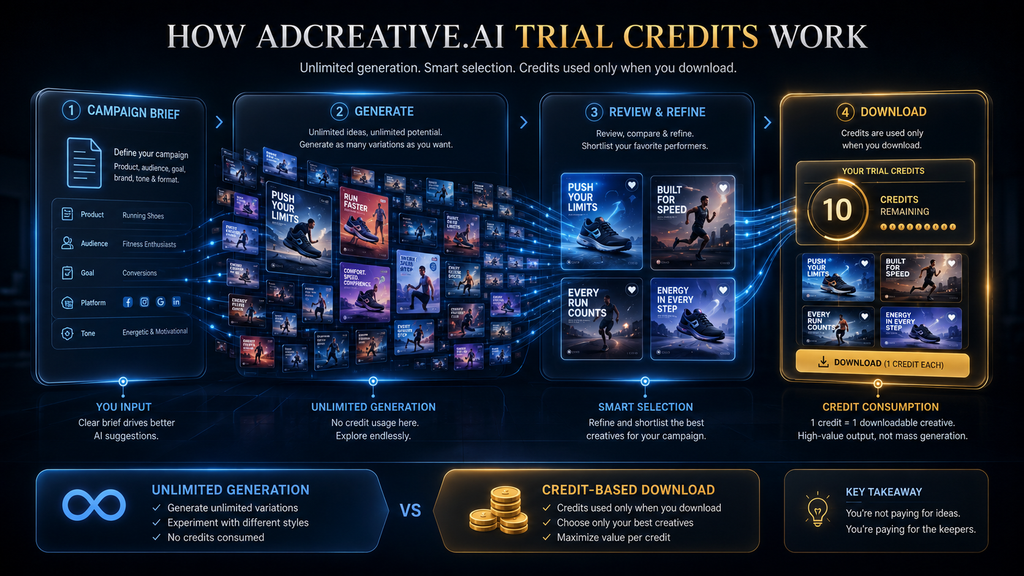
The important distinction is that the trial combines broad experimentation with a limited number of downloadable outputs. AdCreative.ai’s own FAQ explains that users can generate unlimited creatives, while credits are consumed when those generated creatives are downloaded. That means the trial is not designed around “generate 10 times and stop.” You can explore considerably more ideas than the credit count suggests, provided you are selective about what you actually download.
| Trial element | What it means |
|---|---|
| Trial duration | 7 days |
| Trial credits | 10 Creative Credits |
| Generations | Unlimited, according to AdCreative.ai |
| Credit consumption | Credits are used when generated creatives are downloaded |
| Creative formats advertised for the trial | Ads, banners, videos and UGC videos |
| Payment details | Required during sign-up |
| Cancellation | Should be handled before the trial ends if you do not want the subscription to continue |
| Main purpose | Evaluate whether the creative workflow fits your needs |
This distinction is worth remembering throughout the article because it changes the economics of the trial. You are not being given 10 experiments. You are being given a limited number of downloadable outputs within a much broader experimentation environment.
That is a far more useful way to think about the offer.
Want to See What AdCreative.ai Can Actually Do?
The smartest way to evaluate the platform is to use the trial as a real workflow test—not simply generate random ads. Start with the free credits and see whether the creative process fits the way you actually work.
Explore the Free TrialAffiliate disclosure: AI Hustle World may earn a commission if you sign up through this link, at no additional cost to you.
What Do the 10 AdCreative.ai Trial Credits Actually Mean?
The simplest explanation is this: one credit is tied to downloading a generated creative, not simply asking the system to generate another variation.
AdCreative.ai’s current FAQ states that a credit is used when you download a generated ad creative. The same documentation says you can generate unlimited creatives regardless of how many downloads you have used.
That creates an important separation between two stages of the workflow.
The first stage is exploration. You give the system your inputs, generate creative concepts, inspect the results, compare variations, and decide whether they are useful. The second stage is selection. Once you have found something worth taking into your broader marketing workflow, you download it and consume a credit.
That is a much more sensible structure for an AI creative platform than charging you every time you ask the system to think of another idea. Creative work is inherently iterative. A first generation may have the right product placement but the wrong headline. Another may have a stronger composition but poor hierarchy. A third may finally combine the elements you actually want. If every generation immediately consumed a credit, experimentation would become artificially expensive.
The current credit model instead allows the trial to function more like a selection budget.
You can experiment widely, but you should download selectively.
The mistake most trial users make
Imagine you are testing a new product campaign. You generate 20 concepts. Six look promising. Three are genuinely strong. One is clearly the direction you would want to develop further.
A poor trial strategy is to download all 20 because the credits are available.
A better strategy is to inspect all 20, refine the six promising directions, compare the three strongest, and then download only the outputs that teach you something meaningful or are genuinely usable.
The second approach extracts much more information from the same trial.
That is the first major lesson of the AdCreative.ai free trial:
Do not treat the 10 credits as a quota of ideas. Treat them as a quota of outputs worth keeping.
That distinction sounds small, but it can completely change how effectively you evaluate the platform.
Why Unlimited Generation Matters More Than the Number 10
“10 credits” is the number most likely to catch your attention on the trial page. “Unlimited generations” is arguably the more strategically important detail.
AdCreative.ai says users can generate as many creatives as they want and only use a download credit when they choose to download a generated creative.
That means the trial gives you an opportunity that many people fail to exploit: you can use the generation process itself as a learning environment.
Suppose you run an online store selling a skincare product. You might start by generating several creative directions based on the same product. One version could emphasize the product benefit, another could emphasize the visual identity, another could be designed around a promotional message, and another could use a completely different composition.
You do not need to immediately download each version to learn from the differences.
You can ask much more useful questions first.
Which layouts consistently look professional? Which visual hierarchy makes the product easiest to understand? Which copy directions seem too generic? Which designs would require the least manual editing? Which variations actually resemble the type of advertising your business runs?
Those observations are part of the value of the trial even when they do not consume a credit.
This is why a trial should not be judged only by how many finished assets you walk away with. The information you gain about the workflow is itself an output.
What Can You Test During the AdCreative.ai Free Trial?
AdCreative.ai currently promotes the trial as a way to test different creative formats, including ads, banners, videos, and UGC videos. Its current product pages also position the platform around AI-generated advertising creatives, images, videos, text and related creative tools.
That breadth is useful, but it creates a temptation: trying everything.
You should resist that.
The goal of a seven-day trial is not to prove that the platform has many features. It is to determine whether the features that matter to your workflow actually work well enough to justify continuing.
For example, an e-commerce operator may care primarily about static product ads and product photography. A social media manager may care more about creative variety and content volume. An agency may care about multiple brands and repeatable production. Someone running video-heavy advertising may care far more about video workflows than static banners.
The trial should therefore be customized around the bottleneck you are trying to solve.
Test the workflow you would actually pay for
This is one of the most important rules for evaluating any AI SaaS product.
Do not test the feature that looks most impressive in a demo. Test the feature that would save you time or improve your output every week.
If you currently spend four hours creating static ad variations, test that workflow.
If you spend most of your time turning product assets into multiple campaign formats, test that.
If your bottleneck is generating enough creative variations for paid social testing, test that.
If your team already has strong design capabilities but struggles with volume, evaluate whether the platform increases throughput without creating more review work.
The correct question is not: Can AdCreative.ai do this?
The better question is: Would I use this repeatedly if I were paying for it?
That is the standard that turns a free trial into an actual buying decision.
The 10-Credit Trial Test™
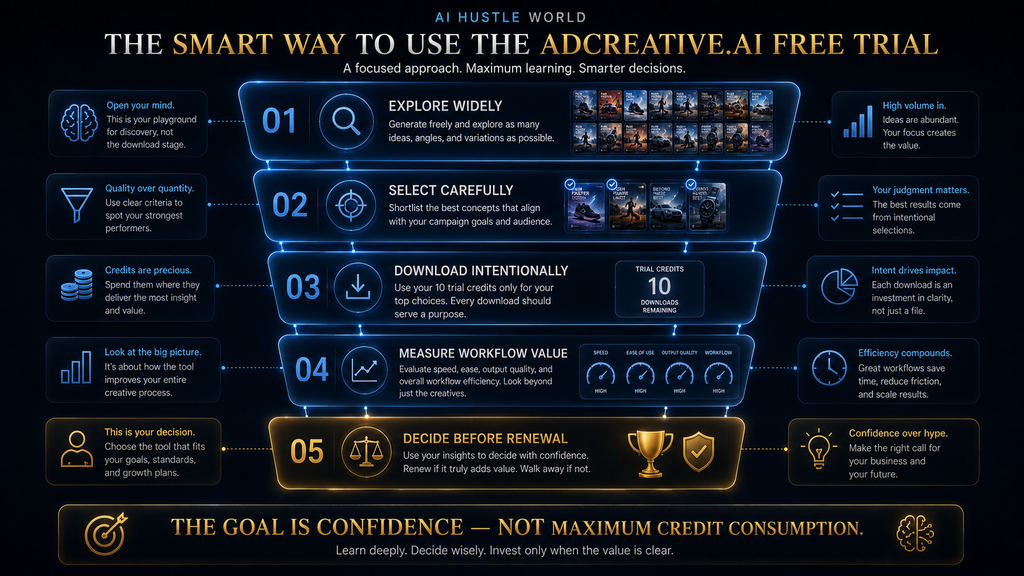
The principle is straightforward: use the unlimited-generation environment to explore, but deliberately reserve your downloadable credits for the experiments that provide the highest decision value.
The exact allocation does not have to be rigid. If your business is video-first, for example, you may want a different balance from a business that only runs static Meta ads. The point is to prevent the most common trial mistake: spending credits randomly before you know what you are trying to learn.
A practical starting allocation is:
| Trial purpose | Suggested credits | What you are trying to learn |
|---|---|---|
| Core static creative test | 3 | Quality, relevance and editability |
| Creative variation test | 3 | Breadth and usefulness of different concepts |
| Advanced workflow test | 2 | Whether a relevant specialized feature fits your operation |
| Final validation | 2 | Whether your strongest outputs are actually worth keeping |
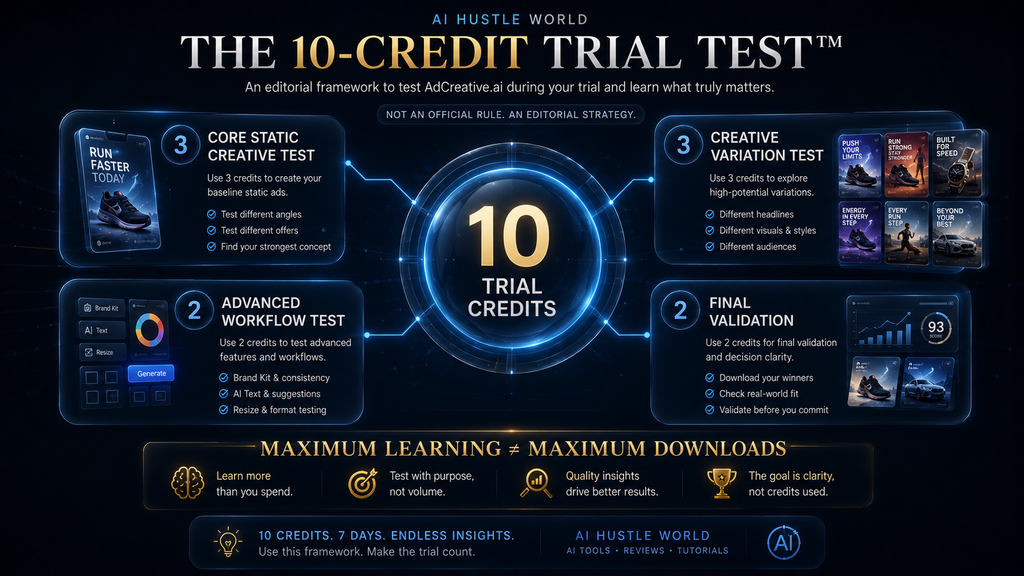
The allocation is AI Hustle World analysis, not a published AdCreative.ai rule. The platform gives you the credits; this framework is simply a disciplined way to use them.
First: explore without trying to “spend” anything
Your first objective should be understanding the system.
Set up your brand information, examine the creative workflow, understand what inputs it expects, and see how different requests influence the output. Generate enough variations to understand the range of results before deciding which ones deserve your limited downloads.
This is where many people get the economics backward. They see a credit counter and immediately start worrying about how quickly it is falling. If generations themselves do not consume the credits, that anxiety can lead to exactly the wrong behavior: downloading too early because you assume every experiment has a cost.
Instead, make the early stage deliberately exploratory.
You are trying to learn how the machine behaves before you start treating its outputs as production assets.
Three credits: test the core creative workflow
Your first serious downloads should answer the most basic question:
Can AdCreative.ai produce advertising creatives that are useful for my business without creating more work than they save?
Choose a real product, service or campaign rather than a random example. Use the kind of creative brief you would normally give a designer or create yourself.
Then look beyond whether the result is visually attractive.
Does the hierarchy make sense? Is the product prominent enough? Is the message understandable without additional explanation? Does the design fit your brand? Would you be comfortable putting it in front of an actual customer? How much manual correction would it require?
That last question is particularly important.
An AI tool can appear extremely productive if you count generated images. But if every “finished” creative requires substantial redesign, the apparent speed advantage can disappear.
The useful metric is therefore not:
Creatives generated per hour.
It is closer to:
Usable creatives produced per hour of total human effort.
That is a much harder standard, but it is also much closer to the real economics of creative production.
Three credits: test creative variation
Once you understand the basic workflow, use another portion of the trial to test variation.
This is where an advertising-specific platform can become more interesting than a conventional design tool. Advertising rarely depends on one beautiful image. You often need multiple creative directions so you can learn which messages, compositions and angles resonate with different audiences.
Your test should therefore avoid producing ten versions that are essentially the same.
Instead, deliberately vary the underlying idea.
Try a benefit-led concept.
Then a product-led concept.
Then a problem-solution concept.
Or, depending on the campaign, test different visual structures, calls to action or audience angles.
The purpose is to determine whether the platform helps you create meaningful creative diversity, not merely cosmetic variation.
If ten generated ads differ only in background color and headline placement, you may have volume without much strategic value.
That distinction matters because creative fatigue is not solved simply by producing more files. You need enough variation in the underlying creative idea to give the campaign room to learn.
Two credits: test the workflow that matters most to you
The next two credits should go toward the most relevant advanced workflow for your business.
That might involve video, UGC-style content, product-focused creative work, or another feature that is directly connected to your production bottleneck. AdCreative.ai’s current marketing pages promote multiple creative formats and advanced capabilities, but you should not assume every feature is equally valuable to every user.
This is where discipline matters.
If you never produce video advertising, there is little reason to spend half your trial learning a video feature simply because it looks impressive.
If you are a fashion brand, however, a product-photography or fashion-focused capability may deserve more attention.
If you manage paid social for multiple clients, the repeatability of the broader creative workflow may matter more than any single generation feature.
The trial should follow your economics, not the vendor’s feature list.
Two credits: final validation
Keep the final two credits in reserve.
This is one of the easiest changes to make and one of the most valuable.
By the end of the trial, you will know more about the platform than you did on Day 1. Your judgment will be better. You will understand which workflows are useful, which outputs require too much editing, and which creative directions are worth keeping.
That is when your remaining credits become most valuable.
Use them on the two strongest outputs that represent the actual quality level you would expect to receive repeatedly.
You are no longer asking:
“Can it make something impressive?”
You are asking:
“If I paid for this every month, would I be happy producing this kind of work through it?”
That is the subscription question.
A Smarter Seven-Day AdCreative.ai Trial Workflow
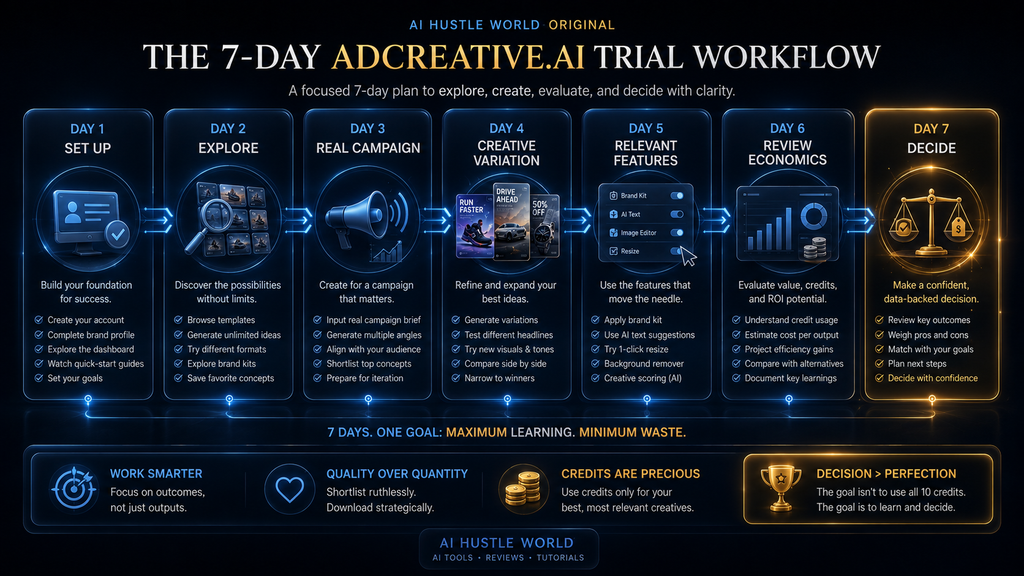
A seven-day trial can feel short if you approach it as a feature tour. It becomes much more manageable when you treat each day as a different stage of an evaluation process.
Day 1: Set up the environment
The first day should be about understanding the system rather than maximizing output.
Create the relevant brand information, examine the interface and understand how the platform organizes its creative workflow. Pay attention to what information you need to provide and whether the setup feels compatible with the way your business actually works.
This is also the point where you should decide what success will mean.
If your current creative process takes six hours per campaign, perhaps your goal is to determine whether the platform can meaningfully reduce production time. If your problem is creative variety, your test should focus on the number and quality of distinct concepts you can produce. If your problem is consistency across campaigns, evaluate how well the system maintains the visual language you need.
Without a defined success criterion, the trial can become a sightseeing tour.
Day 2: Explore the generation system
Generate broadly.
Do not worry about downloading everything. You are learning what the system is capable of producing from your inputs.
Try different creative directions and pay attention to patterns. Some outputs may immediately look useful, while others may reveal limitations in composition, messaging, brand consistency or specificity.
The goal is not to prove the system is perfect.
You are building a mental model of where it performs well and where it needs human intervention.
Day 3: Work with a real campaign
This is where the trial becomes meaningful.
Take a real campaign or realistic campaign brief and reproduce the type of work you would normally need to create manually. Use real brand information and real product or service information wherever appropriate.
Then compare the AI workflow with your existing process.
How long did it take to get from brief to useful creative?
How much manual correction was necessary?
Did the tool make the work easier, or did it simply move the work to another stage?
That last question is often ignored in AI-tool evaluations.
Automation is valuable only when it removes friction rather than relocating it.
Day 4: Test creative breadth
Now deliberately explore variation.
Generate different creative concepts rather than repeatedly asking for nearly identical executions. Examine whether the system can help you explore different advertising angles quickly enough to become useful in real campaign planning.
At this stage, you should also start identifying your strongest outputs.
Do not download everything.
Keep a shortlist.
Day 5: Test the features that matter to your business
By Day 5, you should have a good sense of the basic creative workflow.
Now test one or two capabilities that could materially affect your decision.
For one business, that could be video. For another, product-focused creative generation. For another, creative intelligence or campaign-related analysis.
The principle remains the same: test for relevance, not novelty.
A feature can be technically impressive and still be commercially irrelevant to you.
Day 6: Review the economics
Day 6 is when you should stop thinking like a free-trial user and start thinking like a buyer.
Look at what you actually accomplished.
How many useful concepts did you create?
How many required substantial editing?
How much time did you save?
Which outputs were genuinely good enough to keep?
How many credits did you consume?
What would the workflow look like at your normal monthly volume?
The current AdCreative.ai pricing pages show plans structured around monthly credit allowances, so the trial should ultimately be connected to the volume you expect to need after conversion.
Day 7: Make the decision
The final day should not be another day of random experimentation.
It should be a decision day.
If the platform has demonstrated a repeatable workflow that solves a meaningful bottleneck, continuing may make sense.
If it has produced attractive examples but has not meaningfully improved your process, do not subscribe simply because the trial was free.
And if you decide not to continue, make sure you have handled cancellation before the trial ends rather than assuming the subscription will simply disappear.
What the Free Trial Can Actually Prove
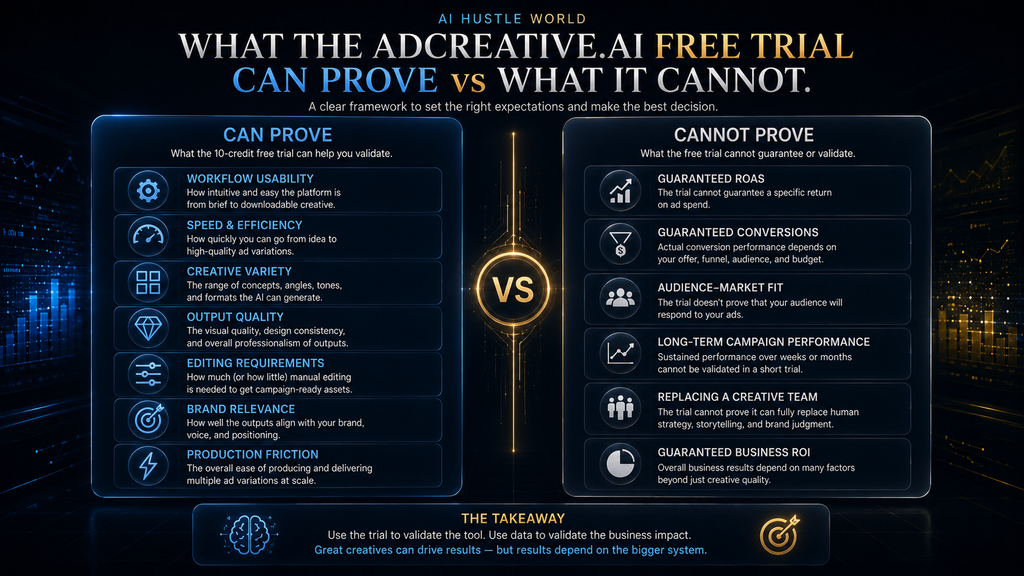
A seven-day trial can tell you a surprising amount about a software product, but only if you ask the right questions.
The trial can tell you whether the interface makes sense to you. It can show whether the creative generation process produces outputs relevant to your niche. It can reveal how much editing the results require and whether the workflow is faster than your current approach. It can also help you understand whether the platform’s creative formats and tools match the kind of advertising work you actually perform.
Those are meaningful answers.
But they are not the same as proving campaign performance.
What it can prove
You can reasonably use the trial to evaluate:
- workflow usability
- generation speed
- creative variety
- initial output quality
- brand relevance
- editing requirements
- production friction
- format availability
- ease of repeated use
- whether the platform fits your existing process
These are operational questions, and seven days is enough to investigate many of them.
What it cannot prove
You should be much more cautious about conclusions such as:
- “This will increase my ROAS.”
- “These creatives will beat my current ads.”
- “The AI understands my audience better than my team.”
- “Creative Scoring guarantees better campaign performance.”
- “This will replace my designer.”
- “The subscription will definitely pay for itself.”
Those are longer-term claims.
Actual advertising performance depends on much more than the creative asset itself. Audience selection, offer quality, landing-page experience, media buying, pricing, market conditions and campaign structure can all influence the outcome.
A free trial can tell you whether the creative-production system is promising.
It cannot magically isolate the effect of the software on your business’s entire advertising funnel.
That distinction is essential if you want a trustworthy review rather than another AI-tool sales pitch.
The Difference Between a Good-Looking Creative and a Useful Creative
This is where many AI creative evaluations go wrong.
A generated image can look polished and still be a poor advertisement.
Advertising has a job to do.
The viewer needs to understand what is being offered, why it matters, and what action they should consider taking. A visually impressive composition that obscures the product or communicates the wrong message is not a successful creative simply because it looks sophisticated.
During the trial, evaluate outputs against four questions.
First: Is the message clear? If someone sees the creative for a few seconds, can they understand what is being promoted?
Second: Is the product or offer obvious? If the main subject gets lost inside the design, the creative may need substantial work.
Third: Is the hierarchy useful? Headlines, product imagery, supporting information and calls to action should work together rather than compete.
Fourth: Is it commercially usable? A creative that requires extensive rewriting, redesigning and repositioning may not provide the time savings you expected.
This is why “AI generated 100 creatives” is not a useful productivity metric on its own.
The more important question is:
How many commercially usable creatives did it help you produce with less total effort?
Use the Trial as a Real Creative Workflow Test
You do not need to download everything you generate. Explore broadly, identify the strongest directions, and use your credits on outputs that genuinely help you decide whether AdCreative.ai deserves a place in your workflow.
Test AdCreative.ai With the Free CreditsAffiliate disclosure: AI Hustle World may earn a commission if you sign up through this link, at no additional cost to you.
What Happens If You Download Everything?
You may technically have the ability to generate unlimited creatives, but your credits are still finite.
That creates a subtle behavioral trap.
The easier it becomes to generate content, the easier it becomes to save content you do not actually need.
Your downloads can become a graveyard of “maybe useful later” assets.
This is one reason I would not recommend trying to maximize the number of downloaded creatives during the trial.
If you download ten mediocre assets, you have consumed the available trial budget without necessarily learning much.
If you generate dozens of concepts, carefully compare them, and download only the strongest examples, you may leave the trial with fewer files but much more confidence about whether the platform belongs in your workflow.
That is a better outcome.
The goal of a trial is not maximum consumption.
It is maximum information per unit of consumption.
What Happens When the Seven-Day Trial Ends?
The most important practical point is that the trial has a deadline.
AdCreative.ai’s official help documentation says a credit card is required during sign-up and explains that the payment details support uninterrupted access to the service. The sign-up documentation also tells users to start the free trial after entering payment information.
That means you should treat the trial like a subscription decision with a seven-day evaluation window, not like an indefinitely available free account.
If you decide the platform is not right for you, cancel before the trial ends.
If you decide it is right for you, understand which plan you are moving into and whether its credit allowance matches your expected workload.
The important point is that the decision should happen before the renewal event, not after it.
This is also why the trial should not be started casually just because you are curious.
If you are not prepared to spend an hour or two actually evaluating the workflow, there is little value in starting the clock.
What If You Forget to Cancel?
This is one of the most common questions around free trials with payment information, and the answer needs to be precise.
AdCreative.ai’s documentation makes clear that payment details are collected at sign-up and that the trial is connected to continued paid access if you do not cancel.
The right response is not panic.
It is planning.
If you know you do not want to continue, cancel during the trial.
If you are unsure, put a reminder on your calendar for well before the seven-day deadline. That gives you time to review your results, check the plan you would move to, and make a deliberate decision rather than relying on memory.
AdCreative.ai also publishes a refund policy with eligibility conditions. Its current documentation says refunds may be available within seven days for monthly plans and 30 days for yearly plans when the platform has not been used, while the policy also says credits expire at the end of the billing cycle and do not roll over.
That does not mean you should treat the refund policy as a substitute for cancellation.
The safer approach is simple:
Know when the trial ends. Decide before it ends. Cancel if you do not want the subscription.
Is the AdCreative.ai Free Trial Actually Worth Using?
For someone who actively produces digital advertising creatives, yes, the trial can be worth using, particularly because the unlimited-generation model gives you room to explore the platform before deciding which outputs are worth downloading.
But that answer has an important condition.
The trial is most valuable if you have a real advertising workflow to test.
If you are a marketer currently producing ads every week, the trial can answer practical questions about speed, quality, variety and workflow fit.
If you are an agency, the trial can help you determine whether the system could become part of a repeatable creative-production process.
If you are an e-commerce operator, you can test the system against actual products and campaign concepts.
If you are simply curious about AI advertising and do not currently have campaigns or creative work to evaluate, the trial may be less informative. You could spend seven days generating attractive examples without ever discovering whether the tool creates meaningful business value for you.
That is the difference between testing software and testing a workflow.
Who Should Use the AdCreative.ai Free Trial?
The trial makes the most sense for people who already have a creative-production problem.
Paid social advertisers
If you regularly need new ad variations, the trial gives you a practical environment for testing whether AI-assisted generation can increase your creative throughput.
The important thing is to evaluate variation quality rather than raw generation volume.
E-commerce businesses
If you frequently need product-based advertising creatives, the trial can help you determine whether the platform reduces the time between product information and usable advertising assets.
Use your actual products wherever possible. Generic examples tell you much less than a realistic campaign test.
Small marketing teams
A small team may find value if creative production is constantly competing with other marketing priorities. The relevant question is whether the platform reduces bottlenecks without creating a new review burden.
Agencies
Agencies should evaluate repeatability.
A single impressive creative proves very little. What matters is whether the process can be repeated across clients, campaigns and formats without requiring excessive manual correction.
Who Should Probably Skip the Trial?
The trial is not automatically useful for everyone.
If your business already has a highly efficient creative team and your current production system is not a bottleneck, you may not gain much from adding another tool.
Likewise, if you are looking for a general-purpose design platform rather than advertising-focused creative production, another category of software may fit your workflow better. That is why the broader AdCreative.ai alternatives question deserves separate treatment rather than being squeezed into this article.
You should also be cautious if you are starting the trial solely because “10 free credits” sounds like free content.
That mindset encourages the wrong behavior.
You are not evaluating a free asset generator.
You are evaluating a paid software workflow.
Common AdCreative.ai Free Trial Mistakes
The first mistake is confusing generations with credits. Because the platform allows unlimited generations, there is no reason to behave as though every experimental generation immediately consumes one of your ten credits.
The second mistake is downloading everything. A download should have a reason. It should either be a genuinely useful asset or part of a deliberate experiment that helps you decide whether the platform is worth paying for.
The third mistake is testing random features instead of your actual bottleneck. A platform can have dozens of impressive capabilities, but if the feature that matters to your business is weak, the rest may not matter much.
The fourth mistake is judging the platform only by visual quality. A polished creative is not automatically a useful creative. Evaluate message clarity, brand fit, editability and commercial usability.
The fifth mistake is waiting until the final day to evaluate the subscription. By then, you may have plenty of generated material but very little time to think about the economics or cancellation deadline.
The sixth mistake is assuming the trial proves advertising performance. It does not. A short product trial can evaluate the production workflow; actual campaign performance requires real-world testing over time.
The seventh mistake is treating a refund policy as permission to ignore the renewal date. A published refund policy can have conditions. It is better to make the correct cancellation decision before the charge than to assume a refund will automatically solve the problem afterward.
How to Measure Whether the Trial Was Successful
You should leave the trial with more than a folder full of generated images.
You should leave with evidence.
A simple measurement framework is:
Time saved + usable output + workflow fit + creative variety − editing friction = trial value.
You do not need a perfect mathematical ROI calculation for a seven-day trial. You need enough information to make a rational decision.
Start with your normal production process. How long does it take you to go from a creative brief to an asset that is ready for review?
Then measure the same workflow through AdCreative.ai.
Next, examine how much human editing was required.
A tool that generates a first draft in seconds but requires 40 minutes of correction may still be useful, but its value is very different from a tool that produces a near-final asset with minimal intervention.
You should also record how many downloaded outputs were genuinely worth keeping.
That gives you a more realistic measure than simply counting generations.
A practical trial scorecard
| Metric | Question |
|---|---|
| Speed | Did the platform reduce production time? |
| Quality | Were the strongest outputs commercially usable? |
| Variety | Could you produce genuinely different creative directions? |
| Editing | How much human correction was necessary? |
| Brand fit | Did the outputs align with your visual identity? |
| Workflow fit | Could you see yourself using this repeatedly? |
| Economics | Does the likely subscription cost make sense for your volume? |
| Decision confidence | Do you now know whether you want to continue? |
The final metric is underrated.
Decision confidence is itself a successful trial outcome.
You do not have to subscribe for the trial to have been valuable.
If seven days of structured testing tells you that AdCreative.ai is not the right platform for your operation, that is useful information. You have potentially avoided paying for a tool that would not solve your problem.
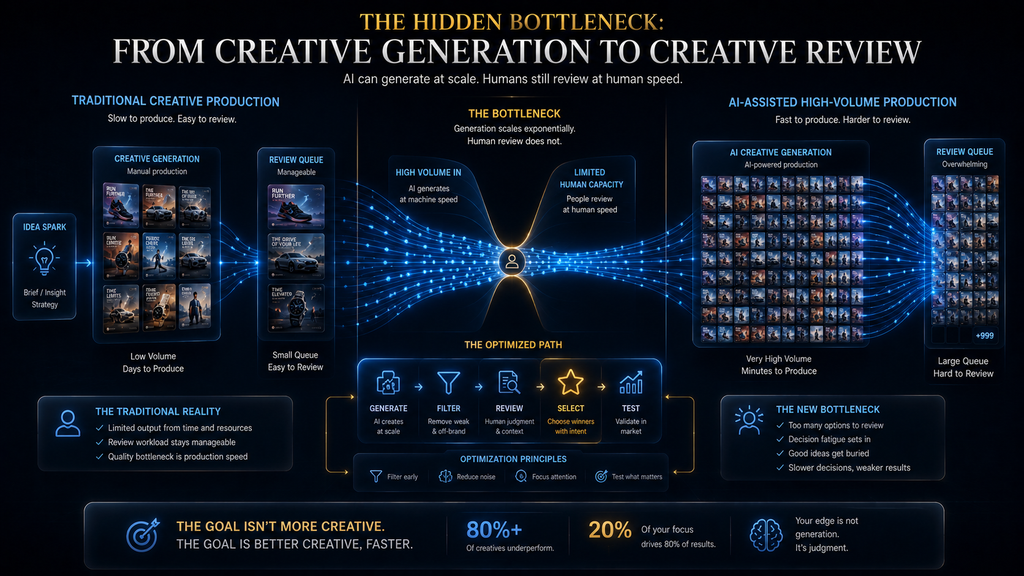
The Hidden Cost: Review Time
There is another issue that becomes more important as AI generation gets faster.
More creative production can create more creative review.
This is the second-order effect many AI-tool evaluations ignore.
Imagine your old process produced five reasonable concepts in a day. Your new AI-assisted process produces fifty.
That sounds like a tenfold improvement.
But if your team now has to inspect fifty assets, compare them, reject weak outputs, rewrite copy, check brand consistency and decide which versions deserve testing, the productivity gain may be much smaller than the generation number suggests.
This is why AI Hustle World’s preferred metric should be usable output, not raw output.
The value of automation is not that it creates more things.
The value is that it moves the organization toward better decisions and useful outputs with less unnecessary work.
AdCreative.ai’s unlimited-generation model makes this particularly relevant. Because experimentation is inexpensive in credit terms, your operational bottleneck can move from creation to selection.
That is not necessarily a problem.
But it is something you should recognize.
Why Human Judgment Still Matters
AI-generated advertising does not remove the need for creative judgment.
It changes where that judgment is applied.
Instead of spending all your time producing the first version, you may spend more time selecting the strongest directions, correcting weak messaging, checking brand alignment and deciding which concepts deserve actual campaign testing.
That can be a good trade.
But it means the value of the tool depends partly on the quality of the person using it.
A marketer who can recognize strong creative concepts may extract much more value from a high-volume generation system than someone who simply downloads the first attractive result.
The platform can increase the size of the creative search space.
Human judgment still decides which part of that search space is worth pursuing.
That is why the best use of the trial is not “let AI make my ads.”
It is:
Use AI to explore more creative territory, then apply human judgment to decide what deserves production and testing.
What Happens to Unused Credits?
AdCreative.ai’s current official refund-policy documentation says credits expire at the end of the billing cycle and do not roll over.
For a trial user, the practical lesson is not to obsess over using every last credit.
Unused capacity is not necessarily wasted.
If you have already reached a confident decision about the product, downloading another mediocre asset just to make the number reach zero does not improve the quality of your evaluation.
The better question is whether the remaining credit could answer an unresolved question.
If you still do not know whether the platform’s video workflow is useful, one final test may be valuable.
If you already know that video is irrelevant to your business, using a credit simply because you have it is pointless.
The correct objective remains the same:
maximize learning, not consumption.
Should You Use All 10 Trial Credits?
Not necessarily.
That may sound strange for an article about what ten credits get you, but it is one of the most important conclusions from the credit model.
If you have generated enough examples to determine that the platform is not suitable for your workflow, stop.
If you have already found enough useful outputs to evaluate quality and workflow fit, stop.
If you have remaining credits but no unanswered question, there is no strategic reason to manufacture one.
The ten-credit limit should therefore be treated as an upper boundary, not a target.
That is the opposite of how many free trials are mentally framed.
And it is a better way to think about software evaluation.
AdCreative.ai Free Trial vs Paying for a Month
The free trial answers one question:
Does this workflow appear useful enough to investigate further?
A paid subscription answers a different question:
Does this workflow create enough recurring value to justify its ongoing cost?
Do not confuse the two.
A seven-day trial can demonstrate that you enjoy using the product and that it can create attractive assets. That is useful, but it does not automatically establish that the monthly subscription is economically justified.
Your next decision should be based on expected recurring volume.
If you only need a handful of creative assets every few months, a subscription may be difficult to justify.
If you continuously produce paid-social creative and the platform meaningfully reduces production time, the economics can look very different.
This is where the credit allowance matters. AdCreative.ai’s current plan pages structure subscriptions around monthly credits, with the entry-level plan currently shown at 10 credits per month and higher plans providing more credits.
So your trial should help you answer a simple question:
At my normal creative volume, how much recurring value would I actually get from those monthly credits and the surrounding workflow?
That is the question that matters after the free period.
The Real Question Is Not “Is the Trial Free?”
The trial is free in the sense that AdCreative.ai currently advertises a seven-day free evaluation period. But the more useful question is whether the trial gives you enough information to make a confident purchasing decision.
And the answer can be yes.
The combination of unlimited generation and limited downloadable credits gives you room to explore the platform without treating every experiment as a paid output. The seven-day window is long enough to run a focused workflow test if you start with a real business problem rather than wandering through the feature list.
The payment requirement is the part you need to take seriously. Because the trial is connected to paid continuation, the decision about whether to keep the subscription should be made before the trial expires, not after a charge appears. AdCreative.ai’s own sign-up documentation confirms that payment details are collected as part of starting the trial.
So yes, the trial can be valuable.
But its value comes from how deliberately you use it.
AdCreative.ai Free Trial: Final Verdict
The AdCreative.ai free trial is more useful than the headline “10 free credits” suggests.
The reason is simple: the ten credits are not ten generations. AdCreative.ai says you can generate unlimited creatives and that credits are consumed when you download generated creatives.
That makes the trial fundamentally different from a simple “try ten AI images” offer.
You can explore the platform broadly, compare creative directions, refine promising concepts and learn how the workflow behaves before deciding which outputs are actually worth downloading. That gives you a meaningful opportunity to evaluate the platform’s production value rather than simply its ability to generate attractive examples.
But the trial is only useful if you approach it like a buyer.
Use real campaign requirements. Test the workflow that solves your actual bottleneck. Measure how much human editing remains. Pay attention to creative variety rather than raw generation volume. Reserve some credits for final validation instead of spending everything immediately. And, above all, make your subscription decision before the seven-day window closes.
There is also a useful contrarian lesson here.
The best outcome from a free trial is not necessarily using all the free credits. It is reaching a confident decision with as little wasted effort as possible.
If AdCreative.ai proves that it can repeatedly produce useful advertising creative faster than your current process, the trial has done its job. If it produces attractive examples but does not reduce your real workload, you have learned something equally valuable.
The goal is not to leave the trial with ten downloaded files.
The goal is to leave it knowing whether you would willingly pay for the workflow when the free period is over.
Ready to Decide for Yourself?
If your goal is to evaluate AdCreative.ai against a real advertising workflow, the free trial gives you a practical way to test the platform before committing to a paid plan. Use the credits deliberately, measure the time saved, and make the subscription decision from evidence.
Start the AdCreative.ai TrialAffiliate disclosure: AI Hustle World may earn a commission if you sign up through this link, at no additional cost to you.
Frequently Asked Questions
Is AdCreative.ai free to try?
Yes. AdCreative.ai currently advertises a 7-day free trial. The platform also says the trial includes 10 creative credits.
The important detail is that payment information is required when signing up, so the trial should be treated as a time-limited evaluation connected to a potential paid subscription rather than an indefinite free account.
How many credits do you get with the AdCreative.ai free trial?
The current trial offer provides 10 Creative Credits. AdCreative.ai says the credits can be used for testing different creative formats during the trial.
However, ten credits should not be interpreted as ten total generations. The platform’s current FAQ says generations are unlimited and that a credit is used when you download a generated creative.
Do AdCreative.ai credits limit how many ads you can generate?
No, not according to AdCreative.ai’s current credit explanation. The platform says users can generate unlimited creatives and that credits are consumed when generated creatives are downloaded.
This means the practical limit is on downloadable output rather than experimentation.
Does AdCreative.ai require a credit card for the free trial?
Yes. AdCreative.ai’s official sign-up documentation says payment details are required when starting the free trial. The company explains that this is used to provide uninterrupted access to premium features and verify genuine users.
Because payment details are collected, you should remember the trial’s end date and cancel before renewal if you decide not to continue.
What happens when the AdCreative.ai free trial ends?
The trial is designed to transition into paid access if you continue rather than canceling. Because the account requires payment information at sign-up, users who do not want a paid subscription should handle cancellation before the trial period expires.
The exact paid plan and current pricing should be checked at the time you start or continue the subscription because commercial terms can change.
Can I generate unlimited ads during the AdCreative.ai trial?
AdCreative.ai currently says its platform supports unlimited generations and that downloads consume credits.
That does not mean you should download everything you generate. The smarter approach is to generate broadly, evaluate the results, and use credits selectively for outputs that are useful or strategically informative.
Do unused AdCreative.ai credits roll over?
AdCreative.ai’s current refund-policy documentation says credits expire at the end of the billing cycle and do not roll over.
That makes it especially important to evaluate your actual credit needs rather than assuming unused credits will accumulate indefinitely.
Is the AdCreative.ai free trial enough to determine whether the tool will improve ROAS?
No. A seven-day trial can help you evaluate workflow, creative quality, production speed, variety and editing requirements, but it cannot reliably establish long-term advertising performance.
Actual campaign results depend on many variables beyond creative generation, including audience, offer, media buying, landing page, budget and market conditions. Treat the trial as a workflow evaluation, not a guarantee of future campaign performance.
Is AdCreative.ai worth trying?
For advertisers, e-commerce operators, agencies and marketing teams that regularly need new advertising creatives, the trial can be worthwhile because it gives you an opportunity to evaluate the production workflow before committing to a paid plan.
The strongest reason to try it is not simply the free credits. It is the opportunity to determine whether the platform can reduce a real creative-production bottleneck.
If you do not have an actual advertising workflow to test, however, the trial may tell you much less.
Final Thoughts
A free trial is easy to waste because there is no obvious cost attached to experimentation. AdCreative.ai’s model gives you an unusual advantage: the platform says generations are unlimited while downloads consume credits, which means you can explore a wide range of creative possibilities before deciding which outputs are worth keeping.
Use that advantage.
Do not chase the number ten. Build a real test, use your actual creative requirements, compare the output against your existing process, and reserve enough of your trial for final validation. If the platform makes your creative operation faster and more capable, you will have evidence for continuing. If it does not, you will have evidence for walking away.
The best way to use the AdCreative.ai free trial is not to spend all 10 credits. It is to use the seven days to make a confident decision about whether the workflow deserves your money.
Written by
Muntasir Ahmad Chowdhury
Founder, AI Hustle World
Muntasir Ahmad Chowdhury is the Founder of AI Hustle World, an independent publication dedicated to making Artificial Intelligence practical, trustworthy, and easy to understand. He researches AI tools, automation, customer service, productivity, and real-world business applications, helping readers make smarter technology decisions through research-driven, experience-backed content.
Expertise:
AI Tools • AI Automation • AI Customer Service • AI Productivity • Generative AI • AI Workflows
Get Smarter With AI
Enjoyed this guide? Get practical AI tools, tutorials, and honest reviews delivered to your inbox.
2 thoughts on “AdCreative.ai Free Trial: What the 10 Credits Get You”