Last updated: August 2026
10 Best AI Image Generators in 2026: Free & Paid Tools Compared
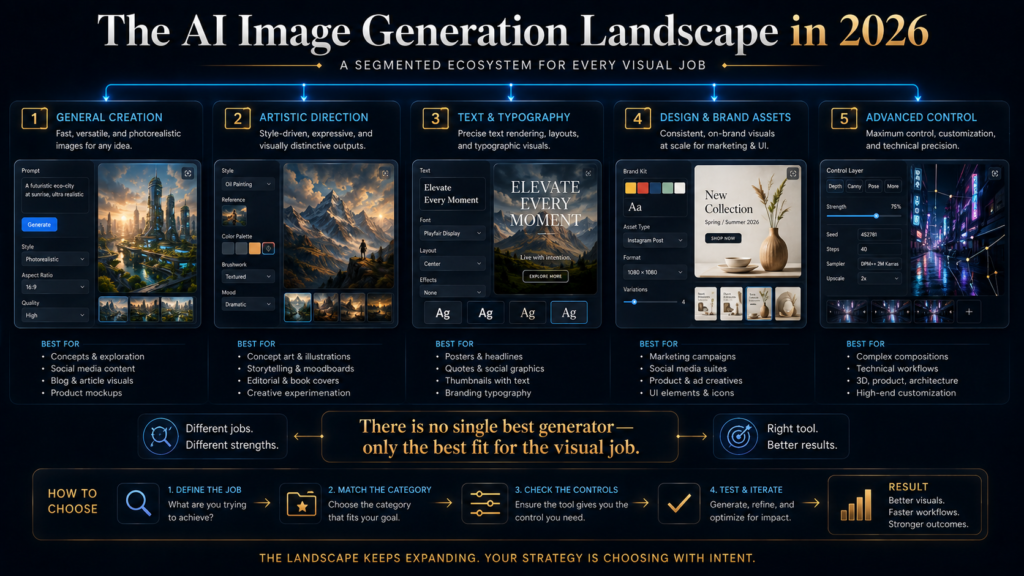
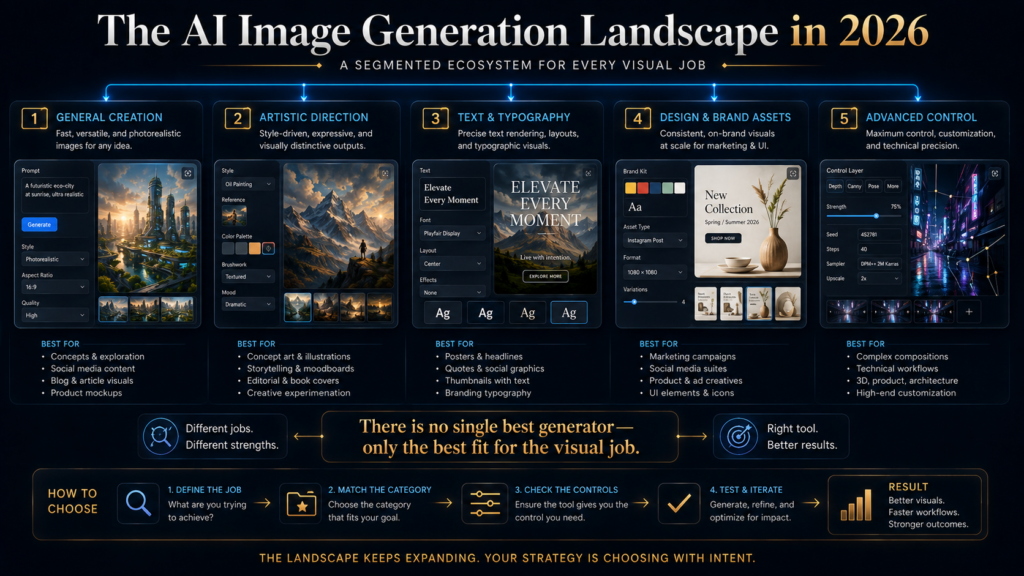
The AI image market has reached the point where “best image generator” is no longer a useful question by itself.
There are now tools optimized for different jobs: cinematic art, photorealistic images, typography, image editing, brand assets, vector graphics, production workflows, and advanced local control.
That creates a practical problem.
A tool can produce beautiful images and still be the wrong choice for your actual work.
A marketer creating a text-heavy poster needs different capabilities from a game designer building character concepts. A blogger creating editorial illustrations needs a different workflow from a brand team producing hundreds of campaign assets. A photographer may care more about editing and reference consistency than pure text-to-image quality.
The right question is therefore not:
“Which AI image generator makes the prettiest picture?”
It is:
“Which generator is strongest for the visual problem I am actually trying to solve?”
That distinction drives this guide.
We compare 10 major AI image tools across image quality, instruction following, text rendering, editing, consistency, workflow depth, free access, and the practical reason you might—or might not—pay for them.
One important freshness note matters before we begin: Google’s AI documentation now recommends its newer Gemini image models as the current generation, and its documentation says the older Imagen 4 family was scheduled to be shut down on August 17, 2026. That means older “best AI image generator” lists that still treat Imagen 4 as a current standalone recommendation are already outdated.
AI Hustle World takeaway: The best image generator is rarely the one with the highest benchmark score. It is the one whose strengths match your visual objective, workflow, and level of control.
Quick Answer: The Best AI Image Generators by Use Case
| Tool | Best for | Free access | Strongest reason to choose it | Main limitation |
|---|---|---|---|---|
| ChatGPT Images 2.0 | General creation + editing | Yes | Flexible conversational workflow | Not the deepest specialist control |
| Midjourney | Artistic / cinematic visuals | No permanent free plan | Strong creative aesthetics | Subscription required for normal use |
| Gemini / Nano Banana 2 | Conversational editing + references | Availability depends on Google access | Strong multimodal workflow and current image stack | Google ecosystem fit matters |
| Ideogram 4.0 | Text, typography and brand graphics | Yes, with limits | Strong text-oriented design workflow | Free capacity is limited |
| Adobe Firefly | Commercial creative workflows | Yes, limited | Deep Adobe ecosystem integration | Best value grows with Adobe workflow |
| Leonardo AI | Game art, concepts and production visuals | Yes | Broad creative production toolkit | Token/plan complexity |
| Recraft | Vectors, brand assets and design systems | Limited/free entry | Design-oriented workflow and vector focus | More useful for designers than casual users |
| Stable Diffusion 3.5 | Advanced control / self-hosting | Model access varies | Customization and deployment flexibility | More technical |
| Microsoft Designer | Beginner-friendly social and graphic creation | Yes | Easy entry and design workflow | Less advanced control |
| FLUX-family workflows | High-control image generation | Depends on host/product | Strong control-oriented ecosystem | Experience varies by implementation |
These are use-case recommendations, not a universal ranking.
That distinction matters because the tools increasingly occupy different parts of the image-production stack.
What Actually Makes an AI Image Generator “Good”?
A high-quality image is only one part of the equation.
For practical use, seven factors matter more.
1. Prompt adherence
Does the tool actually follow the instructions?
For example:
“Three people, one laptop, dark navy background, electric-blue lighting, headline at the top, empty space on the right.”
A generator that produces a beautiful image but ignores half of that brief is less useful than one that follows the structure accurately.
2. Text rendering
This matters enormously for:
- posters
- infographics
- advertisements
- thumbnails
- social graphics
- presentations
- product labels
A generator that produces beautiful art but mangles every word may be the wrong choice for a design-heavy task.
Google’s current Nano Banana 2 documentation specifically highlights improved text rendering, while Ideogram positions its 4.0 model around typography and production design.
3. Editing ability
Generation is only the first step.
Real creative work often looks more like:
Generate → notice problem → change problem → regenerate → preserve good parts → refine
That makes editing, inpainting, background changes and iterative conversation increasingly important.
OpenAI’s current ChatGPT Images supports both generation and editing, including editing uploaded images and asking for specific changes.
4. Consistency
If you are making:
- a character series
- product variants
- multiple campaign assets
- recurring editorial illustrations
you need more than one good image.
A tool that produces one beautiful image but cannot keep the character, product or visual style consistent may be frustrating in a production workflow.
Google’s current Nano Banana 2 documentation specifically highlights multiple-reference processing and consistency.
5. Control
Beginners often want:
“Make me something beautiful.”
Professionals increasingly need:
“Make this exact thing, then let me change these five elements without breaking the rest.”
That is a very different capability.
Control can come from:
- reference images
- masks
- layers
- structure guidance
- style references
- custom models
- open-weight models
- image editing
- APIs
6. Workflow fit
A tool may be excellent in isolation but inconvenient inside your actual process.
For example:
Writer → ChatGPT → Canva → WordPress
may be a better workflow for a content publisher than:
Writer → standalone image generator → Photoshop → Canva → export
even if the second generator produces slightly better raw images.
The winning tool is often the one that reduces total workflow friction.
7. Economics
The final factor is the one most listicles ignore.
What does the image cost you?
Also in:
- time
- iterations
- editing
- failed generations
- learning curve
- exports
- commercial licensing
- team coordination
A $30/month tool that solves your entire workflow can be cheaper than a $10/month tool that forces two hours of manual cleanup per project.
The AI Image Generation Decision Stack
This is the original AI Hustle World framework I recommend using throughout the article.
Step 1 — Define the visual objective
Photo → Illustration → Poster → Product → Infographic → Character → Brand asset → Concept art
Step 2 — Define the control requirement
How precise do you need to be?
Prompt only → Editing → Reference images → Consistency → Custom control
Step 3 — Check the text requirement
Does the image need accurate typography?
If yes, text rendering becomes a major selection criterion.
Step 4 — Check the production requirement
Are you making:
One image? → Ten images? → 500 campaign assets?
Your required workflow changes dramatically at scale.
Step 5 — Check commercial requirements
Are you creating:
Personal art → Blog graphics → Client work → Commercial brand assets → Enterprise production?
That can change which tool and plan make sense.
This decision stack is much more useful than simply asking which model has the highest visual-quality benchmark.
1. ChatGPT Images 2.0 — Best General-Purpose Image Workflow
Best for: People who want a flexible image generator and editor inside a conversational AI workflow.
ChatGPT Images 2.0 is currently available across all ChatGPT tiers. OpenAI says users can create images, edit existing images, add details, add text, and make backgrounds transparent. Paid tiers also have access to “images with thinking,” which allows more planning/refinement before generation.
Why it stands out
The biggest advantage is not simply image quality.
It is workflow continuity.
You can start with:
“Create a 16:9 editorial graphic explaining the difference between AI assistance and AI automation.”
Then continue:
“Make the typography larger.”
Then:
“Move the central diagram to the left.”
Then:
“Remove the extra icon.”
Then:
“Give me more negative space on the right.”
That conversational loop matters.
The user is not required to return to a completely new prompt every time.
Strong use cases
ChatGPT Images is particularly useful for:
- editorial graphics
- blog visuals
- diagrams
- social graphics
- concept art
- visual explainers
- image editing
- image variations
- text-heavy compositions
OpenAI specifically highlights improved instruction following, text generation and editing in ChatGPT Images 2.0.
Why it may be the best first choice
For a creator who does not need specialized artistic controls, the combination of:
generation + editing + conversation + general AI assistance
can be extremely efficient.
You are not learning a separate creative environment just to make one image.
The limitation
It is still a general-purpose workflow.
A specialist tool may offer deeper control in areas such as:
- art direction
- custom production
- vector design
- open-weight deployment
- highly specialized creative workflows
Free vs paid
ChatGPT Images 2.0 is currently available on all ChatGPT tiers, although usage and advanced image capabilities vary by plan.
That makes it one of the easiest tools to test before committing to another subscription.
AI Hustle World verdict: Best overall starting point for creators who value flexibility and iterative editing over specialist control.
2. Midjourney — Best for Artistic and Cinematic Visuals
Best for: Artists, creators, concept designers and users who care strongly about visual style.
Midjourney remains one of the most recognizable names in AI image generation because its core strength is not merely producing “correct” images.
It is producing images with a strong visual point of view.
Where Midjourney shines
It is particularly attractive for:
- cinematic concepts
- editorial art
- fantasy
- fashion
- concept design
- stylized photography
- visual moodboards
- creative exploration
This makes it especially valuable when the desired output begins with a visual direction, not a rigid business diagram.
Why the workflow differs
A general image generator may optimize:
“Did I follow the prompt?”
Midjourney often appeals to users who care just as much about:
“Does this image have a compelling visual identity?”
That is why it remains important even as general-purpose image models improve.
Current pricing
Midjourney’s current plans are:
- Basic — $10/month
- Standard — $30/month
- Pro — $60/month
- Mega — $120/month
Annual billing gives a 20% discount. Standard, Pro and Mega provide unlimited image generations in Relax Mode; Stealth Mode is available on Pro and Mega. Midjourney also says there is currently no Discord free trial, although limited trial access exists through the niji·journey mobile app.
Important commercial point
Midjourney states that subscribers own the images and videos they create, subject to its terms; larger companies above its stated revenue threshold must use Pro or Mega.
That makes plan selection relevant for commercial users.
The limitation
Midjourney is not the obvious first choice for someone who mainly needs:
- business infographics
- simple blog illustrations
- precise document graphics
- spreadsheet visuals
- straightforward product edits
It shines more when visual quality and aesthetic direction are central.
AI Hustle World verdict: Best choice when artistic direction matters more than workflow simplicity.
3. Gemini / Nano Banana 2 — Best for Conversational Editing and Reference-Heavy Work
Best for: Users who want image generation tightly connected to conversation, references and Google ecosystem capabilities.
Google’s current image-generation stack has moved to the newer Gemini image models.
Google currently describes Gemini 3.1 Flash Image / Nano Banana 2 as its general-purpose workhorse, emphasizing fast generation, 4K support, world knowledge, text rendering, multiple-reference processing and consistency. It describes Nano Banana Pro / Gemini 3 Pro Image as the premium option for complex visual tasks, advanced localization, brand consistency and precision creative control.
Why this is important
Google’s current positioning shows how image generation is moving beyond simple text-to-image.
The model can reason about images and continue editing them conversationally.
That changes the workflow from:
Prompt → image
to:
Reference → generation → critique → modification → consistency
This is more useful for real projects.
Strong use cases
- reference-based image work
- conversational editing
- product concepts
- visual variations
- realistic scenes
- multimodal work
- projects requiring current web grounding through supported workflows
Google says Nano Banana Pro can use Google Search for real-world grounding and supports up to 4K generation.
Important watermark consideration
Google’s current documentation says generated images include a SynthID watermark.
That does not automatically make the tool unsuitable for commercial use, but it is relevant for teams that care about provenance or output presentation.
The limitation
The main strategic question is ecosystem fit.
If your broader workflow already lives in Google, the value can be higher.
If not, the advantage may be less pronounced.
AI Hustle World verdict: One of the strongest choices for conversational, reference-heavy and increasingly production-oriented image workflows.
4. Ideogram 4.0 — Best for Text-Heavy Images
Best for: Posters, advertisements, typography, logos, visual headlines and design work where words inside the image matter.
Ideogram occupies a very specific place in the market.
It is not merely trying to make prettier images.
It is particularly valuable when the image itself contains language.
Ideogram 4.0 launched in June 2026 with open weights and a commercial license, and the company emphasizes design-system and production-design use cases. Its API currently prices 4.0 at $0.03/image for Turbo, $0.06 for Default and $0.10 for Quality.
Why text rendering matters
Imagine creating:
“BLACK FRIDAY — 40% OFF”
inside the image.
A visually beautiful composition with malformed letters is not useful.
For:
- posters
- thumbnails
- quote graphics
- advertisements
- social campaigns
- packaging concepts
- text-heavy editorial designs
text accuracy can be more important than pure photorealism.
Current subscription options
Ideogram’s current personal plans include:
- Free access with limited slow credits
- Plus — $15/month billed annually
- Pro — $42/month billed annually
- Team — $20/user/month billed annually
Paid plans add priority credits, private generation, character consistency and larger generation queues.
A major strategic distinction
Ideogram 4.0 also offers open-weight and commercial licensing options, including self-hosted commercial licensing.
That makes it more interesting to organizations than a simple consumer image app.
The limitation
If your work contains almost no text and is purely artistic, other tools may provide stronger aesthetic workflows.
AI Hustle World verdict: The specialist to consider first when typography and image-embedded text are important.
5. Adobe Firefly — Best for Adobe-Centered Creative Workflows
Best for: Designers, marketers and businesses already using Adobe.
Firefly’s main advantage is not that Adobe has “the one best model.”
The advantage is ecosystem integration.
Adobe’s current Firefly plans support image, video and audio generation, and Firefly can also expose leading models from Adobe and other providers. Adobe currently offers free daily generations, while paid plans expand access and credits; Firefly Pro for teams is currently listed at $19.99 per month per license when billed annually, with higher tiers for heavier usage.
Why this matters
Professional visual work frequently involves more than generation.
It involves:
Generate → Edit → Composite → Brand → Export
That is where Adobe’s broader ecosystem can become more valuable than an isolated generator.
If the next step after generation is Photoshop, the value of staying inside an Adobe-oriented workflow increases.
Where Firefly is especially strong
- commercial creative production
- branded design
- marketing assets
- Photoshop workflows
- creative teams
- iterative image editing
Adobe also increasingly lets Firefly work with models from Adobe and other providers, making it less of a single-model destination and more of a creative AI workspace.
The limitation
If you are a casual user creating a few blog images every month, the Adobe ecosystem may be unnecessary complexity.
AI Hustle World verdict: Best when image generation is part of a professional Adobe creative workflow rather than an isolated task.
6. Leonardo AI — Best for Game Art and Concept Production
Best for: Game developers, concept artists, character designers and creators producing many related assets.
Leonardo is interesting because it is closer to a creative production environment than a single-purpose image generator.
It supports image generation and broader creative workflows, and current plans include token-based systems, collections, personal AI models and team capabilities. Leonardo’s current individual plans include options reaching $60/month for its Ultimate tier, while team plans start at $72/month for three seats.
Why it matters for production
A game creator may need:
- characters
- environments
- props
- variations
- visual exploration
- repeated assets
The problem becomes:
consistency + iteration + production management
rather than a single impressive image.
That is where a dedicated creative environment becomes more useful.
Strong use cases
- concept art
- game assets
- character ideation
- visual development
- production imagery
- creative exploration
The limitation
The broader production system introduces more concepts to learn than a simple chatbot-based image generator.
It can be overkill for someone who just wants one article illustration.
AI Hustle World verdict: Strong for creators who need an image-production environment rather than occasional image generation.
7. Recraft — Best for Vectors and Brand-Oriented Design
Best for: Logos, vector graphics, brand assets, mockups and design systems.
Recraft is one of the clearest examples of the market moving beyond “make me an image.”
Its recent product development emphasizes:
- V4.1 image models
- vector-oriented workflows
- design production
- mockups
- editing
- new model integrations
Recraft’s June 2026 changelog notes faster V4.1 generation and reduced API pricing, while also adding models such as Ideogram 4.0 and Krea 2 into its broader design environment.
Why vectors matter
A generated illustration is not always the final asset.
A designer may need:
- scalable vector output
- editable brand elements
- logo systems
- mockups
- reusable design components
That is a different production requirement from a 1024-pixel illustration.
Strong use cases
- logos
- vector graphics
- branding
- product mockups
- design systems
- marketing assets
The limitation
The value is much lower if all you need is a simple AI-generated photograph.
AI Hustle World verdict: A strong specialist when the output needs to behave like a design asset rather than simply an image.
8. Stable Diffusion 3.5 — Best for Advanced Control
Best for: Advanced creators, developers, custom workflows and users who want more control over deployment.
Stable Diffusion remains important because it represents a different philosophy from consumer-first AI image apps.
Instead of:
“Give me the best interface.”
the model ecosystem can support:
“Give me more control over where, how and with what customization the model runs.”
Stability AI currently lists Stable Diffusion 3.5 Large, Medium and Turbo among its core models, with self-hosted and API deployment options. Stability AI describes the 3.5 family as capable across styles and emphasizes prompt adherence and multiple deployment approaches.
Why advanced users care
You can potentially control:
- infrastructure
- model selection
- deployment
- customization
- editing
- image-to-image workflows
- API integration
Stability AI’s current image services include generation, editing, upscaling and control workflows.
Current economics
Stability AI’s API uses credit pricing, with a free starting allocation and per-image credit costs depending on the model.
The limitation
This is not the easiest path for a casual beginner.
You may need:
- technical knowledge
- model understanding
- infrastructure knowledge
- more setup
- more experimentation
That is the price of control.
AI Hustle World verdict: Best for users who value customization and control more than convenience.
9. Microsoft Designer — Best Easy Entry for Simple Visual Creation
Best for: Beginners who want quick social graphics, banners and simple visual assets.
Microsoft says Designer is free to use, although a subscription may be required for people who want to create more frequently. Microsoft also says its AI-generated images include content credentials metadata, and warns that generated text can sometimes have language or spelling errors.
Why it belongs on the list
Not everyone needs the most advanced image model.
Some people simply need:
Idea → visual → edit → export
Designer can make that process approachable.
It is particularly relevant for:
- banners
- social posts
- simple marketing graphics
- announcements
- visual content
The limitation
Microsoft’s own documentation acknowledges that generated text can contain spelling or language errors.
That means you should not treat AI-generated text inside a visual as automatically correct.
For text-heavy graphics, Ideogram remains the more compelling specialist candidate.
AI Hustle World verdict: A practical beginner option when ease of use matters more than advanced control.
10. FLUX-Family Workflows — Best for Control-Oriented Creators
Best for: Creators and developers looking for high-control image-generation workflows beyond a single consumer interface.
FLUX is important less as a single website and more as part of the broader ecosystem of image-generation models and products built around them.
The practical value depends heavily on where you access the model, which version you use, and how much control the host gives you.
That distinction matters.
A model can be excellent while its hosted interface is poor—or a great interface can make a technically complex model accessible to nontechnical users.
Why FLUX deserves consideration
FLUX-family workflows are particularly relevant where you care about:
- image quality
- prompt control
- reference-based workflows
- advanced creative tooling
- developer/API integration
- experimentation
The limitation
The user experience varies dramatically depending on the implementation.
That means you should not evaluate “FLUX” as though every FLUX-based product is identical.
AI Hustle World verdict: Worth considering for advanced users, but evaluate the actual implementation rather than the model name alone.
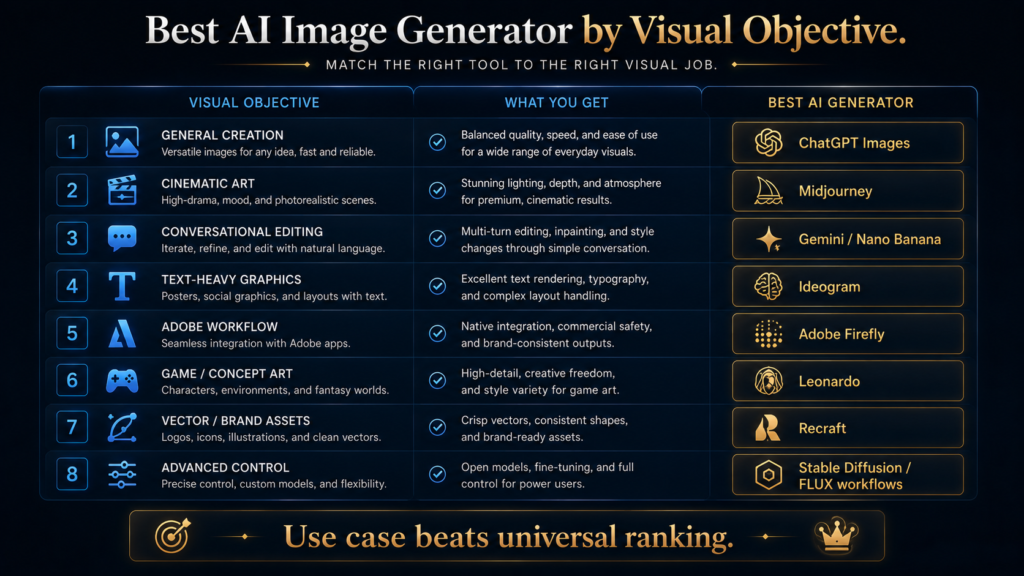
Which AI Image Generator Is Best for Your Job?
This is the decision readers actually need.
| Visual objective | Best starting point | Why |
|---|---|---|
| General-purpose images | ChatGPT Images | Flexible creation and editing |
| Cinematic / artistic imagery | Midjourney | Strong art direction |
| Conversational image editing | Gemini / Nano Banana 2 | Reference-aware, multimodal workflow |
| Text inside images | Ideogram | Typography-focused strength |
| Adobe production | Firefly | Creative ecosystem |
| Game / concept art | Leonardo | Production-oriented creative tools |
| Logos / vectors / brand assets | Recraft | Design and vector focus |
| Advanced local control | Stable Diffusion 3.5 | Customization and deployment |
| Beginner visual design | Microsoft Designer | Low-friction workflow |
| Advanced model experimentation | FLUX-family workflows | Control-oriented ecosystem |
This is why a simple “#1 through #10” ranking is misleading.
Your best tool is the one that wins your job.
Free vs Paid: When Should You Actually Pay?
The word “free” is one of the most abused terms in AI-tool comparisons.
A free plan might mean:
- limited credits
- slow generation
- watermarked output
- restricted models
- trial access
- no private generations
- limited commercial functionality
- limited editing
So the right question is not:
“Is it free?”
It is:
“Can I complete my actual workflow at $0?”
When Free Is Enough
Stay free when you are:
- learning
- experimenting
- creating occasional images
- publishing a few blog visuals
- testing whether the style fits you
For example, ChatGPT Images 2.0 is currently available across all ChatGPT tiers, making it easy to test the core workflow before considering a paid plan.
Microsoft Designer is also free to use, with more frequent creation potentially requiring a subscription.
When Paid Makes Sense
Upgrade when:
1. Usage is the bottleneck
You repeatedly run out of credits or generation time.
2. Quality is the bottleneck
The free model cannot reliably produce the visual quality you need.
3. Privacy is the bottleneck
You need private generations or stronger workflow controls.
Midjourney, for example, restricts Stealth Mode to Pro and Mega plans.
4. Production is the bottleneck
You need batch generation, APIs, team collaboration or higher throughput.
5. Editing is the bottleneck
A better paid workflow saves enough manual work to justify the subscription.
The Real Cost of an AI Image
The subscription price is only one variable.
A more useful equation is:
True Cost = Subscription + Generation Cost + Editing Time + Failed Iterations + Workflow Friction
Imagine:
Tool A: $10/month, but every image needs 15 minutes of editing.
Tool B: $30/month, but each image is usable in two minutes.
If you create 100 images, Tool B can actually be much cheaper in operational terms.
That is the economics most comparison articles ignore.
How to Build an AI Image Workflow
The strongest production workflow is not:
Prompt → Download
It is:
1. Write the brief
Define:
- subject
- audience
- purpose
- aspect ratio
- visual style
- required text
- brand constraints
2. Gather references
Collect:
- existing images
- brand examples
- product references
- visual style references
3. Generate
Use the model that fits the objective.
4. Compare
Do not automatically use the first image.
Compare:
composition → clarity → accuracy → brand fit → usability
5. Edit
Fix:
- unwanted objects
- composition
- text
- background
- proportions
- visual hierarchy
6. Verify
Check:
- text
- faces
- logos
- claims
- brand accuracy
- commercial requirements
7. Export
Choose the format based on the destination:
- blog
- social
- presentation
- client deliverable
This is where image generation becomes a production system rather than a novelty.
Why the Traditional Method Still Exists
Before generative image tools became widely capable, professional visual production relied on:
Brief → reference → concept → draft → critique → revision → final
AI has not destroyed that structure.
It has compressed parts of it.
The better question is not whether AI replaces the traditional creative process.
It is:
Which parts of the traditional process should become faster, and which should remain human-led?
Research can be accelerated.
Concept exploration can be accelerated.
Variation generation can be accelerated.
But:
art direction → judgment → approval → accountability
remain critical.
That is why the best AI image workflow is not fully autonomous.
It is human-directed and AI-accelerated.
Where AI Image Generators Still Fail
1. Exactness
Models may produce something visually plausible rather than exactly correct.
2. Small text
Even strong models can make mistakes in dense typography.
Microsoft explicitly warns that generated text in Designer can contain spelling or language errors.
3. Complex spatial relationships
A prompt may describe ten objects in precise positions and still produce an approximate interpretation.
4. Consistency
Keeping a character or product perfectly identical across many generations remains a practical challenge, although current tools are improving.
5. Commercial context
A visually generated asset may still raise questions involving:
- trademarks
- likenesses
- copyrighted references
- brand policies
- platform terms
The existence of an AI-generated image does not automatically answer those questions.
6. Human taste
A technically correct image can still be visually boring.
The model can generate.
The art director decides what is worth keeping.
Commercial and Licensing Reality
This section matters because many “best AI image generator” articles make an unsafe leap:
“You generated it, so you automatically own everything.”
That statement is too broad.
Rights can depend on:
- model terms
- subscription
- user inputs
- third-party material
- jurisdiction
- commercial use
- likenesses
- trademarks
- licensing arrangements
Ideogram, for example, explicitly distinguishes hosted commercial use from its self-hosted/open-weight licensing options.
Midjourney’s terms also vary by plan and company status; its documentation specifies separate treatment for higher-revenue companies and commercial use.
Stability AI similarly distinguishes model families and license arrangements, including community and self-hosted use.
The safe rule is:
Before using AI-generated images commercially, check the current product terms for the exact plan, model and use case.
Do not rely on a generic “commercial-use safe” badge from a comparison article.
Common AI Image Generator Mistakes
1. Choosing based on benchmark rankings
A benchmark does not know your workflow.
2. Paying for five generators
If two tools solve the same job, the second may add cost rather than capability.
3. Ignoring editing
Generation quality matters less when the tool has poor correction workflows.
4. Focusing only on photorealism
A beautiful photo model may be terrible for typography and branding.
5. Ignoring text rendering
This can ruin otherwise excellent marketing graphics.
6. Using the first generation
Professional visual work usually requires iteration.
7. Writing giant prompts without a hierarchy
Long prompts are not automatically better.
Clear priority is more important.
8. Ignoring aspect ratio
A great 1:1 image may be useless for a 16:9 hero graphic.
9. Treating AI output as final
A generation is often a draft.
10. Forgetting commercial terms
The legal/commercial context matters as much as the image quality.
A Better Prompting Framework
Beginners often try to write enormous descriptive paragraphs.
A more reliable structure is:
Subject + Purpose + Composition + Style + Constraints + Output
For example:
Subject: AI researcher working at a futuristic workstation
Purpose: premium editorial hero image
Composition: subject on the right, large negative space on left
Style: sophisticated technology magazine
Constraints: dark navy, electric blue, subtle gold
Output: 16:9
This creates a hierarchy.
The model understands what the image is for, not only what it contains.
That distinction is particularly important for editorial and commercial work
A More Advanced Prompting Principle: Tell the Model What Must Not Break
When image accuracy matters, identify the non-negotiables.
For example:
Must keep:
- product shape
- logo placement
- subject position
- headline area
- brand colors
Can vary:
- background texture
- lighting
- secondary objects
- decorative elements
This is often a better control strategy than adding more adjectives.
What Happens If You Do Nothing?
There is no reason to subscribe to every new image generator.
The technology will continue improving.
Prices will move.
Interfaces will change.
New models will appear.
Existing models will be replaced.
If you build your creative workflow around the underlying principles—
brief → reference → generate → compare → edit → verify
—you can change tools without rebuilding your entire process.
That is the more durable skill.
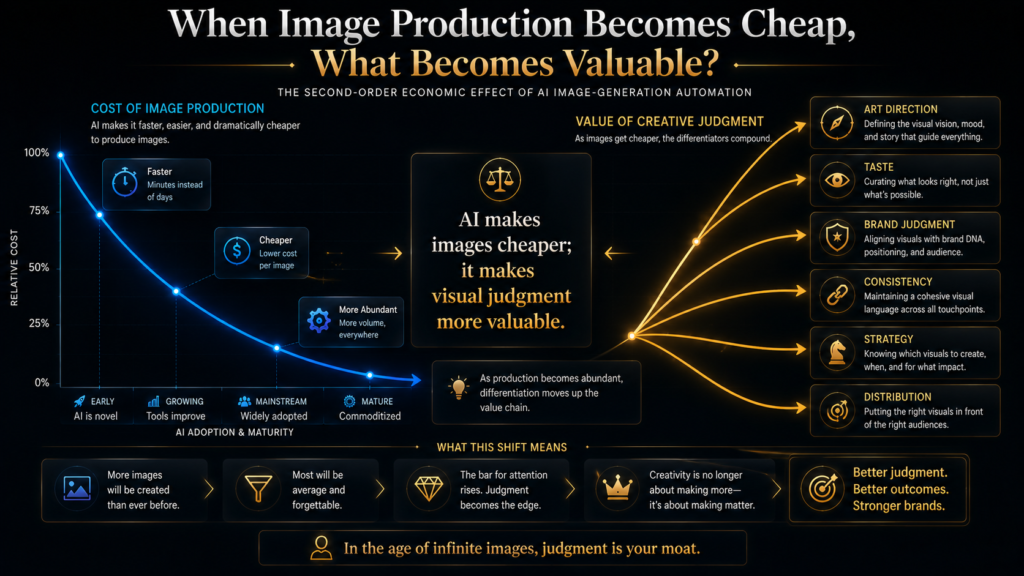
The Second-Order Effect: When Image Production Becomes Cheap
This is where the AI image market becomes strategically interesting.
AI is making image production cheaper.
That means the image itself becomes less scarce.
So what becomes more valuable?
Art direction.
Visual strategy.
Brand judgment.
Consistency.
Taste.
Audience understanding.
Distribution.
Original concepts.
A business will increasingly be able to produce 100 images.
The scarce question becomes:
Which one should it publish?
That changes the value of the creative professional.
The role moves from:
“person who makes the image”
toward:
“person who decides what the image should accomplish.”
AI does not eliminate creative judgment.
It increases the relative importance of creative judgment.
The Future: AI Image Generators Are Becoming Creative Systems
The market is moving from:
Text → Image
toward:
Brief → References → Generation → Editing → Consistency → Brand → Production
Google’s current image stack already emphasizes reference handling, consistency and multimodal workflows.
Adobe is increasingly presenting Firefly as a creative AI environment rather than simply a model.
Ideogram is moving toward layer-aware and production-design workflows.
Stability AI is offering generation, editing, upscaling and control services across one ecosystem.
This suggests a broader transition:
Image generator → image editor → creative assistant → production system
The future competition will therefore not be determined only by who creates the most attractive single image.
It will also be determined by:
Who gives creators the best end-to-end visual workflow?
Frequently Asked Questions
What is the best AI image generator in 2026?
There is no universal winner.
ChatGPT Images is a strong general-purpose choice. Midjourney is especially compelling for artistic and cinematic work. Ideogram is a specialist for text-heavy graphics. Gemini/Nano Banana 2 is strong for conversational and reference-heavy workflows. Firefly is particularly relevant to Adobe-centered production.
Which AI image generator is best for beginners?
Start with a low-friction tool such as ChatGPT Images or Microsoft Designer.
The goal at the beginning should be learning the creative workflow, not mastering the most complicated model.
Microsoft says Designer is free to use, although frequent creation may require a subscription.
Which AI image generator is best for text in images?
Ideogram is one of the strongest candidates when typography and text-in-image accuracy are central to the project. Ideogram 4.0 is explicitly positioned around production design and brand use.
Which AI image generator is best for cinematic art?
Midjourney is a strong choice when visual aesthetics and artistic direction are the primary goal.
Its current subscription structure is centered around image/video creation with higher plans adding more GPU time and privacy controls.
Is Midjourney free?
Midjourney currently does not provide a normal permanent free plan on Discord. Its current plans start at $10/month for Basic, with Standard, Pro and Mega at $30, $60 and $120 monthly respectively.
Is ChatGPT image generation free?
ChatGPT Images 2.0 is currently available on all ChatGPT tiers, though usage limits and advanced image capabilities vary by plan.
Is Gemini good for image generation?
Yes.
Google’s current Gemini 3.1 Flash Image / Nano Banana 2 is positioned as a general-purpose image workhorse with 4K support, improved text rendering, multiple reference handling and consistency.
What happened to Imagen 4?
Google’s current documentation says the Imagen 4 models were scheduled to shut down on August 17, 2026, with migration recommended to newer Gemini image models.
That is why an article updated for August 2026 should not treat Imagen 4 as a current standalone recommendation.
Which AI image generator is best for logos?
Recraft and Ideogram are especially interesting for brand and design work.
Recraft is more explicitly design/vector oriented, while Ideogram is particularly useful when typography and visual text matter.
Which AI image generator is best for game art?
Leonardo is a strong choice for game and concept production because its workflow is oriented toward repeatable creative asset production and model customization. Its current plans include personal AI models and broader production features.
Is Stable Diffusion still relevant in 2026?
Yes.
Stable Diffusion 3.5 remains a current model family, and Stability AI supports API, self-hosted and web-based workflows.
Its strongest advantage is control rather than simplicity.
Which AI image generator is best for commercial use?
There is no universal answer.
Commercial suitability depends on the exact tool, plan, model, inputs and use case.
Check the current terms before relying on any tool for client or commercial work. Ideogram, Midjourney and Stability AI all publish specific licensing/usage information that varies by deployment and plan.
Should I pay for multiple AI image generators?
Usually not at first.
Choose one tool based on your main visual objective.
Add another only when your existing tool creates a genuine bottleneck.
Is a better model always worth paying for?
No.
The correct question is:
Does the better model save enough time, improve enough quality, or unlock enough workflow capability to justify the cost?
Can AI image generators replace graphic designers?
They can automate parts of image production.
They do not eliminate the need for:
- art direction
- brand judgment
- composition
- communication strategy
- editing
- client requirements
- final approval
As generation gets cheaper, those skills become relatively more valuable.
Final Thoughts
The AI image-generator market has become too diverse for a single “best tool” ranking to remain useful.
ChatGPT Images is a strong general-purpose choice.
Midjourney remains compelling for artistic direction.
Gemini/Nano Banana 2 is increasingly powerful for conversational, reference-heavy image workflows.
Ideogram is particularly strong when text belongs inside the image.
Firefly becomes more valuable when image generation connects to the Adobe creative stack.
Leonardo is built for richer production workflows.
Recraft makes more sense when the output needs to behave like a design asset.
Stable Diffusion remains important for users who value control and customization.
Microsoft Designer provides an accessible starting point.
FLUX-family workflows are interesting for advanced creators who want more control over the implementation.
But none of those answers matter until you define the job.
A beautiful model is irrelevant if it cannot handle the typography you need.
A powerful model is irrelevant if your team cannot fit it into the workflow.
A cheap model is not cheap if every output takes 20 minutes of manual correction.
And the highest-quality generator is not automatically the best commercial choice if its licensing or workflow does not fit your use case.
So the better approach is:
Define the visual objective → choose the required level of control → identify the text/editing/consistency requirements → test one tool → measure the workflow → upgrade only when the economics justify it.
The market will continue changing.
Models will improve.
Prices will change.
Interfaces will merge.
Some tools will disappear.
Others will become creative operating systems.
The durable skill is not memorizing which model is #1.
It is knowing what visual problem you are solving and how to build the workflow around it.
AI makes image production cheaper. It makes visual judgment more valuable.
Ready to Build a Smarter AI Image Workflow?
The best image generator isn’t the one with the biggest feature list. It’s the one that matches the visual job, level of control, and production workflow you actually need.
Continue exploring AI Hustle World for practical AI tools, visual workflows, tutorials, and strategies designed to help you create better work with AI.
Explore AI Hustle World →AI Hustle World — AI Tools • Reviews • Tutorials
Written by
Muntasir Ahmad Chowdhury
Founder, AI Hustle World
Muntasir Ahmad Chowdhury is the Founder of AI Hustle World, an independent publication dedicated to making Artificial Intelligence practical, trustworthy, and easy to understand. He researches AI tools, automation, customer service, productivity, and real-world business applications, helping readers make smarter technology decisions through research-driven, experience-backed content.
Expertise:
AI Tools • AI Automation • AI Customer Service • AI Productivity • Generative AI • AI Workflows
Get Smarter With AI
Enjoyed this guide? Get practical AI tools, tutorials, and honest reviews delivered to your inbox.
1 thought on “Best AI Image Generators in 2026: Free & Paid Tools Compared”