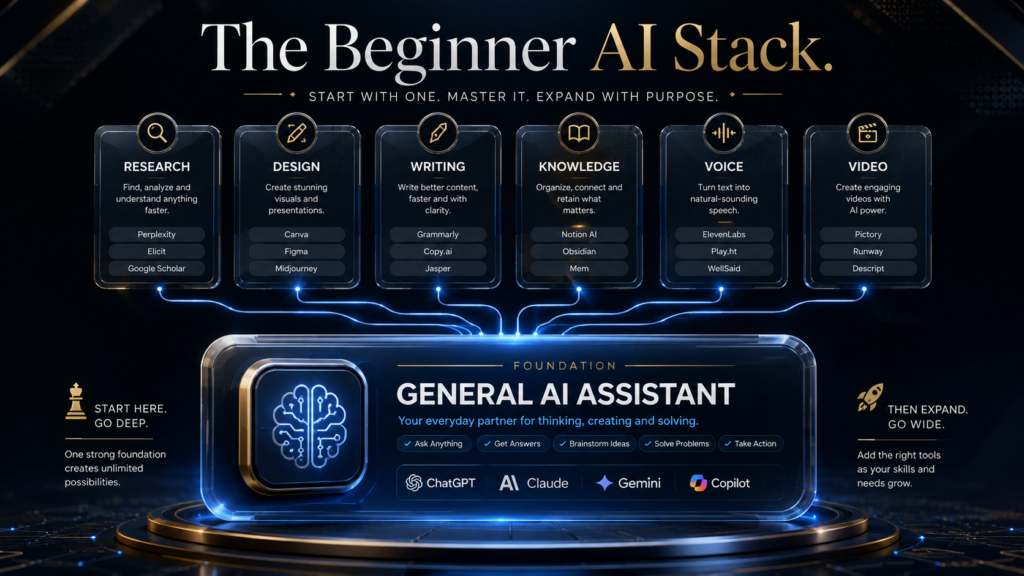
Evidence: Documentation reviewed
Last checked: September 2026
What was done: Written from official documentation and the published sources linked in this article. Not hands-on tested.
Files: None
Affiliate links: Yes
Affiliate disclosure: this article contains affiliate links. AI Hustle World may earn a commission if you sign up through one, at no extra cost to you. See our Affiliate Disclosure.
Last updated: September 23, 2026. The best AI tool for a beginner is not the platform with the longest feature list. It is the one that helps you complete a real task, understand what happened, and check the result without forcing you to assemble a complicated system first.
For most people, that makes ChatGPT the strongest general starting point, Canva the easiest visual starting point, Perplexity the clearest research starting point, and NotebookLM the best place to work from a fixed set of sources. Claude, Gemini, Grammarly, Notion AI, ElevenLabs, and Pictory become better choices when the work is more specific.
This guide compares ten beginner-friendly AI tools by the first useful job each one can perform, the skill a new user must learn, the verification habit the tool requires, and the point at which a free plan may stop being enough. That approach is more useful than declaring one universal winner because a student reviewing sources, a creator producing narration, and a small-business owner organizing customer information do not have the same problem.
The Best AI Tools for Beginners in 2026: Quick Answer
| Tool | Best beginner use | Free entry | Main learning requirement | Upgrade when |
|---|---|---|---|---|
| ChatGPT | General writing, planning, explanation, and file-based work | Yes | Giving context and checking important claims | You repeatedly reach usage, model, or workflow limits |
| Claude | Reading, restructuring, and drafting long material | Yes | Separating source facts from requested interpretation | Long-document work becomes frequent |
| Gemini | AI work connected to Google services | Yes | Managing files, permissions, and Google context | Higher limits or premium Google features save recurring time |
| Perplexity | Source-led web research and starting bibliographies | Yes | Opening citations and judging source quality | Research depth and query volume justify it |
| Canva | Presentations, social graphics, and simple visual assets | Yes | Editing generated layouts instead of accepting the first draft | Brand controls, premium assets, or higher AI limits matter |
| Grammarly | Editing existing writing for clarity, tone, and correctness | Yes | Accepting suggestions selectively | Rewriting and advanced checks become daily needs |
| Notion AI | Working with notes, projects, and team knowledge in one workspace | Limited trial access | Organizing the workspace before asking AI to use it | Your source material already lives in Notion |
| ElevenLabs | AI narration, voice experiments, and multilingual audio | Yes | Directing pace and pronunciation and confirming usage rights | You need commercial rights, cloning, or more credits |
| Pictory | Turning scripts or long material into draft videos | Free trial | Reviewing scene selection, timing, and stock footage | You publish enough video to use the monthly allowance |
| NotebookLM | Studying and synthesizing an uploaded source collection | Yes | Curating reliable sources and following citations | Higher notebook, source, or generation limits matter |
If you want one safe starting decision, choose a single general assistant and use it for one repeatable task for seven days. Add a specialist only after you can name the missing capability, such as source-grounded research, visual design, narration, or video assembly.
Start With One Voice Task You Already Do
Test ElevenLabs by turning a short paragraph you wrote into speech and judge whether it sounds natural enough for your audience.
Try ElevenLabs With a Short Script →Affiliate disclosure: We may earn a commission if you subscribe through this link, at no additional cost to you.
The AI Hustle World Beginner AI Learning-Friction Matrix
Most AI-tool comparisons measure how many features a product advertises. The AI Hustle World Beginner AI Learning-Friction Matrix measures a more practical sequence: how quickly a beginner can reach a useful output, what new skill must be learned, how that output should be verified, and what usually triggers a paid upgrade.
This is the article’s central framework. A teacher, editor, creator, or software reviewer can use it to explain why “easy to open” and “easy to use responsibly” are different standards. The matrix also supplies a reusable way to compare future tools without pretending that one score can represent every beginner.
How we researched
We reviewed official product, pricing, and help documentation available on September 23, 2026. Each tool was assessed across five observable dimensions: the first useful task, setup friction, the new skill required, the minimum verification habit, and the likely upgrade trigger. Product availability, plan names, limits, and prices can change, so readers should confirm current terms on the linked official pages before purchasing.
This article does not claim a controlled laboratory test, a timed productivity experiment, or statistically representative user research. The matrix is an editorial classification derived from documented capabilities and transparent beginner-workflow criteria; it is not a performance leaderboard. Where a judgment is interpretive, the reason is stated so another reader can challenge or reproduce the classification.
| Tool | First useful task | Skill to learn | Verification habit | Common beginner failure |
|---|---|---|---|---|
| ChatGPT | Turn a rough request into a plan or draft | Context-rich prompting | Check facts against the original source | Treating fluent output as confirmed truth |
| Claude | Summarize or restructure a long document | Defining source boundaries | Compare conclusions with cited passages | Asking for certainty the document cannot provide |
| Gemini | Draft or analyze around Google-based work | Providing the correct file and service context | Inspect linked files and permissions | Assuming every Google item is automatically available |
| Perplexity | Create a cited research starting point | Source triage | Open the source, then verify the claim | Citing the answer page without reading the evidence |
| Canva | Produce a workable first visual layout | Visual editing and hierarchy | Check text, brand fit, contrast, and rights | Publishing an attractive but inaccurate first generation |
| Grammarly | Improve an existing paragraph | Editorial judgment | Read the full sentence after every material change | Accepting edits that flatten meaning or voice |
| Notion AI | Summarize or retrieve from a workspace | Information organization | Open the underlying page and confirm freshness | Expecting AI to repair a disorganized knowledge base |
| ElevenLabs | Generate a short narration sample | Voice direction and rights review | Listen for pronunciation, artifacts, and consent issues | Choosing realism before checking permitted use |
| Pictory | Assemble a rough video from a script | Scene and timing judgment | Watch the export from start to finish | Letting stock footage misrepresent the narration |
| NotebookLM | Ask questions across selected sources | Source curation | Follow inline citations back to source context | Uploading weak material and blaming the synthesis |
What this adds is a clear separation of interface friction from reasoning friction. A product can be simple to operate while still demanding careful source selection, privacy judgment, or editorial review. Beginners make better choices when those hidden responsibilities are visible before they subscribe.
What Makes an AI Tool Beginner-Friendly?
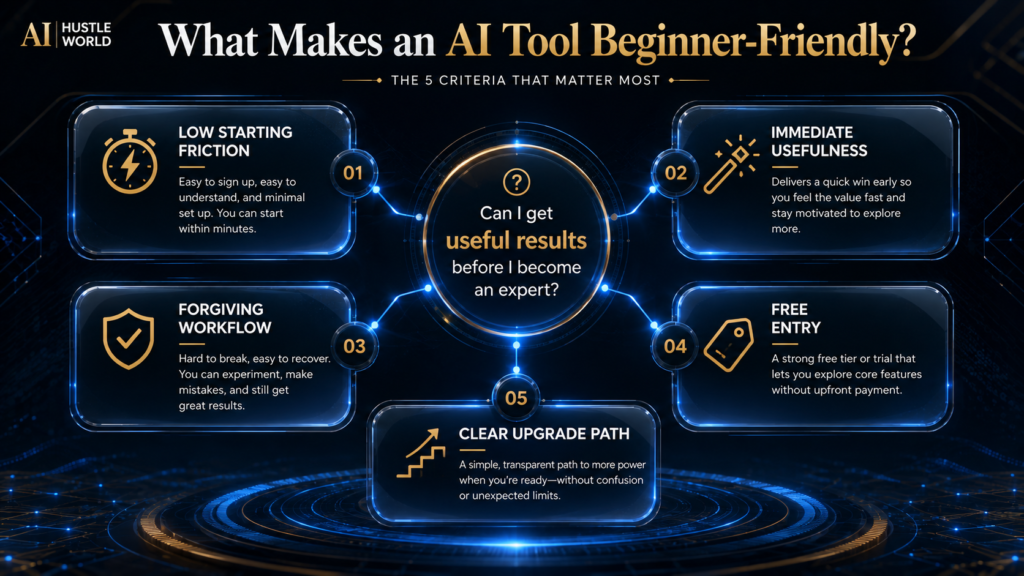
A beginner-friendly AI tool should have low setup friction, a visible first use, a forgiving revision loop, a realistic free entry point, and an understandable upgrade path. Those five qualities matter together. A free product is not beginner-friendly if the interface hides the basic workflow, and a polished product is not beginner-friendly if a new user cannot tell when the output is unreliable.
The first-use test is simple: can a new user complete one meaningful task without watching hours of tutorials? Meaningful does not mean perfect. A useful first result might be a revised email, a cited research outline, a social graphic that still needs editing, or a source summary with traceable references.
The revision loop matters because AI output is rarely final on the first attempt. Good beginner tools make it easy to correct the brief, replace a source, edit a scene, change a tone, or regenerate only the weak part. If the only obvious action is “generate again,” the user learns gambling rather than directing.
Finally, the tool should expose its boundaries. Usage caps, credit systems, commercial-rights restrictions, file limits, data controls, and source behavior affect whether a product fits a real workflow. A beginner does not need to master every setting, but the product should not make the cost or responsibility impossible to understand.
How We Selected These Tools
We selected tools that represent distinct beginner jobs rather than ten versions of the same chatbot. The list covers general assistance, long-document work, Google-connected work, web research, design, editing, knowledge management, audio, video, and source-grounded study. A tool had to provide a clear starting workflow and enough official documentation for a reader to verify its current offer.
We did not rank tools by vague “power” because power depends on the task and plan. We also avoided inventing numerical scores from unlike categories. Comparing a voice generator with a research assistant on a single ten-point scale produces precision without meaning; the learning-friction matrix makes the tradeoffs explicit instead.
Pricing was treated as a moving constraint rather than a permanent product fact. When an exact price helps the buying decision and was available on an official page, it is dated and linked. When regional billing, credits, or plan transitions complicate the number, the article explains the upgrade trigger instead of presenting a misleading universal cost.
1. ChatGPT: Best Overall AI Tool for Most Beginners
ChatGPT is the strongest default starting point because one interface can handle conversation, drafting, explanation, planning, image understanding, file work, and increasingly agent-like tasks. A beginner can start with a familiar chat box, then add files, tools, or more structured workflows only when the need appears. OpenAI’s official ChatGPT pricing page confirms a free plan alongside paid individual and business options.
The best first use is not “tell me everything you can do.” Give it a real input and a concrete output: turn meeting notes into an action list, explain a difficult paragraph at a chosen reading level, compare two options using criteria you provide, or rewrite a customer email without changing the underlying facts. The model becomes easier to judge when the task has visible boundaries.
Its main beginner risk is breadth. Because the system can respond confidently across many topics, a new user may assume it has verified every claim or correctly inferred missing context. Important dates, quotations, calculations, medical or legal implications, product terms, and source-dependent claims should be checked against authoritative material rather than trusted because the prose sounds polished.
Stay on the free plan while you are learning what tasks repeat. A paid plan becomes easier to justify when you regularly hit limits, need a specific advanced model or feature, or save enough time on a defined workflow to explain the expense. OpenAI currently lists ChatGPT Plus at $20 per month in the United States, but features and regional prices should be confirmed before purchase.
Best for: people who want one flexible assistant before choosing specialists. Not ideal for: anyone who needs every answer to be source-grounded by default or assumes the chat output is an approval-ready final product. For a focused blogging workflow, see our guide to using ChatGPT for blogging.
2. Claude: Best for Long Documents and Careful Restructuring
Claude is a strong beginner choice when the work starts with substantial text: a report, interview transcript, policy draft, research bundle, or long piece of writing that needs organization. Its value is not that every long answer is automatically correct. The useful pattern is to provide material, define the transformation, and require the response to distinguish source content from interpretation.
A practical first task is to ask for a structured map of a document before requesting a rewrite. Have Claude identify the thesis, supporting claims, missing evidence, repeated sections, and unresolved questions. Once you approve that map, ask it to revise one section at a time; this keeps the workflow inspectable and reduces the chance that a wholesale rewrite silently changes meaning.
Anthropic offers free and paid Claude access, and its pricing page lists Claude Pro at $20 per month when billed monthly, or $17 per month with an annual subscription ($200 billed up front), as checked on September 25, 2026. That price does not answer whether you need it. Upgrade only when long-document volume, higher usage, or paid capabilities repeatedly remove a real bottleneck.
The verification habit is to compare any summary, quotation, or conclusion with the original passage. Ask for section names or short source pointers, then open the document yourself. A long context window can hold more material, but it does not transform ambiguous evidence into certainty or guarantee that every small detail receives equal attention.
Best for: writers, researchers, and operators who routinely reorganize long text. Not ideal for: people whose first need is visual design, cited live-web research, or media production. If your decision is specifically between major general assistants, our ChatGPT vs Claude vs Gemini comparison looks at prompt-heavy workflows in more depth.
3. Gemini: Best for Beginners Working in Google’s Ecosystem
Gemini makes the most sense when Google services already hold the work. A user who lives in Gmail, Docs, Drive, or other Google products may value connected context more than a small difference in model style. The beginner advantage is continuity: the task can remain close to the files, messages, and documents that prompted it.
The first useful workflow should be narrow and permission-aware. Start with one document or one collection you can identify, ask Gemini to produce a summary or draft, and then confirm which material it actually used. Do not assume that being signed into Google means every file, mailbox, shared drive, or workspace item is automatically visible or appropriate for the request.
Google offers free Gemini access and packages higher limits and premium capabilities through Google AI plans. The official Google One plans page is the right place to confirm current regional pricing and inclusions because storage, AI benefits, and availability can change. The paid decision should depend on repeated Google-connected work, not the idea that every beginner needs the most capable tier.
The main beginner risk is context confusion. A response may be reasonable while relying on the wrong file version, incomplete email thread, or outdated internal document. Open the source, check the date and owner, and confirm that sensitive information belongs in the workflow before using the answer.
Best for: users already committed to Google productivity tools. Not ideal for: someone choosing a standalone assistant with no Google-based workflow advantage. Gemini is a fit decision, not a universal upgrade from another chatbot.
4. Perplexity: Best for Source-Led Web Research
Perplexity is beginner-friendly because citations are visible in the normal research flow. Instead of receiving an unreferenced answer and remembering to ask for sources later, a user can open the supporting pages as the answer is read. That makes it a useful starting tool for landscape research, terminology, recent developments, and building an initial reading list.
The important word is starting. A citation proves that a linked page exists; it does not prove that the page is authoritative, that the cited passage supports the exact claim, or that competing evidence was considered. Beginners should open each material citation, identify the publisher, check the date, and read enough surrounding text to understand the qualification.
A good first query names the decision, date boundary, preferred source type, and exclusions. For example, ask for current plan information using only official vendor documentation, or request peer-reviewed research and government guidance while excluding unsourced summaries. Then use the response to find evidence, not as a replacement for reading evidence.
Perplexity provides free and paid options; its official pricing page should be checked for current plan details. A paid tier is most defensible when deeper searches, file work, or higher query volume serve a recurring research process. Casual questions rarely require an immediate upgrade.
Best for: people who want a faster path from a question to inspectable web sources. Not ideal for: anyone who wants to cite an AI-generated synthesis without opening the evidence. The skill to build is source judgment, not faster prompting.
5. Canva: Best for Beginner-Friendly AI Design
Canva is one of the easiest places for a non-designer to move from an idea to an editable visual. Templates, drag-and-drop controls, asset libraries, and AI-assisted creation live in the same workspace, so the user can correct the result without exporting it into professional design software. This matters because the first generated layout is usually a draft, not a finished brand asset.
A useful first task is a single-format asset with a clear hierarchy, such as one presentation slide, square social post, or simple checklist graphic. Specify the audience, dimensions, headline, supporting text, brand colors, and required image treatment. After generation, shorten the copy, align the elements, increase contrast, check spelling, and confirm that the design still reads on a phone.
Canva says its AI tools are available on free accounts with plan-dependent limits, while paid plans provide higher usage and additional capabilities. Its official AI access documentation is more useful than an old blog-post limit because AI allowances and feature tiers change. Check the current pricing page when brand kits, premium assets, collaboration, or volume becomes important.
The main risk is visual plausibility. AI-generated text inside images can be wrong, decorative charts can imply data that does not exist, and stock or generated visuals can misrepresent a product or person. Review every word, number, logo, face, hand, chart, and license-sensitive element before publishing.
Best for: beginners producing presentations, social media assets, lead magnets, and basic brand materials. Not ideal for: specialized illustration, precision data visualization, or complex production work that requires exact professional control. Canva reduces design friction, but it does not replace visual judgment.
6. Grammarly: Best for Editing What You Already Wrote
Grammarly is different from a blank-page chatbot because it usually meets the beginner inside existing writing. That makes the first-use question clear: does this sentence become more correct, readable, or appropriate for its audience? The tool is most useful as an editing layer, not as an authority that should overwrite every individual choice.
Start with a short message whose purpose you understand. Review suggestions one by one and ask what each change does to tone, specificity, and meaning. If a replacement makes the sentence technically smooth but less accurate, more generic, or unlike the writer, reject it.
Grammarly’s official plans page lists a free tier and paid plans with broader rewriting and review capabilities. The free version is enough to learn the core workflow. Upgrade when advanced rewriting, higher AI usage, team consistency, or additional checks solve a frequent editorial problem rather than an occasional inconvenience.
The main beginner risk is cumulative voice loss. Ten small “professional” edits can turn a direct human message into vague corporate copy even when no single suggestion looks harmful. Read the complete paragraph after edits, preserve concrete nouns and natural rhythm, and do not confuse formality with quality.
Best for: email, reports, school or workplace writing, and final-pass clarity. Not ideal for: source research, knowledge retrieval, or generating a strategy from incomplete facts. It improves language; it does not validate the underlying claim.
7. Notion AI: Best When Your Work Already Lives in Notion
Notion AI is most useful when AI is added to an existing workspace rather than treated as a separate destination. If project notes, meeting records, task databases, decisions, and reference pages already live in Notion, the assistant can help retrieve, summarize, draft, and organize around that material. Without a maintained workspace, much of the advantage disappears.
A good first workflow is a weekly project review. Keep the project page current, label decisions and owners, then ask for open actions, unresolved questions, and changes since the previous review. Confirm each item by opening the underlying page because an old or contradictory note can still produce a fluent summary.
Notion’s official AI FAQ states that full Notion AI access is tied to Business and Enterprise plans, while Free and Plus workspaces receive limited complimentary AI responses. That plan structure makes the upgrade decision unusually dependent on where the team already works. Paying for workspace AI is difficult to justify if the relevant knowledge remains scattered elsewhere.
The hidden beginner skill is information architecture. Pages need meaningful titles, dates, owners, permissions, and a consistent place in the workspace. AI can accelerate retrieval from an organized system, but it cannot reliably determine which of three conflicting, undated pages represents the current policy.
Best for: individuals and teams already using Notion as a working knowledge base. Not ideal for: beginners who only want a chatbot or have not decided where their source information belongs. Organization comes before automation.
8. ElevenLabs: Best for AI Voice and Narration
ElevenLabs gives a beginner a direct path from text to natural-sounding speech, with tools for voice design, speech generation, transcription, dubbing, and related audio workflows. The first successful use can be a short paragraph, which makes it easy to compare versions without committing to a long production. Its interface is approachable, but responsible voice use requires more than choosing the most realistic sample.
Begin with 20 to 40 seconds of original text. Mark difficult names, abbreviations, numbers, pauses, and emotional changes, then generate two controlled variations. Listen on headphones and a phone speaker, checking pronunciation, pace, emphasis, abrupt cuts, and whether the delivery matches the intended audience.
The official ElevenLabs pricing page currently lists Free at $0 with 10,000 monthly credits, Starter at $6 with 30,000 credits, and Creator at $22 with 121,000 credits, before taxes and subject to current terms. Starter adds a commercial license and instant voice cloning, while higher tiers expand credits and capabilities. Confirm the live page because credit consumption varies by product and model.
The main beginner risk is rights and consent. Do not clone or imitate a person’s voice merely because audio is publicly available, and do not assume a free output includes the rights needed for commercial publishing. Keep written authorization where required, check the product terms, disclose synthetic narration when the context warrants it, and avoid deceptive impersonation.
Best for: narration samples, accessible audio, multilingual content, and creators building a repeatable voice workflow. Not ideal for: users who have not resolved the script, rights, or pronunciation review process. For a larger market comparison, read our guide to the best AI voice generators.
Add Narration Without Recording Yourself
Use ElevenLabs to narrate a slide deck, lesson or short video, then compare the result with your own recording before relying on it.
Narrate a Project With ElevenLabs →Affiliate disclosure: We may earn a commission if you subscribe through this link, at no additional cost to you.
9. Pictory: Best for Turning Text Into a Draft Video
Pictory is designed to turn scripts, articles, or long video material into editable video drafts with scenes, captions, stock media, and voice options. For a beginner, the benefit is structural: the tool can create a first timeline without requiring traditional video-editing skills. The result still needs a human who understands what the narration means and whether each scene supports it.
The best first task is a short, factual script with clear scene boundaries. Break the script into purposeful beats, create the draft, and inspect every visual choice. Replace generic footage, correct subtitle timing, remove unnecessary transitions, and verify that the final duration and aspect ratio suit the intended platform.
Pictory’s official pricing page currently advertises a 14-day free trial and paid plans based on users, video minutes, storage, brand kits, voice allowances, and AI credits. Monthly and annual pricing differ, and allowances are detailed enough that the right question is expected output volume. Calculate how many publishable minutes you actually need rather than comparing only the headline subscription price.
The main beginner risk is semantic mismatch. A stock clip can be aesthetically smooth while contradicting the claim, representing the wrong location, or turning a sensitive subject into visual cliché. Watch the complete video with sound, then once without sound for captions and once while listening without watching for narration quality.
Best for: creators and marketers who need a guided route from script to first video cut. Not ideal for: precision editing, original cinematography, or a workflow that requires complete control over every frame. Automation removes assembly work; it does not approve the story.
10. NotebookLM: Best for Learning From Your Own Sources
NotebookLM is one of the clearest beginner tools for source-grounded learning because the user defines the source collection. Upload or connect relevant material, ask questions across it, and follow citations back to the original passages. This is different from asking a general chatbot to answer from broad model knowledge when your real question concerns a specific course, report, policy set, or research bundle.
A practical first notebook should be small enough to understand. Add three to five authoritative sources on one question, note the date and publisher of each, and ask for agreement, disagreement, missing evidence, and definitions. Google explains in its official source documentation that NotebookLM uses the sources you add when answering requests.
The verification habit is built into the interface but still requires action. Open the citation, read the surrounding passage, and check whether the source itself is credible and current. A perfectly grounded summary of an outdated or biased source set remains outdated or biased.
NotebookLM has a standard free experience and higher limits through eligible Google plans, with plan and feature details changing over time. Begin free and upgrade only when notebook, source, sharing, audio, video, or generation limits constrain an established study or research workflow. More capacity will not improve a weak source collection.
Best for: students, researchers, analysts, and teams working from a known body of material. Not ideal for: open-ended live-web discovery when you have not collected sources yet. Use a research tool to find evidence, then NotebookLM to work carefully across the selected evidence.
ChatGPT vs Claude vs Gemini: Which General Assistant Should a Beginner Choose?
Choose ChatGPT when you want the broadest general starting point and do not yet know which specialist workflow will matter. Choose Claude when long text, careful restructuring, and document-centered conversation dominate the work. Choose Gemini when the practical advantage comes from Google services and files already being central to your day.
| Decision factor | ChatGPT | Claude | Gemini |
|---|---|---|---|
| Best first reason to choose | Broad flexibility | Long-document work | Google-connected workflow |
| Beginner skill to build | Context and verification | Source-bounded instructions | File and permission awareness |
| Most common wrong expectation | Every fluent answer is factual | Long context means perfect attention | Every Google item is automatically accessible |
| Stay free when | Learning basic recurring tasks | Document volume remains occasional | Free Google AI access covers the workflow |
Do not subscribe to all three to “keep your options open.” That multiplies interfaces, bills, and inconsistent workflows before you understand what you need. Use the free versions on the same low-risk task, compare which revision process makes sense to you, and pay for the one whose limits you can describe from experience.
Which AI Tool Should You Choose by Task?
| If your main task is… | Start with | Add later only if… |
|---|---|---|
| General planning and drafting | ChatGPT | You identify a specialist research or media need |
| Long reports and document restructuring | Claude | You also need live source discovery |
| Work tied closely to Google services | Gemini | A separate specialist solves a visible gap |
| Current web research | Perplexity | You need deeper synthesis across a curated source set |
| Source-grounded study | NotebookLM | You first need to discover or collect sources |
| Social graphics and presentations | Canva | Professional precision exceeds template-based control |
| Editing existing prose | Grammarly | You also need ideation or source research |
| Organizing team knowledge | Notion AI | The workspace is already maintained |
| Voiceover and narration | ElevenLabs | Your script and rights process are stable |
| Script-to-video assembly | Pictory | You publish frequently enough to justify the allowance |
This task-first selection prevents a common beginner mistake: choosing a famous tool and then searching for a reason to use it. Start with the bottleneck. If the bottleneck is unclear, write down the last five tasks that consumed time and select the one that repeats with similar inputs and outputs.
Free vs Paid AI Tools: When Should a Beginner Upgrade?
A free plan is not merely a reduced product; it is a diagnostic period. Use it to learn whether the tool fits your task, whether you can review the result, how often the need occurs, and which limit actually stops you. If you cannot name the limiting feature, usage cap, or business requirement, you probably do not yet have a reason to upgrade.
Paid access makes sense when one of four conditions becomes stable. You repeatedly hit a capacity limit, a paid feature removes a measured bottleneck, commercial or team rights require the plan, or the tool is embedded in revenue-producing work where interruption costs more than the subscription. “The paid model might be smarter” is not enough by itself.
Calculate value conservatively. Estimate how many completed, reviewed outputs the tool supports per month, not how many generations it can produce. Include the time required to write prompts, correct errors, manage credits, learn updates, and transfer work between systems; the subscription price is only one part of the cost.
Also check what “free” permits. Some tools limit commercial rights, exports, branding, storage, voice cloning, collaboration, or advanced models even when basic generation is available. Review the current plan terms and usage policy before building a client or business workflow around an assumption.
The Smallest Beginner AI Stack That Actually Works
A practical beginner stack has three layers: one general assistant, one specialist tied to the primary output, and one verification system. A writer might use ChatGPT or Claude, Grammarly, and original sources. A visual creator might use a general assistant, Canva, and a pre-publish checklist for claims, spelling, rights, and accessibility.
The verification system does not need to be another subscription. It can be a folder of primary sources, a checklist in a document, a spreadsheet that records citations, or a second-person review for high-impact material. What matters is that checking happens as a defined step rather than as an optional feeling at the end.
Add a second specialist only when the handoff is clear. If a research answer becomes a cited outline, which then becomes a designed presentation, you can name the input and output of each stage. If tools are copying the same text back and forth without a new responsibility, the stack is creating overhead rather than capability.
A Seven-Day Plan for Learning Your First AI Tool
Day 1: Define one repeatable task
Choose a low-risk task that already exists in your week, such as summarizing your own notes, drafting a routine email, outlining a post, or converting a script into a rough visual. Write down the normal input, the desired output, and what a correct result must preserve. Avoid sensitive personal, client, financial, medical, legal, or confidential data while you are still learning the product’s controls.
Day 2: Create a baseline without AI
Complete or review one example using your current method. Note the time-consuming parts, common mistakes, and quality criteria. This baseline is not a scientific study, but it stops you from calling an impressive-looking generation “better” when it fails the real requirements.
Day 3: Write a complete first instruction
Give the tool the goal, audience, source context, constraints, output format, and uncertainty rule. Ask it to identify missing information rather than inventing it. Save the instruction and result so you can compare revisions instead of relying on memory.
Day 4: Review errors by category
Mark factual errors, unsupported claims, missing requirements, awkward language, formatting problems, and judgment calls separately. Different errors need different remedies. A missing constraint belongs in the instruction, while a questionable fact requires a better source or human verification.
Day 5: Build a reusable template
Turn the improved instruction into a short template with blanks for the variables that change. Include a final self-check request, but do not treat model self-review as independent verification. The template should make the next run clearer, not longer for its own sake.
Day 6: Run the workflow on a second example
Use a different but comparable input and observe what transfers. If the prompt only works on the original example, it is not yet a reliable workflow. Update the checklist based on the second result and record any limit, credit cost, or manual correction that affected the outcome.
Day 7: Decide whether to keep, replace, or pay
Keep the tool if the reviewed output is useful and the process is understandable. Replace it if the product repeatedly fails a core requirement or creates more correction work than it removes. Pay only if the free-plan restriction, rights requirement, or repeated workload gives you a concrete reason.
How to Write Better AI Prompts Without Becoming a Prompt Expert
A beginner prompt should function like a clear work brief. State the task, give the relevant context, name the intended reader, specify constraints, describe the output shape, and explain how uncertainty should be handled. This is more durable than memorizing a collection of dramatic prompt formulas.
For example: “Using only the attached meeting notes, create an action list grouped by owner. Preserve dates exactly, mark any task without an owner as ‘unassigned,’ and do not infer deadlines. End with three questions that must be resolved.” The value comes from the boundaries and verification-friendly format, not from assigning the model an exaggerated expert persona.
Use examples when tone or structure is difficult to describe. Provide one short sample of an acceptable output and explain which characteristics should transfer. Do not provide a copyrighted work and ask for close imitation of a living creator’s distinctive style; describe the observable qualities you need instead.
When the first answer is weak, diagnose before regenerating. Ask whether the problem came from missing context, an ambiguous instruction, insufficient evidence, or a capability limit. Randomly requesting five new versions can produce variety without addressing the cause.
Our beginner’s guide to writing AI prompts develops this process further. Prompting is useful, but source quality, task design, and review usually have more influence on dependable outcomes than clever wording alone.
How to Verify AI Output Before You Use It
Verification begins by classifying the output. A brainstorming list can tolerate uncertainty because no item is presented as fact. A public comparison, financial calculation, medical instruction, legal summary, customer promise, quotation, or policy interpretation requires much stronger evidence because an error can change a decision.
For factual claims, find the closest primary source: official documentation, a law or regulator page, a research paper, a company’s current terms, or the original dataset. Check whether the source says what the draft claims, whether the date still applies, and whether a qualification was removed. A link near a sentence is not enough if the linked passage does not support it.
For calculations, repeat the arithmetic in a spreadsheet or calculator and inspect the units. For summaries, compare the conclusion with representative passages and look for excluded counterevidence. For generated images, audio, and video, review rights, consent, accuracy, accessibility, and potential deception in addition to aesthetic quality.
High-impact decisions need a qualified human reviewer. AI can help organize questions, surface alternatives, or draft explanations, but it should not be presented as the accountable professional. The more difficult an error would be to reverse, the more independent the review should become.
Privacy and Security Rules Every Beginner Should Learn
Do not paste information into an AI tool merely because it is convenient. Before uploading a file or connecting a service, ask who owns the information, whether you are authorized to process it, what the product retains, how the data may be used, who can access the output, and whether the workflow violates an employer, school, client, or platform policy.
Remove unnecessary identifiers and secrets. Passwords, API keys, private health details, financial records, unpublished customer data, confidential contracts, and private employee information should not become training material for a beginner experiment. Use synthetic examples or redacted copies when the task can be learned without real data.
Connected tools increase both convenience and exposure. When an assistant can reach cloud files, email, project systems, or team knowledge, grant the smallest useful scope and review sharing settings. Revoke unused connections, separate personal and work accounts, and confirm the target before an automated action changes or sends anything.
For a deeper starting point, read our guide to AI privacy risks before sharing personal information. The correct product setting depends on the data and account type, so current official privacy documentation should control the decision.
Common Beginner Mistakes and How to Correct Them
The first mistake is collecting tools instead of building a workflow. Signing up for six platforms creates six dashboards, billing systems, learning curves, and privacy surfaces. Choose one task and one starting tool, then add another only when you can name the handoff.
The second mistake is treating generation as completion. AI makes first drafts cheap, which can hide the cost of checking facts, cleaning structure, correcting media, and approving the final result. Measure finished outputs that pass review, not the number of drafts produced.
The third mistake is asking for a result without supplying the decision context. “Write a marketing plan” forces the tool to guess the audience, offer, channel, evidence, budget, and goal. A smaller task with real constraints usually produces something you can evaluate.
The fourth mistake is accepting citations at face value. Open the source, identify whether it is primary or secondary, check the date, and verify the specific passage. If the output combines claims from several sources, confirm that the synthesis does not erase important disagreement.
The fifth mistake is automating before the manual process is understood. If nobody can describe the correct input, steps, exception path, owner, and approval point, automation will scale confusion. Stabilize a small workflow, record edge cases, and keep a human checkpoint where errors matter.
The sixth mistake is paying because a launch or promotion creates urgency. Free limits are valuable evidence. Use them until you can explain which paid capability changes the completed workflow, then confirm cancellation terms, renewal behavior, credits, and commercial rights on the official site.
From One AI Tool to a Reliable Workflow
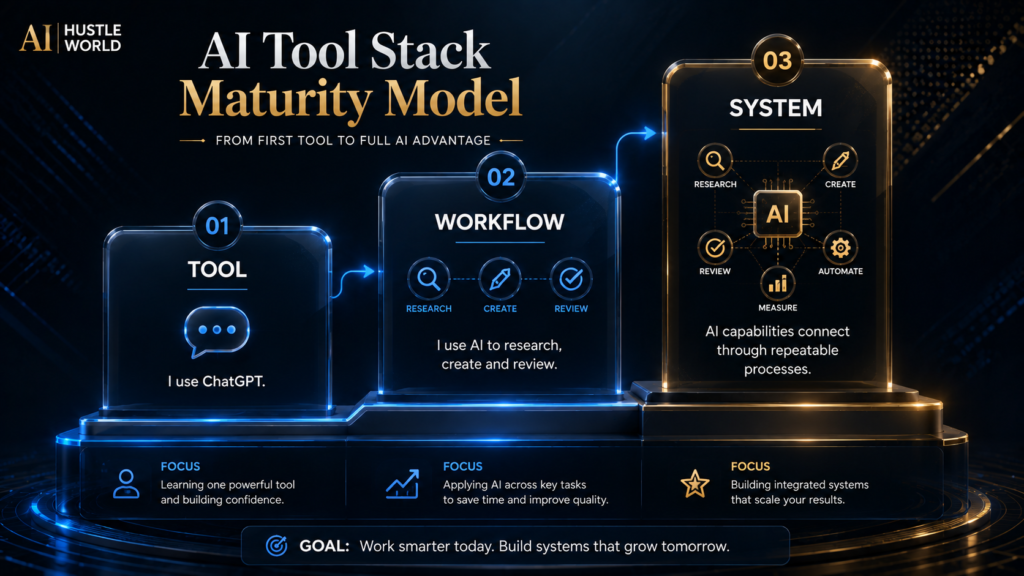
The first maturity level is individual use: one person asks one tool to help with one task. The success measure is whether the user understands the input, can review the output, and can repeat the process. There is no need for complex integration at this stage.
The second level is a documented workflow. Inputs have a known format, the instruction is reusable, review criteria are written down, and the output has a defined destination. A simple log records sources, edits, failures, and the person who approved the final version.
The third level connects systems. A research result may enter a content brief, move into design or production, and then pass through approval. Connections should be added one at a time, with permissions limited and a clear way to stop, correct, or rerun the process.
The fourth level introduces monitoring and governance. Teams track changing model behavior, costs, exceptions, data access, quality failures, and ownership. At that point, the important question is no longer “Which AI tool is best?” but “Which controlled process consistently produces an acceptable outcome?”
From AI Apps to AI Systems
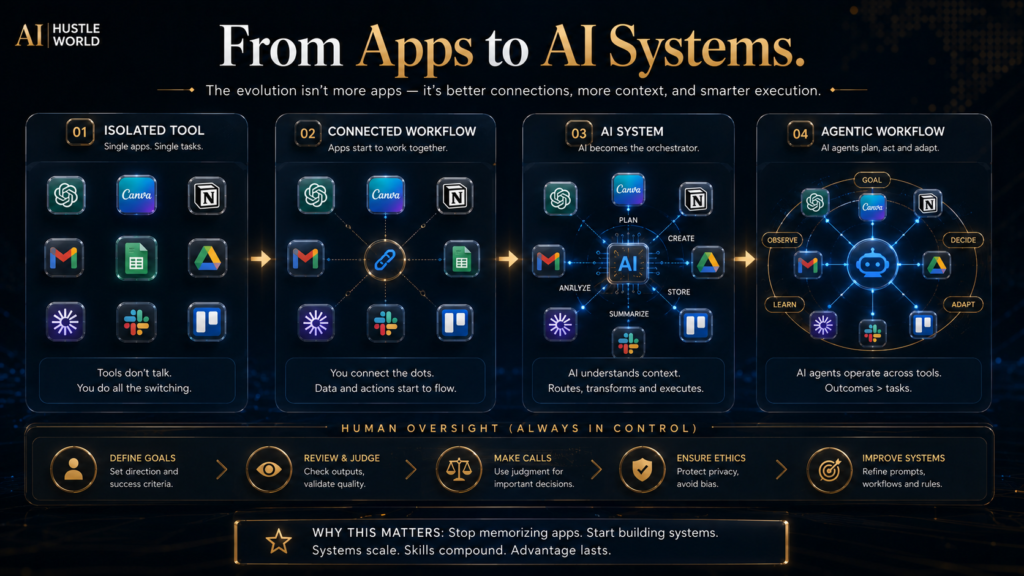
AI products increasingly combine chat, search, files, media generation, and actions. That does not mean a beginner should immediately build an autonomous agent. Each new connection increases the number of places where context, permissions, cost, or a mistaken instruction can produce an unintended result.
A safe progression is read, draft, recommend, then act. First let the system read approved sources. Next let it draft an output for human review, then recommend an action with reasons. Only after the process is stable should selected low-risk actions run automatically, with logs and a recovery path.
This progression preserves accountability. A tool can generate or route work, but a person or organization still owns the decision to publish, send, purchase, approve, or rely on it. Agent-like capability changes the interface; it does not remove responsibility.
What Beginners Can Ignore for Now
You can ignore model leaderboards that do not resemble your task. A small benchmark difference does not tell you whether the product fits your files, review process, budget, accessibility needs, or privacy requirements. Run a low-risk example that reflects your work and examine the correction loop.
You can ignore large prompt libraries until you understand a basic brief. Copying elaborate prompts can hide why a result succeeded or failed, and many templates include unnecessary roles, repetition, or unsupported promises. Build one reusable instruction from your own requirements first.
You can ignore the pressure to automate everything. Manual review is not evidence that a workflow is primitive; it is often the control that makes the workflow trustworthy. Automation should remove a stable burden, not conceal an unstable decision.
You can also ignore the idea that a single subscription creates AI expertise. Competence comes from defining tasks, supplying good evidence, recognizing uncertainty, protecting data, editing results, and learning from failures. Those skills transfer when tools and plan names change.
Final Thoughts
The best AI tool for a beginner is the smallest tool that solves a real, repeated problem while leaving the user able to understand and verify the result. ChatGPT is the most flexible general starting point, but Perplexity, NotebookLM, Canva, Grammarly, Notion AI, ElevenLabs, and Pictory can be better first choices when the task is already specific.
Start free, choose one workflow, and learn its review requirements before you add subscriptions. A useful AI stack is not a shelf of popular apps. It is a controlled sequence in which each tool has a defined job, each important claim has evidence, and a human remains accountable for the outcome.
See Whether AI Voice Belongs in Your Beginner Stack
Check whether you would use ElevenLabs weekly for real projects before adding it to your tools, and start on the free plan if you are unsure.
Compare ElevenLabs Plans →Affiliate disclosure: We may earn a commission if you subscribe through this link, at no additional cost to you.
Frequently Asked Questions
What is the best AI tool for a complete beginner?
ChatGPT is the strongest general starting point for most beginners because it supports many common tasks in one interface and has a free plan. If your first task is already specific, choose the specialist instead: Canva for editable visual design, Perplexity for source-led web research, or NotebookLM for questions across sources you provide.
Can I learn AI using only free tools?
Yes. Free access is enough to learn task definition, prompting, revision, verification, privacy judgment, and basic workflow design. Upgrade when a specific limit, required right, or repeated workload blocks useful work; do not pay simply because a higher tier exists.
Which AI tool is best for students?
NotebookLM is especially useful for studying a defined set of course or research sources because answers link back to the supplied material. Perplexity can help discover sources, while ChatGPT, Claude, or Gemini can explain concepts; students should follow school rules and verify claims against assigned readings and primary evidence.
Which AI tool is best for writing?
ChatGPT and Claude are good general drafting partners, while Grammarly is better positioned as an editing layer for text you already wrote. The best choice depends on whether the bottleneck is ideation, long-document restructuring, source research, or line-level clarity; no writing tool removes the need to check facts and preserve the author’s voice.
Which AI tool is best for small businesses?
Start with the business process, not the company size. ChatGPT may fit general planning, Canva may fit marketing production, and Notion AI may fit a team whose current knowledge already lives in Notion. Before connecting customer or employee data, review permissions, privacy terms, retention, and the organization’s approval policy.
Is it worth paying for more than one AI tool?
It can be worth paying for a general assistant and one specialist when each owns a distinct, repeated stage of the workflow. It is usually wasteful when several subscriptions perform the same occasional task or when you cannot describe which paid limit each one removes.
How do I know if an AI answer is accurate?
Identify the material claims, locate authoritative sources, and confirm that each source supports the exact statement in context. Recheck calculations independently, compare summaries with original passages, and require qualified human review for high-impact medical, legal, financial, employment, or safety decisions.
Should beginners use AI agents and automation?
Beginners should first learn a manual, reviewable workflow. Add automation after the input, output, exception path, permission scope, owner, and approval point are clear. Start with read-only or draft-only assistance before allowing a system to send, publish, purchase, delete, or change important data.
Can I use AI-generated content commercially?
Commercial use depends on the product plan, terms, source material, jurisdiction, and the rights involved in text, images, audio, voices, logos, and likenesses. Check the current official terms, maintain consent and licenses where needed, and do not assume that access to a generation feature grants every downstream right.
How many AI tools should a beginner learn at once?
One tool is enough until you can complete and verify a repeatable task. Add a second tool when it handles a distinct specialist stage with a clear handoff. Learning three interfaces at once often creates shallow familiarity without a dependable workflow.
Related Guides
- Best Free AI Tools for Students in 2026: 10 Tools to Study Smarter
- 10 Best AI Tools for Small Business Owners
- 15 Best Free AI Tools You Should Try in 2026
Written by
Muntasir Ahmad Chowdhury
Founder, AI Hustle World
Muntasir Ahmad Chowdhury is the Founder of AI Hustle World, an independent publication dedicated to making Artificial Intelligence practical, trustworthy, and easy to understand. He researches AI tools, automation, customer service, productivity, and real-world business applications, helping readers make smarter technology decisions through research-driven, experience-backed content.
Expertise:
AI Tools • AI Automation • AI Customer Service • AI Productivity • Generative AI • AI Workflows
Get Smarter With AI
Enjoyed this guide? Get practical AI tools, tutorials, and honest reviews delivered to your inbox.