AdCreative.ai vs Canva: Which One Should You Use for Ad Creatives?
Choosing between AdCreative.ai and Canva looks simple until you actually try to use both for the same advertising workflow. Both can help you produce visual ads, both now include AI-powered features, and both can make a small marketing team dramatically faster. But they are built around different ideas of what the creative process should accomplish.
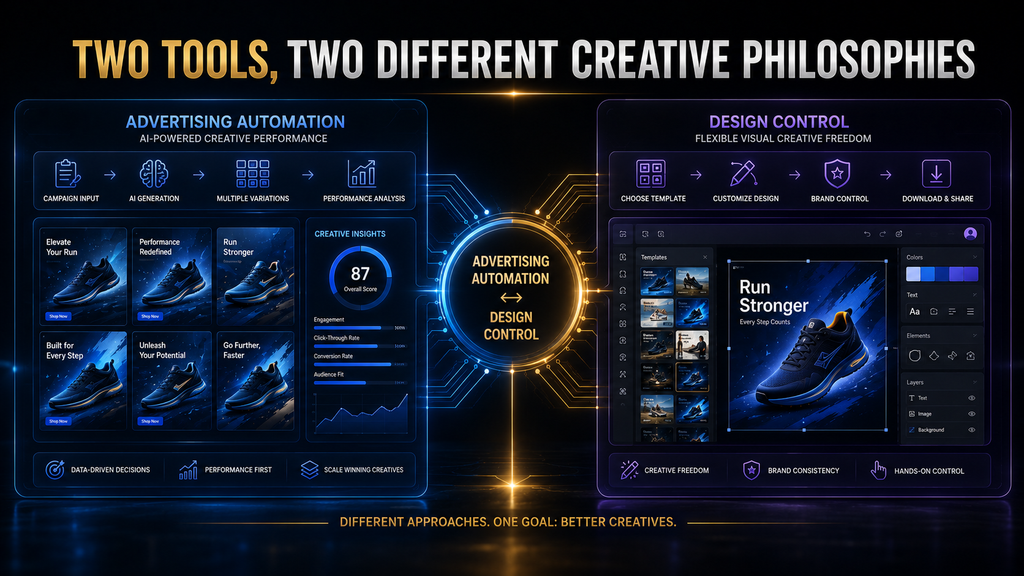
Canva is fundamentally a broad visual communication platform. It gives you a large design environment where you can create advertisements, social posts, presentations, videos, documents, brand assets, and many other formats while maintaining direct control over the design. Its current product also includes AI creation, resizing, writing, image generation, ad creation, brand management, and collaboration features.
AdCreative.ai takes a narrower and more performance-oriented approach. Its product is designed specifically around advertising creative production, with AI-generated ad creatives, ad copy, product imagery, creative scoring, competitor insights, custom templates, and workflows intended to increase the volume and speed of advertising production.
That difference matters more than the number of features either platform has. The better question is not simply “Which tool has more AI?” It is “Where is the bottleneck in your advertising workflow?” If your bottleneck is designing and controlling the creative, Canva may be the better fit. If your bottleneck is producing, evaluating, and iterating large numbers of advertising concepts, AdCreative.ai becomes much more compelling.
AdCreative.ai vs Canva: The Short Answer
For most people who need to design occasional advertisements, social media graphics, branded content, or marketing materials, Canva is the more versatile and economical starting point. Its broad design ecosystem, templates, brand controls, AI tools, collaboration capabilities, and large asset library make it useful far beyond advertising.
For marketers whose primary problem is advertising creative production at scale, AdCreative.ai is the more specialized choice. It is designed around generating advertising variations, producing ad copy and imagery, evaluating creatives with its scoring system, and helping teams move more quickly from campaign idea to multiple testable assets.
The important distinction is therefore control versus advertising-specific production velocity. Canva generally gives you more control over the overall design environment, while AdCreative.ai is designed to push the workflow toward advertising output, creative variation, and performance-oriented evaluation.
| Category | AdCreative.ai | Canva |
|---|---|---|
| Primary purpose | Advertising creative production | Broad visual communication and design |
| Best for | Paid-ad teams and performance marketers | Creators, marketers, businesses, and designers |
| Ad generation | Strong, specialized | Strong, but part of a broader platform |
| General design flexibility | Moderate | Excellent |
| Templates | Advertising-focused | Extremely broad |
| AI generation | Advertising-focused | Broad creative AI ecosystem |
| Creative scoring | Core capability | More focused on design/ad insights rather than the same specialized scoring workflow |
| Brand control | Strong | Very strong |
| Collaboration | Stronger for advertising workflows | Strong across many content types |
| Content beyond ads | Limited compared with Canva | Excellent |
| High-volume ad testing | Strong fit | Possible, but more manual |
| Ease for beginners | High | Very high |
| Best strategic role | Creative production and testing engine | Design and visual communication platform |
The table makes the distinction easier to see, but it still does not answer the most important question: which workflow are you actually trying to build?
The Real Difference: They Solve Different Problems
The biggest mistake in this comparison is treating AdCreative.ai and Canva as direct substitutes. They overlap at the point where a marketer needs an advertisement, but they approach the problem from different directions.
Canva starts with the idea that people need a flexible environment for creating visual communication. An advertisement is one output among many. You might design a Facebook ad in the morning, a presentation at lunch, a YouTube thumbnail in the afternoon, and a brochure later that day without leaving the platform. Canva’s current product positioning reflects that breadth, with design types, templates, premium assets, AI tools, brand management, collaboration, and business features all sitting inside the same ecosystem.
AdCreative.ai starts from a different assumption: advertising teams often need to create many advertising assets repeatedly, and the production process itself can become a bottleneck. Its product therefore puts advertising-specific generation, creative scoring, ad copy, product visuals, competitor insights, and campaign-oriented workflows much closer to the center of the experience.
That distinction becomes obvious when you imagine two marketers.
The first runs a small business and needs a Facebook promotion, Instagram post, email graphic, website banner, and a flyer for an upcoming event. That person benefits from having one flexible design platform that can handle everything and allow detailed editing. Canva makes considerable sense here because the advertising task is only one part of the overall creative workload.
The second marketer runs paid acquisition campaigns every week. They need dozens of creative variations, different hooks, multiple formats, product-focused visuals, alternative messaging, and a faster way to decide which concepts deserve testing. For that marketer, advertising-specific automation can have much greater economic value than having another general-purpose design feature.
The tools may therefore produce similar-looking outputs while creating very different value.
Before You Switch From AdCreative.ai, Test What It Can Actually Do
If you’re comparing alternatives because you’re unsure whether AdCreative.ai is worth using for your workflow, a short trial can give you a more useful answer than comparing feature lists alone.
Try AdCreative.ai FreeDisclosure: This is an affiliate link. We may earn a commission if you sign up through it, at no additional cost to you.
AdCreative.ai vs Canva for Ad Creation
If your only requirement is “Can this tool help me make an ad?”, both platforms can answer yes. The more useful question is what happens before and after the ad exists.
Canva’s ad workflow gives you extensive control over the design. You can select or generate visuals, change layouts, modify typography, adjust colors, position elements, add calls to action, resize the design, and adapt it for different uses. Canva’s advertising tools are integrated with its broader Magic Studio ecosystem, including features such as Magic Edit, Magic Eraser, Magic Grab, Magic Write, Dream Lab, and Magic Media.
That makes Canva particularly strong when the marketer already has a clear creative direction. Suppose you know exactly what the campaign should look like: a product photograph on the left, a specific headline in the upper-right corner, a branded background, a particular CTA treatment, and a strict visual hierarchy. Canva lets you translate that direction into a finished asset without forcing you into a narrow advertising workflow.
AdCreative.ai is more attractive when the question changes from “How should I design this ad?” to “How many useful versions of this advertising idea can I produce and evaluate?” Its platform is built around advertising creative generation and includes tools intended to help marketers generate conversion-focused creatives, copy, product imagery, videos, and other campaign assets.
That difference is subtle but strategically important.
A designer may think in terms of composition, hierarchy, typography, photography, and brand expression. A performance marketer often thinks in terms of hooks, offers, audience segments, creative angles, formats, testing velocity, CTR, conversion rate, and return on ad spend. AdCreative.ai is much closer to the second mental model.
Canva Wins When Creative Control Is the Bottleneck
Canva’s biggest advantage is not simply that it has a lot of templates. Its deeper advantage is that it gives users a relatively accessible environment for making detailed creative decisions without requiring traditional design software expertise.
That matters because advertising is not always about producing more variations. Sometimes the campaign requires a very specific visual identity, and increasing creative automation can actually make the workflow worse if the marketer loses control over important brand details.
Consider a luxury skincare company launching a new product. The campaign might require a specific product position, carefully controlled whitespace, particular typography, a consistent photography treatment, and precise color usage. The marketer may want AI assistance for ideation or image editing, but the final creative still needs human art direction. Canva’s editable environment is well suited to that kind of workflow.
The same applies to businesses that produce many kinds of content. If your team creates ads, social posts, presentations, lead magnets, newsletters, documents, event materials, thumbnails, and other visual assets, the value of Canva extends far beyond paid advertising. The platform’s current plans and feature ecosystem are explicitly designed around this broader visual communication use case.
This is why choosing AdCreative.ai simply because it is more advertising-specific can be a mistake. Specialization is valuable only when the problem being solved is important enough to justify specialization.
AdCreative.ai Wins When Creative Volume Is the Bottleneck
There is a point where manual creative production stops being primarily a design problem and becomes an operational problem.
Imagine a performance marketing team running campaigns across several products. Each product has multiple audiences, several messaging angles, different placements, and a constant need for fresh creative. Even if a designer can produce excellent ads, the organization may struggle because the number of requested variations keeps growing.
At that point, the question is no longer whether the designer can make one excellent advertisement. The question is whether the team can generate enough credible creative candidates to support the testing strategy.
This is where AdCreative.ai’s specialization becomes meaningful. Its current platform emphasizes generating ad creatives, ad copy, product imagery, videos, instant ads, competitor insights, and creative scoring within an advertising-oriented environment.
The economic value is therefore potentially larger for teams that already have enough advertising demand to consume the output.
That last qualification matters.
Do not buy creative-production software to create a workload you do not have.
If you are running two small campaigns a month and already have enough time to design the required assets, a specialized advertising platform may add subscription cost without solving a meaningful constraint. If your team is constantly waiting for creative variations, however, the same software could remove a genuine bottleneck.
The AI Difference Is More Important Than It First Appears
Both platforms use AI, but “AI-powered” does not mean the same thing in both products.
Canva’s AI capabilities are broad because they operate inside a broader creative platform. Canva’s current AI ecosystem includes image and video generation, writing assistance, editing, resizing, design generation, and other creative functions. Its Magic Design functionality, for example, can turn a prompt or uploaded media into a design starting point, while Magic Switch can transform content into different formats and languages.
This makes Canva’s AI useful across the entire creative process. It can help you move from an idea to a design, modify an existing design, generate content, and adapt the result to other channels.
AdCreative.ai’s AI is much more tightly connected to advertising outcomes and production workflows. Its feature set includes ad generation, ad copy generation, product photoshoots, product videos, competitor insights, and creative scoring.
That difference creates two distinct forms of leverage.
Canva’s AI reduces the friction involved in creating and editing visual communication.
AdCreative.ai’s AI aims to reduce the friction involved in producing and evaluating advertising creative.
Neither approach is inherently superior. They become superior under different operating conditions.
AdCreative.ai Creative Scoring vs Canva’s Design Intelligence
This is one of the most important differences in the comparison because it changes the role of the software.
AdCreative.ai offers a dedicated Creative Scoring AI system that evaluates advertising creatives using a large set of data points. According to AdCreative.ai’s documentation, the system evaluates creatives using more than 340 data points and a dataset of more than 450 million ads, producing Performance and Awareness scores and recommendations intended to improve the creative.
AdCreative.ai also explains that its scoring workflow can show attention heatmaps and recommended actions, allowing marketers to inspect where the system believes a creative may be stronger or weaker.
That can be valuable because it introduces a layer of evaluation before the marketer spends advertising money.
But there is an important reality check: a predicted creative score is not the same thing as actual campaign performance.
A scoring system can analyze characteristics of an image and compare them against patterns in historical data, but it cannot know with certainty how a particular creative will perform against your exact audience, offer, landing page, bid strategy, market conditions, competitor environment, and campaign setup.
That means the correct workflow is not:
AI score → winner → campaign
It is closer to:
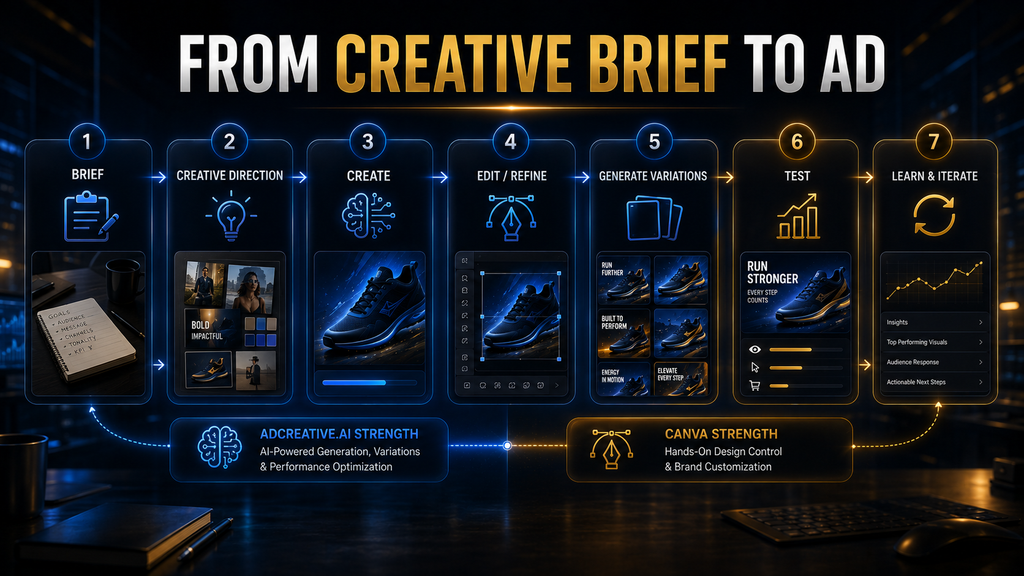
AI generation → human review → AI evaluation → controlled testing → real performance data → next creative decision
The distinction protects marketers from treating predictive analytics as an oracle.
Canva’s approach is different. Canva has increasingly incorporated advertising insights and AI-powered marketing capabilities into its business offering, but its broader strength remains the ability to create, modify, manage, and distribute visual content rather than functioning as a dedicated creative-prediction system.
For someone who wants design intelligence, Canva is compelling. For someone who specifically wants an advertising creative evaluation layer, AdCreative.ai has the more specialized proposition.
Which Tool Is Better for Brand Consistency?
This is much closer than the basic feature comparison suggests.
Canva has strong brand-management capabilities. Its current paid plans include Brand Kits, templates, approvals, collaboration, and business-oriented brand controls, with the Business and Enterprise tiers extending those capabilities further.
That makes Canva particularly useful for organizations where many people need to produce content while staying within a defined visual identity.
A marketing manager can create templates, establish brand assets, and give other team members an environment where they can create materials without rebuilding the visual system from scratch. That is a fundamentally important operational advantage.
AdCreative.ai also supports brands, custom templates, and advertising-specific workflows. Its pricing structure currently scales the number of brands and credits across tiers, which makes the platform more relevant to organizations managing multiple advertising operations.
The difference is that Canva treats brand consistency as a broad communication problem, while AdCreative.ai approaches it more from an advertising production perspective.
If your company needs every social post, sales presentation, internal document, event graphic, advertisement, and marketing asset to follow the same brand system, Canva has the stronger overall proposition.
If your agency manages multiple client brands and the primary requirement is producing advertising creative for those brands, AdCreative.ai’s specialized structure becomes more relevant.
Which Tool Is Better for Agencies?
Agencies should be especially careful here because client volume changes the economics of the decision.
A small creative agency may prefer Canva because it provides an extremely broad environment for producing client deliverables. One platform can support social media graphics, presentations, brand assets, proposals, campaign materials, video, documents, and advertising creative. Canva’s current Business and Enterprise ecosystem also emphasizes team management, permissions, brand control, collaboration, and integrations.
A performance marketing agency, however, may have a different requirement. If the agency’s commercial value comes from managing paid advertising campaigns and continuously generating new creative concepts for multiple clients, the specialized advertising workflow of AdCreative.ai can become much more attractive.
The important variable is not the word agency. It is the agency’s production model.
A branding agency that occasionally produces ads may find Canva more useful. A paid-social agency producing large numbers of campaign variations every week has a stronger reason to consider AdCreative.ai.
This distinction also prevents a common buying mistake: assuming that a tool designed for agencies is automatically the best tool for every agency.
AdCreative.ai vs Canva for E-Commerce
E-commerce is one of the strongest cases for evaluating AdCreative.ai because product advertising often requires large numbers of visual variations.
An e-commerce marketer may need multiple product angles, promotional messages, backgrounds, audience-specific concepts, product photos, social placements, and campaign formats. The challenge is not necessarily creating one beautiful product advertisement. It is maintaining enough creative diversity to support continuous testing.
AdCreative.ai’s product-focused features are designed for this environment. Its current platform includes product photoshoots, product videos, ad generation, ad copy, creative scoring, and instant-ad workflows, making the product catalog itself a potential starting point for creative production.
Canva is also highly capable for e-commerce, especially when the business needs to maintain a consistent visual identity across its broader marketing ecosystem. You can create product ads, social posts, banners, promotional graphics, email visuals, landing-page assets, and other content inside the same environment.
The decision comes down to what happens after the first creative is made.
If your e-commerce workflow is product → campaign graphic → publish, Canva may be sufficient.
If your workflow is product → many creative angles → multiple formats → evaluate → test → iterate → generate another batch, AdCreative.ai has a stronger strategic fit.
AdCreative.ai vs Canva for Small Businesses
For a small business, Canva will often be the safer first purchase.
The reason is simple: small businesses rarely have only one creative requirement. A restaurant may need menus, promotional posts, ads, event graphics, signage, presentations, and social content. A consultant may need LinkedIn graphics, lead magnets, presentations, website visuals, and advertisements. An online store may need product graphics, social posts, promotional banners, and paid ads.
Canva can cover all of those jobs inside one broad environment. Its current Free, Pro, Business, and Enterprise structure gives users different levels of assets, AI access, collaboration, brand management, and business functionality.
AdCreative.ai becomes more interesting when advertising itself is already a significant operating activity. If a small business is spending meaningful money on paid advertising and regularly needs new creative variations, the productivity gained from specialized advertising automation can potentially justify the additional cost.
This leads to a useful rule:
Small business does not automatically mean Canva, and advertising-heavy does not automatically mean AdCreative.ai. The correct choice depends on the workload.
AdCreative.ai vs Canva for Startups
Startups have a slightly different problem because their creative needs can change rapidly.
Early-stage teams often need to test positioning, audiences, landing pages, offers, social content, investor materials, product announcements, paid campaigns, and sales collateral without hiring a large creative department.
That makes Canva particularly attractive because it can act as a broad visual operating system for a small team. Canva itself positions Pro toward individuals and Business toward small businesses and growing teams, with Business adding higher AI access, brand management, collaboration, and advertising insights.
AdCreative.ai can become more valuable once the startup has moved from “Can we create this?” to “Can we produce and test enough versions of this?”
That transition is often a better buying signal than company size.
A five-person startup spending heavily on performance marketing may benefit more from AdCreative.ai than a 50-person company that produces very little paid advertising.
AdCreative.ai vs Canva for Social Media Advertising
Social media advertising is another area where the distinction between the platforms becomes important.
Canva is exceptionally strong when paid ads are part of a broader social content operation. You can create organic posts, carousels, stories, videos, thumbnails, ads, and other assets while maintaining visual consistency across the channel. Its AI features also make it easier to transform and repurpose content across formats.
AdCreative.ai is stronger when the social advertising workflow is highly performance-oriented. If you are continuously testing different hooks, product angles, messages, visual compositions, and formats, the platform’s advertising-specific generation and scoring capabilities become more relevant.
A useful way to think about the distinction is that Canva helps you create the social ecosystem, while AdCreative.ai is more focused on feeding the advertising machine.
That is not an absolute rule, but it is a useful starting point for evaluating the tools.
Which One Is Easier to Learn?
Both are accessible compared with traditional professional design software, but Canva has the advantage in general-purpose usability.
Canva’s interface has been designed around making visual communication accessible to people without extensive design training. The company’s own positioning emphasizes ease of use and tools designed for people who do not have complex design skills.
That broad simplicity matters because a new Canva user does not have to understand advertising theory to create something useful. They can start from a template, modify the content, apply branding, and export the result.
AdCreative.ai is also designed to be approachable, but its value becomes clearer when the user understands advertising concepts such as creative testing, audiences, campaign objectives, variations, CTR, conversion behavior, and performance analysis.
In other words, Canva is easier to understand as a design product; AdCreative.ai is easier to appreciate when you already think like a performance marketer.
Which Has Better Templates?
There is no universal winner because the platforms define the word template differently.
Canva’s template ecosystem is enormous and covers virtually every major visual communication format. Its current pricing page lists more than 1.6 million templates on the Free plan and more than 3.6 million on Pro and Business, alongside a very large library of photos, videos, graphics, and audio.
That breadth is a major advantage for creators and businesses.
AdCreative.ai’s template philosophy is more advertising-oriented. Its platform allows users to work with ready-made advertising templates as well as custom templates designed around their own workflow.
So if you mean “Which platform gives me the widest selection of designs for almost anything?”, Canva wins comfortably.
If you mean “Which platform is more focused on producing advertising creative inside an advertising workflow?”, AdCreative.ai has the more specialized proposition.
Which One Gives You More Creative Control?
Canva wins.
This is one area where there is little reason to overcomplicate the answer.
Canva allows the user to directly manipulate the design environment: layout, typography, imagery, spacing, colors, elements, backgrounds, positioning, and other visual details. Its advertising tools explicitly allow users to edit and move design elements, customize colors and add visual components before publishing the finished asset.
That level of control is valuable when the creative direction matters.
AdCreative.ai is not trying to eliminate human editing, but its strategic value comes from increasing the amount of useful creative work the system can perform before and around human review.
That means Canva is generally the stronger choice when the question is “How precisely can I control this design?”
AdCreative.ai is more compelling when the question is “How much advertising production can I accelerate?”
Which One Is Better for Creative Testing?
This is where AdCreative.ai has a meaningful advantage.
Creative testing requires more than producing different designs. You need meaningful variations in messaging, visual concepts, offers, audiences, formats, and sometimes product presentation. The objective is not to create variety for its own sake. The objective is to generate enough credible alternatives that real campaign data can reveal what deserves further investment.
AdCreative.ai’s product is built around this type of advertising workflow, with creative generation and Creative Scoring AI sitting close to the center of the experience. Its scoring system is specifically designed to provide predictive feedback before advertising spend occurs.
Canva can absolutely be used for creative testing. A marketer can create multiple versions, resize them, change messaging, export the assets, and run experiments. But more of the testing logic remains with the marketer.
That distinction matters when creative volume becomes large.
For a campaign with three concepts, Canva may be perfectly adequate. For an operation that continuously needs dozens or hundreds of creative candidates across campaigns, the specialized workflow of AdCreative.ai becomes considerably more interesting.
The Creative Volume Question
Here is the AI Hustle World way to think about this decision.
Do not ask how many features each platform has.
Ask how much creative volume your advertising operation needs.
A business producing five finished ads per month has a very different problem from an agency producing 500 variations across multiple clients. The latter can potentially justify specialized automation because every manual step becomes multiplied across the workflow.
This creates a simple relationship:
Creative demand × production frequency × number of variations = operational pressure
When that pressure is low, flexibility is usually more valuable.
When that pressure becomes high, specialized automation becomes more valuable.
That is why the correct answer can change as a business grows.
What About Pricing?
Pricing is one of the areas where the comparison needs careful interpretation because the two products are not structured around exactly the same value proposition.
Canva currently offers Free, Pro, Business, and Enterprise options, with pricing varying by market. Its UK pricing page, for example, currently lists Free at £0, Pro at £100 per year for one person, and Business at £180 per person per year, while Enterprise is custom-priced. The page also shows that the plans differ substantially in AI access, brand management, collaboration, storage, templates, and business functionality.
Canva Business is particularly important because Canva has changed its team-plan structure. New users can choose Canva Pro or Canva Business, while Canva Teams is no longer available for new sign-ups or upgrades. Canva describes Business as the option for individuals and small teams that need higher AI access, advanced brand management, collaboration, and advertising insights.
AdCreative.ai uses a more specialized credit-based structure. Its current published pricing shows a Starter tier at $39 per month for 10 credits, Professional at $249 per month for 50 credits, and Ultimate at $999 per month for 100 credits, with additional configurations and discounts depending on billing terms.
Those numbers immediately show why the two products should not be compared only on subscription price.
A $39 Canva subscription and a $39 AdCreative.ai subscription would not necessarily deliver comparable value because the underlying jobs are different. The correct question is what the subscription replaces: design software, stock assets, freelancer time, creative-production labor, advertising analysis, or some combination of those.
The Best Alternative Depends on What You Actually Need
If your priority is advertising-specific automation, creative testing, and performance-oriented workflows, AdCreative.ai remains worth evaluating before you move to a broader design or social-content platform.
Explore AdCreative.aiDisclosure: This is an affiliate link. We may earn a commission if you sign up through it, at no additional cost to you.
The Cost-per-Creative Trap
AdCreative.ai’s credit model deserves particular attention because the headline subscription price does not tell you the actual economics of your workflow.
The platform currently structures its plans around monthly creative credits, and the number of credits available increases with higher tiers.
That means you should calculate your expected usage before buying.
Suppose your advertising team needs ten finished assets per month. A 10-credit plan may look reasonable. But if your actual workflow requires multiple exported formats, additional variations, video assets, or repeated campaign iterations, the effective consumption can grow quickly.
The right calculation is therefore not:
“How much does the subscription cost?”
It is:
“How many finished campaign assets will this subscription realistically help us produce, evaluate, and deploy?”
That is the number that should determine ROI.
Canva has a different economic advantage because a single subscription can support a much broader range of creative work. If your team would otherwise need several tools for design, templates, stock assets, AI-assisted creation, resizing, and brand management, Canva’s broader ecosystem can create significant value even when only a portion of that value comes directly from paid advertising.
Which Tool Has the Better ROI?
There is no honest universal answer.
The better ROI comes from the platform that removes your most expensive bottleneck.
If your current problem is that employees spend hours manually designing ordinary marketing assets, Canva may produce excellent ROI because it gives them a flexible environment for creating many different types of content quickly.
If your current problem is that your paid media team cannot generate enough advertising concepts to test, AdCreative.ai may produce better ROI because it attacks the creative-production bottleneck directly.
The mistake is measuring ROI through software features rather than operational outcomes.
A better framework is:
| Question | If the answer is “yes” |
|---|---|
| Are designers spending too much time making basic assets? | Canva becomes more attractive |
| Do you need many types of marketing content? | Canva becomes more attractive |
| Is brand control the primary concern? | Canva becomes more attractive |
| Do you produce large numbers of paid-ad variations? | AdCreative.ai becomes more attractive |
| Is creative testing too slow? | AdCreative.ai becomes more attractive |
| Do you want advertising-specific creative scoring? | AdCreative.ai becomes more attractive |
| Do you manage multiple advertising brands? | AdCreative.ai becomes more attractive |
| Are paid ads a major source of revenue? | AdCreative.ai becomes more attractive |
| Do you rarely run paid campaigns? | Canva becomes more attractive |
| Do you need one tool for most visual work? | Canva becomes more attractive |
This is more useful than declaring one platform the winner because it has a longer feature list.
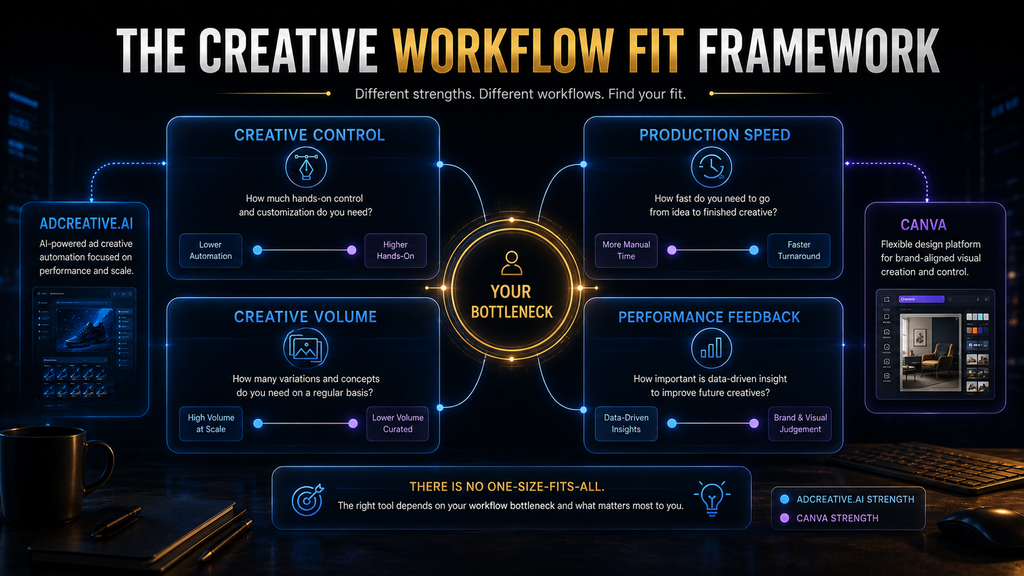
A Better Way to Decide: The Control vs Volume Framework
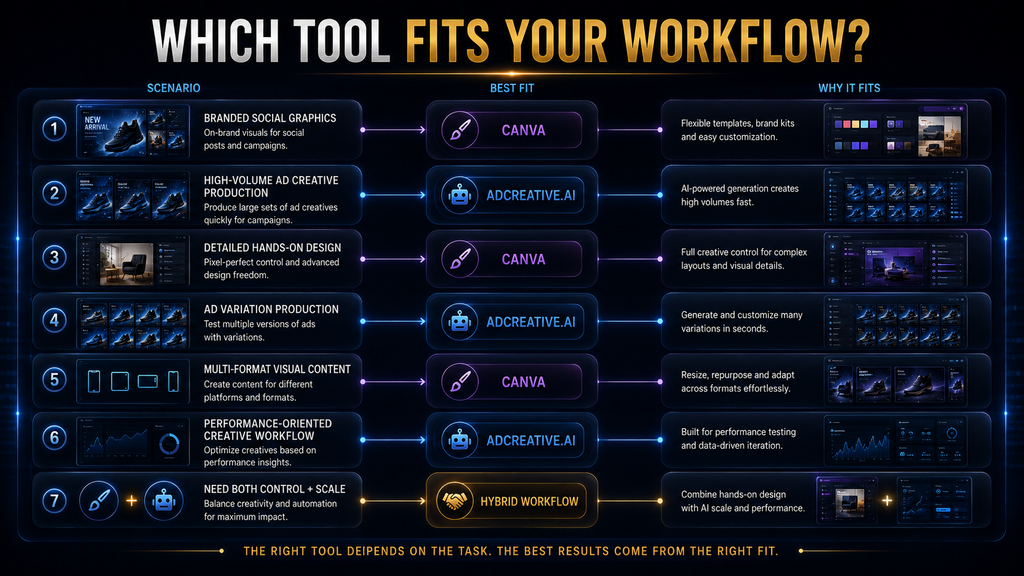
AI Hustle World’s recommendation is to classify your creative operation along two dimensions: control and volume.
Control asks how much human direction the creative process requires. A highly controlled workflow might involve strict brand rules, detailed art direction, carefully approved layouts, and a limited number of campaign concepts.
Volume asks how many creative assets the organization needs to generate, adapt, evaluate, and test over a given period.
That creates four practical operating environments.
| Creative operation | Better starting point |
|---|---|
| High control + low volume | Canva |
| High control + high volume | Canva + specialized automation where necessary |
| Low/moderate control + low volume | Canva |
| Performance-focused + high volume | AdCreative.ai |
The interesting category is high control + high volume.
That is where a combination can make sense.
A mature advertising operation does not necessarily need to choose one platform for every job. Canva can remain the environment for brand-controlled design and final refinement, while AdCreative.ai can be used to generate and evaluate a larger pool of advertising concepts.
The goal is not to own two subscriptions.
The goal is to avoid forcing one tool to solve two fundamentally different problems.
Should You Use AdCreative.ai and Canva Together?
For some teams, yes—but only when there is a genuine division of labor.
A sensible combined workflow might look like this:
Campaign strategy → AdCreative.ai generation → creative evaluation → human selection → Canva refinement → final approval → campaign testing
The advantage of this approach is that each platform is used where it is strongest.
AdCreative.ai can help increase the number of advertising concepts available for consideration, while Canva can provide the detailed editing environment needed to bring selected concepts into the brand’s final visual system. AdCreative.ai’s current platform supports creative generation and scoring, while Canva provides extensive design control, brand tools, and broader content creation capabilities.
But there is a major warning here.
Do not build a six-step workflow simply because two platforms can technically perform overlapping tasks.
If your team generates an ad in AdCreative.ai, downloads it, uploads it into Canva, completely rebuilds it, and then spends more time managing the handoff than it would have spent creating the asset directly, the combined workflow has failed.
The correct question is always: Does the second tool remove a bottleneck that the first tool cannot efficiently solve?
If the answer is no, the additional software is probably unnecessary.
Where AdCreative.ai Can Be Overkill
Specialized tools are powerful precisely because they solve specialized problems. That also means they can be unnecessary for people who do not have those problems.
If you are a freelancer who creates a few ads for clients each month, Canva may already give you everything you need. Paying for an advertising-specific platform can introduce another interface, another subscription, another workflow, and another place where assets need to be managed.
The same applies to a small business that has not yet established a meaningful advertising operation. If the company is still trying to determine its offer, audience, positioning, and basic campaign strategy, producing more creative variations is unlikely to be the highest-priority problem.
This is an important reality check because AI software can create the illusion that more creative production automatically means better marketing.
It does not.
If the offer is weak, the landing page is confusing, the audience is poorly defined, or the campaign objective is wrong, generating 50 more advertisements does not solve the underlying problem.
Where Canva Can Be Overkill
Canva can also be the wrong tool when the workflow has become heavily performance-oriented.
A performance marketing team may eventually find itself using Canva as a general-purpose design environment even though most of its work consists of repetitive advertising variations. The platform remains capable, but the team may spend unnecessary time manually producing versions that a specialized system could accelerate.
Imagine a paid-media team that needs new creative concepts every week across ten products. Each product requires multiple hooks, visual approaches, formats, and audience angles. The team may be capable of producing everything in Canva, but capability is not the same thing as efficiency.
At that scale, the cost of manual creative production can become more important than the subscription cost of specialized software.
That is the point where AdCreative.ai deserves serious consideration.
Who Should Choose Canva?
Canva is the stronger choice if your work extends beyond advertising and you want one flexible creative environment.
It is particularly well suited to creators, freelancers, small businesses, social media managers, brand teams, educators, marketers, and organizations that need to produce many kinds of visual communication. Canva’s current ecosystem includes templates, premium assets, AI tools, brand management, collaboration, advertising tools, and business features, which gives it unusually broad utility.
Choose Canva if your priorities look like these:
- You create many different types of visual content.
- You need strong manual design control.
- Brand consistency matters heavily.
- Your advertising volume is moderate.
- You want a tool that non-designers can learn quickly.
- You need presentations, social content, documents, ads, and other assets in one ecosystem.
- You want a lower-cost starting point before investing in specialized advertising software.
For most solo creators and small businesses, Canva is the more rational first purchase.
Who Should Choose AdCreative.ai?
AdCreative.ai makes more sense when advertising is a core operating function rather than an occasional marketing task.
The strongest candidates are performance marketers, e-commerce operators, paid-social teams, growth teams, advertising agencies, and organizations that continuously need new creative concepts and campaign variations. The platform’s current positioning and feature set are heavily centered on advertising generation, creative scoring, product imagery, ad copy, competitor insights, and scalable campaign production.
Choose AdCreative.ai if:
- Paid advertising represents meaningful revenue or acquisition spend.
- Your team needs creative variations regularly.
- Creative production is slowing campaign testing.
- You want advertising-specific creative scoring.
- You manage multiple advertising campaigns or brands.
- Your team spends substantial time generating ad concepts.
- You value testing velocity more than complete design flexibility.
- You already have a performance marketing workflow capable of using more creative output.
The strongest buying signal is not company size.
It is creative demand.
Who Should Avoid AdCreative.ai?
You should probably avoid AdCreative.ai for now if your advertising volume is low and your broader design requirements are high.
If you need one platform for ads, presentations, social content, documents, thumbnails, marketing materials, and brand assets, Canva’s broader ecosystem will likely provide more value per subscription. Canva’s current platform is deliberately designed to support these broader visual communication needs.
You should also avoid buying AdCreative.ai simply because you believe AI-generated ads will automatically improve campaign performance.
That is the wrong reason to buy it.
Buy it when your organization has a genuine production or evaluation bottleneck that the platform can reasonably address.
Who Should Avoid Canva?
Canva is less compelling as the primary system when your advertising operation has become highly specialized and creative volume is creating measurable operational friction.
If your team is already spending significant time generating variations manually, waiting for designers, and delaying campaign tests because creative production cannot keep pace, a general-purpose design platform may no longer be enough.
That does not mean Canva suddenly becomes a bad product.
It means your problem has changed.
A tool can remain excellent while becoming the wrong tool for a particular stage of an organization’s growth.
Common Mistakes When Choosing Between AdCreative.ai and Canva
Mistake 1: Choosing the Tool With More Features
Feature count is one of the least useful ways to compare modern AI software.
Both platforms have accumulated enough AI capabilities that a feature-by-feature comparison can easily become meaningless. What matters is whether those features reduce the specific friction inside your workflow.
A tool with 50 irrelevant features is less valuable than a tool with five features that solve your most expensive problem.
Mistake 2: Assuming AI Means Automatic Performance
This is particularly dangerous in advertising.
An AI-generated creative can be visually attractive and still fail because the message is wrong, the offer is weak, the audience is mismatched, or the landing page does not support the promise.
AdCreative.ai’s own Creative Scoring system is positioned as predictive assistance, not as a replacement for real advertising experimentation. Its scoring process evaluates creative characteristics and offers recommendations, but actual campaign data remains the final performance evidence.
Use AI to improve the quality and speed of decisions.
Do not use AI as an excuse to stop making decisions.
Mistake 3: Buying AdCreative.ai Before Having Enough Ad Demand
This is perhaps the most important purchasing mistake.
If your team only needs a few advertisements each month, the additional automation may not generate enough value to justify a specialized subscription.
The software becomes more economically interesting when the organization already has enough creative demand to consume the capacity.
Do not buy production capacity before you have production demand.
Mistake 4: Treating Canva as Only a Beginner Tool
Canva’s simplicity sometimes causes experienced marketers to underestimate it.
That is a mistake.
Its current platform includes sophisticated brand management, AI capabilities, collaboration, advertising features, business plans, integrations, and enterprise controls.
The fact that a beginner can use Canva easily does not mean advanced teams cannot build serious workflows around it.
Mistake 5: Building a Duplicate Workflow
Using two platforms is not automatically better than using one.
If AdCreative.ai generates an asset and Canva then becomes a second place where the entire design is recreated manually, you have not created an efficient workflow. You have created duplication.
A second tool should exist only when it performs a distinct function that produces enough value to justify the handoff.
A Practical 30-Minute Decision Test
If you are still uncertain, do not make the decision based on feature pages.
Run a small workflow test.
Choose one real advertising campaign and define three creative concepts. Use the same campaign brief, audience, offer, brand requirements, and output formats for both platforms.
Then measure five things.
1. Production time: How long did it take to reach usable creative?
2. Useful variation count: How many genuinely different concepts did you produce rather than superficial changes?
3. Editing effort: How much human work was required after generation?
4. Brand fit: How many outputs were good enough to enter your normal review process?
5. Testing readiness: How quickly could the assets move into an actual campaign experiment?
This is far more useful than asking which product has the better homepage.
You can even calculate a simple Creative Workflow Efficiency Score:
Creative Workflow Efficiency = Usable Creatives ÷ Total Production Hours
Then compare the result.
If Canva produces 12 usable creatives in six hours, your baseline is two usable creatives per hour.
If AdCreative.ai produces 25 usable candidates in three hours but requires additional editing, measure the final usable output after that editing. The point is not to reward AI for generating more images. The point is to determine whether the complete workflow produces more useful advertising work per unit of human effort.
The AI Hustle World Decision Matrix
| If your situation looks like this | Recommended choice |
|---|---|
| Solo creator making occasional ads | Canva |
| Small business with mixed marketing needs | Canva |
| Freelancer creating many content types | Canva |
| Brand team prioritizing strict creative control | Canva |
| Social media manager handling organic + paid content | Canva |
| E-commerce store producing frequent ad variations | AdCreative.ai |
| Performance marketing team | AdCreative.ai |
| Paid-social agency | AdCreative.ai |
| Multi-brand advertising operation | AdCreative.ai |
| Team focused on creative testing velocity | AdCreative.ai |
| Brand-controlled design + high-volume performance testing | Potentially both |
The word “potentially” matters in the final row. A two-tool stack should be justified by workflow economics, not by the belief that having more AI automatically makes a marketing team more sophisticated.
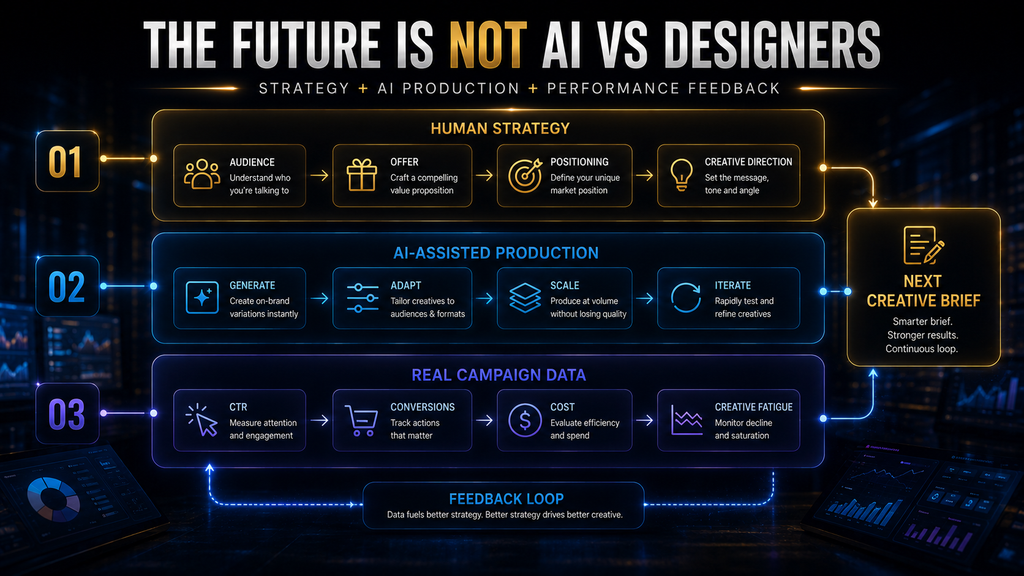
The Deeper Question: Control or Volume?
There is a broader lesson in this comparison.
Modern advertising teams are increasingly forced to balance two competing requirements: creative control and creative volume.
Brand teams often want fewer, more carefully controlled assets. Performance teams often want more variations because they need evidence about what works. Neither side is wrong.
The problem begins when an organization tries to optimize both requirements with a workflow designed primarily for one.
Canva generally pushes toward control, flexibility, and broad creative production. AdCreative.ai pushes toward advertising-specific generation, performance-oriented evaluation, and creative scale.
That is why this comparison should not end with “AdCreative.ai wins” or “Canva wins.”
The more useful conclusion is:
Choose the platform that matches your creative bottleneck, not the platform with the most impressive feature list.
If you need control, Canva is usually the better starting point.
If you need advertising volume and performance-oriented creative workflows, AdCreative.ai deserves the stronger consideration.
What Happens If You Do Nothing?
This is an overlooked part of the decision.
If your creative production process is already working efficiently, there may be no urgent reason to change anything. Software adoption has a cost beyond the subscription: onboarding, learning, migration, process redesign, asset management, team training, and the risk of introducing another operational dependency.
But if creative production is already slowing your advertising operation, doing nothing also has a cost.
Your team may launch fewer tests. Campaigns may rely on stale creative for longer. Designers may spend time on repetitive production rather than higher-value creative direction. Performance marketers may have fewer concepts to test, making it harder to learn what resonates with the audience.
That means the right question is not “Is AdCreative.ai worth $39, $249, or $999?”
The real question is:
“What is our current creative bottleneck costing us?”
If the answer is almost nothing, stay with the simpler workflow.
If the answer is substantial, specialized automation becomes easier to justify.
Final Verdict: AdCreative.ai vs Canva
For most people asking this question, Canva is the better general-purpose choice, while AdCreative.ai is the better specialized advertising choice.
Canva wins on flexibility, design control, breadth, brand management, and the ability to support a large range of marketing and visual communication tasks from one platform. Its current AI ecosystem makes it much more than a traditional template editor, while its Pro, Business, and Enterprise offerings give larger teams additional brand, collaboration, AI, and advertising capabilities.
AdCreative.ai wins when advertising itself becomes the operational bottleneck. Its specialization in ad generation, creative scoring, advertising copy, product imagery, competitor insights, and scalable creative production makes it better suited to performance marketers who need more advertising output and faster creative iteration.
For a solo creator, freelancer, small business, general marketer, or brand-focused team, start with Canva.
For a performance marketing team, e-commerce operation, paid-social agency, or high-volume advertiser, AdCreative.ai is more likely to justify its specialized role.
For a mature team that needs both high creative control and high advertising volume, using the two together can make sense—but only if each platform owns a distinct part of the workflow.
The strongest decision is therefore not about which product is “better.”
It is about identifying whether your business needs more control over every creative or more capacity to generate and evaluate many creatives.
And if you are still unsure, run the same campaign through both platforms and measure usable output, human editing time, creative quality, testing readiness, and total workflow cost. The winner for your business should emerge from that evidence rather than from a feature checklist.
Still Not Sure Which Direction to Take?
If you want advertising-specific AI rather than a general-purpose design tool, testing AdCreative.ai directly is the fastest way to determine whether its workflow fits your creative operation.
Start the Free TrialDisclosure: This is an affiliate link. We may earn a commission if you sign up through it, at no additional cost to you.
Frequently Asked Questions
Is AdCreative.ai better than Canva for ads?
AdCreative.ai is generally better suited to advertising teams that need high creative volume, advertising-specific generation, and predictive creative evaluation. Canva is usually better when advertising is one part of a broader design workflow and the marketer needs extensive control over the final creative.
Can Canva replace AdCreative.ai?
For many small businesses and creators, yes. Canva can produce advertisements, use AI to assist with creative generation and editing, manage brand assets, resize content, and support broader marketing workflows. The reason to move to AdCreative.ai is not that Canva cannot make ads; it is that specialized advertising workflows may become more valuable when creative volume and testing speed become major constraints.
Can AdCreative.ai replace Canva?
For some advertising-focused teams, it can reduce the need for Canva, but it is not a direct replacement for everything Canva does. Canva covers a much broader range of visual communication, including presentations, social content, documents, brand assets, and many other formats.
Does AdCreative.ai actually predict ad performance?
AdCreative.ai provides predictive Creative Scoring AI that evaluates creatives using a large dataset and multiple data points, producing Performance and Awareness scores and recommendations. However, those scores should be treated as decision-support signals rather than guarantees of real campaign performance; actual testing remains necessary.
Is Canva good for Facebook and Instagram ads?
Yes. Canva provides advertising creation tools, editable design elements, AI-assisted creative features, and formats suitable for social advertising. Its broader ecosystem also makes it useful when the same campaign needs organic social posts, videos, graphics, and other marketing assets.
Is AdCreative.ai good for e-commerce?
It can be particularly useful for e-commerce operations that need frequent product-focused creative variations. Its current feature set includes product photoshoots, product videos, ad generation, copy generation, instant ads, and creative scoring, all of which align closely with the needs of high-volume product advertising.
Which is cheaper, AdCreative.ai or Canva?
Canva generally has a lower-cost entry point and offers a broad free plan, while AdCreative.ai’s specialized plans start at a higher price and are structured around advertising credits. Current AdCreative.ai pricing lists Starter at $39 per month, while Canva’s pricing varies by market and plan.
Should I use AdCreative.ai and Canva together?
You can, particularly if you want AdCreative.ai for advertising ideation and evaluation and Canva for detailed brand-controlled editing. But the combination is only worthwhile when the two platforms perform genuinely different jobs; otherwise, the extra handoff can create more complexity than value.
Which is better for a beginner?
For most beginners, Canva is the easier starting point because it supports a much broader range of creative work and does not require the user to build a specialized advertising workflow first. AdCreative.ai becomes more compelling when the beginner is already focused specifically on paid advertising and needs to scale creative production.
Which one should a small business buy first?
For most small businesses, Canva is the safer first purchase because it can support advertising alongside many other marketing and communication needs. Consider AdCreative.ai when paid advertising becomes frequent enough that creative production and testing speed are creating a measurable bottleneck.
Final Thoughts
The easiest mistake in this comparison is asking which platform has better AI. That question sounds modern, but it leads to a surprisingly old-fashioned buying decision: comparing feature lists instead of evaluating the work the software is supposed to accomplish.
Canva is powerful because it gives a business control over a broad visual communication system. AdCreative.ai is powerful because it concentrates that intelligence around advertising production and performance-oriented creative workflows. The right choice depends on which of those problems is actually costing your team time, money, or missed opportunities.
If your bottleneck is design control, choose Canva. If your bottleneck is advertising creative volume and iteration, choose AdCreative.ai. If you have both problems, build a workflow where each tool does the job it is actually good at.
That is the decision that matters—not which logo looks better on a comparison chart.
Written by
Muntasir Ahmad Chowdhury
Founder, AI Hustle World
Muntasir Ahmad Chowdhury is the Founder of AI Hustle World, an independent publication dedicated to making Artificial Intelligence practical, trustworthy, and easy to understand. He researches AI tools, automation, customer service, productivity, and real-world business applications, helping readers make smarter technology decisions through research-driven, experience-backed content.
Expertise:
AI Tools • AI Automation • AI Customer Service • AI Productivity • Generative AI • AI Workflows
Get Smarter With AI
Enjoyed this guide? Get practical AI tools, tutorials, and honest reviews delivered to your inbox.
2 thoughts on “AdCreative.ai vs Canva: Which One Should You Use for Ad Creatives?”