Evidence: Documentation reviewed
Last checked: September 2026
What was done: Written from official documentation and the published sources linked in this article. Not hands-on tested.
Files: None
Affiliate links: No
Last updated: September 2026. This update replaces fragmented recommendations with a source-backed comparison, current product and pricing checks, a transparent selection methodology, clearer limitations, and the AI Hustle World Small-Business AI Stack Fit Matrix.
The best AI tool for a small business is not necessarily the most capable model or the platform with the longest feature list. It is the product that removes a recurring bottleneck without creating more setup, oversight, subscription overlap, or operational risk than the problem is worth.
That distinction matters because adoption has already moved beyond experimentation. The SBE Council’s March 2026 Small Business Technology Use Survey reported that 82% of surveyed small-business employers had invested in at least one AI tool, while the typical adopter used five. The same study reported median weekly savings of five owner hours and 11.5 employee hours, but those results describe surveyed adopters rather than a guaranteed outcome for every company.
Five well-assigned tools can form a coherent operating stack. Five overlapping assistants can also produce duplicated costs, scattered information, inconsistent outputs, and another layer of work for an already stretched owner. This guide therefore compares tools by the business job they should own, the system they need to connect with, the way their costs scale, and the level of human review their outputs require.
Quick Answer: The Best AI Tools for Small Businesses
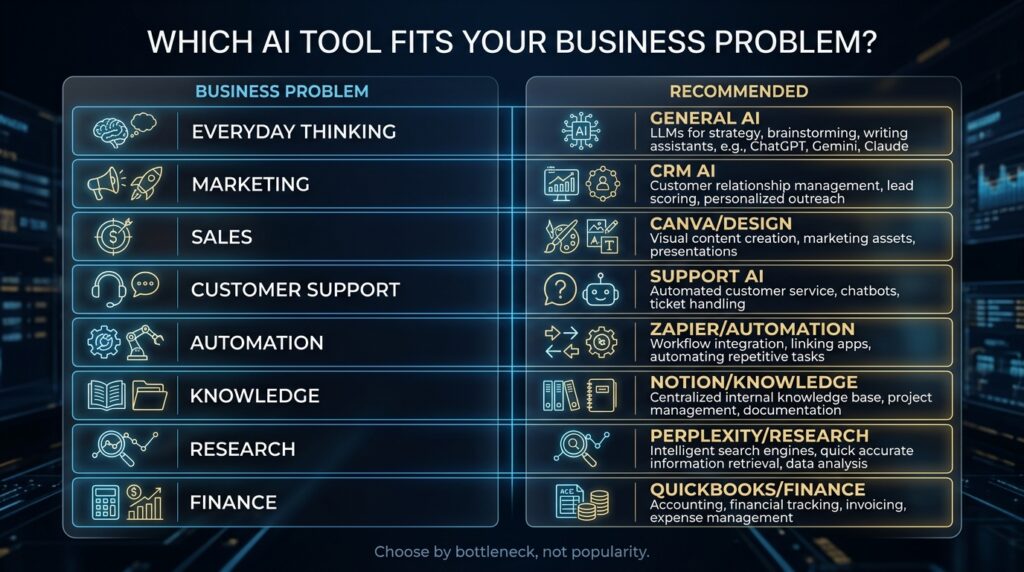
For most small businesses, ChatGPT is the strongest general-purpose starting point, while specialist platforms become more valuable when they sit inside a high-volume workflow. Canva is the practical choice for recurring visual production, HubSpot Breeze for CRM-centered sales and service, Zapier for cross-app automation, Notion for company knowledge, Perplexity for source-led research, QuickBooks for accounting operations, and Intercom Fin for businesses with enough support volume to justify an AI service layer.
| Business need | Strong starting tool | Best reason to choose it | Main reason to avoid it |
|---|---|---|---|
| General business work | ChatGPT | Broad coverage across analysis, writing, research, files and planning | A specialist system may be better for structured operational records |
| Long documents and analysis | Claude | Useful for document-heavy reasoning and extended written work | Can duplicate an existing general assistant |
| Google-centered work | Gemini | Works close to Gmail, Docs, Drive, Meet and other Workspace tools | Less differentiated outside the Google ecosystem |
| Visual marketing | Canva | Combines templates, brand controls and AI-assisted production | Polished design cannot repair weak positioning or copy |
| CRM, sales and service | HubSpot Breeze | Uses customer and pipeline context already held in HubSpot | Platform and usage costs can exceed the needs of a simple business |
| Workflow automation | Zapier | Connects repetitive work across thousands of applications | Poorly designed automations multiply errors and usage costs |
| Knowledge and projects | Notion AI | Places AI beside documented processes, notes and projects | Weak documentation produces weak answers |
| Current research | Perplexity | Makes sources visible during research and comparison | Citations still require opening and verifying the source |
| Accounting operations | QuickBooks | Applies AI inside an established financial system | Tax, payroll and compliance decisions still need qualified review |
| High-volume support | Intercom Fin | Handles support outcomes inside a service workflow | Low ticket volume may not justify the platform and implementation effort |
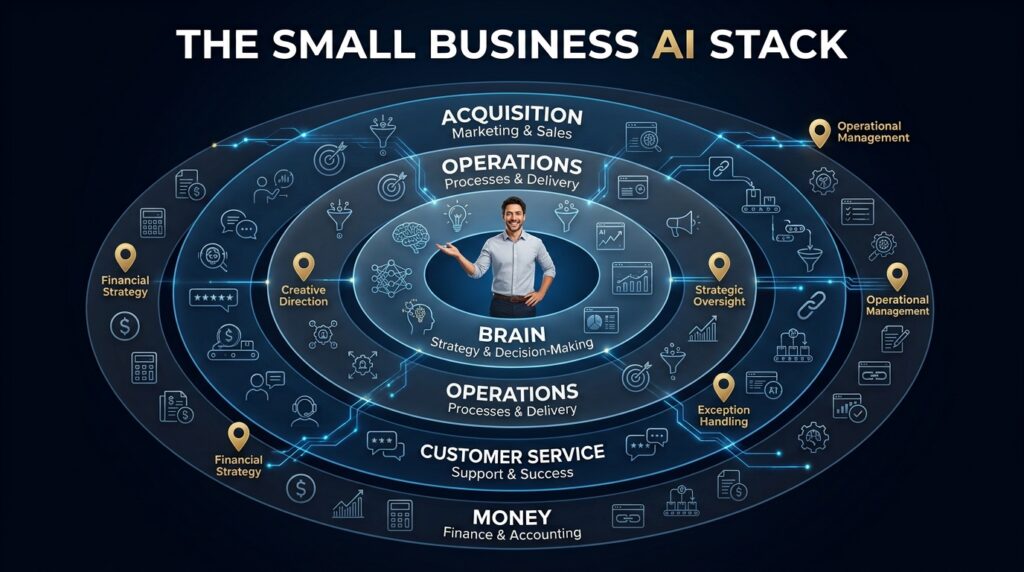
This is a role-based shortlist, not a claim that every company should buy ten subscriptions. A solo consultant may need one general assistant and one design or knowledge tool. A local service business may create more value with a CRM and automation layer, while an ecommerce company may prioritize support, product content, and finance.
The AI Hustle World Small-Business AI Stack Fit Matrix
The Small-Business AI Stack Fit Matrix is this article’s original contribution. It translates vendor documentation into five operational questions a buyer can verify: what job the tool should own, where its useful context comes from, how costs scale, how much human review is needed, and what business signal justifies adoption.
Methodology: AI Hustle World reviewed official product, pricing, billing, and help documentation available on September 23, 2026. We mapped each platform to a distinct small-business workflow and separated documented product facts from our editorial interpretation. We did not run a controlled hands-on benchmark for this update, so the matrix does not assign performance scores or claim measured time savings.
| Tool | Job it should own | Useful context it needs | How cost tends to scale | Oversight level | Adoption trigger |
|---|---|---|---|---|---|
| ChatGPT | General analysis and creation | Files, instructions and connected business sources | Per user or workspace plan | Medium; higher for consequential claims | Several teams repeatedly need flexible AI assistance |
| Claude | Document-heavy reasoning | Reports, contracts, briefs and long source material | Per user plan and usage limits | Medium to high | Long-document work is frequent enough to justify a second assistant |
| Gemini | Google Workspace assistance | Gmail, Drive, Docs, Meet and Calendar | Workspace edition and seat count | Medium | Most daily work already happens inside Google Workspace |
| Canva | Visual content production | Brand kit, templates, campaign assets and approvals | Subscription, seats and AI allowance | Low to medium | The business produces branded visuals every week |
| HubSpot Breeze | CRM-based acquisition and service | Contacts, pipeline stages, interactions and knowledge | Platform tier plus credits or outcomes | High for external communication | Lead or service volume makes manual handling a measurable bottleneck |
| Zapier | Cross-app process automation | Defined triggers, fields, rules and exception paths | Plan, tasks and model-tier consumption | High during setup; medium after stabilization | Staff repeatedly copy data or trigger the same handoff between apps |
| Notion AI | Knowledge retrieval and workspace assistance | Maintained pages, projects, meeting notes and SOPs | Business plan, seats and some credit-based features | Medium | Employees lose time searching for internal information |
| Perplexity | Source-led external research | Current web sources, files and connected repositories | Individual or enterprise subscription | High for important decisions | Market and competitor research is a recurring part of decisions |
| QuickBooks | Accounting administration | Transactions, invoices, expenses and accounting records | Regional accounting plan and add-ons | High | Financial administration consumes recurring owner or bookkeeper time |
| Intercom Fin | Customer-service outcomes | Help content, conversation history, policies and integrations | Platform access plus outcome-based usage | High for exceptions | Repetitive ticket volume is large enough to measure resolution economics |
The matrix exposes a pattern that ordinary feature comparisons often miss: specialist AI becomes valuable when it has access to the system of record. CRM AI can use customer history, accounting AI can work beside financial records, and workspace AI can retrieve documented processes. A standalone chatbot may be more flexible, but flexibility is not the same as operational context.
How We Selected the Tools
A useful small-business comparison should not rank products by the number of AI features they advertise. We included tools that can own a recognizable business job, have current first-party documentation, and offer a credible path from individual use to a repeatable workflow. We also looked for products that reduce app-switching by operating inside an established workspace, CRM, accounting system, or support desk.
We evaluated fit across six decision factors: frequency of the task, economic pain, integration with existing systems, total operating cost, consequence of an error, and the burden of maintaining the workflow. This is a selection framework rather than a laboratory benchmark. A tool can be excellent and still be the wrong purchase when the underlying task is rare, poorly defined, or too risky to automate.
Price is treated as a changing input rather than a permanent fact. Vendors increasingly combine seat fees, platform tiers, credits, tasks, model consumption, and outcome-based charges, so buyers should verify the linked official pages before purchasing. The more useful comparison is how the bill grows when employees, workflow runs, AI steps, customer conversations, or data volume increase.
1. ChatGPT: Best General AI Tool for Small Businesses
Best for: Owners and small teams that need one flexible system for analysis, drafting, research, files, planning, and everyday problem-solving. ChatGPT is the most defensible first purchase when the business has several modest AI use cases but not enough volume to justify a specialist platform for each one.
The operational advantage is coverage. A consultant can turn notes into a proposal, compare options in a spreadsheet, create a client briefing, and draft follow-up messages without moving through four separate AI subscriptions. OpenAI’s official business pricing page lists ChatGPT Business at $20 per user per month when billed annually and $25 when billed monthly, with a minimum of two users and no training on business data by default.
The limitation is that a general assistant does not automatically become a CRM, accounting ledger, support desk, or governed automation system. It can reason about data you provide, but the company still needs rules for source quality, permissions, review, and record keeping. Businesses deciding among the major general assistants should use our deeper ChatGPT vs Claude vs Gemini comparison instead of paying for all three by default.
2. Claude: Best for Long Documents and Nuanced Analysis
Best for: Consultancies, professional-service firms, researchers, and managers who regularly work with lengthy source material. Claude earns a place in a small-business stack when extended documents are a real workflow, not simply because the team wants a second chatbot.
Its strongest use cases include synthesizing reports, restructuring a strategy document, comparing policies, reviewing large briefs, and developing long-form written work from supplied evidence. Anthropic publishes current consumer, team, enterprise, and API options on its official pricing page, while regional prices and plan availability can vary.
The buying question is incremental value. If the business already completes its document work effectively in ChatGPT or Gemini, adding Claude may create another inbox, another billing relationship, and another place where confidential material can be uploaded. The purchase makes sense when the team can identify a recurring document workflow that the existing tool handles poorly or inefficiently.
3. Gemini: Best for Google Workspace Businesses
Best for: Companies whose email, documents, meetings, calendars, and files already live in Google Workspace. Gemini’s most important advantage for these businesses is not an abstract model ranking; it is the reduction of manual movement between the assistant and the systems where work already happens.
Google states that Workspace plans include access to the Gemini app and Gemini features across products such as Gmail, Docs, and Meet, although capabilities and usage levels depend on the edition. The current Google Workspace with Gemini documentation is the right place to confirm what is included before choosing a plan.
Integration only creates value when the underlying information is organized and access is appropriate. A cluttered Drive, inconsistent naming system, or overly broad permissions can weaken retrieval and increase risk. Gemini is therefore a strong ecosystem choice, but it is not a substitute for basic information governance.
4. Canva: Best for Visual Marketing Production
Best for: Small businesses that regularly need social graphics, presentations, flyers, lead magnets, short videos, simple ads, and other branded assets. Canva is practical because it combines templates, editing, stock assets, brand controls, scheduling, and AI-assisted creation inside one production environment.
Canva’s official plans and pricing page currently distinguishes Free, Pro, Business, and Enterprise access, with different AI allowances and brand-management features. As checked on September 23, 2026, Canva Business was listed at US$250 per person per year, while regional pricing, taxes, and promotional terms may differ.
The platform reduces production friction, but it does not create a sound marketing strategy. A polished graphic cannot repair a weak offer, unclear audience, or unsupported claim. Businesses should buy Canva for recurring production and brand consistency, then judge the result by campaign performance rather than the number of assets generated.
5. HubSpot Breeze: Best for CRM-Centered Sales and Service
Best for: Businesses that already need a serious CRM and have enough lead or customer volume to make automation measurable. Breeze becomes useful because it can work with contact records, pipeline stages, interactions, and knowledge inside HubSpot rather than operating as a detached writing assistant.
HubSpot’s official Prospecting Agent page says the agent can research qualified leads, monitor buying signals, enrich contacts, and prepare outreach. It also documents outcome-oriented pricing of $1 for each lead the agent recommends for outreach, while availability, included credits, and base subscription requirements vary by HubSpot edition.
This is not the right starting point for a business that has only a few leads and no repeatable sales process. CRM AI magnifies the quality of the data and workflow beneath it; incomplete records and undefined stages do not become reliable merely because an agent can act on them. HubSpot should be evaluated as a customer platform with AI capabilities, not as a cheap chatbot subscription.
6. Zapier: Best for Connecting Repetitive Work Across Apps
Best for: Businesses where employees repeatedly copy information, create the same records, send predictable notifications, or hand work from one application to another. Zapier creates value when the process is stable enough to define as a trigger, a set of conditions, one or more actions, and an exception path.
Zapier says its platform connects more than 9,000 applications, and its official pricing page scales plans partly around task volume. Buyers should also note that AI steps can have model-based task consumption: Zapier’s June 2026 billing update explains that the selected model tier determines how many tasks an AI by Zapier step uses per run.
The common mistake is automating a process before deciding what a correct result looks like. A workflow that sends the wrong field, duplicates records, or continues after an exception can create errors faster than a person can discover them. Use the broader AI workflow automation tools comparison when your requirements include more complex governance, agents, or alternative automation platforms.
7. Notion AI: Best for Internal Knowledge and Project Context
Best for: Teams that already use Notion for projects, meeting notes, operating procedures, client information, and company knowledge. AI inside a maintained workspace can answer process questions, summarize project context, draft from internal information, and reduce the time employees spend searching across pages.
Notion’s official AI product page states that core features such as Notion Agent, AI Meeting Notes, and Enterprise Search are included with Business and Enterprise plans, while some custom-agent usage is credit based. That packaging matters because the economic unit is not only the AI response; it is the workspace, the seats, and the quality of the knowledge maintained inside it.
Notion AI cannot retrieve a reliable onboarding process that was never documented or reconcile five contradictory versions of a policy without human ownership. The right implementation starts by identifying authoritative pages, assigning maintainers, and archiving outdated material. The AI layer becomes valuable after the knowledge system is trustworthy enough to support it.
8. Perplexity: Best for Current, Source-Led Research
Best for: Owners and teams that repeatedly compare markets, competitors, products, regulations, or current developments before making a decision. Perplexity is useful because source discovery and citations are central to the research workflow rather than an optional addition to a general conversation.
The current Perplexity pricing page separates free, individual, and enterprise access and lists differences in research depth, model access, connectors, and usage. Those details can change, so a buyer should compare the current plan against the number of researchers, required data connections, and sensitivity of the material being queried.
Visible citations improve traceability, but they do not make every answer correct. A cited passage may be outdated, misinterpreted, or taken from a weak source. For pricing, law, policy, financial information, and other consequential facts, the responsible workflow remains question, source discovery, primary-source verification, comparison, and human decision.
9. QuickBooks: Best for AI Inside Accounting Operations
Best for: Businesses that need an established accounting system and want automation or assistance close to transactions, invoices, bills, expenses, and financial workflows. The value comes from applying AI inside the system that already holds the financial record rather than exporting sensitive information to an unrelated assistant.
Intuit’s official QuickBooks AI page describes accounting automation, anomaly suggestions, drafted messages and documents, and workflows designed for review and approval. Product names, features, and prices vary by region, making the local QuickBooks product page more reliable than a universal price quoted in a comparison article.
Accounting is a high-consequence domain, so assistance must not be confused with professional accountability. A business owner or qualified accountant still needs to review tax treatment, payroll, compliance, reconciliations, and material financial decisions. Our guide to AI in finance and accounting explains where automation is useful and where control should remain human.
10. Intercom Fin: Best for High-Volume Customer Support
Best for: Businesses with enough repetitive customer conversations to measure containment, resolution, escalation quality, response time, and cost per successful outcome. Intercom Fin is a stronger candidate than a generic website chatbot when support is already an operating function with maintained help content and defined escalation paths.
Intercom’s Fin outcome documentation explains that billing and performance are tied to defined outcomes rather than raw message count alone. The platform can also operate with Intercom or supported external help desks, but actual cost depends on the chosen plan, seats, outcome volume, channels, and implementation needs.
Support automation carries reputational risk because the customer directly experiences the failure. The business needs clear source content, refusal boundaries, handoff rules, transcript review, and a process for correcting wrong answers. Compare Intercom with other options in our best AI customer service tools guide before committing to a help-desk architecture.
The Ten Tools Are Not Ten Subscriptions
The list covers ten business roles because small businesses have different operating models, not because a single company should purchase every product. A healthy stack gives each tool a clear job and avoids paying several products to perform the same general task. The first assistant should establish broad coverage; specialist tools should enter only when workflow volume, context, or control requirements justify them.
| Business type | Practical starting stack | First specialist trigger |
|---|---|---|
| Solo consultant | One general assistant + knowledge or design tool | Repeated proposals, research, or client-content production |
| Local service business | General assistant + CRM | Lead follow-up or appointment handoffs consume weekly time |
| Ecommerce business | General assistant + visual production + support | Product-content or customer-question volume becomes measurable |
| Small agency | General assistant + CRM + automation + knowledge system | Client delivery contains repeatable handoffs across several apps |
| Professional services | General assistant + research + workspace | Long documents, policy research, or knowledge retrieval dominate work |
| Small SaaS company | General assistant + CRM + support AI | Ticket volume and product knowledge support reliable automation |
A company should be able to explain the ownership rule in one sentence: ChatGPT handles flexible analysis, HubSpot owns customer records, Zapier moves approved data, Notion holds internal procedures, and QuickBooks remains the financial system of record. If two products have the same job and neither has a unique integration advantage, the stack probably contains avoidable overlap.
How to Decide Whether an AI Tool Is Worth Paying For
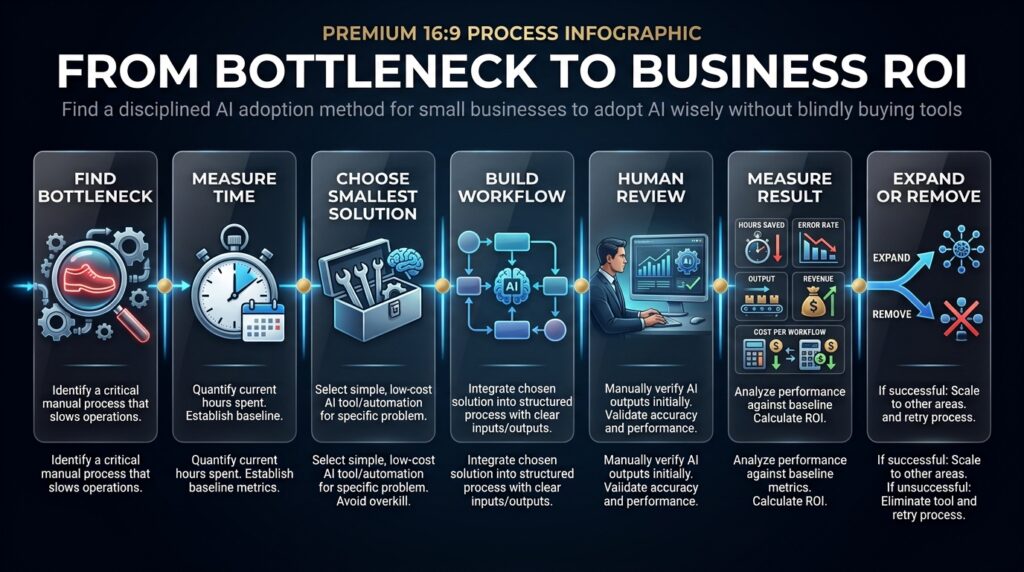
Start with the workflow, not the product. Define the task, the people involved, the current time or cost, the information required, the acceptable error rate, and the point where a human must approve the result. This converts a vague interest in AI into a business problem that can be measured.
Then calculate total operating cost rather than comparing subscription prices alone. The relevant cost includes the plan, additional seats, usage or credits, setup, integration, training, review, error correction, and the cost of switching later. A $20 tool that requires several hours of weekly cleanup can be more expensive than a $100 platform that removes a complete process.
Finally, define the adoption threshold before starting the trial. Examples include reducing proposal preparation from three hours to one, cutting repetitive ticket handling by 30%, eliminating a weekly data-entry handoff, or decreasing revision rates without weakening quality. These are targets to test, not promises that the tool will achieve them.
A Simple ROI Model for Small-Business AI
A useful monthly model is: net workflow value = verified time value + verified revenue contribution + avoided error cost − total operating cost. Time value should use the cost of the person whose capacity is actually released, while revenue contribution should include only results that can be reasonably connected to the workflow.
Consider an illustrative example in which an automation costs $60 per month and saves four verified hours of administrative work valued at $25 per hour. The gross time value is $100, leaving $40 before setup, review, and error costs. If maintaining the workflow requires two hours per month, the apparent return disappears; this is why time saved must be measured after oversight rather than inferred from the number of automated runs.
Revenue claims require even more discipline. Faster lead responses may contribute to additional sales, but a business should not credit the entire sale to the AI tool when pricing, demand, salesperson performance, or seasonality also influenced the result. A conservative model is more useful than an inflated ROI figure that cannot guide the next purchase.
When Embedded AI Beats a Standalone Assistant
Embedded AI tends to win when the task depends on structured context already held in a business system. HubSpot has customer and pipeline history, QuickBooks has financial records, Notion has internal knowledge, and Google Workspace has email, files, meetings, and documents. Keeping the AI close to the system of record can reduce copying, improve continuity, and make permissions easier to manage.
A standalone assistant wins when the work crosses several domains or requires flexible reasoning beyond one application. It may be the better place to compare alternatives, develop a strategy, analyze an uploaded file, or create a draft that will later enter an operating system. Many effective stacks therefore use one general reasoning layer and a small number of embedded specialist layers.
The boundary is accountability. The CRM remains the source for customer status, the accounting platform remains the source for financial records, and the approved knowledge base remains the source for policy. AI can retrieve, summarize, draft, and recommend, but the business must decide which system owns the final truth.
A 30-Day Adoption Plan That Limits Risk
Week 1: Measure the Existing Workflow
Track one recurring task for a week before selecting a product. Record volume, handling time, common inputs, review time, errors, exceptions, and the business outcome. Without a baseline, the team cannot distinguish real improvement from the novelty of using a new tool.
Week 2: Test the Smallest Useful Configuration
Choose the lowest-risk plan or trial that can address the measured bottleneck. Use representative inputs, including difficult cases, and document where the system fails. Do not connect sensitive data, publish external communications, or automate consequential actions until permissions and review rules are clear.
Week 3: Define Human Review and Exceptions
Write the workflow as input, AI action, validation, human approval, output, and exception handling. Decide what the AI may complete independently, what requires a sample review, and what always needs a person. Our AI risk management framework for small and mid-sized businesses provides a deeper control model for sensitive use cases.
Week 4: Compare Results and Make a Stop Decision
Measure total time, review effort, error rate, output quality, operating cost, and the intended business result against the baseline. Keep the tool only if the workflow improved enough to justify its ongoing cost and maintenance. A disciplined cancellation decision is part of successful adoption, not evidence that the experiment failed.
Common Mistakes That Destroy AI ROI
Buying before measuring is the first mistake. A product demonstration can make a capability feel valuable even when the business performs that task only twice a month. Frequency and consequence determine economic value more reliably than feature novelty.
Stacking overlapping assistants creates a second problem. ChatGPT, Claude, Gemini, and Perplexity all have legitimate strengths, but subscribing to each without assigned roles fragments prompts, files, history, and employee habits. Add another assistant only when it owns a defined workflow that the current stack cannot handle well.
Automating a broken process multiplies inconsistency. If employees disagree about the correct pipeline stage, return policy, or approval rule, an AI workflow cannot resolve the operating model on its own. Standardize the decision first, then automate the stable portion.
Ignoring exceptions and maintenance makes early results look better than long-term performance. Products change, data fields move, policies become outdated, and unusual cases accumulate. Every production workflow needs an owner, a review cadence, and a clear response when the system is uncertain or wrong.
Measuring activity instead of outcomes completes the failure pattern. Generations, automated tasks, and chatbot conversations describe usage, not value. Measure verified time saved, error and revision rates, customer outcomes, conversion impact, or cost per useful completed workflow.
Which Businesses Benefit Most?
AI creates the clearest small-business value when work has three characteristics: recurring volume, digital inputs, and a process that can be checked. Agencies, ecommerce stores, consultancies, SaaS companies, education businesses, and customer-support-heavy operations often meet those conditions because much of their work already moves through documents, databases, messages, and repeatable approvals.
The fit is weaker when every assignment is physically unique, the information is not digitized, or success depends on nuanced human judgment that cannot be reduced to a stable process. AI can still assist planning or administration in those businesses, but a narrow support role is more realistic than broad automation.
Caution should increase with the consequence of error. Payroll, taxes, legal work, medical information, safety-critical decisions, sensitive customer data, and material financial commitments require stronger controls and qualified oversight. The objective is useful automation where patterns are stable and human judgment where ambiguity or harm is high.
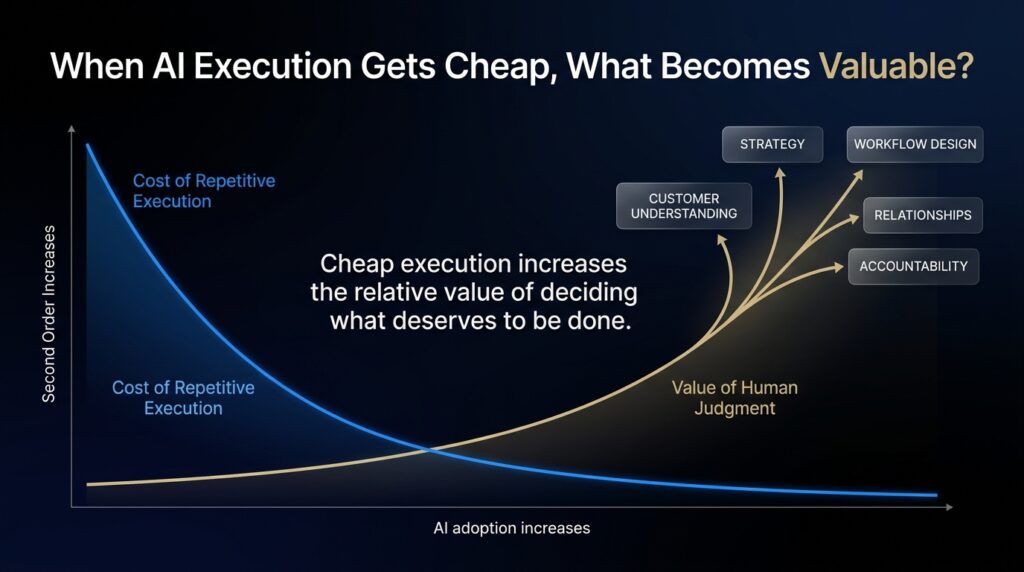
The Second-Order Effect: Human Attention Becomes More Valuable
As AI reduces the cost of producing acceptable drafts, graphics, research summaries, and routine responses, those outputs become less differentiating. More competitors can produce more material, but customers do not automatically gain more attention, trust, or purchasing intent. The scarce resource shifts from production capacity toward judgment, distribution, customer understanding, and accountability.
This is why a small business should not spend all of its new capacity generating more content. Some of that capacity should improve the offer, speak with customers, refine the sales process, remove operational delays, and build proprietary knowledge. Faster execution creates an advantage only when the business chooses better work.
Traditional software therefore remains necessary. CRMs, accounting platforms, project systems, and support desks encode records, permissions, workflows, and history. AI adds a reasoning and interaction layer, but the operating system beneath it still determines what the business can trust and control.
Final Thoughts
The best small-business AI stack begins with one general assistant and expands only when a specialist tool can own a high-value workflow. ChatGPT is the broadest starting point for many companies, while Gemini, Canva, HubSpot, Zapier, Notion, Perplexity, QuickBooks, and Intercom become stronger choices when ecosystem context or workflow volume matters more than general flexibility.
Do not measure progress by how many AI products the company owns. Measure whether the stack reduces verified work, improves quality, shortens cycle time, supports revenue, or manages risk without demanding more oversight than it saves. Every tool should have a defined job, a system of record, an owner, a review rule, and a reason to remain subscribed.
The practical rule is simple: buy the smallest reliable solution for the most expensive recurring bottleneck, then make the next tool earn its place. A four-tool system with clear ownership can outperform a fifteen-tool collection because human attention, not access to AI features, is usually the real constraint.
Turn Your Shortlist Into a Working AI System
Compare automation platforms by app coverage, control, usage cost, and workflow depth before connecting the tools your business chooses.
Compare AI Automation Tools →Frequently Asked Questions
What is the best AI tool for a small business?
ChatGPT is the strongest general starting point for many small businesses because it covers analysis, writing, files, research, and planning in one system. A specialist product can be better when the main bottleneck sits inside a CRM, accounting platform, visual-production workflow, automation layer, or support desk.
How many AI tools does a small business need?
There is no correct universal number. Start with one general assistant and add a specialist only when it solves a measured workflow problem without duplicating an existing tool. The SBE Council survey reported a median of five tools among surveyed adopters, but that observation is not a purchasing target.
Should a business pay for ChatGPT, Claude, and Gemini together?
Usually not at the beginning. All three can serve as general assistants, so multiple subscriptions are justified only when each platform owns a distinct workflow, ecosystem integration, or document requirement. Run the existing assistant against the real task before adding another.
Are free AI tools enough for a small business?
Free plans can be enough for low-volume experimentation and individual work. Paid plans become more defensible when the business needs higher limits, collaboration, administration, connectors, brand controls, privacy commitments, or predictable access. Evaluate the full workflow and data requirements rather than upgrading only because a free quota was reached once.
Can AI replace employees in a small business?
AI can remove tasks and change roles, but a job usually combines predictable work with judgment, accountability, relationships, and exceptions. The more realistic design is to automate stable components while employees handle ambiguous, consequential, or customer-sensitive situations.
How should a small business calculate AI ROI?
Measure verified time value, attributable revenue contribution, and avoided error cost, then subtract subscriptions, seats, usage, setup, training, review, maintenance, and correction. Use a pre-adoption baseline and measure after human oversight; otherwise the calculation will exaggerate the benefit.
What is the biggest mistake when adopting AI?
The biggest mistake is buying a tool before defining and measuring the business problem. Without a baseline, adoption threshold, and owner, the company can track usage but cannot prove that the workflow improved.
Is AI safe for accounting and financial work?
AI can assist with transaction organization, anomaly detection, drafting, retrieval, and administrative workflows. Tax treatment, payroll, compliance, reconciliations, and material financial decisions still require appropriate human and professional review because the consequence of error is high.
When should a small business choose embedded AI?
Embedded AI is strongest when the task depends on context already held in a system such as a CRM, accounting platform, help desk, or company workspace. It can reduce copying and improve continuity, but the underlying data, permissions, and processes must be reliable.
How often should an AI stack be reviewed?
Review usage, cost, errors, overlap, and business outcomes at least quarterly, and sooner when a vendor changes pricing or a workflow handles sensitive information. Cancel products that no longer own a distinct job, and retest critical automations after material application or policy changes.
Related Guides
- Best AI Tools for Beginners in 2026 (Free & Paid)
- AdCreative.ai for Small Business: Is the Starter Plan Enough?
- Best AI Finance & Accounting Tools in 2026
Written by
Muntasir Ahmad Chowdhury
Founder, AI Hustle World
Muntasir Ahmad Chowdhury is the Founder of AI Hustle World, an independent publication dedicated to making Artificial Intelligence practical, trustworthy, and easy to understand. He researches AI tools, automation, customer service, productivity, and real-world business applications, helping readers make smarter technology decisions through research-driven content.
Expertise:
AI Tools • AI Automation • AI Customer Service • AI Productivity • Generative AI • AI Workflows
Get Smarter With AI
Enjoyed this guide? Get practical AI tools, tutorials, and honest reviews delivered to your inbox.