AdCreative.ai for E-Commerce: Does the Shopify Integration Actually Work?
If you run a Shopify store, the appeal of connecting your product catalog to an AI advertising platform is obvious. Your store already contains the products, descriptions, prices, images, variants and selling points that your advertising campaigns need, so it is reasonable to expect an AI tool to take that information, turn it into creative, and help move those assets toward paid campaigns without forcing your team to rebuild the same information in several different systems.
That expectation is only partly correct with AdCreative.ai.
AdCreative.ai is highly relevant to Shopify-based e-commerce advertising, but you should not confuse its e-commerce and URL-based creative capabilities with a fully documented native Shopify catalog integration. AdCreative.ai’s current official documentation emphasizes e-commerce creative production, product photography, creative scoring, templates, website or product URL analysis, and connections to external advertising accounts. Its Help Center’s integration section is specifically described as managing external paid advertising accounts rather than a Shopify store connection.
That distinction sounds technical until you operate a real store. A Shopify merchant may have hundreds of products, frequent price changes, multiple variants, seasonal promotions and several advertising channels. A system that can read a product URL and generate an advertisement is useful, but it is operationally different from a system that continuously synchronizes the Shopify catalog, detects product changes, updates dependent creative and manages the entire product-to-campaign workflow.
So this article is not going to answer the question with a simplistic “yes” or “no.” The useful question is where AdCreative.ai actually connects to the Shopify workflow, what it automates, what it leaves to you, and whether that distinction matters enough to change your buying decision.
Affiliate disclosure: AI Hustle World may earn a commission if you purchase a product or service through an affiliate link in this article. Our recommendations are based on product fit, documented capabilities, limitations, value and use case—not on commission.
The Short Answer: AdCreative.ai Works With Shopify Workflows, But It Is Not the Same as a Native Shopify Integration
The most accurate answer is that AdCreative.ai can be used effectively by Shopify merchants, but the current official documentation does not establish a deep native Shopify integration comparable to Shopify’s own sales-channel connections. AdCreative.ai can analyze a website or product URL through Instant Ads, generate product-focused advertising creatives, create AI product photography, score creatives and connect to advertising accounts such as Meta, Google and LinkedIn.
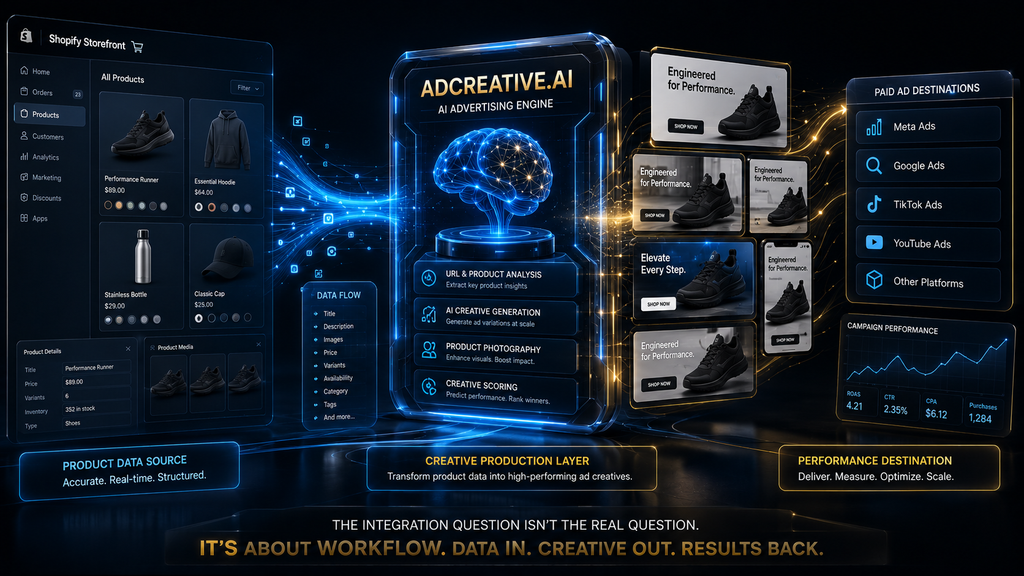
That is a meaningful workflow, especially for stores where advertising creative is the bottleneck. It allows a merchant to use the Shopify storefront as the commercial source of product information while using AdCreative.ai as a creative-production and evaluation layer, then moving the resulting assets toward the advertising platforms where campaigns actually run.
What it does not mean is that your Shopify catalog becomes a continuously synchronized database inside AdCreative.ai. Shopify’s own integrations with Meta and Google are much more explicit about catalog synchronization: Shopify documents product syncing to Meta’s catalog and automatic product synchronization to Google Merchant Center through the Google & YouTube channel.
That comparison gives us the right mental model. Shopify is already very good at being the system of record for products and distributing catalog information to commerce and advertising ecosystems. AdCreative.ai is solving a different problem: how to turn commercial product information and existing assets into more advertising creative, evaluate those creative options and accelerate the path toward paid-media testing.
First, Separate the Shopify Catalog From the Creative Workflow
A common mistake is to treat the Shopify store and the advertising creative system as though they have the same job. They do not.
Shopify is fundamentally a commerce platform. Your store contains the product information customers depend on: names, descriptions, images, variants, pricing, inventory, policies and the checkout experience. Shopify also provides sales-channel connections that can distribute product information to platforms such as Meta and Google, making the catalog available for shopping and advertising workflows.
AdCreative.ai operates further downstream. Its e-commerce positioning is centered on turning product imagery into product shoots, turning those visuals into advertising creatives, generating ad text, evaluating creative performance and helping marketers connect those assets to advertising platforms. Its current e-commerce page explicitly presents product photography, custom templates, creative scoring, ad text generation and paid-ad platform connections as parts of the workflow.
That means the most useful architecture is not “Shopify replaces AdCreative.ai” or “AdCreative.ai replaces Shopify.” It is closer to:
Shopify product data → creative production → creative evaluation → advertising platform → campaign performance → next creative iteration
Once you see the workflow this way, the Shopify question becomes much easier to evaluate. You do not necessarily need a deep Shopify integration if the biggest operational bottleneck exists after the product information has already been created.
What Shopify Already Automates Before AdCreative.ai Enters the Picture
Shopify merchants sometimes underestimate how much of the catalog-distribution problem Shopify already solves.
For Meta, Shopify’s Facebook and Instagram sales channel can sync products to a Meta catalog. Shopify explains that the catalog is used across Facebook Shop, Instagram Shopping and advertising features, while product availability and product requirements are managed through the Shopify sales channel.
Google works similarly, although the technical path is different. Shopify’s Google & YouTube channel automatically syncs products and relevant store information to Google Merchant Center, allowing merchants to manage product information from Shopify and use eligible products across Google Shopping and related advertising workflows.
This matters because it changes the question you should ask about AdCreative.ai. If Shopify already handles catalog distribution to the advertising ecosystem, you do not necessarily need your creative platform to duplicate that entire function. You need the creative platform to make the creative layer faster, better or more measurable.
That is a much narrower requirement, and it is also where AdCreative.ai’s current feature set is most relevant.
So Where Does AdCreative.ai Actually Fit?
AdCreative.ai fits between product information and paid-media execution.
The product already exists in Shopify. The merchant already has a product page and some source imagery. AdCreative.ai can then use those inputs to create advertising concepts, including product-focused visuals and copy, and its Instant Ads feature can analyze a website or product URL to extract information such as product details, pricing and tone before generating creatives.
That is particularly useful when the merchant has enough products and enough advertising activity that manually turning each product into multiple advertising concepts becomes expensive.
Consider a store with 60 products. If the marketing team wants three genuinely different advertising concepts for each product, that is already 180 creative directions. Add multiple aspect ratios, seasonal offers, audience angles and testing iterations, and the number of assets can grow quickly. The problem is not that the team lacks software for designing one advertisement; the problem is that the traditional process becomes difficult to scale without either increasing headcount or reducing the number of creative experiments.
AdCreative.ai’s e-commerce workflow is designed around that scaling problem. Its official e-commerce materials describe catalog-scale templates, AI product photography, ad generation and creative scoring, which together create a workflow focused on increasing creative throughput rather than merely replacing a graphic-design canvas.
The Most Important Distinction: URL Analysis Is Not Catalog Synchronization
This is probably the single most important point in the entire article.
AdCreative.ai’s Instant Ads feature allows you to paste a website or product link and have the system analyze the page. The company says the system can extract product details, pricing and tone, identify selling points, and generate advertising creative from the webpage.
For a Shopify merchant, that can be extremely convenient. A Shopify product page already contains much of the information an advertising system needs to understand what is being sold, so using the product URL can reduce the amount of manual briefing required before creative generation.
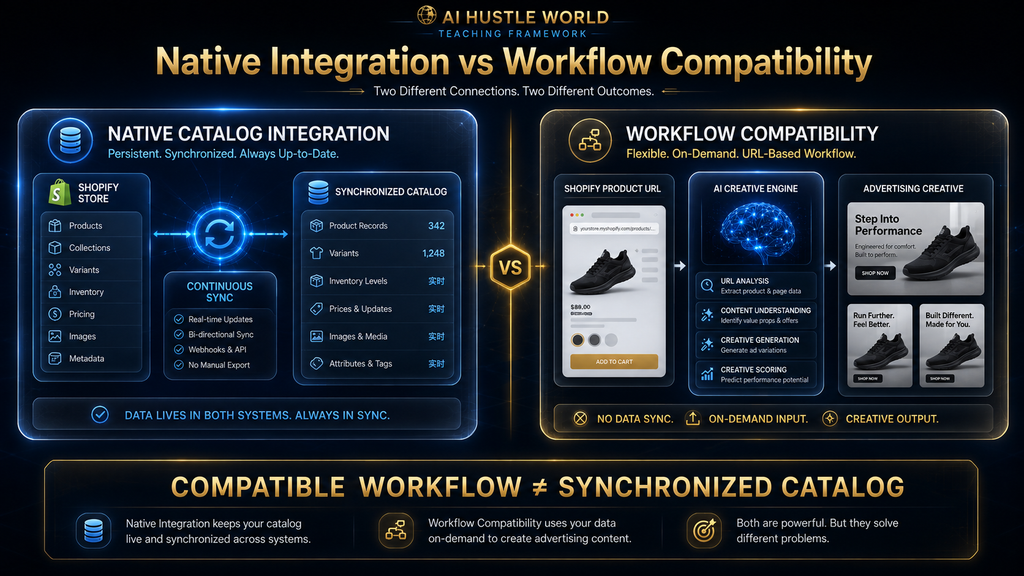
But a URL workflow is still different from a native catalog synchronization layer.
Imagine that a Shopify product changes from $79 to $59 because of a weekend promotion. A URL-scanning workflow can analyze the page when you generate new creative, assuming the updated information is accessible to the scanner. A true catalog synchronization system would go further by maintaining an ongoing relationship between the product record and the creative system, potentially detecting changes and updating downstream assets or workflows.
Those are fundamentally different operating models.
That is why describing AdCreative.ai as “Shopify-integrated” without qualification can create the wrong expectation. It can fit naturally into a Shopify product workflow, but that is not the same thing as saying Shopify and AdCreative.ai maintain a continuously synchronized native catalog connection.
What the Official Integration Documentation Tells Us
The strongest evidence comes from AdCreative.ai itself.
Its current Help Center has an Account Integrations collection specifically described as the place to manage external paid advertising accounts. The collection includes documentation for connecting ad accounts, pushing creatives, Google Analytics and related advertising-platform functionality. Shopify is not presented there as a core account integration.
AdCreative.ai also documents connecting advertising accounts to brands inside the platform. Once connected, those accounts can be used to push creatives toward the relevant advertising platforms, and the platform can use advertising data as part of its creative intelligence workflow.
That is an important distinction because it tells us what AdCreative.ai considers an “integration” in its current documentation. In this part of the product, integration primarily means connecting advertising accounts and performance data, not synchronizing an e-commerce store’s product database.
This does not make the platform less useful for Shopify merchants. It simply means that the Shopify connection should be thought of as a workflow relationship rather than a documented first-party catalog integration.
Why the Difference Matters More as Your Store Gets Bigger
A five-product store can survive a surprising amount of manual work.
A 500-product store cannot.
When the catalog is small, a marketer can manually choose a product, copy its URL, generate a few creatives, review them and upload the best ones. The process is repetitive, but the number of products is low enough that the friction remains manageable.
At larger scale, the economics change. Product information changes more frequently, campaigns become more segmented, creative fatigue becomes harder to manage, and the team needs a more systematic way to decide which products deserve creative investment. The bottleneck shifts from “Can we make an ad?” to “Can we continuously produce and evaluate enough useful creative without creating an operational mess?”
This is where AdCreative.ai’s catalog-oriented capabilities become more interesting. The company says merchants can create custom templates and generate creatives across an entire product catalog, while its e-commerce workflow also includes creative scoring and product photography.
The practical benefit is therefore not the existence of a Shopify button. It is the possibility of scaling the creative layer around a Shopify catalog without scaling design labor at the same rate.
AdCreative.ai’s Product Photography Can Solve a Different Shopify Problem
There is another reason the platform can be valuable to Shopify merchants even without a deep native catalog connection: the quality and quantity of source imagery often become a bottleneck before ad production even starts.
Many small e-commerce businesses begin with supplier photographs, basic studio images or a limited collection of product shots. Those assets may be sufficient for a product page, but they can become repetitive when the same products need to appear in dozens of paid-social creatives.
AdCreative.ai’s current product-photography workflow allows merchants to upload product images and generate AI-based product scenes without arranging a traditional photoshoot. The company positions this as a way to create professional-looking product photography for e-commerce listings and ads.
That can change the economics of experimentation. Instead of commissioning new photography every time the marketing team wants to explore a different visual concept, the team can use AI-generated environments to test directions more cheaply before deciding which ideas deserve higher-production treatment.
There is an important caveat, however. The more freedom you give an image-generation system, the more carefully you need to verify product fidelity. A visually impressive scene is not automatically a commercially accurate representation of the product, and Shopify merchants have to protect the relationship between what the advertisement promises and what the product page actually delivers.
The Real Risk: Creative Accuracy
E-commerce advertising has a higher accuracy requirement than many other forms of visual marketing because the creative often communicates concrete product information.
If the AI changes the shape of a product, exaggerates its size, creates an impossible use case, invents an accessory or makes a feature appear more sophisticated than it really is, the result is not merely a design error. It can create a mismatch between the customer’s expectation and the product they eventually receive.
This becomes more serious when creative generation is scaled.
One incorrect advertisement can be caught and corrected quickly. A flawed template or prompt applied across dozens of products can multiply the same problem across an entire campaign structure. The more automation you introduce, the more important it becomes to establish a review layer that checks product appearance, claims, pricing, offers and landing-page consistency before assets receive advertising budget.
That is why AI Hustle World’s position here should be deliberately conservative: automate production aggressively where the cost of error is low, but keep human judgment around product accuracy and commercial claims where the cost of error is high.
Shopify Variants Make This Even More Important
Shopify products frequently contain variants, and variants create a subtle creative problem that is easy to overlook.
A product advertisement might show one color, size or configuration while the linked product page opens with another. Technically, the advertisement can still be describing the same product, but the customer experience becomes less coherent.
Imagine an apparel store advertising a black jacket while the landing page defaults to a red version. Or imagine a furniture store showing a large configuration while the product page initially displays the smaller option. These mismatches may not be severe enough to invalidate the advertisement, but they introduce unnecessary friction at exactly the point where the customer is deciding whether to buy.
A good Shopify advertising workflow therefore needs more than product recognition. It needs creative-to-product consistency, particularly when the store has variants, bundles, accessories or configurable products.
This is one of the reasons human review should remain part of the workflow even when AI dramatically increases creative production speed.
The Better Workflow Is Not “Shopify to AdCreative.ai to Ads”
That simplified diagram hides too much.
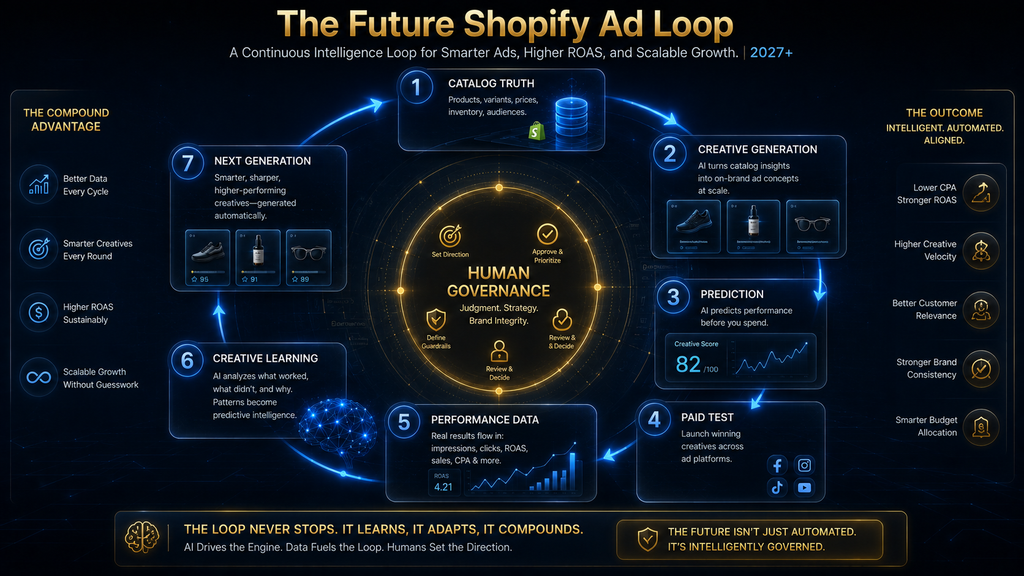
A better e-commerce workflow looks like this:
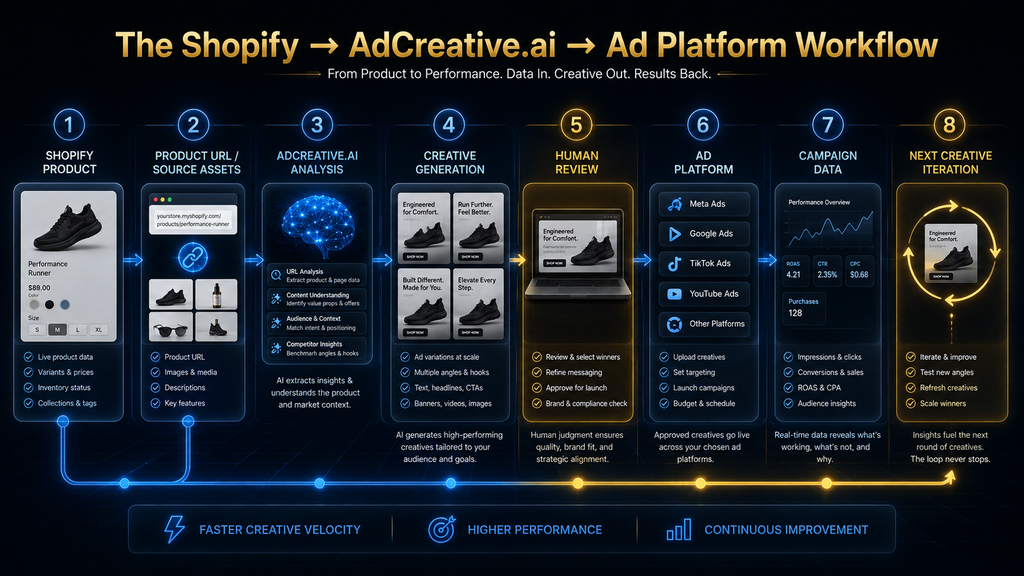
Product strategy → Shopify product page → source assets → creative generation → creative review → creative scoring → advertising platform → campaign testing → performance analysis → creative iteration
Each stage solves a different problem.
The Shopify product page provides the commercial truth. AdCreative.ai can help expand the creative possibilities around that product. Creative scoring can provide another layer of evaluation before media spend is committed, while connected advertising accounts can bring the workflow closer to real campaign performance. AdCreative.ai’s documentation says that connecting ad accounts allows its AI to learn from previous ad history and provide more personalized creative recommendations and scoring.
The important insight is that the value comes from connecting decisions, not merely connecting software.
If your Shopify catalog is accurate but your creative process is slow, automate creative production. If your creative production is fast but your campaigns are poorly measured, fix measurement. If your campaigns are well measured but the offer is weak, generating more ads will not solve the fundamental problem.
Where Creative Scoring Fits Into the Shopify Workflow
AdCreative.ai’s Creative Scoring AI is particularly relevant because it changes the role of the creative platform from pure generation toward pre-launch evaluation.
The company says its Creative Scoring AI evaluates creatives using hundreds of data points and produces Performance and Awareness scores, while also providing visual heatmaps and recommendations for improving the creative.
That does not mean the score predicts actual Shopify revenue with certainty.
A creative score is not a substitute for real-world campaign testing because real performance depends on the audience, offer, landing page, pricing, product-market fit, placement, budget, auction conditions and many other factors. A high predicted score can help prioritize which creatives deserve attention, but it cannot guarantee that the corresponding Shopify campaign will produce a profitable customer acquisition cost.
This distinction is critical.
The strongest use of creative scoring is triage. Instead of sending every generated asset into paid testing, the team can use scoring and human review to narrow a larger creative pool into a smaller set of candidates that deserve actual media spend.
That can reduce waste without pretending that an algorithm can see the future.
Why Shopify Data Alone Cannot Tell You Which Creative Will Win
A product catalog tells you what the business sells. It does not tell you which message will persuade a particular audience.
Suppose your Shopify store sells a premium skincare product. The catalog may tell the system the product’s ingredients, price, size and description, but the best advertisement could depend on whether the audience responds more strongly to convenience, clinical credibility, visible results, ingredient transparency or a lifestyle identity.
That is why product data and advertising data have different roles.
Shopify provides the commercial object. Advertising performance provides evidence about the communication strategy.
AdCreative.ai’s platform connections are useful precisely because they move beyond static product information. The company says connected ad accounts allow its AI to learn from historical advertising data and tailor creative insights to the brand.
This is more strategically interesting than a basic Shopify connector because the ultimate question is not “Can the tool see my products?” It is “Can the tool help me learn which ways of presenting those products are more likely to work?”
The Shopify-to-Meta Relationship Is Already More Native Than AdCreative.ai’s
If your main goal is product synchronization, Shopify itself already provides a more direct path to Meta.
Shopify documents that its Facebook and Instagram sales channel creates a shared product catalog for Facebook and Instagram features, including advertising, and products can be synchronized from Shopify into that catalog. Shopify also provides product-status and publishing-error controls from the Shopify environment.
That means a merchant should not buy AdCreative.ai expecting it to replace the Shopify-to-Meta catalog infrastructure.
It serves a different purpose.
The Shopify-to-Meta connection answers: Which products can the advertising ecosystem access?
AdCreative.ai answers a different question: What creative can we build around those products, and how can we increase the volume and quality of creative options available for testing?
Those two systems can coexist because they solve different layers of the advertising workflow.
The Same Logic Applies to Google
Shopify’s Google & YouTube channel automatically synchronizes products and relevant store information with Google Merchant Center, and Shopify documents connections between that channel, Google Ads and Google Analytics.
Again, the distinction matters.
Google Merchant Center is concerned with product information and commerce visibility. AdCreative.ai is concerned with advertising creative. A merchant can therefore use Shopify to maintain the product feed while using AdCreative.ai to produce and evaluate additional creative assets for paid campaigns.
Trying to force both systems to perform the same function would create unnecessary complexity.
The strategic objective should instead be division of responsibility.
Let Shopify remain the source of truth for the product. Let the advertising platform remain the source of truth for campaign performance. Use AdCreative.ai where it provides incremental value in creative production, evaluation and iteration.
What Happens When a Shopify Product Changes?
This is where merchants need to be especially disciplined.
Imagine a product starts at $100, receives a temporary 20% discount, then returns to its normal price. If a creative contains the discounted price, that creative becomes outdated as soon as the promotion ends. If the product’s main image changes, the old creative may also become visually stale. If inventory becomes unavailable, continuing to spend money promoting that product can waste budget or create a poor customer experience.
A native catalog system is valuable partly because it can maintain structured relationships between products and downstream commerce assets.
A URL-driven creative workflow does not eliminate this responsibility. If you generate creatives from a Shopify URL, you still need a process for determining which previously generated assets are now outdated and which need to be regenerated.
That leads to an important operational rule:
Treat AI-generated advertising creative as a campaign asset with a lifecycle, not as a permanent extension of the Shopify product record.
Once you think about creative this way, versioning, review dates, promotions and campaign status become part of the workflow.
The Creative Lifecycle Shopify Merchants Should Use
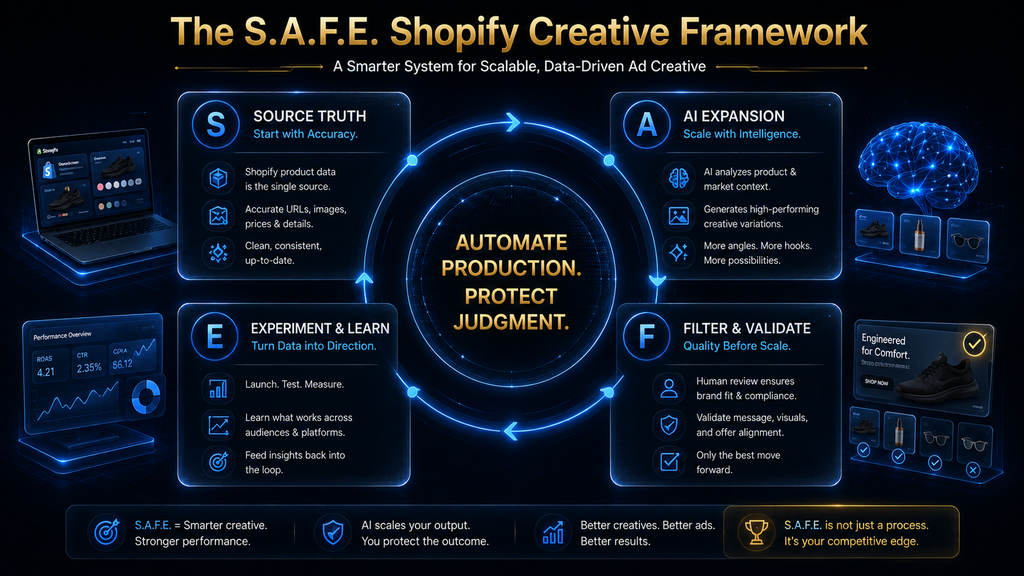
A useful operating model is to treat every important advertising creative as moving through five stages:
Source → Generate → Review → Test → Retire or Iterate
The source stage begins with the current Shopify product information and approved brand assets. Generation creates multiple creative directions. Review verifies product accuracy, claims, offers and brand consistency. Testing puts selected assets into real advertising campaigns, while the final stage either retires weak creative or feeds successful learnings into the next generation cycle.
This framework is more robust than simply generating advertisements whenever the team feels it needs something new.
It also creates a natural connection between Shopify changes and advertising maintenance. When the product changes materially, the relevant creative moves back toward the generation and review stages rather than remaining active indefinitely.
The result is a more controlled advertising system in which AI increases production speed without removing accountability.
Why “Unlimited Generation” Does Not Mean Unlimited Value
AdCreative.ai currently advertises unlimited creative generation on its plans, while credits are consumed when generated creatives are downloaded.
That distinction is important for Shopify merchants because generation volume can easily become a vanity metric.
If a system lets you generate 500 ideas, the first instinct may be to celebrate the output. But if the team only has time to review 30, the remaining 470 are not automatically creating value.
The better metric is usable creative throughput.
If your current workflow produces 10 usable creatives per month and AdCreative.ai allows your team to produce 30 without tripling review time, that is meaningful. If it produces 500 assets but your team still has capacity to evaluate only 10, the nominal generation increase is largely irrelevant.
The purpose of AI is not to maximize the number of files.
It is to increase the number of good decisions and useful experiments the team can make.
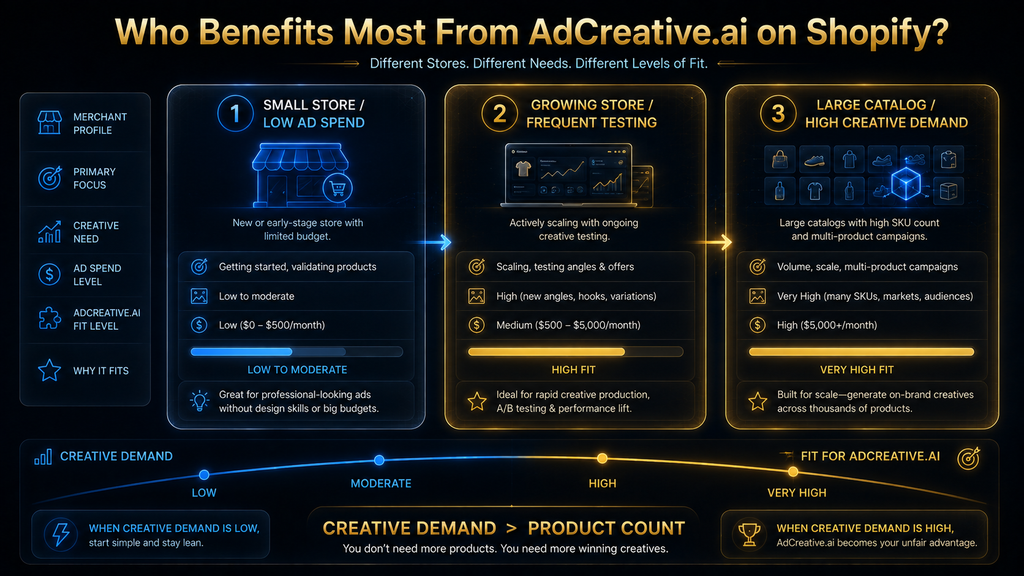
A Shopify Store With 10 Products Can Still Benefit
It would be a mistake to assume that AdCreative.ai only makes sense for huge catalogs.
A ten-product Shopify store can have an extremely high creative requirement if it depends heavily on Meta advertising. Each product might need several hooks, visual directions, offers and audience-specific angles, particularly when the store is trying to find product-market fit or identify its strongest advertising messages.
In that situation, the number of products is not the limiting factor.
The number of creative hypotheses is.
A small store may therefore benefit from AdCreative.ai when its paid-media strategy depends on frequent creative experimentation. Conversely, a 500-product store may not need the platform if most products generate little advertising demand and the existing creative team already operates efficiently.
The correct buying variable is therefore creative demand relative to internal production capacity, not simply catalog size.
A Shopify Store With 500 Products May Need It for a Different Reason
Large catalogs create a different problem: consistency.
A retailer with hundreds of products cannot afford to create every advertising asset from scratch. The brand needs repeatable visual structures, reusable templates and a system for turning product-level inputs into advertising assets without allowing every creative to become a separate design project.
AdCreative.ai’s custom-template workflow is directly relevant here. The company says merchants can create custom templates and generate creatives across a product catalog, allowing the team to preserve brand structure while increasing production scale.
The goal should not be perfect uniformity. If every advertisement looks identical except for the product image, creative fatigue can still become a problem.
The better objective is controlled variation: enough consistency to protect the brand, combined with enough variation to give the advertising system genuinely different concepts to test.
The Traditional Designer Still Has a Role
There is a tendency in AI advertising discussions to frame the decision as “AI versus designer.”
That is the wrong comparison.
A strong designer is not merely a person who can arrange images and text. A good creative professional understands hierarchy, visual identity, composition, brand codes, audience psychology and the difference between an idea that looks impressive and one that communicates quickly.
AI can accelerate production, but those judgments do not disappear.
In a mature Shopify workflow, the designer’s role may actually become more strategic. Instead of spending most of the day resizing assets and creating minor variations, the designer can establish the visual system, define what the AI should and should not generate, review the highest-value concepts and improve the creative directions that show evidence of working.
That is a better use of creative expertise.
The Same Applies to the Performance Marketer
The performance marketer also should not be reduced to someone who uploads whatever the AI produces.
The marketer decides which product deserves testing, which audience is being addressed, which offer is being communicated, what campaign objective matters and how the resulting data should influence the next creative iteration.
AdCreative.ai can support those decisions with creative scoring and connected advertising data, but it does not eliminate the need for campaign judgment. Its own documentation makes clear that connecting ad accounts helps the system learn from previous advertising history, while its creative-pushing workflow still requires the merchant to use the resulting assets when creating campaigns.
This is another reason to resist the idea that an AI creative platform should become the entire advertising operating system.
Its greatest value may come from improving one part of the system without pretending to own all of it.
What AdCreative.ai Does Not Automatically Do
The limitations are just as important as the features.
AdCreative.ai explicitly says that it does not automatically publish ads as complete campaigns. When creatives are pushed to a social advertising platform, they are added to the media library and can then be used as ad images when creating an advertisement.
That means the workflow still contains a human-controlled activation stage.
You still need to decide which products receive budget, which creative should be tested, what campaign structure to use, what audience to target and when a creative should be paused. You also remain responsible for checking that the product, price, offer and landing page are accurate.
That is not necessarily a weakness. In fact, maintaining human control over consequential commercial decisions is usually the safer architecture.
The mistake would be to buy AdCreative.ai expecting it to turn a Shopify store into a fully autonomous advertising machine.
It does not.
What If You Do Nothing?
This question is important because every software purchase should have a counterfactual.
Suppose your existing Shopify advertising workflow is already producing enough quality creative at the speed your campaigns require. Your designers have capacity, your performance team can test enough concepts, and creative fatigue is not causing meaningful performance problems.
In that situation, adding AdCreative.ai may simply create another subscription and another process that somebody has to manage.
The situation changes when the creative pipeline becomes the bottleneck. If your team knows which products and audiences it wants to test but cannot produce enough creative quickly enough, the opportunity cost of doing nothing becomes much larger because you are effectively restricting the number of advertising hypotheses the business can evaluate.
That is why the right question is not “Is AdCreative.ai good?”
The right question is “What is currently preventing this Shopify business from learning faster through creative testing?”
The Economics: Calculate Creative Workflow ROI, Not Subscription Price
A Shopify merchant should evaluate AdCreative.ai using workflow economics rather than software price alone.
Suppose a team spends 40 hours each month producing advertising creative. If an AI-assisted workflow reduces that to 20 hours while maintaining or improving usable output, the value is not simply 20 hours of labor saved.
The team may now have another 20 hours available for campaign analysis, offer testing, landing-page optimization, competitor research or additional creative experimentation. Those activities can create value that is much larger than the software subscription itself.
A more realistic equation is:
Creative workflow ROI = labor capacity recovered + additional testing capacity + performance improvement − software cost − review cost − correction cost
The last two terms are essential.
If AI generation produces large quantities of output that require heavy human correction, the apparent efficiency gain can disappear. If the output is accurate and the team can select strong assets quickly, the economics improve.
The answer will therefore vary dramatically from one Shopify business to another.
The Most Important KPI Is Not Number of Creatives Generated
If you adopt an AI creative workflow, track the quality of the production system.
| KPI | What it actually tells you |
|---|---|
| Time to first usable creative | How quickly an idea becomes testable |
| Usable creative rate | How much generated output survives review |
| Revision rate | How much human correction the AI requires |
| Creative production hours | Whether the workflow really saves labor |
| Testing velocity | How many meaningful concepts can enter campaigns |
| CTR | Whether the creative earns attention |
| CPC | Whether traffic acquisition becomes more efficient |
| Conversion rate | Whether the creative attracts commercially relevant visitors |
| CPA / ROAS | Whether the advertising economics improve |
| Creative fatigue cycle | How quickly winning concepts lose effectiveness |
The distinction between generated output and usable output is particularly important.
A system that generates 200 assets but gives the team 15 usable candidates may be less valuable than a system that generates 50 assets and produces 20 candidates worth testing.
The objective is not content volume. It is decision-quality throughput.
Build a Small Pilot Before You Scale
If you are unsure whether AdCreative.ai belongs in your Shopify workflow, do not immediately move the entire catalog into it.
Start with a small group of products that already have enough advertising activity to generate meaningful evidence. Five to ten products are enough to compare the existing creative process against an AI-assisted workflow.
For each product, document the traditional process: how long the creative brief takes, how long design takes, how many revisions are normally required, how many assets are produced and how long it takes before the creative reaches the advertising platform.
Then run the same products through the AI-assisted process.
The objective is not to make the AI workflow look better. The objective is to discover where it genuinely saves time and where it creates new work.
You may find that generation becomes dramatically faster but review becomes the bottleneck. Or you may find that product photography becomes much easier while final advertising selection still requires substantial human judgment. Those findings are more valuable than a generic claim that the tool “saves time.”
The Five-Stage Shopify Creative Operating Model
For a Shopify merchant, a useful operating model is to separate the workflow into five stages.
1. Commercial Truth
Shopify remains the source of truth for the product, price, offer, variant structure, landing page and availability. Anything that enters the advertising workflow should ultimately be checked against this source.
2. Creative Expansion
AdCreative.ai can then expand the available creative possibilities through product imagery, templates, ad generation and copy. This is where the platform can create the most leverage because it increases the number of creative directions available to the team.
3. Creative Selection
Generated assets should not automatically receive media budget. Human review, creative scoring and brand standards should narrow the pool to the assets that are accurate, relevant and worth testing. AdCreative.ai’s Creative Scoring AI is designed to support this selection stage.
4. Paid Testing
The selected assets move into the advertising platforms. AdCreative.ai supports connections to advertising accounts and can push creatives into those platforms’ media libraries, but it does not automatically create and publish the complete campaigns for you.
5. Learning and Refresh
Performance data should then influence the next round of creative production. Winning concepts should be developed further, weak concepts should be retired, and meaningful changes to Shopify products, prices or offers should trigger creative review.
That final stage is what turns an AI image generator into part of an actual advertising system.
Common Shopify Mistakes With AI Creative Platforms
The first mistake is buying an AI creative platform because the store has a large catalog when the actual problem is low advertising demand. Catalog size alone does not create a need for creative automation.
The second mistake is assuming that URL analysis means live synchronization. A product page can be analyzed without creating a persistent relationship between every future product change and every existing creative asset. Treat those as separate capabilities.
The third mistake is generating large volumes of creative without building a review process. More assets create more opportunities, but they also create more opportunities for inaccurate claims, stale prices, variant mismatches and brand inconsistencies.
The fourth mistake is measuring success by generation speed. A creative that appears in 30 seconds but requires 15 minutes of correction is not a 30-second creative in operational terms.
The fifth mistake is expecting creative automation to solve a weak offer. If customers do not want the product, the pricing is uncompetitive or the landing page fails to convert, generating more attractive ads will not repair the underlying business problem.
The sixth mistake is treating all advertising channels as identical. A creative that works well on Meta may not communicate the same way in Google display inventory, LinkedIn or another environment. The platform can accelerate production, but channel-specific judgment still matters.
The seventh mistake is failing to retire outdated creative. Shopify promotions, prices, inventory and product positioning change. A creative that was accurate when generated can become commercially wrong later.
What a Good Shopify + AdCreative.ai Workflow Looks Like in Practice
Imagine a Shopify brand selling premium home products.
The marketing team identifies three products that have healthy margins and enough demand to justify additional paid acquisition. The team verifies that the product pages contain accurate information, current pricing, high-quality source images and clear product benefits.
Instead of asking a designer to manually create ten advertisements for each product, the team uses AdCreative.ai to generate several creative directions. Product photography can be expanded, templates can provide consistent visual structures, and Instant Ads can use product or website URLs to help build advertising concepts from the existing commercial information.
The team then reviews the generated assets. Anything that misrepresents the product, exaggerates a claim, uses an outdated offer or fails brand standards is rejected before it reaches paid media.
The remaining candidates can be evaluated with creative scoring and then moved toward the relevant advertising accounts. Actual campaign performance becomes the final test, because predicted creative performance is not the same thing as real-world customer response.
That workflow is much more realistic than expecting Shopify and AdCreative.ai to operate as one fully automated system.
When AdCreative.ai Is a Strong Fit for Shopify
AdCreative.ai becomes particularly compelling when the store already has a functioning product and advertising operation but creative production is limiting the number of tests the team can run.
That usually means the business is spending meaningful money on paid advertising, needs regular creative refreshes, has several products or campaigns, and wants to experiment with more visual and messaging variations than its existing team can comfortably produce. The platform’s e-commerce capabilities—product photography, catalog-oriented templates, creative generation, ad text and creative scoring—align directly with that problem.
The case becomes stronger when the business has a small creative team supporting a large amount of paid-media activity. In that situation, the platform can function as a production multiplier rather than as a replacement for the creative team.
It can also make sense for agencies managing Shopify clients when the recurring problem is not strategy but production capacity. The agency can standardize parts of the creative workflow while keeping strategic decisions and client approval under human control.
When AdCreative.ai Is Probably Not the Right Tool
If your Shopify store runs only occasional advertisements and your existing design workflow is already fast enough, a specialized AI advertising platform may not create enough incremental value.
The same is true if your primary problem is catalog management. Shopify already provides native product-distribution workflows to Meta and Google, so buying AdCreative.ai specifically to synchronize products would be solving the wrong problem.
It is also a weaker fit if your advertising strategy depends heavily on highly bespoke art direction that must be controlled at every stage. AI can accelerate production, but highly controlled premium campaigns may still benefit from traditional design workflows where the creative team deliberately constructs every visual element.
Finally, if your biggest problem is campaign economics rather than creative production, fix that first. Better targeting, stronger offers, improved landing pages and better measurement may create more value than producing another 100 creative variations.
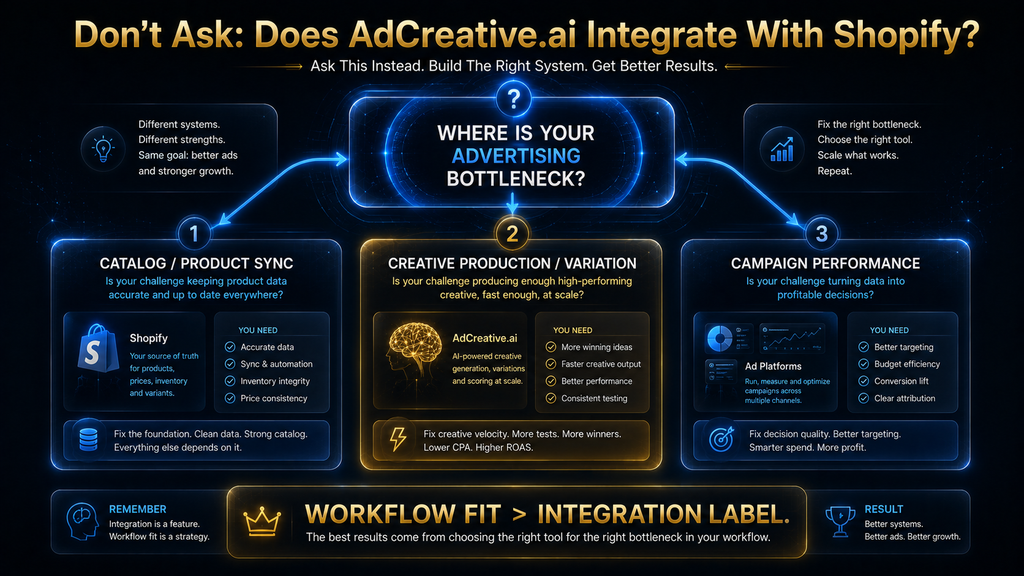
The Real Question: What Is Your Creative Bottleneck?
A useful decision framework is to identify the bottleneck before deciding whether to add AdCreative.ai.
If the problem is “We cannot create enough variations,” AdCreative.ai is worth serious consideration.
If the problem is “Our products are poorly photographed,” its AI product-photography capabilities may be relevant.
If the problem is “We cannot tell which creative deserves testing,” Creative Scoring may help prioritize candidates.
If the problem is “Our Shopify products do not synchronize correctly to Meta or Google,” start with Shopify’s native sales-channel and catalog tools rather than assuming AdCreative.ai will solve the problem.
If the problem is “Our campaigns are unprofitable,” do not assume more creative is the answer.
That simple diagnostic prevents a lot of wasted software spending.
The Contrarian Take: Shopify Integration May Not Be the Feature You Actually Want
The most interesting conclusion from this comparison is that a deeper Shopify integration is not automatically better.
At first glance, a merchant might prefer a tool that has direct access to every product, variant, inventory status and price. But deeper integration also means greater complexity, more synchronization dependencies and more ways for an automated system to make consequential changes based on imperfect information.
For creative production, the better architecture may sometimes be deliberately separated.
Shopify owns the commercial truth. The creative platform receives the information it needs to produce assets. The advertising platform receives selected creative and produces performance evidence. Humans supervise the transitions between those systems.
That separation can actually be healthier because each system has a clearly defined responsibility.
The objective is not to eliminate every manual handoff.
The objective is to eliminate low-value manual work while preserving high-value judgment.
What the Future Could Look Like
The direction of e-commerce advertising is clearly moving toward more connected workflows.
The ideal future system would understand the product catalog, recognize meaningful changes to products and offers, generate multiple creative hypotheses, score those hypotheses, distribute selected assets to advertising platforms, interpret performance and automatically propose the next round of creative.
Some of those pieces already exist separately.
Shopify provides increasingly sophisticated product-distribution and commerce-channel infrastructure. AdCreative.ai provides creative generation, product photography, scoring and advertising-platform connections. Advertising platforms provide campaign-level performance data.
The missing piece is the reliability of the complete loop.
The difficult problem is not whether AI can generate another advertisement. It can.
The difficult problem is determining which product, which message, which visual, which audience, which offer and which moment deserve the next dollar of advertising spend while keeping the underlying product information accurate.
That is where human judgment and increasingly capable AI systems will have to work together.
How to Decide in 10 Minutes
If you are a Shopify merchant evaluating AdCreative.ai right now, ask yourself five questions.
First, is creative production actually slowing your advertising operation? If your team can already produce enough strong concepts, the platform may not create enough incremental value.
Second, do you need more creative variation than your team can reasonably produce? If the answer is yes, AdCreative.ai’s generation, templates and e-commerce workflows become more relevant.
Third, do you want creative intelligence or product synchronization? If you want creative generation, scoring and testing support, AdCreative.ai fits the problem. If you primarily want a native catalog-management integration, Shopify’s own commerce channels may be the more relevant starting point.
Fourth, can your team review AI output properly? More automation without adequate review can increase risk rather than reduce it.
Fifth, can you measure whether the workflow is actually improving economics? If you cannot compare production time, usable output, testing velocity and campaign performance, you will have difficulty determining whether the subscription is creating real value.
Those five questions are more useful than simply asking whether a product page contains the word “Shopify.”
Final Verdict: Does the AdCreative.ai Shopify Integration Actually Work?
Yes, AdCreative.ai can work very well inside a Shopify advertising workflow—but no, you should not interpret the current official documentation as proof of a deep native Shopify catalog integration.
The distinction is important. AdCreative.ai’s current e-commerce offering is clearly built for merchants: it supports AI product photography, product-focused advertising, custom templates, ad copy generation, creative scoring and advertising-platform connections. Its Instant Ads workflow can also analyze a website or product URL and use information from that page to generate advertising creatives.
At the same time, AdCreative.ai’s documented integration system is centered on external paid advertising accounts. The company explains that connected ad accounts can help the AI learn from advertising history and allow creatives to be pushed into those platforms, but it also explicitly says that pushing a creative does not automatically publish a complete advertisement.
Shopify itself already provides native product synchronization into ecosystems such as Meta and Google. Shopify documents product catalog synchronization to Meta and automatic product synchronization with Google Merchant Center through its Google & YouTube channel.
So the strategic conclusion is straightforward:
Do not buy AdCreative.ai because you think you need another Shopify catalog connector. Buy it if your Shopify business needs a stronger creative production, evaluation and testing layer.
That is where the platform’s current capabilities are most defensible.
The best Shopify + AdCreative.ai workflow is therefore not about making one tool control everything. It is about giving each system a clear job: Shopify maintains the commercial truth, AdCreative.ai expands and evaluates creative possibilities, advertising platforms provide real-world performance evidence, and humans decide what deserves budget.
That is a much more useful answer than simply saying “yes, it integrates.”
Frequently Asked Questions
Does AdCreative.ai have a native Shopify integration?
As of the current documentation reviewed for this article, I could not verify a dedicated native Shopify catalog integration from AdCreative.ai’s official integration documentation. Its documented account integrations focus on external paid advertising accounts, while its e-commerce workflow supports product URLs, creative generation, product photography and advertising-platform connections.
Can I use AdCreative.ai with a Shopify store?
Yes. Shopify merchants can use their product pages and product assets as inputs to an AdCreative.ai workflow, including its website/product URL-based Instant Ads process. The platform can then generate advertising creative around those products and connect to supported advertising accounts.
Can AdCreative.ai read a Shopify product page?
Its Instant Ads feature can analyze a website or product URL and extract information such as product details, pricing and tone for creative generation. That capability should not be confused with a continuously synchronized Shopify catalog integration.
Does AdCreative.ai automatically sync my Shopify catalog?
The current official documentation reviewed here does not establish a native, continuously synchronized Shopify catalog connection. If catalog synchronization is your primary requirement, Shopify’s native Meta and Google channel integrations are more directly designed for that purpose.
Can AdCreative.ai create ads for Shopify products?
Yes. Its e-commerce workflow is specifically designed to create product-focused advertising creative, including AI-generated product imagery, advertising visuals, templates and ad copy.
Can AdCreative.ai push creatives to Meta or Google?
AdCreative.ai documents connections to advertising accounts and a workflow for pushing creatives into connected ad platforms. However, it states that pushed creatives are added to the platform’s media library rather than automatically being published as complete ads.
Does AdCreative.ai automatically create Shopify campaigns?
No. AdCreative.ai is not a replacement for Shopify’s store-management system or the campaign-management interfaces of advertising platforms. Its role is primarily creative generation, evaluation and advertising-workflow support.
Is AdCreative.ai good for Shopify stores with large catalogs?
It can be, particularly when creative production becomes the bottleneck. AdCreative.ai promotes custom templates and catalog-scale creative generation, which can help teams create more advertising assets without manually rebuilding every product creative.
Is AdCreative.ai useful for a small Shopify store?
It depends on advertising intensity rather than product count. A small Shopify store that runs frequent paid campaigns and needs constant creative testing may benefit substantially, while a small store with occasional advertising may not generate enough creative demand to justify another specialized platform.
Does AdCreative.ai replace a Shopify product catalog?
No. Shopify should remain the source of truth for product information, pricing, variants and the customer shopping experience. AdCreative.ai should be treated as a creative-production and advertising-intelligence layer rather than as a replacement for the commerce platform.
Final Thoughts
The Shopify question sounds technical, but the buying decision is actually operational.
If Shopify already gives you a reliable product catalog and your advertising platforms already receive the products they need, the missing piece may not be another catalog integration. The missing piece may be the ability to turn those products into enough strong, varied, accurately represented creative to support a serious testing program.
That is where AdCreative.ai has the clearest case.
Its value is not that it magically connects Shopify to advertising. Its value is that it can sit between what your store sells and how your advertising communicates it, increasing the number of creative possibilities your team can produce and evaluate while leaving consequential commercial decisions under human control.
And that leads to the most important takeaway from this article:
For Shopify merchants, workflow fit matters more than integration labels.
If your bottleneck is product synchronization, start with Shopify’s native channels. If your bottleneck is creative production, variation, product imagery or pre-launch creative evaluation, AdCreative.ai deserves serious consideration. If your bottleneck is the offer, landing page or campaign economics, neither integration will solve the underlying problem.
The best system is not the one with the most connections.
It is the one that removes the most expensive bottleneck without creating a new one.
Written by
Muntasir Ahmad Chowdhury
Founder, AI Hustle World
Muntasir Ahmad Chowdhury is the Founder of AI Hustle World, an independent publication dedicated to making Artificial Intelligence practical, trustworthy, and easy to understand. He researches AI tools, automation, customer service, productivity, and real-world business applications, helping readers make smarter technology decisions through research-driven, experience-backed content.
Expertise:
AI Tools • AI Automation • AI Customer Service • AI Productivity • Generative AI • AI Workflows
Get Smarter With AI
Enjoyed this guide? Get practical AI tools, tutorials, and honest reviews delivered to your inbox.