Last Update: August 2026
Best AI Video Generators (Free & Paid)
Choosing an AI video generator used to be relatively simple: find a tool that could turn a prompt into a short clip and compare the subscription prices.
That logic is breaking down.
In 2026, an “AI video generator” can mean a cinematic text-to-video model, an image-to-video system, an AI-native production workspace, a script-to-video platform, or an editor that gives you access to several generation models. Those products may all create video, but they solve very different problems.
A filmmaker who needs a controllable hero shot does not need the same platform as a marketer who wants a finished vertical ad from a product brief. A YouTube creator may care more about script-to-video automation and editing than raw cinematic generation. A brand team may care more about commercial-use terms and workflow integration than getting the most photorealistic eight-second clip.
So the best AI video generator is not necessarily the one that produces the prettiest demo.
It is the one that reliably produces the type of video you need, with enough control to make the result usable, at a cost and workflow complexity you can sustain.
This guide compares ten leading options using that principle.
Important freshness note: OpenAI’s Sora web and app experiences were discontinued on April 26, 2026, with the Sora API scheduled for discontinuation on September 24, 2026. Sora therefore does not appear as a current recommendation in this updated list.
Quick Answer
If you want a short answer, Runway is the strongest all-around choice for creators who want a serious creative-production workflow; Google Flow with Veo 3.1 is particularly strong for cinematic generation and native audio; Kling is a strong choice for motion, consistency and audio; Luma is built around increasingly precise creative control; Pika is particularly useful for social-first experimentation; Hailuo offers a compelling value-oriented generation option; Higgsfield targets high-volume cinematic and marketing workflows; Adobe Firefly is attractive for Adobe-centric and brand workflows; InVideo AI is better when you want AI to build a more complete video rather than a single clip; and VEED is compelling when generation and editing need to happen in one browser workflow.
The key is to choose by production job, not by a universal ranking.
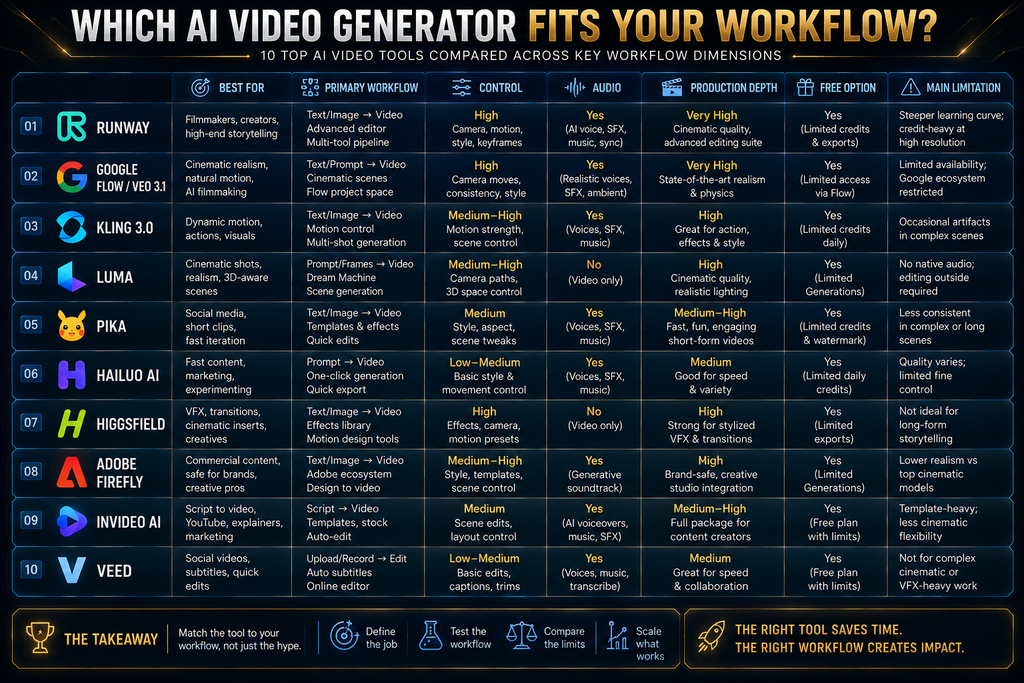
The 10 Best AI Video Generators at a Glance
Native WordPress Table — create this as a WordPress Table block, not HTML.
| Tool | Best For | Primary Workflow | Free Option | Key Strength | Main Limitation |
|---|---|---|---|---|---|
| Runway | Professional creative production | Text/image → controllable clips → production | Limited | Creative control + broad workflow | Credits can disappear quickly with iteration |
| Google Flow / Veo 3.1 | Cinematic generation | Prompt/reference → video + audio | Yes, limited | Quality, references, native audio | Premium generations consume credits quickly |
| Kling 3.0 | Motion and consistency | Text/image/reference → multi-shot video | Limited | Motion, audio, control | Feature/credit complexity |
| Luma | Directed production and iteration | Text/image/video → controlled generation | Trial/limited | Frame-level control and production workflow | Higher-end output can be credit-intensive |
| Pika | Social content and effects | Prompt/image → short creative clips | Yes | Effects and fast experimentation | Less suited to full production pipelines |
| Hailuo AI | Value-focused generation | Text/image → short clips | Limited | Prompt following and physical motion | Shorter generation scope |
| Higgsfield | Marketing and cinematic workflows | Prompt/reference → multi-model production | Trial/limited | Multiple models + creative workflow | Credit model requires monitoring |
| Adobe Firefly | Brands and Adobe users | Prompt/image → generation + creative workflow | Yes, limited | Multi-model workspace + Adobe ecosystem | Partner models have different terms |
| InVideo AI | Script-to-video production | Brief/script → complete video | Yes, limited | AI agents + editing + production | Less focused on pure cinematic shot generation |
| VEED | Generate + edit + publish | Prompt/script → video → editor | Limited | Generation and editing in one workflow | Model/credit options can be complex |
The comparison reflects current product documentation and market positioning rather than arbitrary star ratings. The SOP requires evidence-based decision support and prohibits fabricated testing or unsupported first-hand claims.
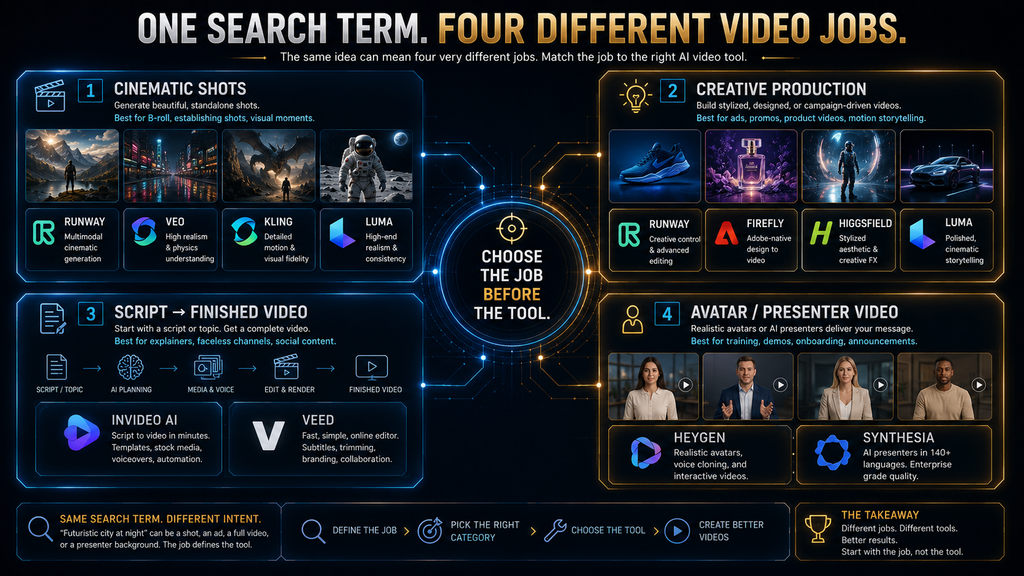
The AI Video Market Has Split Into Different Jobs
The most important thing to understand before choosing an AI video generator is that video generation is no longer one product category.
There are at least four different jobs hiding behind the same search phrase.
Job 1: Generate a cinematic shot
You already know what the shot should look like.
You need:
- text-to-video
- image-to-video
- camera direction
- reference images
- motion control
- scene consistency
- high visual fidelity
Runway, Veo, Kling, Luma, Pika and Hailuo are more relevant here.
Job 2: Build a creative production workflow
You don’t just need a model. You need a workspace where you can generate, iterate, edit, extend, reframe and manage assets.
Runway, Luma, Adobe Firefly and Higgsfield become more interesting.
Job 3: Turn a script or brief into a finished video
You don’t want to manually generate ten individual shots and assemble them yourself.
You want AI to handle more of:
script → scenes → voice → visuals → captions → editing.
InVideo AI and VEED are much closer to this job.
Job 4: Create presenter or avatar videos
This is a separate category.
HeyGen and Synthesia remain important products, but they are primarily avatar/synthetic-presenter platforms rather than general cinematic video generators. AI Hustle World’s content architecture already reserves a separate article for AI avatars and synthetic presenters.
That distinction matters because putting an avatar platform beside a cinematic generator and declaring one “better” is usually an apples-to-oranges comparison.
What Actually Makes an AI Video Generator Good?
A good AI video generator is not simply one that produces visually impressive samples.
The real evaluation has several layers.
Generation quality asks whether the footage looks convincing.
Motion quality asks whether people, objects, cameras and environments move coherently.
Prompt adherence asks whether the system actually follows the requested action and composition.
Consistency asks whether characters, products, locations and visual identity remain stable across shots.
Control asks whether you can influence frames, references, camera movement, duration, aspect ratio, audio and editing.
Production economics asks how much it costs to get something you can actually use.
That last point is easy to underestimate.
A platform that creates one beautiful clip on the first attempt can be cheaper than a platform that technically costs less per generation but requires five or six failed attempts before you get something usable.
This is why the useful commercial metric is not:
Cost per generated video.
It is:
Cost per usable result.
How We Evaluated These AI Video Generators
This comparison is based on current product documentation, pricing information, official model specifications, current market evidence and competitor research. We did not conduct a controlled identical-prompt benchmark across every platform in this article, so we do not claim first-hand testing where none was performed.
That distinction matters because some competitor articles publish detailed test rankings based on their own experiments, while others simply synthesize vendor information. Current independent comparisons also show that the market is highly use-case dependent rather than producing one consistent winner.
We therefore evaluate each tool through four questions:
1. Scene
Can it generate the kind of scene you actually need?
2. Handling
How well does it handle motion, physics, characters, objects and transitions?
3. Output Control
How much control do you have over references, frames, camera direction, duration, audio and consistency?
4. Total Production Cost
What does it take to turn an idea into a usable asset rather than merely a generated preview?
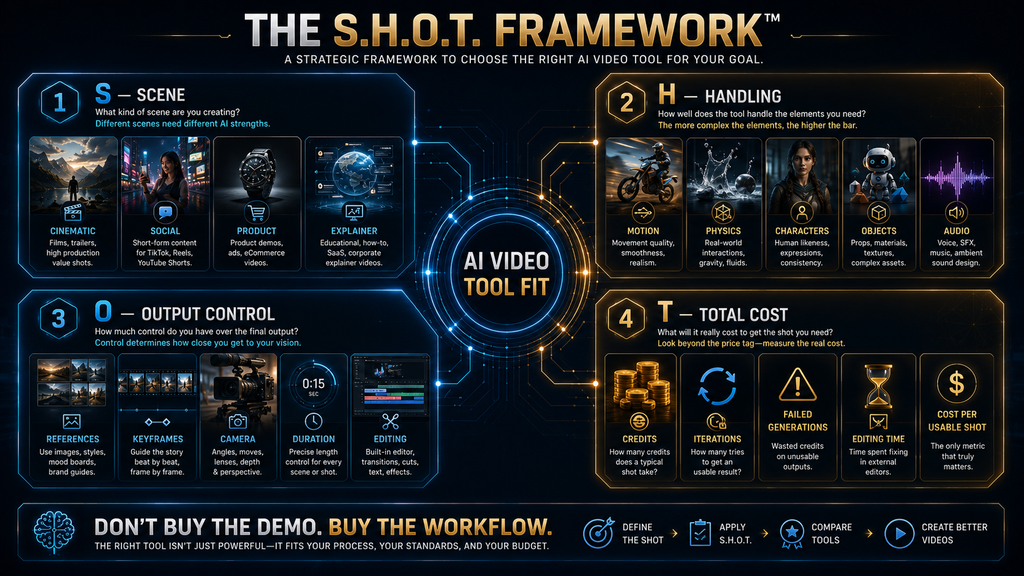
This is the AI Hustle World S.H.O.T. Framework:
Scene → Handling → Output Control → Total Cost
It is deliberately different from a five-star rating because a tool can be excellent at one production job and mediocre at another.
1. Runway — Best All-Around AI Video Generator for Creative Production
Best for: creators, filmmakers, agencies and marketers who want a serious AI video-production environment rather than a basic prompt-to-clip generator.
Runway remains one of the strongest all-around options because its value comes from the workflow around generation, not just one model.
Its current Gen-4.5 supports both text-to-video and image-to-video, with generations from two to ten seconds and a current cost of 12 credits per second. Runway describes Gen-4.5 as optimized for complex, sequenced instructions, including camera choreography, scene composition and timed events.
That matters because professional video is rarely about one isolated visual.
You may start with a reference image, generate a shot, modify the prompt, change the camera movement, extend the scene, reframe it for another platform, and then combine the resulting assets with other footage.
Runway’s broader platform also includes video editing and multiple model options. Its current model ecosystem includes Runway’s own models alongside third-party models such as Veo 3.1 and other generation systems through its platform.
The economics require more attention than the headline subscription price.
Gen-4.5 costs 12 credits per second, so a five-second generation uses 60 credits and a ten-second generation uses 120. Runway’s own documentation also makes clear that credits are a production resource and that users can purchase additional credits on eligible paid plans.
Runway is also transitioning its high-volume plan from Unlimited to Max. Existing Unlimited subscribers are scheduled to move to Max on September 1, 2026.
Why Runway wins
Runway’s strongest advantage is control plus breadth.
If you’re building a campaign that requires multiple types of AI-generated assets rather than simply testing text-to-video, the platform becomes much more compelling.
Where it falls short
Credit consumption can become significant when you iterate heavily. The mistake is to calculate your budget using the cost of one successful generation.
Real production involves failed generations, variations and revisions.
Best fit
Choose Runway when AI video is becoming a creative production workflow, not just a fun experiment.
2. Google Flow with Veo 3.1 — Best for Cinematic Generation and Native Audio
Best for: creators who prioritize cinematic output, reference-driven generation and synchronized audio.
Google Flow is important because it combines Veo models with a purpose-built creative interface.
Current Flow documentation shows text-to-video, first-frame generation, first-and-last-frame workflows and reference/ingredient-based generation. Veo 3.1 supports multiple video lengths depending on the model, while Google’s documentation continues to expand the supported creative controls.
The platform also has a clear credit system.
Non-subscribers currently receive 50 Flow credits per day, while Google AI Plus provides 200 monthly credits, Pro provides 1,000, and Ultra plans provide substantially more.
The crucial point is that credits are consumed per generation, not simply per request. Veo 3.1 Lite, Fast and Quality have different credit costs, and a single request can create multiple generations.
That creates a very practical production lesson.
If you ask for several variations, the cost can rise faster than the interface makes obvious at first glance.
Google Flow is therefore particularly compelling when the creative requirement justifies high-quality generation and you want audio and reference-driven control inside the same environment.
Why Flow/Veo wins
It combines a strong generation model with a workflow designed around cinematic creation.
Where it falls short
Premium generation is credit-intensive, and users need to understand the difference between a free daily allowance and the much larger capacity of paid plans.
Best fit
Use Flow when visual fidelity, sound and cinematic control matter more than simply generating large quantities of inexpensive clips.
3. Kling 3.0 — Best for Motion, Consistency and Native Audio
Best for: creators who care about dynamic movement, character continuity, multi-scene storytelling and native audio.
Kling 3.0 has become one of the most significant competitors in the generation-first market.
Kling describes its current 3.0 family as supporting multimodal instruction parsing, narrative logic, native audio and stronger consistency across complex multi-scene transitions. Its product surface includes image-to-video, motion control and other creative tools.
The current API pricing also shows how granular the economics have become. Kling 3.0 pricing varies according to resolution, native audio, motion control and other options. For example, the API lists different per-second costs for 720p, 1080p and 4K, with native audio adding to the rate.
Kling’s own July 2026 credit guide also emphasizes that model, feature, resolution, duration and membership level all affect credit consumption.
This is a strength and a weakness.
The strength is that you get more control over the production economics.
The weakness is that comparing Kling using one simple “monthly price” number can be misleading.
Why Kling wins
Kling is particularly interesting when the shot involves movement, multiple subjects, camera changes or native sound.
Where it falls short
The growing number of model and pricing options makes it harder for beginners to predict exactly how much a production will cost.
Best fit
Kling is a strong choice when motion quality and controllability matter more than having the simplest interface possible.
4. Luma — Best for Directed Production and High-End Creative Control
Best for: creators, agencies and production teams that want more precise control over how a video evolves from frame to frame.
One important freshness correction is necessary here: Luma’s current video model is Ray3.2, released in June 2026. Older articles may still refer to Dream Machine, Ray2 or Ray3.14 as the current flagship. Luma’s own current information identifies Ray3.2 as the current video model.
Ray3.2 is designed around a more directed production workflow. Luma says it supports up to 16 keyframes in a single clip, frame-level control, performance tracking, HDR generation and 16-bit EXR export. It can generate clips up to 20 seconds at 1080p.
That is a very different proposition from:
“Write a prompt and hope the shot looks right.”
Luma is moving toward:
“Direct the shot and specify how it changes.”
Its current consumer plans are Plus at $30/month, Pro at $90/month and Ultra at $300/month. The plans also provide access to third-party video models such as Veo 3.1 and Kling 3.0 within the broader Luma ecosystem.
The platform’s cost model reinforces the need for disciplined iteration. Luma recommends exploring at lower resolutions and escalating only the winning direction to final-quality settings rather than burning expensive credits on every experiment.
Why Luma wins
Its value is direction and production control, particularly for teams that think in terms of shots, keyframes and finishing.
Where it falls short
High-quality settings can become expensive quickly, and the platform is more sophisticated than a simple social-video generator.
Best fit
Choose Luma when the ability to direct and refine a shot matters as much as the initial generation.
5. Pika — Best for Social-First Creativity and Effects
Best for: social creators, marketers and beginners who want fast experimentation and visually distinctive effects.
Pika occupies a different part of the market from Runway and Luma.
Its appeal is less about recreating a traditional film-production pipeline and more about making visual experimentation accessible.
Pika’s current 2.5 generation system supports text-to-video and image-to-video, while its product ecosystem includes tools such as Pikadditions, Pikaswaps and Pikaffects. Current API pricing shows 720p and 1080p generation with relatively granular per-second costs, while effect-oriented operations are priced separately.
That matters for short-form content.
A creator making Instagram Reels or TikTok content may not need twenty seconds of carefully choreographed cinematic footage. They may need a visually surprising five-second transition, product effect, character animation or social hook.
Pika’s toolset is designed around that type of experimentation.
Why Pika wins
It lowers the creative friction between:
idea → effect → short clip → social post.
Where it falls short
If your requirement is a controlled commercial sequence involving multiple scenes, extensive continuity and professional finishing, Pika is less obviously the first platform to choose.
Best fit
Choose Pika when speed, experimentation and social-native visual effects matter more than a complete professional production pipeline.
6. Hailuo AI — Best Value-Oriented Generation Option
Best for: creators looking for a cost-conscious generator with strong motion and prompt-following capabilities.
Hailuo comes from MiniMax and remains relevant because it competes aggressively on generation economics.
MiniMax describes Hailuo 2.3 as improving body movement, facial expression, physical realism, stylization and response to motion commands. The model supports text-to-video and image-to-video workflows, with 1080p six-second generation and 768p six- or ten-second options.
The API pricing is also relatively transparent. MiniMax currently lists Hailuo 2.3 at $0.28 for a 768p six-second video, $0.56 for a 768p ten-second video and $0.49 for a 1080p six-second video through its pay-as-you-go API.
The consumer Hailuo site also describes a credit-based system, with Hailuo 2.3 using 25 credits for a 768p six-second generation and 50 credits for a 768p ten-second or 1080p six-second generation.
Why Hailuo wins
It gives budget-conscious creators a serious option without requiring them to start with the highest-priced professional platforms.
Where it falls short
Short generation windows mean it is best treated as a shot generator, not as a complete end-to-end video-production system.
Best fit
Hailuo makes sense when your priority is getting more generation experimentation from a limited budget.
7. Higgsfield — Best for High-Volume Cinematic and Marketing Workflows
Best for: creators, agencies and marketing teams that want a multi-model creative production environment.
Higgsfield is one of the most important newer additions to this comparison because it represents a broader trend: AI video platforms increasingly compete by orchestrating multiple models rather than relying on one proprietary generator.
Higgsfield’s current system uses credits as its production currency. The amount consumed depends on model, resolution and duration, and the exact credit cost is displayed before generation. Subscription credits reset each billing cycle and do not roll over.
The platform also offers model-specific unlimited access on some plans. That means “unlimited” does not necessarily mean every model is unlimited; the access can be restricted to particular models and periods.
Higgsfield’s business positioning is also becoming more serious. Its current business plans pool credits across team seats and provide shared workspaces, parallel generation, analytics and administrative controls.
Why Higgsfield wins
Its advantage is not just a single generation model. It is creative orchestration.
For agencies and marketing teams, the ability to move between models and creative workflows can reduce the need to maintain multiple disconnected subscriptions.
Where it falls short
The credit structure requires active cost management, particularly for teams generating large numbers of variations.
Best fit
Higgsfield is worth considering when volume, experimentation and multi-model access are more important than keeping your workflow centered on one model.
8. Adobe Firefly — Best for Adobe-Centric and Brand Workflows
Best for: marketers, brands, agencies and Adobe users who want generation inside a broader creative ecosystem.
Adobe Firefly is strategically different from a pure video model.
Adobe increasingly positions Firefly as a multi-model creative workspace. Its current video tools provide access to Adobe’s own video model alongside partner models including Veo 3.1, Runway Gen-4.5, Kling 3.0 and Luma’s video technology.
That changes the buying decision.
If your goal is:
“Which model has the best raw video generation?”
Firefly may not be the most obvious answer.
But if your goal is:
“Where can my creative team generate, compare models and keep the work connected to Adobe’s broader ecosystem?”
Firefly becomes much more interesting.
Current Firefly pricing includes Standard at $9.99/month and Pro at $19.99/month, with larger plans available for higher-volume users. Adobe’s current plan documentation shows generative-credit allocations and access to premium video features, with current promotional offers changing over time.
There is another important commercial-use nuance.
Adobe promotes its own Firefly video model within a commercially safe workflow, but partner models have their own terms. You should therefore check the specific model and applicable terms before using an output commercially rather than assuming every output inside Firefly has identical licensing treatment.
Why Firefly wins
It connects AI generation with an established creative-production ecosystem.
Where it falls short
If you only want to experiment with one generation model and do not use Adobe tools, part of Firefly’s value proposition may be irrelevant to you.
Best fit
Firefly is particularly attractive for brands and creative teams that already depend on Adobe workflows.
9. InVideo AI — Best for Turning a Brief or Script Into a Finished Video
Best for: marketers, YouTubers, businesses and creators who want AI to handle more of the complete video-production process.
This is where the distinction between video generation and video creation becomes important.
Runway can generate a great shot.
InVideo is trying to help you build the whole video.
Its current platform uses AI agents and multiple models for different production tasks. InVideo’s own site describes agents for scripting, editing, cinematography, sound and music, while its current workflow can create different formats from a single brief.
The platform’s current Autopilot workflow also separates generation into Basic, Pro and Ultra levels. Basic can use stock media, while Pro and Ultra use increasingly capable generative models. The current documentation says Pro uses models including Veo 3.1 Fast and similar systems, while Ultra uses higher-end models such as Veo 3.1.
Credits are therefore tied not only to the length of a video but to the models and operations the agent uses. InVideo explains that an agent response can involve multiple actions—reasoning, generating images, creating video, producing voice and more—and each consumes credits according to the underlying models.
That makes InVideo particularly interesting for script-to-video automation.
A documented example
InVideo has published examples of AI-assisted campaign production, including a documented campaign it says cost roughly $33 and another campaign around $150, with the reported figures including rejected generations. These are company-reported production examples, not independent benchmarks, so they should be interpreted accordingly.
Why InVideo wins
It reduces the distance between:
brief → script → visuals → narration → editing → deliverable.
Where it falls short
If your primary requirement is the highest degree of control over one cinematic shot, a generation-first platform such as Runway, Veo, Kling or Luma may be a better starting point.
Best fit
Choose InVideo when finished-video automation matters more than individual-shot craftsmanship.
10. VEED — Best for Generation Plus Editing in One Workflow
Best for: social creators, marketers and businesses that want AI generation followed immediately by browser-based editing.
VEED occupies a useful middle ground.
It can generate video from prompts or scripts, provide voiceovers and avatars, generate or source visuals, and then move the output directly into an editor where you can add captions, music, branding and other assets.
VEED also provides access to several AI video models. Its current documentation and product pages mention models such as Veo, Kling and Hailuo, allowing users to choose between different generation characteristics rather than committing to one model.
This is valuable for social-media production because the hardest part of many short videos is not generating the initial clip.
It is finishing it.
You need:
- captions
- aspect-ratio changes
- brand elements
- voiceover
- music
- cuts
- subtitles
- exports
VEED keeps those activities in the same environment.
Why VEED wins
It reduces the number of handoffs between generation and editing.
Where it falls short
It is not necessarily the platform to choose if your entire requirement is advanced cinematic generation and precise shot control.
Best fit
VEED makes the most sense when your workflow is:
generate → edit → caption → brand → export → publish.
The S.H.O.T. Framework: How to Choose the Right Tool
The easiest way to choose among these platforms is to stop asking:
“Which one is best?”
and instead ask four questions.
S — Scene
Can the platform generate the actual visual language your project requires?
A cinematic product commercial, animated social post, talking-head tutorial and documentary B-roll sequence are different scene-generation problems.
If you need a highly controlled cinematic shot, prioritize Runway, Veo, Kling or Luma.
If you need social effects, Pika becomes more attractive.
If you need a complete script-based video, InVideo or VEED may be more appropriate.
H — Handling
How well does the tool handle the difficult parts of video?
This includes:
- human movement
- hands
- facial expressions
- object interaction
- physics
- camera motion
- multiple characters
- scene transitions
- audio synchronization
- continuity
This is where marketing demos can become misleading.
A five-second clip with one subject walking through an empty environment is not a serious stress test.
A five-second clip involving two people exchanging an object while the camera moves around them is much harder.
The difficulty of the scene should therefore determine how much you care about handling capability.
O — Output Control
How much can you control before and after generation?
Look for:
- reference images
- first/last frames
- keyframes
- camera controls
- motion controls
- video-to-video
- extensions
- reframing
- audio
- resolution
- aspect ratios
- editing
This is where platforms such as Luma and Runway become especially interesting.
Luma’s Ray3.2, for example, supports up to 16 keyframes and frame-level control, while Runway’s Gen-4.5 emphasizes complex camera choreography and sequenced instructions.
T — Total Production Cost
What does it cost to get the final asset you can actually publish?
Consider:
Subscription
generation credits
failed generations
iterations
upscaling
editing
voice/audio
human review
That is the real production cost.
A cheap generation platform can become expensive if the usable-shot rate is low.
A more expensive platform can become cheaper in practice if it produces an acceptable result in fewer iterations.
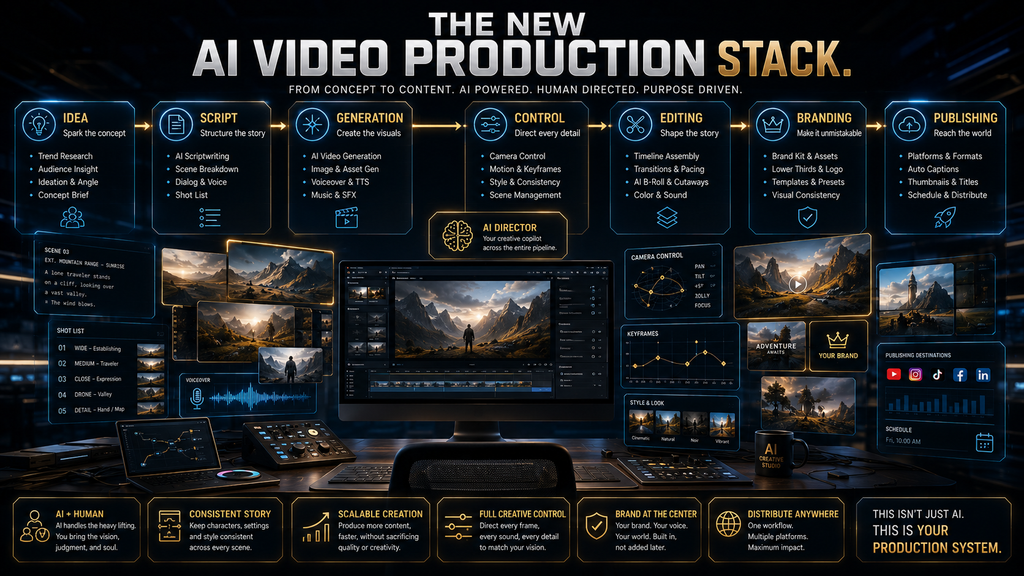
The AI Video Production Stack
Another mistake is assuming that buying an AI video generator means you have automated video production.
It doesn’t.
A real production stack looks more like this:
IDEA
↓
SCRIPT / BRIEF
↓
STORYBOARD
↓
SHOT GENERATION
↓
CHARACTER / SCENE CONTROL
↓
VOICE + AUDIO
↓
EDITING
↓
CAPTIONS + BRANDING
↓
QUALITY REVIEW
↓
PUBLISHING
An AI generator primarily solves the shot-generation layer.
Platforms such as InVideo and VEED try to cover more of the stack. Runway, Luma and Firefly increasingly connect generation to editing and broader creative workflows.
AI Hustle World analysis: The closer a platform gets to the entire production stack, the less useful it becomes to compare it purely on raw model quality. Workflow integration starts becoming a larger part of the product’s value.
Free vs. Paid AI Video Generators: What “Free” Really Means
Most major AI video platforms now offer some form of free access, trial credits or limited generation.
But “free” rarely means:
unlimited professional video production.
Google Flow currently gives non-subscribers 50 credits per day, but those credits are restricted to certain models and do not roll over.
InVideo offers a free plan with limited credits, while generation uses different amounts depending on the model and workflow.
Adobe Firefly offers free access with limited generations, while paid tiers provide larger generative-credit pools.
Pika provides usage-based generation options and a free/paid ecosystem, while its API exposes transparent per-second pricing.
The smarter question is therefore:
Can the free allowance produce enough usable output for my actual workflow?
If you need one clip for a presentation, free may be enough.
If you need 30 usable shots for a campaign, the free tier is primarily an evaluation mechanism.
The Hidden Economics: Cost Per Usable Shot
This is the metric most beginner comparisons miss.
Suppose Tool A costs $0.50 per generation.
You need four attempts to get one usable shot.
Your effective cost is:
$0.50 × 4 = $2 per usable shot.
Now suppose Tool B costs $1 per generation but produces a usable shot every other attempt.
Its effective cost becomes:
$1 × 2 = $2 per usable shot.
The headline price suggests Tool A is cheaper.
The production economics say they are equal.
Now add editing time.
If Tool A requires ten minutes of correction while Tool B requires three, Tool B may actually be cheaper even though its raw generation price is higher.
This is why the best AI video generator should be evaluated using:
Usable-shot rate
usable outputs ÷ total generations
Iterations per usable shot
How many attempts are required before approval?
Cost per usable shot
generation spend ÷ usable outputs
Human editing time
How much work remains after generation?
Cost per finished minute
What does a publishable finished video actually cost?
These metrics are far more useful for a business than:
“This plan has 1,000 credits.”
Why Traditional Video Production Still Exists
AI video has reduced the cost of generating certain visual assets.
It has not eliminated the underlying production problems.
Traditional production exists because a professional video requires control, continuity and accountability.
A traditional production can control:
- exact camera position
- actor performance
- lighting
- physical props
- product placement
- sound
- continuity
- timing
- legal permissions
- brand standards
AI can reduce the cost of some of these activities, but it does not remove the need for them.
A generated product shot can still contain an incorrect logo.
A generated human can still have an inconsistent hand.
A cinematic sequence can still violate the intended brand style.
A beautiful clip can still communicate the wrong message.
That is why the correct AI workflow is not:
Prompt → Publish
It is:
Prompt → Generate → Inspect → Select → Edit → Verify → Publish
The more commercially important the video, the more important the verification step becomes.
Where AI Video Generators Still Fail
The strongest marketing demonstrations show what these systems can do.
A useful buying guide also needs to explain where they fail.
Character consistency
A character may look correct in one shot and subtly change in another.
The face, clothing, body proportions or hairstyle can drift.
Complex interactions
Hands, tools, objects and multiple people interacting remain difficult because the system has to maintain coherent relationships over time.
Physics
Objects may move in visually plausible ways that are physically wrong.
Text and logos
Generated text can still be unreliable, particularly when exact brand language matters.
Long-form continuity
Generating one excellent five-second shot is fundamentally easier than generating a coherent sequence of dozens of shots.
Audio synchronization
Native audio is improving quickly, but audio quality, dialogue, timing and consistency still need review.
Prompt interpretation
A model can produce something aesthetically impressive while misunderstanding the actual instruction.
That last failure is particularly dangerous because the output looks good enough to fool the buyer into thinking the prompt was followed.
Commercial Rights: Don’t Treat Them as a Footnote
If you are creating videos for yourself, licensing may feel secondary.
For a business, agency or monetized creator, it can become a purchasing criterion.
Check:
- commercial-use rights
- ownership provisions
- model-specific terms
- uploaded-reference rights
- likeness rights
- music/audio rights
- trademark restrictions
- enterprise indemnification
- content retention
- training/data-use policies
Adobe is a good example of why this matters. Firefly combines Adobe models with partner models, and the commercial-use treatment can depend on which model produced the output.
Luma similarly distinguishes commercial-use access by plan, with its current Plus, Pro and Ultra plans advertising commercial use.
The correct principle is:
Never infer licensing rights from the fact that a tool allows you to generate the video.
Check the terms for the exact product, plan and model you are using.
What Happened to Sora?
Sora deserves a specific section because older AI video articles are now especially vulnerable to becoming outdated.
OpenAI discontinued the Sora web and app experiences on April 26, 2026. The Sora API is scheduled to be discontinued on September 24, 2026. OpenAI recommends exporting existing Sora content before the final shutdown process.
That means an article published today that still tells readers:
“Sora is one of the best AI video generators you can subscribe to”
is not merely slightly outdated.
It is giving the reader the wrong purchasing advice.
Where should former Sora users look instead?
For cinematic generation:
Google Flow/Veo, Runway, Kling or Luma
For social experimentation:
Pika or Hailuo
For broader creative workflows:
Adobe Firefly or Higgsfield
For complete script-to-video production:
InVideo or VEED
These are workflow recommendations, not claims that any one replacement reproduces Sora’s exact behavior.
Which AI Video Generator Fits Which Workflow?
| If you need… | Start with… | Why |
|---|---|---|
| Professional creative production | Runway | Broad generation and production workflow |
| Cinematic visuals + native audio | Google Flow / Veo 3.1 | Strong model + creative controls |
| Dynamic motion and consistency | Kling 3.0 | Strong motion-oriented workflow |
| Directed, controllable production | Luma | Frame-level and keyframe control |
| Social effects and experimentation | Pika | Fast creative iteration |
| Lower-cost generation | Hailuo | Strong value-oriented generation |
| High-volume marketing workflows | Higgsfield | Multi-model creative environment |
| Adobe/brand production | Firefly | Multi-model + Adobe ecosystem |
| Script → finished video | InVideo AI | Agents handle more of production |
| Generate → edit → publish | VEED | Generation and editor in one workflow |
Who Should Use AI Video Generators?
AI video generators are particularly useful when the cost of traditional production is disproportionate to the value of the asset.
That includes:
- social-media creators
- YouTube channels
- marketers
- advertising teams
- agencies
- educators
- product marketers
- small businesses
- concept artists
- filmmakers prototyping scenes
- teams producing frequent creative variations
The strongest use case is often not replacing a full production.
It is making previously uneconomical visual experimentation possible.
A small marketing team may not commission ten variations of an ad concept from a production studio.
With AI, it can generate ten directions, identify the strongest concept, then invest human effort in finishing the winner.
That changes the economics of creative decision-making.
Who Should Avoid Them?
You should be cautious if:
- your brand requires exact product rendering
- legal approval is required for every visual
- the output needs frame-perfect continuity
- your project involves sensitive unreleased information
- you have not checked commercial-use terms
- you have no human review process
- your workflow requires predictable production costs
- you are expecting one prompt to create a finished film
AI video is most useful when creative iteration is valuable and imperfection can be controlled.
It is less useful when exactness is non-negotiable.
What Happens If You Do Nothing?
There are two different “do nothing” scenarios.
Scenario 1: You remain entirely manual
You keep traditional editing, stock footage, filming and post-production.
That may be completely rational for high-value work where precision matters more than speed.
But for frequent low- and medium-budget content, you may spend more time and money on experimentation than competitors using AI-assisted workflows.
Scenario 2: You adopt AI badly
This can be worse.
You may produce:
- more content
- faster
- at lower generation cost
while simultaneously creating:
- generic visuals
- inconsistent characters
- brand errors
- licensing mistakes
- repetitive content
- excessive review work
So the strategic choice is not:
AI vs. traditional production.
It is:
Which parts of production should be automated, and where should human judgment remain the control point?
That is the AI Hustle World position:
Automate repeatable production work. Keep humans responsible for consequential creative and commercial decisions.
A Practical AI Video Workflow
A useful workflow starts before opening the generator.
Step 1: Define the finished asset
Don’t begin with:
“I want an AI video.”
Begin with:
“I need a 15-second vertical product ad for Instagram.”
That determines almost everything else.
Step 2: Break the video into shots
Write down:
- shot purpose
- subject
- camera
- action
- environment
- duration
- aspect ratio
- audio requirement
This prevents the common mistake of asking one generation to solve an entire production.
Step 3: Choose the generator based on the hardest shot
Don’t choose a platform based on the easiest shot.
Choose it based on the shot most likely to fail.
If your hardest requirement is cinematic camera control, prioritize platforms strong there.
If it is script-to-video automation, choose accordingly.
If it is social effects, optimize for iteration speed.
Step 4: Generate cheaply first
Use lower-cost or lower-resolution settings while exploring.
Luma explicitly recommends using lower-resolution exploration before escalating selected work to final settings, and Runway similarly provides lower-cost models for iteration.
Step 5: Keep only winning directions
Do not polish every generation.
Reject aggressively.
The purpose of AI is not to make every attempt successful.
It is to make experimentation cheap enough that you can find the right result faster.
Step 6: Finish the video
Generation is not the final stage.
Add:
- voice
- music
- captions
- branding
- pacing
- transitions
- legal review
- platform-specific formatting
Step 7: Measure the workflow
Track:
- total generations
- usable generations
- iterations per usable shot
- generation spend
- editing time
- final production time
- rejected assets
- cost per finished video
That’s how you determine whether AI is actually improving production.
A KPI Framework for AI Video Production
If you are using AI video commercially, measure the workflow rather than the novelty.
Usable-Shot Rate
Usable generations ÷ total generations
A low rate means your prompt, model or workflow needs improvement.
Iterations per Approved Shot
How many attempts does it take to get a result you would actually publish?
Cost per Usable Shot
Total generation spend ÷ approved shots
This is more useful than cost per generation.
Human Editing Time
How many minutes of human work remain after AI generation?
Cost per Finished Minute
Useful for agencies, YouTube production and recurring marketing campaigns.
Rework Rate
How often does an AI-generated asset require substantial regeneration after review?
Time to Approved Asset
Measure from:
brief → final approved video
That is the metric that connects AI generation to business value.
Common Mistakes When Choosing an AI Video Generator
Choosing by demo quality
A vendor’s best demo is not necessarily representative of your workflow.
Comparing different jobs
Do not compare an avatar platform to a cinematic generator as if they solve the same problem.
Looking only at subscription price
Credits and generation limits can matter more than the headline monthly fee.
Ignoring failed generations
Budget for iteration, not just successful output.
Generating final-quality footage too early
Use lower-cost exploration where the platform allows it, then spend premium credits on the winning direction.
Asking one prompt to create a whole film
Break complex videos into shots.
Ignoring licensing
Especially for advertising, commercial content and client work.
Treating AI output as final
AI should reduce production friction, not eliminate quality control.
Switching platforms constantly
Every platform has its own prompting behavior, controls and workflow.
If one tool consistently produces usable work for your specific content type, the operational learning can be more valuable than chasing every new model release.
The Future of AI Video Generators
The next stage of AI video is unlikely to be defined only by better pixels.
It will be defined by better control over production.
The progression is already visible:
Text prompt
→ Reference image
→ Multiple references
→ Keyframes
→ Camera control
→ Video-to-video
→ Native audio
→ Multi-shot sequences
→ Editing
→ Agentic production
Luma’s Ray3.2, for example, adds frame-level direction and up to 16 keyframes, while InVideo is pushing toward agents that coordinate scripting, cinematography, sound and editing.
The second-order effect is important.
As generation becomes easier, generation itself becomes less scarce.
The scarce skills become:
- knowing what to generate
- directing the visual language
- maintaining consistency
- selecting winning outputs
- verifying commercial rights
- editing for narrative
- understanding the audience
- measuring production economics
In other words:
AI lowers the cost of making footage. It does not automatically lower the cost of making something worth watching.
The Strategic Shift: From Generating Videos to Directing Systems
The most important change in AI video is not that machines can now make attractive clips.
It is that the workflow is moving from:
human creates every asset
to:
human defines the creative system → AI generates options → human selects and directs → AI executes variations → human approves the result.
That is a different production model.
A good AI video workflow therefore resembles a creative director working with a very fast production team.
The human decides:
- what the audience should see
- what the brand should communicate
- what matters
- what is acceptable
- which version wins
The AI handles:
- variations
- repetitive generation
- visual experimentation
- asset creation
- some editing
- some formatting
That division of labor is much more durable than the simplistic idea that AI will “make the video for you.”
Our Verdict: Which AI Video Generator Should You Choose?
There is no single winner because the category has fragmented into different production jobs.
Runway is the strongest all-around choice for creators who want a serious creative-production workflow and broad model/tool access. Its current Gen-4.5 supports text-to-video and image-to-video with detailed prompt and camera control.
Google Flow with Veo 3.1 is particularly compelling for cinematic generation, references and native audio, especially if you are comfortable managing a credit-based workflow.
Kling 3.0 is a strong choice for motion-heavy, consistency-sensitive and audio-enabled generation.
Luma is increasingly differentiated by control, keyframes and professional production workflows, with Ray3.2 now the current flagship video model.
Pika is better suited to social-first experimentation and effects than to replacing a complete professional production pipeline.
Hailuo is attractive when generation economics and motion quality matter, particularly for creators who need a lower-cost experimentation option.
Higgsfield is increasingly relevant for high-volume creative and marketing workflows where multi-model access and production orchestration matter.
Adobe Firefly is particularly strong for Adobe-centric creative teams and brands that want multiple generation models inside one creative ecosystem.
InVideo AI is the better choice when your real requirement is not “generate a clip” but “turn my brief into a complete video.”
VEED is compelling when the workflow needs to move directly from generation into editing, captions, branding and publishing.
The bigger lesson is more important than the ranking:
Don’t choose an AI video generator because its demo looks impressive. Choose it because it solves your hardest production problem at an acceptable cost per usable result.
FAQ
What is the best AI video generator in 2026?
There is no universal winner. Runway is a strong all-around choice for creative production, Google Flow/Veo 3.1 for cinematic generation and native audio, Kling for motion and consistency, Luma for directed control, and InVideo or VEED for more complete script-to-video workflows.
What is the best free AI video generator?
There is no single best free option because free allowances vary by model and usage. Google Flow currently provides 50 free Flow credits per day for eligible non-subscribers, while Adobe Firefly and several other platforms provide limited free generation.
Can AI video generators create videos from text?
Yes. Text-to-video is now a standard capability across major platforms including Runway, Google Flow/Veo, Kling, Luma, Pika, Hailuo, Adobe Firefly and VEED. The difference is how much control each platform gives you after the initial prompt.
What is the difference between text-to-video and image-to-video?
Text-to-video starts with a written description and generates the visual scene. Image-to-video starts with a still image and adds motion based on your instructions. Image-to-video can provide more control over a character, product, composition or visual style because the initial appearance is already established.
Which AI video generator is best for YouTube?
It depends on the YouTube format. For cinematic B-roll and custom shots, Runway, Veo, Kling or Luma are stronger starting points. For script-to-video workflows where narration, visuals and editing are generated together, InVideo AI or VEED can reduce more of the production workload.
AI Hustle World already covers dedicated AI video workflows for phone-first faceless YouTube production, so that narrower use case should be evaluated separately from this general generator comparison.
Which AI video generator is best for marketing?
For cinematic campaign assets, Runway, Veo, Kling, Luma and Higgsfield are strong candidates. For complete marketing-video automation, InVideo and VEED may be more practical. Adobe Firefly is particularly relevant for teams already working inside Adobe’s creative ecosystem.
Can AI video generators create commercial videos?
Many platforms permit commercial use under particular plans and terms, but you should check the exact product, model and subscription. Commercial rights can differ between a platform’s own model and partner models, as Adobe’s current Firefly documentation illustrates.
Is Sora still available?
No. OpenAI discontinued the Sora web and app experiences on April 26, 2026. The Sora API is scheduled to discontinue on September 24, 2026.
How much does AI video generation cost?
It varies significantly. Some platforms use monthly credits, some use per-second pricing, and others combine subscriptions with model-specific credit consumption. Runway, Google Flow, Kling, Luma, Higgsfield and InVideo all use credit-based economics in different ways.
Why do AI video generators use credits?
Video generation is computationally expensive, and higher-quality models require more compute. Credits allow platforms to charge differently for model quality, resolution, duration, audio, editing and other resource-intensive operations.
Can AI video generators replace professional video production?
They can replace or reduce some production tasks, but they do not eliminate the need for creative direction, storytelling, editing, quality control, rights management or brand review. The strongest current use case is augmenting production, not blindly replacing the entire process.
Final Thoughts
AI video generation has moved far beyond the novelty of turning a sentence into a moving picture.
The difficult part now is not finding a tool that can generate video. There are many.
The difficult part is choosing the right production system.
If you need cinematic creative control, start with Runway, Google Flow/Veo, Kling or Luma. If you want fast social experimentation, Pika or Hailuo may be more practical. If you’re producing marketing content at scale, Higgsfield or Adobe Firefly deserve serious consideration. If your goal is to turn a script or brief into a much more complete finished video, look at InVideo AI or VEED.
And don’t judge the decision by the prettiest demo or the lowest advertised subscription.
Judge it by four things:
Can it create the right scene?
Can it handle the difficult parts?
Can you control the output?
What does it actually cost to produce something you can publish?
That is the difference between experimenting with AI video and building an AI-assisted production workflow.
The best generator is not the one that creates the most footage.
It is the one that helps you create the right footage with less wasted time, fewer failed iterations, and enough human control to trust the final result.
Choose the AI Tool That Solves the Right Problem
AI Hustle World publishes practical, research-driven guides on AI tools, productivity, automation, content creation, business AI, and real-world workflows.
Explore our AI learning hub, understand the trade-offs, and choose the technology that actually fits your needs.
Explore More AI Guides →Written by
Muntasir Ahmad Chowdhury
Founder, AI Hustle World
Muntasir Ahmad Chowdhury is the Founder of AI Hustle World, an independent publication dedicated to making Artificial Intelligence practical, trustworthy, and easy to understand. He researches AI tools, automation, customer service, productivity, and real-world business applications, helping readers make smarter technology decisions through research-driven, experience-backed content.
Expertise:
AI Tools • AI Automation • AI Customer Service • AI Productivity • Generative AI • AI Workflows
Get Smarter With AI
Enjoyed this guide? Get practical AI tools, tutorials, and honest reviews delivered to your inbox.
1 thought on “Best AI Video Generators (Free & Paid): Top 10 Tools Compared”