
Evidence: Documentation reviewed
Last checked: August 2026
What was done: Written from official documentation and the published sources linked in this article. Not hands-on tested.
Files: None
Affiliate links: No
Last Updated: August 2026
How to Start a Faceless YouTube Channel in 2026: Complete Beginner Guide
Most “how to start a faceless YouTube channel” advice online is either a vague pep talk or a list of AI tools with no context for how they fit together. Neither actually gets you from zero to a published first video.
This is the checklist version — the one we’d hand someone who messaged us saying “I want to start this weekend, tell me exactly what to do.” It covers what to decide before you touch a single app, a real day-by-day plan for your first week, the mistakes that quietly cost creators their monetization, and an honest timeline for when this can realistically start generating anything.
What You’re Actually Building
A faceless YouTube channel is exactly what it sounds like: a channel where the content — the voice, the visuals, the value — carries the video instead of a recognizable on-camera presenter. It’s not a shortcut or a loophole. It’s a different production model, one that trades the personal-brand advantage of showing your face for the speed and privacy advantage of not needing to.
That trade-off matters for expectations. A faceless channel can scale content production faster than a filmed channel because you’re not bottlenecked by your own schedule or camera time. It does not scale trust the same way — viewers build a relationship with a voice and a format rather than a face, which takes a bit longer to establish and rewards consistency more than any single “viral” video.
Here’s the honest version of what this looks like month to month:
Your first few videos exist mainly to teach you your own workflow — script pacing, which visuals actually match your narration, how long editing really takes once you’re not learning the tools from scratch. Growth on a new channel, faceless or not, is rarely linear; most channels see a slow build for the first month or two before either finding traction or revealing that the niche or format needs adjusting. We’re not going to promise you a subscriber number or a timeline to your first payout, because anyone who does is guessing — what we can hand you is a process that removes the guesswork from the parts you
actually control.
Who This Is Actually For
Be honest with yourself about this before you spend a weekend on setup. A phone-only faceless channel fits well if you’re comfortable writing or heavily editing scripts (even with AI help), you’re realistic about a slow first couple of months rather than expecting overnight traction, and your chosen niche can genuinely be explained through narration and supporting visuals rather than needing you to demonstrate something in person.
It fits poorly if your only reason for going faceless is discomfort with being on camera combined with an expectation that this route is easier — production-wise it can be faster, but it isn’t easier in the sense of requiring less thought. Scripting, pacing, and editing judgment still have to come from somewhere, and a channel with no visual presenter has to work harder in its narration and hook to hold attention that a likeable on-camera personality might otherwise carry for free. If you’re drawn to this format because you enjoy writing and building repeatable systems more than performing, that’s a good sign. If you’re drawn to it purely to avoid being seen, it can still work, but go in knowing the writing and structure now have to do the job your face and delivery would have done.
One more honest distinction worth making: there’s a difference between “faceless because it fits how I want to work” and “faceless as a way to avoid ever improving at communication.” The former tends to produce creators who get genuinely better at scripting and pacing over time, since that’s where all their creative energy is directed. The latter tends to plateau, because the discomfort that pushed them toward this format in the first place never actually gets addressed — it’s just routed around a video at a time. Neither is a moral failing, but it’s worth being honest with yourself about which one describes you before you build months of habits around it.
What This Actually Costs to Start
Cost is one of the most exaggerated parts of this conversation in either direction — some guides claim you need nothing, others imply you need a stack of premium subscriptions before you post anything. Neither is accurate. A realistic starting budget looks like this:
True zero-cost path:
Canva’s free tier for your visuals and voiceover, CapCut’s free tier for finishing, and YouTube itself costs nothing to publish to. This is enough to produce and publish your first five to ten videos while you’re validating whether your niche and format hold attention. Most beginners underestimate how far the free tiers actually go.
Light paid path, once you’re validated:
Adding one paid script-to-video tool (in the $20–$30/month range) once you know your format works, plus keeping CapCut’s free finishing tools, is a realistic second-stage budget. This is the point where most creators start seeing real time savings from paying for a tool, rather than paying just to have a subscription.
What you don’t need early:
A dedicated voice-cloning subscription, a premium cinematic-shot generator, or more than one script-to-video tool. These are genuine upgrades once you have a working channel, not requirements to start one. Spending on them before you’ve validated your format is the most common way new creators burn a month’s budget with nothing to show for it.
Hardware and accessories:
True to the phone-only premise, you don’t need a camera, a ring light, or a dedicated microphone, since none of the tools in this workflow record you directly. The one piece of hardware worth having is a phone with reasonably current storage and processing power, since AI video and voice generation apps can be resource-heavy during rendering — an older, storage-full phone will make production noticeably slower and more frustrating than the workflow itself is supposed to be. Beyond that, a stable internet connection matters more than any accessory, since most of these tools do their generation work in the cloud rather than on-device.
Realistic Growth Expectations
Nobody can hand you a subscriber timeline that means anything — too much depends on niche competitiveness, format, consistency, and factors outside anyone’s control. What’s fair to say instead is the shape of what typically happens: the first month or so is mostly about finding your actual production rhythm rather than growth, since you’re still learning your own workflow. Somewhere in months two and three, creators who’ve kept a consistent cadence typically start to see which videos and topics within their niche perform better than others — that’s the point real optimization becomes possible, because before that you don’t have enough data to know what’s working. Channels that hit a wall usually aren’t missing a growth hack; they’re missing the consistent volume needed to generate that data in the first place.
It’s also worth naming the emotional pattern that trips up a lot of new creators here, faceless or not: the temptation to judge a channel’s viability from the first two or three videos, when realistically that’s not even enough data to judge a single script structure, let alone an entire niche. Give the process the month it actually needs before drawing conclusions either way — both “this is clearly working” and “this clearly isn’t” are premature judgments at video three.
That process starts before you open any app.
The Pre-Launch Checklist
Work through this in order. Each section builds on the one before it.
Decide Your Niche and Format
✅Pick a niche narrow enough to script easily. “Personal finance for people paying off debt” beats “personal finance.” Narrow niches are easier to come up with video ideas for every week, and they attract a more specific, more engaged audience. ✅Choose a visual format that matches your niche’s information density.
Explainer, list, and commentary-style content works well with stock-footage-driven visuals. If your topic depends on showing a specific real product or real location, faceless AI visuals are the wrong tool — that content needs actual footage.
✅Write down five video topics before you publish anything.
If you can’t come up with five ideas in your niche in ten minutes, the niche is probably too narrow or too thin to sustain a channel; widen it slightly and try again.
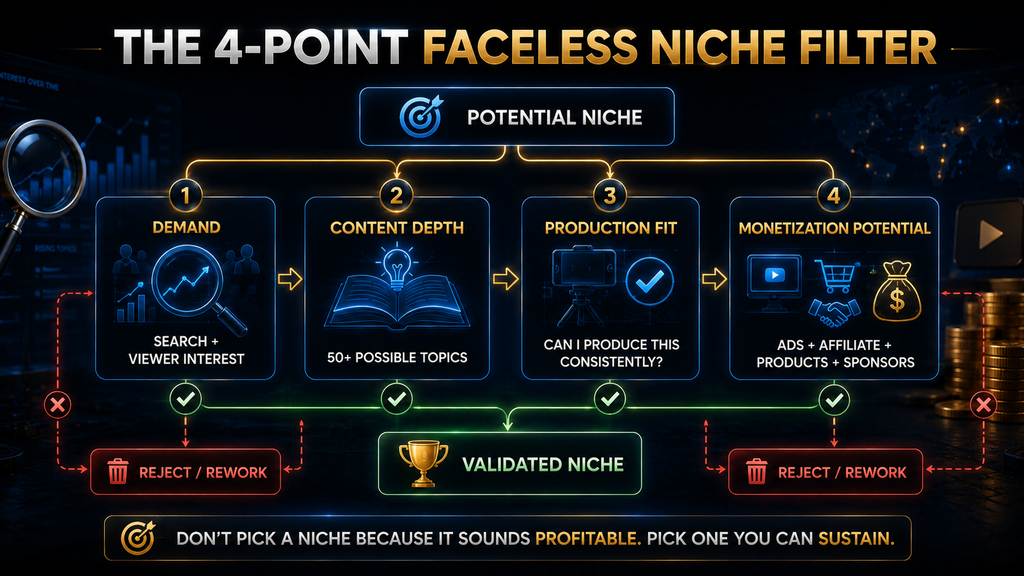
A quick worked example, since “narrow but not too narrow” is easier to show than explain: “Cooking” is too broad — you’d be competing with every cooking channel that exists with no clear angle. “Cooking for people who hate cooking” is closer, but still vague. “Five-ingredient dinners for people who work full-time” is narrow enough that you could list fifteen video topics in the next ten minutes (one per common dinner category, one per dietary restriction, one per kitchen-tool shortcut) while still being broad enough to sustain a channel for years without repeating yourself. That’s the target zone: narrow enough to generate ideas easily, broad enough not to run out.
On the format side specifically: most niches that fit this checklist well work best with stock-footage-style visuals rather than an AI avatar or whiteboard-style animation, simply because stock visuals are faster to produce and iterate on while you’re still validating whether the niche holds attention at all. Avatar and whiteboard ormats can be worth adopting later once a format is proven, but they add cost and production time you don’t need to carry during the validation phase covered in this checklist. Our tools guide breaks down all three formats and when each one earns its extra cost, if you want the fuller comparison once you’re past this stage.
✅ Pick a channel name that describes the value, not just a brand. New viewers decide whether to click partly from the name — “Debt-Free Playbook” tells them what they’ll get faster than an invented brand name does.
✅Write your channel description around your niche’s core promise, not a generic “welcome to my channel” line. ✅ Upload a simple banner and profile image —doesn’t need to be elaborate, just consistent and legible at a small size.
✅ Turn on two-step verification on the Google account tied to your channel now, even before you’re close to monetizing. It’s required later, and setting it up early avoids a last-minute scramble.
Set Up the Channel Itself
This step feels like busywork compared to actually making videos, but skipping it is one of the more common regrets we hear about. A channel name that’s a personal joke instead of a value statement, or a description that never got written past “hey guys welcome to my channel,” costs you clicks from new viewers on every single video
afterward — it’s a one-time fifteen-minute task that keeps paying (or costing) you indefinitely. Treat this section as done once, not as something to revisit constantly.
Choose Your Tool Stack
✅ Pick one tool per production role — script/voice, visuals, finishing — rather than collecting apps. If you haven’t settled on a stack yet, our full AI tool stack for a phone-only faceless channel breaks down exactly which tools fit which role and why.
✅Test your chosen stack on one throwaway video before your real first upload. You want your actual first published video to reflect a workflow you already understand, not one you’re learning live.
The throwaway-video step is the one people skip most often because it feels like wasted effort — you’re not planning to publish it, so why bother? The answer is that your very first published video is doing double duty: it’s both your channel’s introduction to any early viewers and your own first real test of a workflow you’ve only used in isolation up to that point. Running one disposable video through the full
pipeline first — script to voice to visuals to captions to export — surfaces the small friction points (an export setting you didn’t expect, a step that takes longer than you assumed) while nothing is riding on the result. It typically takes under an hour and saves considerably more than that in avoided frustration on video one.
Plan Before You Produce
✅ Write a full script for video one, even a rough one, before opening any generation tool. Every tool in this space performs better on an edited script than on a bare topic prompt.
✅ Draft titles and thumbnail concepts for your first three videos now, while you’re thinking clearly about the niche, rather than rushing them right before each upload.
✅ Decide your posting cadence before you start— twice a week is a realistic, sustainable starting cadence for most newsolo creators using this workflow. Committing to daily uploads before you’ve timed your own process is the single most common reason first channels stall.
On cadence specifically: it’s worth deciding this now rather than “seeing how it goes,” because the decision is genuinely harder to make well once you’re already a few videos in and either excited by early momentum or discouraged by a quiet start. Neither emotional state is a good basis for a long-term posting commitment. Pick a cadence you could sustain even in a mediocre month, not the cadence you’d want in a great one.

Your First Week and the Mistakes That Actually Cost You
A Realistic First-Week Plan
Day 1–2: Script and plan. Write full scripts for your first two videos. Don’t touch a generation tool yet — get the writing right first.
Day 3: Produce video one. Run your script through your chosen stack, do one finishing pass in your editing app, and export. Expect this to take longer than it will
once you’re experienced — that’s normal for a first attempt.
Day 4: Publish video one, and prep your channel’s discovery pieces. Add a description with your niche’s key terms written naturally (not stuffed), and set up an end screen pointing to your next video slot even if it isn’t live yet.
Day 5: Produce video two, applying anything you learned from video one’s production process.
Day 6: Rest or batch-plan. Use this day to sketch three or four more video topics
rather than producing — a content pipeline a few videos ahead of your publish date is what actually makes a twice-a-week cadence sustainable past month one.
Day 7: Publish video two, and review your first week honestly. Which script felt strongest to write? Which part of production took longest? Answer those two questions before starting week two — they tell you more about where to improve than any single view count will this early.
What Changes in Weeks 2 Through 4
Week one is about proving to yourself that the workflow functions end to end. Weeks two through four are about turning that into a rhythm rather than a series of one-off efforts. Two things should shift during this stretch. First, your per-video production time should noticeably drop — if it isn’t, that’s a sign to simplify your stack rather than push through, since a workflow that stays exhausting rarely survives past the first month. Second, you should be batching at least one production step ahead of where you’re publishing: writing two scripts in one sitting rather than one, or generating two videos’ worth of visuals back to back. Batching is what protects your posting cadence from an unexpectedly busy week, and an unprotected cadence is the single most common reason otherwise-promising channels quietly stop updating around week three or four.
This is also the point to start paying attention to which of your five-or-more brainstormed topics actually turned into videos you were excited to make versus ones that felt like a chore to script. That’s an early, useful signal about which sub-angles within your niche to lean into, well before you have enough view data to tell you the samething.
The Mistakes That Actually Cost Creators
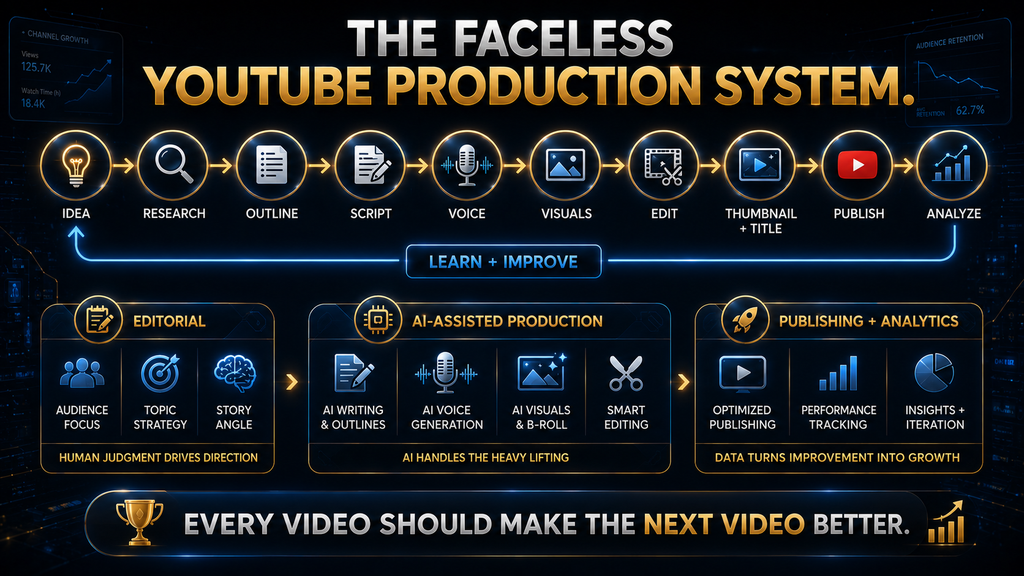
Mistake 1: Treating “faceless” as “hands-off.” The channels that stall fastest are the ones where a creator generates a video end-to-end without editing the script or reviewing the output. A lightly-edited script and a quick review pass before publishing is the difference between a channel that improves video over video and one that plateaus immediately.
Mistake 2: Publishing template content at volume without adding anything original. This is the one most guides skip, and it’s the one that can actually cost you monetization rather than just views. According to YouTube’s own monetization policy page, content that’s mass-produced from generic or unoriginal templates — including AI-generated video that gives the impression of mass production without the creator’s own original insight or perspective — is explicitly ineligible for monetization under YouTube’s inauthentic-content policy. This isn’t a ban on AI tools; it’s a requirement that your channel add real perspective, commentary, or educational value rather than pumping out interchangeable videos from the same template. Practically: keep your scripts genuinely yours, vary your structure and angle video to video, and don’t treat any single tool’s default output as a finished product.
Mistake 3: Chasing daily uploads before the workflow is sustainable. A consistent twice-a-week schedule you actually keep beats a daily schedule that collapses after two weeks. YouTube’s system and audience both respond
better to reliability than raw frequency, especially early on.
Mistake 4: Ignoring the monetization thresholds until you’re already close. As of 2026, YouTube’s Partner Program has two tiers. The entry tier (fan funding — memberships, Super Thanks, and similar features, but not ad revenue) generally requires around 500 subscribers plus roughly 3,000 public watch hours in the trailing 12 months, or an equivalent Shorts-view threshold. Full ad-revenue monetization generally requires 1,000 subscribers plus 4,000 public
watch hours in the trailing 12 months, or 10 million Shorts views in the trailing
90 days — alongside no active Community Guidelines strikes and two-step
verification enabled. These exact numbers are set by YouTube and do get refined
over time, so treat this as a planning reference and check YouTube’s own
Partner Program page before you apply.
Mistake 5: Rebuilding the entire channel identity after one slow month. One quiet month is data, not a verdict. Look at your two honest review questions from the first-week plan before deciding whether the niche, the
format, or just your own process needs adjusting.
Mistake 6: Not batching ahead once week two arrives. As covered above, a workflow with no buffer is fragile. The creators who quietly disappear around week three or four usually didn’t decide to quit — a busy week just broke an unprotected cadence, and momentum was hard to pick back up once broken.
Monetization Math: What Reaching the Thresholds Actually Looks Like
It’s worth translating the subscriber and watch-hour thresholds from Mistake 4 into something more concrete. Full ad-revenue monetization requires 4,000 public watch hours in a trailing 12-month window — that’s the total time all viewers combined have spent watching your public videos, not views. As a rough planning reference: if your average video runs eight minutes and holds a typical retention rate for a new channel, you’d need somewhere in the range of tens of thousands of total views across your library to accumulate that watch-hour total, though the exact number swings heavily based on your actual average view duration, which is itself driven by how strong your scripts and hooks are. This is why the earlier sections on scripting and hooks matter more than any tool choice: watch-hour accumulation is a direct function of how long people actually stay, not just how many people click.
A practical implication: two channels with identical view counts can reach the watch-hour threshold months apart purely based on retention. Improving your hook and pacing doesn’t just help any one video’s performance — it compounds across your entire path to monetization.
Analytics to Actually Watch in Month One
With this little data, most of YouTube Studio’s analytics dashboard is noise. Three numbers are worth checking after each upload, and the rest can wait:
- Audience retention graph, specifically the first 15–30 seconds. A steep early drop points directly at your hook, regardless of how good the rest of the video is.
- Click-through rate on your thumbnail and title. A very low rate suggests the title/thumbnail isn’t communicating the video’s value, independent of how good the content itself is.
- Which of your videos so far has the strongest retention, and why. Compare its script structure to your other videos — this is the fastest way to find your own format within your niche before you have enough volume for YouTube’s own recommendations to help you.
Everything else — traffic sources, demographics, real-time views — is more useful once you have a dozen or more videos to compare against each other. Checking it obsessively in week one mostly just adds anxiety without adding usable information.
A Few Legal and Disclosure Basics Worth Knowing
This isn’t legal advice, and the specifics vary by tool and jurisdiction, but a few basics are worth understanding before you publish at volume. Most script-to-video and
stock-footage tools license their visual libraries for commercial use as part of your subscription, but “commercial use” terms differ between tools and between their free and paid tiers — check the specific license terms of whichever tool you’re using rather than assuming, especially if a video ends up doing well and you want to repurpose clips elsewhere. Ownership of AI-generated voice and video output is also still a developing area legally, and terms of service on this point vary by provider and do get updated, so it’s worth a periodic re-read of your tools’ terms rather than a one-time check. On disclosure specifically: YouTube doesn’t require a blanket announcement that a channel uses AI tools, but platforms have been moving toward requiring disclosure for realistic synthetic media that could be mistaken for real events or people, which is part of why Google’s Veo model, mentioned in our tools guide, ships with built-in content labeling. Keeping your own use of AI tools straightforward and non-deceptive is both the safer legal position and, in our view, the more sustainable way to build an audience’s trust over time.
Handling Comments and Community Without Showing Your Face
A faceless channel can still build a real community — it just does it through the account’s voice and personality rather than a face. Replying to comments in a consistent tone (the same “character” your scripts already have) does more for viewer loyalty on a faceless channel than it might on a filmed one, precisely because the
comment section is one of the few places viewers interact with something that feels like a person rather than a produced video. Set aside time after each upload specifically for replying to early comments — the first hour or two after publishing tends to matter most for a video’s early engagement signals, and a channel owner replying visibly in that window is one of the simpler, low-cost ways to encourage more of it.
You don’t need to disclose personal details to build this kind of connection. A consistent point of view, a recognizable sense of humor or tone in your scripts and replies, and follow-through on questions viewers ask in comments (turning a recurring
question into a future video topic, for instance) builds familiarity without requiring a face attached to it.
When and Whether to Consider Outsourcing
For your first month, do every step yourself. You can’t effectively delegate a process you don’t understand well enough to explain, and outsourcing too early is a common way to lose the workflow knowledge that lets you troubleshoot when something breaks. Once you have a stable, repeatable process and a consistent posting cadence, the first task worth considering for outsourcing is usually script writing or research, if that’s the step taking you the longest relative to how much you enjoy it —not the AI generation or finishing steps, which are already fast once you know
your stack. Outsourcing before you have a proven format mostly just means paying someone else to guess at what your channel should be, which rarely works as well as a format you’ve already validated yourself.
A Simple Content Calendar You Can Copy
You don’t need project-management software for this. A basic weekly structure that supports the twice-a-week cadence from Part 2 looks like: one day for planning (choosing which two topics from your growing idea list you’re producing this week), two production days, and one buffer day held in reserve for whichever week inevitably goes sideways. The specific days matter less than keeping planning and production as separate blocks rather than deciding what to make the same day you sit down to make it — that single separation is what makes a twice-a-week cadence survive busy weeks, holidays, and the inevitable week where the first draft of a script just isn’t working and needs a full rewrite.
Keep your running idea list somewhere you’ll actually reopen — a simple notes app list is enough. The goal is never staring at a blank page trying to think of this week’s topic from scratch; that blank-page moment, more than any tool or editing step, is where posting cadences quietly die.
Final Thoughts
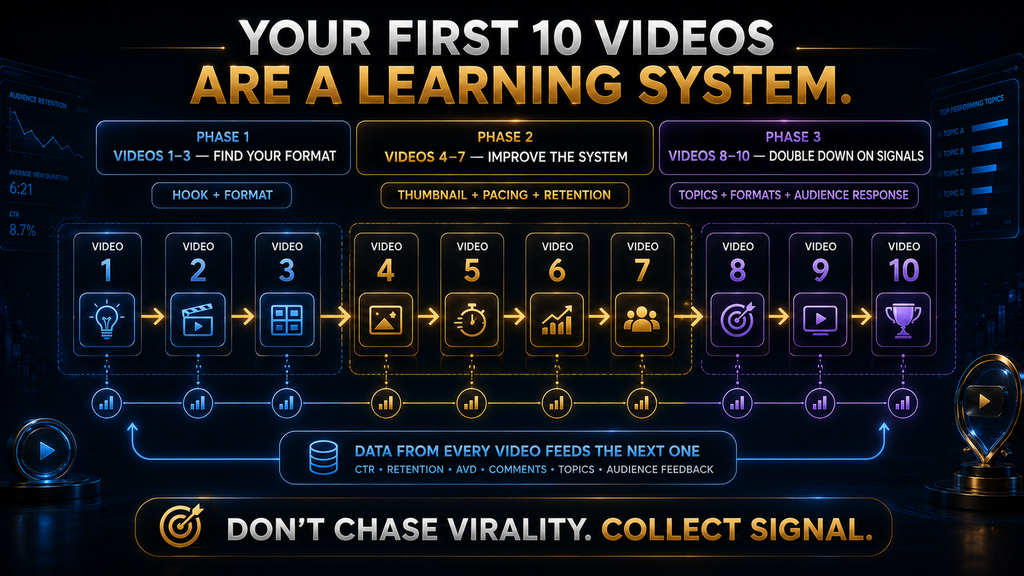
Starting a faceless YouTube channel isn’t complicated in the way most people assume — it’s a checklist, a first week of honest production practice, and a posting cadence you can actually sustain past month one. The creators who stall usually aren’t missing a better tool; they’re skipping the planning steps in Part 2, chasing a posting frequency their workflow can’t support yet, or losing their cadence in weeks two through four because nothing was batched ahead of schedule.
Work through the checklist once, run your real first week, and adjust from there. That’s the whole process — everything else, from your tool stack to your content calendar to when you eventually consider outsourcing, is refinement on top of a foundation that either holds up or doesn’t in that first month.
If there’s one mindset shift worth taking from this guide, it’s treating your channel’s first month as a data-gathering exercise rather than a performance to be judged. You’re not trying to go viral in week one — you’re trying to find out, honestly, whether your niche, your format, and your own production rhythm actually fit together. Everything after that first honest month is optimization; everything before it is just finding out what you’re actually working with.
Ready to Build Your Faceless YouTube Workflow?
Your next step is simple: choose a production workflow you can actually maintain. Explore the AI video tools that can help you create, edit, and publish your first faceless YouTube videos.
Explore AI Video Tools →FAQ
Do I need to show my face at any point to run a faceless YouTube channel?
No. Channel management, community replies, and everything else can be done under a channel name or brand identity without appearing on camera.
How long does it realistically take to reach monetization?
There’s no fixed timeline — it depends heavily on niche, consistency, and format. What’s consistent across successful channels is a steady twice-a-week (or more) posting cadence sustained for months, not a single viral video. Treat any specific timeline promise elsewhere with skepticism.
Is AI-generated faceless content against YouTube’s rules?
No — using AI tools for production is explicitly allowed. What’s restricted is
mass-produced, templated content that lacks original commentary or perspective,
under YouTube’s inauthentic-content policy. The tool doesn’t matter; the originality of the finished video does.
What’s the single most important thing to get right in month one?
A script and hook you’d actually want to watch the first fifteen seconds of. Visuals, voice quality, and editing polish all matter, but none of them save a weak opening line.
Do I need a content calendar from day one?
Not a formal one, but you do need at least three or four video ideas planned ahead of your publish dates by the end of week one. Producing ideas and producing videos are different tasks, and separating them is what keeps a twice-a-week cadence sustainable.
How much money do I actually need to start?
Nothing, if you use free tiers for your first several videos. A realistic paid budget once you’ve validated your format is roughly $20–$30/month for one script-to-video tool, keeping your finishing tool free.
Why do so many new faceless channels stop posting around week three?
Usually because week one and two went fine on adrenaline and novelty, but nothing was batched ahead, so the first genuinely busy week broke the posting cadence. Batching at least one production step ahead of schedule by week two is the most direct fix.
Can I build real community on a channel with no face attached to it?
Yes. Community on a faceless channel comes from a consistent voice and tone in your scripts and comment replies, not from a visible presenter. Replying to comments promptly, especially in the first hour or two after publishing, matters more for a faceless channel’s engagement than it does for a channel that already has a recognizable personality carrying that connection.
When should I start outsourcing parts of production?
Not in month one. Do every step yourself until you have a stable, repeatable process — you can’t delegate a workflow you don’t understand well enough to explain. Once your format is proven, scripting or research is usually the first task worth handing off, not the AI generation or finishing steps.
Sources and Further Reading
- YouTube Partner Program overview & eligibility: YouTube Help. Eligibility thresholds and how the Partner Program works.
Related Guides
- How to Use ElevenLabs for YouTube & Faceless Videos
- How to Start a Faceless Instagram Page With AI Tools
- Best AI Script and Idea Generation Tools for YouTube Creators (2026)
- How to Start a Faceless Pinterest Account for AI Content
Written by
Muntasir Ahmad Chowdhury
Founder, AI Hustle World
Muntasir Ahmad Chowdhury is the Founder of AI Hustle World, an independent publication dedicated to making Artificial Intelligence practical, trustworthy, and easy to understand. He researches AI tools, automation, customer service, productivity, and real-world business applications, helping readers make smarter technology decisions through research-driven, experience-backed content.
Expertise:
AI Tools • AI Automation • AI Customer Service • AI Productivity • Generative AI • AI Workflows
Get Smarter With AI
Enjoyed this guide? Get practical AI tools, tutorials, and honest reviews delivered to your inbox.