Evidence: Documentation reviewed
Last checked: September 2026
What was done: Written from official documentation and the published sources linked in this article. Not hands-on tested.
Files: None
Affiliate links: No
Last reviewed: September 2026. Pricing, features, and positioning in this comparison were checked against the linked official product and plan pages; confirm live terms before purchasing because AI software changes quickly.
Best AI Tools for Writing Blog Posts (Free & Paid)
Choosing an AI writing tool seems straightforward until you compare the jobs each platform is built to handle. A blogger may need research support, a stronger drafting partner, SEO workflow help, or brand controls—and those are different buying problems.
General AI assistants can handle broad research and writing work. SEO platforms add structured optimization, while brand platforms prioritize consistency across a team. The price gap only makes sense when a specialized tool removes a real bottleneck instead of adding another dashboard.
That is why a raw “best AI writing tools” ranking is a poor buying guide. It treats products built for different workflow stages as though they solve the same problem.
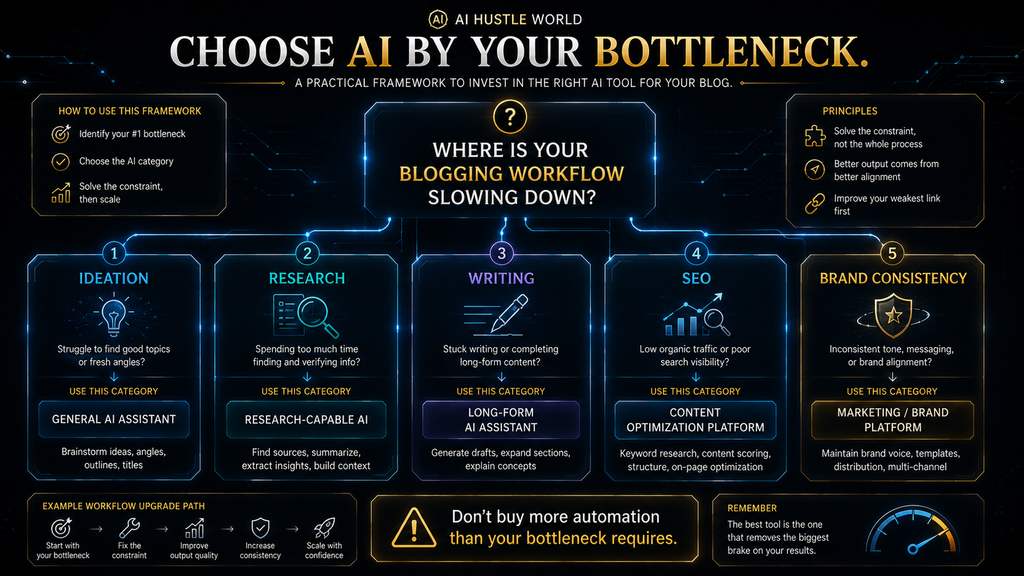
Start by naming the part of your blogging workflow that costs the most time, effort, or quality. Then choose the tool whose documented strengths address that constraint.
This guide evaluates AI writing tools across the full path from topic selection to a publishable article: thinking, research, drafting, optimization, editing, and update work. The goal is to help you make a decision that improves the finished article, not simply the speed at which a first draft appears.
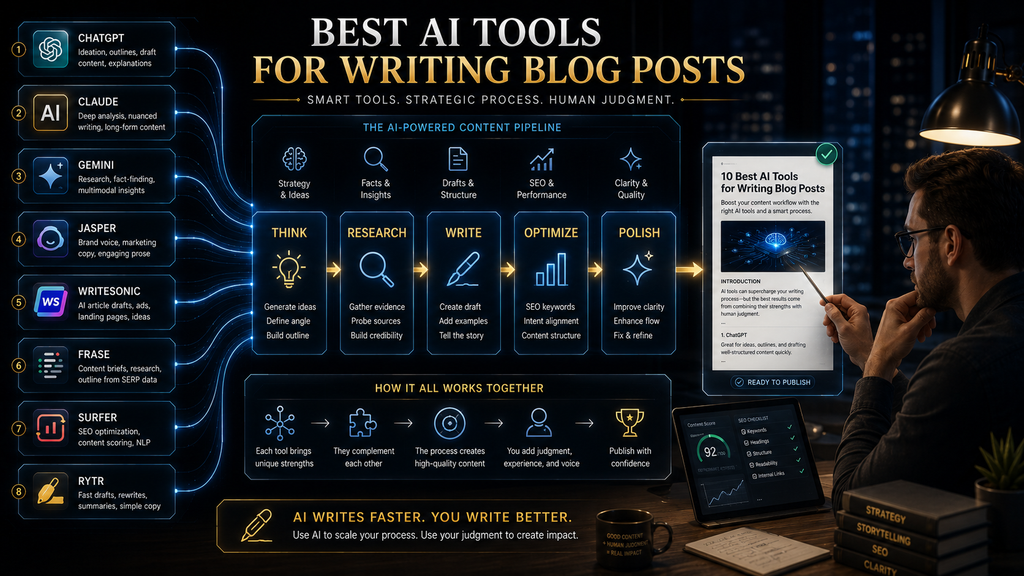
The comparison covers ChatGPT, Claude, Gemini, Jasper, Writesonic, Frase, Surfer, and Rytr. Each occupies a distinct position in the market, so the best fit depends on your workflow, budget, and the work you still need to do after the tool generates text.
Quick answer: ChatGPT is the strongest all-around starting point for most solo bloggers. Claude suits long-form editorial work, Gemini fits Google-centered workflows, Jasper serves brand-heavy teams, Writesonic and Frase support search-led production, Surfer specializes in optimization, and Rytr is a lower-cost entry point.
Use the ranking as a starting point, not as a substitute for diagnosis. The decision framework below shows where each tool earns a place in a real content workflow.
The Best AI Tools for Writing Blog Posts at a Glance
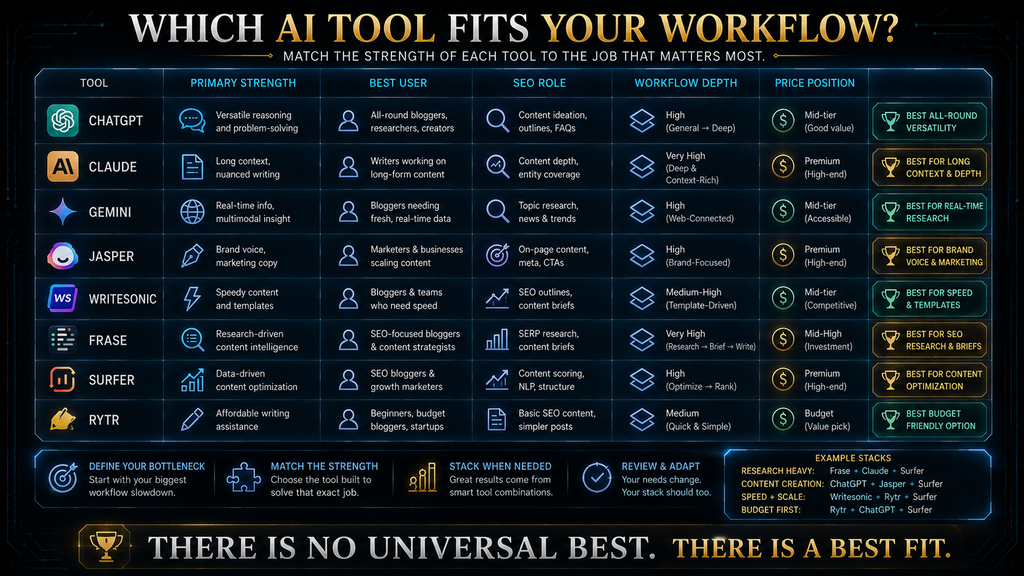
The table below answers the buying question quickly by matching each tool to a practical job. It gives you a starting point before the detailed workflow analysis that follows.
| Tool | Best For | Main Strength | Main Limitation | Price Position |
|---|---|---|---|---|
| ChatGPT | Most bloggers | Flexible research, writing and analysis | Requires a structured workflow | Free + paid |
| Claude | Long-form writers | Natural writing and reasoning | Less specialized blogging workflow | Free + paid |
| Gemini | Google-heavy workflows | Research and Google ecosystem | Best value depends on Google usage | Free + paid |
| Jasper | Marketing teams | Brand voice and marketing workflows | Expensive for casual bloggers | Premium |
| Writesonic | SEO + AI-search workflows | Content plus AI-search visibility | Expensive for simple blogging | Premium |
| Frase | Content optimization | Research, writing, SEO and publishing workflow | More specialized than a general AI assistant | Paid |
| Surfer | SEO-focused publishers | Content optimization and search-focused workflow | Not primarily a general writing assistant | Paid |
| Rytr | Beginners on a budget | Affordable content generation | Less comprehensive workflow | Low-cost |
The key takeaway: don’t choose a tool because it has the most features. Choose it because its strongest capabilities match your biggest bottleneck.
Why AI Writing Tools Are Useful for Bloggers
AI writing tools are valuable when they remove repetitive work without removing the judgment that gives a blog post its value. They can shorten preparation and drafting, but they cannot decide what your audience needs or whether a claim deserves to be published.
A publishable blog post involves more than prose. It requires topic selection, intent analysis, research, outlining, drafting, editing, fact-checking, optimization, formatting, visual planning, and later updates when facts or search behavior change.
Different tools help at different points in that process. A general assistant can turn an uncertain idea into an outline, while a specialist platform may be more useful when optimization, collaboration, or brand governance is the constraint.
That difference is why word count is a weak measure of value. The useful question is whether a tool improves the path from an idea to an article you are prepared to stand behind.
A tool should earn its place by improving a real workflow stage, not by generating the largest volume of text. The decision is about useful output after research, verification, and editing are complete.
The real productivity question is how much of the path from idea to a publishable article the tool actually improves. A fast first draft is useful only when it reduces the work that remains afterward.
The AI Blog Writing Stack
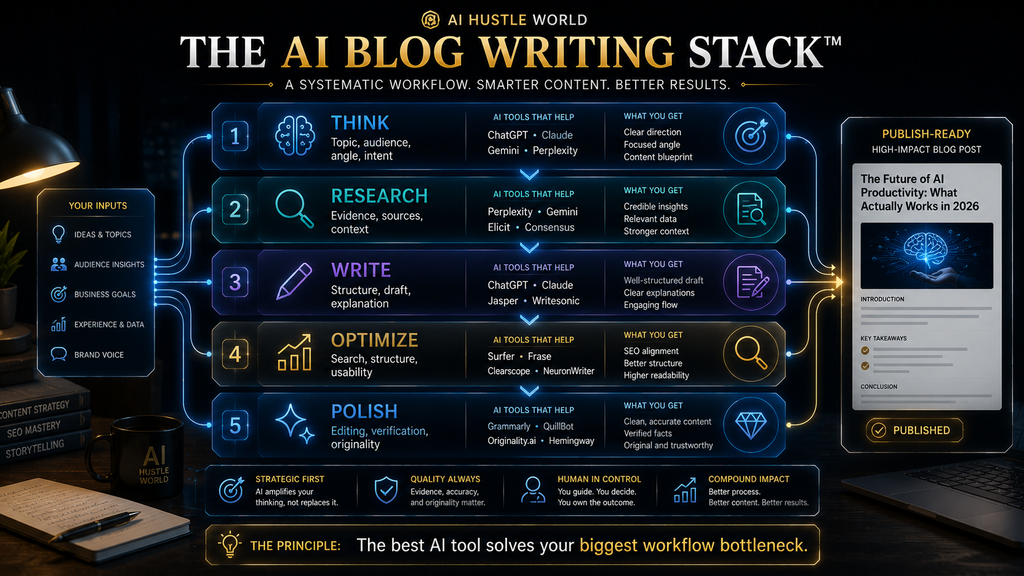
The AI Blog Writing Stack divides blog production into five connected layers. It gives bloggers a practical way to identify which part of the work needs help before they pay for another tool.
The AI Blog Writing Stack moves through five connected stages: think, research, write, optimize, and polish. Each stage represents work that still needs a clear purpose and editorial ownership.
These five layers form the AI Blog Writing Stack. They describe the work required to move from a topic idea to a trustworthy, useful article, rather than a sequence of product features.
THINK
Think is where you choose the topic, angle, audience, search intent, and structure. A strong decision at this stage prevents the rest of the workflow from producing well-written content for the wrong reader or query.
RESEARCH
Research is where you collect current information, identify evidence, and separate verified facts from assumptions. AI can help organize the work, but important claims still need a source a reader can check.
WRITE
Write turns the research and structure into a coherent draft. The aim is not maximum output; it is a clear argument that can be edited without rebuilding the article from scratch.
OPTIMIZE
Optimize improves search relevance, structure, topical coverage, readability, and internal linking. It should help a useful article become easier to find and use, rather than turn the page into a list of repeated phrases.
POLISH
Edit the language, verify important claims, add original insight, improve transitions, and make the article genuinely useful. That final editorial pass is where the draft becomes publishable rather than merely generated.
The AI Blog Writing Stack is AI Hustle World’s original decision map for this category. It shifts the question from which tool looks most impressive to which stage of the publishing process needs to improve.
Use the map to match each product to the named layer it can plausibly support: general assistants can span several layers, while specialized platforms should justify their cost by reducing work at the stage they target. This is not a performance score, and it makes no claim that any model universally writes better copy.
Methodology: this decision map is a transparent primary-source synthesis. It matches current vendor documentation and plan pages to workflow stages, then separates those documented capabilities from AI Hustle World’s editorial analysis.
A feature earns weight only when it can reduce work without simply moving effort into verification, editing, or tool management. That makes the framework reusable for comparing general AI assistants, SEO platforms, and brand systems without inventing a benchmark.
How We Evaluated These AI Writing Tools
A fair comparison needs more than a feature checklist because the right tool depends on what it changes in a publishing workflow. We evaluated documented capabilities, the work each platform may replace, the human work that remains, and whether the cost fits the user type.
The comparison considers the factors that determine whether a tool improves the finished article rather than merely accelerates a first draft. Those criteria are listed below, with current product and pricing facts linked to official pages in the relevant tool sections.
- Writing and editing capability
- Long-form control
- Research support
- Accuracy and verification requirements
- SEO capabilities
- Content optimization
- Workflow integration
- Ease of use
- Customization
- Brand consistency
- Publishing workflow
- Pricing and value
- Learning curve
- Appropriate user type
- Limitations and failure points
This is not a hands-on laboratory benchmark. We did not run one identical prompt through every platform or score output quality under controlled conditions. When a capability or price comes from a vendor, it is treated as a vendor statement, while the workflow recommendation is AI Hustle World’s editorial analysis.
That distinction matters because “tested” can mean very different things on comparison pages. Some publishers document standard prompts and scoring methods, while others are making a feature or workflow comparison; readers deserve to know which they are reading.
Our method is deliberately conservative: verify what the product says it offers, distinguish that evidence from editorial judgment, and avoid presenting a benchmark that does not exist. We also review whether a specialist tool reduces work across the whole workflow, including the verification and editing it may create.
1. ChatGPT — Best Overall AI Writing Tool for Most Bloggers
Best for: Bloggers who want one flexible AI assistant for research, outlining, writing, editing, and problem-solving. ChatGPT is the broadest fit when the publisher wants one environment but still plans to manage the workflow.
ChatGPT is the strongest general-purpose starting point for most bloggers because it does not impose a single publishing workflow. It can support the strategy, research, drafting, and editing work around an article, but the blogger remains responsible for structuring the process and verifying claims.
A blogger can use it to turn a messy topic into an outline, compare approaches, improve a draft, analyze an existing article, or work with source material. That flexibility is useful when the same person handles multiple stages of content production rather than a narrowly defined SEO task.
OpenAI currently lists ChatGPT Plus at $20/month. The paid plan provides broader model and tool access than Free, including higher limits, advanced reasoning, file uploads and analysis, image generation, and Deep Research where available.
Its central advantage is flexibility across the workflow. That same openness is a limitation for writers who need a rigid keyword-to-publish system with minimal setup.
What ChatGPT does particularly well
For bloggers, the useful prompt is not “write me an article.” The better use is to build a repeatable sequence that gives the model clear inputs, assigns it a limited task, and keeps editorial decisions with the publisher.
A practical sequence is to analyze intent, review the competing pages, build an evidence-backed outline, draft sections, challenge weak claims, and then edit for clarity. Used this way, ChatGPT supports the work without pretending to replace research or editorial review.
For example, a blogger can use a general assistant as part of a controlled sequence rather than a one-click article generator. The sequence keeps the human responsible for the argument and the evidence.
Step 1 is to analyze the search intent and define what the reader is trying to accomplish. Without that decision, a polished draft can still answer the wrong question.
Step 2 is to identify what competing articles explain poorly or leave out. That gap becomes the basis for useful information gain.
Step 3 is to build an evidence-backed outline before drafting. The outline should connect the reader’s need, the article thesis, the supporting sections, and the sources required.
Step 4 is to draft individual sections against that outline. Section-level drafting makes it easier to challenge weak reasoning before it spreads through the whole article.
Step 5 is to challenge weak claims, missing caveats, and unsupported conclusions. A confident sentence should not survive simply because it sounds authoritative.
Step 6 is to improve transitions and readability after the substance is sound. Editing should make the reasoning easier to follow without flattening the writer’s point of view.
Step 7 is to create FAQs and supporting content only where they answer genuine follow-up questions. Extra sections should extend usefulness rather than inflate the word count.
That process gives the writer more control than pressing an “AI article” button because every stage has an editorial purpose. It also makes it easier to see where the draft needs human evidence, examples, or a stronger point of view.
ChatGPT also supports file uploads and analysis for research notes, PDFs, spreadsheets, briefs, and existing drafts. The useful benefit is being able to work from source material while keeping the editorial decisions visible.
Where ChatGPT falls short
Its flexibility can become a weakness when the workflow is not defined. A blank chat window does not tell a writer what to research, what to verify, or when a draft is ready to publish.
A dedicated content platform may provide a more structured path from keyword to optimized article. With ChatGPT, you are responsible for designing the workflow and deciding whether the suggested output deserves to survive editing.
It can also produce incorrect information, which means research-heavy articles still require verification. A confident paragraph is not evidence.
This is especially important for current pricing, product specifications, statistics, regulations, and other facts that can change. Those claims should be checked against current sources before publication.
Who should choose ChatGPT?
Choose ChatGPT if you want one versatile assistant that can support several stages of content production. It is a particularly strong fit when you are willing to design and maintain your own workflow.
- want one versatile AI assistant,
- publish different types of content,
- value control,
- are willing to build your own workflow,
- want research and writing capabilities in one environment.
Who should skip it?
If you want a highly specialized workflow that moves from keyword research through optimization and publication with minimal setup, a dedicated content platform may suit you better. Choose it only when that structure removes a bottleneck that a general assistant leaves unresolved.
Our verdict: ChatGPT is the best overall starting point for most bloggers. Its flexibility is most valuable when the publisher keeps research, verification, and final editing in the process.
ChatGPT official pricing and plan information
2. Claude — Best for Long-Form and Editorial Writing
Best for: Bloggers who prioritize natural prose, reasoning, structure, and long-form editorial work. Claude is most useful when the quality of the argument and revision matters more than a built-in SEO production line.
Claude occupies a different position from many dedicated AI content platforms. It is designed to be a strong reasoning and writing partner, so the surrounding editorial process remains important.
Its appeal is less about a giant collection of marketing templates and more about a strong general-purpose environment for complex writing and reasoning. That makes it useful when the work changes from article to article.
That makes it particularly attractive for writers who need help shaping a long argument without losing coherence. It can support development and revision, but it does not remove the need for sources and judgment.
- detailed guides,
- educational articles,
- thought leadership,
- editorial drafts,
- content refinement,
- document analysis,
- long-form reasoning.
Anthropic positions Claude around complex professional work, and current Claude offerings include research and other capabilities depending on the plan. Treat those capabilities as plan-dependent product information and verify the live terms before buying.
Why writers like this type of workflow
Good long-form writing is not simply about generating more paragraphs. It depends on structure, continuity, selective detail, and a clear sense of what the reader should understand by the end.
The writer needs to maintain an argument across sections, avoid contradictions, understand context, and make transitions feel intentional. Those demands make long-form reasoning and revision more important than raw generation volume.
A general AI assistant that handles that reasoning well can be more valuable than a specialized tool that produces an article quickly but requires extensive restructuring afterward. The final comparison should include the editing time that follows generation.
Where Claude falls short
Claude is not necessarily the best choice if your primary need is an integrated SEO publishing machine. Its strength is editorial reasoning, while keyword tracking and publishing operations may require other tools.
You may still need dedicated tools for search optimization, content management, or team governance. That extra setup is acceptable when long-form reasoning is the real constraint.
- search optimization,
- keyword research,
- content scoring,
- technical SEO,
- publishing management.
That is not a criticism of Claude; it is a positioning issue. The platform can be excellent for writing while still being the wrong purchase for a publisher who needs a complete production system.
Claude is a strong writing and reasoning tool, not necessarily a complete blogging operations platform. Treat it as one part of the workflow when optimization, publishing, or measurement requires specialist software.
Who should choose Claude?
Choose Claude if your biggest bottleneck is the quality of long-form reasoning and revision. It is less compelling when your main problem is moving from a keyword to a fully managed publishing workflow.
If you know what you want to say but need help turning it into strong long-form writing, Claude is a logical candidate. Its value comes from shaping and challenging the argument, not merely increasing word count.
It is particularly attractive to writers, educators, researchers, and publishers who care about editorial quality. Those users still need to bring the evidence, examples, and final point of view.
Our verdict: Claude is the best alternative for long-form, reasoning-heavy blog writing. Choose it when coherent thinking and revision matter more than specialized SEO infrastructure.
3. Google Gemini — Best for Google-Centered Research Workflows
Best for: Bloggers who already live inside Google Search, Docs, Gmail, Drive, and other Google services. Gemini is most useful when those products already hold the research and collaboration context.
Gemini becomes more compelling when you stop evaluating it as just another chatbot. Its practical advantage depends on how well it fits the tools where your publishing work already happens.
The bigger advantage is the surrounding Google ecosystem. A model that can work alongside familiar files and collaboration habits may reduce handoffs even when it is not the best fit for every writing task.
Google’s current AI plans include Gemini access, Deep Research capabilities, and integration across Google products. Google AI Pro is currently listed at $19.99/month in the U.S. and includes 5 TB of storage alongside expanded Gemini access.
For a blogger already working inside Google Docs and Drive, the ecosystem can matter as much as raw writing quality. Fewer handoffs may be more valuable than a marginal difference in prose.
Where Gemini fits into blogging
Imagine a workflow in which research happens in Google and the draft remains close to the source material. The value comes from reducing friction between notes, documents, collaboration, and publishing decisions.
A Google-centered workflow might research in Google, collect notes, write in Docs, collaborate with others, and organize assets in Drive. Gemini fits this environment because the context and the tools already sit together.
In that environment, an AI system connected to the ecosystem can reduce friction. The benefit is operational continuity, not a universal guarantee that the prose will be better.
That is the real value proposition for Google-centered publishers. The tool is strongest when ecosystem fit removes repeated handoffs or context switching.
Where Gemini is less compelling
If you do not use Google’s ecosystem heavily, some of Gemini’s advantages become less important. Compare it on the work it removes from your actual process rather than on the breadth of its feature list.
You may be better served by a general AI assistant whose strengths are more independent of a particular productivity suite. That choice keeps the workflow flexible when your tools or collaborators change.
Who should choose Gemini?
Choose Gemini if your blogging operation already depends heavily on Google. The more of your research, files, and collaboration already live there, the more meaningful the integration can be.
Especially consider it if your team shares research in Docs or Drive and expects the writing process to stay inside that environment. If those tools are not central to your work, another general assistant may be simpler.
- research through Google,
- write in Docs,
- store research in Drive,
- collaborate through Google Workspace,
- want AI integrated into existing Google workflows.
Our verdict: Gemini is best for Google-centric bloggers and research workflows. Its recommendation is conditional on ecosystem fit, files, collaboration, and the publisher’s existing habits.
4. Jasper — Best for Brand-Driven Marketing Teams
Best for: Businesses, agencies, and marketing teams that need consistent brand-controlled content. Jasper is designed for organizations where governance and repeatability matter as much as drafting speed.
Jasper is one of the clearest examples of why “AI writing tool” is too broad a category. Its value depends on brand control, team workflow, and the cost of inconsistency rather than on raw text generation.
It is not simply trying to be another general chatbot. Jasper’s role is closer to a governed marketing system that helps teams produce work within shared standards.
Its current positioning is heavily focused on marketing workflows, brand voice, knowledge assets, audiences, and AI agents. Jasper’s current Pro plan is $69/month when billed monthly or $59/month when billed annually, with one seat; Business pricing is custom.
That makes its economics very different from a casual blogger’s. A team can justify higher software costs when the platform reduces approval cycles, rewrites, and brand drift.
Where Jasper makes sense
Suppose a company has a large content program with several contributors and reviewers. In that setting, consistent voice, reusable guidance, and shared workflows can be operational requirements rather than optional features.
- several content writers,
- multiple campaigns,
- strict brand guidelines,
- recurring marketing workflows,
- different target audiences,
- a need for consistent messaging.
In that environment, brand controls and workflow features can justify paying for a specialized platform. The subscription makes sense when it removes recurring coordination work across a team.
Where Jasper doesn’t make sense
For a solo blogger who publishes two articles a month, paying premium pricing for marketing infrastructure may be unnecessary. The higher price needs to remove a recurring problem that actually exists.
You may be paying for organizational capabilities you do not use if you publish alone or rarely collaborate. A general assistant can be better value when brand governance is not a real bottleneck.
That is one of the most important principles in choosing AI software: do not buy enterprise workflow complexity to solve a solo creator problem. Match the subscription to the scale and governance needs of the publisher.
Who should choose Jasper?
Choose Jasper when brand consistency, approval workflows, and marketing operations are more important than low-cost experimentation. It is a team purchase first and a casual blogging purchase second.
- brand consistency is critical,
- multiple people produce content,
- marketing workflows matter,
- you need structured brand controls,
- the software is replacing meaningful team-level work.
Our verdict: Jasper is best for brand-heavy content marketing teams, not casual bloggers. Its value comes from control and scale, so the buyer should measure those outcomes.
5. Writesonic — Best for SEO and AI-Search Visibility
Best for: Publishers who want content production connected to SEO and AI-search visibility. Writesonic is aimed at search-led workflows that extend beyond drafting alone.
Writesonic is particularly interesting because its positioning has evolved. It is now presented as a broader content and visibility workflow rather than simply a fast article generator.
It is no longer accurate to describe it simply as an inexpensive AI article generator. The useful question is whether its SEO and AI-search features solve a meaningful publishing constraint.
Its current Starter plan is listed at $79/month billed annually, with AI articles, site audits, and tracking across ChatGPT, Gemini, and Google AI Overviews. The platform now positions itself as an AI-search visibility and SEO platform as well as a content-generation system.
That changes how it should be evaluated. Compare the platform with the research, optimization, tracking, and updating work you already perform instead of comparing word counts alone.
Why this matters to bloggers
The blogging workflow is moving beyond a simple write-and-publish sequence. Publishers increasingly need to understand how content is discovered, summarized, and updated across changing search surfaces.
A basic workflow can look like write, publish, and wait for Google. That sequence leaves little room for diagnosing intent, visibility, decay, or the reasons a page fails to help the reader.
Publishers increasingly care about how a page performs across search and AI-mediated discovery. That creates a stronger case for connected visibility features, but it also increases the need for careful interpretation.
- traditional search visibility,
- AI-generated answers,
- citations,
- brand mentions,
- content gaps,
- site health,
- search intent.
Writesonic’s current platform explicitly incorporates AI-search visibility tracking alongside content and SEO functions. That documented scope is useful context, but it is not independent evidence of better search performance.
The trade-off
That specialization comes at a cost in money, setup, and learning time. It is worthwhile only when search visibility is important enough to repay those costs.
At $79 per month annually for Starter, Writesonic is not an obvious purchase for someone who simply wants help drafting articles. The price makes more sense when visibility tracking and content workflow are central to the business.
Its value increases when SEO and AI-search visibility are a significant part of the business. A casual blogger may not need the additional reporting or workflow complexity.
Who should choose Writesonic?
Choose Writesonic if content production and AI-search visibility are central to your publishing operation. Verify that its current plan and reporting scope match the work you actually need.
- publishing frequently,
- serious about SEO,
- interested in AI-search visibility,
- managing a commercial content site,
- looking for more than raw writing assistance.
Who should avoid it?
Avoid paying for the platform if you only need brainstorming and drafting. A general assistant may cover those jobs with less setup and a lower recurring commitment.
Our verdict: Writesonic is a strong choice when SEO and AI-search visibility are central to the publishing operation. It should not be treated as a universal writing winner.
Writesonic pricing and features
6. Frase — Best for the Research-to-Optimization Workflow
Best for: Bloggers who want a more integrated content research, writing, and optimization workflow. Frase is most useful when several connected steps are slowing publication.
Frase is useful because it sits between a general AI assistant and a full content-optimization platform. Its appeal is the way research, writing, and optimization can be organized in one environment.
Its value proposition is less about being the smartest conversational AI and more about helping a publisher move through the content workflow with structure. The buyer should compare that structure with the handoffs it removes.
That can include research support, outlines, drafting, optimization, and publishing-oriented analysis. The value depends on whether those connected tasks replace repeated handoffs in your current process.
- content research,
- topic analysis,
- article creation,
- optimization,
- content scoring,
- publishing workflow.
This makes Frase particularly interesting for SEO-driven bloggers who do not want to stitch together an entire tool stack. Its value depends on whether the integrated process is faster and clearer than the current setup.
The important trade-off
Integration is valuable only when you actually need the integrated workflow. A unified dashboard is not automatically better if the same steps are faster in the tools you already understand.
If you already have a research system, a strong general AI assistant, and an SEO platform, adding another tool may simply create more software overhead. The new subscription should remove a specific handoff or recurring delay.
That means Frase should be judged on workflow replacement, not feature count. Ask which repeated tasks disappear after adopting it and which verification or editing work remains.
Ask how many separate steps this platform actually eliminates for you. The answer should be specific enough to compare with the subscription cost and the time required to learn the system.
If the answer is several recurring steps, the subscription can make sense. The benefit comes from removing friction across the process rather than from owning another list of features.
If the answer is one small step, it may not be worth the added cost. A focused tool or existing general assistant may solve that narrower problem more efficiently.
Who should choose Frase?
Choose Frase if you want research, writing, and optimization to work together in one workflow. It is most compelling when integration reduces real handoffs instead of adding another dashboard.
- structured content research,
- AI-assisted writing,
- SEO optimization,
- content workflow management,
- fewer disconnected tools.
Our verdict: Frase is best for publishers who want an integrated content workflow rather than a standalone chatbot. Judge it by the process it replaces and the quality of the final article.
7. Surfer — Best for SEO-Led Blog Publishing
Best for: Bloggers whose primary bottleneck is search optimization rather than generating prose. Surfer belongs in the comparison because optimization is a different job from drafting.
Surfer belongs in this comparison with an important qualification. It is a search-optimization platform, so it should be assessed against the page-level problems a writer is trying to solve.
Surfer is not simply another AI writer. Its value is strongest when a publisher already has a draft and needs better alignment with search intent, structure, or competitive coverage.
Its value is closely connected to content optimization, search analysis, content scoring, keyword coverage, and SEO workflow. Those capabilities matter most after the page has a clear argument and evidence base.
That makes Surfer attractive to publishers who already know how to create useful content but want more structured optimization. It is not a substitute for research, original insight, or editorial judgment.
Why this distinction matters
Imagine two bloggers with different constraints. One struggles to produce a draft, while the other can write but cannot consistently align articles with the searcher’s task.
Blogger A
If you struggle to write 1,500 words, a general AI assistant may solve much of that problem. The bottleneck is drafting, so optimization software is unlikely to be the first useful purchase.
A general AI assistant may solve much of that drafting problem by helping with ideas, outlines, and section development. The writer still needs evidence and editing, but the tool matches the constraint.
Blogger B
If you can write but your articles are not sufficiently aligned with search intent or competitive topics, the bottleneck is different. A specialized optimization platform may be more valuable than another drafting assistant.
A specialized optimization platform may be more valuable when the page already has substance but needs clearer topical coverage. It should improve decisions about structure and relevance rather than encourage keyword stuffing.
The second blogger does not need another paragraph generator. They need better optimization and a clearer way to identify where the page falls short.
Optimization is therefore the job that deserves the budget in this case. The right tool should make the page more useful and discoverable, not merely longer.
That is where Surfer’s positioning becomes relevant. It can support publishers who already have a writing process and need stronger search-focused review.
The limitation
If you expect Surfer to replace every part of your writing process, you may be disappointed. Its specialization is a boundary as well as a strength.
Its specialization is also its boundary. Pair it with a suitable research and writing process when those stages remain the real bottlenecks.
Our verdict: Surfer is best for SEO-focused publishers who already have a writing workflow and need stronger optimization. It is not the default first purchase for someone who still struggles to draft.
8. Rytr — Best Budget Option for Beginners
Best for: Beginners who want inexpensive AI assistance for basic writing tasks. Rytr is positioned as a simpler entry point for users who do not need a large production system.
Rytr occupies the opposite end of the market from Jasper and Writesonic. Its appeal is simplicity, affordability, and a narrower set of expectations.
Its appeal is simplicity and affordability. Those qualities can be useful when a beginner wants basic assistance without a complicated setup.
That makes it relevant for beginners, occasional publishers, and budget-conscious creators. The right fit depends on whether basic drafting is the actual constraint.
- beginners,
- occasional writers,
- short-form content,
- simple blog drafts,
- rewriting,
- brainstorming,
- basic copy.
There is an important distinction between cheap and high-value. A low price matters only when the tool improves a task that would otherwise consume meaningful time.
A low monthly price is valuable if the tool solves your problem. It is not valuable if you quickly outgrow it and end up paying for another platform anyway.
It is not valuable if you quickly outgrow it and end up paying for another platform anyway. Compare the low entry price with the work you expect to keep using after the first few months.
Who should choose Rytr?
Rytr makes sense if you need basic assistance, want a low learning curve, and understand the limits of a simpler platform. Keep verification and editing in the workflow even when the subscription is inexpensive.
- your budget is very limited,
- your content workflow is simple,
- you don’t need advanced SEO infrastructure,
- you want to experiment with AI writing before committing to a larger platform.
Our verdict: Rytr is the best budget-oriented starting point for basic AI writing assistance. It is a sensible entry point when price and simplicity matter more than an integrated publishing workflow.
The Real Comparison: Which Tool Wins at Which Job?
A simple ranking stops being useful once the task changes. The table below names the job first, then the strongest fit and the reason that fit matters.
| Blogging Job | Strongest Fit | Why |
|---|---|---|
| General brainstorming | ChatGPT | Flexible and broad |
| Long-form editorial writing | Claude | Strong reasoning and prose workflow |
| Google-centered research | Gemini | Ecosystem integration |
| Brand-controlled marketing | Jasper | Brand and marketing workflow |
| SEO + AI-search visibility | Writesonic | Integrated search visibility |
| Research + content optimization | Frase | Structured content workflow |
| SEO optimization | Surfer | Search-focused specialization |
| Budget writing | Rytr | Lower-cost entry point |
The table has no universal winner because the tools solve different problems. A general assistant may be enough for brainstorming and drafting, while a specialist platform earns its cost only when optimization, brand controls, or search visibility is the actual bottleneck.
Choose the tool that improves the limiting stage of your workflow. A long feature list does not prove that the product will reduce the work that still slows publication.
That is the practical distinction most generic comparison articles leave unclear. It is also why this guide gives conditional recommendations rather than an unconditional winner.
The next section applies that same logic to the three general assistants most bloggers consider first. For a wider category view, see our AI writing tools comparison; both guides treat output as part of a workflow rather than a substitute for research and editing.
ChatGPT vs Claude vs Gemini: Which General AI Is Best for Blogging?
If you do not need an integrated blogging platform, the most important comparison is often between the major general-purpose AI assistants. Their differences matter most when they are matched to the existing research, drafting, and collaboration environment.
Choose ChatGPT if:
Choose ChatGPT when you need a flexible general assistant that can support research, drafting, editing, and work beyond the blog itself. It is strongest for bloggers prepared to create their own repeatable process.
Choose Claude if:
Choose Claude when long-form reasoning, editorial structure, and revision are your primary constraints. You may still need separate tools if SEO optimization or publishing management is the bottleneck.
Choose Gemini if:
Choose Gemini when research, files, drafts, and collaboration already live in Google products. Its value depends more on that ecosystem fit than on a universal claim about writing quality.
None of these systems turns a request for 2,000 words into a finished, authoritative article. The final quality depends on the research, source checking, structure, and editorial judgment around the model.
The workflow determines whether the model saves time or simply creates more editing. Choose the environment that fits how you already research and publish.
Why “Generate a 2,000-Word Blog Post” Is a Bad Workflow
This is one of the biggest mistakes beginners make because the prompt skips the decisions that make an article useful. A topic and word count cannot define evidence, audience, intent, or a distinctive point of view.
They give an AI tool a topic and a word count, such as “Write a 2,000-word SEO article about the best productivity apps.” That instruction specifies length, but it does not establish a thesis, sources, reader problem, or editorial standard. A better prompt supplies the missing decisions before asking for prose.
The result may look impressive because it is fluent and complete on the surface. Appearance is not the same as usefulness when the article has not been researched or challenged.
A polished draft can still be generic, inaccurate, or misaligned with the reader’s intent. The important question is what work remains before publication.
The article can still contain generic claims, repeated explanations, weak transitions, unsupported facts, and no meaningful information gain. Those problems are editorial failures, not problems that word count can solve.
- weak search intent,
- generic explanations,
- unsupported claims,
- outdated information,
- repetitive paragraphs,
- no original insight,
- poor differentiation,
- weak internal linking,
- no meaningful evidence,
- no reason for the reader to trust it.
The traditional blogging workflow exists because writing is only one part of publishing. Each stage protects a different quality requirement that a language model cannot responsibly own by itself.
Research comes first because writers need something worth saying. Current sources and original observations give the draft substance beyond fluent paraphrase.
Outlining exists because structure affects comprehension and decision-making. A reader should be able to see how the answer develops before being asked to absorb detail.
Editing exists because first drafts are rarely final. Revision removes repetition, sharpens claims, and makes the article sound like a deliberate piece of work.
Fact-checking exists because language models can produce plausible errors. Important claims need evidence that a reader or editor can verify.
SEO exists because useful information still needs to be discoverable. Search optimization should clarify relevance and structure without turning the page into keyword repetition.
Human review exists because judgment cannot be reduced to word generation. Someone still has to decide what belongs, what is credible, and what the reader should do next.
AI does not eliminate those reasons for a publishing process. It changes how much time each step can take and where human attention is most valuable.
The result is a faster workflow only when the saved time does not reappear as research, verification, editing, or correction work. Good use of AI shifts effort; it does not pretend that judgment has disappeared.
The Better AI Blog Workflow
A stronger workflow starts with the reader and the evidence rather than with a blank generation box. The sequence below shows where AI can assist without taking over the editorial decisions.
1. Define the searcher’s problem
Do not start by asking what AI can write. Start by asking what the reader needs to understand, decide, or do after reading the article.
The reader’s problem defines the useful angle. If that problem is vague, a longer draft will only hide the lack of direction.
2. Research the topic
Collect current, authoritative information before asking for a large draft. Sources give the model and the writer something concrete to analyze.
3. Analyze competing content
Identify what already exists and where competing pages fail to explain the issue. Those gaps are more valuable than simply adding another summary.
4. Create the article thesis
Decide what your article will say that is meaningfully useful. The contribution could be a framework, comparison, process, evidence map, or clear decision rule.
5. Build the structure
Organize the reasoning before generating large amounts of prose. A structured outline makes the draft easier to assess and prevents the model from deciding the argument by accident.
6. Draft with AI
Use AI to accelerate drafting after the editorial strategy is clear. The tool should help express a decision that has already been thought through.
7. Verify
Check important claims, numbers, pricing, dates, and product information against current sources. Treat confident output as a lead to verify, never as evidence by itself.
8. Add original value
Bring in analysis, examples, experience, frameworks, comparisons, or insights that the reader cannot get from a generic summary. Those elements create information gain and demonstrate editorial judgment.
9. Optimize
Improve search relevance and usability after the substance is sound. Good optimization helps the right reader find and navigate the answer.
10. Edit
Remove repetition, weak claims, filler, and AI-sounding language during editing. The finished article should sound intentional rather than merely grammatical.
11. Publish
Format the article properly and connect it to the rest of your site. Internal links should help readers continue their task and reinforce the topic cluster.
12. Review performance
Look at rankings, clicks, engagement, conversions, and content decay after publication. Measurement tells you what the workflow actually improved and what needs another update.
That is a content production system, not an AI writing prompt. The system is what turns generation into a repeatable editorial process.
Free vs Paid AI Writing Tools: When Should You Upgrade?
The right question is not whether the paid version is better in the abstract. The useful question is whether paying removes enough friction to justify the subscription for your workflow.
Paid plans usually provide more capability, access, or limits than free plans. Those differences matter only when they remove work you genuinely perform.
Ask whether paying removes enough friction to justify the subscription. Compare the recurring cost with useful published output, time saved after editing, and the value of better decisions.
A free AI tool may be sufficient when your publishing volume is low and your workflow is still developing. It can also be enough when you need brainstorming, outlines, or occasional drafting rather than specialized optimization.
- publish occasionally,
- are experimenting,
- need brainstorming,
- write short articles,
- don’t need advanced workflow features.
A paid tool becomes more compelling when you publish often, collaborate with others, need current research support, or face a repeatable optimization bottleneck. The subscription should remove a measurable source of delay or inconsistency.
- you publish consistently,
- usage limits interrupt your workflow,
- you need stronger research capabilities,
- you need specialized SEO features,
- you need brand controls,
- you manage multiple contributors,
- or the software replaces several manual steps.
ChatGPT Plus, for example, is currently $20/month, while Jasper Pro is $59/month when billed annually or $69 monthly. Those prices are not directly comparable because the products are designed around different workflows.
That is an important buying principle: compare value per workflow, not price per subscription. A cheap tool that creates more cleanup can cost more in editorial time than a focused paid tool.
One AI Tool vs an AI Content Stack
You do not necessarily need eight AI subscriptions. Most bloggers should begin with the smallest setup that solves the real bottleneck.
In fact, most bloggers should not have eight separate subscriptions. More tools create more handoffs, logins, maintenance, and opportunities for inconsistent decisions.
There are two broad approaches to building an AI writing setup. Choose between them based on workflow maturity rather than on the number of features you can access.
The One-Tool Model
One general AI assistant can cover several stages when the publisher is willing to manage the process. It is usually the simplest starting point for solo bloggers.
Research is the first stage because the draft needs material and evidence. A general assistant can help organize the work, but the sources still need to be checked.
Outline the argument before writing full sections. This keeps the article focused on a reader problem and prevents generic structure from taking over.
Draft against the outline in manageable sections. Section-level work makes it easier to review claims and improve transitions.
Edit for accuracy, clarity, and voice before publication. Editing is where the writer decides what the tool got wrong and what the article still lacks.
Publish only after the article has been verified, formatted, linked, and prepared for the reader’s next step. A one-tool workflow still needs a complete publishing process.
The one-tool model is simple to operate and inexpensive to maintain. It works well for solo bloggers who need help across several stages but do not yet have a clearly defined specialist bottleneck.
Add another platform only when a repeatable step, such as optimization or brand governance, consistently holds the workflow back. If a general assistant already solves the problem, extra software will probably add more complexity than value.
The Specialized Stack
A specialized stack combines a general assistant with tools aimed at specific stages. It can be useful when the workflow is mature enough to identify a recurring bottleneck.
A general AI tool can support research, reasoning, and drafting across several content types. Its flexibility is valuable when the publisher handles varied work.
An SEO platform can support optimization after the article has a clear argument and evidence base. It should improve relevance and coverage rather than dictate the substance.
An editing tool can help with language refinement and consistency. It cannot decide whether the article is accurate, original, or worth publishing.
An image tool can support visual production when the article needs a useful explanatory asset. The image should clarify the topic rather than decorate an otherwise thin page.
A publishing system such as WordPress handles the final presentation and distribution. The platform does not replace the research and editorial decisions that came before it.
An image tool can support visual production when the article needs an explanatory asset. The visual should improve understanding rather than decorate a page that lacks substance.
Visual production is useful when it clarifies a process, comparison, or decision. It should be planned alongside the article instead of added as an unrelated extra.
WordPress handles the final presentation and publishing workflow. It gives the finished article a place to be formatted, linked, reviewed, and distributed.
Publishing is the final handoff from the editorial workflow to the reader. It still requires a check of formatting, metadata, links, visuals, and the next action you want the reader to take.
A specialized stack can improve a mature workflow, but every added platform carries costs in money, setup, training, maintenance, and decision fatigue. Build the stack around a proven constraint rather than around a feature list.
- costs,
- logins,
- integrations,
- learning curves,
- maintenance,
- decision fatigue.
Do not build a stack simply because you can. Build it because one recurring stage has become the bottleneck and the added tool can improve that stage.
The stack should follow a documented need rather than a collection of attractive features. If no stage is consistently holding the workflow back, fewer tools are usually better.
The Hidden Cost of AI Tool Stacking
Imagine paying for several platforms at once and using each for only a small part of the process. The monthly total can grow quickly before the workflow produces better articles.
- $20 general AI
- $50 SEO software
- $20 editing software
- $15 image software
- another $30 automation tool
A cheap AI workflow can quietly become a $135 monthly software stack. That cost is reasonable only if the resulting articles create enough useful value to justify it.
The total does not automatically make the stack a bad decision. It does mean the publisher should compare the spend with time saved after editing and with the commercial value of the finished work.
If the stack helps you produce significantly more valuable content, the investment may be rational. Measure the outcome through useful published articles, quality, traffic, conversions, or capacity rather than through generated words.
You should measure the stack before adding more software. Without measurement, each subscription becomes an assumption about productivity.
The relevant calculation is monthly tool cost divided by useful published articles produced. This reflects the work that survives research, editing, and publication.
Do not calculate value as monthly tool cost divided by AI-generated words. Generated volume can rise while useful output stays flat.
A tool generating 100,000 words is useless if only 10,000 survive meaningful editing. The retained, publishable work is the output that matters.
A Simple ROI Framework for AI Writing Tools
Before buying a tool, estimate four numbers that describe the current workflow and the likely value of the change. These estimates will not be perfect, but they are more useful than judging a subscription by generated word count.
1. Current production time
Measure how many hours one article takes today, including research, drafting, editing, verification, and publishing. A tool can only save time that is actually part of the current process.
2. Expected time saved
Estimate how many hours the tool could realistically eliminate after verification and editing are included. Treat optimistic claims as a hypothesis that needs measurement.
3. Monthly publishing volume
Record how many articles you produce each month. A subscription that saves little per article may still matter at high volume, while a premium platform may be wasteful for occasional publishing.
4. Your effective value per hour
Estimate what an hour of your time is worth in business terms. Use a realistic figure connected to your work rather than a marketing claim about productivity.
For example, suppose a publisher tracks current hours, expected time saved, monthly volume, and effective hourly value. That simple model shows whether the subscription might create enough time value to justify its cost.
- an article currently takes 6 hours,
- AI reduces the workload by 1.5 hours,
- you publish 12 articles/month,
- your effective time value is $20/hour.
Potential monthly time value is calculated as 1.5 hours saved × 12 articles × $20 per hour, which equals $360. This is an illustrative calculation, not a claim about what any tool will save you.
A $20 or $40 subscription could be easy to justify under that assumption. The decision changes if the tool creates extra verification or editing work.
There is a catch that simple ROI estimates often miss. Time saved during drafting is not the same as time saved across the finished article.
If the tool saves 90 minutes of drafting but creates 60 minutes of additional fact-checking and editing, the real saving is only 30 minutes. That is why ROI should be measured across the finished article, not the first draft.
That is why usable output matters more than raw generation speed. A draft has value only when enough of it survives accurate editing and is ready to publish.
The Quality Trap: Faster Drafts Can Create Slower Articles
This is the uncomfortable reality of AI writing: a faster first draft can still produce a slower finished article. The workflow must be judged from idea to publication, not from prompt to text.
AI can make the first draft dramatically faster while making the final article only slightly faster. Verification, restructuring, and editing can absorb much of the apparent gain.
The answer is that a draft is not a finished article. The remaining work determines whether the tool actually improves productivity.
A draft is not a finished article because it may still lack evidence, a clear thesis, useful examples, and an editorial point of view. Those gaps are work, even when the sentences are fluent.
If an AI draft gives you generic claims, repetitive explanations, inaccurate facts, weak transitions, invented examples, or poor sourcing, the workflow has not eliminated those responsibilities. It has only moved them into the review stage.
- generic claims,
- repetitive explanations,
- inaccurate facts,
- weak transitions,
- invented examples,
- poor sourcing,
You have not eliminated work when the draft still requires the same research and repair. You have moved that work downstream into editing and verification.
You have moved work downstream when the first draft looks faster but the publishable article takes just as long. That distinction is why useful output is a better metric than raw generation speed.
The best AI writing workflow does not ask only how fast the article can be generated. It asks how quickly the publisher can reach a publishable article they are willing to stand behind.
A publishable article is one with evidence, clear reasoning, appropriate structure, and a standard the publisher is prepared to defend. That is a much more meaningful productivity target than word count.
That is a better productivity metric because it includes the work that determines whether the article can be trusted. It also discourages buying tools that merely move effort from drafting to cleanup.
What AI Writing Tools Still Cannot Reliably Replace
Even the best AI writing software does not eliminate the need for human judgment. Someone must still decide what deserves attention, what is true, and what the reader should do next.
You still need to decide which ideas are worth developing and which should be omitted. The model can offer options, but it cannot own the editorial standard.
What is worth writing?
AI can generate 50 ideas, but that does not mean any are worth publishing. The publisher still needs a reason to choose one topic and reject the others.
What is true?
AI can organize information, but important claims still need verification. A well-structured explanation is not evidence until the source supports it.
What does your audience actually need?
Understanding the reader requires more than generating keywords. It requires knowing the problem, context, stakes, and decision the audience is trying to make.
What is original?
AI can remix patterns extremely well, but original insight still requires human thinking and experience. A useful article should make a contribution that readers cannot get from a generic summary.
What should be omitted?
Good editors remove information as often as they add it. Cutting repetition and weak claims is part of producing a useful article.
What deserves emphasis?
Deciding what deserves emphasis is an editorial judgment. The writer has to choose which evidence, caveat, example, or recommendation carries the argument.
The strongest AI-assisted content workflows use AI for leverage rather than surrendering editorial responsibility. Human judgment remains necessary for evidence, emphasis, and the final decision to publish.
Common Mistakes When Using AI for Blogging
Mistake 1: Choosing the most popular tool
Popularity does not guarantee workflow fit. A widely used platform can still be the wrong choice if it does not improve the stage that slows your publishing.
Mistake 2: Buying too many tools
More software can create more complexity when each platform adds another login, handoff, and maintenance task. The stack should earn its place by removing work.
Mistake 3: Generating the entire article in one prompt
Generating an entire article in one prompt often produces generic structure and weak reasoning. Section-level drafting creates more opportunities to research, challenge, and improve the argument.
Mistake 4: Publishing without verification
AI-generated confidence is not evidence. A claim remains unverified until it is checked against a source appropriate to its importance.
Mistake 5: Measuring word count instead of useful output
More words are not automatically more value. A shorter article that answers the reader clearly can outperform a longer page that repeats itself.
Mistake 6: Ignoring the editing stage
AI drafts still need editorial judgment because the model cannot determine what the audience should trust. The publisher remains responsible for the claims and the final recommendation.
Mistake 7: Treating SEO as keyword insertion
Modern search optimization is much broader than repeating a phrase. It includes intent, structure, topical coverage, helpfulness, internal linking, and the quality of the answer.
Mistake 8: Using AI to remove all personality
Readers do not need another perfectly grammatical generic article. They need a page with evidence, clarity, useful distinctions, and a reason to believe the publisher understands the subject.
Mistake 9: Assuming expensive means better
A $79 platform can be a poor investment for someone who only needs brainstorming. Price becomes meaningful only when the workflow improvement is large enough to justify it.
Mistake 10: Never measuring the workflow
If you do not track time, quality, publishing frequency, organic traffic, and conversions, you cannot tell whether the tool is actually helping. Measurement turns a productivity impression into a testable workflow question.
How to Choose the Right AI Writing Tool
Use this sequence to turn a vague “best tool” question into a defensible purchase decision. Begin with the task you cannot complete efficiently, then select the narrowest tool that can improve it.
If your biggest problem is…
If your problem is that you do not know what to write, define the audience and the reader’s problem before choosing a tool. A general assistant can help generate and challenge options after that foundation exists.
If you do not know what to write, begin with a general AI assistant that can help clarify the audience, intent, and article angle. A specialist platform will not fix an undefined content strategy.
If research takes too long, look for research and document-analysis capabilities that fit your sources. The tool should reduce organization work while leaving important claims open to verification.
If research takes too long, prioritize research and document-analysis capabilities. Use them to organize and interrogate source material, then verify the claims that matter.
If writing the first draft takes too long, choose a general writing assistant that supports section-level drafting. The aim is a coherent draft that can be edited, not a large block of generic prose.
If the first draft is slow, choose a general writing assistant that lets you work section by section. The goal is a draft that can be edited into an article, not a large block of generic copy.
If content is not optimized well enough, examine whether the gap is intent, structure, coverage, or internal linking. A specialized SEO platform is useful only when it addresses the actual cause.
If content is not optimized well enough, evaluate a specialized SEO tool against the real gap in search intent, structure, and topical coverage. Do not use optimization as a reason to stuff phrases into an article.
If brand voice is inconsistent, consider a brand-focused platform when the problem is recurring across a team. The subscription should reduce approval and revision work rather than simply add another content dashboard.
If brand voice is inconsistent, consider a brand-focused platform such as Jasper. The subscription should earn its place by reducing revision and approval work across the team.
If you want content and AI-search visibility together, assess a platform that documents how it measures those surfaces. Visibility features still need to be interpreted alongside evidence and editorial quality.
If you want content and AI-search visibility together, assess a platform such as Writesonic against the reports and workflows you actually need. Its broader positioning does not remove the need for source checking and editorial review.
If research, writing, and optimization need to work together, consider an integrated platform such as Frase. Compare its combined workflow with the separate tools and handoffs it would replace.
If research, writing, and optimization need to work together, consider an integrated platform such as Frase. Compare the workflow it replaces with the tools and processes you already use.
If you need affordable basic writing help, start with a lower-cost option such as Rytr. Keep the scope realistic and maintain a human review process for anything you publish.
If you need affordable basic writing help, start with a lower-cost option such as Rytr. Keep the scope realistic: lower entry cost does not remove the need for a human editorial process.
Who Should Use AI Writing Tools?
AI writing tools are particularly useful for publishers who repeat content work often or face a clear bottleneck. They are less useful when the strategy, audience, or editorial process is still undefined.
- solo bloggers,
- affiliate publishers,
- content marketers,
- small businesses,
- freelance writers,
- agencies,
- newsletter creators,
- niche website operators,
- publishers producing content regularly.
The more frequently you publish, the more valuable workflow automation can become. Higher volume makes small delays and quality problems compound across the content program.
Frequency is not the only factor that matters. A lower-volume publisher may still benefit when each article is commercially important or requires substantial research and optimization.
A specialist tool can also make sense for a lower-volume publisher if each article is commercially important and requires substantial research or optimization. In that case, value comes from the importance of the outcome rather than from publishing volume alone.
Who Should Avoid Paying for a Dedicated AI Writing Platform?
You probably do not need a specialized AI writing subscription if you publish occasionally, already meet your needs with a general assistant, or do not care about specialist SEO features. A repeatable workflow should come before a larger software stack.
- you publish only occasionally,
- your current general AI tool already meets your needs,
- writing isn’t your bottleneck,
- you don’t care about specialized SEO features,
- you’re still learning basic blogging,
- you haven’t established a repeatable content workflow yet.
This is one place where the “best tool” conversation becomes misleading. The best decision may be to improve the strategy or process before buying another subscription.
Sometimes the best decision is not buying another tool. If the current bottleneck is unclear positioning, weak research, or missing editorial standards, software will not solve it by itself.
A Practical AI Blogging Workflow for Beginners
If you are starting today, do not build a complicated stack. Begin with a general assistant, authoritative sources, and a simple review process.
Use this simple model to move from an idea to a publishable article. Each stage has a different purpose, so the tool should not be asked to make every decision.
Stage 1 — Research
Use a general AI assistant alongside authoritative sources during research. The model can organize notes and identify questions, but the sources should remain visible and checkable.
Stage 2 — Outline
Define the reader problem, search intent, article thesis, sections, and evidence requirements before drafting. This outline gives the writing stage a standard to follow.
- reader problem,
- search intent,
- article thesis,
- sections,
- evidence requirements.
Stage 3 — Draft
Use AI to develop the article section by section. Smaller units make it easier to verify claims, improve reasoning, and remove generic language.
Stage 4 — Verify
Check important facts and current information before publication. Pricing, product specifications, statistics, and regulations should be treated as changeable claims.
Stage 5 — Improve
Add original examples, personal observations, useful comparisons, frameworks, evidence, and clear recommendations. These elements give the article information gain beyond a generic summary.
- original examples,
- personal observations,
- useful comparisons,
- frameworks,
- evidence,
- clear recommendations.
Stage 6 — Optimize
Review the title, headings, internal links, search intent, semantic coverage, and readability before publication. Optimization should make the article easier to find and use.
- title,
- headings,
- internal links,
- search intent,
- semantic coverage,
- readability.
Stage 7 — Publish
Add visuals, metadata, category, tags, excerpt, and final formatting during publication preparation. These details support usability, distribution, and consistent presentation.
- visuals,
- metadata,
- category,
- tags,
- excerpt,
- final formatting.
Stage 8 — Measure
Track organic clicks, impressions, ranking movement, engagement, conversions, affiliate clicks, and content updates required. Measurement shows whether the workflow improved the published result.
- organic clicks,
- impressions,
- ranking movement,
- engagement,
- conversions,
- affiliate clicks,
- content updates required.
This workflow is more important than which AI model you choose. The model is one component of a system that includes strategy, evidence, editing, publishing, and measurement.
How to Measure Whether an AI Writing Tool Is Actually Helping
Do not rely on the feeling that AI makes you faster. Track the time and quality of the complete process so you can see whether the apparent gain survives editing.
Track the workflow from research through publication and later updates. A simple record is more useful than an impression that the first draft arrived quickly.
Production KPIs
Measure average hours per article, research time, drafting time, editing time, and publishing time. These production measures show where the bottleneck actually sits.
- average hours per article,
- research time,
- drafting time,
- editing time,
- publishing time.
Quality KPIs
Track the percentage of the draft retained, factual corrections, editorial revisions, source additions, and reader feedback. Quality measures show whether the tool is reducing or creating work.
- percentage of draft retained,
- factual corrections,
- editorial revisions,
- source additions,
- reader feedback.
SEO KPIs
Track impressions, clicks, average position, indexed pages, and rankings for target queries. SEO measures should be interpreted with the quality and intent of the page in mind.
- impressions,
- clicks,
- average position,
- indexed pages,
- ranking for target queries.
Business KPIs
For commercial sites, track affiliate clicks, conversion rate, revenue per article, revenue per 1,000 visitors, email signups, and assisted conversions. Business measures connect the content workflow to outcomes that matter.
- affiliate clicks,
- conversion rate,
- revenue per article,
- revenue per 1,000 visitors,
- email signups,
- assisted conversions.
The purpose is simple: if AI saves two hours but reduces content quality enough to cut traffic or conversions, the workflow may not actually be better. Time saved is useful only when the published result remains strong.
What Happens If You Don’t Upgrade Your AI Workflow?
The consequence of an inefficient workflow depends on publishing volume and the commercial importance of each article. A low-volume blogger may absorb extra time, while a high-volume publisher can quickly turn small weaknesses into a capacity, quality, or trust problem.
Publishing one article a month can make an inefficient process easy to tolerate. The same process becomes expensive when it is repeated across a larger content program.
At higher volume, delays in research and editing compound into missed publication capacity. Inconsistent voice, weak verification, and over-reliance on automated drafts can also make a site harder to trust and easier to confuse with generic content.
The risk is not failing to use enough AI. It is adding AI without strengthening the editorial process around it, which can increase cleanup and reduce trust.
A better workflow protects quality while removing work a human should not have to repeat. It leaves direction, evidence, and final judgment with the publisher.
Brand consistency becomes a trust issue when the reader cannot recognize a stable editorial point of view. A tool can help maintain patterns, but it cannot determine what the brand should stand for.
Poor verification becomes an accuracy issue when plausible claims enter a published article without a source. The cost is larger for topics whose facts change quickly or influence a reader’s decision.
Excessive dependence on automated writing can make a site increasingly indistinguishable from thousands of other AI-generated pages. Original evidence, editorial choices, and useful distinctions are the parts a content system must protect.
The risk is not that you are using too little AI. The risk is using AI without improving the underlying process that determines quality.
A tool should remove repetitive work while leaving direction, evidence, and final judgment with the publisher. Automation is useful when it strengthens those decisions rather than hiding them.
The Future of AI Blog Writing
AI blog-writing tools are moving beyond simple text generation toward connected workflows that support research, drafting, optimization, monitoring, and updates. That direction is visible in platforms that combine content production with search and AI-visibility features.
The next question is not whether a tool can generate an article. It is whether it can reduce the right work while keeping a human responsible for evidence, editorial standards, and publishing decisions.
The shift is from a single prompt to a workflow that researches a topic, interprets the audience, identifies gaps, produces a draft, optimizes it, monitors performance, and flags decay. That can be useful, but it is also a reason to be cautious about blind automation.
“Generate an article” describes a prompt, not a publishing system. A reliable workflow also needs research, intent, evidence, editing, and updates.
The system increasingly becomes a connected process that researches the topic, understands the audience, identifies gaps, drafts, optimizes, monitors visibility, and recommends updates. Each step still needs editorial oversight.
A connected system can research the topic, understand the audience, identify content gaps, and generate a structured draft. It can then support optimization, monitor search visibility, identify content decay, and recommend updates while the publisher reviews each important decision.
Writesonic’s current positioning illustrates the trend: it combines AI content creation with tracking across ChatGPT, Gemini, and Google AI Overviews. That is a product claim about the platform’s scope, not evidence that the workflow will improve every publisher’s results.
Not every blogger needs an autonomous content system. As generation becomes cheaper, original judgment, evidence, differentiation, and a clear understanding of the audience become more valuable.
A high-volume automated workflow can easily produce polished but commodity content. The competitive advantage moves away from typing speed and toward better questions, research, evidence, updating, and distribution.
The work that matters is deciding what a reader needs, what can be verified, and what the article adds to the existing results. Those are editorial questions that automation can support but cannot settle responsibly.
When everyone can produce 5,000 words in minutes, typing speed becomes less distinctive. The advantage moves toward better questions, better evidence, better judgment, and better understanding of the audience.
The competitive advantage moves toward the parts of publishing that are difficult to automate responsibly. That includes research quality, differentiation, updating, distribution, and judgment.
- better questions,
- better research,
- better evidence,
- better experience,
- better judgment,
- better distribution,
- better updating,
- better understanding of the audience.
That is the second-order effect of generative AI on blogging: content creation becomes cheaper while generic content becomes more abundant. The value of a genuinely useful, differentiated article rises as a result.
AI makes content creation cheaper and can also make generic content more abundant. Publishers therefore need stronger evidence and clearer editorial choices to stand out.
That makes genuinely useful content more valuable, not less. The page that adds real understanding has an advantage over a fluent page that merely repeats what already exists.
The Reality Check: AI Won’t Save a Bad Content Strategy
A better AI writing tool cannot rescue an unclear content strategy. If you do not know your audience, your angle, or the reason a reader should trust you, faster drafting will only produce more of the same problem.
If your problem is that you do not know who your audience is, fix the audience definition before generating more copy. A model can help explore possibilities, but it cannot choose your business or editorial position for you.
If audience is the issue, define the reader’s problem before asking a model for topics or copy. More generated words do not create understanding.
If your topics do not match search intent, validate the searcher’s task and competing results before drafting. Faster writing cannot correct a strategy aimed at the wrong need.
If intent is wrong, validate the searcher’s task and the competing results before drafting. Faster writing cannot correct a strategy that targets the wrong need.
If nobody trusts your content, add transparent sourcing, original analysis, and clear author and site context. More generic paragraphs will not create authority.
If trust is missing, add transparent sourcing, original analysis, and a visible author or website context. More generic paragraphs will not create authority.
If your problem is that your articles do not offer anything different, stop expanding the draft and define the missing contribution. A useful framework, evidence-backed comparison, or original angle will create more value than another generic section.
If the page offers nothing different, find a useful framework, evidence-backed comparison, or real angle before expanding the word count. Another 3,000-word draft will not create differentiation on its own.
AI amplifies the system around it. A strong system can publish better work with less wasted effort, while a weak one can scale generic content faster.
The result depends on the editorial decisions that happen before and after generation. That is why workflow fit matters more than raw output.
AI can amplify a strong content system and a weak one. The publishing process around the model determines whether that amplification produces useful work or more generic pages.
Our Final Recommendations
If you want the shortest possible buying guide, start with the workflow constraint rather than the product name. The recommendations below identify the best fit for common situations, not universal winners.
Best Overall: ChatGPT
ChatGPT offers the best balance of flexibility, research support, reasoning, writing, editing, and broader AI capabilities for most bloggers. It is the strongest starting point when you are willing to build a repeatable process around it.
Best for Long-Form Writing: Claude
Choose Claude when long-form editorial writing and reasoning matter more than specialized SEO infrastructure. It is a fit for writers who need help shaping and revising substantial drafts.
Best for Google-Centered Research: Gemini
Gemini is a strong fit when research, files, drafts, and collaboration already live inside Google’s ecosystem. Its value is tied to that workflow fit rather than a universal writing-quality claim.
Best for Marketing Teams: Jasper
Jasper is worth considering when brand control and marketing workflows justify the higher price. It makes the most sense for teams whose consistency and governance needs are real and recurring.
Best for SEO + AI Search: Writesonic
Writesonic is strongest for publishers who want content creation connected to AI-search visibility. Evaluate the reporting and workflow against your own production needs before treating it as a general-purpose writing subscription.
Best Integrated Content Workflow: Frase
Frase is a good option when research, writing, and optimization need to work together in one workflow. Its value depends on whether that integration removes a real handoff or tool-management problem.
Best for SEO Optimization: Surfer
Surfer is best suited to publishers whose main bottleneck is content optimization rather than basic drafting. A general assistant may be a better first purchase when the problem begins earlier in the workflow.
Best Budget Option: Rytr
Rytr is a sensible entry point for users who need basic AI writing assistance without a large software commitment. Keep the expected use case narrow and retain a thorough editorial review process.
Which AI Writing Tool Should You Choose?
Here is the simplest decision matrix for matching a publisher’s situation to a starting point. Use it as a diagnostic aid rather than as a universal ranking.
| If You Are… | Start With… | Why |
|---|---|---|
| Beginner blogger | ChatGPT or Rytr | Low complexity |
| Solo professional blogger | ChatGPT or Claude | Flexible writing workflow |
| Research-heavy publisher | Gemini or ChatGPT | Strong research support |
| Long-form editorial writer | Claude | Writing and reasoning |
| SEO-focused publisher | Surfer or Frase | Optimization |
| Commercial SEO publisher | Writesonic | Content + AI-search visibility |
| Brand/content team | Jasper | Brand and marketing workflows |
| Budget-conscious creator | Rytr | Lower entry cost |
| Multi-tool power user | ChatGPT + specialized SEO tool | Flexible stack |
| Blogger who hates tool complexity | One general AI assistant | Fewer moving parts |
The Best AI Writing Stack for Different Bloggers
You do not have to use the same setup as another publisher. The right stack depends on your volume, bottleneck, team structure, budget, and willingness to manage several tools.
Beginner Stack
A beginner stack can use ChatGPT or Rytr with WordPress. Keep the process simple while you learn research, outlining, editing, and verification.
The beginner stack is simple and inexpensive to maintain. It gives a new blogger room to learn the fundamentals before adding specialist software.
Learn the fundamentals before adding more software. A clear process will make it easier to decide whether a later subscription solves a real problem.
Solo SEO Blogger
A solo SEO blogger might use ChatGPT or Claude, then add Surfer or Frase before publishing in WordPress. The specialist tool should address a proven optimization bottleneck.
Use the general AI for thinking and drafting, then add a specialist tool where optimization is genuinely the bottleneck. The specialist should improve a repeatable step rather than add another dashboard.
Commercial Publisher
A commercial publisher may combine a general AI assistant, research, an SEO or content platform, human editing, and WordPress. The emphasis should be evidence and conversion quality rather than maximum article volume.
The emphasis should be on evidence and conversion quality rather than maximum article volume. More output is valuable only when the finished pages help readers and the business.
Marketing Team
A marketing team might use Jasper, shared brand knowledge, marketing workflows, and human review. The value comes from consistency, governance, and operational scale.
The value comes from consistency and operational scale. Those benefits should be measured through fewer revisions, faster approvals, and more reliable brand expression.
AI-Search-Focused Publisher
An AI-search-focused publisher might combine research AI, a writing workflow, Writesonic, and content updates. The workflow should monitor changing visibility while keeping editorial standards stable.
Here the objective extends beyond traditional search visibility into how brands and pages appear across AI-search systems. That broader objective makes measurement and updating part of the workflow.
Final Thoughts
The AI writing market has matured past a simple “best writer” question. The relevant choice is the system that helps you produce a more useful finished article with less wasted effort.
For most individual bloggers, ChatGPT remains the flexible starting point; Claude deserves consideration when long-form editorial work is the priority; and Gemini fits a workflow anchored in Google. Jasper becomes more compelling for brand-led teams, while Writesonic, Frase, and Surfer are best judged by their search and optimization roles, and Rytr by its budget fit.
Those recommendations are conditional because the right choice depends on the bottleneck, not a universal score. A tool should be measured by what it improves after research, verification, and editing are complete.
Before subscribing, identify what costs the most time or quality in your current process. Buy for research when research is slow, writing when drafting is slow, optimization when discoverability is weak, and brand controls when consistency is the problem. If none of those constraints is real, another tool may add expense without changing the outcome.
The best AI writing workflow moves a worthwhile idea toward a trustworthy, useful, publishable article with the least wasted effort. It keeps the human responsible for the conclusions, evidence, and final editorial call.
Learn the fundamentals before adding more software. A specialist tool should enter the stack only after the basic workflow is repeatable.
The best AI writing workflow is not the one with the most automation. It is the one that moves a worthwhile idea toward a trustworthy, useful, publishable article with the least wasted effort.
The final workflow should move a worthwhile idea toward a trustworthy, useful, publishable article with the least wasted effort. It should preserve the human responsibility for evidence, conclusions, and the editorial call.
Ready to Build a Smarter AI Writing Workflow?
Start with the tool that matches your biggest blogging bottleneck. If you need a flexible all-around AI assistant for research, writing, editing, and analysis, ChatGPT is a strong place to start.
Learn How to Use ChatGPT for Blogging →Frequently Asked Questions
What is the best AI tool for writing blog posts?
For most bloggers, ChatGPT is the strongest overall starting point because it combines research, reasoning, writing, editing, file analysis and other capabilities in one general-purpose workflow. However, Claude, Gemini, Jasper, Writesonic, Frase, Surfer and Rytr can be better choices for specific workflows.
What is the best free AI writing tool?
There isn’t one universal winner. Free versions of general AI assistants can be enough for brainstorming, outlines and occasional drafts. Your choice should depend on usage limits, writing needs and whether you need specialized SEO or publishing features.
Is ChatGPT good for writing blog posts?
Yes. ChatGPT is particularly useful for brainstorming, research assistance, outlining, drafting, rewriting, analysis and editorial workflows. Its major advantage is flexibility rather than being a dedicated blogging platform. ChatGPT Plus currently costs $20/month.
Is Claude better than ChatGPT for blogging?
Not universally. Claude can be particularly attractive for long-form writing and reasoning, while ChatGPT offers a broader general-purpose toolset. The better option depends on your workflow and what you value most.
Is Gemini good for blog writing?
Gemini can be a strong choice for bloggers who already rely heavily on Google’s ecosystem. Its current Google AI plans include expanded Gemini access and Deep Research features.
Is Jasper worth the money for bloggers?
It can be for businesses and marketing teams that need brand controls, structured workflows and consistent marketing output. For a casual solo blogger, the price may be difficult to justify compared with general-purpose AI assistants. Jasper currently lists Pro at $69/month monthly or $59/month when billed yearly.
Is Writesonic good for SEO blog writing?
Writesonic is particularly relevant to SEO-focused publishers because its current platform combines AI content creation with SEO and AI-search visibility features. Its Starter plan is currently listed at $79/month billed annually.
Can AI write an entire blog post for me?
It can generate a complete draft, but that doesn’t mean the draft is ready to publish. Important articles still require research, fact verification, editing, original insight, search-intent alignment and human judgment.
Will AI-generated blog posts rank on Google?
AI-generated content can appear in search, but using AI does not automatically make content useful or rank-worthy. Google emphasizes useful, people-first content and warns against using generative AI to produce large amounts of low-value content.
Should I use multiple AI writing tools?
Only when specialization creates enough value to justify the additional cost and complexity. A general AI assistant plus one specialist tool is often a better starting point than maintaining five or six subscriptions.
What should I look for in an AI blog writer?
Look beyond word generation. Consider research capability, writing quality, long-form control, editing, SEO support, workflow integration, pricing, limits, accuracy requirements and how much human work remains after the AI generates the draft.
Are expensive AI writing tools always better?
No. A premium tool can be excellent and still be a poor purchase for your specific workflow. The right question is how much useful work the subscription removes and whether that value exceeds the cost.
Related Guides
- How to Optimize Blog Posts for ChatGPT, Perplexity & Gemini
- Best AI SEO Tools in 2026: 10 Tools Compared
- Best AI Tools for Creating Social Media Content (Free & Paid)
Written by
Muntasir Ahmad Chowdhury
Founder, AI Hustle World
Muntasir Ahmad Chowdhury is the Founder of AI Hustle World, an independent publication dedicated to making Artificial Intelligence practical, trustworthy, and easy to understand. He researches AI tools, automation, customer service, productivity, and real-world business applications, helping readers make smarter technology decisions through research-driven, experience-backed content.
Expertise:
AI Tools • AI Automation • AI Customer Service • AI Productivity • Generative AI • AI Workflows
Get Smarter With AI
Enjoyed this guide? Get practical AI tools, tutorials, and honest reviews delivered to your inbox.