Evidence: Documentation reviewed
Last checked: 6 October 2026
What was done: The steps and refund terms follow AdCreative.ai’s cancellation help article, its invoice guide and its refund policy. Not hands-on tested.
Files: None
Affiliate links: Yes
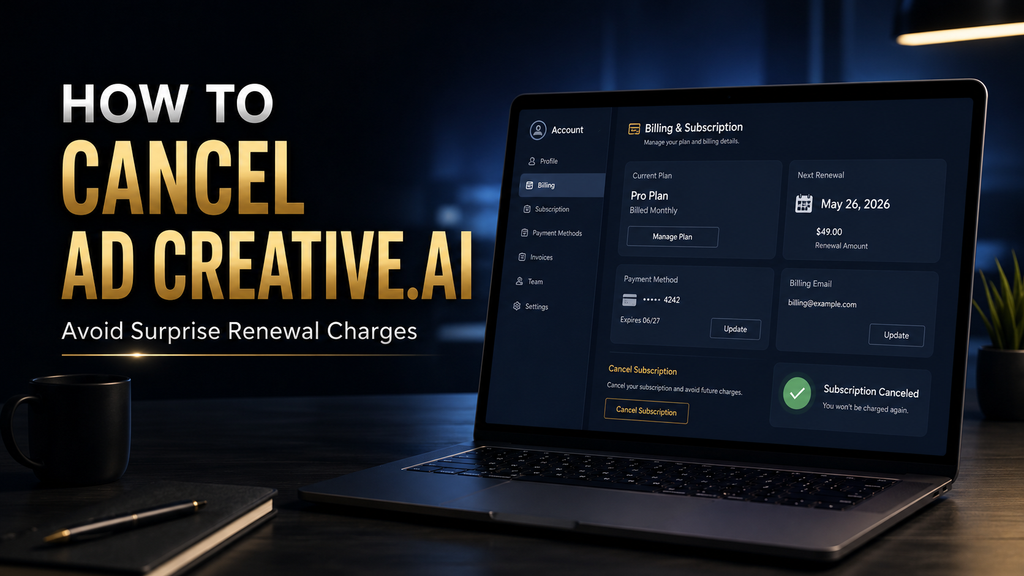
How to Cancel an AdCreative.ai Subscription (Avoid Surprise Renewal Charges)
Affiliate Disclosure: AI Hustle World may earn a commission if you sign up for AdCreative.ai through a link in this article, at no additional cost to you. That relationship does not change our cancellation instructions, refund guidance, or assessment of when the service makes sense. Our priority is to give you the information you need to make the right decision, including if that decision is to cancel.
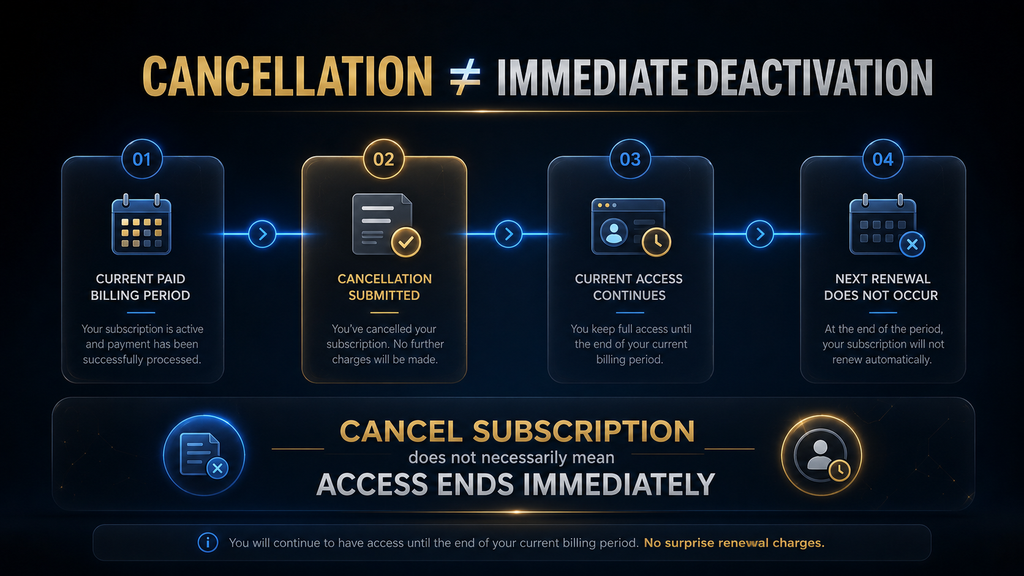
If you want to cancel an AdCreative.ai subscription, you can do it from your account settings by opening Settings → Account → Cancel My Subscription, completing the cancellation form, typing CONFIRM, and selecting Proceed with Cancellation. AdCreative.ai says a paid subscription that is cancelled normally remains active until the end of its current billing period, while users who need immediate cancellation should contact support.
The important part, however, is not simply finding the cancellation button. If you are trying to avoid another charge, you need to understand when your subscription renews, what cancellation actually changes, how refunds work, and how to verify that the cancellation has been accepted. AdCreative.ai’s current help documentation, refund policy and Terms of Service contain different layers of information about cancellation and renewal, so relying on one screen or one generic instruction can leave important questions unanswered.
This guide walks through the entire process, including what to do before cancellation, how to cancel, what happens afterward, what to do if you have already been charged, and how to decide whether cancelling is actually the right move.
The Short Answer: How to Cancel AdCreative.ai
The standard in-app cancellation process is straightforward: open Settings, go to the Account section, scroll to Cancel My Subscription, complete the cancellation form, enter CONFIRM, and select Proceed with Cancellation. AdCreative.ai says that once you complete the process, the subscription is scheduled for cancellation; paid accounts normally remain active through the current billing period rather than ending immediately. Before you do that, check your billing information and identify your renewal timing. AdCreative.ai provides upcoming and paid invoices through Settings → Billing, which is useful for confirming what plan you are on and what billing event is approaching.
If you have already been charged, do not assume that cancelling automatically means you will receive a refund. AdCreative.ai’s current refund policy says refunds can be considered when the service was not used and the request falls within its stated eligibility windows, while its Terms describe refunds as discretionary. The safest approach is therefore to treat cancellation as a four-part process: identify the date, complete the action, preserve the confirmation, and check the billing result.
Try AdCreative.ai With a Cancellation Plan
Start the free trial with a reminder set before it ends, so you decide on your own timeline whether to keep the subscription.
Start a Trial With a Reminder →Affiliate disclosure: We may earn a commission if you subscribe through this link, at no additional cost to you.
Before You Cancel, Find Your Renewal Date
The first mistake people make with subscription cancellation is starting with the cancellation button instead of the billing calendar. If your objective is simply to stop using AdCreative.ai, that distinction may not matter much. If your objective is to avoid another charge, it matters considerably because a subscription is fundamentally a recurring billing agreement rather than a one-time purchase. AdCreative.ai says subscriptions are billed on recurring monthly or annual cycles, and its Terms state that subscriptions automatically renew unless cancelled under the applicable cancellation conditions. The same Terms specify different cancellation timing provisions for monthly and annual subscriptions. Current plan details are in the AdCreative.ai pricing section.
That means you should first establish three things:
- What plan are you currently using?
- When does the current billing cycle end?
- Has another invoice already been generated or scheduled?
You can find invoice information under Settings → Billing. AdCreative.ai’s Help Center says the upcoming invoice appears at the top of the Billing section, with recent paid invoices listed below it. This is a small step, but it changes the quality of the cancellation process. Instead of saying, “I think I cancelled before the charge,” you have a much clearer record of the subscription’s billing state.
Why the Renewal Date Matters More Than the Cancellation Button
A cancellation button tells you how to submit a request. It does not, by itself, answer the question that most users actually care about: Will I be charged again? AdCreative.ai’s current Terms say billing occurs in advance on recurring monthly or annual cycles. They also state that the subscription automatically renews at the end of the billing cycle unless it is cancelled within the specified timeframe. The company’s current refund page similarly tells users to cancel before the end of the monthly cycle or before the anniversary of an annual subscription to avoid unwanted renewal.
So if you are close to renewal, do not treat cancellation as something to postpone until the last possible moment. The more important the upcoming charge is to your budget, the more important it is to verify the cancellation rather than merely initiate it.
How to Cancel Your AdCreative.ai Subscription
The official Help Center currently documents the cancellation process through the account settings area. The sequence is short, but each stage matters because the goal is not simply to open the cancellation screen; it is to complete the process successfully.
Step 1: Log In to AdCreative.ai. Open your AdCreative.ai account using the credentials or sign-in method associated with your subscription. Once inside, look for the Settings menu. AdCreative.ai’s current Help Center places the cancellation control inside the Account section of Settings.
If you cannot immediately see the cancellation option, do not assume that cancellation is unavailable. Interface labels can change, and the relevant account controls may be positioned differently depending on the current interface. The official Help Center remains the best reference for the current documented workflow.
Step 2: Open Settings and Go to Account. Select Settings, then open the Account tab. According to AdCreative.ai’s documented process, the cancellation control is located toward the bottom of the Account section. You should see a button labeled Cancel My Subscription. This is worth distinguishing from deleting an account. You are trying to stop the subscription from renewing; you are not necessarily trying to erase your entire account. That distinction becomes important later if you still need access to invoices, account information, or previous subscription records.
Step 3: Select “Cancel My Subscription”. Select Cancel My Subscription. AdCreative.ai says a cancellation form will appear asking why you want to cancel. The company describes this feedback as useful for improving the service, but the important operational step is completing the cancellation flow rather than simply closing the window.
If your reason is that the product is too expensive, you do not use it often enough, you found another tool, or the workflow no longer fits your business, answer honestly. The reason itself is less important than completing the process.
Step 4: Complete the Cancellation Confirmation. After completing the form, AdCreative.ai asks the user to type CONFIRM to verify the cancellation request. That confirmation step is important because reaching the cancellation screen is not the same thing as submitting the cancellation. You need to complete the final confirmation action described by the platform. This is one reason I would not recommend simply opening the cancellation page and assuming the subscription is finished.
Step 5: Select “Proceed with Cancellation”
After entering the required confirmation, select Proceed with Cancellation. AdCreative.ai says that after this action, the subscription will be scheduled for cancellation. For a paid subscription, the company says the account is scheduled to end when the current billing period finishes. Users seeking immediate cancellation are directed to contact support. That wording matters. If you can still access AdCreative.ai after cancelling, that does not necessarily mean your cancellation failed. If the cancellation is scheduled to take effect at the end of the billing period, continued access during that period can be expected. Our AdCreative.ai pricing guide compares each plan against typical ad budgets.
What Happens After You Cancel AdCreative.ai?
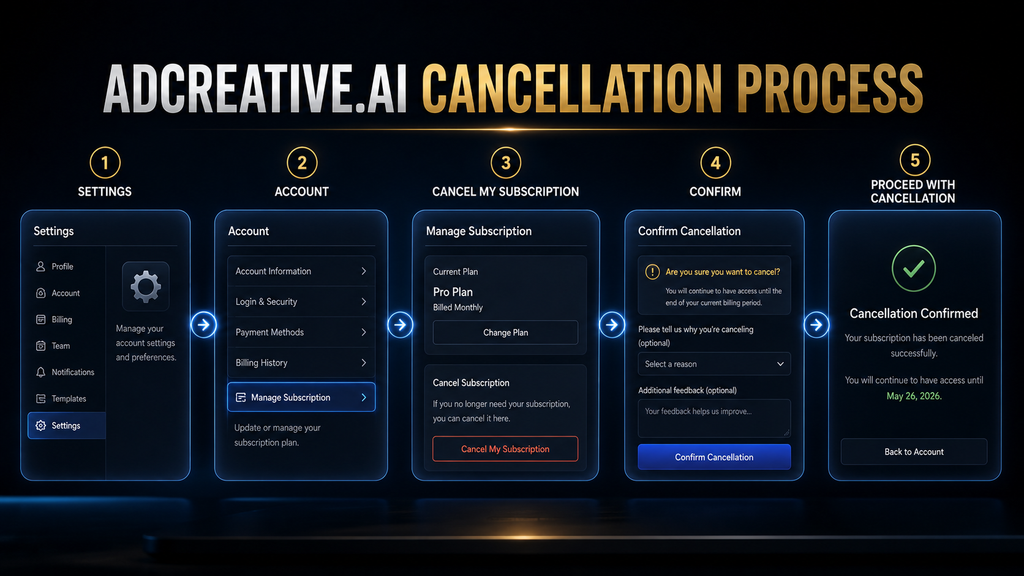
Cancelling a paid subscription generally does not mean your access disappears at that exact moment. AdCreative.ai says a paid subscription that is cancelled without immediate termination remains scheduled to end when the current billing period ends. The company separately instructs users who need immediate cancellation to contact its support team. This creates an important distinction between cancellation status and access status.
Imagine you cancel on August 20 and your current paid period runs until August 31. If you can still use the platform on August 21, that does not automatically mean you are still committed to another month. Your subscription may simply be continuing through the period you already paid for. The mistake would be to see continued access and immediately cancel again, delete the account, or make assumptions about another charge. Instead, verify the cancellation status and billing information.
Cancellation Does Not Necessarily Mean Immediate Deactivation. This is a useful principle for almost every subscription service, but it is especially relevant here because AdCreative.ai’s own cancellation instructions explicitly distinguish scheduled cancellation from immediate cancellation. Think about it this way: Your cancellation changes what happens at the next billing event; it does not necessarily erase the time you have already purchased. That is why checking your renewal date before cancelling is so useful. It gives you a reference point against which you can judge what should happen next.
How to Verify That Your AdCreative.ai Subscription Is Actually Cancelled
The strongest cancellation workflow does not end when you click the final button. It ends when you have enough evidence to reasonably conclude that the subscription will not renew. AdCreative.ai’s official refund page says users receive a cancellation confirmation when an account is cancelled, while the Help Center states that the subscription is scheduled for cancellation after the final confirmation step.
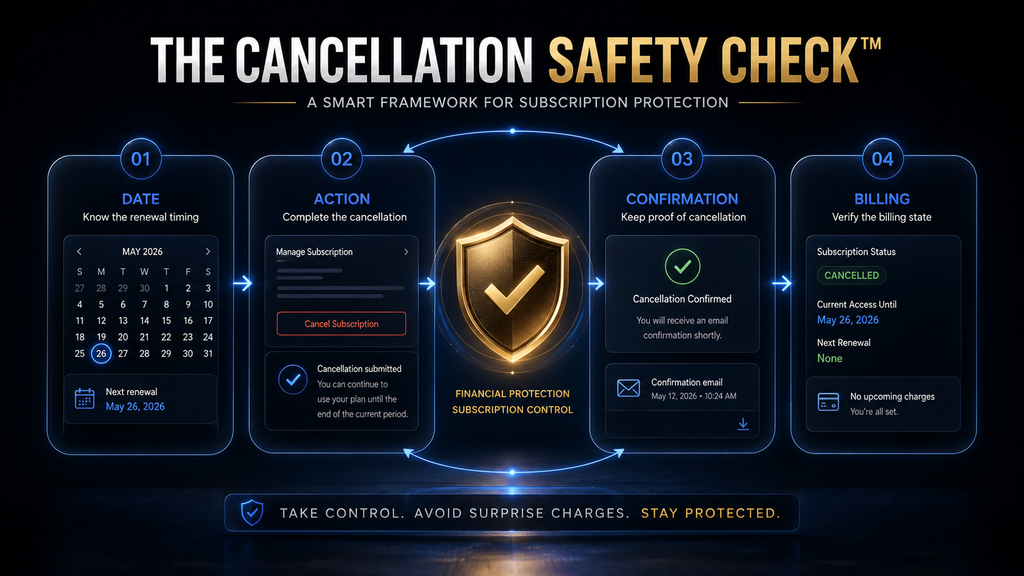
The AI Hustle World 4-Point Cancellation Safety Check
Our recommendation is to verify four things before you consider the process finished. Our AdCreative.ai pricing guide compares each plan against typical ad budgets.
| Check | What you should verify | Why it matters |
|---|---|---|
| Date | Know your current billing period and renewal timing | Establishes what charge you are trying to prevent |
| Action | Complete the actual cancellation flow | Opening the cancellation page is not enough |
| Confirmation | Keep the cancellation confirmation | Gives you evidence of the completed request |
| Billing | Review your Billing area and invoice information | Helps you identify the subscription and billing state |
This is not an AdCreative.ai requirement; it is an AI Hustle World practical framework for handling recurring subscriptions with less ambiguity. The logic is simple. A subscription problem usually happens at the boundary between intent and evidence. You may intend to cancel, but what matters operationally is whether the cancellation was actually submitted and accepted before the relevant billing event.
Keep the Cancellation Evidence. AdCreative.ai does not say that every customer must take screenshots of their cancellation process. This is our practical recommendation rather than a vendor requirement. If the cancellation is financially important, keep a screenshot or confirmation message showing that you completed it. If you contact support, keep the correspondence as well. This becomes particularly useful if you later need to explain the timeline of what happened. The goal is not to prepare for a fight with the company. It is simply to avoid relying on memory.
How to Find Your AdCreative.ai Invoice and Billing Information
Your Billing area is one of the most useful places to check before and after cancellation. AdCreative.ai’s Help Center says you can open Settings → Billing to view the Upcoming Invoice and recent paid invoices. The Terms similarly state that invoices are accessible through the Billing tab inside the application. This gives you a useful record of: We compare the two directly in AdCreative.ai vs Canva.
- what you have previously been billed for,
- what subscription activity is associated with the account,
- whether an upcoming invoice is shown,
- and the information you may need if you contact support about a billing issue.
That last point matters if you have already been charged. AdCreative.ai’s refund instructions specifically ask users to include their invoice when submitting a refund request. In other words, the invoice is not just an accounting document; it can become part of your support case.
What If You Are Still on the Free Trial?
If you are still inside an AdCreative.ai trial and already know that you do not want a paid subscription, cancelling before the trial ends is the cleanest approach. AdCreative.ai currently advertises a 7-day free trial and says users can cancel at any time. Its current website also says it will remind users before the trial ends. The company’s refund page describes the trial as providing 10 credits and access to the Pro feature set during the trial. Our AdCreative.ai free trial guide shows what the trial credits actually cover. Our AdCreative.ai free trial guide shows what the trial credits actually cover.
The important point is that a trial should be treated as an evaluation period, not as a reason to postpone the cancellation decision until the final hours. If you already know the product is not right for you, canceling early reduces the number of variables you have to worry about later.
Should You Cancel the Trial Immediately?
If you are certain you do not want to continue, there is little strategic value in waiting until the last day simply because you can. The better approach is to use the trial to answer the questions that actually matter to you, then make the decision. For example, if you were evaluating AdCreative.ai for an advertising workflow, you might ask:
- Did the generated creatives fit the brand?
- Did the platform actually reduce production time?
- Was the output usable after normal editing?
- Did the creative scoring or other analysis change your decisions?
- Was the workflow better than your existing process?
- Did the value justify continuing into a paid billing cycle?
If the answers are consistently negative, continuing simply because the trial has not ended yet does not create much additional information.
What If AdCreative.ai Already Charged You?
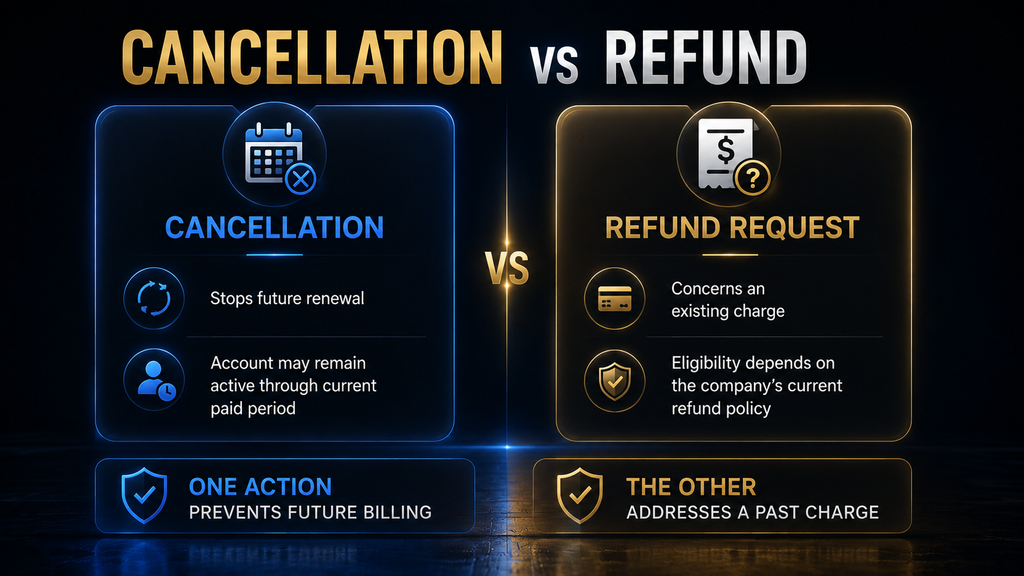
If you have already been charged, the situation changes. Cancelling the subscription can prevent future renewal, but cancellation by itself does not mean an already-completed charge will automatically be refunded. AdCreative.ai’s current refund policy sets out specific eligibility conditions, and its Terms describe refunds as discretionary exceptions rather than an unconditional right. The correct response is therefore to separate two questions: First: Have you cancelled the subscription so another renewal does not occur?
Second: Are you eligible to request a refund for the charge that already occurred? Do not treat those as the same process.
If You Were Charged but Have Not Used the Service. This is the strongest situation for a refund request under AdCreative.ai’s published policy. The current refund page says the company can consider a refund when you subscribed but did not use the service, provided you contact the company within:
- 7 days for a monthly plan
- 30 days for an annual plan
The Terms use similar timing but characterize the refund as something AdCreative.ai may grant at its discretion. That distinction matters. It is more accurate to say “you may be eligible to request a refund” than “AdCreative.ai guarantees a refund.”
If You Already Used the Service. This is where expectations need to become more realistic. AdCreative.ai’s current refund policy says refunds are not available when the service was used during the subscription. The policy also lists requests outside the stated timeframes, deleted/deactivated accounts and unused or expired credits among situations where refunds are not available. That does not mean contacting support is pointless. It means you should not present a refund as something you are automatically entitled to receive.
Give support the relevant facts, include your invoice, explain what happened and ask what options are available. The important distinction is between requesting a review and promising yourself an outcome.
How to Request an AdCreative.ai Refund
AdCreative.ai’s current refund instructions say to email contact@AdCreative.ai and include your account email, full name, invoice and a brief reason for the request. The company says it may also request proof of identity for account security. A strong refund request should be short, factual and easy for the support team to process. Include:
- The email address associated with your account.
- Your full name.
- Your subscription type.
- The subscription date.
- The date you cancelled.
- The relevant invoice.
- Whether you used the service after the charge.
- Why you are requesting the refund.
- The applicable refund window, if you believe you are within it.
Avoid turning the email into a long emotional explanation. The support team needs a clear timeline more than a dramatic story.
A Simple Refund Request Template
Subject: AdCreative.ai Subscription Cancellation and Refund Request Hello AdCreative.ai Support, I am writing regarding my AdCreative.ai subscription associated with [account email]. I subscribed on [date] to the [monthly/annual] plan and would like to cancel the subscription and request a refund for the charge of [amount]. I have cancelled the subscription through my account and have attached the relevant invoice. [If applicable: I have not used the service since the subscription/charge.]
Please review my request under your current refund policy and confirm the cancellation and refund status. Thank you, [Full Name] Keep the message factual. If you are outside the published refund window or have used the service, do not rewrite the facts to make yourself appear eligible.
Test Whether the Credits Are Worth Keeping
Generate a few creatives during the trial and count how many you would actually use before you decide to continue.
Test the Trial Credits →Affiliate disclosure: We may earn a commission if you subscribe through this link, at no additional cost to you.
How Long Does an AdCreative.ai Refund Take?
AdCreative.ai’s current refund page says approved refunds are usually processed in approximately 2–3 weeks, although the bank or payment provider may require additional time for the funds to appear.
The company’s public pages are not perfectly consistent on processing language: another AdCreative.ai page says eligible refunds are typically processed the same day and may take one to two weeks to appear, while the dedicated refund page currently states approximately two to three weeks after approval. Because of that difference, I would not publish a hard promise such as “your refund will arrive within two weeks.” The safer statement is:
If AdCreative.ai approves the refund, allow the timeframe stated in the current refund guidance and remember that your payment provider may add processing time. If the published timeframe has passed and the refund has not appeared, AdCreative.ai’s refund page directs users to contact the company at contact@AdCreative.ai. (AdCreative.ai refund policy)
What If You Cancelled but Still See Another Charge?
This is the situation where evidence becomes especially important. If you believe you cancelled before renewal but see another charge, do not immediately jump to the conclusion that the company ignored your cancellation. First reconstruct the timeline. Check the date you submitted cancellation, the date the subscription was scheduled to renew, the invoice associated with the charge, and any cancellation confirmation you received. AdCreative.ai’s current refund guidance specifically tells users with duplicate charges or billing errors to access the invoice under Settings → Billing and contact the company with the relevant details.
A useful support message would therefore contain the exact facts: “I submitted cancellation on [date]. My account showed [status/confirmation]. I received a charge of [amount] on [date]. Attached is the invoice and cancellation confirmation. Please review the billing event.” That is much stronger than simply writing: “You charged me after I cancelled.” The first version gives support something they can investigate.
The Important Difference Between Cancellation and Account Deletion
Cancelling your subscription and deleting your account are not the same thing. This distinction is easy to overlook because people often use “cancel my account” as shorthand for “stop charging me.” But from an operational perspective, subscription cancellation concerns the recurring service, while account deletion concerns the existence of the account itself. AdCreative.ai’s Terms state that cancellation of a subscription and deletion of an account are separate concepts and also state that customers do not receive a refund simply because an account is deactivated or deleted.
That creates a practical rule: Do not delete your account simply because you want to stop the subscription. If you still need to access invoices, billing information, cancellation evidence or support correspondence, retaining the account may be more useful while the billing issue is being resolved. This is especially relevant when you are requesting a refund. AdCreative.ai’s current refund policy specifically lists deactivated or deleted accounts among cases where refunds are not available.
Why You Should Not Delete the Account Immediately After a Billing Problem
Suppose you were charged unexpectedly and immediately delete your account. You may think you are cleaning up the situation, but you could also be removing access to information that helps explain the transaction. The better sequence is: Review → document → cancel → request refund if eligible → resolve billing issue → consider deletion later. That sequence preserves your ability to inspect invoices and communicate with support while the issue is still active.
This is an AI Hustle World recommendation rather than an AdCreative.ai requirement, but it follows a simple principle: when money is disputed, preserve evidence before removing access to the system that contains the evidence.
What AdCreative.ai’s Terms Say About Automatic Renewal
AdCreative.ai’s Terms of Service are worth reading because they contain details that the simplified cancellation instructions do not fully explain. The Terms say subscriptions are billed in advance on recurring monthly or annual billing cycles and automatically renew under the same conditions unless cancelled according to the specified cancellation provisions. They specify a seven-day cancellation timeframe before the end of a monthly cycle and a 30-day timeframe before the anniversary of an annual subscription. Our AdCreative.ai vs Predis.ai comparison covers one of its closest rivals.
The Terms also state that invoices are accessible through the application’s Billing tab and that the customer is responsible for reviewing billing details there. This is where careful reading matters. AdCreative.ai’s public website currently says “Cancel anytime in 2 clicks” and promotes a 7-day free trial with cancellation anytime. Meanwhile, the Terms contain specific renewal and cancellation timing language. Rather than pretending these statements are identical, the practical takeaway is to check the actual renewal information associated with your subscription and complete the cancellation process well before the relevant billing event. That is a more useful approach than relying on a slogan or a single line in the Terms.
What Happens If You Do Nothing?
If you simply stop using AdCreative.ai without cancelling the subscription, the service does not necessarily interpret inactivity as a cancellation request. That distinction is fundamental to subscription economics. A recurring subscription is designed around an ongoing authorization to bill according to the selected cycle. Not logging in is a behavior; cancelling is an explicit account action. AdCreative.ai’s Terms state that subscriptions automatically renew unless cancelled under the applicable terms. Its refund guidance likewise tells customers to cancel before the end of the monthly cycle or annual anniversary to avoid unwanted renewal.
So if you have decided that you no longer want the service, inaction is not a substitute for cancellation. This is one of the easiest subscription mistakes to avoid.
Common AdCreative.ai Cancellation Mistakes
Waiting Until the Last Possible Moment. The most obvious mistake is waiting until the day before renewal. Even when a cancellation process is straightforward, last-minute actions create unnecessary uncertainty. A login problem, account issue, forgotten credentials, support delay or misunderstanding about the renewal date can turn a simple task into a billing problem. If the subscription is no longer useful, cancel when the decision is made and verify the result. Our guide to AdCreative.ai for small business looks at whether the Starter plan is enough.
Assuming “I Don’t Use It” Means “I’m Cancelled”. It does not. A subscription is about the billing relationship, not your usage frequency. You can use a service zero times and still have an active subscription. If you do not want the next billing event, cancel explicitly.
- Confusing Continued Access With Continued Renewal. If AdCreative.ai remains accessible after cancellation, do not immediately assume the cancellation failed. The company says paid subscriptions normally remain active until the current billing period ends. Look at the cancellation status and billing information instead.
- Deleting the Account Instead of Cancelling the Subscription. Account deletion is a different action, and AdCreative.ai’s Terms specifically distinguish account deletion from subscription cancellation. If your objective is to stop future billing, use the subscription cancellation process first.
- Assuming Every Charge Is Refundable. AdCreative.ai’s published refund policy has conditions around non-use and timing, while the Terms describe refunds as discretionary. Never tell yourself, “I’ll just get the money back later.” If you believe you qualify, submit the request promptly.
- Cancelling Without Keeping Evidence. Again, AdCreative.ai does not say every customer must take screenshots. This is simply good operational practice. If the subscription matters financially, keep the confirmation.
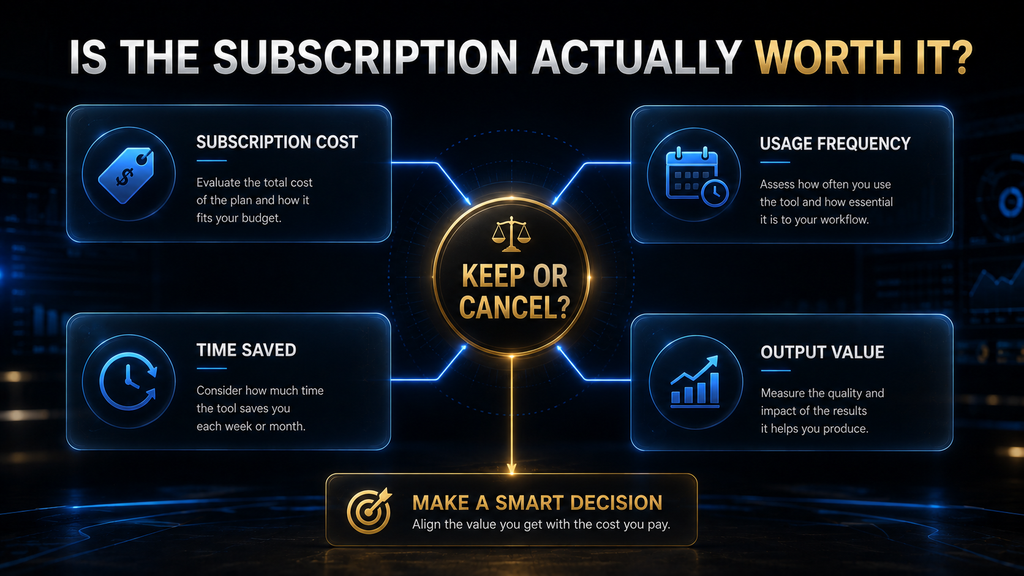
Should You Cancel AdCreative.ai or Keep It?
Cancellation is not automatically the right decision just because a subscription costs money. The better question is whether the product creates enough economic or operational value to justify the recurring cost. That requires looking beyond the number on the pricing page. Suppose AdCreative.ai saves a small business owner several hours every month while allowing the business to produce enough usable creative variations to support active campaigns. The subscription may be rational even if the monthly fee feels expensive in isolation. Our guide to the AdCreative.ai Shopify integration covers the store side in detail.
Now imagine another business generates only a few campaigns every quarter, already has a capable design workflow, and rarely uses the platform’s additional capabilities. In that situation, continuing the subscription simply because the tool is “good” may make little financial sense. The decision should therefore be based on actual usage and marginal value, not whether the software is impressive.
Keep It If the Workflow Has Become Valuable. Continuing may make sense when the platform is consistently solving a real production bottleneck. For example, if your team repeatedly uses its creative generation, product imagery, video or scoring capabilities and the workflow has become embedded in campaign production, cancellation may create more friction than savings. The key question is not: “Is AdCreative.ai a good product?” It is: “Is AdCreative.ai worth its recurring cost for what I actually use?” That is a much better subscription question.
Cancel It If You Are Paying for Unused Capacity. Cancellation becomes more rational when the subscription is mostly dormant. If you signed up because the product looked interesting, tested it briefly, and then returned to your normal design workflow, the recurring fee is effectively paying for optional access rather than meaningful business value. That is usually a poor subscription economics decision.
Do Not Keep It Just Because You Already Paid. This is a classic sunk-cost problem. If you have already paid for the current billing period, that money should not automatically determine whether you renew again. The relevant decision is: Would you willingly pay for the next billing period based on the value you expect to receive? If the answer is no, cancellation is usually the cleaner decision.
A Simple Decision Framework Before You Cancel
Use these questions before making the final decision: For a wider view of tools for smaller teams, see our list of the best AI tools for small business owners. For a wider view of tools for smaller teams, see our list of the best AI tools for small business owners.
| Question | If “Yes” | If “No” |
|---|---|---|
| Are you using AdCreative.ai regularly? | Consider keeping it | Cancellation becomes more attractive |
| Does it remove a meaningful creative bottleneck? | Measure the value | Look at your existing workflow |
| Are the outputs usable without excessive rework? | Continue testing value | Reconsider the workflow |
| Does it influence actual advertising decisions? | Potentially valuable | May be unnecessary |
| Would replacing it cost more time or money? | Compare replacement cost | Cancellation may be rational |
| Are you paying for capacity you rarely use? | Consider whether the plan fits | Keep if usage supports it |
| Would you willingly pay the next billing cycle today? | Strong keep signal | Strong cancellation signal |
This is not a replacement for reviewing the actual plan price or features. It is simply a way to avoid making the decision based on emotion.
The Economics of a Subscription Cancellation
The hidden cost of a subscription is not always the monthly price. There are three separate economic variables: Subscription cost + switching cost + opportunity cost. The subscription cost is obvious. The switching cost is the time required to replace the workflow, recreate templates, learn another platform or move existing processes elsewhere. The opportunity cost is what you could do with the money and attention if you stopped paying for the service. Plan data for other tools is in our AI Tool Pricing Database. Plan data for other tools is in our AI Tool Pricing Database.
This is why “cancel everything you don’t use” is not always sophisticated advice. Some tools are inexpensive insurance against future workload, while others are simply forgotten recurring charges. The right decision depends on the relationship between actual usage and actual value.
What If You Are Cancelling Because AdCreative.ai Was Not Useful?
Then the most valuable thing you can do is identify why it failed your workflow. There is a difference between a product being bad and a product being poorly matched to a particular use case. For example, you might have expected the platform to replace a designer completely when your actual workflow still required human creative direction and editing. Or you may have expected generated creatives to be ready for publication without brand adjustments, while your business requires strict visual consistency.
You may also have simply needed the tool less often than you expected. These are different problems, and the cancellation decision should reflect which one occurred. Ask What Failed. Was it:
- output quality?
- brand consistency?
- workflow speed?
- creative variety?
- price?
- frequency of use?
- missing functionality?
- poor fit with your advertising process?
- insufficient return from the time invested?
That answer is more valuable than simply recording “AdCreative.ai wasn’t useful.” It tells you what to look for in the next tool.
What If You Are Cancelling Because You Found Another Tool?
Then compare the workflows rather than comparing feature lists. A replacement is only genuinely better if it improves something that matters. For example, moving from AdCreative.ai to another platform might reduce subscription cost but increase manual design time. Alternatively, a cheaper tool might provide enough functionality for a small operation that does not need advanced creative analysis.
That is why we cover AdCreative.ai in separate articles for pricing, alternatives and product comparisons rather than trying to force every decision into this cancellation guide. For those decisions, see our AdCreative.ai Review, AdCreative.ai Pricing, best AdCreative.ai alternatives and AdCreative.ai vs Canva comparison.
When You Should Contact AdCreative.ai Support
You should contact support when the standard cancellation flow does not resolve your situation or when you need something beyond normal scheduled cancellation. The official Help Center specifically directs users to support for immediate cancellation. The refund page also directs users to contact AdCreative.ai regarding refund requests and billing issues. Contact support if:
- the cancellation control is unavailable,
- the cancellation process fails,
- you need immediate cancellation,
- you were charged and believe you qualify for a refund,
- you see a duplicate or unexpected billing event,
- your refund has not arrived within the stated timeframe,
- or you need clarification about the billing status of your account.
When contacting support, include the information needed to investigate the issue rather than sending a vague complaint. Your account email, invoice, relevant dates, cancellation confirmation and a concise description of the problem are much more useful.
The Safest Cancellation Workflow
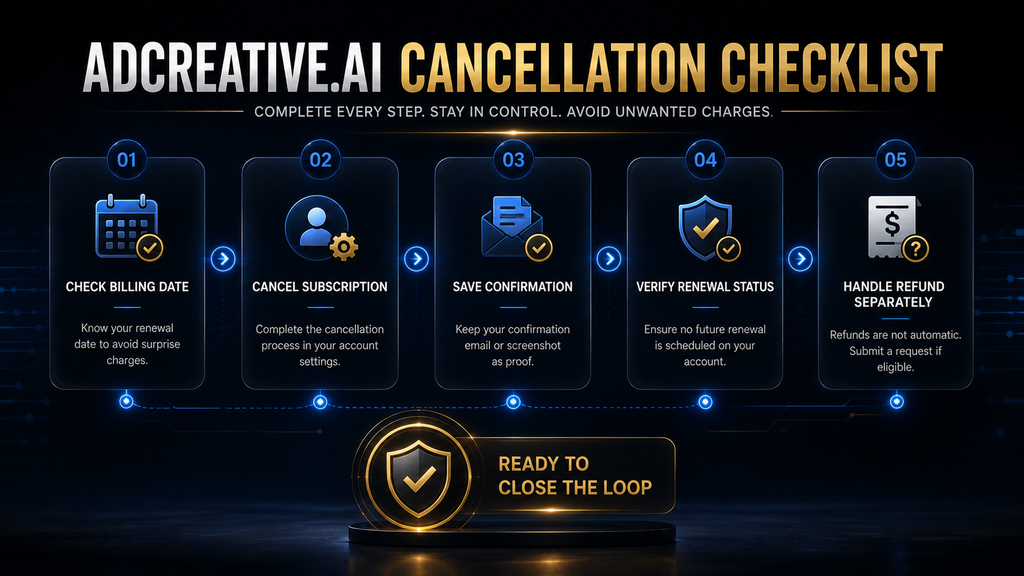
At this point, the process can be reduced to a practical sequence. First, identify the billing situation. Open your account and review your plan and Billing section so you know what subscription you are dealing with and what invoice information is available. AdCreative.ai says upcoming and paid invoices can be accessed through Settings → Billing. Second, complete the actual cancellation. Go to Settings → Account → Cancel My Subscription, complete the requested form, enter CONFIRM and select Proceed with Cancellation. Our guide to AdCreative.ai for small business looks at whether the Starter plan is enough. The full AdCreative.ai review has the complete verdict.
Third, verify the result. Keep the cancellation confirmation and understand that a paid subscription may remain active until the end of its current billing period. Fourth, handle money separately. If you have already been charged, determine whether your situation falls within AdCreative.ai’s current refund criteria and contact support promptly if you believe it does. This workflow is safer than simply clicking “Cancel” and forgetting about the account.
A Cancellation Checklist You Can Save
Before closing the issue, confirm:
- I know which AdCreative.ai plan I am using.
- I checked my Billing section.
- I know the relevant renewal/billing date.
- I completed the cancellation process.
- I entered the required confirmation.
- I selected Proceed with Cancellation.
- I received or recorded cancellation confirmation.
- I understand whether access continues through the current billing period.
- I saved my relevant invoice.
- If I was already charged, I checked the refund criteria.
- If I requested a refund, I included the required account and invoice information.
- I have not deleted the account while an active billing issue is being resolved.
The checklist is intentionally simple. Subscription problems rarely require sophisticated technical knowledge; they usually require getting the sequence right.
Final Thoughts: Cancel the Subscription, Not the Evidence
The easiest way to cancel AdCreative.ai is to use the cancellation control inside your account. The harder and more important task is making sure you understand when the subscription renews, what happens after cancellation, and whether an existing charge is potentially refundable. AdCreative.ai’s own documentation provides the cancellation workflow, billing guidance and refund criteria, but its Terms add additional renewal and cancellation language that deserves attention. Whatever tool you use, generated ads still have to comply with Meta’s Advertising Standards and Google Ads policies, so review every creative before it goes live. Whatever tool you use, generated ads still have to comply with Meta’s Advertising Standards and Google Ads policies, so review every creative before it goes live.
If you have decided to leave, do not overcomplicate the process: check the billing information, cancel through the documented workflow, preserve the confirmation and monitor the relevant billing outcome. If you have already been charged, treat the refund request as a separate issue and use the company’s current eligibility rules rather than assuming cancellation automatically reverses the payment.
The bigger lesson is useful beyond AdCreative.ai. A subscription is not safely cancelled when you intend to cancel it; it is safely cancelled when the cancellation has been submitted, confirmed and aligned with the next billing event. That small difference is what turns a vague “I cancelled it” into a defensible, documented decision.
Decide Whether AdCreative.ai Is Worth Keeping
Compare your monthly ad spend and creative needs with the plan price, then choose to continue or cancel before the renewal date.
Review Your AdCreative.ai Plan →Affiliate disclosure: We may earn a commission if you subscribe through this link, at no additional cost to you.
Frequently Asked Questions
How do I cancel my AdCreative.ai subscription?
Go to Settings → Account → Cancel My Subscription, complete the cancellation form, type CONFIRM, and select Proceed with Cancellation. AdCreative.ai says a paid subscription normally remains active until the end of its current billing period after cancellation is scheduled.
Can I cancel AdCreative.ai during the free trial?
Yes. AdCreative.ai currently advertises a 7-day free trial and says users can cancel at any time. If you already know you do not want a paid subscription, cancelling before the trial ends is the safest approach. The full AdCreative.ai review has the complete verdict.
Will I lose access immediately after cancelling AdCreative.ai?
Not necessarily. AdCreative.ai says paid subscriptions are normally scheduled for cancellation at the end of the current billing period. If you need immediate cancellation, the company directs you to contact support.
How do I know whether my AdCreative.ai subscription is cancelled?
Complete the cancellation process and retain the cancellation confirmation. You should also review your billing information and renewal timing so you understand what should happen at the next billing event. AdCreative.ai says cancellation confirmation is provided when an account is cancelled. For a wider view of tools for smaller teams, see our list of the best AI tools for small business owners.
Does AdCreative.ai automatically refund a cancelled subscription?
No. Cancellation and refunds are separate issues. AdCreative.ai’s current refund policy says refunds can be considered when the service was not used and the request is within the applicable timeframe, while the Terms describe refunds as discretionary.
What is AdCreative.ai’s refund window?
The current official refund guidance says refunds can be considered for unused service when the request is made within 7 days for a monthly subscription or 30 days for an annual subscription.
Can I get a refund if I already used AdCreative.ai?
The current refund policy says refunds are not available when the service was used during the subscription. If you believe there are unusual circumstances, you can still contact support, but you should not assume a refund is guaranteed. For a wider view of tools for smaller teams, see our list of the best AI tools for small business owners.
Where can I find my AdCreative.ai invoice?
Go to Settings → Billing. AdCreative.ai says the Billing section contains the upcoming invoice and recent paid invoices.
Should I delete my AdCreative.ai account after cancelling?
Not necessarily. Account deletion is separate from subscription cancellation, and AdCreative.ai’s Terms state that deleting or deactivating an account does not itself create a refund entitlement. If you have an active billing or refund issue, keeping access to your account and billing records may be more useful until the matter is resolved.
What should I do if AdCreative.ai charged me after I cancelled?
First, reconstruct the timeline: check the cancellation date, confirmation, renewal date and invoice. Then contact AdCreative.ai with those details and ask the company to review the billing event. Its current refund guidance specifically directs users with duplicate charges or billing errors to provide the relevant invoice and contact support.
Written by
Muntasir Ahmad Chowdhury
Founder, AI Hustle World
Muntasir Ahmad Chowdhury is the Founder of AI Hustle World, an independent publication dedicated to making Artificial Intelligence practical, trustworthy, and easy to understand. He researches AI tools, automation, customer service, productivity, and real-world business applications, helping readers make smarter technology decisions through research-driven, experience-backed content.
Expertise:
AI Tools • AI Automation • AI Customer Service • AI Productivity • Generative AI • AI Workflows
Get Smarter With AI
Enjoyed this guide? Get practical AI tools, tutorials, and honest reviews delivered to your inbox.