Evidence: Documentation reviewed
Last checked: September 2026
What was done: Written from official documentation and the published sources linked in this article. Not hands-on tested.
Files: None
Affiliate links: No
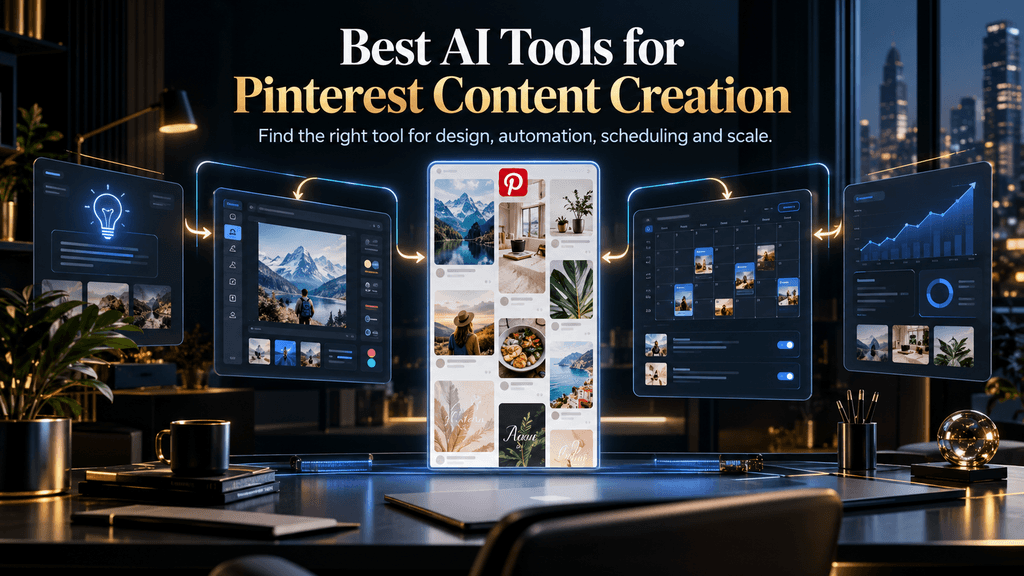
Best AI Tools for Pinterest Content Creation
Creating one attractive Pinterest Pin is easy. Building a repeatable Pinterest content system that can consistently produce original visuals, useful titles, relevant descriptions, brand-consistent designs, and enough fresh content to keep a publishing schedule alive is much harder.
That difference matters because AI has changed what “content creation” means on Pinterest. A modern workflow can begin with a blog post, product page, trend or simple idea and move through research, content planning, visual design, copywriting, variation, scheduling and performance analysis. The problem is that most tools do not solve all of those jobs equally well. Some are primarily design platforms with AI layered into the editor, some are Pinterest-focused scheduling systems, some turn URLs into Pins, and others are broader social-media suites that happen to support Pinterest.
So the best AI tool for Pinterest content creation is not necessarily the one with the most AI features or the most impressive homepage. The better choice is the tool that removes the biggest bottleneck in your own workflow while preserving enough control to keep the content useful, distinctive and appropriate for Pinterest.
Pinterest’s own creative guidance reinforces why that distinction matters. The platform recommends a vertical 2:3 format for standard image creative, or 1000 × 1500 pixels, and notes that the first 40 characters of a Pin title are the most likely to appear to people on the platform. Pinterest also emphasizes strong visual storytelling, clear branding and relevant creative rather than treating the image as an isolated graphic. (Pinterest)
That means this guide will not treat every AI Pinterest product as the same category. Instead, we will look at what each tool actually does, where it fits into the Pinterest content workflow, what it is good at, what it does not solve, and which type of creator should seriously consider using it.
What Makes an AI Tool Good for Pinterest?
A Pinterest content tool needs to solve more than the design problem.
A beautiful Pin with an unclear headline is weak. A perfectly optimized title attached to an uninspiring visual is also weak. A great Pin that requires thirty minutes of manual work before every publication may not be useful for someone running a large content library. Conversely, a completely automated generator that produces dozens of nearly identical designs may save time while gradually making an account look generic.
The best way to evaluate these tools is therefore to treat Pinterest content creation as a stack of interconnected jobs: Discover → Plan → Create → Write → Brand → Publish → Learn.
Discovery means identifying topics, search demand, trends and audience needs. Planning determines what angle the Pin should take and what promise it should make. Creation produces the visual. Writing handles the title and description. Branding makes the asset recognizable. Publishing gets it onto Pinterest through the appropriate workflow. Learning means reviewing the outcome and using that information to improve the next batch.
No single tool dominates every layer.
Canva is strongest when you need creative control and brand consistency. Tailwind becomes more valuable when scheduling and Pinterest-specific publishing are central to the problem. A URL-focused Pin generator makes more sense when you have hundreds of blog posts and want to turn those pages into new Pinterest assets. Broader products such as Predis or Simplified become attractive when Pinterest is only one part of a wider social-content workflow.
That is the first principle behind this comparison:
Do not ask which AI tool is best in general. Ask which part of Pinterest content creation you need to make faster, easier or more scalable.
The P.I.N. Score: How We Compare the Tools
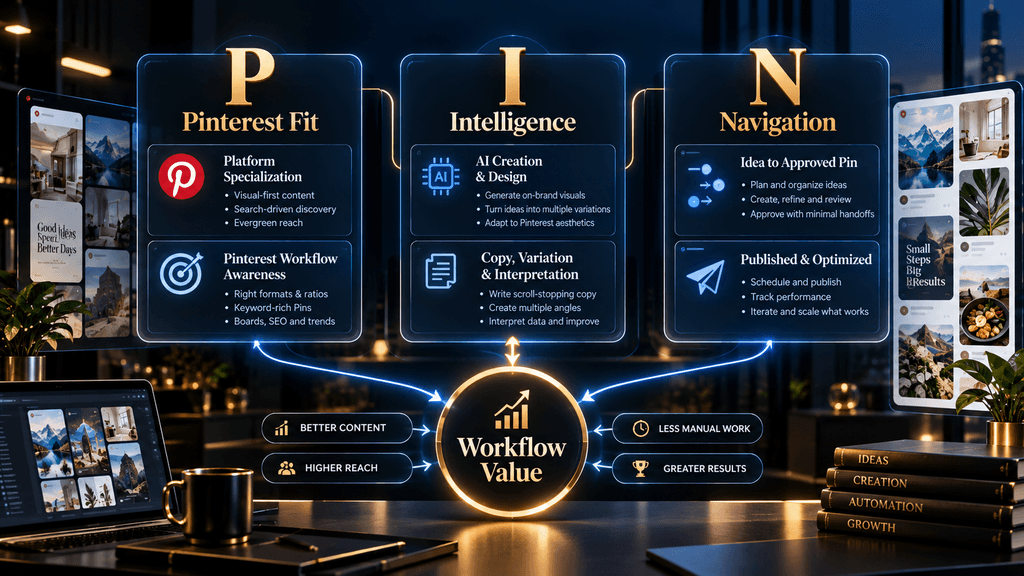
To keep the comparison useful, AI Hustle World can evaluate each platform through three questions. Pinterest Fit asks how deeply the product aligns with Pinterest rather than merely supporting it as one more social network.
Intelligence asks how much meaningful work the AI performs. Does it simply suggest a template, or can it interpret content, create variations, generate copy and assist with the surrounding workflow?
Navigation asks how smoothly the tool moves you from the original idea to a publishable Pin. A tool that removes several manual handoffs can be more valuable than a technically impressive AI feature that still leaves most of the workflow in your hands.
The score is not intended to create false precision. A small numerical difference between two products does not mean one is objectively superior. It is simply a structured way of asking what the software is actually helping you accomplish.
Best AI Tools for Pinterest Content Creation
The following tools are not ranked purely by popularity. They are organized around the jobs they are best positioned to perform.
1. Canva — Best Overall for Most Pinterest Creators
For most solo creators, bloggers, small businesses and faceless Pinterest accounts, Canva is the safest overall recommendation because it provides an unusually strong balance between AI assistance and human control.
Canva’s Magic Design can analyze the images, text or ideas you provide and recommend layouts that fit the theme and style of your content. The resulting designs remain editable, so you can replace imagery, change the headline, adjust the layout, add branding and bring in other Canva assets or AI-generated media. That combination is particularly useful on Pinterest because good content often needs refinement rather than one-click generation. (Canva)
Imagine that you have a blog article about AI productivity tools. An AI system might generate a generic graphic saying “10 Best AI Tools,” but a strong Pinterest workflow could turn the same article into several distinct creative angles: one Pin focused on beginners, another on free tools, another on time-saving workflows and another on a specific use case. Canva gives you the control to make those versions visually different while keeping the brand identity consistent.
That flexibility is the main reason Canva remains such a strong choice. It does not force you to accept the first AI output as the final design. You can use AI to accelerate the starting point and then apply editorial judgment to the finished asset.
There is an important limitation, though. Canva is not a Pinterest strategy engine. It can help you create excellent creative assets, but it does not eliminate the need to decide what people are searching for, what promise your Pin should make or which content deserves to be promoted. It is therefore best understood as a powerful creative and branding layer, not a complete Pinterest growth system.
Best for: bloggers, beginners, creators, small businesses and anyone who wants strong visual control. Best workflow role: Create + Brand. P.I.N. verdict: Very strong overall.
2. Tailwind — Best for Pinterest-Centric Publishing and Fresh Pins
Tailwind becomes especially interesting when the challenge is no longer “How do I make one good Pin?” but “How do I keep creating and publishing fresh Pins consistently without turning Pinterest into a second full-time job?”
Its SmartPin product is explicitly built around Pinterest. Tailwind says users can add a URL and have SmartPin generate a fresh Pin for that page every seven days, then place the resulting Pin into drafts for review before scheduling. Tailwind also ties the workflow to its Pinterest scheduling system and SmartSchedule functionality. (Tailwind Knowledge Base)
That is a very different value proposition from Canva.
A blogger with a large content library may already know how to design. The problem is volume and consistency. Tailwind addresses that bottleneck by connecting content generation to Pinterest publishing rather than making the creator export every asset from one tool and manage scheduling somewhere else.
The review step matters too. Tailwind’s current SmartPin workflow creates drafts rather than automatically forcing every generated asset straight onto the account. That gives the creator an opportunity to check the design and copy before publication, which is important because automation should reduce manual production without eliminating editorial judgment.
Tailwind is therefore a particularly strong option for people who treat Pinterest as a serious traffic channel rather than a place to occasionally repost social content.
Its weakness is equally clear: someone who mainly wants to design highly customized visuals may still prefer Canva or Adobe Express. Tailwind’s advantage is Pinterest workflow depth, not replacing a full creative studio.
Best for: serious Pinterest creators, bloggers and publishers focused on consistent publishing. Best workflow role: Create + Publish. P.I.N. verdict: Excellent Pinterest fit.
3. Adobe Express — Best AI-Assisted Alternative to Canva
Adobe Express is a strong option for creators who want AI-assisted design but prefer the Adobe ecosystem or want a more explicitly generative approach to editable templates.
Adobe’s current AI template workflow lets users describe a design in text, generate template options and then choose and customize an editable result. Adobe also offers AI tools for rewriting text inside designs and generating other types of creative assets. (Adobe Help Center)
That makes Adobe Express particularly useful for Pinterest because the output is not just a flattened AI image. You can continue editing the structure, typography and branding. The difference is important when creating content in batches, because a template that can be modified is more useful than an image that has to be recreated from scratch each time.
Adobe Express can also work well when you want to combine original photography or existing brand assets with AI-generated layouts. Adobe’s own documentation specifically describes using uploaded media alongside the template-generation workflow and then customizing the resulting designs with your own branding and text.
The limitation is similar to Canva’s. Adobe Express helps solve the creative-production problem, but Pinterest strategy still belongs to the creator. You still need to identify the right topic, create an appropriate search-oriented headline, maintain consistency and decide whether a Pin deserves to be published.
For creators already comfortable with Adobe products, that is not necessarily a disadvantage. It may actually make Express the more natural choice.
Best for: Adobe users, visually oriented creators and brands wanting AI-assisted editable designs. Best workflow role: Create + Brand. P.I.N. verdict: Excellent creative fit.
4. Predis.ai — Best for Broader AI Social Content Automation
Predis.ai is more interesting when Pinterest is part of a larger social-media content operation.
Rather than behaving primarily like a graphic-design editor, Predis positions itself around AI-generated social content, captions and publishing workflows across multiple networks, including Pinterest. Its scheduler is designed to connect content creation with distribution instead of keeping those two stages completely separate. (predis.ai)
That makes the tool attractive to someone managing a content calendar across several platforms. A single blog topic might need a Pinterest Pin, an Instagram post, a Facebook graphic and other assets. In that situation, a broader AI social-content platform can save time because the creator is not rebuilding the same campaign across several unrelated tools.
The tradeoff is specialization. A creator whose business depends almost entirely on Pinterest may not need a platform designed to support a wider social ecosystem. And someone who cares deeply about detailed visual art direction may still find a dedicated design editor more flexible.
Predis therefore makes the most sense when the real problem is cross-platform content production at scale, not simply Pinterest graphic design. Best for: multi-platform creators, small marketing teams and people who want creation plus publishing in one system.
Best workflow role: Create + Write + Publish. P.I.N. verdict: Strong for broader automation.
5. Pin Generator — Best for Pinterest-Specific Content at Scale
Pinterest-specific generators become more compelling when the starting point is not a blank design canvas but an existing content library.
Recent 2026 comparisons describe Pin Generator and similar tools as Pinterest-focused systems that can work from URLs or other content inputs and create Pinterest assets rather than requiring the creator to build each design manually. The broader market now contains several different kinds of “AI Pin generators,” including systems that generate complete Pins, systems that mainly provide copy or layouts, and systems that connect generation with scheduling. (Pinners Haven)
That distinction is valuable for bloggers.
Suppose you have 300 articles on your website. Your bottleneck is probably not coming up with things to write about. You already have the content. Your problem is converting that content into enough Pinterest creative variations to give the library another distribution channel.
A Pinterest-specific generator can be much more efficient for that workflow than opening Canva for every individual article.
But this is exactly where quality control becomes important. A generator can create fifty Pin candidates faster than you can design fifty from scratch, but that does not mean all fifty are publication-ready. The creator still needs to inspect the headline, visual hierarchy, relevance, branding and originality. Recent comparisons also highlight the importance of looking past headline subscription prices because credit-based systems can make the true cost of a usable Pin very different from the advertised monthly price.
Best for: bloggers, publishers and high-volume Pinterest creators. Best workflow role: Content-to-Pin production. P.I.N. verdict: Very strong Pinterest specialization.
6. Buffer — Best Simple Publishing Layer
Buffer belongs in this comparison for a different reason: it does not need to solve every creative problem to be useful.
Buffer is primarily a social publishing platform, with AI assistance incorporated into the broader workflow. It supports Pinterest business accounts and offers a free entry tier as well as paid channel-based plans. (buffer.com)
This makes it a strong choice for creators who already know where their content is going to come from.
A simple workflow could look like this: use a general AI assistant for content ideas and copy, create the Pin in Canva, then use Buffer to schedule the finished asset alongside other social content. In this setup, Buffer does not need to compete with Canva on visual production or Tailwind on Pinterest specialization.
It only needs to make publishing easier.
That is a useful lesson because many creators buy too much software. Sometimes the bottleneck is not content production at all. Sometimes the content already exists and the only problem is distributing it consistently.
Best for: creators who already have their creative workflow and mainly need scheduling. Best workflow role: Publish. P.I.N. verdict: Strong as a lightweight publishing layer.
7. Simplified — Best All-in-One Content Workspace
Simplified sits closer to the other end of the spectrum. Rather than solving one narrow problem, it combines AI-assisted writing, design, video and social scheduling into a broader content workspace. Its Pinterest-oriented offering is designed around creating and managing social content within the same environment. (simplified.com)
That can be useful for creators who are tired of moving between multiple applications. An all-in-one environment can reduce the amount of exporting, downloading, rewriting and re-uploading that happens when each stage of content production lives somewhere else.
The tradeoff is that breadth can introduce complexity.
A platform capable of doing ten different jobs may not perform each job as deeply as the best specialist tool for that task. If Pinterest design quality is the overriding priority, Canva or Adobe Express may still be better. If Pinterest scheduling is the central challenge, Tailwind may be more appropriate.
Simplified makes the most sense when reducing the number of disconnected tools is more valuable to you than maximizing specialization. Best for: creators and small teams who want a broad marketing workspace.
Best workflow role: Create + Write + Publish. P.I.N. verdict: Strong all-in-one option.
8. Hootsuite / Perch — Best for Teams and Agencies
The Pinterest workflow changes significantly once several people or clients are involved.
A solo blogger can make a design, approve it and publish it. An agency may have to deal with multiple accounts, client approval, content calendars, permissions, reporting and cross-platform campaigns. In that environment, the problem is not simply “How can AI make a Pin?”
It becomes:
How can a team manage an entire content operation without losing consistency or control?
Hootsuite and its broader ecosystem are aimed much more at that problem. Hootsuite’s current AI-oriented social workflow combines content ideation and assistance with scheduling, management and analytics, while Perch extends AI-assisted content workflows inside the wider social-management environment. (blog.hootsuite.com)
These platforms therefore make much more sense for teams and agencies than for someone who only needs to produce five Pins per week.
The price of that capability is complexity. A solo creator can easily end up paying for governance and collaboration features that solve problems they do not actually have.
Best for: agencies, teams and multi-account operations. Best workflow role: Plan + Create + Publish + Learn. P.I.N. verdict: Strong for organizational workflows.
AI Pin Generator vs AI Design Tool: They Are Not the Same Thing
This is one of the most important distinctions in the entire market.
An AI design tool generally begins with the creative problem. You describe the style or content you want, choose a format and ask the platform to help create a design.
A Pinterest-specific generator often begins with the content problem. You give it a URL, article, product page or other source and ask it to transform that information into Pinterest assets.
The difference sounds small, but it changes the ideal use case. A fashion brand with a highly specific visual identity may prefer Canva because the creative director wants to control every part of the composition. A blog publisher with 500 articles may prefer a URL-based generator because the problem is turning an enormous archive into distributable Pinterest content.
Neither user is wrong. They simply have different bottlenecks.
That is why a tool list that says “Canva is #1, Tailwind is #2 and Pin Generator is #3” without explaining their different jobs is not very useful. The rankings only become meaningful when the reader understands what work each product is actually taking off their plate.
Why Pinterest Fit Matters More Than Generic AI Features
A generic AI platform can produce a beautiful vertical graphic. That does not necessarily make it a strong Pinterest tool.
Pinterest is a visual-discovery environment with its own creative conventions. Pinterest recommends vertical 2:3 imagery, tells advertisers to make brand identity visible without overpowering the creative, and encourages creators to structure visual stories with the imagery in the middle and key messaging layered around it. Pinterest also provides specific title and description limits for standard image formats.
That context matters.
A tool that can generate a beautiful square Instagram post may be excellent for Instagram and mediocre for Pinterest. A tool that creates an attractive image without helping with titles, descriptions, scheduling or Pinterest-specific workflow may still be useful, but its value is different from that of a Pinterest-focused platform.
This is why Pinterest fit should be evaluated independently from raw AI quality. The two are not interchangeable.
Pinterest’s Own AI Is Now Part of the Competition
There is another development that makes a 2026 comparison particularly different from an older “best Pinterest tools” article: Pinterest itself is building AI into its business ecosystem.
In June 2026, Pinterest introduced Pinterest Business Assistant and a new Model Context Protocol server for partners. Pinterest describes these tools as an effort to connect AI with Pinterest-specific knowledge, creative insight, infrastructure, brand context, trends and campaign information rather than simply placing another general-purpose chatbot beside the marketing workflow.
That matters because platform context can be more valuable than generic generation.
A general AI model can suggest ten Pinterest content ideas. Pinterest has direct access to the platform environment where people are searching, saving and discovering ideas. A generic AI tool can suggest that a topic is trending; Pinterest can increasingly connect recommendations to its own ecosystem and performance data.
This points toward a larger shift in the market.
The future Pinterest AI tool will probably not be judged only by how attractive its generated graphic looks. It will increasingly be judged by how well it understands the entire Pinterest environment surrounding that graphic.
Pinterest Content Creation Is a Search Problem, Not Just a Design Problem
A creator can spend twenty minutes designing a beautiful Pin and still produce a weak asset if the concept does not match what the audience is looking for. The content strategy must begin earlier.
Suppose a creator has a long article about AI productivity. A generic approach might produce a Pin titled “Improve Your Productivity With AI.” That is broad and visually easy to design, but it gives the audience little reason to understand exactly what they will get from the click.
A stronger content strategy might identify a more specific promise: Best AI Productivity Tools for Remote Workers or: AI Tools That Save 5 Hours of Weekly Admin Work or: How to Automate Repetitive Office Tasks With AI. The visual can then be designed around the promise instead of being generated independently of it.
Pinterest’s own creative guidance emphasizes relevance, useful content and visual storytelling, and its platform is explicitly built around discovery of ideas rather than a purely chronological social feed. This is why the strongest Pinterest AI workflow should connect topic selection, content angle, copy and visual creation rather than treating them as isolated actions.
The Cost of an AI Pinterest Tool Is Not Its Subscription Price
Price comparisons in this category can be misleading because AI tools frequently use very different limits and billing models.
One platform may charge a simple monthly subscription. Another may meter image generation through credits. A third may limit the number of brands or social channels. Another may include unlimited templates but restrict AI generation.
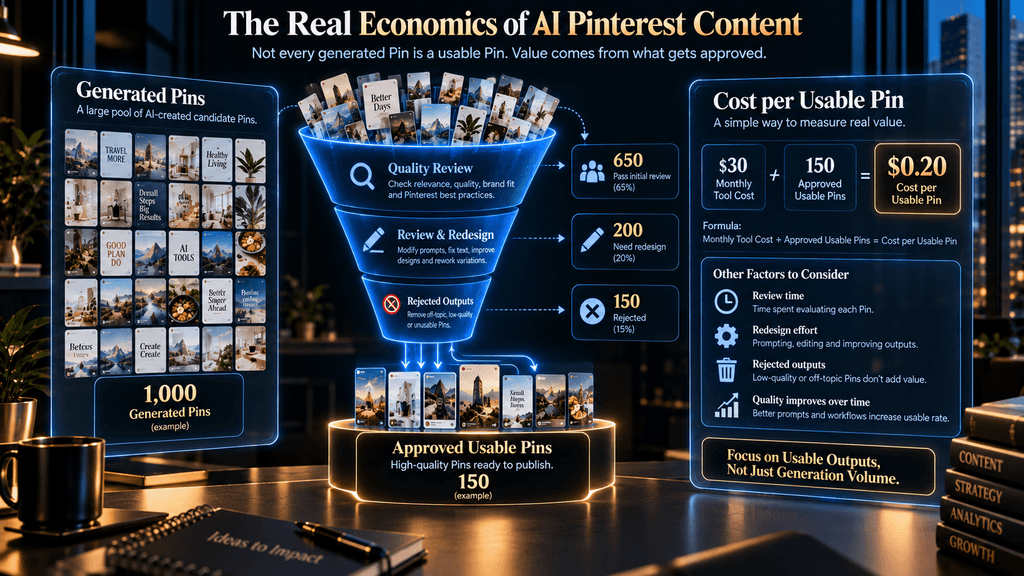
This makes a basic comparison such as “Tool A costs $15 and Tool B costs $25” almost meaningless. A better metric is:
Cost per Usable Pin
Imagine that one service costs $25 per month and generates 400 candidate assets, but only 80 survive your review because the rest are repetitive, poorly designed or irrelevant to the source content. Another service costs $30 per month and produces 150 candidate assets, of which 120 are actually usable.
The second tool is more expensive on paper. It is cheaper per usable output.
That is the economic lens to use when comparing AI Pinterest software. Recent 2026 research and comparison coverage of AI Pin generators also highlights the problem with credit-based pricing and the need to understand what one actual generated Pin costs rather than relying on the headline subscription price. (Pinners Haven)
The question is therefore not: “How many Pins can this tool generate?” It is: “How many good Pins can this tool help me publish without creating more cleanup work than it saves?”
The AI Slop Problem: More Content Is Not Automatically Better
AI has made Pinterest production dramatically faster. That creates a dangerous temptation to equate output volume with strategy.
Imagine a creator publishing 200 Pins a month that all use almost the same layout, the same type of headline and nearly identical imagery. The account may look busy, but the content system is not necessarily becoming more valuable.
Pinterest’s own guidance emphasizes high-quality creative and warns against spam-related behavior, while its current creative recommendations focus on clear storytelling and relevant content rather than arbitrary output volume. That means AI should be used to create more useful variation, not simply more files. A strong variation changes the content angle, audience promise or visual treatment in a meaningful way.
A weak variation changes the background color and calls it a new Pin. The difference matters because an AI tool can technically make both. Only one represents thoughtful content production.
Human Review Is Not the Opposite of Automation
There is a tendency to assume that the best AI tool is the one that requires the least human involvement. That is not necessarily true. The point of automation is to remove repetitive production work while preserving the decisions that matter.
A creator should still review whether the headline accurately represents the linked content, whether the visual makes the promise immediately clear, whether the design matches the brand and whether the Pin is meaningfully different from previously published content. Pinterest itself now includes AI-related controls and transparency features in its content workflow, while its platform guidance continues to emphasize creator responsibility around the content they publish.
A good workflow therefore looks like: AI generates possibilities → human reviews quality → approved content gets published → performance informs the next batch. That is better than: AI generates everything → everything gets published automatically.
The second workflow is certainly more automated. It is not automatically more intelligent.
The Pinterest Creation Stack in Practice
A practical workflow can combine several tools rather than forcing one product to do everything.
Start with Pinterest Trends and audience research to identify subjects worth creating content around. Then use a general AI assistant to develop several content angles from the same underlying topic. This is where broad AI systems are useful because they can reason about audience segments, article structure, hooks and positioning.
Move into Canva or Adobe Express for the visual-production stage if your priority is brand control. Both platforms now offer AI-assisted design systems that accelerate the creation of editable creative rather than leaving you with a single uneditable image.
Move toward Tailwind when your biggest problem becomes Pinterest scheduling and recurring fresh content. Its current SmartPin workflow is specifically designed to create recurring fresh Pins from URLs and put them into a review-and-schedule process.
Use a Pinterest-specific generator when the main bottleneck is converting a large existing content library into Pinterest assets. This is especially valuable for bloggers and publishers who already have hundreds of URLs but not enough creative capacity to promote them individually.
Use Buffer when your creative workflow is already settled and you simply need a straightforward publishing layer. Use Predis or Simplified when you want broader social-content automation, and move toward Hootsuite-style platforms when collaboration and account management become central.
That is a more realistic picture of professional Pinterest content creation than trying to find one magical application that does everything perfectly.
Which Tool Is Best for Bloggers?
Bloggers usually have a specific advantage: they already have source material.
An existing article can provide the subject, audience, key points and destination URL. The Pinterest problem becomes converting that source material into multiple visual entry points.
For a blogger who wants maximum creative control, Canva is the strongest starting point. For a blogger with a large archive who values automation, a Pinterest-specific generator can save far more time. For a blogger who wants to combine automated generation with a Pinterest-focused publishing system, Tailwind becomes especially attractive.
A sensible workflow might therefore be: Article → content angles → Canva or Pinterest generator → human review → Tailwind scheduling → Pinterest performance review. The specific combination is less important than the logic. The system should reduce manual repetition without turning every article into the same Pin.
Which Tool Is Best for Faceless Pinterest Accounts?
Faceless Pinterest accounts often depend heavily on visual consistency. Because the brand is represented primarily through content rather than a recognizable person, typography, color, layout and visual language become disproportionately important.
That makes Canva especially strong because you can build a recognizable design system and reuse its structure across a large content library. The AI helps create variations, while the creator controls the brand.
Tailwind becomes useful once publishing consistency becomes the larger bottleneck. Predis and Pinterest-specific generators become more interesting when production volume rises significantly.
The best stack depends on scale, but the principle remains constant: faceless does not mean anonymous-looking. The account still needs a recognizable visual identity.
Which Tool Is Best for Small Businesses?
Small businesses typically need a balance between visual quality, brand consistency and time efficiency.
Canva is a strong option when the owner or small team wants direct control over designs. Adobe Express is a reasonable alternative for businesses already using Adobe’s ecosystem.
Predis or Simplified become more attractive when Pinterest content needs to be coordinated with other social channels. Buffer works well when the company already has its creative process and just needs consistent scheduling.
The deciding factor is often not AI sophistication. It is how many people are involved and how many tools the business is willing to manage.
Which Tool Is Best for Agencies?
Agencies have a different problem. They need scale, but they also need governance.
A tool must support multiple clients, content approvals, calendars, publishing workflows and reporting. The ability to generate a beautiful Pin is only one part of the requirement.
This is why Hootsuite and other team-oriented platforms become more attractive at agency scale, while Tailwind remains interesting when Pinterest itself is the central platform. The correct decision depends on whether the agency’s main organizational problem is Pinterest-specific production or broader cross-channel management.
What About Using ChatGPT, Claude or Gemini?
General AI assistants belong in this article, but they should not be confused with dedicated Pinterest design platforms. Their greatest value is often upstream of the design. A general AI system can help turn one article into multiple content angles, identify potential audience segments, rewrite headlines, create Pinterest descriptions, suggest board names and produce variations that can then be tested in the visual layer.
The mistake would be asking a general AI assistant to “make a Pinterest strategy” and then treating the output as finished marketing work. The stronger workflow is collaborative: AI helps think → specialized tools help produce → human decides what deserves to publish. That division of labor is much more realistic.

The Most Important Decision: What Are You Actually Short Of?
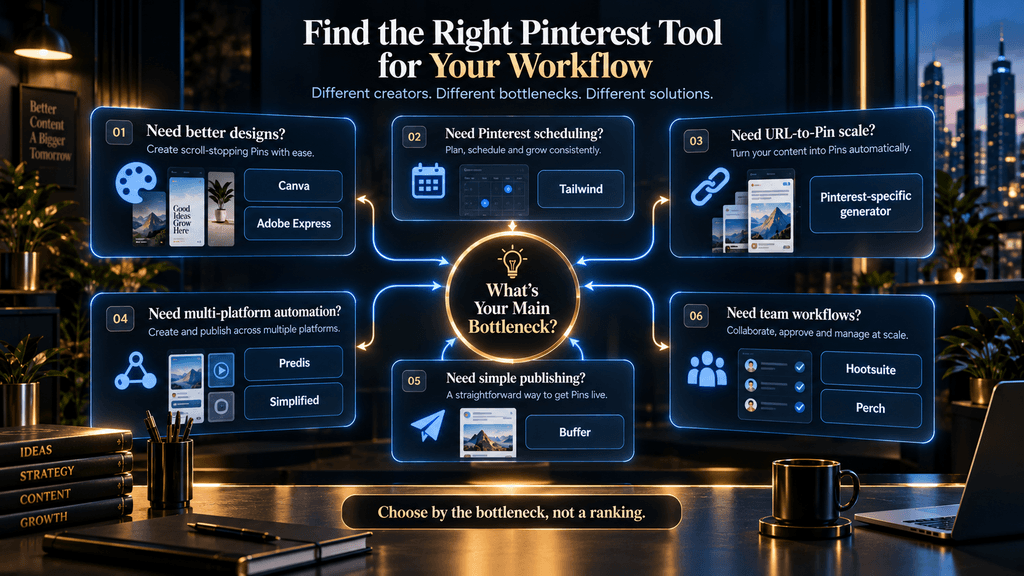
This is where the entire market becomes easier to understand. If you are short of design skill, Canva or Adobe Express is probably the right place to begin. If you are short of Pinterest publishing capacity, Tailwind becomes more attractive.
If you are short of time to turn existing articles into Pins, a Pinterest-specific generator makes more sense. If you are short of cross-platform production capacity, Predis or Simplified may have more value. If you are short of simple scheduling, Buffer may be all you need.
If you are short of team workflow and governance, Hootsuite-style platforms become relevant. That means the product selection process should start with a bottleneck assessment, not a tool roundup.
A Practical Comparison of the Leading Options
| Tool | Best use | Creative control | Pinterest specialization | Automation | Best for |
|---|---|---|---|---|---|
| Canva | AI-assisted design | Very high | High | Medium | Most creators |
| Tailwind | Creation + scheduling | Medium | Very high | High | Serious Pinterest users |
| Adobe Express | AI-assisted design | Very high | High | Medium | Adobe-oriented creators |
| Predis.ai | Social content automation | Medium | Medium | High | Multi-platform creators |
| Pin Generator | Pinterest-specific bulk creation | Medium | Very high | High | Bloggers and publishers |
| Buffer | Scheduling | High through external tools | Medium | Medium | Simple publishing |
| Simplified | All-in-one creation | Medium-high | Medium-high | High | Small teams |
| Hootsuite / Perch | Team workflows | Medium | Medium-high | High | Agencies and teams |
The table is intentionally a decision aid rather than a universal ranking. A tool’s value depends on where it fits in the overall workflow.
The Cost-per-Usable-Pin Test
Before subscribing to an AI Pinterest platform, run a simple calculation over a representative month. Record:
- Total software cost
- Number of AI-generated candidate Pins
- Number of Pins you would actually publish
- Hours spent reviewing and correcting them
- Number of final Pins that meet your brand and quality standards
Then calculate: Effective cost per usable Pin = total monthly tool cost + meaningful cleanup cost ÷ approved Pins.
The equation does not need to be mathematically perfect to be useful. Its purpose is to expose a common mistake: paying for large generation quotas while using only a small percentage of the output.
A $20 subscription can become expensive if it creates 300 assets you do not want. A $35 subscription can become cheap if it reliably produces 150 assets you would otherwise spend days creating.
How to Choose Between Canva and a Pinterest AI Generator
This is one comparison many creators will face.
Choose Canva when the design itself is the bottleneck. You want control over the visual, you care about brand identity and you are comfortable deciding what the final Pin should look like.
Choose a Pinterest-specific generator when content conversion is the bottleneck. You have existing URLs or articles and your biggest problem is turning those sources into enough Pinterest creative.
Choose Tailwind when publishing consistency is the bottleneck. Choose a combination when the workflow genuinely benefits from specialization. There is no requirement that the best Pinterest stack contain only one tool.
How to Build a Better AI Pinterest Workflow
The most efficient workflow begins before the design stage.
First, decide what the content should accomplish. A Pin might be designed to generate traffic to a blog article, introduce a product, capture search demand around an informational topic or reinforce a brand category. Those goals require different creative approaches.
Next, create several angles from the same underlying content. One article can produce multiple Pins because the audience may care about different aspects of the same subject. A guide to AI tools, for example, can support beginner-oriented content, productivity-focused content, budget-oriented content and workflow-oriented content without producing the same Pin repeatedly.
Then create the visuals using a tool that matches your need for control or automation. Canva and Adobe Express are strong when creative flexibility matters, while Pinterest-specific generators become increasingly useful as URL volume and production requirements increase.
After that, review the copy and visual together. The Pin should make one clear promise, and the destination page should fulfill it. This is where an AI-generated asset becomes actual editorial content rather than simply another generated image.
Finally, publish and learn from the results. A mature Pinterest workflow does not end when the Pin is scheduled. The performance data should influence what topics, formats and creative angles you produce next.
That last stage is what separates content production automation from content strategy automation.
Where AI Pinterest Tools Still Fail
The biggest weakness across the market is not necessarily poor image generation. It is context.
AI can create a beautiful design around the wrong idea. It can create a useful headline that does not match the linked article. It can generate ten “different” Pins that are visually almost identical. It can produce attractive content that feels interchangeable with thousands of other AI-generated assets.
There is also the problem of knowledge accuracy. A tool may write a title that contains a claim the source article does not support. It may simplify a technical subject too aggressively. It may use a benefit statement that sounds persuasive but is not defensible.
Those errors are difficult for a generator to catch because the system is optimized for producing outputs, not necessarily for protecting the editorial integrity of the destination content. That is why a good Pinterest AI workflow needs a review boundary. The creator should remain responsible for deciding whether an asset should be published.
The Future of Pinterest AI Tools
The most interesting development is the shift from isolated creative features toward context-aware content systems.
Pinterest’s Business Assistant and MCP initiative are early examples of this direction. Pinterest says its goal is to connect AI with Pinterest-specific information and workflows so that AI can move beyond generic answers and support decisions using Pinterest context.
That suggests the next generation of tools may operate across the entire content cycle. A future system could identify an emerging topic, connect it to a creator’s existing content, recommend several Pinterest-specific angles, generate branded visuals, write the accompanying copy, schedule approved versions and then use performance information to suggest the next set of Pins.
At that point, the product is no longer just an “AI Pin generator.” It is becoming a Pinterest content operating system.
That shift also changes what creators will compete on. Production speed will become less differentiating as AI makes asset generation cheaper. The advantage will move toward judgment, positioning, brand identity, audience understanding and the ability to build a strong feedback loop between content and performance.
In other words, AI will make making Pins easier. It will not automatically make deciding which Pins deserve to exist easier.
The Biggest Mistake to Avoid
Do not choose an AI Pinterest tool because its landing page promises to create hundreds of Pins with one click. That sounds impressive because production volume is easy to measure. But the real objective is not to create hundreds of files.
It is to create useful Pinterest content that attracts the right audience, earns attention, communicates a clear promise and gives that audience a reason to continue to your destination. Pinterest itself emphasizes helpful and inspiring content and clear visual storytelling. A tool that creates fewer but stronger Pins can therefore be more valuable than one that floods your account with low-quality variations.
The right automation reduces the cost of producing good content. It should not reduce the standard for what counts as good content.
Best AI Pinterest Tool by Use Case
- Best overall: Canva, because it balances AI assistance with exceptional creative control.
- Best for Pinterest-first scheduling: Tailwind, particularly when consistent fresh-Pin production is part of the workflow.
- Best Canva alternative: Adobe Express, especially for creators who prefer Adobe’s ecosystem and editable AI-generated templates.
- Best for multi-platform AI content: Predis.ai, when Pinterest sits inside a broader social-content operation.
Best for high-volume Pinterest content from existing URLs: Pinterest-specific generators such as Pin Generator, where source-content conversion is the primary bottleneck.
- Best for simple scheduling: Buffer, when the content is already created elsewhere.
- Best all-in-one workspace: Simplified, when reducing the number of disconnected tools is the main objective.
- Best for teams and agencies: Hootsuite / Perch, where collaboration, approvals and account management matter as much as the content itself.
The Final Decision
There is no single AI Pinterest tool that wins every category because there is no single Pinterest content workflow.
A beginner who needs design confidence has a different problem from a blogger with 500 articles. A faceless creator building a visual brand has different requirements from an agency managing 25 client accounts. A business that needs scheduling has a different bottleneck from a publisher that needs URL-to-Pin automation.
That is why the most useful answer is not simply “buy Canva” or “use Tailwind.” It is to identify the stage where your current workflow breaks.
When design is the bottleneck, Canva or Adobe Express makes the most sense. When Pinterest publishing and recurring fresh content are the problem, Tailwind becomes more compelling. When you have a large content archive to convert into Pinterest assets, Pin Generator or another Pinterest-specific generator can create much more leverage. When Pinterest is one part of a larger social operation, Predis, Simplified or Buffer may fit better, while Hootsuite and similar platforms become more relevant as team complexity increases.
The tools are different because the jobs are different. And that is exactly how they should be evaluated.
Final Thoughts
AI has made Pinterest content production dramatically easier, but easier production does not automatically create better Pinterest marketing. The real challenge is still deciding what deserves to be created, what promise the Pin should communicate, how the visual should represent that promise, how the content should remain distinctive and how the resulting performance should influence the next round of decisions.
That is why the best AI tool for Pinterest content creation is not necessarily the most automated tool. It is the tool that removes the most expensive or repetitive part of your workflow while leaving you enough control to maintain quality, relevance and a recognizable brand.
For most creators, Canva is the strongest starting point because it combines AI speed with creative control. Tailwind becomes more valuable when Pinterest publishing is the operational bottleneck, while Pinterest-specific generators become increasingly useful when the creator needs to transform a large library of existing content into fresh Pins. Broader systems such as Predis, Simplified, Buffer and Hootsuite have their place when the workflow extends beyond Pinterest itself.
The larger lesson is more important than any individual recommendation. Choose the AI tool that removes your bottleneck, not the one with the longest feature list. That is the approach most likely to turn AI from a shortcut for making more Pins into a genuine system for creating better Pinterest content.
Build a Smarter AI Content Workflow
With the tools chosen, follow a step-by-step plan for building a faceless Pinterest account.
Start a Faceless Pinterest Account →Frequently Asked Questions
What is the best AI tool for Pinterest content creation?
There is no single winner, because Pinterest content creation is a stack of separate jobs: planning, designing, writing, branding and publishing. For most creators, Canva is the strongest starting point because it pairs AI-assisted layouts with full editing control. Tailwind, Adobe Express, Predis.ai, Buffer and Pinterest-specific generators each fit a different bottleneck, so the better question is which part of your workflow needs to be faster.
Is Canva or Tailwind better for Pinterest?
They solve different problems. Canva is a creative and branding layer, so it is the better choice when the design itself is the bottleneck. Tailwind is built around Pinterest publishing: according to its own documentation, SmartPin can generate a fresh Pin from a URL every seven days and place it in drafts for review before scheduling. Many creators design in Canva and schedule in Tailwind.
What is the difference between an AI Pin generator and an AI design tool?
An AI design tool starts from the creative problem. You describe the look or content you want and it helps you design the Pin. A Pinterest-specific generator starts from the content problem. You give it a URL, article or product page and it turns that source into Pinterest assets. A brand that wants control over every visual detail usually prefers the first, while a blogger with hundreds of articles usually gets more from the second.
What size should a Pinterest Pin be?
Pinterest recommends a vertical 2:3 ratio for standard image creative, which is 1000 × 1500 pixels. It also notes that the first 40 characters of a Pin title are the most likely to be shown, so the main promise should come at the start of the title.
How do I compare the real cost of AI Pinterest tools?
Compare the cost per usable Pin, not the monthly price. Add the tool’s monthly cost to the cost of your cleanup time, then divide by the number of Pins you would actually publish. A $25 plan that produces 400 candidates but only 80 usable Pins can cost more per Pin than a $30 plan that produces 150 candidates and 120 usable ones. This check matters most for credit-based plans, where the headline price hides what a finished Pin costs.
Should I publish everything an AI Pin generator creates?
No. A generator can produce fifty candidates faster than you could design them, but that does not make all fifty ready to publish. Check that the headline matches the linked page, that the visual makes the promise clear, and that the Pin differs meaningfully from ones you have already posted. A good variation changes the angle or the audience promise, not just the background color.
Can I use ChatGPT, Claude or Gemini for Pinterest content?
Yes, mostly upstream of the design. A general AI assistant can turn one article into several content angles, suggest audience segments, rewrite headlines and draft descriptions and board names. It should not be asked for a finished Pinterest strategy that you accept as it is. The stronger workflow is that AI helps you think, specialized tools produce the visuals, and you decide what deserves to be published.
Which tool is best for a faceless Pinterest account?
Canva is a strong fit because you can build a recognizable design system and reuse it across a large library, while AI helps create variations. Tailwind becomes useful once publishing consistency is the bigger problem, and Predis.ai or a Pinterest-specific generator makes sense as production volume grows. Faceless does not have to mean anonymous-looking, because the account still needs a consistent visual identity. If you are starting from scratch, our guide to starting a faceless Pinterest account covers the setup.
Which tool is best for a blogger with a large archive?
A blogger already has the source material, so the job is turning articles into several Pinterest entry points. Canva gives the most creative control, a Pinterest-specific generator saves the most time when you have hundreds of URLs, and Tailwind adds Pinterest-focused scheduling. A sensible flow is article, then content angles, then design or generation, then human review, then scheduling, then a performance review.
Do I need more than one tool?
Not necessarily, and a stack is often more realistic than one tool that does everything. A practical setup is Pinterest Trends and a general AI assistant for topics and angles, Canva or Adobe Express for visuals, and Tailwind or Buffer for publishing. Start by finding where your workflow breaks, whether that is design skill, publishing capacity, converting existing articles, cross-platform production, simple scheduling or team management, and pick the tool that removes that bottleneck.
Related Guides
- Best AI Tools for Instagram Reels & Carousels
- AdCreative.ai vs Canva: Which One Should You Use for Ad Creatives?
- AdCreative.ai vs Predis.ai: Which AI Ad Tool Is Better?
Written by
Muntasir Ahmad Chowdhury
Founder, AI Hustle World
Muntasir Ahmad Chowdhury is the Founder of AI Hustle World, an independent publication dedicated to making Artificial Intelligence practical, trustworthy, and easy to understand. He researches AI tools, automation, customer service, productivity, and real-world business applications, helping readers make smarter technology decisions through research-driven, experience-backed content.
Expertise:
AI Tools • AI Automation • AI Customer Service • AI Productivity • Generative AI • AI Workflows
Get Smarter With AI
Enjoyed this guide? Get practical AI tools, tutorials, and honest reviews delivered to your inbox.