Evidence: Documentation reviewed
Last checked: September 2026
What was done: Written from official documentation and the published sources linked in this article. Not hands-on tested.
Files: None
Affiliate links: No
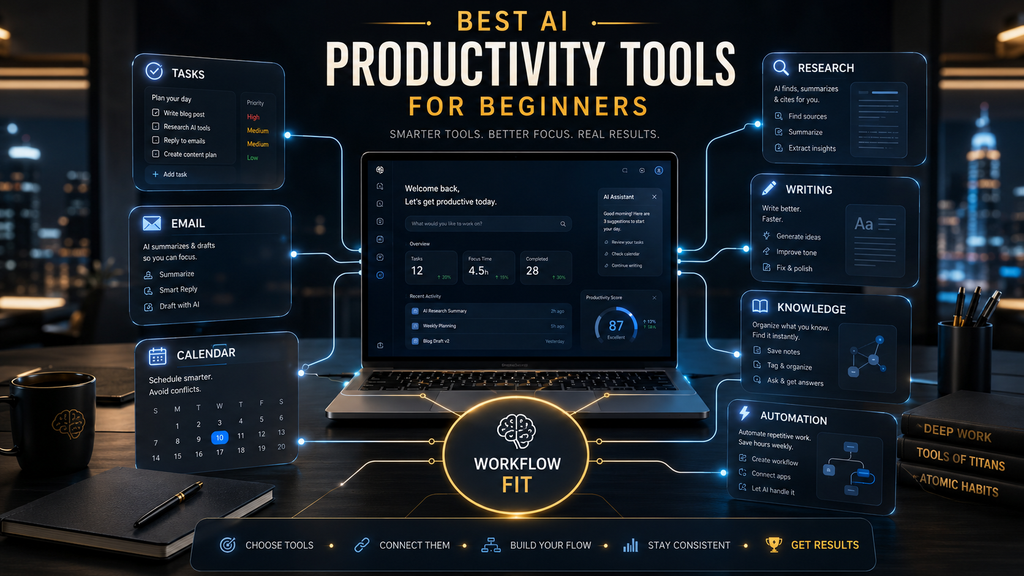
The best AI productivity tool for a beginner is not the platform with the longest feature list. It is the one that removes a specific bottleneck without creating a second job made of setup, prompt repair, subscriptions and output checking. That distinction matters because a general assistant, a writing tool, a meeting notetaker and an automation platform can all claim to improve productivity while doing completely different work.
This guide compares ten tools for everyday knowledge work: planning, writing, research, task management, meetings, scheduling and simple automation. It deliberately excludes specialist design, coding, image-generation, sales and marketing platforms, so it does not overlap with a broad list of AI tools for beginners. The recommendations are based on current official product documentation and transparent evaluation criteria, not fabricated hands-on tests or invented time-saving claims.
Quick answer: the best AI productivity tools for beginners
ChatGPT is the best overall starting point for most beginners because one workspace can help with drafting, summarizing, planning, file analysis and recurring tasks. Google Gemini is the more natural first choice for people whose work already lives in Gmail, Docs and Drive, while Microsoft 365 Copilot makes more sense when Word, Excel, Outlook and Teams are the center of the workday.
A specialist tool becomes worthwhile when one recurring bottleneck is clear. Grammarly is the easiest recommendation for writing clarity, Perplexity is useful for source-led research, Todoist keeps task management intentionally simple, Otter.ai captures meeting records, Motion reshapes tasks around a calendar, and Zapier connects stable processes across apps. Notion AI is strongest for people who want notes, projects and organizational knowledge in the same workspace.
| Tool | Best for | Beginner entry point | Main caution | AHW verdict |
|---|---|---|---|---|
| ChatGPT | General productivity | Drafting, planning and file work | Confident errors still require review | Best overall starting point |
| Google Gemini | Google Workspace users | Gmail, Docs and Drive assistance | Features and limits vary by plan | Best Google ecosystem fit |
| Microsoft 365 Copilot | Microsoft work environments | Word, Excel, Outlook and Teams | Licensing and data readiness matter | Best Microsoft ecosystem fit |
| Notion AI | Notes and knowledge | Search, summaries and workspace help | Setup can become a project itself | Best knowledge workspace |
| Grammarly | Clearer writing | Rewrite and tone support | Suggestions can flatten individual voice | Best low-friction writing aid |
| Perplexity | Source-led research | Answer discovery with linked sources | Citations still need inspection | Best research starting point |
| Todoist | Simple task management | Capture, organize and schedule tasks | AI cannot choose priorities for you | Best beginner task manager |
| Otter.ai | Meeting notes | Transcripts, summaries and action items | Consent and transcript accuracy matter | Best meeting capture layer |
| Motion | Calendar-based execution | Automatic task scheduling | Higher cost and learning curve | Best AI scheduling specialist |
| Zapier | Cross-app automation | Trigger-and-action workflows | Automating a broken process scales errors | Best later-stage automation layer |
This guide is about productivity, not generic AI discovery
A generic beginner list answers, “Which AI products are easy to try?” This article answers a narrower question: “Which tools can help a beginner complete recurring knowledge-work tasks with less total effort?” The difference prevents category drift, where a useful image generator, chatbot, video editor and coding assistant are placed in the same ranking even though no person would choose between them for the same job.
Productivity also means more than faster output. A tool may draft an email in thirty seconds and then cost five minutes of fact-checking, tone repair and formatting. A calendar app may reduce planning effort but require disciplined estimates and constant task maintenance. The relevant question is whether the complete workflow improved after setup, review, correction and switching costs were included.
Beginners should therefore start with a workflow they already understand. AI is easier to judge when you know what a good meeting note, research summary or weekly plan looks like. Using an unfamiliar tool to automate an unfamiliar process makes weak output harder to detect and turns product learning into a substitute for useful work.
How AI Hustle World evaluated the tools
This comparison uses the AHW W.O.R.T.H. checklist, a reusable commercial-evaluation framework that measures Workflow fit, Output capability, Risk and rights, Total cost, and Human effort. It is designed to reveal what a simple feature checklist misses: whether a tool fits the work, whether its outputs are useful, what must be protected, what the full commitment costs and how much labor remains after the AI responds.
This is a decision aid, not a controlled performance benchmark. AI Hustle World did not time identical tasks across every product, audit model accuracy or measure productivity outcomes inside customer organizations. No numeric scores are published because none of these tools were hands-on tested.
The AHW W.O.R.T.H. checklist
A five-part method for comparing productivity software by total workflow value rather than feature count.
Workflow fit
Output capability
Risk and rights
Total cost
Human effort
What this comparison adds: This guide defines beginner productivity as net workflow improvement, not access to impressive AI features. It combines a documentation-based comparison with a four-level stack ladder and a net-productivity calculation that helps readers decide whether a second or third tool will remove meaningful work or merely add another interface.
The 10 best AI productivity tools for beginners in 2026
1. ChatGPT — best overall AI productivity tool for beginners
ChatGPT is the strongest general starting point because it can support several ordinary workflows before the user needs specialist software. It can turn rough notes into a structured draft, explain a document, compare files, help plan a project, analyze uploaded data and maintain context inside projects. Eligible plans also support tools such as tasks, deeper research and more agentic work, although availability and limits depend on the plan.
The practical beginner advantage is consolidation. A person can learn how to give context, request a format, add constraints and verify the result in one environment, then carry those habits into other tools. This is more useful than subscribing to a separate app for every task before the user knows which bottleneck appears often enough to justify specialization.
Best for: drafting, summarization, planning, file analysis and flexible one-off assistance. Main limitation: fluent output can still contain factual errors, omit important context or sound generic, so the user remains responsible for verification and final judgment. Pricing approach: a free entry plan is available, with paid individual and business tiers offering higher limits and additional capabilities.
AI Hustle World verdict: Start here if you cannot yet name a single specialist bottleneck. Use it on two recurring tasks for at least two weeks, save the prompts that work, and measure correction time. A specialist subscription becomes easier to justify when ChatGPT repeatedly reaches the same workflow boundary.
2. Google Gemini — best for Google Workspace users
Google Gemini becomes especially useful when the user’s work already sits in Gmail, Drive, Docs, Calendar and other Google services. Connections can let Gemini work with permitted information from those apps, reducing the need to copy material into a separate assistant. In supported Workspace environments, that proximity can turn an AI chat into a contextual layer across email, documents and files.
Ecosystem fit is the reason to choose Gemini over a general popularity ranking. Someone who writes in Docs and coordinates through Gmail may gain more from in-context help than from a marginally stronger isolated response elsewhere. The opposite is also true: a person who rarely uses Google services loses much of Gemini’s practical advantage and should judge the standalone assistant on its own merits.
Best for: drafting, summarizing and finding information across a Google-centered workflow. Main limitation: supported apps, usage limits and data protections depend on account type, region and plan, which makes the product experience less uniform than the name suggests. Pricing approach: free access exists, while paid Google AI and Workspace plans provide different capabilities and limits.
AI Hustle World verdict: Gemini is the most logical beginner choice when Gmail and Drive are already the operating system of the workday. Before connecting sensitive work data, confirm which account is active, what the organization permits and whether the relevant enterprise protections apply to that license.
3. Microsoft 365 Copilot — best for Word, Excel, Outlook and Teams
Microsoft 365 Copilot is designed for work that already happens inside Microsoft 365. Depending on licensing and configuration, it can assist within Word, Excel, PowerPoint, Outlook and Teams while drawing on permitted organizational context through Microsoft Graph. Copilot Chat may also be included with eligible Microsoft 365 subscriptions, while the fuller Microsoft 365 Copilot license adds deeper in-app and work-data capabilities.
The benefit is not that every employee receives another chatbot. It is that a user can summarize a meeting, locate the related file, draft a follow-up and build a presentation without repeatedly exporting context between tools. That value depends on document hygiene, permissions and naming practices; an assistant connected to disorganized information can retrieve the wrong version more efficiently.
Best for: employees whose daily work centers on Microsoft documents, email, meetings and spreadsheets. Main limitation: licensing can be confusing, and organizations need permissions, information governance and adoption support before broad deployment. Pricing approach: Copilot Chat is available with eligible subscriptions, while full Microsoft 365 Copilot is sold as an additional per-user license for qualifying plans.
AI Hustle World verdict: Choose Microsoft 365 Copilot for ecosystem depth, not because it is a fashionable AI purchase. A beginner working independently may get more immediate value from a general assistant, while an employee inside a well-managed Microsoft environment can benefit from the context already surrounding the work.
4. Notion AI — best for notes and knowledge management
Notion AI places search, drafting, summaries and AI assistance inside a workspace that can already hold notes, databases, projects, meeting records and internal documentation. Its value grows when the answer depends on information scattered across pages rather than a single prompt. Current Notion AI offerings also include more agent-like capabilities and connected search, with availability and credit models varying by plan.
The product can be excellent for building a personal or team knowledge base, but beginners should resist redesigning their entire life in Notion. A complicated dashboard feels productive while it is being built and expensive when it must be maintained. Start with one database or shared area—such as projects, meeting notes or operating procedures—and add structure only when retrieval has become difficult.
Best for: people who want knowledge, notes and lightweight project information in one searchable workspace. Main limitation: flexible pages and databases create a higher setup burden than a focused task or writing tool. Pricing approach: Notion provides a free plan and paid workspace plans, while AI access, included capabilities and credits vary across current packaging.
AI Hustle World verdict: Notion AI is worth adding when the information you need already belongs in Notion. It is a weak purchase if you are moving content into the platform solely to make the AI useful, because migration and upkeep can exceed the time saved.
5. Grammarly — best low-friction AI writing assistant
Grammarly is easier to adopt than a blank chat window because it works close to the writing. It can identify grammar and clarity problems, propose rewrites, adjust tone and help generate or transform text across supported applications. That makes it useful for beginners who know what they want to say but lose time polishing emails, reports, proposals or other routine business writing.
The main risk is over-acceptance. A suggestion can be grammatically clean and still be too formal, vague, inaccurate or unlike the writer. Beginners should review changes in batches, preserve domain terminology and read important text aloud before sending it. The goal is to remove friction without allowing a house style to become a universal voice.
Best for: proofreading, tone adjustment and rewriting inside an existing writing routine. Main limitation: it is a writing layer, not a full research or project-management system, and generated claims still require verification. Pricing approach: a free plan includes core assistance and a limited number of AI prompts; Grammarly Pro adds broader rewriting and higher usage allowances through monthly, quarterly or annual billing.
AI Hustle World verdict: Grammarly is a sensible first specialist tool when editing consumes more time than ideation. It offers a clear workflow boundary and low adoption burden, but it should support the writer’s judgment rather than silently replacing it.
6. Perplexity — best for source-led research
Perplexity organizes web research around answers with linked sources. For a beginner, that is often more useful than receiving an unreferenced paragraph and then searching for evidence afterward. Follow-up questions can narrow a topic, compare claims or expose missing context while keeping the research trail visible.
Citations are an interface for verification, not proof of correctness. A source can be real but weak, outdated or unrelated to the exact claim placed beside it. Open the important links, prefer primary documentation and inspect dates before carrying a statement into a report. Perplexity is best treated as a discovery and synthesis layer rather than the final authority.
Best for: initial research, source discovery, fast comparisons and questions that benefit from current web information. Main limitation: source quality varies, and summaries can overstate what a linked page actually supports. Pricing approach: free access supports everyday use, while Pro plans raise research limits and provide access to additional models and capabilities; organizations can choose enterprise plans with administrative controls.
AI Hustle World verdict: Perplexity deserves a place in a beginner stack when research repeatedly starts on the open web. It does not replace reading. The time saving comes from finding candidate sources and mapping the question faster, not from skipping evidence review.
7. Todoist — best simple AI task manager for beginners
Todoist keeps the essential task loop understandable: capture something, assign a date or context, place it in a project and complete it. Its current plans include natural-language capture and AI-assisted features such as Task Assist, Filter Assist, Email Assist and Ramble at different access levels. The interface remains less operationally demanding than a full project-management suite.
That simplicity matters because task software can easily become a place where work is organized instead of finished. AI can turn a spoken or rough entry into a clearer task, help break down an outcome or build a view, but it cannot decide which commitment deserves your limited attention. The user still needs a weekly review and a realistic limit on active work.
Best for: personal tasks, lightweight projects, recurring reminders and people graduating from scattered notes. Main limitation: it is not designed to replace a deeply customized team project platform, and excessive tagging can recreate complexity. Pricing approach: the Beginner plan is free, while Pro expands projects, calendar views, reminders, history and AI-assisted task features.
AI Hustle World verdict: Todoist is a strong starting point because a beginner can become useful quickly without redesigning the organization. If your problem is forgetting or losing commitments, start here before paying for an automated calendar or enterprise project system.
8. Otter.ai — best for meeting notes and searchable transcripts
Otter.ai can join or record supported meetings, create a transcript, generate a summary and surface action items. For a beginner who spends hours in calls, the value is not merely avoiding typing. A searchable record can reduce repeated questions, help participants revisit decisions and make follow-up ownership more visible.
Meeting capture introduces responsibilities that a normal note does not. Participants may need notice or consent depending on policy and jurisdiction, confidential conversations may require different treatment, and names or technical terms can be transcribed incorrectly. A summary should be checked by someone who attended before it becomes the official record or creates tasks for other people.
Best for: interviews, recurring team calls, classes and client conversations that benefit from a searchable record. Main limitation: transcription quality varies with audio, speakers and vocabulary, while privacy considerations can make automatic recording inappropriate. Pricing approach: a free Basic plan provides limited use, with paid individual and business plans expanding minutes, imports, history and administrative features.
AI Hustle World verdict: Otter is a focused purchase when missed details and manual notes are the bottleneck. It is unnecessary for meetings that should have been an email, and it should never be allowed to convert every conversation into a permanent record by default.
9. Motion — best AI scheduling tool for calendar-heavy work
Motion combines tasks, projects, calendar planning, meetings, notes and other work-management features, with AI scheduling as its clearest productivity proposition. The user enters deadlines, priorities, durations and availability; the system places tasks into open time and can adjust the plan as conditions change. This addresses a different problem from a to-do list: deciding when the work will happen.
The system depends on input quality. Unrealistic duration estimates, too many high-priority tasks and calendars filled with soft commitments produce an impossible schedule regardless of the AI. Beginners should trial Motion with one workstream and treat rescheduling patterns as feedback about workload, not as permission to carry unlimited commitments forward.
Best for: professionals with many dated tasks who already trust their calendar as the place work gets done. Main limitation: the product costs more and demands more setup than a basic task manager, so low-volume users may never recover the investment. Pricing approach: Motion currently lists Pro AI at $19 per seat per month and Business AI at $29 per seat per month on annual billing, with monthly options and a trial also available.
AI Hustle World verdict: Motion is a specialist second or third tool, not the universal beginner starting point. Add it when the task list is accurate but daily scheduling and constant replanning remain the bottleneck.
10. Zapier — best no-code automation layer after the process is stable
Zapier connects apps through workflows built from triggers and actions. A new form submission can create a task, update a table, notify a channel and start a follow-up process without someone copying the same information across systems. Its platform now also includes AI steps and broader orchestration capabilities across thousands of supported applications.
Automation should come after observation. If the manual process contains exceptions, duplicate data or unclear ownership, a Zap can make the problem faster and less visible. Beginners should first write the process in plain language, identify the source of truth, decide what should happen when a step fails and keep a human approval point before high-impact actions.
Best for: stable, repetitive transfers between apps and routine notifications or record creation. Main limitation: task-based usage can grow with workflow complexity, connected permissions need maintenance and silent failures can damage downstream data. Pricing approach: Zapier offers a free starting point, a premium trial and paid task tiers; current pricing scales with usage and the complexity of some AI or code steps.
AI Hustle World verdict: Zapier can remove more mechanical work than another chatbot, but it belongs at the top of the maturity ladder rather than the bottom. Automate only a process you can explain, test and repair manually.
Choose the tool by the bottleneck, not the category label
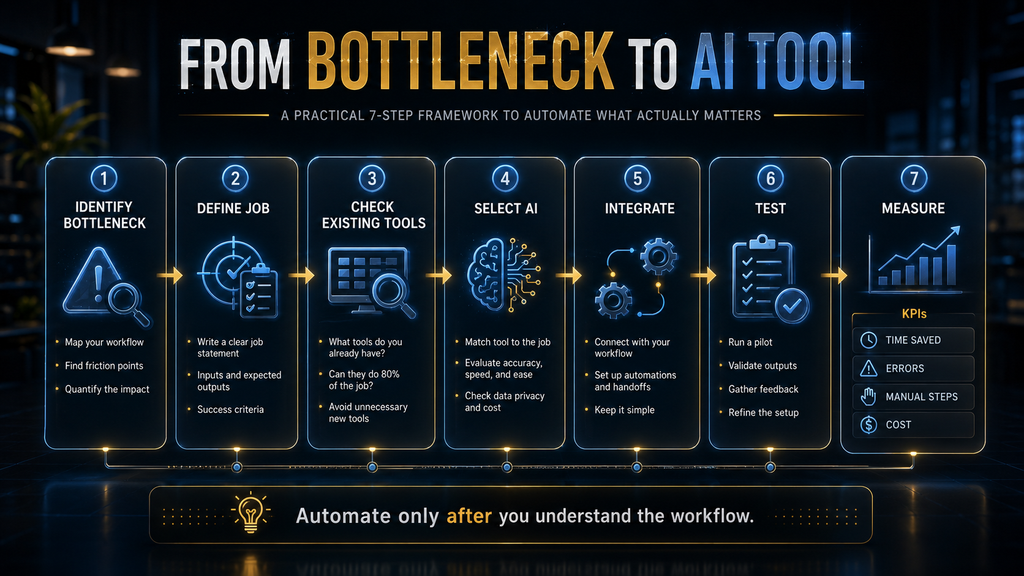
A beginner rarely needs all ten products. Start by observing where a repeated task slows down: finding information, producing a first draft, clarifying writing, remembering commitments, documenting meetings, placing work on the calendar or transferring data. A precise bottleneck produces a shorter shortlist and a test that can succeed or fail honestly.
| If the repeated problem is… | Start with… | Measure… | Do not confuse it with… |
|---|---|---|---|
| Blank-page drafting and ad hoc analysis | ChatGPT | Usable first drafts and correction time | Publishing without verification |
| Work scattered across Google apps | Gemini | Search and handoff reduction | Granting unnecessary data access |
| Work scattered across Microsoft 365 | Microsoft 365 Copilot | In-app completion and retrieval quality | Buying licenses before permissions are ready |
| Notes and internal knowledge are hard to find | Notion AI | Time to locate and reuse approved information | Building elaborate dashboards |
| Editing routine writing takes too long | Grammarly | Revision time and accepted changes | Outsourcing judgment or voice |
| Open-web research starts slowly | Perplexity | Relevant primary sources found | Trusting citations without opening them |
| Tasks are forgotten or scattered | Todoist | Capture reliability and weekly completion | Overbuilding a productivity system |
| Meeting details and actions disappear | Otter.ai | Accurate decisions and assigned follow-ups | Recording without notice or review |
| Good task lists never become realistic days | Motion | Planned versus completed blocks | Using rescheduling to hide overload |
| Stable data is copied between apps | Zapier | Successful runs, exceptions and recovery time | Automating an unclear process |
The AHW Beginner Productivity Stack Ladder
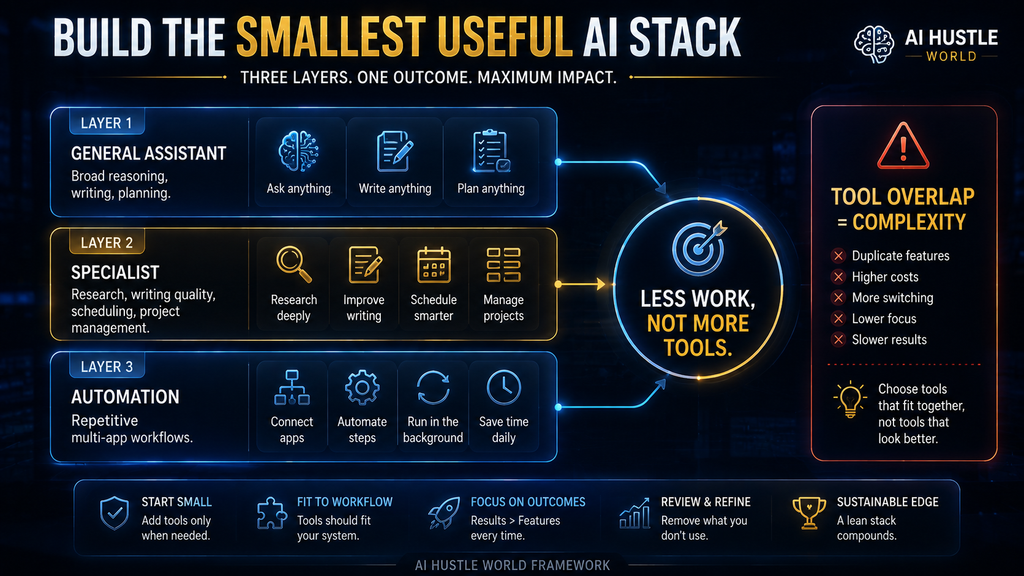
The safest way to build an AI productivity stack is to add capability in layers. Each level should solve a documented problem before the next level is introduced. This preserves a clear source of truth and makes it possible to identify which tool created value, which introduced an error and which subscription can be removed.
The AHW Beginner Productivity Stack Ladder
Learn context, constraints, formatting and verification with one flexible tool.
Add Google or Microsoft integration only when in-app context removes real handoffs.
Choose writing, research, tasks, meetings or scheduling for a repeated bottleneck.
Connect apps only after the manual process, owner and failure path are stable.
Level 1 is sufficient for many people. A general assistant can reveal whether the recurring need is better writing, stronger research or more reliable planning. Level 2 is not automatically an additional subscription; it may mean selecting the assistant already closest to the user’s Google or Microsoft work. The purpose is to reduce context transfer, not to collect overlapping chatbots.
Level 3 should contain one specialist at first. If a user adds Grammarly, Perplexity, Todoist, Otter and Motion at the same time, the learning cost obscures the result. Run a narrow pilot, preserve the old workflow as a baseline and keep only the specialist that changes a recurring outcome. Level 4 is reserved for processes stable enough that a trigger, expected action and failure response can be written down.
Free versus paid: when should a beginner upgrade?
A free plan is usually enough to learn the workflow and discover whether the tool belongs in it. It can reveal the quality of outputs, how often limits interrupt useful work and whether the user returns after the initial novelty. An upgrade makes sense when a measured constraint—usage limits, file size, model access, connected apps, history, administration or a specialist capability—prevents a proven workflow from continuing.
Do not upgrade because the paid plan promises to make the product “more powerful.” Name the blocked task. If the free assistant handles five useful sessions each week and the sixth is merely experimentation, a subscription may not be justified. If a paid plan removes a daily handoff, supports required privacy controls or reliably replaces a separate tool, the economics are easier to defend.
| Upgrade signal | Good reason to pay | Weak reason to pay |
|---|---|---|
| Limits interrupt a validated task | The same useful workflow reaches the cap repeatedly | You want more prompts without a defined use |
| A paid capability removes a handoff | Files, connectors or in-app assistance save repeated work | The feature looked impressive in a demo |
| Work requires controls | Administration, retention or access settings are necessary | You assume “business” automatically makes every use safe |
| A specialist outperforms a general tool | Correction time falls on a frequent workflow | The specialist produces a prettier first answer |
| The plan replaces another cost | One subscription or manual service can actually be retired | The old tool remains and both must be maintained |
The AHW Net Productivity Test
Time saved in the visible task is only one part of productivity. The complete calculation must include setup, checking, correction, context switching and maintenance. That is why an AI-generated draft can feel fast but produce no net gain, while a modest task-capture improvement can compound across every day of the month.
Net productivity gain
Useful time removed − setup − review and correction − context switching − ongoing maintenance
A tool earns a permanent place only when the result remains positive across a repeated workflow.
Use minutes only when they can be observed consistently. A simple weekly log is enough: record the old process once, then record the assisted process several times and note any corrections or failures. Do not invent precision by assigning financial value to every saved minute or extrapolating from one unusually easy task. The decision can remain directional when the evidence is limited.
Quality belongs beside time. A research tool that finds sources faster but increases unsupported claims is not productive, and a meeting summary that saves note-taking while misassigning decisions creates downstream cost. Define one output-quality check before the pilot, such as factual correction count, accepted edits, captured actions or successful automation runs.
A 30-day beginner pilot that produces a real decision
The first week is a baseline, not a shopping spree. Choose one recurring workflow and record how it currently starts, where information comes from, how long completion roughly takes and what errors usually require rework. If the process varies widely, collect several examples before deciding what “normal” means.
During the second week, use one tool with the smallest reasonable amount of customization. Save two or three prompts, templates or views that worked, but avoid building an elaborate system. In the third week, repeat the workflow under ordinary conditions and log review time, failures and exceptions. A useful tool should survive a busy day, not only a carefully staged trial.
The fourth week ends with a decision: keep, modify or remove. Keep the tool when the net-productivity result is positive and the risk is acceptable. Modify the workflow when value exists but a specific problem—such as poor input quality or unclear ownership—can be corrected. Remove the tool when the benefit depends on unusually careful prompting, unmeasured claims or work the user will not maintain.
| Week | Action | Evidence to keep | Decision question |
|---|---|---|---|
| 1 | Document the existing workflow | Examples, approximate time, error patterns | What is the actual bottleneck? |
| 2 | Introduce one tool | Prompts, settings, access and outputs | Can a beginner repeat the process? |
| 3 | Run under normal conditions | Corrections, failures and human effort | Does value survive ordinary variability? |
| 4 | Compare and decide | Net gain, quality, risk and subscription need | Keep, modify or remove? |
General AI assistant versus specialized productivity tool
A general assistant is strongest when the task changes often. It can draft one day, analyze a file the next and help plan a project later, which makes it efficient for learning and low-volume work. A specialist is strongest when the same task appears frequently enough that integrations, domain controls or a purpose-built interface remove repeated steps.
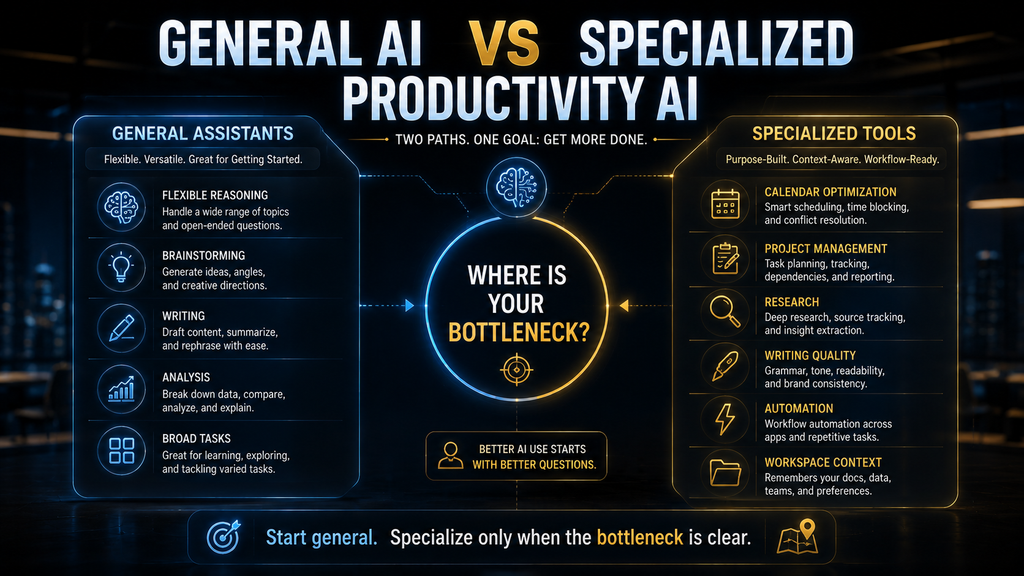
The decision is not permanent. A beginner can use ChatGPT to learn how meeting summaries should be structured, then adopt Otter when automatic capture becomes the larger constraint. The same person can research with a general assistant until source discovery dominates the workflow, at which point Perplexity may reduce more work. Specialization should follow evidence, not precede it.
Privacy, permissions and safe beginner use
Before entering work information, identify the account, plan and organizational policy in use. Consumer, business and enterprise versions of the same brand can have different data controls, retention options and administrative protections. A product’s general security page does not prove that a particular user has the protected configuration described there.
Use the minimum information required for the task. Remove customer identifiers from practice prompts, avoid pasting credentials or regulated data, and connect only the apps needed for the workflow. Review permissions after the pilot and revoke anything no longer required. A connected assistant should not receive broad access merely because the setup screen makes it convenient.
High-impact outputs require human approval. Financial decisions, legal interpretations, medical guidance, employment actions and messages that bind an organization should not be delegated to an AI productivity tool without qualified review. Even ordinary tasks need escalation rules: if the model cannot find a source, the transcript is uncertain or an automation fails, the workflow should stop or route to a person.
Five practical beginner workflows
Turn rough notes into a verified first draft
Use ChatGPT, Gemini or Copilot to organize notes into a requested structure, audience and length. Ask the assistant to mark unsupported claims and open questions rather than filling gaps. Then compare the draft with the source material, verify names and numbers, and edit for judgment and voice. This workflow accelerates structure without pretending generation equals authorship.
Build a source map before writing a report
Ask Perplexity for primary sources grouped by the claims the report must support. Open each important source, note the date and copy a short paraphrase into a research table with the URL. A general assistant can then help organize the verified notes, but the evidence map remains separate. This reduces the risk that polished prose hides a missing source.
Convert a meeting into owned follow-up
With appropriate notice, use Otter or a supported ecosystem assistant to capture the conversation. Ask for decisions, owners, dates and unresolved questions, then have an attendee correct the record before distribution. Transfer only approved actions into Todoist or the team’s project system. The workflow succeeds when ownership becomes clearer, not when the transcript becomes longer.
Plan a week without turning planning into the work
Capture commitments in Todoist, then use a weekly review to select a realistic set of outcomes. A general assistant can help break an outcome into steps, while Motion can place accurate tasks into open time when scheduling is the proven bottleneck. Our guide to planning weekly tasks with AI without losing focus provides a fuller routine.
Automate one stable handoff
Choose a transfer that already happens the same way, such as creating a task from an approved form submission. Build the smallest Zap, test normal and abnormal inputs, assign an owner for failure notices and keep a manual recovery procedure. Add further actions only after the first transfer is reliable. Complexity should grow from operational evidence rather than ambition.
Common mistakes beginners make with AI productivity tools
Starting with the tool instead of the recurring task
A new product encourages people to search for something to automate, which reverses the buying logic. The result is a collection of clever demonstrations that never becomes a dependable workflow. Start with a task that already happens, describe its inputs and acceptable output, and choose a tool only when its role is clear. This keeps novelty from being mistaken for usefulness.
Using several overlapping assistants
ChatGPT, Gemini and Copilot can all draft, summarize and answer questions, but subscribing to all three rarely triples productivity. It creates uncertainty about where conversations, files and reusable instructions belong. Choose one general assistant according to ecosystem, workflow and data requirements, then add a second only for a documented capability gap. A smaller stack is easier to learn, secure and measure.
Treating the first answer as the finished work
AI output often has the form of a finished answer before it has earned that status. Dates, citations, calculations, names and implied facts require checking against reliable sources. Important writing also needs a human pass for audience, tone and consequences. Our guide to writing prompts for more accurate AI answers can improve the input, but no prompt removes the need for verification.
Automating exceptions before understanding them
A workflow looks repetitive until the unusual cases appear. Duplicate form submissions, missing fields, changed permissions and ambiguous calendar events can send automation down the wrong path. Run the process manually long enough to identify common exceptions, then design a stop, alert or approval route. The most valuable automation is not the one that never asks for help; it is the one that fails visibly and recoverably.
Counting generated material instead of completed outcomes
More drafts, summaries and tasks can create a larger queue without moving important work forward. Measure accepted outputs, completed follow-ups, successful transfers and reduced correction time. If a tool increases the amount of material that someone else must review, it may have shifted the bottleneck instead of removing it. Productivity belongs to the whole system, not the fastest step.
Ignoring the cancellation test
At the end of a trial, ask what would measurably become harder if the product disappeared. If the answer is vague, cancel or pause it. A tool that has earned its place should support a named workflow, have repeatable evidence of value and have an owner who will maintain it. This simple test prevents free trials from becoming a permanent layer of forgotten subscriptions.
Who should use these tools—and who should wait?
These tools are a good fit for students, freelancers, creators, managers and knowledge workers who can identify repeatable tasks and review the result. They are especially useful when information already exists but needs to be organized, summarized, rewritten, scheduled or transferred. Beginners do not need technical expertise, but they do need enough subject understanding to recognize weak output.
Wait before adopting an AI tool when the process changes every time, the source data is highly sensitive, no one owns the final decision or success cannot be described. The same caution applies when an organization has not established which accounts and data uses are permitted. Manual work can be slower, but it remains easier to inspect while the workflow is still being designed.
People who feel overwhelmed by the number of options should choose one daily workflow and ignore the rest of the market for a month. A stable routine produces better evidence than constant comparison. The daily AI workflow for managing work without feeling overwhelmed shows how to contain AI inside a practical day rather than letting it become another stream of inputs.
Final thoughts
The best AI productivity tools for beginners are useful because their roles are different. ChatGPT provides the broadest starting point; Gemini and Microsoft 365 Copilot bring AI closer to established work ecosystems; Notion AI organizes knowledge; Grammarly improves routine writing; Perplexity supports research; Todoist manages commitments; Otter captures meetings; Motion schedules work; and Zapier connects mature processes.
The winning stack is usually smaller than the market suggests. Begin with one workflow, measure the complete human effort, verify consequential output and add specialization only when evidence shows a persistent boundary. Productivity is not the amount of AI in the process. It is the amount of worthwhile work completed with acceptable quality, cost and risk.
Build one reliable AI routine first
Use the AI Hustle World daily workflow to turn one assistant into a repeatable system for planning, focused work and end-of-day review.
Build Your Daily AI Workflow →Frequently asked questions
What is the best AI productivity tool for beginners?
ChatGPT is the best overall starting point for most beginners because it covers drafting, planning, summarization and file work in one environment. Gemini can be the better first choice for Google Workspace users, while Microsoft 365 Copilot fits organizations centered on Word, Excel, Outlook and Teams. The best product is the one closest to a recurring workflow that you can verify.
Which AI productivity tools are free?
ChatGPT, Gemini, Grammarly, Perplexity, Todoist, Otter and Zapier all provide a free entry point or free plan, although limits and included features change over time. Notion also offers a free workspace, with AI access governed by current packaging and credits. Use free access to validate one workflow before comparing premium limits.
Do I need more than one AI productivity app?
Most beginners need one general assistant and, at most, one specialist. Add a writing, research, task, meeting or scheduling tool only when the same bottleneck repeatedly survives the general assistant. Automation belongs later, after the manual process is stable. A compact stack is cheaper and makes causes of success or failure easier to identify.
Is ChatGPT or Gemini better for productivity?
ChatGPT is the stronger general recommendation when flexibility across different tasks is the priority. Gemini becomes especially attractive when relevant work is already in Gmail, Docs and Drive and the account supports the needed connections and protections. Compare the exact workflows and plans available to you rather than treating the brands as one permanent winner and loser.
What is the easiest AI tool to learn?
Grammarly and Todoist have the lowest conceptual burden for their focused jobs: improve writing and manage tasks. Chat-based assistants are easy to start but take longer to use consistently because the user must provide context and judge variable output. Ease should be measured across the entire workflow, including review and maintenance, not by how quickly the first response appears.
Can AI productivity tools make mistakes?
Yes. Assistants can invent facts, misread files, overlook instructions or produce language that sounds more certain than the evidence supports. Transcription tools can confuse speakers, and automations can move incorrect data into several systems. Verification, access limits, approval gates and visible failure alerts are part of the productivity workflow rather than optional safeguards.
Are AI productivity tools safe for confidential work?
Safety depends on the data, account type, settings, contract, permissions and organizational policy. Do not assume that every plan under a familiar brand has the same protections. Use approved business accounts, minimize inputs, review retention and training controls, and avoid sensitive data when the permitted configuration is uncertain. Regulated work may require specialized legal and security review.
How do I know whether an AI tool actually saves time?
Compare a repeated task before and after adoption. Subtract setup, review, correction, switching and maintenance from the useful work removed, then track one quality measure. Several ordinary repetitions are more informative than one demonstration. If the gain disappears when verification is included, the tool has not yet improved the workflow.
Should beginners use AI automation?
Beginners can use automation safely when the process is narrow, repetitive and easy to reverse. Start with low-impact actions such as creating a draft task or sending an internal alert, then inspect every run. Avoid automated payments, deletion, public messages or consequential record changes until permissions, testing, approvals and recovery are mature.
Which AI productivity tool is best for students?
A general assistant can help explain concepts, structure study plans and turn notes into practice questions, while Perplexity can support source discovery and Todoist can manage deadlines. Students should follow institutional rules, cite original sources and avoid submitting generated work as their own. Learning is weakened when the tool performs the reasoning the course is intended to develop.
Editorial note: Product capabilities, official plan structures and linked documentation were reviewed in September 2026. AI Hustle World did not accept payment for these rankings, did not run a controlled product benchmark and does not claim the tools produced measured time savings in our own workflow. Confirm current features, limits, pricing and data terms before purchase.
Related Guides
- Best AI Meeting Assistants (Free & Paid): 10 Tools Compared
- Best AI Email Assistants (Free & Paid): 10 Tools Compared
- 10 Best AI Note Taking Apps (Free & Paid Compared)
- 10 Best AI Tools for Small Business Owners
- Best Free AI Tools for Students in 2026: 10 Tools to Study Smarter
Written by
Muntasir Ahmad Chowdhury
Founder-AI Hustle World
Muntasir Ahmad Chowdhury is the Founder of AI Hustle World, an independent publication dedicated to making Artificial Intelligence practical, trustworthy, and easy to understand. He researches AI tools, automation, customer service, productivity, and real-world business applications, helping readers make smarter technology decisions through research-driven, experience-backed content.
Expertise:
AI Tools • AI Automation • AI Customer Service • AI Productivity • Generative AI • AI Workflows
Get Smarter With AI
Enjoyed this guide? Get practical AI tools, tutorials, and honest reviews delivered to your inbox.