
Evidence: Documentation reviewed
Last checked: September 2026
What was done: Written from official documentation and the published sources linked in this article. Not hands-on tested.
Files: None
Affiliate links: No
How to Repurpose Content Across YouTube, Pinterest, and Instagram
Creating content for one platform is manageable. Creating genuinely useful content for three platforms at the same time is where many solo creators discover that the problem is not a lack of ideas, but a lack of leverage.
A creator might spend an afternoon researching one subject, writing a detailed article, recording a YouTube video, designing a Pinterest Pin, and preparing an Instagram Reel, only to realize that all five pieces are built around essentially the same underlying idea. The next week brings the same problem again. New research is required, new scripts are written, new visuals are created, and the creator gradually becomes more focused on feeding the publishing schedule than developing the ideas that make the brand valuable in the first place.
The obvious solution is often phrased as “create once and post everywhere.” That sounds efficient until the same finished asset is forced into environments that expect different things from content. A long YouTube explanation may need room for context and demonstration, while a Pinterest asset needs to make sense as a visual discovery object and an Instagram Reel often has to communicate its value almost immediately. Simply copying or resizing the original does not solve that difference; it usually produces content that feels native nowhere.
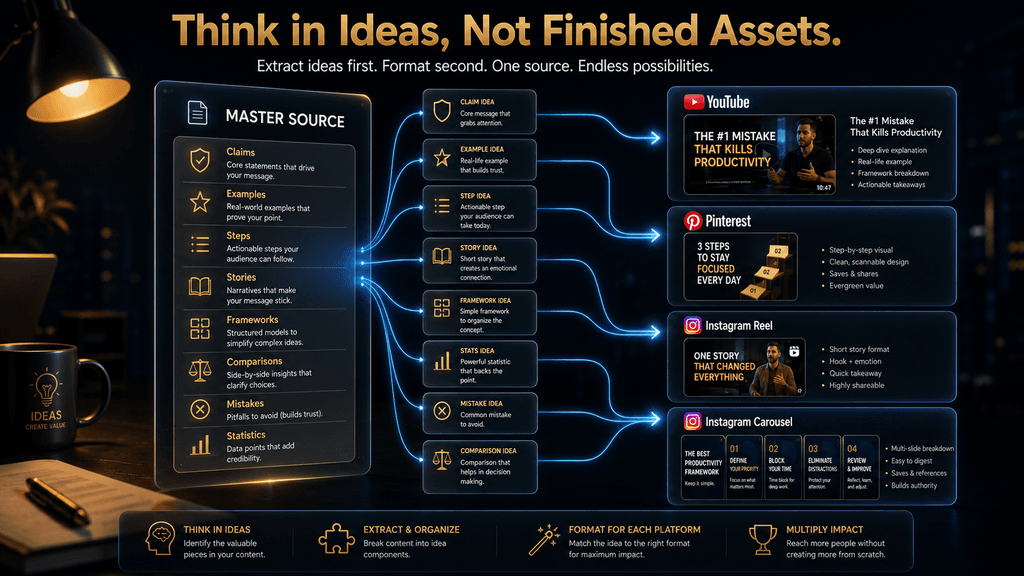
The better approach is to go one level deeper. Do not think of your article, video, podcast, or tutorial as one finished piece of content. Think of it as a source containing a collection of useful ideas that can be rebuilt for different platforms. Once that becomes the operating model, repurposing stops being a race to create more posts and becomes a way to increase the return on the research, expertise, and creative thinking you have already invested.
This is especially powerful when AI is part of the workflow. AI can accelerate transcription, extraction, rewriting, scripting, visual planning, caption drafting, and content organization, but the strategic advantage comes from knowing what to extract, what to keep together, what to change, and where each idea belongs. The goal is not to ask AI to generate ten versions of everything. The goal is to build a system in which one strong source can produce a connected library of platform-native content without becoming repetitive, inaccurate, or mechanically copied.
What Is Content Repurposing?
Content repurposing is the process of taking the ideas, evidence, examples, arguments, or lessons from one substantial source and rebuilding them into new assets that serve different platforms or formats.
That definition is deliberately different from reposting. Reposting takes a finished asset and distributes it again with little or no substantive change. Repurposing goes back to the source and asks what useful information is inside it, which parts can stand independently, and how those parts should be expressed for a different audience context.
Imagine you publish a detailed article explaining how small businesses can automate customer support. Inside that article might be a definition of support automation, a five-step workflow, three mistakes to avoid, a case example, a cost comparison, and a discussion of when automation should not be used. The article is one published asset, but it contains several distinct ideas that can be useful on their own.
A YouTube video might explain the complete workflow. An Instagram Reel might focus on the single mistake that causes most bad implementations. A carousel might turn the five-step workflow into a visual framework. A Pinterest Pin could transform the same workflow into a saved checklist. None of these assets needs to reproduce the original article word for word because their purpose is not to preserve the original format. Their purpose is to preserve the useful idea while changing the way that idea is delivered.
This is why good repurposing is closer to editorial adaptation than duplication.
Why “Create Once, Post Everywhere” Is the Wrong Mental Model
The phrase sounds like the perfect efficiency strategy because it promises maximum distribution with minimum effort. The problem is that it treats platforms as delivery pipes rather than distinct environments where people discover and consume information differently.
YouTube’s current creator guidance makes this distinction very clearly. Its recommendation system is designed around individual viewers, and YouTube says creators should focus on whether their audience actually wants to watch and enjoy the content rather than trying to satisfy a mysterious algorithm. It evaluates signals such as viewer personalization and content performance, with performance including whether people choose to watch, continue watching, and engage positively with the content. (Google Support)
Pinterest has a different context. Pinterest describes itself as a visual discovery platform and recommends a vertical 2:3 format for many standard visual assets. It also gives creators substantial space for titles and descriptions, reflecting the importance of explaining what the visual contains rather than relying on the image alone. (Pinterest)
Instagram introduces another set of behaviors. Its recommendation systems use multiple signals and surfaces rather than a single universal ranking rule, and features such as Trial Reels are explicitly designed to help creators test content with non-followers and examine early response before deciding whether to distribute it more broadly.
That means the same idea can travel across all three platforms while the actual content should change.
A long-form YouTube video might begin with a broad problem and then gradually build an explanation. The Instagram version may need to isolate the strongest tension or most surprising mistake within that explanation. The Pinterest version may need to turn the practical takeaway into a visual reference that makes sense before the user ever leaves Pinterest.
The information is connected. The experience is not. That distinction is the heart of good repurposing.
The Real Problem: Creators Rebuild the Research Instead of Reusing It
Most of the time savings in content repurposing do not come from saving a few minutes of caption writing. They come from avoiding duplicated research.
Research is where creators spend time understanding the subject, deciding which claims matter, finding examples, identifying objections, checking facts, organizing the argument, and developing a point of view. When every platform begins from an empty document, the creator repeats that intellectual work again and again.
Imagine producing a YouTube tutorial about five mistakes people make when implementing an AI workflow. To create the Instagram version independently, you might research the five mistakes again, find new examples, write a separate structure, and then design the Reel. To create the Pinterest version, you might repeat part of that process again. None of this creates additional strategic value. It simply duplicates the work already completed.
Repurposing changes where the work happens. Instead of researching three times, you research once and extract the useful material into an organized idea library. The additional work is adaptation rather than rediscovery. That is the real economic advantage.
The AI Hustle World Atom-to-Platform System
The strongest way to operationalize repurposing is to treat every substantial source as an idea inventory rather than a finished object. Inside that inventory are what we can call content atoms: claims, examples, steps, frameworks, mistakes, comparisons, stories, statistics, questions, and insights that can potentially stand independently.
But the atom is only the beginning. The real system is what happens after extraction.
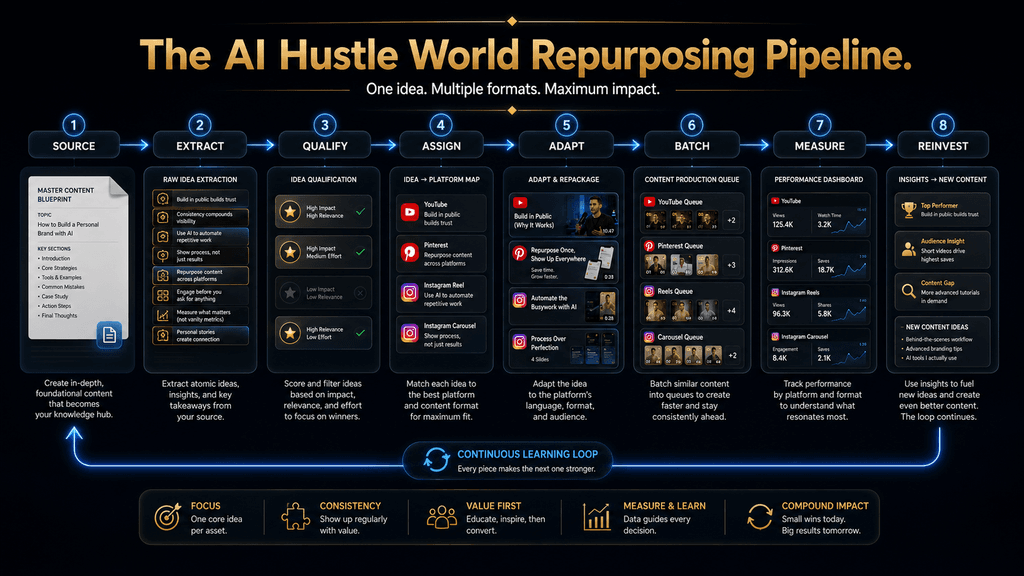
The AI Hustle World model is: Source → Extract → Qualify → Assign → Adapt → Batch → Measure → Reinvest. Each stage solves a different problem. Source determines whether the underlying material is strong enough to multiply.
Extract identifies the useful ideas inside it. Qualify prevents weak or context-dependent fragments from becoming low-value content. Assign determines which platform is best suited to each idea.
Adapt rebuilds the idea for the destination environment. Batch creates operational efficiency. Measure determines whether the adaptation worked.
Reinvest turns performance data into the next round of content decisions. This is more sophisticated than “one article becomes ten posts,” because it introduces a quality filter and a learning loop.
Step 1: Start With a Source Worth Repurposing
Not every piece of content should be turned into a multi-platform campaign. A source is a strong repurposing candidate when it contains substantial information, solves a recognizable problem, presents useful evidence, tells a compelling story, demonstrates a workflow, or contains several ideas that could stand alone.
A detailed tutorial is often excellent source material because tutorials naturally contain steps, mistakes, decisions, examples, and results. A case study can work well because it contains a narrative and a set of lessons. A research-heavy article can provide claims, evidence, counterarguments, and explanations. Even a successful Reel can become a source if the underlying idea is strong enough to expand.
A weak source creates a different problem. If the original content is vague, outdated, derivative, or too thin to support independent ideas, trying to multiply it usually produces even weaker derivatives.
That is why the first question should not be: “How many posts can I make from this?” It should be: “Is this source rich enough that several useful pieces of content already exist inside it?” If the answer is no, improve the source before repurposing it.
Step 2: Create a Truth Lock Before You Extract Anything
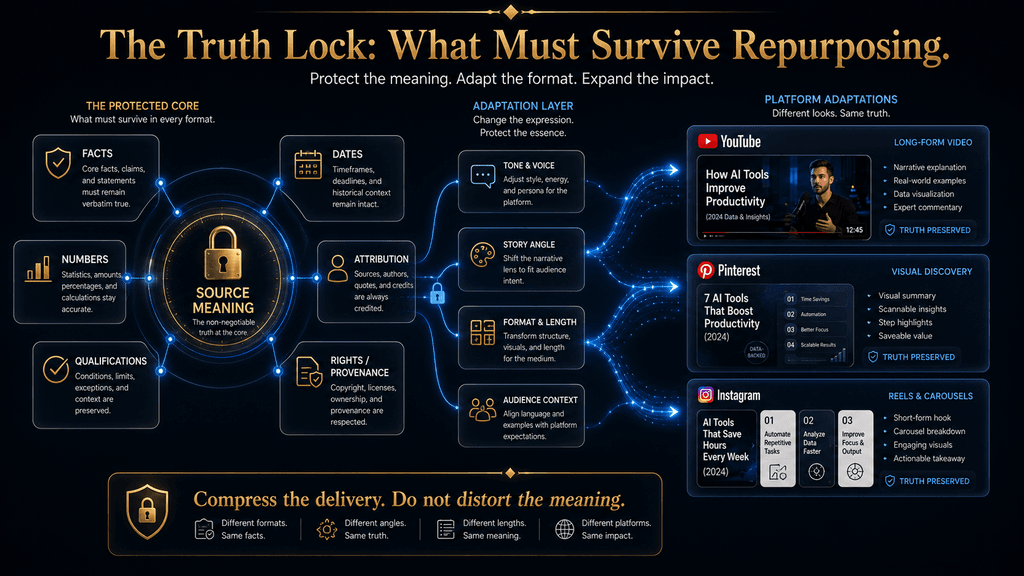
Repurposing introduces a subtle risk: every time information is rewritten into a shorter format, some context can disappear. That matters when the source contains statistics, qualifications, dates, conditions, comparisons, or claims that are true only within a specific context.
Suppose your original content says that a workflow reduced processing time by 35 percent during a particular internal test. When the idea becomes an Instagram Reel, the shorter version might accidentally say, “This workflow reduces processing time by 35 percent.” The second statement is easier to understand, but it has changed the claim by removing the conditions that made the original statement accurate.
The solution is to create a Truth Lock before adapting the source. The Truth Lock identifies the information that must remain accurate across every version: facts, numbers, qualifications, dates, source attribution, definitions, limitations, and rights.
This is particularly important when AI is doing the rewriting. AI can compress language extremely well, but compression can remove qualifications unless the workflow explicitly protects them.
The Truth Lock should therefore contain two categories of information. The first is meaning protection: what the source actually claims and what context is necessary to keep the claim honest. The second is rights protection: which music, images, footage, graphics, trademarks, or other third-party assets can legally be reused across destinations.
The rights issue becomes especially important when creators move content between platforms. YouTube’s Creator Music documentation, for example, says Creator Music licenses are not transferable to other platforms.
The practical lesson is simple: repurpose your ideas freely, but do not assume every asset attached to the original publication can travel with them.
Step 3: Build the Atom Inventory
Once the source is safe to use, break it into the ideas that actually matter.
Read the source as if you were looking for pieces that could survive independently. Mark every meaningful claim, step, example, mistake, framework, objection, comparison, statistic, story, and practical lesson.
Suppose the source is an article titled: How to Build an AI-Powered Content Workflow. A useful atom inventory might contain the central workflow, the three most common implementation mistakes, the role of human review, the time-cost difference between manual and assisted production, a practical example for a solo creator, and a framework for deciding which tasks should be automated. Notice that you are not yet deciding whether each atom belongs on YouTube or Instagram.
That comes later. First, you want a clean map of what the source contains.
This is where AI can be extremely useful. Give an AI assistant the source and ask it to identify candidate claims, frameworks, examples, counterarguments, questions, statistics, and practical steps. The resulting output should be treated as an extraction draft, not as a publishing plan. The human still needs to determine whether an extracted idea is genuinely useful and whether the AI preserved its original meaning.
The goal is to convert: one large document into: a structured inventory of possible content ideas.
Step 4: Not Every Atom Deserves a Post
One of the biggest mistakes in repurposing is assuming that every sentence in a source deserves to become a separate asset. It does not. An idea should pass three tests before it enters the active content queue.
First, the idea should be understandable without requiring the entire source. If the user needs several paragraphs of missing context to understand what you mean, the idea is probably not ready to stand alone.
Second, it should provide meaningful value. A sentence can be technically self-contained without being interesting enough to justify a Reel, Pin, or carousel.
Third, it should have a natural format. Some ideas work well as visual checklists. Others require demonstration. Some are better suited to a long explanation because reducing them would create confusion.
This qualification stage is what prevents repurposing from becoming content fragmentation. The objective is not to maximize the number of assets. The objective is to maximize the number of useful independent assets.
Step 5: Give Each Atom a Platform Job
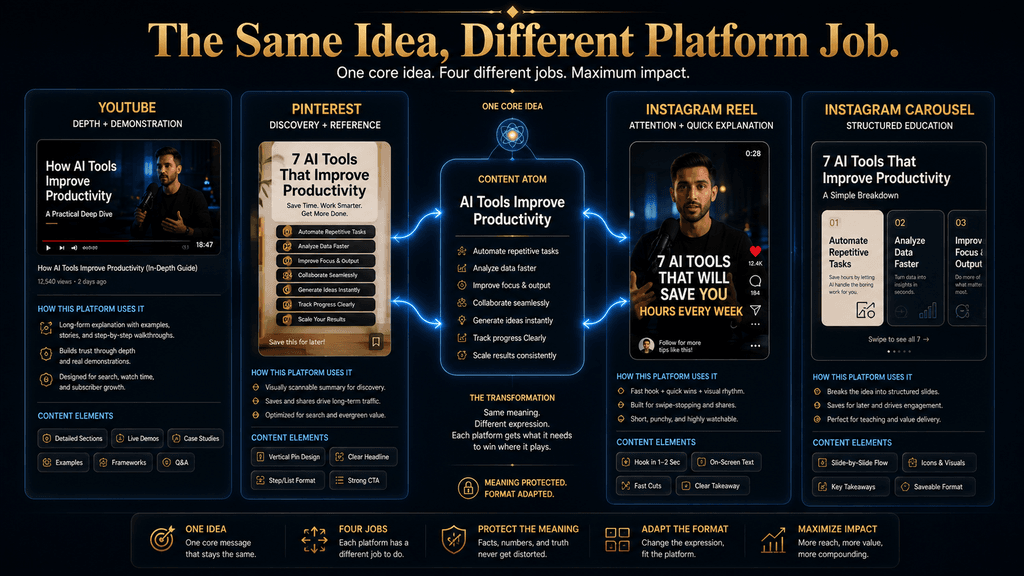
Once the atom inventory is ready, the most important decision begins: Where should each idea live? This is where genuine repurposing separates itself from cross-posting. YouTube can give an idea depth.
Pinterest can turn an idea into a visual reference. Instagram Reels can isolate a compelling insight and deliver it quickly. Instagram carousels can turn frameworks and processes into structured swipeable explanations.
An idea does not need to appear everywhere. It needs to appear where its shape and purpose make the most sense.
YouTube: Use the Platform for Depth and Demonstration
YouTube is often the strongest home for the full argument because it gives the creator room to build context, explain a process, demonstrate a tool, compare approaches, or develop a story.
YouTube’s current creator guidance explicitly says there is no universal ideal video length. The appropriate length depends on the content, audience, and purpose, and creators are encouraged to avoid filler while using audience-retention data to understand how viewers respond. (Google Support)
That principle matters for repurposing because it means the YouTube version should not be artificially shortened just to fit an arbitrary duration.
Suppose your source explains five mistakes in AI automation. The long-form YouTube version might open with the business problem, explain all five mistakes, demonstrate a poorly designed workflow, compare it with a better one, and show what the creator should measure after implementation.
The same source can therefore become a substantial viewing experience rather than an article read aloud over generic visuals. The deeper YouTube question is: What can this idea become when the audience gives it enough room?
Sometimes the answer is a tutorial. Sometimes it is a case study. Sometimes it is a comparison. Sometimes it is a story with a practical lesson.
The format should be determined by the idea, not by the desire to make every source look the same.
YouTube Shorts: Extract One Complete Idea
Short-form video works differently from long-form explanation. A Short should generally focus on a bounded idea that the viewer can understand without needing the entire source.
Suppose the full video explains five reasons AI workflows fail. A Short might focus only on the first reason:
The workflow was never clearly defined before automation began. That single idea can be explained with a concrete example, a quick contrast between the bad and good approach, and a conclusion.
The Short does not need to mention the remaining four mistakes. That is an important repurposing principle: you do not have to preserve the source’s original structure when you move the idea into a new format.
YouTube itself emphasizes that viewers can consume different formats according to their preferences and that creators can experiment across Shorts and long-form content without automatically harming the channel. The system evaluates content individually according to how viewers respond to it.
That supports a flexible content system in which the same subject can exist at multiple depths.
Pinterest: Turn Information Into a Visual Reference
Pinterest is particularly valuable when an idea can be converted into something people would want to save for later.
The platform’s current business guidance recommends a vertical 2:3 ratio, or 1000 × 1500 pixels, for standard image creative because larger ratios can be cropped in feeds. Pinterest also supports substantial title and description fields that provide additional context.
Those specifications are useful, but the deeper point is about user intent. A Pinterest asset often works best when it is useful before the click.
Suppose your source contains a seven-step process for building an AI content workflow. A strong Pin might become: “7 Steps to Build an AI Content Workflow”
The visual can show the seven stages clearly enough that someone browsing Pinterest can understand the framework without opening another tab. The destination link can lead to the detailed source. That is more valuable than simply turning a YouTube thumbnail into a vertical image. The Pin becomes a useful object in its own right.
Instagram Reels: Lead With the Most Compelling Part
Instagram Reels are often better suited to one strong point than to a complete summary.
Imagine your source contains a long explanation of why AI-generated content often performs poorly. The entire argument might be too large for a Reel, but one specific insight may be compelling enough:
“The problem is not that AI makes content too quickly. The problem is that it makes average content incredibly easy to reproduce.”
That idea can become the spine of a Reel. The creator can explain the tension, show an example, and then offer a practical correction.
Notice what happened.
The Reel did not become the “short version” of the original article. It became a new piece built around one of the article’s strongest ideas. This is the difference between summarizing and adapting.
Instagram Carousels: Turn Frameworks Into Sequential Lessons
Carousels are particularly useful when the idea has a clear sequence. A five-stage workflow, comparison, checklist, mistake analysis, or decision framework can often become more useful when each part receives dedicated visual space. Suppose the source contains a framework for deciding which tasks to automate.
The carousel might begin with: “Do Not Automate These Tasks First.” The following slides then explain the decision logic and end with the recommended order. The source’s information remains intact, but the structure changes because the reader is interacting with the idea differently.
A carousel should therefore not be treated as “an article broken into slides.” That approach usually produces dense, unreadable cards.
Instead, ask: What does the reader need to understand in sequence for this idea to make sense? Then build the carousel around that sequence.
The Platform Job Matrix
Once you think in terms of platform jobs, the content system becomes much easier to manage.
| Platform | Primary Job | Best Content Atoms | Strongest Adaptation |
|---|---|---|---|
| YouTube | Depth, explanation and demonstration | Tutorials, stories, frameworks, case studies | Long-form video |
| YouTube Shorts | Focused discovery and quick teaching | Single insight, mistake, tip, demonstration | Short-form video |
| Discovery and visual reference | Checklists, comparisons, processes, frameworks | Vertical Pin | |
| Instagram Reels | Attention and focused explanation | Surprising insight, mistake, transformation, demonstration | Short-form video |
| Instagram Carousels | Structured education | Frameworks, comparisons, checklists, step-by-step lessons | Swipeable visual guide |
This matrix should not be treated as a rigid law.
A tutorial might work extremely well as a Pinterest diagram. A comparison might become a Reel. A story might become a carousel.
The matrix is simply a starting point for deciding where an atom has the most natural fit.
Don’t Resize. Rebuild.
The biggest practical mistake in repurposing is changing the dimensions while leaving the communication strategy untouched.
A YouTube thumbnail may become technically large enough for a Pinterest image, but that does not make it a good Pin. A 90-second YouTube clip may become technically short enough for Instagram, but that does not mean it has a strong Reel structure. A blog paragraph can fit on a carousel slide, but that does not mean someone will want to read it there. A successful adaptation usually changes several elements at once.
The hook may change because users encounter the content differently. The depth may change because one platform requires a complete explanation while another only needs one useful insight. The visual hierarchy may change because a dense document becomes a single graphic. The pacing may change because the audience’s attention is expressed differently. The context may change because the destination audience may never have seen the original source. The call to action may change because the next best step differs by platform. The metadata and packaging should also change. This is why repurposing is not zero-work content.
It is reduced duplicated work.
A Worked Example: One Article Across All Three Platforms
Suppose the source is:
How to Write Better AI Prompts: Five Mistakes That Reduce Output Quality
The source identifies five problems: vague instructions, missing context, weak examples, missing constraints, and failure to iterate. Now build the atom inventory.
One atom explains why vague prompts create ambiguity. Another explains why context affects relevance. A third shows how examples improve consistency. A fourth explains how constraints limit unwanted behavior. A fifth explains why iteration improves the result.
Instead of publishing the same five points everywhere, assign each idea strategically.
The full YouTube video can explain all five mistakes with before-and-after prompt examples. A YouTube Short can focus on the first mistake and show one vague prompt becoming a specific one.
An Instagram Reel can start with: “Your AI prompt isn’t necessarily bad because the AI is bad.” It then explains that the user’s instruction may simply be underspecified.
The Instagram carousel can teach all five mistakes in sequence, with one concrete prompt example on each slide. The Pinterest Pin can become a reference graphic titled: “5 AI Prompt Mistakes Beginners Should Avoid.”
The core source is the same. The finished content is not. That is exactly what we want.
Reverse Repurposing: Start With What Already Worked
The repurposing process becomes even more valuable when it moves in the opposite direction. Most content strategies imagine the flow as: Long-form → Short-form. But the strongest idea may actually appear first in short-form.
Imagine you publish an Instagram Reel about a common AI prompting mistake. It receives unusually strong saves, shares, comments, and profile visits compared with your normal content.
That response tells you something. The topic may deserve deeper treatment.
You can turn that Reel into a carousel that explores several examples, then create a YouTube tutorial that explains the complete concept, and eventually write a detailed article. The new sequence becomes: Instagram Reel → Carousel → YouTube → Article.
Now performance is helping determine what deserves additional production. This is a far more intelligent system than deciding in advance that every source must begin as a 2,000-word article.
YouTube’s own creator guidance recommends looking for patterns in past performance and going beyond one-off successes. It specifically advises creators to identify recurring topics, styles, formats, and audience responses rather than assuming every viral result should dictate the next strategy.
That makes reverse repurposing a natural extension of evidence-driven content planning.
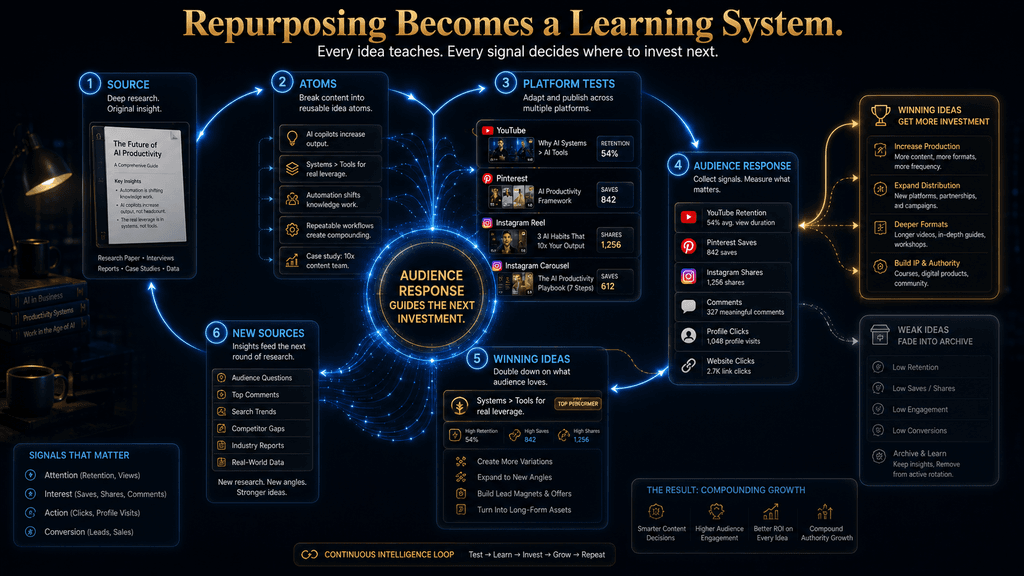
Repurposing Should Become a Learning Loop
At first, repurposing looks like a distribution system. You make something once and move it around.
But a mature system is more powerful: Source → Ideas → Platforms → Audience Response → New Insights → New Sources
Imagine your YouTube video contains six meaningful ideas. You adapt all six into smaller assets. One Instagram Reel performs exceptionally well. A Pinterest Pin built around another idea receives strong saves and clicks. A YouTube Short reveals that viewers keep asking a question that was only briefly mentioned in the original video.
You now have three pieces of evidence. One idea may deserve more short-form attention. Another may have strong evergreen visual utility.
The audience question may deserve a new long-form source. The original source has therefore done more than produce derivatives. It has helped identify what should be created next.
That is the point at which content repurposing becomes a content intelligence system.
How AI Fits Into the Workflow
AI is particularly useful when the source is already strong and the creator needs help moving information through the system.
An AI assistant can analyze a transcript and identify potential content atoms. It can group related ideas, generate candidate hooks, turn an approved atom into several script options, create rough carousel structures, suggest Pinterest titles, summarize comments, and help organize the publishing queue.
AI is also useful for comparing versions.
You can give it the source, the selected atom, and the destination format, then ask it to produce three or four alternative structures. That is a better use of AI than asking it to generate “everything you can think of.”
But there is a boundary. AI should accelerate transformation. It should not automatically determine editorial importance.
The human should still decide whether the idea is worth publishing, whether it is factually sound, whether the framing is misleading, whether the brand would stand behind it, and whether the adaptation still preserves the meaning of the source. This leads to a useful rule: Automate transformation before you automate editorial judgment. The less mature your content strategy is, the more dangerous full automation becomes.
Use AI to Extract Information, Not Just Write Captions
A common beginner workflow is:
- Write article.
- Ask AI for ten captions.
- Copy them into a scheduler.
That technically qualifies as repurposing, but it leaves much of the real leverage unused. A better workflow begins by asking AI to understand the source.
Suppose the source is a 40-minute YouTube tutorial. The AI system can identify:
- the major arguments,
- the steps,
- the most surprising moments,
- common mistakes,
- examples,
- audience questions,
- useful definitions,
- and sections with high standalone value.
The result is a structured content map. You can then decide that three ideas are strong enough for Reels, two are suitable for carousels, one deserves a Pinterest framework, and the full tutorial remains on YouTube.
The difference is significant. The AI is not inventing a separate strategy for every platform. It is helping you navigate the structure of the original work.
How to Preserve Your Voice During Repurposing
Repurposing becomes dangerous for personal brands and editorial businesses when every adaptation starts sounding like the same generic AI voice. The solution is to define what should remain stable across platforms.
Your point of view should remain stable. Your core terminology should remain stable. Your standards for evidence should remain stable. Your brand personality should remain recognizable.
But sentence length, opening style, pacing, examples, and visual presentation can change.
For example, a YouTube video may sound conversational and explanatory, while an Instagram carousel may use tighter phrasing because the audience is processing each slide visually. That does not mean the brand voice has changed. The expression changed while the underlying editorial identity remained intact.
This is another reason to avoid simply copying the source. Copying preserves the words but often destroys the native experience. Adaptation preserves the idea and voice while changing the delivery.
Build a Clean Master Asset
One of the easiest ways to make multi-platform publishing harder than it needs to be is to treat the first published version as the only source file. Instead, maintain a clean master. For video, that may include the original footage, clean voice track, project file, captions, graphics, and unwatermarked export.
For written content, keep the full source, research notes, citations, headline variants, and supporting assets. For visual content, keep the original editable design files rather than only the final flattened export. This creates a practical benefit: platform-specific elements can be added later without contaminating the core asset.
You can then create a YouTube version with one title treatment, an Instagram version with another, and a Pinterest visual with a completely different composition. The underlying material stays organized.
Music, Stock Footage and Third-Party Assets Need Separate Attention
Creators often assume that because an audio track or stock clip appeared legally in one version, it can automatically appear in every derivative. That is not a safe assumption.
YouTube’s Creator Music documentation says Creator Music licenses are not transferable to other platforms. Instagram’s music library also operates under separate rights arrangements, with restrictions around certain commercial uses and different access depending on account type and content.
That means your repurposing workflow should separate original intellectual content from platform-specific licensed ingredients.
Your script may travel. Your recorded narration may travel. Your original graphics may travel. A specific platform-licensed song may not.
This distinction can prevent an otherwise successful content system from creating unnecessary copyright or licensing problems.
AI-Modified Content and Provenance
The same principle applies when AI is involved in the production itself.
A creator may use AI to generate an image, remove an object from a photograph, clean audio, create captions, design a background, or draft a script. Those uses are different from building the content around a synthetic person presented as a real individual.
The specific disclosure expectations can change by platform and over time, so the repurposing workflow should include a provenance checkpoint before publishing. Record how major AI-generated assets were created, whether they contain synthetic people or voices, and whether the destination platform has a relevant disclosure requirement.
This is not bureaucracy for its own sake. It protects the content system from a common failure mode: the creator builds a workflow around an asset that later turns out to require different treatment on the next platform.
Pinterest Should Not Receive a Screenshot of the Article
This mistake deserves special attention because it is extremely common. A creator publishes a detailed article, creates a square social image with the article title, stretches it vertically, and calls the result a Pinterest strategy.
The problem is not the dimensions. The problem is the lack of adaptation.
A stronger Pin might extract a specific framework from the article and present it visually. It might turn a five-step process into a vertical checklist. It might compare two approaches. It might answer one narrow question that has clear discovery value.
Pinterest’s current creative guidance emphasizes visual-first communication and recommends a 2:3 canvas for standard assets, which reinforces the need to design for the environment rather than simply resize an existing graphic.
The Pin should be useful before the click. The click should extend the value, not create it.
Instagram Should Not Receive the YouTube Intro Cut Out
The same mistake appears in video.
A creator records a ten-minute YouTube tutorial and simply takes the first forty seconds for Instagram. That can work if the opening section already functions as a standalone argument. Often it does not.
YouTube introductions may spend time establishing context, defining the problem, introducing the channel, or explaining what the viewer will learn. That can be useful in a long-form environment, but it may not be the strongest structure for a Reel.
A better process is to revisit the source and select an atom that naturally fits short-form behavior.
Maybe the strongest Reel comes from the middle of the video. Maybe it is the counterintuitive example near the end. Maybe it is one mistake the audience can understand immediately.
The source tells you what you know. The platform tells you what deserves emphasis.
The Economics of Repurposing: Does It Actually Save Time?
Repurposing only creates real efficiency when the adaptation effort is lower than the effort required to create the assets independently. That sounds obvious, but it is easy to lose sight of it.
Suppose a creator spends four hours researching and producing a substantial source. They then spend three more hours extracting ideas and producing platform-specific versions. The total is seven hours.
That is useful only if those adaptations would have required significantly more than three additional hours had they been created independently. So the right comparison is not: “One source produced ten assets.”
The right comparison is: “How much additional time did each useful asset require after the source already existed?” You can think about the basic efficiency as: Useful assets created ÷ incremental repurposing time.
That number becomes meaningful only when you also consider quality. If twenty derivatives are created but fifteen are weak, repetitive, or unused, the system is not necessarily efficient. The best repurposing workflow maximizes useful output per unit of additional effort.
The Hidden Cost of Over-Repurposing
Repurposing can also go too far. Imagine a creator produces a YouTube video, then creates three Reels, two carousels, four Pins, six quote graphics, and five text posts from exactly the same source.
At first, that looks like excellent leverage. But if the audience sees essentially the same message repeatedly over the next two weeks, the creator has solved the production problem by creating a relevance problem.
The content library is now technically larger but intellectually narrower. This is why every adaptation should answer a different user need.
One asset can explain. Another can demonstrate. Another can compare. Another can summarize. Another can challenge an assumption. Another can provide a reference.
The content becomes repetitive when the job remains the same even if the format changes.
When a Source Should Not Be Repurposed
There are several situations where the right decision is to leave the source alone.
Do not multiply information that is outdated. Do not strip away context that is necessary to keep a claim accurate. Do not repurpose a source whose rights do not extend to the destination platform. Do not create a new asset from an idea that is too weak to stand independently. Do not turn sensitive or confidential information into public content merely because AI makes extraction easy. Do not continue generating derivatives once the useful ideas have been exhausted.
And do not force a platform adaptation when the result would be obviously inferior to creating a new piece specifically for that environment.
Repurposing is a means of increasing leverage. It is not a requirement that everything be reused.
A Better Measurement Framework
Traditional content calendars measure output: How many posts did we publish? That is useful for operations but weak for strategy. A repurposing system should measure at least three things.
Content Efficiency
How many genuinely useful assets came from the source? This tells you whether your source material is rich enough and whether your extraction process is working.
Production Efficiency
How much incremental time did each adaptation require? This tells you whether the system is actually reducing duplicated work.
Performance Efficiency
What did the adapted content accomplish? Did it attract attention? Did people save or share it?
Did it generate meaningful profile or website actions? Did it produce leads, subscribers, sales, or another relevant business result? Those three dimensions are important because a system can succeed on one while failing on another.
You might create content very efficiently that performs poorly. You might create excellent content that takes so long to repurpose that the efficiency advantage disappears.
You might produce strong engagement without generating any meaningful business outcome. A good system balances all three.
Measure Each Platform by Its Own Job
You should also resist the temptation to compare all platforms using one metric.
For YouTube, the useful questions include whether people chose to watch, whether they stayed engaged, and whether the viewing experience satisfied them. YouTube’s current creator guidance groups these signals under appeal, engagement, and satisfaction.
For Pinterest, useful indicators can include saves, Pin clicks, outbound actions, and downstream conversions where relevant. The platform provides business-oriented performance and audience analytics to help creators understand these behaviors.
For Instagram, watch behavior, shares, saves, comments, profile actions, and experimental performance can all matter depending on the content and objective. The point is not to search for one universal winner. The point is to ask: Did this asset accomplish the job we created it to do?
A Pinterest Pin that generates repeated saves may be successful even if it does not receive the same raw view count as an Instagram Reel. A YouTube video with modest initial reach can still be valuable if the people who watch it stay engaged and continue into other content. A Reel can be useful as an idea-validation device even if it never becomes a major traffic driver. Context matters.
Repurposing Should Feed the Next Editorial Decision
The final stage of the system is reinvestment. Suppose you have ten atoms from one source and only three perform strongly across your platforms.
That is useful information. You now know that those three ideas may deserve more attention. The winning atom can become a deeper YouTube video. The Pinterest version can be expanded into a more comprehensive visual guide. The Instagram carousel can explore common mistakes around the topic. The audience questions can become the source material for your next article.
Your content library begins to develop a hierarchy.
Some ideas remain one-off assets. Some become recurring themes. Some become cornerstone topics. Some are retired.
That is a much healthier system than endlessly generating new ideas from scratch.
The 30-Day Implementation Plan
A creator starting this system does not need a complicated content operation.
During the first week, choose one substantial source and create the Truth Lock and atom inventory. Do not rush into publishing. The objective is to understand exactly what material you already have.
During the second week, assign the strongest atoms to platform jobs. Decide which deserve long-form treatment, which can stand alone as short-form ideas, which are naturally visual, and which should remain inside the original source because they require too much context.
During the third week, batch-produce the adaptations. Create the YouTube version, then work through the short-form scripts, Pinterest visuals, and Instagram structures without constantly returning to the original source.
During the fourth week, review what happened. Look for patterns rather than isolated wins. Which ideas consistently attracted attention? Which formats required too much effort? Which adaptations felt genuinely native to the destination platform? Which source topics deserve another round?
By the end of the month, you should not simply have more posts. You should have a more efficient content operating system.
A More Advanced 90-Day Model
After the first month, the system can become more intelligent.
In days 31–60, start identifying recurring patterns across your strongest atoms. Perhaps practical mistakes outperform broad educational definitions on Instagram. Perhaps process-oriented Pins outperform inspirational graphics. Perhaps YouTube audiences respond particularly well to demonstrations rather than list-based videos.
You can then modify the platform-job matrix based on evidence.
During days 61–90, introduce stronger reverse repurposing. When a short-form idea consistently performs well, promote it into a candidate for deeper content. When a YouTube topic generates a recurring question, turn the question into a standalone short-form asset. When a Pinterest topic performs well over time, consider developing a durable article or tutorial around the same underlying problem.
At this stage, the content system begins to compound. You are no longer asking: “What should I publish next?”
You are asking: “Which proven idea deserves the next level of investment?” That is a much more efficient editorial question.
Common Mistakes to Avoid
The most common mistake is copying the source instead of rebuilding the idea. This usually produces content that technically exists on multiple platforms but feels unnatural everywhere except the place where it was originally created.
Another common mistake is repurposing too early. If the source has weak research or weak positioning, multiplying it does not improve the underlying content; it spreads the weakness.
A third mistake is treating quantity as efficiency. Ten derivatives are not automatically better than four. The correct measure is useful output relative to additional effort.
Creators also make mistakes by removing context, particularly when converting detailed claims into short statements. This is where the Truth Lock becomes essential.
There is also the rights mistake, where music, footage, graphics, or other third-party assets are carried across platforms without confirming that the original license permits that use.
Finally, many creators automate too much too early. AI can produce endless variations, but endless variations are not a strategy. Without a strong editorial filter, automation simply makes it easier to generate more content that nobody needs.
Can One Piece of Content Become a Full Content Ecosystem?
Yes, provided the source is substantial enough and the creator is willing to treat repurposing as adaptation rather than duplication. A single research project can become a long-form video, several short-form concepts, one or more visual reference assets, multiple educational posts, and eventually new source material based on audience response.
But there is a limit. One source cannot produce infinite original value. Eventually the strongest ideas will have been used, tested, expanded, or retired. At that point, the next efficiency gain does not come from squeezing another five posts out of the same material.
It comes from creating a new strong source. That distinction protects the content system from becoming a recycling machine.
The Real Strategic Advantage
The deepest benefit of repurposing is not that it allows you to publish everywhere. It allows you to make your original thinking travel farther.
If you spend three hours researching an important problem, you want that intellectual investment to produce more than one isolated asset. You want the research to inform your YouTube channel, support your Pinterest library, give Instagram a useful idea, and reveal which parts of the subject the audience cares about most.
That is leverage. AI can increase that leverage by reducing the friction between one stage and another, but AI is not the reason the system works. The system works because the creator stops rebuilding the same thinking from scratch.
Final Thoughts
The best content repurposing strategy is not based on the idea that one piece of content should be duplicated everywhere. It is based on a much more useful principle: one strong source can contain many valuable ideas, and each of those ideas can be rebuilt to perform a different job on a different platform.
That means YouTube can provide depth and demonstration, Pinterest can turn information into durable visual reference material, and Instagram can isolate compelling ideas for faster discovery and engagement. AI can make the movement between those formats much faster, but the quality of the system still depends on decisions that automation cannot safely make on its own: what is worth extracting, what context must remain intact, where an idea belongs, and whether the final adaptation is genuinely useful.
The strongest creators eventually stop thinking of repurposing as a way to fill calendars. They start treating it as a way to multiply the value of original thinking. A good source becomes an idea inventory. The idea inventory becomes platform-native content. Audience response then reveals which ideas deserve deeper investment, which creates the next source and strengthens the system over time.
That is the real advantage of repurposing.
You are not trying to make one piece of content appear in three places. You are building one body of thinking that can become three different content experiences—and then using what you learn from those experiences to decide what deserves to be created next.
Build a Smarter Content System With AI
Turn one idea into many assets by following a repeatable system for repurposing content with AI.
Read the AI Content Repurposing Guide →Frequently Asked Questions
What is content repurposing?
Content repurposing means taking the useful ideas, information, examples, or arguments from an existing source and rebuilding them into new assets for different platforms or formats. Unlike simple reposting, genuine repurposing changes the presentation so the content performs a different job in the destination environment.
Is content repurposing the same as reposting?
No. Reposting usually distributes the same finished asset again, while repurposing goes back to the underlying material and creates a new version around the needs of another platform, audience context, or content format.
How can one piece of content become YouTube, Pinterest, and Instagram content?
The usual process is to start with a substantial source, extract its strongest independent ideas, qualify them, assign them to the platforms where they fit best, and then rebuild each one for the destination. A deep explanation may become a YouTube video, a visual process may become a Pinterest Pin, and a single compelling insight may become an Instagram Reel.
Should I post the exact same content on YouTube, Pinterest, and Instagram?
Usually, no. The underlying idea can remain the same, but the hook, pacing, depth, visuals, metadata, and call to action should change according to the platform. YouTube, Pinterest, and Instagram create different contexts for discovery and consumption, so identical packaging often produces a weaker result.
What is a content atom?
A content atom is a self-contained idea extracted from a larger source that can provide value independently. It could be a mistake, step, framework, example, claim, comparison, statistic, or useful insight.
How many pieces of content should I create from one source?
There is no universal number. The right amount depends on how many strong independent ideas actually exist in the source and whether each adaptation provides something different to the audience. Ten useful assets are better than twenty weak variations, and four excellent adaptations may be more valuable than ten repetitive ones.
Can AI automate content repurposing?
AI can accelerate many parts of the workflow, including transcript analysis, idea extraction, hook generation, scripting, visual planning, caption drafting, and organization. It should not automatically decide what deserves publication or whether an adaptation remains accurate, original, and appropriate for the destination platform.
How do I avoid making repurposed content repetitive?
Start by assigning each asset a different job. One piece can explain the concept, another can demonstrate it, another can compare approaches, and another can provide a checklist or reference. Repetition usually becomes a problem when the format changes but the audience is still being given essentially the same message in the same way.
Can I turn an Instagram Reel into a YouTube video?
Yes. A Reel can become the starting point for a longer video when the underlying idea has enough depth to justify expansion. The Reel should function as evidence that the topic deserves attention, while the YouTube version should add context, examples, demonstrations, and nuance.
How do I know whether content repurposing is actually saving me time?
Compare the incremental time spent adapting the source with the amount of useful content produced and the time it would have taken to create those assets independently. You should also consider performance and quality, because producing a large volume of low-value derivatives does not represent genuine efficiency.
Related Guides
- How to Turn Articles Into Social Media Content With AI
- Repurpose Podcasts Into Short-Form Content With AI
- Turn Video Transcripts Into Articles, Clips and Social Posts With AI
Written by
Muntasir Ahmad Chowdhury
Founder, AI Hustle World
Muntasir Ahmad Chowdhury is the Founder of AI Hustle World, an independent publication dedicated to making Artificial Intelligence practical, trustworthy, and easy to understand. He researches AI tools, automation, customer service, productivity, and real-world business applications, helping readers make smarter technology decisions through research-driven, experience-backed content.
Expertise:
AI Tools • AI Automation • AI Customer Service • AI Productivity • Generative AI • AI Workflows
Get Smarter With AI
Enjoyed this guide? Get practical AI tools, tutorials, and honest reviews delivered to your inbox.