Evidence: Documentation reviewed
Last checked: September 2026
What was done: Written from official documentation and the published sources linked in this article. Not hands-on tested.
Files: None
Affiliate links: No
Best AI Tools for Instagram Reels & Carousels
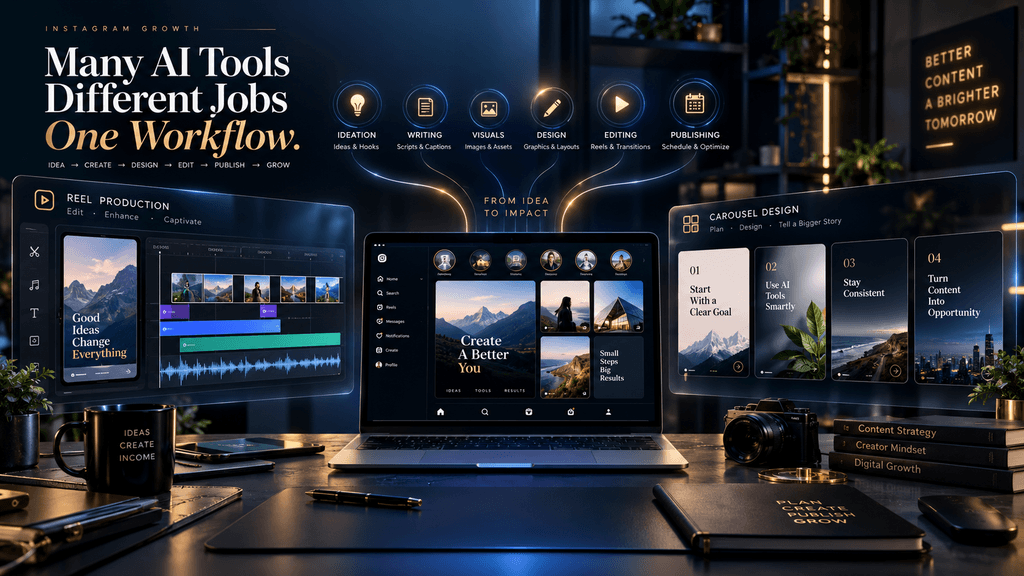
Instagram content creation has become a strange problem in 2026. The technology is better than ever, yet choosing the right tool has become harder because there are now too many tools that appear to do the same thing. One platform promises AI-generated Reels, another turns a prompt into a complete video, another specializes in branded carousels, another offers automated captions and editing, and another bundles almost the entire social-content workflow into one dashboard. The result is that creators can spend almost as much time comparing tools as they once spent creating content.
That is the wrong way to approach the market.
The better question is not which AI tool has the longest feature list. It is which part of your Instagram production process is actually slowing you down, and which tool removes that bottleneck without making the finished content less original, less editable, or less credible. A creator who mainly publishes educational carousels has a completely different tooling problem from someone producing ten Reels a day, and neither should automatically buy the same software.
That distinction is especially important because Instagram itself is becoming more selective about the content it recommends. Meta said that by the end of Q4 2025, 75% of Instagram recommendations in the United States were coming from original posts, after the platform increased the prevalence of original content in recommendations by 10 percentage points during the quarter. (Facebook) The implication for AI-assisted creators is not that AI should be avoided; it is that automation has to improve production without turning the account into another stream of interchangeable content.
This guide therefore evaluates the strongest AI tools for Instagram Reels and carousels by workflow role rather than pretending there is one universal winner. The goal is to help you decide what belongs in your stack, what does not, when an all-in-one tool makes sense, when specialist tools are better, and where AI still needs a human editor sitting in the loop.
The Most Important Decision: Reels and Carousels Are Different Production Problems
Reels and carousels are both Instagram content, but from a production perspective they are fundamentally different jobs.
A Reel is a time-based medium. You are managing pacing, scene changes, motion, audio, captions, framing, visual rhythm, and attention over several seconds. Even a simple educational Reel can involve a script, visuals, voiceover, editing, captions, background audio, transitions, and a final export that remains readable inside Instagram’s interface.
A carousel is closer to editorial design. The hard part is not making things move. It is deciding what information belongs on each slide, how the argument progresses from one slide to the next, how much text the reader can process, and how to maintain visual consistency without making every slide look like the same template. A strong carousel therefore involves conceptual architecture before graphic design.
That difference is why the question “Which is the best AI tool for Instagram?” is too broad to be useful. The better question is whether you need a thinking layer, a design layer, an editing layer, a generation layer, or some combination of those layers.
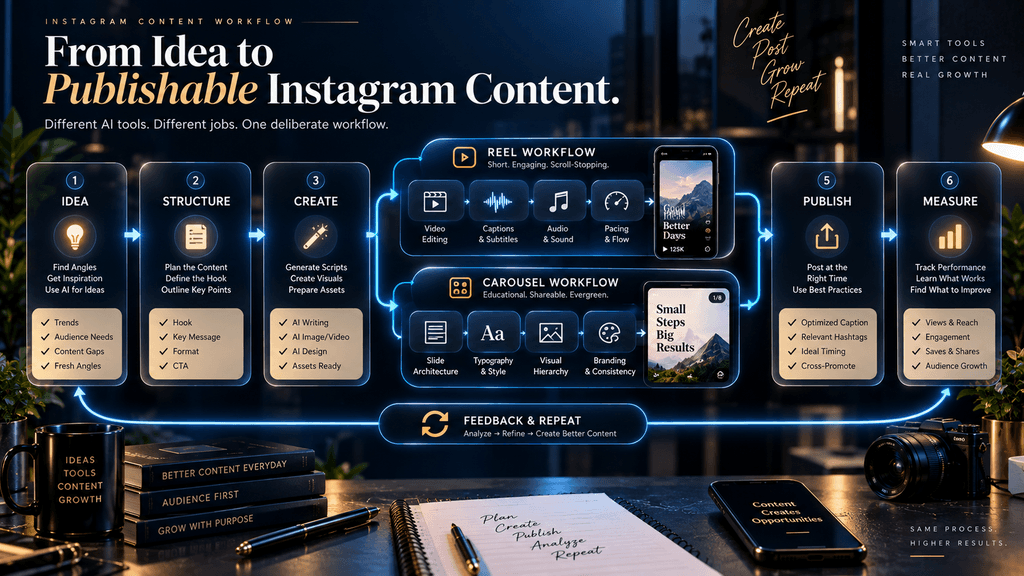
A creator making educational content might use one tool to develop the idea, another to design the carousel, and a third to cut the Reel. Someone focused on high-volume social publishing may prefer an all-in-one system because reducing context switching is more valuable than having the absolute best specialist tool at each stage. Neither approach is inherently superior; the correct choice depends on the production constraint you are trying to solve.
Our Framework: The R.E.E.L. + C.A.R.D. Stack
A useful way to evaluate Instagram creation tools is to separate the production process into two format-specific systems.
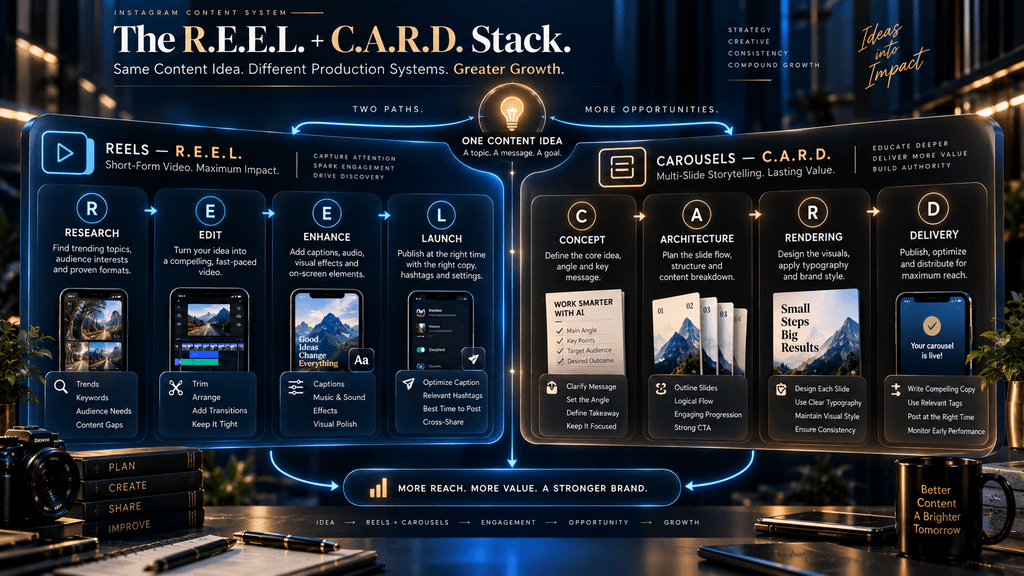
For Reels, think in terms of R.E.E.L.: Research, Edit, Enhance, Launch. Research is where you find the idea, evidence, footage, screenshots, examples, or references that make the Reel worth watching. Edit is where you control pacing, sequence, framing, audio, captions, and transitions. Enhance is where AI can reduce repetitive work or generate something that would otherwise be difficult to produce. Launch is where you perform the final quality check, export, publish, and learn from the results.
Carousels follow a different path: C.A.R.D. — Concept, Architecture, Rendering, Delivery. Concept determines the actual idea and the audience problem it addresses. Architecture determines how the argument unfolds slide by slide. Rendering turns that structure into a visual system, while Delivery covers the final export, publishing, and measurement process.
The reason this framework matters is that different tools dominate different stages. Canva may be exceptionally strong when the problem is rendering a consistent carousel system. CapCut may be better when the bottleneck is editing a Reel quickly. Runway may be useful when the content requires generated visual footage rather than conventional editing. ChatGPT may be more valuable before any of those tools are opened, because the real problem may be figuring out what the Reel or carousel should say in the first place.
Once you see Instagram creation this way, tool selection becomes much less confusing.
How We Evaluated the Tools
The most useful comparison is not a feature checklist. It is a workflow comparison.
We are looking at creative control, because an AI tool that saves time while locking you into generic output is not necessarily improving your content. We are also looking at output quality, Instagram fit, time saved, repeatability, originality, limitations, and practical economics. Pricing matters, but it should not dominate the decision because a cheap tool that creates a lot of unusable drafts can cost more in time than a more expensive tool that produces publishable assets quickly.
Another important distinction is between vendor capability and editorial judgment. When a company says its product can produce professional videos or automate part of the workflow, that is a product claim. It is not the same as an independent conclusion that the output will be consistently good. Throughout this comparison, that distinction matters because the current AI-content market is full of tools that can produce technically complete assets while still requiring substantial human correction.
For that reason, the recommendations below are best understood as workflow judgments, not promises of universal performance.
Best AI Tools for Instagram Reels & Carousels
1. Canva — Best Overall for Instagram Carousels and Branded Content
Canva is the closest thing to a default starting point for creators who need a reliable visual production system rather than a single clever AI feature. Its Instagram video workflow supports Reels and other vertical formats, while its broader design platform provides templates, graphics, animation, stock assets, resizing, and AI-assisted features through Magic Studio. Canva’s AI toolkit includes capabilities such as Magic Write, Magic Media, Beat Sync, and Magic Animate, which means the platform can participate in both the planning and production sides of visual content. (Magic Hour AI)
The reason Canva is particularly strong for carousels is not simply that it has templates. It is that a carousel is fundamentally a repeatable design system, and Canva is built around reusable layouts, brand controls, page structures, and easy editing. Once a creator develops a recognizable visual language, the platform makes it relatively straightforward to reuse that system without rebuilding every post from scratch.
That matters more than it sounds. A carousel account can become inconsistent when every post is generated independently. Fonts change, title treatments drift, spacing changes, colors become slightly different, and the account slowly loses its visual identity. A design system solves that problem because the creator is not merely creating individual images; they are creating a consistent publishing environment.
Canva also makes sense when your Instagram content is not exclusively video. A creator may need carousels on Monday, a Reel on Tuesday, Stories on Wednesday, a branded announcement on Thursday, and a lead magnet graphic on Friday. Having one visual environment for those assets has operational value that a specialist Reel tool cannot provide.
The weakness is that Canva’s strength can become its limitation. Templates and AI-assisted design make production easier, but they also make it easier for thousands of creators to arrive at similar-looking output. A polished template is not inherently distinctive. The strategic mistake is to confuse design consistency with originality.
That is why Canva is strongest when the creator already has an editorial concept and uses Canva to express it, rather than asking the platform to generate the entire identity of the account.
- Best for: Carousel-heavy creators, brands, educators, businesses, faceless accounts, and creators who want one visual system across Instagram formats.
- Less suitable for: Creators whose primary need is advanced AI-generated video footage or highly specialized video production.
- Editorial verdict: Best overall starting point for Instagram visual production, especially carousels and branded content.
2. CapCut — Best for Fast Reel Editing
CapCut has become one of the most practical choices for creators whose main problem is getting from raw clips or a rough concept to a polished short-form video quickly. Its AI-assisted editing stack includes automatic cutting, scene detection, captions, music synchronization, templates, and other short-form editing features. Its AI template workflow can also turn a script or concept into a more complete first draft that the creator can then customize.
CapCut’s biggest advantage is therefore not that it “does AI.” Most of the serious tools on this list now do that in some form. Its advantage is workflow speed.
For a creator publishing Reels repeatedly, the ability to move through cutting, captions, transitions, effects, and audio without switching between several applications can save substantial time. That becomes particularly valuable when the content format itself is relatively conventional: educational clips, narrated explainers, talking-point videos, list videos, demonstrations, and other short-form formats where the editing needs to be clean and fast rather than cinematic.
Its automatic captioning is also useful because subtitles are a practical production requirement for many short-form workflows. CapCut documents its caption tools across web, desktop, and mobile, with the generated text remaining editable afterward.
The trade-off is that speed can produce sameness. Template-heavy workflows are excellent for reducing editing time, but they can also encourage creators to imitate the visual grammar of trends instead of developing their own. This is particularly dangerous for faceless accounts because the creator cannot rely on personality or on-camera presence as a differentiator.
A second issue is that the cheapest or fastest workflow is not always the best workflow. If a template produces a Reel that looks polished but requires extensive rewriting and re-editing, much of the supposed automation benefit disappears.
That means CapCut works best when you treat AI features as accelerators inside an editing workflow rather than as permission to stop editing.
- Best for: Reel creators, mobile-first creators, daily publishers, fast educational videos, and creators working from existing footage or assets.
- Less suitable for: Carousel-first brands or creators who primarily need highly controlled static design.
- Editorial verdict: Probably the strongest daily Reel-editing tool for creators who value speed and practical control.
3. Predis.ai — Best for High-Volume Social Content
Predis.ai takes a different approach from Canva and CapCut. Instead of primarily being a design or editing environment, it attempts to help with a larger portion of the social-content workflow. Its current platform supports content creation for formats including Reels and carousels, and its product positioning combines generation with captions, hashtags, brand styling, and scheduling. (ClipNova)
That makes Predis particularly interesting for a creator or small team that does not want to assemble every stage independently. The appeal is not necessarily superior output in every category; it is the possibility of reducing the number of handoffs between idea, draft, design, copy, and scheduling.
For a high-volume account, that can be valuable. Production friction accumulates through tiny decisions: creating a canvas, finding a layout, writing a caption, choosing a visual direction, formatting a carousel, resizing assets, and preparing the publishing queue. An integrated platform can reduce some of that overhead.
But there is a corresponding danger. The more of the workflow a platform automates, the more carefully you need to inspect the output for originality and editorial quality. A system designed to create social content efficiently can also create content efficiently that no one particularly needs to see.
This is an important distinction between production volume and content quality. If your business model depends on frequent publishing, Predis can make operational sense. If your goal is to produce a small number of highly differentiated editorial pieces each week, a more controlled specialist workflow may produce better results.
Predis is therefore better evaluated as a workflow-consolidation tool than simply as another image or video generator.
- Best for: High-volume creators, agencies, social teams, and users who value integrated creation more than maximum manual control.
- Less suitable for: Creators who want every visual and editorial decision to be deeply customized.
- Editorial verdict: One of the most interesting options when production throughput is the primary constraint.
4. Adobe Express — Best Alternative for Brand-Heavy Workflows
Adobe Express is the clearest major alternative to Canva for creators who want a more explicitly Adobe-centered environment. Adobe’s current Express offering includes AI-powered design features, brand kits, templates, generative credits, and broader visual editing capabilities. Adobe has also introduced an AI Assistant designed to let users create and modify designs through natural-language instructions. (aipedia.wiki)
The value of Adobe Express is strongest when design consistency and an existing Adobe ecosystem matter. A creator who already works with Adobe products may find it easier to keep visual production inside one broader environment rather than building an entirely separate stack.
Express is also useful for Instagram because it supports social-oriented video creation, templates, resizing, animation, and branded assets. That gives it enough breadth to function as more than a static-post editor.
The question is whether that breadth translates into a meaningful advantage for your specific workflow.
For someone starting from zero and simply wanting fast Instagram carousels, Canva may feel more immediately straightforward. For someone who already values Adobe’s creative ecosystem and wants more control over a broader professional design workflow, Express becomes much more compelling.
This is one of those cases where “best” depends heavily on what ecosystem you already use. Software becomes expensive when you pay for capabilities that your workflow never touches, and a creator should not subscribe to an entire creative ecosystem merely because it has more features.
- Best for: Brand-heavy creators, businesses, designers, and people already invested in Adobe workflows.
- Less suitable for: Beginners who primarily want the simplest route to basic Instagram production.
- Editorial verdict: A strong Canva alternative, particularly when Adobe ecosystem compatibility matters.
5. InVideo AI — Best for Turning a Script Into a Reel Draft
InVideo occupies a more specific position. Instead of focusing primarily on manual editing, it is designed to move from a prompt or script toward a video draft. Its current product positioning emphasizes AI-generated video workflows, stock media, voiceovers, music, and social-video creation, while its Reel-oriented resources specifically describe workflows that turn simple instructions into vertical videos. (CapCut)
This is useful when your bottleneck is not editing existing footage but creating a first version from an idea.
Imagine you have a script explaining three productivity mistakes. You do not have original footage, and the video does not require a sophisticated cinematic treatment. The value of InVideo is that it can reduce the distance between that script and a watchable first draft, giving you a starting point rather than a blank timeline.
The important word is starting point.
Prompt-to-video systems are often most valuable when they eliminate the first 60% of production rather than pretending to eliminate the final 40%. A generated video can still have pacing problems, generic stock choices, awkward emphasis, weak storytelling, or visuals that technically match the script but do not strengthen the idea.
This is why InVideo is particularly useful for faceless content. If your account does not depend on original on-camera footage, an AI-assisted script-to-video workflow can cover a significant portion of the production problem. But the content still needs an editorial layer that decides whether the generated visuals actually support the message.
- Best for: Faceless creators, marketers, explainers, and users starting from scripts rather than recorded footage.
- Less suitable for: Creators who need highly original cinematic visuals or precise manual editing.
- Editorial verdict: Excellent for moving quickly from script to Reel draft, but not a substitute for final editorial control.
6. Runway — Best for Advanced AI-Generated Visuals
Runway belongs in a different category from most tools on this list because it is primarily relevant when you need generated footage or advanced creative visual manipulation, not simply faster editing.
Its current generation system uses credits, with its documentation stating that Gen-4.5 consumes 12 credits per second of generated video. Its current plans allocate different amounts of monthly credits, while the Free plan provides a one-time credit allocation.
That pricing structure matters because generative video has a different economic model from conventional editing. When you edit an existing Reel, the cost of another revision is mostly your time. When you generate new footage, revisions can consume additional credits. The economics therefore change as your iteration rate increases.
Runway is strongest when generated visuals materially improve the idea.
For example, a technology explainer might need a visualization of an abstract system that cannot easily be filmed. A design account might need surreal product scenes. A storytelling account might need visual sequences that would be expensive or impossible to shoot conventionally. In those cases, generative video can add something genuinely new.
It is less compelling when you simply need to trim clips, add captions, and publish a normal talking-point Reel.
This is an important boundary condition because advanced AI tools can become expensive solutions to simple problems. Using Runway for every Reel because it is impressive is not necessarily a smart production strategy.
- Best for: Cinematic faceless content, visual experimentation, advanced AI-generated footage, and creators who need scenes that are difficult to film traditionally.
- Less suitable for: High-volume everyday editing, basic educational Reels, or workflows where generated visuals do not materially improve the idea.
- Editorial verdict: A specialist creative layer, not the default editor for every Reel.
7. Meta Edits — Best Native Companion for Instagram-First Reel Creation
Meta’s Edits app is strategically interesting because it is being built specifically around mobile video creation within the Meta ecosystem. Meta introduced Edits as a dedicated video-creation app for creators, and by 2026 the company continued positioning it as a major investment in phone-based video creation.
The strongest reason to consider Edits is not that it necessarily replaces every third-party editor. It is that the workflow sits close to the environment where the content is ultimately going to live.
Meta has also said that Trial Reels are available broadly, allowing creators to share a Reel with non-followers first as a way to test content. In Meta’s internal analysis of more than 400,000 creators, 40% of creators began posting Reels more often after using Trial Reels, and 80% of those who posted more often saw increased non-follower reach. Meta explicitly notes that these results are based on internal analysis and are not guaranteed.
That makes an Instagram-native creation and testing loop increasingly interesting. You can create, test, inspect performance, and refine without necessarily building a completely detached workflow.
Edits should still be evaluated on practical editing requirements rather than brand enthusiasm. A creator who already has a sophisticated CapCut workflow may have little reason to switch merely because Edits is made by Meta. The more compelling use case is for creators who want a streamlined mobile workflow that stays close to Instagram and prefer native ecosystem integration.
- Best for: Instagram-first mobile creators and people who want a native Meta-centered Reel workflow.
- Less suitable for: Carousel-focused workflows or advanced editors who already have a mature specialist setup.
- Editorial verdict: A strategically important tool to understand, particularly for mobile-first Instagram creators.
8. ChatGPT — Best Upstream Tool for Ideas, Hooks and Structure
It may seem strange to include a conversational AI system in an article about Instagram creation tools, but excluding it would misunderstand where much of the real bottleneck occurs.
A Reel can be edited perfectly and still fail because the idea is weak. A carousel can be beautifully designed and still fail because the reader cannot understand the argument. In both cases, the most expensive mistake happened before the design software was opened.
That is where a general AI assistant can be useful. The upstream questions are often more important than the downstream production questions: What problem is this post solving? Why should the viewer care?
What should appear in the first three seconds? Does this idea belong in a Reel or a carousel? What evidence supports the claim?
What example will make the concept understandable? What belongs on slide five instead of slide two? Which parts are unnecessary?
A conversational system can help explore those questions before the production stage begins. That does not make it the best visual-design tool or the best Reel editor. Its role is different: it acts as a thinking and planning layer above the visual stack.
That distinction becomes particularly valuable for faceless creators because a faceless account cannot rely on physical presence to compensate for weak ideas. The editorial layer has to carry more of the burden.
- Best for: Hooks, concepts, scripts, carousel structures, content planning, research organization, and editorial refinement.
- Less suitable for: Final visual design or professional video editing by itself.
- Editorial verdict: The best place to start when the bottleneck is the idea rather than the editing.
So Which Tool Is Actually the Best?
Once the tools are viewed by workflow role, the answer becomes much clearer.
| Need | Best Fit | Why |
|---|---|---|
| Branded carousels | Canva | Strong design system and visual control |
| Fast Reel editing | CapCut | Practical AI-assisted editing workflow |
| High-volume social production | Predis.ai | Creation workflow consolidation |
| Adobe-centered brand production | Adobe Express | Brand + design + AI ecosystem |
| Script-to-Reel drafts | InVideo AI | Rapid idea-to-video workflow |
| Cinematic AI-generated footage | Runway | Specialist generative video |
| Instagram-native mobile video | Meta Edits | Meta ecosystem integration |
| Ideas, hooks and structure | ChatGPT | Upstream thinking and editorial layer |
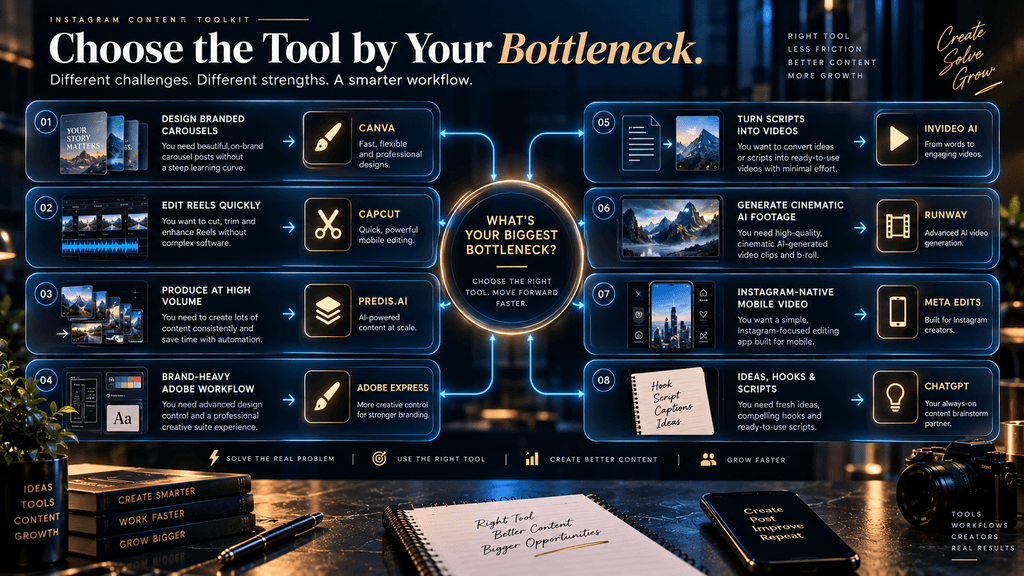
Notice what is missing from this table: a single winner. That is deliberate.
There is no honest reason to call one tool universally superior when the products solve different production problems. Current comparison coverage increasingly recognizes this distinction; recent Reel-specific research, for example, places CapCut in fast daily editing, Runway in cinematic AI visuals, and InVideo in faceless script-based production rather than pretending those tools are direct substitutes.
The Best Tool by Creator Type
The right stack depends heavily on how you actually create content.
The Beginner
A beginner usually needs fewer tools, not more. The biggest risk early on is building a complicated production system before proving that the content itself works.
A simple combination of ChatGPT + Canva + CapCut covers a surprisingly large percentage of normal Instagram needs. The thinking layer handles ideas and structure, Canva handles carousels and visual assets, and CapCut handles Reel editing.
That stack may not be the most technologically impressive one, but it has an important advantage: it is understandable. You can learn where your actual bottleneck is before paying for another tool.
The Faceless Creator
A faceless creator often has a different production problem because there is no original talking-head footage to anchor the content.
That makes the ability to combine visuals, narration, screenshots, generated footage, and text especially important. A practical stack could therefore combine ChatGPT for the concept and script, Canva for carousels and brand assets, and CapCut or InVideo for Reels, with a specialist visual-generation tool such as Runway only when the idea truly benefits from generated footage.
The critical point is that not every faceless Reel needs generative video. A simple screen recording with good narration may outperform a much more expensive synthetic video because the information is clearer and the production feels less artificial.
The High-Volume Creator
High-volume creators have a different optimization target. They care about throughput.
For them, a tool such as Predis can become more attractive because consolidating steps may reduce the hidden cost of context switching. The question becomes less about whether the platform can produce one perfect post and more about whether it can help produce a consistent stream of acceptable posts without creating excessive manual correction work.
The danger is content dilution. A volume system works only when quality controls remain strong enough to prevent the account from becoming a machine for publishing average material.
The Brand or Small Business
For businesses, visual consistency often matters more than maximum AI novelty.
A small business may need posts, carousels, Reels, product graphics, Stories, campaign visuals, and branded announcements from the same visual system. In that situation, Canva or Adobe Express can be more valuable than a specialist generative-video tool because the real problem is not “How do I generate something impressive?”
It is “How do I make everything look like it belongs to the same brand?” That is a design-system problem.
The Advanced AI Visual Creator
For someone building highly visual content, the equation changes.
If the account’s value depends on unusual scenes, cinematic sequences, generated environments, or imaginative visual storytelling, Runway becomes more relevant. But it should usually sit beside an editor rather than replace one.
A sensible advanced workflow is often ideation → generation → editorial selection → editing → publishing, not simply “prompt → publish.” Generated footage creates possibilities; editing creates a coherent story.
Should You Use One Tool or a Stack?
This is one of the most important strategic decisions in the entire article. There is no universal benefit to using five specialist tools. Every additional tool creates friction: more subscriptions, more logins, more exports, more file transfers, more opportunities for formatting problems, and more places for the visual identity to drift.
At the same time, forcing one tool to do everything can create mediocre results. The practical answer is to build the smallest stack that solves your actual bottleneck. A creator who produces mostly carousels may only need ChatGPT plus Canva.
A Reel creator may need ChatGPT plus CapCut. A faceless video creator may need ChatGPT, InVideo, and CapCut. A visually ambitious AI creator may need ChatGPT, Runway, and a conventional editor.
An agency may prefer Predis or another integrated system because operational simplicity matters more at scale. The goal is not to own the largest AI stack. The goal is to minimize production friction while protecting quality.
Why All-in-One Tools Can Be Deceptively Attractive
All-in-one platforms solve a genuine problem: they reduce context switching. That is valuable. But all-in-one does not automatically mean best-in-class.
Imagine a tool that can write the caption, generate the carousel, create the Reel, add hashtags, schedule the post, and produce analytics. That sounds ideal until you realize that the carousel design is only average, the Reel editing is limited, and the generated copy is generic.
You have consolidated the workflow, but you have also consolidated the weaknesses. This is why all-in-one tools are most attractive when convenience is itself a major requirement. For professional creative work, a small specialist stack may still produce better economics even if it involves more applications, because the output requires less correction and performs a more important function.
The right question is therefore not whether a platform has more features. It is whether those features reduce total work.
The Hidden Metric: Cost per Usable Asset
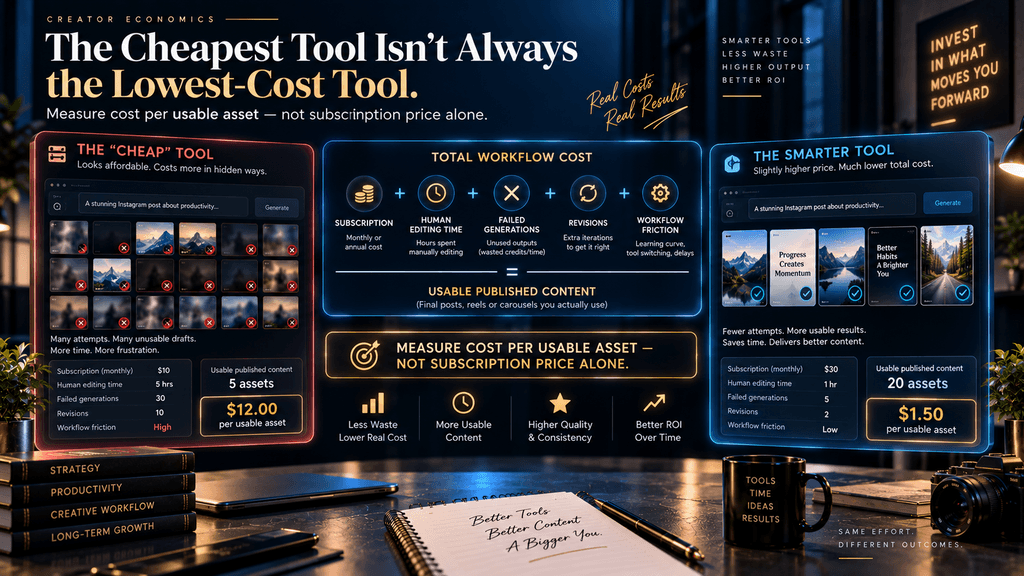
Subscription price is one of the least useful numbers when evaluating AI content tools. A better metric is cost per usable published asset.
Suppose Tool A costs $10 per month and generates 40 drafts, but only five are good enough to publish without significant revision. Tool B costs $25 and produces 20 drafts, but 12 are immediately usable after minor editing.
Tool A appears cheaper. Tool B may actually be cheaper in production terms.
That is because the real cost of content creation includes more than software subscriptions. It includes revision time, failed generations, exports, rework, quality checks, and the opportunity cost of spending another hour fixing something the tool claimed to automate.
This is why AI tools should be measured through the full workflow rather than the pricing page alone. A useful internal calculation is: Cost per usable asset = software cost + significant human editing time + failed-output cost, divided by usable published assets.
You do not need accounting software to use the idea. Even a simple spreadsheet can reveal whether a tool is genuinely saving time or merely moving work from one stage to another.
The Automation Trap: When AI Creates More Work
This is where many AI-tool articles become overly enthusiastic. A tool can automate the creation of a Reel and still make your workflow slower.
Consider what happens when an AI generator produces a polished-looking video with generic visuals. You then replace the visuals, rewrite the opening, adjust the pacing, fix the captions, remove unnecessary scenes, correct the voiceover, and rebuild the ending.
The software successfully generated a video. It failed to generate a useful one. That distinction is crucial.
Automation should be evaluated by how much human effort remains after generation, not by how impressive the generation step appears. The most valuable AI feature is often not the one that does the most. It is the one that removes a repetitive task you dislike without requiring you to undo the result afterward.
The Originality Problem
There is another reason not to automate blindly: content can become visually and conceptually generic.
Instagram’s current recommendation environment makes this increasingly relevant. Meta reported that 75% of U.S. Instagram recommendations at the end of Q4 2025 came from original posts.
The platform does not define originality as “never touched AI.” The practical lesson is broader: your content should make a meaningful contribution rather than simply reproduce material that already exists. That contribution can come from the idea, the explanation, the visual treatment, the example, the comparison, the research, or the editorial angle. AI can help with all of those things, but only when the creator still makes the important decisions.
A generic AI carousel is not original because the graphics look different from yesterday’s version. A stronger carousel may use AI to create the layout while the creator provides an original framework, real example, useful comparison, and a specific argument. The tool should be invisible behind the quality of the content.
The Trust Problem With AI-Generated People
Faceless content does not require a fake human personality.
That distinction has become more important because Instagram changed its approach to AI-generated profiles in August 2026. The platform renamed its “AI creator” label to “AI-generated profile” and said undisclosed profiles featuring AI-generated people could have their reach reduced. Instagram also clarified that ordinary AI assistance such as editing photos, improving captions, creating graphics, and similar creative work is not automatically subject to that profile-level label. (TechCrunch)
For creators, the practical lesson is useful. You can build a faceless brand around information, visuals, narration, screen recordings, and editorial storytelling without pretending that an AI-generated person is a real human creator.
That is generally a healthier brand architecture anyway. If the content is valuable, the audience should have a reason to follow the content brand rather than a synthetic personality.
How to Build a Better Reel Workflow
A strong Reel begins before the editing software.
Start with the audience problem. Determine what the viewer needs to understand, decide, or discover, then decide whether the idea is strong enough to deserve a Reel at all. Once the purpose is clear, write the core structure before adding visuals, because generating beautiful footage around a weak narrative simply makes the weakness more expensive to fix.
Next, determine what type of visual material the idea needs. A screen recording may be better than generated footage for a software tutorial. Stock or licensed footage may be perfectly adequate for an explanatory video. Original AI-generated scenes become more useful when the concept requires something that does not exist in your available media library.
After that, choose the production tool according to the bottleneck. CapCut is the natural candidate when editing speed is the problem. InVideo becomes more attractive when the challenge is turning a script into a first video draft. Runway becomes more justified when the content genuinely benefits from custom AI-generated footage.
Finally, perform a human review before publication. Check the opening, pacing, visual relevance, captions, voiceover, and claims. Then publish and inspect performance rather than assuming the tool made the correct creative decisions.
Instagram’s Trial Reels feature provides an especially useful testing mechanism because creators can share experimental Reels with non-followers first and use early performance data to decide whether the content deserves broader distribution.
How to Build a Better Carousel Workflow
Carousels benefit from a different philosophy. Do not begin in Canva. Begin with the idea.
Decide what the carousel is trying to teach or help the reader decide. Then build the argument before opening the design tool. A strong sequence might begin with a problem, introduce the reason it happens, explain the mechanism, show an example, offer a framework, and end with a practical decision. The exact structure will vary, but the important point is that the narrative should exist before the graphics.
Once the architecture is clear, Canva or Adobe Express can translate it into a visual system.
This separation between thinking and rendering is one of the simplest ways to improve AI-assisted carousel quality. AI can help generate possible structures, but the creator needs to decide whether the structure actually makes sense.
A carousel is not a pile of slides. It is an argument spread across slides. That is why design quality cannot rescue weak content architecture.
Free Tools vs Paid Tools
Free tools are often enough when you are validating an idea, learning the format, or publishing relatively simple content. The mistake is upgrading because a tool looks impressive rather than because it solves a demonstrated bottleneck.
A creator who publishes three carousels a month may gain little from an expensive automation platform. A creator producing two Reels every day may quickly find that the time savings justify a paid editor.
The right sequence is therefore: Validate → Measure → Identify bottleneck → Upgrade rather than: Subscribe → Collect tools → Figure out why you need them.
This is particularly important with credit-based generative tools. A platform may have an attractive subscription price while each generation consumes enough credits that frequent experimentation becomes much more expensive than expected. Runway’s current credit documentation illustrates this model clearly.
What Should You Avoid Paying For?
The first thing to avoid is paying for capabilities you do not use. A second is paying for AI generation when your bottleneck is editing. A third is paying for advanced video generation when your audience mainly wants simple educational content.
A fourth is paying for automation that creates content requiring so much revision that you lose the productivity benefit. A fifth is paying for multiple platforms that solve essentially the same problem. The ideal stack is often smaller than beginners expect.
You do not need the entire AI creator economy installed on your laptop. You need the fewest tools that reliably produce the quality and volume your audience requires.
Common Failure Modes Across AI Instagram Tools
One of the biggest failures is feature-first selection. Creators choose the tool with the most impressive AI feature rather than the one that solves their actual bottleneck.
Another is template dependence, where the creator becomes efficient at reproducing visual styles that are already common.
A third is generation without editorial review. The output looks complete, so the creator assumes the work is finished even when the narrative is weak.
A fourth is stack inflation, where every new task adds another subscription until the workflow itself becomes difficult to manage.
A fifth is poor economics. A tool may save three minutes of editing while adding ten minutes of correction.
A sixth is format confusion. Tools that work well for Reels are not necessarily the best tools for carousels, and trying to force a video-first workflow onto static editorial content can produce disappointing results.
A seventh is brand inconsistency. AI makes variation easy, but strong brands often require controlled repetition.
Finally, there is mistaking AI novelty for audience value. A viewer rarely cares that your Reel was generated with sophisticated technology if the underlying idea is weak.
What the Best Instagram AI Stack Looks Like
For most creators, the best stack will probably not be the most advanced stack. A practical baseline is:
- ChatGPT for thinking and structure
- Canva for carousels and brand visuals
- CapCut for Reel editing
That combination handles a remarkably large share of normal Instagram production. From there, specialization can be added only when the content requires it. Add InVideo AI when script-to-video speed becomes the bottleneck.
Add Runway when custom generative footage becomes genuinely valuable. Consider Predis.ai when content volume and workflow consolidation matter more than maximum control. Consider Adobe Express when an Adobe-centered creative environment is strategically important.
Consider Meta Edits when you prefer an Instagram-native mobile workflow. This is a more sensible progression than collecting tools because every new AI platform promises to “revolutionize” content creation.
The Real Question: What Are You Trying to Automate?
This is the question that should sit above every software recommendation. Are you trying to automate thinking? That is difficult, because the quality of the decision matters.
Are you trying to automate drafting? That is much easier. Are you trying to automate design repetition?
Usually a very good automation target. Are you trying to automate editing mechanics? Also a strong target.
Are you trying to automate creative judgment? That is where the risk rises sharply. The best AI workflows therefore automate mechanics before judgment.
That is particularly important for a faceless account because the editorial layer is doing more of the identity work. When the creator’s face is not the differentiator, the content itself has to carry the authority.
The Future of AI-Powered Instagram Creation
The direction of the market is fairly clear: the number of AI-assisted creation tools will continue to increase, and the gap between “idea” and “first draft” will continue to shrink. That sounds like entirely good news. It is not automatically good news for creators.
When everyone can move from idea to acceptable draft quickly, acceptable drafts become less scarce. The competitive advantage shifts toward taste, judgment, original research, audience understanding, and brand coherence.
That means the future creator will probably use more AI while becoming less dependent on AI-generated identity.
Tools will increasingly handle repetitive production. Humans will increasingly decide what deserves to be produced.
That is a healthy division of labor.
The strongest account of the future may have very little visible evidence of the sophisticated technology underneath it. The viewer may simply think, “This account consistently explains things well.”
That is the outcome worth building toward.
Who Should Use AI Tools for Instagram?
AI tools make the most sense for creators who have identified repetitive production work that is slowing down publishing or consuming too much time. They are especially useful when the content format is predictable enough to benefit from structured workflows, but variable enough that automation can still save meaningful effort.
They are less useful for someone who is using software shopping as a substitute for content strategy. Adding another tool cannot fix an unclear audience, weak positioning, poor ideas, or a lack of differentiation.
A creator who is not yet sure what the account should be about probably needs more audience research and experimentation before building a complex production stack. A creator who already has a validated content model but finds themselves spending hours on captions, formatting, editing, or repetitive asset preparation is in a much stronger position to benefit from AI.
The Final Decision
There is no universal best AI tool for Instagram Reels and carousels because there is no universal Instagram workflow.
For most carousel-focused creators, Canva is the strongest place to start because the platform’s value is not merely generation; it is the ability to build a repeatable visual system around the content. For Reel-heavy creators, CapCut is the strongest practical choice for fast editing, particularly when mobile speed and efficient captioning matter. Predis.ai becomes interesting when volume and workflow consolidation are the central problems, while Adobe Express is a strong alternative when brand production sits naturally inside an Adobe ecosystem.
For faceless creators who want to turn scripts into first-draft videos, InVideo AI can remove a large amount of initial production friction. When the content genuinely benefits from custom AI-generated footage, Runway is the more appropriate specialist. Meta Edits deserves attention for creators who prefer a native mobile workflow closely connected to Instagram, while ChatGPT belongs upstream as the thinking layer that helps determine what the content should actually say.
The broader lesson is more important than the rankings.
Do not choose the tool that automates the most. Choose the tool that removes the most expensive bottleneck while leaving enough human control to make the content worth following.
That is the difference between using AI as a shortcut and using AI as infrastructure.
Final Thoughts
The AI Instagram-tool market is moving toward a world where almost every serious platform can generate something. That makes the old question—“Which tool is the most powerful?”—less useful every year. The more valuable question is whether the tool improves the part of the workflow that is actually limiting your account, and whether it does so without forcing you into generic content, unnecessary complexity, or a production process that requires more correction than the automation saves.
For most creators, the smartest strategy is not to build the biggest possible AI stack. It is to build a small, deliberate system around the formats you actually publish. A useful starting point is ChatGPT for ideation and structure, Canva for carousels and branded visuals, and CapCut for Reels; then add specialist tools only when a real production constraint justifies them. That approach keeps the technology subordinate to the content rather than allowing the tool stack to become the strategy.
Instagram’s increasing emphasis on original content makes that distinction even more important. Meta’s 2026 recommendation data suggests that original posts are already a major component of what the platform recommends, while Instagram’s evolving treatment of AI-generated profiles shows that transparency around synthetic identity is becoming a practical consideration rather than an abstract concern.
The strongest creators will therefore use AI aggressively where it saves repetitive effort and selectively where it creates genuinely new possibilities. They will still spend human attention on the parts that matter most: deciding what to say, why it matters, what evidence supports it, what the audience needs, and what makes the content worth remembering.
The best AI Instagram tool is not the one that makes the most content. It is the one that helps you make better content with less wasted effort.
Choose Tools That Fit the Content You Actually Make
Once you have the right tools, follow a step-by-step plan for building a faceless Instagram page with AI.
Start a Faceless Instagram Page →Frequently Asked Questions
1. What is the best AI tool for Instagram Reels?
For most creators whose main need is fast Reel editing, CapCut is the strongest practical choice because its workflow is built around short-form editing, captions, effects, and rapid production. InVideo AI becomes more attractive when you want to start from a script or prompt and generate a first video draft, while Runway is more appropriate when the content requires advanced AI-generated footage rather than conventional editing. The right choice therefore depends on whether your bottleneck is editing, drafting, or visual generation.
2. What is the best AI tool for Instagram carousels?
Canva is the strongest general recommendation for Instagram carousels because carousel production depends heavily on layout control, repeatable visual systems, typography, templates, and easy slide-by-slide editing. Adobe Express is a strong alternative for creators who prefer an Adobe-centered workflow. The quality of the final carousel still depends more on the strength of the content architecture than on the design software itself.
3. Can I use AI to create both Reels and carousels?
Yes, but using the same tool for both formats does not necessarily produce the best workflow. Reels involve time-based editing, pacing, motion, audio, and captions, while carousels depend more heavily on editorial structure and visual design. An efficient stack may therefore use one tool for carousel design and another for Reel production while sharing the same upstream content idea.
4. Is Canva enough to create Instagram Reels and carousels?
For many creators, yes. Canva can handle branded graphics, carousels, templates, animation, and social-oriented video creation, which makes it capable of supporting a large portion of an Instagram workflow. Its main limitation is not that it lacks features but that broad, template-heavy workflows can make content look generic when the creator does not add a distinctive editorial layer.
5. Is CapCut better than Canva for Instagram Reels?
CapCut is generally the stronger choice when Reel editing speed is the primary concern, especially for creators working with clips, captions, effects, and short-form video pacing. Canva is more compelling when you want the Reel to share a broader brand-design system with carousels, feed graphics, and other visual assets. The better tool depends on whether the workflow is primarily video editing or broader brand content production.
6. Should I use one AI tool or several?
Use the smallest stack that solves your actual production bottlenecks. A simple combination such as ChatGPT for ideas, Canva for carousels, and CapCut for Reels can cover most ordinary creator needs without introducing excessive workflow complexity. Additional tools should be added only when they solve a problem that your existing stack demonstrably does not solve efficiently.
7. Are AI-generated Instagram Reels automatically better?
No. AI can make content faster to produce, but it does not guarantee stronger ideas, better storytelling, or higher audience value. A generated Reel can still have weak pacing, generic visuals, poor narrative structure, or unnecessary scenes. The best use of AI is usually to accelerate production while keeping human control over the decisions that affect quality and originality.
8. Can AI-generated content hurt Instagram reach?
Using AI does not automatically mean a post will be penalized, and Instagram’s current policies distinguish between ordinary AI-assisted creative work and profiles built around AI-generated people. In August 2026, Instagram said that undisclosed profiles featuring AI-generated people could have their reach reduced, while ordinary uses such as editing photos, polishing captions, and creating graphics are not automatically covered by that profile-level label.
9. How much should I spend on AI Instagram tools?
Spend according to the value of the bottleneck you are removing rather than according to how advanced a tool looks. A beginner validating an account may need little beyond free or entry-level software, while a high-volume creator may justify several subscriptions if they materially reduce production time. A useful measure is cost per usable published asset, because a cheap tool that creates large amounts of unusable output can be more expensive than a higher-priced tool that produces publishable work efficiently.
10. How can I test whether an AI Instagram workflow is actually working?
Track production time, usable output, revision cycles, publishing frequency, and content performance before and after introducing the tool. For Reels, watch retention, shares, saves, profile visits, and follow conversion rather than relying only on views. Instagram’s Trial Reels feature can also help eligible creators test content with non-followers first, and Meta’s internal analysis found that creators often increased Reel publishing and non-follower reach after adopting the feature, although Meta explicitly notes that performance is not guaranteed.
Related Guides
- Best AI Tools for Creating Social Media Content (Free & Paid)
- Best AI Tools for Pinterest Content Creation
- How to Turn Articles Into Social Media Content With AI
- AdCreative.ai vs Predis.ai: Which AI Ad Tool Is Better?
- AdCreative.ai vs Canva: Which One Should You Use for Ad Creatives?
- 7 Best AI Video Tools for a Phone-Only Faceless YouTube Channel (2026)
Written by
Muntasir Ahmad Chowdhury
Founder, AI Hustle World
Muntasir Ahmad Chowdhury is the Founder of AI Hustle World, an independent publication dedicated to making Artificial Intelligence practical, trustworthy, and easy to understand. He researches AI tools, automation, customer service, productivity, and real-world business applications, helping readers make smarter technology decisions through research-driven, experience-backed content.
Expertise:
AI Tools • AI Automation • AI Customer Service • AI Productivity • Generative AI • AI Workflows
Get Smarter With AI
Enjoyed this guide? Get practical AI tools, tutorials, and honest reviews delivered to your inbox.