Ollama vs LM Studio vs Jan: Which Local AI Tool Should You Use in 2026?
Editorial note: This comparison is based on each project’s official documentation, GitHub repositories, and current privacy/licensing pages, reviewed on September 23, 2026. No hands-on performance testing is claimed; where the article discusses speed or behavior, it reports what each project documents rather than what AI Hustle World measured.
Where a claim comes from a source other than the vendor’s own documentation — including another comparison’s testing claims — that source is named explicitly rather than folded in as if AI Hustle World verified it directly.
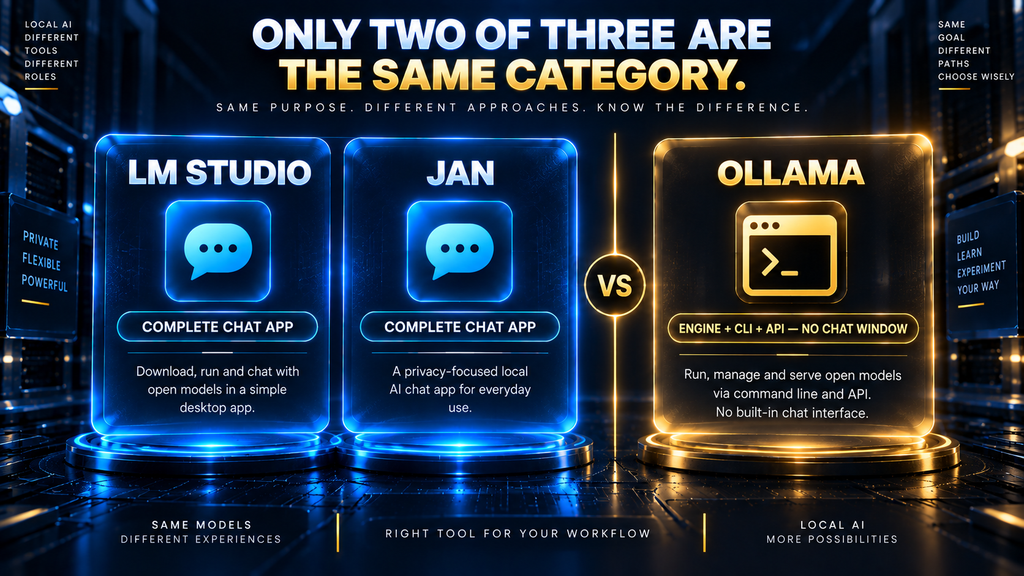
Most “Ollama vs LM Studio vs Jan” comparisons hand you a persona chart — developer, beginner, privacy-focused — and call it a decision. That’s not wrong, but it skips something more basic: only two of these three are actually competing for the same job.
LM Studio and Jan are both complete, self-contained desktop chat apps. Ollama isn’t — install it and you get a command-line tool, a background service, and an API, with no chat window at all. Comparing all three as if they’re interchangeable “apps” sets up the wrong question before the comparison even starts.
What this article owns: a primary-source comparison of these three tools specifically, including a documented telemetry-policy discrepancy in existing coverage and workflow-level detail persona-chart roundups skip. What it doesn’t: hands-on performance benchmarks, or a broader survey of the local AI landscape — for that, see our complete roundup of the best local AI tools.
This article is also strictly about running these tools, not training or customizing the models inside them. For the training side of that split, see our guide to fine-tuning AI models, which covers LoRA, datasets, and overfitting in depth.
The Short Answer
If you want a complete chat app with no terminal involved, it’s LM Studio or Jan — not Ollama, which ships no chat interface of its own. Between those two, LM Studio has the deeper model browser and dual MLX/llama.cpp backend; Jan is fully open source with a comparably clean interface and, per its own privacy documentation, no telemetry by design.
Ollama is the right pick only if you specifically want a CLI and API to build on — including pairing it with a separate interface like Open WebUI — not a ready-to-use chat window. If none of that sounds like your use case, skip straight to the LM Studio or Jan sections below.
Ollama vs LM Studio vs Jan at a Glance
| Ollama | LM Studio | Jan | |
|---|---|---|---|
| What it actually is | CLI + background service + API | Complete desktop chat app | Complete desktop chat app |
| Native chat GUI | None — requires a separate interface | Yes, built in | Yes, built in |
| License | MIT (CLI/engine); a separate desktop companion app has disputed, unclear licensing | Proprietary, free for personal and commercial use | Apache 2.0, fully open source |
| Inference engine | llama.cpp | Dual: MLX (Apple Silicon) + llama.cpp | llama.cpp |
| Telemetry (per official docs) | None — “conversation data does not leave your machine” | None — no telemetry or user tracking, per current privacy policy | Not explicitly documented; open-source code is auditable |
| Model library | ~200+ curated models via ollama pull | Browse essentially any GGUF model via built-in Hugging Face-style catalog | Curated hub plus manual GGUF import |
The Question These Comparisons Usually Get Wrong
Ask “Ollama vs LM Studio vs Jan” and most people picture three chat apps competing on the same axis — polish, speed, model selection. That framing already misdescribes one of the three. Ollama’s own README is explicit about what installing it actually gives you: a background service on localhost:11434, a CLI, and REST API access — full stop.
Every chat window you’ve seen labeled “Ollama” is a separate project layered on top: Open WebUI, LibreChat, Lobe Chat, and dozens of smaller community GUIs exist specifically because Ollama doesn’t ship one. That’s not a knock on Ollama — it’s a deliberate, engine-first design choice, the same one covered in our Local AI Explained breakdown of engine, interface, and serving layers.
It does mean the fair comparison isn’t really three-way. LM Studio and Jan compete directly as complete apps, while Ollama competes for a different job — the engine underneath an interface you either build yourself or install separately.
Answering “which should I use” without that distinction is how people end up installing Ollama expecting a chat window and thinking something’s broken when there isn’t one.
One more wrinkle worth flagging honestly: Ollama has recently shipped a separate desktop companion app alongside the open-source CLI. A GitHub issue from a community member points out that this companion app isn’t covered by the same MIT license as the core tool.
Its exact licensing is left undocumented — a live ambiguity, not a settled fact, worth knowing before assuming everything under the Ollama name carries the same open-source terms.
Ollama: The Engine, Not the App
Ollama wraps llama.cpp in a simpler CLI, a curated model library of roughly 200+ models spanning Llama, Qwen, Gemma, Mistral, and specialized coding and vision variants, and an OpenAI-compatible API. Pulling and running a model is a single ollama run <model> command, which is why it’s become the default backend for coding-agent integrations like Claude Code and VS Code extensions.
Its own FAQ states the privacy position plainly: conversation data does not leave your machine, and there’s no telemetry tied to what you run. The core CLI and engine are MIT-licensed, though — as noted above — the newer desktop companion app sits outside that license with its terms still undocumented.
Who it’s best for: developers and technically comfortable users who want an engine to build on, especially anyone already pairing it with a coding assistant or a separate interface. Who should choose something else: anyone who wants to open an app and start chatting immediately — that experience isn’t what Ollama on its own provides.
LM Studio: The Polished Complete App
LM Studio is a closed-source desktop application running on a dual backend — Apple’s MLX on Apple Silicon, llama.cpp elsewhere — with a built-in model browser that lets you search and download essentially any GGUF model without leaving the app. It ships a chat interface, a developer SDK in both JavaScript and Python, and a CLI for anyone who wants scriptable access alongside the GUI.
As of a recent licensing change, it’s free for both personal and business use, with no separate commercial license required. Its own privacy policy is unambiguous on data handling: no telemetry or user-specific tracking, which directly contradicts a claim made by at least one competing “Ollama vs LM Studio vs Jan” comparison that describes LM Studio as sending startup analytics by default.
Who it’s best for: beginners and researchers who want a complete, polished chat app with real model-browsing depth and no command line required. Who should choose something else: anyone who specifically wants an open-source engine they can audit line by line — LM Studio’s application layer is proprietary, even though the engines underneath are open.
Jan: The Fully Open-Source Complete App
Jan is a free, Apache 2.0-licensed desktop chat app — 44,600+ GitHub stars, 3,000+ forks, and nearly 9,000 commits — that uses llama.cpp directly as its local inference engine, confirmed in its own GitHub acknowledgements. It also connects to hosted providers like Claude, ChatGPT, and Gemini from the same interface, worth knowing if fully offline was the deciding factor in choosing it.
One clarification worth making precisely: Jan also has a separate, more advanced product called Tokamak — an org-level, self-hosted backend with model routing and governance features aimed at teams, not the everyday desktop app most people mean when they say “Jan.” Conflating the two, which some coverage does, overstates what a solo user installing Jan Desktop actually gets.
Who it’s best for: privacy-conscious users who want a fully open-source, auditable chat app with the option to plug in cloud models later. Who should choose something else: anyone needing persistent conversation memory today — that feature is still listed as “coming soon” in Jan’s own documentation.
The AI Hustle World Decision-Fit Score
This is the same locked scoring framework used across AI Hustle World’s tool comparisons, recomputed here specifically for these three tools rather than reused from our broader 8-tool roundup. Each dimension is rated zero to five against documented evidence — a zero means no supporting evidence was found, a five means the capability is extensively documented.
| Dimension | Weight | What it measures |
|---|---|---|
| Core-job fit | 30% | How completely the tool handles its actual job — engine access for Ollama, complete chat app for the other two |
| Workflow coverage | 20% | How many adjacent needs (model browsing, API access, cloud fallback) it covers natively |
| Human control | 15% | Configuration depth and transparency into what’s actually running |
| Integration and portability | 15% | Ecosystem compatibility and what else it connects to |
| Pricing predictability | 10% | Whether costs and licensing terms are clear and stable |
| Evidence transparency | 10% | How clearly official documentation supports the claims made |

Formula: Decision-Fit Score = sum of each rating ÷ 5 × its assigned weight, giving each tool a total out of 100.
| Tool | Core-job fit | Coverage | Human control | Portability | Pricing clarity | Evidence | Total |
|---|---|---|---|---|---|---|---|
| Jan | 28 | 16 | 12 | 12 | 10 | 8 | 86 |
| LM Studio | 27 | 17 | 9 | 9 | 9 | 8 | 79 |
| Ollama | 24 | 14 | 12 | 15 | 7 | 6 | 78 |
Jan leads here mainly on pricing clarity and evidence transparency — a fully open-source, single-license project with no companion-app licensing ambiguity is simply easier to evaluate with confidence. LM Studio scores close behind on the strength of its model-browsing depth and polish.
Ollama’s lower total reflects the framework measuring fit as a complete chat app, which was never really its job — scored purely as an engine and API, it would rate closer to the top the way it did in our broader 8-tool comparison. The score should narrow your shortlist, not replace the “what job am I actually hiring this for” question from the section above.
Telemetry and Data Handling, Verified
Most comparisons state a telemetry verdict without linking to where it came from. This section is built entirely from each project’s own current documentation, fetched directly rather than taken from another article’s summary — and it’s worth explaining why that distinction matters.
At least one widely-cited “Ollama vs LM Studio vs Jan” comparison states that LM Studio “sends startup analytics by default” with an opt-out available. LM Studio’s own current privacy policy says the opposite — “does not include telemetry or user-specific tracking,” with data moving only when downloading a model, checking for updates, or opting into a cloud feature.
That’s a direct, checkable contradiction, and the vendor’s own current policy is the more authoritative source than another article’s summary of it. The practical takeaway: verify a telemetry claim against the vendor’s own current page before repeating it, since policies change between one article’s publish date and the next reader’s visit.
Ollama’s own FAQ says that when you run models locally it does not see your prompts or data, while its cloud-hosted models process prompts and responses, and it collects limited usage metadata that does not include prompt or response content. Jan carries no explicit telemetry statement in its main documentation, but its fully open-source codebase makes the claim independently auditable — a different kind of assurance than a closed-source vendor’s written promise.
How to Verify These Claims Yourself
Every factual claim in this article — the telemetry policies, the license terms, the backend engines — is checkable in a few minutes, and it’s worth doing that check yourself rather than trusting any single article, including this one, indefinitely. The next few paragraphs point directly to each primary source.
For telemetry, go directly to LM Studio’s privacy page and Ollama’s FAQ rather than a secondary summary of either. Both are short, plainly worded, and dated, so you can confirm they still say what this article says they say. Jan has no dedicated telemetry page at the time of writing, which is itself worth noting rather than assuming silence means one thing or the other.
For licensing, Jan’s GitHub repository states its Apache 2.0 license directly on the repo page. The open GitHub issue on Ollama’s desktop app is an open, unresolved thread, not a settled claim — check whether it’s been closed or clarified since this article’s review date of September 23, 2026.
This kind of primary-source check matters more in fast-moving open-source projects than in most software categories, because a privacy policy, a license file, or a README can change between one comparison article’s publish date and the next reader’s visit.
Community and Development Activity, Verified
GitHub activity is not a quality metric on its own, but it is a genuine, checkable signal of how much of each project is actually open for outside scrutiny — which matters directly for the evidence-transparency question this article keeps returning to. The numbers below are current as of this article’s review date and worth spot-checking yourself.
Ollama’s core repository carries roughly 181,000 stars, 17,900 forks, and 5,767 commits at review time, with an MIT license covering the CLI and engine. That scale reflects its adoption as the default local backend behind coding-agent integrations, not just chat-app popularity.
Jan’s repository sits at roughly 44,600 stars, 3,000 forks, and nearly 9,000 commits, entirely under Apache 2.0 — smaller in raw numbers than Ollama, but notable for being a complete chat application with its full codebase open, not just an engine.
LM Studio’s desktop application itself has no public repository, since the app is closed source. Its surrounding SDK tooling is not: the lms CLI carries over 5,200 stars, and the lmstudio-js and lmstudio-python SDKs add roughly 2,600 more between them, meaning the interface into LM Studio is auditable even though the application isn’t.
None of this changes the Decision-Fit Score above, which already accounts for it under evidence transparency — but it’s worth seeing the actual numbers rather than taking that dimension’s rating on faith.
Model Library and Format Support Compared
Ollama’s library is curated and finite — roughly 200+ models, each pulled with a single command, spanning the major open-weight families plus specialized coding, vision, and embedding variants. That curation is a feature for most users: less to sift through, less risk of pulling a broken or mislabeled file.
LM Studio takes the opposite approach, exposing the full breadth of GGUF models on Hugging Face through its in-app browser — better for chasing a specific fine-tune Ollama’s curated list doesn’t carry. Jan sits between the two: a curated hub for common models plus manual GGUF import, with direct passthrough to hosted providers like Claude and ChatGPT when a local model isn’t the right fit.
Model quantization — the process that shrinks these GGUF files down to something a consumer GPU can actually load — works identically across all three, since it happens at the model-file level rather than inside any one app. See Quantization Explained for how that trade-off between file size and output quality actually works.
None of these differences show up in a simple feature checkmark table, but they matter in practice: a developer standardizing on one well-tested model wants Ollama’s curation, while someone chasing the newest fine-tune the week it releases wants LM Studio’s open browsing.
Context Window and Memory Settings: A Practical Difference
One difference the feature tables rarely mention is how much control each tool gives you over context window size and GPU memory offloading. These settings matter more than raw speed once you’re running anything past a small model.
LM Studio exposes both directly in its load-model dialog: a context-length slider and a GPU-offload percentage, adjustable per model before you even start chatting. That upfront visibility is part of why it’s often recommended for users who want to tune performance without editing config files.
Ollama handles the same settings through its Modelfile system or API parameters — functionally equivalent, but set once in a text file rather than through a live slider. That fits its engine-first design: configuration is code, not a settings panel, which is either a feature or friction depending on your comfort with a text editor.
Jan sits closer to LM Studio here, with context length and GPU layers configurable in its model settings panel, though with fewer fine-grained options than LM Studio’s dialog exposes. For most single-model, single-user setups, none of these differences change whether a model runs — they change how much you have to think about it while setting one up.
Workflow-Level Differences That Persona Charts Skip
Switching models mid-session. In LM Studio and Jan, switching is a dropdown selection inside the same chat window — the app reloads the model and you continue. With Ollama alone, switching means a new CLI command or API call; a smooth in-chat switching experience only exists if you’ve paired it with an interface like Open WebUI.
Editing a system prompt. LM Studio and Jan both expose a persistent system-prompt field in their chat settings, editable per conversation or per model. Ollama supports system prompts through its Modelfile mechanism or API parameters — functionally equivalent, but it’s a config-file or API-call step rather than a settings panel.
Chat history and export. LM Studio and Jan both keep a browsable conversation history inside the app, exportable in standard formats. Ollama itself keeps no chat history at all — any history is a feature of whatever interface sits on top of it, again a byproduct of it not being a chat app.
Where model files actually live. All three ultimately store GGUF (or MLX, for LM Studio on Apple Silicon) files on disk, and models are portable in principle between tools that support the same format. In practice, each tool defaults to its own directory structure, so moving a model between them without re-downloading usually takes a manual copy or symlink.
Logging and debugging output. Ollama logs everything to the terminal or system service logs by default, which is useful for anyone debugging an API integration. LM Studio and Jan both tuck logs inside the app or a hidden folder — friendlier for casual users, but slower to dig through when something actually breaks.
Hardware and Performance: What’s Actually Different
All three rest on llama.cpp for at least part of their inference path — LM Studio adds MLX as a second option on Apple Silicon. That shared foundation is why comparisons across this space, including several read for this article, consistently report inference speed as effectively identical, typically within about 5% for the same model and hardware.
That figure comes from other testers’ reported measurements, not a benchmark AI Hustle World ran itself, and it’s worth treating as directional rather than exact.
Where hardware actually matters is picking the tool that best exposes what your hardware can do, not raw speed. LM Studio’s MLX backend is purpose-built for Apple Silicon’s unified memory and can edge out a generic llama.cpp build on the same Mac; Ollama and Jan both run well on Apple hardware through their own Metal/llama.cpp paths, but without that MLX-specific tuning.
On Windows and Linux with an NVIDIA GPU, the practical difference shrinks further, since all three lean on the same CUDA-accelerated llama.cpp path underneath. At that point, the decision genuinely comes down to whether you want a complete app or an engine to build on — the question this whole article keeps returning to.
Hardware Tiers in Practice: Apple Silicon, NVIDIA, and CPU-Only
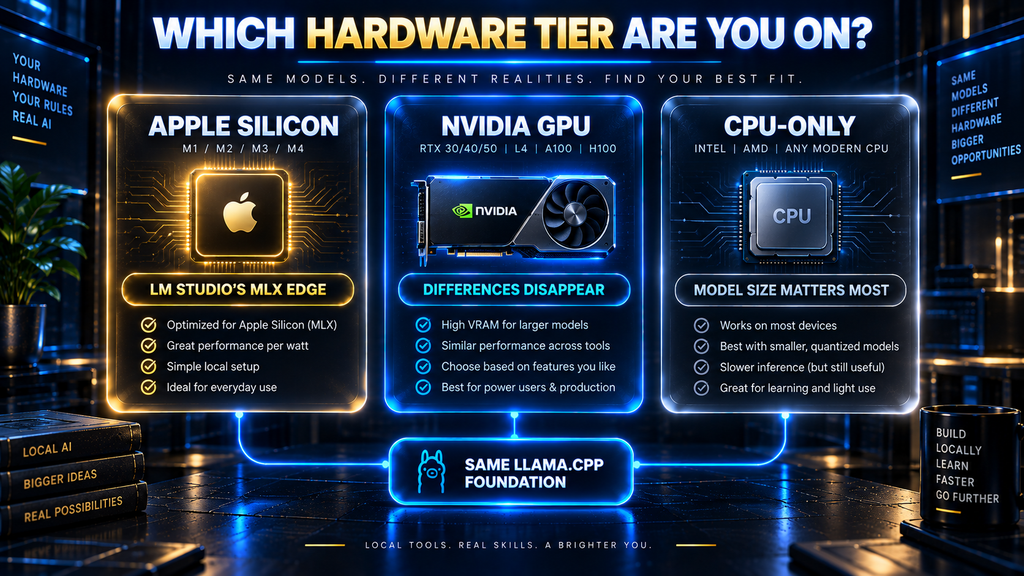
The persona-chart comparisons treat “hardware requirements” as one shared checklist — commonly cited as roughly 8GB of system RAM as a floor, 16GB recommended, and around 4GB of VRAM as a baseline for a small quantized model. That’s a reasonable starting point, but which tool feels fastest depends more on which hardware tier you’re on than on the tool itself.
Apple Silicon (M-series Macs). This is where the three genuinely diverge, since LM Studio’s MLX backend is purpose-built for Apple’s unified memory architecture. Ollama and Jan both run fine on the same hardware via Metal-accelerated llama.cpp, but neither has that MLX-specific tuning, so LM Studio holds a real, documented edge here.
NVIDIA GPUs on Windows or Linux. Here the differences mostly disappear, since all three lean on the same CUDA-accelerated llama.cpp path underneath. VRAM is the hard constraint — once a model plus its context window won’t fit, all three degrade the same way, offloading layers to system RAM.
CPU-only or integrated graphics. All three still technically run without a dedicated GPU, but this is where local AI gets hardest to recommend without caveats. Throughput drops sharply past a small, aggressively quantized model, and picking the right model size matters more than which tool you chose.
If you’re on this tier, the Quantization Explained guide’s coverage of lower-bit formats is worth reading before picking any of the three. None of it changes which app fits your workflow — only which model size is realistic to run.
Setup Effort: From Download to First Response
“Which one is easier to set up” depends entirely on what you mean by “set up.” Getting Ollama running a model from a terminal is arguably the fastest of the three — but getting to an actual chat window is not, because that’s not what Ollama does on its own.
| Step | Ollama | LM Studio | Jan |
|---|---|---|---|
| Install | CLI installer or package manager | Download and run desktop app | Download and run desktop app |
| Get a model | ollama pull <model> from terminal | Search and download in built-in browser | Browse curated hub or import a GGUF file |
| Start chatting | Requires a separate interface (Open WebUI, etc.) | Immediate — open chat tab | Immediate — open chat tab |
| Typical time to first response | Minutes, if you’re comfortable in a terminal | A few minutes for app and model download | A few minutes for app and model download |
For a non-technical reader, LM Studio and Jan get to “typing in a chat box” fastest, because that’s the entire product. For a developer who already lives in a terminal, Ollama’s single-command model pull can feel faster precisely because it skips the GUI layer entirely — the same design choice that makes it feel incomplete to someone expecting a chat app.
Two Real-World Setups
Abstract comparisons only go so far. Here’s how the decision plays out in two concrete, common situations — not lab tests, just typical configurations based on how each tool is documented to work.
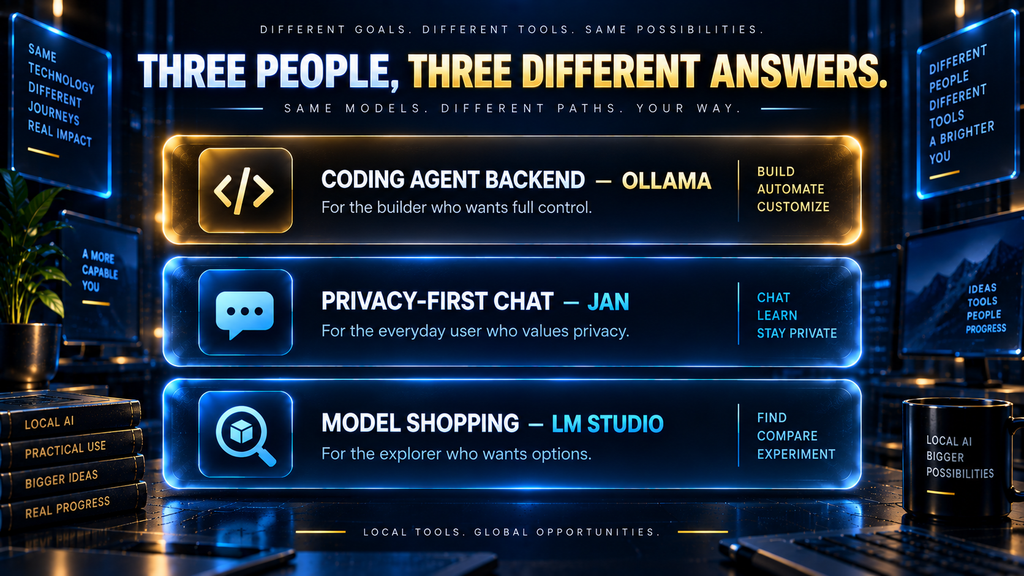
The developer wiring up a coding assistant. Someone setting up a local backend for a coding agent typically never opens a chat window at all, since Ollama’s ollama pull and OpenAI-compatible API are the entire interaction. LM Studio and Jan could technically serve the same role, but neither is built around that workflow the way Ollama is, so most coding-agent tooling defaults to Ollama.
The privacy-conscious researcher who wants a chat app and nothing else. Someone who wants to question a local model without a terminal or a subscription is the textbook Jan use case — install the app, import a GGUF model, and start chatting. LM Studio serves the same need just as well; the deciding factor is whether auditable open-source code or a deeper model browser matters more.
The model-shopper comparing options before committing. Someone unsure which fine-tune or quantization actually fits their hardware often opens LM Studio first, purely for its wide model browser, tries several GGUF variants back to back, then settles into Ollama or Jan for daily use once they know which model they actually want.
None of these scenarios is exotic. Between them, they cover most of why people search “Ollama vs LM Studio vs Jan” in the first place — and none of the three is well served by treating the decision as a single three-way horse race.
What Happens When You Pick the Wrong One
Getting this choice wrong doesn’t usually mean lost money — all three are free — but it does have real costs, mostly in wasted time and a skewed first impression of what local AI is actually like to use.
Installing Ollama expecting a chat app. This is the most common mismatch this article is built around — someone installs Ollama, gets a terminal prompt instead of a chat window, and concludes local AI is too technical for them. The actual problem was picking an engine instead of an app; the fix is cheap once you know it: install LM Studio or Jan instead, or add Open WebUI on top.
Installing LM Studio when you specifically needed an auditable, open-source stack. If the reason you’re going local is that you don’t trust closed-source software with your data, LM Studio’s proprietary application layer — even with a clean privacy policy — may not clear that bar. Jan’s Apache 2.0 license is the more defensible choice for that specific requirement.
Installing Jan expecting persistent conversation memory today. Jan’s own documentation lists cross-session memory as “coming soon,” not shipped. Someone who needs a chat app that remembers earlier conversations by default will hit that gap immediately; it’s not a bug, just a feature that hasn’t landed yet.
The common thread across all three mismatches is the same one from the top of this article: read what a tool actually is, not just its name in a “vs” headline, before installing it. A five-minute read of the at-a-glance table above avoids most of it.
Which Should You Actually Install First?
Start by answering one question honestly: do you want to open an app and start chatting, or do you want an engine to build something on top of? If it’s the former, Ollama isn’t actually in the running yet — that’s LM Studio or Jan’s category.
Between LM Studio and Jan, the split is mostly about license philosophy and model-browsing breadth. LM Studio’s proprietary app trades some transparency for a deeper model browser and Apple Silicon-tuned performance; Jan’s fully open-source codebase trades some browsing depth for an auditable, single-license product with cloud-model passthrough built in.
If you already know you want to build a coding-agent backend, a custom interface, or a multi-model API setup, start with Ollama. Its coding-agent integrations and curated library make it the fastest path from install to a working backend, even though you’ll need to add an interface separately if you also want a chat window.
Don’t rule out running more than one. A common real-world setup is Ollama as the engine behind a coding assistant, with LM Studio or Jan open separately for everyday chat — they’re not mutually exclusive tools competing for the same slot on your machine.
Common Mistakes When Comparing These Three
Treating “Ollama vs LM Studio vs Jan” as three like-for-like chat apps. It sets up disappointment the moment someone installs Ollama expecting a chat window and gets a terminal prompt instead.
Repeating a telemetry claim without checking the vendor’s current policy. Privacy pages change, and at least one popular comparison currently states something about LM Studio that contradicts LM Studio’s own live policy page.
Assuming Jan’s Tokamak product is what you get by installing Jan Desktop. Tokamak is a separate, team-oriented backend — installing the everyday Jan app doesn’t pull in Tokamak’s routing or governance features.
Picking based on inference speed alone. With all three sitting on largely the same llama.cpp foundation, the real differences are in interface, licensing, and workflow — not raw tokens per second.
Ignoring how differently these projects are licensed once you read past the headline. “Open source” gets used loosely across comparisons — Jan’s entire app is Apache 2.0, Ollama’s core is MIT while its newer desktop companion isn’t clearly licensed, and LM Studio is open only at the SDK layer, not the application itself.
The Real Cost of Switching: Time, Disk Space, and Workflow Lock-In
Because Ollama, LM Studio, and Jan are all free, the usual “cost of choosing wrong” framing — wasted subscription dollars — doesn’t apply here. The real costs are time, disk space, and how deeply a tool gets wired into your other workflows.
One clarification on “free”: that applies to running all three locally, which is what this article covers. Ollama separately offers a paid Ollama Cloud tier for hosted inference, and both LM Studio and Jan support connecting to paid hosted models — none of that is required for local use, but the free label specifically means local.
Disk space adds up faster than people expect. A handful of quantized models in the 4-to-8-bit range can easily run 50 to 100GB combined, and each tool defaults to its own storage directory. Running two or three of these tools side by side means either duplicating models across directories or manually symlinking them.
Re-learning time is real but small. Moving between LM Studio and Jan costs maybe twenty minutes, since both are chat apps with a similar settings layout. Moving away from Ollama once it’s wired into a coding agent’s API is a bigger cost — every script and config pointing at localhost:11434 needs updating too.
The deepest lock-in isn’t the model, it’s the integration. A GGUF file is portable in principle across all three, but a custom system prompt or an Ollama Modelfile isn’t. That’s the workflow cost worth weighing before standardizing on one tool for anything beyond casual chatting.
The Second-Order Effects of Standardizing on One Tool
Picking one of these three doesn’t just decide how you chat with a model today — it quietly shapes what your local AI setup looks like six months from now, in ways the initial decision rarely accounts for.
Choose Ollama as your engine and you’ve effectively decided every future local AI project — a coding agent, an automation script, a second chat interface — will assume an OpenAI-compatible API on localhost:11434. That’s a useful default, but it means the engine decision isn’t one-time; it becomes infrastructure other tools quietly depend on.
Choose LM Studio or Jan as your daily chat app and the effect is smaller but real: saved system prompts and chat history accumulate inside one app’s specific format. None of the three currently offers a clean export to another’s format, so switching later means starting your conversation history over.
Neither path is wrong. The point is that “which one should I install first” is a smaller question than it looks — the honest follow-up question is “what am I willing to have quietly depend on this tool six months from now,” and that’s the question the Decision-Fit Score above is really trying to help answer.
Where This Comparison Is Headed
The most likely near-term shift is Ollama narrowing the gap this whole article is built around. Its desktop companion app, even with its licensing still unsettled, signals the project sees value in offering something closer to a complete app rather than leaving that job entirely to third parties.
If it matures into a fully supported, clearly licensed chat interface, a future version of this comparison may not need the “these aren’t really the same category” framing at all.
LM Studio and Jan are both likely to keep converging on each other’s strengths — Jan closing its memory-feature gap, LM Studio’s SDKs deepening developer access to what’s normally a closed application. Meanwhile, cloud-model passthrough, which Jan already offers, is a reasonable bet to show up in more “local-first” tools as a pragmatic acknowledgment that not every task suits a locally-run model.
What would most change this comparison’s verdict isn’t a speed improvement — it’s licensing clarity. If Ollama’s desktop companion app resolves its ambiguity under a permissive license, or if LM Studio open-sources any part of its application layer, the evidence-transparency dimension of the Decision-Fit Score above would need recalculating, not just its total.
Final Thoughts
The honest answer to “Ollama vs LM Studio vs Jan” starts by admitting the question is malformed: Ollama is an engine and API, not a chat app, and treating all three as equivalent is how people end up confused after installing the wrong one. Once sorted, LM Studio and Jan are a close call decided mostly by license philosophy and model-browsing depth, not any real gap in capability.
Pick based on what you’re actually building, not which name shows up most often in a “vs” headline — that single distinction resolves more of this decision than any feature table can.
For a broader view of where all three fit among eight local AI tools, including the engine, interface, and serving-layer framework this article builds on, see our complete local AI tools comparison. For the underlying mechanics of how local inference actually works, Local AI Explained is the foundational read.
Compare All 8 Local AI Tools, Not Just These Three
See how Ollama, LM Studio, and Jan stack up against llama.cpp, Open WebUI, AnythingLLM, GPT4All, and vLLM using the same Decision-Fit Score framework.
See the Full 8-Tool Comparison →Frequently Asked Questions
Is Ollama better than LM Studio? They’re not really comparable as-is — Ollama is a CLI and API with no chat interface, while LM Studio is a complete app. Ollama is “better” only if you specifically want an engine to build on.
Does Jan have a chat interface like LM Studio? Yes. Jan Desktop is a complete, self-contained chat app, functionally similar to LM Studio in that regard, just fully open source instead of proprietary.
Which of these three is the most private? All three claim to keep conversations on-device, but Jan’s fully open-source codebase makes that claim independently auditable rather than resting on a privacy policy alone. Ollama and LM Studio’s claims rest on vendor documentation instead of open code.
Is LM Studio really free for commercial use? Yes, as of a recent licensing change — no separate commercial license is required for personal or business use. The change removed an earlier requirement that larger companies register separately.
Do Ollama, LM Studio, and Jan all run the same models? Mostly yes, since all three support the GGUF format in some capacity, but each defaults to its own model-storage location, so moving a model between them isn’t automatic. A manual copy or symlink is usually all it takes.
What is Tokamak, and do I need it to use Jan? Tokamak is Jan’s separate, team-oriented self-hosted backend product. Installing the everyday Jan desktop app does not require or include it.
Is Ollama’s new desktop app the same as its open-source CLI? No. The CLI and core engine are MIT-licensed; the newer desktop companion app is separate, with its licensing terms not yet clearly documented.
Which one has the best model selection? LM Studio, since its browser exposes essentially any GGUF model on Hugging Face rather than a curated list.
Can I use Jan or LM Studio with cloud AI models too? Jan explicitly supports connecting to hosted providers like Claude, ChatGPT, and Gemini from the same interface. LM Studio focuses primarily on local models.
Is inference speed actually different between the three? Independent comparisons consistently report differences under about 5% for the same model and hardware, since all three rely on largely the same llama.cpp foundation.
Can I run Ollama, LM Studio, and Jan at the same time? Yes — each binds to its own local port by default, so there’s no conflict running them side by side. The practical limit is RAM and VRAM, not software: loading large models in more than one at once competes for the same hardware.
Do I need a GPU to use any of these? No, all three run on CPU alone, though performance drops sharply on anything past a small, heavily quantized model. A dedicated GPU with enough VRAM is what makes larger models practical, not a requirement to run at all.
Is there an official mobile app for any of these? No. Ollama, LM Studio, and Jan are all desktop-only as of this review, covering macOS, Windows, and Linux — none ships an official iOS or Android app.
Can I move my chat history from LM Studio to Jan, or the other way around? Not automatically. Chat history in LM Studio and Jan is stored locally in each app’s own format, and there is no built-in export-import bridge between them yet. Copying model files themselves is more straightforward, since GGUF is portable across all three.
Related Guides
- How to Use Structured Prompts for Reliable JSON and Data Extraction
- What Is a Large Language Model (LLM)? How LLMs Really Work
- What Is an AI Agent? A Beginner’s Guide to How Autonomous AI Works
- How to Use AI Tools Safely: A Complete Learning Path
Written by
Muntasir Ahmad Chowdhury
Founder-AI Hustle World
Muntasir Ahmad Chowdhury is the Founder of AI Hustle World, an independent publication dedicated to making Artificial Intelligence practical, trustworthy, and easy to understand. He researches AI tools, automation, customer service, productivity, and real-world business applications, helping readers make smarter technology decisions through research-driven, experience-backed content.
Expertise:
AI Tools • AI Automation • AI Customer Service • AI Productivity • Generative AI • AI Workflows
Get Smarter With AI
Enjoyed this guide? Get practical AI tools, tutorials, and honest reviews delivered to your inbox.
2 thoughts on “Ollama vs LM Studio vs Jan: Which Local AI Tool Should You Use in 2026?”