Evidence: Documentation reviewed
Last checked: August 2026
What was done: Written from official documentation and the published sources linked in this article. Not hands-on tested.
Files: None
Affiliate links: No
Last updated: October 2026
What Is an AI Agent? A Beginner’s Guide to How Autonomous AI Works
An AI agent is software that uses an AI model to pursue a goal on your behalf by deciding what to do next, using tools such as search, email or databases, checking the results and repeating until the task is done. A chatbot mainly answers questions; an agent works through a multi-step task, within limits set by the people who built and deployed it.
Imagine telling an AI: “Research five competitors, compare their pricing, find their biggest weaknesses and prepare a report.” A chatbot can explain how you might do that. An agent can be designed to work through it: decide what information it needs, search for it, read the results, notice what is missing, search again and finally write the report.
That shift from generating an answer to working toward an outcome is the central idea behind AI agents. It also explains both their promise and their risks. An agent that can take actions can save hours of work, but it can also take the wrong action, use the wrong data or keep going when it should have stopped and asked for help.
This guide explains AI agents from the ground up. You will learn how they differ from chatbots, language models and traditional automation, the five layers every agent needs, how the agent loop works step by step, the levels of autonomy, why guardrails and human oversight matter, when to use an agent and when not to, and how to decide whether your task needs one.
What Is an AI Agent?
OpenAI’s practical guide to building AI agents defines agents as systems that independently accomplish tasks on your behalf. It describes them as using a model to manage the steps of a workflow and tools to gather information or take actions, often with a high degree of independence. The guide is a useful starting point for anyone planning to build one.
Anthropic draws a useful distinction in its guide to building effective agents. Workflows are systems where models and tools follow predefined code paths, while agents are systems where models dynamically direct their own processes and tool use, keeping control over how they accomplish a task. Both kinds of system have their place.
Put simply, a chatbot primarily answers and an agent is designed to pursue a goal. The agent decides which steps to take, in what order and with which tools, based on what it learns along the way. That flexibility is what makes agents powerful for messy, multi-step tasks that do not follow a fixed script.
An agent is still software built and configured by people. Someone chooses its goal, its tools, its permissions and its limits. Even the most capable agent works inside boundaries, and the quality of those boundaries often matters as much as the quality of the AI model at its center. Good boundaries make good agents.
The Simplest Mental Model: Goal, Decide, Act, Observe
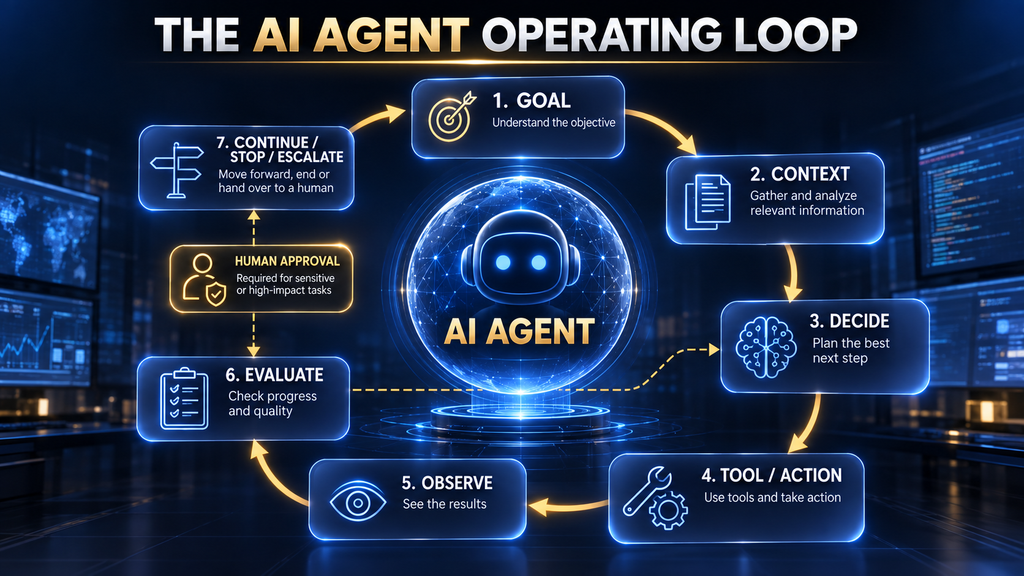
The easiest way to understand any agent is a four-step loop. It starts with a goal, such as “prepare a competitor report.” It decides what to do next, perhaps “search for each competitor’s pricing page.” It acts by using a tool, such as running a web search. Then it observes the result. That is one full turn of the loop.
After observing, it loops back and decides again. If the search found three of five pricing pages, it decides to look for the other two. If a page was unclear, it might read another source. The loop continues until the agent judges the goal complete, reaches a limit, or stops to ask a person for input. Each turn builds on the last.
This loop is what separates agents from simple prompts. A prompt gets one response. An agent can take many steps, each informed by what happened before. Researchers formalized a version of this pattern in the ReAct paper, which combined reasoning steps with actions such as searching, and showed that interleaving the two improved results on several tasks.
Keep this loop in mind throughout the guide. Almost every strength and every risk of AI agents comes from it. More loops mean more capability, but also more chances for a small mistake early on to grow into a bigger problem later, which is why limits and checks matter so much. Small errors early on are the hardest to spot later.
Why AI Agents Became Important
Three changes made agents practical. First, language models became much better at following instructions, planning and reasoning across several steps. Second, they learned to call tools reliably, which means they can trigger a search, query a database or send a message in a structured way rather than only producing text.
Third, the ecosystem around models matured. Developer kits such as the OpenAI Agents SDK provide ready-made pieces for tools, guardrails, handoffs between agents, human-in-the-loop steps and tracing. Google introduced its Agent Development Kit to make multi-agent applications easier to build. These kits save builders from writing the same plumbing again and again.
Standards for connecting tools also emerged. The Model Context Protocol, explained in our guide to MCP, gives agents a common way to plug into data sources and applications. Together, these changes moved agents from research demos to tools that businesses use every day. The pace of change since then has been rapid.
The result is that agents now appear in customer support, coding, research, sales and IT operations. They are not magic, and many projects disappoint, but the building blocks are mature enough that a well-designed agent can deliver real value on the right kind of task. Choosing the right task is half the battle.
AI Agent vs Chatbot: The Practical Difference
A chatbot responds to messages. You ask a question, it answers, and the conversation continues at your direction. Even an advanced chatbot that can search the web usually does so in direct response to your request, then hands control back to you. You decide each next step. Control stays with you throughout.
An agent takes more of those decisions itself. Given a goal, it plans steps, chooses tools, evaluates results and continues without waiting for you after every action. It may run for minutes or hours and produce a finished piece of work, such as a report, a resolved support ticket or a completed code change.
The line is blurring, because many chat products now include agent-like features such as deep research or computer use. A useful test is to ask who decides the next step. If you do, it behaves like a chatbot. If the system does, within limits you set, it behaves like an agent. It is a simple test that cuts through marketing labels.
Our guide to AI chatbots versus AI agents compares the two in more depth for business use, including when a well-designed chatbot is the better and cheaper choice. Many businesses need a chatbot first and an agent later, once their processes and data are ready. Starting with a chatbot is often the smarter move.
AI Agent vs LLM: Not the Same Thing
A large language model, or LLM, is the AI model that generates text. On its own, it takes input and produces output; it does not remember past sessions, browse the web or send emails. Our explainer on what a large language model is covers how LLMs work. Understanding the model makes agents much easier to understand.
An agent is a system built around a model. It adds a goal, instructions, memory or state, tools and controls. The model acts as the decision engine, choosing what to do next, while the rest of the system carries out those decisions and feeds the results back to the model for the next step. The model thinks; the system acts.
That distinction matters when things go wrong. A failing agent may have a perfectly good model but poor instructions, missing tools, bad data or weak limits. Improving an agent often means improving the system around the model rather than switching to a bigger model. Check every layer before blaming the model.
AI Agent vs Traditional Automation
Traditional automation follows fixed rules: when a form is submitted, create a record, send an email and notify a manager. It is fast, cheap and predictable, and it works well when every case follows the same path. Tools such as those in our roundup of workflow automation tools excel at this. Predictability is its biggest strength.
Agents shine when the path is not fixed. If incoming requests vary widely, information is unstructured or the next step depends on judgment, rules become hard to write and maintain. An agent can read a messy email, work out what the sender wants and choose an appropriate action. That flexibility is hard to achieve with rules alone.
The key trade-off is predictability versus flexibility. Rules do exactly what you specify every time, including the wrong thing if you specified it badly. Agents adapt to new situations but can make different choices on similar inputs. Many good systems combine both, using rules for fixed steps and an agent only where judgment is needed.
The Five-Layer AI Agent Stack
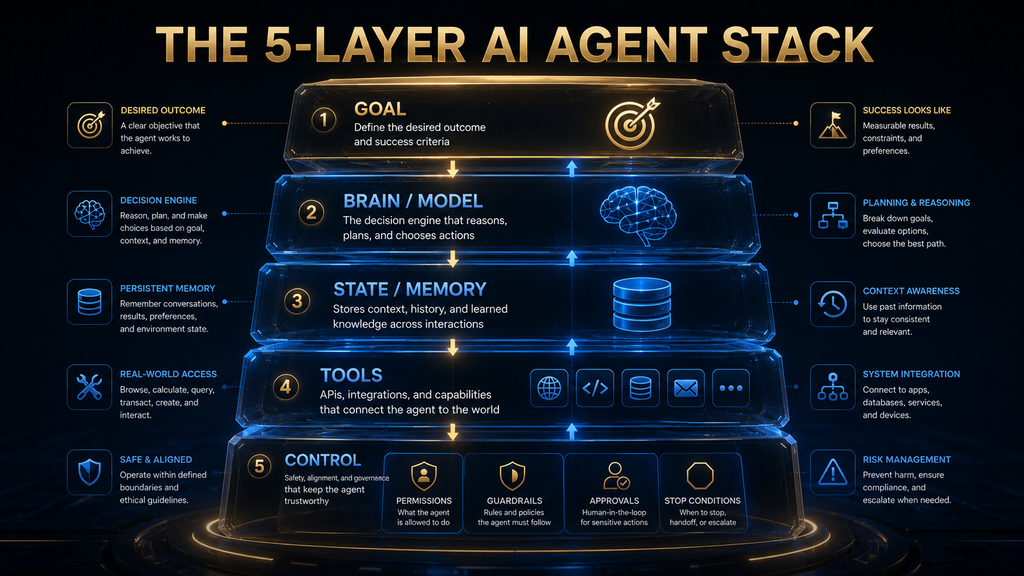
Every useful agent has five layers, a framework we use throughout this guide. Goal: what the agent is trying to achieve. Brain: the model that makes decisions. State: the information the agent keeps track of. Tools: the ways it gets information and takes action. Control: the boundaries that keep it safe and on task.
When an agent performs badly, one of these layers is usually the cause. A vague goal produces aimless work. A weak model makes poor decisions. Missing state causes repetition or forgetting. Poor tools return bad data. Weak control allows harmful or expensive actions. Diagnosing by layer makes problems much easier to fix.
Layer 1: The Goal
A good goal is specific, achievable and measurable. “Improve our marketing” is too vague. “Draft three subject lines for this email campaign aimed at existing customers, under 50 characters each” gives the agent a clear target and a clear definition of done. The clearer the goal, the better the agent can judge its own progress.
Layer 2: The Brain
The model is the decision engine. It reads the goal, the instructions and the current state, then decides what to do next. Stronger models plan better and recover from errors more gracefully, but the best model in the world still struggles with unclear goals, bad data or tools that return confusing results.
Layer 3: State and Memory
State is what the agent knows at each step: the goal, what it has done, what it found and what remains. Some agents also keep longer-term memory between sessions. Managing state well prevents repeated work and lost context. Our guide to how AI memory works explains context windows and memory in more detail.
Layer 4: Tools
Tools connect the agent to the outside world. Data tools retrieve information, such as search, database queries or document retrieval. Action tools change something, such as sending an email, updating a record or issuing a refund. Orchestration tools let one agent hand work to another. Our guide to how AI agents use tools covers this layer in depth.
Layer 5: Control
Control sets the boundaries: which tools the agent may use, what it may change, how much it may spend, when it must ask for approval and when it must stop. Control is what turns a clever demo into a system you can trust with real work, and it is usually where the most important design decisions are made.
How an AI Agent Works, Step by Step
Step 1: understand the goal. The agent reads the request, the instructions and any context it has been given, and works out what success looks like. Step 2: gather context. It collects the information it needs, such as the customer’s history, relevant documents or the current state of a system. Good context at this stage prevents many later mistakes.
Step 3: decide what it needs. It identifies the next piece of information or action required. Step 4: select a tool. It chooses the best tool for that step, such as a search, a database query or a message to a person. Tool descriptions matter a lot here, because the agent relies on them to choose correctly.
Step 5: take an action. It calls the tool with the right inputs. Step 6: observe the result. It reads what came back, whether that is data, a confirmation or an error. Step 7: decide what happens next. It updates its plan based on the result, perhaps trying another approach if something failed. Errors are information too.
Step 8: evaluate completion. It checks whether the goal has been met. If yes, it finishes and reports. If not, it loops back to step three. Good agents also know when to stop and ask for help, for example when they are uncertain, when an action is risky or when they have hit a limit. Knowing when to stop is a sign of a well-designed agent.
Planning does not always mean writing a perfect plan first. Many agents plan a little, act, learn from the result and adjust. That adaptive approach handles surprises well, but it also means the path can drift, which is why clear goals and stopping rules are so important for keeping the agent on track. Adaptive planning and firm limits work best together.
Fixed Workflows vs Agentic Workflows
Anthropic’s guide suggests a practical rule: start with the simplest solution and add complexity only when needed. Many tasks are best handled by a fixed workflow where a model performs specific steps in a set order, such as classify, then summarize, then route. These are predictable, easier to test and cheaper to run.
Agentic workflows make sense when the steps cannot be known in advance. A support agent handling unpredictable customer problems, or a research agent exploring an unfamiliar topic, benefits from deciding its own path. The trade-off is higher cost, more variability and a greater need for monitoring and limits.
In practice, the best systems mix both. A fixed workflow can handle the routine parts of a process, with an agent used only for the step that needs judgment. That combination keeps most of the reliability of traditional automation while adding flexibility exactly where it is useful. That hybrid design is often the most practical choice.
Why Agents Need Good Instructions
Instructions tell an agent how to behave: its role, its priorities, the rules it must follow, how to use each tool and what to do in unusual situations. OpenAI’s guide describes configuring instructions as one of the core design foundations, alongside selecting models and defining tools. Weak instructions are a common cause of weak agents.
Good instructions are specific and grounded in how the work is really done. Many teams turn existing standard operating procedures, help-center articles or policy documents into agent instructions, because those documents already capture the steps and edge cases that experienced staff follow. Reusing them saves time and improves consistency.
Instructions should also cover failure. Tell the agent what to do when information is missing, when a tool fails, when a request is outside its scope or when a customer is upset. Our guide to writing system instructions shows how to structure instructions that hold up in real use. Planning for failure makes agents far more dependable.
Give the Agent a Real Job
The most important design principle is to give an agent a real, bounded job, the way you would brief a new employee. “Help with customer service” is not a job. “Resolve order-status questions for online orders, using the order database, and hand anything involving refunds to a person” is a job with a clear scope and clear limits.
A real job has a defined input, a defined output, the tools needed to do it and a clear boundary where human help takes over. That clarity makes the agent easier to build, easier to test and easier to trust. It also makes it obvious when the agent is succeeding and when it is not. Clear jobs make clear results.
Start narrow, prove value and then expand. Teams that launch broad “do everything” agents often struggle with unpredictable behavior and unclear results. Teams that start with one well-defined job usually learn faster and build more trust, because successes and failures are easy to see. Small wins build confidence for bigger projects.
What Tasks Are Good for AI Agents?
Agents work best when the task has multiple steps that depend on each other, the path can change depending on what the agent finds, and the information is unstructured, such as emails, documents or web pages that rules struggle to parse. In these conditions, the agent’s ability to decide each step adds real value.
They also suit tasks where rules are difficult to maintain because exceptions keep appearing, where the agent has useful tools to gather information and take action, and where the outcome can be measured, so you can tell whether the agent did a good job and improve it over time. Measurement is what makes improvement possible.
Common examples include triaging support tickets, researching and summarizing information, preparing first drafts of reports, reconciling records, monitoring systems and responding to routine alerts, and helping developers write and fix code. Each involves judgment across several steps, which is where agents earn their cost.
When You Should Not Use an AI Agent
Do not use an agent when a simple rule or workflow would do. If every case follows the same path, traditional automation is cheaper, faster and more predictable. Using an agent there adds cost and variability without adding value, and makes the system harder to test and explain. Simple problems deserve simple solutions.
Be cautious with high-stakes, irreversible actions, such as moving money, deleting data, signing contracts or making medical or legal decisions. Agents can make mistakes, and some mistakes cannot be undone. In these areas, an agent should prepare work for a person to approve rather than act on its own. Approval steps are cheap insurance.
Also avoid agents when you cannot define success or measure results. If you cannot tell whether the agent did a good job, you cannot improve it or trust it. Start by defining what good output looks like, then decide whether an agent is the right way to produce it. Writing down what good output looks like is the first step toward automating it.
The Autonomy Ladder
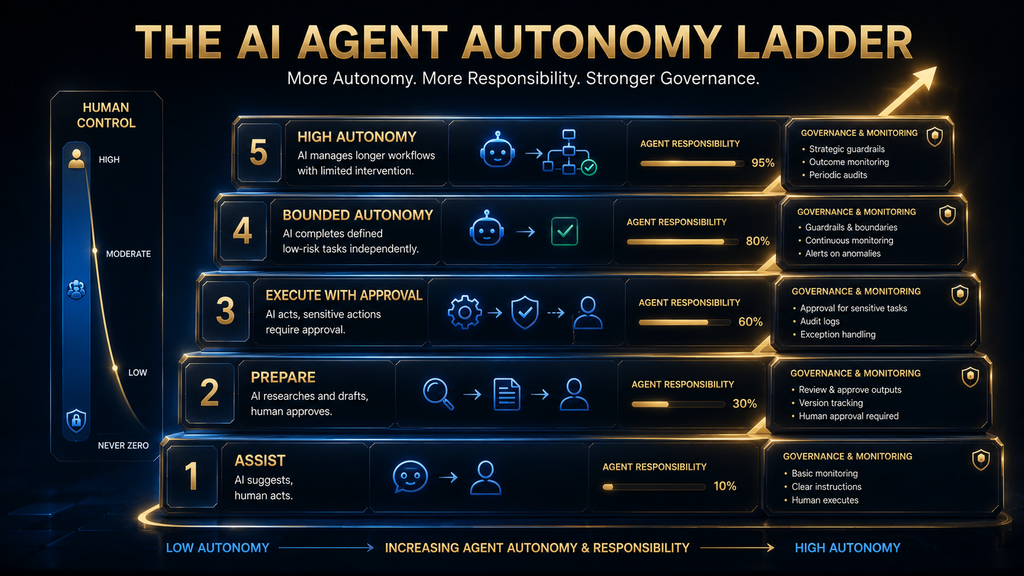
Agents do not have to be fully autonomous. A useful way to think about autonomy is a five-level ladder, an AI Hustle World framework. At Level 1, assist, the agent suggests and a person does everything. At Level 2, prepare, the agent drafts work, such as a reply or a report, for a person to review and send.
At Level 3, execute with approval, the agent can take actions, but only after a person approves each one. At Level 4, bounded autonomy, the agent acts on its own within strict limits, such as refunds under a set amount or changes to a test environment, and escalates anything outside those limits. These middle levels suit most business uses.
At Level 5, high autonomy, the agent acts broadly with little supervision. Very few business processes should start here. Most organizations get the best results by starting at Level 2 or 3, measuring quality and moving up only when the evidence shows the agent is reliable for that specific job. Trust should be earned job by job.
The right level depends on the consequences of mistakes. Drafting a social media post can safely sit higher on the ladder than issuing refunds or changing production systems. Match the autonomy to the risk, not to what the technology can technically do. A simple risk assessment for each job keeps autonomy at a sensible level as you expand.
Why Human Oversight Still Matters
Even capable agents make mistakes: misreading a request, trusting a bad source, choosing the wrong tool or continuing when they should stop. Human oversight catches those mistakes before they cause harm and provides the judgment that agents lack in unusual situations. People remain the last line of defense.
Oversight works best when it is designed into the process. Approval steps before risky actions, regular review of samples, clear escalation paths and easy ways for staff to correct the agent all help. The OpenAI Agents SDK, for example, includes human-in-the-loop features for exactly this reason. Designing it in from the start is far easier than adding it later.
Oversight also builds trust over time. As reviewers see the agent handle cases well, they can reduce checks for routine work and focus on edge cases. Our guide to human-in-the-loop AI explains how to design oversight that is meaningful rather than a rubber stamp. Meaningful review keeps quality high as volume grows.
Agents Need Guardrails, Not Just Good Prompts
Instructions tell an agent what to do; guardrails enforce what it may not do. OpenAI’s guide treats guardrails as a core part of agent design, covering checks such as relevance filters, safety classifiers, limits on tool use and checks on outputs before they are acted on. Together they keep the agent inside safe limits.
Guardrails can sit at several points: on the input, to block harmful or off-topic requests; on tool calls, to limit what actions are possible; and on outputs, to check results before they reach users or systems. Layering several simple guardrails is usually more effective than relying on one complex check.
The key principle is that a prompt alone is not a security boundary. A clever input can sometimes persuade a model to ignore its instructions. Permissions, approval steps and hard limits enforced by the surrounding software are what keep an agent within safe bounds, even when the model itself is confused or manipulated.
Security Changes When Agents Can Act
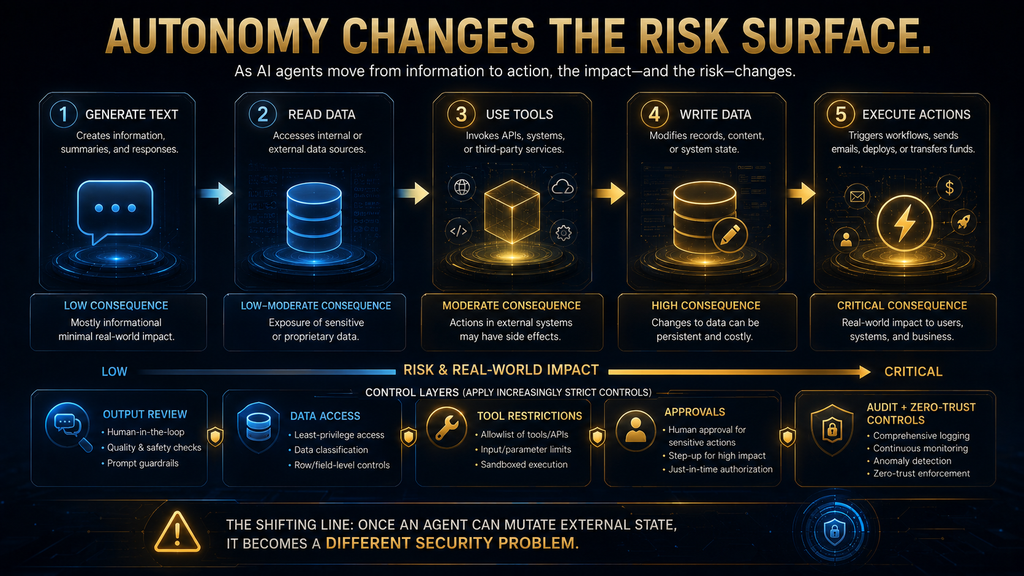
When an AI can only produce text, the worst outcome is usually a bad answer. When an agent can send emails, change records or access files, mistakes and attacks have real consequences. The OWASP Top 10 for large language model applications lists prompt injection and excessive agency among the main risks.
Prompt injection happens when instructions hidden in content, such as a web page or an email the agent reads, try to make it do something unintended. Excessive agency happens when an agent has more permissions or autonomy than it needs, so a single error or manipulation can cause wide damage. Both risks grow as agents gain access to more systems.
The defenses are practical. Give each agent the minimum permissions it needs, require approval for sensitive actions, treat content from outside sources as data rather than instructions, log every action and review logs regularly. Our guide to AI privacy risks covers what agents should and should not be allowed to access.
Why Tool Quality Matters as Much as Model Quality
An agent is only as good as its tools. If a search tool returns irrelevant results, a database tool returns stale data or an action tool fails silently, even the best model will produce poor outcomes. Investing in clear, reliable tools often improves an agent more than upgrading the model. Tool quality is often the cheapest improvement available.
Tool descriptions matter too. The agent decides which tool to use based on its name, description and expected inputs. Vague or overlapping descriptions lead to wrong choices. Clear names, precise descriptions and examples of correct use help the agent pick the right tool at the right time. Treat tool descriptions like documentation for a new colleague.
More tools can make an agent worse, not better. Every extra tool adds another option to consider and another way to choose wrongly. OpenAI’s guide suggests splitting work across multiple agents when a single agent struggles with too many tools or overlapping ones, rather than piling everything into one. Fewer, better tools usually win.
How Agents Use Context
Context is everything the agent can see when it makes a decision: its instructions, the goal, the conversation so far, tool results and any retrieved documents. Good context helps the agent make sensible choices; cluttered or missing context leads to confusion, repetition and errors. Curating context is part of building a good agent.
Managing context is a skill in its own right. Long tasks generate a lot of intermediate information, and not all of it stays useful. Good agents summarize what they have learned, drop irrelevant details and keep the information that matters for the next decision. Our guide to context engineering explains how to do this well.
Many agents also use retrieval to pull relevant documents into context only when needed. That keeps the context focused while still giving the agent access to large knowledge bases. Our retrieval-augmented generation guide explains how retrieval works and why its quality matters. It is a key technique for knowledge-heavy agents.
What Happens When an Agent Gets Something Wrong?
Agent errors usually come from one of seven sources. A bad goal sends the agent in the wrong direction from the start. Bad context leaves out information it needed. Bad tool selection means it used the wrong tool for the step. A bad tool result gives it wrong or incomplete data to work with. Each source needs its own fix.
Bad interpretation means it misread a correct result. A bad next action means it chose a poor step even with good information. Finally, compounding error happens when a small early mistake carries through many later steps, producing a confidently wrong final result that looks complete and polished. That last pattern deserves special attention.
Compounding error is the most dangerous, because each step can look reasonable on its own. That is why agents need checkpoints, logs that show every step and evaluation that looks at the path as well as the final answer. Our guide to AI hallucinations explains one common source of bad interpretation. Checking intermediate steps catches problems early.
Evaluating an Agent Is Different From Evaluating a Chatbot
With a chatbot, you mostly judge the answer. With an agent, you also need to judge the path: did it use the right tools, in a sensible order, without wasted steps, risky actions or unnecessary cost? A correct final result reached through a dangerous action is still a problem. How the agent got there matters as much as where it ended up.
Good evaluation uses a set of realistic test tasks with known good outcomes, run regularly as the agent changes. Track success rate, steps taken, tools used, cost per task, time per task and how often the agent escalates to a person. Tracing tools, such as those in agent development kits, make each run visible.
The agent’s definition of “done” matters too. If it stops too early, it leaves work incomplete. If it never stops, it wastes time and money. Clear completion criteria, maximum step limits and spending caps keep agents finishing at the right point, and make their behavior easier to predict. Clear stopping rules also make costs predictable.
Single-Agent vs Multi-Agent Systems
A single agent with a clear job and a handful of tools is the right starting point for most projects. It is simpler to build, test and debug. OpenAI’s guide recommends getting the most out of a single agent before adding more, because each extra agent adds coordination and complexity. Simplicity is a feature, not a limitation.
Multi-agent systems split work between specialists, such as a manager agent that hands tasks to research, writing and review agents. They can help when a task has clearly separate parts, or when a single agent struggles with too many tools or instructions. Google’s Agent Development Kit was built with this pattern in mind.
The rule is to add agents only when a single agent clearly cannot do the job well. More agents mean more handoffs, more places for errors and more cost. For most business uses, one well-designed agent with good tools and limits beats a complex team of agents. Complexity should be earned, not assumed.
AI Agent, Agentic AI and Copilot: What the Terms Mean
An AI agent is a specific system that pursues goals using a model, tools and controls. Agentic AI is a broader term for AI systems that act with some independence, including agents and the behaviors that make them work, such as planning, tool use and self-correction. The terms overlap, which causes confusion.
A copilot usually refers to an assistant that works alongside a person inside an application, suggesting and drafting while the person stays in control. Copilots sit near the bottom of the autonomy ladder, while agents can sit higher. Microsoft’s explainer on what an AI agent is discusses how these ideas relate in its products.
Vendors use these terms loosely, so focus on what a product does rather than what it is called. Ask who decides the next step, which tools it can use, what it can change without approval and how you can see what it did. Those answers tell you more than any label. Practical questions reveal what a product really does.
Real-World AI Agent Examples
Research agents search the web and documents, compare sources and write cited reports. Deep research features in ChatGPT, Gemini and Perplexity are examples. They save hours of reading, but their reports need checking, especially for important decisions. Our comparison of AI research assistants covers the leading options.
Customer support agents read customer messages, look up orders or accounts and resolve routine requests, handing complex or sensitive cases to people. Our guide to AI customer service explains how these agents fit into support teams. They are among the most common business agents today, partly because support work is high-volume and well documented.
Coding agents read a codebase, plan changes, write code, run tests and fix failures. Our guides to how AI coding agents work and the best AI coding agents cover this fast-moving area. Developers were among the earliest heavy users of agents, and coding remains one of the clearest examples of agents completing multi-step work.
Operations agents monitor systems, triage alerts and carry out routine fixes. In security, for example, agents help analysts investigate alerts, as our guide to AI SOC agents describes. Sales teams use agents to research prospects and draft outreach, covered in our guide to AI SDRs. Each example follows the same goal, decide, act and observe loop.
Who Should Use AI Agents?
Businesses With Repetitive, Judgment-Heavy Work
If your team handles high volumes of varied requests, such as support tickets, invoices or research questions, agents can take on the routine cases and free people for complex ones. Start with one well-defined process, measure results and expand only when the agent proves reliable. Measured expansion avoids costly surprises.
Developers and Technical Teams
If you build software, coding agents and agent development kits can speed up routine work and let you build agent features into your own products. Invest early in testing, tracing and permissions, because these are what make agents dependable in production. Good engineering habits matter even more with agents.
Individuals and Small Teams
If you work alone or in a small team, agent features in tools you already use, such as deep research or email assistants, are the easiest entry point. Use them for research and drafting, review their output and avoid giving them permission to act on important accounts without approval. Approval steps keep you in control.
Who Should Avoid AI Agents for Now?
If your processes are undocumented, your data is messy or you cannot define what a good result looks like, fix those first. Agents amplify whatever process they are given. A chaotic process run by an agent becomes chaotic faster and at a larger scale. Clean processes and data are the foundation every reliable agent is built on.
Also wait if the work is mainly high-stakes and irreversible, or if you lack the time to monitor and improve an agent after launch. Agents are not set-and-forget tools. They need testing, review and adjustment, much like training and supervising a new employee. Plan and budget for that ongoing care from the start.
Common Mistakes With AI Agents
Giving the Agent an Enormous Goal
“Run our marketing” is too broad. Break large goals into specific jobs with clear outputs. Narrow agents are easier to build, test and trust, and they deliver value sooner than ambitious agents that try to do everything at once. Narrow agents are also easier to explain to colleagues and customers, so begin with a single well-defined job.
Giving It Too Many Tools or Permissions
Every extra tool is another chance to choose wrongly, and every extra permission is another way for an error to cause harm. Give each agent only the tools and access its job requires, and review them regularly as the job changes. Least privilege is a simple, powerful rule that limits the damage any single mistake can cause.
Removing Humans Too Early
Jumping straight to full autonomy is the fastest way to lose trust. Start with drafts or approvals, measure quality and increase autonomy gradually. Keep humans involved for anything high-stakes, even when the agent performs well on routine cases. Trust grows with evidence, so earn autonomy step by step.
Measuring Only the Final Answer
A correct result reached through risky or wasteful steps is still a problem. Evaluate the path as well as the outcome, including tools used, steps taken, cost and escalations. Traces make this practical and reveal problems that final answers hide. Reviewing a small sample of traces every week catches most problems early.
Assuming the Model Is the Whole System
Most agent problems come from goals, instructions, tools, data and limits rather than the model. Before switching models, check each layer of the stack. Fixing a confusing tool description or a missing permission check often solves the problem. The cheapest fix is often outside the model, in the instructions, tools or permissions.
How to Decide Whether You Need an Agent
Ask seven questions. Is the task multi-step? Does the path change based on what happens? Does it require judgment or interpretation? Does the agent have useful tools to gather information and take action? If most answers are no, a simple workflow or a chatbot is probably enough. Those simpler tools are cheaper and easier to run.
Then ask: can you define success and measure it? Can you bound the risk with permissions, approvals and limits? And what should happen when it fails, including who is alerted and how errors are reversed? If you cannot answer these, the agent is not ready for production, however impressive the demo. Demos rarely show the hard cases.
If the answers are positive, start small. Build one agent for one job, run it at a low autonomy level, measure carefully and improve. That approach turns agents from an exciting experiment into a dependable part of how your organization works. Slow and steady usually wins with agents, so expand only as you learn what works.
The Economics of AI Agents
Agents cost more per task than simple prompts, because each task can involve many model calls and tool calls. Our guide to AI tokens explains why multi-step work uses so many tokens. Costs can add up quickly at scale. Long contexts and repeated tool calls are the main drivers, so efficient design keeps costs under control.
The value comes from the work an agent completes: hours of research saved, tickets resolved without a person, faster responses or fewer errors. A good business case compares the full cost of the agent, including development, monitoring and fixing mistakes, with the value of the work it reliably handles. That full comparison shows the true return.
Track cost per completed task, not just total spend. An agent that costs a few dollars to resolve a ticket that would take a person twenty minutes can be excellent value. One that costs the same but needs a person to redo half its work is not. Measure both cost and quality together. Quality and cost belong in the same report.
Autonomy vs Control: The Key Trade-Off
More autonomy means more potential time saved but also more risk and less predictability. More control means safer, more predictable behavior but more human time. Every agent design sits somewhere on this spectrum, and the right point depends on the task and the cost of mistakes. There is no single correct answer.
A better rule than “automate everything” is to automate the steps where errors are cheap and easy to catch, and keep people in charge where errors are costly or hard to reverse. That rule lets you capture most of the benefit while keeping the risks you cannot afford firmly under human control. It is a rule that scales well.
Over time, as evidence builds, you can shift the balance toward more autonomy for specific jobs. That gradual approach is slower than a big launch, but it builds the trust and data you need to use agents widely and safely across an organization. Patience pays off with agents. Move one job at a time.
The Future of AI Agents
Agents are likely to become more capable, more connected and more common. Standards such as MCP make it easier to connect agents to tools, and agent development kits make them easier to build. Agents that can operate computers directly, by clicking and typing like a person, are also maturing. These abilities will widen what agents can do.
The next stage is agents that improve through evaluation: systems that are tested continuously against realistic tasks, with failures used to refine instructions, tools and limits. That discipline, rather than bigger models alone, is what will make agents reliable enough for more important work. Evaluation is becoming a core skill for agent builders.
Agents will not remove the need for process design. They make good processes faster and bad processes faster too. The organizations that benefit most will be those that understand their work well, define clear jobs for agents and keep humans responsible for the decisions that matter. Process knowledge is becoming more valuable, not less.
How We Researched This Guide
This guide is based on published documentation and research, not hands-on testing of particular agents. We reviewed OpenAI’s practical guide to building AI agents and its Agents SDK documentation, Anthropic’s guide to building effective agents, Google’s announcement of its Agent Development Kit, Microsoft’s explainer on AI agents, the ReAct research paper and the OWASP Top 10 for LLM applications.
The five-layer agent stack, the autonomy ladder and the seven-question decision framework are AI Hustle World’s editorial frameworks, built from those sources and common agent design practice. Agent tools change quickly, so check current documentation before building or buying. We will update this guide as the field develops.
Final Thoughts
An AI agent is software that pursues a goal by deciding, acting and checking results in a loop, using a model as its decision engine and tools to reach the outside world. That ability to work through multi-step tasks is what makes agents powerful, and it is also what makes careful design essential. Both sides deserve attention.
The best agents have a clear job, good instructions, reliable tools, sensible state management and strong controls. They start at a low level of autonomy, earn trust through measured results and keep humans involved where mistakes would be costly. Most problems come from the system around the model, not the model itself.
If you remember one thing, make it this: give agents real, bounded jobs and keep control proportional to risk. Start small, measure honestly and expand only when the evidence supports it. To see how agents connect to the world, read our guide to how AI agents use tools to complete real tasks. It explains the layer where agents meet real systems.
Choose the AI Tool That Solves the Right Problem
Agents become useful when they can act, so see how they use tools to complete real tasks.
See How Agents Use Tools →Frequently Asked Questions About AI Agents
What is an AI agent in simple words?
An AI agent is software that works toward a goal for you. It decides the next step, uses tools such as search or email, checks the result and repeats until the task is done or it needs help.
Is ChatGPT an AI agent?
ChatGPT is mainly a chat assistant, but it includes agent-like features, such as deep research, that plan and carry out multi-step tasks. Whether it acts as an agent depends on the feature you use.
Is an AI agent the same as a chatbot?
No. A chatbot answers your messages and waits for your next step. An agent decides its own next steps toward a goal, using tools, within limits you set.
Is an AI agent the same as an LLM?
No. An LLM is the model that generates text. An agent is a system built around a model that adds a goal, instructions, memory, tools and controls.
Can AI agents use tools?
Yes. Tools are what let agents search, read documents, query databases, send messages and update systems. Good tools and clear tool descriptions are essential for good agent performance.
Are AI agents fully autonomous?
Usually not. Most business agents work with approvals or within strict limits. Full autonomy is rare and suits only low-risk tasks where errors are cheap and easy to reverse.
Can AI agents replace human workers?
Agents can handle routine parts of many jobs, but most still need people for judgment, exceptions, oversight and responsibility. They tend to change jobs more than eliminate them.
What are the biggest risks of AI agents?
Key risks include wrong actions, compounding errors, prompt injection and excessive permissions. Least-privilege access, approvals, logging and regular review reduce these risks.
When should I use an agent instead of normal automation?
Use an agent when tasks have many steps, the path changes and judgment is needed. Use normal automation when every case follows the same fixed rules.
Is a multi-agent system better than a single agent?
Not by default. Start with one well-designed agent. Add more only when a single agent clearly struggles, because each extra agent adds complexity and cost.
Sources and Further Reading
- OpenAI: A practical guide to building AI agents
- Anthropic: Building effective agents
- OpenAI Agents SDK documentation
- Google: Agent Development Kit announcement
- Yao et al.: ReAct, synergizing reasoning and acting in language models
- OWASP Top 10 for LLM applications
Related Guides
- How AI Agents Use Tools to Complete Real Tasks
- AI Chatbots vs AI Agents: What’s the Difference?
- What Is Model Context Protocol (MCP)?
- How AI Coding Agents Work
Written by
Muntasir Ahmad Chowdhury
Founder, AI Hustle World
Muntasir Ahmad Chowdhury is the Founder of AI Hustle World, an independent publication dedicated to making Artificial Intelligence practical, trustworthy, and easy to understand. He researches AI tools, automation, customer service, productivity, and real-world business applications, helping readers make smarter technology decisions through research-driven, experience-backed content.
Expertise:
AI Tools • AI Automation • AI Customer Service • AI Productivity • Generative AI • AI Workflows
Get Smarter With AI
Enjoyed this guide? Get practical AI tools, tutorials, and honest reviews delivered to your inbox.