Evidence: Documentation reviewed
Last checked: August 2026
What was done: Written from official documentation and the published sources linked in this article. Not hands-on tested.
Files: None
Affiliate links: No
Last updated: October 2026
How to Use AI Tools Safely: A Complete Learning Path
To use AI tools safely, control what you share, check what the tool can access, verify important answers, and keep a human decision point for anything costly or hard to undo. In practice that means removing sensitive details before you paste, reviewing app connections, checking facts that matter, and approving actions such as sending, paying or deleting yourself.
None of this requires technical skill. It requires a few habits applied in the right order, with more care as the stakes rise. Rewriting an email, planning a trip or explaining a concept carries little risk. Uploading a confidential contract, connecting your inbox or trusting a voice message that asks for money carries much more, even though the interface looks exactly the same.
That is the core idea of this guide. The technology does not suddenly become unsafe when you move from one task to another. The consequences of a mistake change, and your habits need to change with them. Safe AI use is a decision skill: knowing which tasks AI can handle alone and which need your input, your checking or your final approval.
This learning path builds that skill in stages. You will learn the Four AI Safety Gates for everyday decisions, the AI Risk Ladder for tools that can access accounts or take actions, how privacy settings work at OpenAI, Google and Anthropic, how to spot AI-enabled scams, and how to keep your own judgment in charge as AI becomes more capable.
What It Means to Use AI Safely
Using AI safely means matching three things to the consequences of the task: the information you give the tool, the access you allow it, and the amount of human review you apply to its output. When the stakes are low, all three can be relaxed. When the stakes are high, each one needs more care, and the final decision should stay with a person.
This definition is broader than privacy. Privacy matters, but a safe user also understands that answers can be wrong, that connected apps widen what a tool can see and do, that synthetic voices can impersonate people, and that trust in a system tends to grow faster than the evidence for it. Each of these is a separate risk with its own simple habit.
AI literacy is increasingly treated the same way at policy level. The European Commission’s guidance on AI talent, skills and literacy explains that Article 4 of the EU AI Act, in application since February 2025, asks organizations to build AI literacy suited to people’s knowledge, experience, training and the context of use, rather than one fixed level for everyone.
That approach suits individuals too. You do not need to become an AI engineer. You need enough understanding to recognize when a task is routine and when it deserves more care. The rest of this guide builds that understanding one layer at a time, starting with what AI can and cannot guarantee and ending with a routine you can follow every day.
The Four AI Safety Gates
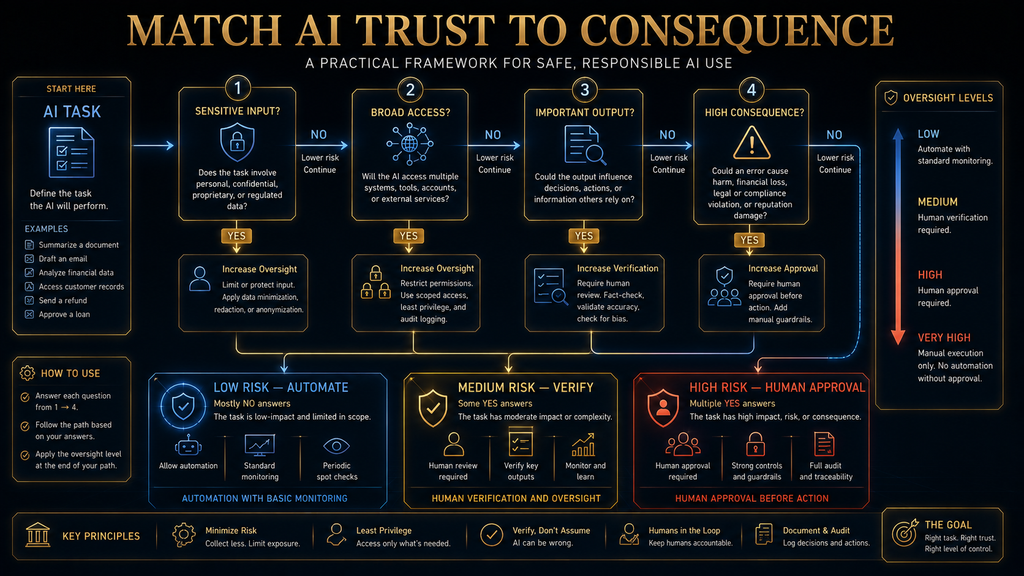
The simplest way to make safe decisions is to ask four questions before any AI task that matters. We call them the Four AI Safety Gates, an AI Hustle World framework. It is a practical decision tool, not a technical security standard, and it works for chat assistants, writing tools, image generators and connected agents alike.
- Input: What am I giving the AI, and does it need all of it?
- Access: What can the AI see or do beyond this conversation?
- Output: What am I about to believe, publish or send?
- Consequence: What happens if the AI is wrong?
The purpose of the gates is to stop you from treating every AI interaction as if it carried the same risk. A brainstorm about dinner recipes and an assistant connected to your work email may share a chat window, but they should not receive the same trust. The gates make that difference visible in a few seconds, before anything sensitive leaves your hands.
You will see the gates again throughout this guide, applied to privacy, connected apps, verification, scams and workplace use. Once they become a habit, you can handle new AI products without memorizing new rules, because the same four questions apply whatever the tool is called or however its interface changes next year.
Understand What AI Can and Cannot Guarantee
The safest AI users are not the ones who distrust every answer. They are the ones who understand what kind of system they are using. Generative AI produces responses from patterns learned in training and the context you provide. That makes it very good at drafting, summarizing and explaining, but fluency is not the same as guaranteed accuracy.
NIST’s Generative AI Profile lists confabulation among the main risks, meaning confidently stated but false content. It also covers privacy, information integrity, intellectual property and the way people configure and rely on AI systems. Our guide to why AI gives wrong answers explains how these errors arise.
This changes how you use the tool. If you ask for five headline ideas, you can judge the result yourself in seconds, so errors cost little. If you ask whether a medicine is safe with your current prescription, the same fluent style hides a much bigger risk. The model may sound equally confident in both cases, but your duty to check has grown with the stakes.
A useful rule follows from this. Do not judge an AI task by how easy it is to ask. Judge it by how costly it would be if the answer were wrong. Easy questions can have expensive answers, and the chat box gives you no warning when you cross that line. That is why the Consequence gate exists and why it is the one most worth remembering.
Stage 1: Control What You Give AI
The first practical habit is simple: before sending information to an AI service, ask whether the task needs it. Most privacy mistakes happen before the AI writes a single word. People paste whole documents, screenshots or email threads when the task only needed a short excerpt with the identifying details removed.
Say you want AI to improve a complaint email that includes your full name, address, phone number, order number and account details. The model only needs the complaint and some context. Replace the identifying details with placeholders such as [ORDER NUMBER] and [NAME], and the rewrite works just as well. This habit is called data minimization: give enough to do the task, not everything you have.
Minimization matters more as tools handle more than text. Google’s Gemini Apps Privacy Hub describes processing prompts, files, photos, screens, browser content and information from connected apps. The more types of input a tool accepts, the easier it becomes to share more than you meant to, often with a single click on an upload or share button.
Some inputs deserve extra caution in every tool: passwords, one-time codes and recovery codes, API keys and access tokens, full card or bank numbers, government ID numbers, medical records, and sensitive photos or recordings. Our guide to AI privacy risks before sharing personal information covers these categories in more depth.
The rule is not that AI tools cannot handle sensitive data. Some enterprise products are built and contracted for it. The rule is that an interface accepting something does not make it appropriate to send. Providers, account types, settings, retention policies and connected services all create different conditions, so “AI is private” and “AI is never private” are both too simple.
How Privacy Settings Work at the Major Providers
Privacy controls differ between providers, and the details matter. OpenAI’s Temporary Chat FAQ says a temporary chat stays out of your history and is not used to improve its models while it remains temporary. OpenAI may still keep a copy for up to 30 days for safety purposes, and a temporary chat saved later follows normal retention rules.
Google’s Gemini Apps Privacy Hub says temporary chats, and chats held while Keep Activity is off, are retained with your account for 72 hours and are not used to train Google’s models. Google also notes that human reviewers read some data collected for improvement, and asks users not to enter confidential information they would not want a reviewer to see or Google to use.
Anthropic’s consumer privacy article says Claude chats are used to improve its models if you allow it, if a conversation is flagged for safety review, or if you explicitly opt in. Incognito chats are not used for improvement even when the setting is on. Feedback you submit with a thumbs rating stores the related conversation for up to five years.
These details show why reading the settings page beats assuming. Each company treats training, retention, human review and feedback differently, and business accounts usually follow separate terms from consumer ones. Our explainer on AI data retention walks through what to look for in any provider’s policy before you rely on it.
Privacy Settings Help but Do Not Make Risky Inputs Safe
A privacy toggle is a control, not an eraser. Turning off model training limits one use of your data, but the service still has to process your input to answer, and it may keep it for safety, legal or operational reasons. If a document should never leave your organization, no setting inside a consumer chat app changes that conclusion.
So the stronger habit is to minimize first and configure second. Ask whether you need to send the material to a third-party AI service at all. If the answer is no, changing a setting does not create a reason to send it. If the answer is yes, strip what is not needed, then choose the most protective settings and the right account type for the job.
Connected apps raise the stakes further. Google warns that custom third-party connected apps are not monitored or secured by Google and may expose data, passwords, devices and accounts. It also warns that Gemini can make mistakes such as making purchases or sharing data with third parties unexpectedly, and advises users to supervise its browsing and tasks closely.
Those warnings apply well beyond one product. Any assistant that reads your email, files or calendar can expose that material if something goes wrong, and any assistant that can act can act wrongly. The next stages of this learning path cover how to judge outputs and how to limit access, which are the two habits that turn privacy settings into real protection.
Stage 2: Learn to Evaluate the Output
Once you control your inputs, the next skill is deciding when an answer deserves trust. Beginners often treat this as a yes-or-no question about whether AI is reliable. A more useful view is that different claims need different levels of checking, depending on what you plan to do with them and how hard they are to confirm yourself.
If AI suggests three ways to tighten a paragraph, you can judge the result by reading it. If AI says a regulation changed last month, check an authoritative source before relying on it. If AI offers a diagnosis, a legal interpretation or a financial recommendation, the bar should be much higher still. Safe use is mostly about scaling your checking to the consequence.
Before accepting an important claim, ask three quick questions. Is it factual, and can it be checked? Is it time-sensitive, depending on current prices, rules, features or events? Does it matter, so that being wrong could cost money, reputation, health or legal standing? If the answer to the last question is yes, AI output should never be the final authority on its own.
Our practical framework for verifying AI information turns these questions into a full workflow, with an evidence ledger and status labels for each claim. For everyday use, the short version is enough: check the claims that matter, check them against a source you trust, and check that the source is current. It is worth bookmarking if you use AI for research, school or client work.
Why Sources Do Not Automatically Mean Verified
A common mistake is assuming that citations solve the reliability problem. They help, but a cited source can be irrelevant, outdated, secondary when a primary source exists, or genuine but too weak to support the claim attached to it. An answer with citations still needs the same question: does this evidence support this specific statement?
For important claims, prefer primary sources. Use the government agency for regulations, the official documentation for product behavior, the original research for scientific findings, the contract or policy text for contractual questions, and the institution itself for official announcements. Secondary sources are useful for context, but they inherit any mistakes made upstream.
The habit to build is simple: click through on the sources that matter and find the sentence that supports the claim. If you cannot find it, treat the claim as unverified. This takes a minute for most claims and catches a surprising share of errors, because AI tools frequently attach real sources to statements those sources never make.
Stage 3: Understand What the AI Can Access
The risk profile changes sharply when an AI stops being a chatbot and becomes a connected assistant. A model answering “how should I organize my weekend?” has very limited reach. An assistant that can read your email, open cloud files, see your calendar, browse websites and send messages on your behalf has a much larger safety boundary, even if its answers are equally good.
At that point the key question changes. It is no longer only whether the AI is accurate, but what happens if it is inaccurate while it has access to something important. A wrong summary is an inconvenience. A wrong action inside your inbox, bank or work systems can be costly and hard to reverse, and it may happen faster than you can notice.
Capability and authority are different things. A very capable model with no access may be less dangerous than a weaker system with permission to take irreversible actions. When you evaluate an AI product, look at what it can reach and what it can do, not only how smart it seems. Our guide to what an AI agent is explains how this access works.
Connections are increasingly built on shared standards. The Model Context Protocol, for example, lets many AI apps connect to tools and data in a consistent way. That convenience is useful, but it also means one click can give an assistant access to a great deal. Before approving any connection, ask what it can read, what it can change and how to revoke it.
The AI Risk Ladder
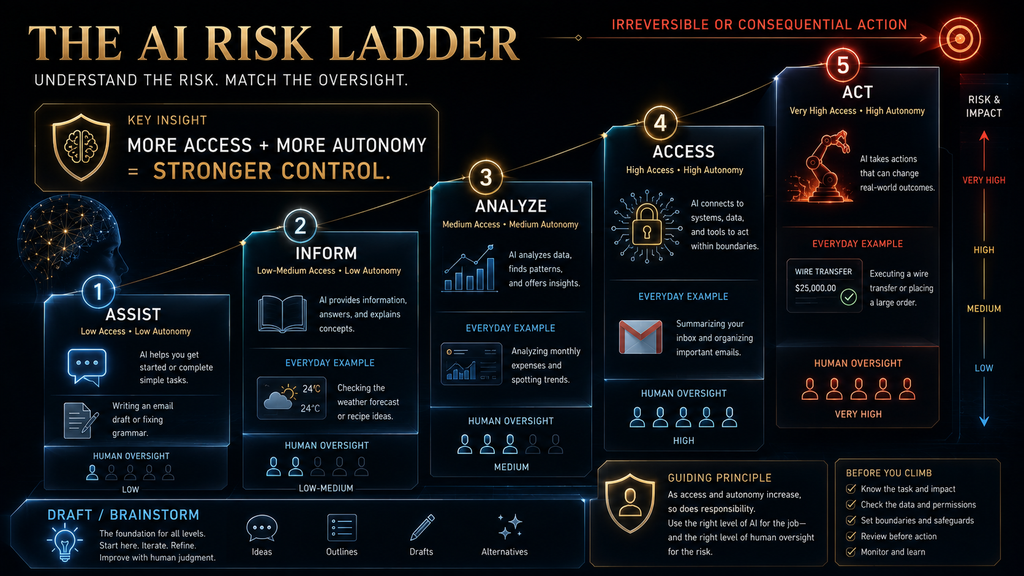
The second AI Hustle World framework in this guide is the AI Risk Ladder. It sorts AI use into five levels, from low-risk help to consequential action. Each step up adds capability and adds risk, so each step deserves a little more control. Knowing where a task sits on the ladder tells you how much oversight it needs.
- Assist: AI drafts, brainstorms, rewrites or organizes, such as rewording an email. You stay the obvious decision-maker.
- Inform: AI explains, summarizes or recommends. Checking matters more because you may act on it.
- Analyze: AI interprets documents, data or situations. Source quality and misreading become bigger concerns.
- Access: AI connects to accounts, files or services. Permissions and security join the safety picture.
- Act: AI sends, buys, deletes or changes things. Human approval, reversibility and records become essential.
The key insight is that a system’s risk depends not only on what the model can generate but on what the surrounding product allows it to access and do. Two tools using the same model can carry very different risks. One that drafts replies for you to send sits at Assist. One that sends replies on its own sits at Act, with all the extra care that implies.
Stage 4: Build a Human Approval Boundary
A safe workflow does not require approving every trivial step, which would remove most of the benefit. Instead, draw a boundary around consequential actions. Let AI prepare the work, and keep the commitment with a person. This captures most of the speed of automation while keeping the decisions that matter under your control.
In practice, AI can draft the email, and you approve sending it. AI can analyze a bill, and you authorize the payment. AI can draft a social media post, and you decide whether to publish it. AI can prepare a calendar change, and you confirm it. The pattern is the same each time: AI accelerates preparation, and a human remains responsible for the commitment.
Not every action needs the same boundary. Sorting newsletters into a folder or labeling low-priority mail is easy to undo, so light automation is fine. Sending a message to a client, moving money or deleting files is hard to reverse, so explicit approval belongs there. Our guide to human-in-the-loop AI explains how to design these checkpoints well.
A good boundary also includes a record. If an assistant takes actions on your behalf, you should be able to see what it did and when. That record makes mistakes easier to spot and fix, and it helps you decide whether to give the tool more freedom over time. Automation you cannot review is automation you cannot safely expand.
Stage 5: Recognize AI-Enabled Deception
AI safety is not only about what you send to AI. It is also about what other people send to you. AI-generated text, images, audio and video can create convincing impersonations. The International AI Safety Report 2026 documents scammers using voice clones and deepfakes to impersonate executives or family members and trick victims into transferring money.
The report also notes that accessible AI tools have sharply lowered the barrier to creating harmful synthetic content. Many are free or cheap, need no technical skill and can be used anonymously. That changes an old assumption: recognizing someone’s voice is no longer enough to confirm it is really them, especially when the call involves urgency and money.
The FTC’s consumer alert on AI-enhanced family emergency schemes explains that a scammer needs only a short clip of a person’s voice, often taken from content posted online. Its advice is direct: do not trust the voice. Hang up and call the person on a number you know is theirs, or contact them through another relative or friend.
The practical rule is to verify through a separate, trusted channel whenever a message involves money, passwords, secrets or urgent action. Do not use the same call, chat or email thread to confirm the request. Requests to pay by wire, gift card or cryptocurrency are strong warning signs. Our guide to how AI detects phishing and social engineering covers more patterns.
Families and small teams can prepare in advance. Agree on a simple verification step, such as calling back on a known number or using a shared code word for emergencies. Discuss it calmly before anything happens, so nobody feels awkward checking when a real request arrives. A plan made in advance is much easier to follow under pressure than one invented during a call.
Stage 6: Notice When AI Persuades Instead of Assists
The risks are not limited to obvious scams. The International AI Safety Report notes that, in experiments, AI-generated content can be as effective as human-written content at changing people’s beliefs. Real-world manipulation is documented but not yet widespread, and the report expects the risk may grow as capabilities improve.
This creates a quieter everyday problem. An assistant that knows your preferences, habits and goals can make its suggestions more relevant, which is useful. It can also make them more persuasive, which is not always in your interest. Personalization that helps you decide can slide into personalization that discourages you from questioning the decision.
A good self-check is to ask whether the AI is helping you make a decision, or whether its framing is making you less likely to consider alternatives. You do not need to distrust every suggestion. You do need to keep the habit of stepping outside the AI’s framing, asking for options it did not mention, and comparing them on your own terms.
Our simple AI decision-making framework shows how to use AI to widen your options instead of narrowing them. Asking the model to argue against its own recommendation, or to list what would change its answer, is an easy way to keep your judgment active rather than handing it over. It works especially well for purchases, career choices and other decisions where a confident suggestion can feel more settled than it really is.
Stage 7: Treat High-Stakes Decisions Differently
The safest habit is not “never use AI for important things.” It is changing the role AI plays as the stakes rise. For low-consequence tasks, AI can be the main producer. For higher-consequence tasks, it should become a research assistant, an explainer or a source of questions to investigate, while the decision rests with you or a qualified professional.
Choosing a restaurant is low stakes: AI suggests three places, you check menus and hours, and a mistake costs one mediocre dinner. Choosing a financial product is higher stakes: AI can explain differences, but you should confirm fees and terms with the provider. A medical decision is higher still: AI can explain terms and help prepare questions, but diagnosis and treatment belong with a clinician.
Providers say the same. Google’s Gemini Apps Privacy Hub tells users not to rely on Gemini for diagnosis, treatment, medical advice, or legal, financial or other professional help, and describes its output as informational. The broader rule holds across all tools: the more expensive, irreversible or personal the mistake, the more you need independent evidence and qualified judgment.
AI can still add real value in these situations. It can organize symptoms before an appointment, summarize your questions for a lawyer or explain investment terms before you meet an adviser. That makes your time with the professional more productive. The difference is that AI takes part in the workflow without owning the high-stakes decision at the end of it.
The Four Gates Applied to a Real Task
The gates become useful when you apply them to an actual decision. Suppose you want AI to review an employment contract before you sign it. At the Input gate, ask whether the tool needs the whole document. Names, addresses, salary figures and ID numbers could often be removed, and you should check the provider’s data policy for your account type first.
At the Access gate, ask whether the AI is only reading the document you upload, or whether it has broader access to your cloud storage or work account. At the Output gate, ask whether you are using its analysis to identify clauses for further review, or treating its interpretation as a final legal conclusion. Those are very different uses of the same answer.
At the Consequence gate, ask what happens if it misses an important clause. If the answer could affect your job, income or legal position, human review becomes essential, perhaps from a lawyer or a trusted adviser. Notice that you did not need a long list of rules. Four questions shaped the whole decision, and they will work again for the next task.
Using AI Safely at Work
Workplace AI needs a stricter version of the same path, because the data you handle often belongs to customers, colleagues or your employer. A personal AI account and a company-approved AI environment are not equivalent, even if they use the same model. Contracts, retention terms, admin controls and audit logs usually differ, and those differences matter to your organization.
- Is this tool approved by my organization?
- Can customer or employee data be processed in it?
- Which account should I use, personal or company?
- Which connected services are permitted?
- Is human review required before output is used?
- Who is responsible for the final result?
One of the most common workplace risks is shadow AI: an employee finds a convenient tool, uploads work material and solves a problem before anyone has considered data protection or compliance. The intent is usually good and the productivity gain may be real, but the governance decision still matters. A sensible rule is to use the fastest approved tool, not just the fastest tool available.
Organizations can make this easier by publishing a short list of approved tools and clear guidance on what data may go where. Our guide to AI governance explains how to set this up without blocking useful work. Employees follow rules more readily when the approved option is easy to find and genuinely helpful.
Stage 8: Tell Personal Information From Sensitive Information
Not all personal information is equally sensitive, and not all confidential information looks secret. “I am planning a vacation” is personal but low-risk. A passport scan, home address, flight booking and card statement together carry far more exposure. The difference lies in what harm could follow if the information were exposed, kept, reviewed or combined.
Work documents can be sensitive without containing passwords. A pricing sheet, product roadmap, client list or negotiation position may be commercially valuable, and sharing it carelessly could hurt your organization. This is why “never share personal information” is too blunt to guide decisions. A better question is what damage could result if this information reached the wrong place.
Combination is the subtle risk. NIST notes that generative AI can create privacy risk by drawing inferences about people from scattered pieces of information. A first name, a workplace, a neighborhood and a daily routine may each seem harmless, but together they can identify someone. When in doubt, share the least specific version that still lets the AI help you.
Stage 9: Respect Other People’s Data
One of the easiest mistakes is protecting your own privacy while forgetting everyone else’s. Suppose a friend sends you a private message and you paste it into AI to ask what they really meant. You were allowed to receive the message, but that does not automatically mean you may share it with another service. The same question applies to group chats and photos.
The same issue appears at work. A customer email may be visible to you because your job requires it, but that does not mean you can paste it into any consumer AI tool. Safe AI use includes data stewardship: treating information that belongs to others with the care you would want for your own, and following the rules your organization sets for it.
A single question catches most of these cases: do I have the right to give this information to this system for this purpose? If you are unsure, remove identifying details, summarize instead of pasting, or ask permission. That habit protects other people, and it also protects you from breaching workplace policies or confidentiality obligations without realizing it.
Stage 10: Use AI-Generated Content Honestly
AI helps you create content faster, and it also makes misrepresentation easier. The line to watch is whether the content truthfully reflects reality. Using AI to improve the grammar and structure of a genuine restaurant review is fine. Asking AI to invent details about food, service or staff you never experienced is deception, however polished the result looks.
Regulators treat this seriously. The FTC’s final rule on fake reviews and testimonials, announced in August 2024, allows civil penalties against knowing violators and is designed to deter AI-generated fake reviews. It covers reviews attributed to people who do not exist or who never used the product or service.
The principle reaches beyond reviews. AI can help you polish a real experience, summarize real feedback or explain a real result more clearly. It should not manufacture personal experiences, testimonials, endorsements, credentials or evidence. Once generated content claims something that did not happen, AI assistance has become deception, and the responsibility for it is yours.
Stage 11: Respect Copyright and Permission
AI tools make it easy to transform content, but technical ability is not permission. Before uploading material, ask whether you have the right to provide it to the tool. Before publishing the result, ask whether you have the right to publish it. Before presenting it as your own work, ask whether that accurately represents your contribution and experience.
Rules differ across countries, platforms and content types, so this guide is not legal advice. Our explainer on AI copyright covers what businesses should check before publishing. For everyday use, one principle is enough: being able to generate or transform something is not the same as having permission to use it.
Voices and faces deserve special care. Google’s own guidance asks users to get permission before recording people in a live chat or using their faces or voices in Gemini, and to upload only content they have rights to. Our comparison of AI voice cloning tools explains why consent and licensing matter so much for synthetic voices.
Why Traditional Safeguards Still Matter
Long before generative AI, people had systems for handling uncertainty and risk. We checked important information, consulted qualified professionals, required approval for payments, restricted access to confidential files, confirmed identity before acting, documented decisions and separated preparation from authorization. None of these ideas become obsolete because AI arrived.
What AI changes is the speed and scale at which decisions reach us. Because AI can produce and act on information faster than a person can casually inspect it, these traditional controls become more valuable, not less. A payment approval step, for example, matters more when an assistant can prepare and submit payments in seconds instead of minutes.
This creates a useful paradox. The better AI becomes at doing work, the more important it is to decide which work it should be allowed to finish without you. Strong tools deserve clear boundaries. That is not distrust of the technology. It is the same sensible caution we already apply to any powerful system that can make costly mistakes quickly.
What Happens If You Do Nothing
The biggest risk for most people is not one dramatic mistake. It is the gradual normalization of unsafe habits. First you paste one small private detail. Then a whole document. Then you connect your drive because it is convenient. Then you let AI send messages automatically. Then you trust it without checking because it has been right so often.
Each step seems reasonable on its own. The problem appears when the combined workflow becomes more powerful than your ability to monitor it. NIST describes this in terms of human-AI configuration and automation bias: people tend to rely more on systems that seem consistently useful, and that reliance can outgrow the evidence that it is justified.
The remedy is to build judgment before dependence. Each time you give a tool more information, more access or more freedom to act, make it a deliberate choice rather than a drift. Review your connections every few months and remove the ones you no longer use. Small, regular checks keep your setup matched to the risks you are willing to accept.
A Practical Everyday Safety Routine
You do not need a long policy for personal AI use. A short routine is more likely to survive daily life. Before you start a task, ask what you are giving the tool, what you are asking it to do and how important the result is. Remove details it does not need, and decide in advance how much checking the answer will deserve.
Before you connect anything, ask what the tool will be able to access: files, email, calendar, contacts, location, browser or payment details. Ask whether you can revoke the access later and whether the tool can only read or can also take actions. Connecting a tool to read your calendar is very different from allowing it to accept invitations and send replies.
After AI responds, do not ask whether the answer sounds good. Ask which parts matter for your decision, then check those. If the response is a draft, edit it into your own words. If it contains factual claims, verify the important ones. If it includes a recommendation with financial, legal or medical consequences, raise the standard of checking and consider asking a professional.
Before AI takes an action for you, ask three questions. Can this be reversed? What happens if the AI misunderstood me? Would I approve this if a human assistant had recommended it? If any answer makes you uneasy, add a manual approval step. Our guide to planning your week with AI shows how to keep this routine light.
A Simple Risk Matrix for Everyday AI
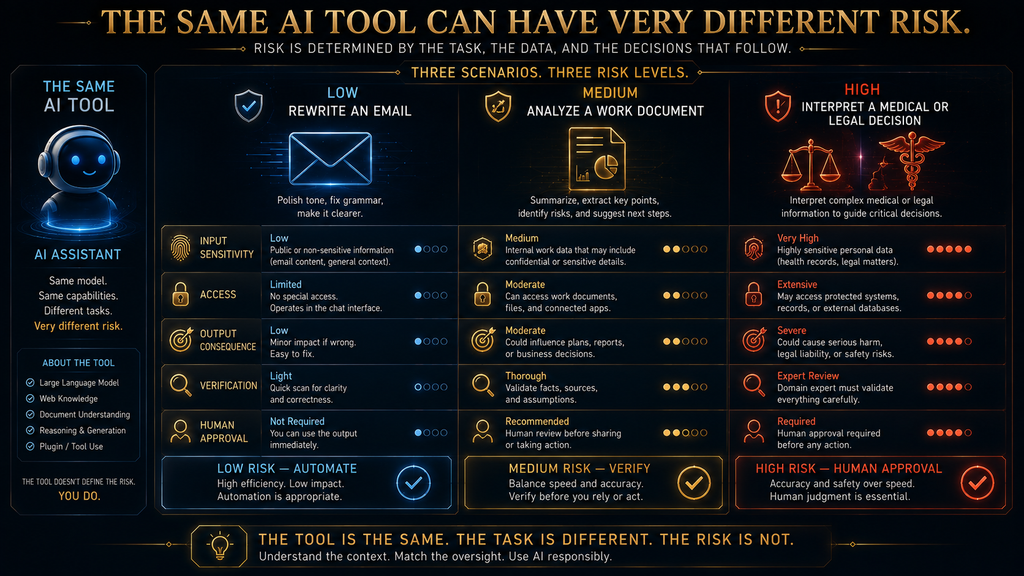
The table below summarizes typical tasks, their usual risk, the role AI should play and the oversight that makes sense. It is a practical decision aid, not a legal or technical classification, and your own situation may move a task up or down. The pattern matters more than any single row: as consequences rise, human oversight should rise with them.
| Task | Typical risk | AI role | Human oversight |
|---|---|---|---|
| Brainstorming ideas | Low | Generate | Quick review |
| Rewriting your own email | Low | Draft | Edit before sending |
| Summarizing a public article | Low to medium | Summarize | Spot-check key points |
| Comparing products | Medium | Research assistant | Verify current price and specs |
| Analyzing a work document | Medium to high | Analysis assistant | Check policy and sensitive data |
| Reviewing financial options | High | Research and education | Verify independently |
| Interpreting medical information | High | Explanation and preparation | Qualified professional |
| Legal interpretation | High | Issue spotting | Qualified professional |
| Sending messages automatically | Medium to high | Draft and assist | Approve consequential messages |
| Making payments | Very high | Preparation only | Human authorization |
Use the matrix as a starting point when you try a new tool or task. If a task does not fit neatly, pick the row with the closest consequences rather than the closest technology. Sending a sensitive message with a brand-new agent still belongs in the “approve consequential messages” row, however clever the agent appears.
Signs You Are Becoming AI-Literate
AI literacy is not memorizing the names of new models. A better test is whether you can make good decisions when the interface changes. You are building practical literacy when you can explain roughly what AI can and cannot guarantee, and when you can tell which information should not be casually shared with any tool.
Other signs include checking privacy and retention settings before using a new service, understanding what connected apps can expose, recognizing that fluent output can be wrong, telling assistance apart from autonomous action, deciding when human approval is needed and knowing when AI should not be the final authority. Above all, you use AI without giving up your own judgment.
This matches the broader direction of AI education. UNESCO’s AI competency framework for students describes progression through three levels: understand, apply and create. The aim is not to turn everyone into an engineer. It is to make people competent enough to use AI on purpose, with a clear sense of when to trust it, when to check it and when to step in.
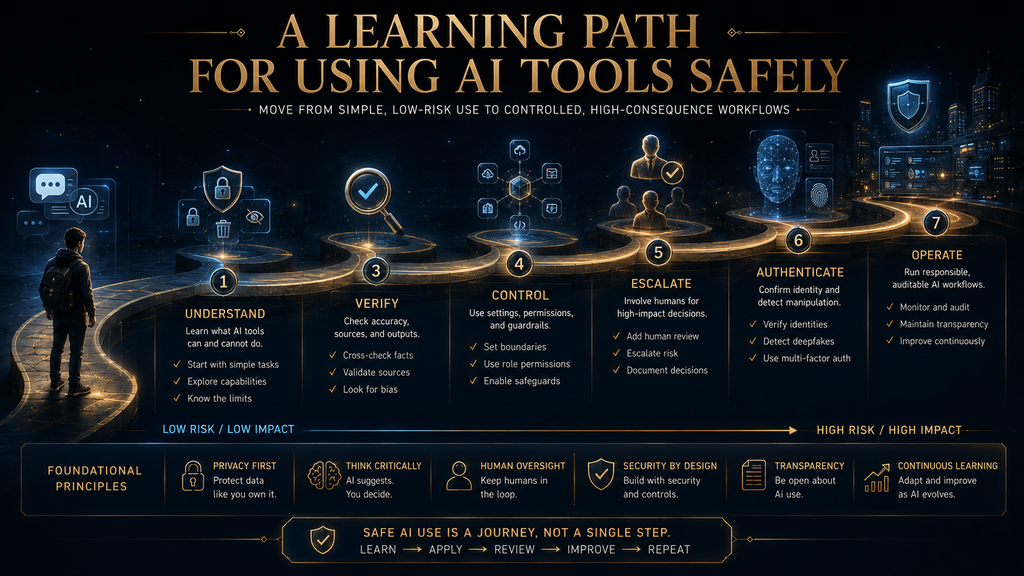
A Seven-Step Learning Order
If you are starting from scratch, do not try to master every risk at once. Learn in a sensible order, because each step builds on the one before. There is little value in studying agent security while still pasting passwords into a chatbot, and someone who understands privacy perfectly but trusts every answer is still missing a major skill.
- Understand: what generative AI is, why it helps and why it can be wrong.
- Minimize: what information to share and what to keep back.
- Verify: how to tell a useful answer from a checked claim.
- Control: what files, apps and accounts a tool can reach.
- Escalate: when a task needs stronger human oversight.
- Authenticate: how to question suspicious voices, images and urgent requests.
- Operate: how to turn these habits into a repeatable routine.
Spend a week or two on each step if you are new to AI, practicing on low-stakes tasks before moving on. Writing better prompts helps at every stage, because clear instructions reduce errors from the start. Our guide to prompts for accurate and reliable answers is a good companion to steps one and three. There is no exam at the end, only better habits.
AI Safety Is a Decision Skill
Much beginner content on AI safety stops at warnings. That approach produces fear, and fear leads to avoidance rather than competence. The better goal is calibration: being able to look at a task and quickly judge how much care it needs, then applying exactly that much care without overthinking the easy cases.
A calibrated user notices when a task is low risk and lets AI do most of it. They notice when sensitive data is involved and trim the input. They notice when an answer drives an important decision and look for independent evidence. They notice when a tool can reach an account and check its permissions before going further.
They also notice when a message asks for money in a familiar voice and verify the person separately, and when an action cannot be undone and keep the final approval for themselves. None of these reactions requires expertise. Each is a quick recognition followed by a simple habit, and together they make up what safe AI use looks like in daily life.
What Changes as AI Becomes More Agentic
The next phase of AI safety will focus less on whether an AI can produce a good answer and more on what it is allowed to do. Today’s question is usually “can I trust this answer?” Increasingly it will be “can I trust this system with my information and the ability to act?” That is a much larger question, and it needs a different kind of care.
An AI agent may need access to several systems to finish one task, and the International AI Safety Report highlights the growing role of agentic systems alongside language and multimodal models. Our guide to how AI agents use tools explains how one request can involve many separate actions behind the scenes. Each extra connection adds convenience and another place where something can go wrong.
A future-proof rule follows. The more autonomy you give an AI, the more carefully you should control its access, watch its actions and define when it must stop and ask you. That principle will remain useful as product names and interfaces change. It also applies to memory features, which our guide to how AI memory works explains.
Common Mistakes People Make When Using AI
Most safety problems come from a handful of habits. The first is treating privacy settings as permission to share anything. A setting can limit certain uses of data, but it does not turn sensitive information into harmless information. The second is trusting polished language, because a confident, well-formatted answer can still contain errors.
- Over-granting access: connecting a whole drive when one document would do.
- Connecting everything for convenience: each integration widens what can go wrong.
- Letting AI act irreversibly: drafting is not sending, and recommending is not executing.
- Trusting a familiar voice or image: verify identity outside the original channel.
- Forgetting other people’s privacy: access to data is not permission to share it.
- Treating AI as a professional: it can prepare questions, not replace expert judgment.
- Manufacturing evidence: never use AI to fake experiences, reviews or credentials.
- Chasing maximum automation: useful automation keeps a clear decision boundary.
Each of these mistakes is easy to fix once you notice it. Pick the one or two that match your own habits and change them first. Small, specific improvements stick better than a long list of resolutions, and they make the remaining stages of this learning path feel natural rather than forced. Revisit the list after a month to see which habits have changed.
How We Researched This Guide
This guide is based on official documentation and published sources, not hands-on security testing. In October 2026 we reviewed the European Commission’s AI literacy page, OpenAI’s Temporary Chat FAQ, Google’s Gemini Apps Privacy Hub, Anthropic’s consumer privacy article on model training, and NIST’s Generative AI Profile.
We also reviewed the International AI Safety Report 2026, the FTC’s consumer alert on AI-enhanced family emergency scams, the FTC’s August 2024 final rule on fake reviews and UNESCO’s AI competency framework for students. Provider settings and retention periods are quoted as published at the time of checking and may change. The Four AI Safety Gates and the AI Risk Ladder are AI Hustle World frameworks.
Final Thoughts
Safe AI use is not a permanent list of things you are forbidden to do. It is a skill that improves as you understand the link between information, access, output and consequence. Start by learning what AI can and cannot guarantee. Then minimize what you share, build a habit of checking important claims and understand what connected tools can reach.
Keep a person involved when actions become consequential, verify identity when voices or images could be faked, and never confuse the convenience of automation with a reason to give up your judgment. The Four AI Safety Gates hold it together: what am I giving AI, what can it see or do, what am I about to trust, and what happens if it is wrong?
If you can answer those four questions consistently, you do not need to memorize every new risk that appears next year. You will have the underlying skill. That is the goal of AI literacy: not fear and not blind trust, but the competence to know when to use AI, when to check it, when to limit it and when to take the decision back yourself.
Build Better AI Habits
Safe use starts with checking what AI tells you, so learn a practical framework for verifying it.
Learn to Verify AI Information →Frequently Asked Questions
Is it safe to use AI tools every day?
Yes, for many ordinary tasks, if you manage what you share, what the tool can access and how much you rely on its answers. Uncritical use is the bigger risk, not daily use.
What should I never share with an AI tool?
Avoid sharing passwords, one-time codes, API keys, full card or bank details and government ID numbers. Think carefully before sharing medical, legal or confidential work material.
Does turning off AI training make my chats private?
No. It limits one use of your data, but providers may still process and keep chats for safety or legal reasons. OpenAI, for example, may keep temporary chats for up to 30 days.
Can I trust AI answers that include sources?
Not automatically. Open the sources that matter and confirm they are authoritative, current and support the specific claim the AI made.
Should I use AI for medical or legal questions?
Use it to learn terms and prepare questions, not as the final decision-maker. Providers such as Google warn against relying on their AI for professional medical, legal or financial advice.
How can I tell if a voice message is a deepfake?
Often you cannot tell from the audio alone. If a call involves money, passwords or urgency, hang up and contact the person on a number you already know is theirs.
Is it safe to connect AI to Gmail, Drive or other apps?
It depends on the product, permissions and data involved. Check what the connection can read and do, start with the least access needed, and know how to revoke it.
Can AI write reviews for me?
AI can help you edit a genuine review of your own experience. It should never invent experiences or testimonials, and the FTC’s rule on fake reviews covers AI-generated fakes.
Should I avoid AI completely if I am worried about safety?
No. Avoidance is not literacy. Use AI freely for low-risk, reversible tasks, and add checking, access limits and human approval as the stakes rise.
What is the most important AI safety habit?
Before any task that matters, ask four questions: what am I giving it, what can it access or do, what am I about to trust, and what happens if it is wrong?
Sources and Further Reading
- European Commission: AI talent, skills and literacy
- NIST: Generative Artificial Intelligence Profile
- International AI Safety Report 2026
- Google: Gemini Apps Privacy Hub
- FTC: Scammers use AI to enhance their family emergency schemes
Related Guides
- How to Verify AI Information: A Practical Accuracy Framework
- Understanding AI Privacy Risks Before Sharing Personal Information
- AI Data Retention Explained: What Happens to Your Prompts and Files?
- How to Build an AI Risk Management Framework for Small and Mid-Sized Businesses
Written by
Muntasir Ahmad Chowdhury
Founder, AI Hustle World
Muntasir Ahmad Chowdhury is the Founder of AI Hustle World, an independent publication dedicated to making Artificial Intelligence practical, trustworthy, and easy to understand. He researches AI tools, automation, customer service, productivity, and real-world business applications, helping readers make smarter technology decisions through research-driven, experience-backed content.
Expertise:
AI Tools • AI Automation • AI Customer Service • AI Productivity • Generative AI • AI Workflows
Get Smarter With AI
Enjoyed this guide? Get practical AI tools, tutorials, and honest reviews delivered to your inbox.