Evidence: Documentation reviewed
Last checked: August 2026
What was done: Written from official documentation and the published sources linked in this article. Not hands-on tested.
Files: None
Affiliate links: No
Last updated: August 2026
Creating a presentation has traditionally meant choosing a template, writing the outline, building slides one by one, finding visuals, fixing spacing, and then spending another hour making everything look consistent. AI changes the economics of that process. Modern presentation tools can turn a topic, prompt, document or existing file into a structured deck and then help you rewrite, redesign, add visuals, or refine the presentation.
But there is an important catch: The best AI presentation maker is not necessarily the one that generates the prettiest first draft. What matters is what happens after the first draft. Can you edit it easily?
Can your team collaborate on it? Can you export a genuinely usable PowerPoint? Does it work directly inside PowerPoint or Google Slides?
Can you apply your brand? Can it turn a 30-page report into a coherent story rather than simply splitting paragraphs across slides? Those questions are becoming more important in 2026 because the category has expanded beyond simple “prompt-to-PowerPoint” tools.
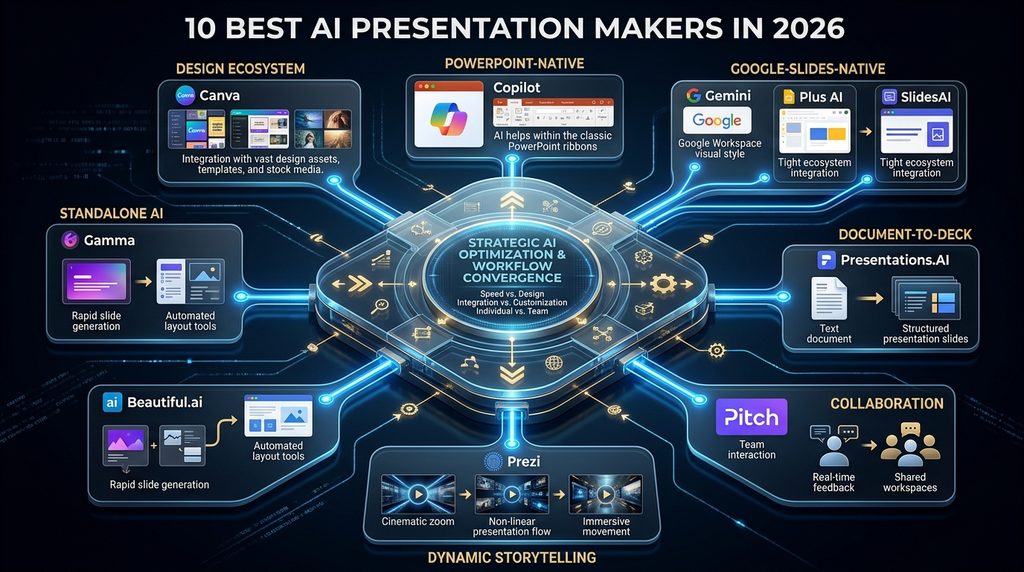
Today, the market includes: standalone AI deck builders, AI inside PowerPoint, AI inside Google Slides, design-first platforms, document-to-deck tools, and presentation collaboration systems with AI built into the workflow. That means the smartest way to compare these tools is by workflow, not by a single leaderboard.
AI Hustle World takeaway: Choose the presentation environment that matches where your content starts, where the final deck must live, and how much editing and control you need after AI generates it.
Quick Answer: The Best AI Presentation Makers by Use Case
| Tool | Best for | Free access | Main reason to choose it |
|---|---|---|---|
| Gamma | Fast standalone AI deck creation | Yes | Excellent prompt-to-deck workflow |
| Canva | Design + presentations | Yes | AI presentation generation plus a huge visual design ecosystem |
| Beautiful.ai | Consistent professional design | Trial | Smart Slides and automatic layout control |
| Microsoft Copilot in PowerPoint | Microsoft 365 users | Plan dependent | AI works directly inside PowerPoint |
| Gemini in Google Slides | Google Workspace users | Plan dependent | Native editable presentations inside Google Slides |
| Plus AI | AI inside PowerPoint/Google Slides | Trial | Adds AI while keeping the native slide environment |
| SlidesAI | Text/document-to-slide workflows | Yes | Works across Google Slides, PowerPoint, web and ChatGPT |
| Pitch | Collaborative team presentations | Yes | AI + collaboration + sharing/analytics |
| Presentations.AI | AI-first deck generation and tracking | Yes | AI generation, PowerPoint export, branding and analytics |
| Prezi AI | Dynamic storytelling | Trial/free entry | AI-generated narrative presentation with Prezi’s visual format |
There is no universal #1. Gamma is the strongest starting point when speed from idea to deck matters. PowerPoint Copilot is often the better choice when your organization already works in PowerPoint.
Gemini in Google Slides makes more sense when Google Slides is the existing workspace. Beautiful.ai is particularly compelling when visual consistency matters.
Canva becomes attractive when presentations are only one part of a larger design workflow. And SlidesAI or Plus AI can make sense when you want AI without leaving the presentation software you already know.
What Actually Makes an AI Presentation Maker Good?
A presentation tool should be judged by more than the quality of its first generated slide. A practical evaluation has seven dimensions.
1. Starting point
What can you give the system?
- Prompt?
- Notes?
- PDF?
- Word document?
- Existing deck?
The more useful your starting material is, the more important source handling becomes.
2. Story generation
Does the AI understand the purpose of the presentation? A useful deck has: setup → problem → evidence → insight → recommendation → next step. A tool that simply turns every paragraph into a separate slide may create more slides without creating a better presentation.
3. Visual structure
Does the layout adapt to the content?
This is where presentation-specific systems such as Beautiful.ai become interesting because Smart Slides are designed to adapt layouts as content changes. Beautiful.ai currently lists more than 300 Smart Slide layouts, automatic formatting, custom branding and AI presentation generation.
4. Editability
A generated deck is only a draft. You need to be able to:
- rewrite text
- move elements
- replace images
- adjust charts
- change structure
- apply branding.
5. Final-file quality
This may be the most underrated criterion. If the deck ends up as: PDF → finished the requirement is different from:
PPTX → client edits it tomorrow. Some tools are excellent web presentation environments. Others are better when the final deliverable needs to remain a native PowerPoint or Google Slides file.
6. Workflow integration
Where does the AI live?
- Inside PowerPoint?
- Inside Google Slides?
- Inside Canva?
- Inside a separate web app?
Integration can matter more than a slightly better generation model.
7. Economics
The real cost is: subscription + AI credits + editing time + export friction + learning curve. A cheap tool that requires hours of cleanup is not necessarily cheaper.
The AI Presentation Workflow Matrix
This is the first original AI Hustle World framework for the article.
Layer 1 — Starting Point
Prompt → Notes → Document → PDF → Existing Deck
Layer 2 — Generation
Outline → Content → Visuals → Layout
Layer 3 — Editing
Web editor → Google Slides → PowerPoint → Design suite
Layer 4 — Final Deliverable
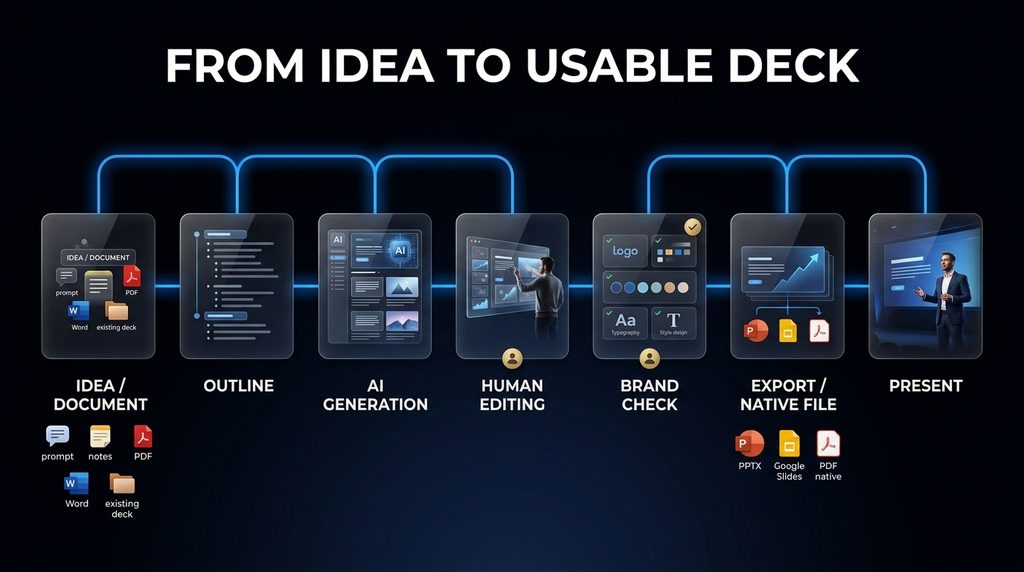
Web link → PDF → PPTX → Native editable deck. The winning tool is the one that minimizes friction across the entire chain.
1. Gamma — Best Overall Standalone AI Presentation Maker
Best for: People who want to go from an idea or outline to a polished presentation quickly without starting inside PowerPoint. Gamma is one of the strongest standalone AI presentation environments because the product is built around rapid generation rather than treating AI as a small feature inside an existing slide editor.
Its current free plan includes up to 10 slides per prompt, PDF/PPTX import, and export to PDF, PPTX, PNG and Google Slides. Paid tiers add higher generation limits, branding controls, advanced AI models, analytics, custom domains, API access and additional customization.
Current 2026 pricing references place Gamma’s paid entry around $10/month for Plus and $20/month for Pro, with lower effective annual rates; verify the live checkout because plan structures can change.
Why Gamma stands out
Gamma’s biggest advantage is speed to first usable deck. You can begin with:
“Create a 12-slide presentation explaining how AI is changing small business operations.”
Instead of spending the first hour selecting layouts, you get a structured starting point. That changes where your time goes. You spend less time assembling slides and more time editing the story.
Where Gamma is especially strong
- pitch decks
- business presentations
- internal briefings
- educational decks
- visual explainers
- fast first drafts
- web-shared presentations.
Its free tier is also unusually useful for experimentation because it allows basic presentation creation and export before you decide whether you need more capacity.
The limitation
Gamma is still a web-native presentation environment. That means the workflow is excellent when your goal is: generate → refine → share/export. But if the client expects a highly structured native PowerPoint file that another team will heavily edit, you should compare Gamma with PowerPoint-native options.
Best fit
Solo creators, consultants, marketers, educators and founders who care most about speed.
AI Hustle World verdict
Best starting point for most people who want standalone AI-first presentation generation.
2. Canva — Best for Presentations Plus a Full Design Ecosystem
Best for: Marketers, small businesses, creators and non-designers who need presentations and other visual assets.
Canva’s Magic Design for Presentations can generate a presentation from a prompt with an outline, content and layout, then let you refine the deck within Canva’s wider design environment. Canva also supports collaboration, AI writing, presenter notes, media creation and branding workflows.
Magic Design is currently available for limited free use, with Canva saying users can use the feature up to 10 times for free and access more through Canva Pro.
Why Canva is different
Canva isn’t really just an AI presentation maker. It is a visual production platform. That means the presentation can become: presentation → social graphic → infographic → video → PDF → promotional asset without changing environments.
For a small business, that can be a major advantage. A presentation is often not the final asset. It is the source material for a marketing campaign.
Strong use cases
- sales presentations
- marketing decks
- social presentations
- webinars
- business plans
- training material
- visual reports.
Canva also supports presenter notes, Magic Write and translation workflows inside its presentation environment.
The limitation
Canva gives you enormous creative freedom. That can be an advantage.
It can also become a disadvantage when you need highly disciplined presentation structure. A tool that gives you every design option can make it easier to overdesign a deck.
Best fit
Small businesses, marketers and creators who need presentations as part of a larger visual-content operation.
AI Hustle World verdict
Best when your presentation is only one piece of a broader design workflow.
3. Beautiful.ai — Best for Consistent Professional Design
Best for: Business users who care about consistent layouts, branding and presentation polish. Beautiful.ai takes a different approach. Instead of giving you maximum manual freedom immediately, it uses Smart Slides that adapt to your content.
Its current Pro plan is $12/month when billed annually. Teams are currently $40 per user/month annually. Pro includes unlimited AI content generation, custom branding, Smart Slides, over 300 Smart Slide layouts, dynamic visualizations, and editable PowerPoint export.
Beautiful.ai currently offers a 14-day free trial rather than a permanent free plan.
Why this matters
One of the biggest problems with presentations is not generating slide five. It is keeping slide five consistent with slides one through four. A title becomes too long.
A chart changes. A bullet list grows. A new image is added.
Suddenly the layout breaks. Smart Slides are designed to automatically adapt to content changes.
Strong use cases
- corporate decks
- sales presentations
- recurring reports
- client presentations
- team decks
- branded presentations.
The limitation
Beautiful.ai’s design guardrails are a feature and a constraint. If you want complete creative freedom, a more open editor may be better.
Best fit
Teams and professionals where consistency matters more than unlimited design freedom.
AI Hustle World verdict
One of the strongest choices when “polished and consistent” matters more than “infinitely customizable.”
4. Microsoft Copilot in PowerPoint — Best for PowerPoint-First Organizations
Best for: Businesses that already create and edit presentations in Microsoft PowerPoint. This is one of the most strategically important options in 2026. Copilot does not force you to leave PowerPoint.
Microsoft’s current PowerPoint documentation says Copilot can create presentations from prompts or files, generate an outline, produce slides, and then continue editing and refining them directly inside PowerPoint. It can also add slides, reorganize sections, improve slide flow, create visuals, summarize decks and help adapt presentations for different audiences.
Why native matters
Consider the real workflow of a corporate presentation. You already have:
- a PowerPoint template
- company fonts
- charts
- previous slides
- speaker notes
- brand assets
- an approval process.
Moving out of PowerPoint to generate a deck and then importing it back can create unnecessary friction. Copilot works inside the environment where the final deck already lives. Microsoft also supports using an organization’s presentation template as the starting point so Copilot can preserve the existing theme and design.
Another important 2026 development
Microsoft now supports selecting different AI models while editing with Copilot in PowerPoint, including models from OpenAI and Anthropic, depending on licensing and availability. That means the product is increasingly functioning as an AI orchestration layer inside PowerPoint, not just a single presentation model.
The limitation
You need the appropriate Microsoft 365/Copilot licensing and configuration. The experience can therefore make more sense for organizations already invested in Microsoft 365 than for a solo creator who simply wants a quick AI deck.
Best fit
Microsoft 365 businesses, enterprise teams and PowerPoint-heavy workflows.
AI Hustle World verdict
Best choice when PowerPoint is already the company’s presentation operating system.
5. Gemini in Google Slides — Best for Google Workspace Users
Best for: Teams that live in Google Slides, Drive and other Google Workspace tools.
Gemini in Google Slides can now generate fully editable presentations from prompts and reference files. Google says users can describe their topic and goals, provide reference material, refine the conversation and then generate slides.
Gemini can also generate and edit individual slides, reuse an existing presentation’s visual style, and work from Google Drive references. Google’s July 2026 product announcement specifically highlights the ability to generate on-brand presentations inside Google Slides.
Why this is strategically strong
Again, the biggest advantage is not necessarily the model. It is: AI + native workspace + existing files. A business can have its:
- research
- reports
- spreadsheets
- previous presentations
- reference documents
already inside Google. That reduces context switching.
Strong use cases
- internal business presentations
- team reporting
- client decks
- educational presentations
- marketing reports
- Google Workspace workflows.
The limitation
The feature requires an eligible Google Workspace or Google AI plan, and some presentation-generation capabilities are still rolling out. Google’s documentation also notes desktop/English availability for some current features.
Best fit
Google-first individuals and organizations.
AI Hustle World verdict
Best option when your presentation workflow already lives in Google Slides.
6. Plus AI — Best AI Layer for Existing PowerPoint and Google Slides Workflows
Best for: People who want AI presentation generation without abandoning the tools they already know. Plus AI operates directly in Google Slides and PowerPoint.
Its current Basic plan is $10 per user/month when billed annually or $15 monthly, with a 7-day free trial and 1,500 AI credits per month. It can create presentations, insert single slides, rewrite content and remix layouts.
Why Plus AI is different from Gamma
Gamma says:
“Come build presentations in our AI-first environment.”
Plus AI says:
“Keep building presentations where you already work.”
That distinction matters. If your organization already uses PowerPoint and doesn’t want a separate presentation platform, Plus AI can be a more natural fit.
Strong use cases
- existing PowerPoint workflows
- Google Slides teams
- consultants
- sales teams
- users who need AI rewriting of existing slides
- users who want AI-assisted deck creation without a platform migration.
Limitation
If you want a complete AI-native presentation environment with broader design and web-presentation features, Gamma or Canva may provide a richer experience.
Best fit
Existing PowerPoint/Google Slides users who want AI added to the workflow rather than replacing it.
AI Hustle World verdict
A strong bridge between traditional presentation software and AI generation.
7. SlidesAI — Best for Turning Text and Documents Into Slides
Best for: Students, educators, consultants and professionals who start with notes, documents, PDFs or scripts. SlidesAI is especially interesting because it treats text-to-presentation conversion as the main workflow.
Its current free plan gives 12 presentations per year, with a 2,500-character input limit per presentation. Pro is $10/month when billed annually, while Premium is $20.83/month annually. The platform supports document upload and works across Google Slides, PowerPoint, web and ChatGPT.
Why this is useful
Imagine you already have: a 20-page report. You don’t need another AI writer. You need: report → presentation.
That’s the workflow. SlidesAI is explicitly built around turning prompts, notes, documents, PDFs and other text into presentations.
Strong use cases
- reports
- academic work
- meeting notes
- articles
- research documents
- business briefs
- PDF-to-slide conversion.
A useful distinction
Gamma is excellent when the presentation begins with a creative brief. SlidesAI becomes particularly attractive when the presentation begins with existing source material. That’s an important buyer distinction.
Limitation
If the deck is primarily about high-end visual storytelling, you may prefer a more design-focused platform.
Best fit
Document-heavy users who want to convert existing information into a presentation quickly.
AI Hustle World verdict
One of the most practical choices when your starting point is already written content.
8. Pitch — Best for Collaborative Presentation Teams
Best for: Teams that need presentation creation, collaboration, sharing and analytics. Pitch is no longer just a collaborative slide editor. Its current product includes Pitch Agent, which can create new presentations from prompts, uploaded files and templates, as well as edit existing decks.
Pitch also uses an AI-credit system, with free users getting a one-time 100-credit allocation and paid tiers receiving recurring credits; additional credits can be purchased. Current pricing includes:
Free: $0
Plus: $15/month or $13/month annually
Team: $23/user/month or $19 annually
Business: $30/user/month or $25 annually.
Why Pitch is compelling
Presentation work often isn’t an individual task. It is: writer + designer + manager + reviewer + salesperson. Pitch emphasizes:
- shared workspaces
- templates
- guests
- collaboration
- analytics
- branded sharing
- presentation rooms.
That makes it a more complete business presentation environment than a simple AI generator.
The limitation
If you’re making one deck every few months, the collaboration features may not justify the subscription.
Best fit
Sales teams, agencies, startups and teams that use presentations as an ongoing business communication channel.
AI Hustle World verdict
Best when a presentation is a collaborative business asset rather than a one-off file.
9. Presentations.AI — Best for AI-First Deck Generation and Tracking
Best for: Users who want an AI-first presentation environment with PowerPoint export, branding and presentation analytics. Presentations.AI currently offers:
- Starter — Free
- Pro — $20/month billed annually
Gold — $100/month billed annually.
The Pro tier currently includes 5,000 credits, advanced AI features, high-quality PowerPoint export, presentation tracking/analytics and brand customization. Gold adds higher credit allowances, frontier AI models, advanced branding and shared knowledge capabilities.
Why this matters
Presentations.AI is moving beyond: “Generate a slide deck.” toward: “Generate, distribute and understand how the presentation performs.” That can be especially relevant for sales and business presentations.
Strong use cases
- client decks
- sales presentations
- recurring business decks
- presentations where viewer engagement matters
- branded presentations.
Limitation
The higher-tier pricing makes less sense for casual users. And when your team already has a strong presentation environment in PowerPoint or Google Slides, moving platforms may introduce unnecessary workflow friction.
Best fit
Sales and business teams that care about both deck creation and downstream presentation analytics.
AI Hustle World verdict
Worth considering when presentation performance matters as much as presentation creation.
10. Prezi AI — Best for Dynamic, Story-Driven Presentations
Best for: Presenters who want a more dynamic visual storytelling format than standard slide-by-slide decks.
Prezi AI can start from a prompt or uploaded PPTX, PDF or DOCX file, generate an outline, create the presentation, and then let you refine it. It supports AI image generation, PDF/PPT export and Prezi’s spatial/zooming presentation format.
Prezi’s current plans include:
- Standard — $7/month annually
- Plus — $19/month annually
Premium — $29/month annually with higher tiers providing unlimited AI usage, PowerPoint import, PDF export, offline access and analytics.
Why Prezi remains different
Most presentation tools optimize: slide 1 → slide 2 → slide 3. Prezi can build a more spatial visual story. That can be effective when the subject is:
- a strategy map
- a complex system
- a process
- a hierarchy
- a connected set of ideas.
Current 2026 improvements
Prezi says its 2026 AI workflow can generate presentations quickly from prompts and use a website URL to extract brand colors, fonts and logos. It also added PPTX export improvements.
The limitation
The zooming/spatial format is not ideal for every business deck. If a client expects a conventional PowerPoint document, a more standard slide environment may be safer.
AI Hustle World verdict
Best when storytelling and visual movement are central to the presentation.
Best AI Presentation Maker by Use Case
| Your priority | Best starting choice | Why |
|---|---|---|
| Fastest idea-to-deck workflow | Gamma | AI-first generation |
| Design + other visual assets | Canva | Broader design ecosystem |
| Consistent business design | Beautiful.ai | Smart Slides and brand controls |
| Native PowerPoint | Copilot | Works inside PowerPoint |
| Native Google Slides | Gemini | Works inside Google Slides |
| AI inside existing PPT/Slides | Plus AI | Adds AI without changing platforms |
| Document/PDF → deck | SlidesAI | Strong text-to-slides workflow |
| Team collaboration | Pitch | Collaboration + sharing + analytics |
| Decks + presentation tracking | Presentations.AI | Analytics and AI-first workflow |
| Dynamic visual storytelling | Prezi AI | Spatial presentation format |
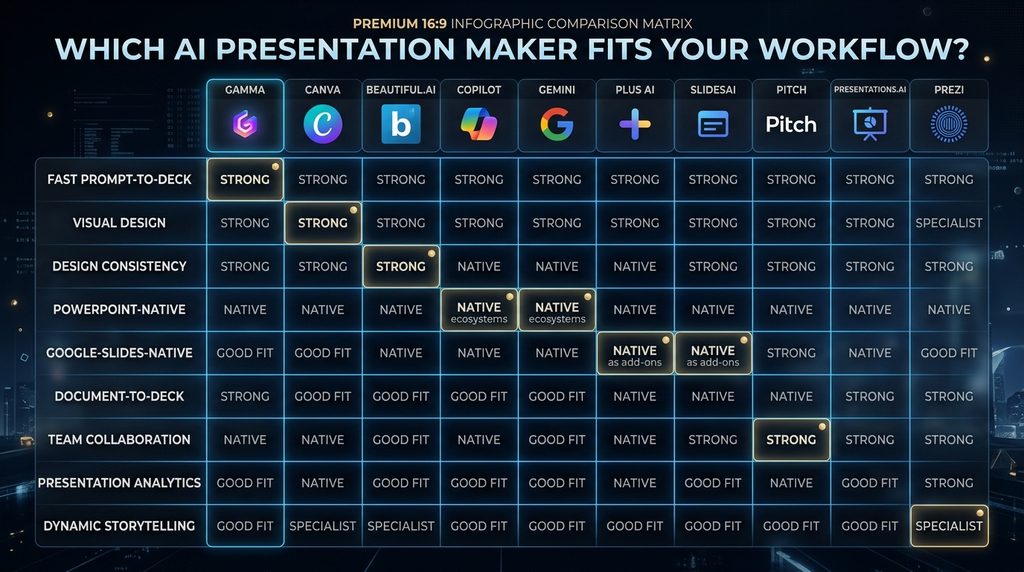
This is the comparison that matters more than a generic “#1–#10” ranking.
Standalone AI Presentation Maker vs Native AI
This is probably the most important purchasing decision in the entire category.
Choose a standalone tool when:
You want:
- fast generation
- an AI-first experience
- modern layouts
- a fresh presentation environment
- minimal manual setup.
Examples:
- Gamma
- Beautiful.ai
- Presentations.AI
- Prezi
Choose native AI when:
Your business already works in: PowerPoint or Google Slides and the final deck needs to remain there. Examples:
- PowerPoint Copilot
- Gemini in Google Slides
- Plus AI
The advantage is less about the first draft. It is about workflow continuity.
Why Export Quality Is a Business Decision
Consider these two situations.
Situation A
You need a PDF tomorrow. A standalone AI presentation tool may be perfect.
Situation B
You send a deck to a client who will:
- change prices
- add charts
- replace images
- modify slides
- send it to another employee.
Now the quality of the underlying editable file matters much more. This is why a “beautiful first draft” should never be the only evaluation criterion.
How to Choose the Right Tool
Use this six-question fit test.
1. Where does your content start?
Prompt? Choose a prompt-first generator. PDF/report?
Choose a document-to-deck tool. Existing PowerPoint? Choose PowerPoint-native or import-friendly tools.
2. Where must the final deck live?
Web? Gamma/Pitch and similar environments can work well. PowerPoint?
Prioritize native PowerPoint workflows or strong PPTX export. Google Slides? Prioritize Gemini or Plus AI/SlidesAI.
3. How much editing will you do?
If the answer is: almost none speed is more important. If the answer is: a lot editing environment and native file structure matter more.
4. How important is branding?
For personal presentations: low. For a company: high.
That makes brand kits, templates, custom fonts and locked styles more valuable. Beautiful.ai, PowerPoint Copilot and Canva all have strong brand-oriented workflows, but they approach them differently.
5. How many people work on the presentation?
One person: A simple tool may be enough.
Team: You should care about:
- collaboration
- permissions
- version history
- templates
- shared assets
- analytics.
Pitch is particularly oriented around those team workflows.
6. What happens after the presentation is created?
This question is often ignored. Do you: publish it? present it live? send it to a client? convert it to a PDF? reuse it as social content? update it every month? Your answer can completely change which product is the best fit.
Free vs Paid: What Are You Really Paying For?
Free plans are useful for learning. Paid plans usually buy one or more of: more AI generation no branding better export brand controls team features analytics higher limits advanced models. The right upgrade depends on your bottleneck.
For example:
Gamma
Free is enough to test the concept; paid tiers expand slide-generation capacity and branding/customization.
Beautiful.ai
The current Pro tier is $12/month billed annually and includes unlimited AI content generation, Smart Slides, custom branding and PowerPoint export.
Plus AI
The Basic plan starts at $10/user/month annually and includes 1,500 AI credits/month across Google Slides and PowerPoint.
SlidesAI
The free plan is limited to 12 presentations/year, while Pro starts at $10/month annually and Premium at $20.83/month annually.
Pitch
The free tier includes unlimited presentations and a one-time 100 AI-credit allowance, while paid tiers add recurring credits and more professional sharing/collaboration features.
Presentations.AI
Starter is free; Pro is $20/month billed annually; Gold is $100/month billed annually.
Prezi
Standard starts at $7/month annually, with Plus at $19 and Premium at $29; higher plans include unlimited AI presentation generation.
The Real Cost of an AI Presentation Tool
Don’t compare only subscription prices. Use this model: Total presentation cost = software cost + editing time + correction time + export friction + collaboration cost. Suppose: Tool A = $10/month but every deck requires: 60 minutes of cleanup.
And: Tool B = $20/month but needs only: 20 minutes of cleanup. If you make 12 presentations a month, Tool B could save: 40 minutes × 12 = 480 minutes. That’s 8 hours.
The extra $10 may be irrelevant compared with the value of those eight hours. This is why presentation software should be evaluated on cost per usable deck, not only monthly subscription price.
The First Draft Is Not the Presentation
This is perhaps the most important operating rule. AI can produce: a starting deck much faster than a human can manually build one. But the final presentation still needs:
- factual checking
- audience adaptation
- narrative refinement
- visual hierarchy
- brand consistency
- speaker judgment.
Microsoft’s own documentation explicitly says AI-generated presentations should be human-reviewed and edited. That’s not a weakness unique to Microsoft. It is a characteristic of the category.
Common AI Presentation Mistakes
1. Asking AI to “make a presentation” and publishing it unchanged
The first draft is rarely the final message.
2. Putting paragraphs on slides
A presentation is not a report exported horizontally.
3. Overloading slides
The AI may generate too much text because the source material is too dense.
4. Ignoring the audience
An investor deck, classroom deck and internal operations deck have different communication requirements.
5. Choosing a tool before choosing a destination
If you need PowerPoint, think about PowerPoint early.
6. Ignoring branding until the end
Brand controls are easier to apply when the system knows the visual language from the start.
7. Comparing only visual beauty
A stunning deck that cannot be edited cleanly may become a bad business tool.
8. Forgetting source verification
AI-generated numbers, claims and charts still need checking.
9. Regenerating everything when one slide is wrong
Good workflows allow targeted editing.
10. Buying the most expensive plan before testing the workflow
Start with the smallest useful tier.
Why Traditional Presentation Software Still Exists
If AI can generate slides in seconds, why do PowerPoint and Google Slides still matter? Because presentation software is not only an authoring tool. It is also:
- a file format
- a collaboration environment
- a brand system
- an approval workflow
- a corporate record
- a presentation surface.
That’s why native AI inside PowerPoint and Google Slides is strategically important. AI is not necessarily replacing the presentation environment.
In many cases, it is becoming a layer inside it. That is a major direction for the category.
What Happens If You Keep Building Slides the Old Way?
Nothing catastrophic happens. You can still make excellent presentations manually. The cost is mainly: time.
A team may continue spending hours on:
- outline creation
- slide formatting
- finding visuals
- rewriting
- layout adjustments.
AI can reduce those repetitive steps. But the biggest potential advantage is not: “I can make 20 slides in one click.” It is:
“I can spend more of my time deciding what the audience needs to understand.”
That is the deeper productivity gain.
The Second-Order Effect: When Slides Become Cheap, Storytelling Matters More
AI is making slide production cheaper. That changes what is valuable. The scarce skill becomes: choosing the right story.
You can generate ten decks. That does not tell you:
- which argument matters
- what the audience should remember
- which evidence is convincing
- which slide should come first
- what should be removed.
As production becomes cheap, editorial judgment becomes relatively more valuable. That is why AI should take more responsibility for: layout + formatting + repetition while humans retain responsibility for: message + evidence + judgment + audience understanding.
A Practical 30-Minute AI Presentation Workflow
For a typical business deck:
0–5 minutes
Define: audience + objective + desired outcome.
5–10 minutes
Provide: brief + source material + constraints.
10–15 minutes
Generate: outline + first draft.
15–20 minutes
Remove: repetition + weak slides + excess text.
20–25 minutes
Fix: brand + visuals + charts + hierarchy.
25–30 minutes
Verify: facts + numbers + export + final flow. This is a much more realistic workflow than: “Prompt → magic deck → done.”
Which AI Presentation Maker Should You Choose?
Choose Gamma
When speed and standalone AI generation matter most.
Choose Canva
When you need presentations plus a broader visual-content ecosystem.
Choose Beautiful.ai
When consistent professional design matters most.
Choose PowerPoint Copilot
When your company lives inside Microsoft 365.
Choose Gemini in Google Slides
When your team lives inside Google Workspace.
Choose Plus AI
When you want AI without leaving PowerPoint or Google Slides.
Choose SlidesAI
When you start from documents, notes, PDFs or scripts.
Choose Pitch
When presentation collaboration and sharing are central.
Choose Presentations.AI
When presentation analytics and AI-first deck generation matter.
Choose Prezi AI
When dynamic visual storytelling is more important than traditional slide structure.
Final Decision Matrix
| Your situation | Best starting point |
|---|---|
| “I have an idea and need a deck fast.” | Gamma |
| “I need decks plus marketing designs.” | Canva |
| “Our slides need to stay polished and consistent.” | Beautiful.ai |
| “Everyone on our team uses PowerPoint.” | Copilot |
| “We live in Google Slides.” | Gemini |
| “We want AI inside our existing slide tool.” | Plus AI |
| “I have reports/PDFs and need decks.” | SlidesAI |
| “Several people create and review decks.” | Pitch |
| “We care about presentation engagement analytics.” | Presentations.AI |
| “We need a more dynamic visual story.” | Prezi AI |
Final Thoughts
AI presentation software is no longer one category. It is becoming a collection of different workflows. Gamma is built for speed.
Canva is built for visual versatility. Beautiful.ai is built for consistency. PowerPoint Copilot is built around Microsoft’s presentation environment.
Gemini in Google Slides is built around Google’s environment. Plus AI brings AI into existing PowerPoint and Google Slides workflows. SlidesAI is particularly useful when the starting point is written content.
Pitch is stronger when collaboration and sharing matter. Presentations.AI adds analytics to an AI-first deck workflow. Prezi AI is compelling when storytelling needs a more dynamic visual format.
The biggest mistake is choosing based on which demo looks coolest. Choose based on the actual workflow:
- Where does your content start?
- Where must the final deck live?
- How much editing will the human do?
- How important is branding?
- How important is collaboration?
- How much will the tool save in real production time?
That’s the difference between buying an AI toy and adopting an AI workflow. Your goal is not to create slides faster for their own sake. Your goal is to spend less time fighting formatting and more time deciding what your audience should understand, remember, and do next.
The best AI presentation maker is not the one that builds your slides fastest. It is the one that removes the most friction between your idea and the presentation your audience actually needs.
Ready to Build Better Presentations With AI?
Start with your workflow, not the tool. Decide where your content begins, where the final deck must live, and how much human editing you need—then choose the AI presentation maker that removes the most friction.
Compare AI Productivity Tools →Frequently Asked Questions
What is the best AI presentation maker in 2026?
There is no universal winner.
Gamma is a strong standalone AI-first choice. Canva is better when presentation creation is part of a broader design workflow. Beautiful.ai is strong for consistency. PowerPoint Copilot and Gemini are especially compelling when the presentation already lives in Microsoft or Google software.
Is Gamma better than Canva for presentations?
Gamma is generally more focused on rapidly turning an idea into a structured deck. Canva is broader and gives you a much larger visual design environment.
Choose Gamma when presentation generation is the main task. Choose Canva when presentations are part of a wider visual-content workflow.
Is Microsoft Copilot good for PowerPoint?
Yes.
Copilot can create presentations from prompts or source files, add and edit slides, reorganize sections and refine decks directly inside PowerPoint. Microsoft also supports working with existing templates and brand requirements.
Is Gemini good for Google Slides?
Yes. Gemini in Google Slides can generate fully editable presentations from prompts and reference files, and it can generate and edit individual slides.
Is Beautiful.ai free?
It currently offers a 14-day free trial rather than a permanent free plan. Its Pro plan is currently $12/month billed annually.
Can AI presentation makers create PowerPoint files?
Many can. Gamma exports PPTX, Beautiful.ai supports editable PowerPoint export, Plus AI works directly in PowerPoint, SlidesAI generates editable PowerPoint files, Pitch supports PPTX export on paid Plus and above, Presentations.AI supports PowerPoint export, and Prezi supports PPTX export.
What is the best AI presentation maker for PowerPoint?
If you want the AI to work inside PowerPoint, Microsoft Copilot is the most direct choice. Plus AI and SlidesAI are strong alternatives when you want additional AI functionality inside PowerPoint without adopting the full Microsoft Copilot workflow.
What is the best AI presentation maker for Google Slides?
Gemini in Google Slides is the most native option. Plus AI and SlidesAI are strong alternatives if you want a third-party AI layer inside Google Slides.
What is the best free AI presentation maker?
There is no single answer. Gamma, Canva, SlidesAI, Pitch and Presentations.AI all have meaningful free entry points, although their limits differ.
Can AI create a presentation from a PDF?
Yes. Gamma, SlidesAI and Prezi currently support document/file-based presentation workflows, while PowerPoint Copilot can create presentations from source documents and Gemini in Slides supports reference files.
Which AI presentation maker is best for business?
The answer depends on the existing business stack.
- PowerPoint business → Copilot
- Google Workspace → Gemini
- Brand-heavy design → Beautiful.ai/Canva
- Fast standalone creation → Gamma
- Collaborative presentation teams → Pitch
Which AI presentation maker is best for students?
SlidesAI, Canva, Gamma and Google Slides/Gemini are all worth considering. SlidesAI has a free tier and affordable Pro plan, while Canva also provides a low-friction visual-design environment.
Does AI replace presentation designers?
It can automate parts of slide production. It does not automatically replace:
- story development
- art direction
- audience understanding
- data interpretation
- final quality control.
The production layer becomes cheaper. The judgment layer becomes more valuable.
Related Guides
- Best Free AI Tools for Students in 2026: 10 Tools to Study Smarter
- Best AI Email Assistants (Free & Paid): 10 Tools Compared
- Best AI Image Generators in 2026: Free & Paid Tools Compared
- Best AI Meeting Assistants (Free & Paid): 10 Tools Compared
- Best AI PDF Tools (Free & Paid): Top 10 Tools Compared
- Best AI Tools for Creating Social Media Content (Free & Paid)
Written by
Muntasir Ahmad Chowdhury
Founder, AI Hustle World
Muntasir Ahmad Chowdhury is the Founder of AI Hustle World, an independent publication dedicated to making Artificial Intelligence practical, trustworthy, and easy to understand. He researches AI tools, automation, customer service, productivity, and real-world business applications, helping readers make smarter technology decisions through research-driven, experience-backed content.
Expertise:
AI Tools • AI Automation • AI Customer Service • AI Productivity • Generative AI • AI Workflows
Get Smarter With AI
Enjoyed this guide? Get practical AI tools, tutorials, and honest reviews delivered to your inbox.