Evidence: Documentation reviewed
Last checked: August 2026
What was done: Written from official documentation and the published sources linked in this article. Not hands-on tested.
Files: None
Affiliate links: No
Last updated: October 2026
Best AI Email Assistants (Free and Paid): 10 Tools Compared
The best AI email assistant for most people is the one already built into their inbox: Gemini in Gmail for Google users and Microsoft Copilot for Outlook users. Test those first, because they use your existing email, calendar and files without adding another subscription. If they leave a clear gap, a specialist tool can fill it.
Shortwave is the strongest choice for Gmail users who want AI-powered search and organization. Superhuman suits high-volume professionals who value speed, Fyxer suits people who want an assistant that sorts the inbox and drafts replies in their voice, and MailMaestro is a lighter add-on for Gmail or Outlook. Grammarly focuses on writing quality across apps.
For teams, Missive combines shared inboxes with AI drafting and automation rules. Lavender is a specialist for sales email coaching, and Claude is a general assistant that can work with Gmail and other connected apps when email is one part of a wider research or writing workflow. Each tool here has a free plan or free trial, so you can test before paying.
This guide compares the ten tools by the job each does best, with prices checked on each vendor’s site in October 2026. You will also find a W.O.R.T.H. score for every tool, the AI Email Assistant Stack for understanding what these products really do, a safe automation ladder, and a simple plan for testing a tool against your own inbox.
The 10 Best AI Email Assistants at a Glance
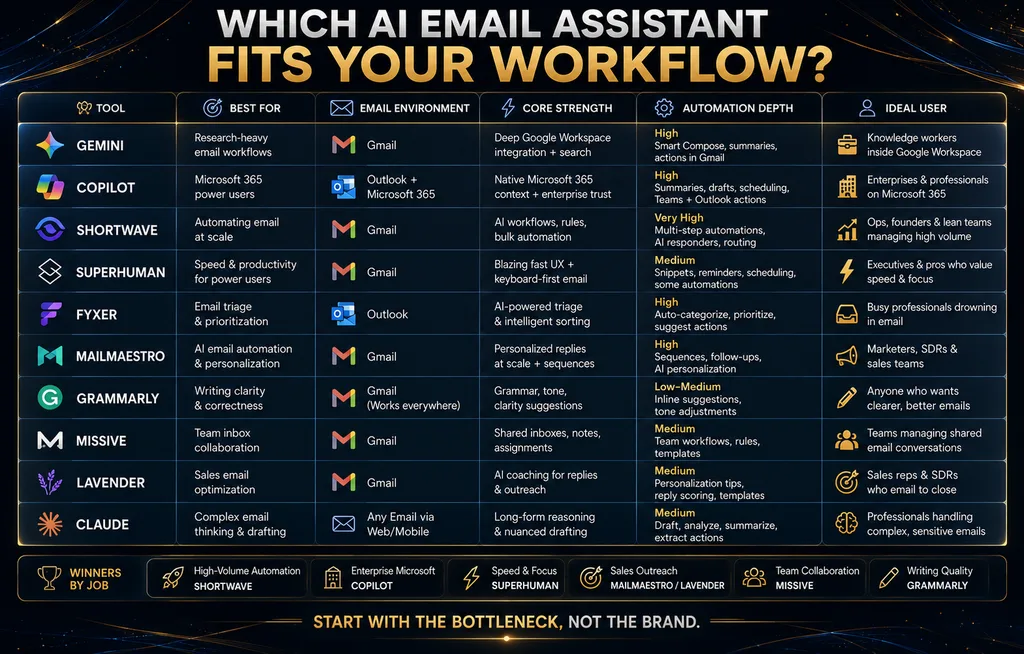
Here is the short version. Prices come from each vendor’s pricing page in October 2026 and change often, so check before you subscribe. “Paid from” shows the lowest per-user monthly price for a plan with meaningful AI features, on annual billing unless noted. Monthly billing usually costs more, and some vendors show region-adjusted prices.
| Tool | Best for | Works with | Free option | Paid from |
|---|---|---|---|---|
| Gemini in Gmail | Google-centered work | Gmail, Workspace | Some features free | $7/user/mo (Workspace Starter) |
| Microsoft Copilot | Outlook and Microsoft 365 | Outlook, Microsoft 365 | Copilot Chat | $18/user/mo add-on (promo) |
| Shortwave | Gmail power users | Gmail | Free plan | $18/seat/mo |
| Superhuman Mail | Speed-focused professionals | Gmail, Outlook | None for Mail | $25/member/mo |
| Fyxer | Inbox sorting and drafts | Gmail, Outlook | Free plan, 14-day trial | $37/person/mo |
| MailMaestro | Lightweight email AI | Gmail, Outlook | 3 AI requests a week | $12/seat/mo |
| Grammarly | Writing quality across apps | Email and most apps | Basic free plan | $12/mo |
| Missive | Team inboxes | Gmail, Outlook, others | 30-day trial | $14/user/mo |
| Lavender | Sales email coaching | Gmail, Outlook | Free extension | Check vendor |
| Claude | Email as part of wider work | Gmail and other connectors | Free plan | $17/mo (Pro) |
Use the table to shortlist two or three tools, then read their sections. The cheapest plan is rarely the best value. What matters is how much repetitive email work the tool removes, how often you have to correct it, and whether its access to your inbox fits your privacy needs. A week of real use tells you more than any feature list.
How We Chose and Compared These Tools
We selected widely used AI email assistants that cover the main needs: native AI inside Gmail and Outlook, AI-first email clients, inbox assistants that sort and draft, lightweight add-ons, writing assistants, team inboxes, sales coaching and general AI assistants with email access. For each, we reviewed the vendor’s pricing and feature pages in October 2026.
This is a documentation-based comparison, not a hands-on test. We did not run the same inbox through every tool or measure draft quality ourselves. Where a feature or price shapes our recommendation, we link to the vendor’s page so you can check current details. None of the links in this article are affiliate links, and no vendor paid for placement or reviewed this guide.
Each tool also gets a W.O.R.T.H. score, an AI Hustle World editorial assessment out of 100. It weighs Workflow fit (25), Output quality (25), Risk and rights (15), Total cost (20) and Human effort saved (15). The scores reflect documented features and pricing for a typical user, so your own priorities may move a tool up or down.
What an AI Email Assistant Does
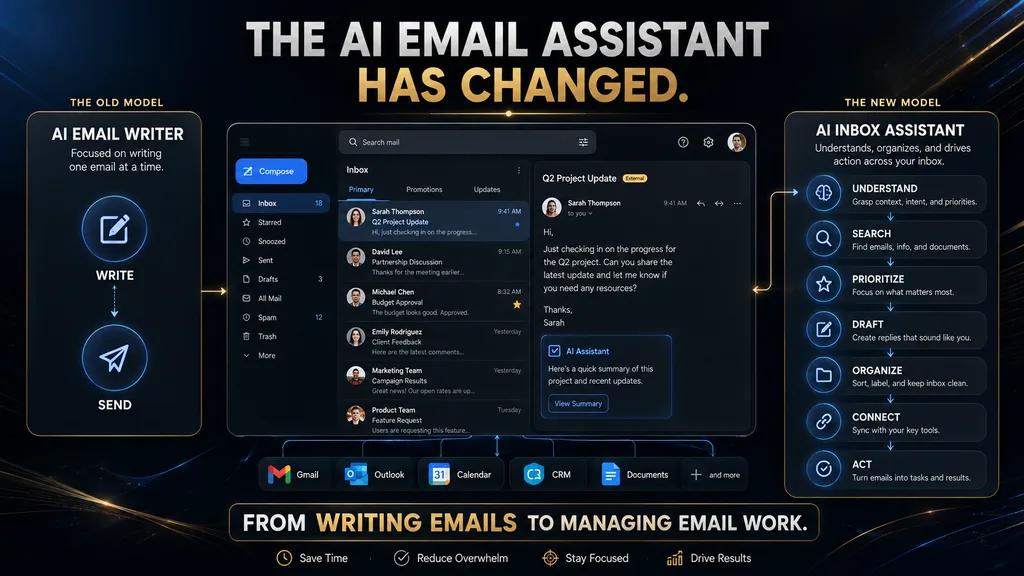
An AI email assistant is software that uses AI to help you write, understand, search, organize, prioritize or automate email work. The simplest tools improve a sentence or draft a reply. More capable ones summarize long threads, pull out action items, search past conversations in plain language, sort the inbox and connect email to calendars, files and business systems.
That breadth matters because “AI email assistant” now covers very different products. Someone who spends 30 minutes every morning writing replies needs a writing assistant. Someone with 400 unread messages needs triage and search. A team sharing a support inbox needs collaboration and routing. Putting all three in one ranking hides the fact that each needs a different tool.
The right question before buying is therefore not “which tool is best?” but “what is my biggest email bottleneck?” Writing, finding information, deciding what matters, coordinating with a team and following up are separate problems. Once you name yours, the shortlist usually shrinks to two or three tools. Our guide to AI productivity tools for beginners takes the same approach.
The AI Email Assistant Stack
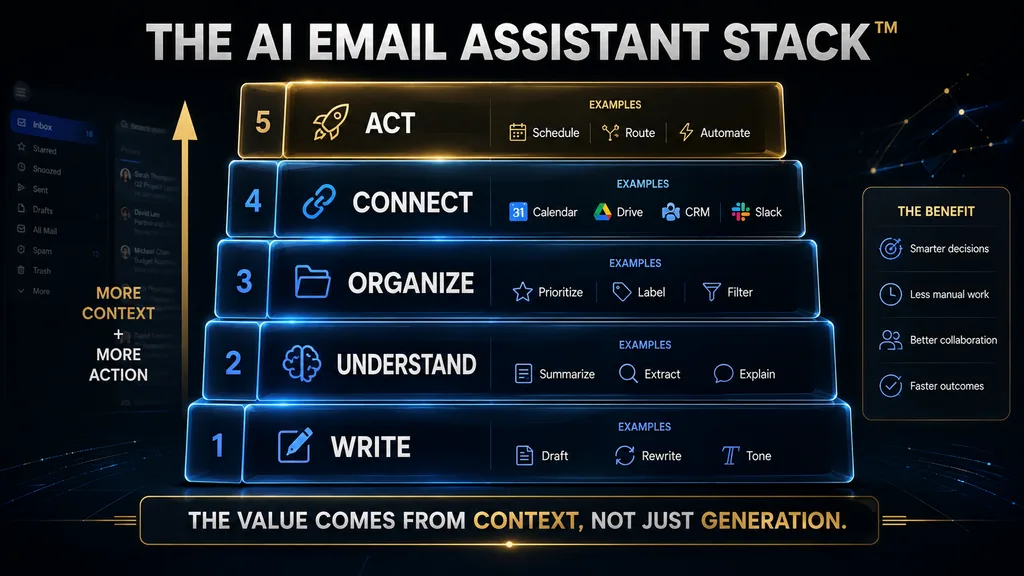
A useful way to compare these products is the AI Email Assistant Stack, an AI Hustle World framework with five layers. Each layer adds value and adds some risk. Most tools are strong in two or three layers and weaker in the rest, which explains why so many people end up combining a native assistant with one specialist.
- Write: draft, rewrite, shorten and adjust tone. The most mature and most commoditized layer.
- Understand: summarize threads, extract action items and answer questions about past email.
- Organize: prioritize, label, archive and filter the inbox.
- Connect: use calendars, files, CRM records and other context beyond the message itself.
- Act: create events, update records, send replies or trigger workflows.
Writing is now table stakes, because almost every serious AI tool can produce a reasonable email. The value increasingly comes from the higher layers. Understanding saves time when volume is high, organizing protects your attention, and connecting removes the need to hunt through other apps for the context a good reply needs.
Acting is where the productivity gains are largest and where human oversight matters most. A bad draft costs you a minute to fix. A bad automated action, such as archiving an important message or sending the wrong commitment to a client, can create a real problem. The higher a tool sits in the stack, the more carefully you should review its permissions and controls.
The Inbox Automation Ladder
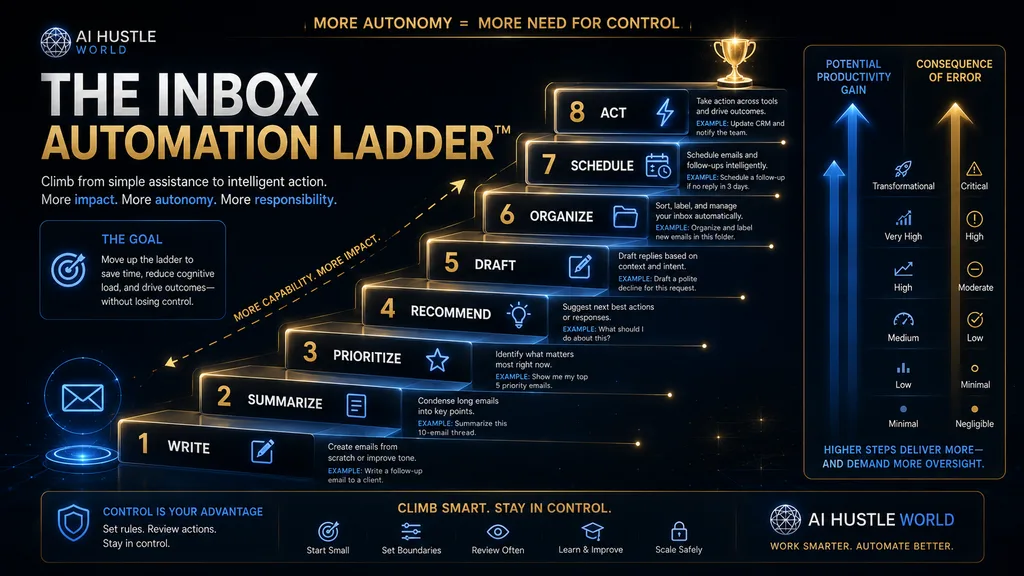
Another way to think about AI email is as a ladder of automation: write, summarize, prioritize, recommend, draft, organize, schedule and finally act. The further up you go, the larger the potential time savings, and the more you need to trust the system’s judgment. Each rung deserves a deliberate decision rather than a default setting.
When AI changes the wording of a sentence, you can review it in seconds. When it decides which messages are important, you are trusting its prioritization. When it archives messages automatically, you need confidence that nothing important disappears from view. When it acts across other systems, the consequences reach beyond your inbox entirely.
So the best AI email workflow is not necessarily the most autonomous one. Useful automation is automation you understand, can review and can undo. Start on the lower rungs, measure the results and climb only when a tool has earned it. Our guide to human-in-the-loop AI explains how to set approval points that people follow in practice.
W.O.R.T.H. Scores for All 10 Tools
The table below summarizes our W.O.R.T.H. scores. Native tools score well on workflow fit and cost for people already in their ecosystems, while specialists score higher on output for their particular job. Scores assume a typical professional user and are editorial judgments based on documented features, not lab measurements.
| Tool | Workflow (25) | Output (25) | Risk (15) | Cost (20) | Effort (15) | Total |
|---|---|---|---|---|---|---|
| Gemini in Gmail | 23 | 19 | 12 | 18 | 12 | 84 |
| Microsoft Copilot | 23 | 19 | 13 | 14 | 12 | 81 |
| Shortwave | 20 | 21 | 11 | 16 | 13 | 81 |
| Fyxer | 19 | 20 | 11 | 12 | 14 | 76 |
| Superhuman Mail | 19 | 20 | 11 | 12 | 13 | 75 |
| Missive | 18 | 18 | 12 | 15 | 12 | 75 |
| MailMaestro | 17 | 17 | 11 | 18 | 11 | 74 |
| Grammarly | 16 | 18 | 12 | 17 | 9 | 72 |
| Claude | 14 | 20 | 11 | 16 | 9 | 70 |
| Lavender | 12 | 19 | 11 | 14 | 10 | 66 |
Treat the totals as a starting point rather than a ranking for everyone. A sales team will rate Lavender far higher than our general score suggests, and a support team will rate Missive higher. If one category matters most to you, such as privacy or cost, re-weight that column and see how the order changes. The individual tool sections below explain each score in more detail.
1. Gemini in Gmail: Best for Google-Centered Work
If Gmail is the center of your working day, Gemini in Gmail is the first assistant to evaluate. Google’s Gemini in Gmail help page lists features such as AI Inbox for reviewing top priorities, AI Overview summaries of long conversations, AI Overview answers in Gmail search and Gmail Live for asking questions about your email by voice.
Availability depends on your account. Google says users with eligible Google AI or Workspace plans can access some features globally, while personal accounts without a paid plan are currently limited to the US for some features. Conversation summaries are available more widely, including on personal accounts in several languages, while AI Inbox is limited to English in the US on paid plans.
On Google’s Workspace pricing page in October 2026, Business Starter listed the Gemini AI assistant in Gmail at $7 per user per month on annual billing, with a temporary discount bringing it lower. Business Standard, at $14 per user per month, extends Gemini across Docs, Meet and other apps. That makes Gemini one of the cheapest ways to get serious AI in a business inbox.
The main advantage is context. Gemini can draw on your email, Drive files and Calendar, so it can help find what you agreed with a client and draft a reply without switching apps. The main limitation is that its value depends on staying inside Google’s ecosystem. Its W.O.R.T.H. score is 84, the highest here, because it suits so many people at low added cost.
2. Microsoft Copilot: Best for Outlook and Microsoft 365
Microsoft Copilot is the natural counterpart to Gemini for organizations built on Microsoft 365. Copilot works inside Outlook alongside Word, Excel, PowerPoint and Teams, so it can summarize long threads, draft replies and help you prepare for meetings using information across your Microsoft environment. For Microsoft-heavy teams, that shared context is the main reason to choose it.
On Microsoft’s Copilot for business page in October 2026, Microsoft 365 Copilot Business was offered as an add-on to Microsoft 365 business plans, listed at $21 per user per month with a promotional price of $18. Microsoft 365 Business Standard with Copilot was listed at $23.50, and Business Premium with Copilot at $32, both per user per month paid yearly.
The licensing takes some care. Free Copilot Chat, Copilot included in certain plans and the paid Copilot add-on offer different features and limits, so check exactly what your current license includes before buying more. Many organizations already have more AI available in Outlook than their staff realize, and a short internal check can save a needless purchase.
Copilot scores 81 on W.O.R.T.H. It matches Gemini on workflow fit for its own users and earns a strong risk score thanks to Microsoft’s enterprise data protection and admin controls. Its cost score is lower because the add-on is a meaningful extra expense for small teams. If you live in Outlook and Teams, it is still the obvious first test.
3. Shortwave: Best for Gmail Power Users
Shortwave is an AI-first email client built on top of Gmail. Instead of adding AI to Gmail’s interface, it replaces that interface with one designed around search, organization and an AI assistant. Its natural-language search is the standout feature: you can describe what you remember about a message instead of guessing exact keywords or the sender’s name.
That matters more than it sounds. If you remember that a customer sent pricing feedback around the time of a product update, a keyword search may fail, while a semantic search can find it from the description alone. Shortwave’s assistant can also summarize threads, draft replies, use AI filters to sort mail and suggest cleanup actions while leaving final decisions with you.
Shortwave’s pricing page in October 2026 listed a Free plan with basic AI, a limited usage quota and 90 days of search history. Pro cost $18 per seat per month with full search history and personalized AI writing. Business plans started at $30 per seat, with Premier at $45 and Max at $120 for heavier AI use, and paid plans offered a 14-day free trial.
The main limitation is that Shortwave suits Gmail users who are happy to switch email clients. If your organization requires Outlook, it is not an option. Its W.O.R.T.H. score is 81, with strong output and workflow scores for Gmail power users. For simple inbox needs, Gemini may be enough; for search-heavy work, Shortwave is the better tool.
4. Superhuman Mail: Best for Speed-Focused Professionals
Superhuman Mail is built around processing email as fast as possible, with keyboard shortcuts, split inboxes and AI features layered on top. It suits executives, founders, investors and salespeople who handle hundreds of messages a day and want each one to take as few keystrokes as possible. Its advantage is the whole workflow, not one AI feature.
Superhuman’s Mail plans page in October 2026 listed Starter at $25 per member per month and Business at $33, both billed annually. Starter includes Superhuman AI, team collaboration and calendar tools. Business adds its most advanced AI, Auto Drafts, Ask AI, a Superhuman Mail MCP connection, custom AI auto labels and HubSpot and Salesforce integrations.
The buying trap is comparing Starter’s $25 with another tool’s fully featured AI plan. If you want Auto Drafts or Ask AI, Business at $33 is the relevant comparison. There is no free tier for Mail, so the decision rests on whether faster processing saves enough time to justify a premium price. For heavy email users, it often does.
Superhuman Mail scores 75 on W.O.R.T.H., with strong output and effort scores offset by cost. It is a premium tool for people whose job is effectively email. If you send a few dozen messages a day, the speed gains will not repay the price, and a native assistant or MailMaestro is a better fit for your budget.
5. Fyxer: Best for Inbox Sorting and Drafts in Your Voice
Fyxer positions itself as an assistant rather than an email client. It works inside Gmail and Outlook, labels incoming email, drafts replies in your tone so they are waiting when you open the inbox, records meetings and keeps a running list of follow-ups. The appeal is less work to think about, not just better wording, which is a bigger promise than most tools make.
Fyxer’s pricing page in October 2026 showed a Free plan and paid plans with a 14-day free trial. Pro cost $37 per person per month billed annually, or $49 monthly, and included drafted replies, automatic labeling, meeting recording and 3,000 credits per member each month after a launch offer. Team cost $64 annually or $99 monthly.
Fyxer is a clear example of drafting rather than sending. Replies are prepared for you to review, which keeps a person in charge of outgoing messages while still removing much of the effort. That is the right balance for most professional email, where one wrong commitment to a client can cost more than many hours of saved typing.
Fyxer scores 76 on W.O.R.T.H. It earns the top effort score because it works in the background, but its cost score is modest at $37 or more per month. It makes sense for busy professionals whose inbox volume justifies the price. If your problem is mostly writing quality rather than volume, a cheaper writing tool will serve you better.
6. MailMaestro: Best Lightweight AI Add-On
MailMaestro is a focused AI layer for people who want help inside Gmail or Outlook without changing how they work. It adds AI drafting, replies, rewriting, templates, auto labels and auto drafts directly in the inbox. It suits people who are happy with their email client and simply want faster, better replies with less effort.
MailMaestro’s pricing page in October 2026 listed a Free plan with three AI requests a week to compose, reply and improve emails, plus templates and text shortcuts. Pro cost $12 per seat per month billed annually ($144 a year), or $15 billed monthly, and added unlimited AI compose and reply, unlimited auto labels and auto drafts.
The free plan is enough to test the product but not enough for daily use, since three requests a week runs out quickly. That is a good example of why pricing comparisons should show real limits rather than simply “free plan available.” The Pro plan is reasonably priced for what it does, which is why MailMaestro earns a high cost score.
MailMaestro scores 74 on W.O.R.T.H. Its workflow score reflects how easily it slots into an existing inbox, and its output is solid for everyday business email. It is a sensible choice for individuals and small teams who want AI help without paying for a premium client or committing to a large assistant platform.
7. Grammarly: Best for Writing Quality Across Apps
Grammarly is a different kind of competitor. Its strength is not inbox organization but helping you write clearly and with the right tone wherever you type: email, documents, chat, social media and forms. If your main concern is that your emails sound unclear, too blunt or unprofessional, it addresses that problem better than an inbox tool.
Grammarly’s plans page in October 2026 listed a free Basic plan with limited suggestions and AI chat, and Pro at $12 per month with a 14-day trial. Pro adds full-sentence rewrites, tone adjustment, fluency help, plagiarism and AI text detection, and 2,000 AI prompts for text generation. Enterprise is now offered through Superhuman Go.
Grammarly suits people for whom email is one part of a wider writing workload. If your issue is 300 unread messages and no idea which matter, it is the wrong primary tool, because it does not triage or organize. If your issue is that well-meant replies come across badly, it is one of the most effective fixes available.
Grammarly scores 72 on W.O.R.T.H. Its output and cost scores are strong, but its effort score is lower because it improves writing rather than removing inbox work. Many people pair it with a native assistant, using Gemini or Copilot for summaries and search and Grammarly for polishing the replies that matter most.
8. Missive: Best for Team Inboxes
Missive is built for teams that share email, such as support, operations, agencies and small businesses where several people handle the same customer conversations. It combines team inboxes, internal comments on threads, assignments, shared drafts, rules and integrations, with AI features layered on top. Its core problem is coordination, not individual writing speed.
Missive’s pricing page in October 2026 listed Starter at $14, Productive at $24 and Business at $36 per user per month billed yearly, with a 30-day free trial. Productive adds integrations, rules and automations, and API and MCP access. AI features include instant drafts, AI rules, translation and a choice of Anthropic, OpenAI or Gemini models.
Missive also lets teams use its AI credits or bring their own API keys, which helps organizations that already have AI contracts. When a message arrives in a shared inbox, AI rules can label it, assign it and prepare a draft, while teammates discuss it internally before anyone replies. That workflow is something individual email assistants are not designed to handle.
Missive scores 75 on W.O.R.T.H. It is excellent for teams and unnecessary for one person with one inbox. If you run customer conversations through email, it deserves a trial alongside dedicated help desks. Our guide to AI customer service tools covers alternatives built specifically for support. Most teams can tell within the trial period whether it fits their workflow.
9. Lavender: Best for Sales Email Coaching
Lavender is a specialist for sales teams. Its Chrome extension, the Email Coach, works in Gmail and Outlook and focuses on helping sellers write outbound emails that get replies. It scores drafts, suggests improvements, helps personalize messages and can write a first draft. The company now also promotes an AI sales agent called Ora alongside the coach.
The Email Coach is free to install, and Lavender sells paid individual and team plans. We could not find a current public pricing page in October 2026, so we do not quote a price here. Check directly with Lavender or start with the free version to see whether its coaching suits your outreach style before discussing team pricing with its sales team.
The specialization is the point. Almost any tool can write an email, but few are designed to improve reply rates on cold outreach. If prospecting is a core part of your job, coaching tuned to sales can be worth more than general writing help. Our guides to AI cold email strategy and cold email software cover the wider workflow.
Lavender scores 66 on W.O.R.T.H., the lowest here, because its narrow focus lowers its workflow score for general users. For salespeople, that score understates its value. If you do not send outbound sales email, skip it. If you do, it belongs on your shortlist next to the AI SDR tools many teams now test. Its free extension makes that test cheap.
10. Claude: Best When Email Is Part of Wider Work
Claude is not an email client, and it should not be judged as one. It is a general AI assistant that can connect to apps and tools, including Gmail and Google Calendar, so it can read relevant email alongside documents and research. That makes it useful when your work combines email with analysis, writing and planning rather than processing an inbox quickly.
Anthropic’s pricing page in October 2026 listed a Free plan that includes connecting apps and tools, Pro at $17 per month with an annual subscription ($200 billed up front) or $20 monthly, and Max from $100 per month for much heavier use. Pro adds more usage, projects and Claude in Chrome and Microsoft 365, among other features.
Choose Claude if you regularly connect email with documents and research, want one assistant across many apps, or do not want your AI workflow tied to one email client. Do not choose it just because it can write emails, since every tool here can. Our guide to ChatGPT alternatives compares it with other general assistants.
Claude scores 70 on W.O.R.T.H. Its output score is high for reasoning and writing, but its workflow and effort scores are lower for pure email work, because it does not organize the inbox or work in the background. Connections like these increasingly run on the Model Context Protocol, which our explainer covers.
Which AI Email Assistant Is Best for You?
The strongest recommendation depends on where you already work and what slows you down. Start with your environment, then match your main bottleneck to the tool built for it. The table below gives a quick starting point for the most common situations we see among readers. If two rows seem to fit, start with the cheaper option and move up only if it falls short.
| If your situation is | Start with | Why |
|---|---|---|
| You live in Gmail | Gemini in Gmail | Native Google context |
| You live in Outlook | Microsoft Copilot | Native Microsoft context |
| Gmail search is painful | Shortwave | AI search and organization |
| Email fills your whole day | Superhuman Mail | Speed-focused workflow |
| You want replies drafted for you | Fyxer | Background sorting and drafts |
| You want light AI in your inbox | MailMaestro | Add-on for Gmail and Outlook |
| Writing quality is the issue | Grammarly | Tone and clarity everywhere |
| Your team shares inboxes | Missive | Collaboration and AI rules |
| You sell through email | Lavender | Sales coaching |
| Email is one part of wider work | Claude | General reasoning with connectors |
There is no single winner across these situations, which is why we avoid a simple number-one ranking. The best tool is the one that removes your largest source of email friction without creating more correction work, privacy exposure or complexity than it saves. Most people find that answer within two tools. Trying two at once for a week is often the quickest way to decide.
Check What You Already Have First
Before paying for any AI email assistant, check what your existing tools already include. Gmail users with Workspace or Google AI plans may already have thread summaries, AI search answers and drafting help. Outlook users may already have Copilot features through their Microsoft 365 license, even if nobody has switched them on.
That leads to a simple rule: do not buy a second AI layer until you know what the first one cannot do. Spend a week using the native features seriously, then list the specific gaps. If the gaps are small, you may not need anything else. If they are clear, such as weak search, no team features or no background drafting, you know exactly what to look for.
The category is also converging quickly. Email clients are adding AI, AI assistants are connecting to email, productivity suites are adding agents and writing tools are becoming broader assistants. Features that justify a separate subscription today may be built into your main platform next year, so avoid long contracts for tools whose main advantage is a single feature.
Native AI vs Standalone Assistants
Native AI, such as Gemini in Gmail and Copilot in Outlook, is embedded in the system you already use. Its advantages are less context switching, simpler administration, existing security controls and no extra vendor to approve. Its disadvantages are that it may be less specialized, its features depend on your plan, and automation is limited to what the platform allows.
Standalone and AI-first tools, such as Shortwave, Superhuman, Fyxer and MailMaestro, offer more specialized workflows and often move faster on new features. Their downsides are another subscription, possible migration or setup effort, and one more company with access to sensitive email data. For many businesses, that last point is the deciding factor.
The choice comes down to depth versus integration. If you need one specific capability done very well, a specialist usually wins. If you need good-enough help across email, files and calendar with minimal fuss, native AI usually wins. Many people settle on a native assistant plus one specialist for their biggest gap.
Free vs Paid AI Email Assistants
A free plan is useful for testing but rarely enough for daily productivity. Free is usually sufficient if you receive relatively little email, mainly need occasional rewriting, want to try AI drafting, or are a student or casual user. Paid plans make more sense when email takes several hours a week, when volume is high or when email directly affects revenue.
Watch the real limits of free plans. MailMaestro’s free tier allows three AI requests a week. Shortwave’s free plan keeps 90 days of search history and a limited AI quota. Superhuman Mail has no free tier, and Missive offers a 30-day trial rather than a free plan. These differences matter more than whether a vendor says “free” on its homepage.
The useful question is not how cheap a tool is, but how much repetitive work the useful tier removes. A $12 tool that saves ten minutes a week may be poor value, while a $37 tool that saves five hours a week may be excellent. Price only makes sense next to the time and stress it removes from your own inbox. Measure that before you upgrade.
Compare Useful Tiers, Not Headline Prices
Comparing headline prices is one of the easiest ways to make a bad software decision. Superhuman’s Starter plan is $25 per month annually, but Auto Drafts, Ask AI and CRM integrations are in Business at $33. Missive starts at $14, but integrations, rules and API access begin in Productive at $24. The entry price is not the price of the features you want.
The same applies to usage limits. Fyxer includes a monthly credit allowance per member after its launch offer, and Shortwave’s higher tiers differ mainly in AI usage and context size. If you are a heavy user, check what happens when you hit the limit: slower responses, blocked features or extra charges. Those details change the real monthly cost.
The rule is simple: compare the tier that contains the functionality you need, at the billing period you will choose. Write down the two or three must-have features first, then find the cheapest plan with all of them for each tool. That comparison is usually very different from the one on vendors’ homepages. It takes ten minutes and often changes which tool looks cheapest.
Measuring the Return on an AI Email Assistant
Treat an AI email assistant like any productivity investment. A simple model is net time saved equals time removed minus time spent reviewing and correcting AI output. If a tool saves three minutes on each of 30 meaningful emails a day, that is 90 minutes in theory. If you then spend 25 minutes fixing drafts and undoing mistakes, the real gain is 65 minutes.
Sixty-five minutes a day is still significant, but the example shows why correction time must be counted. AI creates value only when the whole workflow becomes faster and better. A tool that produces many drafts you rewrite from scratch can make you slower while appearing busy. Track the review time honestly for the first few weeks.
Better measures than “emails written by AI” include time to reach a manageable inbox, response time for important messages, time spent searching past conversations, missed follow-ups, how often drafts need heavy rewriting and how often automated actions must be reversed. Together these show whether a tool is improving the work or just moving it around.
The Human Approval Rule for Email
For consequential communication, AI should prepare or recommend, and a person should approve the final outcome. That does not mean manually reviewing every low-risk action. Categorizing newsletters, labeling receipts, summarizing long threads and archiving obvious promotions can usually run automatically once you trust the rules.
Higher-risk messages deserve stronger review: customer commitments, pricing, legal or HR matters, anything confidential and anything sent to an important contact for the first time. The table below shows a practical split. It is an AI Hustle World guide, and your own context may move some tasks up or down. Adjust it as you learn how reliable your chosen tool is.
| Task | AI role | Human review |
|---|---|---|
| Fix grammar | Automatic help | Low |
| Summarize a thread | Automatic help | Moderate |
| Suggest a reply | Draft | Recommended |
| Draft a customer response | Draft | Strong |
| Prioritize the inbox | Recommendation | Recommended |
| Archive messages | Automation | Depends on the rule |
| Create a meeting | Action | Recommended |
| Send an external commitment | Action | Strong |
| Legal or sensitive messages | Assistance only | Essential |
The goal is appropriate autonomy, not maximum autonomy. The consequence of an error should decide how much oversight a task gets, not how new or impressive the AI feature is. That principle protects you from the occasional serious mistake that can wipe out months of saved time. Review those rules every few months as tools and your needs change.
Voice Matching Is Not Enough
Many assistants promote drafting “in your voice,” and that is useful. But voice is only one part of a good email. A professional reply also needs accurate facts, the right commitments, correct dates and prices, appropriate confidentiality and a tone suited to the relationship. A beautifully written email with the wrong information is still a bad email.
This is why context accuracy matters more than stylistic similarity. An assistant that sounds like you but misstates a delivery date or invents a discount causes more harm than one that sounds slightly generic but gets the facts right. AI models can state wrong details with confidence, as our guide to why AI gives wrong answers explains.
When testing a tool, judge drafts on three things in order: are the facts right, are the commitments right, and does it sound like me? A tool that passes the first two consistently is worth keeping even if you adjust the tone. A tool that fails the first two is not worth keeping however natural its writing sounds.
Privacy Should Shape Your Choice
AI email assistants work best with context, and context means access. Your inbox may hold customer information, contracts, invoices, HR matters, passwords, legal discussions and personal messages. That makes privacy far more important than for a general writing tool that only sees what you paste into it. A connected assistant can potentially see all of it.
Before connecting any assistant, ask what it can read, what it can send, archive or delete, which other services it can reach, whether administrators can control those permissions, whether data is used for model training and how long it is kept. Our guide to AI data retention explains how to read vendor policies on these points.
Google and Microsoft provide enterprise privacy and admin controls for their business AI, and several specialist vendors publish security certifications. Treat those as vendor claims, not as an independent audit by us. For business use, the sensible path is vendor documentation, a security review, a permissions review, a small pilot and monitoring, not “the website says secure.”
Email is also a common entry point for scams, and AI assistants that read every message can be targeted by malicious content. Our guide to how AI detects phishing covers the threats. Keep sensitive actions behind human approval, and be wary of any assistant that acts on instructions found inside incoming email.
Common AI Email Assistant Mistakes
The most common mistake is buying a writing tool when the problem is inbox overload. If you have 300 unread messages, better prose will not help. You need prioritization, search and organization. The reverse mistake is buying a full email platform when you send ten emails a week and only want help with tone. Other frequent mistakes are listed below.
- Paying twice: Gmail users should test Gemini and Outlook users Copilot first.
- Chasing autonomy: more automation is not better unless it suits the task.
- Skipping review: one serious mistake can cost more than months of savings.
- Counting drafts, not time: a draft you rewrite saves nothing.
- Ignoring correction time: AI errors carry hidden costs.
- Granting broad permissions: give only the access your workflow needs.
- Comparing headline prices: compare the plan with the features you want.
- Chasing inbox zero: the goal is important work done with less friction.
Most of these mistakes come from buying before defining the problem. Name your bottleneck, test the native option, then trial one specialist against that bottleneck for two weeks. That sequence avoids almost every item on the list and usually leads to a smaller, cheaper setup than people expect. It also makes renewal decisions easier, because you know what each tool is for.
A Practical Plan for Testing a Tool
You do not need to automate everything on day one. Start by identifying your main bottleneck: writing, search, prioritization, follow-up, team coordination or sales outreach. That choice determines your tool category. Then spend a few working days measuring your current routine, including time in email, missed messages and time spent on repetitive replies.
Next, test the native assistant. If you use Gmail, try Gemini; if you use Outlook, try Copilot. This sets a baseline for what your existing environment can already do. Only then trial a specialist against the gaps you found, ideally for two weeks so you see a full range of normal email rather than one unusually quiet or busy week.
Start with low-risk features such as summaries, search and draft suggestions. Set clear approval rules, for example that AI can summarize automatically but cannot send customer commitments without review. Expand only when the tool consistently saves time without creating correction work. Our guide to a daily AI workflow shows how to fit this into your day.
The Two-Tool Strategy
You do not need one product to do everything. The strongest setup is often a native assistant plus one specialist. A sales professional might use Gmail with Gemini for inbox context and Lavender for outbound coaching. A Microsoft-based consultant might use Copilot in Outlook plus Grammarly for writing polish. A Gmail power user might use Shortwave alone.
The key is to avoid subscription stacking. Every extra tool adds cost, another login, more data access, more settings to manage and more places for errors. Add a second tool only when its specialist advantage is clear and measurable, and drop it if it stops earning its place after a few months. A quarterly review of every email tool you pay for is a simple way to keep costs in check.
Meetings generate much of the email that follows them, so many people pair an email assistant with a meeting note-taker. Our comparison of AI meeting assistants covers that category, and Fyxer is one of the few email tools that includes meeting notes in the same product. Combining notes and follow-up emails in one routine saves a surprising amount of time each week.
When You Should Not Buy an AI Email Assistant
You probably do not need one if you receive little email, already process your inbox efficiently, rarely write repetitive messages or find that Gmail’s or Outlook’s built-in AI already solves your problem. You also do not need one if the subscription would cost more than the time it saves, which is common for light users.
There is also a strategic reason not to automate some messages. A thoughtful note to a customer, employee, partner, mentor or important contact often matters because you wrote it yourself. Optimizing those messages for speed can weaken the relationships they exist to build. Sometimes the human effort is the point of the message.
A balanced approach uses AI for the routine majority of email and keeps personal attention for the messages that shape relationships and decisions. That way the tool frees time for the emails that matter most instead of making every message feel automated. Our guide to planning your week with AI shows how to protect that time.
Where AI Email Is Heading
The category is moving from AI that writes emails, to AI that manages the inbox, toward AI agents that work through email. The progression runs from generation (“write this email”), to understanding (“summarize this thread”), to retrieval, prioritization, recommendation, automation and finally orchestration (“find the customer details, check my availability, draft a reply and create the follow-up”).
Signs of that shift are already visible. Superhuman’s Business plan includes an MCP connection, Missive offers API and MCP access, and Shortwave pairs with a sister product for round-the-clock workflow automation. The inbox is becoming an interface to business workflows, not just a place where messages arrive. Our guide to AI workflow automation tools covers that wider trend.
As writing becomes a commodity, competition is shifting to context, organization, integration, trust and control. The future is less about writing more emails faster and more about reducing how much email work people do by hand. The most valuable human role becomes deciding what should be automated, what should be reviewed and what should stay personal.
How We Researched This Guide
This guide is based on vendor documentation and pricing pages, not hands-on testing. In October 2026 we reviewed Google’s Gemini in Gmail help page and Workspace pricing, Microsoft’s Copilot for business page, and the pricing pages for Shortwave, Superhuman Mail, Fyxer, MailMaestro, Grammarly, Missive and Claude, plus Lavender’s Email Coach page.
Prices and limits are as shown at the time of checking and may change or vary by region and billing period. We could not find a public price for Lavender, so none is quoted. The AI Email Assistant Stack, the Inbox Automation Ladder, the Human Approval Rule table and the W.O.R.T.H. scores are AI Hustle World editorial frameworks and assessments. We have no affiliate relationship with any tool here.
Final Thoughts
The AI email market is no longer mainly about writing. That was the first generation. The current generation is about understanding the inbox, finding information, prioritizing work, organizing conversations, connecting email to other systems and automating repetitive tasks. That changes how you should choose a tool.
Start with the AI your platform already provides: Gemini for Gmail and Copilot for Outlook. If that solves your problem, you may not need another subscription. If it does not, name the exact gap, whether search, speed, background drafting, team inboxes, writing quality or sales coaching, and pick the specialist built for it: Shortwave, Superhuman, Fyxer, Missive, Grammarly or Lavender.
Above all, do not confuse more automation with better automation. A good AI email assistant should make your inbox lighter without leaving you wondering what it did while you were away. Keep human judgment where the stakes are high, and let AI handle the rest. For writing beyond email, our roundup of AI writing tools is the next place to look.
Find the AI Email Assistant That Fits Your Workflow
Beyond your inbox, compare the AI writing tools that help you draft and edit other content.
Compare AI Writing Tools →Frequently Asked Questions
What is the best AI email assistant?
For most people, the native option: Gemini for Gmail and Copilot for Outlook. Shortwave suits Gmail power users, Superhuman suits heavy email users and Missive suits teams.
What is the best free AI email assistant?
Gemini’s free Gmail features and Shortwave’s free plan are good starting points. Fyxer also has a free plan, and MailMaestro’s free tier allows three AI requests a week.
Can AI manage my inbox automatically?
Partly. Tools such as Shortwave, Fyxer and MailMaestro can label, sort and draft automatically. Keep human approval for sending messages and anything hard to undo.
Can AI write emails in my style?
Yes. Fyxer drafts replies in your tone, and Superhuman, MailMaestro and others personalize drafts. Always check facts and commitments before sending.
Is Gemini in Gmail better than a standalone assistant?
For Google-centered work, often yes, because it uses Gmail, Drive and Calendar context. A standalone tool can be better for search, speed or team workflows.
Is Microsoft Copilot worth paying for email?
It can be if you rely on Outlook and Microsoft 365. Check what your current license already includes before buying the Copilot Business add-on.
Can AI email assistants send emails automatically?
Some can, depending on the product and settings. Because sending has real consequences, review controls first and keep important messages behind human approval.
Are AI email assistants safe?
It depends on the vendor and your settings. Check data access, retention, training use, security certifications and admin controls before connecting your inbox.
How much does an AI email assistant cost?
From free to about $50 per user per month for most tools. Examples include MailMaestro Pro at $12, Superhuman Starter at $25 and Fyxer Pro at $37 on annual billing.
Do I need an AI email assistant if I have Google Workspace or Microsoft 365?
Not necessarily. Both include AI email features on many plans. Test them for a week first, then add a specialist only for a clear gap.
Related Guides
- AI Cold Email Strategy Explained: Scale Outreach Without Hitting
- 7 Best ChatGPT Alternatives in 2026: Free & Paid Compared
- 10 Best AI Presentation Makers in 2026: Free & Paid Compared
Written by
Muntasir Ahmad Chowdhury
Founder, AI Hustle World
Muntasir Ahmad Chowdhury is the Founder of AI Hustle World, an independent publication dedicated to making Artificial Intelligence practical, trustworthy, and easy to understand. He researches AI tools, automation, customer service, productivity, and real-world business applications, helping readers make smarter technology decisions through research-driven, experience-backed content.
Expertise:
AI Tools • AI Automation • AI Customer Service • AI Productivity • Generative AI • AI Workflows
Get Smarter With AI
Enjoyed this guide? Get practical AI tools, tutorials, and honest reviews delivered to your inbox.