Evidence: Documentation reviewed
Last checked: August 2026
What was done: Written from official documentation and the published sources linked in this article. Not hands-on tested.
Files: None
Affiliate links: No
Best AI Workflow Automation Tools (Free & Paid): 10 Platforms Compared
Last updated: August 2026 — This guide has been substantially updated for current AI-agent capabilities, pricing models, workflow execution economics, enterprise controls, self-hosting options, and major platform changes.
Workflow automation used to be relatively simple: something happened in one application, and another application responded. A form submission created a CRM record. A new order triggered an email. A spreadsheet row generated a task.
That model still works—and in many cases, it is exactly what you should use.
The problem begins when the workflow stops being predictable. A support request may need to be classified before it is routed. A document may need to be interpreted before information is extracted. A sales lead may need research before it is scored. An incoming email may require context, judgment, and a decision about which system to update.
That is where AI workflow automation changes the equation.
Modern platforms can combine traditional triggers, application integrations, business rules, APIs, AI models, agents, human approvals, and data transformations inside the same workflow. But the market has also become harder to navigate. Some platforms are primarily no-code automation systems, some are developer-oriented, some are enterprise integration platforms, and others are increasingly AI-native agent environments.
So the question is no longer simply, “Which AI automation tool has the most features?” The better question is:
Which platform gives you the right level of automation, AI reasoning, technical control, pricing model, and governance for the workflow you actually need to run?
That is the approach used in this comparison.
Quick Answer: What Are the Best AI Workflow Automation Tools?
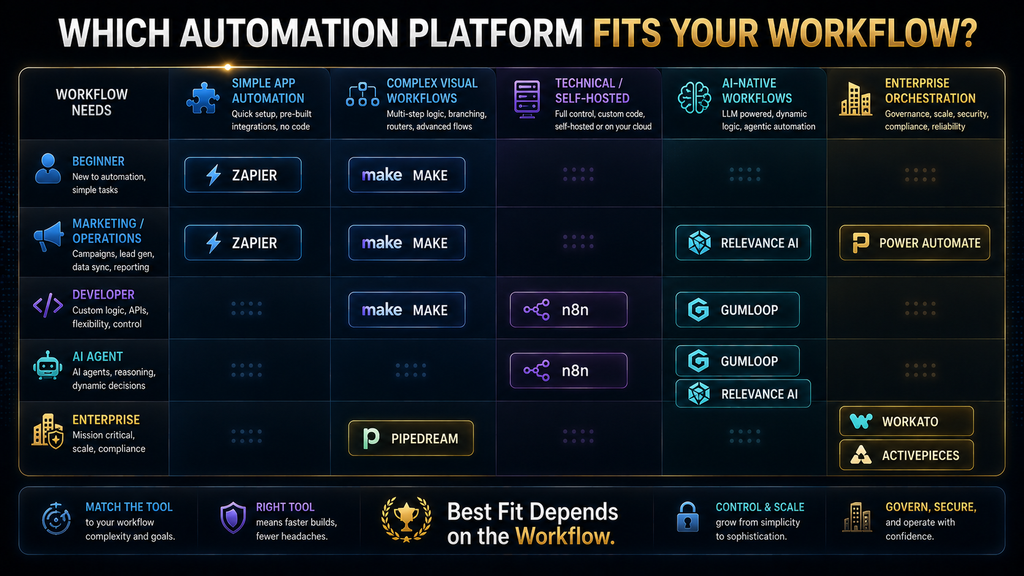
For most users, Zapier is the easiest starting point when the priority is connecting a large number of business applications with minimal technical work. Make is stronger when workflows become visually complex and require branching, transformations, and more detailed control. n8n is the better choice for technical teams that want deep customization, code, self-hosting, and AI-agent workflows.
For Microsoft-heavy organizations, Power Automate is usually the more natural choice because it combines cloud automation, desktop RPA, Microsoft services, and process capabilities. Workato is designed for a different level of problem: enterprise integration, orchestration, governance, and increasingly agentic automation.
If AI reasoning is the center of the workflow rather than an occasional step, Gumloop, Relevance AI, and Lindy become more interesting. Pipedream is particularly attractive for developers who work heavily with APIs and code, while Activepieces stands out for users who want open-source, self-hosting, and more control over where automation runs.
There is no universal winner because these products optimize for different problems. A two-step lead notification, a self-hosted AI research system, and a multinational enterprise integration architecture should not be evaluated using the same criteria.
The AI Workflow Automation Market Has Changed
The old mental model of workflow automation was straightforward: connect application A to application B and define the rules. That model is still important, but AI has introduced another layer.
A workflow can now receive an unstructured email, ask an AI model to determine what the sender wants, retrieve relevant information, choose an appropriate action, update a business system, and send the result to a human for approval. Some platforms can also place AI agents inside these workflows so the system can make bounded decisions rather than following only predetermined branches.
Make, for example, now positions AI Agents inside its visual automation environment, allowing agents to work across more than 3,000 apps while remaining alongside deterministic workflow logic. Its documentation explicitly distinguishes ordinary scenarios from agents: use standard automation when the task simply needs to be done, and use an AI agent when the task requires judgment or reasoning.
n8n takes a similar hybrid approach, combining explicit workflow logic, code, AI agents, human approvals, and hundreds of integrations. Its current AI positioning emphasizes keeping AI paired with explicit logic so inputs and outcomes remain controllable.
Zapier has also moved beyond its traditional automation identity. Its current platform combines workflows, AI steps, agents, MCP, tables, forms, and programmatic access, with its task-based billing model now spanning several of those capabilities.
This matters because “AI workflow automation” is increasingly becoming an umbrella term for several different types of software.
What Is AI Workflow Automation?
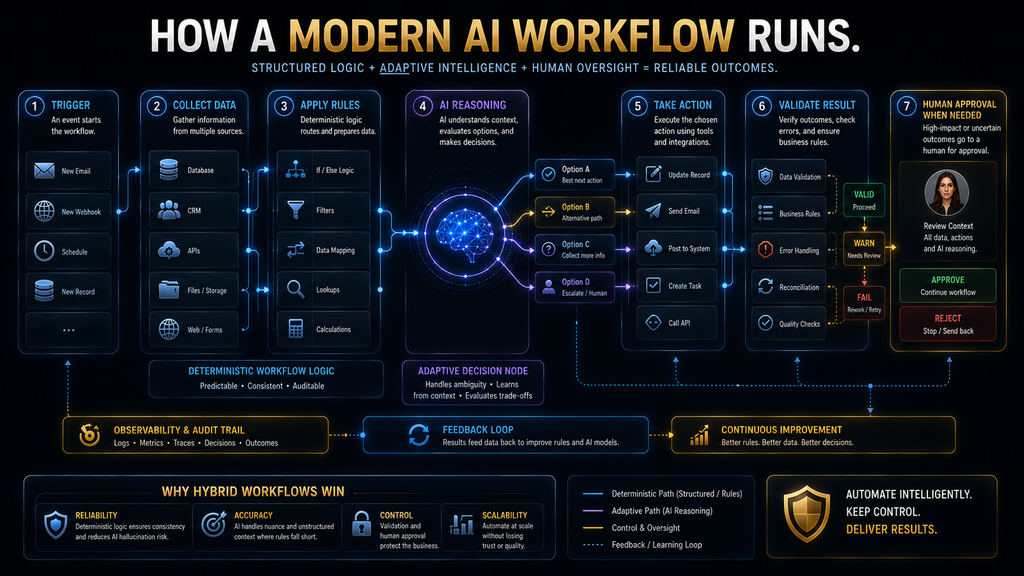
AI workflow automation is the use of software workflows that combine automated application actions with AI-based interpretation, generation, classification, prediction, extraction, or decision support. The important distinction is that AI is not necessarily responsible for the entire workflow. A good system might use deterministic automation for predictable parts and AI only where judgment or unstructured information makes traditional rules insufficient.
Consider a customer-support workflow. A traditional workflow might look like: New ticket → check category → assign team → send notification. An AI-assisted workflow could instead look like: New ticket → understand customer message → identify intent → retrieve customer context → determine urgency → assign team → draft response → request approval → update ticket.
The first workflow is mostly rules. The second combines rules with AI interpretation.
The strongest systems do not replace deterministic automation simply because AI is available. They use AI where it adds something that fixed logic cannot easily provide.
That principle is important throughout this comparison.
AI Automation Does Not Automatically Mean AI Agents
These terms are often used interchangeably, but they should not be. A workflow can contain an AI step without being an agentic workflow.
For example, a workflow might send a product description to an AI model and ask it to classify the product into one of five categories. The next step is predetermined.
That is AI-assisted automation.
An agentic workflow is more flexible. The system may need to determine which information it needs, which tool to use, what action should happen next, or whether the task is complete.
That distinction becomes particularly important when evaluating tools such as Gumloop, Relevance AI, n8n, Make, and Workato. If your workflow is mostly deterministic, you do not necessarily need the most agentic platform available. If your workflow involves ambiguous documents, research, decisions, multiple tools, or changing paths, agentic capabilities become much more valuable.
The Four Types of AI Workflow Automation Platforms
Before comparing individual tools, it helps to separate the market into four broad categories.
Traditional Workflow Automation With AI Capabilities
Platforms such as Zapier and Make began with application-to-application automation and have progressively added AI features. They are particularly useful when most of the workflow is predictable but one or more steps benefit from AI.
For example, you might trigger a workflow from a new form submission, enrich the lead, use AI to summarize the company’s information, assign a lead score, and then update the CRM. The workflow remains largely controlled by explicit logic.
Technical and Developer-Oriented Automation
Platforms such as n8n and Pipedream become more attractive when you need APIs, code, custom logic, webhooks, self-hosting, or detailed control over execution. The trade-off is that the person building the automation needs to understand more of the underlying system.
That is not necessarily a disadvantage. Technical control is valuable when the workflow is important enough to justify it.
Enterprise Integration and Orchestration
Power Automate and Workato address larger organizational environments. They can connect business systems, automate processes, incorporate governance, support enterprise identity and permissions, and extend into RPA or agentic workflows.
A small business may find this unnecessary. A large organization with hundreds of applications and strict governance requirements may find a lightweight consumer automation platform inadequate.
AI-Native Workflow and Agent Platforms
Platforms such as Gumloop, Relevance AI, and Lindy put AI reasoning much closer to the center of the product. These platforms become more interesting when the workflow is fundamentally about research, interpretation, classification, decision-making, communication, or AI workers rather than simple data movement.
The category boundaries are not absolute. Several platforms now overlap heavily. That is precisely why choosing based on feature count alone is becoming less useful.
The 10 Best AI Workflow Automation Tools
The following tools are evaluated by workflow fit, AI depth, technical control, pricing behavior, scalability, governance, and the type of user who benefits most from them. The goal is not to pretend there is one universal ranking. The goal is to tell you where each platform makes the most sense and where it does not.
1. Zapier — Best Overall for Broad, Accessible Automation
Zapier remains the strongest general-purpose starting point for users who want to connect business applications without becoming automation engineers.
Its biggest advantage is not that it can perform one particular workflow better than every competitor. Its advantage is the combination of broad application connectivity, accessibility, mature workflow tooling, and an increasingly large AI layer.
Zapier currently says its platform connects to more than 9,000 apps and now includes workflows, AI features, agents, MCP, SDK capabilities, tables, and forms. That breadth matters because integrations are often the hidden constraint in automation.
Imagine you want to automate a process involving a form provider, Gmail, Google Sheets, a CRM, Slack, a project-management tool, and an AI model. If the platform already has mature connections to all of those systems, the implementation becomes much easier.
Zapier’s current Professional plan starts at $19.99 per month, while Team starts at $69 per month, with enterprise pricing available separately. Its free tier includes 100 tasks per month and two-step workflows.
However, the price displayed on the plan page is not the whole story.
Zapier’s current billing model is task-based. Successful steps consume tasks, and AI, code, MCP, and other capabilities draw from the shared task allocation. AI by Zapier also now has model tiers with different task multipliers, meaning the cost of an AI-heavy workflow can behave differently from a simple trigger-and-action automation.
That makes Zapier extremely convenient but requires you to understand your expected workload before scaling a high-volume workflow.
Best for
Zapier is a strong fit for beginners, marketers, small businesses, operations teams, agencies, and anyone who values speed of setup over maximum infrastructure control.
Where Zapier becomes less attractive
The platform can become expensive when workflows execute at high volume or contain many successful steps, particularly when AI operations and additional tool calls increase task consumption. It is also not the first choice if self-hosting, deep custom infrastructure control, or highly specialized developer workflows are your main requirements.
Bottom line
Choose Zapier when your biggest problem is connecting lots of applications quickly and reliably without building the integration infrastructure yourself.
2. Make — Best for Complex Visual Workflows
Make is the platform I would look at first when a workflow has moved beyond simple trigger-and-action automation and you want to see the logic clearly. Its visual canvas is the product’s defining advantage. Instead of hiding the workflow behind a relatively linear sequence, Make lets you construct branches, routers, transformations, filters, aggregators, and other logic in a visual environment.
That becomes valuable when the workflow starts looking like this: New lead → identify source → enrich company → check lead score → if high-value, research account → notify sales → otherwise add to nurture. The visual representation helps the builder understand the entire process. Make currently advertises more than 3,000 integrations and has expanded its platform to include AI agents, MCP capabilities, code, AI tools, and visual monitoring.
Its current AI Agents implementation is particularly relevant. Make says agents can operate across more than 3,000 apps and that users can see the decisions and tools used by an agent through its visual environment. It also supports manual approval points and stop conditions.
That combination of deterministic logic and AI reasoning is one of Make’s strongest characteristics.
Pricing
Make has moved to a credit-based billing terminology. Its current pricing shows a Free tier with 1,000 credits per month, Core at $12 per month, Pro at $21, and Teams at $38, with enterprise pricing available separately.
The important detail is that credits are not simply a universal “one workflow equals one credit” system. Most standard operations consume one credit, but AI and more advanced capabilities can consume credits based on operations, tokens, or other usage factors. That means a simple Google Sheets operation and an AI-heavy operation should not be treated as economically equivalent.
Best for
Make is particularly strong for operations teams, agencies, marketers, automation specialists, and businesses with workflows that require branching and detailed visual control.
Where Make becomes less attractive
The visual power also creates a learning curve. Once a workflow contains many routers, iterators, aggregators, error paths, and AI steps, the canvas can become complicated.
Make is also not the best choice if self-hosting is a hard requirement.
Bottom line
Choose Make when the workflow itself is complicated enough that visual control becomes more valuable than absolute simplicity.
3. n8n — Best for Technical Control and Self-Hosting
n8n is one of the strongest choices for technical teams that want automation without giving up control over the underlying environment. It occupies an interesting position between no-code automation and developer infrastructure. You can build visually, but you can also use code, APIs, custom logic, AI agents, webhooks, and self-hosted deployments.
n8n currently describes its AI platform around explicit logic, 500+ integrations, AI agents, human approvals, and code. It also emphasizes self-hosting and explainability.
That makes n8n particularly attractive for organizations that do not want their automation architecture to be limited to the abstractions provided by a purely SaaS automation platform.
Pricing model
n8n’s cloud pricing is based around workflow executions rather than charging separately for every step. An execution is one run of the entire workflow, regardless of how many steps are inside it. n8n explicitly contrasts this with task- or operation-based pricing on other platforms. Its current cloud Starter plan includes 2,500 executions per month, and n8n also supports self-hosting.
This can make a meaningful difference for complex workflows. Suppose a workflow has 20 steps.
On a step-based platform, a single workflow run may consume many billable units. On an execution-based model, the same workflow can remain one execution.
That does not mean n8n is automatically cheaper. Infrastructure, AI model costs, technical labor, hosting, monitoring, and maintenance still matter.
But the economic model can be attractive for technically sophisticated teams.
Best for
n8n is particularly strong for developers, technical operations teams, startups, privacy-sensitive organizations, and companies that want self-hosting or deeper control.
Where n8n becomes less attractive
The flexibility creates responsibility. A team that self-hosts n8n is now responsible for deployment, updates, infrastructure, security, backups, monitoring, and operational reliability.
That is not a flaw in n8n. It is the price of ownership.
Bottom line
Choose n8n when automation is important enough that technical control, custom logic, or self-hosting matters more than the simplest possible setup.
4. Microsoft Power Automate — Best for Microsoft-Centric Organizations
If your organization already lives inside Microsoft 365, Power Automate deserves serious consideration before you start stitching together another automation ecosystem. Power Automate connects cloud-based business workflows with Microsoft services and also extends into desktop RPA and process capabilities.
Microsoft’s current licensing documentation lists Power Automate Premium at $15 per user per month and Power Automate Process at $150 per bot per month. Premium includes API-based digital process automation, cloud flows, attended desktop automation, and process-mining functionality.
The economics can become particularly interesting depending on how many users need to run the workflow versus how many automated processes need to operate independently.
Microsoft also provides pay-as-you-go options for certain scenarios. Its documentation gives examples where prepaid licensing is better for some high-run personal automation patterns, while pay-as-you-go can be more economical for seasonal or multi-user flows.
That is exactly why simply comparing “$15 vs $20” is misleading. The correct question is: Who is licensed, how often does the flow run, what systems does it touch, and does it require attended or unattended RPA?
Best for
Power Automate is a natural fit for Microsoft-heavy businesses using Teams, SharePoint, Outlook, Excel, Dynamics, Azure, and related systems.
Where it becomes less attractive
If your business uses a fragmented stack outside the Microsoft ecosystem, the platform may not feel as natural. Its licensing model can also become difficult to reason about in complex enterprise environments.
Bottom line
Choose Power Automate when Microsoft is already the operating system of your business.
5. Workato — Best for Enterprise Integration and Orchestration
Workato belongs in a different part of the market from lightweight automation tools. It is designed for organizations that need to connect substantial numbers of business systems while maintaining governance, access controls, monitoring, and enterprise-level operational standards. Its recent AI development makes the platform even more relevant to this comparison.
In July 2026, Workato announced that AIRO became generally available globally. Workato describes AIRO as a multi-agent system that can plan, build, troubleshoot, and answer questions across the solution lifecycle. It can work with recipes, APIs, MCP servers, skills, and other Workato assets while respecting enterprise RBAC controls.
That illustrates where enterprise automation is heading. The goal is no longer merely:
Connect application A to application B.
It is increasingly:
Understand an operational objective, design the required integrations, execute them, monitor them, troubleshoot them, and govern the entire system.
Best for
Workato is strongest for larger organizations with complex application estates, enterprise integration requirements, governance needs, and substantial automation programs.
Where it becomes less attractive
It is unnecessary complexity for a freelancer who simply wants to send a Slack message when a form is submitted. Enterprise-grade architecture is valuable when you need enterprise-grade architecture.
Bottom line
Choose Workato when workflow automation has become an organizational integration problem rather than a small productivity problem.
6. Gumloop — Best for AI-Native Workflow Automation
Gumloop is more interesting when the central problem is not simply moving data but using AI to perform work.
The platform positions itself around AI agents and automated workflows, with current pricing built around credits. Gumloop’s current public materials show a Free tier with 5,000 credits and a Pro plan starting at $37 per month with 20,000+ credits, while enterprise capabilities include controls such as RBAC, SSO/SCIM, audit logs, model controls, and optional VPC support.
The important distinction is that Gumloop’s value proposition is much more AI-centric than a traditional “connect these two apps” platform. A workflow such as: Find companies → research websites → extract relevant information → classify prospects → generate personalized messaging → send qualified records to CRM is much closer to Gumloop’s sweet spot than: New spreadsheet row → send Slack message.
The first workflow contains unstructured research and interpretation. The second mostly contains deterministic actions.
Best for
Gumloop is particularly interesting for sales research, marketing operations, content workflows, enrichment, AI agents, and teams that want AI to perform more of the cognitive work.
Where it becomes less attractive
If the workflow does not need meaningful AI reasoning, you may be paying for capabilities you do not need. Credit economics also need to be understood before scaling heavily.
Bottom line
Choose Gumloop when AI is doing meaningful work inside the workflow, not merely appearing as one optional step.
7. Relevance AI — Best for AI Workforces and Agent-Heavy Operations
Relevance AI is another platform that moves the conversation away from simple workflow automation toward AI workers and agentic operations. Its platform is designed around agents, tools, workforces, and integrations rather than simply connecting application triggers. That makes it relevant to organizations that want an AI system to perform more substantial operational roles.
For example, imagine a sales operation where an AI worker:
- researches an account;
- identifies relevant decision-makers;
- gathers company information;
- evaluates fit;
- prepares a research brief;
- updates a CRM;
- escalates uncertain cases to a salesperson.
That is qualitatively different from a conventional Zapier-style automation. The platform’s marketplace also reflects this workforce-oriented model, with dedicated AI workforces designed for tasks such as research and content operations.
Best for
Relevance AI is a strong candidate when the workflow resembles an AI employee or specialized digital worker more than a conventional application integration.
Where it becomes less attractive
If you only need deterministic application synchronization, an agent-centric platform can introduce unnecessary complexity.
Bottom line
Choose Relevance AI when the workflow requires AI workers that can reason through tasks rather than simply move data between applications.
8. Lindy — Best for Assistant-Style AI Automation
Lindy is particularly relevant for users who think about automation in terms of AI assistants. Instead of starting with:
“Which applications should I connect?”
the experience is closer to:
“What should my AI assistant handle for me?”
This can work well for email, scheduling, sales, support, administrative tasks, and communication-heavy workflows. The distinction matters because not every user wants to become a workflow architect. Some users want to define an outcome and have an AI assistant coordinate the underlying actions.
Best for
Lindy is particularly suited to individuals, founders, sales professionals, operators, and teams that want AI assistants to manage recurring communication and administrative work.
Where it becomes less attractive
For deeply technical integration architectures, custom API orchestration, or complex enterprise integration, a platform such as n8n, Pipedream, or Workato may offer more appropriate control.
Bottom line
Choose Lindy when your mental model is “AI assistant that handles work” rather than “visual integration platform that I engineer.”
9. Pipedream — Best for Developers and API-First Automation
Pipedream is designed around a different assumption: the person building the automation is comfortable with APIs and code. That changes what “easy” means. A no-code user might consider a workflow easy when it takes five drag-and-drop modules.
A developer may consider a workflow easier when they can write a small function, call an API directly, transform a response, and continue. Pipedream’s pricing also follows a compute-oriented model rather than simply charging for every application step, which makes it particularly relevant to developers who need flexible API workflows.
Best for
Pipedream is a strong choice for:
- developers;
- API-heavy workflows;
- webhooks;
- custom integrations;
- event-driven applications;
- internal tools;
- workflows where code is easier than fighting a visual abstraction.
Where it becomes less attractive
It is not the best first choice for a nontechnical team that wants a completely visual, no-code environment.
Bottom line
Choose Pipedream when code and APIs are part of the workflow rather than something you are trying to avoid.
10. Activepieces — Best Open-Source and Self-Hosted Alternative
Activepieces deserves attention because it attacks one of the biggest frustrations with SaaS automation: limited control over infrastructure and usage economics.
Its current platform is open source under the MIT license, supports cloud or self-hosted deployment, and includes AI agents, MCP, workflows, and human approvals. Activepieces says its Community Edition can be self-hosted and that the core can run without per-task pricing.
Its current cloud pricing also includes a Free tier, Plus at $16 per month billed annually, Team at $166 per month billed annually, and an enterprise Ultimate tier.
One particularly interesting difference is its execution economics. Activepieces says running a flow costs one credit regardless of the number of steps in that flow, while AI actions can consume additional credits depending on the model.
That makes it conceptually closer to execution-based pricing for the workflow itself.
Best for
Activepieces is attractive for technical teams, self-hosting enthusiasts, privacy-sensitive organizations, developers, and users who want more ownership over their automation environment.
Where it becomes less attractive
Self-hosting is not free operationally just because the software is free. Someone still has to maintain the infrastructure, secure it, back it up, monitor it, and update it.
Bottom line
Choose Activepieces when infrastructure control and open-source ownership matter enough to justify taking on more responsibility.
The Most Important Comparison: What Are You Actually Paying For?
A common mistake when comparing automation tools is to look only at the monthly subscription. That is not how these platforms actually behave. Different products meter different things.
Some charge for tasks. Some charge for credits. Some charge for workflow executions.
Some charge based on compute. Some charge by user or bot.
Some combine platform usage with AI model consumption. That means two platforms with identical advertised monthly prices can have completely different total costs for the same workflow.
| Platform | Primary pricing concept | What to watch |
|---|---|---|
| Zapier | Tasks | Steps, AI model tier, tool calls, MCP usage |
| Make | Credits | Operations, AI tokens, dynamic credit usage |
| n8n | Executions | Number of workflow runs, hosting, AI usage |
| Power Automate | Users / bots / usage | Licensing model, RPA, run patterns |
| Workato | Enterprise/custom | Scale, connectors, governance, contract |
| Gumloop | Credits | AI/model/tool consumption |
| Relevance AI | AI/action usage | Agent and vendor-credit consumption |
| Lindy | AI/usage-based plans | Agent activity and integrations |
| Pipedream | Compute | Runtime and memory |
| Activepieces | Credits / flow runs | AI model usage, plan limits, self-hosting |
The strategic lesson is simple: Never compare automation platforms using subscription price alone.
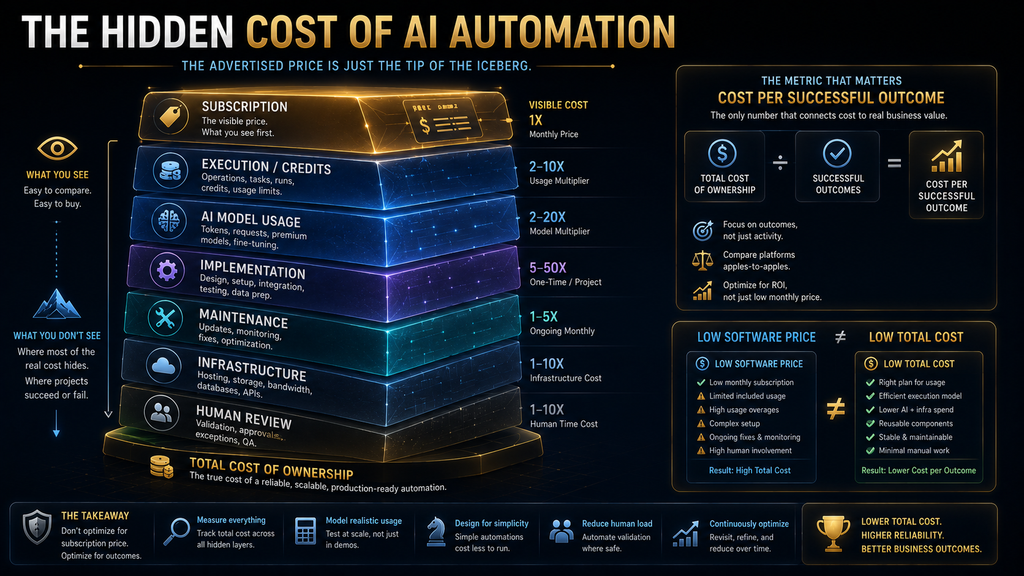
The Hidden Cost of AI Workflow Automation
The monthly software bill is only one part of the economics. A serious automation has at least six cost categories: Software cost + execution cost + AI cost + implementation cost + maintenance cost + human-review cost. This changes how you should evaluate an automation.
Imagine a company pays $30 per month for an automation platform. That sounds inexpensive. But suppose the workflow breaks twice a month and an employee spends three hours fixing it.
The software is cheap. The automation is not. Now consider the opposite.
A company spends $200 per month on a more capable platform but saves 30 hours of manual work and reduces errors substantially. The second system may be economically superior despite having the higher subscription price. That is why workflow automation should be evaluated on cost per successful outcome, not cost per software account.
The AI Tax: AI Can Make Automation More Expensive
Traditional automation tends to be relatively predictable. A workflow checks a condition and performs an action. AI introduces variable consumption.
A classification step may use one model. A research workflow may use several model calls. An agent may use tools.
A tool call may retrieve documents. The agent may reason again.
The workflow may repeat. That means an AI workflow can have a much less predictable cost curve than a simple trigger-and-action automation.
Zapier’s current AI pricing illustrates this directly. AI by Zapier has Standard, Advanced, and Premium model tiers with 1x, 3x, and 5x task multipliers, and tool calls can add to the task usage.
Make similarly distinguishes between fixed credit consumption and dynamic AI usage based on tokens and other factors. So when designing an AI workflow, ask: Does this step really need AI?
If the answer is no, use deterministic logic. That single decision can improve reliability and reduce cost at the same time.
The W.O.R.K. Framework for Choosing an Automation Platform
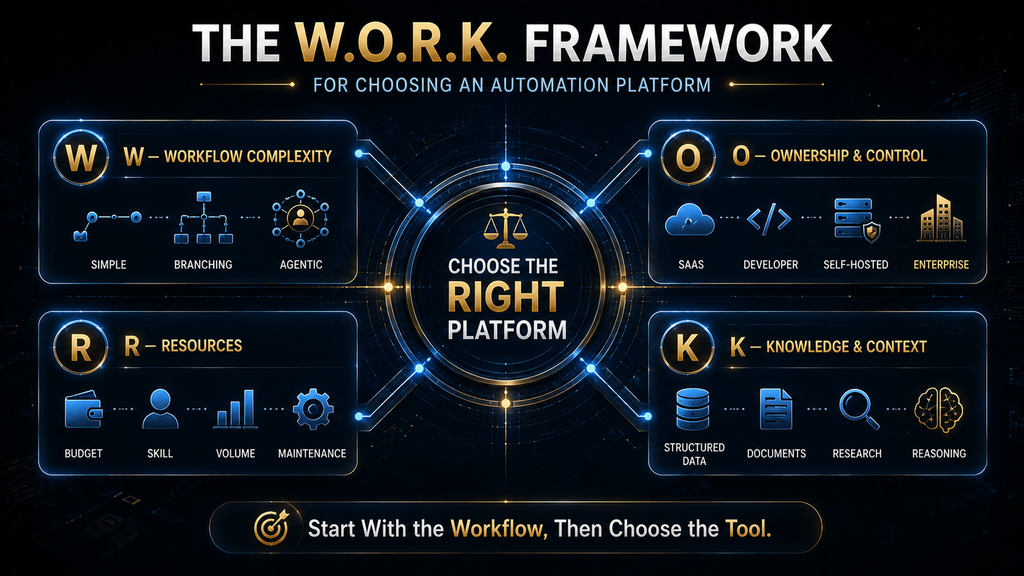
To choose between these platforms without getting distracted by feature lists, use the W.O.R.K. Framework.
It evaluates four things: Workflow Complexity, Ownership, Resources, and Knowledge. The framework is deliberately platform-neutral.
W — Workflow Complexity
Start by asking how complicated the workflow actually is. A simple workflow might be: New lead → CRM. A moderate workflow might be: New lead → enrich → score → assign → notify.
A complex workflow might be: New lead → research company → analyze fit → classify intent → retrieve context → generate personalized message → request approval → update CRM → schedule follow-up. The more dynamic the workflow becomes, the more valuable advanced logic, AI reasoning, and agentic capabilities become. If your workflow is simple, do not buy complexity you do not need.
O — Ownership and Control
Next ask how much control you need over the system. Do you simply want a managed SaaS platform? Do you need developers to customize it?
Do you need APIs? Do you need self-hosting? Do you have data residency requirements?
Do you need audit logs and role-based access? Do you need to control which users can access which tools? A beginner may prefer Zapier.
A technical organization may prefer n8n. A self-hosting requirement may make Activepieces or n8n much more attractive.
An enterprise governance requirement may move the decision toward Workato or Power Automate. The important thing is that ownership requirements can eliminate entire categories of platforms before you even compare features.
R — Resources
Resources include more than budget. You need to consider:
- money;
- technical skill;
- engineering capacity;
- automation volume;
- maintenance time;
- AI usage;
- infrastructure;
- human review.
A self-hosted platform may have a low software cost but a higher engineering cost. A managed platform may cost more in subscription fees but save substantial operational effort. That is why “free” should never be interpreted as “cost-free.”
K — Knowledge and Context
Finally, ask what kind of information the workflow needs to understand. If the workflow only moves structured fields between applications, conventional automation may be enough. If it must interpret:
- emails;
- PDFs;
- customer messages;
- websites;
- research;
- internal policies;
- long documents;
- ambiguous instructions;
then AI becomes more valuable. If the AI must decide which tools to use and what to do next, agentic capabilities become more important.
This gives you a practical progression: Structured data → AI interpretation → AI reasoning → AI action → agentic orchestration. Do not jump to the final stage unless the workflow actually requires it.
The Automation Maturity Model
A second way to think about the decision is to identify the maturity of the automation you are trying to build.
Level 1: Connect
The goal is simply to move information. Example:
Form submission → CRM record. Zapier, Make, Power Automate, and Activepieces can all handle this type of workflow.
Level 2: Transform
Now the workflow cleans, enriches, calculates, or restructures information. Example: Lead → normalize data → enrich company → calculate score → CRM. Make and n8n become increasingly attractive as logic becomes more complex.
Level 3: Reason
The workflow must interpret unstructured information. Example: Customer email → classify issue → identify urgency → retrieve policy → route. AI becomes a meaningful component.
Level 4: Act
The AI is no longer just classifying information. It helps determine and execute actions.
Example: Research prospect → evaluate fit → draft response → update CRM → notify salesperson. This is where AI-native platforms and agentic features become more valuable.
Level 5: Orchestrate
Multiple agents, tools, workflows, systems, and humans coordinate around a broader business objective. Example: Research agent → enrichment → analysis agent → approval → CRM → communication → monitoring.
At this stage, governance, observability, permissions, failure handling, and cost control become as important as the AI model itself. The important lesson is that most businesses do not need Level 5 automation for every process.
Which Tool Is Best for Different Real-World Workflows?
The fastest way to make the comparison practical is to stop talking about tools in isolation. Instead, imagine the workflows you actually want to automate.
Lead Management
Suppose your workflow is: Lead form → CRM → Slack notification → email. Zapier is an obvious starting point. If you need more branching and transformation, Make becomes attractive.
If you need custom APIs and code, n8n or Pipedream may be better. If you want AI to research every lead and make decisions about qualification, Gumloop or Relevance AI become more interesting. The correct platform changes as the workflow changes.
AI-Powered Lead Research
Now imagine: New lead → research company → identify industry → find relevant signals → summarize company → score lead → update CRM. This is no longer just application integration. The workflow requires web research, extraction, interpretation, and reasoning.
Gumloop, Relevance AI, Make with AI Agents, or n8n become stronger candidates. The deciding factor is no longer simply “how many apps are supported.” It is: How well does the platform handle AI reasoning, unstructured information, tools, and controlled action?
Customer Support Triage
Imagine: Incoming ticket → classify intent → determine urgency → retrieve customer context → suggest response → assign team. A traditional workflow can handle the routing. AI can handle classification and response drafting.
A mature implementation should probably keep the actual routing and system updates deterministic where possible, while using AI for the ambiguous parts. Make and n8n are particularly interesting for this hybrid approach because they allow AI logic to coexist with explicit workflow logic.
Document Processing
Consider: PDF invoice → extract fields → validate → compare against purchase order → flag discrepancy → update accounting system. This is a strong AI automation use case because documents are unstructured. But it is also a good example of why AI should not control everything.
Extraction can be AI-assisted. Validation can be deterministic. Thresholds can be rule-based.
High-value exceptions can require human approval. This hybrid architecture is generally more reliable than asking an AI agent to make every decision independently.
Content Operations
A content workflow might look like: Topic → research → draft → fact check → create metadata → generate visual brief → editorial review → publish. AI can assist several stages. But a fully autonomous publishing workflow introduces quality and brand risks.
The better design may use AI for research and drafting while retaining human approval before publication. That is exactly the type of workflow where “more autonomous” is not automatically “better.”
Microsoft-Centric Operations
If the workflow involves: Outlook → SharePoint → Teams → Excel → Dynamics. Power Automate deserves priority.
There is little strategic value in introducing another automation ecosystem if your core business systems already sit inside Microsoft’s environment. The integration depth and licensing model matter more than a generic “best automation tool” ranking.
Developer API Workflows
Consider: Webhook → API request → custom transformation → AI model → database → webhook response. This is where Pipedream and n8n become much more compelling.
The developer does not need to force the workflow into a purely no-code abstraction. Code can become a feature rather than a failure.
Enterprise Integration
Now consider: CRM + ERP + HR + finance + support + data warehouse + APIs + AI agents + governance. This is no longer a simple automation.
It is an enterprise integration architecture. Workato and Power Automate become much more relevant, depending on the organization’s technology environment and governance requirements.
Which Tool Is Best for Beginners?
For a beginner, I would generally start with Zapier or Make. Zapier has the advantage of simplicity and a very broad integration ecosystem. Make has the advantage of visual control once the workflow becomes more complicated.
If the beginner is technically comfortable and wants to learn a system that can eventually support deeper customization, n8n is worth learning early. The mistake is starting with the most powerful platform simply because it is the most powerful. You should start with the platform that lets you successfully automate a real workflow.
Which Tool Is Best for Developers?
For developers, the shortlist changes. n8n is compelling when you want visual workflows plus code, AI, self-hosting, and broad integration. Pipedream is compelling when API calls, webhooks, code, and event-driven architecture dominate. Activepieces is compelling when open-source ownership and self-hosting matter.
The decision should be driven by how much infrastructure you want to own. If you want managed infrastructure, choose accordingly. If you want control, accept the operational responsibility that comes with it.
Which Tool Is Best for AI Agents?
There is no single winner here because “AI agent” can mean several things. If you want AI agents inside a broader visual workflow environment, Make is increasingly compelling. If you want AI agents combined with technical control and explicit workflow logic, n8n is strong.
If you want AI-native workflows, Gumloop is a natural candidate. If you want AI workforces and specialized AI workers, Relevance AI deserves consideration. If you want enterprise agentic orchestration and governance, Workato is operating at a different scale.
The important question is not:
“Which platform has agents?”
Most serious platforms now have some form of agent capability. Ask:
What can the agent access, how can it reason, how are its actions constrained, how are decisions observed, and how does the platform price that behavior?
Those questions separate meaningful agent infrastructure from an AI feature checkbox.
Free vs Paid: When Is Free Enough?
Free plans are excellent for learning and prototyping. They are often enough to build:
- simple lead routing;
- personal notifications;
- small data synchronization;
- lightweight content workflows;
- basic experiments.
But free tiers become less attractive when the workflow becomes business-critical. A production workflow may need:
- more executions;
- faster polling;
- multiple users;
- advanced permissions;
- error handling;
- monitoring;
- AI usage;
- higher throughput;
- support.
The right progression is therefore: Prototype cheaply → measure actual usage → identify failure points → calculate business value → upgrade only when the workflow earns it. Do not buy an expensive enterprise plan before proving that the automation itself works.
Common Mistakes When Choosing an AI Workflow Automation Tool
Choosing based on the number of integrations
A platform with 9,000 integrations is not automatically better than one with 500. If the five applications you actually use are supported well, the larger number is mostly marketing context. Integration quality matters more than integration count.
Choosing AI because the platform says “AI”
An AI label does not tell you what the AI actually does. Ask whether the platform provides:
- classification;
- extraction;
- generation;
- retrieval;
- agent reasoning;
- tool use;
- memory;
- approvals;
- observability.
The depth of AI integration matters more than the existence of an AI button.
Ignoring the billing unit
This is one of the most expensive mistakes. A task, operation, credit, execution, user, bot, and compute unit are not interchangeable. Model the workflow before choosing the plan.
Automating a bad process
Automation does not fix a fundamentally broken workflow. It can simply make the broken process execute faster. Before automating, ask:
- Why does this process exist?
- What outcome is it supposed to produce?
- Which steps actually create value?
- Which steps exist only because the old manual process evolved that way?
This is where process redesign becomes more valuable than tool selection.
Using AI where deterministic logic is better
If a workflow can be expressed reliably as: If X, then Y you probably do not need a language model. AI introduces uncertainty and cost. Use it when ambiguity justifies the trade-off.
Giving an agent too much authority
An AI that can read a CRM is one thing. An AI that can modify customer records, send external messages, issue refunds, and delete information is another. The more consequential the action, the stronger the validation and approval controls should be.
The Traditional Method Still Has a Reason
There is a tendency to describe manual workflows as outdated simply because AI automation exists. That is too simplistic. Manual processes often exist because they provide human judgment at points where the business has historically been unable to encode reliable rules.
For example, a support manager may manually review unusual refund requests because edge cases are difficult to represent in software. An AI agent may eventually help with those cases. But that does not mean the human review step was pointless.
It existed because uncertainty had to be managed somehow. Good AI automation does not blindly eliminate those controls.
It identifies which decisions can be automated safely and which should remain reviewable. That is a much more mature approach.
When You Should Not Use AI Workflow Automation
You probably do not need an AI workflow platform when:
- the task happens only once;
- the process is too rare to justify setup;
- the workflow is already handled natively by your software;
- the process changes constantly;
- the automation would require more monitoring than manual work;
- the consequences of an error are unacceptable without mature controls;
- you have not defined what “success” means.
Sometimes the correct answer is simply: Do not automate it yet. That is better advice than forcing every business problem into an AI workflow.
How to Calculate Automation ROI
A useful automation ROI model should include more than labor savings. Start with: Annual benefit = time saved + error reduction + faster response + avoided opportunity cost. Then subtract: Annual cost = software + AI usage + implementation + maintenance + infrastructure + human review.
For example, suppose a team spends 20 hours per week manually processing leads. If automation reduces that to 5 hours, the gross time saving is 15 hours per week. But the real benefit depends on what those 15 hours are worth.
If the employees use the time for higher-value sales work, the economic value can be significant. If they simply move to other low-value administrative tasks, the financial benefit may be smaller. This is why the best automation projects measure outcomes, not just hours.
The KPIs You Should Track
After deploying a workflow, measure:
Automation rate
What percentage of eligible cases are completed without manual intervention?
Human intervention rate
How often does a person have to step in?
Error rate
How often does the automation produce an incorrect result?
Exception rate
How often does the workflow encounter a case it cannot handle?
Cost per successful execution
How much does each completed business outcome cost?
Time to completion
How much faster is the process?
Failure recovery time
How long does it take to detect and fix broken workflows?
Business outcome
Did the automation actually improve revenue, customer response time, operating cost, throughput, or another meaningful metric? That final metric is the one that matters most.
AI Workflow Automation Has a Second-Order Effect
The first-order benefit of automation is obvious: Less manual work. The second-order effects are more interesting. When a business automates a process, it often changes how the process itself is designed.
Data becomes more structured. Errors become easier to detect. Work becomes more observable.
Employees spend more time on exceptions. Teams begin redesigning processes around machine-readable information. That can produce a compounding advantage.
But there is a downside. Poor automation can also scale mistakes. If a manual process produces 20 errors a month and automation turns it into 20,000 automated decisions, the problem becomes much larger.
Automation increases the importance of process quality. AI increases the importance of judgment quality. Together, they make governance more important—not less.
What Happens If You Do Nothing?
The answer depends on your workflow. If your company performs a high-volume repetitive process manually, doing nothing means continuing to pay the coordination cost. Employees spend time copying information.
They wait for notifications. They search across systems. They reconcile records.
They perform repetitive classification. They manually generate routine communications. Over time, those costs compound.
But if the process is low-volume, highly ambiguous, or dangerous to automate, doing nothing may be the rational choice. The important decision is not:
“Should we automate?”
It is:
“Is this process valuable, repetitive, measurable, and sufficiently predictable that automation will create more value than it costs?”
Security and Governance Matter More as AI Becomes More Autonomous
Traditional automation can already cause problems when credentials are misconfigured. AI agents increase the risk because the system may make decisions about which tools to use. A workflow that only reads a database has one risk profile.
A workflow that can:
- read customer data;
- modify records;
- send emails;
- create payments;
- delete information;
has a completely different risk profile. This is why permissions should be based on minimum necessary access. Do not give an agent access to an entire system when it only needs one narrow operation.
Also separate read permissions from write permissions wherever possible. Human approval should be used for high-consequence actions where mistakes are expensive, irreversible, or difficult to detect.
A Practical Decision Matrix
Use this as the final shortlist rather than trying to find one universal winner.
| If your priority is… | Start with… | Why |
|---|---|---|
| Easiest broad app automation | Zapier | Accessible and broad ecosystem |
| Complex visual workflows | Make | Strong visual logic and branching |
| Technical control | n8n | Code, APIs, AI, self-hosting |
| Microsoft ecosystem | Power Automate | Deep Microsoft integration and RPA |
| Enterprise orchestration | Workato | Governance and large-scale integration |
| AI-native workflows | Gumloop | AI-centered workflow design |
| AI workforces | Relevance AI | Agent and workforce orientation |
| AI assistant workflows | Lindy | Assistant-style automation |
| API/developer workflows | Pipedream | Code and API-first architecture |
| Open-source/self-hosting | Activepieces | MIT-licensed, cloud or self-hosted |
The table should be used as a starting point, not a substitute for understanding the workflow.
How to Choose in 10 Minutes
Start by writing the workflow in one sentence. For example:
“When a new lead arrives, research the company, score the lead, update the CRM, and notify sales.”
Then answer five questions. How many applications are involved? If it is only two or three, almost any major platform may work.
Does the workflow need AI reasoning? If no, prioritize traditional automation. Does the workflow need code or custom APIs?
If yes, look harder at n8n or Pipedream. Do you need self-hosting? If yes, prioritize platforms such as n8n or Activepieces.
What happens if the workflow makes a mistake? If the answer involves money, customers, legal exposure, security, or irreversible changes, prioritize governance and approval mechanisms over convenience. This five-question process can eliminate most unsuitable platforms before you spend hours comparing features.
A More Important Question Than “Which Tool Is Best?”
Ask:
What is the simplest architecture that can reliably complete the job?
If the answer is a Zapier workflow, use Zapier. If it is a Make scenario, use Make. If it requires code and self-hosting, use n8n.
If Microsoft already owns the relevant systems, use Power Automate. If it requires enterprise orchestration, evaluate Workato. If AI reasoning is central, consider Gumloop or Relevance AI.
If you need an AI assistant, consider Lindy. If you need API-first development, consider Pipedream.
If open source and infrastructure ownership matter, consider Activepieces. The best platform is the one that solves the problem without introducing unnecessary complexity.
One Important Market Warning: Platforms Change
Automation infrastructure is not something you should choose casually. A workflow can become deeply embedded in a business. Credentials are connected.
Processes depend on it. Employees learn it.
Data flows through it. That means platform continuity matters.
A useful example is Relay.app. The old version of this article included Relay among its recommendations, but the company has since announced that Relay is shutting down, with free accounts scheduled for deletion on August 15, 2026 and paying accounts on September 14, 2026. New signups and upgrades were also disabled.
That development is a reminder that platform stability is part of automation risk. This does not mean every newer platform is unsafe. It means important automations should not be designed without considering:
- exportability;
- portability;
- API access;
- documentation;
- vendor stability;
- backup procedures;
- migration options.
If your business depends on an automation platform, you should know what happens if that platform disappears.
The Best Automation Architecture Is Usually Hybrid
The strongest modern workflow is rarely: AI does everything. It is more often:
Deterministic logic handles predictable work. AI handles ambiguity. Humans handle high-consequence judgment.
Imagine an invoice workflow. The system receives an invoice. Deterministic logic identifies the vendor.
AI extracts information from the document. Deterministic logic validates the invoice number. The system compares the amount against the purchase order.
If everything matches, the workflow continues automatically. If the amount exceeds a threshold or the information conflicts, a human reviews it.
This architecture is powerful because every component is doing the kind of work it is best suited for. AI does not have to replace the entire process to create enormous value.
Final Recommendation: Which AI Workflow Automation Tool Should You Choose?
If you want the simplest answer, start with Zapier for broad application automation, Make for more complex visual workflows, or n8n if you are technical and want greater control. Choose Power Automate when Microsoft is already central to your business. Choose Workato when automation has become an enterprise integration and governance problem.
Choose Gumloop when AI reasoning is central to the workflow. Choose Relevance AI when you want AI workers or agent-heavy operations. Choose Lindy when you want an AI assistant to handle recurring business work.
Choose Pipedream when developers and APIs are at the center of the workflow. Choose Activepieces when open source and self-hosting are important. But do not stop at the tool recommendation.
The more important decision is determining how much autonomy the workflow actually needs. If the process is deterministic, automate it deterministically. If the process needs interpretation, introduce AI.
If the process needs dynamic decision-making, consider agents. If the action is consequential, add validation and human approval. That progression will usually produce a better system than simply choosing the platform with the longest AI feature list.
Final Thoughts
The AI workflow automation market is becoming more powerful—and more confusing.
The old choice was largely between simple automation platforms and more technical integration tools. Today, the same platforms increasingly include AI models, agents, MCP, code, enterprise governance, human approvals, and intelligent orchestration.
That creates more possibilities, but it also creates a temptation to overbuild.
You do not need an AI agent because your workflow contains the word “AI.” You do not need enterprise orchestration because your company has 20 employees. You do not need self-hosting because a platform advertises it. And you should not choose a platform simply because it claims to have thousands of integrations.
The right starting point is always the workflow.
If the work is predictable, use predictable automation. If the inputs are messy, use AI where interpretation adds value. If the workflow genuinely requires dynamic decisions, consider agents. If the actions have meaningful consequences, add permissions, validation, monitoring, and human approval.
Then choose the platform. That order matters.
The best AI workflow automation tool is not the one with the longest feature list. It is the one that gives you enough intelligence to solve the problem without adding more complexity, cost, or risk than the problem deserves.
Choose the AI Tool That Solves the Right Problem
Automation tools are getting more autonomous, so learn how AI agents differ from simple workflows.
Learn How AI Agents Work →Frequently Asked Questions
What is the best AI workflow automation tool for beginners?
Zapier is usually the easiest starting point for beginners because it combines a broad application ecosystem with a relatively accessible workflow model. Make is another strong choice if you expect your workflows to become more visually complex and want more control over branching and transformations.
Is Zapier better than Make?
Neither is universally better. Zapier is generally easier for straightforward application automation, while Make provides more visual control for complex workflows. The right choice depends on workflow complexity, pricing behavior, and how much control you want.
Is n8n better than Zapier?
n8n can be better for technical users who need code, custom APIs, self-hosting, or deeper control. Zapier can be better for users who prioritize simplicity, managed infrastructure, and a broad application ecosystem.
Is Make better than Zapier for complex workflows?
Make is often a stronger fit when workflows require many branches, routers, transformations, and visual logic. Its visual scenario builder makes complex workflows easier to inspect, although the same flexibility can create a learning curve.
Are AI workflow automation tools free?
Many provide free tiers, but free plans usually impose limits on tasks, credits, executions, users, or features. Activepieces, Zapier, Make, n8n, and Gumloop all provide ways to start without paying, although their limits and pricing models differ.
What is the difference between AI automation and AI agents?
AI automation usually combines predefined workflow logic with AI capabilities such as classification, extraction, or generation. AI agents can go further by making bounded decisions about what to do next and which tools to use based on the task and information available.
Do I need an AI agent for workflow automation?
No. Most workflows do not require an autonomous agent. Use an agent when the workflow contains meaningful ambiguity, dynamic decision-making, unstructured information, or multiple possible paths. For predictable processes, deterministic automation is often simpler and more reliable.
Which AI automation tool is best for self-hosting?
n8n and Activepieces are strong options for self-hosting. Activepieces currently offers an open-source MIT-licensed Community Edition, while n8n also supports self-hosted deployment.
Which automation tool is best for Microsoft 365?
Power Automate is the natural starting point for organizations deeply invested in Microsoft 365 because it is designed to work across Microsoft’s cloud applications and also supports desktop RPA and related process capabilities.
Are AI workflow automation tools expensive?
They can be inexpensive for small workflows and expensive at scale. The important factor is not only the subscription price but the billing model, workflow volume, AI consumption, infrastructure, maintenance, and human-review requirements.
What is the cheapest AI workflow automation tool?
There is no universal cheapest option because platforms meter usage differently. A tool that looks cheaper per month can become more expensive at high execution volume, while a platform with a higher subscription can be cheaper for complex workflows if its billing model is more favorable.
Can AI workflow automation replace employees?
It can automate portions of employees’ workflows, but replacing entire roles is a much stronger claim. In practice, the most useful approach is often to automate repetitive work while keeping people responsible for ambiguous, strategic, interpersonal, or high-consequence decisions.
What is the biggest mistake when choosing an AI automation platform?
The biggest mistake is choosing the platform before understanding the workflow. Start with the process, determine whether it needs deterministic logic, AI interpretation, or agentic reasoning, calculate expected usage, and then choose the platform that fits.
Related Guides
- Best AI Lead Generation Tools in 2026: 8 Platforms Compared by Use Case
- Weav Pricing Explained: Cost Per Resolution vs Hiring Support Staff
- AI Contract Management vs Traditional CLM: Where AI Adds Real Value
Written by
Muntasir Ahmad Chowdhury
Founder, AI Hustle World
Muntasir Ahmad Chowdhury is the Founder of AI Hustle World, an independent publication dedicated to making Artificial Intelligence practical, trustworthy, and easy to understand. He researches AI tools, automation, customer service, productivity, and real-world business applications, helping readers make smarter technology decisions through research-driven, experience-backed content.
Expertise:
AI Tools • AI Automation • AI Customer Service • AI Productivity • Generative AI • AI Workflows
Get Smarter With AI
Enjoyed this guide? Get practical AI tools, tutorials, and honest reviews delivered to your inbox.