Evidence: Documentation reviewed
Last checked: September 2026
What was done: Written from official documentation and the published sources linked in this article. Not hands-on tested.
Files: None
Affiliate links: No
How AI Chatbots Work: From User Message to Intelligent Response
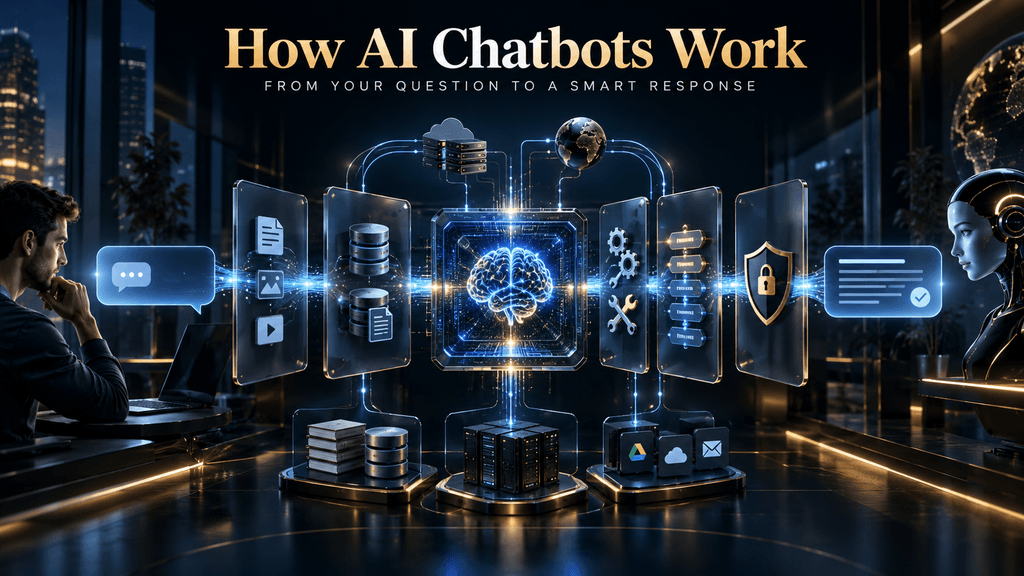
You type a question into an AI chatbot, press Send, and a response begins appearing almost immediately. Because the experience feels conversational, it is tempting to imagine a simple process: the system reads your words, understands what you mean, and writes an answer. That description is useful as a starting point, but it hides most of the machinery that makes the conversation possible.
A modern AI chatbot is better understood as a software system built around a language model. Your message may pass through input handling, tokenization, conversation-state assembly, routing, retrieval, tool selection, model inference, output controls and application logic before the response reaches you. Some of those stages may be simple, some may be sophisticated, and some may not exist at all in a particular product. The important point is that the language model is only one part of the system, and many of the differences between a reliable chatbot and an unreliable one come from everything surrounding the model.
That distinction matters because it changes how you interpret both the strengths and the failures of conversational AI. A chatbot can produce fluent language while relying on incomplete context. It can retrieve the wrong document and then explain that document beautifully. It can have access to the right API but lack permission to use it. It can understand the question perfectly and still generate an answer that should have been verified before being shown to you. To understand why, we need to follow the journey of a single request from the moment it enters the application.
What Is an AI Chatbot?
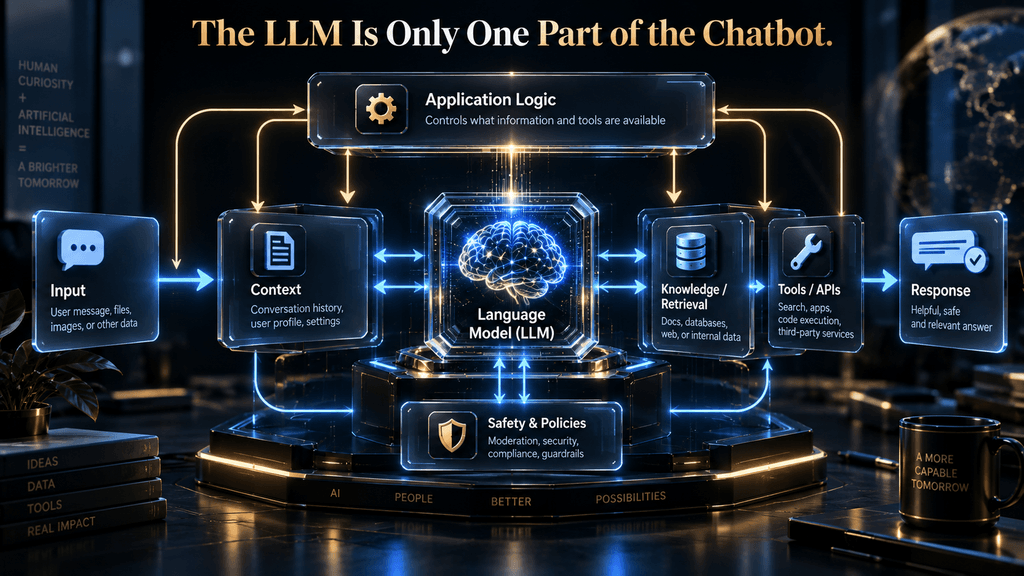
An AI chatbot is a conversational software system that accepts natural-language input and uses AI models, application logic, data sources and, in some cases, external tools to produce a response or perform a task. The key distinction is that the chatbot is the complete system, while the large language model is one component inside that system.
That distinction is easy to miss because the model is responsible for the part users see most clearly: the language. When you ask a chatbot to summarize a document, explain a concept or rewrite an email, the generated text makes the model feel like the whole product. In production systems, however, the application often decides what context should be sent to the model, what instructions apply, whether a knowledge source should be searched, which tools are available, what permissions the user has, and what should happen if a request cannot be handled safely.
There are also important differences between chatbot architectures. A customer-service system might combine a language model with a retrieval system and several APIs. A simple embedded website chatbot may use a model with a short system prompt and no external knowledge. A classic intent-driven bot may rely heavily on predefined routes and confidence thresholds instead of open-ended generation. Google Dialogflow CX, for example, can compare user input against training phrases, score possible intent matches and use a classification threshold to decide whether an intent should be matched at all. (Google Cloud Documentation)
So when people ask, “How does an AI chatbot work?”, there is not one universal implementation. There is, however, a common architecture that lets us understand the major stages.
The Big Idea: The LLM Is Not the Chatbot
The most useful mental model is to imagine an AI chatbot as a controlled request-processing system wrapped around a language model.
The user supplies a request. The application captures it, attaches whatever state or instructions are relevant, decides what information or tools may be needed, and constructs the context presented to the model. The model then produces an output based on that context and its learned parameters. The surrounding application can evaluate that output, trigger actions, apply business rules, log the interaction and update the state used for the next turn.
This is why two products using similarly capable language models can feel radically different. One may have excellent retrieval and clean business data, carefully designed tool permissions and strong evaluation. Another may simply send the user’s text to a model and return the generated response. The underlying model matters, but the system design determines what the model can actually do in that environment.
This is also why improving a chatbot is rarely as simple as replacing the model with a larger one. A larger model cannot automatically fix a broken knowledge base, missing permissions, bad retrieval, stale customer records or a workflow that was never connected to the system in the first place.
The AI Hustle World M.E.S.S.A.G.E. Framework
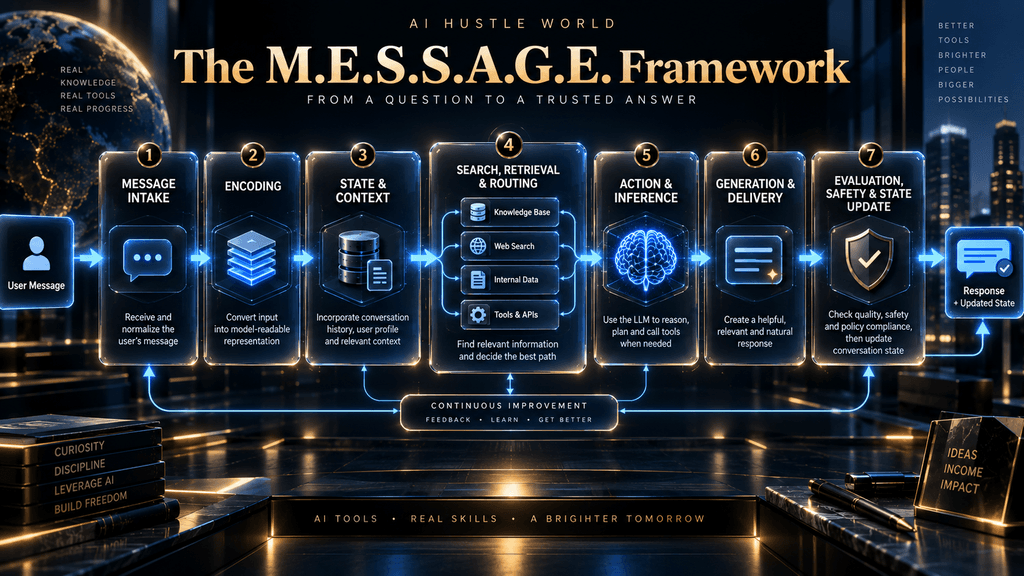
To follow what happens behind the interface, we can use an expanded version of the AI Hustle World M.E.S.S.A.G.E. Framework:
Message Intake → Encoding → State & Context → Search, Retrieval & Routing → Action & Inference → Generation & Delivery → Evaluation, Safety & State Update
The framework is deliberately broader than a simple “prompt in, answer out” diagram. It includes the parts of the system that determine what the model sees, what it can access, what it can do and what happens after an answer is produced. Not every chatbot implements every stage in exactly this order, but the framework provides a practical way to reason about the architecture.
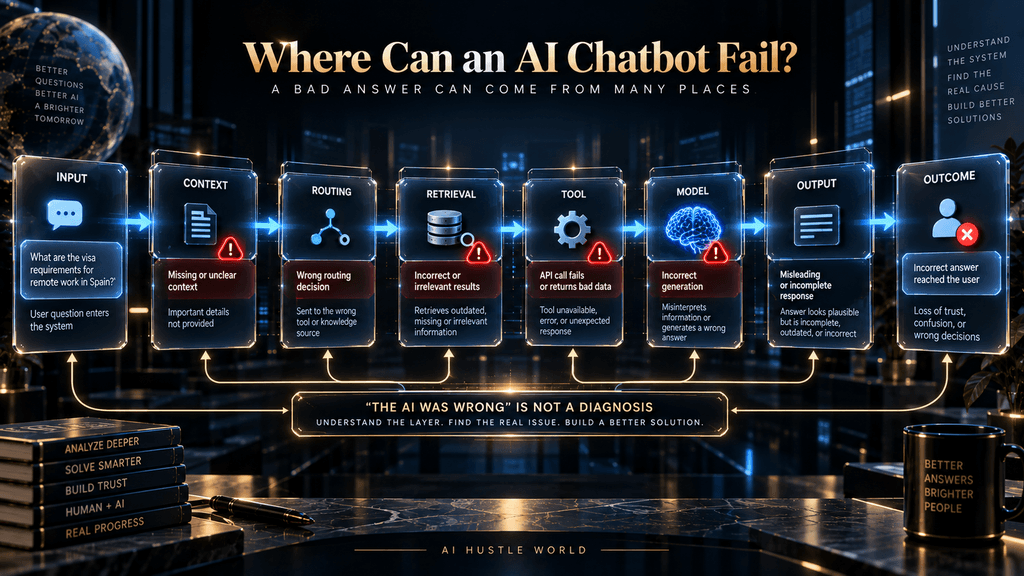
More importantly, it gives us a way to diagnose failures. When a chatbot produces a poor answer, “the AI was wrong” is often too vague to be useful. The better question is: which layer failed?
Stage 1: Message Intake
Everything starts with the request entering the application, but even this first stage is richer than it looks. The visible message might be only one piece of the information the system receives. Depending on the product, the application may also have access to a conversation identifier, user identity, language, attached files or images, account permissions, interface metadata, session state and configuration settings.
Suppose you write, “Can I change the delivery address?” A basic chatbot might receive only those words. A connected commerce system may receive the user identity, an order identifier, the conversation history and account context as well. A production system could also know which tools are permitted for that user and whether the current application is allowed to access order records.
This explains an important principle: the first responsibility of a chatbot system is not answering; it is constructing the right request context. If the wrong conversation is attached, an image fails to upload, an account identifier is missing or the application sends incomplete history, the model may never receive the information required to answer correctly.
The original AI Hustle World article correctly emphasized that the chatbot captures context such as conversation state, available memory and attached content before response generation begins. The rewrite should preserve that concept but make the architecture more explicit: message intake is the gateway between the user’s interface and everything downstream.
Stage 2: Encoding and Tokenization
Once the request enters the model pipeline, text must be represented in a form the model can process. Tokenization breaks the input into tokens, which are not necessarily identical to complete words. A token can correspond to a whole word, part of a word, punctuation or another fragment, depending on the tokenizer being used.
This matters because language models operate on these discrete units rather than on the same word-level objects humans perceive when reading a sentence. The tokenizer maps the input into a sequence of token identifiers, and the model processes those identifiers through learned numerical representations. From there, the neural network operates on patterns and relationships represented within its architecture.
It is common to hear people say that “AI understands words by turning them into tokens,” but that phrasing hides too much. Tokenization is the representation step, not the complete process of understanding. The important transition is from raw input into the numerical form the model can operate on, followed by transformations through the network that allow it to use relationships among the tokens.
Tokenization also has practical consequences. Longer inputs generally consume more tokens, which affects context usage, computational cost and potentially latency. This is one reason a very long conversation is not equivalent to a short one, even when the latest user question contains only a handful of words. The application has to decide which previous information remains part of the active context.
That distinction becomes critical once we reach context and memory.
Stage 3: State and Context
When you ask an AI chatbot a follow-up question, the model usually cannot answer the new message correctly from the latest words alone. The application must provide the relevant conversation history or some representation of the prior interaction.
Consider this exchange:
User: Who invented Python?
Assistant: Guido van Rossum.
User: When did he create it?
The second message depends on the first. “He” refers to Guido van Rossum, and “it” refers to Python. The system needs enough prior context for that relationship to remain available when the model processes the new turn.
This is where the concept of context becomes more useful than the vague idea that the AI “remembers.” In a single interaction, the model is typically given an active context containing the relevant instructions, current user input and some amount of conversation history or other information selected by the application. That active context is what the model can condition its current output on.
Memory is related but not identical. A product may store information across sessions and later retrieve selected pieces of that information into the current context. That is a system-level capability, not evidence that the model has an unlimited autobiographical record of everything you have ever said.
This distinction is important enough to deserve its own deeper treatment, which is why we already have a dedicated article on context windows and long-term memory. In this article, the key point is simply that the model answers from the context presented to it at that moment, not from some magical universal memory layer.
The Four Sources of What a Chatbot Can Use
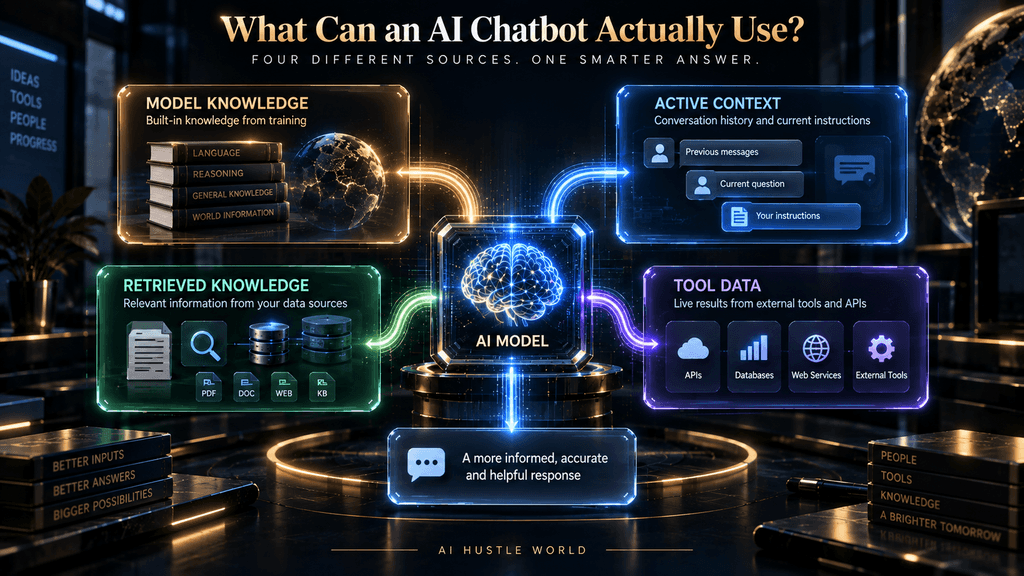
A useful way to understand this is to separate the information available to a chatbot into four categories.
Model knowledge refers to patterns and information encoded in the trained model itself. This is what lets a general-purpose model answer many questions without performing a live search.
Active context is the information supplied for the current interaction, such as system instructions, conversation history, user-provided text and attached material.
Retrieved knowledge is information fetched at inference time from documents, knowledge bases, search indexes or other approved sources. Retrieval-augmented generation, or RAG, is one way of doing this. Microsoft describes RAG as an architecture pattern for supplying relevant grounding information to a language model, with more advanced designs adding query processing and dynamic retrieval behaviors. (Google for Developers)
Tool data is information or results returned by external systems. A chatbot might query an order database, a CRM, a calendar or another API. Modern model platforms can expose tools that retrieve external data or call functions defined by the application. OpenAI’s developer documentation, for example, describes connecting models to built-in tools such as web and file search or defining functions that call APIs and other systems. (OpenAI Platform)
These four sources can work together, but they are not interchangeable. A model can know the general concept of airline baggage but not the customer’s current booking. A retrieval system may contain the current baggage policy but not the customer’s reservation status. An API may know the reservation status but not explain the policy. A useful chatbot combines the right sources for the actual request.
That leads to one of the most important ideas in this article: a chatbot’s answer is shaped not just by what the model knows, but by what information the surrounding system chooses to make available.
Stage 4: Search, Retrieval and Routing
Once the system has the initial request and context, it may need to decide whether additional information is required. This can take several forms.
A traditional conversational system might classify the request as an intent such as “check order status,” “reset password” or “cancel subscription.” Dialogflow CX is an example of an architecture that explicitly matches user input against intents, scores candidate matches and uses a threshold to determine whether a valid match exists. (Google Cloud Documentation)
A modern LLM-based system might instead use the model itself to interpret the request, perhaps combined with deterministic rules or a routing model. A hybrid architecture can use both. The important lesson is that there is no requirement that every chatbot use exactly one mechanism for understanding user intent.
If the system determines that external knowledge is needed, retrieval may begin. In a RAG system, for example, the user’s question can be transformed into a search query, compared against indexed material, and used to retrieve the most relevant chunks of content. Embeddings are commonly used to represent information as dense vectors that capture semantic relationships, making them useful in similarity-based retrieval systems. Google describes embeddings as lower-dimensional representations that capture semantic relationships between items. (Google for Developers)
The basic flow looks something like this: User question → query processing → retrieval → relevant information → model context → response.
But real systems can be more sophisticated. Query rewriting, filtering, reranking, metadata constraints and multiple retrieval steps can all affect what reaches the model. Microsoft’s advanced RAG guidance explicitly discusses query processing, retrieval and more dynamic architectures because retrieval quality itself is a major design problem. (Google for Developers)
This produces a critical distinction between knowing something and retrieving something. A chatbot may have strong language capabilities yet perform poorly if the retrieval system consistently returns irrelevant or stale material. Conversely, a good retrieval system can provide highly useful evidence to a less capable model, provided the model can interpret it correctly.
That is why saying “RAG prevents hallucinations” is too strong. Retrieval can ground generation, but it cannot guarantee that the right documents were retrieved, that the retrieved information is complete, or that the model will use it correctly. The retrieval layer creates a new opportunity for accuracy, but also a new failure surface.
Stage 5: Action and Inference
After context and any required external information have been assembled, the language model performs the central inference step.
This is where the model processes the available tokens and estimates what output should follow from the supplied context. The model does not retrieve a prewritten answer from a giant database every time you ask a question. It uses learned parameters and the current context to generate a sequence of output tokens.
The word reasoning is often used casually here, but it is worth being precise. Different AI systems and model architectures provide different forms of inference and reasoning behavior, and the exact internal process is not equivalent to a human consciously thinking through a problem. From an engineering perspective, what matters is that the model transforms the supplied context into an output through its learned computation.
In some systems, this is also where the model decides that it needs a tool. Instead of immediately producing a natural-language answer, it can emit a structured tool request such as “look up this order,” “search this knowledge base,” “check the calendar” or “perform this API action.” OpenAI’s current developer documentation describes attaching tools to models for external data and functions, including function calling and search tools. (OpenAI Platform)
That introduces an important loop. The model may produce a tool request. The application executes the tool. The tool returns information. That information is added back into the model’s context. The model then continues from the new context.
This is fundamentally different from simply generating text. The model is now participating in an interaction with external systems.
Stage 6: Tool Calling Changes What a Chatbot Can Do
Imagine asking a chatbot, “What time is my meeting with Sarah tomorrow?”
A model may know what a calendar is. It may know how to interpret dates. It may even recognize who Sarah is from the conversation. None of that tells it the actual meeting time.
For that, the system needs live calendar information. The architecture can therefore look like: Question → identify need for calendar data → call calendar tool → receive event information → interpret result → generate response. The distinction becomes even more important when the user asks, “Move that meeting to 3 p.m.”
Now the system does not merely need to read information. It must be authorized to perform a state-changing action.
That creates at least three separate questions:
- Can the model understand the request?
- Does the application have access to the necessary tool?
- Is the user authorized to perform the action?
These are different problems. A highly capable model cannot overcome an API that does not expose the needed function. A perfectly functioning API cannot compensate for an application that grants the wrong user permission. And a model that selects the wrong tool can still cause failure even when everything else is available.
This is one reason modern AI applications are increasingly designed as orchestration layers around models rather than as single prompts connected to a chat box.
Stage 7: Generation and Delivery
Once the system has enough information to answer, the model generates the response as a sequence of output tokens.
From the user’s perspective, the sentence appears as a coherent block of language. Internally, generation proceeds through a sequence of token predictions conditioned on the active context and the output generated so far. Each new token becomes part of the context used for deciding what token should come next.
This sequential process helps explain why wording can vary even when the underlying request is identical. Generation is not a lookup table with one fixed answer associated with each prompt. Depending on the model and sampling configuration, there can be several plausible continuations, and the system can produce different outputs while remaining broadly consistent in meaning.
This is also why it is misleading to describe temperature as a universal accuracy setting. Sampling parameters can influence the diversity or predictability of generated output, but they do not transform a language model into a factuality meter. Lower variation does not magically convert incorrect information into correct information.
Once output generation starts, the application may stream the response to the user instead of waiting for the full answer to finish. What feels like the chatbot “thinking out loud” is often simply the interface displaying generated output as it becomes available.
That visual smoothness should not be confused with certainty. A model can begin producing highly fluent text even when its underlying answer is incomplete or wrong.
Stage 8: Evaluation, Safety and State Update
Generation is not necessarily the end of the pipeline.
Depending on the application, the output may be checked against policies, formatting constraints, business rules, moderation systems or other controls before it is delivered. Safety can also exist earlier in the pipeline, for example through authentication, authorization, input filtering, tool restrictions or retrieval controls.
This is why the idea of a single “safety filter at the end” is too simplistic. A mature system can place controls around multiple boundaries:
What the user may submit? What information the system may retrieve? What tools the model may call?
What actions the application may execute? What output may be returned to the user?
For high-consequence workflows, these controls become more important because the cost of an error is not the same in every conversation. An incorrect restaurant recommendation and an incorrect financial instruction are both bad answers, but they do not carry the same risk.
The system may also record information after the response is delivered. It can log latency, tool errors, retrieval quality, user feedback, escalation events or other signals used to improve the application. A particularly mature architecture can use those signals to update the underlying knowledge base or workflow.
The conversation therefore becomes a loop rather than a one-way pipe: Request → context → retrieval/action → inference → response → evaluation → feedback/state → next request. That loop is what makes conversational software feel persistent and increasingly adaptive.
Why AI Chatbots Sometimes Give Excellent Answers—and Sometimes Terrible Ones
The easiest way to misunderstand chatbot failures is to treat every bad answer as the same kind of problem. It isn’t.
Suppose a customer asks, “What is the cancellation fee on my ticket?” The system could fail because the message was routed incorrectly. It could fail because the correct booking information was never retrieved. It could retrieve the correct booking but retrieve an outdated cancellation policy. It could retrieve both correctly and still generate the wrong conclusion. It could generate the correct answer but omit an important condition. Or it could have all the right information while failing to enforce the business rule that the customer’s specific fare is non-refundable.
The visible symptom is simply: “The chatbot gave me a bad answer.” The underlying cause could be almost anywhere in the architecture. That suggests a much better diagnostic framework.
If the request was misunderstood
Look at input processing and routing.
If the right information was missing
Look at context construction and retrieval.
If the wrong information was retrieved
Look at indexing, query processing and ranking.
If the right information was available but misused
Look at model inference and prompt/context design.
If an action failed
Look at tool selection, API behavior, permissions and external-system state.
If the answer should never have been produced
Look at safety, policy and verification controls. This is a more useful way to evaluate AI than simply asking whether the model is “smart.”
The Knowledge Problem: Why Better Models Do Not Fix Bad Information
One of the biggest practical mistakes in AI chatbot projects is assuming that a stronger model automatically produces a better support experience.
Imagine a company gives a chatbot access to a knowledge base containing hundreds of documents. The chatbot now has retrieval, but the documents contain outdated return policies, duplicated articles, contradictory instructions and poorly structured product information.
The model may retrieve those documents successfully. It may even summarize them elegantly.
The result can still be wrong. This is the fundamental knowledge problem: a model can only use the evidence the system provides to it, and the evidence itself may be incomplete, stale or contradictory.
That is why retrieval architecture and knowledge management matter so much in production systems. The current RAG literature and engineering guidance increasingly treats retrieval as a system-design problem involving query processing, indexing, relevance and evaluation rather than simply “adding a vector database.” (Google for Developers)
The lesson extends beyond customer service. A chatbot answering internal HR questions, product questions or technical support requests inherits the quality of the information environment behind it.
In practical terms, a knowledge base should be treated as part of the product, not as an afterthought.
Why Traditional Chatbots Still Exist
The rise of generative AI can make older rule-based chatbots look obsolete, but that conclusion is too simplistic. Traditional systems have a major advantage: predictability.
If a banking application has a narrow workflow where the correct response must follow a known set of rules, a deterministic route can be easier to validate than open-ended generation. Intent systems can define permitted categories, required parameters and explicit fallback paths. Dialogflow CX, for example, can use intent matching and confidence thresholds to determine whether a user utterance matches a known route. (Google Cloud Documentation)
Generative systems are much better at handling variation in human language. A user does not need to write the exact phrase anticipated by the original designer. The system can interpret natural expressions, answer follow-up questions and synthesize information across sources.
The trade-off is that flexibility introduces uncertainty.
This is why the most practical production architecture is often hybrid rather than ideological. A system can use an LLM to understand natural language and explain information while still applying deterministic rules to sensitive actions, required parameters, authentication, policy constraints or high-risk decisions.
The goal is not to make everything generative. The goal is to use generation where flexibility has value and deterministic controls where predictability has value.
Response Is Not the Same as Resolution
One of the most important distinctions in AI chatbot design is the difference between producing an answer and solving the user’s problem.
Suppose a customer asks, “My payment failed. What should I do?”
A chatbot can respond immediately with a generic explanation of possible causes. That may be a fast response.
But suppose the system can identify the customer’s transaction, determine the payment failure code, check the applicable policy and initiate the appropriate recovery process. That can become a resolution.
The difference is operational.
A good chatbot does not optimize only for how quickly it says something. It should optimize for whether the interaction actually moves the user toward a correct outcome.
This is especially important in customer-service systems, where a high automation rate can look impressive while repeat contacts quietly increase. If the customer must ask the same question three times because the original response was incomplete, the system may be automating messages rather than automating support.
That is why AI Hustle World’s broader customer-service framework should emphasize verified resolution rather than automation volume alone. The deeper discussion belongs in AI customer service explained, but the principle applies to chatbot architecture generally.
A Real-World Example: Air India’s AI.g
Air India’s AI.g provides a useful illustration of why modern chatbots are systems rather than simple language generators.
Microsoft’s latest customer story says AI.g currently handles about 40,000 customer queries per day across more than 1,300 question types, ranging from booking changes to refund requests. Microsoft says the system has resolved more than 13 million conversations with a 97% success rate, with roughly 3% escalated to human agents. These figures are Microsoft/Air India customer-story claims rather than independent academic measurements, so they should be understood in that context. (Microsoft)
The more interesting part of the case is architectural. Microsoft describes Air India’s system as integrating generative AI with enterprise data and operational workflows. An earlier Microsoft case study describes AI.g as using enterprise data, including the reservation system, and explains that the system can handle natural-language questions while escalating cases when human assistance is required.
That is the real lesson. Air India’s chatbot is not valuable simply because it can write natural language. Its usefulness comes from connecting natural-language understanding to real airline information and operational processes.
The same principle applies to almost every serious business chatbot.
A Real-World Example: Decagon’s Multi-Model Approach
OpenAI’s customer story about Decagon provides another useful example because it makes the architecture itself visible.
OpenAI reports that Decagon uses different models for different parts of its support workflow. One example is using a fine-tuned GPT-3.5 model to rewrite customer queries before they enter RAG workflows, while GPT-4 is used for more complex decision-making tasks involving API requests. OpenAI also describes the system as combining models, retrieval, workflows and evaluations rather than relying on one model for every task. (OpenAI)
Whether or not another company would use exactly the same model choices is not the important point. The important point is that one AI application does not necessarily have one model doing one thing.
Different parts of the pipeline can have different requirements. Query rewriting may value one balance of speed and quality. Complex tool selection may value another. Retrieval may depend more heavily on indexing and ranking than on model size. This reinforces the broader thesis that the chatbot is an orchestration system around models and data.
A Real-World Research Example: Retrieval as a Separate Failure Surface
Recent research into RAG chatbots also reinforces this architectural distinction. A 2026 Springer study describing the Ask CSO system discusses a workflow in which user queries are processed, relevant information is retrieved, the retrieved material is combined with the question for generation, and guardrails are used to reject out-of-scope questions. (Google for Developers)
The significance is larger than the specific application. A chatbot can now be evaluated at multiple layers:
- Was the question interpreted correctly?
- Was the right information retrieved?
- Was the retrieved information relevant enough?
- Did the model use the evidence properly?
- Did the system reject requests outside its intended scope?
This layered evaluation is more useful than treating “answer quality” as a single number because different architectural problems require different fixes.
What Happens When a Tool Fails?
Tool use creates enormous practical possibilities, but it also introduces a new category of failure.
Imagine a chatbot that can check an order status. The model correctly identifies that it needs the order system. It calls the API. The API times out.
The chatbot now has to decide what to do with the failure.
A weak implementation may confidently respond as though it successfully checked the order. A better system recognizes the tool failure and tells the user that the information could not be retrieved. A more sophisticated architecture might retry, route to a human, or use a fallback data source depending on the task.
The same problem can occur when the tool succeeds technically but returns incomplete or stale data. The model may receive an empty result and still try to produce a confident answer.
This is why tool integration should be treated as a first-class engineering surface rather than a simple extension of prompting. The relevant question is not merely “Can the model call an API?” It is: Can the full system call the right API, with the right arguments, under the right permissions, verify the result, handle failure and communicate uncertainty appropriately?
The Same Prompt Can Produce Different Answers
A common question is why an AI chatbot sometimes answers the same question differently on different occasions. There are several reasons.
The active conversation may not be identical. One interaction may contain additional context or previous instructions that another does not.
The retrieved information may differ. A search index can change, documents can be updated and ranking can produce different results.
External systems may return different data. A calendar, stock database, order system or news search is dynamic by nature.
Sampling behavior can also introduce variation during generation. The model may have several plausible continuations and select among them according to the configured generation process. This means that reproducibility is not always a simple model property. The entire system state contributes to the output.
For applications where deterministic behavior matters, developers may need controlled retrieval, strict workflows, structured outputs, constrained choices or other mechanisms rather than simply telling the model to “be consistent.”
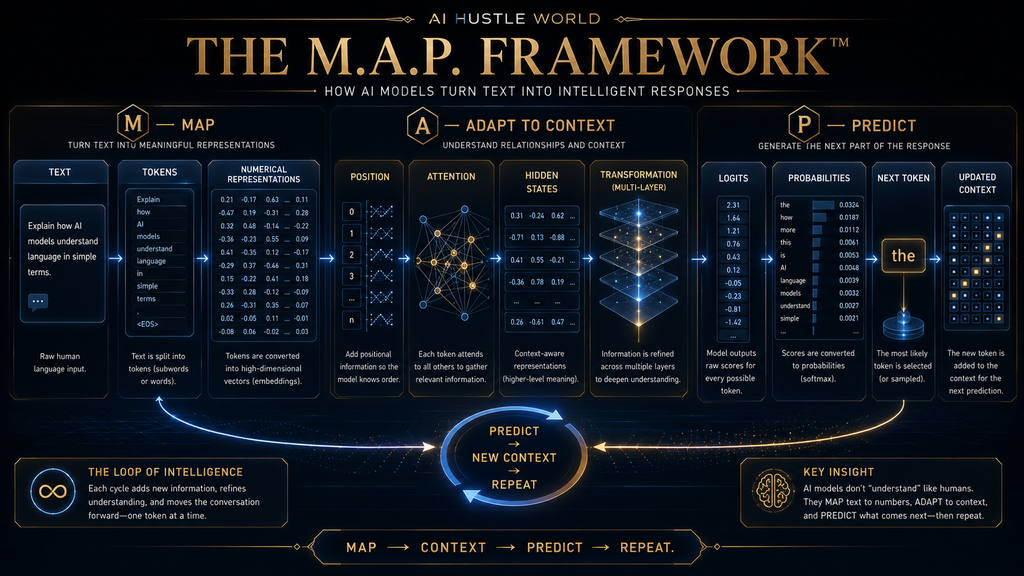
The M.A.P. Framework for Understanding Language Models
Here is the simplest mental model to carry forward.
M — Map
Text → tokens → numerical representations
The model turns human language into a form its neural network can process.
A — Adapt to Context
Representations → relationships → contextual hidden states. Transformer layers repeatedly transform those representations using information from surrounding tokens.
P — Predict
Final representation → token scores → probability distribution → next token. The model selects a next token according to its generation process, adds it to the sequence and repeats.
So: MAP → CONTEXT → PREDICT → REPEAT. This is an AI Hustle World teaching framework, not an official machine-learning term.
Its purpose is to prevent a common misunderstanding: the model doesn’t first “understand everything” and then write an answer. The internal representation evolves through the computational process that ultimately supports prediction.
The Grounding Gap: Language Is Not the World
This gives us a second AI Hustle World framework.
The Grounding Gap
Language patterns → Internal representations → Generated language does not automatically equal: Physical experience → real-world observation → verified truth. This distinction explains several surprising AI behaviors. A model may be excellent at explaining how to repair a bicycle while never having physically held a bicycle.
It can describe what a storm sounds like while not hearing one. It can discuss a historical event without having experienced the event. That doesn’t make its language useless.
It means you need to understand what kind of evidence the model’s output represents. Language competence is not automatically evidence of direct experience.
Why Chatbots Hallucinate
Hallucination is often described as the model “making something up.” That is understandable, but it is not enough to diagnose the problem.
A chatbot may hallucinate because the required information was never available to the model. It may happen because the system retrieved irrelevant or stale material. It may happen because the model misinterpreted contradictory evidence. It may happen because the question falls outside the system’s intended domain and no effective refusal or routing mechanism exists.
Consider a support chatbot answering a product question using a RAG system. If the correct manual exists but retrieval returns an older manual, the resulting hallucination may actually begin as a retrieval failure. If retrieval finds the correct section but the model draws the wrong conclusion from it, the failure is different. If the system never had access to the relevant information, the architecture has a knowledge-gap problem.
These distinctions matter because the remedy changes.
A retrieval problem calls for better indexing, query processing or ranking. A knowledge problem calls for better source material. A generation problem may call for better prompting, model selection, structured output or evaluation. A permission problem calls for application-level controls. A domain-boundary problem may require better routing or escalation.
This layered diagnosis is far more actionable than simply increasing model size.
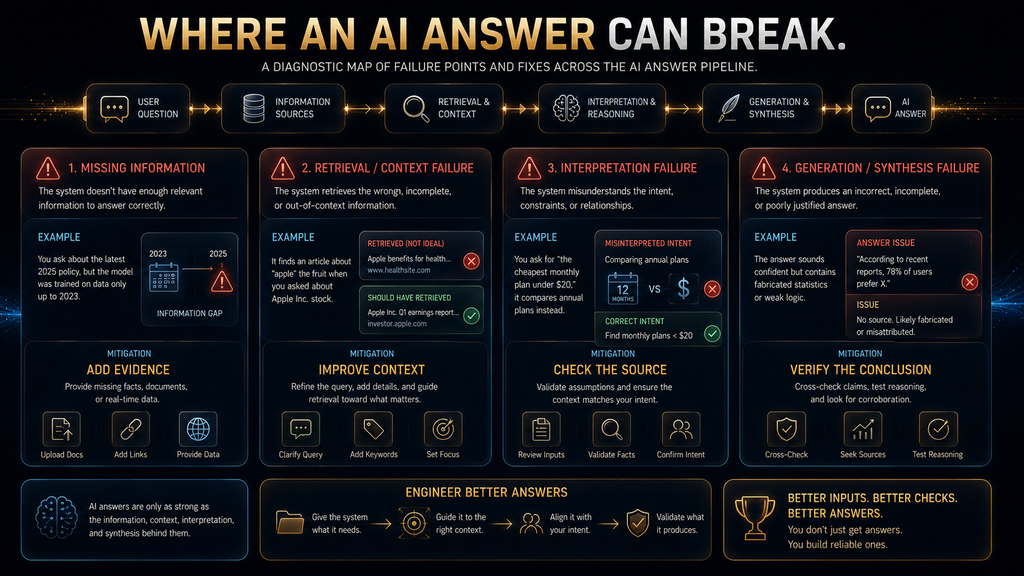
The Four Main Ways an AI Answer Can Fail
1. The system lacks the information
The required fact was never available through the model or tools.
2. The system has the information but fails to retrieve or use it
The relevant evidence exists but does not reach the generation stage.
3. The system receives the information but interprets it incorrectly
The source may be good, but the answer misrepresents it.
4. The system has useful evidence but generates an incorrect conclusion
This is a synthesis or generation failure. This distinction is more useful than simply saying:
“AI hallucinated.”
It tells you what needs to be fixed.
A Simple Verification Framework for AI Answers
When the consequence of being wrong matters, use this six-step check:
Verify the claim
What exactly is the AI asserting?
Examine the evidence
Where did the information come from?
Review the context
Does the source actually apply to your situation?
Identify uncertainty
Are there qualifications, competing interpretations, or missing information?
Find independent support
Can another authoritative source confirm the important point?
Yield to authoritative sources
When the stakes are high, the AI should help you understand the evidence—not replace the evidence. This framework is intentionally simple.
The objective is not to turn every casual AI interaction into a research project. It is to teach users when verification becomes necessary.
How to Evaluate an AI Chatbot
A useful chatbot evaluation framework should follow the same architecture as the system itself.
1. Understanding
Did the system correctly interpret the request, including ambiguous references and important entities?
2. Context
Did it use the right conversation state and relevant user-provided information?
3. Retrieval
When external knowledge was needed, did it retrieve the right source?
4. Tool Use
Did it select the right tool, provide valid inputs and correctly interpret the result?
5. Answer Quality
Was the final response accurate, relevant, complete and understandable?
6. Safety and Control
Did the system respect policy, authorization, privacy and risk boundaries?
7. Resolution
Did the interaction actually solve the user’s problem, or merely generate an attractive response? That last category is frequently underestimated.
A chatbot can score well on language quality while performing badly on actual resolution. Conversely, a system can produce fairly ordinary prose while being extremely useful because it reliably completes the underlying task.
This is why chatbot evaluation should not rely on one generic “accuracy” metric.
The Economics Behind Chatbot Architecture
AI chatbot economics are also more complicated than “replace employees with AI.”
The cost of running a chatbot can include model inference, retrieval infrastructure, storage, search, API calls, observability, evaluation, engineering, data preparation and human escalation. A highly automated chatbot may still become expensive if every conversation requires multiple model calls, repeated retrieval or complex tool orchestration.
The opposite can also happen. A carefully designed system can reduce the volume of repetitive human work while allowing people to focus on cases where judgment, empathy or accountability matter more.
Air India’s reported experience illustrates that operational framing. Microsoft says its AI.g system has helped manage customer demand while giving human agents more capacity for complex cases, and the company is continuing to develop agentic workflows that can operate across systems.
That is a more useful business question than “How much cheaper is AI?” The question is: Which work is expensive because it is repetitive, which work is valuable because it requires judgment, and where does AI improve the economics of that division of labor?
Where AI Chatbots Work Best
AI chatbots are particularly effective when the task has enough structure for the system to provide reliable context and a clear success condition. They are a strong fit for questions with predictable knowledge requirements, repetitive information retrieval, document summarization, guided troubleshooting, straightforward classification, low-risk workflows and well-defined tool interactions. They become more challenging when requests are ambiguous, when available information is unreliable, when external systems are fragmented, or when the cost of an incorrect answer is high.
They also need careful treatment when the user’s actual goal is emotional, interpersonal or highly consequential. A system may be capable of generating an empathetic response without actually possessing human empathy in the ordinary sense, and that distinction matters when users are making decisions under stress.
The practical rule is not “use AI wherever possible.” It is: use AI where the system can provide meaningful leverage without removing the human judgment the task actually requires.
Common Mistakes When Building or Choosing an AI Chatbot
Treating the model as the entire product
This leads teams to obsess over model selection while neglecting knowledge quality, retrieval, permissions, workflow design and evaluation.
Measuring automation instead of outcomes
A system that answers 90% of conversations is not necessarily successful if customers still need to contact the company again.
Giving the model access to everything
Broad access may appear convenient, but it can create unnecessary security and governance risk. Tool permissions should reflect what the system genuinely needs to do.
Ignoring the knowledge layer
Outdated documents and contradictory sources can produce confidently wrong answers even when the model itself is functioning normally.
Using generation where deterministic rules are better
Not every decision benefits from open-ended language generation. Some tasks require strict validation and explicit logic.
Designing escalation as an afterthought
When a conversation reaches a human, the human should receive the useful context already gathered by the system rather than asking the customer to start over. For a deeper discussion of the boundary between automated and human support, see AI customer support vs human support.
How AI Chatbots Differ From AI Agents
The line between chatbot and agent is becoming less rigid as conversational systems gain access to tools and workflows. A conventional chatbot primarily focuses on the conversational exchange: understand the request and generate a response. An agentic system can go further by selecting tools, making decisions across multiple steps, interacting with external systems and pursuing an outcome rather than simply producing text.
The architectural distinction is therefore less about whether the interface looks like a chat window and more about what the system is authorized and able to do. A chatbot can explain how to cancel a subscription. A more capable system can determine the customer’s subscription, verify eligibility, execute the cancellation and confirm the result.
That transition from answering to acting is one of the most important developments in conversational AI. For a dedicated comparison of the two architectures, see AI chatbots vs AI agents.
The Future: From Answering Questions to Preventing Them
The most interesting future development may not be increasingly clever answers. It may be systems that use conversations as operational signals.
Imagine a company noticing that thousands of customers repeatedly ask the same question about a product feature. A chatbot can answer those questions, but the business can also analyze the conversations and discover that the underlying documentation is unclear or the product interface itself is confusing.
The mature system therefore creates a loop: Customer conversations → recurring patterns → insight → product/process change → fewer future problems. That changes the role of customer-facing AI.
Instead of merely absorbing support demand, the system can help the organization understand why that demand exists in the first place. Air India is already describing a broader direction in which AI can move from customer responses toward workflows that operate across enterprise systems.
This is the second-order effect worth paying attention to. The best AI chatbot may ultimately be the one that causes fewer chatbot conversations because the business keeps eliminating the problems that generated those conversations.
What the Next Generation of Chatbots Will Look Like
The next generation of AI chatbots is unlikely to be defined by one dramatic feature. The bigger trend is convergence.
Chatbots will increasingly combine multimodal input, richer state, retrieval, tool access, structured outputs, workflow orchestration, stronger evaluation and more deliberate permission boundaries. That does not mean every chatbot becomes fully autonomous.
In fact, the opposite may happen in many high-value systems. As capabilities expand, organizations may become more deliberate about where automation ends and human accountability begins.
A support system may answer routine questions automatically, retrieve relevant evidence for complex cases, draft recommendations for agents, and require explicit human approval for high-consequence actions. That is a much more useful vision than “AI replaces the support team.” The future of conversational AI is likely to be less about a single bot doing everything and more about systems assigning the right work to the right combination of model, tool, workflow and human judgment.
How to Think About an AI Chatbot as a User
You do not need to become a machine-learning engineer to evaluate a chatbot intelligently.
When a chatbot gives you a good answer, ask what made the answer good. Did it already know the information, or did it retrieve it? Did it have access to your account? Did it perform an action? Was the information current? Did the answer include evidence? Did it ask for clarification when necessary?
When it gives you a bad answer, ask the same questions in reverse.
Was your request ambiguous? Was important context missing? Did the system have access to the necessary information? Could it actually verify the claim? Did it need a human?
These questions are often more revealing than asking which model the chatbot uses. Model names matter, but system design determines how those capabilities become a real product.
Final Thoughts
The easiest way to imagine an AI chatbot is as a machine that reads your question and writes an answer. The more accurate way is to see it as a layered system that decides what your request means, what information matters, what tools are available, what the model should receive, what the model should produce and what the application should allow that output to do.
That perspective explains why conversational AI can feel remarkably capable while still failing in surprisingly ordinary ways. A model may be fluent but poorly grounded. A retrieval system may be technically functional but return the wrong evidence. A tool may exist but lack the right permissions. A chatbot may respond instantly but fail to resolve the actual problem. The visible answer is only the last part of a much larger chain.
The most useful takeaway, therefore, is not simply that AI chatbots predict tokens. It is that the quality of a chatbot depends on the entire system surrounding those predictions. Strong models matter, but so do context, retrieval, tools, knowledge, permissions, evaluation and human judgment. Once you understand that architecture, you can stop treating every chatbot as a mysterious black box and start asking the much better question: which part of the system is creating the result I am seeing?
Ready to Go Beyond the Chatbot?
Now that you understand how modern AI chatbots process requests, learn what changes when an AI system can use tools, make multi-step decisions, and take actions like an agent.
Compare AI Chatbots vs AI Agents →Frequently Asked Questions
How do AI chatbots actually work?
AI chatbots work by combining a user interface with software that captures the user’s request, constructs relevant context, optionally retrieves external information or calls tools, sends the resulting context to an AI model, generates a response and applies application or safety controls before delivery.
What happens when you send a message to an AI chatbot?
The application first receives the message and associated session information. It may then assemble conversation history and instructions, route or retrieve relevant information, call external tools if necessary, send the resulting context to the model, generate output and process the result before displaying it.
How does an AI chatbot understand language?
The input is tokenized into units the model processes numerically. The model then uses learned representations and relationships among those tokens, together with the current context, to infer what response is appropriate.
What are tokens in an AI chatbot?
Tokens are the discrete units a tokenizer creates from input or output text. They can represent complete words, word fragments, punctuation or other pieces, depending on the tokenizer.
How does an AI chatbot remember previous messages?
The system usually provides relevant previous messages or other stored information as part of the current context. Longer-term memory is a separate system capability in which selected information can be stored and later retrieved into a new interaction.
What is RAG in an AI chatbot?
Retrieval-Augmented Generation is an architecture in which a system retrieves relevant external information and provides that information to the language model as grounding context for generating a response. Retrieval quality therefore becomes an important part of overall answer quality.
How do AI chatbots use tools and APIs?
A model can produce a structured request for a tool, such as a search system, database or API. The application executes the tool, returns the result to the model and allows the model to continue based on the new information. OpenAI’s current documentation describes extending model responses with tools and function calling for external data and functions.
Why do AI chatbots hallucinate?
Hallucinations can result from missing knowledge, poor context, incorrect retrieval, contradictory information, model mistakes or inadequate validation. Increasing model capability alone does not eliminate every one of these failure modes.
What is the difference between an AI chatbot and an AI agent?
A chatbot is primarily designed around conversational interaction, while an agentic system can use tools, make multi-step decisions and take actions toward an objective. The distinction is therefore more about system capabilities and autonomy than the presence of a chat interface.
Why can an AI chatbot give different answers to the same question?
The system’s context, retrieved information, external data, model state and sampling behavior may differ between interactions. Even when the prompt text is identical, the full input to the system may not be.
Written by
Muntasir Ahmad Chowdhury
Founder, AI Hustle World
Muntasir Ahmad Chowdhury is the Founder of AI Hustle World, an independent publication dedicated to making Artificial Intelligence practical, trustworthy, and easy to understand. He researches AI tools, automation, customer service, productivity, and real-world business applications, helping readers make smarter technology decisions through research-driven, experience-backed content.
Expertise:
AI Tools • AI Automation • AI Customer Service • AI Productivity • Generative AI • AI Workflows
Get Smarter With AI
Enjoyed this guide? Get practical AI tools, tutorials, and honest reviews delivered to your inbox.