Evidence: Documentation reviewed
Last checked: September 2026
What was done: Written from official documentation and the published sources linked in this article. Not hands-on tested.
Files: None
Affiliate links: No
AI Chatbots vs AI Agents: What’s the Difference and Which One Does Your Business Need?
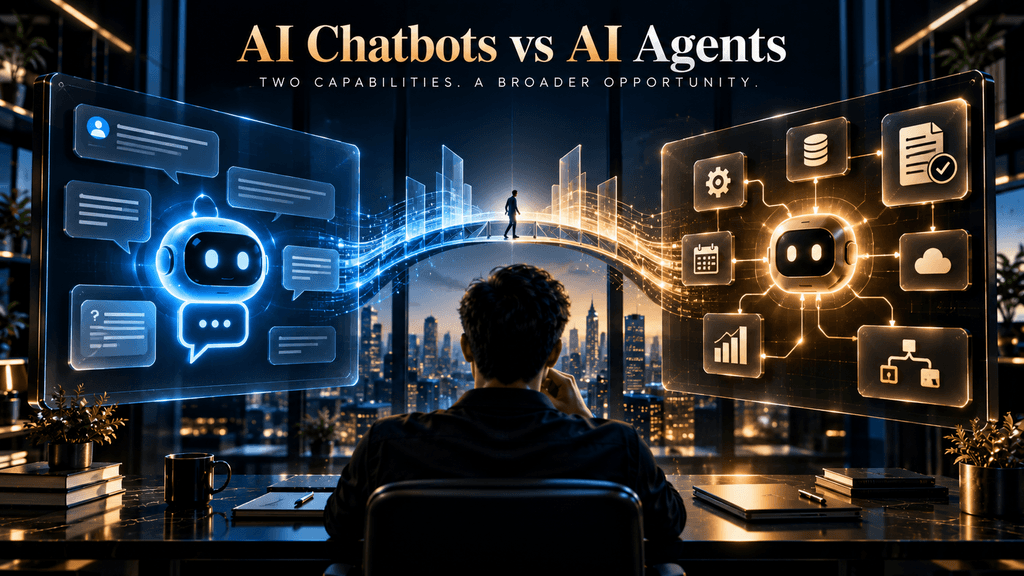
Two AI systems can sit behind almost identical chat interfaces and still represent very different technologies from a business perspective. One may answer customer questions, summarize information, search a knowledge base and guide an employee through a process. Another may receive a goal, determine the steps required to achieve it, use several business systems, evaluate what happened, adjust its approach and continue until the task is completed or it reaches a boundary that requires human intervention.
Both systems may use the same underlying language model. Both may understand natural language. Both may use tools. Both may even appear as a simple chat window to the person using them. The difference is therefore not as simple as “chatbots talk and agents act.” That phrase captures the beginning of the distinction, but it misses the more important question: who controls the workflow, how much decision-making is delegated to the system, how many steps must be coordinated, and what is allowed to happen without a human?
That distinction matters because businesses are increasingly moving from AI used for individual interactions toward AI used for longer-running work. OpenAI’s 2026 research, for example, describes agentic AI as changing the unit of knowledge work from short, self-contained interactions toward delegated, longer-horizon tasks in which agents can orchestrate tools, interact with environments and iterate toward a solution. (OpenAI) At the same time, Deloitte’s 2026 enterprise research shows that organizations are moving quickly toward agentic AI while governance and operational readiness are still lagging, making the decision less about which technology sounds more advanced and more about whether the business is prepared to use autonomy responsibly. (Deloitte)
This guide takes that question from first principles. Instead of treating a chatbot and an agent as two competing software categories, we will look at them as different levels of responsibility inside a workflow. By the end, you should be able to look at a business process and decide whether it needs a chatbot, a supervised agent, a more autonomous agent, a hybrid architecture—or no AI automation yet.
The Real Difference Between an AI Chatbot and an AI Agent
An AI chatbot is primarily designed around conversational interaction, while an AI agent is designed around achieving an outcome through a sequence of actions. A chatbot generally waits for the user to ask something and then provides information, guidance, or assistance. An agent can take the user’s goal as the starting point and determine what needs to happen next, using tools and intermediate results to move the workflow forward.
That does not mean a chatbot is incapable of using tools, nor does it mean every agent operates independently from beginning to end. A sophisticated chatbot may retrieve customer records, search documents, query a database, or perform a narrowly defined action. Conversely, an agent may operate with strict approval gates and require a human before it can take a consequential action. Google Cloud’s current definition emphasizes that agents pursue goals and complete tasks on behalf of users, with capabilities such as reasoning, planning, memory and action, while current Microsoft guidance similarly frames agents around combining instructions, knowledge and tools to accomplish tasks. (Google Cloud)
The more useful distinction is therefore workflow responsibility. If the system’s job is mainly to help a person make the next decision, you are usually in chatbot or assistant territory. If the system is responsible for determining and executing a chain of steps toward an outcome, you are moving into agentic territory. The interface is secondary; the degree of delegated responsibility is the architectural signal that matters.
Chatbot vs Agent: The Interaction Loop and the Execution Loop
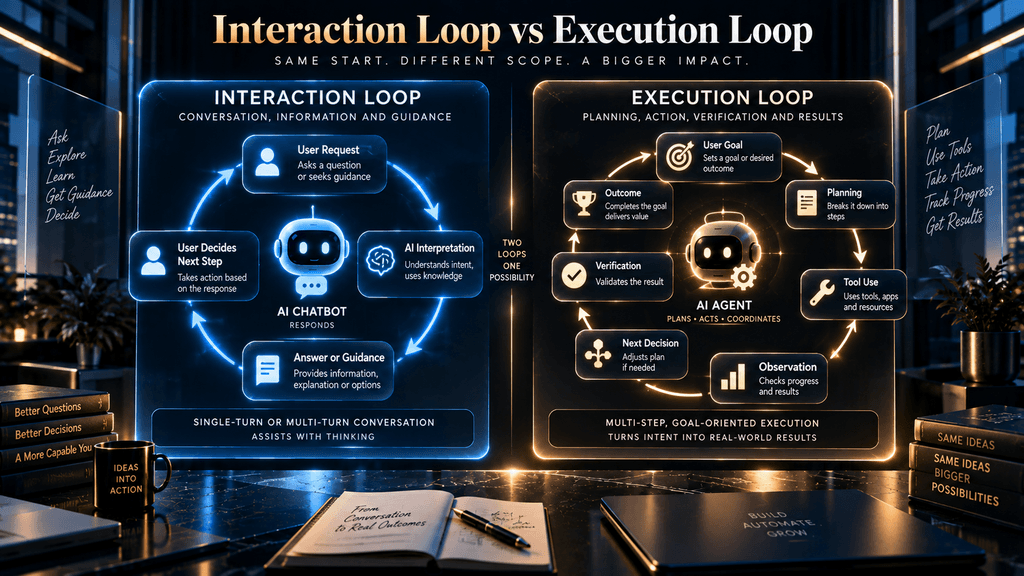
A useful way to understand the difference is to compare the loops each system is built around.
A typical chatbot follows an interaction loop. The user asks a question, the system interprets the request, retrieves whatever context it needs, and returns an answer or recommendation. The user then decides what to do next. Even when the conversation contains many turns, the human generally remains the driver of the workflow.
An agent operates around an execution loop. The user provides a goal, the system determines what needs to happen, chooses or requests tools, observes the results, updates its task state, and decides what step should come next. The loop can continue until the goal is completed, the system reaches an exception, or a human approval point is triggered. OpenAI describes this shift toward longer-horizon work as one of the defining characteristics of agentic systems, while Anthropic distinguishes agents from more predefined workflows specifically because agents dynamically direct their own process and tool usage.
The distinction becomes obvious in a practical example. Asking an AI system, “What documents do I need to open a business account?” is primarily an information problem. Asking it, “Check my application, identify what is missing, retrieve the required documents, create the submission package, upload everything and tell me what still needs my approval” is an execution problem. Both can begin inside the same chat interface, but the second requires the system to take responsibility for a chain of dependent actions.
That is the real dividing line: a chatbot primarily helps you navigate work; an agent can be delegated responsibility for carrying work forward.
What an AI Chatbot Is Actually Designed to Do
An AI chatbot is strongest when the main value lies in conversation. It can explain information, answer questions, summarize documents, translate text, guide a user through a process, suggest options and help someone decide what to do next. Modern chatbots can also retrieve external information or connect to business data, which means the term “chatbot” should not be interpreted as “simple question-and-answer box.”
The crucial limitation is that the user generally remains the manager of the interaction. If you ask a chatbot how to prepare a report, it can explain the process. If you ask what should be included in the report, it can help draft the structure. If it has access to your organization’s information, it may even retrieve the relevant numbers. But unless the system has been designed to take responsibility for the broader workflow, it normally stops at the assistance boundary.
That makes chatbots especially useful for tasks where information itself is the product. Customer-service questions, internal knowledge retrieval, product guidance, documentation search, onboarding questions, troubleshooting and content assistance all fit naturally. In those situations, adding more autonomy may not create enough additional value to justify the complexity of orchestration, permissions, monitoring and recovery.
This is one reason it is a mistake to frame chatbots as the “old” technology that companies should graduate away from. If a business needs reliable information delivery and conversational assistance, a well-designed chatbot can be exactly the right system.
What an AI Agent Is Actually Designed to Do
An AI agent begins with a different assumption: the user does not necessarily want information for its own sake. The user wants an outcome.
Google Cloud describes agents as software systems that use AI to pursue goals and complete tasks on behalf of users, and highlights reasoning, planning, memory, decision-making and action as core characteristics. The agent may need to interpret the goal, divide it into subproblems, decide which tools are required, retrieve information, carry out actions, inspect results and revise the plan when conditions change.
Imagine a sales manager saying, “Prepare tomorrow’s meeting with our five largest prospects.” A chatbot can help create an agenda or suggest questions. An agent could potentially retrieve CRM histories, inspect recent communication, identify unresolved issues, summarize the account status, gather recent relevant information, draft personalized briefing notes and place the finished documents in a shared workspace.
The difference is not that the agent suddenly possesses a magical level of intelligence. It is that the software has been given a greater share of the workflow authority. It has somewhere to keep task state, a defined set of tools, permission to use those tools, rules governing its actions, and an objective against which it can determine whether it is making progress.
That additional responsibility is what creates both the value and the risk.
Why “Chatbots Talk, Agents Act” Is Only Half the Story
The phrase is useful because it provides an intuitive entry point, but it becomes misleading when used as a strict technical definition. Chatbots can increasingly perform actions through APIs, while agents can communicate extensively through conversational interfaces. The distinction is not whether an action exists somewhere in the system; it is whether the system is responsible for planning and coordinating the path toward the goal.
Consider a support chatbot that lets a customer request a password reset. The user asks to reset the password, the chatbot verifies eligibility, calls a predefined function and confirms the result. That system is clearly doing something, but it may still behave as a user-led conversational workflow with a narrow, predetermined action.
Now consider an employee saying, “Get the new hire ready for Monday.” An agentic system could interpret the goal, identify the relevant onboarding steps, check which tasks have already been completed, create accounts through approved systems, send required documents, schedule meetings, detect missing information and escalate anything that requires human approval. The individual actions are not the defining feature; the system’s ability to coordinate them around a broader objective is.
This is why “tool use” should not be used as a binary test for agenthood. Tool use is a capability. Autonomy and workflow responsibility are architectural properties.
Can an AI Chatbot Use Tools?
Yes, and this is one of the most important points to understand before comparing the two.
A chatbot can be connected to search, a knowledge base, a CRM, a database, a calendar, a help-desk system, a calculator, an internal function or an API. Google Cloud explicitly describes tools as the bridge between an agent’s reasoning and its ability to act, while modern model platforms increasingly support structured function or tool calling.
The presence of a tool therefore tells you very little by itself.
What matters is how the tool is used. A chatbot might call one approved function because the user explicitly requested an action. An agent might choose among several tools, execute one step, inspect the result, decide that another step is necessary, call a second system and continue until a measurable outcome has been reached.
This gives us a useful rule: A chatbot can use a tool. An agent can organize a workflow around tools.
That distinction will become increasingly important as vendors use the word “agent” for products that are essentially conversational systems with a few API integrations.
Can an AI Agent Have a Chat Interface?
Absolutely. In fact, conversational interfaces may become one of the most common ways people interact with agents.
The mistake is assuming that the interface determines the architecture. A chat window is simply an interaction surface. Behind that surface could be a basic retrieval chatbot, a tool-assisted assistant, a supervised agent or a much more autonomous system.
This matters for purchasing decisions because a polished interface can make two products look almost identical. One may be designed mainly to answer questions, while the other can coordinate multi-step work across business systems. If the purchasing decision is made from a product demo alone, the visual similarity can conceal a very large difference in operational capability.
The right evaluation question is therefore not “Does this look like an AI agent?” It is “What responsibilities has this system actually been authorized and engineered to own?”
The Real Difference Is the Amount of Workflow Responsibility
Once the interface is removed from the equation, the comparison becomes much cleaner.
A chatbot usually receives a request and produces a response that helps the user continue. An agent receives a goal and can potentially become responsible for the sequence required to achieve it. The more responsibility the system assumes, the more information, state, tools, permissions and controls it needs.
This is why agentic architecture becomes more expensive and difficult as the workflow becomes deeper. A one-step response can often be evaluated by asking whether the answer was correct. A multi-step system needs to be evaluated across tool selection, intermediate decisions, state transitions, exception handling, permissions and final outcome.
Anthropic’s engineering guidance makes this point from a different angle: workflows use predefined code paths to orchestrate LLMs and tools, while agents dynamically direct their own processes and tool usage. The company also recommends finding the simplest solution possible because more agentic architectures add complexity and can increase latency and cost.
That is the central business trade-off. More autonomy gives you more flexibility, but it also gives the system more ways to fail.
Difference 1: Conversation vs Goal Completion
A chatbot is usually optimized around a conversation. The goal is to interpret the user’s request, provide useful information and maintain enough context to make the next exchange coherent.
An agent is optimized around completion. The conversation may start the process, but the output is not necessarily another message; it may be a completed report, updated customer record, scheduled meeting, processed request or other business outcome.
This distinction becomes particularly important when measuring performance. A chatbot may be judged on answer quality, response time, satisfaction and successful resolution. An agent needs additional measures such as task completion rate, successful tool execution, recovery from errors, human intervention and whether the final workflow actually achieved its objective.
For example, suppose an employee asks, “Can you prepare a weekly sales report?” A chatbot that produces a good template has done what it was asked conversationally. An agent that retrieves the underlying sales data, validates the time period, calculates the requested metrics, generates the report and places it in the correct folder has fulfilled a much broader responsibility.
The more the business cares about the finished outcome rather than the quality of the response, the more relevant agentic architecture becomes.
Difference 2: Reactive vs Proactive Behavior
Most chatbots are fundamentally reactive. They wait for a person to start the conversation and then respond to the request.
Agents can also be reactive, but their operating model can extend to events, schedules and system triggers. A business might configure an agent to examine incoming support tickets, identify unusual patterns, prepare a summary and route an investigation when a threshold is reached. The user did not have to ask, “Please check today’s support tickets now”; the trigger itself initiated the workflow.
This is powerful because many business processes are already event-driven. A new lead arrives. A contract reaches a renewal period. A payment fails. A support queue exceeds a threshold. A deadline approaches. An inventory level falls below a defined point.
But proactive behavior should not be confused with unlimited independence. A responsible system still needs explicit triggers, permissions, budgets, policy constraints, escalation rules and human approval where appropriate. An agent that can initiate work without controls is not necessarily advanced; it may simply be under-governed.
Deloitte’s 2026 research is particularly relevant here because it found that agentic AI use is expanding while only about one in five organizations report having mature governance for autonomous AI agents.
Difference 3: Answer Generation vs Tool-Oriented Execution
A language model can generate an answer from the context it has. Real business work often requires information or actions that exist somewhere outside that context.
That is where tools become important. Google Cloud describes tools as capabilities that allow agents to perform calculations, access databases, search enterprise knowledge bases and connect to external systems through APIs.
The difference between a chatbot and an agent is not whether either system has tools. It is whether tool usage becomes part of a broader decision loop. A chatbot might perform one known lookup because the user explicitly asks for it. An agent might determine that it needs CRM data first, then a pricing service, then an inventory check, then an approval workflow, and finally an email service.
The resulting architecture looks less like: question → answer and more like: goal → plan → tool → result → next decision → tool → verification → outcome. That second loop is what creates agentic behavior.
Difference 4: Single-Step Assistance vs Multi-Step Workflows
Multi-step work is one of the clearest reasons businesses consider agents, but even here a useful distinction is needed.
Not every multi-step workflow needs an agent. A traditional automation platform can execute a long sequence perfectly well when the path is known in advance. If the workflow is always “receive form → validate fields → create record → send email → create task,” there may be little value in giving an AI system freedom to reinvent the sequence.
Agents become particularly useful when the path itself contains uncertainty. Maybe the system must decide which records are relevant, choose among several tools, handle missing information, prioritize tasks or change the sequence based on what it discovers.
Anthropic’s distinction between workflows and agents is extremely useful here. A workflow can coordinate multiple models and tools along predetermined routes, while an agent dynamically determines its own route.
This creates a subtle but important principle: Multi-step does not automatically mean agentic. Dynamic multi-step decision-making is the stronger signal.
Difference 5: Conversation Context vs Task State
Chatbots need context so they can understand the current conversation. Agents may need something deeper: a representation of what they are trying to accomplish and what has already happened.
Suppose a chatbot is answering a question about a company’s return policy. Conversation history may be enough to understand the user’s follow-up.
Now imagine an agent responsible for preparing a research report over several stages. It may need to track which sources it reviewed, which claims were accepted, which data points conflicted, which sections are unfinished, which tools were called, which approvals were received and where the final output should be delivered.
That is task state. It changes the architecture because the system now needs to understand not just “What are we talking about?” but “Where are we in the work?”
This is one reason persistent state and memory become more important as workflows become longer. The system needs a reliable representation of the task rather than merely a transcript of the conversation.
Difference 6: Information Risk vs Action Risk
Both chatbots and agents can be wrong, but their errors may affect different things.
A chatbot can provide outdated information, misunderstand the user, hallucinate a fact or give incomplete guidance. Those failures can still be serious, especially in regulated or high-consequence environments.
An agent introduces another category: the system may perform the wrong action.
It could update the wrong customer record, send a message to the wrong recipient, create duplicate tasks, purchase the wrong item, delete information, issue an incorrect refund or schedule an appointment incorrectly. The problem is no longer limited to what the system says. It extends to what the system changes in the real world.
This is one of the most important reasons organizations should be careful about increasing autonomy. The jump from an answer that is wrong to an action that is wrong is not merely a technical escalation; it is an operational one.
A useful rule is: The more consequential the action, the more important verification, reversibility, permissions and human control become. That rule should influence architecture before model selection.
Difference 7: Predictability vs Adaptability
Traditional automation is often powerful precisely because it is predictable. The designer defines the acceptable path, the system follows it and testing can focus on known branches.
Agents introduce adaptability. If a preferred tool fails, an agent may attempt an alternative. If a required piece of information is missing, it may search another source. If a meeting time becomes unavailable, it may evaluate alternatives. That adaptability is exactly what makes agents attractive for messy real-world workflows.
But adaptability makes verification harder. When a system can choose among many possible paths, testing every possible path becomes increasingly difficult. The business needs stronger monitoring and evaluation because success is no longer equivalent to “the automation followed the script.”
This is another reason agentic systems should not be judged solely through demonstrations. A system can complete one impressive workflow in a product demo while still behaving unpredictably in edge cases.
The question is not: “Can it do this?” The stronger question is: “Can it do this reliably across the conditions that matter to the business?”
Difference 8: Cost and Infrastructure
The pricing page is rarely the complete cost of an AI architecture.
A chatbot can require a model, interface, knowledge source, basic analytics and perhaps escalation to a human. An agent may add tool integrations, identity management, granular permissions, task state, monitoring, audit logs, approval checkpoints, error recovery and workflow orchestration.
There are also organizational costs. Data may need to be cleaned. Processes may need to be documented. Employees may need training. Security teams may need to review integrations. Someone must monitor the system, evaluate failures and maintain the tools it depends on.
Anthropic explicitly notes that more agentic systems can involve higher latency and cost, while OpenAI’s current agent research shows that as systems become capable of longer-horizon work, users increasingly delegate more complex tasks to them. The economic question is therefore not whether an agent costs more than a chatbot in some universal sense; it is whether the additional value of automating the larger workflow justifies the additional complexity.
A company should compare operating models, not simply subscription prices.
The Autonomy Ladder: Chatbot and Agent Are Not Two Boxes
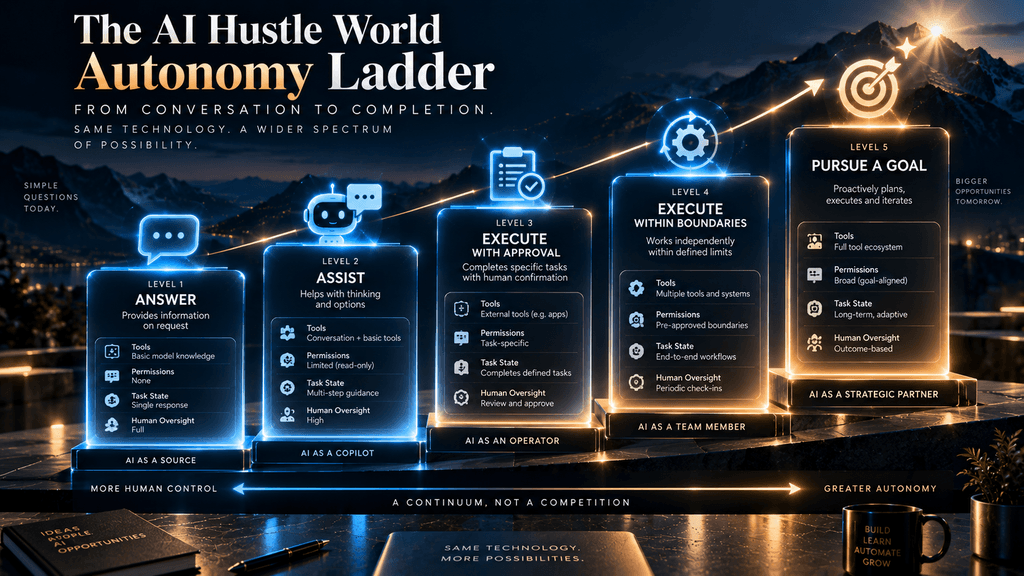
A useful way to think about the market is as an Autonomy Ladder rather than a binary category system.
At the first level, the system simply answers. It provides information, explains concepts or retrieves approved knowledge.
At the second level, it assists. It may analyze a situation and recommend what a human should do, but the person remains responsible for execution.
At the third level, it can execute with approval. The system prepares or performs actions, but meaningful changes require human authorization.
At the fourth level, it can execute within defined boundaries. The agent can complete approved actions automatically as long as they remain within explicit limits.
At the fifth level, it can pursue a goal. It dynamically plans, coordinates tools, maintains task state, adapts to intermediate results and continues working until the objective is achieved, blocked or escalated.
These levels are intentionally not tied to product names. A vendor may call a Level 3 system an “agent,” while another may reserve the term for Level 5. The business decision should therefore be based on actual autonomy, not the label used in the marketing material.
The principle is simple: choose the lowest autonomy level that can reliably accomplish the business outcome you care about.
The A.C.T. Decision Model
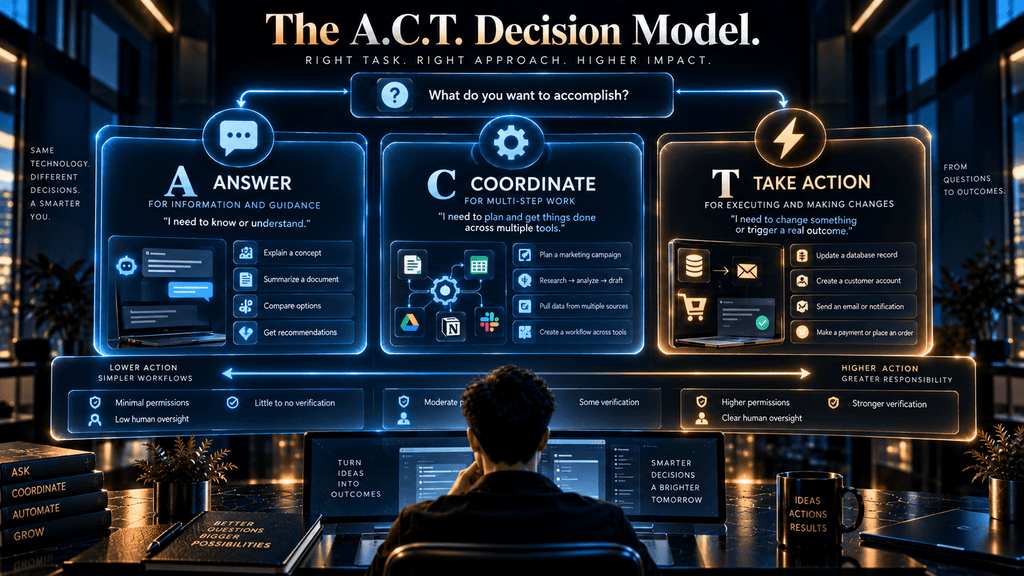
The second AI Hustle World framework should begin with the work itself rather than the technology.
Answer
Start here when the system mainly needs to explain, retrieve, summarize, guide or inform. A chatbot is often sufficient because the user remains responsible for what happens next.
Coordinate
Move into this territory when the system needs to manage multiple sources, tools, steps or dependencies. The question is no longer simply whether the AI can answer but whether it can coordinate the information and activities required to produce a result.
Take Action
This is where autonomy becomes materially important. If the system must change records, send communications, move money, create commitments or perform other externally visible actions, the architecture needs stronger permission, verification and recovery mechanisms.
The A.C.T. model intentionally does not say that every “Take Action” problem requires a fully autonomous agent. A supervised workflow or bounded agent may be enough. The purpose is to force the business to identify what kind of responsibility the AI actually needs to assume before choosing an architecture.
Why a Hybrid System Is Often the Best Answer
The chatbot-versus-agent debate becomes much less dramatic when you realize that many real business processes need both.
Consider customer support. A conversational system can understand the customer’s problem and retrieve the relevant policy. A bounded agent can access the account and perform an approved action. A human can take over when the situation becomes unusual, sensitive or disputed.
The same structure works in HR. A chatbot can answer policy questions. A tool-enabled workflow can retrieve an employee’s current information. An agent can prepare a request. A human manager can approve the consequential step.
This is not a compromise between two competing technologies. It is often a better allocation of responsibility.
The system can remain conversational where conversation is valuable, deterministic where rules are important, agentic where dynamic coordination creates leverage, and human-led where consequences or ambiguity are too high.
This hybrid approach also gives businesses a safer path to autonomy. They can begin with information access, then assistance, then supervised execution, and only later automate specific actions when enough evidence exists to justify it.
A Business Does Not Need an Agent Just Because the Workflow Has Multiple Steps
This deserves emphasis because it is one of the easiest ways to over-engineer AI.
Suppose a company wants to automatically process a standard employee expense claim. The workflow is:
receive form → validate fields → check policy → approve if within rule → record transaction → notify employee.
That is multi-step, but if the rules are stable and deterministic, a conventional workflow engine may be better than an agent. There is no obvious advantage in asking a model to decide what the next step is when the business already knows what the next step should be.
Now suppose the expense claim is messy. The system must interpret receipts, identify the relevant policy, resolve ambiguous descriptions, decide which category applies, request missing information and route unusual cases. The value of an agent becomes more credible because the workflow contains decisions that cannot be fully predetermined.
This is the difference between workflow automation and agentic automation. The presence of several steps is not the deciding factor. The deciding factor is whether the system needs meaningful flexibility in determining and coordinating those steps.
Process Stability Matters Before Autonomy
One of the most overlooked issues in agent adoption is process quality.
Businesses sometimes try to automate workflows that are not even well-defined internally. Different employees follow different procedures. Exceptions are not documented. Data lives in conflicting systems. Nobody agrees on what “done” means.
Adding an agent to that environment does not fix the underlying process. It can actually make the ambiguity harder to detect because the system begins making decisions inside a process whose rules were never clear.
This is why the first question should be: Can the business clearly explain the process today? If the answer is no, process redesign may create more value than AI automation.
Deloitte’s 2026 research is highly relevant here: while enterprise AI access has expanded and expectations for scale are increasing, the report also highlights gaps in infrastructure, data, risk and talent readiness. It reports that only 21% of organizations have a mature model for agent governance, and says successful companies are taking measured approaches that begin with lower-risk use cases and build governance before scaling autonomy.
The lesson is straightforward: agentic capability should sit on top of process maturity, not compensate for the absence of it.
The Most Important Variable: Consequence of Error
The architecture decision becomes much easier when you classify the consequence of failure.
Suppose an AI summarizes a team meeting and gets one minor sentence wrong. That is undesirable, but the error can probably be corrected.
Now suppose an AI agent sends the wrong contract to a customer, changes a financial record or initiates a payment without the required approval. The same underlying model error becomes a much more consequential operational event.
This is why autonomy should increase only as controls become stronger. High-consequence actions should generally require some combination of: tight permissions, explicit approval, validation, logging, reversibility, exception handling and human oversight. The exact controls vary by workflow, but the principle is universal: the system’s authority should be proportional to the consequences of failure.
An organization does not need to become anti-agent because some actions are risky. It needs to separate low-risk automation from high-risk decisions instead of giving the same level of autonomy to both.
When a Chatbot Is the Better Choice
A chatbot is usually the better starting point when the main problem is information access, guided assistance or repetitive conversation. This includes FAQ systems, internal knowledge assistants, product-support experiences, documentation search, basic troubleshooting and employee self-service.
It is also the better choice when the company has not yet built the data and governance foundation required for more autonomous execution. A chatbot can provide significant value without needing broad permissions across business systems.
Another important reason to choose a chatbot is workflow simplicity. If the user’s next action is obvious and the system’s contribution is mainly to provide accurate information, adding autonomous planning may create complexity without meaningful business benefit.
This is not a lesser architecture. A well-designed chatbot can be the right endpoint rather than merely the first step toward an agent.
When an AI Agent Becomes Worthwhile
An agent becomes more compelling when a task has a clear outcome, enough repetition to justify automation, multiple dependent steps and meaningful value in reducing human coordination.
Good candidates often share several characteristics. The process is reasonably well understood, the necessary data is accessible, the tools are available, permissions can be defined, the outcome can be measured and the business benefits from reducing the amount of human coordination required.
Sales research, operational reporting, internal knowledge workflows, ticket investigation, document processing and certain customer-service workflows can all become good candidates when the underlying systems are connected. OpenAI’s 2026 research provides a useful indicator of where the technology is heading: users are increasingly delegating longer-horizon work rather than relying only on short chat interactions, with substantial growth in tasks estimated to require more than 30 minutes, one hour and even several hours of human work.
The implication for businesses is not that every workflow should become autonomous. It is that longer-horizon work is increasingly becoming technically feasible, making workflow-level AI a more realistic category than it was when conversational systems were mostly limited to answering questions.
When You Should Use Neither Yet
There are cases where the correct answer is not chatbot and not agent. Do not start with either architecture when the underlying data is unreliable, the process is undocumented, the result cannot be measured, the permissions are unclear or the cost of failure is not understood.
The same is true when the business cannot explain why automation is necessary. AI should not be added simply because competitors are announcing agents. A process that takes ten minutes once per month may not justify an elaborate automation system, even if a demo makes the technology look impressive.
This is one of the most useful contrarian positions in the entire subject:
AI maturity does not mean automating everything. It means knowing what should remain human.
Deloitte’s research supports this broader interpretation because the organizations that report the strongest progress are not merely adding AI tools; they are redesigning processes and building governance around how those tools operate.
A Practical Chatbot vs Agent Decision Matrix
| Business Need | Best Starting Point | Why |
|---|---|---|
| Answer customer questions | AI chatbot | Primary value is information and conversation |
| Search internal knowledge | AI chatbot / assistant | Retrieval is more important than autonomy |
| Summarize documents | AI assistant | Human usually decides what happens next |
| Recommend next action | Assistant / supervised system | Human retains responsibility |
| Gather information across systems | Agent or hybrid | Multiple sources must be coordinated |
| Prepare a report automatically | Supervised agent | Multi-step work with measurable output |
| Update CRM records | Bounded agent / hybrid | External action requires permissions |
| Send business communications | Hybrid | Action and reputation risk need controls |
| Process financial transactions | Bounded agent / hybrid | Verification and approval are critical |
| Coordinate complex multi-step workflow | Agent | Dynamic planning and tool orchestration create value |
| Make high-consequence judgment | Human-led hybrid | AI can assist, but human accountability remains central |
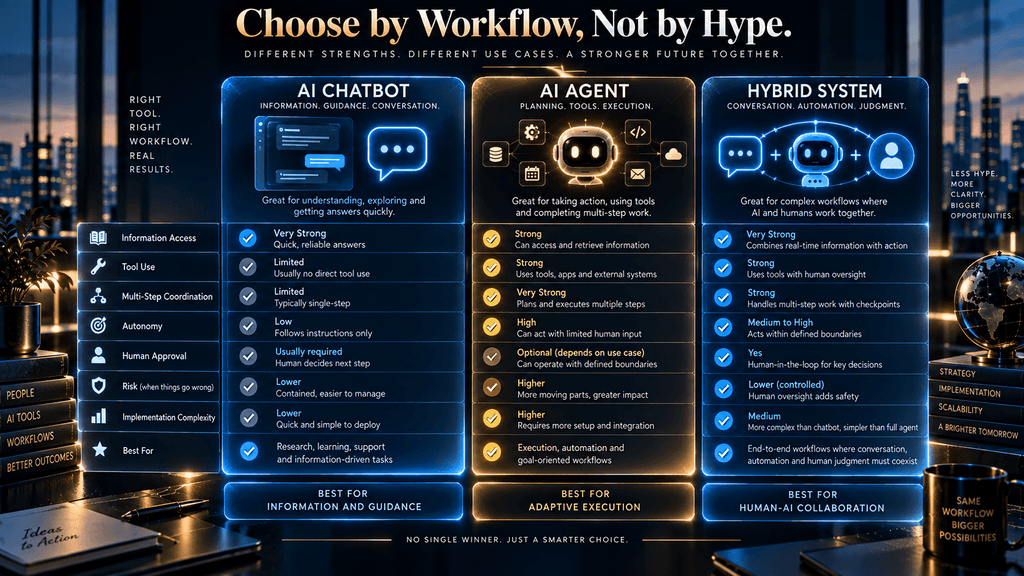
This matrix is not an official industry classification. It is an AI Hustle World decision aid designed to answer the practical question: how much autonomy does the task actually require?
The Economics: Compare Value, Not AI Labels
Businesses often compare chatbot pricing with agent pricing and stop there. That can produce a misleading conclusion because the two systems may be solving different amounts of work.
A chatbot may save employee time by reducing repetitive questions. An agent may save time by completing a larger workflow. But the agent may also require significantly more engineering, integration, monitoring and governance.
The real equation is closer to: automation value − system complexity − supervision cost − failure cost = net operational value.
That does not require precise dollar figures before every experiment. It simply means that the value of the final outcome needs to be large enough to justify the system’s total cost.
Anthropic explicitly notes that agents can introduce additional latency and cost in exchange for better performance on tasks that benefit from dynamic execution. OpenAI’s current agent research also shows why this trade-off can become attractive as systems take on longer-horizon work.
The correct business question is therefore not: “Are agents expensive?” It is: “Is the additional value created by delegated execution large enough to justify the additional operational complexity?”
Real-World Evidence: Agent Adoption Is Growing Faster Than Readiness
The current market gives us an interesting signal. Businesses are clearly experimenting with and deploying AI agents, but widespread experimentation should not be confused with mature autonomous operations.
Deloitte’s 2026 State of AI report says agentic AI usage is poised to rise sharply and that only around one in five companies has a mature governance model for autonomous AI agents. It also reports that organizations feel less prepared in infrastructure, data, risk and talent than in overall AI strategy.
Its January 2026 survey similarly found that close to three-quarters of companies planned to deploy agentic AI within two years, while only 21% reported mature agent governance. Deloitte says organizations seeing the most success are taking measured approaches, starting with lower-risk use cases and building governance capabilities before scaling.
That creates an important reality check. The technology is moving quickly enough that businesses should understand agentic architecture now, but the evidence does not support blindly maximizing autonomy. The companies with the most sustainable path are likely to be those that treat autonomy as an operating decision rather than a prestige feature.
Real-World Example: Air India’s AI.g
Air India’s AI.g provides a useful example of a system that sits beyond basic conversational question answering.
Microsoft reports that AI.g handles about 40,000 customer queries per day across more than 1,300 question types, including requests involving bookings, changes and refunds. Microsoft describes the system as integrating generative AI with enterprise data and operational workflows rather than simply returning static answers. These figures are Microsoft/Air India customer-story claims, not independent industry benchmarks, but the architecture illustrates the important point.
The interesting lesson is not the headline number.
It is the connection between natural-language conversation and real enterprise processes. When a conversational system can retrieve information from operational systems and support actions within defined boundaries, the chat interface becomes the front end of a broader workflow.
That is precisely why the chatbot-versus-agent distinction cannot be reduced to interface design. The customer may still see a conversational assistant, while the underlying system increasingly participates in operational execution.
Real-World Example: The Move Toward Longer-Horizon Work
OpenAI’s June 2026 research provides another useful lens because it measures how users are actually engaging with agentic systems. The research says that by May 2026, 80.6% of sampled individual users had made at least one request estimated to correspond to more than 30 minutes of human work, 70.2% had made one exceeding an hour, and 25.6% had made at least one estimated to exceed eight hours. OpenAI cautions that these task-horizon estimates are model-generated and directional rather than exact, but the trend itself is clear: capable users are delegating longer and more complex work.
This matters because it changes how the business opportunity should be framed. Agentic AI is not merely a more elaborate chatbot that writes longer answers. It enables a shift from asking for assistance to delegating work.
That shift has implications for organizational design as well. If AI systems increasingly complete pieces of work that once required employees to move between applications, gather information and coordinate actions manually, then the value of the agent comes from reducing that coordination overhead rather than simply reducing the number of messages typed into a chat box.
What Traditional Automation Still Gets Right
There is a temptation to assume that AI agents replace workflow automation because they are more flexible. In reality, deterministic automation remains extremely valuable when the process is stable and the rules are explicit.
Suppose a company has a simple process for approving a standard expense below a fixed threshold. There may be no reason to let an AI system dynamically plan that workflow. A conventional rule engine can validate the fields, check the limit, update the record and send the notification with high predictability.
Where agents become more useful is when the workflow contains ambiguity, variation or decisions that cannot be efficiently expressed as fixed rules. The business should not use agentic AI merely because it can; it should use it where dynamic interpretation and coordination create value.
This is another reason the “agent is more advanced” mindset can be harmful. Advanced does not automatically mean appropriate.
The better architecture is the one that produces the required outcome reliably.
Why Agent Washing Is a Real Problem
As agentic AI becomes a major marketing category, some products will use the label simply because it sounds more sophisticated.
A product may call itself an agent while performing a predefined action from a chat interface. Another may genuinely plan across tools and maintain state. A third may combine deterministic workflows with selective agentic decision-making.
The label is therefore almost useless without inspecting the behavior. Ask the vendor:
- Can the system determine the next step itself?
- Can it choose among tools?
- Can it preserve task state across steps?
- Can it recover from failures?
- Can it operate from triggers rather than only direct user instructions?
- What can it change without approval?
- Can administrators define tool and data permissions?
- How are actions logged and audited?
These questions reveal architecture more effectively than the word “agent” on the product page.
How to Start Safely: From Assistance to Autonomy
A business does not need to choose its final autonomy level on day one. A much safer strategy is to introduce autonomy gradually.
Begin with an informational use case where the system has read access and the consequences of error are limited. Once the business understands the failure patterns, expand into recommendation or assistance. From there, introduce selected actions behind explicit approval gates. Only after those actions demonstrate reliability should the business consider allowing them to execute automatically within tightly defined boundaries.
This gradual path has an important advantage: every increase in autonomy is earned by evidence.
The business learns where the data is weak, where users intervene, where tools fail and where the process contains exceptions. Rather than treating those problems as reasons to abandon AI, the organization uses them to establish the next control boundary.
Deloitte’s 2026 findings support this measured approach, noting that more successful organizations are starting with lower-risk use cases, building governance capabilities and scaling deliberately.
The Permissions Problem
The most important technical question about an agent is often not whether it can use a tool. It is which tools it is allowed to use, for which user, under which conditions, and with what limits.
An employee-assistance chatbot may need read access to an internal knowledge base. A customer-service agent may need access to a specific account record. A financial workflow may require a separate authorization layer before an action can be executed.
These permissions should not be hidden inside the model’s prompt and treated as sufficient security. They need to exist at the application and infrastructure level so the system cannot simply “reason” its way around an authorization boundary.
This becomes especially important as agents gain access to more systems. The potential value of a highly connected agent rises with its access to business data and tools, but so does the potential blast radius of an error or compromised workflow.
That is why agent architecture increasingly has to be treated as a security and governance problem as much as an AI problem.
The Human Is Not Necessarily Removed; the Human’s Role Changes
A common fear is that adding agent autonomy means eliminating people from the workflow entirely. In practice, a better design often changes what the person does.
Instead of manually gathering five documents, an employee may review the agent’s gathered evidence. Instead of writing every customer response, a support specialist may handle escalations where judgment is required. Instead of building every report manually, an analyst may verify the data and investigate anomalies.
This is an important distinction because human involvement can move up the value chain rather than disappear.
The AI handles predictable coordination and mechanical work. The human handles ambiguity, accountability, exception management and decisions with consequences. The right architecture therefore creates a division of labor rather than treating automation as a binary replacement strategy.
OpenAI’s 2026 enterprise research describes frontier firms as moving from assistance toward delegation by giving agents context and tools to complete more complex tasks. The implication is not that humans become irrelevant; it is that humans increasingly supervise systems capable of doing larger units of work.
How to Decide What Your Business Actually Needs
The decision becomes much clearer when you ask six questions about the workflow.
What is the actual outcome? If the outcome is a correct answer, explanation or recommendation, a chatbot may already be enough.
How many decisions happen between request and outcome? A simple path may not justify agentic orchestration, while a workflow containing multiple dependent decisions may benefit substantially.
Does the system need to choose its own next step? If the process is completely predictable, conventional automation may be better.
What systems must it access? More tools and systems generally mean greater potential value, but also more integration and governance complexity.
What happens if it is wrong? The higher the consequence, the more important approval, verification and reversibility become.
Can success be measured? If you cannot define what a completed workflow looks like, you will struggle to evaluate the agent fairly.
These questions are far more useful than asking which AI product has the most features.
A Better Way to Compare Chatbot and Agent Vendors
When evaluating products, avoid feature checklists that simply count whether each platform has “memory,” “tools,” “agents,” “RAG” and “automation.” Those labels tell you what capabilities are advertised, not how the system behaves in your workflow.
Instead, test the architecture through a realistic task. Give the system an ordinary request. Then introduce an ambiguity, a missing data point, a failed tool, an approval requirement and a conflicting source. Observe whether the system asks for clarification, chooses another path, exposes uncertainty, incorrectly pushes forward or escalates to a human.
That exercise tells you much more than a polished product demonstration. You are effectively asking the system: How does it behave when reality stops following the happy path? That is where the difference between a chatbot, a scripted workflow and a genuinely useful agent becomes visible.
The Biggest Mistakes Businesses Make
The first mistake is buying an agent before defining the workflow. The second is assuming the most capable model will automatically produce the best operational system. The third is giving an agent broad access to tools before permission boundaries and recovery procedures are ready.
Another common mistake is measuring activity instead of outcomes. A company may celebrate the number of tasks an agent initiated or the number of conversations it handled without measuring whether the work was actually completed correctly. That creates the same problem seen in poorly designed customer-service automation: the system appears busy while the business outcome does not improve.
Agent adoption also fails when organizations automate unstable processes. If employees routinely disagree about the correct procedure, an agent is not going to magically resolve the disagreement. It may instead encode inconsistency into an automated system that operates at much greater speed.
Finally, companies often make the technology decision before the economic decision. An agent may be technically impressive while producing too little value to justify integration, monitoring and governance. Capability is not the same thing as business value.
What Should a Business Measure?
Chatbots and agents need different success metrics because they solve different problems. For a chatbot, useful measures can include response accuracy, first-contact resolution, customer satisfaction, escalation rate, response latency and the frequency with which users need to repeat themselves.
For an agent, the measurement system should expand to include task completion, successful tool use, exception rates, recovery behavior, human intervention, time to completion and the proportion of workflows completed without preventable rework. The most important metric should usually remain the final business outcome.
If a chatbot answers 95% of questions but customers still cannot solve their problems, the system is not performing as well as the number suggests. If an agent completes 80% of a workflow automatically but creates expensive errors in the remaining 20%, the headline automation percentage is similarly misleading.
A mature AI system should be evaluated on reliable outcomes, not impressive activity.
The Future Is Probably Not “Chatbot vs Agent”
The distinction between chatbots and agents will become less visible to end users as systems become more capable.
A person may open one conversational interface and ask a question. The system might decide to answer directly, retrieve documents, call a database, invoke a specialized workflow, ask another agent for assistance or request human approval. From the user’s perspective, it may all look like one conversation.
This is already visible in the direction of current agent platforms. Google describes agents as capable of combining reasoning, tools, memory and action, while OpenAI’s current agent work focuses on longer-horizon execution and tool orchestration.
The result could be a shift away from thinking about “the chatbot” or “the agent” as a single product. Instead, businesses may increasingly build an AI operating layer where conversational interfaces, deterministic workflows, retrieval systems, specialized agents and humans each handle different parts of a larger process.
That creates a new strategic question for businesses: Where should autonomy live? That question may ultimately matter more than which model or agent platform a company chooses.
The Bigger Second-Order Effect: Software May Start Adapting to the Work
There is an even larger implication behind the rise of agents.
Today, employees often adapt themselves to software. A customer-service representative moves between the CRM, ticketing system, email application, knowledge base and analytics dashboard. The employee becomes the coordinator connecting systems together.
An agent can potentially reverse some of that relationship.
Instead of the person moving between applications, the agent can move between systems and bring the relevant result back to the employee. OpenAI’s 2026 research argues that agentic tools are already extending into longer-horizon work and allowing workers to operate beyond traditional boundaries of their roles.
This could reduce software switching costs and administrative coordination substantially.
But it also means that permissions, identity, auditability and governance become part of the operating system of the company itself. When software starts acting across systems on behalf of employees, deciding what the software is allowed to do becomes an organizational policy question, not simply an IT configuration.
That is why the agentic shift is more significant than adding another AI assistant to the toolbar.
Final Decision: Which One Does Your Business Need?
The simplest way to make the decision is to start with the work instead of the technology.
Choose an AI chatbot when the primary job is to answer questions, retrieve information, explain something, guide a user or provide conversational assistance. This is often the most sensible architecture when the user should remain in control of the workflow and the system’s contribution is mainly informational.
Choose a supervised or bounded AI agent when the workflow has multiple meaningful steps, requires coordination across tools, benefits from dynamic decision-making and produces a measurable outcome. Give it only the permissions it needs, keep consequential actions behind appropriate controls and expand autonomy only when the evidence supports it.
Choose a hybrid architecture when the workflow combines conversation, information retrieval, external actions and human judgment. In many real organizations, this will be the most practical answer because different parts of the same workflow need different levels of autonomy.
And choose neither when the underlying process is unstable, the data is unreliable, the outcome is unclear or the business cannot yet justify the cost and risk of automation. Sometimes the most sophisticated AI strategy is to fix the process first.
Final Thoughts
The chatbot-versus-agent debate is often presented as a race between an older technology and a more advanced one. That framing is too simplistic for the way modern AI systems are actually being built. Chatbots are becoming capable of retrieval and tool use, agents are becoming conversational, and businesses increasingly combine models, workflows, APIs, databases and human approvals into systems that do not fit neatly into either label.
The more useful distinction is responsibility. A chatbot primarily helps someone navigate information and make decisions. An agent can take responsibility for coordinating a sequence of work toward a defined outcome. The further that responsibility moves from the human into the system, the more important process stability, permissions, monitoring, recovery and governance become.
That is why the best business decision is rarely “choose the most advanced AI.” The stronger question is how much autonomy the workflow actually needs. If a chatbot solves the problem, use the chatbot. If the process genuinely benefits from dynamic multi-step execution, an agent may create significant leverage. If the workflow combines information, automation and judgment, a hybrid system may be the architecture that makes the most sense.
The technology will continue moving quickly. OpenAI’s current research already shows users delegating longer-horizon tasks, while Deloitte’s research shows that enterprise governance is struggling to keep pace with agentic adoption. That combination suggests the next competitive advantage will not belong simply to companies with the most autonomous agents. It will belong to organizations that know where autonomy creates value, where it creates unacceptable risk, and how to build the controls that make delegated AI trustworthy enough to operate in the real world.
The right AI architecture is not the one with the most autonomy. It is the one that gives AI exactly as much responsibility as the workflow can reliably support—and no more.
Want to Understand AI Agents More Deeply?
Now that you know when a business needs an agent instead of a chatbot, go deeper into how autonomous AI agents work, what components they use, and how they complete tasks.
Learn How AI Agents Actually Work →Frequently Asked Questions
What is the difference between an AI chatbot and an AI agent?
An AI chatbot is primarily designed to support conversational interaction, while an AI agent is designed to pursue a goal by coordinating decisions, tools and actions across multiple steps. The distinction is not simply whether the system can perform an action; it is how much workflow responsibility and autonomy the system has.
Are AI agents smarter than chatbots?
Not necessarily. A chatbot and an agent can use the same underlying model, but the agent may have more tools, task state, permissions and orchestration around that model. The difference is often architectural rather than a simple measure of intelligence.
Can an AI chatbot use tools?
Yes. A chatbot can use search, databases, APIs, calendars, CRMs and other tools to provide better answers or perform limited actions. Tool access by itself does not automatically make a system an agent.
Can an AI agent have a chat interface?
Yes. An agent can communicate through a chat interface just like a chatbot. The difference is what happens behind that interface: an agent can use the conversation to initiate and coordinate a broader workflow rather than limiting itself to providing a response.
Is an AI agent more expensive than a chatbot?
It can be because agents often require more integration, state management, monitoring, permissions, testing and recovery mechanisms. The correct comparison is not simply software pricing but whether the additional value of autonomous workflow execution justifies the additional system complexity.
When should a business choose an AI chatbot?
A chatbot is usually a good fit when the main requirement is information, guidance, self-service, summarization or conversation and when the user should remain responsible for deciding what happens next. It is also appropriate when the business wants AI assistance without giving the system broad authority to change external systems.
When should a business choose an AI agent?
An agent becomes more compelling when the system needs to pursue a measurable outcome through multiple dependent steps, use several tools, manage task state and adapt when conditions change. The process should also be sufficiently stable and governed to make autonomous execution responsible.
Is a hybrid chatbot-and-agent system better?
Often, yes. A hybrid architecture can use conversational AI for interaction, retrieval systems for knowledge, agents for controlled execution and humans for ambiguous or high-consequence decisions. This avoids forcing one component to perform every job.
What are the biggest risks of AI agents?
The main risks include incorrect actions, excessive permissions, unreliable data, poor tool selection, weak recovery behavior, privacy and security problems, hidden workflow complexity and insufficient governance. Because agents can affect external systems, the consequences of an error can be greater than those of a purely conversational mistake.
How should a business start implementing an AI agent?
Start with one well-defined, measurable workflow rather than attempting to automate an entire department. Begin with lower-risk capabilities, document the process, define permissions, establish approval and recovery mechanisms, measure real outcomes and increase autonomy only after the system demonstrates reliable performance.
Sources and Further Reading
- A Survey on Large Language Model based Autonomous Agents: Wang et al., 2023. A survey of how LLM-based agents are built and evaluated.
- OpenAI Agents SDK: Documentation for OpenAI’s framework for building agents with tools and handoffs.
Related Guides
- AI SOC Agents Explained: How Autonomous Security Operations Work
- Weav vs Chatbase: Which AI Customer Support Agent Should You Choose?
- Best AI Shopping Assistants for Ecommerce Businesses
Written by
Muntasir Ahmad Chowdhury
Founder, AI Hustle World
Muntasir Ahmad Chowdhury is the Founder of AI Hustle World, an independent publication dedicated to making Artificial Intelligence practical, trustworthy, and easy to understand. He researches AI tools, automation, customer service, productivity, and real-world business applications, helping readers make smarter technology decisions through research-driven, experience-backed content.
Expertise:
AI Tools • AI Automation • AI Customer Service • AI Productivity • Generative AI • AI Workflows
Get Smarter With AI
Enjoyed this guide? Get practical AI tools, tutorials, and honest reviews delivered to your inbox.