AI Coding Assistants Explained: How AI Is Changing Software Development
Editorial note: This explainer is built from primary and vendor documentation (IBM, Checkmarx), current market data (G2), the JetBrains Developer Ecosystem Survey (15,000+ professional developers, tenth annual edition, fieldwork May–July 2026), and third-party productivity and pricing research (METR, DX, and a synthesis of McKinsey’s enterprise survey via Second Talent), reviewed on September 25, 2026. No hands-on tool testing is claimed in this article — it explains the category and synthesizes existing research rather than benchmarking specific products.
Ask ten developers what an “AI coding assistant” is and you’ll get ten different answers, and most of them will be technically incomplete. Some mean autocomplete that finishes a line of code. Some mean a chatbot they paste error messages into. A growing number mean something that can open a terminal, run your test suite, and fix its own mistakes without being asked twice.
All three are real, all three get called the same thing, and the differences between them matter more than any single tool review can capture.
This article exists because two things are true at once, and almost nothing written about this topic says both clearly: adoption of these tools has become close to universal among professional developers, and the actual productivity payoff is far messier, more task-dependent, and more contested than the adoption number implies. Getting that gap right — not just defining the category — is the point of this piece.
What this article owns: the category definition, the real technical mechanism behind these tools, the assistant-versus-agent distinction, a sourced look at the gap between how fast developers have adopted these tools and what the research actually shows about impact, and an honest accounting of what they cost against what they actually save. What it doesn’t: a head-to-head ranking of specific products — for that, see our Best AI Coding Assistants roundup — or a step-by-step implementation guide for a specific task like test generation, code review, or refactoring.
The Short Answer
An AI coding assistant is software that wraps one or more large language models in tooling built for real development work — reading your project’s files, understanding your codebase’s context, and generating, reviewing, or modifying code inside your actual workflow rather than in a blank chat window. The category spans a real spectrum: simple autocomplete that finishes a line as you type, conversational assistants you direct explicitly, and increasingly autonomous agents that plan and execute multi-step coding tasks with minimal supervision.
The single most important thing to understand before choosing or evaluating any specific tool: adoption of these tools is now close to universal, but measured productivity gains are inconsistent and heavily dependent on the type of task — a distinction almost every “top tools” list skips in favor of a feature checklist.
What Actually Counts as an “AI Coding Assistant”
The term gets applied loosely enough that it’s worth drawing the category boundaries explicitly before going further, since the tools inside each category behave, and fail, in genuinely different ways.
| Category | What it actually does | Supervision needed | Example use |
|---|---|---|---|
| Inline / autocomplete | Suggests the next line or block as you type | Constant — you accept or reject each suggestion | Finishing a function signature, boilerplate |
| Conversational assistant | You describe a task in chat; it responds with code or an explanation | High — you copy, review, and integrate manually | Debugging a specific error, explaining unfamiliar code |
| Agentic / autonomous | Plans a multi-step task, edits multiple files, runs tests, and iterates on failures with limited prompting | Lower per-step, but requires upfront guardrails and review of the final result | Refactoring across a codebase, building a feature end to end |
| Security-focused assistant | Scans AI-generated (or any) code for vulnerabilities and suggests or applies fixes | Moderate — typically gates a merge rather than writing new code | Catching an injected vulnerability before it ships |
That fourth category is easy to miss because it’s not what most people picture when they hear “coding assistant,” but Checkmarx’s own tool taxonomy groups it separately for good reason — it’s grown alongside the others precisely because the first three categories generate code fast enough that reviewing all of it manually has become its own bottleneck.
Why This Replaced What Developers Did Before
None of what these tools do is entirely new — it’s worth being honest about that before treating the category as a clean break from how software got written before it. Autocomplete existed long before AI: IDEs have offered symbol-based completion, snippet libraries, and boilerplate templates for two decades, all pattern-matching against your own codebase rather than generating anything. What’s different now is that the pattern-matching source expanded from “your project’s existing code” to “roughly every public repository the model trained on,” which is both the entire source of the category’s power and the entire source of the insecure-pattern risk covered later in this article.
Debugging and unfamiliar-code explanation used to route through two channels: searching Stack Overflow for a similar error, or asking a more senior teammate to explain something. Both still happen, but a coding assistant collapses the wait time of the second option to zero, which is a large part of why the “faster onboarding” benefit described further down shows up so consistently across independent research — it’s not a new capability so much as an old one made instantly available instead of dependent on someone else’s calendar.
Large-scale refactoring is the one area where the “traditional method” genuinely had no real substitute — a human, or a very narrow, purpose-built script, reading and changing hundreds of files by hand. That’s the specific gap agentic tools are built to close, and it’s why the agentic tier’s adoption curve, covered in detail below, is climbing the fastest of any category in the current data: it’s the first real alternative to a task nothing else automated well.
Understanding this history matters for a practical reason, not just a historical one: a team evaluating these tools is really asking “how much of my existing process — code review, pairing, style guides, search habits — does this replace versus augment?” Treating the answer as “replace everything” is where the review-discipline gap described later in this article actually originates.
How These Tools Actually Work
“It’s just an LLM” undersells what’s actually happening, and understanding the real architecture explains both why these tools have gotten dramatically more capable in the last two years and why they still fail in specific, predictable ways.
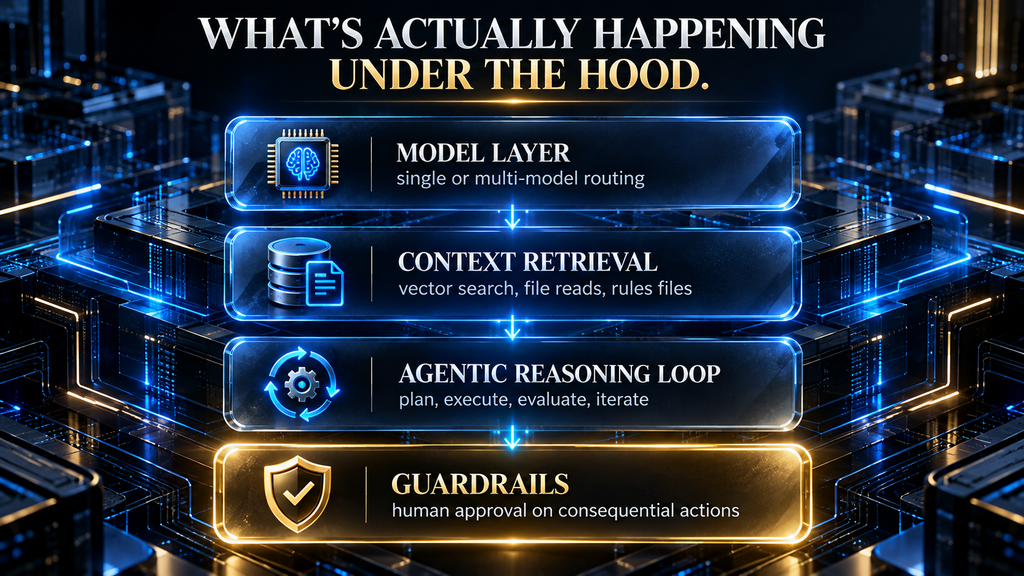
The model layer isn’t always a single model. For a primer on what these models actually are, see What Is a Large Language Model (LLM). Some products route between a frontier model, a faster proprietary model, and an open-source model depending on the task’s complexity and cost sensitivity — a multi-model orchestration strategy IBM describes rather than one model doing everything. This matters practically: a tool that’s slow or expensive on a trivial autocomplete request is usually over-provisioning model power for the job, which is also part of why the token-spend side of the cost breakdown later in this article varies so much between tools.
Context retrieval is the real differentiator, not the base model. A generic LLM has no idea what’s in your specific codebase, and the way it holds onto that project context over a long session works differently than the memory most people are used to from a chatbot (see How AI Memory Works: Context Windows vs. Long-Term Memory for the underlying mechanics). Coding assistants close the codebase-awareness gap through a combination of vector-based semantic search across your project files, direct file reads, and increasingly a structured “rules file” — a markdown document defining your team’s coding standards that the assistant reads before generating anything. Without this layer, a coding assistant is just a chatbot that happens to format its answers as code blocks.
This is also the step most responsible for cost: retrieving and feeding in more context means more tokens processed per request, which is the single biggest lever behind why an agentic workflow costs meaningfully more per month than a simple autocomplete subscription.
Agentic tools add a reasoning loop on top of that. Where a conversational assistant answers once and stops, an agentic tool decomposes a broader goal into an ordered list of steps, executes them against real tools — a terminal, a file editor, a test runner — and evaluates whether each step succeeded before moving to the next (see How AI Agents Use Tools to Complete Real Tasks for how this loop works outside of coding specifically). When a test fails, the loop is supposed to diagnose why and adjust, rather than reporting failure back to a human immediately.
Model Context Protocol (MCP) servers extend this further, letting an agent call out to external APIs, databases, or services as part of that same loop rather than being limited to the local filesystem — a concrete example: an agent building a feature that touches a database schema can query that schema directly through an MCP connection rather than a developer pasting it into the chat manually.
Guardrails exist specifically because that loop can go wrong. Consequential actions — deleting files, pushing to a remote branch, installing a new dependency — are typically gated behind an explicit human approval step in well-designed agentic tools, precisely because an autonomous multi-step loop with no checkpoint is how a small misunderstanding turns into a genuinely damaged working tree.
Interface is a real trade-off, not a preference. A CLI-based tool is token-efficient and scriptable but assumes real command-line fluency. An IDE-integrated GUI is more approachable and shows diffs visually, but tends to consume more tokens per task and abstracts away some of the control a CLI exposes directly. Neither is objectively better — they suit different developers and different levels of automation comfort.
Assistant vs. Agent: The Distinction That Actually Matters
Every vendor uses “assistant” and “agent” a little differently, which is part of why the terminology confuses people who are trying to evaluate tools rather than build them. The distinction worth holding onto isn’t about branding — it’s about who initiates each step of the work.
An assistant, in the strict sense, responds to what you ask it and stops. You stay in the loop for every meaningful decision: what to build next, whether a suggestion is correct, when to move to the next file. An agent — in the same sense laid out in What Is an AI Agent? — initiates its own sub-steps toward a goal you set once: it decides what file to open next, what test to run, and whether its own output succeeded, checking back with you at defined points rather than after every micro-decision.
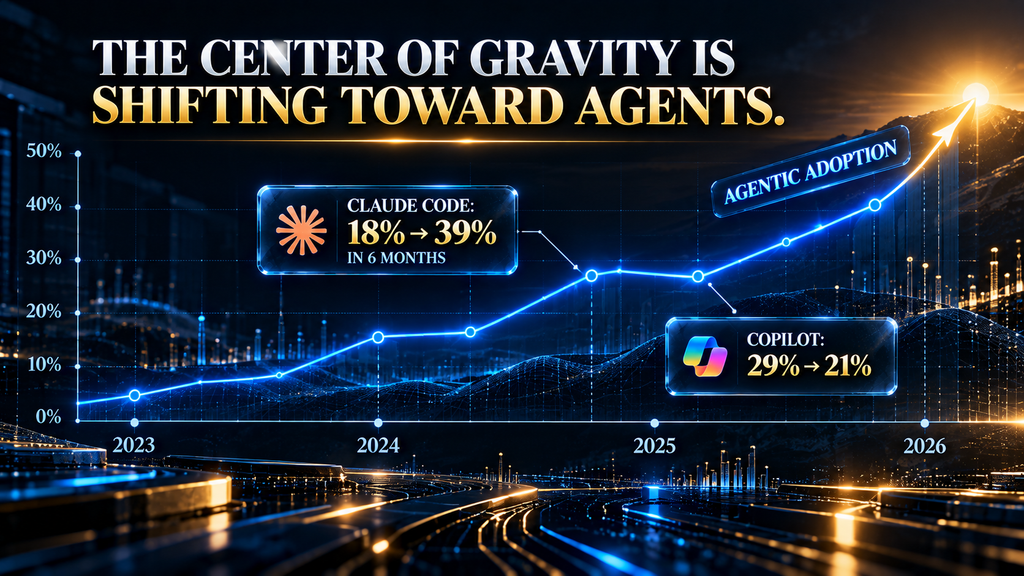
This isn’t a purely academic distinction. It shows up directly in the current adoption data: according to the JetBrains Developer Ecosystem Survey — 15,000-plus professional developers, fielded May through July 2026 — Claude Code, an agentic, CLI-first tool, grew from 18% global adoption in January 2026 to 39% by the survey window, more than doubling in roughly six months and growing roughly twice as fast as GitHub Copilot over the same period.
Copilot, historically the category’s dominant inline-suggestion tool, fell from 29% to 21% adoption over the same stretch even as its brand awareness stayed high at 79%. That’s not a story about one tool getting better and another getting worse in absolute terms — awareness of Copilot didn’t drop, and 21% adoption is still a large developer base. It’s a story about the center of gravity in the category shifting from “assistant” toward “agent” faster than most coverage of this space has caught up to.
The practical implication for a reader deciding where to invest learning time: the assistant-style tools remain genuinely useful and lower-risk to adopt, but the category’s growth energy — and increasingly its venture and engineering investment — is concentrated in the agentic tier now.
The Adoption-vs-Impact Gap
This is the section most coverage of AI coding assistants skips entirely, because most coverage only draws on one of two data sets that need to be read together to make sense.
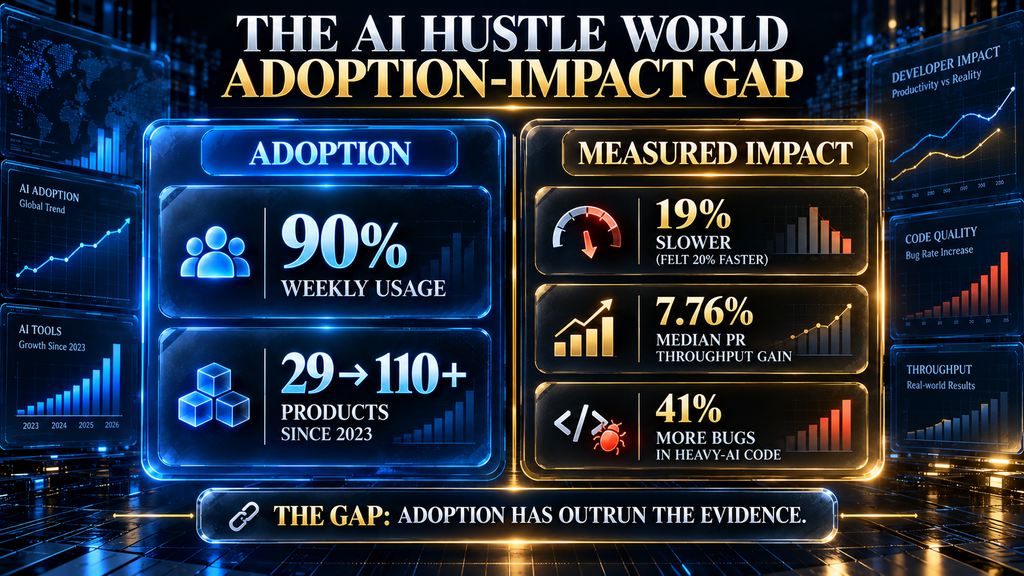
The adoption side of the picture is not in dispute. The JetBrains Developer Ecosystem Survey — 15,000-plus professional developers, its tenth annual edition, fielded May through July 2026 — found that 90% of professional developers used an AI coding agent at work at least weekly, and 68% used one daily.
G2’s own tracking shows the category ballooned from 29 listed products in 2023 to over 110 by June 2026, nearly 280% growth in under three years, with more than 5,300 verified user reviews accumulated across the space. By any adoption metric available, this is no longer an early or contested technology category.
The impact side of the picture is genuinely more contested, and the two most-cited figures actively disagree depending on what’s being measured. A randomized controlled trial run by METR had 16 experienced open-source developers complete 246 real issues, drawn from repositories averaging 22,000-plus GitHub stars, each issue randomly assigned to allow or disallow AI tool use.
The result ran directly against expectation: developers took 19% longer to complete issues with AI assistance — yet going in, they’d expected a 24% speedup, and after the fact, they still believed AI had made them roughly 20% faster.
That perception gap is arguably the study’s most useful finding for anyone deciding how much to trust their own sense that a tool is helping. Separately, a McKinsey survey of 4,500 developers across 150 enterprises found AI tools reduced time spent on routine coding tasks by 46% — but McKinsey’s own framing limits that figure specifically to boilerplate code, test writing, and documentation, not general development work. The same source’s synthesis of a DX analysis covering 135,000 developers found an average of 3.6 hours saved per developer per week.
There’s a fourth, independently useful figure worth adding here: DX’s own separate pricing-and-ROI analysis puts the median measured pull-request throughput increase at just 7.76%, with a mean of 13.1% pulled upward by a long tail of high performers — the 90th percentile of teams sees a 43.9% gain. That’s a much smaller headline number than “46% faster,” and the gap between the two is itself informative: it’s the difference between the best-case task type (boilerplate) and the blended, real-world average across everything a team actually ships.
| Data point | Source | What it actually measures |
|---|---|---|
| 90% weekly / 68% daily usage | JetBrains Developer Ecosystem Survey, 15,000+ developers, May–July 2026 | Adoption frequency, not output quality |
| 29 → 110+ products since 2023 | G2 category tracking, as of June 2026 | Market/vendor growth, not developer-level impact |
| 19% slower completion, believed 20% faster | METR randomized controlled trial, 16 developers, 246 issues, 2025–2026 | Actual measured task time vs. developer’s own perception |
| 46% less time on routine tasks | McKinsey survey, 4,500 developers / 150 enterprises, 2026 | Impact specifically on boilerplate, tests, and documentation |
| 3.6 hours saved per developer per week | DX analysis, 135,000 developers | Aggregate self-reported and tracked time savings |
| 7.76% median / 13.1% mean PR throughput gain | DX pricing & ROI analysis, 2026 | Blended, real-world measured output across task types, not just favorable ones |
None of these numbers is wrong, and they aren’t actually contradictory once you separate what each one measures — but a reader who’s only seen the adoption number and not the METR finding will reasonably, if incorrectly, assume that near-universal weekly use implies a settled, uniformly positive productivity story. It doesn’t. The honest read: adoption has outrun the evidence for uniform impact, and the type of task you’re using these tools for predicts your actual result far better than which specific product you picked.
Why the Gap Exists
The productivity gap isn’t a mystery once you look at what’s actually driving it, and it comes down to three things that have little to do with model quality.
Task type is the single biggest variable. The same body of research that found a 46% time reduction on boilerplate, tests, and documentation is unambiguous that unfamiliar, architecturally complex work behaves differently — this is exactly the category where the METR trial found developers running slower despite feeling faster. An assistant that reliably saves time generating a test file can just as reliably cost time when a developer has to untangle a plausible-looking but subtly wrong suggestion in code they don’t fully understand yet.
Review discipline is the second half, and it’s the one teams actually control. Only 48% of developers report always reviewing AI-generated code before committing it — meaning a little over half the time, code produced by a tool with a documented tendency to replicate insecure or outdated patterns from its training data goes into a codebase without a full human check.
That gap correlates directly with a separate, sobering figure: codebases with heavy AI-generated code saw a 41% rise in bugs, and only 29% of developers report actually trusting the tool’s output even as adoption sits at 84% and higher. Put plainly, the tools are being used more than they’re being trusted — a combination that predicts exactly the kind of inconsistent, task-dependent results the research shows.
The third factor is the one almost no coverage of this topic mentions: coding itself is a smaller share of a developer’s day than the productivity headlines imply. DX’s research puts actual coding at roughly 14% of a typical developer’s working time — the rest is meetings, planning, reviewing others’ work, and coordination. A tool that makes the coding portion dramatically faster still runs into a hard ceiling on total throughput improvement, because it isn’t touching the other 86%.
This alone explains a meaningful part of why blended, real-world PR-throughput gains (7.76% median) look so much smaller than task-specific gains (46% on boilerplate) — the second number is measuring a narrow slice of the job, and the first is measuring the whole job. This is also, not incidentally, why the security-focused assistant category exists at all: tools like Snyk Code and Checkmarx’s own developer-assist products exist specifically to backstop the review-discipline gap at scale, scanning AI-generated code the way a team would if every developer reliably reviewed every suggestion themselves — which, per the data above, they demonstrably don’t.
What These Tools Are Actually Good At
Stripped of the hype cycle, the genuine, well-supported strengths are narrower than “writes your code for you” but still substantial. Boilerplate generation, test scaffolding, and documentation are where the McKinsey figure’s 46% reduction actually lives, and it’s a real, repeatable gain rather than an anecdote. Explaining unfamiliar code — pasting a function you didn’t write and getting a plain-language walkthrough — is one of the most consistently useful applications across every tool category, assistant or agent, because it plays to what LLMs are actually reliable at: summarizing and explaining patterns, not inventing novel logic under uncertainty.
Faster onboarding for new team members follows from that same strength, letting someone new to a codebase ask questions of the code itself rather than waiting on a teammate’s availability. Reduced context-switching is a real, if harder to quantify, benefit: staying in an IDE to get an answer instead of tabbing to a browser and back preserves the flow state that constant tool-switching otherwise breaks.
The Economics: What These Tools Actually Cost Against What They Save
Almost no explainer on this category puts a real number next to the word “worth it,” which is a gap worth closing directly rather than leaving as a vague “productivity gains justify the cost” gesture.
Per-seat pricing varies by roughly 20x across the category, based on DX’s 2026 pricing analysis. GitHub Copilot runs $10/month for an individual Pro plan up to $39 for Pro+, with a Business tier at $19/user/month. Cursor runs $20 (Pro) to $60 (Pro+) individually, $40/user/month for Business. Claude Code runs $20 (Pro) up to $200 (Max 20x) individually, with a Team Premium tier at $100/seat/month for a minimum of five seats. JetBrains AI sits at the low end at $10-20/month; Tabnine sits higher at $39/user/month and up.
The seat price is only part of the real cost. Agentic tools bill token consumption on top of or instead of a flat seat fee, and DX’s analysis puts the realistic total cost of ownership — seat license plus token spend — at $200 to $600 per engineer per month for a team mixing inline and agentic tools. That range is wide enough that “how much does this cost” genuinely depends on usage pattern, not just which product you picked.
Set against that cost, the measured throughput gain is the 7.76% median / 13.1% mean figure from the section above — not the more attractive 46% figure, which applies only to the narrower boilerplate/test/documentation slice of work. Whether that trade clears a reasonable ROI bar depends entirely on a developer’s fully loaded cost: at a rough $100,000-plus fully loaded annual cost for a mid-level developer in a market like the US, a 7-13% throughput gain is worth meaningfully more than a $200-600 monthly tool spend on pure arithmetic.
That math changes fast in lower-cost markets or for junior developers whose fully loaded cost is lower, which is exactly why blanket “just buy the tool” advice doesn’t hold up team to team.
Timeline to seeing that return isn’t instant either. DX’s research puts basic autocomplete tools at 1 to 3 months to positive ROI, and agentic workflows at 3 to 6 months — the longer ramp reflecting the real learning curve of getting guardrails, review policy, and task-fit right rather than the tool itself needing to improve.

Limitations and Risks Worth Taking Seriously
The risk categories below aren’t hypothetical edge cases — they’re the specific, named failure modes that security and engineering teams evaluating these tools flag most often, and each connects directly back to the mechanism explained above rather than being a generic “AI can be wrong” caveat.
Insecure or outdated code patterns. Because these models are trained on public code, they can reproduce vulnerable or deprecated patterns that were common in their training data without any signal to the model that the pattern is now considered unsafe. This is precisely why security-focused assistants exist as their own tool category rather than a feature bolted onto the others. Our guide to why AI hallucinates covers the underlying mechanism behind confidently-wrong output, which applies to generated code exactly as it does to generated prose.
Data privacy exposure. Sending proprietary source code to an external model provider is a real governance question, not a paranoid one, and it’s a large part of why organizations increasingly standardize on a small number of approved tools rather than letting developers use whatever chatbot they prefer informally — which the G2 research notes is already happening at scale without oversight in many organizations.
Quality inconsistency at team scale. One developer using an assistant carefully is a very different risk profile than twenty developers each accepting suggestions with their own personal review habits and no shared standard — the 41% bug-increase figure cited above is a team-scale effect, not an individual one.
Cognitive debt. Over-reliance on generated code for reasoning a developer used to do themselves is a real, if harder-to-measure, long-term risk raised consistently across vendor and independent coverage alike — a developer who never has to trace through unfamiliar logic manually may be slower to do it when a tool genuinely can’t help.
Governance gaps. Many organizations still lack a clear, written policy on which tools are approved, how generated code is reviewed, and how compliance obligations apply to AI-assisted output — a gap that matters more, not less, as adoption climbs toward the 90%-weekly-usage figure cited above.
Common Mistakes Teams Make Adopting These Tools
Treating adoption as the finish line. A team that measures success by how many developers have a coding assistant installed is measuring the wrong thing — the JetBrains and productivity-research figures above show clearly that installation and measured benefit are not the same milestone.
Applying one tool to every task type. Given how sharply the productivity data diverges by task — strong on boilerplate, weak on unfamiliar architecture — standardizing on a single tool for every kind of work leaves real gains on the table on one end and real risk on the other.
Skipping the review-discipline conversation entirely. Rolling out a tool without an explicit team norm for when generated code gets a full human review is how the 41% bug-increase figure happens in practice, not in theory.
Assuming “agentic” always means “better.” The category’s growth is real and Claude Code’s adoption curve reflects genuine capability gains, but an agentic tool’s larger blast radius — multiple files, real terminal commands, actual test runs — makes the guardrails question more important, not less, than it is for a simple autocomplete tool.
Budgeting the seat price and stopping there. Given the $200-600/month realistic total-cost-of-ownership range once token spend is included, a team that only budgets the advertised per-seat number is routinely surprised by the actual bill three months in.
Who Should Lean In Now, and Who Should Wait
If you’re leading a team that’s still relying on informal, ungoverned chatbot use for code generation — the exact pattern G2’s research flags as already widespread — you’re carrying real data-privacy and quality-inconsistency risk today without any of the productivity data above actually being measured for your team specifically. Formalizing around one or two approved tools, even before optimizing which ones, closes more risk than any single feature comparison would.
If you’re an individual developer deciding whether to invest real learning time in the agentic tier specifically, the adoption curve is a legitimate signal: a tool category growing this fast, with this much engineering investment behind it, is worth being fluent in even if your day-to-day work leans on simpler assistant-style tools most of the time.
If your team’s work is dominated by unfamiliar, architecturally complex code rather than boilerplate, tests, or documentation, moderate your expectations specifically — that’s the exact category where the METR trial found developers running slower while feeling faster, and no tool choice changes that underlying pattern. And if your budget genuinely can’t absorb $200-600 per engineer per month once real usage kicks in, start with a $10-20/month inline-only tier rather than an agentic one — the smaller category still delivers real boilerplate/test/documentation gains at a fraction of the cost and the shorter, 1-to-3-month ROI timeline.

What Happens If You Do Nothing
It’s worth stating the do-nothing case plainly rather than assuming the reader already knows why inaction has a cost, because “wait and see” is a genuinely reasonable-sounding instinct given how contested the productivity data above actually is.
The practical problem with waiting is that the G2 and JetBrains data both point to the same underlying fact: your developers are very likely already using these tools whether or not your organization has approved or governed that use. A 90%-weekly-usage figure at the category level, combined with G2’s observation that ungoverned chatbot use is already widespread, means “doing nothing” rarely means “no AI-generated code enters your codebase” — it usually means AI-generated code enters your codebase without the review policy, tool standardization, or security scanning that would otherwise catch the specific risks named above.
There’s a secondary, slower-moving cost too: hiring and retention. A developer who has gotten comfortable with agentic workflows at a previous employer, in a job market where JetBrains’ data shows adoption climbing this fast, is evaluating a prospective employer’s tooling as part of the job itself — not a dominant factor, but a real one, and one that skews further in that direction every quarter the adoption curve keeps climbing.
None of this argues for rushing into the agentic tier without the guardrails and review policy covered above — the METR finding is a genuine caution, not a reason to ignore it. It argues specifically for governing what’s already happening rather than deciding the topic yet.
How to Roll These Out Without the Bug Spike
Treating this as an implementation checklist rather than a hope: name an explicit review policy before rollout, not after. Decide, in writing, which categories of change require full human review regardless of how confident the tool’s output looks — a policy retrofitted after the 41%-bug-increase pattern has already shown up in your codebase is a policy that arrived too late to prevent it.
Match the tool to the task type deliberately. Given how differently boilerplate and unfamiliar-architecture work perform in the research above, a team is better served picking (or configuring) tools per task category than assuming one default tool is right for everything.
Route AI-generated code through the same security scanning as human-written code, ideally through a dedicated tool in the security-assistant category rather than trusting review discipline alone to catch what the data shows it currently doesn’t — only 48% of developers always review before committing, which is a governance gap a scanning step closes structurally instead of hoping for better habits.
Track the right metrics from day one, not a vanity number. DX’s AI Measurement Framework — built by the same research group behind several of the productivity figures cited throughout this article — organizes this into three dimensions worth adopting directly rather than inventing your own from scratch:
| Dimension | What it tracks | Why it matters |
|---|---|---|
| Utilization | Daily/weekly active users, share of AI-assisted pull requests | Distinguishes real usage from installed-but-unused licenses |
| Impact | Time saved, developer satisfaction, PR throughput, change failure rate | Measures actual output and quality, not just activity |
| Cost | Total spend, net time gain per developer, effective hourly agent rate | Connects the spend side of the economics section above to a real return figure |
Installed-tool count or weekly-active-user rate alone measures adoption, not the thing that actually matters — pairing a Utilization metric with an Impact metric and a Cost metric is the only way to know if a given team is actually in the 13%-mean-gain camp or the 19%-slower camp for its specific mix of work.
A Practical Readiness Checklist
Before rolling out any tier of this category, answer these five questions in writing. Each one maps directly to a risk or cost figure covered above, which makes it more useful than generic advice:
- What task types make up most of your team’s actual work? If it’s boilerplate, tests, and documentation, expect gains closer to the 46% figure. If it’s unfamiliar or architecturally complex code, expect gains closer to the METR trial’s result and budget accordingly.
- Do you have a written review policy today? If the honest answer is no, that’s the first thing to build — not the tool selection.
- Can your budget absorb $200-600 per engineer per month at real usage, not just the advertised seat price? If not, start with a $10-20 inline-only tier.
- Who owns the Utilization/Impact/Cost tracking described above, and when does the first review happen — 1 month in for autocomplete, 3 months in for agentic tools?
- What’s your organization’s current, honest answer to “is unapproved AI tool use already happening”? Per the G2 and JetBrains data above, the realistic answer for most organizations is yes — which changes the actual decision from “should we adopt” to “how fast can we govern what’s already underway.”
Where This Is Headed
The adoption curve in the JetBrains data — Claude Code more than doubling in six months while Copilot’s older assistant-first model lost share — points toward the agentic tier continuing to absorb more of the category’s growth, not less, over the next year. Expect the tool boundaries in the “what counts as an assistant” table above to blur further as inline-suggestion tools add agentic modes of their own rather than staying in their original lane.
The bigger open question isn’t which specific tool wins — it’s whether the productivity research catches up to the adoption curve. Right now, a category with 90% weekly usage is still operating on productivity evidence that’s genuinely contested and heavily task-dependent; as more enterprises run controlled before-and-after measurements the way McKinsey and DX have started to, expect the task-dependency finding to sharpen rather than resolve into a single “AI coding tools make developers X% faster” headline number.
Two second-order effects are worth watching beyond the tool market itself. First, the junior-developer pipeline: if boilerplate and test-writing — the traditional early-career proving ground — keep shifting toward AI assistance, the path by which junior developers historically built pattern-recognition and codebase familiarity changes with it, and no source reviewed for this article has a settled answer for what replaces that training function.
Second, code review itself may need to become a distinct, better-resourced discipline rather than an afterthought, given that the 41%-bug-increase and 48%-review-rate figures above both point to the same conclusion: the bottleneck is shifting from writing code to verifying it. Anyone still citing a single blended productivity figure a year from now likely isn’t looking closely enough at what’s actually being measured.
Where to Go From Here
If you already know you want to compare specific products head to head, our Best AI Coding Assistants roundup covers ten tools across the categories laid out above. If your team is specifically worried about the review-discipline and hallucination risks this article names, Understanding AI Hallucinations covers why models produce confidently wrong output in the first place, which is the mechanism behind a meaningful share of the insecure-code risk described here.
Final Thoughts
The honest starting point for anyone evaluating AI coding assistants isn’t “which tool is best” — it’s recognizing that adoption and impact are two different claims, currently supported by two different bodies of evidence that don’t yet fully agree with each other. Ninety percent weekly usage is real. A 19%-slower result on unfamiliar work in a controlled trial is also real. Both can be true at once because they’re measuring different things, and the reader who understands that distinction will get more out of any specific tool than one chasing whichever product has the highest adoption number this quarter.
Pick tools based on the type of work you actually do, price them against the real $200-600 total-cost-of-ownership range rather than the advertised seat price, build review discipline in before the bug data forces the conversation, and treat the agentic tier’s rapid growth as a signal worth tracking rather than a reason to abandon simpler tools that are still measurably useful for the tasks they’re good at.
Ready to Pick an Actual Tool?
Now that you know the category and the real evidence behind it, see how the top 10 AI coding assistants compare on price, capability, and fit for your workflow.
See the Top 10 Compared →Frequently Asked Questions
What’s the difference between an AI coding assistant and an AI coding agent? An assistant responds to what you ask and stops, leaving you to direct every step. An agent plans and executes a multi-step task on its own — running commands, editing multiple files, and checking its own results — checking back with you at defined points rather than after every micro-decision.
Do AI coding assistants actually make developers more productive? It depends heavily on the task. Research shows roughly 46% less time on boilerplate, tests, and documentation, but a real-world blended measure puts median PR throughput gains closer to 7.76%, and a controlled trial found developers were 19% slower on unfamiliar, complex work despite believing they were faster.
Is GitHub Copilot still the most-used AI coding tool? Not by the most recent data. Per the JetBrains Developer Ecosystem Survey, Copilot’s adoption fell from 29% to 21% between January and mid-2026, while Claude Code grew from 18% to 39% over the same window.
Are AI-generated code suggestions safe to use directly? Not without review. These tools can reproduce insecure or outdated patterns from their training data, and codebases with heavy AI-generated code have shown a 41% rise in bugs, which is why security-focused scanning tools exist as their own category.
Why do developers feel faster with AI tools even when they’re not? METR’s randomized controlled trial found developers expected a 24% speedup going in, and even after actually running 19% slower on the measured tasks, still believed AI had sped them up by about 20% — a perception gap the tools’ reduced visible friction (like typing less) appears to create.
Do I need to review every line of AI-generated code? Only 48% of developers currently say they always do, and that gap correlates with the measured rise in bugs in heavily AI-generated codebases — so yes, a consistent review policy is one of the highest-leverage things a team can put in place.
How much do AI coding assistants actually cost per developer? Advertised seat prices range from about $10 to $200 a month depending on tier, but the realistic total cost once token consumption is included runs $200 to $600 per engineer per month for a team mixing inline and agentic tools.
What is “vibe coding,” and is it different from using a coding assistant? Vibe coding generally refers to accepting AI-generated code with minimal review, prioritizing speed over understanding — a pattern distinct from a disciplined assistant or agent workflow with review checkpoints, and one that carries a meaningfully higher risk profile.
Can AI coding agents work without any human supervision? Not safely, in current practice. Well-designed agentic tools gate consequential actions like deleting files or pushing to a remote branch behind explicit human approval specifically because an unsupervised multi-step loop can compound a small misunderstanding quickly.
Which type of coding task benefits most from AI assistance right now? Boilerplate code, test writing, and documentation show the clearest, most consistent gains in current research. Unfamiliar or architecturally complex work shows the weakest and most inconsistent results.
Related Guides
- AI in HR & Recruiting Explained: How AI Is Changing Talent Operations
- Context Engineering Explained: How to Give AI Models the Right Information
- AI Product Management Explained: How AI Is Changing the Product Lifecycle
Written by
Muntasir Ahmad Chowdhury
Founder-AI Hustle World
Muntasir Ahmad Chowdhury is the Founder of AI Hustle World, an independent publication dedicated to making Artificial Intelligence practical, trustworthy, and easy to understand. He researches AI tools, automation, customer service, productivity, and real-world business applications, helping readers make smarter technology decisions through research-driven, experience-backed content.
Expertise:
AI Tools • AI Automation • AI Customer Service • AI Productivity • Generative AI • AI Workflows
Get Smarter With AI
Enjoyed this guide? Get practical AI tools, tutorials, and honest reviews delivered to your inbox.
1 thought on “AI Coding Assistants Explained: How AI Is Changing Software Development”