Evidence: Documentation reviewed
Last checked: September 2026
What was done: Written from official documentation and the published sources linked in this article. Not hands-on tested.
Files: None
Affiliate links: No
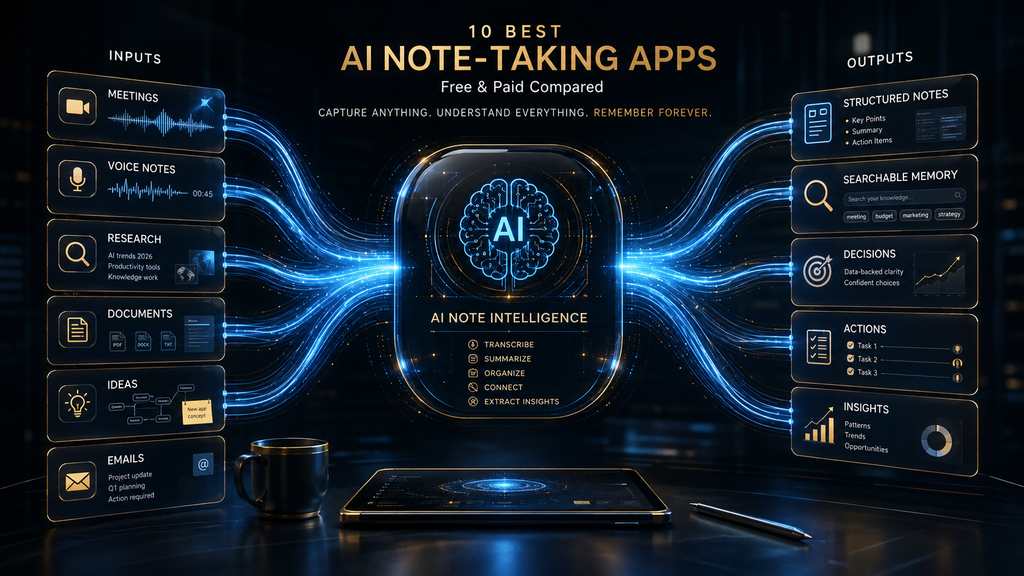
An AI note taking apps can produce a beautiful summary and still leave you with a weak record. The transcript may be difficult to find, a decision may never reach the project board, or a confident sentence may hide the fact that the speakers never agreed. The real buying question in 2026 is not “Which app writes the nicest notes?” It is “Which system carries the right information from capture to verified action?”
The fastest recommendation: choose Granola when you want human-guided, bot-free notes; Fathom when you want a generous free meeting recorder; Notion when notes must remain beside projects and databases; and NotebookLM when the work begins with sources rather than a live call. Fireflies is the integration-led team choice, while Read AI makes more sense when the desired output is cross-channel work intelligence rather than a standalone recap.
This update deliberately begins with the largest buyer group: people who need a complete meeting record. It then steps back to separate five different note-taking jobs, explains the research method, and compares the remaining architectures. That order reflects how purchases usually happen—a concrete call-recording need appears first, then the team discovers that capture was only one part of the problem.
Research checked September 25, 2026. Prices and plan limits can change, so follow the cited official pages before purchasing. AI Hustle World did not run a controlled transcription-accuracy benchmark for this update; vendor accuracy claims are not treated as independent evidence.
Start Here When the Meeting Itself Must Become a Record
Automated meeting recorders make a different promise from human-guided notepads. They aim to preserve the call, label speakers, generate a summary, and make the conversation searchable even when the user writes nothing. This is useful for client calls, interviews, sales discovery, training, and any situation where a later reviewer may need evidence beyond one participant’s interpretation.
The cost is a larger operational footprint. A bot may enter the meeting, recordings may be shared automatically, and integrations may send content into CRMs or workspaces. The winning product is therefore not the one that captures the most data; it is the one whose permissions, sharing defaults, and handoffs match the team’s actual process.
Fathom: The Best Free-First Recorder for Individual Professionals
Fathom combines recorded calls, transcripts, summaries, highlights, and action items in a product that is unusually usable before payment. Its official pricing page says the individual Free plan includes unlimited recordings, instant call summaries, and integrations. That makes it a practical first test for a consultant, recruiter, customer-success manager, or founder who wants evidence-rich meeting notes without starting a per-minute budget.
“Free” does not mean every AI function is unlimited. Fathom’s Free versus Premium documentation lists five advanced summaries per month on Free, while Premium adds advanced AI action items, follow-up emails, custom summaries, and Ask Fathom. The distinction is sensible: basic recording and recap remain accessible, while deeper post-meeting work becomes the upgrade trigger.
For teams, Fathom lists a Team plan at $15 per user monthly with annual billing or $19 monthly, with a two-user minimum. It adds shared meeting intelligence, action items, a conversational assistant, and highlight playlists. CRM sync and automatic delivery can close the gap between discussion and follow-up, but teams should test field mapping and ownership before turning on unattended automation.
Fathom now supports both bot-based and bot-free capture experiences, so buyers should confirm which mode is available on their platform and account. Its consent guidance correctly treats recording permission as a separate responsibility: it advises obtaining consent and notes that legal requirements differ by jurisdiction. A technically invisible recorder is not ethically invisible.
Fathom is the strongest choice here for an individual who values unlimited recordings, quick summaries, and a low-friction upgrade path. It is less compelling when the primary requirement is a broad personal knowledge base or source-cited research. Teams with strict data residency, retention, or regulated-industry requirements should evaluate the enterprise controls and agreements rather than extrapolating from the consumer experience.
Otter.ai: A Familiar Live-Transcript Workspace with Clear Minute Limits
Otter helped define the mainstream AI transcription workflow: join or capture a conversation, watch text appear, search the transcript, review the summary, and share the result. That familiarity remains an advantage for classrooms, interviews, and internal meetings where people want a transcript-centric workspace rather than a complex intelligence layer. Live text can also help participants follow a conversation, although it should not be mistaken for an accessibility guarantee in every context.
The pricing model is easier to understand through minutes and conversation caps. Otter’s official 2026 product comparison lists a free Basic plan with 300 transcription minutes per month and a 30-minute limit per conversation. Pro starts at $8.33 per user monthly with annual billing and includes 1,200 monthly minutes, while Business starts at $20 per user monthly with 6,000 minutes and additional administrative features.
This makes Otter appropriate when usage can be forecast in time rather than meetings. A student recording two long lectures can hit a different constraint from a manager recording many short check-ins, even if both create the same number of notes. Before choosing a plan, calculate typical meeting length, monthly frequency, file imports, and the maximum duration of any single session.
Otter is strongest when the transcript is the central artifact and users want comments, highlights, search, and familiar collaboration around it. Its relative weakness is workflow breadth: CRM actions, cross-channel enterprise search, or workspace-native project execution may require a higher tier, integration, or another platform. The right comparison is therefore not Otter versus every note app, but Otter versus the other record-first systems in this lane.
Fireflies.ai: The Strongest Integration-Led Choice for Growing Teams
Fireflies is designed to turn a collection of meetings into a searchable team resource. It can capture online calls and uploaded media, generate transcripts and summaries, search past conversations, and connect notes with collaboration and customer systems. Its breadth makes it particularly relevant to sales, recruiting, customer success, and operations teams that want meeting data to move beyond an isolated archive.
Fireflies’ official pricing page lists a $0 Free plan with unlimited transcription, limited AI summaries, 400 minutes of team storage, and 20 AI credits. Pro is shown at $10 per seat monthly with annual billing, or $18 monthly, and adds unlimited AI summaries, downloads, expanded storage, integrations, and task-oriented features. Business is $19 annually or $29 monthly per seat and adds unlimited storage, conversation intelligence, team analytics, and multi-language mode.
The phrase “unlimited transcription” needs context. Fireflies documents rate limits for some upload sources and uses AI credits for certain advanced actions, so a buyer should model the workflows that consume storage, transcription allowances, and credits separately. A team that only needs a recap after scheduled calls has a different cost profile from one that repeatedly uploads a back catalog and runs custom AI skills across it.
Fireflies earns its place when integrations are part of the buying requirement, not an afterthought. A note can be more valuable when it updates a CRM, creates a task, or becomes searchable across team meetings, but each automated destination introduces a new failure mode. Duplicate contacts, incorrect ownership, over-broad sharing, and unreviewed action items can turn an efficient integration into a governance problem.
Enterprise includes SSO, SCIM, audit logs, custom retention, private storage, and compliance-oriented controls according to the same pricing page. Those features justify a stronger governance classification for managed deployments, but only when administrators configure them. The product’s consumer and enterprise experiences should not be treated as identical merely because they share a brand.
Notta: A Practical Multilingual and File-Transcription Option
Notta is a strong candidate when language coverage and imported audio or video matter as much as live calls. It supports web meetings, recordings, uploads, summaries, and bilingual or multilingual workflows, making it relevant to international interviews, research, education, and distributed teams. Buyers should still test their actual language pair and acoustic conditions because a long language list does not prove equal performance across every language.
Notta’s official plan information lists a free allowance of 120 transcription minutes per month, but free sessions are capped at three minutes. Pro is listed at $8.17 monthly with annual billing and 1,800 monthly minutes, while Business is $16.67 monthly with annual billing and unlimited transcription. The three-minute free-session limit is the detail most likely to surprise someone who reads only the monthly total.
Notta’s value is clearest for users who need a flexible intake system for recordings from different sources and languages. It is less differentiated if all meetings are in one language and the destination is a deeply integrated CRM or enterprise-search environment. In that case, Fireflies or Read AI may provide more downstream structure, while Fathom may be simpler for an individual.
Read AI: The Broadest Choice for Cross-Channel Work Intelligence
Read AI starts with meeting summaries and extends into search, coaching, email, messaging, and recommendations about what happens next. Its product language—“Meetings In, Decisions Out”—captures the intended shift from transcription to organizational intelligence. That can help a knowledge worker recover context spread across several systems, but it also makes access design more important than it is in a standalone notepad.
Read AI’s official pricing page says the Free plan includes five meeting transcripts per month, unlimited enterprise search, meeting, email, and messaging summaries, a personalized coach, basic integrations, and support for more than twenty languages. Paid tiers expand the number of reports, playback, integrations, and administrative capability. The free limit is based on meeting transcripts rather than minutes, which favors a different usage pattern from Otter or Notta.
The core advantage is contextual breadth. A user can ask a question that requires a meeting, a message thread, and an email rather than remembering which application contains the answer. However, this only works responsibly when connected accounts, user consent, sharing, and retention are deliberate; the value of universal search rises at the same time as the cost of an over-permissioned account.
Read’s privacy materials and data controls should therefore be part of the trial, not procurement paperwork read afterward. Confirm whether meeting content is used for model improvement, which settings can disable storage, what connected-workspace data is accessed, and how deletion propagates. A team that only wants occasional transcripts may find Read excessive, while a team already suffering from fragmented context may consider the extra integration surface worthwhile.
Choose Read AI when the desired unit is not a note but a connected answer about work. Choose a narrower recorder when the primary goal is an auditable meeting artifact with minimal permissions. That distinction is more useful than comparing the number of AI features because it reveals the organizational change the product expects.
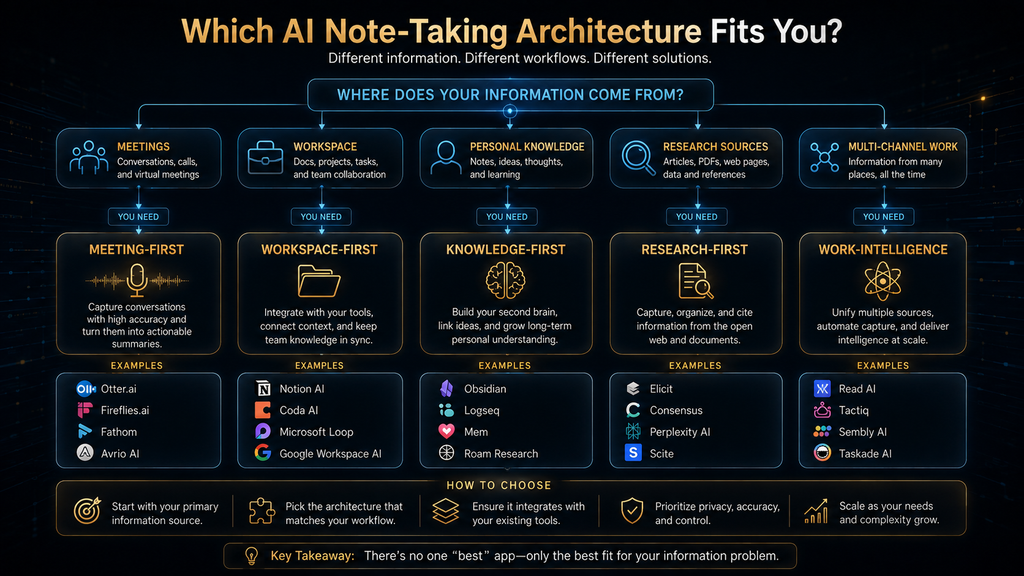
The five products above solve the most visible version of the problem, yet none is automatically the best note-taking app. A complete recording may be unnecessary in a private one-to-one, and a precise transcript may still be the wrong artifact for a research synthesis or personal knowledge system. The next step is to identify the note’s job before comparing more features.
The rest of this comparison examines bot-free capture tools such as Granola and Krisp, workspace memory systems such as Notion and Mem, and the source-grounded research model offered by Google’s NotebookLM. The products overlap at the edges, but treating them as substitutes produces misleading rankings. The framework below makes those boundaries explicit.
The central principle is simple: optimize for the next destination, not the first summary. If a decision must become a task, test that handoff. If a claim must remain traceable to evidence, inspect citations and source links. If sensitive content must disappear after thirty days, verify retention controls before anyone records a real conversation.
This is why a single winner would be less useful than a workflow map. The following sections show where each architecture begins, what it preserves, and what still requires a human owner. They also make the evidence boundary visible so that a feature claim is not mistaken for an independently measured outcome.
Build the Decision Around the Note, Not the Brand
- The one-minute shortlist
- Five different jobs hiding under “AI notes”
- How this comparison was built
- The AHW Note Continuity Audit
- Lane 1: human-guided capture
- Lane 2: automated meeting records
- Lane 3: workspace and personal memory
- Lane 4: source-grounded research
- Choose by scenario
- Consent, privacy, and retention
- A safer operating loop
- Final thoughts
- Frequently asked questions
The One-Minute Shortlist
| App | Best match | Free entry point | Important constraint |
|---|---|---|---|
| Granola | Human-guided, bot-free meeting notes | Yes; unlimited notes with limited history | Long-term history and advanced integrations require Business |
| Fathom | Free recorded calls and instant summaries | Yes; unlimited recordings and standard summaries | Advanced AI features are restricted on Free |
| Notion AI Meeting Notes | Notes that must remain inside a team workspace | No durable free entitlement for this feature | Requires an eligible Business, Enterprise, or mobile subscription |
| Otter.ai | Familiar live transcription with minute-based plans | Yes; 300 minutes monthly | Free conversations are capped at 30 minutes |
| Fireflies.ai | Team search, integrations, and meeting automation | Yes; unlimited transcription with limits around summaries and storage | Advanced actions can use separate AI credits |
| Mem | Personal notes retrieved by meaning and context | Check current offer | Not a substitute for a full meeting recorder |
| NotebookLM | Research grounded in a defined source set | Yes | Designed around imported sources, not live meeting capture |
| Notta | Multilingual transcription and file workflows | Yes; 120 minutes monthly | Free sessions are limited to three minutes |
| Krisp | Bot-free capture plus audio cleanup | Core plan available | Storage and processing choices vary by feature and mode |
| Read AI | Cross-channel search and meeting intelligence | Yes; five meeting transcripts monthly | Broader permissions and analytics may be excessive for simple notes |
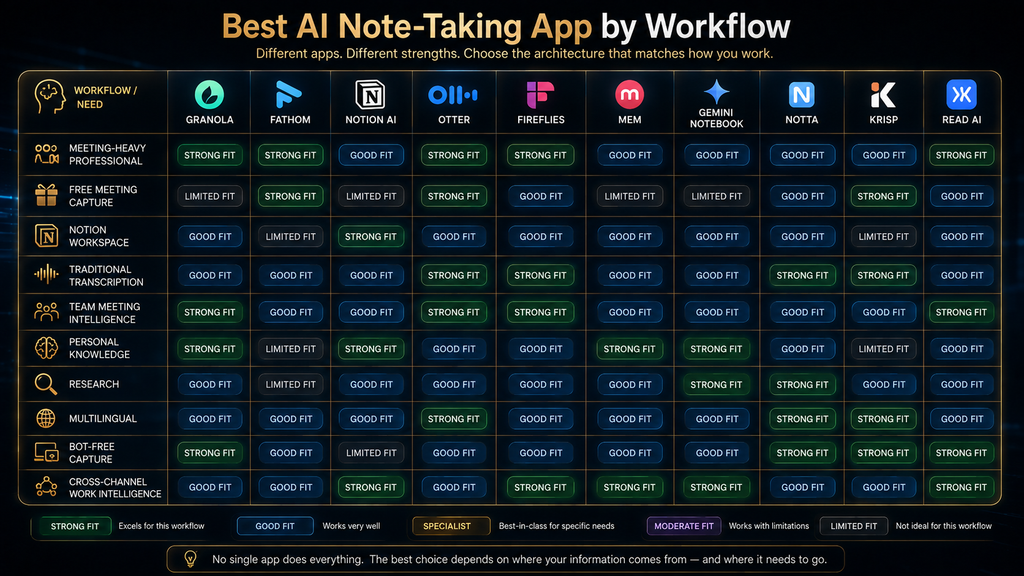
This table is a routing device, not a universal league table. An independent consultant may value unobtrusive capture and a polished client recap, while a product team may care more about workspace retrieval and decision history. A researcher needs citations back to source material, which is a different requirement from identifying speakers on a sales call.
Five Different Jobs Hiding Under “AI Notes”
The category becomes easier to understand when it is divided by job rather than brand. A meeting recorder joins or captures calls, preserves audio or video, and generates a transcript and recap. Fathom, Otter, Fireflies, Notta, and Read AI begin from this model even though their automation and analytics differ.
A human-guided AI notepad starts with the notes you deliberately type and uses the conversation as supporting context. Granola is the clearest example: the user remains an active editor instead of outsourcing the entire record. Krisp reaches a similar bot-free outcome from a different starting point because its broader identity includes audio processing and meeting assistance.
A workspace memory system treats the note as one object inside a larger operating environment. Notion can connect meeting notes with pages, databases, projects, and agents, while Mem focuses on personal retrieval and contextual resurfacing. Their value appears after capture, when someone needs to find a decision or relate one note to previous work.
A source-grounded research notebook answers questions from a bounded collection of material and shows where an answer came from. NotebookLM belongs here because it works with supplied PDFs, websites, videos, audio, Google Docs, and Slides, then returns answers with inline citations. Calling it a meeting notetaker hides the reason it is valuable.
The fifth job is cross-channel work intelligence. Read AI and some higher-tier meeting platforms increasingly connect meetings with email, messages, CRM records, or enterprise search. That can expose patterns no individual note contains, but it also expands the permission surface and the consequences of a weak access policy.
How This Comparison Was Built—and What It Does Not Claim
AI Hustle World reviewed current official product pages, pricing pages, help centers, privacy materials, and security documentation available on September 25, 2026. Pricing statements are linked to official sources wherever possible, and the article distinguishes an included feature from one that depends on a paid plan, integration, credit allowance, or organization-level setting. Marketing claims are described as vendor claims rather than converted into independent findings.
We did not create a fake accuracy score from incomparable vendor numbers. Transcription performance changes with microphones, cross-talk, accents, language, jargon, room acoustics, and whether a product receives separate audio tracks. A defensible accuracy comparison would require the same recordings, a disclosed reference transcript, repeatable error rules, and multiple environments; that controlled test was outside this update.
Instead, the evaluation asks whether a product supports the full life of a note. A capability is marked Strong when current official documentation shows native support central to the product. Partial means the capability is plan-limited, integration-dependent, narrower than the category suggests, or available but not the product’s main job. Not primary means it falls outside the product’s intended workflow or no clear current official support was found.
This approach captures what ordinary feature grids miss. The article provides a dated, reproducible method for mapping ten unlike products across six post-capture handoffs, while openly stating what was not tested. The resulting framework helps buyers audit their own workflow and gives future reviewers a clear basis for challenging or updating a classification.
The AHW Note Continuity Audit
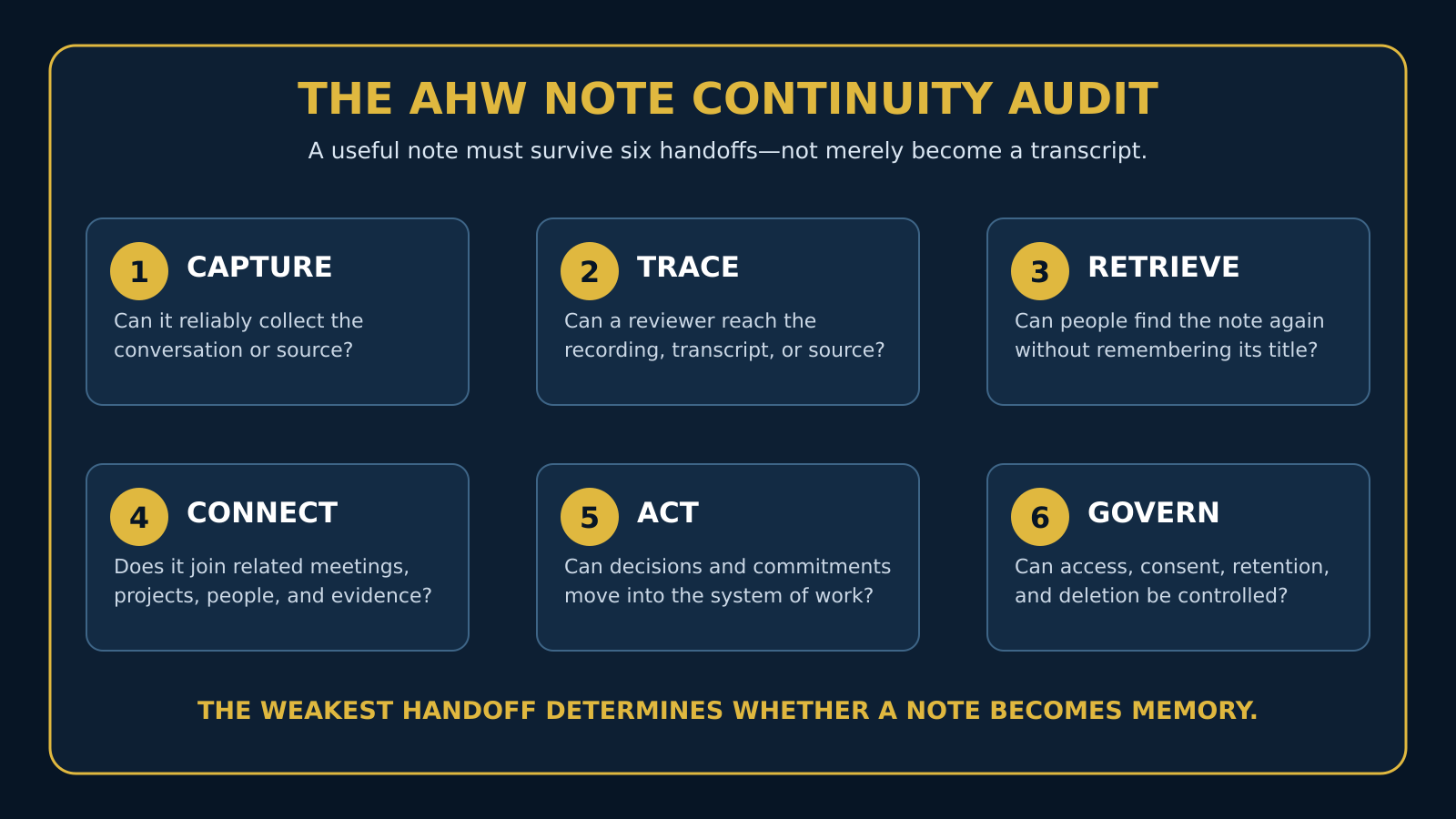
The AHW Note Continuity Audit treats a note as a chain of custody for meaning. Capture asks whether the system can collect the conversation or source. Traceability asks whether a reviewer can return to the transcript, recording, or cited passage instead of trusting a detached summary.
Retrieval measures whether the note can be found later without remembering its title. Connection looks for links to related people, projects, meetings, and documents. Action covers the movement of decisions and commitments into a project, CRM, calendar, or other system of work, while governance covers consent, access, retention, deletion, and administrative control.
| Tool | Capture | Traceability | Retrieval | Connection | Action | Governance |
|---|---|---|---|---|---|---|
| Granola | Strong | Strong | Strong | Partial | Partial | Partial |
| Fathom | Strong | Strong | Strong | Strong | Strong | Partial |
| Notion AI Meeting Notes | Strong | Strong | Strong | Strong | Strong | Strong |
| Otter.ai | Strong | Strong | Strong | Partial | Partial | Partial |
| Fireflies.ai | Strong | Strong | Strong | Strong | Strong | Strong on higher tiers |
| Mem | Partial | Partial | Strong | Strong | Partial | Partial |
| NotebookLM | Source import | Strong | Strong | Strong within notebook | Not primary | Partial |
| Notta | Strong | Strong | Strong | Partial | Partial | Partial |
| Krisp | Strong | Strong | Strong | Partial | Partial | Partial |
| Read AI | Strong | Strong | Strong | Strong | Strong | Strong on managed plans |
The table should not be summed into a single score. A researcher may reasonably choose NotebookLM even though action routing is not its purpose, and a privacy-sensitive executive may prefer a narrower bot-free tool to a platform with broader cross-channel reach. The useful comparison is the pattern of strengths against the work that must happen next.
When the Human Should Shape the Record
Granola: The Best Starting Point for Deliberate Meeting Notes
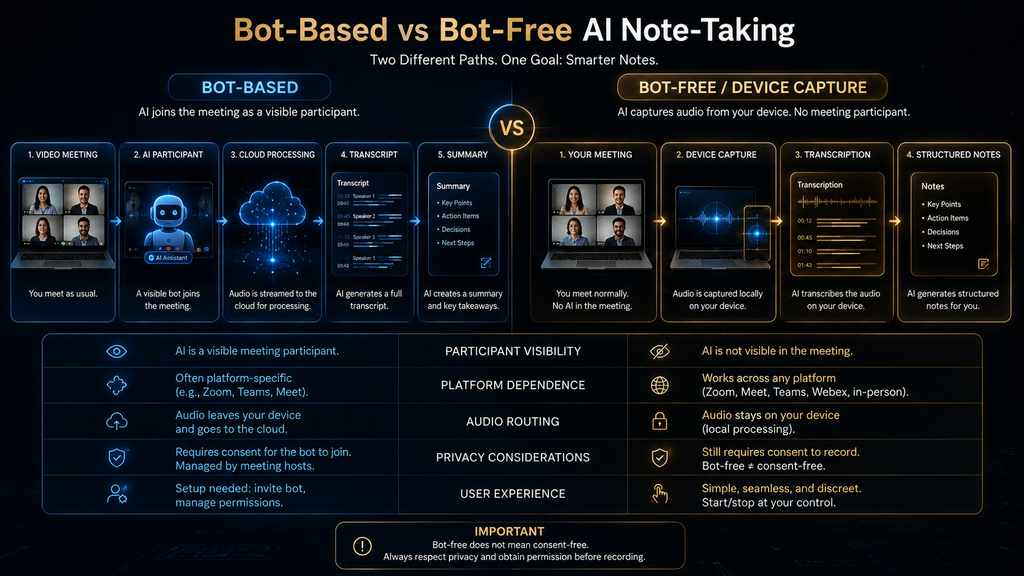
Granola is built around an AI notepad rather than a visible participant bot. It captures meeting audio from the user’s device, combines that context with notes the person types, and produces an expanded record afterward. That design is especially effective when the human already knows which statements matter and does not want a bot account entering every call.
The product’s strongest idea is not silence or convenience; it is editorial control. A user can write terse signals during the meeting—an objection, a promised date, a decision—and allow the system to turn those signals into fuller notes. This often creates a more intentional record than a generic recap because the note reflects both the conversation and the operator’s judgment.
According to Granola’s official pricing page, the Basic plan costs $0 and includes AI meeting notes, limited meeting history, chat across meetings, shared folders, templates, multilingual support, and the ability to opt out of model training. Business is listed at $14 per user monthly and adds unlimited history, advanced models, integrations, billing controls, MCP, and API access. Enterprise starts at $35 per user monthly with SSO, organization-wide retention controls, and additional administration.
The free offer is generous for active capture but less suitable as a permanent archive because viewing and working with older notes is limited. The Business tier therefore pays for continuity more than capture: it keeps history available and connects the record to systems such as Notion, HubSpot, Attio, Affinity, and Zapier. That distinction matters if notes must become institutional memory rather than disposable personal recaps.
Granola is the best fit for consultants, product leaders, recruiters, and managers who take active notes and want AI to complete rather than replace that behavior. It is a weaker match when an organization needs a conspicuous recording bot, video playback, detailed coaching metrics, or deeply managed enterprise conversation intelligence. “Bot-free” also does not remove the need to notify participants and obtain the consent required by policy and law.
Krisp: Bot-Free Capture for People Who Also Need Cleaner Audio
Krisp approaches notes from the audio layer. Its established strength is noise cancellation, and its meeting assistant adds recording, transcription, summaries, action items, and meeting notes without requiring a bot to join the call. That combination is distinctive for users who regularly work from imperfect acoustic environments or move between conferencing platforms.
The bot-free model reduces meeting clutter, but privacy still depends on the selected features. Krisp’s privacy policy explains that certain services may involve transcripts, recordings, summaries, and related content, while some speech processing is performed locally. Teams should identify which modes create stored artifacts, where administrators can control them, and whether a regulated workflow requires a Business plan and a signed agreement.
Krisp’s current pricing page organizes the meeting assistant into Core, Advanced, and Enterprise plans and lists unlimited transcription and audio recording across those tiers. Pricing presentation and bundled allowances can vary by billing selection, so the live plan comparison is more reliable than a copied historical number. Buyers should also separate meeting-note features from call-center products, which address a different operational problem.
Choose Krisp when noise cleanup and unobtrusive capture belong in the same workflow. Choose Granola when the act of typing signals during a meeting is central to how you think. Neither should be purchased solely because it is bot-free; the differentiator is whether the capture architecture improves attention and the downstream note remains retrievable, reviewable, and governed.
When Notes Must Live Beside the Work
A meeting recorder usually organizes information by event: one call, one transcript, one recap. A workspace memory system organizes information by relationship: this decision belongs to that project, affects these people, and should be visible beside the work it changes. That model becomes more valuable as the cost of losing context exceeds the cost of capturing it.
Notion AI Meeting Notes: Best When the Workspace Is Already the System of Record
Notion’s AI Meeting Notes can transcribe and summarize meetings without adding a bot, then keep the transcript, decisions, and action items inside a Notion page. The advantage is proximity. A project brief, task database, customer page, and meeting record can share the same permission model and become searchable through the same workspace.
The feature is not a durable free-plan benefit. Notion’s official help center says AI Meeting Notes is available on Business and Enterprise plans and on certain eligible mobile subscriptions. The pricing page currently lists Business at $20 per member monthly before annual-billing differences and presents AI Meeting Notes as part of that plan.
Notion is most persuasive when a team already maintains disciplined pages and databases. Notes can feed decisions, owners, statuses, and linked project records without being exported to another application. In a disorganized workspace, however, AI can generate more pages without creating better memory; taxonomy, permissions, and ownership still need human design.
The consent guidance is unusually direct. Notion recommends complying with the strictest applicable consent rules and obtaining consent from all participants before transcription. Teams should pair that advice with a standard opening notice, a visible recording indicator where possible, a rule for sensitive meetings, and a retention schedule that prevents every conversation from becoming permanent by default.
Choose Notion when the note should immediately become workspace context and the organization is already committed to Notion. Do not choose it only to avoid a meeting bot if your team actually needs video playback, call coaching, or a specialized CRM conversation layer. The product’s strength is continuity inside the workspace, not superiority at every form of capture.
Mem: Best for Personal Retrieval Across a Growing Note Library
Mem is closer to an AI-assisted personal memory than a conventional meeting recorder. It emphasizes quick capture, semantic retrieval, related-note discovery, and conversational access to what a person has saved. This suits founders, writers, researchers, and independent professionals who accumulate ideas across days and need the system to resurface connections without maintaining a rigid folder tree.
The distinction between retrieval and evidence matters here. A semantically relevant note can help someone remember a previous idea, but it may not prove who said what in a recorded meeting. If the source must be auditable, preserve the original document, link, transcript, or recording beside the synthesized note rather than relying on the AI-generated connection alone.
Mem’s current product and security information is available through its official site. Pricing and packaging have changed over the product’s life, so buyers should use the live offer rather than an old comparison table. The meaningful trial question is whether Mem retrieves useful prior material from a real personal archive, not whether it can generate another generic summary from a clean sample.
Choose Mem when the difficult task is remembering and recombining personal knowledge. Choose Notion when several people need structured pages, databases, permissions, and project links. Choose a record-first meeting tool when playback and speaker-attributed evidence are non-negotiable.
When the Note Must Answer Back with Sources
NotebookLM: Best for Source-Grounded Research Notes
Google’s NotebookLM begins with a set of sources rather than an empty page or a live meeting. A user can add PDFs, websites, YouTube videos, audio, Google Docs, and Slides, then ask questions across that bounded collection. Answers include inline citations that lead back to supporting passages, which makes the product more suitable for research verification than a detached general-purpose summary.
The citation behavior is its defining feature, not a decorative extra. A student can inspect the passage behind a study claim, a marketer can compare several interview transcripts, and an analyst can test whether a synthesis is supported by the supplied material. The model can still misunderstand a passage or overstate an inference, so the citation shortens verification; it does not eliminate it.
Google’s official NotebookLM documentation details supported sources and notebook behavior. Limits and upgrade benefits changed in September 2026, so readers should confirm the account-specific allowance shown in the product. The free tier remains useful for testing the research workflow before choosing a paid Google AI plan.
NotebookLM should not replace a dedicated call recorder when the organization needs automatic attendance, live transcription, or CRM routing. It becomes powerful after recordings, transcripts, reports, and references already exist and need to be compared. In the AHW audit, it scores strongly on traceability and retrieval within a notebook but is not primarily an action-routing system.
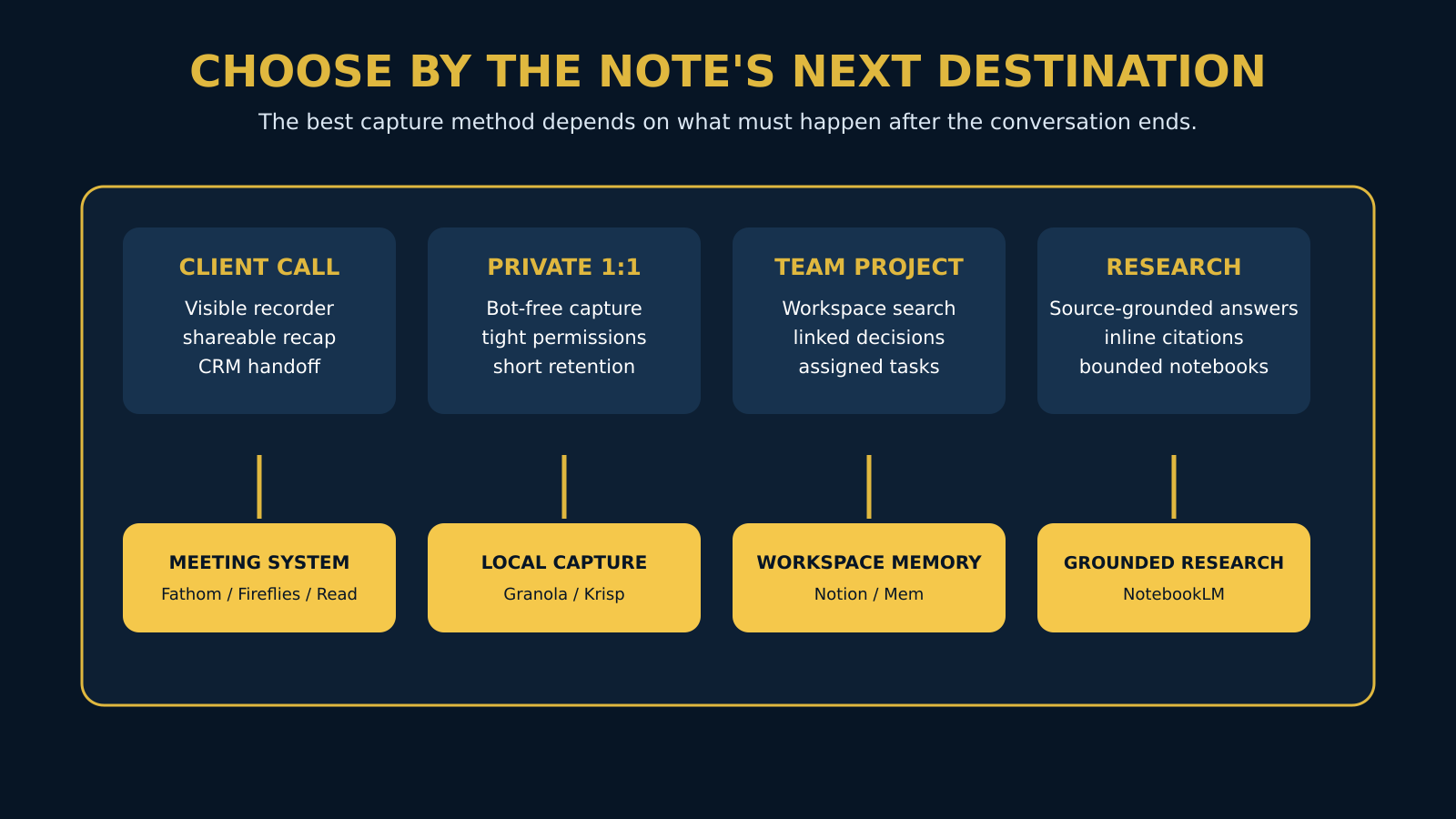
Choose by the Note’s Next Destination
A consultant who must send a clean recap after a client call should start with Fathom or Granola. Fathom preserves a fuller recorded artifact and creates shareable summaries, while Granola keeps the capture less intrusive and lets the consultant’s typed signals shape the note. The deciding factor is whether playback evidence or quiet editorial control matters more.
A sales or customer-success team should compare Fireflies and Read AI before defaulting to the cheapest recorder. Fireflies is attractive when the requirement is meeting search plus established integrations; Read AI becomes more interesting when answers must span meetings, email, and messages. Both require a permission review because their usefulness grows through connected systems.
A multilingual interviewer should evaluate Notta with representative speakers, accents, and domain vocabulary. A student should first decide whether the job is lecture capture, where Otter, Granola’s student offer, or another recorder may help, or source-based revision, where NotebookLM is structurally better. Students should also follow institutional rules, avoid recording classmates or instructors without permission, and compare the wider study stack in our guide to the best free AI tools for students.
A product or operations team already living in Notion should test the native meeting-note path before adding another repository. A privacy-sensitive one-to-one may be better served by Granola or Krisp, a written human summary, or no recording at all. Sensitive does not automatically mean “choose the tool with the best security page”; it can mean collect less data.
Consent, Privacy, and Retention Are Product Features
Recording law varies by jurisdiction and circumstance, and participants can be located in different places. This article is not legal advice, but a conservative operating standard is clear: disclose the recording or transcription before it begins, obtain consent from everyone involved, provide a practical way to decline, and document the organization’s policy. Vendor consent notifications can support that process but do not transfer responsibility away from the meeting host.
Privacy review should follow the data, not the marketing adjective. Identify whether audio is processed locally or in the cloud, whether a recording is stored, how long transcripts remain available, which subprocessors receive content, whether data can train models, and how deletion works across integrations and backups. Repeat the review for each capture mode because a desktop recorder, meeting bot, mobile app, and uploaded file may follow different paths.
Access is equally important. A transcript can contain health information, personnel issues, credentials spoken aloud, commercial plans, or comments a participant reasonably expected to remain within a small group. Use least-privilege sharing, restrict public links, separate private meetings from team libraries, and test what a newly added employee can discover through AI search.
Retention should have a reason. Some recordings are useful evidence, while others become risk after decisions and actions have been verified. A sensible policy can keep the approved summary and decision record while deleting raw audio sooner, provided legal, contractual, and operational requirements allow it.
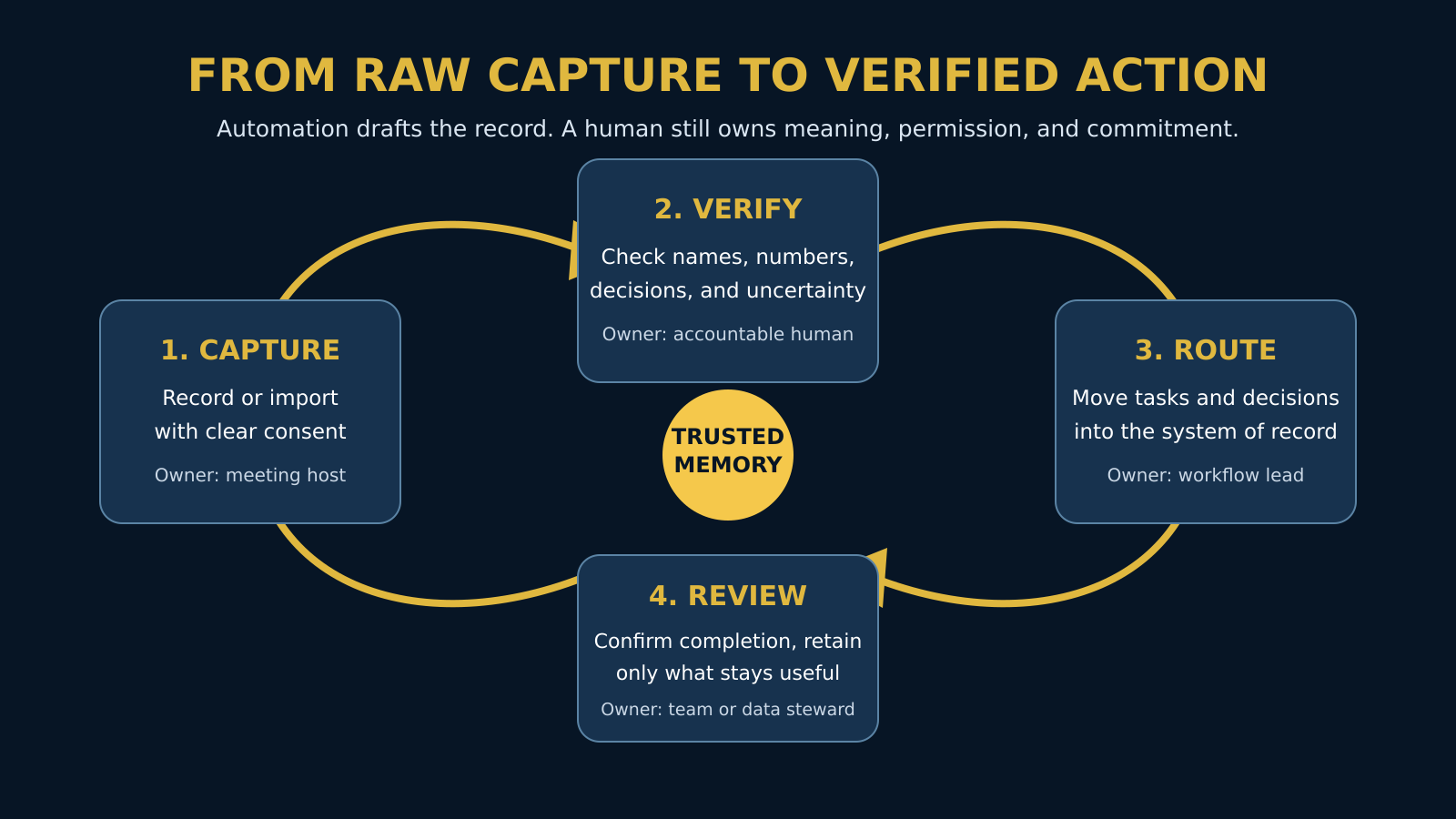
A Safer Operating Loop for AI Notes
First, define the artifact before the meeting. A client discovery call may require a recording, transcript, decision summary, and CRM update, while an internal check-in may need only decisions and owners. Choosing the smallest sufficient artifact prevents the note system from collecting data simply because it can.
Second, make consent visible and capture through the approved mode. During the meeting, a human should mark important decisions, uncertainties, and commitments even if the product promises a complete summary. Those signals help distinguish a true agreement from a topic that was merely discussed.
Third, verify high-consequence details against the transcript, recording, or cited source. Check names, dates, money, quantities, owners, deadlines, and statements that affect a customer, employee, contract, or publication. If the conversation is ambiguous, the note should preserve uncertainty rather than invent certainty.
Fourth, route only approved outputs. An action item needs an owner and due date in the system where work is actually managed; a decision needs a durable home and a link to the evidence; a follow-up email needs human review before it represents the sender. Finally, review retention and access so that yesterday’s convenience does not become tomorrow’s uncontrolled archive.
Sometimes the Better Note-Taking App Is No Recorder
Do not default to AI capture for privileged legal discussions, sensitive health or personnel conversations, protected investigations, or any meeting where policy prohibits recording. Even when recording is lawful, a participant may speak less candidly when every word becomes searchable. A short human-written decision record can preserve what the organization needs without creating a permanent transcript of everything said.
AI notes are also a poor substitute for active thinking. Research on assisted note-taking increasingly suggests that maximum automation and maximum learning are not the same goal; the useful design question is how much cognitive work the person should retain. For learning, strategy, and creative synthesis, typing a few deliberate ideas and using AI to organize them may be better than passively receiving a complete summary.
Finally, do not record merely to avoid a weak meeting practice. If decisions have no owner, agendas are unclear, and follow-up never happens, a more detailed transcript will document the dysfunction rather than fix it. Improve the meeting system and use the AI tool as supporting infrastructure.
Run a Workflow Pilot, Not a Feature Demo
A useful pilot should cover the situations that create failure, not only a clean ten-minute demonstration. Include a normal internal meeting, a long call, cross-talk, specialized vocabulary, at least one external participant, and the real destination for actions or decisions. Do not insert confidential material merely to make the pilot realistic; use representative but approved content.
Before the pilot begins, write five acceptance questions. Did the system capture the meeting through the intended device and platform? Can a reviewer reach the evidence behind an important summary statement? Can a colleague find the note using a person, topic, or project rather than its exact title? Does the action arrive in the correct system with an owner? Can an administrator delete, restrict, or retain the artifact according to policy?
Measure correction work instead of declaring the transcript “accurate.” Count the important names, numbers, decisions, and assignments that require repair, and record how long review takes. A tool that makes fewer words but produces a dependable decision record may save more time than a tool that produces a flawless-looking transcript requiring extensive verification.
Test sharing from the recipient’s side. Ask a colleague who did not attend the meeting to locate one decision, identify its owner, and open the supporting context. This reveals whether the system created usable memory or merely generated an artifact that makes sense to the person who was already there.
Finish with a deletion and offboarding test. Remove a pilot note, revoke a user, disconnect an integration, and inspect what remains searchable. A product should not be approved solely because capture succeeded; continuity includes the ability to end access and dispose of information intentionally.
Calculate the Cost of the Workflow, Not the Seat
The advertised monthly price is only one part of ownership. Add the number of seats, annual-versus-monthly billing difference, transcription or storage limits, AI-credit usage, required integrations, administrative work, and the time people spend checking summaries. A low-cost product that creates duplicated tasks or forces manual exports can be more expensive than a higher-priced system that fits the existing process.
Free plans are best treated as workflow tests. Fathom’s recording offer is unusually capable for individuals, Granola allows meaningful bot-free capture, and several competitors provide enough minutes or meetings to expose the basic experience. None of those free tiers proves that a team rollout will have the necessary controls, history, integration capacity, or support; readers still assembling a broader starter stack can compare our best AI tools for beginners.
The most important upgrade trigger is often not more transcription. It is continuity: longer history, organization-wide search, CRM or project integration, managed retention, SSO, audit logs, or permission control. When comparing paid plans, write down which broken handoff each upgrade repairs; if a paid feature does not repair one, it may not deserve a place in the budget.
Final Thoughts
The best AI note-taking app is the one that preserves the right evidence and helps the right person act without collecting more than the situation justifies. Granola is the strongest general recommendation for deliberate, bot-free professional notes; Fathom is the best free-first recorded-meeting option; Notion is the natural choice for a disciplined Notion workspace; and NotebookLM leads when source traceability defines the task.
Fireflies and Read AI become more compelling as integration and organizational search matter, while Otter, Notta, Krisp, and Mem each serve clearer specialist needs. Do not force those products into a single score. Use the AHW Note Continuity Audit to identify the weakest handoff, pilot with real workflow conditions, and keep a human accountable for consent, meaning, and action.
Need the Tool to Manage the Meeting, Not Just the Notes?
Compare assistants built to handle capture, follow-up, team workflows, and the work that begins after the call ends.
Compare AI Meeting Assistants →Frequently Asked Questions
What is the best AI note-taking app overall?
Granola is the best starting point for many meeting-heavy professionals because its human-guided, bot-free design keeps the user involved in shaping the record. Fathom is better when free recorded calls and shareable recaps matter most, while Notion wins for teams that need meeting notes to remain inside an existing workspace. There is no honest universal winner because meeting capture, personal memory, team knowledge, and source-grounded research are different jobs.
What is the best free AI note-taking app?
Fathom has one of the most practical free plans for individuals because it includes unlimited recordings and standard summaries, although advanced AI features have monthly limits. Granola’s Basic plan is a strong alternative for bot-free meeting notes, but older history is restricted. Otter, Notta, Fireflies, and Read AI also offer free entry points with different limits based on minutes, session length, storage, AI summaries, or number of meetings.
Which AI note taker can work without a meeting bot?
Granola and Krisp are clear bot-free choices, and Notion AI Meeting Notes also captures through the user’s app rather than adding a visible attendee. Fathom supports bot-based and newer bot-free experiences, with availability depending on the platform and account. Bot-free capture reduces meeting clutter but does not remove the obligation to disclose recording or transcription and obtain the consent required by law and policy.
Can AI note-taking apps record in-person meetings?
Several products can capture device audio, mobile recordings, or uploaded files, so they can support in-person conversations as well as web conferences. Results depend heavily on room acoustics, microphone placement, overlapping speakers, and distance from the device. Test the actual room setup and consent process before relying on an AI-generated record for a high-consequence meeting.
Which app is best for students and research?
NotebookLM is the strongest option for research based on a defined collection of sources because its answers include citations back to supporting passages. Otter, Notta, Granola, or another recorder may be more useful for a permitted lecture or interview. Students should follow school rules, obtain permission before recording, and continue writing deliberate notes because passive automation can reduce the cognitive work that supports learning.
Are AI meeting notes accurate enough to trust?
They are useful drafts, not self-authenticating records. Performance varies with sound quality, accents, cross-talk, technical vocabulary, speaker separation, and language, while summaries can turn a discussion into a false decision. Verify names, numbers, money, deadlines, owners, commitments, and other consequential details against the transcript, recording, or cited source before acting.
Is it legal to use an AI note taker in a meeting?
Recording and transcription laws differ by country, state, participant location, and context, so a universal answer would be misleading. A conservative practice is to disclose the tool before capture, obtain consent from every participant, allow refusal, and follow the strictest applicable organizational rule. Consult qualified legal counsel for regulated, multi-jurisdictional, employment, health, or other high-risk use cases.
What should a company check before buying an AI note-taking tool?
Check capture compatibility, source traceability, search, integration handoffs, permissions, retention, deletion, model-training choices, subprocessors, SSO, audit logs, and contractual requirements. Then run a pilot that includes a normal meeting, a difficult audio case, an external participant, and the real destination for tasks or decisions. Procurement should fail a product that captures well but cannot be governed or offboarded safely.
Do AI note-taking apps replace manual notes?
They reduce clerical capture, but manual signals remain valuable. Typing a decision, objection, uncertainty, or promised date tells the system and future reviewer what mattered, while active note-taking can support attention and learning. A strong workflow combines automated coverage with deliberate human annotations and a verification pass.
How do I choose between Granola, Fathom, Notion, and NotebookLM?
Choose Granola for human-guided, bot-free meeting notes; Fathom for recordings, transcripts, and generous free summaries; Notion when notes must connect directly to workspace projects and databases; and NotebookLM when questions need citations to supplied sources. If none of those descriptions matches the next destination of the note, compare the specialist options rather than buying the most popular name.
Related Guides
- Best AI Productivity Tools for Beginners: 10 Tools Compared
- Best AI Conversation Intelligence Tools in 2026: Research, Customer Insights & Analysis
- Daily AI Workflow for Managing Work Without Feeling Overwhelmed
- What Is a Large Language Model (LLM)? How LLMs Really Work
- What Is an AI Agent? A Beginner’s Guide to How Autonomous AI Works
Written by
Muntasir Ahmad Chowdhury
Founder-AI Hustle World
Muntasir Ahmad Chowdhury is the Founder of AI Hustle World, an independent publication dedicated to making Artificial Intelligence practical, trustworthy, and easy to understand. He researches AI tools, automation, customer service, productivity, and real-world business applications, helping readers make smarter technology decisions through research-driven, experience-backed content.
Expertise:
AI Tools • AI Automation • AI Customer Service • AI Productivity • Generative AI • AI Workflows
Get Smarter With AI
Enjoyed this guide? Get practical AI tools, tutorials, and honest reviews delivered to your inbox.