Evidence: Documentation reviewed
Last checked: October 2026
What was done: Written from official documentation and the published sources linked in this article. Not hands-on tested.
Files: None
Affiliate links: No
Last updated: October 2026
Daily AI Workflow for Managing Work Without Feeling Overwhelmed
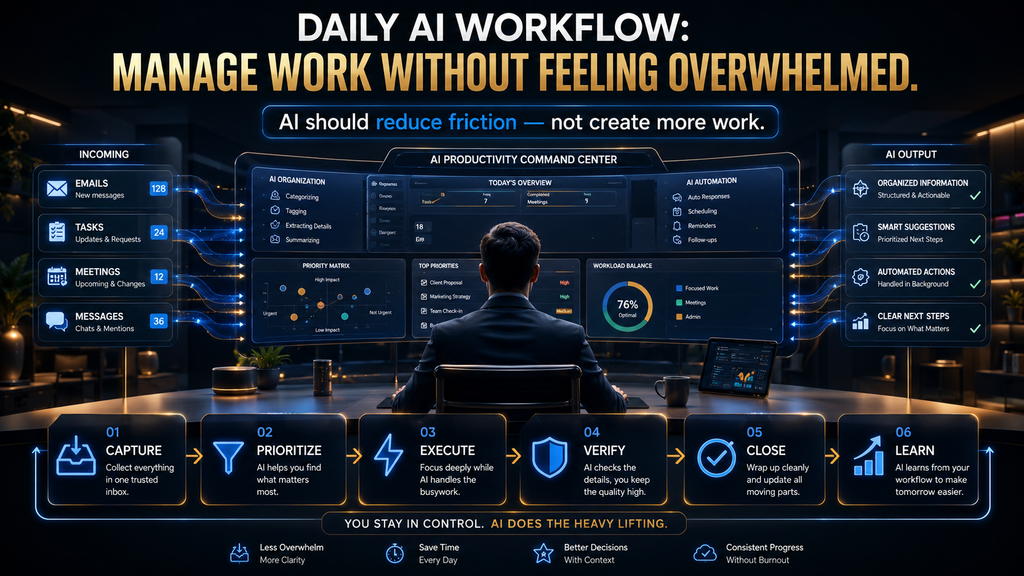
A daily AI workflow is a repeatable routine that uses AI at fixed points in your day to capture incoming work, set priorities, support execution, verify results and close the day cleanly. It is a system, not another app, and it works with the tools you already have.
Most people do not need another productivity tool. They need a better way to deal with the work already arriving every day, because the tasks themselves are rarely the heaviest cost, and the constant deciding about what to do next usually is.
The scale of the problem is well documented. Microsoft’s 2025 Work Trend Index found that employees using Microsoft 365 are interrupted every two minutes during core hours by meetings, emails or pings, which adds up to 275 interruptions a day.
A companion Microsoft analysis, Breaking Down the Infinite Workday, found that 57% of meetings are ad hoc calls without a calendar invite. Those figures describe Microsoft’s telemetry sample rather than every worker, but they show how fragmented attention has become.
AI can help, but only when it is pointed at the right problem. The useful request is “help me reduce the mental friction between incoming work and meaningful output,” which is very different from asking AI to produce more.
This guide shows how to build that system. You will learn the AI Hustle World Daily Workflow Loop, a simple capture rule, the Daily Top Three, a three-level verification model, the AI Task Fit Test and a 15-minute minimum version you can start tomorrow.
What a Daily AI Workflow Is
A daily AI workflow is a repeatable system that uses AI at specific points in the workday to help capture, organize, execute, verify and close tasks. The important word is system, because opening a chatbot whenever you feel stuck is a habit, not a workflow.
A workflow has an input, a process, an output, a decision and a next step. For example, a new email arrives, AI identifies whether it contains an action, a task is created, AI suggests a priority, you confirm it, and the task enters today’s queue.
The difference matters because isolated AI use produces isolated time savings, while a connected workflow compounds. Asana’s guidance on AI for daily tasks makes the same point: start by capturing inputs from wherever work arrives, then convert them into tracked tasks.
AI is most useful when it is connected to the place where work is captured, assigned and tracked. A clever summary that never reaches your task list has saved you nothing.
Why Work Feels Overwhelming Before AI Enters the Picture
Overwhelm usually comes from fragmentation rather than volume. Work arrives through email, chat, meetings, documents and passing conversations, and your brain becomes the integration layer that holds it all together.
Interruptions make that worse in a specific way. Research by Gloria Mark and colleagues on the cost of interrupted work found that people compensate for interruptions by working faster, and pay for it with more stress, frustration and time pressure.
That finding explains a common experience. You can finish the day having completed a great deal and still feel behind, because the speed came at the cost of attention and energy.
The classic Harvard Business Review article Manage Your Energy, Not Your Time made a related argument years before generative AI. Time is fixed, but energy and focus can be protected or wasted, and a good workflow protects them.
Why AI Can Make Overwhelm Worse
AI can make you faster without making you more productive. If you can draft five documents in the time one used to take, but nothing controls what happens next, you have only increased the speed at which work enters the system.
Atlassian’s State of Teams 2026 research describes this at team level. It found that 85% of knowledge workers use AI at work, but only 29% have embedded it in their flows of work.
The report calls the result a fragmentation tax. As individuals use AI to move faster, reviews, approvals and coordination do not keep pace, so the team gains output and loses alignment.
The same thing happens to individuals. If AI helps you create five times more material but forces you to review and organize five times more, the net benefit can be close to zero, which is why this guide treats review capacity as a hard limit.
Why To-Do Lists and Inboxes Became the Default
The traditional approach, a to-do list plus an inbox, exists because it is simple and visible. Writing something down gets it out of your head, and an inbox shows you what other people need.
Those tools still work for capture. Their weakness is that they treat every item as equal, they grow without limit, and they say nothing about what to do first or what to ignore.
A daily AI workflow keeps the list and the inbox and adds what they lack. It adds a single queue, a daily decision about priorities, protected time for important work and a deliberate close at the end of the day.
AI is the helper in that system, not the system itself. The structure would improve your day even without AI, and AI makes each step faster and less tiring.
The AI Daily Workflow Loop
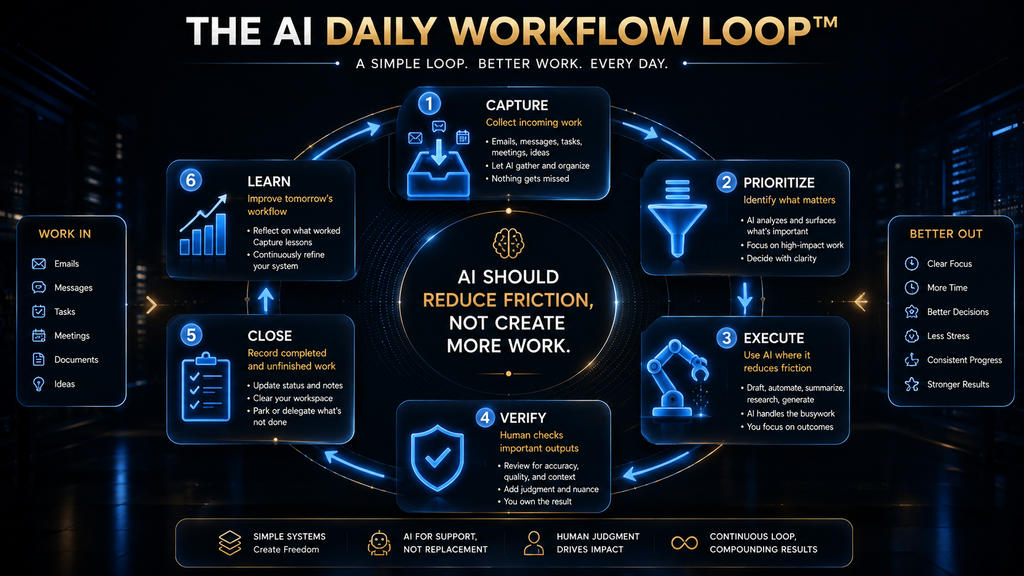
The AI Hustle World Daily Workflow Loop has six stages: capture, prioritize, execute, verify, close and learn. Each stage has a job for AI and a decision that stays with you.
| Stage | What happens | What AI does | What you decide |
|---|---|---|---|
| Capture | Incoming work is collected in one place | Extracts possible tasks from emails, notes and meetings | Whether each item is really a task |
| Prioritize | The day’s outcomes are chosen | Sorts by deadline, dependency and effort | Which three outcomes matter most |
| Execute | Work gets done in focused blocks | Drafts, summarizes, researches | What good looks like |
| Verify | Outputs are checked | Flags gaps and inconsistencies | Whether the result is safe to use |
| Close | The day is wrapped up | Summarizes done, pending and blocked work | What carries over and what is dropped |
| Learn | Friction is reviewed | Highlights repeated problems | What to change tomorrow |
The last stage is the one most productivity advice misses. Asking what repeatedly caused friction, and changing one thing, turns a routine into a feedback loop that improves each week.
You do not need to run every stage with AI from day one. Many people start with capture and close, which together take about ten minutes and remove most of the mental load.
Step 1: Capture Everything Into One Queue
The first job of the workflow is capture, because you cannot prioritize work that exists only in your memory. Work arrives through email, chat, meetings, documents, calls and your own ideas, and each source left separate adds to the load.
Create one work queue, in whatever task tool you already use. AI can extract candidate tasks from unstructured material, such as the commitments buried in meeting notes or the request hidden in the fourth paragraph of an email.
A simple capture rule keeps the queue clean. For every incoming item, decide which of five things it is before it enters the system.
| The item is | What to do with it |
|---|---|
| Information | Store it where you will find it later |
| An idea | Park it in an ideas list, not the task queue |
| An action | Add it to the queue with an owner and a date |
| A decision | Make it, or schedule when you will |
| Noise | Do not let it enter the system |
AI can suggest which category an item belongs to, and you confirm. That confirmation matters, because AI makes task creation effortless, and a workflow that turns every sentence into an obligation creates more overwhelm, not less.
If meetings are a major source of tasks for you, an AI meeting assistant can capture decisions and action items automatically. For inbox-heavy roles, an AI email assistant does the same for messages.
Step 2: Prioritize With a Daily Top Three
A giant task list does not create clarity; it creates guilt. The goal of prioritization is to decide what today is for, and a list of 27 neatly sorted tasks does not do that.
Start by sorting work into four levels. AI can do the first pass if you give it deadlines, dependencies and rough effort for each task.
| Priority | What it means | What to do |
|---|---|---|
| Critical | Serious consequence if delayed | Do first |
| Important | Creates meaningful progress | Schedule focused time |
| Routine | Necessary but lower impact | Batch or automate |
| Low-value | Little meaningful outcome | Reduce, delegate or remove |
Then apply the Daily Top Three: one major outcome and two supporting outcomes. Everything else is secondary, and you are allowed to finish the day with secondary items untouched.
Do not surrender this decision to the model. A task with a deadline tomorrow looks urgent, while a task with no deadline may decide whether your business succeeds in six months, and only you know which matters more.
A useful prompt is: “Here are today’s tasks, deadlines and commitments. Suggest the three outcomes that matter most, separate urgent from important, and flag anything that looks unrealistic for one day.” Our guide to planning your week with AI covers the weekly version.
Leave room for the unexpected as well. A schedule that fills every minute fails the moment something urgent arrives, so plan for roughly two-thirds of your available time and treat the rest as buffer.
Step 3: Protect Deep Work
This is where many AI workflows go wrong. People open a chatbot every few minutes, which feels productive and can increase context switching.
If you are writing a report and keep asking AI to improve one sentence, then checking email, then asking another question, you have built a fragmented workflow. The fix is to use AI in blocks rather than in a constant trickle.
A research block gathers and summarizes what you need before you start. A drafting block produces the first version without interruption, and a review block uses AI to check structure, gaps and clarity once the draft exists.
The same batching applies to communication. Process related emails together in one session instead of asking AI to summarize each as it arrives, and you remove dozens of small switches from the day.
Prepare each block before it starts. Gather the documents, notes and data you will need, and give them to the AI in one go, so you are not hunting for context halfway through.
Keep a parking list beside you during deep work. When a stray thought or small task appears, write it down in one line and return to the block, then move the list into your queue afterward.
Managing Email and Chat With AI
Email and chat are where most interruptions start, so they deserve their own rules. The goal is to process messages in batches, at times you choose, instead of reacting to each one as it lands.
Pick two or three fixed windows a day for communication. Outside those windows, close the inbox and silence notifications for everything except a small list of people who can reach you urgently.
Inside each window, let AI do the first pass. Ask it to group messages into those needing a reply, those containing a task, those to read later and those to archive, then draft replies for the first group.
You still read every draft before it goes out. AI is good at structure and tone, but it does not know the history of a relationship or the promise you made on a call last week.
Handling Interruptions and Urgent Requests
No workflow survives a day without interruptions, so plan how you will handle them. The useful question for any incoming request is whether it beats one of today’s top three outcomes.
If it does, swap it in deliberately and drop something else. If it does not, capture it in the queue with a date and return to what you were doing, which takes under a minute.
Tell people when they can expect an answer. A short reply such as “I have this and will respond by three” removes the pressure to switch immediately and protects your focus block.
Use the midday check-in to re-plan after a disrupted morning. Asking AI which of the remaining tasks still fit the afternoon is faster and calmer than trying to rescue the original plan.
Matching Tasks to Your Energy
Time on the calendar is only half the picture, because your attention is not equally sharp all day. Most people have two or three hours of peak focus, often in the morning.
Put the major outcome of the day in that window and defend it. Schedule meetings, email and routine administration for the hours when your energy is naturally lower.
AI fits this pattern well. Low-energy periods are a good time for AI-assisted tasks such as summarizing documents, tidying notes and drafting routine messages, which need review rather than deep thought.
Build short breaks between blocks as well. A workflow that removes every pause in order to fit more in will cost you the focus it was meant to protect.
Step 4: Use AI Before, During and After Meetings
Meetings create a chain of work: preparation, conversation, notes, decisions, action items and follow-up. AI can assist at nearly every link, and the value sits at the end of the chain.
Before a meeting, ask AI to summarize the relevant thread or document and list the decisions that need to be made. Five minutes of preparation often shortens the meeting itself.
During the meeting, let a transcription tool capture the conversation so you can pay attention. Afterward, the structured outcome matters far more than the transcript: a 45-minute transcript is rarely useful, while five clear action items with owners and dates are.
Move those action items into your queue the same day. A decision that stays in meeting notes is a decision nobody will act on, and our roundup of AI note-taking apps covers tools that make that transfer easier.
Step 5: Turn Repetitive Work Into Repeatable Workflows
Repetitive work is where automation pays, provided you match the level of automation to the risk. A weekly status summary is low risk, a customer reply is moderate risk, and anything involving money, contracts or sensitive data is high risk.
Low-risk repetitive work can be automated with a light check. Moderate-risk work should be drafted by AI and approved by you, and high-risk work should stay human-led, with AI limited to preparation.
A safe automation pattern has five parts: trigger, process, check, action and record. On Friday, AI gathers project updates and drafts the weekly summary, you review it, the summary is sent, and the final version is stored.
That is far safer than letting AI send whatever it generated. Tools now support this directly; OpenAI documents scheduled tasks in ChatGPT that run one-time or recurring work, and our comparison of AI workflow automation tools covers dedicated platforms.
Step 6: Verify Before You Trust
AI-generated output is not correct because it looks professional. Verification is the stage that protects your reputation, and the effort should match the stakes.
Use three levels. A quick scan is enough for low-risk drafts and internal notes, where you check that the output answers the request and nothing is obviously wrong.
An evidence check applies to anything containing facts, figures, names or dates that other people will rely on. Confirm each important claim against its source, because language models can produce confident errors, as our guide to AI hallucinations explains.
Expert review applies to legal, financial, medical or contractual content. There, AI output is a starting point for a qualified person, and our framework for checking AI information shows how to verify efficiently.
Summaries deserve a specific check. When AI condenses a long document or thread, compare the summary against the source for the two or three points you will act on, because a summary can drop a condition or a date that changes the meaning.
The AI Task Fit Test
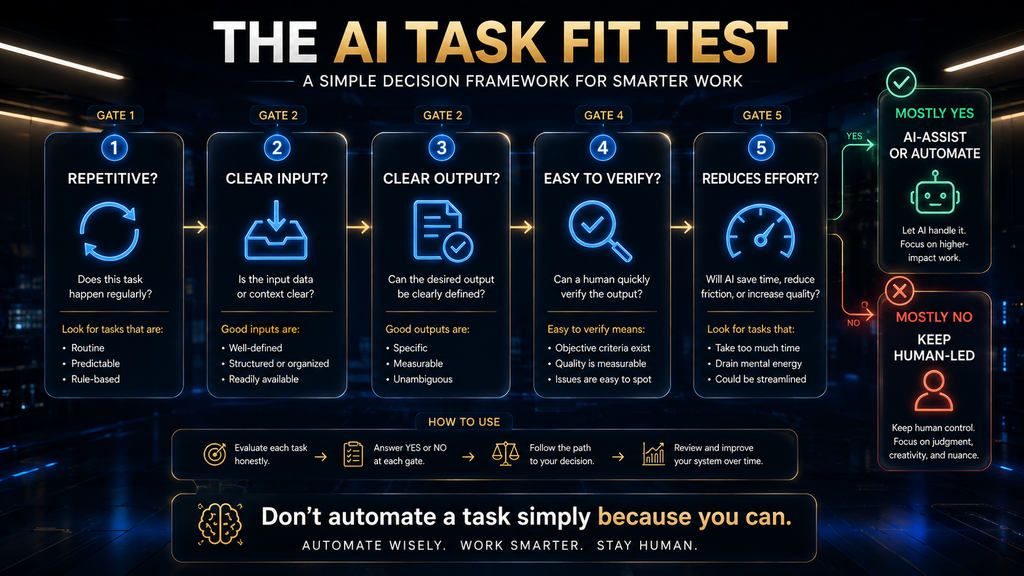
Not every task deserves AI. The AI Task Fit Test takes thirty seconds and prevents the most common waste, which is forcing AI into work it does not improve.
| Question | Good sign |
|---|---|
| Is the task repetitive? | Yes |
| Does it have a clear input? | Yes |
| Is the desired output reasonably clear? | Yes |
| Can a human verify the result? | Yes |
| Does AI reduce effort instead of adding setup? | Yes |
If most answers are yes, AI assistance is probably worthwhile. If most are no, using AI will likely add complexity, and doing the task yourself is the faster path.
The last question is the one people skip. A task that takes five minutes by hand and ten minutes to explain to an AI should be done by hand, at least until it becomes frequent enough to justify a reusable prompt.
Three Types of Work: AI-Assisted, AI-Automated and Human-Led
It helps to sort your work into three types before you automate anything. AI-assisted work is done by you with AI support, such as drafting, summarizing and researching.
AI-automated work runs on its own with a check, such as recurring summaries, reminders and data collection. Human-led work is done by you, with AI used only for preparation, such as negotiations, performance conversations and final decisions.
This model prevents the common mistake of treating every task as an automation opportunity. Most knowledge work belongs in the first category, a small share belongs in the second, and the most consequential work stays in the third.
Our guide to human-in-the-loop AI explains how to decide where review points belong. The short version is that the cost of an error decides the category, not the difficulty of the task.
Step 7: Close the Day Properly
Closing the day is the most overlooked part of an AI workflow. People plan tomorrow, but they rarely close today, so unfinished work follows them home as a vague sense of things undone.
A ten-minute reset fixes that. Spend two minutes each on capturing unfinished work, removing tasks that no longer matter, identifying blockers, choosing tomorrow’s priorities and preparing the first action for the morning.
AI makes this faster. Give it the day’s completed and incomplete work and ask for a short summary sorted into completed, carry-over, waiting and tomorrow.
The final step is the most valuable. If tomorrow’s first action is already defined, you start the day working instead of deciding, which is the single biggest reduction in morning friction.
A Complete Daily AI Workflow, Hour by Hour
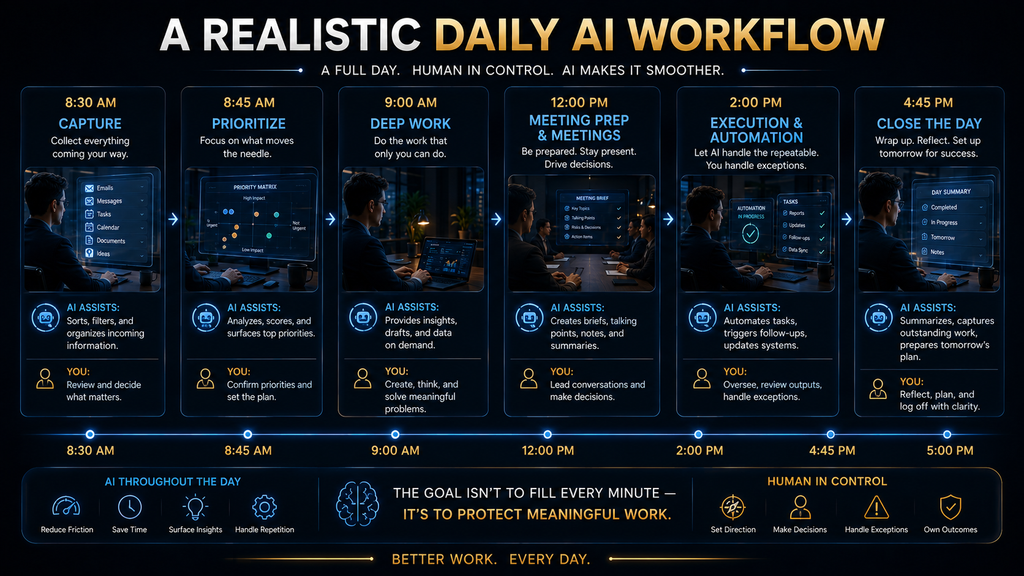
The loop becomes concrete when it is mapped onto a day. The timings below are an example, and the order matters more than the clock.
| Time | Stage | What happens |
|---|---|---|
| 8:30 | Capture | Collect overnight email, messages and notes into one queue |
| 8:45 | Prioritize | Choose the Daily Top Three with AI support |
| 9:00 | Deep work | Two hours on the major outcome, AI used in blocks |
| 11:00 | Communication | Batch-process email and chat with AI drafts |
| 12:00 | Meeting preparation | Summarize context and list decisions needed |
| Afternoon | Meetings and execution | Capture decisions, convert action items, work on supporting outcomes |
| Late afternoon | Automation | Run or review recurring workflows |
| Final 15 minutes | Close | End-of-day reset and first action for tomorrow |
Then stop. A workflow should help you finish the workday, and it should never become a permanent loop of AI-generated extra tasks.
The 15-Minute Minimum Workflow
If the full loop feels like too much, start with three five-minute check-ins. This version needs one AI assistant and one task list, with no integrations at all.
In the morning, paste your tasks and ask: “Here are today’s tasks, deadlines and commitments. Help me identify the three outcomes that matter most, separate urgent from important, and flag anything unrealistic.”
At midday, ask: “Here is what I completed and what remains. Identify anything blocked, anything that can be batched, and the most important next action.” It takes five minutes and resets a day that has drifted.
In the evening, ask: “Here is today’s completed and incomplete work. Create a short end-of-day summary, identify carry-over tasks, and suggest tomorrow’s first three priorities.” Consistency with these three prompts beats an elaborate setup you abandon in a week.
Worked Example: A Freelancer’s Tuesday
A freelance designer starts Tuesday with four client emails, two overdue invoices and a proposal due Thursday. Without a workflow, she answers emails first and two hours later has done nothing on the proposal.
With the workflow, she captures everything in one list in five minutes. AI sorts it, and she picks her top three: the proposal draft, one client revision and the invoices.
She spends the first two hours on the proposal, using AI to outline it from her notes and to check the scope section for gaps. Emails are batched at eleven, with AI drafting replies that she edits.
At the end of the day, the unfinished client request becomes tomorrow’s first action. The technology involved is ordinary, and the sequence is what changed her day.
Worked Example: A Small-Business Owner
A small-business owner switches all day between customers, suppliers, marketing and administration. The temptation is to connect AI to everything at once, and that is exactly where caution is needed.
He starts with three low-risk workflows: a daily summary of new customer inquiries, drafted replies to common questions that he approves, and a weekly sales summary from his existing reports.
Each one follows the trigger, process, check, action and record pattern. Nothing reaches a customer without his approval, and nothing touches payments or contracts.
After a month he reviews what saved time. The inquiry summary and the weekly report stay, and the drafted replies need better source material before they are worth keeping, which is a normal result for a first round.
Worked Example: A Content Creator
A content creator’s workflow runs from idea capture to research, outline, draft, fact-check, edit, optimization, publishing and repurposing. AI can assist at nearly every stage without owning any of them.
She uses AI to group raw ideas into themes, to summarize research sources and to produce a first outline. The draft and the opinions in it are hers, and every factual claim is checked before publishing.
Repurposing is where automation pays best. One finished article becomes a newsletter section and several social posts, a process our guide to AI content repurposing covers in detail.
For the writing stages, our guide to using ChatGPT for blogging goes deeper. The principle is the same as everywhere else in this article: AI speeds the steps, and you own the judgment.
Choosing a Minimal Tool Stack
A daily AI workflow needs three things: one AI assistant, one task list and one place for notes. Most people already have all three, and adding more rarely helps at the start.
Choose the assistant you find easiest to use and can access wherever you work. Our guides to the best AI tools for beginners and the best free AI tools compare the main options.
Add a tool only when you can name the bottleneck it removes. If meetings generate most of your tasks, a meeting assistant earns its place, and if email dominates, an email assistant does.
Review the stack every few months and remove anything you have stopped using. Each tool you keep costs attention, even when the subscription is free.
Building a Personal Prompt Library
The prompts in this guide work best when you save and refine them. A small library of five to ten prompts covers most of a working week.
Start with the three check-in prompts for morning, midday and evening. Add one for extracting tasks from meeting notes, one for drafting routine replies and one for reviewing a document against a checklist.
Keep them in your notes tool with a line on when to use each. When a prompt gives a weak result, edit the saved version instead of improvising, so the improvement carries forward.
If your library grows or you share it with colleagues, our roundup of AI prompt libraries and marketplaces shows ready-made collections worth borrowing from.
Using Better Prompts Inside the Workflow
The quality of the workflow depends partly on the instructions you give the AI. A vague request such as “prioritize my tasks” produces a generic list.
A stronger version is: “Prioritize these tasks by business impact, deadline, dependency, estimated effort and whether another person is blocked. Return the top three and explain the trade-off behind each.”
That produces a decision aid instead of a list. Our guides to writing AI prompts and asking AI better questions cover the techniques.
Do not confuse prompt quality with workflow quality, though. A brilliant prompt inside a broken workflow still produces work that nobody reviews, files or acts on.
Privacy Belongs in the Workflow
A system that saves 30 minutes while exposing sensitive information is not a better system. Before you feed anything into AI, ask what the data is, who it belongs to and whether the tool is approved for it.
Client details, financial records, health information and unreleased plans deserve particular care. Remove names and identifiers where you can, and keep the most sensitive material out of general-purpose tools altogether.
Check how each tool handles what you give it. Our guide to AI privacy risks and our explainer on AI data retention list the questions worth asking.
The rule of thumb is simple. Share the minimum the task needs, and treat anything you would not put in an email to a stranger as something to keep out of a prompt.
The Economics: When AI Saves Time and When It Does Not
AI removes some work and creates other work. You may spend less time drafting and more time reviewing, or generate more ideas and spend longer choosing between them.
The honest equation is that AI value equals time saved minus setup, review, correction and coordination. If AI saves 30 minutes and creates 35 minutes of checking and cleanup, it made the workflow more complicated.
A quick illustration shows how to test it. Suppose AI drafting saves you 40 minutes a day, and reviewing those drafts costs 15 minutes, so the net gain is 25 minutes, or about two hours a week.
Now suppose you add three more tools, each needing ten minutes a day of switching and upkeep. The gain disappears, which is why this guide recommends the smallest set of tools that solves your actual bottleneck.
How to Measure Whether the Workflow Helps
Measure outcomes rather than activity. The number of prompts you sent and documents you generated says nothing about whether meaningful work got done with less friction.
Track a few simple things for two weeks: time saved, rework needed, completion of your Daily Top Three, interruptions you allowed and how long tasks take from start to finish. Add a rough rating of how drained you feel at the end of the day.
A weekly scorecard keeps it honest. Score each line from one to five and look at the trend rather than any single week.
| Area | Score out of 5 |
|---|---|
| Tasks captured reliably | |
| Priorities were clear | |
| Deep work was protected | |
| AI saved meaningful time | |
| AI output required reasonable review | |
| Important work was completed | |
| End-of-day closure worked |
If AI time savings score high but important work completed scores low, the workflow is producing activity rather than progress. That pattern is the signal to cut tools and tighten priorities.
The Weekly Review: The Loop Above the Loop
Daily planning works better inside a weekly frame. Once a week, spend twenty minutes looking at what you finished, what slipped and what is coming.
Give AI your completed tasks and your open queue and ask for three things: patterns in what slipped, tasks that have been carried over more than twice and commitments due in the next seven days.
Tasks carried over repeatedly are a signal. Either they matter and need a protected block, or they do not matter and should be deleted, and deciding which is a judgment only you can make.
End the review by choosing the two or three outcomes that would make next week a success. Each morning’s Daily Top Three should then serve those outcomes.
Using the Workflow in a Team
The same loop works for a small team, with a few adjustments. The queue becomes shared, priorities are agreed together and verification rules are written down.
Agree which kinds of AI output need review and by whom. A team where one person publishes unchecked AI drafts and another checks everything will produce uneven quality and friction.
Share what works. If one person builds a prompt that reliably turns meeting notes into action items, everyone should use it, which is how individual gains become team gains.
Watch for the fragmentation tax described earlier. If the team produces more documents, summaries and drafts than it can read, slow the output down and spend the time on alignment instead.
When the Workflow Breaks
Every system fails sometimes. A crisis, an illness or a week of travel leaves the queue stale and the routine abandoned, and the temptation is to give up on the whole thing.
Restart with the smallest version. Capture everything that is currently on your mind, ask AI to sort it, delete or defer anything older than a month that nobody has chased, and pick three outcomes for tomorrow.
Do not try to clear the backlog first. A fresh Daily Top Three gets you moving again, and the old items can be reviewed a few at a time during the next weekly review.
Treat each restart as information. If the workflow breaks at the same point every time, such as the evening close, simplify that step until it survives a bad week.
Common Workflow Mistakes
Most failed AI workflows fail in the same few ways. Watch for these:
- using too many tools, each adding logins, context and switching
- automating a process before you understand it
- turning every idea and message into a task
- letting AI decide priorities without your judgment
- skipping verification because the output looks polished
- creating more output than you can properly review
- ignoring privacy when pasting in client or company data
- measuring activity, such as prompts sent, instead of outcomes
The most common of these is the sixth. If AI generates 100 pieces of content and you can properly review only 20, you have created a quality-control bottleneck rather than a productivity gain.
What Happens If You Do Not Build a Workflow
You can keep using AI casually, and nothing dramatic will happen. The benefits will simply stay fragmented, a few minutes saved here and there with no lasting change to how the day feels.
The interruptions will continue at the same rate, and without a single queue and a daily decision, your attention will keep going to whatever arrived most recently. That is the pattern the Microsoft data describes.
Casual use also hides risk. Without a verification step, an AI error eventually reaches a client or a colleague, and without a privacy habit, something sensitive eventually reaches a tool it should not.
A workflow turns one-off wins into a process you can improve. The path changes from prompt and answer to input, AI assistance, verified output, reusable process and measured improvement.
Where Daily AI Work Is Heading
AI is moving out of isolated chat windows and into the tools where work happens. Assistants can now keep project context, run scheduled tasks and take actions across apps on your behalf.
That makes workflows more powerful and governance more important. An AI agent that can send messages and update records needs clearer limits than a chatbot that only drafts text.
Atlassian’s research points the same way. The organizations getting more value from AI are embedding it into workflows, context and team practices, rather than simply using more of it.
The best systems will be the ones where AI handles the appropriate work and people keep control of the decisions that matter. Building the habit of capture, priority, verification and closure now prepares you for more capable tools later.
A 7-Day Implementation Plan
A week is enough to build the habit, provided you add one piece per day. Trying to install the whole system in an afternoon is the surest way to abandon it.
| Day | Focus | What to do |
|---|---|---|
| 1 | Observe | Note where your time and attention go, without changing anything |
| 2 | Capture | Create one queue and move everything into it |
| 3 | Prioritize | Choose a Daily Top Three each morning |
| 4 | AI assist | Use AI in blocks for one drafting or research task |
| 5 | Verify | Apply the three-level check to everything AI produced |
| 6 | Automate | Set up one low-risk recurring workflow |
| 7 | Review | Score the week and decide what to change |
At the end of the week, decide what deserves improvement next. One change per week is enough, and it is far more durable than downloading six productivity tools at once.
Who Should Use This Workflow, and Who Should Keep It Light
If you are a freelancer, blogger, student, small-business owner or knowledge worker who switches between many kinds of task, this workflow will pay for itself quickly. The more your day is driven by incoming requests, the more a single queue and a Daily Top Three will help.
It also suits content teams and anyone who already uses AI and feels busier than before. Our roundup of the best AI productivity tools for beginners can help you choose the small set of tools to run it with.
If your work involves regulated data, safety-critical decisions or strict confidentiality, keep the automation light. You can still use the capture, priority and closing steps with AI limited to low-risk drafting.
If your day is already calm and well organized, you may only need the 15-minute version. The goal is less friction, and adding structure you do not need is its own kind of overhead.
How We Researched This Guide
This guide was researched and drafted with AI assistance and checked against the primary sources linked in the article. The interruption and meeting figures come from Microsoft’s Work Trend Index reports, and the AI adoption figures come from Atlassian’s State of Teams 2026.
The research on interruptions is from Gloria Mark and colleagues, and the workflow guidance referenced comes from Asana and OpenAI’s published documentation. We did not run a controlled productivity experiment, and no benchmark is claimed.
The Daily Workflow Loop, the capture rule, the Daily Top Three, the AI Task Fit Test and the scorecard are AI Hustle World frameworks. The worked examples and time figures are illustrative.
Last updated October 2026. This version restructures the guide, corrects the share of ad hoc meetings to the 57% Microsoft reports, adds the economics and do-nothing sections and re-checks every source link.
Final Thoughts
The best daily AI workflow is not the most sophisticated one, and it is not the one with the most integrations. It is the one that makes meaningful work easier to start, easier to organize and easier to finish.
Start with capture, so nothing lives only in your head. Add a Daily Top Three, protect two hours of deep work, verify what AI produces and close the day with tomorrow’s first action defined.
Then learn. Each week, find the one thing that caused the most friction and change it, instead of adding another tool.
That is the difference between using AI and building an AI-enabled way of working. The first saves minutes, and the second changes how the whole day feels.
Build a Smarter AI Productivity System
AI works best when it becomes part of a clear workflow—not another source of distraction. Explore more practical AI productivity guides from AI Hustle World and build a system that helps you work smarter without adding unnecessary complexity.
Explore AI Productivity Guides →Frequently Asked Questions
What is a daily AI workflow?
A repeatable routine that uses AI at fixed points in the workday to capture information, prioritize tasks, assist execution, verify outputs and close unfinished work.
How can AI help with daily work?
AI can summarize information, extract tasks, draft routine messages, prepare meetings, research topics and create end-of-day summaries. You keep the decisions about priorities and quality.
What is the best AI workflow for beginners?
Start small with one task list, one AI assistant and three five-minute check-ins: morning priorities, a midday reset and an end-of-day review.
Should AI manage my entire workday?
No. AI can help organize the day, but you should keep control of priorities, sensitive decisions and anything with real consequences.
Can AI reduce work overwhelm?
Yes, by organizing information, clarifying priorities and handling repetitive tasks. Adding too many tools or generating more than you can review makes overwhelm worse.
How many AI tools do I need?
Usually fewer than you think. Start with the smallest set that solves your actual bottleneck, because the workflow matters more than the number of apps.
Should I automate every repetitive task?
No. Automate stable, low-risk, clearly defined tasks first. Anything involving sensitive data or high-consequence decisions needs human review.
Can AI prioritize my tasks?
It can suggest priorities from deadlines, dependencies and effort. Treat the result as a recommendation, because only you know which work matters most.
Is it safe to connect all my work apps to AI?
Not automatically. Check what each integration can access, whether the tool is approved for that data and whether the benefit justifies the exposure.
How do I know whether my AI workflow works?
Measure outcomes for two weeks: time saved, rework, completion of your top priorities, interruptions and how drained you feel at the end of the day.
Related Guides
- Using AI to Plan Your Weekly Tasks Without Losing Focus
- Best AI Tools for Beginners in 2026 (Free & Paid)
- Best AI Meeting Assistants (Free & Paid): 10 Tools Compared
- AI Product Management Explained: How AI Is Changing the Product Lifecycle
- Understanding AI Hallucinations: Why AI Gives Wrong Answers
- What Is an AI Agent? A Beginner’s Guide to How Autonomous AI Works
- Best AI Email Assistants (Free & Paid): 10 Tools Compared
Written by
Muntasir Ahmad Chowdhury
Founder, AI Hustle World
Muntasir Ahmad Chowdhury is the Founder of AI Hustle World, an independent publication dedicated to making Artificial Intelligence practical, trustworthy, and easy to understand. He researches AI tools, automation, customer service, productivity, and real-world business applications, helping readers make smarter technology decisions through research-driven, experience-backed content.
Expertise:
AI Tools • AI Automation • AI Customer Service • AI Productivity • Generative AI • AI Workflows
Get Smarter With AI
Enjoyed this guide? Get practical AI tools, tutorials, and honest reviews delivered to your inbox.