Evidence: Documentation reviewed
Last checked: 5 October 2026
What was done: Prices and model versions were checked against each vendor’s official pages. Not hands-on tested.
Files: None
Affiliate links: No
Last updated: October 5, 2026. This guide was materially rebuilt to reflect Claude’s current plans, Google’s current AI subscriptions, Microsoft’s revised Copilot lineup, Grok 4.7, DeepSeek V4.1 Flash, and Mistral’s renaming of Le Chat to Vibe. It also replaces the previous fragmented ranking with a transparent replacement-fit methodology.
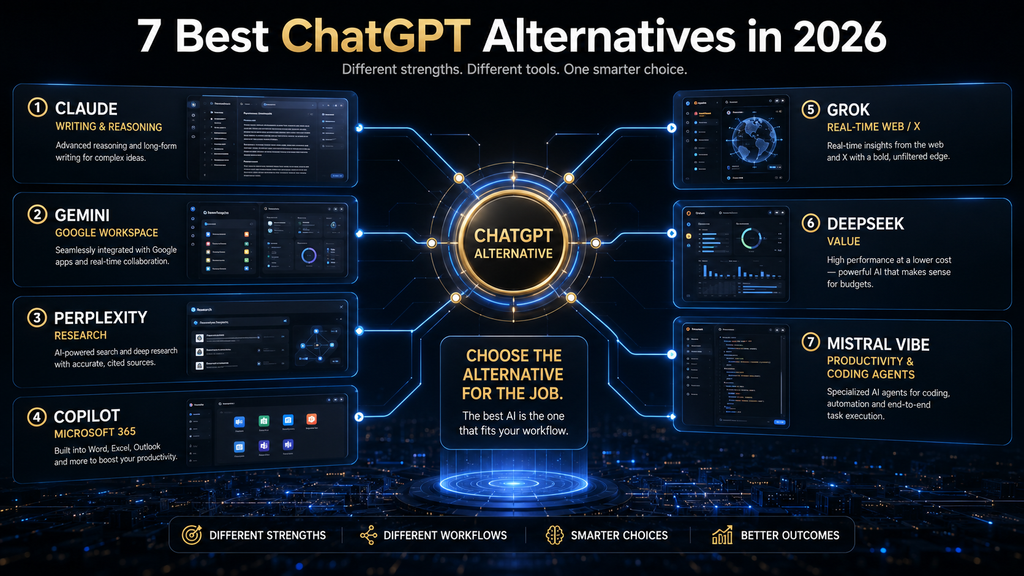
Claude is the best overall ChatGPT alternative for text-heavy professional work, Gemini is the strongest choice for Google-centered workflows, and Perplexity is the clearest alternative for source-led research. Microsoft Copilot makes more sense inside Microsoft 365, Grok is differentiated by live web and X context, DeepSeek is compelling for cost-conscious experimentation, and Mistral Vibe is built around connected work and coding.
The important question is not which chatbot is universally smarter. A useful replacement must fit the job you are leaving ChatGPT to perform, preserve the context and tools you depend on, and reduce a real limitation without creating a larger verification, privacy, or switching burden. This comparison is organized around that decision rather than an invented one-number leaderboard.
Quick Answer: The Best ChatGPT Alternatives by Use Case
| Alternative | Best for | Free entry | Strongest reason to choose it | Main caution |
|---|---|---|---|---|
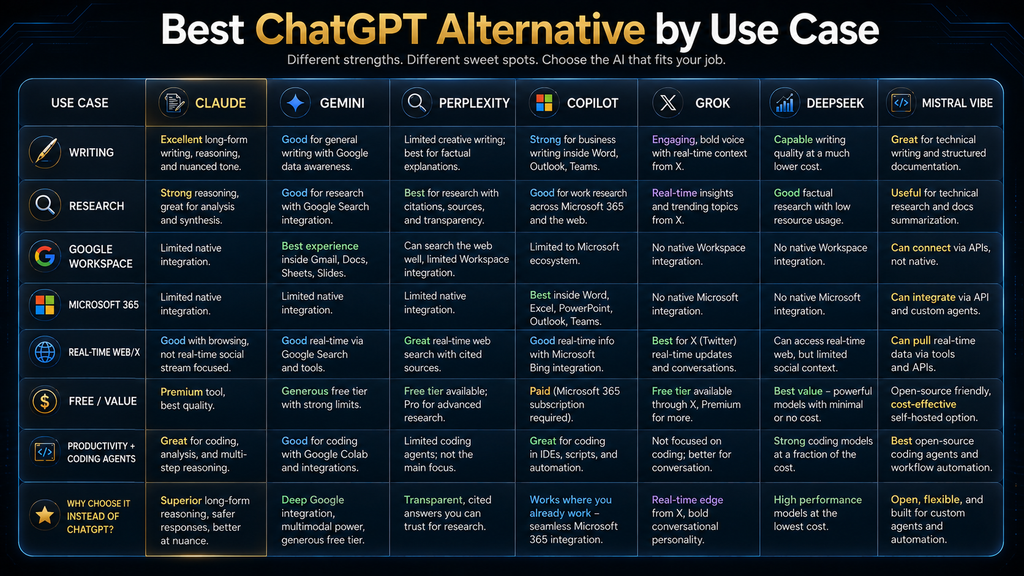
| Claude | Writing, long documents, coding, and thoughtful analysis | Yes | Text-centered professional workflow with projects, artifacts, files, and code | Usage and premium-model access vary by plan |
| Gemini | Google Workspace and multimodal Google workflows | Yes | Close integration with Gmail, Docs, Drive, Sheets, Slides, and Google services | Value falls if your work does not live in Google |
| Perplexity | Web research, source discovery, and cited answers | Yes | Citations and search behavior are central to the product experience | Citations still require source-quality checks |
| Microsoft Copilot | Word, Excel, PowerPoint, Outlook, and Microsoft 365 | Yes / plan-dependent | AI works near Microsoft files, apps, and organizational context | Consumer and business licensing can be confusing |
| Grok | Live web information, X context, voice, and media creation | Yes | Real-time web and X search are explicit product capabilities | Fast-moving information demands stronger verification |
| DeepSeek | Free consumer access and cost-sensitive technical use | Yes | Capable free chat and competitively priced API options | Data-location and privacy requirements need careful review |
| Mistral Vibe | Connected productivity, coding, and agentic work | Yes | Unified work-and-code agent with connectors and enterprise options | The product changed quickly after the Le Chat rebrand |
If you only want one recommendation, begin with Claude or Gemini and use the free plan on a real task you already perform. Choose Perplexity instead when your primary reason for leaving ChatGPT is research behavior, and choose Copilot when the decisive advantage is access to Microsoft 365 rather than the personality of the chatbot.
Table of Contents
- The AI Hustle World Replacement-Fit Matrix
- How we compared the alternatives
- The seven alternatives
- Free versus paid plans
- Whether to switch or use multiple tools
- A practical migration plan
- Frequently asked questions
Why Look for a ChatGPT Alternative?
People usually look for a ChatGPT alternative because a specific part of the workflow no longer fits, not because ChatGPT has stopped being capable. The friction may be document handling, source transparency, ecosystem integration, usage limits, pricing, privacy, model behavior, or access to live information. Naming the friction prevents you from replacing a broad tool with another broad tool that creates the same problem under a different brand.
The first legitimate reason is specialization. Perplexity is designed around search and citations, while Claude emphasizes document, writing, coding, and project workflows. Those products can be better choices for a defined job even when ChatGPT remains the more flexible general assistant.
The second reason is ecosystem fit. Gemini becomes more valuable when the relevant messages, documents, spreadsheets, and files already live in Google services; Microsoft Copilot gains the same kind of advantage inside Microsoft 365. Moving to either platform for a small difference in prose quality is harder to justify if your work lives elsewhere.
The third reason is economic. A free plan may cover an occasional task, while an integrated paid plan may replace separate storage, office, research, or coding expenses. The headline subscription price is not the full cost: correction time, context migration, retraining habits, credits, commercial rights, and administrative controls can matter more.
The fourth reason is control. Organizations may need specific retention settings, deployment choices, identity controls, audit logs, connectors, or regional data practices. A consumer chatbot comparison cannot answer those requirements from output quality alone, so the privacy and governance review must happen before the workflow moves.
The AI Hustle World ChatGPT Alternative Replacement-Fit Matrix
The AI Hustle World ChatGPT Alternative Replacement-Fit Matrix is this article’s original contribution. It separates seven questions that ordinary “best chatbot” lists often mix together: primary job fit, evidence behavior, ecosystem advantage, workflow control, cost structure, verification burden, and switching friction. That separation makes the framework reusable for a personal subscription, a team evaluation, or a future product update.
The matrix is useful because it explains when an alternative is a true replacement, when it is only a specialist companion, and what hidden burden appears after the switch. Vendor pages describe their own capabilities; this synthesis turns those capabilities into a comparable decision model without inventing benchmark scores or claiming unperformed testing.
How we researched
We reviewed official product, pricing, documentation, and policy pages available on September 23, 2026. Each platform was classified by documented consumer capabilities, ecosystem connections, plan structure, evidence behavior, data considerations, and the work a user must redo when leaving ChatGPT. “Low,” “medium,” and “high” describe relative workflow burden in this decision model; they are not laboratory performance scores.
This update does not claim a controlled head-to-head prompt benchmark, timed productivity test, or representative user survey. No unsupported first-hand result has been added. Features and prices change quickly, so the article links to official sources and dates the synthesis; readers should confirm current regional terms before paying or moving sensitive work.
| Alternative | Replacement fit | Evidence behavior | Ecosystem advantage | Verification burden | Switching friction |
|---|---|---|---|---|---|
| Claude | High for writing, documents, coding, and general professional work | Web search and files are available, but source discipline depends on the task | Connectors, projects, code, and productivity features | Medium | Medium: prompts transfer, but projects, memory, and tool habits do not transfer perfectly |
| Gemini | High for Google-centered users; medium otherwise | Google Search and research features can support current information | Google Workspace and Google services | Medium | Low inside Google; higher when important context lives outside it |
| Perplexity | High for research; medium as a complete creative-work replacement | Citations are a core interface behavior | Web, files, apps, and multiple model options on paid plans | Medium: source quality still needs human review | Low for research queries; medium for broad project migration |
| Microsoft Copilot | High in Microsoft 365; medium as a standalone replacement | Grounding depends on account, license, files, and product surface | Word, Excel, PowerPoint, Outlook, OneDrive, and organizational context | Medium | Low inside Microsoft; high if the workflow is not Microsoft-based |
| Grok | High for live web/X context; medium for general professional replacement | Real-time search is prominent, but speed does not guarantee source quality | X, voice, connectors, image, and video | High for breaking or contested claims | Low for casual use; medium for established professional projects |
| DeepSeek | Medium to high for free and technical use | General chat requires the same claim-by-claim checking as other assistants | Consumer chat, open platform, and lower-cost API routes | Medium to high | Low for experimentation; high where governance rules restrict data location |
| Mistral Vibe | High for connected work and coding; medium for casual chat replacement | Research quality depends on connected sources and task design | Work, code, connectors, and enterprise deployment options | Medium | Medium: connector setup and fast product changes require review |
The strongest replacement is therefore conditional. Claude has the widest replacement fit for text-centered professional work, while Gemini and Copilot can be stronger when the ecosystem is the workflow. Perplexity, Grok, DeepSeek, and Vibe are often better understood as specialist-led replacements: each becomes the best choice when its differentiating job matters more than maximum generality.
How We Compared the ChatGPT Alternatives
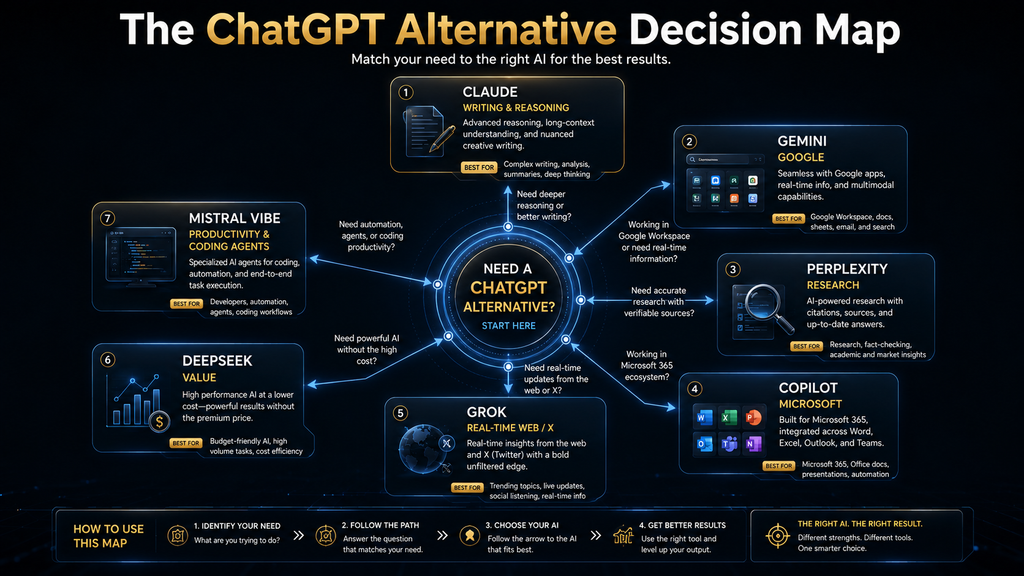
We began with the job a user is trying to move, because product comparison becomes misleading when every assistant is judged as though it serves the same purpose. Writing, cited research, office productivity, coding, breaking-news discovery, and low-cost API use impose different requirements. A platform can be the best alternative in one category and the wrong replacement in another.
We then examined the complete product rather than only the named model. The consumer experience includes memory, projects, file handling, search, connectors, media generation, account controls, limits, and subscription packaging. A strong model inside an inconvenient product may produce less practical value than a slightly different model located where the work already happens.
Evidence behavior received separate attention. A research tool should help users reach inspectable sources, but visible citations do not prove that a claim is correct. The comparison therefore asks how evidence appears and how much human verification remains, rather than awarding automatic trust to a product that displays links.
Finally, we considered exit and switching costs. Chat histories, memories, project instructions, custom assistants, connected apps, generated assets, and habitual prompts are not fully portable. A replacement must create enough new value to justify rebuilding the parts that do not move.
The 7 Best ChatGPT Alternatives in 2026
1. Claude: Best Overall Alternative for Professional Writing and Long Documents
Claude is the most defensible overall ChatGPT alternative when the core work is reading, writing, analysis, coding, and turning substantial source material into useful outputs. Anthropic has expanded Claude beyond a chat box: the current product includes files, web search, code execution, memory, connectors, artifacts, projects, and paid productivity features. That breadth gives it genuine replacement potential rather than limiting it to one specialist task.
The strongest reason to choose Claude is the shape of a text-centered workflow. A user can provide documents, map claims and structure, create an artifact, revise sections, and continue the project with retained context. This is particularly useful for reports, specifications, editorial work, qualitative analysis, and code-related tasks where the input cannot be reduced to a one-line request.
Anthropic’s official Claude pricing page lists Free at $0, Pro at $17 per month with annual billing or $20 monthly, and Max plans beginning at $100 per month before applicable tax. The same page notes that context can reach up to one million tokens depending on the model and plan, but a large context window should not be confused with perfect attention to every detail. Long documents still require source boundaries, section-level review, and explicit uncertainty handling.
Claude is not automatically better than ChatGPT at every general task. Users who rely heavily on a specific OpenAI tool, custom setup, or media workflow may lose more than they gain, and paid limits still apply. The best evaluation is to move one representative document process and inspect factual preservation, revision effort, output structure, and the time required to reach approval.
Choose Claude if most of your value comes from text, documents, projects, analysis, or coding. Keep ChatGPT or use both if your existing OpenAI workflow is broad and the reason for switching is only curiosity. Our deeper ChatGPT vs Claude vs Gemini comparison examines prompt-heavy work across the three leading general assistants.
2. Gemini: Best ChatGPT Alternative for Google Users
Gemini is the strongest replacement when Google is not merely an account provider but the environment in which work happens. Gmail, Docs, Drive, Sheets, Slides, Search, and related Google services can supply a practical advantage that a standalone comparison misses. The benefit is reduced distance between the question and the file, message, spreadsheet, or presentation that gives the question meaning.
A useful Gemini workflow begins with a named source and a bounded output. A user might ask for a summary of a specific Drive folder, a draft based on an identified document, or an analysis of a spreadsheet whose columns and definitions are known. The verification step is to open the exact source, confirm its date and permissions, and make sure Gemini did not rely on an outdated version or incomplete thread.
Google currently sells several AI plans rather than the older single “Gemini Advanced” story repeated in many comparison articles. The official Google AI plans page shows Google AI Plus, Pro, and higher tiers with different storage, model access, and usage limits; Google’s U.S. plan pages list Plus at $4.99 and Pro at $19.99 per month at the time of this update. Regional pricing, availability, age restrictions, and included services should be confirmed before purchase.
Gemini’s weakness as a universal replacement is the same as its strength: ecosystem dependence. If the relevant knowledge lives in Notion, Microsoft 365, local files, or specialized research databases, Google integration may not remove the real friction. Do not migrate a mature workflow because one generated answer looked better; compare access, review, sharing, permissions, and final delivery.
Choose Gemini if your daily work already depends on Google services and the integration will remove repeated copying or file hunting. Look elsewhere if you need a neutral research interface, Microsoft-native work, or a text-first project environment without a Google advantage. Beginners can also use our updated guide to the best AI tools for beginners to decide whether a general assistant is the right first layer.
3. Perplexity: Best ChatGPT Alternative for Research and Citations
Perplexity is the clearest alternative when the user wants to move from a question to inspectable web sources quickly. Search and inline citations are normal parts of the interface, so evidence discovery does not have to be added as an afterthought. That makes Perplexity useful for current product research, market orientation, terminology, source collection, and building a first research map.
The product should not be treated as an automatic fact-checker. A linked page may be outdated, promotional, secondary, or only loosely connected to the sentence it appears beside. The reliable workflow is to open the citation, identify the publisher and date, read the supporting passage, prefer primary evidence, and record any qualification the synthesis compressed.
Perplexity’s official pricing page lists a free plan and Perplexity Pro at $20 per month, with higher plans and separate organizational options. Paid access expands usage, files, research, app connections, and model selection, but the ability to choose a premium model does not eliminate the need to review the sources. Pay for deeper or more frequent research only after the free workflow proves useful.
Perplexity is less convincing as a complete replacement when the work is extended creative development, persistent project management, media production, or a workflow built around one office suite. It can produce polished documents and use connected sources, but its clearest product identity remains research-led. Many users will get more value by pairing it with a general assistant than by forcing it to replace every ChatGPT function.
Choose Perplexity if your main complaint is that general chatbot answers do not make the evidence easy to inspect. Do not choose it merely because citations look authoritative. Our comparison of the best AI research assistants covers the broader category and the different roles research tools can play.
4. Microsoft Copilot: Best for Microsoft 365 Workflows
Microsoft Copilot is the logical ChatGPT alternative when Word, Excel, PowerPoint, Outlook, OneDrive, and Microsoft organizational context define the workflow. Its value is not simply that it can answer questions. It can reduce the distance between a request and the document, spreadsheet, presentation, email, or meeting context that the user must act on.
Older articles often describe a standalone Copilot Pro offer as though Microsoft’s consumer lineup has not changed. The current structure packages different AI limits and features through Microsoft 365 plans, while business and enterprise licensing follow separate paths. Microsoft’s official individual Copilot pricing page currently lists Microsoft 365 Personal at $9.99 per month, Family at $12.99, and Premium at $19.99 in the United States, with AI benefits generally reserved for the subscription owner.
The best first evaluation is application-specific. Ask Copilot to help with a spreadsheet whose formulas and units you understand, a presentation based on an approved document, or an email draft grounded in a known thread. Confirm the source range, calculation, file version, and audience before using the result because proximity to Microsoft data does not guarantee correct interpretation.
Licensing is the main comparison burden. Features, AI credits, model access, business controls, and grounding behavior can depend on the account and subscription rather than the word “Copilot” alone. A buyer should verify the exact license, which apps receive Copilot, who can use the AI benefit, and how usage limits are measured before treating the headline price as comparable to ChatGPT Plus.
Choose Microsoft Copilot if it can work directly with the Microsoft files and apps that consume your time. Do not switch for the chatbot alone if your workflow is independent of Microsoft 365. The ecosystem is the reason to choose Copilot; without that reason, Claude, Gemini, or ChatGPT may be simpler general assistants.
5. Grok: Best for Real-Time Web and X Context
Grok is differentiated by its connection to real-time web and X information, alongside voice, connectors, and media creation. That makes it useful when the question depends on what people, organizations, or communities are saying now. Trend monitoring, breaking developments, public conversation, and rapid issue discovery are clearer fits than slow, source-stable research.
xAI’s official Grok pricing page currently lists a free plan, SuperGrok at $30 per month, and SuperGrok Plus at $100 per month. The free plan includes real-time web and X search, while paid plans increase limits and add access to higher-tier models and creation features. Grok 4.7 was announced on September 21, 2026, which illustrates how quickly a year-based comparison can become outdated.
The main limitation is that freshness and truth are different properties. A post can be current but misleading, a popular claim can be wrong, and an unfolding event can change after the answer is generated. For consequential research, open the original post or page, identify the account, compare independent sources, check timestamps and edits, and separate verified fact from reaction.
Grok is therefore a strong specialist and a conditional general replacement. It may outperform a slower workflow when live social context is the bottleneck, yet it can increase the review burden for disputed or rapidly changing claims. Users who mainly write documents, manage office files, or need stable research collections may find another platform more predictable.
Choose Grok if X and current web context are meaningful inputs to the work. Avoid making it the only evidence layer when the subject is high-stakes, contested, or vulnerable to coordinated misinformation. The closer the task is to breaking news, the more independent the verification should become.
6. DeepSeek: Best Free and Cost-Conscious Alternative
DeepSeek remains a compelling option for users who want capable free chat or lower-cost technical access without immediately committing to another premium subscription. Its official site currently promotes DeepSeek V4.1 Flash with improvements in text, agent behavior, and native multimodal visual understanding. The consumer product and API platform should be evaluated separately because their pricing, controls, and use cases differ.
A practical free-plan evaluation should use non-sensitive examples and tasks with visible correctness criteria. Code explanation, structured extraction from public material, rewriting, ideation, and general problem solving can reveal whether the interface and output fit. Avoid measuring value by the number of impressive answers; measure the number that survive review with less correction than the current method.
Privacy and data location require explicit attention. DeepSeek’s official privacy policy, updated February 10, 2026, identifies Hangzhou DeepSeek Artificial Intelligence Co., Ltd. in China as the data controller and explains that inputs can include prompts, files, photos, voice, and chat history. That does not make every use unacceptable, but it may make the consumer service unsuitable for confidential, regulated, client, government, or employer-restricted information.
Cost should therefore be balanced with governance. A free tool can become expensive if a team must redesign controls after sensitive data has moved into an unapproved system, while a low API price does not include integration, monitoring, security, or human review. Organizations need a legal, security, and procurement decision rather than a creator-style feature comparison.
Choose DeepSeek if the task is low-risk, cost-sensitive, and independently verifiable, or if its API economics fit a properly governed technical application. Do not use the consumer service by default for material whose policy or contractual requirements you have not checked. Our guide to AI privacy risks provides a broader review checklist.
7. Mistral Vibe: Best for Connected Work, Coding, and Deployment Choice
Mistral’s consumer product changed materially in 2026: Le Chat is now Vibe. Mistral describes Vibe as a unified assistant and agent for work and code, available across web, mobile, code editors, and the terminal. That makes it a more ambitious ChatGPT alternative than older reviews of Le Chat suggest.
The strongest fit is a workflow that crosses productivity and development. Mistral’s current documentation describes connected work across services such as Gmail, Outlook, Slack, Notion, Linear, GitHub, Atlassian, Google Drive, SharePoint, and Stripe, with administrative controls for organizational connectors. A user can therefore evaluate Vibe as an operating surface for tasks rather than only a place to exchange messages.
The official Mistral Vibe product page and current documentation should control any buying decision because the transition from Le Chat has been rapid. Existing account history and settings were preserved through the rename, but features, plan availability, and connector controls continue to evolve. An old “Le Chat Pro” comparison can be materially wrong even if it was accurate several months earlier.
Vibe also deserves attention from organizations that care about deployment options and European vendors, but those requirements belong in a formal enterprise review. Product nationality does not answer data residency, retention, subprocessors, model training, access control, or contractual obligations by itself. Ask for the exact architecture and terms that apply to the chosen plan and deployment.
Choose Mistral Vibe if connected productivity and coding tasks are the main reason to move, or if Mistral’s enterprise route fits your deployment strategy. Wait or run a limited pilot if product stability and predictable plan boundaries matter more than early access to a rapidly changing agent platform.
ChatGPT Alternatives Compared Side by Side
| Need | First choice | Second choice | Why |
|---|---|---|---|
| Long-form writing and document analysis | Claude | Gemini | Claude is strongly text- and project-oriented; Gemini gains ground when documents live in Google |
| General Google productivity | Gemini | Claude | Google integration can remove file and app friction |
| Cited web research | Perplexity | Gemini | Perplexity makes source discovery and inline citations central |
| Microsoft Office work | Microsoft Copilot | Claude | Copilot can work near Word, Excel, PowerPoint, Outlook, and Microsoft context |
| Live web and X context | Grok | Perplexity | Grok emphasizes real-time X; Perplexity offers a more research-led interface |
| Free or low-cost experimentation | DeepSeek | Gemini | Both offer accessible entry, but privacy and ecosystem considerations differ |
| Connected agentic work and coding | Mistral Vibe | Claude | Vibe unifies work and code; Claude provides mature project and coding capabilities |
This table does not imply that the second choice is generally weaker. It shows which product advantage most directly matches the stated need. If the first choice introduces an unacceptable privacy, licensing, or migration burden, the second choice may produce the better complete system.
Free vs Paid ChatGPT Alternatives: When Should You Upgrade?
Use the free plan to test workflow fit, not to collect a general impression. Select two representative tasks, record the required inputs and acceptance criteria, and complete the full review process. The important output is not the first answer; it is the approved result after corrections, citations, formatting, and transfer into the system where it will be used.
A paid plan becomes defensible when a specific limit blocks repeated work, an integration removes a measurable burden, commercial or organizational controls require the plan, or higher capacity prevents costly interruption. If the only argument is that a premium model might produce “better answers,” the decision is still too vague. Name the job, the limit, the frequency, and the expected improvement.
Subscription comparisons also need equivalent scope. Microsoft 365 and Google AI plans can include storage and office features, while a standalone assistant subscription may focus more directly on models and usage. Dividing the price by the number of advertised features is not useful; compare the cost of the workflow you will actually keep.
Credits and limits deserve special attention because product pages may use different units. A message limit, model limit, research credit, media-generation credit, connector action, and API token are not interchangeable. Estimate monthly completed outputs under the current rules and add a margin for revisions rather than assuming every generation becomes publishable work.
Our list of the best free AI tools can help if the immediate goal is experimentation without another subscription. Free access is most valuable when it produces evidence about your workflow, not when it adds another unused account.
Should You Replace ChatGPT or Use Multiple AI Tools?
Most users do not need a complete replacement. A two-tool system can be more rational when each product has a distinct responsibility, such as Perplexity for evidence discovery and Claude for document synthesis. The arrangement becomes wasteful when both subscriptions perform the same general tasks and neither owns a defined stage.
Use one primary assistant when consistency, memory, project context, and low overhead matter most. A single system reduces the number of interfaces and makes reusable instructions easier to maintain. This is usually the right choice for beginners, solo users, and teams that have not documented their process.
Use a specialist companion when the handoff is explicit. A research assistant can deliver a source table, a general assistant can convert the verified evidence into a draft, and a design tool can produce the visual asset. Each stage must add a capability rather than repeat the previous stage in different language.
Replace ChatGPT completely when the new product removes a central constraint and the migration cost is acceptable. A Google-based organization moving to Gemini or a Microsoft-based team moving to Copilot may gain more from integration than it loses from changing chat habits. A writer moving to Claude may gain a more natural document workflow, but the advantage should be demonstrated on representative work.
Privacy, Data, and Governance Questions to Ask Before Switching
Start by classifying the data. Public marketing copy, confidential customer records, health information, legal documents, source code, employee material, and unpublished research do not belong in the same risk category. A tool that is acceptable for public brainstorming may be prohibited for regulated or contractually restricted data.
Then review the exact product terms for the chosen account. Consumer, team, enterprise, and API services may have different retention, training, administrator, and support commitments even when they share a brand. Do not transfer an enterprise conclusion to a free consumer account or assume that an API policy controls the public chatbot.
Connected apps expand the risk surface. A connector may expose email, files, tasks, calendars, repositories, or customer systems, so permission scope and action controls matter as much as model quality. Grant the smallest useful access, separate read from write actions, review logs, and confirm the target before an assistant sends or changes anything.
Finally, plan for deletion and exit. Determine how to remove conversations, files, connections, team members, and retained project data, and verify what deletion does not immediately remove. A replacement is easier to govern when the organization understands both entry and exit before migration.
Common Mistakes When Choosing a ChatGPT Alternative
The first mistake is comparing model names instead of products. A model benchmark cannot tell you whether the app can reach the correct files, preserve project context, supply citations, respect permissions, or deliver the output in the required format. Those product-layer details often decide whether the workflow succeeds.
The second mistake is using one impressive prompt as a buying test. A replacement must handle ordinary work, difficult edge cases, revisions, failures, and the final handoff. Test a small set of representative tasks with written acceptance criteria and record the correction burden.
The third mistake is treating free as costless. Free plans may impose usage limits, reduced models, fewer controls, missing commercial rights, weaker support, or data terms that do not fit the job. Time spent reworking interrupted or ungoverned processes is part of the cost.
The fourth mistake is trusting citations without reading them. A research assistant can attach a real link to a claim that the source only partly supports, and a current page can repeat a vendor assertion rather than independent evidence. Verify the passage, publisher, date, methodology, and claim type.
The fifth mistake is migrating history instead of rebuilding the useful system. Old chats contain noise, stale facts, and accidental habits. Move only durable instructions, verified source material, active project context, reusable templates, and records that have a reason to survive.
A Practical ChatGPT Alternative Migration Plan
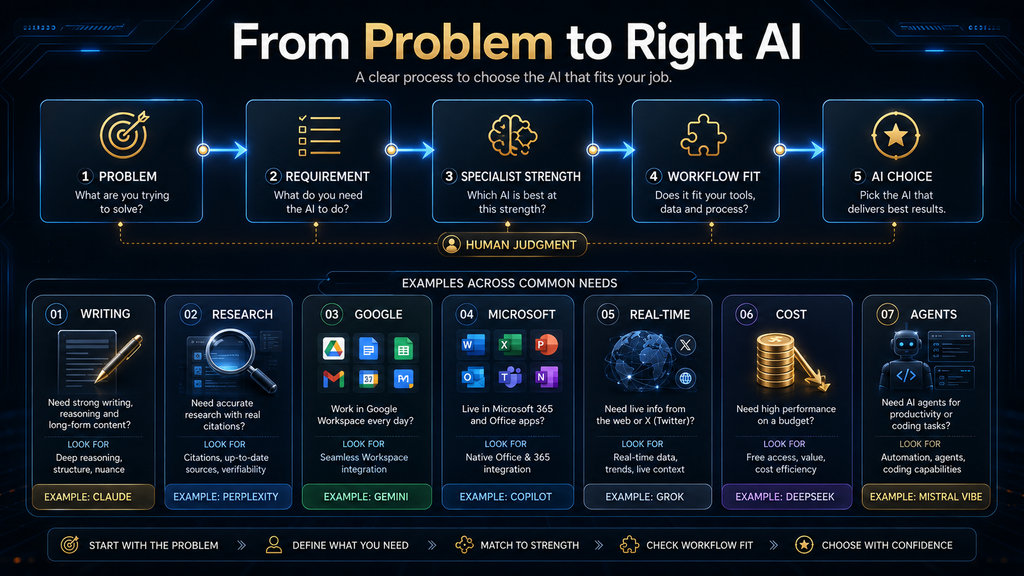
First, define the reason for leaving in one sentence. “I need citations I can inspect,” “our files are in Microsoft 365,” and “we need a lower-cost API” are decision statements. “I heard another model is better” is not specific enough to guide a migration.
Second, inventory the workflow rather than the account. List recurring tasks, inputs, connected systems, custom instructions, memories, projects, files, outputs, approvals, and people who depend on them. Mark which elements can be exported, which must be recreated, and which should be retired.
Third, run a bounded pilot. Use low-risk data and three to five representative tasks for at least one normal work cycle. Keep the input, acceptance criteria, and review method consistent enough to compare correction effort, evidence quality, workflow friction, and completed output.
Fourth, verify privacy and licensing before expanding. Confirm the account type, retention and training rules, permitted data, commercial terms, connector permissions, administrative controls, and exit procedure. A pilot that ignores governance cannot approve production use.
Fifth, migrate templates and sources before history. Rebuild the current system with clean project instructions, authoritative files, review checklists, and approved examples. Avoid importing months of unstructured conversation simply because it exists.
Finally, keep a rollback period. Maintain access to the old workflow long enough to compare missing capabilities and recover essential material, but set an end date so two parallel systems do not become permanent. Record why the new platform was chosen and which changes would trigger a new review.
Seven Decision Scenarios: Which Alternative Fits the Actual Job?
A feature table becomes useful only when it changes a decision. The following scenarios apply the Replacement-Fit Matrix to recognizable workflows, including the evidence burden, ecosystem advantage, switching friction, and human review each choice creates. They are decision patterns rather than universal rankings, because the same product can be a strong replacement for one job and an unnecessary complication for another.
Scenario 1: A Writer Managing Long, Source-Heavy Drafts
Start with Claude when the central problem is reasoning across long documents and maintaining coherent prose. Its project-oriented context and writing behavior make it a practical candidate for briefs, reports, editorial revisions, and document synthesis, while the writer retains responsibility for checking every factual claim against the original material. Perplexity can sit beside it as the discovery layer when the work begins with web research, but citations should be opened and inspected before their claims enter the draft.
Scenario 2: A Team Living in Gmail, Drive, and Google Docs
Gemini has the clearest ecosystem advantage when the work already lives in Google services. The value is not merely access to another capable model; it is the potential reduction in copying, exporting, reformatting, and moving context between tools. Before switching, test the exact account tier, regional availability, Workspace administrator controls, and file-permission behavior, because a feature shown on a product page may not be enabled in every organization.
Scenario 3: An Analyst Who Must Show Where Every Claim Came From
Perplexity is the most natural first choice when visible sources are part of the deliverable. Its research-first interface reduces the distance between an answer and the pages used to support it, which is more useful than a fluent uncited response for market scans, competitive monitoring, and early-stage literature discovery. The analyst still needs a verification pass that checks whether each source is authoritative, whether the cited passage supports the wording, and whether newer evidence changes the conclusion.
Scenario 4: A Microsoft 365 Organization Protecting Existing Workflows
Microsoft Copilot becomes more attractive as the cost of leaving Word, Excel, Outlook, Teams, and OneDrive rises. A team should evaluate it inside the documents, meetings, permissions, and approval process it actually uses rather than judging only the standalone chat experience. The pilot should include a permissions audit and several cases where the answer must draw from the correct organizational files, because convenience does not replace information governance.
Scenario 5: A News or Social Team Monitoring Fast-Moving Events
Grok deserves consideration when live web and X activity are material inputs to the job. It can help surface emerging language, reactions, and event context quickly, but speed also increases the chance of encountering rumor, impersonation, recycled media, or claims that have not reached primary sources. Treat the output as an alert and synthesis layer, then confirm consequential facts through original statements, filings, direct records, or reputable reporting before publication.
Scenario 6: A Cost-Conscious Developer Comparing API Economics
DeepSeek can be compelling when price and model access dominate the shortlist, but the evaluation cannot stop at the token rate. Include engineering time, retry behavior, latency, output review, data-handling requirements, regional restrictions, and the cost of replacing provider-specific features. Sensitive code, customer information, credentials, and regulated data should remain outside any service until its policy, deployment model, contract, and organizational controls have passed the appropriate review.
Scenario 7: A Technical Team That Values Deployment Choice
Mistral Vibe is worth a closer look when coding, connected work, and deployment flexibility matter together. Its position is different from a consumer chatbot selected only for conversation quality, so the proof should be an end-to-end workflow that touches the team’s repository, tools, permissions, and review gates. The team should also separate what is available in the hosted assistant, developer platform, and deployable model catalog, since those surfaces can have different capabilities and commercial terms.
The practical lesson across all seven scenarios is that “best” describes a fit between a product and a controlled workflow, not a permanent crown. Choose the tool that removes the most expensive friction without creating an unacceptable evidence, privacy, governance, or migration burden. If two products solve different parts of the job, a documented two-tool system can be more honest and more resilient than forcing one assistant to perform every role.
How to Future-Proof Your AI Assistant Choice
Choose around portable assets. Keep important prompts, system instructions, source lists, evaluation criteria, and approved outputs in a tool-independent repository rather than relying entirely on chat history. The more of the workflow you can describe outside the product, the easier it becomes to change products responsibly.
Review the tool on material change, not every announcement. A new model name is less important than a change to price, plan limits, data policy, source behavior, integration, reliability, or the tasks your organization performs. Schedule a periodic check and an immediate review when one of those conditions changes.
Separate model, product, and provider risk. A platform can add new models, route tasks across models, rename the interface, or change packaging while the user’s core workflow remains the same. Document the outcome you need so the tool can change without forcing the purpose of the system to change.
Most importantly, retain human review where consequences are difficult to reverse. Better models can reduce some errors, but they do not become accountable for a publication, financial decision, employment action, contract, medical question, security change, or customer promise. Product choice can support judgment; it cannot replace ownership.
Final Thoughts
The best ChatGPT alternative in 2026 depends on why ChatGPT no longer fits. Claude is the strongest broad replacement for text-centered professional work, Gemini and Copilot win when their ecosystems supply the context, and Perplexity is the clearest research-first alternative. Grok, DeepSeek, and Mistral Vibe become stronger choices when live X context, cost, connected agentic work, coding, or deployment direction is the decisive requirement.
Do not replace a useful system because a new model produced one impressive answer. Define the job, test the complete workflow, verify the evidence and data rules, calculate switching friction, and move only when the new system creates a durable advantage. In many cases, the smartest choice is one primary assistant plus one specialist rather than seven overlapping subscriptions.
Compare the Three General Assistants Before You Move
See how ChatGPT, Claude, and Gemini differ when the work depends on detailed prompts, long context, files, and repeated professional workflows.
Read the Three-Way Comparison →Frequently Asked Questions
What is the best overall alternative to ChatGPT?
Claude is the best overall alternative for users whose work is dominated by writing, long documents, analysis, coding, and professional projects. Gemini can be the better complete replacement when Google Workspace integration matters more than a text-centered standalone workflow.
What is the best free ChatGPT alternative?
Gemini, Claude, Perplexity, Grok, DeepSeek, and Mistral Vibe all offer free entry, but they solve different problems. DeepSeek is attractive for cost-conscious experimentation, Gemini for Google users, and Perplexity for source-led research; privacy, limits, and rights should be checked before production use.
Is Claude better than ChatGPT?
Claude can be a better fit for long documents, writing, structured analysis, projects, and some coding workflows. ChatGPT may remain the better choice for users who depend on its broader product ecosystem or established OpenAI projects, tools, memories, and media workflows.
Is Gemini better than ChatGPT?
Gemini can be better when Gmail, Docs, Drive, Sheets, Slides, Search, and other Google services provide the required context. Without that ecosystem advantage, the decision should be based on representative task performance, limits, review effort, and plan value rather than brand.
Which ChatGPT alternative is best for research?
Perplexity is the clearest research-first alternative because search and citations are central to the interface. Every important citation still needs to be opened and checked for source quality, date, context, and direct support.
Which alternative is best for Microsoft Office?
Microsoft Copilot is the strongest fit when the work happens in Word, Excel, PowerPoint, Outlook, OneDrive, or Microsoft 365 organizational systems. Verify the exact account and license because capabilities, AI credits, grounding, and sharing rules differ across consumer and business plans.
Is Grok a good ChatGPT replacement?
Grok is a strong replacement when live web and X information are important inputs, and it also offers voice, connectors, and media capabilities. It creates a higher verification burden for breaking or contested claims, so it should not be the only evidence layer for high-stakes work.
Is DeepSeek safe to use?
Safety depends on the data, account, jurisdiction, employer rules, and use case. DeepSeek’s own privacy policy says the service can collect prompts, files, photos, voice, and chat history under a China-based controller, so sensitive or regulated information requires a formal policy review before use.
What happened to Mistral Le Chat?
Mistral has renamed Le Chat to Vibe (see the official Vibe page) and positioned it as a unified agent for work and coding. Existing conversations and settings were preserved, but readers should use current Vibe documentation rather than older Le Chat comparisons when evaluating features or plans.
Should I cancel ChatGPT before testing an alternative?
Run a short parallel pilot first if the current subscription supports important work. Confirm that the alternative can reproduce the required tasks, context, files, review process, and final delivery, then set an end date for the old subscription so parallel systems do not become permanent.
Related Guides
- Best AdCreative.ai Alternatives in 2026 (For Every Budget and Use Case)
- ElevenLabs vs Alternatives: Which AI Voice Tool Is Best for You?
- Best AI Coding Assistants (Free & Paid): Top 10 Tools Compared
- Best AI Email Assistants (Free & Paid): 10 Tools Compared
Written by
Muntasir Ahmad Chowdhury
Founder, AI Hustle World
Muntasir Ahmad Chowdhury is the Founder of AI Hustle World, an independent publication dedicated to making Artificial Intelligence practical, trustworthy, and easy to understand. He researches AI tools, automation, customer service, productivity, and real-world business applications, helping readers make smarter technology decisions through research-driven, experience-backed content.
Expertise:
AI Tools • AI Automation • AI Customer Service • AI Productivity • Generative AI • AI Workflows
Get Smarter With AI
Enjoyed this guide? Get practical AI tools, tutorials, and honest reviews delivered to your inbox.