Evidence: Documentation reviewed
Last checked: August 2026
What was done: Written from official documentation and the published sources linked in this article. Not hands-on tested.
Files: None
Affiliate links: No
Last updated: October 2026
Understanding AI Privacy Risks Before Sharing Personal Information
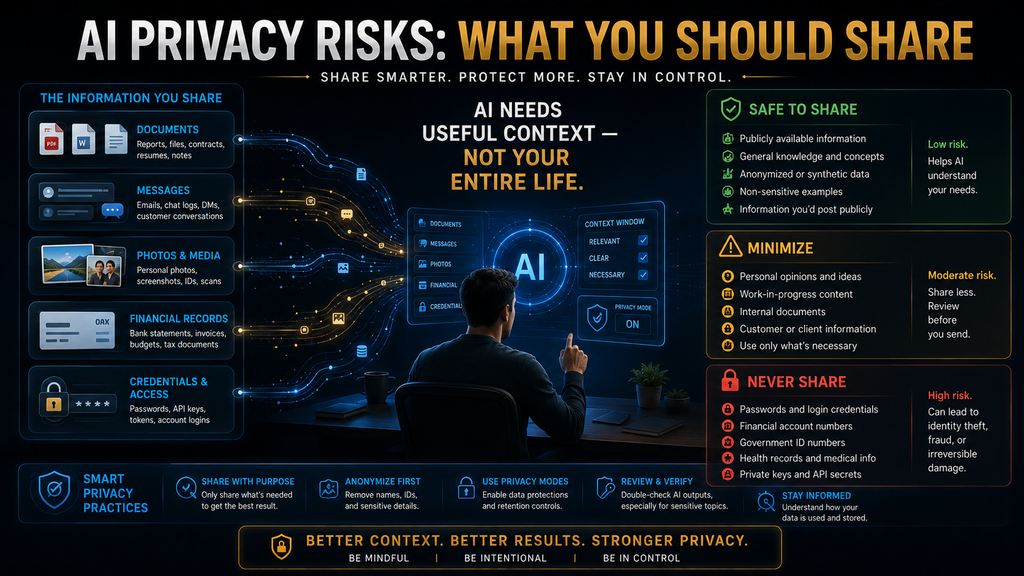
The main AI privacy risk is oversharing: giving a chatbot more personal, financial, health or business detail than the task needs. Before you paste or upload anything, remove what the AI does not need, replace names and numbers with placeholders, share only the relevant part of a document and check your account’s privacy settings. Never share passwords, codes or keys.
AI can write an email, summarize a document, analyze a spreadsheet, explain a medical term or review a contract in seconds. That convenience has created a new habit: people are giving AI systems far more context about their lives and work than they would give most websites. Sometimes that context is much more sensitive than the person realizes at the time.
You might paste a customer conversation into a chatbot to get help with a reply, upload a resume with your phone number and address, screenshot a bank statement to understand a charge or describe a health condition in detail to get a clearer explanation. None of those actions feels like a major privacy decision, yet each one is.
This guide explains what happens to information after you share it, why “turning off training” is only part of the answer, how the main assistants differ, what you should never share and a simple four-step workflow that keeps AI useful without exposing more than you need to. The goal is to keep using AI while sharing only what each task needs.
What AI Privacy Risks Are
AI privacy risks are the problems that can arise when personal, confidential or sensitive information is submitted to, processed by, stored by or connected to an AI system. The obvious examples are passwords, card numbers and ID documents, but the category is much wider than that, and the less obvious parts cause more trouble.
Information that looks harmless on its own can become sensitive in combination. A first name is rarely a problem. A first name plus employer, city, job title, health condition and travel dates is a detailed profile of a real person. AI conversations make this kind of combination easy, because people add context a little at a time.
AI systems can also receive information indirectly. Google’s Gemini Apps Privacy Hub describes collecting the files, videos, screens and photos you share, along with information from connected apps when you use them. What the AI can see depends on the product, the features you turn on and the account you use.
That is why “do not type your password” is good advice but nowhere near a complete privacy strategy. A useful strategy considers what you share, what the AI can reach through connections, how the provider stores and reviews data and what your account settings allow. The sections below take each of those in turn.
How AI Privacy Differs From Ordinary Web Privacy
Most people already have instincts about web privacy: be careful which sites you sign up for, watch what you post publicly and do not click suspicious links. AI tools need a slightly different instinct, because the risk comes less from what a site collects silently and more from what you choose to type, paste and upload yourself.
A search engine sees a short query. An AI assistant may see an entire contract, a full medical report or a long account of a family problem, because the tool works better with more context. People also tend to write to chatbots as if talking to a trusted adviser, which encourages a level of detail they would never put into a search box.
AI tools can also remember. Chat history, saved memories and project files can carry details from one conversation into the next, sometimes months later. That is helpful when the details are harmless and uncomfortable when they are not, so it is worth knowing what your assistant keeps and how to clear it.
Finally, AI outputs can travel. A summary you create may be pasted into an email, a shared document or a public post, carrying private details further than the original chat. Privacy-aware AI use therefore covers both what goes into the tool and what you do with what comes out of it. Check outputs before you forward them.
The AI Privacy Exposure Ladder
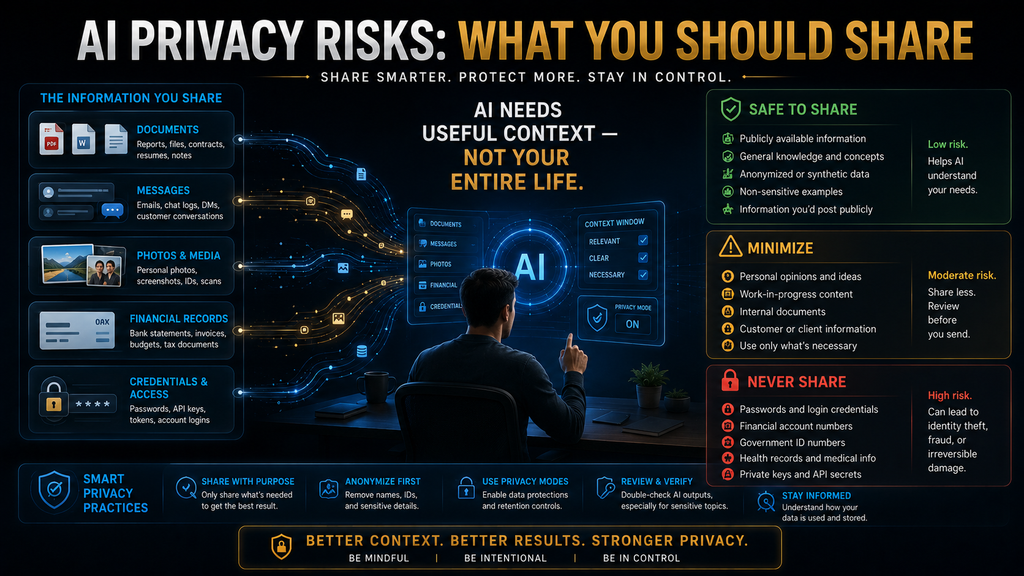
A practical way to decide what to share is to sort information by exposure level. The AI Hustle World Exposure Ladder has five levels, from public context to credentials. It is an editorial tool rather than a legal classification, and its purpose is to make you pause and ask the right question before you share.
Level 1, public context, covers information that is already public, such as a company description from its website or a general topic you are researching. Level 2, general personal context, covers ordinary facts such as “I am a freelance designer” or “I run a small online store.” Both are usually fine to share and often make answers more useful.
Level 3, identifiable personal context, connects directly to a person: full names, email addresses, phone numbers, home addresses, account numbers and customer IDs. At this level, ask whether the AI needs the identifier at all. To rewrite a customer complaint, it rarely needs the customer’s real name or account number, so replace them before you paste.
Level 4, sensitive information, covers health details, financial records, legal matters, children’s data and confidential business information, where disclosure could cause real harm. It deserves much more caution. Level 5, credentials and access data, covers passwords, one-time codes, API keys, recovery codes and crypto seed phrases. These never belong in a prompt.
If a task seems to require Level 5 information, stop and rethink the workflow. In ordinary use, the right answer is simply not to provide it. No legitimate AI task needs your password, and any tool or instruction that asks for one should be treated as a warning sign rather than a reasonable request. Close the chat and use the official route instead.
Why the Ladder Matters: Minimum Necessary Data
A rule like “do not share sensitive data” sounds clear until you have to decide whether something is sensitive. The ladder adds a second, more useful question: what is the minimum information needed to complete this task? That question works even when you are unsure how sensitive something is. It turns a vague rule into a practical decision.
Suppose you want help with a 20-page contract. The careless workflow uploads the whole thing. A better workflow decides what you need to understand, finds the relevant clauses, removes names, addresses and account details, and uploads only those clauses. You get the same help with a fraction of the exposure.
This is data minimisation, a core principle of data protection law. The UK Information Commissioner’s Office explains data minimisation as making sure personal data is adequate, relevant and limited to what is necessary for the purpose. The same idea works for individuals using AI. Share what the task needs and nothing more.
The aim is not zero data, because an AI with no context cannot help much. The aim is the minimum necessary data. Keep the details that change the answer and remove the ones that only identify people. That single habit prevents most everyday AI privacy problems without making the tools less useful. It also tends to produce clearer prompts, as our beginner’s guide to AI prompts explains.
What Happens After You Submit Information
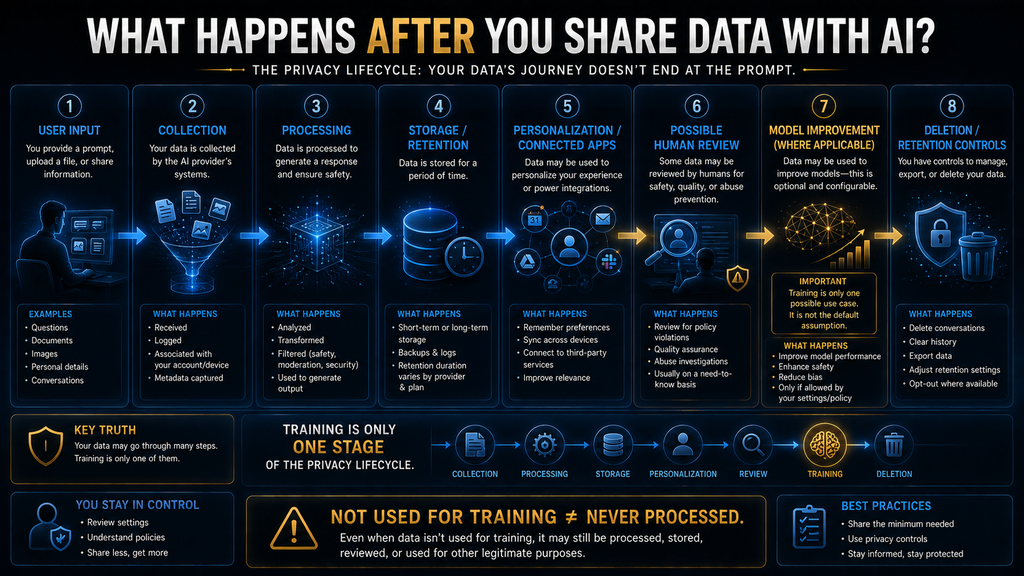
People often reduce AI privacy to one question: does the AI train on my conversation? In practice, information goes through several stages, and each stage raises its own question. Knowing the stages helps you read privacy settings and policies with a clearer idea of what each control covers. Here are the stages in order.
First comes collection, when the service receives your prompt, file, image or audio. Then processing, when it uses that information to generate a response. Then storage, when some information may be kept depending on the product and settings. Some products also use memory or personalization, carrying details from past chats into future ones.
Information may also pass through connected services, such as email or cloud storage you have linked. Some providers use human review for a subset of conversations, for example to improve quality or investigate abuse. Some consumer services use certain content for model improvement, subject to the controls you choose.
Finally there is deletion and retention. Deleting a chat from your history does not always mean every copy disappears immediately, because providers may keep some data for safety, legal or security reasons for a period. Each of these stages can have a different answer, which is why one setting rarely covers everything.
Training Is Only One Privacy Question
Turning off model training is a useful step, but it does not mean your information never exists on the provider’s systems. The service still has to process your input to answer you, and providers may keep some data for safety or security for a set time. “Not used for training” and “not processed or retained” are different statements.
OpenAI’s help article on temporary chat in ChatGPT says temporary chats stay out of your history unless you save them, do not create or update memories and are not used to improve models while temporary. It also says OpenAI may keep a copy for up to 30 days for safety purposes, and that a saved temporary chat then follows your normal settings.
Google’s Gemini Privacy Hub says temporary chats, and chats you have while Keep Activity is off, are kept with your account for 72 hours to respond to you and to protect Google, users and the public. It also says that even with Keep Activity off, Google still uses your chats to respond and to help protect users, including with help from human reviewers.
These controls are valuable, and you should use them for sensitive tasks. But read them for what they say. A training opt-out or temporary mode reduces some kinds of exposure; it does not make a sensitive upload risk-free. The safest data is still the data you never needed to share in the first place. Settings help most when combined with careful inputs.
The Information People Forget Is Sensitive
Most privacy checklists mention passwords and card numbers. The harder problem is information people do not recognize as sensitive, because it sits in the background of something else. Screenshots, documents, photos and long conversations are where most accidental oversharing happens. Each needs a slightly different check.
Screenshots often contain more than the thing you are asking about: your name, email address, notifications, open tabs, account numbers, other people’s messages and location details. If you want AI to explain an error message, crop the screenshot down to the error message before you upload it. Most phones and computers have a quick crop tool built in.
Documents carry hidden detail. A resume includes your address and phone number, a contract includes signatures and payment terms, and a spreadsheet may hold an entire customer list when you only need one column analyzed. Files can also include comments, tracked changes and metadata that you never see on screen.
Photos can show faces, house numbers, car plates, documents on a desk and location clues in the background. Crop before you upload, and remember that a photo of a letter or a prescription is effectively a scanned document. Treat it with the same care you would give the original, including the parts of the image you were not asking about.
Personal conversations deserve special attention. People increasingly use AI as a sounding board for relationships, health worries, money problems and work conflicts. One message may not identify you, but a long conversation can gather enough detail to describe your life in depth, which leads to the next point.
Long Conversations Can Quietly Increase Exposure
Privacy risk is not only a single-prompt problem. It can build up over a conversation. You start with “help me plan my week,” then add that you work at a startup, that your manager is considering you for a promotion, what your salary is and what personal issue is distracting you. No single message felt risky.
By the end, the chat holds a detailed personal record: your employer, role, income, career plans and private circumstances. If the conversation is stored, saved to memory or later shared through a public link, that record goes with it. People tend to relax as a conversation becomes more personal, which is exactly when caution matters most.
Two habits help. First, start a fresh chat when the task changes, so unrelated personal details do not pile up in one place. Second, use temporary or incognito modes for sensitive topics where your assistant offers them. Our guide to how AI memory works explains how chat history and memory differ. Both habits take only a few seconds.
Be careful with shared links too. Many assistants let you share a conversation with a public link, and anyone with the link can read it. Before sharing, scroll through the whole conversation and check what it contains, because an early message may include details you have since forgotten about. Delete links you no longer need.
What You Should Never Share With Consumer AI
Some information should stay out of consumer AI tools entirely. Controlled business environments can have exceptions, but for ordinary personal accounts, treat the following categories as off-limits no matter how convenient sharing them might seem in the moment. Each one can cause serious harm if it leaks.
Passwords, one-time codes and recovery codes are the clearest case. AI does not need your password to explain how a website works or to troubleshoot a login problem. Authentication codes and API keys are equally sensitive. If an AI tool needs access to an account, use the official connection method, never a pasted credential.
Private keys and seed phrases for cryptocurrency wallets are full access credentials. Anyone who sees them can take the funds, and there is no way to reverse it. Never paste them anywhere, including AI chats. Scammers sometimes use fake “AI support” tools to ask for them, so treat any such request as fraud.
Complete financial and identity details, such as full card numbers, bank login details, passport scans and national ID numbers, should also stay out. If you need help understanding a transaction or a form, redact the identifying numbers and describe the problem. The AI can explain a charge without knowing your account number.
Confidential business information, such as customer databases, unreleased financials, legal documents, source code with secrets and internal strategy, needs an approved environment. A tool being convenient does not make it an approved place to process company data. Our guide to AI governance explains how organizations set these rules.
The Data People Forget to Remove
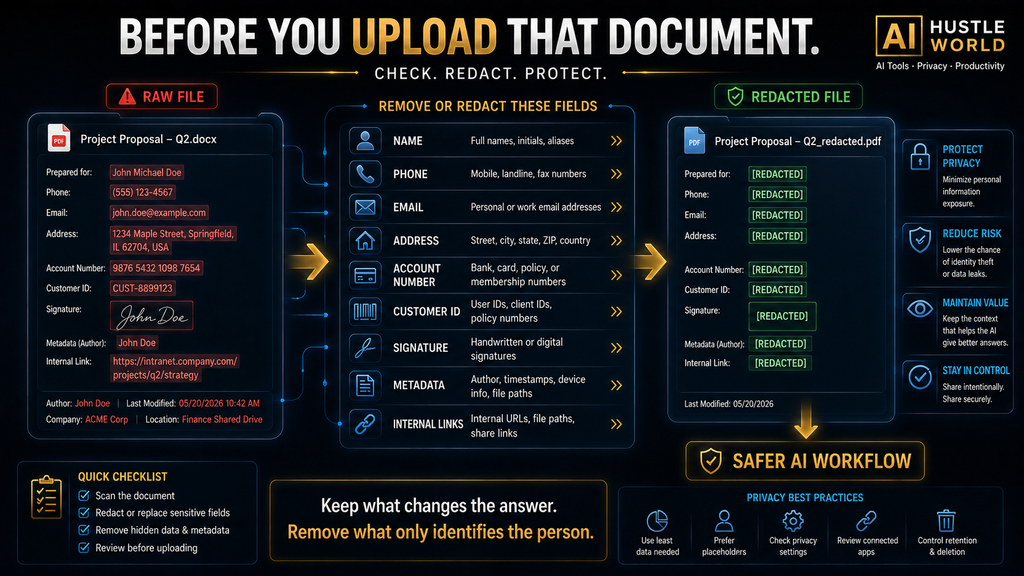
Before you upload any document, check it for names, addresses, phone numbers, email addresses, account and customer IDs, signatures, dates of birth, health details, salaries and other people’s information. Then check the parts you do not normally look at: headers, footers, comments, tracked changes and file properties.
Spreadsheets need extra care. Hidden columns and sheets, filtered rows and cell comments can all contain data you did not mean to share. If you only need help with formulas or structure, create a copy with a few rows of fake data instead of uploading the real file. The AI can usually solve a formula problem just as well with sample data.
PDFs can hold form fields, earlier versions and embedded files. Images can carry location metadata. When in doubt, copy the relevant text into a new, clean document and share that instead. If you are preparing a resume, our guide to AI resume builders covers what to remove first. If you work with documents often, our comparison of AI PDF tools covers tools that make extraction easier.
The Four-Step Privacy Workflow: Redact, Replace, Reduce, Review
The most practical defense is a short routine you run before sharing anything sensitive. We call it redact, replace, reduce and review. It takes less than a minute once it becomes a habit, and it works with any AI tool, any account type and any kind of content, from a single email to a long report. Here is how each step works.
Redact information the AI does not need. “John Rahman, Account #483921, Dhaka” can become “[CUSTOMER], [ACCOUNT ID], [CITY].” Remove anything that identifies a person but does not change the answer, including names in email signatures, phone numbers in footers and addresses in letterheads. Search the text for numbers and capital letters to spot identifiers quickly.
Replace real identifiers with consistent placeholders such as [CLIENT], [COMPANY], [EMPLOYEE] or Customer A and Customer B. This keeps the structure of the problem intact, so the AI can still tell people apart and follow the story, without exposing who they are. Keep a private note of which placeholder stands for whom if you need to map answers back later.
Reduce the material to what the task needs. If you want help with section 7 of a contract, share section 7. If you need three paragraphs rewritten, share those three paragraphs. If you need analysis of one spreadsheet column, share that column, not the whole customer database. Less input also means less to check when the answer comes back.
Review before you press send. Ask what you are giving the AI, whether it needs all of it, which account you are using, which privacy settings are active and whether this tool is approved for this kind of information. That final check is what turns privacy from a vague worry into a repeatable habit. Use the checklist below until it becomes automatic.
Before I paste this, check:
1. Names, emails, phone numbers, addresses removed or replaced?
2. Account numbers, IDs, card numbers removed?
3. Only the relevant section included?
4. Right account (personal vs work) and right settings (temporary chat, training off)?
5. Is this tool approved for this kind of information?
Keep the Answer, Lose the Identity
Sometimes removing all context makes AI much less useful. Often the better answer is to redesign the input rather than avoid AI. Suppose you want help analyzing customer complaints. You do not need “Maria Ahmed, phone number, customer ID 82193.” You may only need “Customer A, subscription customer, complaint: delayed delivery.”
The model can find patterns, draft replies and suggest fixes without knowing anyone’s identity. A useful rule is to preserve the information that determines the answer and remove the information that merely identifies the person. Apply it line by line, and most sensitive inputs can be made safe without losing value.
Sort what you plan to share into two groups. Answer-changing information is what the AI needs to produce a correct result, such as the type of contract, the jurisdiction or the nature of a complaint. Identity information makes the example realistic but does not change the answer, such as names, addresses and account numbers.
Keep the first group and minimize the second. To rewrite a complaint professionally, the customer’s name does not affect the wording. To ask whether a contract term is enforceable, the jurisdiction does matter. So the key question is not “is this personal?” but “does this change the task?” That question settles most borderline cases.
How ChatGPT, Gemini, Claude and Perplexity Differ
It is tempting to rank assistants as “private” or “not private,” but the reality depends on the product, the account type and your settings. Each major provider offers controls, and each handles retention and training differently. Policies change, so check the provider’s current documentation before sharing anything sensitive.
| Assistant | Key consumer privacy controls and points to know |
|---|---|
| ChatGPT | Model-improvement setting, temporary chat (kept up to 30 days for safety), memory controls, deletion |
| Gemini | Keep Activity setting, temporary chats (kept 72 hours), connected-app controls, human review of some chats |
| Claude | Choice about model training; 5-year retention for new chats if you allow training, 30 days if you do not |
| Perplexity | AI Data Retention on by default for Free, Pro and Max, with an opt-out; Enterprise data not used for training |
For Claude, Anthropic’s update to its consumer terms says consumer users choose whether their data is used for model training. If you allow it, retention for new or resumed chats extends to five years; if you do not, the existing 30-day retention period continues. Commercial services follow separate terms.
For Perplexity, its help article on data collection says AI Data Retention is enabled by default for Free, Pro and Max users, who can opt out of AI training data collection, and that Enterprise data is never used for AI training. Our guide to AI data retention compares more services. Check these settings after you sign up for any new assistant.
The lesson is to understand the product, account type and settings you are using before deciding what is appropriate to share. The same person can be careful in one tool and careless in another simply because they assumed the settings were the same. Check each tool separately, and recheck after major product updates.
Why Business and Enterprise AI Is Different
For businesses, the account type matters a great deal. Enterprise and business plans often come with contractual commitments, admin controls, retention settings and access management that consumer accounts do not have. OpenAI’s enterprise privacy page says it does not train its models on business data by default.
That covers business products such as ChatGPT Business, ChatGPT Enterprise and its API platform, and OpenAI also describes admin control over who has access and, for some plans, how long data is kept. Perplexity makes a similar statement for its Enterprise data. These are meaningful differences from free personal accounts.
An enterprise plan is still not a substitute for governance. Businesses need data classification, approved-tool lists, access controls, retention rules, staff training and an incident process. Our guide to building an AI risk management framework walks through these steps for small and mid-sized companies.
If you are an employee, assume your personal AI account is not approved for company data unless your employer has said otherwise. Using a personal chatbot for work documents can break company policy and client contracts even when the tool itself is well run. When in doubt, ask before you paste. A quick question protects both you and your employer.
Connected Apps Add Another Privacy Layer
Modern assistants can connect to email, calendars, cloud drives, documents and third-party tools. That can make them far more useful, because they can find a file, summarize a thread or schedule a meeting for you. It also widens what the AI can see, often far beyond what you would paste into a single chat.
Google’s Privacy Hub describes managing Gemini’s access to other apps and data, including third-party services such as Model Context Protocol server tools, in its Connected Apps settings. Our explainer on the Model Context Protocol explains how these connections work behind the scenes. Review the list of connected services after setting up any new integration.
Before connecting anything, do not only ask what the integration can do. Ask what new data it can see that the AI could not see before. A calendar connection exposes who you meet and when; an email connection may expose years of private conversations. Connect only what gives a clear benefit, and review connections regularly.
Agent features that take actions for you raise the stakes further, because they can read data and act on it. Our guide to how AI agents use tools explains what these systems can access and why human approval steps matter for anything sensitive. Keep approval prompts switched on for any action that sends or deletes data.
Where to Find the Privacy Settings That Matter
You do not need to read every policy in full, but you should know where the main controls live in the assistants you use. Settings menus change often, so treat the notes below as a guide to what to look for rather than exact click paths, and check each provider’s help pages for current steps. Ten minutes is enough to review all of them.
In ChatGPT, look in Settings for data controls, where you can manage whether your chats help improve models, and for personalization, where you can view, edit or turn off memory. Start a temporary chat for anything sensitive, and use the archive and delete options to clean up history you no longer need. Shared links are managed from the same area.
In Gemini, look for the Keep Activity setting in Gemini Apps activity, which controls whether your chats are saved to your account, and for Connected Apps, which controls what other Google services and third-party tools Gemini can reach. Review both, especially if you have linked Gmail, Drive or Calendar.
In Claude, look in the privacy settings for the choice about whether your chats can be used to improve models, and remember that this choice also affects how long data is retained. In Perplexity, look for the AI Data Retention setting, which controls whether your data is used for training. Set a reminder to review all of these every few months.
Privacy Settings Are Not the Whole Solution
Privacy settings are valuable, and you should use them. But they should not be your only defense. If you turn off model improvement and then upload your passport, a bank statement and a client’s medical record, you have reduced one kind of exposure without making the underlying decision sensible. The decision to share is still yours.
Settings also change. Providers update features, defaults and policies, and a setting you chose last year may not mean the same thing today. New features, such as saving temporary chats or connecting new apps, can change what happens to your data in ways that are easy to miss. Release notes and privacy hub updates are worth a quick look when your assistant announces new features.
The strongest privacy strategy is still not to provide unnecessary sensitive information in the first place. Combine minimal inputs with sensible settings, and review your settings every few months. That layered approach protects you even when one layer turns out to be weaker than you assumed. Layers matter because no single control is perfect.
Voice, Meetings and Recordings
Privacy risk is not limited to typed prompts. Voice assistants, meeting recorders and transcription tools capture far more than most people would ever type, including other people’s voices, names, opinions and sometimes confidential decisions. A one-hour meeting transcript can contain more sensitive detail than a month of chat prompts.
If you use an AI meeting assistant, tell participants that the meeting is being recorded and transcribed, follow your organization’s rules and local consent laws, and turn the recorder off for sensitive parts of a conversation. Our comparison of AI meeting assistants covers tools with stronger admin controls.
Review where transcripts and recordings are stored, who can access them and how long they are kept. Delete recordings you no longer need, and avoid pasting full transcripts into other AI tools when a short, anonymized summary would do the job. The same minimum-necessary principle applies to audio as it does to text.
What to Do If You Already Shared Something Sensitive
Do not panic; act calmly and in order, because quick, sensible steps limit most of the damage. First, identify exactly what you shared. Was it a password, an API key, a card number, a client document, health information or something else? The right response depends on the category, so be specific before you do anything else.
Second, delete the conversation using the provider’s deletion controls, and turn off any memory entries that captured the detail. Remember that deletion may not remove every copy immediately, because providers may keep data for a period for safety, legal or security reasons. Deletion still reduces exposure, so do it.
Third, if you shared a credential, treat it as compromised. Change the password, revoke or rotate the API key and turn on two-factor authentication if it is not already on. If you shared card details, contact your bank. These steps matter far more than deleting the chat, because they make the leaked data useless.
Fourth, if the data came through a connected app, review that app’s permissions. If it was confidential company or customer information, follow your organization’s incident process and tell the right person promptly. Hiding a mistake usually makes the consequences worse for everyone involved. Early reporting gives others time to limit the impact.
Finally, fix the workflow, not just the moment. “I will be more careful” rarely works. A clear rule, such as “all customer data is anonymized before it enters consumer AI,” is more reliable than memory, especially when you are busy. If phishing or account security worries you, our guide to AI phishing detection covers related threats.
A Simple AI Privacy Decision Matrix
Use this matrix before sending information to a consumer AI tool. It is a general guide, not legal advice, and it assumes a personal account. Approved business tools may allow more, but only within your organization’s rules and the provider’s contractual terms. When unsure, use the more cautious row. Caution costs little; exposure can cost a lot.
| Information type | Consumer AI? | Recommended action |
|---|---|---|
| Public article or web page | Usually fine | Use normally |
| General preferences and situation | Usually fine | Share only what helps |
| Names and contact details | Use caution | Remove if not needed |
| Customer information | High caution | Anonymize first |
| Medical information | High caution | Minimize; consider approved tools |
| Financial records | High caution | Redact heavily |
| Confidential business files | High caution | Approved environments only |
| Government ID | Avoid | Redact or do not upload |
| Passwords, API keys, tokens | Never | Do not provide |
| Private keys, seed phrases | Never | Do not provide |
Every category carries a different level of risk in different products, so treat the table as a prompt to build a short pause before uploading. Over time, the pause becomes automatic and costs you almost nothing. That pause, and the question “does the AI need this?”, prevents most of the privacy mistakes people make with AI tools.
Common AI Privacy Mistakes
Uploading the Entire Document
People upload a 40-page file when they need help with one section. The fix is to extract the relevant part and share only that. Smaller inputs also tend to produce more focused answers, so you lose nothing by trimming and often gain a better result. A focused input is a better prompt as well as a safer one.
Forgetting What Screenshots Show
The thing you want explained gets your attention, while the background is ignored. Notifications, tabs, names and account numbers often sit in plain view. Crop tightly, and check the whole image before you upload it rather than only the part you care about. A quick zoom around the edges takes seconds. Blur or cover anything you cannot crop.
Assuming “Training Off” Means “Private”
A training opt-out reduces one kind of use but does not stop processing, short-term retention, safety review or connected-app access. Understand what each setting covers, and still minimize what you share. Settings and minimization work best together, and neither is enough on its own. Use both on every sensitive task.
Using Consumer AI for Confidential Work
Convenience often beats policy, especially under deadline pressure. Use the tools your organization has approved for confidential material, and if none exist, ask for one. A personal chatbot is not an approved place for client or company data just because it works well. Approval depends on contracts and controls, not on output quality.
Sharing Credentials Because AI “Needs Access”
AI almost never needs your password. If a tool needs to reach an account, use its official sign-in or connection method, which you can revoke later. Pasting credentials into a chat creates a copy you cannot fully control and may not be able to delete. Official connections can be revoked in one click. That control is worth the extra click.
Revealing Personal Details Gradually
Long conversations collect more personal context than any single prompt. Start fresh chats for new tasks, use temporary modes for sensitive topics and remove personal details that do not help. Review saved memories occasionally and delete anything you would not want kept, especially details about health, money or other people.
Connecting Everything
An assistant becomes more useful with more context, but that does not mean it needs access to everything. Connect only the services that give a clear benefit, review permissions regularly and disconnect anything you no longer use. Every connection is another door to your data, so keep only the doors you use.
Forgetting Other People’s Privacy
Your customers’, colleagues’, friends’ and family members’ information is not yours to upload casually just because you can see it. Having access to information does not mean you have permission to send it to an AI provider. When in doubt, anonymize or ask first. Respecting other people’s privacy also protects your own reputation.
Who Should Be Extra Careful
Freelancers and Small-Business Owners
If you are a freelancer, client files often contain personal or commercially sensitive information, and your contracts may restrict how you handle it. If you own a small business, customer databases, financial records and strategy documents are valuable targets. Our list of AI tools for small business owners can help you choose tools with business-grade controls.
Employees
If you are an employee, your employer may have specific rules about which AI tools can process company information. Follow them, and ask if they are unclear. A personal account used for work can break policies and client contracts even when your intentions are good and the output is helpful. Approved tools exist to protect you as well as the company.
Students and Parents
If you are a student, assignments, IDs, personal records and research data can reveal more than you expect, so check your school’s rules on AI use. If you are a parent, give children’s data extra care: avoid sharing their names, schools, photos and health details with consumer AI tools, and check age rules for each service.
Healthcare, Legal and Finance Professionals
If you work in healthcare, law or finance, sensitive information can carry strict legal and professional duties. Do not assume a consumer chatbot is appropriate just because it can process the information. Use approved, contracted tools, and keep a qualified human responsible for every output, as our guide to human-in-the-loop AI explains.
What Happens If You Do Nothing?
You can keep using AI exactly as you do today, and perhaps nothing bad will happen. The problem is that privacy risk is asymmetric. The benefit of uploading a sensitive document might be saving five minutes, while the downside could be exposure of information that cannot easily be made private again. Some disclosures cannot be undone.
That does not mean every upload is dangerous. It means the benefit should justify the exposure. This matters most when the information is permanent, such as health history, identity documents or private conversations. A password can be changed in a minute; a disclosed medical condition or private message cannot be taken back.
The cost of good habits is small: a minute to redact, a habit of cropping, a quick look at settings. The cost of bad habits is unpredictable and sometimes severe. That imbalance is the strongest argument for building a simple routine now, before a mistake forces you to. Start with the four-step workflow on your next sensitive task.
A 30-Second AI Privacy Check
Before sending anything sensitive, ask five quick questions. What am I sending: a prompt, screenshot, document, image, audio or connected data? What in it is sensitive: names, IDs, health, money, business information or credentials? Does the AI need that sensitive part, and if not, have I removed it? Most answers take a second.
Then ask which account you are using, personal, work, school or enterprise, and which controls are active, such as training, retention, memory, temporary mode and connected apps. If you cannot answer those questions, do not upload the sensitive material yet. Find out first, or reduce the input until the answers no longer matter.
This check is more useful than memorizing a long list of forbidden data types, because lists change while the decision process does not. Our learning path for using AI tools safely builds this and other safety habits step by step. It is a good next read if you are new to AI tools. Practice the check until it feels natural.
Using AI With Sensitive Information Safely
Sometimes you do need AI to work with sensitive material, such as a health report you want explained or a contract you need to understand. In those cases, choose the safest workable setup rather than avoiding AI entirely. The right setup depends on how sensitive the material is and what is at stake. Here are three common situations.
For personal matters, use a temporary or incognito chat, remove names and identifiers, share only the relevant section and delete the chat afterward. For medical, legal or financial decisions, use AI to understand terms and prepare questions, then confirm everything with a qualified professional. AI can also make mistakes, as our guide to AI hallucinations explains.
For business data, use an approved enterprise tool with contractual protections, or a system designed to keep data inside your organization. Some teams use retrieval systems that let AI answer questions from internal documents without sending everything to a consumer chatbot, as our retrieval-augmented generation guide describes.
The Future of AI Privacy
AI assistants are moving toward more context, not less. They increasingly work across conversations, files, emails, calendars, browsers and connected business tools. More context makes them more useful, and it also means more of your information sits within reach of a single system. That trend makes good habits more important each year.
The answer is to make context intentional rather than remove it. The most trustworthy AI setups will give users and organizations clear control over what information is available, how long it stays available, which apps can reach it, whether it can be used for improvement and how it can be deleted. Look for these controls when you choose tools.
Frameworks such as the NIST Privacy Framework already help organizations manage privacy risk in products and services, and they apply to AI as well. For individuals, the same direction holds: know what your assistant can see, decide on purpose what it should see and review those choices regularly. Small, regular reviews keep you in control.
How We Researched This Guide
This guide is based on official documentation and regulatory guidance, not hands-on testing. In October 2026 we reviewed OpenAI’s help article on temporary chat and its enterprise privacy page, Google’s Gemini Apps Privacy Hub, Anthropic’s update to its consumer terms, Perplexity’s data collection article, the UK ICO’s guidance on data minimisation and the NIST Privacy Framework.
The Exposure Ladder, the four-step workflow and the decision matrix are AI Hustle World’s editorial frameworks. Retention periods and settings are as described by each provider at the time of checking and can change. This article is general information, not legal advice, so check current policies and seek qualified advice for regulated data.
Final Thoughts
The useful privacy question about AI is not “can I trust AI?” It is too broad to answer. Better questions are what information you are giving it, why it needs that information, what happens to it in this product and account, what controls you have and whether you could get the same result with less personal data.
That last question may be the most powerful. AI does not need maximum information; it needs useful information. Keep what changes the answer, remove what only identifies people, crop your screenshots, trim your documents, check your settings and never share credentials. Those habits take seconds and protect you for years.
If you remember one rule from this guide, make it this: if the AI does not need the information to complete the task, do not give it the information. You do not need to stop using AI. You need to stop treating every prompt as harmless, and start treating context as something you share on purpose. That habit keeps AI helpful and your information yours.
Use AI Smarter — Without Oversharing
AI can be incredibly useful, but better results do not require giving it your entire personal or business context. Learn how to build safer, more reliable AI workflows with practical guides from AI Hustle World.
Explore AI Safety Guides →Frequently Asked Questions
Is it safe to share personal information with AI?
It depends on the information, the service, your account and your settings. The safest approach is to share the minimum needed and remove names, numbers and other identifiers first.
What should I never share with an AI chatbot?
Never share passwords, one-time codes, recovery codes, API keys, private keys or seed phrases. Be very careful with ID documents, card numbers, health records and confidential business files.
Does ChatGPT keep my conversations?
Regular chats stay in your history until you delete them, subject to your settings. OpenAI says temporary chats are not used to improve models and may be kept for up to 30 days for safety.
Does turning off AI training make my data private?
No. It stops one use of your data, but the service still processes your input and may keep it for a while for safety or security. Minimizing what you share still matters.
Is Gemini private?
Gemini has privacy controls, but Google says it uses chats to respond and protect users, including with human reviewers, even when Keep Activity is off. Review your settings before sharing anything sensitive.
Can I use AI with confidential business information?
Only in tools your organization has approved for that data, ideally business plans with contractual protections. A personal chatbot account should not be treated as an approved business environment.
Should I upload a whole document to AI?
Usually not. Share only the section the task needs, and remove names, account numbers and other identifiers. Smaller inputs reduce exposure and often give more focused answers.
Can screenshots expose private information?
Yes. Screenshots often show names, emails, notifications, account details and other people’s messages. Crop the image to the part you need before uploading it.
What should I do if I accidentally shared a password?
Change it immediately and turn on two-factor authentication. For API keys or tokens, revoke or rotate them. Then delete the chat and check the account for unusual activity.
Is AI privacy only about model training?
No. It also covers collection, processing, retention, memory, connected apps, human review, security and deletion. Each stage can have different rules and settings.
Related Guides
- How to Use AI Tools Safely: A Complete Learning Path
- 10 Best AI Tools for Small Business Owners
- How to Build an AI Risk Management Framework for Small and Mid-Sized Businesses
Written by
Muntasir Ahmad Chowdhury
Founder, AI Hustle World
Muntasir Ahmad Chowdhury is the Founder of AI Hustle World, an independent publication dedicated to making Artificial Intelligence practical, trustworthy, and easy to understand. He researches AI tools, automation, customer service, productivity, and real-world business applications, helping readers make smarter technology decisions through research-driven, experience-backed content.
Expertise:
AI Tools • AI Automation • AI Customer Service • AI Productivity • Generative AI • AI Workflows
Get Smarter With AI
Enjoyed this guide? Get practical AI tools, tutorials, and honest reviews delivered to your inbox.