Evidence: Documentation reviewed
Last checked: August 2026
What was done: Written from official documentation and the published sources linked in this article. Not hands-on tested.
Files: None
Affiliate links: No
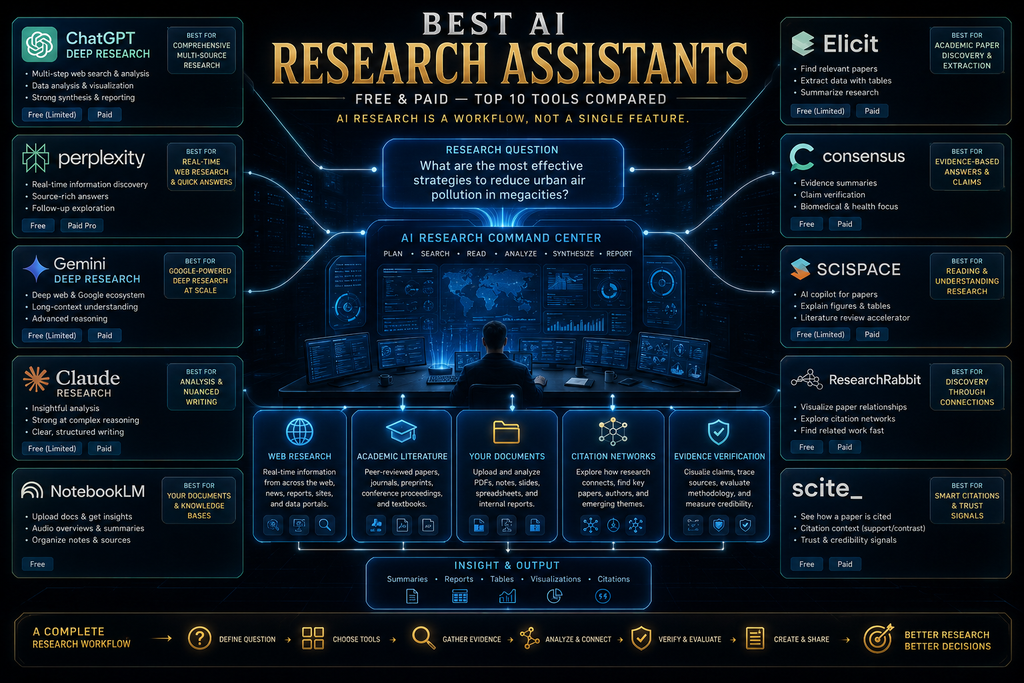
Best AI Research Assistants (Free and Paid): Top 10 Compared
The best AI research assistant depends on the kind of research you do. ChatGPT deep research is the strongest all-round choice for complex investigations, Perplexity is best for fast, cited web answers, Gemini Deep Research suits people who live in Google’s apps and Claude is strong when research needs careful reasoning. For academic work, Elicit, Consensus, SciSpace, ResearchRabbit and Scite each solve a different part of the job.
If you already have your sources, Gemini Notebook, formerly NotebookLM, is often the best tool of all, because it answers only from the documents you give it and cites them. Most of these tools have a useful free tier, so you can test two or three before paying for anything. Testing on a real project is the fastest way to see which fits.
AI has changed where the effort in research goes. The old bottleneck was finding information: searching, opening results, reading, taking notes and searching again. The new bottleneck is judging information: deciding whether a source is appropriate, whether a study supports its conclusion and whether two similar-looking findings are comparable.
This guide compares ten AI research assistants by the job each one does best, with prices checked on each vendor’s site in October 2026. You will get a quick comparison, a Research Fit Matrix, a W.O.R.T.H. score for every tool, an eight-step research workflow and the most common ways AI research goes wrong, so you can choose tools that fit your work.
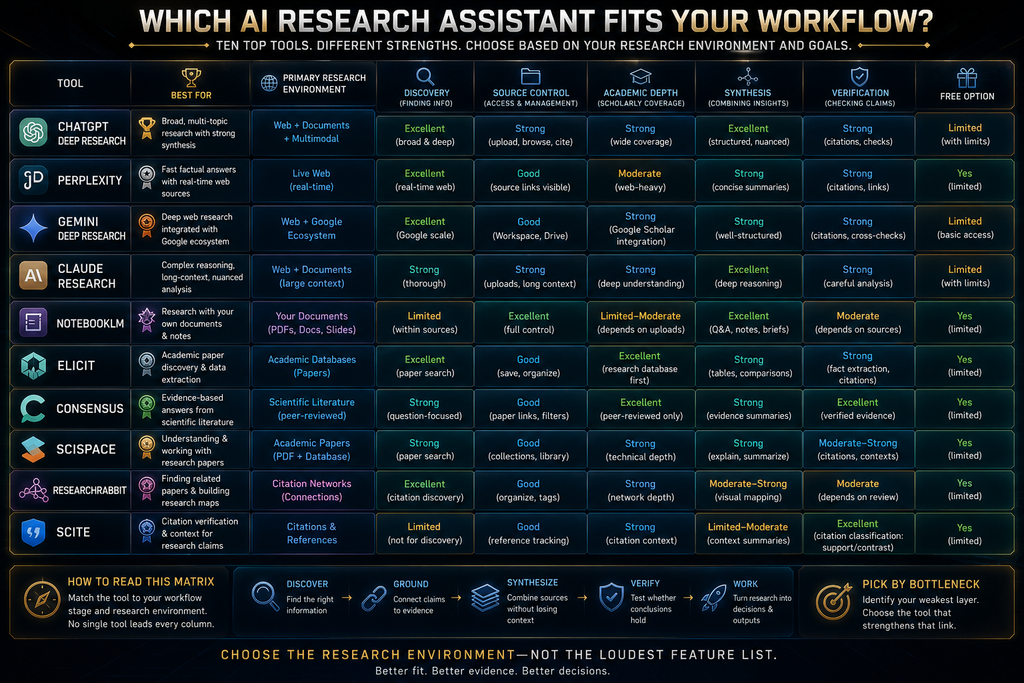
Quick Comparison: 10 Best AI Research Assistants
Here is the short version. Prices come from each vendor’s pricing page in October 2026 and change often, so check before you subscribe. “Paid from” shows the lowest regular price we found, usually on annual billing. Several general assistants include research features within broader subscriptions. If you already pay for one of those, start there.
| Tool | Best for | Main sources | Free option | Paid from |
|---|---|---|---|---|
| ChatGPT deep research | Complex general research | Web, files, connected apps | Limited, varies by plan | Included in paid ChatGPT plans |
| Perplexity | Fast, cited web answers | Web | Yes | $17/mo billed annually |
| Gemini Deep Research | Google-connected research | Google Search, Gmail, Drive, files | Yes, with limits | Higher limits in Google AI plans |
| Claude Research | Research plus deep reasoning | Web and connected tools | Research not on Free | $17/mo annual ($20 monthly) |
| Gemini Notebook | Research from your own sources | Your uploaded sources | Up to 50 sources per notebook | Google AI plans |
| Elicit | Structured literature reviews | 138M+ papers | Yes | $49/user/mo billed annually |
| Consensus | Evidence-based science questions | Peer-reviewed papers | Yes | $12/mo billed annually |
| SciSpace | Academic research workspace | Papers and PDFs | Limited | $12/mo billed annually |
| ResearchRabbit | Citation discovery and mapping | 310M+ articles | Free forever | $10/mo annual |
| Scite | Citation verification | Smart Citations | 7-day trial | $12/mo billed yearly |
The table does not pretend all ten compete on the same dimension. A citation-discovery tool should not lose points for not writing a 30-page report, and a general research agent should not win simply because it does more things. The right tool is the one that removes your biggest research bottleneck. The sections below explain each tool’s strengths and limits.
How We Chose and Compared These Tools
We selected ten widely used tools that cover the main research jobs: general deep research, web answers, document-grounded research, literature reviews, scientific evidence, academic workspaces, citation discovery and citation checking. For each, we reviewed the vendor’s own feature, help and pricing pages in October 2026.
This is a documentation-based comparison, not a hands-on benchmark. We did not run identical research tasks through every tool or measure accuracy ourselves. Where a feature, limit or price shapes our recommendation, we say so and link to the source so you can check the current details yourself before you commit.
None of the links in this article are affiliate links, and no vendor paid for placement. If your main need is working with PDFs rather than research across sources, our comparison of the best AI PDF tools covers that category in more detail. Rankings reflect fit for a type of user, not commissions. We update prices when vendors change them.
What an AI Research Assistant Does
An AI research assistant is software that uses AI to help with one or more stages of research: discovering sources, retrieving information, analyzing documents, synthesizing evidence, writing reports and checking claims. Some tools cover many stages, while others specialize deeply in one, such as citation analysis.
Older research looked like this: search, open results, read, take notes, search again, compare and write. Modern AI research increasingly runs as question, research plan, source discovery, source analysis, synthesis, cited report and verification. The tool does much of the searching and reading; you spend more time on judgment.
That shift is valuable, but it moves risk rather than removing it. AI can retrieve the wrong sources, compress nuance out of findings or present a confident summary built on weak evidence. Choosing a research assistant therefore means looking beyond model names and prices to how each tool handles sources, citations and verification.
Under the hood, many tools rely on retrieval: they search for relevant material, pull passages into the model’s context and generate an answer grounded in them. Our guide to retrieval-augmented generation explains how this works and why retrieval quality shapes answer quality. Good retrieval is often the difference between a useful report and a misleading one.
The Research Stack: Five Jobs AI Tools Perform
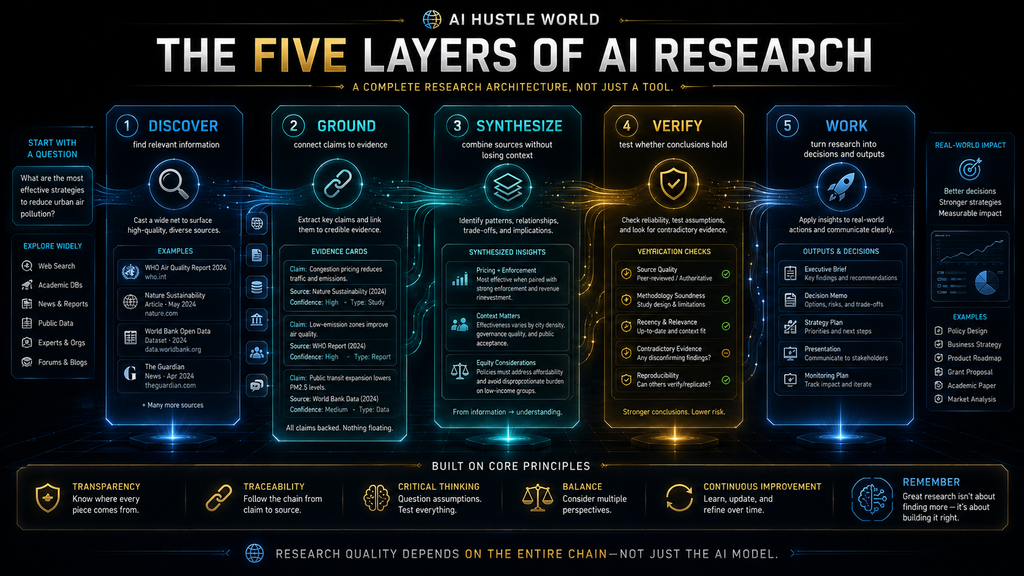
The easiest way to understand this market is to break research into five jobs, a framework we use throughout this guide. Discover means finding potentially relevant information. Ground means connecting an answer to identifiable evidence. Synthesize means combining information across sources without losing important context.
Verify means checking whether a conclusion is supported by the evidence. Work means turning research into something useful: a report, a decision, a literature review, a briefing or a next action. Every research project needs all five, but different tools are strong at different stages. The table below maps each job to the tools that do it best.
| Research job | Core question | Strong tool types |
|---|---|---|
| Discover | What information exists? | Perplexity, ResearchRabbit, Consensus |
| Ground | Where does this claim come from? | Gemini Notebook, Elicit, Scite |
| Synthesize | What do the sources say together? | ChatGPT, Claude, Gemini, Consensus |
| Verify | Is the conclusion supported? | Scite, Elicit, human review |
| Work | What should we do with it? | ChatGPT, Claude, Gemini |
If you judge tools only on discovery, you may pick something excellent at finding information but weak at helping you decide what it means. Judge each tool on the jobs you need most, and expect to combine two tools for serious work: one that discovers or grounds well and one that synthesizes well. Two focused tools usually beat one tool stretched too far.
1. ChatGPT Deep Research: Best Overall for Complex Research
ChatGPT’s deep research feature is the strongest all-round option for complex, open-ended investigations. OpenAI’s help article on deep research in ChatGPT describes a process where you describe the outcome you need, choose websites or uploaded files and review a proposed research plan before the research begins.
The same article says deep research can use the public web, files you upload and supported connected apps, such as document stores like Google Drive or SharePoint, depending on your plan, region and workspace settings. You can follow progress, interrupt to refine the focus and receive a structured report with citations or source links.
Its strength is breadth combined with structure. It can plan a multi-step investigation, read widely, connect findings across many sources and write them up in a form you can use. For questions such as market overviews, policy comparisons or technology assessments, that can save many hours of manual searching and note-taking.
The limitation is that a long, polished report can hide weak links. OpenAI notes deep research can sometimes hallucinate facts or make incorrect inferences, so treat each report as a well-organized draft and check the claims that matter. Verdict: choose it for broad, complex investigations where you need a cited report and can spend time verifying the key points.
2. Perplexity: Best for Fast, Cited Web Research
Perplexity is the fastest way to get a cited answer from the web. Every answer shows the sources it drew on, which makes it easy to check claims and dig deeper. For current events, quick fact-finding and getting oriented on a new topic, it is often the most efficient starting point. It also works well on a phone for quick lookups.
For deeper questions, Perplexity offers Research mode. Its help article on Research mode says it performs dozens of searches, reads hundreds of sources and reasons through the material to deliver a comprehensive report, usually within a few minutes, which you can export or share. It refines its research plan as it learns more about the topic.
Perplexity’s Pro page lists Pro at $17 a month when billed annually, with more advanced answers, a choice of AI models and higher usage limits, and Max at $167 a month billed annually for heavy users. A free plan lets you try core features, and promotions sometimes add extra credits. Check the current offer before you subscribe.
The key distinction is that Perplexity is optimized for discovery and quick answers rather than careful synthesis of a fixed evidence set. Its speed is a strength, but it can lean on whatever ranks well online. Check the quality of the sources it cites, not just the fact that sources are shown. Verdict: choose Perplexity when you need current information quickly with visible sources, and pair it with a grounding or synthesis tool for high-stakes work.
3. Gemini Deep Research: Best for Google-Connected Research
Gemini Deep Research is the natural choice if your work lives in Google’s ecosystem. Google’s help page on using Deep Research in Gemini says it uses Google Search by default, and you can add other sources such as your Gmail or Drive, upload files and add NotebookLM notebooks. That makes it unusually flexible about where evidence comes from.
That combination is powerful. You can research a topic on the open web while also drawing on your own emails, documents and notebooks, which makes it useful for internal briefings that combine public information with company context. Google says reports on its Ultra plan can include visuals such as charts and diagrams.
You need to be 18 or over and signed in to use it, and limits depend on your Google AI plan. For people already paying for Google AI or using Google Workspace heavily, it adds deep research capability without another subscription, which is a practical advantage over standalone tools. Check your plan’s limits before you depend on it for regular work.
The limitation is the same as for any connected research tool: the more sources it can reach, the more carefully you need to think about privacy and about which sources it used. Check citations and make sure sensitive internal material is only connected when your organization allows it. Verdict: choose Gemini Deep Research when you want web research combined with your Gmail, Drive and notebooks, especially if you already pay for Google’s AI plans.
4. Claude Research: Best for Research Plus Deep Reasoning
Claude is known for careful reasoning and clear long-form writing, and its Research feature applies that to multi-step research tasks. It suits investigations where the hard part is interpreting complex material, weighing arguments and writing a nuanced synthesis rather than simply collecting sources. That makes it well suited to policy, strategy and analysis tasks.
Claude’s pricing page shows Research is not included on the Free plan but is available on Pro and higher plans. Pro costs $17 a month with an annual subscription or $20 billed monthly. Max starts at $100 a month for people who use Claude heavily throughout the day. Team and Enterprise plans add administration and higher limits.
Claude’s strength is turning a messy pile of sources into a structured, well-argued analysis. It is good at following detailed instructions about evidence standards, such as separating established findings from speculation or flagging where sources disagree, which makes its research output easier to trust and edit.
The limitation is that Research requires a paid plan, and like any AI research tool, its conclusions are only as good as the sources it finds. For academic literature, a specialist tool such as Elicit or Consensus usually provides better source coverage, with Claude used afterward for synthesis and writing. Verdict: choose Claude Research when interpretation and clear reasoning matter as much as finding sources, and you are comfortable paying for Pro.
5. Gemini Notebook (formerly NotebookLM): Best for Your Own Sources
Gemini Notebook, which Google previously called NotebookLM, works differently from the others. Instead of searching the web, it answers questions using only the sources you add, such as PDFs, documents, websites, videos and audio. Google says its answers are grounded in your sources with clear inline citations.
That design matters because it narrows the evidence to material you have chosen and can check. For literature reviews with a set of papers, studying from course materials, analyzing interview transcripts or preparing a briefing from internal documents, that grounding reduces the risk of answers drawn from unknown sources.
The Gemini Notebook plans page lists up to 50 sources per notebook on the free plan, 100 on Google AI Plus and 300 on Google AI Pro, with higher usage limits on paid plans. It can also create study guides, briefings and audio overviews from your sources. Those outputs are useful for studying and briefing others.
Its limitation is scope: it cannot find sources you have not added. Many people pair it with a discovery tool, using Perplexity, Elicit or ResearchRabbit to find material and Gemini Notebook to analyze it. That combination often gives better results than either tool used alone. Verdict: choose Gemini Notebook whenever you already have the sources and want answers you can trace directly back to them. The free plan covers most individual users.
6. Elicit: Best for Structured Literature Reviews
Elicit is built for researchers who need to find, screen and extract information from academic papers systematically. Elicit’s pricing page describes a free Basic plan with unlimited search across more than 138 million papers, unlimited summaries and unlimited chat with papers where full text is available.
The free plan also includes limited use of Elicit’s Research Agent and Research Reports. Pro costs $49 per user per month billed annually and adds standard usage of those tools, a dedicated systematic review workflow that can screen 5,000 papers, larger extraction tables, custom extractions and API access. Scale costs $169 per user per month for collaboration.
Elicit’s strength is structure. Instead of a narrative answer, it can build a table where each row is a paper and each column is a variable you care about, such as sample size, method, population or outcome. That makes it much easier to compare studies and spot patterns or gaps in the evidence. It turns a pile of papers into a dataset you can analyze.
The trade-off is cost and focus. Pro is expensive for occasional users, and Elicit is centered on academic literature rather than news, business sources or the general web. For a one-off question, the free plan or Consensus may be enough; for ongoing systematic reviews, Pro can save weeks of work. Verdict: choose Elicit for structured literature reviews and evidence extraction from academic papers, especially if you run systematic reviews regularly.
7. Consensus: Best for Evidence-Based Science Questions
Consensus answers questions using peer-reviewed research. Ask “does intermittent fasting improve insulin sensitivity?” and it searches the literature, summarizes what studies found and cites them. That makes it useful for health, science and policy questions where you want answers rooted in published studies rather than web pages.
Consensus’s pricing page lists a free plan with basic paper search, 10 Pro messages a month and up to three deep reviews a month. Pro costs $12 a month billed annually ($144 a year) and adds unlimited Pro messages, 15 deep reviews a month and access to all research tools, including a citation graph. Annual billing saves money compared with monthly billing.
Deep costs $45 a month billed annually for researchers and clinicians who run frequent literature reviews. The deep review feature produces more comprehensive reviews across many studies, which is useful when you need an overview of a research area rather than a single answer. Most individual users will find Pro enough.
The limitation is that “consensus” depends on which studies are included and how they are weighted. A topic with a few small or low-quality studies can produce a misleadingly confident summary. Check study design, sample size and recency for any finding you plan to rely on, especially in health contexts. Verdict: choose Consensus for quick, cited answers to scientific questions and lightweight literature reviews at a low price.
8. SciSpace: Best Academic Research Workspace
SciSpace combines several academic research tools in one workspace: chat with PDF, literature reviews, citation generation, data extraction, an AI writer and research search across sources such as Google Scholar, PubMed and arXiv on paid plans. It suits students and researchers who want one place for most academic tasks.
SciSpace’s pricing page lists Premium at $12 a month billed annually, or $20 monthly, with 1,200 monthly credits, unlimited chat with PDF and unlimited literature reviews. Advanced costs $70 a month billed annually and Max $160 a month billed annually for heavier, more advanced use. Credits are used by its more advanced agent features.
Its strength is breadth for academic work. Instead of switching between a search engine, a PDF reader, a reference manager and a writing tool, you can do much of the work in one interface. That convenience is valuable for students juggling many papers and deadlines at the same time. Fewer tools also means fewer logins and subscriptions.
The limitation is that an all-in-one workspace may be less deep in any single job than a specialist tool. Elicit is stronger for systematic extraction, ResearchRabbit for mapping literature and Scite for checking citations. Use SciSpace as the hub and add a specialist when a task demands it. Verdict: choose SciSpace when you want an academic research workspace that covers reading, reviewing and writing in one place at a moderate price.
9. ResearchRabbit: Best for Citation Discovery and Mapping
ResearchRabbit helps you discover related papers by following citation connections. You start with a few “seed” papers you know are relevant, and it shows papers that cite them, papers they cite and papers similar to them, often as visual maps. This is one of the most effective ways to find literature that keyword searches miss.
ResearchRabbit’s pricing page describes a free forever plan with unlimited searches across more than 310 million articles, unlimited collections, sharing and up to 50 seed articles. ResearchRabbit+ costs $10 a month on an annual plan and raises the limit to 300 seed articles, with multiple projects and alerts.
The citation graph matters because research builds on itself. A landmark paper is usually cited by many later studies, and following those links shows how a field developed, which ideas were challenged and where current debates sit. That context is hard to get from a list of search results. Visual maps make that structure easy to explore.
The important limitation is that citation connections do not tell you whether a paper is good or whether its findings held up. ResearchRabbit is a discovery tool, not a quality filter. Pair it with careful reading and, for key papers, a tool such as Scite that shows how later work treated them. Verdict: choose ResearchRabbit to map a literature and find papers you would otherwise miss. The free plan is enough for most students.
10. Scite: Best for Citation Verification
Scite shows how papers have been cited, not just how often. Its Smart Citations classify citing statements by whether they support, contrast or simply mention a finding. That helps you see whether a claim has held up in later research or has been challenged, which is crucial when you rely on a specific study.
Scite’s pricing page lists Basic at $12 a month billed yearly, with full access to its assistant and search, Smart Citation reports, collections of up to 1,000 papers and citation alerts. Pro costs $40 a month billed yearly and adds API access and larger collections. Both plans offer a seven-day free trial.
Scite’s strength is verification. Before you cite a striking finding, you can check whether later studies supported or contradicted it. That protects you from building an argument on a result that the field has since questioned, which is a common and embarrassing mistake in both academic and professional writing.
The limitation is focus. Scite is not a general research agent or writing tool, and its value depends on how well a field is covered in its citation data. Use it alongside a discovery or synthesis tool rather than as your only research assistant. Verdict: choose Scite when you need to check whether the evidence you rely on has been supported or challenged by later research.
W.O.R.T.H. Scores for All 10 Tools
We rate tools with the AI Hustle World W.O.R.T.H. Score: Workflow fit (25), Output quality (25), Risk and rights (15), Total cost (20) and Human effort (15). These scores are editorial assessments based on documentation and published pricing, not lab tests, and they assume a typical professional or graduate-level user.
| Tool | Workflow /25 | Output /25 | Risk /15 | Cost /20 | Effort /15 | Total /100 |
|---|---|---|---|---|---|---|
| Gemini Notebook | 20 | 21 | 12 | 18 | 11 | 82 |
| ChatGPT deep research | 23 | 22 | 10 | 15 | 11 | 81 |
| Perplexity | 21 | 19 | 10 | 17 | 12 | 79 |
| Gemini Deep Research | 21 | 20 | 10 | 16 | 11 | 78 |
| Claude Research | 20 | 22 | 11 | 14 | 11 | 78 |
| Consensus | 18 | 19 | 11 | 18 | 12 | 78 |
| ResearchRabbit | 17 | 18 | 12 | 19 | 11 | 77 |
| Elicit | 19 | 21 | 12 | 12 | 12 | 76 |
| Scite | 16 | 19 | 12 | 16 | 12 | 75 |
| SciSpace | 18 | 18 | 10 | 16 | 11 | 73 |
Gemini Notebook edges ahead because grounding answers in your own sources lowers risk at little or no cost, while ChatGPT deep research leads on workflow breadth. Elicit’s lower cost score reflects Pro pricing, not output quality, which is among the best for structured academic evidence. Every tool here is strong at its main job.
Read the scores against your needs. If you run systematic reviews, Elicit’s output score matters more than its total. If you research news and markets, Perplexity and ChatGPT will fit better than academic tools. The point of the score is to make trade-offs visible, not to crown one winner for everyone. Weight the columns by what matters most to you.
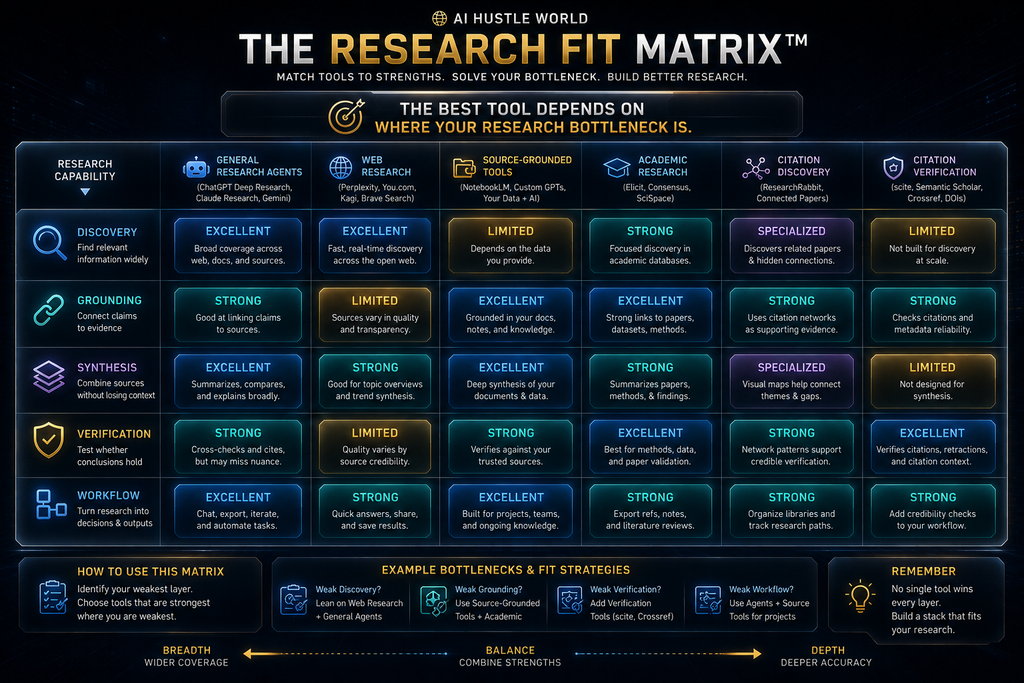
The Research Fit Matrix
The quickest way to choose is to name your bottleneck and match it to a starting tool. The matrix below links common research problems to the tool whose strengths address them most directly, with a reason for each match. Start with the row that matches your biggest problem today, and revisit the table as your research needs change.
| Your bottleneck | Best starting point | Why |
|---|---|---|
| Finding current information | Perplexity | Fast web answers with sources |
| Complex general investigation | ChatGPT deep research | Planned, multi-source, cited reports |
| Research inside Google apps | Gemini Deep Research | Search plus Gmail, Drive and notebooks |
| Interpreting complex material | Claude Research | Careful reasoning and clear synthesis |
| Analyzing sources you already have | Gemini Notebook | Answers grounded in your documents |
| Systematic literature review | Elicit | Structured extraction across papers |
| Quick scientific answers | Consensus | Summaries of peer-reviewed findings |
| All-in-one academic workspace | SciSpace | Reading, reviews and writing together |
| Finding related papers | ResearchRabbit | Citation maps from seed papers |
| Checking a key finding | Scite | Supporting and contrasting citations |
Most serious projects use two or three of these together. A common academic stack is ResearchRabbit for discovery, Elicit or Consensus for evidence, Gemini Notebook for analysis and Scite for checking key citations. A common business stack is Perplexity for orientation, ChatGPT or Claude for synthesis and Gemini Notebook for internal documents.
How AI Research Works
Most AI research tools follow five stages. First, question interpretation: the system works out what you are asking, which is why vague questions produce vague research. Second, search planning: it decides which searches to run and which sources to prioritize, sometimes showing you the plan. Reviewing that plan is one of the best chances to improve the result.
Third, retrieval: it collects candidate sources and pulls relevant passages. Fourth, source analysis: it reads and compares what it found. Fifth, synthesis: it combines the material into an answer or report. Each stage can go wrong, and errors early in the chain carry through to the final output. Problems are cheapest to fix at the start.
That is why the research question matters so much. A precise question with a clear scope, time range and evidence standard produces better plans, better retrieval and better synthesis. Our guide to writing AI prompts for accurate answers shows how to frame research questions well. Our beginner’s guide to AI prompts covers the basics.
The AI Research Reliability Chain
The reliability of an AI research report depends on a chain: the question, the sources searched, the sources retrieved, how they were read, how findings were combined and how the result was presented. A weak link anywhere can produce a confident report that is subtly or seriously wrong. Knowing the links helps you know where to look.
Citations help but do not guarantee accuracy. A cited source may not say what the summary claims, may be outdated or may be a low-quality page that happened to rank well. Our guide to AI hallucinations explains why models can misstate even sources they have read. A citation is a starting point for checking, not proof.
The practical response is to check the claims that matter most, not every sentence. Identify the three to five findings your decision depends on, open their sources and confirm each one. Our framework for checking AI information gives a step-by-step method. Focused checking keeps the time cost reasonable.
Why Traditional Research Still Matters
AI does not replace the core skills of research: forming a good question, judging source quality, reading methods sections, noticing conflicts and understanding context. Those skills decide whether AI output is useful or misleading, and people without them are more likely to accept a polished but flawed report.
Some research also depends on access AI tools do not have: paywalled journals, internal data, interviews, archives and expert conversations. Talking to a practitioner or reading a primary dataset often reveals things no search engine indexes, and those insights are frequently the most valuable part of a project.
The best approach combines both. Use AI to do the heavy searching, reading and organizing, then apply traditional research judgment to decide what the evidence means. Our guide to AI qualitative research shows this balance for interviews and other primary research. The same balance applies to almost any research project.
Verification Debt: The Cost of Unchecked Claims
AI research creates a new kind of cost we call verification debt. Every unchecked claim in a report is a small debt. Each one may be fine, but if you publish, decide or build on the report without checking, the debt can come due as an error, a correction or a decision made on false premises. Most people never notice the debt until something goes wrong.
Verification debt grows with the length and polish of AI reports. A 20-page report with 80 citations feels authoritative, which makes it tempting to skip checking. Yet the more claims a report contains, the more likely it is that some are wrong, outdated or misrepresented, and the harder it is to find them later.
The way to manage verification debt is to plan for it. Budget checking time into every research task, focus on claims your decision depends on and record which claims you verified. A shorter report you have checked is more valuable than a long one you have not. Make the verification list part of the final report.
A Practical AI Research Workflow
Step 1: define the decision. Write down what decision the research should inform and what would change your mind. Step 2: define the evidence standard. Decide which sources count, such as peer-reviewed studies, official statistics, primary documents or reputable industry reports, and how recent they must be.
Step 3: choose the research environment. Use a web tool for current information, an academic tool for literature or a grounded tool for your own documents. Step 4: build the evidence set. Gather sources, remove weak ones and keep a list of what you are relying on, so later steps stay grounded. Many projects use two environments together.
Step 5: extract structured evidence. Record each key claim with its source, date, type of evidence, confidence level and limitations in a simple table. Step 6: ask for synthesis. Have the AI combine the evidence into findings, keeping facts, interpretations and uncertainties clearly separated. The table below shows a simple format.
| Claim | Source | Evidence type | Date | Confidence | Limitation |
|---|---|---|---|---|---|
| Claim A | Primary source | Direct statement | 2026 | High | Vendor-controlled |
| Claim B | Peer-reviewed study | Measured outcome | 2025 | Medium | Small sample |
| Claim C | Industry report | Estimate | 2026 | Medium | Methods unclear |
Step 7: attack your own conclusion. Ask the AI to find evidence that contradicts your findings and to list what the research cannot answer. Step 8: verify high-consequence claims. Check the sources behind the claims your decision depends on before you act or publish. This step catches most serious errors.
Research question: [QUESTION]. Decision it informs: [DECISION].
Evidence standard: peer-reviewed studies and official sources, 2023 or later.
For each finding, give: the claim, the source, the evidence type, and a confidence level.
Separate established findings from interpretation. List conflicting evidence and
what remains unknown. Do not invent sources. Say when evidence is missing.
How to Measure Research Quality
Judge AI research on seven qualities. Coverage: did it find the important sources? Source quality: are those sources credible and appropriate? Traceability: can you link each claim to its source? Agreement: where do sources agree, and is that agreement real or just repetition? Repeated claims can look like agreement when they are not.
Conflict detection: did it surface disagreements and contrary evidence? Freshness: is the information current enough for your purpose? Decision usefulness: does the output help you decide or act, or is it just a long summary? Scoring a report on these seven takes a few minutes and reveals most weaknesses.
Source count is not a quality measure. Fifty weak sources are worse than five strong ones, and many citations can be repetitions of the same original claim. Focus on whether the key findings rest on solid, independent evidence, not on how impressive the reference list looks. Quality beats quantity every time.
Where AI Research Assistants Fail
The most common failures are predictable. Weak source selection means the tool relies on low-quality or SEO-driven pages. Citation overconfidence means a source is cited but does not support the claim. Evidence compression means caveats and conditions vanish in summary, changing what a finding means. Each failure has a simple check.
Conflicting evidence is often smoothed over rather than highlighted. Outdated information appears when a tool relies on old pages or training data. Search-space bias means the tool only sees what its search covers, missing paywalled journals, internal data or non-English sources that may matter. Ask tools to state what their search did not cover.
Missing evidence is invisible: a report rarely says what it could not find. Vendor-controlled evidence means a claim comes from a company promoting its own product. Methodology blindness treats a small pilot like a large trial. False precision reports numbers more exactly than the evidence supports. Label these issues whenever you spot them.
Knowing these failure modes helps you write better prompts and check smarter. Ask tools to rate source quality, flag conflicts, note what they could not find and label vendor claims, then spot-check the results. That habit turns AI research from a black box into a process you can trust. It also makes your research easier to defend.
Vendor Claims vs Evidence
One distinction matters more than any other in business and technology research: the difference between a vendor claim and evidence. A company saying its product “saves 50% of time” is a claim. An independent study measuring that outcome is evidence. AI tools often present both with the same confidence. Separating the two protects every recommendation you make.
| Claim type | Meaning |
|---|---|
| Fact | Directly verifiable information, such as a published price |
| Research finding | A result reported by a study, with its own method and limits |
| Vendor claim | A statement made by the company selling the product |
| Analysis | An interpretation of evidence, such as our editorial assessments |
| Illustrative example | A hypothetical scenario used to explain a point |
Ask your research tool to label every claim using categories like these. It is one of the simplest ways to raise research quality, and it protects you from building recommendations on marketing statements. Our guide to AI product discovery applies the same discipline to competitive research. The habit takes seconds and pays off for years.
Free vs Paid AI Research Assistants
Free tiers are strong in this category. Elicit’s Basic plan offers unlimited paper search and summaries, Consensus’s free plan includes basic search and a few Pro messages and deep reviews, ResearchRabbit is free forever for most uses, Perplexity has a free plan and Gemini Notebook supports 50 sources per notebook without paying.
Paying makes sense when you hit limits regularly, need deep research reports often, run systematic reviews, need team features or want the most capable models. The right upgrade is usually the single tool you use most, not several subscriptions at once, because overlapping tools add cost without adding much value.
A practical approach is to use free tiers for a month, track where you hit limits and then upgrade only that tool. Students can often cover most needs for free with Gemini Notebook, ResearchRabbit, Elicit Basic and Consensus Free. Our list of free AI tools for students includes more options. You can always upgrade once you know what you need.
Best Choices by User Type
Students
If you are a student, start with Gemini Notebook for your course materials, ResearchRabbit to find related papers and Consensus or Elicit’s free plan for evidence questions. Use Perplexity for quick orientation on new topics, and see our guide to optimizing content for ChatGPT, Perplexity and Gemini if you also publish research. Check your institution’s rules on AI use and always cite the original sources, not the AI tool.
Professionals and Business Researchers
If you research markets, competitors or policies, ChatGPT deep research and Perplexity cover most needs, with Claude or Gemini for synthesis and writing. Use Gemini Notebook for internal documents and interview notes. Label vendor claims carefully, because business topics are full of them, and check key numbers against primary sources.
Academic Researchers
If you do academic research, combine ResearchRabbit for literature discovery, Elicit for structured extraction, Consensus for quick evidence questions, SciSpace for reading and writing, and Scite for checking key citations. Use a general assistant for drafting, but keep the evidence work in specialist tools with stronger coverage.
Legal and High-Stakes Research
If your research feeds legal, medical or financial decisions, use AI to find and organize sources, but keep qualified people responsible for interpretation. Prefer tools that ground answers in documents you control. Our guides to AI legal research and AI due diligence cover specialized workflows. Document every source you rely on.
Common Mistakes When Using AI Research Assistants
Starting With a Vague Question
“Tell me about remote work” produces a generic report. “What does research since 2023 say about remote work’s effect on early-career employee development?” produces something useful. Spend a few minutes sharpening the question before you start; it improves every later step. Clear questions lead to clear answers.
Asking for the Final Report Too Early
Jumping straight to a polished report hides weak evidence behind good writing. Gather and review evidence first, then ask for synthesis. That order lets you catch bad sources before they shape the conclusion. Evidence first, writing second is a simple rule that prevents many mistakes in AI-assisted research.
Treating All Citations Equally
A peer-reviewed study, a government statistic, a blog post and a vendor press release are not equal sources. Check what kind of source each citation is, and weight your conclusions accordingly, especially for claims your decision depends on. Ask the AI to label each source type for you. Source type is often more important than source count.
Ignoring Contradictory Evidence
AI summaries tend to smooth over disagreement. Ask explicitly for conflicting findings and for the strongest argument against your conclusion. A conclusion that survives that challenge is far more reliable than one that was never tested. Make the challenge a standard step in every project. It takes only one extra prompt.
Trusting Polished Reports
Good formatting and confident language say nothing about accuracy. The more polished a report looks, the more deliberately you should check its key claims, because polish makes errors easier to miss and harder to question. Check the substance, not the style. A plain report with checked facts is worth more than a beautiful one with errors, and readers notice the difference quickly.
Paying for Features You Do Not Use
Many people subscribe to several overlapping tools. Track which ones you use each week, keep the one or two that remove real bottlenecks and cancel the rest. The money is better spent on the tool that fits your main research job. Our list of ChatGPT alternatives can help you compare general assistants.
The Future of AI Research
AI research has moved through clear stages: search engines that return links, answer engines that summarize results, deep research tools that plan and write reports, and now research agents that run multi-step investigations across many sources and tools. The next stage is research systems that combine agents with your own data, permissions and checks.
As research becomes cheaper and faster, judgment becomes more valuable. Anyone can now produce a long cited report in minutes, so the advantage shifts to people who ask better questions, set clearer evidence standards and know which findings to trust. Our explainer on how AI search engines find and rank information shows how these systems choose sources.
The tools will keep improving, but the core discipline will not change: define the question, choose good sources, check the claims that matter and stay honest about what you do not know. Those habits will matter even more as AI research becomes routine in every kind of work. For long sources, our guide to compressing documents for AI helps you keep the key context.
How We Researched This Guide
This guide is based on vendor documentation, help pages and pricing pages, not hands-on benchmarking. In October 2026 we reviewed OpenAI’s help article on deep research, Perplexity’s help article on Research mode and its Pro page, Google’s help page on Gemini Deep Research and the Gemini Notebook plans page, Claude’s pricing page and the pricing pages for Elicit, Consensus, SciSpace, ResearchRabbit and Scite.
Prices and limits are as shown at the time of checking and may change or differ by region. The research stack, the Research Fit Matrix, verification debt and the W.O.R.T.H. scores are AI Hustle World’s editorial frameworks and assessments. We have no affiliate relationship with any tool in this comparison.
Final Thoughts
There is no single best AI research assistant, because research is not a single task. ChatGPT deep research leads for complex general investigations, Perplexity for fast cited answers, Gemini Deep Research for Google-connected work, Claude for reasoning-heavy synthesis and Gemini Notebook for research from your own sources.
For academic work, Elicit, Consensus, SciSpace, ResearchRabbit and Scite each own a specific job: structured extraction, quick evidence answers, an academic workspace, literature mapping and citation checking. Most serious researchers combine two or three of them rather than relying on one tool for everything.
Whichever tools you choose, the same discipline applies: start with a clear question, set an evidence standard, keep facts and interpretations separate, look for contrary evidence and verify the claims your decision depends on. AI makes research faster; your judgment makes it reliable. To check what your tools tell you, use our framework for checking AI information.
Build a Better AI Research Workflow
Choose the tool that matches your research needs, then use a practical framework to check its answers.
Verify What AI Research Tells You →Frequently Asked Questions
What is the best AI research assistant?
ChatGPT deep research is the strongest all-round choice for complex research. Perplexity is best for fast web answers, and Gemini Notebook is best when you already have your sources.
What is the best free AI research assistant?
Gemini Notebook, ResearchRabbit, Elicit Basic, Consensus Free and Perplexity’s free plan all offer strong free tiers. Which is best depends on whether you research the web, papers or your own documents.
Is Perplexity better than ChatGPT for research?
Perplexity is faster for quick, cited web answers. ChatGPT deep research is stronger for long, planned investigations that need a structured report. Many people use both.
What happened to NotebookLM?
Google’s NotebookLM now appears as Gemini Notebook at notebook.google. It still answers questions from your own sources with inline citations, and its free plan supports 50 sources per notebook.
What is the best AI tool for literature reviews?
Elicit is strongest for structured, systematic reviews. ResearchRabbit helps find related papers, Consensus gives quick evidence summaries and Scite checks how key papers were cited.
Can AI research assistants replace Google Scholar?
Not entirely. They speed up discovery and summarizing, but Google Scholar and library databases remain important for full coverage, access to paywalled papers and precise searches.
Are AI research citations reliable?
Usually, but not always. A cited source may not say what the summary claims or may be weak. Open the sources behind your most important claims and confirm them.
Which AI research assistant is best for students?
Start with Gemini Notebook, ResearchRabbit and the free plans of Elicit and Consensus. Together they cover reading, discovery and evidence questions at little or no cost.
Which tool is best for business research?
ChatGPT deep research and Perplexity cover most business research, with Claude or Gemini for synthesis and Gemini Notebook for internal documents. Label vendor claims carefully.
Can AI do a full systematic review?
AI can speed up searching, screening and extraction, as Elicit’s systematic review workflow shows, but a rigorous review still needs human protocols, judgment and checking at each stage.
Related Guides
- Best Free AI Tools for Students in 2026: 10 Tools to Study Smarter
- Best AI Tools for Beginners in 2026 (Free & Paid)
- How AI Search Engines Find and Rank Information: A Beginner’s Guide
- AI Product Discovery: How to Use AI for Competitive Research and Market Analysis
Written by
Muntasir Ahmad Chowdhury
Founder, AI Hustle World
Muntasir Ahmad Chowdhury is the Founder of AI Hustle World, an independent publication dedicated to making Artificial Intelligence practical, trustworthy, and easy to understand. He researches AI tools, automation, customer service, productivity, and real-world business applications, helping readers make smarter technology decisions through research-driven, experience-backed content.
Expertise:
AI Tools • AI Automation • AI Customer Service • AI Productivity • Generative AI • AI Workflows
Get Smarter With AI
Enjoyed this guide? Get practical AI tools, tutorials, and honest reviews delivered to your inbox.