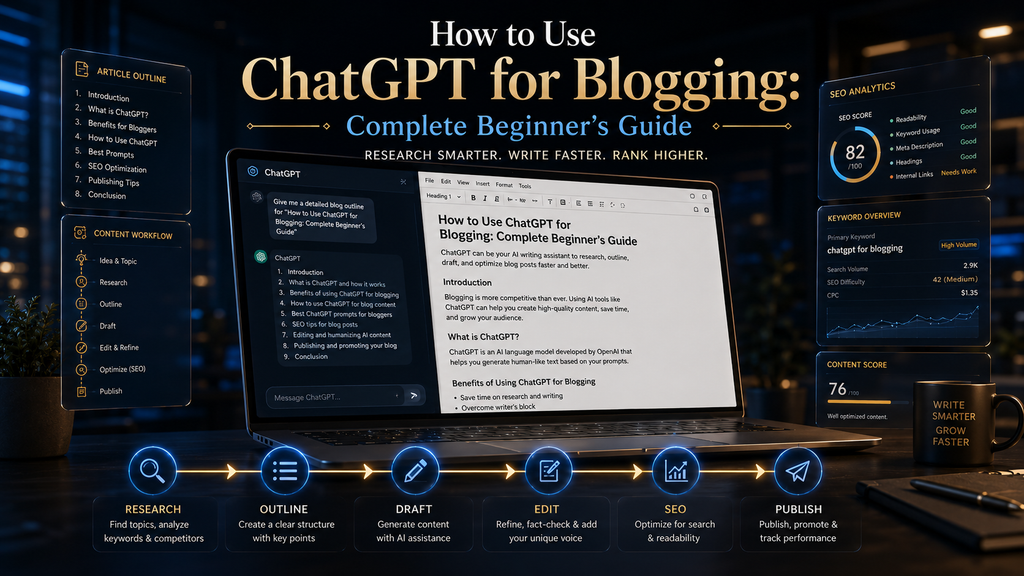
Evidence: Documentation reviewed
Last checked: August 2026
What was done: Written from official documentation and the published sources linked in this article. Not hands-on tested.
Files: None
Affiliate links: No
Last updated: October 2026
How to Use ChatGPT for Blogging: The Complete Beginner’s Guide
The best way to use ChatGPT for blogging is as an assistant inside a human-led workflow. Let it help you research, plan, outline, draft, critique and package each post, while you choose the topic, verify every claim, add your own experience and make the final publishing decision. Used that way, it saves hours without turning your blog into generic AI content.
Most beginners start the other way around. They open ChatGPT, type “write me a 2,000-word blog post about productivity,” and paste whatever comes back into WordPress. The result usually reads smoothly, but it says what a hundred other articles already say, and some of its confident details may not be true.
Google has made the line clear. Its guidance on using generative AI content says AI can be useful for researching a topic and adding structure to original content, but generating many pages without adding value for users may violate its spam policy on scaled content abuse. The tool is allowed; low-value output is the problem.
This guide shows you a complete, repeatable process. You will learn what ChatGPT should and should not do for a blogger, a twelve-step workflow with copy-ready prompts, a worked example, the most common mistakes, how to update old posts with AI, and how ChatGPT scores as a blogging assistant on our W.O.R.T.H. Score.
What ChatGPT Can and Cannot Do for a Blog
ChatGPT is a conversational AI system built on a large language model. It is very good at working with text you give it: generating options, reorganizing notes, drafting sections in a requested style, summarizing long material and spotting gaps or repetition in a draft. The quality of what it produces depends heavily on the material and instructions you give it.
For a blogger, that makes it useful at almost every stage of production. You can use it to brainstorm angles, turn research into a brief, build an outline, draft sections, write examples, critique your own writing, suggest titles and meta descriptions, plan internal links and repurpose a finished post into emails or social content.
What it cannot do is guarantee that anything it writes is true, current or original. Google’s own guidance reminds publishers that generative models predict a likely sequence of words rather than retrieving facts, so outputs may contain inaccuracies. Our guide to AI hallucinations explains why this happens.
ChatGPT also has no access to your experience unless you supply it. It has never run your blog, tested your recipe, used your software or talked to your readers. Those details are what make a post worth reading, and they have to come from you. Think of ChatGPT as a fast, capable assistant that still needs an editor-in-chief.
Is It Allowed? What Google Says About AI-Assisted Blogging
Many beginners worry that Google penalizes any content touched by AI. That is not what Google’s documentation says. Its guidance focuses on how content is produced and whether it helps people, and it describes generative AI as useful for research and for adding structure to original work. What matters is the value a page gives readers.
The risk comes from scale without value. Google’s spam policies define scaled content abuse as generating many pages primarily to manipulate rankings rather than help users, and they name “using generative AI tools” to produce many pages without adding value as one example. Publishing fifty unedited AI posts a week fits that description.
The positive standard is Google’s guide to creating helpful, reliable, people-first content. It asks whether your content provides original information, reporting, research or analysis, and whether it offers substantial value compared with other pages in search results. A raw ChatGPT draft rarely passes that test on its own.
Google also asks publishers to fact-check AI-generated content before publishing, and that includes metadata such as title elements, meta descriptions, structured data and image alt text. So the review step applies to the whole publishing package, not only the body copy. The workflow in this guide builds those checks in from the start.
Why One-Prompt Articles Usually Fail
A single prompt such as “write a blog post about X” gives ChatGPT a topic and nothing else. With no audience, angle, evidence or constraints, the model fills the gaps with the most typical content it can produce. Typical content is, by definition, what readers have already seen many times. That is why the output feels familiar even when it is well written.
The structure suffers too. One giant prompt tends to produce an introduction that restates the title, sections that repeat each other, generic transitions and a conclusion that summarizes everything again. Depth is uneven because the model spreads its effort across the whole article instead of thinking hard about each part.
Accuracy is the third problem. When you do not supply sources, the model may present plausible statistics, product features or dates that no one has checked. Each of those details can damage trust if a reader notices, and in some niches, such as health, money or law, a wrong detail can harm someone. The model rarely signals which details it is unsure about.
The fix is to split the job into stages and give each stage its own context and checks. That is slower than one prompt, but far faster than writing from scratch, and the output is something you can stand behind. The rest of this guide is built around that idea. Each step below has one job, one prompt and one check before you move on.
What to Delegate and What to Keep
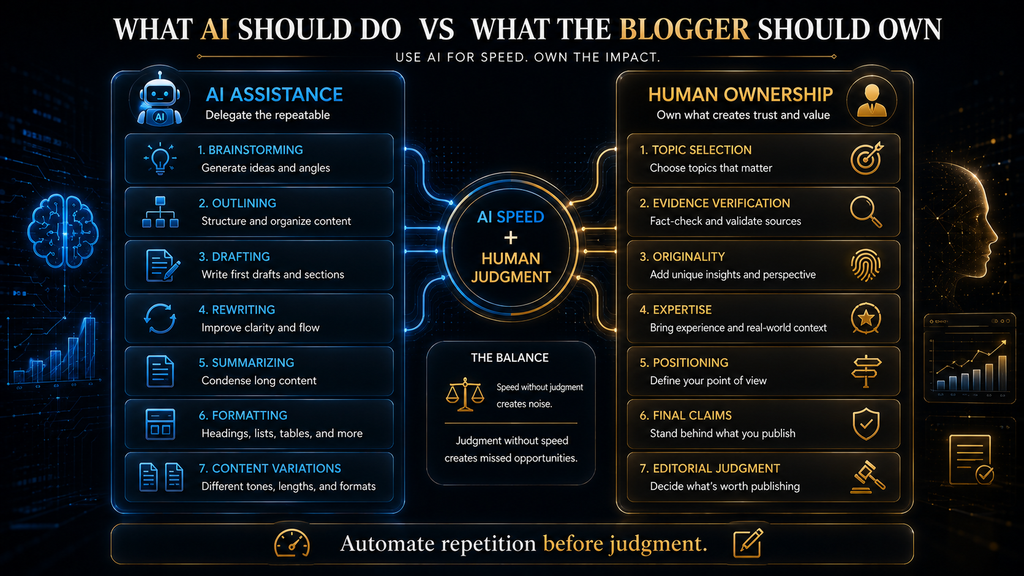
Before you open ChatGPT, decide which jobs belong to the tool and which belong to you. A useful rule is to automate repetition before judgment. Let AI take the work that is repetitive or mechanical, and keep every decision that affects whether the article is true, useful and yours. The table below shows how that split works at each stage.
| Task | ChatGPT’s role | Your role |
|---|---|---|
| Topic ideas | Generate many options and angles | Choose the topic your readers need |
| Research | Organize notes, list questions to answer | Find and verify primary sources |
| Outline and brief | Structure the material logically | Approve the angle and order |
| Drafting | Write first drafts section by section | Rewrite with your voice and experience |
| Editing | Flag repetition, vague claims, weak transitions | Decide what changes and what stays |
| Fact-checking | List every claim that needs a source | Confirm each claim against the source |
| SEO package | Suggest titles, meta descriptions, FAQs | Check accuracy and intent match |
| Publishing | Draft alt text and social copy | Make the final publish decision |
The left column is where ChatGPT saves you time. The right column is where your blog earns trust. If you ever find yourself letting the tool decide whether a claim is true, whether a product is good or whether a post deserves to exist, you have moved a judgment job to the wrong side of the table. Move it back before you publish.
The ChatGPT Blogging Workflow at a Glance
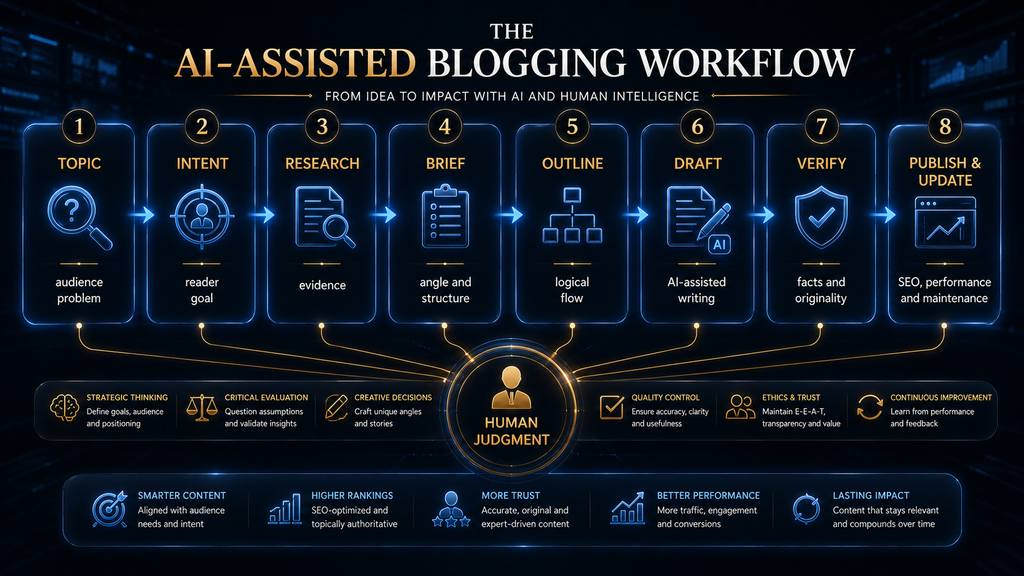
Here is the full process this guide follows: topic, search intent, research, brief, outline, section drafts, critique, fact-check, your expertise, SEO, final edit, publish and update. Each stage has a clear input, a clear output and a check before you move on, which is what keeps quality steady as you publish more.
Compare that with the one-step version: prompt, article, publish. The short version feels efficient, but it skips every stage where quality is created. Most of the time you save on day one is lost later through rewrites, corrections, weak rankings and readers who do not come back. The full loop is slower per post but faster over a year.
You do not need every stage for every post. A short news update may skip the brief, and a personal story may need little research. But for any post you want to rank and keep for years, run the full loop. After a few articles it becomes a habit, and the prompts below make each stage quick. Adjust the depth of each stage to the stakes of the post.
Step 1: Choose a Topic Your Reader Needs
Start with the reader, not the tool. Asking ChatGPT “what should I write about?” hands your content strategy to a system that knows nothing about your audience, your existing posts or your goals. Ask instead what your readers are struggling with, and use ChatGPT to widen and test your answer. Your own analytics and reader emails are good places to start.
Before you open a chat, write down who the reader is, what problem they are trying to solve, what question they would type into Google, what outcome they want and what your article can add that existing articles do not. If you cannot answer the last question, the topic may not be worth writing yet. These notes also become the core of your brief later.
Then use ChatGPT to stress-test the idea. Give it your reader profile and your proposed topic, and ask for narrower angles, likely follow-up questions and topics that would be outside the main intent. Its job at this stage is to widen your thinking, not to make the choice. A prompt like this keeps the decision with you:
I run a blog for [AUDIENCE]. I am considering an article on [TOPIC].
1. List 10 narrower angles a beginner in this audience would search for.
2. For each, state the main problem the reader wants solved.
3. Flag any angle that would need expertise or data I may not have.
Do not write the article. Do not invent statistics.
A broad topic such as “artificial intelligence” is too wide to satisfy any one reader. “How to use ChatGPT for blogging” is better, and “how to use ChatGPT to create a blog outline” could become a focused supporting post. Narrow topics are easier to make genuinely useful, and they link naturally into a cluster of related guides.
Step 2: Define the Search Intent
Search intent is the job the reader wants your page to do. Someone searching “how to use ChatGPT for blogging” wants a practical process, not a list of twenty AI tools, a software review or an essay about the future of writing. If your post answers a different question, it will disappoint the reader even if it is well written.
Intent shapes everything that follows: the format, the depth, the examples and even the length. An informational query needs steps and explanations, a comparison query needs a table and verdicts, and a transactional query needs pricing and clear next steps. Getting this wrong is one of the most common reasons good writing fails to rank.
ChatGPT can help you think through intent, but treat its answer as a hypothesis. Check it by searching the query yourself and looking at what already ranks. If every top result is a step-by-step tutorial, a long opinion essay is unlikely to satisfy the same searcher, however good it is. The search results page is the best evidence of intent you have.
I am writing an informational article for beginner bloggers.
Topic: [TOPIC]
Analyze the likely search intent. Identify:
1. What the reader most wants to accomplish
2. The questions they probably have, in the order they would ask them
3. What a genuinely useful article must teach
4. Subtopics that sound related but are outside the main intent
Do not write the article yet.
Step 3: Research Before You Write
Research comes before drafting, never after. If ChatGPT writes first and you look for sources later, you end up trying to justify whatever the model produced instead of writing from evidence. Reverse the order and the draft is built on facts you have already confirmed. Every claim in the draft then has a source attached, which makes fact-checking much faster.
Use ChatGPT to plan the research, not to be the research. Ask it for the key questions, the claims that will need authoritative sources, the competing viewpoints and the common misconceptions. Then go to primary sources: official documentation, product pricing pages, original studies, government sites and recognized experts in your niche.
Research features have improved. OpenAI describes deep research as a multi-step research capability that searches, analyzes and synthesizes sources into a cited report. OpenAI’s own announcement also notes limitations: it can sometimes hallucinate facts or make incorrect inferences, and it may struggle to tell authoritative information from rumor.
So even a cited report is a starting point. Open the sources it lists, confirm that each one says what the report claims and note the date. Discard anything you cannot trace back to its origin. If you want help choosing research tools beyond ChatGPT, our comparison of the best AI research assistants covers the main options.
I am researching an article about [TOPIC] for [AUDIENCE].
Create a research checklist with:
- key questions the article must answer
- claims that will need an authoritative source, and what kind of source
- current developments I should check for recent changes
- competing viewpoints and common misconceptions
Do not invent sources, statistics or quotes.
Separate what you know from what you are assuming.
Step 4: Turn Research Into an Article Brief
A brief is the bridge between research and writing. It records the decisions that should not change once drafting starts: the primary keyword, the search intent, the target reader, the problem, the desired outcome, the unique angle, the evidence you will use, the planned structure, the internal links and the call to action.
This is where ChatGPT shines. Paste in your research notes and your answers from Steps 1 and 2, and ask it to organize everything into a structured brief. It is fast at this kind of sorting, and the result gives you something concrete to approve or change before a single paragraph is written. Approving the brief takes minutes and saves hours of rewriting.
Read the brief critically. Check that the thesis is something you believe, that the angle differs from what already ranks and that every claim in the evidence list has a source you have seen. A strong brief makes the draft easy; a weak brief guarantees a weak draft no matter how good the prompts are. Fix the brief first, then draft.
Using the research notes below, create an editorial brief.
Primary keyword: [KEYWORD]
Audience: [AUDIENCE]
Intent: informational
Include: 1) one-sentence thesis 2) unique angle 3) section structure
4) evidence needed per section 5) likely reader objections
6) internal-link opportunities from this list: [YOUR URLS]
Rules: no ranking promises, no invented facts.
[PASTE RESEARCH NOTES]
Step 5: Build the Outline
Do not jump from brief to “write the article.” First build the architecture. A good outline answers the reader’s questions in the order they will have them, puts the direct answer near the top and makes sure each section has one clear job that no other section repeats. If you cannot describe a section’s job in one sentence, it probably needs to be split or cut.
For a how-to topic like this one, a natural order is: what the tool can and cannot do, whether it is allowed, the complete workflow, prompts for each step, SEO, mistakes, real-world use and questions. Ask ChatGPT to propose an outline, then reorder, merge and cut until the flow feels like a conversation with one reader.
Use the outline to prevent repetition before it happens. If keyword research is explained in Step 2, the SEO section should refer back to it instead of explaining it again. Catching that at the outline stage takes seconds; catching it after drafting means rewriting whole sections. A clean outline also makes the final article easier to scan.
Using this approved brief, propose an outline with H2 and H3 headings.
Order the sections by the questions a beginner would ask, first to last.
Under each heading, write one sentence describing its single job.
Flag any two sections that overlap.
[PASTE BRIEF]
Step 6: Draft Section by Section
Now ChatGPT becomes a drafting engine, but only for one section at a time. Give it the brief, the outline and the job of the specific section you want. Tell it what the previous section covered, so it does not repeat the introduction, and what the next section will cover, so it can hand off naturally. This keeps the article flowing as one piece of writing.
Section-by-section drafting has three advantages. Each section gets the model’s full attention, you can inspect the argument as it develops and you can give each part a different objective, such as explaining a problem, showing a process or comparing options. The finished article is more coherent because you steered it at every turn.
Keep your constraints in every drafting prompt: the reader, the tone, the evidence rules and the phrases you never want to see. If you use the same requirements often, our guide to writing system instructions shows how to store them so you do not paste them every time. Consistent instructions are the easiest way to keep tone steady across a long article.
Write the section "[HEADING]" for an article on [TOPIC].
Audience: [AUDIENCE]. Job of this section: [ONE SENTENCE].
The previous section covered [X]. The next section covers [Y].
Requirements: plain, professional tone; one concrete example;
explain the mechanism, not just the advice; no unsupported claims;
no generic phrases such as "in today's fast-paced world".
Write only this section.
The Six-Part Blogging Prompt
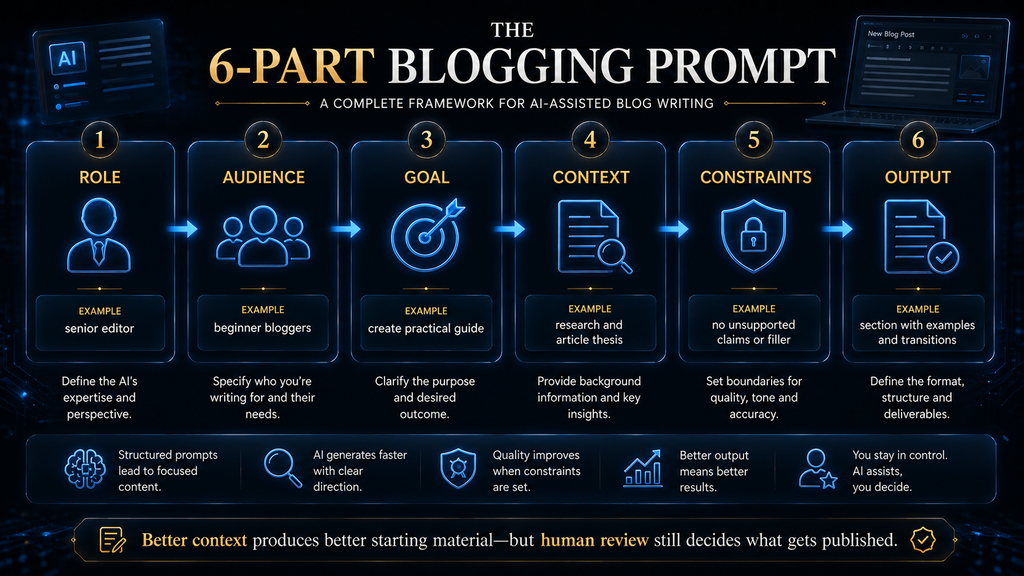
Most strong blogging prompts share six parts: role, task, audience, context, constraints and format. The role sets the perspective, the task states the exact job, the audience says who it is for, the context supplies your facts, the constraints rule things out and the format defines what the output should look like.
You do not need all six for every request. A quick headline brainstorm may need only task, audience and format. But when a result disappoints, check which part was missing. Weak output usually traces back to missing context or a vague task far more often than to the wording of the prompt. Fix the missing part before rewording anything else.
Context carries the most weight. A well-worded prompt with no context still produces average content, while a plain prompt with your research, your examples and your opinion produces something specific, so spend your effort on context first. Our beginner’s guide to writing AI prompts covers each part in more depth.
Step 7: Critique Before You Rewrite
Your first draft is raw material. Before you ask ChatGPT to improve anything, ask it to critique the draft. “Make this better” gives the model no standard, so it changes words without fixing problems. A critique first, revision second approach shows you what is wrong, and you decide what to change. The model becomes a reviewer instead of a rewriter.
Ask for specific weaknesses: repeated ideas, claims without support, vague sentences, missing explanations, weak transitions and places where a reader would ask “so what?” Then read the list yourself. Some points will be useful, some will be wrong and a few will reveal problems you had not noticed. Keep the useful points and ignore the rest.
Only then ask for a revision, and tell the model which critique points to apply. This two-stage process keeps you in control of the edit. It also stops a common failure where each “improvement” makes the text a little longer, a little more generic and a little further from your voice. Small, targeted revisions keep the draft yours.
Review this section as a strict professional editor.
List: repeated ideas, unsupported claims, vague language,
unnecessary sentences, weak transitions and missing explanations.
Do not rewrite anything yet. Critique only.
[PASTE SECTION]
Rewrite the section applying only critique points 1, 3 and 4.
Keep all facts and examples. Do not add new claims.
Keep the length within 10% of the original.
Step 8: Fact-Check Every Claim
Fact-checking is not optional. Statistics, prices, product features, dates, policies, technical details, legal points, health claims, quotes and research findings all need a source you have opened yourself. A single wrong number can undo the trust a well-written post builds. Corrections made after publication rarely reach every reader who saw the original.
ChatGPT is useful here in one specific way: it can list every factual claim in your draft so you do not miss any. Ask it to sort claims into those that need verification, those that are opinion or analysis, and those that look unsupported. Then check each factual claim against a primary source and fix or delete anything you cannot confirm.
Never ask the model to supply the evidence for its own claims. It may produce a citation that looks real but does not exist, or a real source that does not say what the draft claims. Our framework for checking whether AI information is accurate gives a step-by-step method for this. Always open the source yourself before you cite it.
Audit this article for factual claims. Create three lists:
1. Factual claims that must be verified, with the best type of source for each
2. Opinions or analysis that need no source
3. Claims that look unsupported or misleading
Do not invent citations. Do not assume a claim is true because it sounds plausible.
[PASTE ARTICLE]
Step 9: Add What Only You Know
This is the step that separates a strong blog from a pile of AI text. ChatGPT knows patterns from its training data. You know your audience, your results, your mistakes, your niche and the questions readers send you. Those details give a post information that no model can produce on its own. They are also what readers remember and share.
Go through the draft and look for places where a general statement could become a specific one. Replace “ChatGPT can help bloggers save time” with what it saved you, on which task and what you still had to fix. Add a screenshot of your own process, a real before-and-after example or a short story about what went wrong the first time.
Opinion counts as expertise too. Say which approach you recommend and why, where you disagree with common advice, and what you would do differently. A clear, reasoned position is hard to commoditize, and it gives readers a reason to remember your site instead of the dozens of similar pages they skimmed. Readers can disagree with you and still trust you.
If you have no firsthand experience with something, say so plainly and explain what your article is based on instead. Honest framing protects your credibility. Claiming testing you did not do is one of the fastest ways to lose a reader’s trust once they notice details that do not match their own experience.
Step 10: Use ChatGPT for SEO Without Writing for Robots
ChatGPT can help with many SEO tasks: analyzing intent, finding missing subtopics, suggesting natural related terms, improving headings, generating FAQ ideas and spotting internal-link opportunities. These suggestions are most useful after the article is drafted, when the model can compare what you wrote with what the reader needs.
Keep SEO in a supporting role. A sentence such as “ChatGPT for blogging is a great ChatGPT blogging tool for bloggers” is keyword stuffing, and Google’s guidance points away from content made mainly to manipulate rankings. Use your topic naturally, cover the subject completely and let relevance come from usefulness.
For keyword data, use a real tool. ChatGPT can brainstorm keyword themes, but it does not have live search volumes, so any demand figures it offers are guesses. Our roundup of AI keyword research tools covers options for that job, and our explainer on AI SEO explains how search itself is changing. Combine real data with your own sense of what readers ask.
AI search is a growing consideration too. Clear answers near the top of sections, well-structured headings and specific facts help both Google and AI assistants understand a page. The same qualities make a post easier for human readers to scan. Our guide to optimizing blog posts for ChatGPT, Perplexity and Gemini goes deeper on that.
Analyze this article for search intent and SEO. Do not rewrite it.
Identify: primary and secondary intents, missing subtopics,
natural related terms already missing, weak headings,
internal-link opportunities from this list [URLS] and 5 FAQ ideas.
Do not recommend keyword stuffing. Prioritize usefulness.
Step 11: Titles, Introductions and Meta Descriptions
A good title communicates topic, value and specificity. “ChatGPT Blogging Tips” is vague. “How to Use ChatGPT for Blogging: A Beginner’s Guide” is clearer. “How to Use ChatGPT for Blogging: Research, Writing, SEO and Editing” tells the reader exactly what they will get. Ask ChatGPT for fifteen options, then pick and edit one yourself.
The introduction has three jobs: name the reader’s problem, show why it matters and promise what the article will help them do. Put the direct answer in the first paragraph so a reader who only skims still gets value. A sentence such as “Artificial intelligence has transformed the world” does none of those jobs and should be cut.
Meta descriptions should summarize the page honestly in about one or two sentences and include your main keyword naturally. Remember that Google asks publishers to review AI-generated metadata as carefully as body text. Never let a title or description promise something the article does not deliver, because that is the fastest route to a high bounce rate.
Suggest 15 titles for this article. Each must include "[KEYWORD]",
state the benefit and stay under 60 characters.
Then write 3 meta descriptions under 155 characters that summarize
the article accurately without hype.
[PASTE INTRO AND HEADINGS]
Step 12: Internal Links, Images and the Final Package
Internal links help readers move to related information and help search engines understand how your posts connect. Give ChatGPT a list of your existing article titles and URLs, and ask where a reader of this post would naturally want to go next. Then add links in context, inside the sentence where they help, rather than in a random block.
For images, ChatGPT can suggest what each visual should show and draft alt text that describes the image for screen-reader users. Alt text should describe the image accurately, not repeat keywords. If you create images with AI, our comparison of AI image generators covers the main options. Your own photos and screenshots are usually more convincing.
Finally, ask for the rest of the publishing package: an excerpt, a few FAQ questions, social copy and a short update checklist. Review every item before it goes live. Your CMS, SEO plugin and theme all have their own fields and limits, so check the final preview rather than assuming the generated text fits.
A Worked Example: One Post From Idea to Publish
Here is how the workflow looks for one post. The scenario is an illustration we built to show the steps, not a record of a real project, and the timings are rough estimates for a beginner. Imagine a gardening blogger who wants to write about growing herbs on a small apartment balcony. The same steps apply to any niche.
In Step 1, ChatGPT suggests a dozen angles. The blogger picks “the five easiest herbs for a shady balcony,” because readers often say their balconies get little sun. In Step 2, a quick search shows that the top results are practical lists with care tips, so the post will be a list with clear instructions rather than an essay.
For research, the blogger uses a university extension guide on herb light requirements and their own notes from two growing seasons. ChatGPT turns that material into a brief and an outline. Drafting each section takes a few minutes, and the critique prompt flags that two sections repeat the same watering advice, so they are merged.
The fact-check list shows six claims about light hours and watering frequency, and two do not match the extension guide, so they are corrected. The blogger then adds photos of their own mint and parsley, a mistake they made with basil and a simple weekly care table. That personal layer is what makes the post different from other herb lists.
Planning, writing and checking take perhaps three hours instead of a full day. More importantly, every fact is confirmed, the personal experience is real and the post answers the question that searchers asked. That is the outcome the workflow is designed to produce, and it scales because each step is reusable.
Keep Your Voice Consistent With Projects and Instructions
If you publish regularly, re-explaining your style in every chat wastes time. OpenAI describes projects in ChatGPT as dedicated spaces that hold chats, files, instructions and related context together, so you do not need to restate the same background every time you start a new conversation. That continuity saves time on every post you write.
For a blog, a project can hold your style guide, your banned phrases, your audience description, article templates, your list of published URLs for internal linking and your reusable prompts. Every new chat inside that project starts with the same context, which keeps tone and structure consistent from one post to the next.
Write your style guide carefully. Include sentence length preferences, how you address the reader, words you never use, how you handle claims and sources, and two or three short examples of your best writing. Our guide to context engineering explains why the context you give a model matters more than clever wording.
Keep personal and private data out of shared projects. Do not upload reader emails, client documents or anything you would not want stored on a third-party service, and check your plan’s data controls before you upload work files. Our guide to AI privacy risks explains what to remove before you paste anything into a chatbot.
How to Avoid Generic AI Writing
Readers recognize AI filler quickly. Phrases such as “in today’s fast-paced digital world,” “the possibilities are endless,” “take your content to the next level” and “whether you are a beginner or an expert” take up space without saying anything. Put them on a banned list and include that list in your drafting prompts.
The cure is specificity. Instead of “AI can save bloggers time,” write “ChatGPT is most useful for repetitive work such as outlining, restructuring notes and drafting first versions of sections.” The second sentence tells the reader what to do with the tool, which makes it both more useful and more credible.
Watch the rhythm too. AI drafts often fall into the same patterns: three-item lists everywhere, every paragraph the same length, rhetorical questions followed by answers and summaries at the end of each section. Vary your sentence length, cut the summaries and let some points stand without a list. Natural variation makes the text easier and more pleasant to read.
Finally, read the draft aloud. Anything you would never say to a friend who asked for advice is a candidate for deletion. This simple test catches more generic language than any detector, and it brings the text closer to the way you talk to your readers. It also exposes sentences that are too long to follow in one breath.
Common ChatGPT Blogging Mistakes
Most problems with AI-assisted blogging come from a handful of habits rather than from the tool itself. Each one is easy to fix once you notice it, and fixing them improves quality more than switching tools or buying a premium plan. Below are eight of the most common, each with a simple fix you can apply to your next post.
Asking for the Whole Article in One Prompt
One prompt for an entire article produces generic structure, repetition and uneven depth. Draft section by section instead, giving each section its own job and the context of what comes before and after it. The total time is similar, and the result needs far less rewriting. You can still assemble the sections into one document at the end.
Publishing the First Draft
A first draft is raw material. Every post should go through critique, revision, fact-checking and a final human edit. If you do not have time to review a post properly, you do not have time to publish it, because fixing a damaged reputation takes far longer than editing. Build the review time into your schedule from the start.
Asking ChatGPT to Invent Research
“Give me some statistics about this” invites invented or misattributed numbers. Ask instead for research questions and the types of sources that could answer them, then find those sources yourself. Use only numbers you have read in the original source, and link to it. If you cannot find a source for a number, leave it out.
Letting ChatGPT Choose Your Strategy
ChatGPT can generate endless ideas, but it does not know your site, your audience or your business goals. Your content plan should decide which ideas deserve a post. Use the tool to widen your options, then apply your own judgment about what fits. A good idea for someone else’s blog may be a poor fit for yours, and only you can tell the difference.
Padding Word Counts
If a section feels thin, do not ask the model to “add 300 words.” That produces filler. Ask “what important information is missing for this reader?” and add only what answers that question. Length should come from depth, never from repetition. Readers notice filler quickly, and it makes the useful parts of a post harder to find.
Stuffing Keywords
ChatGPT can produce SEO language at scale, which makes keyword stuffing tempting. Resist it. Use your main term where it fits naturally, cover related subtopics completely and write headings that describe what each section delivers. Natural language serves readers and search engines better. Pages written for people tend to earn links and return visits.
Making Every Post Look the Same
If every article has the same introduction, the same heading pattern and the same conclusion, your site starts to feel machine-made. Keep a consistent quality standard, but let structure follow each topic. A comparison needs a table, a tutorial needs steps and an opinion piece needs an argument. Readers notice the difference even if they cannot name it.
Leaving Out Original Experience
AI can summarize what already exists. Your advantage is explaining what others have not: your results, your process, your examples and your analysis. A post with no original element has no reason to rank above the pages it was built from. Even one real example, screenshot or lesson learned can lift a post above a crowded results page.
Copyright, Ownership and Disclosure Basics
Who owns ChatGPT output? Under OpenAI’s terms of use, as between you and OpenAI, you own the output and OpenAI assigns you its rights in it. The same terms note that output may not be unique, so other users may receive similar text, which is one more reason to rewrite drafts in your own words. Your own edits also make the post more distinctive.
Copyright protection is a separate question. The U.S. Copyright Office has published reports on copyright and artificial intelligence, and its position is that protection depends on human authorship. Text generated entirely by AI is not protected, while your own writing, selection, arrangement and substantial edits can be. Our AI copyright explainer covers the details.
Disclosure is largely a trust decision. Google says that sharing information about how content was created can give readers useful context. Many bloggers add a short note explaining that AI assisted with drafting and that a human researched, edited and checked the post. If your niche involves money, health or legal advice, transparency matters even more.
This is general information, not legal advice. Rules vary by country and change over time, so if your blog is a business or you publish in a regulated field, check current guidance in your jurisdiction or speak to a qualified professional before you rely on any of the points above. When the stakes are high, a short consultation is worth the cost.
How to Use ChatGPT to Update Old Posts
AI is often more useful for maintaining a blog than for growing it. Give ChatGPT an existing post together with new research, current product information and fresh data, and ask it to list outdated claims, missing sections, broken assumptions, new reader questions and changes in tools or features you mention.
Treat the list as leads to check, not as conclusions. Confirm each change against a source, update the facts, refresh examples and add any new section readers need. Then update the “last updated” date only if you made meaningful changes, because readers and search engines both notice a date that changes while the content stays the same.
A steady update routine compounds. Publishing, measuring, updating and improving a strong post often brings more traffic than writing a new one, and it keeps your best pages accurate. If you want to turn finished posts into other formats as well, our guide to AI content repurposing shows a workflow for that.
Compare this published article with the new information below.
List: claims that may be outdated, sections that need updating,
new questions readers now ask, and examples that should be refreshed.
Mark each item "confirmed by new info" or "needs verification".
Do not rewrite the article.
[PASTE ARTICLE] [PASTE NEW INFORMATION]
W.O.R.T.H. Score: ChatGPT as a Blogging Assistant
We rate tools with our W.O.R.T.H. Score: Workflow fit (25), Output quality (25), Risk and rights (15), Total cost (20) and Human effort (15). This is an editorial assessment of ChatGPT as a blogging assistant based on documentation and published guidance, not a lab test, and your score will vary with your niche and skills.
| Factor | Score | Reasoning |
|---|---|---|
| Workflow fit | 22/25 | Helps at almost every stage, from ideas to updates; projects keep context together |
| Output quality | 18/25 | Strong drafts and edits with good context; generic and sometimes inaccurate without it |
| Risk and rights | 10/15 | You own output under OpenAI’s terms, but hallucinations and similar outputs need managing |
| Total cost | 17/20 | A free tier covers basic drafting; paid plans add more capacity and features |
| Human effort | 10/15 | Saves drafting time, but research, fact-checking and editing remain your job |
| Total | 77/100 | A strong assistant for bloggers who keep editorial control |
The score drops sharply if you skip the human stages. Used as a one-click article generator, output quality and risk scores would both fall, and the time saved would be lost in corrections. Used inside the workflow above, ChatGPT earns its place in most bloggers’ toolkits. Our list of ChatGPT alternatives covers other options.
Who Should Use ChatGPT for Blogging
Beginner Bloggers
If you are new to blogging, ChatGPT removes the fear of the blank page. Use it to build outlines, explain unfamiliar concepts and critique your drafts, but write the core of each post yourself so you develop your own voice and judgment. The habits you build in your first fifty posts tend to stay with you.
Solo Creators and Freelance Writers
If you work alone, you have no editor, researcher or assistant. ChatGPT can cover part of each role: brainstorming partner, research organizer and first-pass editor. For freelance writers, it can speed up outlining and revision, provided your client agreements allow AI assistance and you disclose it where required.
Content Teams and Niche Publishers
If you run a team or a large niche site, ChatGPT helps standardize repetitive steps such as briefs, outlines, metadata and update audits. The risk is scale. A shared workflow with mandatory fact-checking and human review keeps quality steady when many people use the same tools at once. Shared prompts and a style guide help everyone work the same way.
Business Owners
If you blog for your business, your advantage is knowledge your competitors do not have: customer questions, case studies and real results. ChatGPT can help turn that knowledge into clear articles quickly. Supply the expertise, review every claim, and keep confidential customer and company data out of the chat.
Who Should Be Careful
You should rely on ChatGPT less if your topic needs specialized expertise, if your posts make health, financial or legal claims, if you work in a regulated industry, or if you cannot personally check what the model writes. In those cases, AI can still help with structure and editing, but a qualified human must own every claim.
Be careful too if your plan is to publish large volumes of content quickly to capture search traffic. That approach is exactly what Google’s scaled content abuse policy targets. Even if a few pages rank for a while, a site built on unedited AI text is fragile and hard to recover once trust is lost. Slow, steady quality builds a more durable site.
Finally, be careful if you are using ChatGPT to avoid learning your subject. The tool amplifies whatever knowledge you bring. A blogger who understands their niche gets far more value from it than one who hopes the model will supply expertise they do not have. Learn the basics of your subject first, then use AI to work faster.
What Happens If You Blog Without a Workflow?
If you keep using one-prompt articles, the costs build slowly. Posts look polished but say little, a few contain errors readers notice, and your site begins to resemble every other site in your niche. Rankings stall because nothing on the page is better than what already exists. Over time, readers learn to skim your posts instead of trusting them.
The second cost is time. Without a process, you spend hours rewriting outputs that missed the point, chasing sources for claims the model invented and fixing posts after readers complain. A defined workflow front-loads the thinking, which is far cheaper than fixing problems after publication. A repeatable process also makes your publishing schedule predictable.
The third cost is skill. Bloggers who outsource every decision to AI stop developing judgment about topics, structure and evidence. Those skills are what make a blog valuable when everyone has access to the same tools, so protecting them is a long-term investment, not a nice extra. Keep doing the thinking yourself, and let AI handle the typing.
The Pre-Publish Checklist
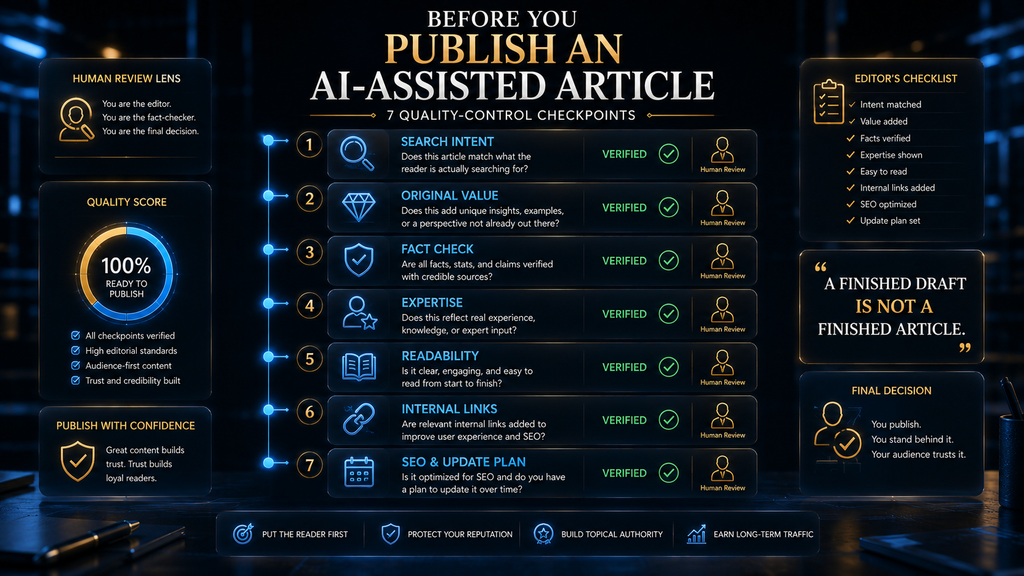
Before any AI-assisted post goes live, run through a final check. It takes ten minutes and catches most problems. Print it, pin it next to your screen or save it in your ChatGPT project so it becomes part of every publishing session. The questions cover intent, originality, accuracy and presentation. Each question takes seconds to answer honestly.
- Does the post answer the search intent in the first paragraph?
- Is there at least one original element: experience, data, examples or analysis?
- Has every factual claim been checked against a source you opened?
- Are prices, dates and product details current as of today?
- Have you removed generic phrases and repeated points?
- Do internal links point to genuinely related posts on your site?
- Are the title, meta description and alt text accurate and natural?
- Would you be comfortable putting your name on every sentence?
If any answer is no, fix it before publishing. A post that is a day late but accurate will outperform a post that is on time but wrong, and it will keep earning trust long after the deadline is forgotten. Errors are also far easier to fix before a post is shared, linked and indexed than after. Your readers will rarely notice the delay.
How We Researched This Guide
This guide is based on official documentation and published guidance, not on hands-on testing for this article. We reviewed Google Search Central’s guidance on generative AI content, its spam policies and its helpful content guide, along with OpenAI’s documentation on projects, deep research and its terms of use, and the U.S. Copyright Office’s AI resources.
The workflow, prompts and checklist reflect the editorial process we use and recommend at AI Hustle World. The gardening example is an illustration created to show the steps, not a case study, and its timings are estimates. The W.O.R.T.H. Score is our editorial assessment. Product features and terms change, so check the linked sources for current details.
Final Thoughts
ChatGPT can be one of the most useful tools in a blogger’s workflow, but only when it does the right jobs. Use it to beat the blank page, organize research, build outlines, draft sections, challenge your reasoning, tighten your writing and package each post for search. Those tasks are repetitive, and the tool handles them well.
Keep the jobs that decide whether a post deserves to exist: choosing the topic, understanding the reader, verifying the evidence, adding your experience and making the final call. The workflow that works is human strategy, AI assistance, human verification and human judgment, in that order, every time you publish.
Build that habit once and every post gets easier. You will write faster, publish with more confidence and build a blog readers trust, which is something no tool can generate for you. To compare ChatGPT with other writing assistants, see our guide to the best AI tools for writing blog posts. Start with your next post and refine the process as you go.
Ready to Build a Smarter AI Blogging Workflow?
ChatGPT can help you research, plan, draft, edit and improve your content—but the real advantage comes from building a workflow that combines AI speed with human judgment.
Explore the Best AI Writing Tools →Frequently Asked Questions
Can ChatGPT write an entire blog post?
Yes, it can generate a complete draft. A publishable post still needs research, fact-checking, your own experience and a human edit, so treat the draft as raw material rather than a finished article.
Is it okay to use ChatGPT for blog content?
Yes. Google does not ban AI-assisted content. Its concern is content made mainly to manipulate rankings, including many AI pages that add no value for users. Useful, original, accurate posts are fine.
Will Google penalize my blog for using ChatGPT?
Using AI alone is not a violation. Problems come from publishing large volumes of low-value or inaccurate content. If each post is researched, checked and genuinely helpful, AI assistance is not the issue.
Can ChatGPT do keyword research?
It can brainstorm keyword themes, questions and topic clusters, but it has no live search volume data. Validate its ideas with a dedicated keyword research tool before you build a content plan around them.
Should I publish ChatGPT’s first draft?
No. Critique it, revise it, check every factual claim, add your experience and remove generic language first. The first draft is a starting point, never the finished post.
Do I own the content ChatGPT writes for me?
Under OpenAI’s terms, you own the output as between you and OpenAI. Copyright protection is separate and depends on human authorship, so your own writing and substantial edits matter.
Should I disclose that I used ChatGPT?
It is not always required, but it builds trust. A short note explaining that AI helped with drafting and a human researched and edited the post is a simple, honest approach many bloggers use.
Is the free version of ChatGPT enough for blogging?
For many beginners, yes. The free tier covers brainstorming, outlining and drafting. Paid plans add more usage and features, which matter more once you publish often or rely on research tools and projects.
How can I make ChatGPT’s writing sound more human?
Give it your audience, examples, opinions and a list of banned phrases, then edit the output yourself. Adding your own stories and specific details does more than any “sound human” instruction.
What is the biggest mistake bloggers make with ChatGPT?
Treating speed as the goal. Publishing more AI text does not build a stronger site. The aim is useful, accurate, differentiated posts, with AI removing the repetitive work around them.
Sources and Further Reading
- Google Search Central: Guidance on using generative AI content
- Google Search Central: Spam policies, including scaled content abuse
- Google Search Central: Creating helpful, reliable, people-first content
- OpenAI: Using projects in ChatGPT
- OpenAI: Introducing deep research
- OpenAI: Terms of use
- U.S. Copyright Office: Copyright and artificial intelligence
Related Guides
- Best AI Tools for Writing Blog Posts (Free & Paid)
- How to Optimize Blog Posts for ChatGPT, Perplexity & Gemini
- AI SEO : What It Is, How It Works, and How Search Is Changing
- Best AI Script and Idea Generation Tools for YouTube Creators (2026)
Written by
Muntasir Ahmad Chowdhury
Founder, AI Hustle World
Muntasir Ahmad Chowdhury is the Founder of AI Hustle World, an independent publication dedicated to making Artificial Intelligence practical, trustworthy, and easy to understand. He researches AI tools, automation, customer service, productivity, and real-world business applications, helping readers make smarter technology decisions through research-driven, experience-backed content.
Expertise:
AI Tools • AI Automation • AI Customer Service • AI Productivity • Generative AI • AI Workflows
Get Smarter With AI
Enjoyed this guide? Get practical AI tools, tutorials, and honest reviews delivered to your inbox.