Evidence: Documentation reviewed
Last checked: August 2026
What was done: Written from official documentation and the published sources linked in this article. Not hands-on tested.
Files: None
Affiliate links: No
Last updated: October 2026
Best AI Translation Tools (Free and Paid): Top 10 Compared
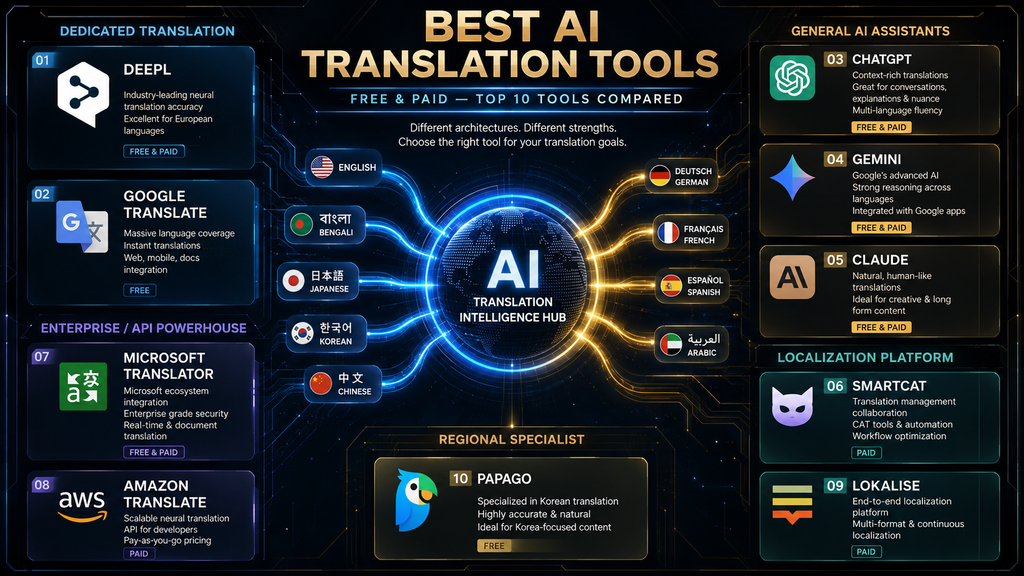
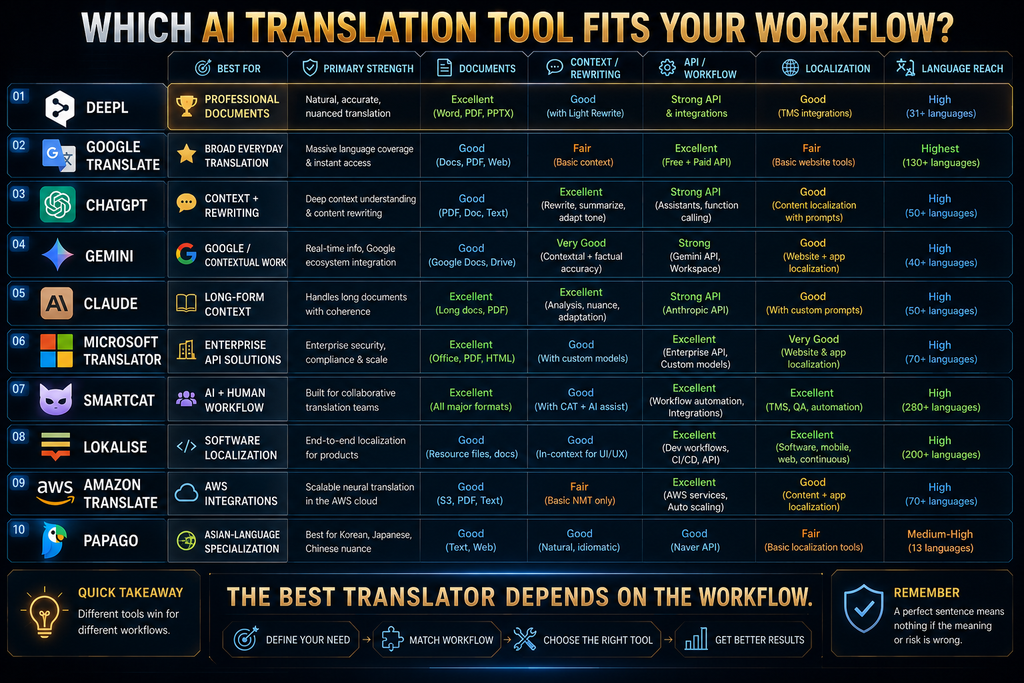
The best AI translation tool depends on what you are translating. DeepL is the strongest choice for professional documents and consistent terminology. Google Translate is the best free tool for everyday use across a huge range of languages. ChatGPT, Gemini and Claude are best when translation also needs rewriting, tone adjustment or explanation, which dedicated translators handle less flexibly.
For businesses, Microsoft Translator and Amazon Translate are reliable APIs for building translation into apps, Smartcat combines AI translation with human review at scale and Lokalise is built for translating software and websites. Papago is a specialist worth considering for Korean and some other Asian-language pairs, where regional strength matters more than language count.
AI translation has become far more capable and far more varied. Some tools translate text instantly, some handle whole documents while keeping formatting, some adapt tone and style, and some manage translation across hundreds of files with glossaries, review steps and integrations. Choosing well starts with naming your actual translation job.
This guide compares ten tools by the job each does best, with facts and prices checked on vendor pages in October 2026. You will get a Translation Fit Framework, a W.O.R.T.H. score for every tool, a quality-control checklist, real-world examples, a seven-step workflow and the most common mistakes people make with AI translation.
Quick Comparison: 10 Best AI Translation Tools
Here is the short version. “Type” describes how each tool is mainly used, which matters more than raw language counts. Prices are noted where vendors publish them clearly; several tools adjust prices by region, so check the vendor page for your country before buying. Free options are marked so you can try each tool before paying.
| Tool | Best for | Type | Free option | Paid from |
|---|---|---|---|---|
| DeepL | Professional documents and terminology | Dedicated translator | Free version; 30-day Pro trial | Pro plans, price varies by region |
| Google Translate | Free everyday translation | Dedicated translator | Free | Free (API billed separately) |
| ChatGPT | Translation plus rewriting | General AI assistant | Free tier | Paid ChatGPT plans |
| Gemini | Google-centered contextual work | General AI assistant | Free tier | Google AI plans |
| Claude | Nuanced long-form translation | General AI assistant | Free tier | $17/mo Pro (annual) |
| Microsoft Translator | Enterprise apps and APIs | Translation API | 2M characters/month free | Pay as you go |
| Amazon Translate | AWS-based applications | Translation API | 2M characters/month for 12 months | $15 per million characters |
| Smartcat | AI plus human translation at scale | Localization platform | Free trial | From $1,200/year |
| Lokalise | Software and website localization | Localization platform | Free trial | From $149/mo (annual) |
| Papago | Korean and selected Asian pairs | Regional specialist | Free | Papago Plus for business |
The table shows why one “best translator” ranking misleads. A traveler, a blogger, a software company and a law firm all need translation, but each needs a very different tool. Use the table to find your category first, then compare tools within it. The sections below explain each tool’s strengths and limits.
How We Chose and Compared These Tools
We selected ten widely used tools that cover the main translation needs: everyday translation, professional documents, translation with rewriting, enterprise APIs, localization platforms and regional specialists. For each, we reviewed the vendor’s own documentation, language lists and pricing pages in October 2026.
This is a documentation-based comparison, not a hands-on quality benchmark. We did not translate the same test set through every tool or score outputs ourselves. Where a claim affects our recommendation, such as language coverage or pricing, we link to the source so you can check it for your own languages and region.
None of the links in this article are affiliate links, and no vendor paid for placement. Translation quality varies by language pair and content type, so treat every recommendation as a starting point and test shortlisted tools on your own material before committing. Your own test is always the final judge.
Translation Is Not One Problem
Translating a menu on holiday, a legal contract, a marketing campaign and a software interface are four different jobs. Each has different stakes, different needs for accuracy and tone, and different workflows. A tool that excels at one can be a poor choice for another, which is why “best overall” claims are rarely helpful.
Everyday translation needs speed and broad language coverage. Professional documents need accuracy, consistent terminology and preserved formatting. Marketing content needs tone, cultural fit and creative adaptation. Software localization needs integration with code, string management and review workflows across many languages at once.
Thinking in jobs rather than tools leads to better choices. Many people end up using two tools: a free everyday translator for quick tasks and a specialist for the work that matters most. Teams often add a third layer, such as a localization platform, once translation becomes a regular business process. Each layer solves a different part of the problem.
The Translation Fit Framework
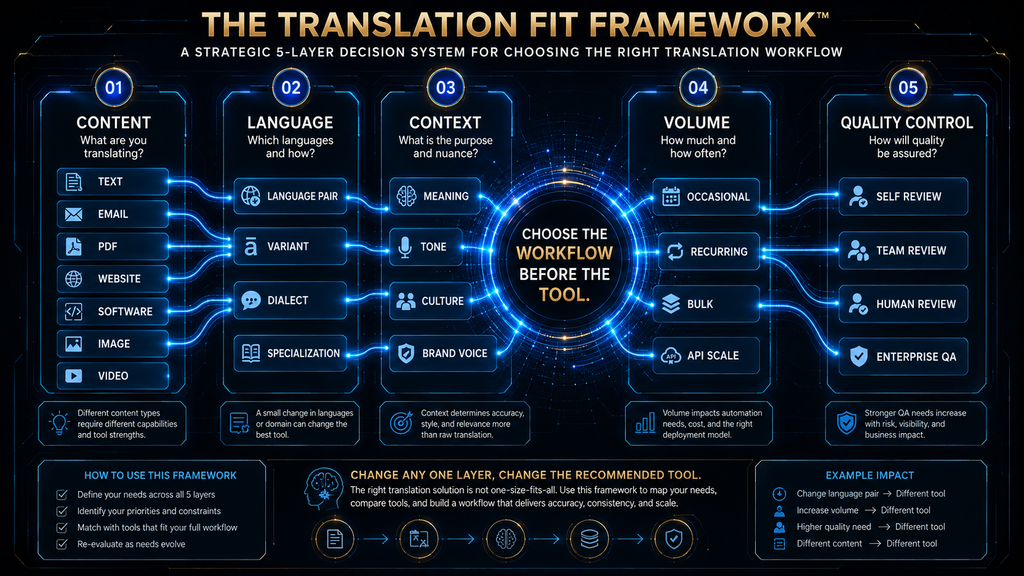
We use a five-part framework to match tools to needs. Content: what are you translating, such as conversations, documents, marketing copy, support tickets or software strings? Language: which specific language pairs matter, not just how many languages a tool claims to support? Specific pairs matter far more than headline numbers.
Context: does the translation need to reflect a brand voice, technical terminology, legal precision or cultural nuance? Volume: are you translating occasionally, weekly or continuously at scale? Quality control: who checks translations, and what happens if an error slips through to customers or regulators?
Language coverage deserves special attention. DeepL’s language list now includes many languages, such as Bengali, Urdu and Vietnamese, but notes that not all languages support features such as glossaries and formal or informal tone. Total language count tells you little about quality for your specific pair.
Answering these five questions usually narrows the choice to two or three tools quickly. A blogger translating occasional posts into Spanish needs something very different from a software company shipping updates in 30 languages every week, even though both are “translating.” The framework keeps the choice grounded in your real needs.
Why Translation Quality Is Hard to Measure
Translation quality is harder to judge than it looks. A sentence can be grammatically perfect and still wrong in meaning, tone or terminology. Two good human translators may produce different translations of the same text, both acceptable. And quality depends heavily on the language pair, the subject and the surrounding context.
Researchers have long tried to measure translation automatically. The annual Conference on Machine Translation, or WMT, compares systems across many language pairs; its 2019 findings illustrate how results vary by language and how human evaluation remains central to judging quality. Automatic scores are useful, but people remain the final judges of quality.
For practical purposes, that means you should test tools on your own content and languages. A tool that scores well on general news text may struggle with your industry’s terminology. A small test set of real documents, reviewed by someone fluent in both languages, tells you more than any published ranking.
Fluency can also hide errors. Modern AI translation reads naturally, which makes mistakes harder to notice for people who do not speak the target language. That is the main reason high-stakes translations still need human review, even when AI quality is excellent on average. Good-sounding text is not the same as correct text.
1. DeepL: Best for Professional Translation
DeepL is the strongest choice for professional documents. It is known for natural, accurate translations, especially in European languages, and it offers document translation that preserves formatting, glossaries for consistent terminology and controls such as formal or informal tone in supported languages.
DeepL’s Pro page offers a 30-day free trial. Its Individual plan includes no data training on your texts, 300,000 characters a month, three file translations a month and a glossary, with higher plans for teams and heavier use. Prices are shown in local currency and vary by region, so check the page for your country.
DeepL stands out for quality and control. Glossaries ensure that product names and key terms are translated the same way every time, which matters enormously for business documents. The no-training commitment on paid plans is also important for confidential material, a point worth comparing with free tools.
The limitation is that some features are not available for every language, as DeepL’s own language list notes, and the free version has limits that business users quickly outgrow. For languages where DeepL is less established, compare its output with Google Translate or a general AI model before committing. Verdict: choose DeepL for professional documents, consistent terminology and confidential business translation, especially in its strongest language pairs.
2. Google Translate: Best for Free Everyday Translation
Google Translate is the best free tool for everyday translation. Google’s post on 20 years of Google Translate says it works for almost 250 languages and more than 60,000 potential language pairs, including endangered and indigenous languages, and that about one billion people use it. Its scale is unmatched by any other translation service.
It translates text, websites, documents, images through your camera and speech in conversation mode, all for free. That breadth makes it the natural first choice for travel, quick checks, reading foreign websites and communicating in languages that specialist tools do not cover. Most features work on phones as well as computers.
Google Translate stands out for reach. If your problem is “I need to understand or communicate across many languages right now,” nothing else comes close. Its camera translation for signs and menus and its conversation mode are especially useful when traveling. It is a reliable everyday companion. Few tools are as easy to start using.
The limitation is that reach is not the same as quality for every pair. A tool that covers almost 250 languages will not perform equally well on all of them. For professional documents, brand-sensitive content or confidential material, use a tool with stronger terminology and privacy controls. Verdict: choose Google Translate for free, fast, everyday translation across a huge range of languages, and pair it with a specialist for important work.
3. ChatGPT: Best for Translation Plus Rewriting
ChatGPT is not a dedicated translator, but it is excellent when translation is only part of the job. You can ask it to translate, adapt the tone for a specific audience, shorten the text, explain idioms or rewrite a marketing message so it feels natural in the target market, all in one conversation. That context-rich approach is its biggest advantage.
That flexibility suits bloggers, marketers, freelancers and anyone adapting content rather than translating it word for word. You can provide context, such as the audience, brand voice and terms to keep in English, and ask for several versions to choose from. Our beginner’s guide to AI prompts shows how to give that context.
ChatGPT stands out for adaptation. It can turn a literal translation into copy that reads as if it were written locally, explain why a phrase does not work in another culture and suggest alternatives. Dedicated translators rarely offer that level of explanation and creative control. It works like a translator and editor in one.
The limitation is consistency. General AI models may translate the same term differently across a long document, add or drop details, or rewrite more than you asked. For documents that must match the source exactly, such as contracts, a dedicated translator with glossaries is safer. Verdict: choose ChatGPT when you need translation combined with tone adaptation, rewriting or explanation, and review the output carefully for consistency.
4. Gemini: Best for Google-Centered Contextual Work
Gemini offers similar strengths to ChatGPT, with the added advantage of working inside Google’s ecosystem. If your documents live in Google Docs, Drive or Gmail, Gemini can help translate and adapt them where you already work, which reduces copying and pasting between tools. Staying in one ecosystem keeps work simple.
Like other general models, Gemini can translate while adjusting tone, explaining nuance and summarizing. It supports a wide range of languages, although Google notes in its documentation that some language-dependent features are not equally available in every language, so test it on your specific pairs. A quick test on real content shows how well it fits.
Gemini stands out for convenience inside Google Workspace. Teams that already write and collaborate in Google’s apps can translate and adapt content without adding another vendor. That integration is often more valuable than small quality differences between general models. Fewer tools also mean fewer places where data is stored.
The limitation is the same as for ChatGPT: general models are flexible but less consistent than dedicated translators for long, precise documents. Use glossaries in your prompts and check key terms, especially for legal, technical or regulated content. Verdict: choose Gemini if your team works in Google Workspace and wants contextual translation and adaptation inside familiar tools.
5. Claude: Best for Nuanced Long-Form Translation
Claude is strong for long, nuanced texts where tone and meaning matter, such as articles, reports and thoughtful correspondence. Anthropic’s multilingual support documentation publishes performance figures for many languages relative to English, with major European and Asian languages performing close to English levels.
Claude can follow detailed translation instructions, such as keeping certain terms unchanged, matching a formal register or explaining choices where the source is ambiguous. Pro plans cost $17 a month with an annual subscription, and a free tier allows lighter use. Clear instructions get the best results from it.
Claude stands out for careful handling of long texts and for explaining translation decisions. When a sentence can be read two ways, it can point out the ambiguity rather than silently choosing one meaning, which helps reviewers catch problems before publication. That transparency makes review faster and more reliable.
The limitation is that, like other general models, it is not built for high-volume document workflows with glossaries, translation memory and formatting preservation. For those, a dedicated translator or localization platform is more efficient and consistent. Verdict: choose Claude for nuanced long-form translation and adaptation, especially when you want the AI to explain ambiguities and choices.
6. Microsoft Translator: Best for Enterprise Apps and APIs
Microsoft’s Azure Translator is a translation service for building into applications and business systems. Microsoft’s Translator updates page says it supports more than 100 languages and that its 2026-06-06 release lets developers choose between standard neural machine translation and generative AI language models for each request.
Azure’s pricing page lists a free tier with 2 million characters of standard translation and custom translation training per month, with pay-as-you-go pricing beyond that. That makes it practical to prototype and run moderate workloads at low cost before committing to larger usage. Larger volumes are billed per million characters.
Azure Translator stands out for enterprise integration. It fits naturally into organizations already using Microsoft’s cloud, supports custom translation models trained on your own terminology and offers document translation that keeps formatting. The choice between neural and LLM translation per request adds useful flexibility.
The limitation is that it is a developer tool, not a ready-made app for everyday users. You need technical skills or a partner to build it into your systems. For individuals who simply want to translate documents, DeepL or Google Translate is easier. Verdict: choose Microsoft Translator if you are building translation into business applications, especially within the Microsoft cloud.
7. Amazon Translate: Best for AWS Developers
Amazon Translate is a neural machine translation service for applications built on AWS. Amazon’s feature page lists support for 75 languages, along with custom terminology, so you can control how brand names and specialized terms are translated, plus real-time and batch translation. It also detects the source language automatically.
Amazon’s pricing page lists standard text translation at $15 per million characters, with a free tier of 2 million characters a month for 12 months. That pay-per-use model suits applications with variable or growing translation volume, such as marketplaces and support systems. You pay only for what you translate.
Amazon Translate stands out for automation. A global marketplace, for example, can automatically translate seller listings as they are posted, without anyone copying text into a translation app. That turns translation from a manual task into a built-in feature of the product. Automation like this scales without extra staff.
The limitation is that it is infrastructure, not an end-user tool, and it covers fewer languages than Google Translate or DeepL’s expanded list. It is best for developers already using AWS who need reliable, scalable translation inside their own systems. Verdict: choose Amazon Translate if you build on AWS and need automated, pay-as-you-go translation inside your applications.
8. Smartcat: Best for AI Plus Human Translation at Scale
Smartcat combines AI translation with human review, workflow management and a marketplace of professional linguists. Its site says its AI coworkers translate, review and keep content current in more than 280 languages, which makes it suited to organizations with ongoing, high-volume translation needs. It also offers more than 50 file formats and many integrations.
Smartcat’s pricing page lists its Adapt plan from $1,200 a year billed annually, with custom pricing for larger plans and a free trial. Plans include AI coworkers for tasks such as translation, quality assurance and compliance checks, with options to bring in human reviewers. Larger organizations negotiate custom plans.
Smartcat stands out for combining automation with professional review. Teams can let AI handle first drafts, route important content to human linguists and keep translation memories and glossaries consistent across projects. That balance of speed and quality is hard to achieve with consumer tools alone. It suits companies that publish in many markets.
The limitation is cost and complexity. Smartcat is overkill for occasional translation, and its value depends on setting up workflows, glossaries and review processes properly. It is best for companies where translation is a regular, important part of operations. Verdict: choose Smartcat if your organization translates large volumes regularly and needs AI speed combined with professional human review.
9. Lokalise: Best for Software and Website Localization
Lokalise is built for translating software, apps and websites. It manages the text strings in your product, connects to code repositories and design tools, and coordinates translators, AI translation and reviewers so new features can launch in many languages at once. It keeps developers, designers and translators in one workflow.
Lokalise’s pricing page lists plans at $149, $379 and $1,049 a month with annual billing, plus custom enterprise pricing and a free trial. Plans differ in seats, processed words, AI translation allowances and workflow features, so check which limits apply to your team. Extra seats and word bundles are sold separately.
Lokalise stands out for integration with product development. Developers push new text automatically, translators work in context with screenshots, and translated strings flow back into the product. That removes much of the spreadsheet chaos that usually comes with multilingual software releases. Faster releases in more languages are the main payoff.
The limitation is that it is designed for product teams, not for translating documents or marketing copy. Its pricing reflects that focus. For a website with mostly static content, a simpler approach may be enough, while for a growing software product it can save a lot of time. Verdict: choose Lokalise if you ship software or apps in multiple languages and need translation built into your development workflow.
10. Papago: Best for Korean and Selected Asian Pairs
Papago, from NAVER, is a regional specialist. It focuses on a smaller set of languages centered on Korean, English, Japanese and Chinese, with support for some other Asian and European languages. It offers text, image, document, voice and website translation, and a business-oriented Papago Plus. It is especially popular in Korea.
Papago stands out where regional strength matters more than language count. For Korean in particular, a specialist trained heavily on that language and its context can handle honorifics, idioms and everyday expressions well, which is valuable for businesses and travelers dealing with Korea. Specialists can beat generalists on their home languages.
The limitation is narrow coverage. If you need many languages, Papago is not the right primary tool. Use it alongside a broad translator, choosing Papago for its strongest pairs and DeepL or Google Translate for the rest, and compare outputs on your own content. Verdict: choose Papago if Korean or its other core Asian language pairs are central to your work, and pair it with a broader tool for other languages.
W.O.R.T.H. Scores for All 10 Tools
We rate tools with the AI Hustle World W.O.R.T.H. Score: Workflow fit (25), Output quality (25), Risk and rights (15), Total cost (20) and Human effort (15). These scores are editorial assessments based on documentation and published pricing, not translation benchmarks, and assume a small business or professional user.
| Tool | Workflow /25 | Output /25 | Risk /15 | Cost /20 | Effort /15 | Total /100 |
|---|---|---|---|---|---|---|
| DeepL | 22 | 23 | 13 | 15 | 12 | 85 |
| Google Translate | 20 | 19 | 9 | 20 | 13 | 81 |
| ChatGPT | 20 | 20 | 10 | 16 | 11 | 77 |
| Claude | 18 | 21 | 11 | 15 | 11 | 76 |
| Gemini | 19 | 19 | 10 | 16 | 11 | 75 |
| Microsoft Translator | 19 | 19 | 12 | 16 | 9 | 75 |
| Smartcat | 21 | 21 | 12 | 11 | 10 | 75 |
| Amazon Translate | 18 | 18 | 12 | 17 | 9 | 74 |
| Papago | 15 | 19 | 10 | 17 | 12 | 73 |
| Lokalise | 20 | 19 | 12 | 11 | 10 | 72 |
DeepL leads thanks to quality, glossaries and its no-training commitment on paid plans. Google Translate earns a full cost score for being free, though its risk score reflects caution about putting confidential text into free tools. Smartcat and Lokalise score lower on cost and effort because they are platforms that need setup, not because of weak output.
Weight the scores by your needs. A software company should weight workflow fit heavily, favoring Lokalise. A law firm should weight risk and output, favoring DeepL plus human review. A traveler should weight cost and effort, favoring Google Translate. The right tool depends on the job. Use the table as a guide, not a verdict.
The Four Types of AI Translation Tools
Dedicated translation engines, such as DeepL, Google Translate and Papago, are built specifically for translation. They are fast, consistent and often offer document handling and glossaries. They translate what is there, without rewriting, which is exactly what you want for many tasks. They are the default choice for most translation work.
General AI models, such as ChatGPT, Gemini and Claude, translate as one of many skills. They excel at adaptation, explanation and rewriting, but they can be less consistent on long, precise documents. They are best when translation is part of a broader writing or communication task. They are also handy for learning a language.
Enterprise and API infrastructure, such as Microsoft Translator and Amazon Translate, builds translation into applications and automated workflows. Localization platforms, such as Smartcat and Lokalise, manage translation as a business process, with workflows, memories, glossaries and human review. These tools suit organizations with steady translation volume.
Most people need one dedicated tool and one general model. Businesses add infrastructure or a localization platform when translation becomes a regular, high-volume process. Choosing the right type first makes the choice of specific tool much easier. Start simple and add layers as needs grow. Our comparison of prompting ChatGPT, Claude and Gemini helps you pick a general model.
The Translation Depth Ladder
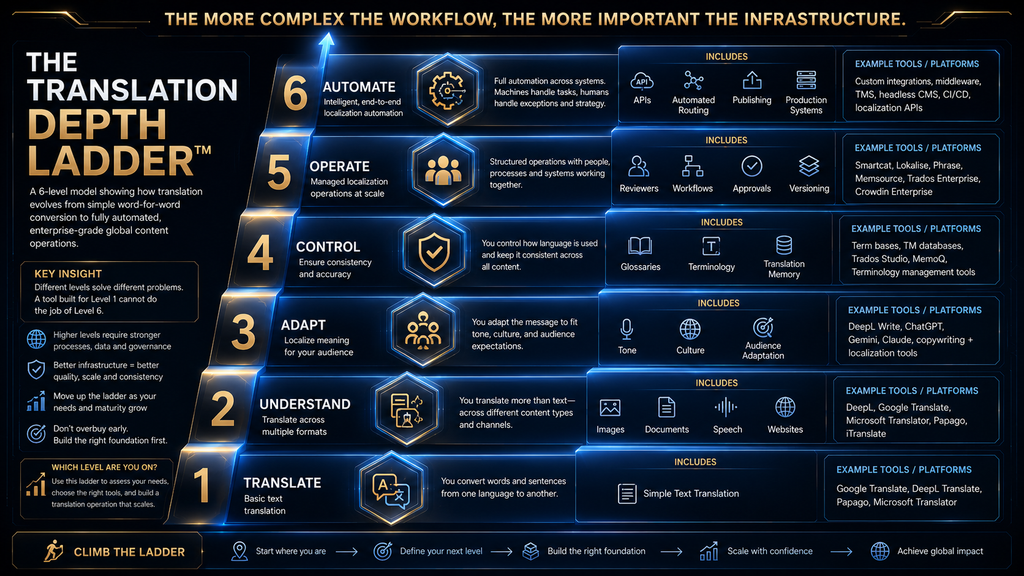
Translation needs grow in depth over time, a framework we call the Translation Depth Ladder. Understand means getting the gist of foreign text, such as reading a website or email. Communicate means writing short messages others can understand. Publish means producing translations that represent you publicly, such as blog posts or product pages.
Localize means adapting content to a market, including tone, examples, currencies and cultural references. Operate means running translation as a continuous process across products, support and marketing, with workflows, review and measurement. These top levels need the most structure and oversight. Few organizations need them at first.
Each step up needs more control and quality assurance. Free tools are excellent for understanding and communicating. Publishing needs review. Localizing needs cultural knowledge and adaptation. Operating needs platforms and processes. Match your tools and checks to the highest level you work at. Knowing your level saves money and mistakes.
Free vs Paid AI Translation
Free tools cover a lot. Google Translate is free for everyday use, DeepL has a free version, and ChatGPT, Gemini and Claude all have free tiers. Microsoft Translator offers 2 million free characters a month, and Amazon Translate offers 2 million characters a month for its first 12 months. These allowances are enough for many small projects.
Paid plans add what professionals need: higher limits, document translation with formatting, glossaries, team features and, importantly, stronger data commitments. DeepL’s paid plans, for example, promise no training on your texts, which matters for confidential material. Data terms are worth reading closely.
A good rule is to use free tools for personal and low-stakes work, and paid tools for business documents, confidential content and anything you publish. The cost of a paid plan is small compared with the cost of a leaked document or an embarrassing published error. Match the tool to the stakes. Our guide to AI privacy risks explains what to keep out of free tools.
AI Translation vs Human Translation
AI translation is fast, cheap and good enough for many purposes, including understanding content, internal communication and first drafts. For high-volume, low-risk content, it can replace most human effort, leaving people to spot-check quality rather than translate every sentence. It changes the economics of multilingual content.
Human translators remain essential for high-stakes content, such as legal contracts, medical information, marketing campaigns and anything where cultural nuance, liability or brand reputation matters. They catch subtle errors, adapt meaning for culture and take responsibility for the final text. Their judgment cannot yet be automated reliably.
The most effective approach combines both. AI produces a draft, and a professional reviews and edits it, a process often called machine translation post-editing. This is faster and cheaper than translating from scratch while keeping human judgment where it matters, and platforms such as Smartcat are built around it.
The AI Translation Quality-Control Checklist
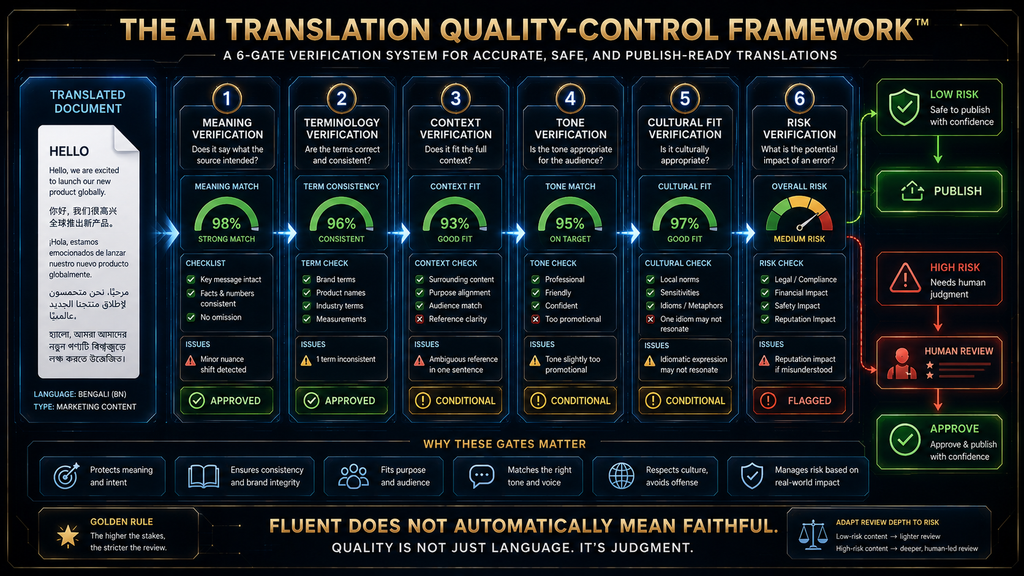
Check six things before publishing any AI translation. Meaning: does the translation say exactly what the source says, with no additions or omissions? Terminology: are product names, technical terms and key phrases translated consistently and correctly throughout? Small errors in these areas are the most common.
Context: does the translation fit where it will be used, such as a button label, a legal clause or a social post? Tone: does it match the intended register, such as formal or friendly, and your brand voice? Cultural fit: are examples, idioms, dates, currencies and references appropriate for the audience?
Risk: what happens if there is an error? For low-risk content, a quick check by a fluent speaker may be enough. For high-risk content, such as contracts, safety instructions or medical information, require full professional review. Our framework for checking AI information applies the same thinking to other AI output.
Real-World Examples
A SaaS help center. A software company with 200 help articles wants them in five languages. It uses Lokalise or Smartcat to manage the content, AI to produce first drafts, a glossary for product terms and native-speaking reviewers for the most-visited articles. Updates flow automatically when the English source changes.
A solo blogger. A blogger wants to publish posts in Spanish. They use DeepL for a faithful first draft, then ChatGPT or Claude to adapt headlines and examples for Spanish readers, and ask a fluent friend to review the first few posts. Over time they build a small glossary of terms. Our guide to AI content repurposing covers related workflows.
Customer support. A support team receives tickets in many languages. It uses an API such as Microsoft Translator or a support platform with built-in translation to translate incoming messages and draft replies, with agents reviewing replies before sending. Our roundup of AI customer service tools covers platforms with built-in translation.
Each example combines tools rather than relying on one. That pattern is typical: a dedicated translator or platform for accuracy and scale, a general model for adaptation and human review where the stakes are highest. Combining tools is the normal pattern, not the exception. Social posts can be translated the same way, as our guide to turning articles into social content shows.
Common Mistakes With AI Translation
Choosing the Tool With the Most Languages
Language count says little about quality for your pair. A tool covering 250 languages may be weaker in your key language than a specialist covering far fewer. Test the languages you need. A short side-by-side comparison on your own content shows more than any feature list, so test before you commit.
Assuming Fluent Means Accurate
AI translations read naturally even when they are wrong. Fluency can hide changed meanings, missing negations and wrong terms. Have a fluent speaker check anything important, especially numbers, names and conditions. Errors in these details cause the most harm. A second reader is cheap insurance against costly mistakes.
Translating Without Context
A word like “charge” can mean a fee, an accusation or electrical charge. Without context, AI guesses. Tell the tool where the text will appear, who will read it and which terms must stay unchanged. A sentence of context improves results noticeably. Context is the simplest quality boost available, and it costs nothing.
Ignoring Terminology
Inconsistent translation of product names and key terms confuses customers and damages trust. Build a glossary early and use tools that support it, such as DeepL, Smartcat, Lokalise or the custom terminology features in AWS and Azure. A shared glossary is one of the highest-value steps you can take.
Publishing High-Risk Translations Without Review
Legal, medical, safety and financial content can cause real harm if mistranslated. Always use professional review for these, regardless of how good the AI output looks. The cost of review is small compared with the cost of a serious error. Use qualified translators for anything with legal or safety implications.
Letting AI Rewrite When You Only Asked for Translation
General AI models sometimes improve, shorten or embellish text while translating. If you need a faithful translation, say so explicitly, and compare length and content with the source. Clear instructions keep translations faithful. Our guide to large language models explains why models behave this way.
Who Should Use Which Tool
Students and Travelers
If you are a student or traveler, Google Translate covers most needs for free, including camera and conversation modes. Use ChatGPT or Claude to understand difficult passages or practice a language, and check our list of free AI tools for students for related tools. Offline language packs are useful when traveling without data.
Bloggers, Freelancers and Small Businesses
If you translate content for your business, start with DeepL for accurate drafts and a general model for adaptation. Build a glossary, review important pages with a fluent speaker and avoid putting confidential client material into free tools without checking their terms. Our guide to optimizing posts for AI search helps translated content get found.
Software Companies and Developers
If you build software, use Lokalise or a similar platform for product strings, and Microsoft Translator or Amazon Translate for translation inside your applications. Automate where you can, and keep human review for user-facing text that affects trust or safety. Text-to-speech can extend translations to audio, as our list of TTS APIs shows.
Enterprises
If you translate at scale across departments, consider Smartcat for managed AI-plus-human workflows, DeepL’s business plans for document translation and enterprise APIs for automated systems. Governance, data protection and terminology management matter as much as raw quality. Our guide to AI governance covers the policies behind safe use.
How to Choose Between Popular Pairs
DeepL or Google Translate? Choose DeepL for professional documents, terminology control and confidentiality; choose Google Translate for free everyday use and the widest language coverage. Many people use both. Using both for different tasks is common and sensible. Try both on your own content and compare the results side by side.
ChatGPT or a dedicated translator? Use a dedicated translator when you need a faithful, consistent translation. Use ChatGPT, Gemini or Claude when you need adaptation, rewriting or explanation alongside translation. For important content, you can combine them: translate with DeepL, then adapt with a general model.
Smartcat or Lokalise? Choose Smartcat for documents and content workflows that need professional human review at scale. Choose Lokalise for software and app localization tied to your development process. Microsoft or Amazon? Usually, choose the one that matches your existing cloud provider. Matching your cloud keeps billing and security simple.
The Seven-Step AI Translation Workflow
Step 1: define the job. Decide what you are translating, for whom and how important accuracy is. Step 2: build a terminology list of product names, technical terms and phrases that must be translated consistently or left unchanged. Step 3: translate with the right tool for the content type. The right tool depends on the content.
Step 4: adapt the translation for tone, culture and format, using a general AI model or a human editor where needed. Step 5: verify meaning, numbers, names and conditions against the source, ideally with a fluent reviewer for important content. Verification catches the errors that matter most. Check names and numbers first.
Step 6: review high-risk content professionally before publishing. Step 7: reuse what you learned by updating your glossary and saving approved translations in a translation memory, so future translations are faster and more consistent. Each project makes the next one easier. Good habits compound with every project you translate.
Translate the text below from English into [LANGUAGE] for [AUDIENCE].
Keep these terms unchanged: [TERMS]. Use this glossary: [TERM = TRANSLATION].
Match a [formal/friendly] tone. Do not add, remove or summarize content.
After the translation, list any phrases that were ambiguous or hard to translate.
[PASTE TEXT]
Translation Memory and Glossaries
A translation memory stores approved translations of sentences and phrases. When the same or similar text appears again, the system reuses the approved version, saving time and keeping wording consistent. Localization platforms such as Smartcat and Lokalise make heavy use of translation memory. It also lowers costs over time.
A glossary lists key terms and how they must be translated. It may matter even more than translation memory for business content, because inconsistent terminology is one of the most visible and confusing translation errors. Start a glossary with your product names, features and industry terms. Update it as your product and vocabulary grow.
Even individual users benefit from a simple glossary, kept as a list you paste into AI prompts or load into DeepL. It takes minutes to create and prevents the most common consistency problems, especially when several people or tools work on the same content. It is the cheapest quality improvement available.
How to Evaluate a Tool Before Paying
Run a short test. Choose five to ten real passages that represent your content, including tricky ones with terminology, idioms and numbers. Translate them with two or three shortlisted tools, then ask a fluent reviewer to score each output on meaning, fluency, terminology and tone. Real content reveals real differences.
A simple scorecard helps keep the comparison fair. Weight meaning preservation most heavily, then fluency, terminology consistency, context and tone, suitability for your language pair, document handling and how much editing each output needed. The tool with the least editing for your content often wins.
Also check privacy terms, data training policies, file format support and integration with your tools. A slightly better translation is not worth much if the tool cannot handle your file types or does not meet your confidentiality requirements. Practical fit matters as much as quality. Our guide to AI data retention explains what to look for in vendor terms.
Translation Failure Modes to Watch
Meaning drift changes what a sentence says. Terminology drift translates the same term differently across a document. Cultural misfit uses examples or phrasing that do not work for the audience. Over-translation translates names or terms that should stay unchanged. These are the most common problems in AI translation.
Under-translation leaves parts of the text untranslated. Context loss produces translations that are correct in isolation but wrong where they appear, such as in a button or a table. Formatting damage breaks layouts, links or code. Automation without review publishes high-risk translations nobody checked.
Knowing these failure modes helps you design checks. Glossaries prevent terminology drift and over-translation. Context in prompts reduces context loss. Document tools reduce formatting damage. Human review catches meaning drift and cultural misfit before they reach customers. Each check targets a specific risk.
The Future of AI Translation
AI translation is moving toward real-time speech translation, deeper personalization and closer integration with everyday tools. General AI models and dedicated translators are converging, with dedicated tools adding generative features and general models improving consistency. The line between the two categories is fading.
Enterprise services increasingly let developers choose between traditional neural translation and generative models for each request, as Microsoft’s Translator now does. That choice lets teams balance consistency and nuance depending on the content. That flexibility is likely to spread to more tools over the next few years.
Human expertise will remain important for high-stakes and creative work. As AI handles more routine translation, human translators increasingly act as reviewers, editors and cultural advisers. Our guide to ElevenLabs dubbing shows how translation is also expanding into voice and video. Content can now cross language barriers in many forms. Our guide to AI content repurposing shows related workflows.
How We Researched This Guide
This guide is based on vendor documentation, language lists and pricing pages, not hands-on translation benchmarks. In October 2026 we reviewed Google’s post on 20 years of Translate, DeepL’s language list and Pro page, Amazon Translate’s feature and pricing pages, Microsoft’s Translator updates and pricing, Anthropic’s multilingual documentation, Smartcat and Lokalise pricing, Papago’s service and WMT evaluation research.
Prices and features are as shown at the time of checking and may differ by region. The Translation Fit Framework, the Depth Ladder, the quality-control checklist and the W.O.R.T.H. scores are AI Hustle World’s editorial frameworks and assessments. Always test tools on your own language pairs before relying on them.
Final Thoughts
There is no single best AI translation tool, because translation is many different jobs. DeepL leads for professional documents, Google Translate for free everyday use, and ChatGPT, Gemini and Claude for translation combined with adaptation. Microsoft and Amazon serve developers, Smartcat and Lokalise serve organizations translating at scale, and Papago serves Korean-focused work.
Choose by content, language pair, context, volume and quality-control needs, not by language count. Test tools on your own material, build a glossary early and keep human review for anything high-stakes. Most people get the best results by combining a dedicated translator with a general AI model. That pairing covers most needs.
Translation errors can be invisible to people who do not speak the target language, so the habit that matters most is review. Use AI for speed, and people for judgment. To create translated content more efficiently, see our guide to the best AI tools for writing blog posts. Our guide to AI hallucinations explains why fluent AI text can still be wrong.
Choose the AI Tool That Solves the Right Problem
Translation is one part of a multilingual workflow; compare the AI writing tools that help you draft and edit.
Compare AI Writing Tools →Frequently Asked Questions
What is the best AI translation tool?
DeepL is best for professional documents and terminology, Google Translate for free everyday use and ChatGPT or Claude for translation combined with rewriting.
What is the best free AI translator?
Google Translate is the strongest free option, covering almost 250 languages with text, document, image and conversation modes. DeepL also has a free version.
Is DeepL better than Google Translate?
DeepL is often preferred for professional documents and offers glossaries and a no-training commitment on paid plans. Google Translate covers far more languages for free.
Can ChatGPT translate accurately?
ChatGPT translates well in many languages and excels at adapting tone, but it can be inconsistent on long documents. Review important translations carefully.
Is AI translation good enough to replace human translators?
For everyday and low-risk content, often yes. For legal, medical, marketing and other high-stakes content, professional human review is still essential.
Which AI translator is best for documents?
DeepL is strong for documents with formatting and glossaries. Microsoft Translator and Amazon Translate offer document translation for business applications.
What is the best translation API?
Microsoft Translator and Amazon Translate are both reliable choices. Most teams pick the one that matches their existing cloud provider.
What is a translation glossary?
A glossary lists key terms and how they must be translated. It keeps product names and technical terms consistent across documents and tools.
Is it safe to translate confidential documents with AI?
Check each tool’s data and training policies. Paid professional plans, such as DeepL’s, often promise not to train on your texts. Avoid free tools for confidential material.
What tool is best for translating software?
Lokalise is built for software and app localization, connecting to code and design tools. Smartcat also supports software content alongside documents.
Related Guides
- ElevenLabs Dubbing Explained: How to Create Multilingual Videos With AI
- 15 Best Free AI Tools You Should Try in 2026
- 10 Best AI Tools for Small Business Owners
- Best AI Coding Assistants (Free & Paid): Top 10 Tools Compared
Written by
Muntasir Ahmad Chowdhury
Founder, AI Hustle World
Muntasir Ahmad Chowdhury is the Founder of AI Hustle World, an independent publication dedicated to making Artificial Intelligence practical, trustworthy, and easy to understand. He researches AI tools, automation, customer service, productivity, and real-world business applications, helping readers make smarter technology decisions through research-driven, experience-backed content.
Expertise:
AI Tools • AI Automation • AI Customer Service • AI Productivity • Generative AI • AI Workflows
Get Smarter With AI
Enjoyed this guide? Get practical AI tools, tutorials, and honest reviews delivered to your inbox.