Evidence: Documentation reviewed
Last checked: August 2026
What was done: Written from official documentation and the published sources linked in this article. Not hands-on tested.
Files: None
Affiliate links: Yes
How to Use ElevenLabs for YouTube & Faceless Videos
How to use ElevenLabs for YouTube and faceless videos: from script preparation and voice selection to narration, editing, retention, and publishing.
Affiliate disclosure: AI Hustle World may earn a commission if you subscribe to ElevenLabs through our referral link, at no additional cost to you. Our recommendations are based on product capabilities, workflow fit, limitations, and current documentation—not commission.
Faceless YouTube looks deceptively simple from the outside. You write a script, generate an AI voice, put some footage underneath it, add music, make a thumbnail, and publish. That workflow can produce a video. It does not necessarily produce a good YouTube channel.
The difference matters because the bottleneck in faceless content is rarely the ability to generate speech. ElevenLabs can turn written text into natural-sounding narration, and its current tools provide multiple models, voice controls, Studio workflows, and options for different kinds of speech generation. The harder problem is turning that capability into a repeatable production system where the topic, script, voice, pacing, visuals, packaging, and audience response reinforce one another. That is the approach this guide takes.
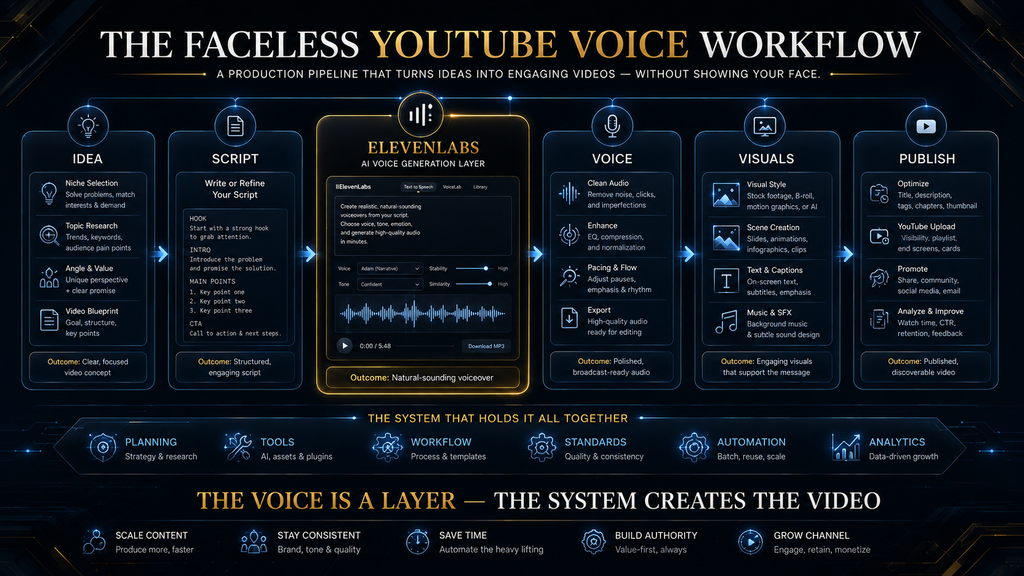
Instead of treating ElevenLabs as a button that says “Generate Voice,” think of it as one component in a larger publishing system: topic → search intent → angle → script → voice direction → narration → visual pacing → edit → thumbnail/title → publish → analyze → improve
If one stage is weak, better voice generation cannot fully rescue the video. A beautiful narration attached to a weak idea is still a weak video. Conversely, a strong topic and excellent script can be damaged by robotic delivery, poor pacing, awkward pronunciation, or a visual edit that ignores what the narrator is saying. So the real question is not: “How do I make an AI voice?” It is: “How do I use ElevenLabs to build a better faceless-video production system?”
What ElevenLabs Actually Does for a Faceless YouTube Workflow
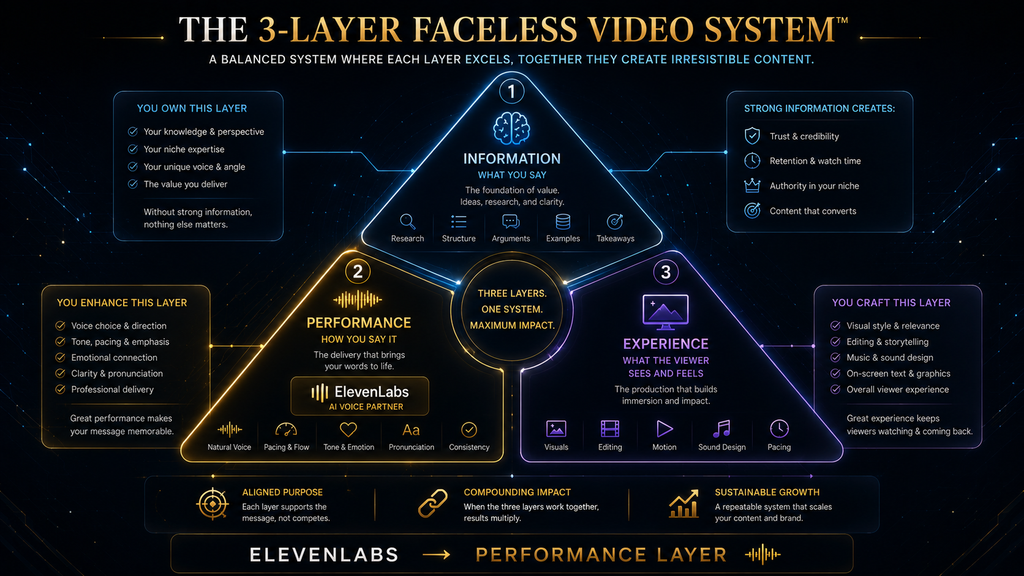
ElevenLabs is most useful in faceless production when the voice is treated as part of the storytelling layer rather than as background audio.
Its current text-to-speech workflow lets you select a voice, choose model behavior, adjust voice settings, generate speech, and regenerate sections when the performance isn’t right. ElevenLabs also notes that generation is nondeterministic, meaning the same text and settings can produce somewhat different performances between generations. That last point is more important than it sounds. A beginner often assumes the workflow is: write → generate → export A better workflow is:
write → generate → listen critically → identify weak passages → adjust or regenerate → assemble → review in context
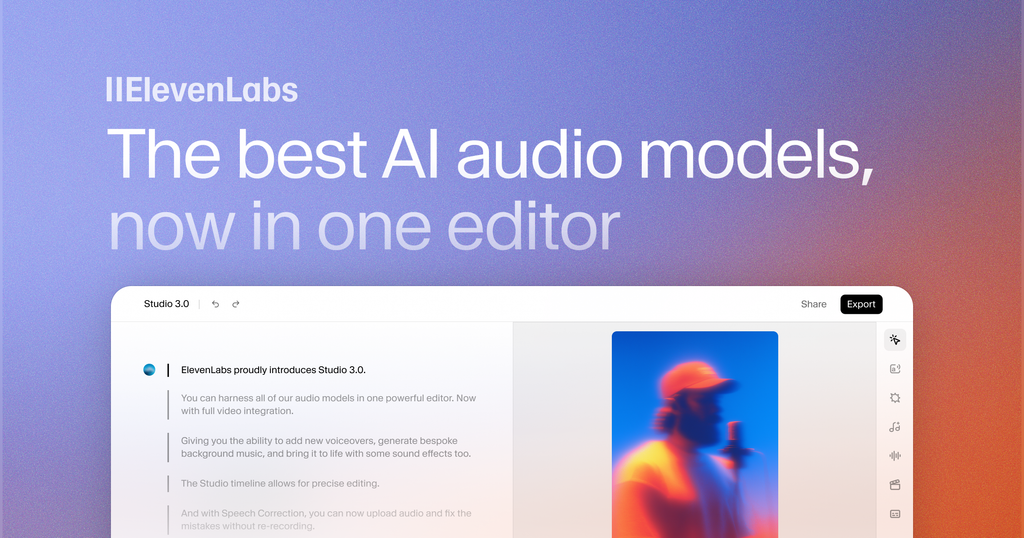
The distinction is between generation and production. Generation creates audio. Production decides whether that audio actually works. For YouTube, that means you should judge a voice not only by whether it sounds realistic in a 10-second demo, but by whether it remains understandable, appropriately expressive, consistent, and believable over several minutes of continuous narration. That is why voice selection should happen after you understand the content you’re making, not before.
Test a Voice Against Your Own Script
Paste one real paragraph from your next video into ElevenLabs and judge whether the voice stays clear, expressive and believable across a full minute of narration.
Test Your Script in ElevenLabs →Affiliate disclosure: We may earn a commission if you subscribe through this link, at no additional cost to you.
Step 1: Decide What Kind of Faceless Channel You Are Building
Before opening ElevenLabs, define the channel’s editorial identity. This is the step most AI-first workflows skip because it doesn’t feel like “production.” In reality, it determines almost every downstream decision: the type of narrator you need, the pacing of the script, how frequently visuals need to change, whether you need character voices, how much emotion is appropriate, and what kind of audience expectation your videos create. If you have not picked a niche yet, our list of 15 faceless YouTube channel niche ideas that actually work is a practical starting point.
A documentary-style channel might need calm authority and controlled pacing. A technology explainer may benefit from an energetic but credible narrator. A horror channel needs tension and deliberate pauses. A motivational channel may need stronger emotional variation. A finance channel generally needs clarity and confidence without sounding theatrical. The same ElevenLabs voice can therefore be excellent for one channel and completely wrong for another.
A practical voice brief
Before choosing the voice, define five things:
- Audience: Who is listening?
- Subject: What are you explaining or telling?
- Emotional register: Calm, authoritative, curious, dramatic, conversational, urgent?
- Pacing: Slow and deliberate, moderate, fast and energetic?
- Narrative role: Teacher, narrator, investigator, storyteller, commentator?
This becomes your voice brief. For example: “The narrator should sound like an intelligent technology analyst explaining complicated ideas to a curious non-technical audience. The delivery should feel confident and conversational, with enough variation to maintain attention but without sounding like an advertisement.” That sentence is far more useful than simply saying: ““Find a male AI voice.””
Step 2: Choose the Voice Before You Optimize the Settings
ElevenLabs’ own documentation emphasizes that voice selection is one of the most important factors in the final result, particularly with Eleven v3. Its current guidance also distinguishes between expressive, neutral, and targeted voices depending on the intended use. That creates an important production principle: Do not try to repair a fundamentally wrong voice with settings. If the voice naturally sounds overly cheerful, increasing stability won’t magically turn it into a serious documentary narrator.
If the voice sounds too dramatic, changing speed may not make it sound authoritative. If the voice’s pronunciation behavior doesn’t suit your subject, you may spend more time fixing individual words than you save through automation. Listen to several candidate voices using the same representative paragraph from your actual channel. Don’t compare voices using the platform’s showcase sentences alone. Take a paragraph containing:
- a technical term,
- a number,
- punctuation,
- a quotation,
- a short sentence,
- a longer sentence,
- and one emotionally important phrase.
That test reveals far more than a generic demo.
Step 3: Choose the ElevenLabs Model Around the Video’s Job
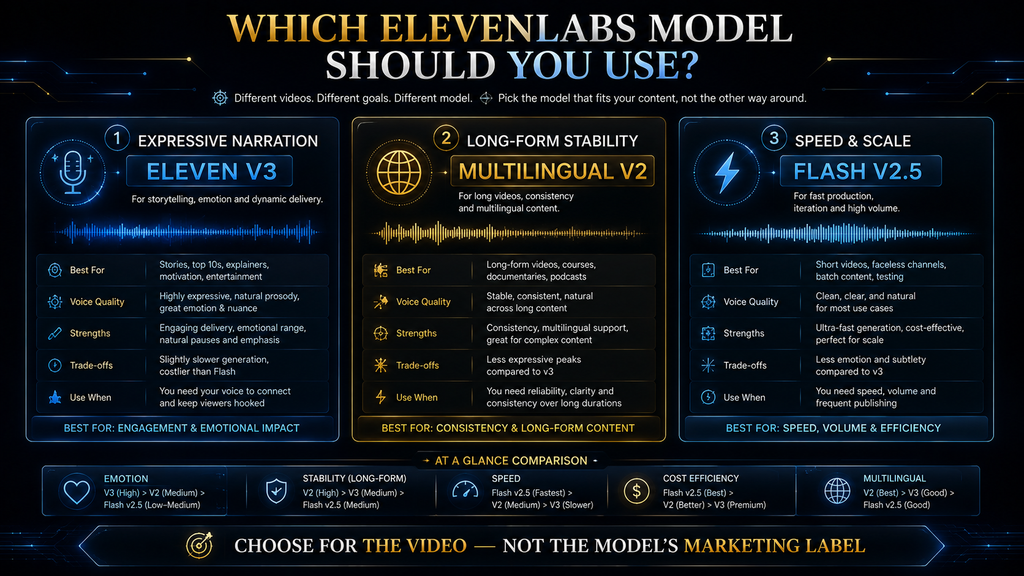
ElevenLabs currently offers different models for different speech requirements. When we checked on 10 October 2026, its documentation listed Eleven v4 as the flagship expressive model, with Eleven v3 still available, Multilingual v2 as a stable multilingual model, and Flash models as optimized for lower-latency generation. For a conventional faceless YouTube narration, you should not automatically choose a model because its name sounds newer. Choose based on what the video needs.
For expressive storytelling. A more expressive model can make sense when the narration contains dialogue, emotional transitions, dramatic storytelling, character performance, or other situations where delivery itself carries meaning.
For long-form explanatory narration. Stability and consistency become more important. A 15-minute technology explainer doesn’t benefit from constant dramatic variation. The audience needs to understand the information without feeling like the narrator is performing every sentence.
For speed-sensitive workflows. Lower-latency models become useful when you’re iterating quickly or building interactive applications, but latency should not become the primary selection criterion for ordinary pre-produced YouTube narration. If the final video is rendered hours before publication, shaving generation latency is less important than getting the performance right. This is a useful rule: Optimize for the final viewer experience, not the speed of your production interface.
Step 4: Write the Script for Speech, Not for the Screen
This is probably the biggest quality difference between amateur and professional AI narration. A written article and a spoken script are not the same thing. If you would rather have AI help drafting the script itself, see our roundup of the best AI script and idea generation tools for YouTube creators.
Articles can survive long sentences, dense clauses, visual references, parenthetical explanations, and complicated formatting because readers control their pace. Listeners don’t have that luxury. When narration becomes syntactically dense, the audience has to hold too much information in working memory while simultaneously processing the visuals. So before sending your script to ElevenLabs, rewrite it for the ear. Instead of: “Although large language models have demonstrated remarkable improvements in reasoning capabilities, their performance remains dependent on context length, training data quality, inference architecture, and task-specific evaluation methodologies.”
A spoken version might be: “Large language models have become much better at reasoning. But their performance still depends on several things: the context they receive, the quality of their training data, the architecture running the model, and how we measure the task.” The second version isn’t necessarily more intelligent. It’s easier to process while watching a video. That distinction should influence the entire script.
Step 5: Build the Script Around Viewer Questions
A strong faceless video should not sound like somebody reading an article aloud. It should feel like somebody leading the viewer through a sequence of questions. A useful structure is: Problem → Promise → Context → Explanation → Evidence → Example → Complication → Resolution → Next implication Suppose the topic is: “Why AI Agents Keep Failing in Real-World Workflows.” A weak script begins with definitions. A stronger opening creates a problem:
“An AI agent can browse websites, write code, call APIs and use tools. So why does it still fail at tasks that seem surprisingly simple?” Now the viewer has a reason to keep listening. The rest of the video can answer that question. This is where ElevenLabs becomes part of the storytelling system. Your voice should reinforce the structure rather than merely pronounce the words.
Step 6: Write for Voice Direction
One of ElevenLabs’ most useful characteristics for creators is that the text itself affects delivery. Its documentation explicitly notes that punctuation, grammar, formatting and context can influence how speech is interpreted. That means the script is also a performance instruction. Compare: “But here’s the problem.” with: “But here’s the problem…” The punctuation can influence the rhythm. Likewise, a short sentence can create a deliberate beat after a longer explanation. “The model wasn’t technically wrong. It was answering the wrong question.”
That structure can create contrast without requiring complicated editing. For Eleven v3 specifically, ElevenLabs documents audio tags and other prompting techniques for controlling emotional delivery and pacing. It also notes that v3 does not use SSML break tags and instead relies on audio tags, punctuation and text structure for pauses. The important lesson is not “add tags everywhere.” It is the opposite. Use direction selectively. If every sentence is marked as excited, whispering, laughing, dramatic or angry, the narration stops sounding intentional. The performance becomes a collection of effects.
Voice direction should serve meaning.
Step 7: Build a Voice Template for Your Channel
Once you have chosen a voice that fits the channel, document the production logic. Don’t rely on memory. Your channel voice template should record:
| Element | Channel Standard |
|---|---|
| Voice | Selected ElevenLabs voice |
| Model | Chosen model |
| Stability approach | Defined baseline |
| Similarity approach | Defined baseline where supported |
| Style | Usually restrained unless intentionally needed |
| Speed | Channel-specific range |
| Tone | Conversational / authoritative / etc. |
| Pronunciation rules | Key names and terminology |
| Pause style | Natural punctuation + intentional breaks |
| Regeneration rule | When to regenerate rather than accept |
This does not mean locking every slider forever. ElevenLabs itself explains that its voice generation is nondeterministic and that settings act more like ranges of variation than guaranteed output controls. Its documentation also notes that common starting points are around 50 stability and 75 similarity, but emphasizes that the correct settings depend on the voice and desired performance. So the template should be a baseline, not a prison.
Step 8: Understand What the Voice Settings Actually Do
This is where many creators make the workflow unnecessarily complicated.
Stability. ElevenLabs describes stability as influencing consistency and variation. Lower stability can create broader emotional range and more variation, while higher stability can produce more consistent but potentially more monotonous delivery. For YouTube narration, that means: Too stable: the narrator can become flat. Too unstable: the narrator can become distracting or inconsistent. The right value depends on the voice and content.
Similarity. Similarity controls how closely the generated voice follows the characteristics of the source voice. ElevenLabs warns that pushing similarity too aggressively can reproduce artifacts or background noise from poor source material when working with replicated voices. For a normal pre-made voice, the practical lesson is simple: Don’t obsess over sliders before you’ve chosen the right voice.
Style exaggeration. Style exaggeration attempts to amplify the original speaker’s style. ElevenLabs notes that it consumes additional computational resources and can reduce stability, and its troubleshooting documentation recommends keeping it at zero when instability appears. For most educational faceless channels, restraint is usually the better default.
Speed. Where supported, ElevenLabs allows speech speed adjustments from 0.7 to 1.2, with 1.0 as the default, while noting that extreme values can affect quality. But don’t use speed as a substitute for editing. If a 12-minute script feels slow, the first question shouldn’t be: “Should I make the voice 1.2× faster?” It should be: “Is the script actually 12 minutes of useful information?”
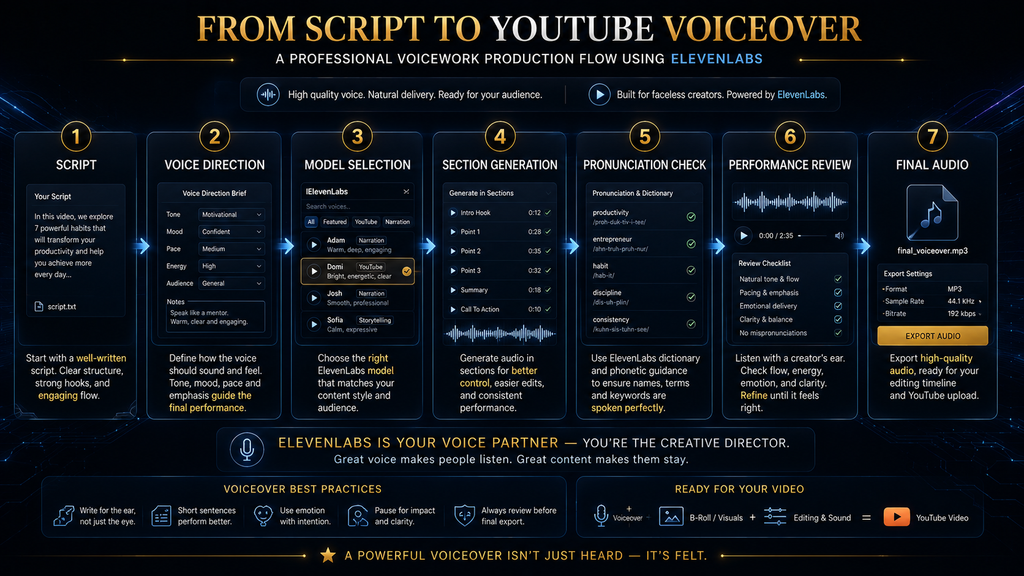
Step 9: Generate in Sections, Not One Giant Block
For long YouTube videos, generating one enormous narration file creates unnecessary production risk. ElevenLabs’ own troubleshooting guidance recommends Studio for longer text when you’re encountering issues because it makes it easier to regenerate specific paragraphs rather than regenerate the entire text. That suggests a better production architecture: Hook → Section 1 → Section 2 → Section 3 → Section 4 → Conclusion Each section becomes a manageable production unit. If one paragraph sounds wrong, you fix that paragraph.
If the introduction needs a stronger delivery, you regenerate the introduction. If the conclusion needs a different emotional tone, you change only the conclusion. This is much closer to how a professional editor thinks.
Step 10: Don’t Accept the First Generation
This is one of the most important rules in an AI voice workflow. The first generation is a draft performance. It is not automatically the final performance. Because ElevenLabs generation is nondeterministic, multiple generations can produce different performances even when the underlying input remains the same. That means your quality-control process should include a listening pass. For every section, ask:
- Does the sentence sound natural?
- Is the emphasis correct?
- Did a technical word get pronounced incorrectly?
- Did the voice become unexpectedly dramatic?
- Is the pace appropriate?
- Does the emotional tone match the visual?
- Does the transition sound like a new thought or like the previous sentence continuing?
If the answer is no, regenerate or rewrite. Do not become emotionally attached to the first usable output. “Technically acceptable” is not the same as “publishable.”
Step 11: Fix Pronunciation Before Editing the Video
Pronunciation problems are disproportionately expensive when discovered late. Imagine you finish the entire edit and then notice that the narrator repeatedly mispronounces:
- a company name,
- a technical acronym,
- a person’s surname,
- a scientific term,
- or a product name.
Now you have to regenerate the audio and potentially adjust cuts, captions, b-roll timing, and music. Catch those problems before the timeline becomes complicated. Create a pronunciation dictionary for recurring channel terminology. For example:
| Term | Desired pronunciation |
|---|---|
| OpenAI | Consistent preferred pronunciation |
| NVIDIA | Consistent preferred pronunciation |
| RAG | “rag” or spelled out depending on context |
| API | “A-P-I” |
| LLM | “L-L-M” |
| SaaS | “sass” |
The exact pronunciation should be chosen based on your audience and context, then kept consistent. This is especially important for technical channels. Our guide to matching voice tone, pace and pronunciation in AI narration goes deeper on this step.
Step 12: Use ElevenLabs Studio Where Long-Form Editing Benefits From It
For long-form narration, the production environment matters almost as much as the voice engine. ElevenLabs’ Studio supports working with text and audio at the project level, and its documentation notes that selected paragraphs can receive override voice settings rather than forcing a single setting across the whole project. That creates an important workflow possibility. Your main narration can remain relatively consistent while specific passages receive different treatment. For example:
- Main explanation: controlled and conversational.
- Important reveal: slightly more expressive.
- Quote: different delivery.
- Conclusion: warmer and more deliberate.
The point is not to create six different voices. The point is to create controlled variation inside a consistent channel identity.
Step 13: Build the Video Around the Narration
Once the narration is approved, begin editing. Do not do the reverse. A common beginner workflow is: collect random stock footage → put it on timeline → write narration around footage That reverses the information hierarchy. For educational faceless content, the narration is often the explanatory spine. Visuals should clarify, demonstrate, contextualize, or emotionally reinforce what is being said. For every paragraph, ask: What should the viewer see while hearing this?
There are five useful answers:
- Demonstrate: show the actual interface or process.
- Illustrate: show a diagram or conceptual visual.
- Evidence: show a chart, source, screenshot or data point.
- Contextualize: show relevant footage or environment.
- Emphasize: use typography, motion or a visual transition to reinforce the key idea.
If the answer is “random footage of someone typing on a laptop,” the visual strategy probably needs work. If you are building the visual layer on a phone, our comparison of the best AI video tools for a phone-only faceless YouTube channel covers the options.
Step 14: Match Visual Change to Information Change
This does not mean changing the visual every two seconds. That’s another AI-content mistake. The correct question isn’t: “How often should the screen change?” It’s: “When does the viewer need new visual information?” If the narrator spends 25 seconds explaining a three-stage process, a single well-designed diagram may be more useful than eight stock clips. If the narrator is describing a rapidly changing sequence, more frequent visual transitions may be justified.
The visual rhythm should follow the information rhythm. That produces a more professional result than blindly applying a “new clip every five seconds” rule.
Let the Narration Decide Your Visual Pacing
Generate one section of your script in ElevenLabs first, then let the finished audio show you how often the visuals really need to change.
Generate a Test Section →Affiliate disclosure: We may earn a commission if you subscribe through this link, at no additional cost to you.
Step 15: Use Screenshots When the Video Is Teaching a Tool
For a tutorial about AI tools, actual interfaces often provide more value than generic b-roll. If you say: “Open the Text to Speech workspace and select your voice.” the viewer benefits from seeing the interface. If you say: “Lowering stability can introduce more emotional variation.” show the relevant control. If you say: “Regenerate only the paragraph that sounds wrong.” show that workflow. The visual becomes evidence of the explanation. That is particularly powerful for faceless educational channels because the channel can develop authority without requiring the creator to appear on camera.
Step 16: Don’t Turn the Video Into an ElevenLabs Advertisement
This matters even more because this article is itself monetized through an ElevenLabs affiliate relationship. A credible tutorial should show where the product works and where it doesn’t. If every paragraph says: “ElevenLabs is amazing…” the audience eventually stops hearing the information and starts hearing the sales pitch. A better approach is: “ElevenLabs is particularly useful here because…” followed by the reason. And when a limitation matters: “This is where you may need to regenerate, edit manually, or use another part of your production stack.”
That honesty increases credibility, and it is the standard AI Hustle World applies to every affiliate article: recommendations rest on product fit, evidence, limitations, pricing and alternatives, never on commission. Our affiliate disclosure lists every company we have a commercial relationship with. For the numbers and limits behind that judgment, read our ElevenLabs review.
Step 17: The Faceless Video Is Not the Product — the Viewer Experience Is
This is the central strategic point. Many faceless creators become obsessed with automation: AI script → AI voice → AI images → AI video → automatic upload The production process becomes efficient. The content becomes generic. That is exactly the wrong direction. YouTube’s current monetization policy explicitly warns against content that feels repetitive, mass-produced, templated, or interchangeable. Its policy specifically identifies AI-generated content using generic or unoriginal templates without meaningful original insight or perspective as a monetization risk.
The answer is not to avoid AI. The answer is to use AI to increase the amount of human editorial judgment per video, not decrease it. Your advantage should be:
- better topic selection
- better research
- better angle
- better script
- better narration direction
- better visual explanation
- better editing
- better packaging
- better analysis after publishing
AI should compress the production work around those decisions. It should not replace them.
Step 18: Build a Repeatable Faceless YouTube Production Pipeline
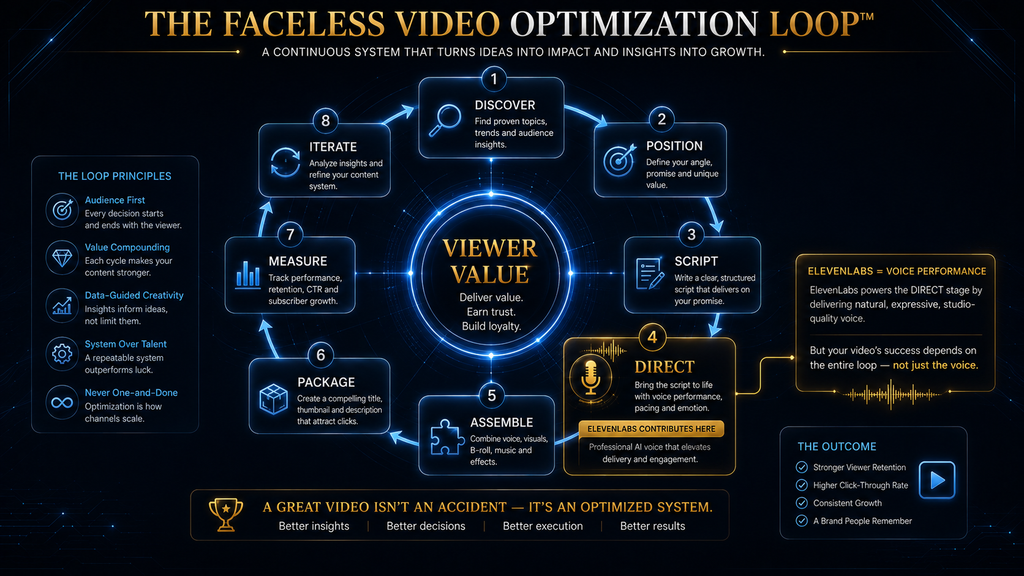
Once the voice workflow works, stop treating every video as a separate project. Create a repeatable system. The pipeline should look like this: 1. Topic selection Identify the viewer problem or question. 2. Audience and search intent Determine what the viewer actually wants from the video. 3. Video angle Decide what makes your version meaningfully different. 4. Research Collect authoritative information, examples, evidence and counterpoints. 5. Script Build the argument before worrying about narration.
6. Voice preparation Choose the voice, model and delivery approach. 7. Narration Generate section by section. 8. Audio QC Fix pronunciation, pacing, awkward delivery and inconsistencies. 9. Visual plan Map every important idea to an appropriate visual. 10. Editing Assemble narration, visuals, music, sound design and captions. 11. Packaging Create title and thumbnail around the actual viewer promise. 12. Publish Upload and optimize the metadata. 13. Analyze Study impressions, CTR, watch time, average view duration and audience retention.
14. Iterate Use what happened to improve the next video. That last stage is what turns content production into a system.
Step 19: Connect the Script to Retention
YouTube’s Analytics tools let creators examine audience retention and identify flat sections, gradual declines, spikes and dips. The platform specifically describes the first 30 seconds as an important intro segment and recommends examining whether the opening matches the promise established by the title and thumbnail. This creates a useful feedback loop. Suppose your video has: strong CTR but large drop during the first 20 seconds. The thumbnail may have successfully earned the click.
The opening failed to earn the continuation. Now examine:
- Did the narrator take too long to reach the point?
- Did the intro repeat the title?
- Did the voice sound unnatural?
- Did the visuals fail to match the promise?
- Did the script start with background information instead of the actual problem?
ElevenLabs can only solve one of those problems directly: the voice. The rest are editorial problems. That distinction prevents creators from blaming the AI voice for a problem that actually exists in the script.
Step 20: Use Retention Data to Improve Voice Direction
This is where analytics becomes much more powerful. Imagine viewers consistently drop during dense explanatory sections. Don’t automatically conclude: “People don’t like technical content.” Maybe the explanation is too compressed. Maybe the narrator is too fast. Maybe the visuals aren’t helping. Maybe the section has no narrative progression. Maybe every sentence has the same vocal intensity. You can test these hypotheses. For the next video:
- shorten the sentences,
- introduce a concrete example earlier,
- slow the narration slightly,
- add a visual explanation,
- restructure the section,
- regenerate the most important passages with stronger delivery.
Then compare the retention pattern. You are no longer simply “using ElevenLabs.” You are using audience data to improve how you use ElevenLabs.
Step 21: Use CTR and Retention Together
A thumbnail and title create the promise. The opening must fulfill that promise. The body must continue rewarding the click. This creates a simple chain: Packaging → Click → Opening → Continued viewing → Satisfaction → Return If CTR is weak, investigate the packaging. If CTR is strong but retention collapses immediately, investigate the opening. If the opening works but viewers drop in the middle, investigate the structure, pacing, explanation and visual rhythm.
If viewers stay but don’t return, investigate whether the channel is building a coherent content identity. YouTube’s analytics separates reach, engagement and audience reporting, allowing creators to examine impressions/CTR, watch time/average view duration, retention, and new versus returning viewers rather than treating “views” as the only meaningful signal. That’s the system.
Step 22: Build the First 30 Seconds Differently
The opening of a faceless video should not be treated as a miniature introduction to an essay. It is a contract with the viewer. A strong opening usually does three things:
- Establish the problem.
- Create a reason to care.
- Begin delivering the answer.
For example: “Most people think faceless YouTube is an automation problem. It isn’t. The real bottleneck is deciding what deserves to be automated—and what still needs human judgment. In this video, I’ll show you how to build the voice layer with ElevenLabs without turning the entire channel into generic AI content.” Notice what happens. The viewer immediately knows:
- what the problem is,
- why the common assumption is wrong,
- what the video will teach,
- and what the broader argument will be.
The voice should support that opening with confidence rather than unnecessary theatricality.
Step 23: Use Pauses as Information, Not Decoration
A pause is useful when the audience needs to process a change in meaning. For example: “The model wasn’t the problem. “The workflow was.” That pause separates cause from conclusion. But if every paragraph contains dramatic pauses, the effect disappears. The same principle applies to emphasis. Don’t emphasize every important word. If everything is emphasized, nothing is emphasized. Use voice direction around:
- the core claim,
- an important contrast,
- an unexpected fact,
- a reveal,
- a conclusion,
- or an emotional transition.
Everything else can remain natural.
Step 24: Music Should Support the Narration, Not Compete With It
Faceless channels often overcompensate for the absence of a visible host by adding constant background music. That can create fatigue. The voice carries the information. Music should establish atmosphere, support transitions, and help shape emotional moments without competing with speech. During dense explanation, simplify. During a reveal or transition, music can become more noticeable. During a key sentence, reducing music can actually make the voice feel more important. Again, the goal isn’t “more production.”
It’s better information hierarchy. For cleaning up recordings and balancing levels, see our guide to the best AI audio editors.
Step 25: Captions Are a Second Reading Layer
Captions should reinforce the narration, not simply dump every spoken word onto the screen in an unreadable block. For important statements, consider using selective emphasis. If the narrator says: “The biggest problem isn’t AI voice quality. It’s production quality.” the visual layer could emphasize: AI VOICE QUALITY ≠ PRODUCTION QUALITY That creates a second route into the idea. But don’t turn every sentence into a giant kinetic-text animation. The visual hierarchy should remain controlled.
Step 26: Build the Thumbnail Around the Promise, Not the Tool
An ElevenLabs tutorial does not automatically need a thumbnail dominated by an ElevenLabs logo. The viewer is clicking because they want an outcome. For example: WE BUILT A FACeless YOUTUBE CHANNEL WITH AI VOICE or HOW TO MAKE AI VOICEOVERS SOUND HUMAN or ELEVENLABS → YOUTUBE The article title can explain the search intent. The thumbnail can communicate the outcome. That creates stronger packaging than simply placing a product logo in the center.
Step 27: Don’t Confuse AI Assistance With Automated Authorship
This distinction is becoming increasingly important. YouTube’s current monetization policy focuses on whether content is original and authentic rather than whether AI was used. It explicitly warns against mass-produced, repetitive or templated content that lacks meaningful creative, educational or commentary value. That means a faceless channel can use AI extensively and still build valuable original content. The channel should contribute something identifiable:
- research
- analysis
- storytelling
- commentary
- original examples
- original visual explanation
- editorial perspective
- meaningful transformation
The dangerous workflow is: prompt → generated script → generated voice → stock clips → upload The stronger workflow is: research → editorial angle → human-reviewed script → directed AI voice → intentional visual storytelling → substantive editing → analytics → iteration AI is still doing a huge amount of work. But the creator is still doing the thinking.
Step 28: Know When You Shouldn’t Use ElevenLabs
ElevenLabs is not automatically the correct solution for every video. If the video depends heavily on:
- live interviews,
- genuine personal storytelling,
- a recognizable host personality,
- spontaneous commentary,
- authentic reactions,
- or real human emotion,
a synthetic narrator may reduce rather than increase the video’s value. Likewise, if your content requires highly specialized pronunciation that the chosen voice consistently struggles with, forcing the platform into the workflow can create more work than it saves. The goal is not: “Use AI everywhere.” The goal is: Use AI where it improves the viewer experience or production economics without reducing authenticity. That is a much stronger editorial position. If narration is not the right fit, compare ElevenLabs with other AI voice tools or browse the best AI voice generators.
Step 29: AI Voice Does Not Remove Copyright or Rights Problems
Another common mistake is assuming: “Because the narration is AI-generated, everything else is safe.” It isn’t. Your visuals, music, clips, images, logos, scripts, voice identities and source material can still create rights issues. You need to know where every major asset came from and whether you have the appropriate rights or permissions to use it. Voice cloning introduces another layer of responsibility. Do not clone somebody else’s voice simply because the technology makes it possible.
Use voices you have the right to use, and be especially careful when the output could make a real person appear to say something they never said.
YouTube’s current policies require disclosure for realistic AI-generated or meaningfully altered content in situations such as making a real person appear to say or do something they did not, altering real events, or creating realistic scenes that did not happen. YouTube also says that cloning your own voice for voiceovers or dubs is currently listed among examples that don’t require disclosure, while other realistic synthetic or altered content can require disclosure.
When in doubt, review the current YouTube disclosure workflow rather than relying on an old creator tutorial.
Step 30: Protect the Channel From the “AI Slop” Trap
The fastest way to destroy a faceless channel is to optimize the wrong metric. If the goal becomes: “How quickly can I publish 30 videos?” you may create a channel full of interchangeable videos. If the goal becomes: “How efficiently can I create one genuinely useful video?” the automation becomes much more valuable. YouTube’s monetization policy explicitly warns about highly repetitive and mass-produced content, including generic AI-generated templates that lack original perspective.
So build systems for consistency, not systems for sameness. Your intro structure can be consistent. Your editing workflow can be consistent. Your voice can be consistent. Your research process can be consistent. Your visual identity can be consistent. But the ideas, evidence, examples and conclusions must remain meaningfully different. That’s how a faceless channel develops an identity instead of becoming a content factory.
A Practical ElevenLabs Faceless-Video Workflow
If you want the process condensed into an operating procedure, use this sequence.
Before opening ElevenLabs
Define:
- Audience
- Topic
- Search intent
- Video promise
- Narrative angle
- Voice brief
- Target video length
- Evidence requirements
This prevents the voice tool from driving the editorial strategy.
Inside ElevenLabs
Select: Voice → Model → Baseline settings → Script section → Generate → Listen → Regenerate weak passages → Approve → Export The important word is approve. Do not automatically export every generation.
Inside the editor
Build: Narration → visual map → screenshots / diagrams / footage → music → sound design → captions → transitions → final audio check Then watch the finished video from beginning to end. Not while editing. As a viewer.
The Quality-Control Checklist Before Publishing
Before uploading, listen to the complete video without looking at the timeline. Ask:
- Does the narrator sound like the same person throughout?
- Are there pronunciation errors?
- Are there unnatural pauses?
- Are important claims delivered clearly?
- Does the opening get to the point quickly?
Then watch the video with the sound off. Ask:
- Do the visuals still communicate the structure?
- Are there long periods where nothing meaningful changes?
- Do screenshots actually prove the narration?
- Are captions readable?
Then watch it normally. Ask:
- Does the voice and visual layer feel like one piece of content?
- Are there moments where the visuals contradict the narration?
- Does the pacing become repetitive?
- Does the ending feel earned?
This three-pass process catches problems that a single editing pass often misses.
How to Improve the Next Video
The first video gives you production knowledge. The second should use it. The third should use the data from the first two. This is where YouTube becomes an iterative system rather than a publishing calendar. YouTube Analytics provides reach metrics such as impressions and impressions click-through rate, engagement metrics such as watch time and average view duration, and audience-retention reports showing where viewers stay, drop, rewatch or skip. Create a simple post-publishing review:
- Packaging: Did people click?
- Opening: Did they stay?
- Structure: Where did they leave?
- Value: What did they rewatch?
- Voice: Were there sections where delivery felt weak?
- Visuals: Which sections generated spikes?
- Topic: Did the audience respond to the subject?
- Next video: What should change?
The goal isn’t to make every video perfect. The goal is to make video 20 materially better than video 1. That is what a production system should accomplish.
The AI Hustle World Faceless Video Loop
Here’s the framework I would actually build around the channel: RESEARCH Find a meaningful viewer problem. ANGLE Choose the perspective that makes the video worth watching. SCRIPT Turn the research into an argument or story. VOICE Use ElevenLabs to create controlled, appropriate narration. VISUALS Show what the narration means. EDIT Control pace, emphasis and information flow. PACKAGE Turn the video’s promise into title + thumbnail. PUBLISH Put the finished work in front of the audience.
MEASURE Study CTR, watch time, retention and audience response. LEARN Identify what actually worked. IMPROVE Change the next video. Then repeat. The important insight is that ElevenLabs sits inside the loop. It isn’t the loop.
What Should You Automate?
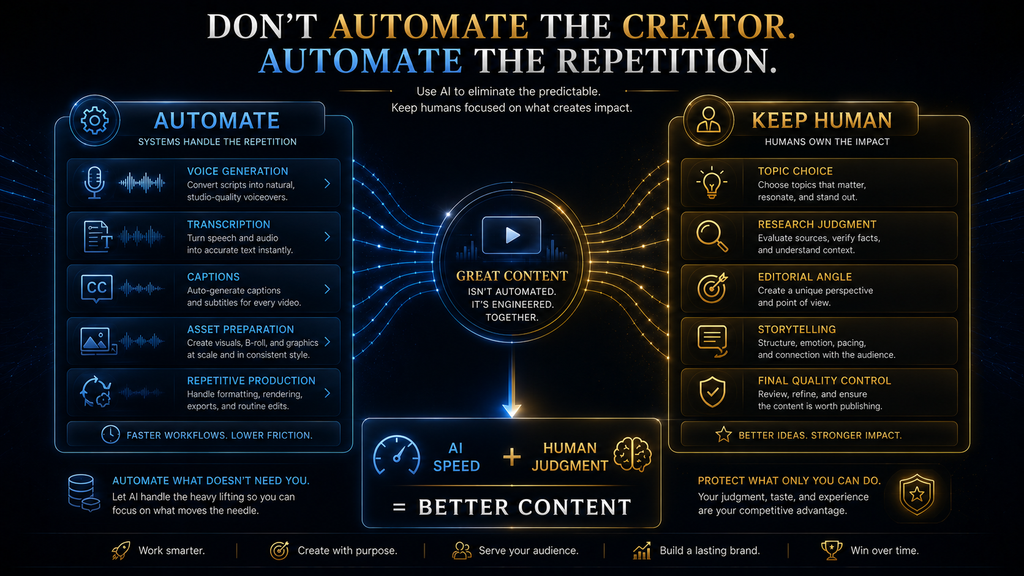
Automate tasks where the cost of human attention is high and the consequence of mistakes is low. Good candidates include:
- first-pass narration generation,
- regenerating small sections,
- transcript preparation,
- caption generation,
- file organization,
- repetitive editing operations,
- asset preparation,
- production checklists.
Be more careful automating:
- topic selection,
- factual claims,
- editorial conclusions,
- sensitive subjects,
- voice identity decisions,
- copyright decisions,
- final quality control.
The principle is simple: Automate execution before you automate judgment. That is especially important for faceless channels because removing the human face does not remove the need for human editorial responsibility.
When ElevenLabs Makes the Biggest Difference
ElevenLabs has the most strategic value when your channel depends heavily on narration. That includes:
- documentary channels,
- technology explainers,
- educational channels,
- business stories,
- history channels,
- storytelling channels,
- list/explainer formats,
- faceless tutorials,
- multilingual narration workflows.
The value increases further when you create enough videos to justify a consistent voice system. At that point, your voice becomes part of the channel’s identity. Viewers may never see the creator. But they can still recognize:
- the voice
- the pacing
- the storytelling style
- the editorial perspective
- the visual language
That’s how a faceless channel can still develop a recognizable brand. Before committing to a paid plan, check current plan limits in our AI Tool Pricing Database.
The Important Limitation
A recognizable AI voice is not a substitute for recognizable editorial identity. If ten channels use similar AI voices, similar stock footage, similar scripts, similar hooks and similar thumbnails, the voice alone won’t differentiate them. Your defensibility comes from the combination: voice + research + angle + storytelling + visual identity + audience understanding ElevenLabs can strengthen the first component. Your editorial system must build the rest.
Is ElevenLabs Good for Faceless YouTube Videos?
Yes—especially when narration is central to the channel and you use it as part of a broader editorial workflow rather than as an automatic content factory. Its current voice-generation system provides meaningful control over voice behavior, model selection and regeneration, while Studio can make longer-form production easier to manage. But the strongest faceless workflow isn’t: ElevenLabs → YouTube. It is: Audience problem → research → angle → script → ElevenLabs narration → intentional visuals → editing → packaging → analytics → iteration.
That distinction is the difference between AI-assisted production and AI-generated filler.
Final Thoughts
The biggest mistake you can make with ElevenLabs is thinking that better AI narration automatically creates better YouTube videos. It doesn’t. A voice can only deliver the material you give it.
If the topic is weak, the voice cannot fix the topic. If the script is repetitive, a natural voice simply makes the repetition sound more polished. If the visuals don’t explain anything, better pronunciation doesn’t solve the visual problem. If the thumbnail promises something the video doesn’t deliver, even excellent narration can’t repair the mismatch. But when the underlying content is strong, ElevenLabs becomes much more valuable.
You can establish a consistent narrator. You can generate and regenerate sections without traditional recording sessions. You can experiment with delivery. You can build reusable voice standards. You can produce narration at scale while keeping the creator’s attention focused on research, storytelling and editorial decisions. That is the real opportunity. Don’t build a faceless channel because AI makes video production cheap. Build one because you have a repeatable way to create something people actually want to watch.
Use ElevenLabs to make the voice layer faster and better. Use your editorial judgment to make the video worth watching. And then let the audience tell you what to improve next.
Check ElevenLabs Against Your Channel’s Real Needs
Review the current plans and licensing terms against how many minutes of narration you actually produce, then decide whether a paid workflow fits.
Review ElevenLabs Plans →Affiliate disclosure: We may earn a commission if you subscribe through this link, at no additional cost to you.
FAQ
Can I use ElevenLabs for YouTube videos?
Yes. ElevenLabs can generate AI narration for YouTube videos, and its current platform provides text-to-speech models, voice settings and Studio workflows suitable for longer-form production.
Which ElevenLabs model should I use for YouTube?
It depends on the video. Expressive storytelling may benefit from Eleven v4 or v3, while long-form narration may prioritize stability and consistency. Lower-latency models are more relevant when generation speed or real-time interaction matters. Always evaluate the actual output using your own script rather than choosing a model purely by name.
How do I make ElevenLabs voices sound more natural?
Start with the right voice, write the script for spoken delivery, use natural punctuation, avoid overusing style controls, and regenerate sections that sound unnatural. ElevenLabs notes that formatting, punctuation and context can affect delivery and that generated output is nondeterministic.
Should I generate my entire YouTube script at once?
For longer videos, section-based generation is generally easier to control. It lets you regenerate a problematic paragraph without rebuilding the entire narration. ElevenLabs specifically recommends Studio for longer text when paragraph-level regeneration is useful.
Can AI-generated faceless videos be monetized on YouTube?
AI use itself is not the core problem. YouTube’s current monetization policy focuses on original and authentic content and warns against repetitive, mass-produced or templated content that lacks meaningful creative, educational or commentary value.
Do I need to disclose AI use on YouTube?
It depends on what AI is doing. YouTube currently requires disclosure for realistic AI-generated or meaningfully altered content in certain circumstances, such as making a real person appear to say something they did not say or creating realistic scenes that did not happen. YouTube lists cloning your own voice for voiceovers or dubs among examples that do not require disclosure.
Can I use someone else’s voice with ElevenLabs?
You should not treat voice cloning as permission to impersonate another person. Use voices you have the rights or authorization to use, and be especially careful when synthetic audio could misrepresent a real person’s statements or identity.
How do I know whether my AI voice is hurting retention?
Compare the narration with your YouTube retention graph. Look for drops around dense explanations, awkward transitions, pronunciation problems or sections with repetitive delivery. YouTube’s retention report can show gradual declines, dips, spikes and top moments that help identify where viewers respond differently.
Should I use one ElevenLabs voice for my whole channel?
Usually, a consistent primary narrator is useful for brand recognition, but it doesn’t mean every video needs identical delivery. You can maintain the same voice identity while changing pacing, emphasis and emotional direction according to the subject.
Is ElevenLabs enough to run a faceless YouTube channel?
No. It solves the narration layer. A sustainable channel still needs topic selection, research, scripting, visual storytelling, editing, thumbnails, titles, publishing, analytics and continuous improvement.
Written by
Muntasir Ahmad Chowdhury
Founder, AI Hustle World
Muntasir Ahmad Chowdhury is the Founder of AI Hustle World, an independent publication dedicated to making Artificial Intelligence practical, trustworthy, and easy to understand. He researches AI tools, automation, customer service, productivity, and real-world business applications, helping readers make smarter technology decisions through research-driven, experience-backed content.
Expertise:
AI Tools • AI Automation • AI Customer Service • AI Productivity • Generative AI • AI Workflows
Get Smarter With AI
Enjoyed this guide? Get practical AI tools, tutorials, and honest reviews delivered to your inbox.