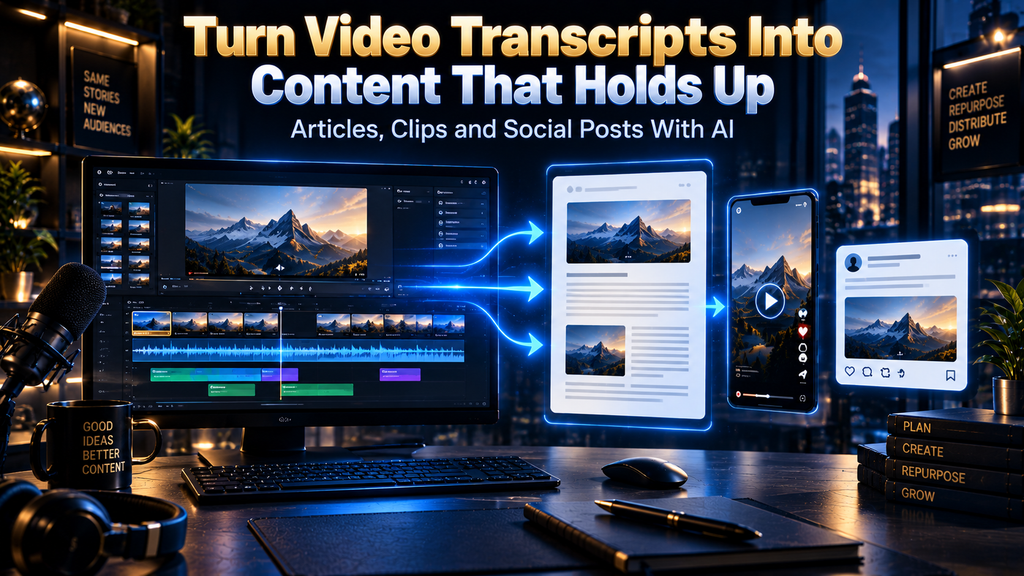
How to Turn Video Transcripts into Articles, Clips and Social Posts with AI
A video transcript can make content production faster, but it can also make a small editorial mistake travel farther than it ever could in the original recording. A speaker may qualify a claim three minutes after making it. A product demonstration may reveal the real limitation behind a confident sentence. A customer story may sound clear in conversation but become misleading once it is compressed into a headline, a clip, and five social posts.
That is why the useful question is not, “How can AI turn one video into more content?” The better question is, “How can I turn one recording into several useful assets while preserving what was actually said, shown, meant, and permitted?” Those are different jobs. The first is production volume; the second is editorial judgment.
AI is very good at reducing repetitive work around a recording. It can transcribe speech, identify recurring themes, produce first-draft outlines, find moments that may work as clips, rewrite an idea for different platforms, and help organize a messy source file. It is much less reliable at deciding whether a statement is still accurate outside its original context, whether a visual caveat matters, whether a quote is representative, or whether a repurposed endorsement requires disclosure.
The traditional method of repurposing content exists for a reason. Editors listened to the recording, watched the footage, pulled verified excerpts, checked claims, and decided what each format could honestly carry. AI should reduce the tedious portions of that work, not remove the parts where meaning, risk, and audience trust are decided.
This article explains a full transcript-to-content workflow for creators, marketers, podcasters, educators, agencies, and small teams. It is designed for people who want articles, clips, and social posts that are easier to produce without becoming thin, repetitive, or untraceable. The central idea is simple: every published asset should have an evidence trail back to the recording it came from.
What This Workflow Owns and What It Does Not
This workflow owns the editorial problem between a finished recording and the content assets built from it. It helps you turn a video transcript into a long-form article, short-form clips, and social posts while keeping source evidence, visual context, permissions, and human review visible throughout the process.
It does not promise that every recording deserves to become ten posts, that every transcript is accurate, or that more content automatically creates more traffic, leads, sales, or trust. Those outcomes depend on the original material, the audience, distribution, topic fit, timing, creative quality, and the credibility of the person or brand publishing it. A workflow can make good decisions easier to repeat; it cannot make an empty source recording valuable.
The distinction matters because the market often frames AI repurposing as a multiplication machine. Upload a video, choose “blog post,” select “social posts,” and receive a stack of drafts. That can be useful for a rough starting point, but it does not answer the questions that matter after the export button is pressed: Is this claim supported? Does this clip make sense without the earlier explanation? Does the post sound like a person with a point of view, or like an automated summary?
AI Hustle World’s editorial position is that useful automation should remove friction from low-judgment tasks while keeping humans responsible for consequence and ambiguity. In transcript repurposing, that means AI can help discover, organize, and draft. A human still needs to decide what is worth saying, what needs proof, what should be omitted, and what could cause harm if it is stripped of context.
The Real Problem Is Not Transcription. It Is Translation.
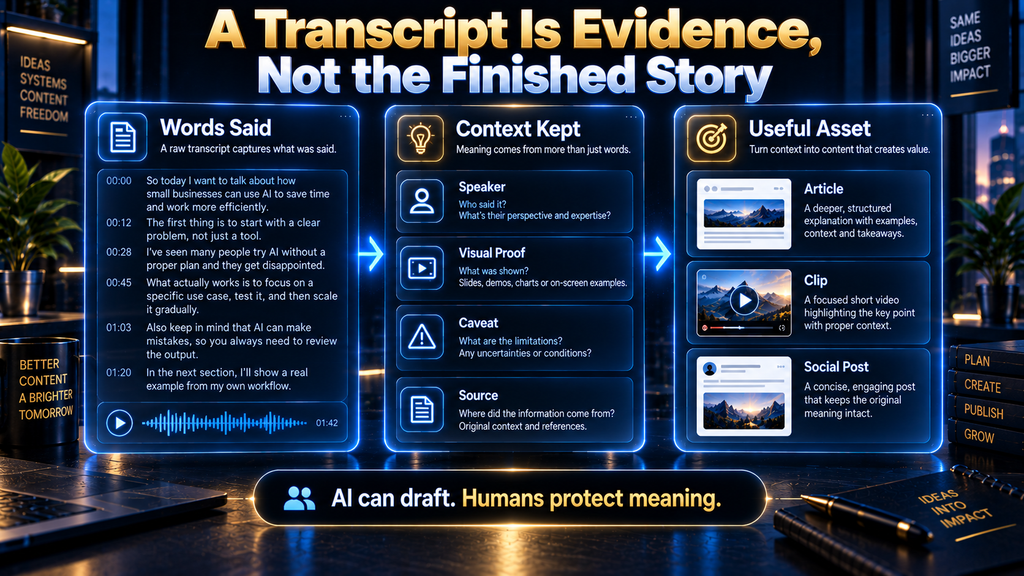
Turning speech into written content is not a formatting task. It is a translation task between different forms of attention. A viewer can hear tone, see a facial expression, notice a product screen, and stay with a thought through its false starts. A reader sees words alone and expects structure. A social-media viewer may give you two seconds before deciding whether the first line is relevant.
That difference explains why a transcript should not be pasted directly into a blog template. Spoken language contains repetitions that help a listener follow along but make written prose feel loose. It contains references such as “that thing,” “this screen,” or “as I said earlier,” which are understandable in the video but meaningless on a page. It also contains incomplete sentences, verbal fillers, mid-thought corrections, and side conversations that may be perfectly natural on camera but do not belong in an article.
The danger is not simply that the final article will be untidy. The danger is that AI will try to make the transcript sound finished by resolving ambiguity on its own. It may turn a tentative statement into a firm conclusion, combine two separate ideas, supply an example that was never given, or remove the caveat that made the original claim responsible.
A clean repurposing system keeps the source recording in charge. The transcript is a working representation of the recording, not a replacement for it. The article, clips, and social posts are interpretations of that source for specific audiences and formats, not independent evidence.
Start With the Recording, Not the AI Tool
The first decision happens before transcription. Confirm that you can legally and ethically reuse the recording in the ways you intend. If you own the video, commissioned it, or have clear written permission from the relevant participants, the path is simpler. If the recording includes a guest, customer, client, employee, partner, paid creator, copyrighted footage, or confidential discussion, you may need more than a general assumption that repurposing is acceptable.
Changing a recording into text does not create ownership of the underlying work. The U.S. Copyright Office’s fair-use guidance makes clear that merely changing someone else’s work does not give you a copyright claim over it. Fair use is fact-specific, and this article is not legal advice, but the practical editorial lesson is straightforward: do not treat transcription as a permission slip.
That caution applies even within your own business. A customer call may contain private information. A sales webinar may include pricing that has changed. A product demo may show an unreleased feature. A founder interview may contain off-the-record remarks made after the formal conversation appeared to end. AI makes it easy to copy, summarize, and distribute this material; that is precisely why teams need a permission and sensitivity check before they begin.
A good preflight review asks four questions. Do we own or have permission to reuse this recording? Does it include sensitive, personal, confidential, licensed, or third-party material? Are there statements that have changed since the recording was made? Does the recording contain endorsements, sponsorships, affiliate relationships, or other commercial connections that need to remain clear in the new format?
If any answer is uncertain, pause before generating derivative content. The cost of waiting is usually lower than the cost of retracting an article, taking down a clip, or explaining why a customer story appeared in public without proper approval.
Build a Canonical Transcript Before You Draft Anything
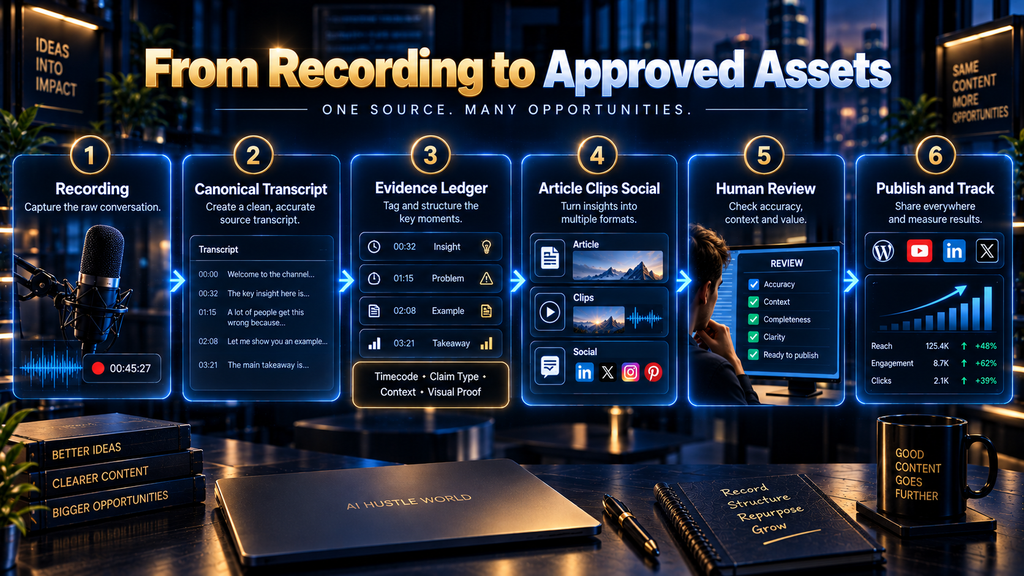
A canonical transcript is the reviewed source file that every later asset refers back to. It is not the prettiest version of the conversation. It is the most reliable operational version: speaker labels, timestamps, obvious corrections, flagged uncertainties, and enough context for another editor to verify a statement without guessing.
Many teams accidentally create several competing source files. One tool produces an auto-caption file. Another produces a cleaned transcript. A writer copies part of it into a document. A social-media manager uploads the video elsewhere and gets a third version. Within a week, nobody knows which version contains the correction to the product name, the missing “not,” or the updated speaker attribution.
The answer is not a more elaborate folder structure for its own sake. The answer is a single source of truth. Keep the original recording, create one canonical transcript from it, document material corrections, and require every article draft, clip shortlist, and social post to use that version as the source.
Automatic captions are useful but imperfect. YouTube’s own caption guidance notes that auto-generated captions can misrepresent speech because of accents, dialects, background noise, pronunciation, and other factors. That is not a reason to avoid automated transcription. It is a reason to review the passages where a mistake would matter.
The highest-priority corrections are usually names, job titles, numbers, dates, prices, URLs, product features, technical terms, direct quotations, and words that reverse meaning. “Can” versus “cannot,” “before” versus “after,” “first quarter” versus “fourth quarter,” and “free” versus “three” are not cosmetic errors. They can materially change a reader’s understanding of what happened or what they should do.
You do not need to listen to every second of a clean recording at half speed if the subject is low-risk and the transcription quality is strong. You do need a sensible review standard. Check the introduction, transitions, key claims, numbers, names, product demonstrations, questions from other speakers, and any passages that will become headlines, clips, or advice. Treat ambiguity as a flag for review, not an invitation for AI to make the sentence smoother.
Timestamped transcripts make this possible. YouTube allows viewers to move from transcript lines back to moments in a video, and modern speech-to-text systems can provide timestamped output as well. OpenAI’s speech-to-text documentation describes transcription output options, including timestamp-related capabilities. The specific tool matters less than the principle: if a published statement cannot be traced back to the original recording, it deserves more scrutiny before it becomes content.
The AI Hustle World Transcript-to-Asset Evidence Ledger
The original contribution in this article is the AI Hustle World Transcript-to-Asset Evidence Ledger. It is a reusable, tool-neutral framework for connecting each final asset to the evidence, context, and review decisions that support it.
The ledger is not a benchmark, a performance score, or a claim that using it guarantees better results. It is a transparent editorial record. Its purpose is to make the journey from recording to article, clip, or post inspectable by a writer, editor, client, fact-checker, or future version of your own team.
Most transcript-repurposing guides focus on output generation. They show how to ask AI for a blog post, a thread, or a clip list. Some correctly recommend reviewing the output. What they often do not provide is a practical structure for recording the source moment, the type of claim being made, the visual context that matters, the adaptation rule for the new format, the permissions or disclosure check, and the person responsible for final approval.
That missing structure is where a large share of repurposing errors begin. A writer may have a good transcript but not know whether the quoted sentence was an opinion or a factual claim. A video editor may choose a strong soundbite without noticing that the visual proof appeared ten seconds earlier. A social-media manager may reuse a testimonial without carrying over the sponsorship disclosure visible in the original video.
The ledger gives each asset a record with the following fields:
| Ledger field | What it records | Why it matters |
|---|---|---|
| Asset ID | A unique identifier for the article section, clip, or social post | Prevents final assets from becoming detached from their source |
| Source window | The exact timestamp range and relevant speaker | Lets reviewers return to the original moment |
| Source claim or quote | The idea, statement, or demonstration being reused | Keeps the draft grounded in actual source material |
| Claim type | Fact, research finding, vendor claim, opinion, personal experience, prediction, instruction, or illustration | Tells the editor what kind of proof is needed |
| Context requirement | The qualification, earlier explanation, or surrounding discussion that must stay attached | Reduces misleading compression |
| Visual proof | The visual moment that supports or complicates the words | Stops transcript-only clip selection |
| Adaptation rule | The editorial job for the article, clip, LinkedIn post, X post, carousel, email, or newsletter | Makes each format distinct instead of repetitive |
| Permissions or disclosure check | Guest approval, customer consent, licensing, confidentiality, sponsorship, or affiliate disclosure | Identifies risks before publication |
| Human reviewer | The person responsible for verifying and approving the asset | Preserves accountability |
| Final status | Draft, needs revision, approved, postponed, or rejected | Prevents incomplete work from being published by accident |
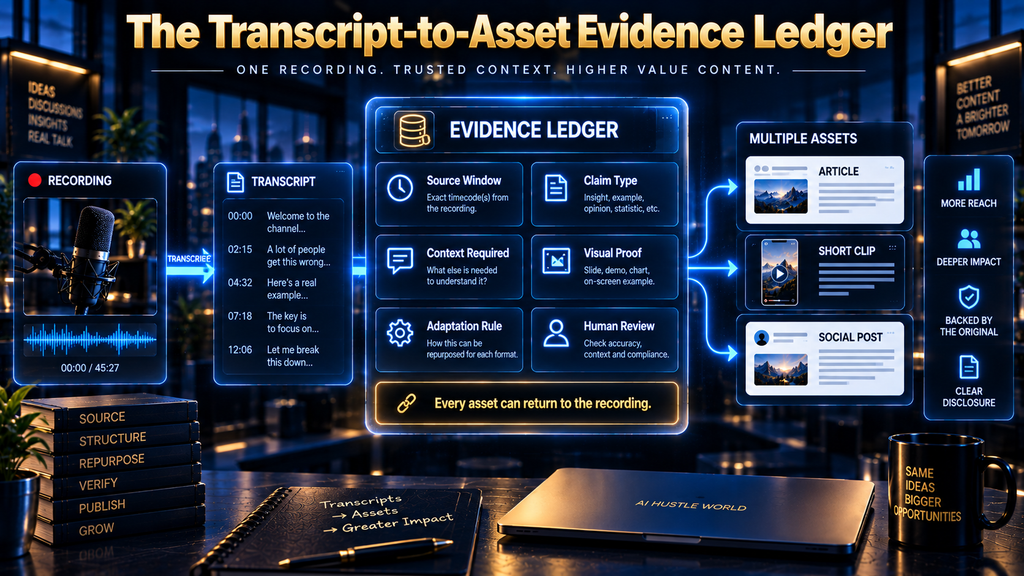
The ledger is easy to verify because it points back to material a careful reader or editor can inspect. They can open the original recording, go to the timestamp, compare the transcript, check the surrounding context, view the relevant footage, and assess the final asset against the written adaptation rule. The system does not require anyone to trust an AI summary as the source of truth.
How the Ledger Works in Practice
Consider an illustrative example. A podcast guest says at 14:08 that their team stopped publishing automatic AI summaries after one summary omitted a limitation in a customer’s feedback. Between 14:08 and 15:02, the guest explains that the problem was not a spelling error; it was a loss of context. At 15:03, they give a practical safeguard: have a human reviewer compare any summary that includes a customer claim with the original recording.
The source claim is not “AI summaries are unreliable.” That broader statement would need evidence beyond one guest’s experience. The source claim is that this guest’s team changed its process after a summary omitted a limitation. The article can explain the broader editorial principle, but it should label the guest’s story as an example, not inflate it into universal proof.
For the article, the adaptation rule could be: “Use this as an example inside a section about source-grounded review; explain the general method separately and cite primary guidance for any factual policy claim.” For a clip, the rule could be: “Use the guest’s sentence only if the preceding explanation makes the risk understandable, and show the guest while they explain the safeguard.” For a LinkedIn post, the rule could be: “Frame the lesson as a review practice, not a claim about all AI systems.”
The visual-proof field may reveal that the strongest clip is not the most quotable line. Perhaps the guest’s sentence is powerful at 14:08, but the practical instruction at 15:03 is more useful because it gives the viewer something to do. The ledger makes that decision visible instead of letting a clip be chosen only because one sentence looked good in a transcript.
Why This Is More Than a Spreadsheet
The ledger is not administrative overhead added after the creative work is finished. It changes the quality of the creative work itself. When a writer must identify the source window and claim type, they are less likely to write around a claim that cannot be supported. When a clip editor must identify visual proof, they are less likely to choose an audio-only soundbite that becomes misleading on screen.
It also solves a quiet team problem: the person who publishes an asset is often not the person who heard the original conversation. A writer may receive a transcript from a producer. A designer may receive a list of selected quotes. A social-media manager may receive a folder of clips. Without a traceable system, every handoff increases the chance that a useful nuance is lost.
For a solo creator, the ledger can be a simple table with ten rows. For an agency or media team, it can become a shared editorial record that makes review faster and reduces the number of “Where did this come from?” messages. The framework scales because the core question remains the same: what source evidence supports this final asset?
Decide What the Recording Is Actually About
A video can cover many ideas. An article should usually own one primary reader problem. If the recording contains a broad discussion of productivity, AI tools, hiring, content strategy, and business mistakes, that does not mean the best article is “Everything We Learned About Business and AI.” It means you need to choose the angle that has the clearest search intent, strongest evidence, and most useful decision point.
Start by asking what a reader would be trying to solve. Are they trying to turn a podcast episode into a blog post? Find clips from a long webinar? Create social posts without sounding repetitive? Keep AI-assisted content accurate? Build a repeatable workflow for a small team? Those are related topics, but they are not interchangeable search intents.
The article should make a promise that the recording can actually support. If the source is a detailed tutorial on editing interview transcripts, it may support a guide about accuracy and editorial review. If the source is a founder telling stories about a launch, it may support a perspective-led article about lessons learned. If the source is a product demo, it may support a carefully bounded explanation of a workflow, but not necessarily a broad claim that the product is the best option for every user.
This is where AI can help with analysis without being allowed to make the editorial decision alone. Give it the canonical transcript and ask it to identify recurring audience questions, repeated concepts, clear examples, tensions, objections, and moments where the speaker changes their mind or explains a tradeoff. Then review those candidates against the original recording and choose one angle based on usefulness, evidence, and fit.
A useful prompt might ask: “Using only this transcript, identify the five strongest reader problems addressed by the speaker. For each, provide the relevant timestamps, direct supporting excerpts, the likely reader intent, and any essential context. Mark an idea as unsupported if the transcript does not contain enough evidence to build a useful article around it.” That is very different from asking AI to “find viral ideas.”
Build an Article From an Argument, Not a Transcript Order
A good article has a line of reasoning. It begins with a problem the reader recognizes, explains the mechanism behind that problem, gives the reader a way to act, and shows where the advice has limits. A recording may contain all of those ingredients in a different order, mixed with greetings, questions, anecdotes, repeated explanations, and detours.
Do not mistake sequence for structure. A speaker may start with a story, explain the practical method halfway through, and reveal the important limitation near the end. The article should arrange those pieces in the order that helps a reader understand and use them, not preserve the chronology of the conversation.
For this topic, a strong long-form article has to do more than say, “Upload your video, transcribe it, and ask AI for content.” It needs to explain why transcript-based repurposing fails when context is lost; how to establish a canonical source record; how to distinguish a speaker’s opinion from a factual claim; how to turn the same source moment into different formats; how to manage permissions and disclosures; and how to measure whether the workflow is producing useful work rather than merely more output.
That is the What, How, and Why sequence in practice. What is the content-repurposing problem: a source recording can produce multiple assets, but only if meaning survives the transformation. How is the operational method: reviewed transcript, evidence ledger, asset-specific adaptation, human verification, and publication checks. Why is the business and editorial consequence: without those controls, fast repurposing can create inaccurate, repetitive, context-free content that damages trust.
An article writer should create an outline from the selected angle and evidence ledger, not from the transcript alone. Each section should have a job. One section may explain the mechanism. Another may address the practical workflow. Another may give the reader a decision rule. Another may show a failure mode that explains why the traditional editing step still matters.
A Better AI Brief for Article Drafting
A vague prompt gives AI too much room to decide what matters. A strong editorial brief narrows the assignment. It tells the model who the reader is, what the article is trying to solve, what evidence is approved, what claims need external support, what the article should not claim, and what tone the final piece needs.
For example, your instruction can say: “Draft a section for creators and small content teams about why a transcript is a source record rather than a finished article. Use only source windows A-02, A-05, and A-09 from the attached Evidence Ledger. Explain the mechanism in plain language, preserve any qualifications, and do not invent statistics, product features, case studies, or first-hand testing. If the source does not support a claim, place [SOURCE NEEDED] instead of filling the gap.”
That instruction improves quality because it asks AI to work within an editorial frame. It does not guarantee accuracy. You still need to read the output, compare it with the source, and rewrite sentences that flatten a complicated idea. But it makes the initial draft more useful and reduces the time spent undoing invented detail.
The revision stage is where the article becomes publication-quality. Read each section as a skeptical reader would. Does it answer a real question? Does it define its terms? Does it explain why the recommendation follows from the evidence? Does it distinguish an example from a general rule? Does it tell the reader what to do next without implying that every situation is identical?
Separate Source Material From Supporting Evidence
A transcript can be the primary source for what happened in the recording. It is not necessarily the primary source for every factual statement made in the recording. If a speaker mentions a platform rule, a current product feature, a legal requirement, a pricing detail, or a statistic, you should check an authoritative source before presenting it as current fact in an article.
This protects both the reader and the speaker. People misspeak. They quote old information. They simplify a policy for conversational purposes. They may accurately describe their own experience while being wrong about the wider industry conclusion. The article should preserve the value of the recording without treating every sentence in it as independently verified research.
Use a simple claim classification system during editing:
| Claim type | Editorial treatment |
|---|---|
| Fact | Verify with a current primary or authoritative source where practical |
| Research finding | Link to the original study, dataset, or institutional source |
| Vendor claim | Attribute it to the company and verify it on the company’s current documentation |
| Personal experience | Attribute it to the speaker or organization; do not overgeneralize |
| Opinion or prediction | Present it as analysis, judgment, or forecast |
| Instruction | Explain the conditions under which it applies and where it may fail |
| Illustrative example | Label it clearly so readers do not mistake it for a reported case study |
| AI Hustle World analysis | Show the reasoning, source trail, and practical basis for the interpretation |
This classification may look formal, but it makes ordinary editorial work easier. It prevents a sentence like “AI-generated content is penalized by Google” from slipping into an article simply because someone said it in a video. Google’s guidance is more specific: it focuses on content quality and spam policy, not a blanket ban on AI-assisted creation. Google Search Central’s guidance on AI-generated content is the kind of primary source that should inform the final article, not an uncited paraphrase from a transcript.
The same applies to product claims. If a speaker says a tool offers a feature, check the product documentation if the feature is important to the reader’s decision. If the article is discussing a vendor’s pricing, limits, or policy, verify it close to publication. Product pages, especially for AI tools, can change quickly.
Find Clip Candidates With Words, Then Approve Them With Video
A transcript is excellent for locating potential clips. It is not enough for approving them. A clip is an audiovisual argument, and the visual part can change its meaning.
The strongest short-form moments tend to contain a clear shift: a mistake revealed, a surprising answer, a direct lesson, a useful contrast, a process step, an objection, or an observation that makes the audience reconsider an assumption. The transcript can help you search for those moments, especially when the recording is long. You can ask AI to find passages where the speaker names a problem, offers an example, disagrees with common advice, explains a decision, or gives a practical instruction.
But every promising result needs a video review. Watch at least several seconds before and after the selected range. Check whether the clip begins in the middle of an idea, depends on an earlier visual, includes an unexplained reference, or loses an important qualification when shortened. Check the sound quality, pacing, framing, on-screen text, and whether a cut would make the statement seem more absolute than it was.
A transcript may say, “This is the one thing we changed.” In the video, the speaker might be reacting to a specific customer segment, a specific time period, or an earlier experiment. If that context is cut, the clip can imply that the lesson applies universally. The solution may be to start earlier, add a short on-screen context line, choose a different clip, or use the idea in an article instead.
The Clip Selection Test
Before approving a clip, ask five questions. Can a person understand the point without watching the entire video? Does the clip preserve the speaker’s intended meaning? Does the video show useful visual evidence, or is the soundbite better suited to text? Is there any omitted context that would materially change how a reasonable viewer interprets it? Does the clip give the viewer something useful enough to justify its place in their feed?
A clip that passes only the first question is not ready. It may be short and understandable while still being misleading, visually dull, commercially undisclosed, or too weak to earn attention. Short-form editing is not the art of removing words until a video fits a time limit. It is the art of retaining the smallest amount of material that still communicates a true and useful idea.
Do not use a universal clip-length rule. A concise answer may need fifteen seconds. A tutorial moment may need forty-five seconds because the visual demonstration is the point. A longer clip may be the honest choice if removing the explanation would distort the claim. Platform conventions matter, but the first rule is accuracy.
Turn One Source Moment Into Different Social Assets
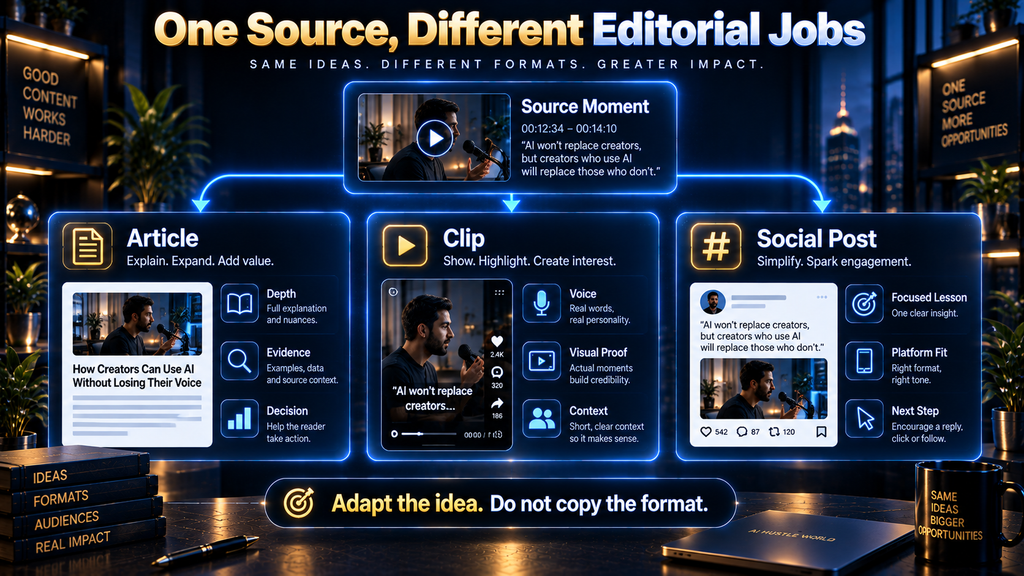
The objective is not to turn a transcript into copied text for multiple platforms. The objective is to give one source idea a different editorial job in each format. An article can provide depth and evidence. A clip can provide voice, demonstration, and personality. A social post can create an immediate connection with a specific problem and point the audience toward a fuller resource.
Take the illustrative podcast example about a summary omitting a customer limitation. In an article, the idea becomes part of a section explaining why source-grounded review exists. You can explain the mechanism: summaries compress information, and compression can remove the condition that made a statement true. You can add a practical safeguard: compare high-stakes summaries against the recording before publishing.
The clip version can show the guest explaining the failure and the safeguard in their own words. It carries credibility because the viewer can hear the person who experienced the problem. It should not be edited to imply that all transcription tools fail in the same way or that the incident proves a broad industry statistic.
The LinkedIn version may begin with the work problem: “The expensive transcript mistake is rarely a typo. It is a summary that removes the condition attached to a customer’s statement.” It can then explain a practical review habit for teams handling interviews, research calls, or customer feedback. The X version may reduce the same lesson to one concise observation and link to the deeper article. An Instagram carousel may turn it into a short sequence: source recording, transcript, claim, missing condition, review step.
The ideas are related, but the audience experience is not identical. This is what prevents repurposing from becoming repetitive. You are not asking every format to repeat the same paragraph. You are asking each format to perform the job it is best suited to perform.
Build Adaptation Rules Before Generating Drafts
An adaptation rule is a one-sentence instruction that defines what an asset must do and what it must not do. It gives AI a useful constraint and gives the human editor a clear review standard.
For an article section, the rule might be: “Explain the full mechanism and include the limitation that the source moment cannot prove a universal claim.” For a clip, it might be: “Preserve the speaker’s point with enough lead-in to make the lesson clear, and show the relevant visual demonstration.” For a LinkedIn post, it might be: “Turn the source moment into a workplace lesson with one practical action; do not repeat the clip’s wording.” For a newsletter, the rule might be: “Use the source moment as a short opening story, then connect it to a broader editorial idea and a related resource.” For a carousel, it might be: “Teach one process in five to seven visual steps; use the transcript only as evidence, not as slide copy.” The rule can be brief, but it should be specific enough to expose when a draft has drifted.
This is one of the reasons a transcript-to-content workflow benefits from a ledger. Without an adaptation rule, AI tends to create variations that differ only in length. With one, each asset has a purpose.
Why the Traditional Editing Step Still Matters
There is a tempting assumption behind many AI repurposing workflows: if a transcript is accurate enough and the output sounds polished enough, the work is done. That is not how editorial quality works. The problem is rarely one obvious error. It is the accumulation of small decisions about emphasis, evidence, sequence, tone, and audience fit.
Traditional editing exists because people do not consume content as raw information alone. They infer confidence from phrasing. They interpret what is left out. They notice when a clip starts too late, when an article states an opinion as fact, or when a social post feels as if it was written by someone who did not understand the original conversation.
AI can reduce the effort of first-draft production, but it can also hide weak reasoning behind competent prose. A grammatically clean sentence can still be unsupported. A neat outline can still organize the wrong ideas. A confident social post can still be built from a transcript line that only made sense in the room where it was spoken.
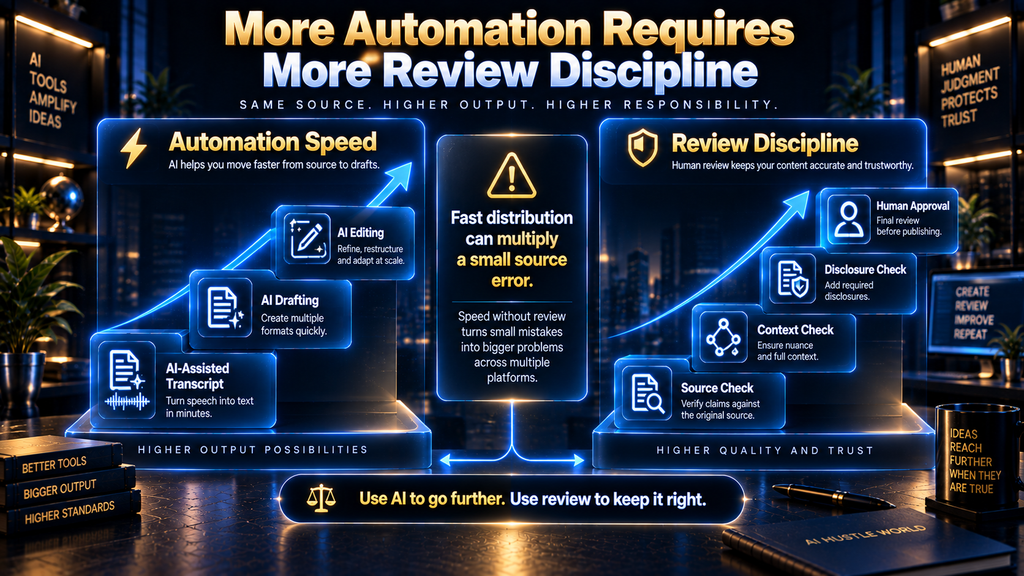
The reality check is this: the more aggressively you automate repurposing, the more deliberate your verification rules need to become. A person manually creating one article from one recording has fewer chances to spread an error. A team creating an article, four clips, a newsletter, a thread, a carousel, and several platform variations from the same recording multiplies the value of getting the source record right.
What happens if you do nothing? You may publish less often, but you retain the slower process of listening, watching, and editing each piece with direct human attention. What happens if you automate without controls? You may publish more often, but you risk building a content library that looks active while gradually becoming less distinct, less accurate, and less trusted. The better option is not “manual versus automated.” It is selective automation with a visible human standard.
Make the Article Worth Reading Without the Video
A reader should not need to watch the original video to understand the article. The article can link to or embed the recording where useful, but it should stand on its own as a complete piece of thinking. That means it needs more than a rewritten transcript.
Begin with the reader’s problem, not the speaker’s biography. Explain terms that a new reader may not know. Use the video’s strongest examples, but add the connective tissue that speech often lacks: why the example matters, what condition makes it relevant, where it may not apply, and what the reader can do with it.
A useful test is to remove the original video from the page in your mind. Does the article still explain the process? Does it distinguish evidence from interpretation? Does it provide an implementable path? Does it acknowledge the situations where the advice becomes risky, incomplete, or irrelevant? If the answer is no, the page is still acting like show notes rather than an article.
This is also where research adds value. If the recording raises a factual issue, use authoritative sources to give the reader current context. If it explains a personal workflow, preserve it as an attributed example and then explain the general principle carefully. If it contains a strong opinion, treat it as an opinion and make the reader’s decision easier by showing the tradeoff behind it.
A good article does not erase the personality of the recording. It extracts the useful insight from the conversational format and presents it with enough structure that a reader can understand, assess, and apply it.
A Practical Editorial Workflow for a Small Team
The following sequence is designed to keep the work moving without letting review happen too late. It can be adapted for a solo creator, an in-house marketing team, an agency, or a publisher working with subject-matter experts.
- Confirm source rights and current relevance. Review ownership, permissions, confidentiality, sponsor obligations, affiliate relationships, and whether any advice or product information has become outdated.
- Create the canonical transcript. Generate a transcript with timestamps and speakers where possible, then correct material errors and flag uncertainty.
- Identify content-worthy source windows. Use AI to locate candidate moments, but review the original recording before approving them for use.
- Create the Evidence Ledger. Record the source window, claim type, context requirement, visual proof, adaptation rule, permissions check, and reviewer for each planned asset.
- Choose one article angle. Select the reader problem that the source can genuinely answer well. Do not force broad coverage because the recording touched several subjects.
- Research the supporting facts. Verify policy, technical, product, legal, research, pricing, and company claims with current authoritative sources where practical.
- Draft the article from an outline. Use the ledger and approved research as inputs. Require AI to mark unsupported claims rather than inventing support.
- Write format-specific social assets. Create different editorial jobs for the article, clips, and social posts instead of copying the same wording.
- Review clips against the footage. Confirm visual context, opening clarity, sound, captions, disclosures, and whether the final cut preserves the source meaning.
- Run publication checks. Review factual claims, links, names, dates, permissions, disclosures, legal sensitivity, brand voice, and whether each asset has an approved ledger status.
- Publish and record the final URLs. Add links to the finished article, clips, and posts in the ledger so future editors can audit or refresh them.
The workflow is intentionally sequential in the early stages. You can draft social ideas while the article is being written, but you should not publish them before the source and claim checks are complete. It is easier to revise a draft than to correct a public statement that has already been shared, embedded, indexed, or screenshotted.
Where AI Helps Most and Where It Should Not Lead
AI is most useful when the task is repetitive, text-heavy, and reversible. It can clean verbal filler from a transcript, create timestamped summaries, group similar discussion points, suggest headline angles, compare passages, generate outline options, write draft variations, and convert approved ideas into different platform formats. These are valuable time savers because a human can inspect the output and make changes without losing the original source.
AI should not lead when the task requires accountability, high-stakes judgment, or interpretation of missing context. Do not let it independently determine whether a sensitive interview can be reused, whether a factual statement is current, whether a guest’s remark was meant for publication, whether an endorsement requires disclosure, or whether a clipped sentence changes meaning. Those are editorial and sometimes legal decisions.
The dividing line is not whether AI can produce an answer. It can produce an answer to almost any prompt. The dividing line is whether a reasonable person can verify the answer from the available evidence and whether the cost of being wrong is low enough to accept automated judgment.
For lower-risk content, an individual creator may handle the process alone. For higher-risk content, build clear handoffs. A researcher or writer can verify factual claims. A producer can confirm source permissions. A video editor can review visual context. A subject-matter expert can approve technical explanations. The ledger tells everyone what they own.
Handle Endorsements, Sponsorships, and Affiliate Relationships Carefully
Repurposing can accidentally separate an endorsement from the disclosure that made it transparent in the original video. A full YouTube description may contain an affiliate notice, while a short clip posted elsewhere may not. A sponsored interview may include a spoken disclosure near the beginning, while a social post pulls a positive remark from the middle.
The Federal Trade Commission’s endorsement guidance emphasizes that material connections should be clear and conspicuous. The practical repurposing implication is that disclosure needs to travel with the claim where the audience sees it, not remain buried in the source format.
This does not mean every post needs a wall of legal language. It means the disclosure should be appropriate to the content, platform, and relationship. If a clip contains an endorsement tied to a paid relationship, free product, affiliate commission, or other material connection, review whether the final clip and caption make that connection understandable to a reasonable viewer.
The same care applies to product comparisons. A transcript may contain enthusiasm about a tool. That enthusiasm may be authentic and still not be enough to support a recommendation. Separate what the speaker experienced, what the vendor claims, what your research confirms, and what remains a matter of fit or judgment.
Measure Whether the Workflow Produces Useful Work
Output volume is easy to count. One webinar became an article, six clips, eight posts, a newsletter, and a carousel. That number can be useful for planning, but it does not tell you whether the content was accurate, distinctive, or worth the time it took to produce.
Measure editorial quality alongside production output. Track the percentage of assets that have a completed Evidence Ledger record. Track the number of material corrections found during review. Track how many clip candidates were rejected because visual context changed their meaning. Track how often a social draft needed to be rewritten because it made a broader claim than the source could support.
For content performance, use metrics that fit the asset’s job. An article may be evaluated through qualified organic visits, time on page, meaningful backlinks, newsletter sign-ups, or conversions to the next relevant resource. A clip may be evaluated through retention, saves, comments that show genuine understanding, or clicks to the fuller explanation. A social post may be evaluated through replies from the intended audience, not merely impressions.
Do not turn these measures into a fake precision system. A high save count does not prove that an article was accurate. A low-view clip is not automatically a bad editorial choice. Metrics are signals that should be read alongside source fidelity, audience fit, and the role of the asset in your wider content strategy.
A Useful KPI Framework
For a practical monthly review, group your measures into four areas.
Source fidelity: Are final assets traceable to a source window? Were claims checked at the right level? Did review catch material context problems before publication?
Editorial usefulness: Does the article answer a specific reader problem? Do clips make sense without misleading compression? Do social posts provide a real lesson rather than recycled promotional text?
Production efficiency: How long does it take to move from recording to approved assets? Where do drafts stall? Which tasks are repetitive enough to automate safely?
Audience and business value: Are the right people finding, saving, sharing, replying to, subscribing through, or acting on the content? Are there patterns in which source formats lead to more useful downstream assets?
The point is not to create a dashboard full of numbers. The point is to identify whether the workflow is helping you publish more of your best thinking or merely helping you publish more frequently.
Common Mistakes That Make Repurposed Content Feel Weak
The first common mistake is treating the first transcript as final. This is how wrong names, inaccurate numbers, and reversed meanings find their way into an article that then appears polished enough to be trusted. A transcript should be reviewed according to the stakes of the content, not accepted because an AI tool produced it quickly.
The second mistake is using AI to generate the article before choosing the article’s actual question. The result is often a long, tidy summary that covers many points without helping a reader make a decision. Decide the reader problem first, then use the transcript selectively as evidence.
The third mistake is picking clips by words alone. A transcript can find the sentence, but only the video can tell you whether the clip has visual proof, natural pacing, a clear opening, and enough context. When in doubt, watch more of the source rather than editing more aggressively.
The fourth mistake is assuming every source moment belongs on every platform. Some ideas are excellent in a detailed article but too conditional for a short post. Some visual demonstrations make strong clips but do not offer enough substance for a long-form section. Repurposing works best when content is adapted, not duplicated.
The fifth mistake is letting AI write around missing evidence. If the transcript is vague, the article should be careful. If a claim needs current documentation, add current documentation. If neither exists, remove the claim or present it as a limited opinion rather than asking a language model to create a persuasive bridge.
The sixth mistake is confusing a speaker’s experience with a general finding. A founder can truthfully describe what happened at their company. That does not automatically prove that the same tactic will work for every company. Attribution is not a weakness; it is what keeps useful examples honest.
The seventh mistake is skipping the publication check because the source video has already been published. A statement that was acceptable in a sixty-minute discussion may carry a different implication in a twenty-second clip or a search-optimized article headline. Every new format deserves its own context, disclosure, and accuracy review.
Who Should Use This Workflow and Who Should Adapt It
This workflow is especially useful for creators and teams producing long-form videos, podcasts, interviews, webinars, founder conversations, educational content, customer discussions with permission, and product walkthroughs. These formats contain enough substance to support several assets, but they also contain enough context that careless compression can cause problems.
It is particularly valuable when more than one person touches the content. Agencies, editorial teams, B2B marketers, media companies, and content operations teams benefit because the Evidence Ledger creates a shared record. The framework reduces dependence on one person remembering why a sentence was included or why a clip begins at a particular timestamp.
A solo creator can use a lighter version. A simple document with timestamp, idea, intended format, source note, and approval status may be enough. The goal is not bureaucracy. The goal is to create enough evidence and structure that you can work quickly without forgetting where an important idea came from.
You should adapt or avoid this workflow when the source material is too thin, too sensitive, too outdated, or too dependent on a real-time conversation that cannot be fairly represented in derivative form. A casual livestream with scattered commentary may not deserve a 3,000-word article. A confidential research interview may be useful internally but inappropriate for public repurposing. A product tutorial from six months ago may need a fresh recording before it becomes new content.
The Second-Order Effect of Better Repurposing
The immediate benefit of a good repurposing workflow is efficiency. You spend less time staring at a blank page because the recording already contains themes, examples, questions, and language from a real conversation. The larger benefit is that your content library becomes more coherent over time.
When articles, clips, and social posts are all grounded in source evidence, they reinforce one another. The article becomes the durable explanation. The clip becomes a memorable entry point. The social post becomes a focused invitation to think about one part of the idea. Readers who move between formats encounter a consistent editorial point of view rather than a collection of loosely related drafts.
There is also a trust effect. Teams that maintain source trails can update content more confidently when facts change, respond to questions with evidence, correct errors without panic, and explain how a conclusion was reached. That is more useful than a vague claim that content is “AI-powered.”
As AI tools become better at transcription, editing, summarization, and media generation, the mechanical barrier to producing content will keep falling. That makes judgment more valuable, not less. When many people can produce acceptable-looking drafts quickly, the differentiator becomes whether a publication can explain its reasoning, respect context, and give readers material they can trust.
Final Thoughts
The best transcript-repurposing workflow is not the one that produces the most drafts from a recording. It is the one that helps you preserve the useful meaning of the source while adapting it for people who prefer to read, watch short clips, or encounter one idea in a social feed.
AI can make that work faster. It can find moments, organize material, produce options, and remove repetitive effort. But the work remains editorial: verify the source, decide what the evidence supports, preserve important context, respect permissions and disclosures, and give every final asset a reason to exist in its own format.
The AI Hustle World Transcript-to-Asset Evidence Ledger is the practical safeguard at the center of that process. It gives you a traceable path from recording to article, clip, and social post, so your content does not merely look finished. It remains connected to the material that made it worth publishing in the first place.
A clean transcript is only the beginning
Use the next step to plan how one strong idea can travel across YouTube, Pinterest, and Instagram without becoming the same post repeated everywhere.
Build the multi-channel repurposing plan →Frequently Asked Questions
Can AI turn a video transcript into a blog post?
Yes. AI can help turn a transcript into a blog-post draft by identifying themes, organizing ideas, suggesting an outline, and rewriting spoken language for a reading audience. The final article still needs human editorial work because a transcript does not automatically provide accurate claims, logical structure, current evidence, or the context that a reader needs.
How do I turn a transcript into short video clips?
Use the transcript to find candidate moments, then review the original video before approving any clip. A good clip needs a clear point, enough context to stand alone, understandable audio, useful visuals, and no omitted qualification that would change the meaning of the speaker’s words.
Should I correct an AI-generated transcript before repurposing it?
Yes, especially when the recording includes names, numbers, dates, prices, technical terms, URLs, direct quotations, legal or financial statements, and important product details. Automated transcription can be very helpful, but material errors can spread into every downstream article, clip, and social post if they are not caught early.
Can one video become an article, clips, and social posts?
Yes, but each format should have a different job. The article should give the reader depth, context, and a usable process. Clips should preserve a memorable audiovisual moment, while social posts should frame one focused lesson for the audience and platform where they appear.
How do I stop AI from inventing information from a transcript?
Give the AI tool a reviewed canonical transcript and an Evidence Ledger with approved source windows. Instruct it to use only that source material, provide timestamps or direct excerpts, and mark unsupported ideas as needing evidence instead of filling gaps with invented facts, examples, or claims.
What is the best way to turn a transcript into an article without sounding repetitive?
Choose one primary reader problem, build an article outline around that problem, and use only the transcript moments that support the argument. Remove verbal repetition, add transitions and explanation, verify factual claims, and make sure every section gives the reader a distinct piece of reasoning or practical guidance.
How long should a repurposed video clip be?
There is no single correct length. A clip should be long enough to preserve the idea honestly and short enough to hold attention in the context where it will be published. A brief statement may work in seconds, while a tutorial or nuanced explanation may need more time because the visual demonstration or qualification is essential.
Can I repurpose somebody else’s YouTube video into articles or social posts?
Not automatically. You need to consider copyright, licensing, permission, fair-use considerations, and the intended use before republishing or adapting someone else’s work. Converting a video into a transcript, article, or social post does not itself create the right to use the source material.
Do sponsorship or affiliate disclosures need to stay in repurposed content?
If the repurposed asset contains an endorsement connected to a material relationship, the disclosure should be clear in the new format too. A disclosure that appears in a full video description may not be sufficient for a short clip, social post, or article excerpt that contains the endorsement.
What should I measure after turning one video into multiple pieces of content?
Measure more than output volume. Track source fidelity, corrections caught during review, production time, the quality of audience response, and the metric that fits each asset’s job, such as qualified article visits, saves, retention, replies, subscriptions, or relevant next-step actions.
Related Guides
- How to Turn Articles Into Social Media Content With AI
- Repurpose Podcasts Into Short-Form Content With AI
- 8 Best AI Content Repurposing Tools in 2026
Written by
Muntasir Ahmad Chowdhury
Founder, AI Hustle World
Muntasir Ahmad Chowdhury is the Founder of AI Hustle World, an independent publication dedicated to making Artificial Intelligence practical, trustworthy, and easy to understand. He researches AI tools, automation, customer service, productivity, and real-world business applications, helping readers make smarter technology decisions through research-driven, experience-backed content.
Expertise:
AI Tools • AI Automation • AI Customer Service • AI Productivity • Generative AI • AI Workflows
Get Smarter With AI
Enjoyed this guide? Get practical AI tools, tutorials, and honest reviews delivered to your inbox.
6 thoughts on “Turn Video Transcripts Into Articles, Clips and Social Posts With AI”