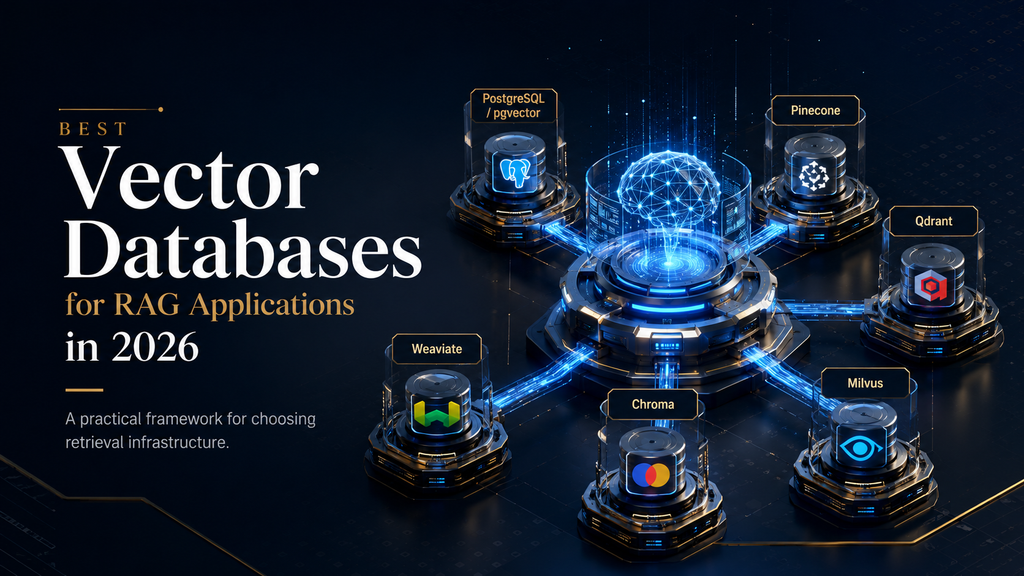
Best Vector Databases for RAG Applications in 2026
Building a RAG application creates a deceptively difficult infrastructure decision. At first, choosing a vector database appears simple: store embeddings, run similarity searches, return the most relevant chunks, and send them to the language model. In production, however, retrieval rarely works under such clean conditions. Documents belong to different customers, users have different permissions, queries contain exact product names alongside vague concepts, knowledge changes over time, traffic fluctuates, and the system has to remain fast enough that retrieval does not become the bottleneck.
That changes what “best” means.
The best vector database for a RAG application is not necessarily the one with the fastest benchmark, the largest maximum vector count, or the longest list of AI features. It is the system that produces sufficiently good retrieval quality under your actual filtering, latency, scale, security, update and cost requirements without introducing unnecessary architectural complexity.
For some teams, that means using pgvector inside PostgreSQL rather than adding another database. For others, a managed service such as Pinecone makes more sense because engineering time is more valuable than infrastructure control. Qdrant becomes compelling when filtering and retrieval control are important, Weaviate when hybrid search and broader AI capabilities matter, Milvus when distributed scale is genuinely required, and Chroma when development simplicity is the priority. Existing database platforms such as MongoDB can also make more sense when they already contain the application’s source data.
This guide therefore does something slightly different from a conventional “top vector databases” list. Instead of declaring a superficial winner, it examines how the retrieval problem changes the database decision, where each platform fits, where it starts to become a poor choice, what implementation realities buyers should expect, and how to evaluate candidates using a production-oriented framework.
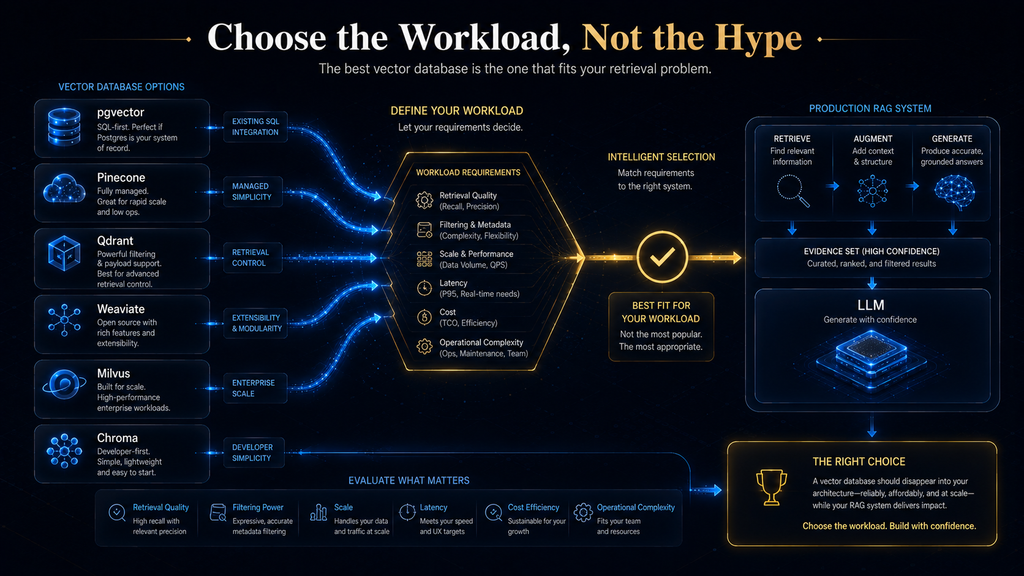
The central idea is simple: Choose the retrieval architecture first. Choose the vector database second.
That distinction will save you from one of the most expensive mistakes in modern RAG development: selecting infrastructure before understanding the workload.
What This Article Covers — and What It Does Not
This article focuses specifically on vector databases and retrieval infrastructure for RAG applications. It covers the role of vector storage and indexing, semantic and hybrid retrieval, filtering, scaling, operational models, economics, security considerations, implementation trade-offs and practical selection criteria.
It does not attempt to explain every component of RAG from scratch. Embedding models, chunking strategies, reranking, retrieval evaluation and hallucination reduction are separate engineering concerns, although they inevitably affect the vector-database decision. That distinction matters because a database can only retrieve the information that the upstream pipeline has represented correctly.
In other words, this is not a ranking of databases in isolation. It is a guide to deciding which retrieval infrastructure is appropriate for a particular RAG system.
Why the Vector Database Decision Has Become More Complicated
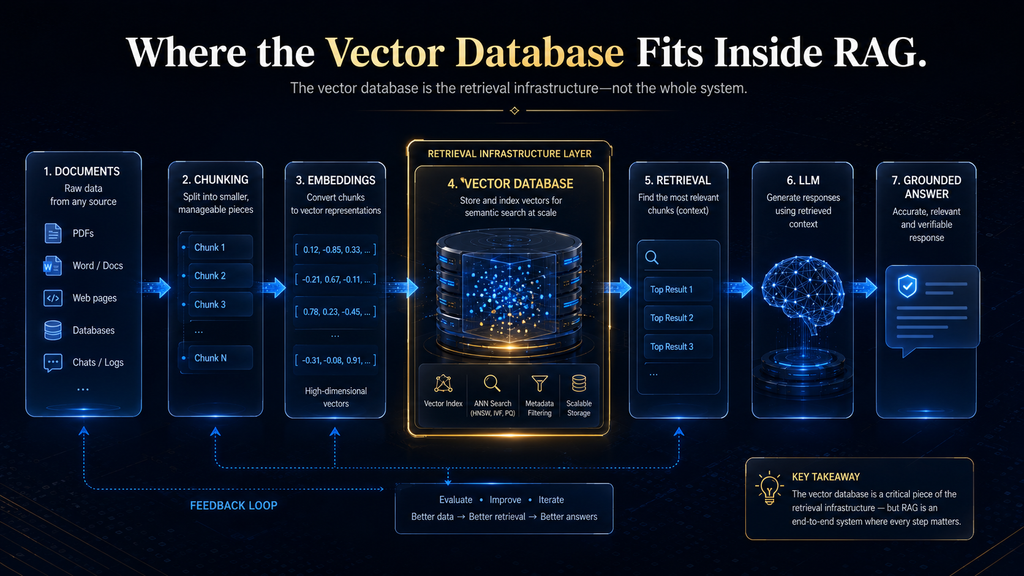
Early RAG implementations could get away with a surprisingly simple architecture. A developer would split documents into chunks, generate embeddings, store them in a vector index, embed the user’s question, retrieve the nearest chunks and pass those chunks to an LLM.
That architecture still works for experiments. Production systems expose the weaknesses very quickly.
Imagine a company building an internal knowledge assistant. Its corpus contains employee policies, product documentation, sales material, engineering manuals and customer-support procedures. An employee asks a question about a product feature, but the assistant must only retrieve documents that the employee is authorized to see. The query may also contain an exact product code, while the relevant explanation is written using different terminology elsewhere in the documentation.
The retrieval system now has to solve several problems simultaneously: semantic similarity, exact-term matching, metadata filtering, access control, ranking and latency.
This is why the vector database has gradually moved from being a simple storage component toward becoming part of a broader retrieval system.
A database that looks excellent when asked, “Find the five vectors nearest to this query,” can behave very differently when asked, “Find the five most useful documents matching this query, but only from this tenant, only from documents the user can access, preferably matching this product identifier, while returning results within a strict latency budget.”
That second query is much closer to reality.
What a Vector Database Actually Does in RAG
A vector database primarily solves an indexing and retrieval problem: it allows an application to store numerical representations of information and efficiently find vectors that are similar to a query vector.
The process begins before the database is involved. A document is extracted, cleaned and divided into chunks. Each chunk is passed through an embedding model, producing a numerical vector intended to represent its semantic characteristics. The application stores the vector alongside the original text or a reference to it, plus metadata such as document ID, tenant, category, author, timestamp, permissions or product.
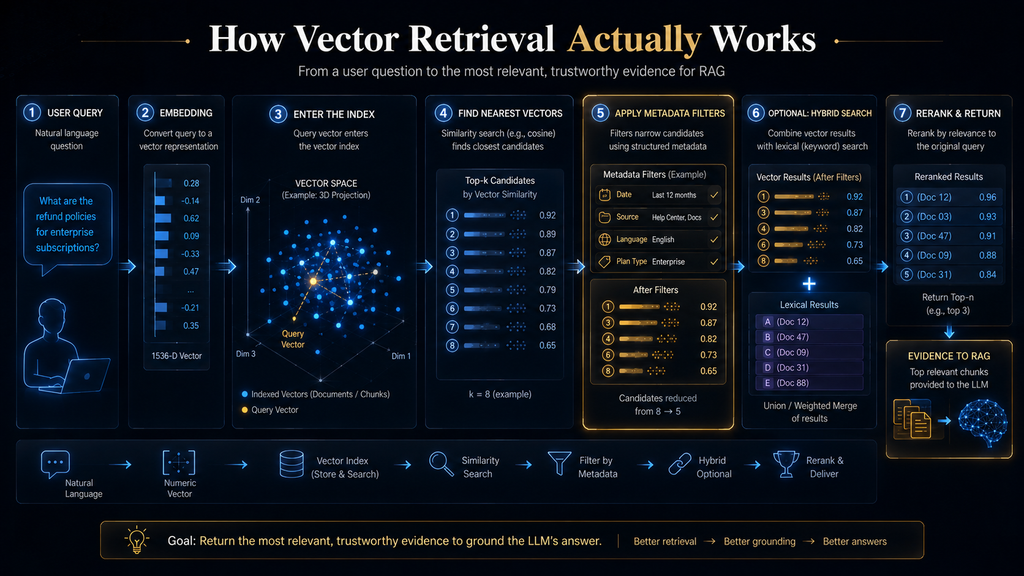
When a user submits a question, the application generates an embedding for the query and asks the vector index to identify relevant candidates. The database performs similarity calculations using an appropriate distance metric and index structure, then returns the selected records.
The language model comes later.
This distinction is crucial because the LLM does not normally search the entire knowledge base itself. It receives the context that the retrieval layer selected. If the correct document never reaches the context window, the model cannot reliably reason from it.
That creates a chain of dependency:
Document quality → chunking → embeddings → indexing → retrieval → filtering → ranking → context → generation.
A weakness near the beginning of that chain can masquerade as a database problem later.
This is also why changing databases sometimes produces surprisingly little improvement. If your chunks are poorly designed or your metadata is incomplete, replacing one competent vector engine with another may change latency without materially improving answer quality.
The Real Job of a Production Vector Database
A production vector database has to do more than return similar vectors.
It has to answer four broader questions:
Which information is relevant?
This is the semantic retrieval problem.
Which information is allowed?
This is the filtering, tenant isolation and authorization problem.
Which information should be prioritized?
This is the ranking, hybrid retrieval and reranking problem.
Can all of that happen economically and reliably?
This is the infrastructure problem.
That fourth question is where many technical comparisons become disconnected from business reality. A retrieval system that is technically impressive but requires a large engineering team to operate may be a poor choice for a startup. Conversely, a managed service that is extremely convenient may become expensive or restrictive at a scale where an enterprise already has database infrastructure expertise.
The right answer depends on the organization’s constraints.
Our AI Hustle World Framework: The R3D Decision Model
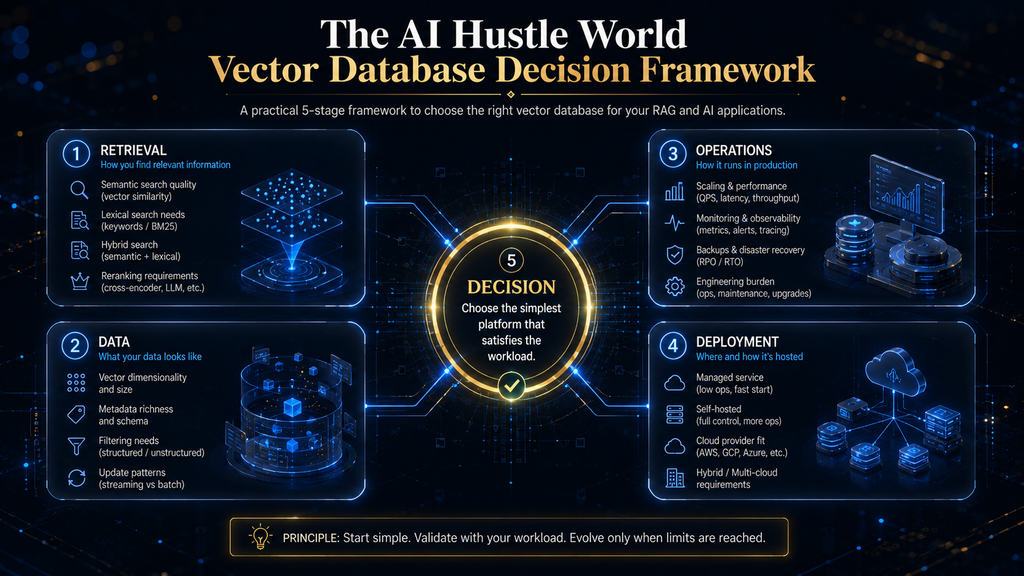
For this comparison, the most useful way to think about vector databases is through a framework built around five decisions:
R — Retrieval
How sophisticated does the retrieval system need to be?
Does it only require dense semantic search, or does it need hybrid retrieval, metadata filtering, multi-stage retrieval, reranking and multiple indexes?
3 — Three Operating Layers
Evaluate the database across three layers rather than one:
Data layer: How does it store vectors, metadata and source records?
Retrieval layer: How effectively can it search, filter, rank and combine signals?
Operations layer: How difficult and expensive is it to deploy, scale, monitor and maintain?
D — Deployment
Do you need a fully managed service, self-hosting, cloud flexibility, private infrastructure or a combination?
Decision
Which option fits the actual workload today without creating an unreasonable migration problem tomorrow?
This gives us the R3D Vector Database Framework: Retrieval → Data/Retrieval/Operations → Deployment → Decision.
The important insight is that database selection is a multidimensional decision. Optimizing only retrieval speed is like choosing a car solely because it has the highest horsepower without considering fuel consumption, reliability, passengers or where you intend to drive it.
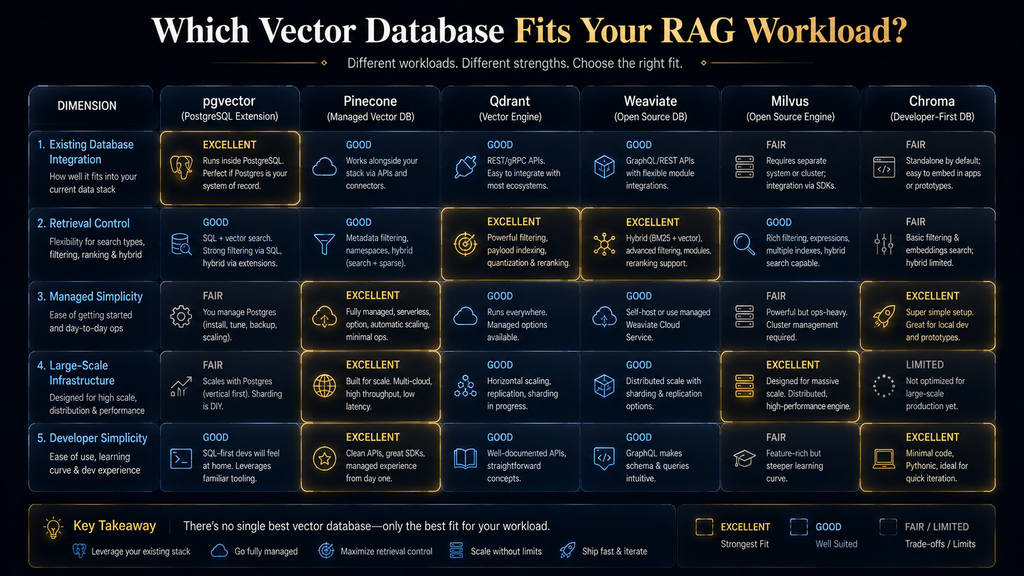
The Six Leading Options at a Glance
Before examining each platform deeply, here is the practical landscape.
| Vector database | Strongest fit | Why it stands out | Where caution is needed |
|---|---|---|---|
| pgvector | PostgreSQL-centric applications | Keeps relational and vector workloads together | Specialized high-scale retrieval may justify another system |
| Pinecone | Managed production RAG | Low infrastructure burden | Less control and greater provider dependence |
| Qdrant | Retrieval-heavy systems | Strong filtering and retrieval flexibility | Self-hosting requires operational expertise |
| Weaviate | Hybrid AI search | Strong combination of vector and keyword retrieval | Broader platform may be unnecessary for simple applications |
| Milvus | Large-scale distributed retrieval | Designed for serious vector workloads | Higher architectural and operational complexity |
| Chroma | Prototyping and developer-first RAG | Simple development experience | More demanding production requirements may favor alternatives |
But this table should not be read as a leaderboard.
The meaningful question is not whether Pinecone ranks above Qdrant or whether Milvus is “more powerful” than pgvector. The meaningful question is which constraint is most important in your application.
1. pgvector: The Best First Choice When PostgreSQL Already Runs Your Application
If PostgreSQL is already the center of your application architecture, pgvector deserves to be evaluated before introducing a separate vector database.
pgvector is an open-source PostgreSQL extension that supports vector similarity search, exact nearest-neighbor queries and approximate indexes such as HNSW and IVFFlat. Because it operates inside PostgreSQL, vector data can live alongside conventional relational data and be queried using the database’s existing capabilities.
That architectural consolidation is more important than it initially sounds.
Consider a SaaS application where PostgreSQL already stores customers, users, subscriptions, documents and permission relationships. If the knowledge assistant requires document retrieval filtered by customer ID and access rules, keeping those relationships inside PostgreSQL can simplify the architecture considerably.
Instead of creating a separate vector platform and building synchronization between two systems, the application can potentially use one database for both operational and retrieval data.
The benefit is not merely convenience. Every additional data system introduces another consistency boundary. If a document is deleted from PostgreSQL but remains searchable in the vector system for several minutes, the application may retrieve stale information. If permissions change but the vector layer does not immediately reflect the change, the problem becomes more serious than ordinary data inconsistency.
For permission-sensitive RAG, architectural simplicity can therefore become a security advantage.
Where pgvector becomes especially attractive
pgvector is particularly compelling when:
- PostgreSQL is already your primary database.
- The corpus is moderate rather than enormous.
- Your application relies heavily on relational metadata.
- You need SQL-based filtering and joins.
- Your team wants open-source infrastructure.
- You want to minimize operational components.
- Retrieval requirements are sophisticated but not extreme.
The important word is moderate.
It would be a mistake to conclude that pgvector is automatically appropriate simply because PostgreSQL is popular. At sufficient scale, specialized retrieval infrastructure may provide advantages that outweigh consolidation.
The correct approach is to benchmark it.
The filtering issue you need to understand
One subtle but important consideration is the interaction between approximate vector search and filtering.
pgvector’s documentation explains that with approximate indexes, filtering is applied after the index scan. This means a highly selective filter can result in fewer qualifying results than expected unless the system is configured appropriately. The project provides approaches such as iterative scans, partial indexes and partitioning for different filtering patterns.
This illustrates a broader principle: a vector index cannot be evaluated separately from the queries you will actually run.
A database may look excellent in a pure semantic benchmark while behaving differently when every production request includes multiple filters.
Who should use pgvector?
Use pgvector when database consolidation, SQL flexibility and operational simplicity matter more than having a purpose-built vector platform.
Who should avoid it?
Avoid choosing it purely because it is cheap or familiar if your workload already requires highly specialized distributed retrieval, massive concurrency or retrieval behavior that PostgreSQL is not handling comfortably.
2. Pinecone: The Strongest Managed Option for Teams That Value Speed of Execution
Pinecone approaches the vector database problem from a different direction: remove much of the infrastructure burden from the development team.
Its current platform provides managed vector infrastructure with dense, sparse and full-text indexing capabilities. Pinecone’s pricing model includes managed tiers and usage-based components, with current plans ranging from a free Starter option through paid Builder and Standard plans and an Enterprise offering.
For a small team, this can be strategically valuable.
Suppose three engineers are building an AI knowledge product. Their real competitive advantage is not running a vector cluster. It is improving onboarding, retrieval quality, user experience and the product’s domain-specific workflow.
If operating vector infrastructure consumes meaningful engineering time, a managed service may be economically rational even if its raw infrastructure cost is higher than self-hosting.
This is where the concept of engineering opportunity cost becomes important.
An engineer spending two days debugging database capacity is not simply costing two days of salary. That person is also not improving the product during those two days.
A managed service effectively allows the team to purchase infrastructure expertise from the provider.
Where Pinecone is particularly strong
Pinecone is attractive when:
- You want managed infrastructure.
- Your team is small.
- You need production deployment quickly.
- Traffic may be variable or unpredictable.
- You prefer operational simplicity.
- You do not want to manage vector clusters yourself.
The trade-off is that convenience creates dependence.
The more application logic becomes tightly integrated with a provider’s API, indexing model and pricing structure, the harder it may become to move later. Vendor lock-in is not automatically bad, but it should be recognized as part of the architecture.
The real Pinecone question
Do not ask: “Is Pinecone better than an open-source vector database?”
Ask: “Is reducing infrastructure ownership worth the additional cost and provider dependency for our business?”
For many teams, the answer may be yes. For infrastructure-heavy organizations with existing database expertise, the answer may be different.
3. Qdrant: A Strong Choice When Retrieval Control Matters
Qdrant is particularly interesting for teams that see retrieval as an engineering discipline rather than simply a storage problem.
Its capabilities include vector search, metadata filtering, hybrid and multi-stage query patterns, quantization and deployment flexibility. That combination makes it useful for RAG applications where retrieval conditions are more complicated than straightforward nearest-neighbor search.
Consider an enterprise knowledge assistant that serves thousands of users across multiple business units. A query may need to be restricted by tenant, department, document type and access level while still benefiting from semantic retrieval. In such an environment, metadata is not supplementary information.
Metadata becomes part of retrieval. That is an important architectural shift.
A document’s vector tells you something about what the document means. Its metadata tells you whether that document is eligible to be retrieved in the first place.
This is why filtering capabilities deserve the same level of scrutiny as vector-search speed.
Qdrant’s hybrid retrieval advantage
Real users rarely search entirely semantically.
They may ask: “What is the warranty policy for model XR-4200?”
The phrase “warranty policy” is semantic. “XR-4200” is an exact identifier.
A retrieval system that understands only semantic similarity may retrieve generally relevant warranty documents but fail to prioritize the exact model. Hybrid retrieval can use multiple signals to improve the candidate set.
This becomes especially valuable in technical documentation, support systems, product catalogs and enterprise knowledge bases.
The trade-off
Qdrant’s flexibility becomes more valuable when the team has the expertise to use it.
If you self-host, you take on deployment, monitoring, scaling, backups, upgrades and incident response. Open source does not mean zero operational cost.
That leads to a useful rule:
Choose self-hosted infrastructure when you want control and can afford to operate that control.
Otherwise, evaluate the managed option.
4. Weaviate: Strong When Vector Search Is Becoming a Broader Search System
Weaviate is particularly compelling when a RAG application needs more than semantic similarity.
Its hybrid search combines vector retrieval with BM25 keyword retrieval, allowing the system to incorporate semantic and lexical signals into the search process. Its broader platform also includes capabilities aimed at AI applications and managed deployments.
That combination matters because human language contains both meaning and exact terminology.
Imagine a legal knowledge assistant. A user might ask about “termination rights under Section 7.3.” Semantic retrieval helps understand the concept, while exact lexical matching can help preserve the significance of “Section 7.3.” The two signals solve different problems.
This is why hybrid search should not be treated as a marketing checkbox. For certain workloads, it is a fundamental retrieval requirement.
When Weaviate makes sense
Weaviate is worth serious evaluation when:
- Hybrid search is central.
- Metadata filtering is important.
- You want an AI-oriented data platform.
- You expect retrieval requirements to expand.
- You want managed deployment options.
- Your application needs more than a simple vector index.
The potential downside is breadth.
A platform that provides many capabilities is not automatically better than a narrower system. If your application needs only basic semantic retrieval over a modest corpus, additional functionality can increase conceptual and operational complexity without producing meaningful user value.
The question is whether you will actually use the broader capabilities.
5. Milvus: The Option to Consider When Scale Is Already a Real Problem
Milvus belongs in a different category from the simplest developer-oriented systems. Its architecture and documentation emphasize distributed deployment, large-scale vector workloads, indexing, filtering, hybrid search, scaling and operational management.
That makes it attractive for organizations where vector retrieval itself has become major infrastructure.
This distinction matters because teams often make a mistake in the opposite direction: they choose the most sophisticated technology because they are worried about future scale.
That is usually backwards. If your application currently serves a few hundred users and has a relatively small knowledge corpus, adopting a distributed vector architecture because “we might have billions of vectors one day” can introduce unnecessary complexity today.
Milvus becomes more compelling when the scale requirement is already visible.
For example, consider an AI platform serving multiple products, maintaining very large vector collections and handling substantial concurrent retrieval traffic. At that point, distributed architecture may not be overengineering. It may be the infrastructure required to meet the workload.
The Milvus trade-off
The price of scale is complexity.
Distributed systems require more careful thinking about deployment, resource allocation, monitoring, failure recovery and capacity planning. That means Milvus is often better suited to organizations with stronger infrastructure capabilities.
The wrong question is: “Can Milvus handle my workload?”
It probably can.
The better question is: “Does my workload justify the complexity of operating a system designed for this level of scale?”
6. Chroma: Strong for Developers Who Want to Move Quickly
Chroma is particularly appealing from a developer-experience perspective.
Its open-source foundation and managed cloud offering make it easy to experiment with vector retrieval without immediately committing to a complex infrastructure architecture. Its current cloud pricing uses usage-based dimensions such as storage, writes, queries and network data, alongside paid plans.
That makes Chroma particularly useful during the stage where the most important questions are still about the application itself.
Does the retrieval strategy work?
Are the chunks good?
Are users asking the questions we expected?
Do embeddings capture the right concepts?
Should we use hybrid search?
A simple retrieval layer can make those experiments faster. But simplicity should not be confused with universal suitability.
Once an application develops strict enterprise security requirements, complex tenancy, unusual scaling behavior or advanced retrieval requirements, the infrastructure should be reassessed.
Chroma is therefore strongest when development velocity is more important than maximum infrastructure sophistication.
The Wild Card: Do You Need a Dedicated Vector Database at All?
This may be the most important question in the entire article.
The AI industry has created a strong association between RAG and vector databases. That association is understandable, but it can lead teams to introduce specialized infrastructure too early.
If your application already uses PostgreSQL, pgvector may be enough. If it already uses MongoDB, MongoDB Vector Search may be worth evaluating. If it already operates Elasticsearch or OpenSearch for sophisticated search workloads, extending that infrastructure may make more architectural sense than creating another retrieval platform.
MongoDB’s current vector-search capabilities support approximate and exact vector search along with metadata pre-filtering, allowing vector retrieval to operate within the broader MongoDB environment.
The deeper lesson is this:
The existence of a vector-search requirement does not automatically justify a new database.
Infrastructure should be introduced because it solves a problem that the existing architecture cannot solve efficiently enough.
Why the Traditional “One Database for Everything” Approach Exists
There is a reason engineering teams historically tried to reduce the number of databases in an application.
Every database creates an operational boundary.
It has its own:
- Backup strategy
- Authentication model
- Monitoring
- Upgrade cycle
- Failure modes
- Scaling behavior
- Cost model
- Data synchronization requirements
- Developer expertise requirements
For decades, relational databases became the default system of record partly because centralizing transactional data simplified application architecture.
The rise of specialized search systems challenged that model because certain workloads genuinely benefit from specialized indexing. Vector retrieval is one of those workloads.
The strategic question is therefore not “specialized database or traditional database?” It is: At what point does specialization create more value than the complexity it introduces?
That is the fundamental vector-database decision.
Dense Retrieval vs Hybrid Retrieval: The Choice That Changes Your Architecture
Dense retrieval represents text as vectors and finds semantically similar content. It is powerful because it can connect concepts even when the wording differs. But semantic similarity has a weakness: exactness can disappear inside abstraction.
A query containing a specific SKU, API error, legal clause, product identifier or technical version may need lexical matching. This is where hybrid retrieval becomes important.
A hybrid system can combine semantic similarity with lexical relevance, producing a candidate set that reflects both meaning and exact terminology.
For a general consumer knowledge assistant, dense retrieval may be sufficient. For a developer documentation assistant, hybrid retrieval may become substantially more valuable. For an enterprise search platform, the answer may be even more complex: dense retrieval, lexical retrieval, metadata filtering and reranking may all contribute to the final ranking.
That means the right database should be evaluated against your query vocabulary, not an abstract definition of “semantic search.”
Filtering Is Not a Feature; It Is an Architectural Constraint
Filtering deserves special treatment because it affects both relevance and security.
Suppose a company’s knowledge base contains 10 million document chunks, but only 50,000 belong to the customer’s account making the request. Retrieving globally and filtering afterward is not equivalent to restricting the search correctly from the beginning.
The retrieval system needs to understand eligibility. This is particularly important in multi-tenant applications.
If Tenant A asks a question and the retrieval system accidentally surfaces a highly similar chunk from Tenant B, the language model may faithfully incorporate that unauthorized content into its answer. The LLM did not create the security failure. The retrieval architecture did.
This is why vector database evaluation should include adversarial retrieval tests, not just relevance tests.
You should deliberately test whether:
- Tenant A can ever retrieve Tenant B’s content.
- Users can retrieve documents outside their permission level.
- Deleted content remains searchable.
- Expired documents continue appearing.
- Archived content is accidentally ranked above current information.
- Metadata filters remain effective under high concurrency.
- Restrictive filters damage recall.
These tests belong in the database evaluation process.
The Economics of Vector Databases
A common mistake is comparing only monthly infrastructure prices. That produces misleading conclusions.
Suppose a self-hosted vector system costs $200 per month in infrastructure but requires significant engineering maintenance. Another managed system costs $600 but requires almost no infrastructure work.
If a developer spends ten hours a month maintaining the cheaper system, the cheaper option may no longer be cheaper.
A better model is: Total Cost of Ownership = Infrastructure + Engineering + Operations + Network + Storage + Monitoring + Support + Migration Risk.
There is another economic variable that is even more important: cost per successful answer.
Suppose Database A retrieves the correct evidence with top-5 retrieval 90% of the time while Database B achieves 82%. If Database B is 20% cheaper but forces the application to retrieve more chunks, use larger context windows or invoke additional reranking and correction logic, the apparent database saving may disappear.
This is why retrieval quality should be connected to application economics. A database is not valuable because it is cheap. It is valuable because it produces the required retrieval outcome at an acceptable total cost.
The Hidden Cost of Poor Retrieval
Poor retrieval creates downstream costs that are easy to overlook.
If the correct document is ranked at position 20 rather than position 3, the application may increase top-k from 5 to 20. That increases the amount of context sent to the language model.
Larger context can increase inference cost and may introduce irrelevant information that makes the model’s reasoning harder rather than easier. The team may then add a reranker. Now there is another model call, another latency component and another cost.
If the final answer is still unreliable, engineers may add query rewriting, multi-query retrieval or answer verification. Suddenly a supposedly inexpensive vector database has become part of a complicated retrieval stack.
This is the retrieval complexity cascade:
Weak retrieval → larger top-k → more context → higher model cost → reranking → additional latency → more infrastructure → more debugging.
The database price is only the beginning.
A Better Way to Think About Performance
Performance should not be represented by one number.
At minimum, measure:
p50 latency: What does a typical request experience?
p95 latency: What does a slower but still common request experience?
p99 latency: What happens at the tail?
Recall@K: How often does the relevant evidence appear within the retrieved set?
Filtered recall: Does retrieval remain effective when production filters are applied?
Throughput: How many queries can the system handle under realistic concurrency?
Freshness: How quickly do updated documents become searchable?
These measurements answer different questions. A database with excellent p50 latency but poor p99 behavior may create an inconsistent user experience. A database with excellent latency but poor filtered recall may be unusable for enterprise applications.
This is why benchmark screenshots should never be treated as purchasing decisions.
The Vector Database Evaluation Scorecard
Before selecting a platform, create a weighted scorecard.
| Evaluation area | Questions to answer |
|---|---|
| Retrieval quality | Does it surface the correct evidence consistently? |
| Filtering | Can production constraints be applied reliably? |
| Hybrid search | Does exact-term retrieval matter for your workload? |
| Latency | Does it meet p50/p95/p99 targets? |
| Scale | Can it handle expected corpus and query growth? |
| Updates | How quickly does new or changed information become searchable? |
| Security | Can it support tenant isolation and authorization requirements? |
| Operations | Who will monitor, upgrade and troubleshoot it? |
| Cost | What is the realistic monthly and annual TCO? |
| Portability | How difficult would migration be? |
| Developer experience | Can engineers build and debug retrieval efficiently? |
| Ecosystem | Does it fit the rest of the application’s stack? |
Do not give every category equal weight. For an internal enterprise assistant, security and filtered retrieval may deserve much more weight than raw query throughput.
For a consumer application with millions of users, latency and scale may dominate. For a startup with three engineers, operational burden could be one of the highest-weight factors.
A Practical Implementation Workflow
Once you shortlist two or three databases, do not immediately build your entire application around one. Create a small representative benchmark.
Start with a realistic document collection. Include the messy documents that your production system will actually encounter: long PDFs, duplicated material, outdated policies, tables, technical documentation and documents with inconsistent terminology.
Then create a golden query set. The query set should contain straightforward questions, ambiguous questions, exact-term searches, multi-document questions, permission-sensitive questions and questions where the correct response is “I don’t have enough evidence.”
The last category is important. A retrieval system should not merely retrieve something for every question. Sometimes the correct behavior is to recognize that the knowledge base does not contain adequate evidence.
Next, run the same corpus through each candidate database using the same embedding model and comparable retrieval configuration. Only then should you compare results.
Measure Retrieval Before You Measure the LLM
One of the most common mistakes in RAG development is evaluating the final chatbot answer without separately evaluating retrieval.
That makes diagnosis difficult.
Suppose the final answer is wrong. Did the database retrieve the wrong document? Did it retrieve the correct document but rank it too low? Did filtering remove the correct document? Did the embedding fail to represent the query? Did the chunk omit the information? Did the language model ignore the retrieved evidence?
Those are completely different failures.
A strong evaluation system therefore measures retrieval independently from generation. You can track metrics such as Recall@K, Precision@K, MRR and NDCG where appropriate, then separately evaluate answer correctness and groundedness.
This gives you a much more useful diagnostic chain.
The KPI Framework for Production RAG Retrieval
A production retrieval dashboard should answer five questions.
Is the system finding the right evidence?
Track retrieval recall against a labeled evaluation set.
Is it finding the evidence quickly enough?
Track p50, p95 and p99 retrieval latency.
Is retrieval still working under real constraints?
Measure filtered retrieval separately from unrestricted retrieval.
Is the system economically sustainable?
Track cost per query and, where possible, cost per successful answer.
Is the knowledge current?
Track ingestion-to-searchability time and stale-document incidents.
These metrics turn “our RAG feels worse this month” into an engineering diagnosis.
If recall falls after a corpus expansion, investigate indexing and retrieval. If latency increases while recall remains stable, investigate capacity. If answer quality declines while retrieval metrics remain stable, investigate the generation layer. If filtered recall collapses, investigate metadata and index behavior.
That is far more actionable than simply watching chatbot thumbs-up ratings.
What Happens If You Do Nothing?
This question is easy to ignore because database selection feels like an infrastructure optimization.
But choosing not to evaluate retrieval architecture also has consequences.
If the initial vector database works well enough, nothing may happen for a while. Then the corpus grows. More users arrive. Metadata becomes more complicated. Documents are updated more frequently. The application begins retrieving too much context. Latency increases. The team adds workarounds. Those workarounds gradually become architecture.
Eventually, the system may contain query rewriting, oversized top-k retrieval, reranking, caching, multiple indexes and application-side filtering layered on top of an infrastructure choice that was originally made for a prototype.
The problem is not that the original database was necessarily bad. The problem is that the workload changed while the architecture remained frozen.
That is why the best vector-database decision is not simply about today’s requirements. It should also identify the conditions under which you would reconsider the decision.
Common Failure Modes When Choosing a Vector Database
Choosing by benchmark alone
A benchmark can tell you something about a workload.
It cannot tell you whether that workload resembles yours.
A database that wins an unrestricted nearest-neighbor benchmark may lose under restrictive filters, high concurrency or frequent updates.
Choosing the most powerful platform
More capability creates more possibilities, but it can also create more complexity.
If you only need semantic retrieval over a moderate dataset, adopting a distributed architecture designed for enormous workloads may be counterproductive.
Choosing the cheapest service
Infrastructure cost is only one part of TCO.
Engineering time, retrieval quality and operational complexity matter too.
Ignoring metadata
A vector without useful metadata is often insufficient for production RAG.
Tenant, permissions, document type, timestamp and lifecycle information can be critical to retrieval quality and security.
Treating filtering as an afterthought
Application-side filtering after retrieval can create both relevance and security problems.
Filtering should be evaluated as part of the retrieval architecture.
Assuming RAG requires a dedicated vector database
Sometimes the best vector database is the database you already operate.
That sounds less exciting than adopting a new AI infrastructure platform, but architecture should optimize for outcomes rather than novelty.
Who Should Use a Dedicated Vector Database?
A dedicated vector database becomes increasingly attractive when vector retrieval has become a significant workload in its own right.
That can happen when the application has high retrieval volume, very large collections, sophisticated filtering, hybrid retrieval requirements, demanding latency targets or infrastructure needs that the existing database cannot satisfy efficiently.
It is also attractive when the team wants the vector layer to scale independently from transactional workloads.
For example, a company may have a relatively stable transactional database but rapidly growing retrieval traffic. Separating the workloads can prevent one from interfering with the other.
The key is that the separation should solve an actual problem.
Who Should Avoid One?
Avoid a dedicated vector database when the application does not have a strong reason for the additional infrastructure.
This is especially true for smaller applications that already have a capable relational or document database, modest traffic and straightforward retrieval requirements.
Avoid self-hosting one if the organization lacks the operational expertise or willingness to maintain it.
And avoid selecting one simply because every RAG tutorial appears to use one. The architecture should follow the workload, not the tutorial.
Contrarian Insight: The Best Vector Database May Be the One You Eventually Delete
This sounds strange, but it reflects how mature systems evolve.
A team may begin with a dedicated vector database because it enables rapid experimentation. Later, the application might consolidate retrieval into an existing database because operational simplicity becomes more valuable.
Another team may begin with pgvector and eventually move to a dedicated vector system because retrieval becomes a specialized high-scale workload.
Neither transition means the original decision was necessarily wrong. The mistake is believing that infrastructure decisions are permanent.
A good architecture has migration triggers.
For example:
- Filtered recall consistently misses the target.
- p99 latency exceeds the product requirement.
- Database resource contention affects transactional workloads.
- Operating costs become disproportionate.
- The application requires retrieval capabilities the current platform cannot provide.
- Scaling requires increasingly complicated workarounds.
Those are signals. The goal is not to predict the future perfectly. It is to know what evidence would tell you that your current architecture no longer fits.
Decision Matrix: Which Vector Database Should You Start With?
| If your situation looks like this | Start by evaluating |
|---|---|
| PostgreSQL is already your core database | pgvector |
| You want minimal infrastructure management | Pinecone |
| Filtering and retrieval control are major concerns | Qdrant |
| Hybrid semantic + keyword retrieval is central | Weaviate |
| You have genuinely large distributed retrieval workloads | Milvus |
| You want a simple developer-first starting point | Chroma |
| MongoDB already stores the application’s data | MongoDB Vector Search |
This is a starting matrix, not a final verdict.
A production benchmark should still decide the winner.
The 30-Day Evaluation Plan
If you are making this decision for a serious application, a structured evaluation can be completed without spending months on infrastructure research.
Week 1: Define the workload
Document corpus size, vector dimensions, query volume, concurrency, filtering requirements, update frequency, security requirements and latency targets.
Do not guess where possible. Use expected production behavior.
Week 2: Build the retrieval benchmark
Create a representative corpus and golden query set. Label relevant documents and define acceptable retrieval results.
Include difficult queries instead of selecting only examples where the system is likely to perform well.
Week 3: Test shortlisted systems
Run the same workload against two or three candidates.
Measure retrieval quality, latency, filtered recall, ingestion behavior and resource consumption.
Week 4: Test economics and operations
Estimate realistic monthly cost at current usage and expected growth. Evaluate deployment, monitoring, backups, upgrades and failure recovery.
Then make the decision.
This is far more reliable than choosing from a generic top-10 article.
How the Six Options Differ Strategically
The easiest way to understand the market is to recognize that these platforms are solving slightly different organizational problems.
pgvector optimizes for architectural consolidation.
Pinecone optimizes for managed infrastructure and developer focus.
Qdrant optimizes for retrieval control and flexibility.
Weaviate optimizes for broader hybrid and AI-oriented search capabilities.
Milvus optimizes for large-scale distributed retrieval.
Chroma optimizes for simplicity and developer velocity.
Once you see the products through those lenses, the comparison becomes much more useful. You are no longer asking which database has the most features. You are asking which architectural philosophy best matches your organization.
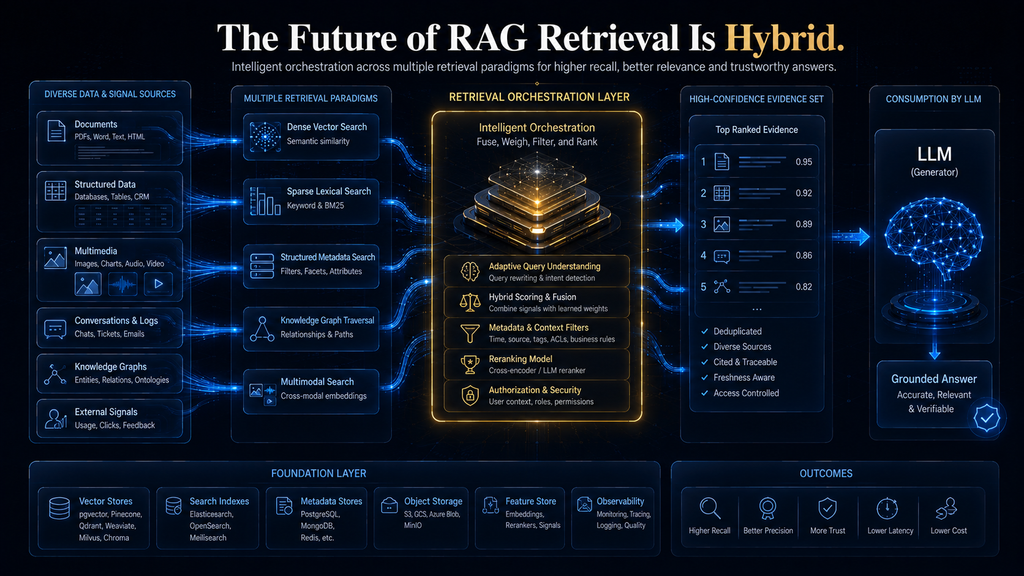
The Future of Vector Databases Is Probably Not “More Vectors”
The vector database category is evolving toward a broader retrieval infrastructure layer.
Future RAG systems are likely to combine dense embeddings with lexical retrieval, structured data, metadata filters, reranking, multimodal representations and agentic workflows. The boundary between vector databases and general-purpose search platforms is therefore becoming increasingly blurred.
That creates an interesting second-order effect.
The value of the database itself may become less about storing vectors and more about orchestrating retrieval signals.
A database that can store billions of vectors but cannot help an application combine semantic, lexical, structured and permission-aware retrieval may become less strategically important than a platform that handles those interactions well.
The same trend is visible across modern database platforms, where vector search is increasingly being integrated into systems that already handle operational, document or search workloads. MongoDB’s continuing vector-search development is one example of this broader convergence.
This suggests that the category may eventually become less about “vector databases” and more about AI retrieval infrastructure.
The Second-Order Effect: Retrieval Becomes a Product Capability
There is another implication that is easy to miss. When retrieval is poor, users do not blame the vector database. They blame the product.
If an internal assistant repeatedly gives outdated policies, employees stop trusting it. If a customer-support assistant retrieves the wrong product documentation, agents stop relying on it. If an enterprise assistant occasionally exposes irrelevant or unauthorized information, the entire AI initiative can lose credibility.
That means retrieval quality is not merely an engineering metric.
It becomes a product trust metric.
This is why organizations should treat vector-database selection as part of the product architecture rather than as a backend implementation detail.
The Final Selection Checklist
Before committing to a vector database, ask:
- Does it retrieve the correct evidence from our actual corpus?
- Does retrieval remain strong under real metadata filters?
- Do we need hybrid retrieval?
- Does it meet our p95 and p99 latency requirements?
- Can it handle our expected concurrency?
- How quickly do updates become searchable?
- Can we enforce tenant isolation safely?
- What happens when documents are deleted or permissions change?
- How much operational work will the system require?
- What is the realistic total cost of ownership?
- How easy would it be to export or migrate our data?
- Does the architecture fit the systems we already operate?
- What measurable condition would cause us to reconsider the decision?
If you cannot answer those questions, you are not finished evaluating the database.
A Practical Recommendation for Most Teams
If you are starting a new RAG application today, the most rational strategy is not to evaluate every vector database on the market.
Shortlist based on your existing architecture.
If PostgreSQL already powers the application, test pgvector first.
If you want managed infrastructure and minimal operational burden, test Pinecone.
If filtering, hybrid retrieval and retrieval control are important, test Qdrant.
If hybrid search and broader AI database functionality are central, test Weaviate.
If your workload is genuinely large and distributed, evaluate Milvus.
If you are primarily experimenting or want the simplest developer path, evaluate Chroma.
If MongoDB already contains your application data, evaluate MongoDB Vector Search before automatically introducing another database.
Then run the same benchmark against the finalists.
That is the part that matters.
Final Thoughts
The vector database market in 2026 is mature enough that there is no shortage of technically capable choices. That makes the decision harder, not easier, because the difference between products is increasingly about architecture, operating model, retrieval behavior and economics rather than basic vector-search capability.
For PostgreSQL-centric applications, pgvector can eliminate an entire infrastructure boundary. Pinecone is compelling when managed infrastructure allows a small team to focus on product development instead of database operations. Qdrant deserves attention when filtering and retrieval control matter, while Weaviate is particularly interesting for hybrid search and broader AI-oriented retrieval. Milvus is the stronger candidate when distributed scale is already a genuine requirement, and Chroma remains attractive when developer simplicity is the primary objective.
But none of those statements should be interpreted as a universal ranking.
The strongest decision is the one that begins with your retrieval workload, not the vendor’s feature page.
Build a representative benchmark. Test real queries. Apply real filters. Measure recall. Measure p95 and p99 latency. Test security boundaries. Measure freshness. Calculate total cost. Then choose the platform that solves the actual problem with the least unnecessary complexity.
And remember the most important principle in this entire article:
Your vector database is not the RAG system. It is one layer inside the retrieval system.
If chunking is poor, embeddings are weak, metadata is incomplete or retrieval evaluation is nonexistent, changing databases will not magically create better answers. But when those foundations are sound, choosing the right retrieval infrastructure can determine whether a RAG application remains a useful prototype or becomes a reliable production system.
Frequently Asked Questions
1. What is the best vector database for RAG in 2026?
There is no universal best option. pgvector is a strong first choice for PostgreSQL applications, Pinecone for managed infrastructure, Qdrant for retrieval control and filtering, Weaviate for hybrid search, Milvus for large distributed workloads and Chroma for developer simplicity.
2. Is pgvector good enough for production RAG?
Yes. pgvector supports exact and approximate vector search and can combine vector retrieval with PostgreSQL’s relational data and filtering capabilities. It is particularly attractive when the application already relies heavily on PostgreSQL.
3. Is Pinecone better than pgvector?
Not universally. Pinecone can reduce infrastructure management, while pgvector can reduce architectural complexity when PostgreSQL is already central to the application. The better option depends on workload, engineering resources and operational priorities.
4. Is Qdrant good for enterprise RAG?
Qdrant is worth considering for enterprise RAG systems that require sophisticated filtering, hybrid retrieval, multi-stage search or deployment flexibility. The most important evaluation should be how well it performs under the application’s actual permission and metadata constraints.
5. Do I need a dedicated vector database for RAG?
No. PostgreSQL with pgvector, MongoDB Vector Search and existing search platforms can sometimes provide everything an application needs. A dedicated vector database should be introduced when its specialized capabilities justify the additional architectural complexity.
6. Which vector database is best for hybrid search?
Weaviate and Qdrant are strong candidates because hybrid retrieval is an important part of their capabilities. The right choice still depends on filtering, deployment, scale, security and operational requirements.
7. How many vectors can a RAG database handle?
There is no useful universal threshold at which one database becomes appropriate and another becomes inappropriate. Corpus size must be considered alongside vector dimensions, query volume, concurrency, filtering, latency requirements, update frequency and available infrastructure.
8. How should I benchmark vector databases for RAG?
Use the same corpus, embedding model, query set and evaluation methodology across candidates. Measure retrieval quality, filtered recall, p50/p95/p99 latency, throughput, ingestion speed, freshness, resource consumption and total cost rather than relying on a single benchmark score.
9. Is a cheaper vector database always better for a small RAG application?
No. A lower infrastructure bill can be outweighed by engineering time, poor retrieval quality or operational complexity. The right comparison is total cost of ownership and cost per successful retrieval outcome.
10. When should I switch to a different vector database?
Consider switching when measurable evidence shows that the current architecture no longer fits: filtered recall is poor, latency consistently exceeds requirements, scaling creates excessive operational complexity, costs become disproportionate, or the application requires retrieval capabilities the current platform cannot provide.
Written by
Muntasir Ahmad Chowdhury
Founder, AI Hustle World
Muntasir Ahmad Chowdhury is the Founder of AI Hustle World, an independent publication dedicated to making Artificial Intelligence practical, trustworthy, and easy to understand. He researches AI tools, automation, customer service, productivity, and real-world business applications, helping readers make smarter technology decisions through research-driven, experience-backed content.
Expertise:
AI Tools • AI Automation • AI Customer Service • AI Productivity • Generative AI • AI Workflows
Get Smarter With AI
Enjoyed this guide? Get practical AI tools, tutorials, and honest reviews delivered to your inbox.
2 thoughts on “Best Vector Databases for RAG Applications in 2026: Compared”