Evidence: Documentation reviewed, plus one hands-on test (6 November 2026)
Last checked: September 2026 (documentation); 6 November 2026 (test)
What was done: Written from official documentation and the published sources linked in this article. One hands-on test was added on 6 November 2026: 14 questions in Gemini Notebook (free plan) and 4 in ChatGPT, shared with eight other RAG articles. See Our test.
Files: RAG test files (documents, questions, score sheet and screenshots)
Affiliate links: No
Choosing between the best RAG platforms in 2026 starts with a simple idea: connect your documents, let an AI system index them, ask questions and get answers with citations. The reality becomes far more complicated once the knowledge base holds thousands of documents, information changes every week, different users have different permissions or the system has to do more than impress people in a polished demo.
That is why choosing a RAG platform is no longer a matter of counting integrations or AI features. The important question is whether the platform can reliably turn your organization’s information into useful retrieval context, keep that information current, preserve the right access boundaries and give your application enough control to produce answers people can trust. Those four tests decide most production outcomes.
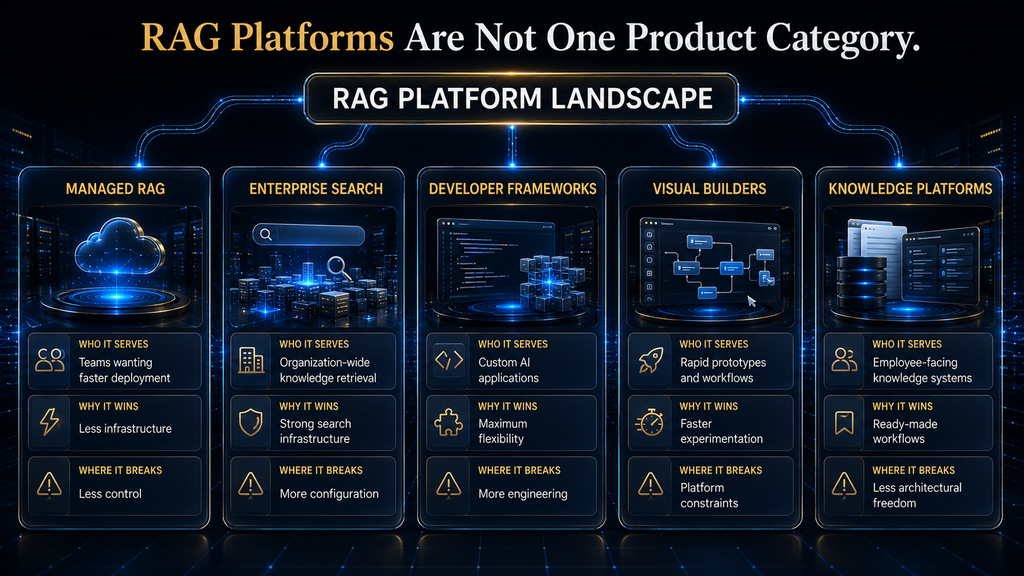
The market is also hard to compare because “RAG platform” now describes very different products. A managed RAG service, an enterprise search platform, a visual app builder, an orchestration framework, a cloud knowledge-base service and an internal knowledge product can all appear in the same search results while solving different problems across a stack that also includes vector databases, parsers and rerankers.
This guide takes a different approach. Instead of pretending one platform is universally best, it explains the RAG stack first, separates the main platform categories, scores ten leading options with our W.O.R.T.H. framework, records their published pricing as of 27 October 2026 and gives you a practical way to decide whether to buy a managed platform, assemble your own stack or choose something in between.
What Is a RAG Platform?
A RAG platform is software that helps an application retrieve relevant information from external knowledge sources and use it to generate grounded responses with a large language model. If you are new to the pattern itself, our retrieval-augmented generation guide explains the core idea before you start comparing products that package it in different ways.
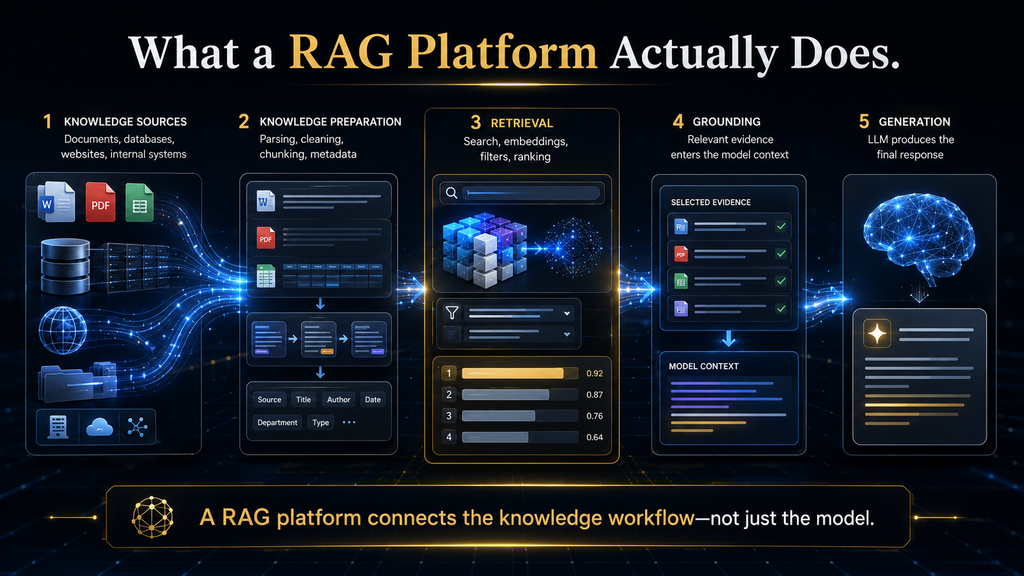
A RAG platform is broader than a vector database. A vector database stores and retrieves representations of information, while a full platform may also handle ingestion, parsing, chunking documents for RAG, embeddings, indexing, retrieval, reranking, prompt construction, citations, model connections, access controls, evaluation, APIs and deployment. The more of those layers a product covers, the less your team has to build.
The easiest way to understand the stack is to follow the information. A document enters the system, is split into usable pieces, receives a representation suited to retrieval, gets indexed and later joins a retrieval operation when someone asks a question. Our explainer on how embeddings work in RAG covers that representation step, which shapes everything that follows.
The retrieved material then passes to the generation layer so the model can answer with evidence that was not in its original training data. That means quality depends on a chain of decisions. Poor parsing damages retrieval before indexing, bad chunking separates a definition from its qualification, weak retrieval returns plausible but irrelevant passages and missing permissions can expose information the user should never see.
A useful RAG platform therefore has to solve a systems problem rather than a chatbot problem. The answer the user sees is only the last link in that chain, and the weakest link sets the quality of the whole system. This is why grounding helps reduce errors without eliminating them, a point our guide to reducing hallucinations with RAG explores in detail.
RAG Platform vs Vector Database vs Framework vs Knowledge Base
The first decision is understanding what you are buying, because many poor choices begin with comparing products that operate at different layers. A vector database is mainly retrieval infrastructure. It stores vectors and metadata and supports similarity or hybrid retrieval, but it does not give you ingestion, orchestration, user interfaces, evaluation or knowledge management on its own.
A RAG framework is different again. Frameworks such as LangChain and LlamaIndex help developers assemble applications from components, with abstractions for data sources, retrieval systems, models and application logic. Using a framework does not mean you have bought a finished knowledge-base product. It means you have chosen to build one, with the flexibility and the maintenance responsibility that choice brings.
An AI knowledge-base platform sits closer to the application layer. It may provide connectors, document sync, search, conversational answers, citations, permissions and a user-facing experience. That suits organizations whose goal is making knowledge accessible to employees or customers rather than building retrieval infrastructure. Glean, Guru and Notion AI fall into this group in different ways.
A managed RAG platform sits between these categories. It absorbs much of the infrastructure while exposing APIs for developers to build their own experiences. Vectara fits this description, while cloud platforms such as Amazon Bedrock and Azure AI Search offer broader infrastructure for building RAG systems inside a wider cloud ecosystem that also covers identity, storage and model hosting.
These categories overlap, but they are not interchangeable. A five-person startup building a support assistant and a multinational surfacing information from SharePoint, databases and internal apps to thousands of employees may both say they need RAG, yet the right architecture for each is completely different. Buying the wrong layer creates either unnecessary engineering or unnecessary constraints.
Our Test: Gemini Notebook as a No-Code RAG Tool
On 6 November 2026 I ran a test with Gemini Notebook, Google’s RAG notebook (formerly NotebookLM), on the free plan. I gave it four short documents for a made-up bike shop, Quillmoor Cycles, and asked it 14 questions. I wrote the documents for this test, so no AI could know the answers in advance. This one test is shared by nine RAG articles on this site; the documents, questions, score sheet and screenshots are on our RAG test files page.
Gemini Notebook is the quickest way to try RAG without writing code: create a notebook, upload documents, ask questions. On the free plan it handled my four documents with no limits or upgrade messages shown.
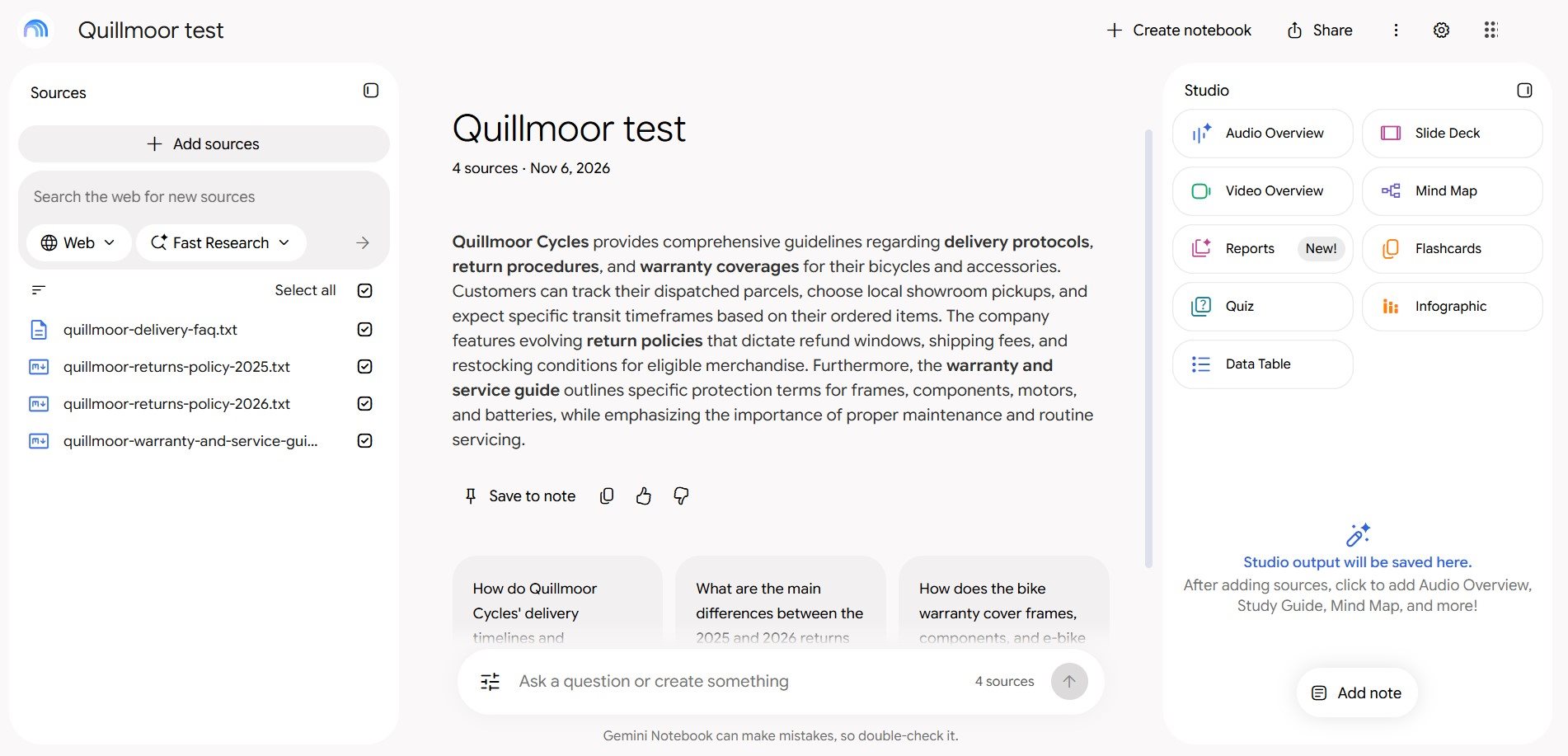
- Accuracy: 14 of 14 questions correct, including a table lookup, a fact buried in a long guide, a false premise and a question the documents could not answer.
- Citations: every answer carried numbered citations that open the source passage. The four I checked pointed to the right place.
- When the answer is missing: it said so, then offered to search the web. Useful, but in a business setting you would want to keep web results apart from your own documents.
- Weak spot: after I removed an outdated document, it still quoted that document’s 30-day figure in the same chat, with a citation that did not support it.
- What you cannot control: it shows no settings for chunking, embeddings, retrieval or the model, and it is a notebook, not an API you can build into your own product.
That makes it a good tool for testing documents and questions before you build anything, and a weak fit for a production system that needs control and monitoring. I tested only Gemini Notebook here, so this is not a comparison with the other platforms in this guide. One tool, one run, so treat it as a demonstration, not a benchmark.
Why RAG Platforms Became Necessary
Before managed RAG tooling was widely available, a knowledge-grounded AI application usually meant building the pipeline yourself. Developers had to identify sources, extract documents, parse file formats, clean content, choose a chunking method, generate embeddings, pick a vector store, implement retrieval, test ranking, build prompts, connect a model, add citations, manage updates, monitor failures and design an evaluation system.
Teams built those components themselves for a good reason: control. A company with unusual data, strict security rules or a specialized retrieval problem may benefit from owning the whole pipeline. The engineering effort buys flexibility, because developers can choose the parser, embedding model, database, reranker and model independently and swap any one of them when requirements change.
The problem is that most organizations do not want to spend their competitive advantage maintaining retrieval infrastructure. They want the application that sits on top of it. RAG platforms emerged because the infrastructure became repeatable enough to package, so a team can now adopt a platform that handles ingestion, indexing and retrieval instead of rebuilding those layers for every new project.
That changes the economic question. The choice is no longer only which technology is technically better. It becomes which parts of the RAG system you should own and which parts you should outsource. That question sits underneath almost every platform comparison in this guide, and answering it honestly is the fastest way to narrow ten options down to two or three worth testing.
The Six Capabilities That Matter Most
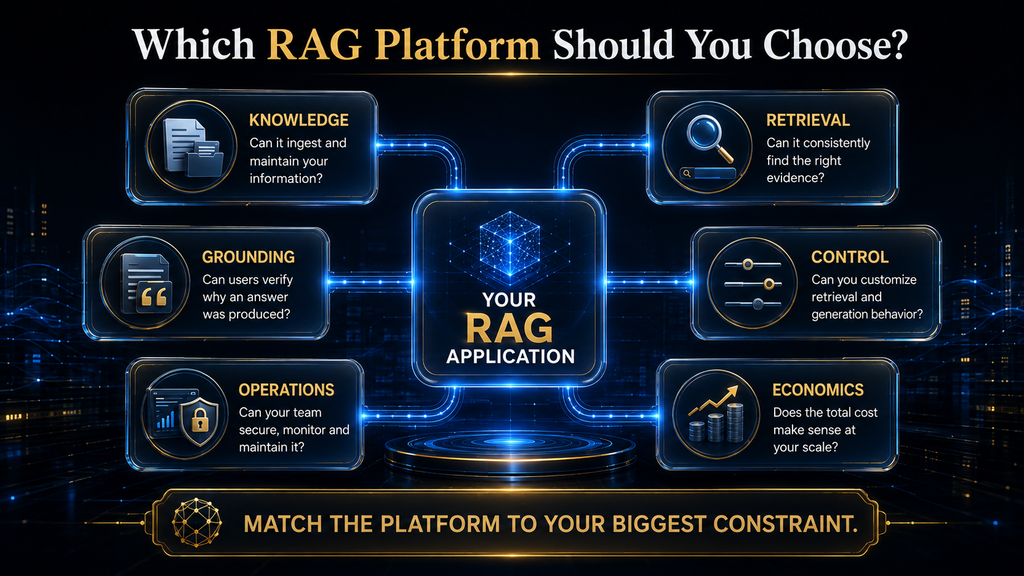
The strongest RAG platform is the one that performs well across the capabilities that matter for your knowledge system, which is rarely the one with the longest feature list. Six capabilities decide most production outcomes: knowledge ingestion and freshness, retrieval quality, grounding and citations, control, operations and governance, and economics. Each is explained below with the questions worth asking.
1. Knowledge Ingestion and Freshness
A knowledge base is only useful if the system can reliably get information into the retrieval layer and keep it in sync. That sounds mundane until you meet the messiness of real organizational data: PDFs, web pages, Word files, spreadsheets, tickets, manuals, database records and SaaS documents. Some change daily, others yearly, and many depend on tables, diagrams or layout to make sense.
Managed platforms increasingly treat ingestion as a first-class feature. Amazon’s managed knowledge base option now connects to SharePoint, Confluence, Google Drive, OneDrive, S3 and a web crawler, and processes text, images, audio and video. Ingestion capability is still different from ingestion reliability, though. The key test is whether the platform detects changes, handles failures and avoids duplicate knowledge.
That is one reason a beautiful first demo can mislead. A platform may perform brilliantly with ten clean documents you uploaded by hand. That says very little about what happens six months later, after the source material has changed 400 times, two connectors have failed silently and a reorganization has moved half the files to a new SharePoint site that nobody remembered to reconnect.
2. Retrieval Quality
Retrieval is the heart of RAG, because the model cannot ground an answer in evidence it never receives. A platform may advertise semantic, vector, hybrid or advanced retrieval with reranking, but those labels are not proof of quality. What matters is whether the system consistently finds the information needed to answer real questions, which our guide to evaluating RAG retrieval quality covers.
Many systems look excellent on simple queries. Harder cases are more revealing: questions with several concepts, terminology that differs from the source documents, requests that need several sources combined and queries where the most similar passage is not the most useful one. Test with representative questions, including ones where the right response is that the knowledge base lacks the answer.
That last case matters more than most buyers expect. A retrieval system that confidently returns weak evidence can be more dangerous than one that admits uncertainty, because the generated answer will sound just as fluent either way. Users rarely check sources when an answer sounds confident, so the platform has to make uncertainty visible rather than hiding it behind polished prose.
3. Grounding and Citations
A good RAG platform makes it possible to see where an answer came from. Citations provide an audit trail between the generated answer and the retrieved evidence, so a user can inspect the document, page or passage and challenge the answer instead of trusting the model’s prose. That turns the system from an oracle into a research assistant whose work can be checked.
Microsoft’s agentic retrieval in Azure AI Search shows how this layer is evolving, returning grounding data, citations and execution metadata alongside retrieved content so the application decides how to pass evidence to a model. Citations still need checking. A citation that points to a relevant document but does not support the specific statement is weak grounding, so judge platforms on citation correctness.
4. Control
Convenience is valuable, but it becomes expensive when your application hits the edge of what a platform allows. Control can exist at many levels: embedding models, chunking, retrieval parameters, metadata filters, reranking, prompts, model choice, source handling, authentication, deployment and application logic. Highly managed platforms hide many of those details deliberately to keep the experience simple.
That simplicity helps a team that wants to move quickly and becomes a limit when the retrieval problem is unusual or the system must be reproduced outside the vendor’s environment. More control is not automatically better, because control has an engineering cost. If your team does not need a particular setting, paying for the ability to change it adds complexity without adding value.
5. Operations and Governance
Production RAG is an operations problem as much as a search problem. Someone needs to know when a connector stops syncing, when ingestion fails, when retrieval quality drops, when a source goes stale, when a permission changes and when a model update alters answer behaviour. Enterprise deployments may also need audit trails, tenant isolation, authentication and permission-aware retrieval.
Microsoft’s documentation now describes Azure AI Search as the service underneath Foundry IQ, a managed knowledge layer that turns enterprise content into reusable, permission-aware knowledge bases for agents. The operational lesson applies to every vendor, however: the system that works on launch day only stays healthy if someone owns its monitoring, maintenance and evaluation over time.
6. Economics
RAG economics are often misunderstood because the visible price is only one part of the cost. A deployment can incur costs from document processing, embeddings, storage, retrieval, reranking, model inference, API usage, bandwidth, monitoring, support and engineering time. Several of those scale with usage, so a cheap pilot can become an expensive production system once traffic grows.
A cheap platform with weak retrieval also creates indirect costs. If users repeat questions, if the application needs extra model calls to compensate for poor retrieval or if engineers spend weeks maintaining a pipeline, the nominally cheaper option becomes the expensive one. The useful measure is what it costs to deliver a reliable answer at the volume and quality your application requires.
The AI Hustle World RAG Platform Fit Framework
Rather than trusting a single overall score, use six dimensions to diagnose what your system needs: knowledge, retrieval, grounding, control, operations and economics. The first three describe whether the system can turn information into trustworthy answers. The last three decide whether you can run that system sustainably once real users, real documents and real budgets are involved.
Different teams weight these differently. A small support team might care most about connectors, deployment speed and low maintenance. A developer building an AI research product might care more about retrieval control, APIs and model flexibility. An enterprise may put permissions and governance ahead of almost everything else, because a single exposure of restricted data outweighs any accuracy gain.
This framework changes how you read feature comparisons. If Platform A supports 150 connectors with limited retrieval control and Platform B supports 40 connectors with deep control over retrieval and ranking, Platform A is not automatically better. If you need only five connectors but depend on custom retrieval, the extra 145 connectors have almost no value. A feature matters only when it solves a constraint in your workload.
How We Scored the Best RAG Platforms
To compare tools that sit at different layers, we scored each one with AI Hustle World’s W.O.R.T.H. framework. Workflow fit is worth 25 points, output quality 25, risk and reliability 15, cost value 20 and effort to adopt 15. Scores reflect how well each product serves its intended RAG use case, so a framework and an enterprise search product can both score well while suiting very different buyers.
| Platform | Category | Workflow (25) | Output (25) | Risk (15) | Cost (20) | Effort (15) | W.O.R.T.H. |
|---|---|---|---|---|---|---|---|
| Amazon Bedrock Knowledge Bases | Managed cloud RAG | 22 | 21 | 13 | 15 | 12 | 83 |
| Azure AI Search / Foundry IQ | Enterprise search and agentic retrieval | 22 | 22 | 13 | 14 | 11 | 82 |
| LlamaIndex | Data framework and document parsing | 21 | 21 | 12 | 16 | 11 | 81 |
| Dify | Visual app builder | 21 | 18 | 11 | 17 | 13 | 80 |
| LangChain | Orchestration framework | 20 | 20 | 12 | 17 | 10 | 79 |
| RAGFlow | Open-source document-centric engine | 19 | 20 | 11 | 18 | 10 | 78 |
| Glean | Enterprise knowledge discovery | 20 | 20 | 13 | 11 | 13 | 77 |
| Vectara | Enterprise managed RAG | 18 | 21 | 13 | 9 | 12 | 73 |
| Guru | Curated knowledge platform | 17 | 17 | 12 | 12 | 14 | 72 |
| Notion AI | Workspace knowledge | 16 | 15 | 11 | 16 | 14 | 72 |
Pricing Snapshot (Checked 27 October 2026)
RAG pricing varies widely in structure, from open-source software you host yourself to enterprise contracts quoted per deployment. The table below records what each vendor published on 27 October 2026. Usage-based cloud services also bill for underlying models, storage and requests, so treat these figures as starting points and model your own volume before comparing totals.
| Platform | Free option | Published pricing |
|---|---|---|
| Amazon Bedrock Knowledge Bases | Pay as you go | Usage-based; costs depend on models, storage and requests |
| Azure AI Search / Foundry IQ | Varies by plan | Pricing now listed under Foundry IQ, including serverless plans for agent workloads |
| Vectara | 30-day free trial | SaaS from $100K/year, VPC from $250K/year, on-premises from $500K/year |
| Dify | Free cloud plan (200 message credits, 5 apps, 50 knowledge documents) and free self-hosted edition | Paid cloud tiers for small and medium teams; enterprise on request |
| RAGFlow | Open source (Apache-2.0) | Free to self-host; you pay for infrastructure and models |
| LangChain | Open-source frameworks; LangSmith Developer $0/seat | LangSmith Plus $39/seat per month; Enterprise custom |
| LlamaIndex | Open-source framework; LlamaParse Free with 10K credits | Starter $50/month (40K credits), Pro $500/month (400K credits), Enterprise custom |
| Glean | None published | Sales-led pricing |
| Guru | None published | Custom packages through sales |
| Notion AI | Free plan with an AI trial | Plus $10 and Business $20 per seat per month; Business adds Notion Agent and Enterprise Search (beta) |
The Best RAG Platforms and Tools in 2026
The options below are not ten identical products competing for one trophy. They represent different approaches to building and running knowledge-grounded AI systems, grouped roughly from cloud infrastructure to developer frameworks to knowledge products. Each entry explains what the platform is designed for, where it fits best and where its trade-offs show up in practice.
Amazon Bedrock Knowledge Bases: Best for AWS-Centred Managed RAG
Amazon Bedrock Knowledge Bases is a strong choice when a company already runs heavily on AWS and wants managed RAG without assembling every retrieval component. AWS now offers a fully managed knowledge base that connects to SharePoint, Confluence, Google Drive, OneDrive, S3 and a web crawler, preserving metadata and thread context while processing text, images, audio and video in several languages.
The advantage is ecosystem alignment. If your organization already uses AWS identity, storage, networking, models and operational tooling, keeping the knowledge layer inside that environment reduces architectural fragmentation. It also cuts the infrastructure your team must assemble, which matters when the business wants the application quickly rather than another internal platform project that takes a quarter to stand up.
The trade-off is that AWS’s breadth can make the ecosystem feel more complex than a narrowly focused RAG product, and usage-based billing needs careful modelling. Best fit: AWS-native organizations, enterprise RAG applications and teams that value managed infrastructure. Less attractive when: you want a minimal, vendor-neutral setup or have little reason to build around AWS services.
Azure AI Search and Foundry IQ: Best for Microsoft-Centred Enterprise Retrieval
Azure AI Search suits teams for whom retrieval is a strategic part of the application. It supports full-text, vector, hybrid and multimodal search, and Microsoft now positions it as the engine underneath Foundry IQ, a managed knowledge layer that turns enterprise content into reusable, permission-aware knowledge bases for agents built in the Microsoft Foundry portal.
The distinction between classic and agentic retrieval matters. Classic RAG sends a query to search and passes the results to a model. Agentic retrieval uses a model to break a complex question into focused subqueries, run them, rerank the results and assemble the evidence before generation. That helps when users ask questions too complicated for one straightforward search to answer well.
The trade-off is complexity. Agentic retrieval adds components, some capabilities have shipped as previews first and pricing has moved to the Foundry IQ page, so check feature status before committing production workloads. Best fit: Microsoft-heavy enterprises and sophisticated search applications. Less attractive when: you only need a lightweight knowledge chatbot with minimal infrastructure.
Vectara: Best for Enterprise Managed RAG
Vectara is positioned around delivering grounded generative search without forcing teams to build the retrieval pipeline themselves. It offers its own retrieval and generation models, including a RAG-tuned generative model, and supports bringing your own models from providers such as OpenAI, Anthropic and Google. Deployment options cover SaaS, a customer’s own VPC or on-premises installation.
Its pricing makes the target customer clear. When we checked, Vectara offered a 30-day free trial, with SaaS plans starting at $100,000 a year, VPC deployments from $250,000 and on-premises from $500,000. That places it firmly in enterprise territory, where buyers value managed infrastructure, deployment choice and support over the lowest possible software cost for a small pilot project.
The usual managed-platform trade-off applies: the less infrastructure you own, the less you can modify at a deep level. Best fit: large organizations that want managed RAG with flexible deployment and are comfortable with an enterprise contract. Less attractive when: you are a small team, a startup testing an idea or a company that wants to own retrieval infrastructure as a strategic capability.
Dify: Best for Visual RAG Application Building
Dify occupies a different part of the market because its value extends beyond the retrieval engine. It provides a visual environment for building AI applications and workflows, including knowledge bases, so teams can experiment with document-based assistants without writing every component. Its free cloud plan includes 200 message credits, five apps and 50 knowledge documents, and a self-hosted edition is free.
That makes Dify useful for prototyping internal assistants, document-based apps and AI workflows where the team wants to see the whole application logic rather than work only through low-level APIs. Its main advantage is accessibility, because a team can iterate quickly and shorten the distance between having a collection of documents and having an AI application that uses them.
The limitation is that visual abstraction can become a constraint when the system needs specialized retrieval behaviour or unusual infrastructure. The question is whether its abstraction level stays appropriate as your application grows. Best fit: rapid prototyping, internal AI apps and teams wanting visual workflow control. Less attractive when: you need low-level control over every retrieval step.
RAGFlow: Best for Document-Centric RAG Workflows
RAGFlow is an open-source RAG engine released under the Apache-2.0 licence, with more than 90,000 GitHub stars when we checked. It suits teams whose main problem is making complex documents useful to RAG systems, and it has added agent capabilities on top of its document processing. Self-hosting is free, so the main costs are your infrastructure, your models and the engineering time to run it.
Document understanding is often underestimated. A PDF may contain tables, headings, footnotes, figures and layout relationships that vanish when the document is treated as plain text, and if those relationships carry meaning, naive extraction damages the knowledge before retrieval starts. A document-centric engine is valuable when the quality of the source material is the main bottleneck in your pipeline.
Document parsing alone does not guarantee a good RAG application, because retrieval, evaluation, model behaviour, permissions and operations still matter. Best fit: document-heavy knowledge systems, complex source files and teams wanting open-source control. Less attractive when: your problem is enterprise-wide search across many business systems rather than deep document processing.
LangChain: Best for Maximum Orchestration Flexibility
LangChain appears on almost every RAG list, but it is important to classify it correctly. It is a development framework that helps developers assemble applications from models, tools, retrieval systems and workflows, not a turnkey knowledge-base product. Its open-source libraries are free, while its LangSmith platform for tracing, evaluation and deployment has a free Developer seat, a Plus plan at $39 per seat and custom Enterprise pricing.
If your team is comfortable engineering software and wants to decide how the pieces fit, a framework can be more powerful than a managed platform. You choose the retrieval store, embedding model, model provider and parser to suit the application. That flexibility comes with responsibility for deployment, observability, updates, evaluation and failures that a managed product would otherwise absorb.
Frameworks should not be scored as though they were identical to managed platforms. A framework gives you the building blocks, while a managed platform tries to give you more of the finished building. Best fit: experienced development teams building custom AI applications. Less attractive when: your organization wants a ready-to-use knowledge system rather than an engineering project.
LlamaIndex: Best for Data-Centric RAG Applications
LlamaIndex takes a similarly developer-oriented position, with a strong focus on connecting applications to data. Its open-source framework remains free, while its hosted document-parsing service, LlamaParse, has a free plan with 10,000 credits, a Starter plan at $50 a month with 40,000 credits and a Pro plan at $500 a month with 400,000 credits when we checked.
That makes it useful when the hard part of the application is structuring access to proprietary information rather than generating text. Its value becomes clear once you think about RAG as a data problem, where the model is one component and the application needs reliable ways to turn source documents, including complex PDFs, into representations that retrieve well.
The same warning applies as with LangChain: flexibility does not remove engineering work, and choosing a framework for control means owning the consequences of that control. Best fit: data-intensive RAG applications and developers who want composability plus strong parsing. Less attractive when: the organization wants a fully managed knowledge product with minimal engineering effort.
Glean: Best for Enterprise Knowledge Discovery
Glean belongs to another category: enterprise knowledge, search and agents. Its value proposition is closer to making organizational knowledge easy for employees to find and use than to building your own RAG application. Glean emphasizes permission-aware access built in from the start, and its October 2026 release added tools for building, testing and publishing governed agents from developer environments.
If information is spread across SaaS apps, collaboration tools and internal repositories, a custom RAG application may solve only part of the problem. The larger challenge is connecting those systems, respecting their permissions and presenting results in a way employees will adopt. Enterprise knowledge products make sense when the outcome you want is employee productivity rather than a new AI product.
The limitation is equally clear: a company building a specialized customer-facing RAG application may need more control than an enterprise knowledge platform offers, and Glean’s pricing is sales-led. Best fit: large organizations improving internal knowledge discovery. Less attractive when: you are building a highly customized RAG product inside your own software.
Guru: Best for Curated Organizational Knowledge
Guru represents organizational knowledge systems that combine curated content with AI retrieval. It describes itself as an AI knowledge layer that structures, verifies and delivers answers across a company’s tools, with knowledge agents that give cited, permission-aware answers, verification workflows, more than 100 integrations and delivery through the Model Context Protocol to other AI tools.
That approach is valuable when an organization wants a deliberate knowledge-management layer where important information is maintained and validated, rather than an AI that searches whatever happens to exist. RAG amplifies both good and bad knowledge, so if the repository is full of obsolete documents and contradictory policies, better retrieval only makes the wrong information easier to find.
Guru sells custom packages through its sales team rather than publishing a price list. Best fit: teams that need structured, verified internal knowledge alongside AI retrieval, especially support and enablement teams. Less attractive when: the application requires a developer-controlled RAG architecture embedded in your own product or customer-facing software.
Notion AI: Best for Teams Already Living in Notion
Notion AI makes the most sense when Notion is already a major part of the organization’s knowledge environment, which reflects a recurring pattern in AI software: the best platform is often the one that fits where information already lives. Notion’s Business plan, at $20 per seat a month, adds Notion Agent, custom agents, AI meeting notes and Enterprise Search, which is still in beta.
If employees already write documentation, project notes and internal knowledge in Notion, adding AI inside that workspace removes the friction of creating another knowledge layer. The value declines when authoritative knowledge is spread across many systems outside Notion, because the platform then becomes one part of the knowledge ecosystem rather than the complete answer.
Best fit: Notion-centred teams that want AI-assisted access to existing workspace knowledge without a separate project. Less attractive when: the organization has a complex, heterogeneous information architecture, strict retrieval requirements or a need for customer-facing RAG built directly into its own product.
The Most Important Comparison: Managed vs Build-Your-Own
The most consequential decision is how much of the RAG architecture your team wants to own, far more than which brand tops a list. A managed platform shortens the time between project approval and a working application. It absorbs infrastructure complexity, provides integrated ingestion and retrieval and reduces the number of components your team has to operate day to day.
A custom stack gives you control over the components that matter. You can change the embedding model, retrieval design, vector store, reranker or model provider without waiting for a platform to expose the setting. Neither approach is universally better. Managed wins when time-to-value and simplicity dominate, while custom wins when control, specialization and long-term independence dominate.
The danger is choosing on engineering ideology. A team may build a fully custom stack because it can, then spend months maintaining infrastructure that adds no differentiation. Another may pick a highly managed product because it looks easy, then find it cannot meet a critical retrieval or permission requirement. The right answer is the smallest architecture that satisfies your requirements.
If you do build, choosing the storage layer is the next big decision. Our comparison of the best vector databases for RAG covers that layer in depth, and it is worth reading before you commit to a framework, because the database choice affects hybrid search, filtering, scaling and cost for the life of the system.
How a Production RAG Knowledge Base Works
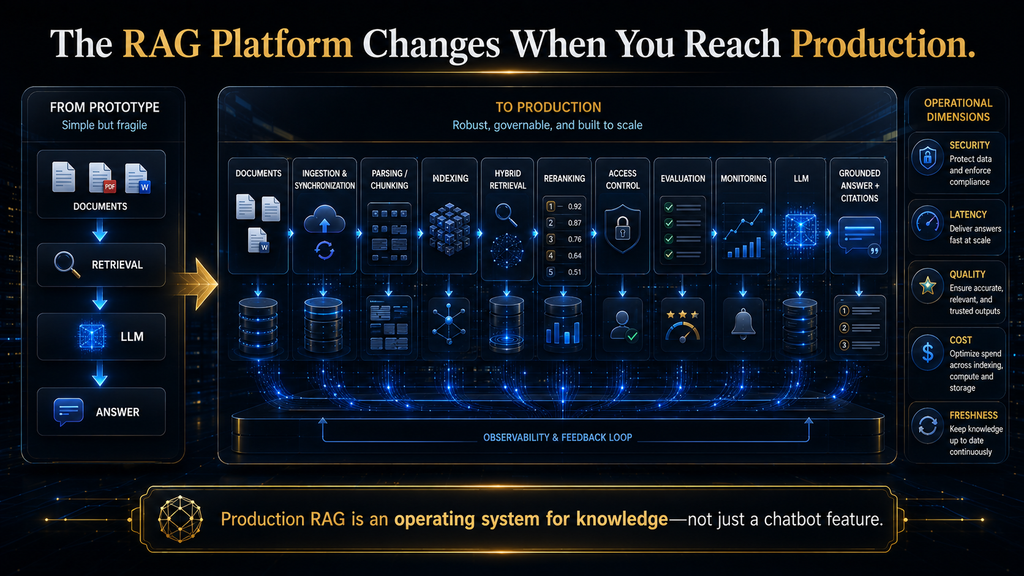
Understanding the workflow makes platform differences easier to judge. The process starts with source acquisition, where documents or records enter from cloud storage, websites, databases, collaboration tools or application APIs. At this point, metadata such as ownership, timestamps, permissions and source identifiers can matter as much as the text itself, because later stages depend on it.
Next comes content preparation. The platform extracts usable information, keeps or removes structure where appropriate and divides large sources into retrievable units. Document quality and chunking strategy have a major effect on everything downstream. The system then creates embeddings or other retrieval representations and stores them with the content and metadata, ready for vector, lexical or hybrid search.
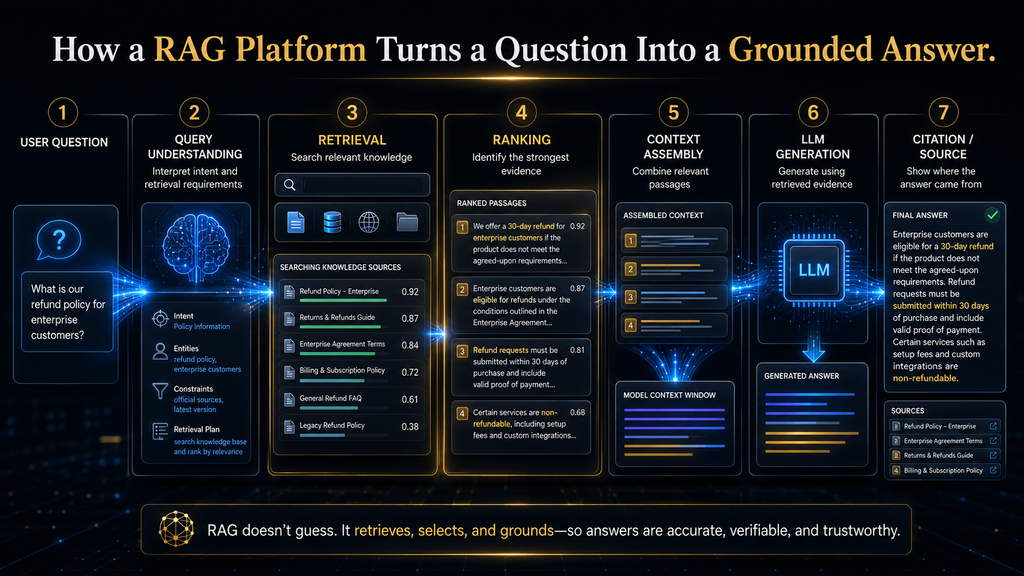
When a user asks a question, the system turns it into one or more retrieval operations. A simple system issues a single search, while more advanced designs split complex questions into subqueries, run them in parallel, rerank the results and combine them into a grounding set. Finally, the model generates an answer from that evidence, ideally with citations that let the user inspect the sources.
This is why a RAG platform cannot be judged by its chatbot interface alone. The visible answer is the last stage of a long pipeline, and most quality problems begin earlier. It also explains why careful context assembly matters, a topic our explainer on context engineering covers from the model’s side of the pipeline.
What Happens When the Retrieval Layer Is Weak?
This is where many RAG projects go wrong. Suppose an employee asks about the current remote-work policy for staff who move to another country. The knowledge base holds three relevant documents: the original remote-work policy, an updated international-employment policy and a regional HR exception. A simple retrieval system finds the original policy because it contains the words “remote work.”
The answer sounds plausible but is wrong, because the relevant information is spread across documents. A stronger design recognizes several concepts, retrieves multiple sources, ranks them correctly and preserves enough context for the model to reconcile them. That is the gap between semantic similarity and useful retrieval: the closest text is not always the best evidence for the question being asked.
Platform comparisons should therefore go beyond “supports vector search,” since almost every serious system now does. The meaningful question is how well the whole retrieval pipeline handles the ambiguity and complexity of real questions. Test with multi-document questions like the one above, and check whether the platform retrieves the newest and most specific document rather than the most keyword-rich one.
Why Hybrid Search Matters
Pure semantic retrieval is powerful but not always enough. When a user searches for a product code, legal clause, error message, employee ID or technical identifier, exact lexical matching is extremely valuable, and a semantically similar phrase may be less useful than a passage containing the exact string. Hybrid retrieval combines these signals instead of assuming one method suits every query.
Azure AI Search supports full-text, vector and hybrid search, with semantic ranking and query planning on top. The wider principle is that retrieval should match the information problem. Broad conceptual questions suit semantic retrieval, exact identifiers need lexical matching and complex multi-concept questions benefit from decomposition and reranking. A good platform handles the mix of questions your users ask.
Permissions Are Part of Retrieval Quality
One of the most dangerous mistakes is treating security as something that happens after retrieval. For an enterprise knowledge system, the correct result is the most relevant document that the current user is authorized to see. If a company restricts salary data, legal files and executive discussions, retrieval must respect those limits before anything reaches the model or the user.
If the system finds a highly relevant confidential document and only then checks whether the user may see it, the design already carries unnecessary risk. Permission-aware retrieval belongs inside the knowledge architecture, which is why Foundry IQ, Glean and Guru all emphasize it. A highly accurate answer drawn from unauthorized information is a system failure, however good the answer looks.
Retention rules matter too, because indexed copies of documents, embeddings and logs can outlive the originals. Our guide to AI data retention explains what to ask vendors about how long content, embeddings and logs are kept, and how deletions in the source system flow through to the index and any caches built on top of it.
Knowledge Freshness Is a Hidden Advantage
Many organizations focus heavily on initial accuracy and overlook freshness. Suppose a company updates its refund policy every few months. The knowledge base holds the old policy, the new policy and several support documents that reference both, so a retrieval system can return a highly relevant passage that is simply out of date. A better model cannot fix that, because it is a knowledge-lifecycle problem.
A serious platform should show where information came from, when it was last synced, whether ingestion succeeded and how outdated material is handled. Automated synchronization creates value by narrowing the gap between the source of truth and what the AI system uses. If your knowledge changes often, a platform with excellent retrieval but weak sync can be a poor production choice.
The Economics of Buying vs Building
A useful comparison accounts for engineering opportunity cost. A company may build a custom system from open-source components at lower direct software cost, which looks attractive until it calculates the ongoing work of maintaining ingestion, retrieval, monitoring, authentication, evaluation, upgrades and incident response. Those costs recur every month and rarely appear in the original business case.
The opposite case also happens. A company buys an enterprise platform with extensive capabilities and uses a small fraction of them, paying for infrastructure and governance its workload does not need. Neither calculation reduces to a monthly subscription. A more useful model adds platform, infrastructure, models, data processing, engineering and operations together to give a total RAG cost.
That sum is a decision framework rather than precise accounting. A platform is economically attractive when the work it removes or the value it adds justifies its total cost. That is why a modest monthly service can beat a “free” open-source stack for a small team, while an enterprise platform such as Vectara, starting at $100,000 a year, can be wasteful for a small application.
A Practical Evaluation Process
Before committing, run a small evaluation instead of relying on the vendor’s demo environment. Start with a representative knowledge set rather than the cleanest documents. Include long PDFs, policy documents, tables, duplicate material, frequently updated content and documents that use the terminology your users type every day. The aim is to recreate your messiest conditions in miniature.
Then build a question set that reflects real use: simple factual questions, multi-document questions, ambiguous queries, questions needing exact terms, questions with no answer in the corpus and questions that permissions should block. Evaluate retrieval separately from the generated answer. When an answer is wrong, check whether the evidence was wrong or the model misread correct evidence, because the fixes differ.
Next, test freshness by changing several source documents and measuring how long the knowledge base takes to reflect the update. Test permissions with deliberately restricted content, and test failure handling by disconnecting a source or uploading malformed files. Finally, measure cost at your expected scale rather than demo scale. That process gives you evidence that no feature list can provide.
A Simple RAG Platform Evaluation Matrix
The matrix below turns that process into a simple checklist you can score for each shortlisted platform. Its main purpose is to stop ten attractive features from outweighing one unacceptable architectural limit, which is the most common way teams end up with a platform they regret within a year of launch.
| Evaluation area | What to test | Why it matters |
|---|---|---|
| Knowledge ingestion | File types, connectors, parsing, updates | Decides whether source material enters the system correctly |
| Retrieval | Semantic, lexical, hybrid, reranking | Decides whether useful evidence is found |
| Grounding | Citations, source metadata, evidence mapping | Makes answers easier to verify |
| Freshness | Sync frequency, update propagation, failures | Stops stale knowledge becoming operational truth |
| Permissions | User-level access and restricted sources | Prevents unauthorized retrieval |
| Control | Models, retrieval settings, APIs, metadata | Shows how far the platform can be customized |
| Operations | Monitoring, logs, failures, administration | Shows the production maintenance burden |
| Economics | Usage, storage, models, engineering | Reveals total cost rather than headline price |
| Deployment | Cloud, self-hosted, hybrid | Decides infrastructure and compliance fit |
| Portability | Export, APIs, data ownership | Reduces long-term lock-in risk |
Common Mistakes When Choosing a RAG Platform
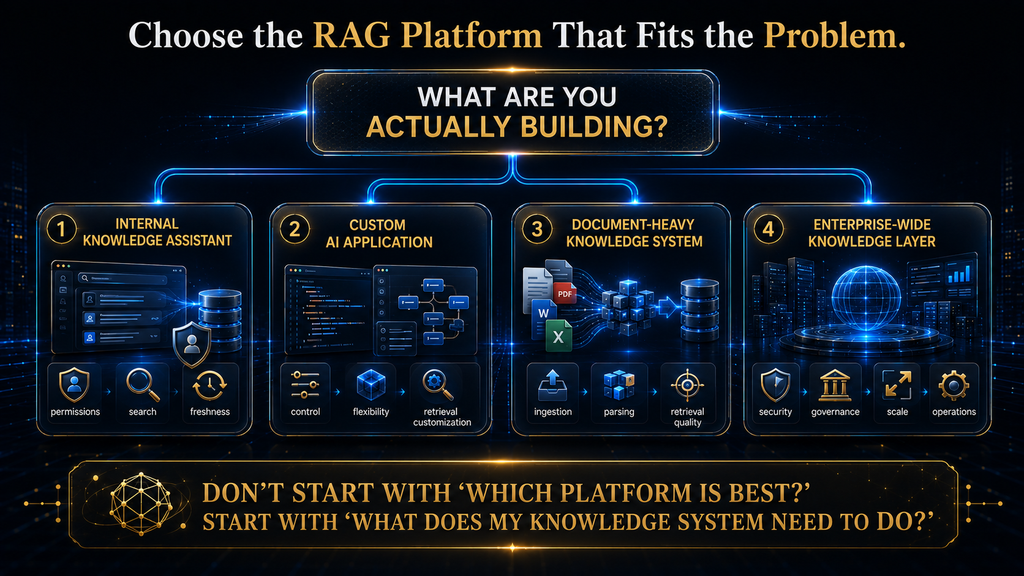
The most common mistake is choosing a platform before defining the knowledge problem. Start with the sources, users, questions, permissions and update frequency instead, and the right platform category usually becomes obvious. The second is treating a demo as proof of production quality. A polished demo proves the vendor can build a polished demo, not that your documents will parse or your permissions will hold.
Assuming more connectors means a better platform is another trap, because a platform with 100 connectors may serve you worse than one with ten excellent connectors for the systems that hold your authoritative data. Optimizing answer quality without evaluating retrieval is risky too, since a model can write a convincing answer from weak evidence. Always inspect the retrieved context, or you may tune the wrong layer.
Ignoring negative queries and stale information causes trouble later. Your system needs to know when it lacks evidence, or you end up optimizing for confidence over correctness, and a document that was accurate six months ago can become dangerous when presented as current policy. Treating security as a checkbox is just as risky. Ask exactly how identity, permissions and retrieval enforcement work in your planned deployment.
The final pair of mistakes mirror each other. Building everything yourself because you can ignores the cost of control when the custom parts add no differentiation. Buying everything because you cannot build outsources decisions your team needs to control. A managed platform should simplify the architecture rather than become an excuse to stop thinking about how retrieval, permissions and freshness work.
Who Should Use a Managed RAG Platform?
Managed RAG platforms are strongest when an organization values speed, operational simplicity and a predictable path from data to working application. They are especially attractive when the RAG layer matters but is not the company’s competitive advantage. A support team wants customers to find accurate answers, not to become experts in vector indexing, retrieval evaluation and ingestion pipelines.
The same applies to an internal business team that wants staff to query company documentation. If the problem is knowledge access rather than retrieval infrastructure, outsourcing the underlying complexity is rational. Managed does not mean no engineering, though. Production systems still need data governance, evaluation, permissions and monitoring, plus clear human review for high-stakes answers, as our guide to human-in-the-loop AI explains.
Who Should Build Their Own RAG Stack?
A custom stack makes more sense when retrieval behaviour is part of the product. That happens when the application needs unusual data sources, specialized ranking, custom models, strict infrastructure rules, specific latency targets or portability across environments. It also makes sense when the organization has strong engineering capability and expects RAG infrastructure to become a reusable internal platform for many teams.
Custom development still needs a reason. If the team is rebuilding standard ingestion and retrieval simply because open-source components exist, the project creates technical ownership without strategic differentiation. Compare the alternative honestly: if a managed platform can meet the requirements, building your own should be justified by a capability you cannot buy, not by preference.
When RAG Is the Wrong Tool
Sometimes RAG is not the answer at all. If the information already lives in a reliable structured database, a direct query may be more accurate than semantic retrieval. If the knowledge base has only a few stable documents, a simple application-level lookup may be enough, and if the task needs deterministic calculation, sending retrieved text to a model may add nothing useful.
If the business cannot establish a reliable source of truth, a RAG layer only makes inconsistent information easier to reach. And if users ask questions that need human judgment rather than document retrieval, no platform removes that ambiguity. It is also worth checking whether fine-tuning suits the task better, which our comparison of RAG and fine-tuning covers.
What Happens If You Choose the Wrong Platform?
The consequences usually appear gradually. At first the application works. Then the corpus grows, more users arrive, documents become more varied, permissions get complicated and someone asks for retrieval behaviour the platform cannot support. The team then has to redesign around the platform’s limits, build workarounds or migrate away, and each option costs far more than a careful choice would have.
Platform selection should therefore consider the next constraint as well as today’s requirements. You cannot predict everything an application will need, but you can identify the constraints likely to matter within its expected life. For a prototype, that may only mean an API and an export path. For an enterprise system, it means identity integration, permissions, audit trails and portability.
Some vendor dependence is normal and acceptable, so eliminating lock-in entirely is the wrong goal. The aim is to avoid accidental lock-in around capabilities that are strategically important to you. If retrieval quality is your product’s differentiator, owning that layer may be worth the cost. If it is not, a managed service that does the job well is usually the better use of scarce engineering time.
The Future of RAG Platforms: Beyond Simple Search
The next generation of RAG platforms treats retrieval as an intelligent process rather than a single similarity query. Azure’s agentic retrieval is a clear example, using a model to split complex questions into subqueries, run them, rerank results and combine the evidence. Bedrock’s managed knowledge bases and Glean’s governed agents point in the same direction from different starting points.
RAG systems increasingly combine semantic retrieval, lexical search, metadata filtering, reranking, query planning, multimodal retrieval, permissions, citations, evaluation and agentic orchestration. Vector search is becoming a baseline capability, so competition is shifting to a harder question: which platform can turn a difficult user question into the right retrieval strategy while keeping evidence trustworthy, current and authorized?
That shift connects RAG with AI agents. As our guide to what an AI agent is explains, agents plan steps and call tools, and retrieval is becoming one of the most important tools they use. Platforms that serve agents well will need strong permissions and logging, because an agent can act on what it retrieves without a person reading it first.
Second-Order Effect: Knowledge Quality Becomes AI Quality
As organizations use AI systems to work with internal knowledge, the quality of that knowledge becomes part of the AI system’s quality. In the past, an outdated document was annoying because an employee found the wrong information. In an AI-enabled organization, the same document can become evidence for an automated assistant, support workflow or agent, which spreads the error much further and faster.
Poor knowledge management no longer only slows people down. It can push incorrect information through automated systems at scale. Organizations adopting RAG should therefore treat knowledge governance, ownership, freshness and source authority as infrastructure concerns. A RAG platform can retrieve information perfectly and still produce a poor system if the underlying knowledge is wrong.
Our Take: There Is No Universal Best RAG Platform
Once the categories are separated, the idea of one best RAG platform is hard to defend. A developer building a highly customized application may prefer LangChain or LlamaIndex. An AWS-heavy enterprise may gain most from Bedrock Knowledge Bases, while a Microsoft-centred organization with demanding retrieval needs may prefer Azure AI Search and Foundry IQ for their agentic retrieval and permissions.
A document-heavy team may prioritize RAGFlow, a team that wants to prototype visually may start with Dify, and an internal knowledge team may be better served by Glean, Guru or Notion AI than by any developer framework. That answer prevents a category error that can cost months of engineering. The best platform is the one that makes your most important constraint easier without creating a worse one elsewhere.
A Practical Decision Guide
If your organization is deeply invested in AWS, start by evaluating Bedrock Knowledge Bases and the surrounding AWS architecture. If you are heavily invested in Microsoft, especially Azure and enterprise search, Azure AI Search and Foundry IQ deserve serious consideration. If you want a managed RAG service with flexible deployment and have an enterprise budget, add Vectara to the shortlist.
If you want to build visually and move quickly, Dify may be a better starting point than a custom stack. If complex documents are your main problem, investigate RAGFlow or LlamaIndex’s parsing tools. If your team is a strong software organization that wants architectural control, evaluate LangChain or LlamaIndex alongside the vector database and retrieval infrastructure you plan to run underneath.
If your problem is enterprise-wide internal knowledge discovery, consider whether Glean or Guru suits you better than building a custom application. If your team already lives in Notion, check whether extending that workspace with Notion AI creates more value than adding another platform. Whichever path you choose, validate it against your own data and user questions before you sign anything.
How We Researched This Guide
We checked each platform’s product page, documentation and published pricing between 26 and 27 October 2026, including AWS’s Bedrock Knowledge Bases page, Microsoft Learn’s Azure AI Search documentation and the pricing pages of Vectara, Dify, LangChain, LlamaIndex, Guru and Notion. RAGFlow details come from its GitHub repository, and Glean details from its own site.
We then scored each product with the W.O.R.T.H. framework for its intended use case and grouped products by layer so that frameworks, managed services and knowledge products are compared fairly. Where a vendor does not publish prices, we say so rather than estimating. RAG products change quickly, so confirm current pricing and feature status with each vendor before you commit.
Final Thoughts
RAG platforms have matured from experimental components into a broad category spanning managed infrastructure, cloud search services, developer frameworks, visual app builders and enterprise knowledge systems. That maturity is useful, but it has made the buying decision harder, because products that look alike in search results can solve fundamentally different problems at very different prices.
The strongest way to choose is to work backward from the knowledge system you need. Identify where information lives, how often it changes, what users will ask, which content needs permissions, how much retrieval control the application needs, how much infrastructure your team wants to own and what the system will cost at production scale. Then judge the best RAG platforms against those constraints.
Most importantly, remember that RAG quality is a chain. Better embeddings cannot rescue badly parsed documents, a powerful vector database cannot fix poor retrieval design, excellent retrieval cannot fix stale or unauthorized knowledge and no platform can turn an unreliable source of truth into reliable knowledge. Choose the platform that fits your knowledge problem, retrieval problem and operating model.
Build Your RAG Knowledge System With the Right Foundation
Choosing a RAG platform is only one part of the architecture. Learn how retrieval, vector databases, embeddings, chunking, grounding, and evaluation fit together before you make your next platform decision.
Learn How Embeddings Work →Frequently Asked Questions
What is the best RAG platform in 2026?
There is no single winner. Bedrock Knowledge Bases suits AWS teams, Azure AI Search suits Microsoft enterprises, LangChain and LlamaIndex suit developers and Glean or Guru suit internal knowledge discovery.
What is the difference between a RAG platform and a vector database?
A vector database stores and retrieves embeddings with metadata. A RAG platform can add ingestion, parsing, chunking, retrieval, reranking, citations, model integration, permissions and application workflows.
Is a RAG platform necessary to build a RAG application?
No. Developers can assemble one from parsers, embedding models, vector databases and models. A platform is worth it when the time and operating cost it saves outweigh owning every component.
Is managed RAG better than building RAG yourself?
Neither is universally better. Managed RAG suits teams prioritizing speed and simplicity, while a custom stack suits teams needing retrieval control, specialized architecture or portability.
What should I test before choosing a RAG platform?
Use your own documents and real questions. Test retrieval, citations, freshness, permissions, failure handling, latency and total cost at your expected scale rather than trusting a vendor demo.
Why do RAG systems give wrong answers when the documents contain the answer?
The failure often happens before generation. The content may be badly parsed, split into poor chunks, never retrieved or outranked by less useful passages, so the model never sees the evidence.
Does a RAG platform reduce hallucinations?
It can, by giving the model relevant evidence, but it does not guarantee accuracy. Retrieval quality, source quality and safeguards all matter, as our guide to AI hallucinations explains.
Should an AI knowledge base use vector search only?
Usually not. Vector search handles meaning well, but lexical search, metadata filters, hybrid retrieval and reranking help with exact terms, identifiers, structured constraints and complex queries.
How important are citations in a RAG knowledge base?
Very important, because they let users check the evidence behind an answer. Showing a citation is not enough, though. The cited passage must support the specific statement being made.
When should a company avoid using a RAG platform?
When data already sits in a reliable structured system, the corpus is tiny and stable, the task needs deterministic calculation or there is no trustworthy source of truth to retrieve from.
Related Guides
- Complete Guide to Retrieval-Augmented Generation (RAG)
- Best Vector Databases for RAG Applications in 2026: Compared
- How to Evaluate RAG Retrieval Quality: Metrics, Testing & Failure Analysis
Written by
Muntasir Ahmad Chowdhury
Founder, AI Hustle World
Muntasir Ahmad Chowdhury is the Founder of AI Hustle World, an independent publication dedicated to making Artificial Intelligence practical, trustworthy, and easy to understand. He researches AI tools, automation, customer service, productivity, and real-world business applications, helping readers make smarter technology decisions through research-driven, experience-backed content.
Expertise:
AI Tools • AI Automation • AI Customer Service • AI Productivity • Generative AI • AI Workflows
Join the AHW Test Log
One email when a new test or guide is published. It says what was checked and links to the sources. Plus Apex Daily OS, a free planner, in your welcome email.