Evidence: Documentation reviewed
Last checked: August 2026
What was done: Written from official documentation and the published sources linked in this article. Not hands-on tested.
Files: None
Affiliate links: No
How AI Website Builders Work: A Beginner’s Guide
Last updated: August 2026
What changed in this update: This guide has been substantially expanded to explain the full AI website-building pipeline—from your first prompt and site planning through design generation, content, responsive layouts, publishing, validation, and the newer agentic workflows that let AI continue modifying a website after the first draft. You describe a business in a few sentences, click a button, and suddenly there is a website on your screen. That can feel almost magical.
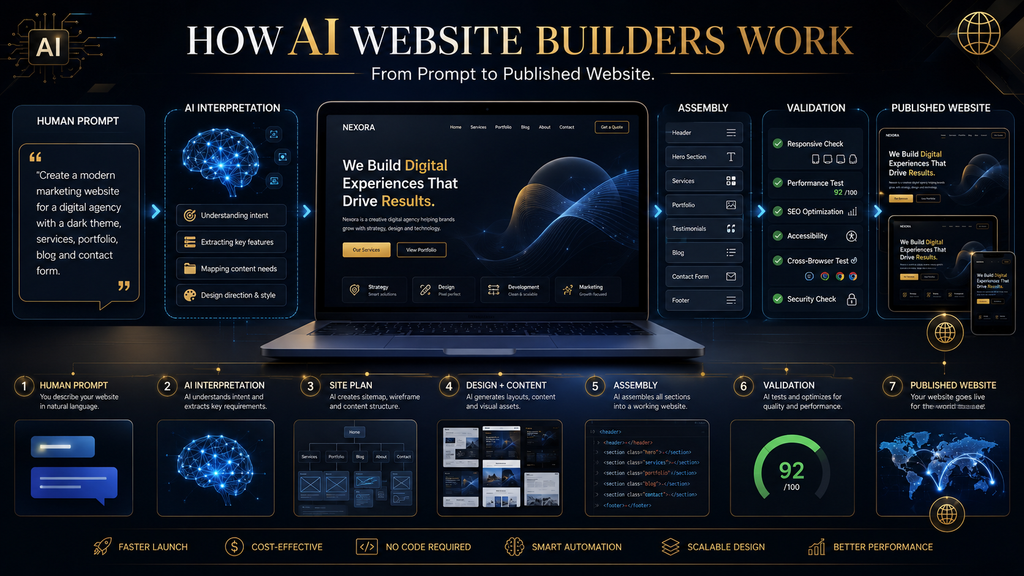
But an AI website builder is not actually skipping the work of website building. It is compressing several traditionally separate tasks into an AI-assisted production workflow.
Behind the scenes, the system has to interpret what you want, infer what pages and sections might be appropriate, generate or assemble a design, create initial content, connect functionality, adapt the layout for different screens, and eventually turn all of those pieces into something a browser can display. And that is only the beginning.
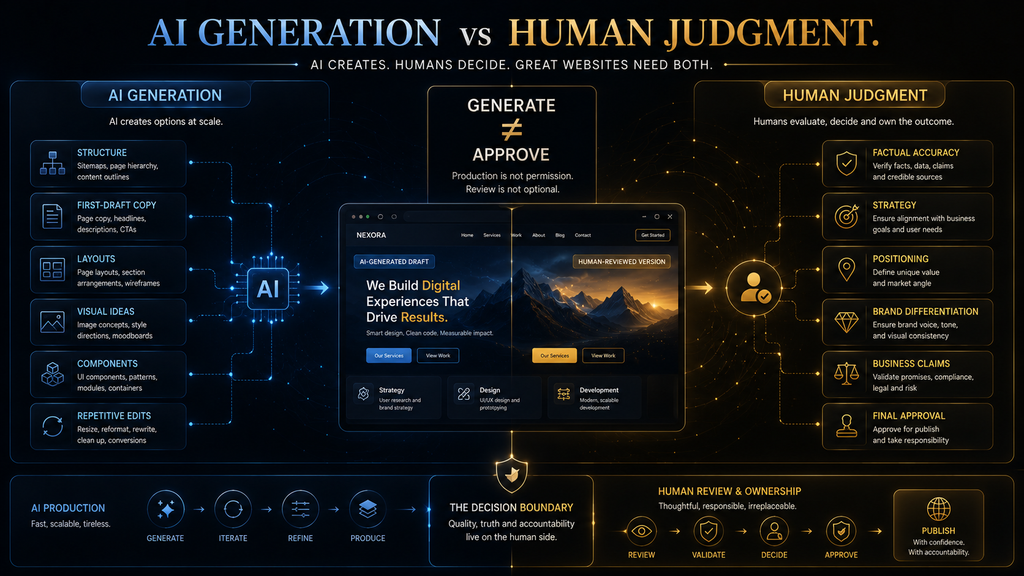
The most important part of understanding AI website builders is realizing that generation and judgment are different jobs. AI can produce a remarkably useful first version, but it does not automatically know whether your business information is accurate, whether your positioning is persuasive, whether the design actually differentiates you, or whether the finished site is good enough to put in front of customers.
That distinction explains both why AI website builders are so powerful and why their first drafts still need human review.
Quick Answer: How Do AI Website Builders Work?
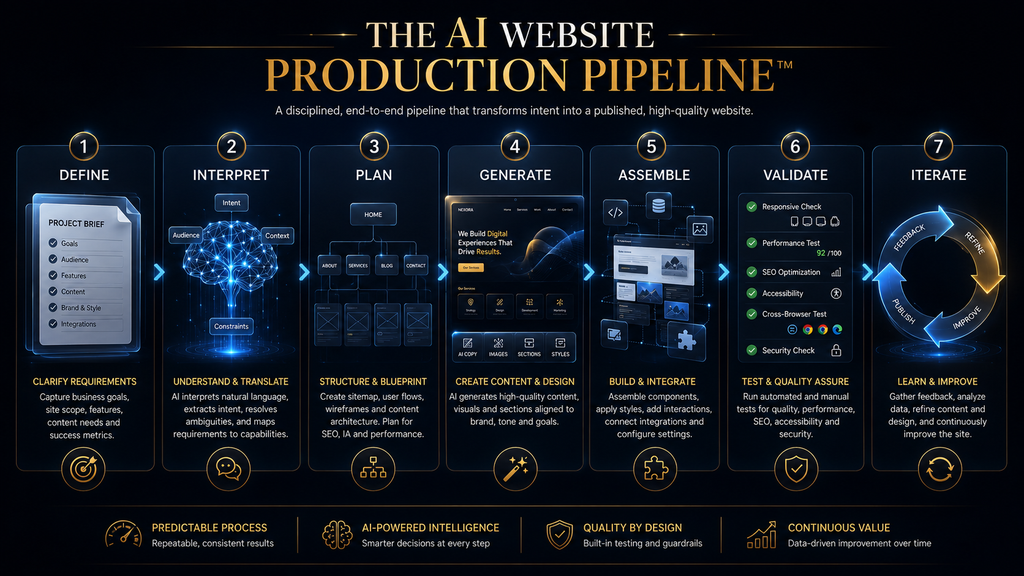
AI website builders generally turn natural-language instructions, business information, templates, existing content, or other inputs into a structured website by combining AI interpretation with design systems, content generation, components, code or configuration, and a visual editing environment. A simplified version of the process looks like this: Define → Interpret → Plan → Generate → Assemble → Validate → Iterate.
The exact implementation varies between platforms. Some primarily assemble editable components and design systems; others generate or modify code; newer agentic platforms can also work with CMS data, backend systems, ecommerce, databases, and other website functions.
For example, Wix’s current Harmony workflow can take a business description and generate pages, layouts, colors, starter content, and images before letting the user continue editing the result with its AI agent. Webflow’s current AI Site Builder similarly asks for the site’s purpose, pages and audience before generating a site structure, content, and theme.
So the simplest accurate mental model is:
An AI website builder is not one magic button. It is a production pipeline that uses AI to automate parts of the traditional website-building process.
What Is an AI Website Builder?
An AI website builder is a website creation platform that uses artificial intelligence to assist with tasks that traditionally required manual design, writing, development, or configuration. Depending on the platform, AI may help generate:
- website structure
- page layouts
- headlines and copy
- images
- navigation
- forms
- reusable components
- CMS content
- custom elements
- code
- SEO fields
- responsive layouts
- business functionality
Some modern platforms go much further than assistance. Framer, for example, describes its current AI agents as capable of creating and editing pages, sections, copy, visuals, layouts, interactions, CMS content, and code directly within the project.
Webflow’s current AI platform similarly extends beyond initial site generation into conversational assistance and, for some workflows, full-stack web-app generation. That means the category is changing. Older explanations often described an AI website builder as: “Give it a description → receive a website.”
A more accurate 2026 description is: “Give it a goal → let it construct a starting system → review and modify it → continue iterating with AI and visual controls → publish and maintain it.” That difference matters because the value of AI website builders increasingly comes from iteration, not just the first generation.
Why Were Traditional Websites So Much Work?
To understand what AI website builders are doing, it helps to understand what they are replacing or compressing. A traditional website project can involve several separate disciplines. A strategist decides what the website should accomplish.
A content specialist determines what information visitors need. A designer creates the visual hierarchy and user interface. A developer turns that design into functioning web technology.
An SEO specialist considers discoverability and information architecture. A business owner supplies accurate information, approves the result, connects the domain, and maintains the site. These jobs exist because a website is not simply a collection of pretty pages.
A working website has to communicate information, provide navigation, respond to different screens, load resources, handle interactions, connect to services, and ultimately help the visitor accomplish something. AI does not make those underlying problems disappear.
Instead, it can compress several stages into a much faster workflow. That is the fundamental change.
The AI Website Production Pipeline
A useful way to understand the entire process is to think of an AI website builder as a seven-stage production pipeline:
1. DEFINE — establish the goal and requirements
2. INTERPRET — convert human instructions into structured requirements
3. PLAN — determine pages, sections, content and functionality
4. GENERATE — produce design, content, images and components
5. ASSEMBLE — turn those pieces into a functioning website
6. VALIDATE — inspect whether the result actually works and is correct
7. ITERATE — improve the website through further instructions and editing
Not every platform exposes these stages separately. Some combine several stages internally. The point is to understand the work being performed, not assume every company uses identical technology.
Let’s walk through it.
1. Define: You Tell the AI What You Want
Everything begins with an input. That input might be surprisingly simple:
“Create a website for my photography business.”
But it can also be much more detailed:
“Create a premium website for a wedding photography studio serving couples in Dhaka. I need Home, About, Packages, Portfolio, Testimonials, FAQ, and Contact pages. The main goal is to generate consultation bookings. Use a sophisticated editorial style with dark backgrounds, warm photography, and minimal typography.”
The second instruction gives the system substantially more information to work with.
Modern builders accept more than just plain text. Wix’s current Harmony workflow starts from a business description and style information, while Webflow asks users to describe the site’s purpose, pages, audience, colors, fonts and other characteristics.
Hostinger’s current agentic approach also demonstrates a broader direction: users can provide sources such as menus, screenshots, or outdated websites as inputs rather than relying exclusively on a written prompt.
The practical lesson
AI cannot infer information that you never give it reliably. If you tell the system only:
“Build a professional website for my company.”
it has to fill in enormous gaps. That usually means relying on generic patterns.
If you provide the audience, goal, services, pages, brand direction, proof, location, functionality, and constraints, you give the AI a much stronger specification. This is why prompt quality matters even when the platform markets itself as “no-code.”
2. Interpret: The AI Turns Human Language Into Requirements
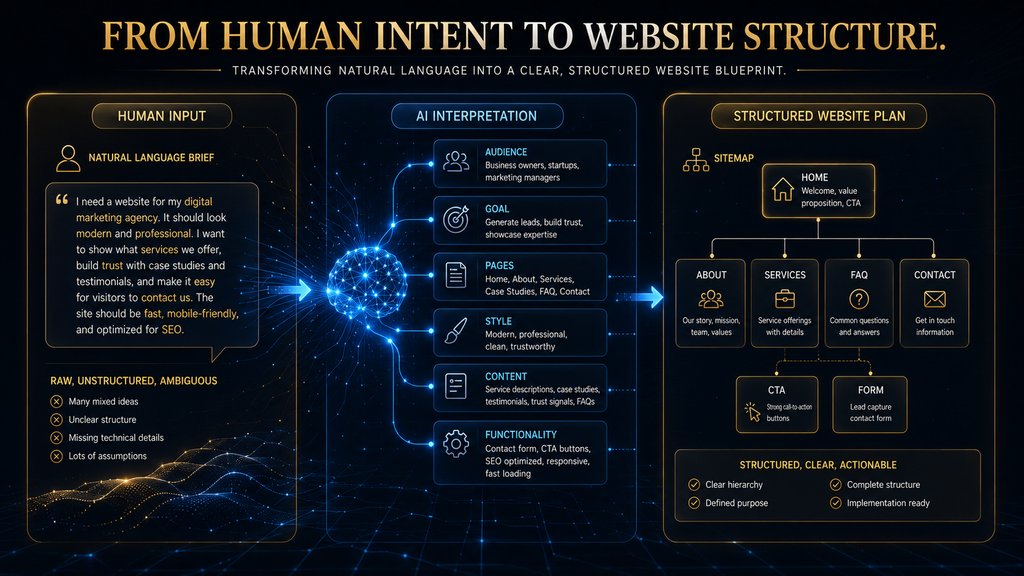
Humans communicate in messy, compressed language. We might say:
“I want a site that feels premium but friendly and helps people book quickly.”
That sentence contains several different requirements. The AI needs to infer that “premium” may influence typography, spacing, imagery and color choices. “Friendly” may influence tone and visual treatment.
“Helps people book quickly” suggests a conversion path, prominent calls to action, and perhaps a booking form or scheduling integration. This is where AI language models and related systems become useful. They can transform natural-language instructions into a more structured representation of what the website should contain.
You don’t necessarily see that internal representation. You see the result. But conceptually, the system is moving from: human language to: website requirements to: website structure.
That distinction is important because the AI is not simply “designing a website” from nothing. It is first trying to determine what kind of website your instructions imply.
3. Plan: The AI Decides What the Website Needs
This is one of the most overlooked parts of AI website generation. Before a site can look good, it needs structure. A basic business website might need:
- Home
- About
- Services
- Portfolio
- Testimonials
- FAQ
- Contact
An ecommerce website may need:
- Home
- Product categories
- Product pages
- Cart
- Checkout
- Account area
- Shipping information
- Returns
- Support
A SaaS company might need:
- Home
- Features
- Pricing
- Integrations
- Documentation
- Blog
- Login
- Signup
The AI therefore has to translate your business description into a site architecture. Webflow’s current AI Site Builder explicitly asks users to describe the site’s purpose, pages and audience and then generates the initial site structure, content and theme. This is an important conceptual shift.
The AI isn’t just generating pixels. It is making structural decisions.
And structural decisions are where human review becomes especially important. If the AI misunderstands the business, it can build a perfectly polished website around the wrong architecture.
4. Generate: The AI Creates the First Version
Once the system has enough information about the website, it can begin generating the pieces. That may include:
- layouts
- sections
- typography
- colors
- headlines
- paragraphs
- images
- buttons
- cards
- forms
- navigation
- calls to action
Wix’s current Harmony documentation provides a useful real-world example: Aria can generate site pages, layouts, colors, starter content and images, then open the result for further editing. Framer takes a similar but more design-oriented approach, describing its AI as capable of generating editable pages, sections, copy and visuals directly on its canvas.
This is where the experience feels magical to the user. But technically, several different generation tasks are happening at once.
How AI Generates the Layout
The system may decide that a homepage needs: Hero → Services → Social Proof → Process → FAQ → CTA. It may then select or construct suitable visual components for each section. Some platforms rely heavily on predefined design systems and reusable components.
Others provide more flexible canvas-based generation. Still others increasingly allow AI to generate or modify code. So it is inaccurate to imagine that every AI website builder creates every website entirely from scratch.
A better description is:
AI determines or proposes a structure, then the platform translates that structure into the visual and technical building blocks available to it.
That distinction explains why two AI website builders can receive the exact same prompt and produce very different results.
How AI Generates Website Copy
The AI can also generate text for:
- headlines
- descriptions
- service pages
- product descriptions
- FAQs
- calls to action
- navigation
- supporting sections
This can save enormous amounts of time. But there is a serious limitation.
The AI knows the pattern of a business better than it knows the reality of your business.
Imagine telling an AI:
“Build a website for a dental clinic.”
It knows what dental websites usually contain. It can produce language about:
- professional care
- modern treatment
- patient comfort
- experienced dentists
- convenient appointments
But it does not automatically know whether those statements are true for your clinic. It doesn’t know your real credentials. It doesn’t know your actual opening hours.
It doesn’t know which procedures you offer. It doesn’t know whether your clinic is genuinely “the leading dental provider” in your city. That information must come from you or another trustworthy source.
This creates a fundamental rule:
AI is excellent at drafting business language. It is not automatically the source of truth about the business.
Wix itself notes that AI-generated results can be unexpected or inaccurate and advises users to review AI output before finalizing it. That is not a minor warning. It is one of the most important things beginners need to understand.
5. Assemble: How the Pieces Become a Website
At this point, we have pieces:
- structure
- text
- images
- design
- components
- functionality
They now have to become a functioning website. This is where the distinction between different AI website-builder architectures becomes useful. Some platforms work primarily through visual editors and component systems.
Others generate or modify code. Some combine visual systems with generated code or custom elements. The underlying web still depends on familiar technologies.
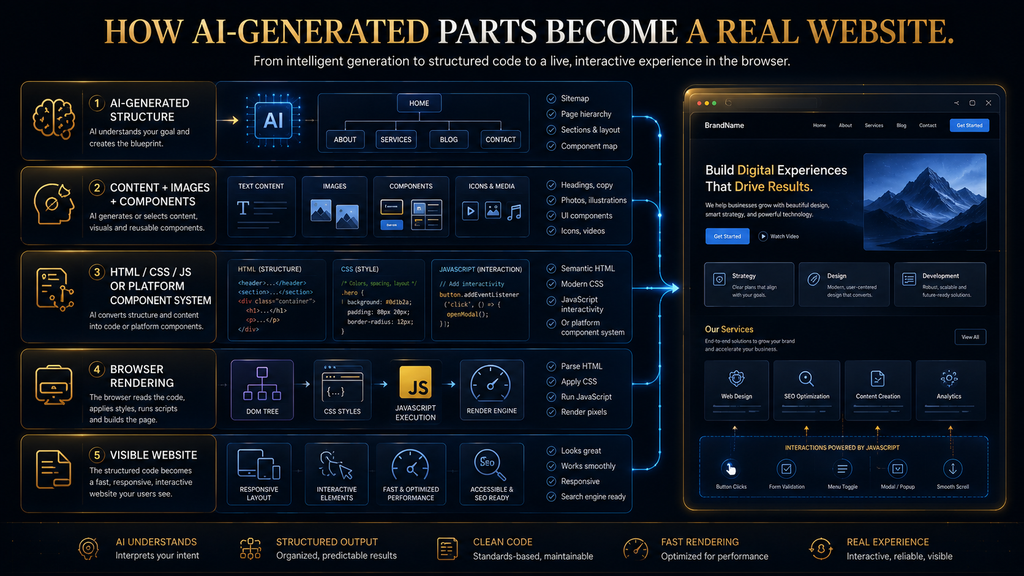
At a basic level, websites use HTML for structure, CSS for styling and layout, JavaScript for interactive behavior, and media assets such as images and videos. A browser receives those resources and assembles them into the experience displayed to the visitor.
You do not necessarily need to see the code. But the website still has to become something a browser can render.
Does an AI Website Builder Actually Write Code?
Sometimes—but not always in the way beginners imagine. Some AI tools can generate or modify HTML, CSS, JavaScript, React components, or other code. Others operate through proprietary visual systems where AI manipulates components, configuration, content and styles without exposing the user to traditional source-code workflows.
Framer, for example, says its agents can generate and update content, layouts, interactions and code directly on the canvas. Webflow’s current AI platform also includes conversational capabilities that can generate and deploy full-stack web apps for supported workflows.
So the correct answer is:
An AI website builder may generate code, manipulate structured components, or do both. The implementation depends on the platform.
This matters because “AI website builder” is now a broad category rather than a single technical architecture.
6. Responsive Design: Making the Website Work on Different Screens
A website that looks good on a laptop but breaks on a phone is not finished. Modern websites need to adapt to different screen sizes and environments.
Responsive web design uses flexible layouts and techniques such as CSS media queries to apply different styling rules based on viewport characteristics. MDN describes media queries as a key component of responsive design because they allow layouts to change depending on available screen space.
For example, a desktop page might have: three columns while a narrow mobile layout might become: one column. A large navigation menu might become a compact mobile menu. A row of buttons might stack vertically.
A large headline might shrink. Images might change size or crop differently. Modern AI builders can help automate some of these decisions.
Framer, for example, explicitly provides AI-assisted responsive refinement for layouts, spacing, hierarchy and breakpoints across tablet and mobile screens. But there is an important distinction:
Generating a responsive layout is not the same as proving that every responsive layout is good.
A generated mobile version can still have:
- awkward spacing
- oversized headings
- buttons that are difficult to tap
- broken navigation
- poor image crops
- excessive scrolling
- confusing section order
That is why responsive testing remains necessary.
7. Rendering: How the Browser Turns the Website Into What You See
Once a website is published, the browser still has to turn its underlying resources into a visible page. At a simplified level, the browser receives HTML, CSS, JavaScript and other assets. It parses the HTML into a DOM structure.
It processes CSS and builds the styling information needed to determine how those elements should appear. It calculates layout. It paints the visual result.
JavaScript can then add or modify interactive behavior and even alter the page structure. MDN describes this browser rendering process in detail, including DOM construction, CSS processing, layout and painting.
You don’t need to become a web developer to use an AI website builder. But understanding this gives you an important insight:
The AI-generated design is not the final website.
It is a set of instructions, content, components and assets that eventually have to be processed into a real browsing experience.
8. Functionality: A Website Has to Do Something
A brochure site may only need:
- navigation
- contact forms
- buttons
- embedded media
But many websites need much more. Examples include:
- appointment booking
- ecommerce
- payments
- login
- search
- databases
- customer accounts
- subscriptions
- analytics
- forms
- email automation
- CRM connections
- third-party integrations
This is where the gap between a website generator and a broader AI application builder becomes important. A simple website might be mostly content and presentation. An application may need: frontend + backend + database + authentication + business logic + integrations.
Current Webflow AI capabilities, for example, extend into full-stack web-app generation for supported workflows. Hostinger’s 2026 agentic AI Builder launch also reflects this broader direction, with the company positioning the system around backend infrastructure, ecommerce, user management, embedded AI and continued project development rather than simply producing a homepage.
The practical boundary
If your requirement is:
“I need a professional five-page company website.”
an AI website builder is a natural fit. If your requirement is:
“I need a customer portal with accounts, databases, payments and custom workflows.”
you may be solving an application-development problem rather than a simple website-building problem. Choosing the right category before choosing the tool can save you from rebuilding later.
9. Preview: The First Draft Is Not the Finished Product
Once the website has been assembled, you usually get a preview. This is where the human needs to step back in. Wix’s current workflow generates a live preview before the site is finalized, and users can then continue changing the design, structure and site details.
Framer similarly keeps AI-generated output editable on its visual canvas rather than treating it as a fixed image. That editable nature is important. The AI is not supposed to be the final decision-maker.
It is creating a candidate version. You now have to ask:
- Is the content accurate?
- Is the structure logical?
- Does the homepage communicate the value proposition immediately?
- Are the calls to action obvious?
- Does the mobile version work?
- Are the images appropriate?
- Are forms configured correctly?
- Are links working?
- Is the navigation intuitive?
- Does the website reflect the real business?
- Does the site actually accomplish its purpose?
This is the point where a beginner can make a major mistake:
Seeing a polished website and assuming the work is finished.
It isn’t.
10. Validation: Where Human Judgment Matters Most
The best way to think about AI website generation is:
- AI creates a candidate.
- Validation decides whether the candidate is acceptable.
This is true even when the platform performs automated checks. A human should still verify business-critical information. For example, if an AI creates:
“Open 24 hours”
but the business actually closes at 10 PM, the website is wrong regardless of how attractive it looks. If the AI invents a customer testimonial, the problem is even more serious. If it says:
“Certified by…”
without reliable evidence, that claim must not be published. If the website recommends a service the company doesn’t provide, the site is operationally misleading. The more consequential the information, the stronger the review should be.
That principle fits the broader AI Hustle World editorial stance:
Automate low-risk production work. Keep human judgment where accuracy, ambiguity, reputation, or consequences are high.
The AI Website Builder Quality Boundary
This is the most useful way to think about responsibility.
| Task | AI Can Usually Help With | Human Should Still Decide |
|---|---|---|
| Site structure | Suggest pages and hierarchy | Whether that structure fits the business |
| Copy | Create first drafts | Accuracy, positioning and claims |
| Images | Generate or select visuals | Authenticity and brand fit |
| Layout | Generate sections and designs | Final UX and visual direction |
| Responsive design | Suggest/adapt layouts | Test actual mobile experience |
| SEO fields | Draft titles/descriptions | Search strategy and factual accuracy |
| Forms | Generate/configure basic forms | Whether the workflow captures what the business needs |
| Integrations | Suggest or configure supported options | Whether the integration actually works |
| Code | Generate or modify code on some platforms | Security, reliability and specialized functionality |
| Publishing | Automate deployment | Final approval before going live |
The deeper lesson is that AI can reduce production effort without removing responsibility.
Why AI-Generated Websites Often Feel Similar
There is a less obvious problem with AI website generation. The easier it becomes for everyone to create a polished website, the easier it becomes for everyone to create a similar-looking polished website. AI systems are trained on patterns.
Website builders also provide design systems, components, templates, conventions and common structures. So if thousands of businesses ask for:
“A modern professional website with a hero section, blue buttons, three service cards, testimonials and a contact form”
many of those sites will naturally converge toward familiar patterns. This creates a second-order effect.
The value of basic website production decreases.
The value of differentiation increases.
When technical setup becomes cheap, businesses have to compete more heavily through:
- positioning
- original messaging
- real photography
- customer evidence
- unique offers
- useful content
- memorable brand systems
- better user experience
In other words:
AI may make websites easier to build while making distinctive websites harder to fake.
A competent first draft becomes less valuable when everybody can produce one.
Why AI Website Builders Don’t Automatically Create Great Websites
There is a difference between technical completion and strategic quality. A technically complete website can have:
- a homepage
- navigation
- contact form
- responsive design
- attractive visuals
and still fail. Why? Because it may answer the wrong question.
Imagine a local accounting firm. The AI might create:
“Professional Accounting Services for Your Business”
That is perfectly reasonable. It is also completely generic. A better website might communicate:
“Monthly bookkeeping and tax preparation for small businesses in Chattogram—without the year-end scramble.”
The second statement has:
- audience
- service
- location
- problem
- outcome
That strategic clarity does not come from choosing a prettier template. It comes from understanding the business.
AI can help express the strategy. It cannot reliably invent the correct strategy without enough information and human direction.
AI Website Builder vs. Traditional Website Building
The goal of AI isn’t necessarily to eliminate every traditional website-building role. Instead, it changes how much manual effort is required.
| Traditional Workflow | AI-Assisted Workflow |
|---|---|
| Research requirements manually | AI helps organize requirements |
| Create sitemap manually | AI can propose site structure |
| Design wireframes | AI can generate initial layouts |
| Write first-draft copy | AI can draft content |
| Search for visual assets | AI can suggest/generate visuals |
| Build components manually | AI can assemble or modify components |
| Code interactions | AI can generate or modify supported code |
| Build responsive layouts | AI can assist with responsive changes |
| Test and revise manually | AI can help identify or implement changes |
| Publish | Platform can automate much of deployment |
| Maintain | Increasingly, AI agents can assist with ongoing changes |
The important thing is that the traditional workflow exists for a reason. Each stage solves a different problem.
AI compresses those stages. It doesn’t make the underlying decisions irrelevant.
What Makes the New Generation of AI Website Builders Different?
The biggest change in 2026 is not simply that AI can generate websites faster. It is that AI is becoming persistent inside the website-building environment. The old mental model was: Prompt → website.
The newer model is: Prompt → website → feedback → modification → new version → testing → modification → publishing → maintenance. Framer explicitly describes its current agents as tools for creating and editing websites directly inside the project, while Wix Harmony lets Aria continue changing the site’s design and structure after initial generation. This creates a new category of workflow:
AI-assisted iteration
Instead of manually hunting through every setting, you can increasingly say:
“Make the hero section less crowded.”
or:
“Turn these three cards into a two-column layout on tablet.”
or:
“Rewrite the services section for small-business owners.”
or:
“Make the mobile navigation easier to use.”
The AI becomes less like a one-time generator and more like a collaborator operating inside the website environment. That is the more important long-term shift.
From AI Generator to AI Agent
The distinction is worth understanding.
AI generator
Creates something from an instruction.
AI assistant
Helps you modify or improve something.
AI agent
Can increasingly take a multi-step objective and perform actions inside the environment to achieve it. The boundaries are not perfectly standardized, and companies use these terms differently. But the practical progression is useful: Generate → Assist → Act.
Framer currently describes agents that can work directly with the canvas, CMS and site content. Webflow describes AI capabilities spanning site generation, conversational assistance and supported full-stack app workflows. Hostinger’s current agentic platform similarly emphasizes ongoing work beyond initial generation.
That is why modern AI website builders should not all be evaluated as if they were simply smarter template selectors.
A Practical Example: Building a Website for a Local Dental Clinic
Suppose you own a dental clinic. You tell the AI:
“Create a professional website for a family dental clinic serving patients in Chattogram. We provide general dentistry, emergency dental care and cosmetic dentistry. The main goal is appointment bookings. Include Home, Services, About, Doctors, FAQ and Contact pages. Use a clean, trustworthy visual style.”
The AI may infer:
- Goal: generate appointment leads
- Audience: local patients and families
- Pages: Home, Services, About, Doctors, FAQ, Contact
- Primary CTA: Book Appointment
- Visual direction: clean and trustworthy
- Content structure: service descriptions, doctor profiles, FAQs
- Functionality: appointment/contact form
That is useful. But now imagine the AI assumes the clinic provides pediatric dentistry. It doesn’t.
Or it writes:
“Open 24 hours.”
The clinic isn’t. Or it creates a testimonial that was never supplied. The website might still look excellent.
That is why the final workflow is not: Generate → Publish. It is: Generate → Verify → Correct → Test → Publish. That is the real production model.
How to Get Better Results From an AI Website Builder
You don’t need to write an enormous prompt. You need to provide the right information. A useful starting structure is:
Build a [type of website] for [audience] to [primary goal]. Include [pages/functions]. The business offers [real services/products]. Use [brand/style direction]. Prioritize [conversion/content goal]. Do not invent [specific information].
For example:
Build a website for a local wedding photography studio serving engaged couples in Dhaka. The primary goal is consultation bookings. Include Home, Portfolio, Packages, About, Testimonials, FAQ and Contact pages. Emphasize documentary-style wedding photography and small intimate ceremonies. Use a premium editorial visual style with large photography and minimal typography. Use only the business information provided and do not invent testimonials, awards, prices or credentials.
That final sentence is particularly valuable. Tell the AI what it must not invent.
The Five Questions to Ask Before You Publish
Before accepting an AI-generated website, ask:
1. Is everything factually correct?
Check:
- names
- addresses
- prices
- services
- hours
- credentials
- testimonials
- contact information
2. Does the structure match the business?
The AI may have produced a conventional structure that isn’t appropriate for your actual customer journey.
3. Does the website say something distinctive?
If another business could use the same copy by replacing the logo, the site probably needs stronger positioning.
4. Does everything actually work?
Test:
- buttons
- links
- forms
- menus
- mobile layouts
- checkout
- booking
- integrations
5. Would you trust this website if you were the customer?
This final question is simple but powerful. If the answer is no, don’t publish yet.
What AI Website Builders Are Actually Good At
AI website builders are particularly effective when the problem is standardized enough to benefit from automation. They are excellent for:
- first drafts
- landing pages
- portfolios
- small-business websites
- service websites
- simple ecommerce projects
- prototypes
- campaign pages
- content-heavy sites with standard structures
They also reduce the barrier to experimentation. A founder can test an idea without first assembling a full design-and-development team. A freelancer can create a starting point much faster.
A small business can get a functional online presence without learning HTML, CSS and JavaScript first. That is a meaningful change.
Where AI Website Builders Still Have Boundaries
AI website builders become less attractive when the project requires highly unusual functionality or deep technical control. Examples include:
- complex backend systems
- specialized databases
- unusual authentication requirements
- advanced enterprise integrations
- highly customized workflows
- specialized security requirements
- unusual interaction models
- complex application logic
That does not mean AI is useless for these projects. It means the tool category may change.
A website builder may be appropriate for the public-facing marketing site while a specialized application-development environment handles the backend system. The mistake is assuming one AI product must do everything.
Does an AI Website Automatically Become SEO-Friendly?
No. An AI builder can automate some SEO implementation. It may help create:
- page titles
- meta descriptions
- headings
- image descriptions
- structured content
- URLs
- basic SEO settings
But SEO is not simply a metadata-generation problem. A search-friendly website still needs useful information, sensible architecture, crawlable pages, internal relationships, accurate content, strong user experience and ongoing maintenance. AI can reduce the mechanical workload.
It cannot guarantee search visibility. For a deeper explanation of how AI is changing search optimization, see AI SEO: What It Is, How It Works, and How Search Is Changing. And if you want the broader distinction between traditional search optimization and optimization for answer engines and generative systems, see GEO vs AEO vs SEO: What’s the Difference?.
Can AI Website Builders Replace Web Developers?
For simple websites, they can reduce the amount of development work required. That is different from replacing web development as a discipline. A developer’s value becomes more obvious as requirements become more specialized.
If you need:
- custom application logic
- complex integrations
- database architecture
- security engineering
- unusual performance requirements
- custom infrastructure
- specialized debugging
you are dealing with engineering problems rather than simply page-generation problems. AI can assist developers with those problems too. But the underlying need for technical judgment remains.
The better question isn’t:
“Will AI replace developers?”
It is:
“Which parts of web development are becoming automated, and which parts still require specialized judgment?”
That question will remain relevant as AI builders become more capable.
The Hidden Cost of Treating AI Generation as Finished
The biggest risk isn’t that AI produces a terrible website. Modern systems can often produce something that looks surprisingly good. The bigger risk is producing something that is good enough to publish but not good enough to compete.
That can lead to:
- generic positioning
- generic copy
- weak differentiation
- incorrect information
- poor conversion paths
- weak customer trust
- fragile integrations
- unnecessary platform dependency
The website may technically work. But it may never become a meaningful business asset. That is why the first draft should be treated as raw material rather than a finished product.
What Happens If You Don’t Use AI?
There is an important counterpoint. AI website builders are not mandatory. You can still build websites through traditional visual builders, WordPress, custom development, agencies, freelancers or in-house teams.
The consequence of ignoring AI isn’t that you suddenly cannot build a website. The consequence is primarily opportunity cost. You may spend more time on:
- repetitive layout work
- first-draft copy
- initial design exploration
- basic component creation
- routine editing
AI can reduce those costs. But if your project requires deep customization, refusing to use traditional development tools simply because AI is fashionable can create the opposite problem. The right principle is:
Automate the parts that are repetitive. Keep specialized human work where it creates meaningful value.
The Future of AI Website Building
The direction of the market is becoming clearer. The first generation of AI website builders focused on speed. The next generation is focusing on continuous work.
That means AI may increasingly help with:
- creating new pages
- updating existing content
- managing CMS entries
- improving responsive layouts
- generating components
- auditing sites
- identifying SEO issues
- changing site-wide styles
- connecting services
- maintaining content
- building more advanced web functionality
Framer already positions its agents around creation, editing, CMS management, SEO, publishing and ongoing site work. Wix Harmony similarly integrates AI into multiple stages of site creation and refinement. Webflow’s AI platform is expanding beyond site generation into management and application workflows.
This suggests an important future shift:
The website builder may become less like a software tool you operate and more like an environment you direct.
Instead of clicking through dozens of controls, you increasingly describe the outcome you want and review what the system changes. But that makes judgment more important, not less. If AI can change an entire website from a short instruction, the ability to clearly define the desired outcome—and verify the result—becomes a critical skill.
The Bigger Shift: From Building Pages to Managing Intent
This is where the technology gets genuinely interesting. Traditional website creation often asks:
How do I build this page?
AI-assisted website creation increasingly lets you ask:
What should this page accomplish?
That is a major abstraction change. The user moves upward from implementation toward intent. Instead of manually deciding every component, the user describes:
- who the page is for
- what it needs to communicate
- what action visitors should take
- what the brand should feel like
- what information must be included
The AI handles more of the implementation. But there is a trade-off. When implementation becomes easier, specification becomes more important.
A vague instruction can produce a polished but mediocre website. A precise instruction gives the system a much better target.
The Real Skill AI Website Builders Are Creating
The new skill isn’t simply:
“Knowing how to prompt AI.”
It is knowing how to specify, evaluate and refine digital experiences. That means understanding:
- your audience
- your business objective
- information hierarchy
- conversion paths
- content quality
- visual identity
- technical constraints
- user experience
- accuracy
- testing
The AI can accelerate execution. But someone still has to know what “good” means.
Final Thoughts
AI website builders are often presented as though they perform a single trick: You describe a website, and AI builds it. That explanation is convenient—but incomplete.
What is actually happening is much more interesting. The system takes human intent and progressively transforms it into a structured website: Define → Interpret → Plan → Generate → Assemble → Validate → Iterate.
The first six stages compress work that once required separate combinations of strategy, design, content, development and technical configuration. The seventh—iteration—is becoming increasingly important as newer AI agents move beyond one-time generation and start working continuously inside website environments.
But there is a boundary that should not disappear:
AI can generate the website. It cannot decide whether the website is actually right.
It does not automatically know whether your business claims are true, whether your positioning is compelling, whether your customer journey makes sense, whether your mobile experience feels good, or whether the website gives visitors a reason to trust you. That is still judgment. And as AI makes website production cheaper and faster, judgment may become the more valuable skill.
The future of website building is therefore unlikely to be simply AI replacing humans. It is more likely to be: humans defining intent → AI accelerating execution → humans validating outcomes → AI helping iterate. The people who understand that workflow will get much more value from AI website builders than people who simply click Generate and publish the first thing they see.
Choose the AI Tool That Solves the Right Problem
Now that you know how AI website builders work, learn the mistakes that trip people up.
Avoid Common AI Website Builder Mistakes →Frequently Asked Questions
How does an AI website builder create a website?
It typically interprets your instructions or source material, creates a site structure, generates or assembles design and content, connects components and functionality, produces a preview, and lets you refine and publish the result. The exact technical process differs between platforms.
Does an AI website builder write the code?
Sometimes. Some platforms generate or modify code, while others use AI to manipulate visual components, design systems, configuration and content. Modern platforms can also combine both approaches.
Can AI build a website without coding?
Yes. Many AI website builders are designed specifically so users can generate and edit websites without writing traditional code. However, “no coding” does not mean “no decisions.” You still need to provide requirements, verify content, test the result and decide what the website should accomplish.
Are AI-generated websites responsive?
They can be, and modern builders increasingly provide responsive design systems and AI-assisted breakpoint/layout adjustments. However, responsive behavior should still be checked on real or simulated desktop, tablet and mobile screen sizes.
Can AI website builders create ecommerce websites?
Many can. The exact ecommerce capabilities vary substantially between platforms, so you should evaluate products, payments, inventory, checkout, shipping, customer accounts and integrations rather than assuming every AI builder supports the same store functionality.
Can AI-generated websites rank on Google?
Yes, an AI-generated website can be indexed and rank, but AI generation itself does not guarantee rankings. Search performance depends on the quality, relevance, technical accessibility, structure, authority and usefulness of the website.
Can I edit a website after AI creates it?
Yes. Editable output is one of the major advantages of modern AI website builders. For example, Framer keeps generated pages and components editable on its canvas, while Wix allows users to continue modifying site structure and design through Aria.
Do AI website builders replace web developers?
Not universally. They can reduce the amount of manual work required for standard websites, but specialized applications, complex integrations, infrastructure, security and custom functionality can still require experienced developers.
What is the biggest limitation of an AI website builder?
The biggest limitation is not usually its ability to create a visually acceptable website. It is its limited understanding of the specific business, audience and strategic context behind the website. The more important the decision, the more human review matters.
Sources and Further Reading
- The WebAIM Million: WebAIM’s annual accessibility analysis of the top one million home pages.
- Introduction to Lighthouse: Chrome for Developers overview of the Lighthouse auditing tool.
Related Guides
- Best AI Resume Builders (Free & Paid)
- How to Optimize Your Website for Google AI Overviews and AI Search
- Best AI Keyword Research Tools : 10 Tools Compared
Written by
Muntasir Ahmad Chowdhury
Founder, AI Hustle World
Muntasir Ahmad Chowdhury is the Founder of AI Hustle World, an independent publication dedicated to making Artificial Intelligence practical, trustworthy, and easy to understand. He researches AI tools, automation, customer service, productivity, and real-world business applications, helping readers make smarter technology decisions through research-driven, experience-backed content.
Expertise:
AI Tools • AI Automation • AI Customer Service • AI Productivity • Generative AI • AI Workflows
Get Smarter With AI
Enjoyed this guide? Get practical AI tools, tutorials, and honest reviews delivered to your inbox.