Evidence: Documentation reviewed
Last checked: August 2026
What was done: Written from official documentation and the published sources linked in this article. Not hands-on tested.
Files: None
Affiliate links: No
Last updated: October 2026
Best AI Website Builders in 2026: 10 Tools Compared
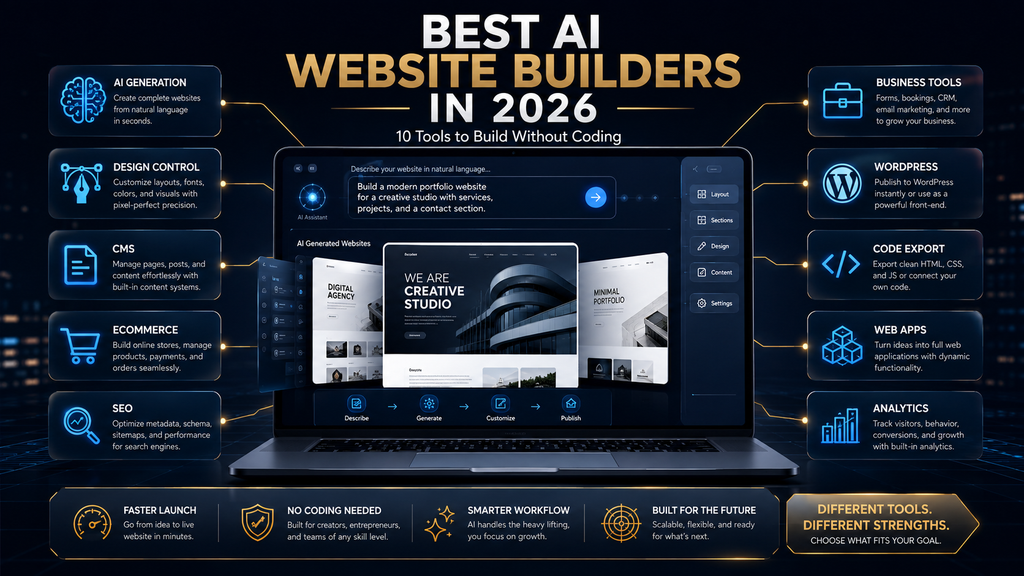
The best AI website builder for most people is Wix, because its Harmony AI builder combines fast generation with strong visual control and a large business toolkit. Squarespace is better for polished brand sites, Framer for design-first sites, Webflow for professional CMS work, Hostinger for the lowest upfront cost and Durable for small service businesses that want a site in minutes.
10Web is the pick for WordPress, GoDaddy Airo for sites that may grow into simple web apps, Dorik for value and code export, and B12 for service firms that want client tools alongside the website. Every builder here has a free plan, a free trial or a low-cost introductory offer, so you can test before committing.
AI website builders keep their main promise: describe the site you want, let AI generate the structure and content, adjust it and publish. That part works. The harder question is what happens after the first draft, when you need to edit details, add features, handle growth, control costs and keep ownership of your content.
This guide compares ten builders with that question in mind. It separates AI-enhanced builders from newer agentic and full-stack platforms, checks pricing on each vendor’s site in October 2026, scores every tool with our W.O.R.T.H. Score and gives you a ten-minute method for choosing the platform you will still be happy with in six months.
The 10 Best AI Website Builders at a Glance
Here is the short version. Prices come from each vendor’s pricing page in October 2026. Website builder pricing is full of promotions, long upfront terms and renewal increases, so read the billing details before you buy. “Paid from” shows the lowest advertised monthly-equivalent price we found. Free options are listed separately.
| Builder | Best for | Free option | Paid from | Main trade-off |
|---|---|---|---|---|
| Wix (Harmony) | Most beginners and small businesses | Free plan | $17/mo billed annually | Can grow complex |
| Squarespace (Blueprint AI) | Brand-led businesses and portfolios | 14-day trial | $12/mo billed annually | Less flexible layouts |
| Framer | Design-first marketing sites | Free plan with AI credits | $10/mo billed yearly | Fewer business tools |
| Hostinger | Lowest upfront cost | Trial period | $2.99/mo for 48 months | Renews at $10.99/mo |
| Webflow | Professional design and CMS | Free Starter | $15/mo billed yearly | Steeper learning curve |
| 10Web | AI-built WordPress sites | Free start | $10/mo billed annually | WordPress upkeep |
| Durable | Local and service businesses | Free plan | $22/mo | Limited design depth |
| GoDaddy Airo | Sites that may become web apps | Free with 50 AI credits/mo | Varies by region | Pricing varies by market |
| Dorik | Value, code export, agencies | Trial | $20.75/mo billed annually | Smaller ecosystem |
| B12 | Service firms needing client tools | Free on subdomain | $24/mo ($1 first 7 days) | Higher price for full features |
The ranking is based on fit rather than a single score. A builder that is perfect for a photographer’s portfolio can be a poor fit for a plumber who needs booking and invoicing, and vice versa. Use the table to shortlist two or three builders, then read their sections. Most people only need to compare two or three options seriously.
How We Chose and Compared These Builders
We selected ten widely used AI website builders that cover the main use cases: general small business sites, brand and portfolio sites, design-first sites, budget sites, professional CMS sites, WordPress sites, local service sites, app-like sites, agency work and service-business operations. Together they cover almost every common small-business website need.
For each, we reviewed the vendor’s own pricing and product pages in October 2026, noting free options, billing terms, AI credit limits and the features that affect long-term fit. This is a documentation-based comparison, not a hands-on build test, and we say so wherever a feature claim comes from the vendor.
The Hostinger link in this article is a referral link; we note it here so you can decide how to use it. Rankings are based on fit for each type of user. If you are new to the category, our guide to how AI website builders work explains the basics before you compare tools. It covers what these tools can and cannot do.
What an AI Website Builder Does
An AI website builder uses artificial intelligence to generate and edit a website from a description. You answer a few questions or write a prompt about your business, and the tool creates pages, layout, images, text, navigation and basic search settings. You then refine the result in a visual editor or by giving the AI more instructions.
An AI builder can generate a website quickly, but it does not automatically create a successful one. Success still depends on a clear offer, accurate content, a good structure for visitors, trust signals, search visibility and the business tools behind the site, such as booking, payments and email. AI speeds up the build; it does not replace the strategy.
Most builders now use AI in three ways: generating the first draft, helping you edit text, images and layouts, and assisting with tasks such as search settings, product descriptions or marketing content. The best ones combine those AI features with an editor that gives you real control over the final result.
The Market Has Split Into Three Types
AI-enhanced builders are established platforms, such as Squarespace, Hostinger, Durable and Dorik, that added AI generation and editing to a traditional builder. They are reliable, mature and easy to learn, and their AI mainly speeds up setup and content creation. They suit people who want a proven platform with helpful AI on top.
Agentic builders let you work with an AI agent that makes changes for you across the site. Wix’s Harmony experience includes an AI agent called Aria that Wix describes as turning ideas into sections, pages or custom components, and Framer’s AI works as a canvas agent that starts from a prompt and lets you refine layouts and styling.
AI-native full-stack builders go further, generating not just pages but databases, logic and app-like features. GoDaddy describes its builder as generating websites, web apps, pages, databases and logic from prompts. That makes it useful when a “website” is really a simple application, such as a directory or booking system.
Knowing which type you need prevents a common mistake: buying an app builder when you need a brochure site, or a brochure builder when you need app features. For most small businesses, an AI-enhanced or agentic builder is the right choice, and full-stack builders become relevant only as needs grow. Starting simple is usually the right call.
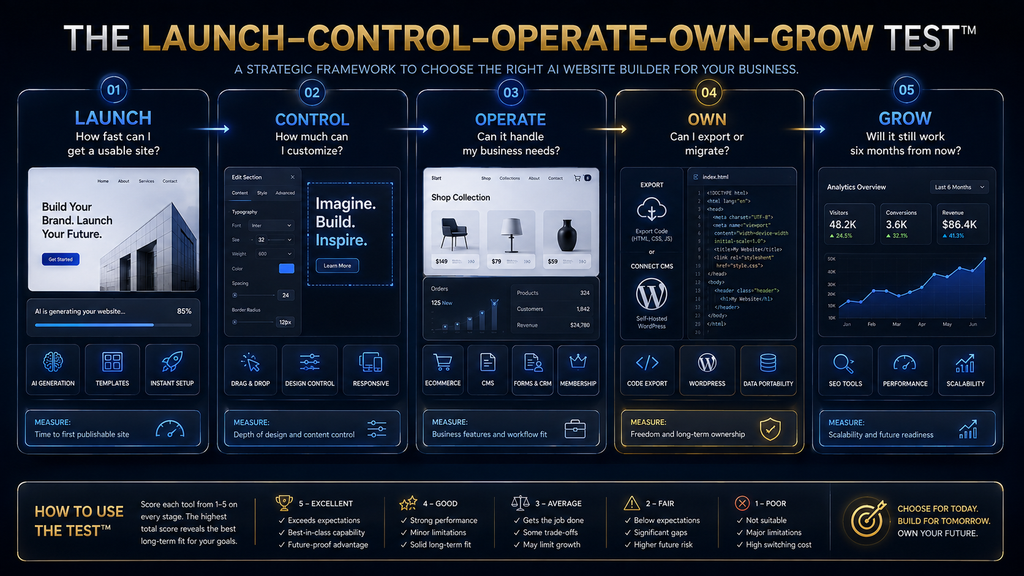
How We Evaluate: The Launch, Control, Operate, Own, Grow Test
We judge each builder on five questions, an AI Hustle World editorial framework. Launch: how quickly can you get a credible first version online? Control: how easily can you change design, layout and content exactly as you want, without fighting the AI? Good control means you can fix details quickly without starting over.
Operate: does the platform include the business tools you need, such as booking, payments, ecommerce, email marketing and forms? Own: can you export your content, use your own domain and leave without rebuilding everything? Grow: will the platform still fit when you add pages, products, team members or traffic?
Most buyers focus on launch, because that is what demos show. The other four questions decide whether you are still happy a year later. A builder that launches in five minutes but traps your content or lacks the tools you need will cost far more in time and money over its life. Judge every builder on all five questions, not just the first.
1. Wix (Harmony): Best Overall for Most Users
Wix is the best overall choice for most beginners and small businesses. Its Harmony AI builder combines fast AI generation with Wix’s mature visual editor and one of the largest business toolkits of any website builder, covering bookings, ecommerce, events, marketing and member areas. Its app market adds many more options as you grow.
Wix’s article on what Wix Harmony costs lists a free plan for a basic site, then Light at $17 a month, Core at $29, Business at $39 and Business Elite at $159, all billed annually. Core and above add ecommerce and business features that most growing businesses eventually need. The free plan is useful for testing the editor first.
Wix stands out because you rarely outgrow it early. You can start with an AI-generated site, refine it visually, ask the Aria agent to add sections or pages and then turn on bookings, online payments or a store when you need them. That breadth keeps you on one platform for longer. Fewer migrations mean less disruption for your business.
The main weakness is complexity as needs grow. Wix’s large feature set and many apps can make sites heavier and harder to manage, and moving a mature Wix site elsewhere usually means rebuilding. Plan your structure early and keep copies of important content outside the platform. Verdict: choose Wix if you want a strong balance of AI speed, visual control and business tools in one place, especially for a small business that may grow.
2. Squarespace (Blueprint AI): Best for Polished Brand Sites
Squarespace is the best choice when design polish and brand presentation matter most. Its AI builder, Blueprint AI, asks about your business in your own words and generates a site based on Squarespace’s design system. Squarespace’s AI website builder page says Blueprint AI was named one of TIME’s Best Inventions of 2025.
Squarespace’s pricing page lists Basic at $12 a month and Core at $17 a month on annual billing, with a higher plan at $25 for advanced commerce features. Every plan includes built-in AI tools and a free custom domain for the first year, and there is a 14-day free trial. Monthly billing costs more than these annual prices.
Squarespace’s strength is consistency. Its templates and design rules make it hard to create an ugly site, which suits photographers, designers, consultants, restaurants and boutique shops. Built-in commerce, appointment scheduling and email campaigns cover most needs for brand-led small businesses. Its mobile layouts are also reliably clean.
The main weakness is flexibility. Squarespace’s structured design system limits unusual layouts, and advanced customization can feel restrictive compared with Wix or Webflow. Transaction fees also apply on lower plans for online sales, so check the fee structure if you plan to sell a lot. Verdict: choose Squarespace when your site needs to look polished and on-brand with minimal design effort, and you are happy to work within its design system.
3. Framer: Best for Design-First Websites
Framer is the best choice for design-led marketing sites, startup pages and portfolios where visual quality and interaction matter. Its AI works as a canvas agent: you start from a prompt, then use the Framer canvas to refine layouts, typography, components, breakpoints, spacing, color and effects. Designers can work quickly while keeping full creative control.
Framer’s pricing page lists a free plan with 500 AI credits to try, a Framer domain and limited bandwidth. Basic costs $10 a month billed yearly with 1,000 AI credits a month, and Pro costs $30 a month billed yearly with 3,000 credits and more pages, CMS collections and features. Extra editors cost $20 a month each, while viewers are free.
Framer stands out for the quality of what designers can build: smooth animations, responsive layouts and modern interactions that look like custom-coded sites. Its CMS handles blogs and collections, and its built-in SEO and localization add-on cover the needs of most marketing teams. Sites also load quickly, which helps both visitors and search.
The main weakness is business tooling. Framer is focused on websites rather than operations, so bookings, complex ecommerce and customer management usually require integrations. Beginners may also find the design canvas more demanding than template-first builders like Squarespace or Wix. Verdict: choose Framer when design quality and interaction matter most, especially for marketing sites, startups and portfolios with a design-aware owner.
4. Hostinger: Best Budget All-in-One Option
Hostinger offers the lowest upfront cost of any builder here, combining an AI website builder with hosting, domains and email. Its AI tools generate a site from a short description and help with content, images and basic search settings, which suits personal sites, simple business pages and first websites.
Hostinger’s website builder page advertised a starter plan at $2.99 a month in October 2026, charged as $143.52 for 48 months upfront and renewing at $10.99 a month. A higher plan with unlimited websites, AI tools and ecommerce was advertised at $3.99 a month on the same 48-month terms. Plans include multiple websites and mailboxes.
What makes Hostinger attractive is the bundle: hosting, a builder, AI tools and email for a very low entry price. For a personal site, a side project or a small business that wants to get online cheaply, it can be the most cost-effective route by a wide margin. Few competitors match that entry price.
The main weakness is that the headline price depends on a long upfront commitment, and renewal prices are much higher. A four-year term also locks you in. Compare the total cost over the term and the renewal rate, not the monthly headline, before you decide. Verdict: choose Hostinger when budget matters most and you are comfortable with a long upfront term. Check the renewal price before you pay.
5. Webflow: Best for Professional Design and CMS
Webflow is the professional’s choice for sophisticated design systems and content-rich sites. It gives designers fine control over layout and interactions and offers a powerful CMS, while its AI site builder helps generate a starting point that you then refine with Webflow’s visual development tools. It is popular with agencies and in-house design teams.
Webflow’s pricing page lists a free Starter workspace, Basic site plans at $15 a month billed yearly for simple sites without a CMS and Premium at $25 a month billed yearly for content-rich sites with CMS and traffic needs. Larger team and enterprise plans add collaboration and control. Add-ons for localization, analytics and optimization are priced separately.
Webflow stands out for scale and craft. Agencies and in-house teams use it to build large marketing sites with structured content, many collaborators and custom interactions, all without hand-coding. Its CMS handles blogs, resource libraries and product catalogs well. Large sites stay organized as they grow.
The main weakness is the learning curve. Webflow thinks like a web developer, with concepts such as classes, boxes and responsive breakpoints, so beginners can find it hard going. For a simple small business site, Wix or Squarespace will get you online faster with less effort. Verdict: choose Webflow when you need professional design control and a strong CMS, and you or your team are willing to learn a more technical tool.
6. 10Web: Best AI Builder for WordPress
10Web generates WordPress sites with AI, then hosts and manages them. That combination suits people who want WordPress’s huge plugin ecosystem and portability without building a WordPress site from scratch or managing hosting themselves. It removes much of the setup work that WordPress usually requires.
10Web’s AI builder pricing page lists AI Starter at $10 a month billed annually, charged as $120 for 12 months against a regular $240, with one website, 100 AI credits a month and a free custom domain worth up to $30. Higher tiers add more websites, credits and storage, and business and agency plans are available.
The WordPress foundation is 10Web’s main advantage. Your site runs on the most widely used content management system, so you can use thousands of plugins and themes, hire from a large pool of WordPress professionals and move your site to another host if you ever need to. That freedom is rare among AI website builders.
The main weakness is WordPress upkeep. Plugins, updates and security still need attention, even with managed hosting, and plugin conflicts can cause problems that pure website builders avoid. Introductory prices also rise on renewal, so check the regular price. Verdict: choose 10Web when you want an AI-built site on WordPress for flexibility and portability, and you are comfortable with some WordPress maintenance.
7. Durable: Best for Local and Service Businesses
Durable focuses on getting small service businesses online fast. It generates a complete site in seconds and bundles tools that local businesses need, such as online booking, a simple customer relationship manager, invoicing and automated search settings, so owners can run more of their business in one place.
Durable’s pricing page lists a free plan on a durable.site subdomain, Launch at $22 a month and Grow at $41 a month. Paid plans add a custom domain with a domain credit, more AI credits and features such as automatic translation and SEO metadata, with Grow offering 5,000 AI credits a month. Durable has also moved its main site from durable.co to durable.com.
Durable stands out for speed and simplicity. A plumber, cleaner, coach or salon owner can have a credible site with booking in minutes, without learning a design tool. For businesses whose website mainly needs to explain services and capture bookings, that focus is exactly right. Owners can spend their time on customers instead of web design.
The main weakness is design depth. Durable sites are simpler and less customizable than Wix, Squarespace or Framer sites, which can matter if your brand needs a distinctive look. Growing businesses may eventually move to a more flexible platform. Verdict: choose Durable when you run a local or service business and want a site with booking and simple business tools online as quickly as possible.
8. GoDaddy Airo: Best for Sites That May Become Web Apps
GoDaddy’s Airo AI builder goes beyond pages. GoDaddy says its builder can generate websites, web apps, pages, databases and logic from a few prompts, with no coding. That makes it a good fit when your “website” is really a simple application, such as a directory, a booking tool or a customer portal. Few traditional builders can do that.
GoDaddy’s website builder page says you can start for free with 50 AI credits a month and no credit card, and paid Airo plans include a free domain. Paid plan prices vary by country and currency, so check the pricing page for your region before you choose a plan. The free start makes it easy to test the app features.
Airo stands out for its app-building direction combined with GoDaddy’s domains, email and marketing tools. If you expect to need data, user accounts or simple workflows later, starting on a platform that can generate them saves a painful migration from a pure brochure builder. Domains and email from the same provider simplify management.
The main weakness is maturity and predictability. App-generating builders are newer, and generated logic still needs careful testing before customers rely on it. For a simple brochure site, a traditional builder is usually more predictable and easier to maintain. Verdict: choose GoDaddy Airo when you expect your site to need app-like features and you want domains, email and the builder from one provider.
9. Dorik: Best for Value, Code Export and Agencies
Dorik is a lightweight AI website builder that stands out for code export and agency features. You can generate a site with AI, edit it visually and export the code, which gives you an exit route that many hosted builders do not offer. Client billing and white-label options suit freelancers and agencies.
Dorik’s pricing page lists Personal at $20.75 a month billed $249 annually, Business at $41.50 a month billed $498 annually and Agency at $79 a month billed $948 annually. Plans include AI website generation, and higher tiers add more custom domains and agency tools. Monthly and lifetime options are also listed.
Code export is the key advantage. If you ever want to move to your own hosting or hand a site to a developer, you are not starting from scratch. For agencies building many small sites, client billing and white-label features turn Dorik into a practical business tool. That makes Dorik a smart choice for freelancers.
The main weakness is a smaller ecosystem than Wix, Squarespace or WordPress, with fewer integrations and templates. Built-in ecommerce and business tools are lighter, so complex stores or booking-heavy businesses may need other platforms or add-on services. Verdict: choose Dorik when portability and value matter, or when you are an agency or freelancer building sites for clients.
10. B12: Best for Service Firms That Need More Than a Website
B12 targets professional service firms, such as accountants, lawyers, consultants and therapists, that need a website plus tools to attract and serve clients. It combines AI site generation with features such as scheduling, payments, intake forms and email marketing, and offers optional expert help. Its focus is on professional services rather than general websites.
B12’s pricing page lists a free plan on a B12 subdomain. The Website plan costs $24 a month with your own domain and 100 AI credits, and Website plus Client Engagement costs $78 a month with 300 AI credits and client tools. Both paid plans were available for $1 for the first seven days. Yearly billing lowers the effective price.
B12 stands out because it treats the website as part of a client workflow. Instead of stitching together a site, booking tool, payment processor and email platform, a small firm can run intake, scheduling and payments in one system that is designed for service businesses. One system means fewer logins and fewer things to break.
The main weakness is price for the full feature set. The Client Engagement plan costs more than most builders here, so it makes most sense when you will use its client tools. If you only need a simple site, Durable or Squarespace may be better value. Verdict: choose B12 when you run a professional service firm and want the website, client intake, scheduling and payments working together.
W.O.R.T.H. Scores for All 10 Builders
We rate tools with the AI Hustle World W.O.R.T.H. Score: Workflow fit (25), Output quality (25), Risk and rights (15), Total cost (20) and Human effort (15). These scores are editorial assessments based on documentation and published pricing, not build tests, and assume a typical small business owner. Your own weighting may differ.
| Builder | Workflow /25 | Output /25 | Risk /15 | Cost /20 | Effort /15 | Total /100 |
|---|---|---|---|---|---|---|
| Wix (Harmony) | 23 | 21 | 10 | 15 | 12 | 81 |
| Squarespace | 20 | 22 | 10 | 16 | 12 | 80 |
| Framer | 18 | 23 | 10 | 16 | 10 | 77 |
| Webflow | 19 | 23 | 11 | 14 | 9 | 76 |
| Durable | 20 | 16 | 10 | 16 | 14 | 76 |
| 10Web | 18 | 18 | 12 | 16 | 11 | 75 |
| Hostinger | 17 | 17 | 10 | 18 | 13 | 75 |
| Dorik | 17 | 17 | 13 | 15 | 12 | 74 |
| B12 | 19 | 17 | 10 | 13 | 13 | 72 |
| GoDaddy Airo | 18 | 17 | 9 | 15 | 12 | 71 |
Wix leads on workflow breadth, Squarespace and Framer on output quality, Durable and Hostinger on ease and cost, and Dorik and 10Web on ownership because of code export and WordPress portability. GoDaddy Airo scores lower on risk because generated app logic needs careful testing. Every builder here is a reasonable choice for the right user.
Use the scores as a starting point. A designer should weight output quality heavily, a busy tradesperson should weight human effort and workflow fit, and anyone worried about lock-in should weight risk and rights. The best builder is the one that scores well on the columns that matter to you. Adjust the weights to your priorities.
Comparing What Matters Most
| Builder | AI generation | Visual control | Business tools | CMS and scale | Portability |
|---|---|---|---|---|---|
| Wix | Excellent | Excellent | Excellent | Strong | Moderate |
| Squarespace | Excellent | Strong | Strong | Strong | Moderate |
| Framer | Strong | Excellent | Limited | Strong | Moderate |
| Webflow | Good | Excellent | Moderate | Excellent | Moderate |
| 10Web | Strong | Strong | Strong (plugins) | Strong | High |
| Hostinger | Strong | Good | Moderate | Moderate | Low to moderate |
| Durable | Strong | Limited | Strong for services | Limited | Low |
| GoDaddy Airo | Strong | Good | Strong | Moderate | Low to moderate |
| Dorik | Good | Good | Limited | Moderate | High (code export) |
| B12 | Strong | Good | Strong for services | Moderate | Low to moderate |
The table shows why no builder wins everything. Strong visual control often comes with a steeper learning curve, strong business tools often come with lower portability and the cheapest entry prices usually depend on long commitments. Choose the trade-offs you can live with. Write down your top two priorities before comparing.
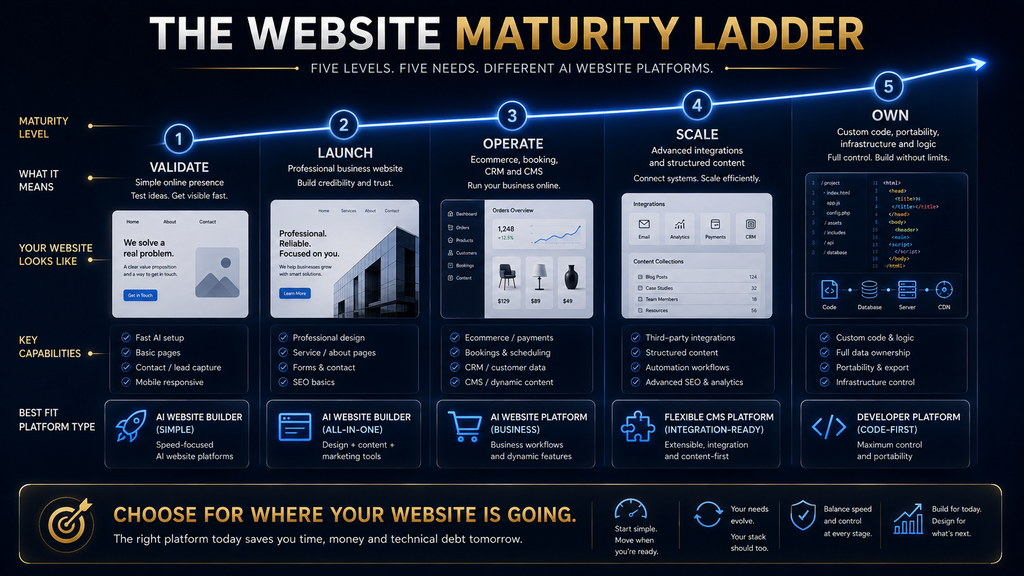
Which Builder Fits Your Website Maturity?
A simple maturity ladder helps match builders to needs. Level 1, online presence: you need a credible page with contact details and services. Durable, Hostinger or Wix’s free plan cover this quickly and cheaply, and AI can do most of the work. Most new businesses start here. Upgrade later when you need more.
Level 2, design and brand: your site must look distinctive and polished. Squarespace and Framer are strongest here. Level 3, business functionality: you need bookings, payments, a store or email marketing. Wix, Squarespace, Durable and B12 fit best, depending on your type of business. Most growing small businesses reach this level quickly.
Level 4, advanced CMS and professional workflows: you publish a lot of content, have several editors or need complex structures. Webflow, Framer and 10Web on WordPress are strongest. Level 5, the website becomes software: you need data, user accounts or logic. GoDaddy Airo and dedicated app builders become relevant.
Choose the builder for the level you expect to reach in the next year, not just the level you are at today. Moving between platforms is usually more work than people expect, so a little foresight saves a rebuild later. Think about the next year, not just the next week, and pick a platform that can handle the features you are likely to add.
AI Website Builder vs AI App Builder
An AI website builder creates pages that present information: services, products, portfolios, blogs and contact forms. An AI app builder creates software: databases, user accounts, dashboards and logic that respond to what users do. The line is blurring, but the distinction still matters when you choose a tool.
If your goal is to explain what you offer and get people to contact or buy from you, a website builder is the right tool, and it will be easier to maintain. If your goal is a directory, a booking marketplace or a customer portal with personal data, you need app features and stronger testing. Most small businesses need the first kind.
Using an app builder for a brochure site adds complexity you do not need. Using a website builder for an application leads to fragile workarounds. Our guides to AI agents and tools and AI workflow automation tools cover the app and automation side. Our explainer on AI chatbots versus AI agents adds useful background.
What AI Website Builders Do Well
AI builders are excellent at first-draft design: producing a reasonable layout, color scheme and page structure in minutes. They are good at content scaffolding, writing placeholder text for services, about pages and calls to action that you can then improve with real details. That gives you something concrete to react to.
They handle layout creation and basic branding quickly, suggesting fonts, colors and section arrangements that look professional. They speed up repetitive editing, such as rewriting text in a different tone or generating product descriptions, and they make iteration easy, letting you try several directions before settling on one.
These strengths remove most of the blank-page problem that used to stop people from building their own sites. A small business owner can now go from idea to a credible draft in an afternoon, which is a genuine change from even a few years ago. Speed is the biggest benefit for most owners. It lowers the barrier to getting online.
Where AI Website Builders Still Struggle
AI builders struggle with strategy: they do not know your best customers, your strongest offer or what makes you different. They struggle with differentiation, often producing sites that look like many others in the same industry, because they draw on common patterns. Your knowledge of your customers fills that gap.
They struggle with conversion, the craft of guiding visitors to take action through clear messaging, proof and calls to action. They struggle with accuracy, sometimes inventing details about your services, prices or history that you must correct before publishing. Every generated claim needs checking.
They also struggle with complex functionality, such as custom integrations, advanced ecommerce rules or multi-step workflows, and with migration, because moving an existing site into an AI builder rarely works cleanly. Our guide to common mistakes with AI website builders covers these pitfalls in detail.
The fix is to treat the AI’s output as a starting draft. Replace generic text with specific details about your business, add real photos and testimonials, check every factual claim and test the site on a phone before you publish. That human layer is what turns a generated site into an effective one. Budget a few hours for this step.
The First Draft Is Not the Product
The first AI-generated draft is the easiest part of building a website. It looks impressive because it is complete and tidy, but it usually lacks the things that make a site work: a sharp explanation of what you offer, real proof such as reviews and examples, and clear paths for visitors to contact you or buy.
Plan to spend more time refining than generating. Rewrite the headline so a visitor understands what you do in five seconds, replace stock images with real ones where you can, add specific details to every service and make sure each page has one clear next step. Those edits matter more than the template.
AI can help here too, if you give it real information. Feed it your actual services, prices, customer questions and testimonials, and ask it to improve clarity rather than invent content. Our beginner’s guide to writing AI prompts shows how to give AI the context that produces specific, useful copy. Real inputs lead to real, specific copy.
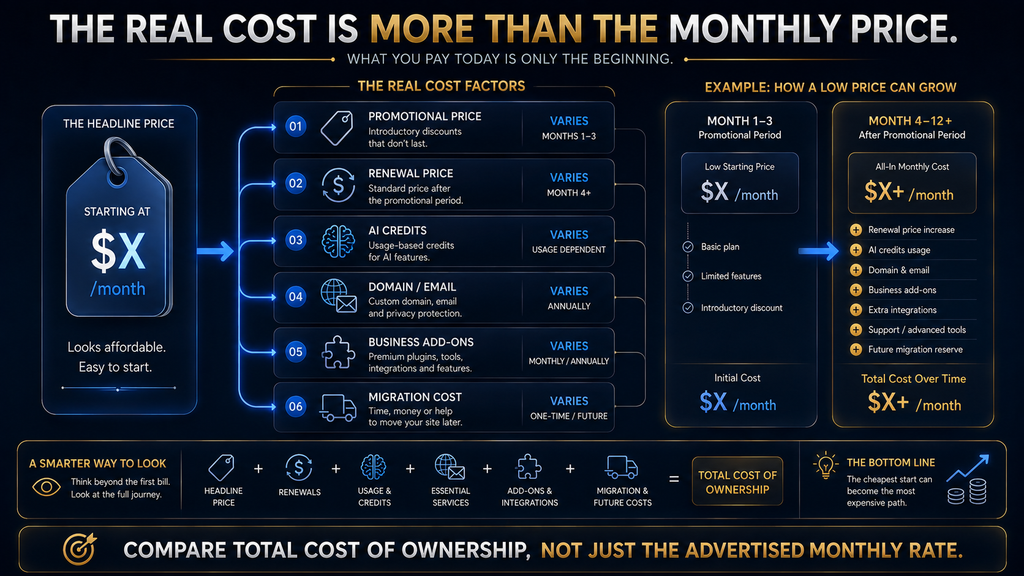
The Total Cost of an AI Website Builder
The monthly price on a pricing page is rarely the full cost. Promotional pricing often requires long upfront terms: Hostinger’s $2.99 a month depends on paying for 48 months upfront, and the plan renews at $10.99. Always compare the total for the term and the renewal price. Upfront terms lower the monthly figure but raise the commitment.
AI credits are another cost to watch. Framer, Durable, 10Web, B12 and GoDaddy all mention AI credits, and heavy use of AI editing or generation can hit limits that require an upgrade. Check how many credits your plan includes and what happens when you run out. Credit limits vary widely between plans.
Renewals often rise after the first term, and add-ons such as premium apps, extra storage, email accounts, transaction fees and extra editors can add up quickly. Migration has a cost too: if you outgrow a platform, rebuilding elsewhere takes time and sometimes professional help. Small add-ons can double the real monthly cost.
A simple way to compare is to estimate your three-year cost, including the first term, renewals, likely add-ons and fees. That figure often reorders the ranking compared with the headline monthly prices, and it prevents unpleasant surprises when the first renewal arrives. Use a simple spreadsheet to compare options side by side.
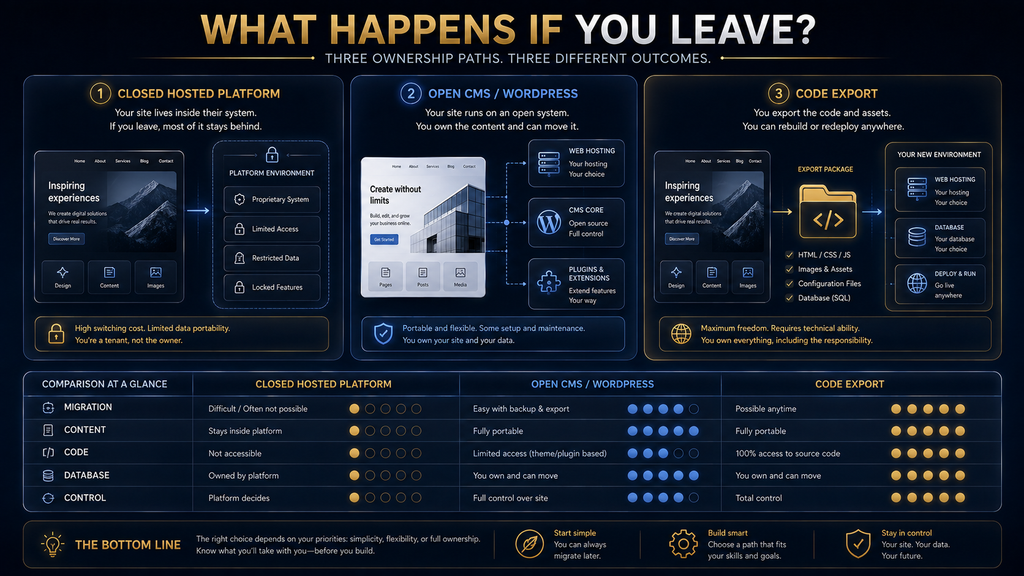
What Do You Own?
Ownership is easy to overlook when a site appears in minutes. On hosted builders such as Wix, Squarespace, Durable and B12, you own your content and domain, but the site’s design and structure live inside the platform. Leaving usually means rebuilding the site elsewhere, even if you can export some content.
Portability is higher with 10Web, because WordPress sites can move between hosts, and with Dorik, because it offers code export. Webflow and Framer allow some export, with limits on dynamic features. If long-term control matters to you, check export options before you invest time in building. Export rules can change, so recheck before you rely on them.
At a minimum, register your domain in your own name, keep copies of your text and images outside the builder and make sure you can export contact lists and customer data. Those steps protect you whichever platform you choose, and they make a future move much less painful. Your domain is your most valuable website asset.
AI Website Builder vs Hiring a Developer
AI builders are now good enough for most small business sites, personal sites and portfolios. They are cheaper, faster and easier to update yourself than a custom site. For a business that mainly needs to present services and capture enquiries, an AI builder is usually the sensible choice. They also let you update the site yourself without waiting for anyone.
A developer or agency still makes sense when you need custom functionality, complex integrations, strict performance or accessibility requirements, a large content migration or a truly distinctive design. Many businesses use both: an AI builder for the first version, then a professional for specific improvements.
If you hire help, choose someone who works with your chosen platform rather than someone who will rebuild everything from scratch. Ask about ongoing costs, who will own the site and how you will make updates yourself. Our list of AI tools for small business owners covers other tools that support a small team.
Do Not Confuse Website Generation With SEO
AI builders often generate page titles, meta descriptions and basic structure automatically, and some promise “SEO on autopilot.” That is helpful, but it is not the same as ranking. Search visibility depends on useful content, clear structure, site speed, mobile quality, local signals and links from other sites.
Use the builder’s SEO settings as a foundation, then do the work that matters: write pages around what customers search for, answer their questions clearly, add your business to local directories and earn mentions from relevant sites. Our guides to AI SEO and AI SEO vs traditional SEO explain the details.
AI search adds another layer. Assistants such as ChatGPT, Gemini and Perplexity increasingly answer questions directly, citing websites they trust. Clear, specific, well-structured pages help with both. Our guides to optimizing for Google AI Overviews and GEO, AEO and SEO cover this shift. Our roundup of AEO and GEO tools covers tools for tracking AI visibility.
Common Mistakes When Choosing an AI Website Builder
Choosing Based on the First Draft
The first generated design says little about how easy the platform is to edit, grow or leave. Test the editor, add a page, change a layout and check the business tools before deciding. Spend an hour with two builders rather than five minutes with ten. If social media drives your traffic, our list of AI tools for social media content pairs well with any builder. The editor matters more than the template.
Choosing the Cheapest Promotional Price
A low monthly price tied to a long upfront term and a higher renewal can cost more over time than a plan that looks pricier. Compare the total cost over three years, including renewals and add-ons, before you buy. Renewal prices are often two or three times the promotional rate, so read the small print before you enter card details.
Ignoring AI Credit Limits
AI editing and generation often use credits. If you plan to rely on AI heavily, check how many credits each plan includes and what extra credits cost. Running out halfway through a redesign is frustrating and can force an unplanned upgrade. Check credit rules before you start a big project. Ask support if limits are unclear.
Picking a Platform Before Defining the Site
Write down what your site must do, such as bookings, payments, a blog or a store, before you compare builders. That list rules out unsuitable platforms quickly and stops you from choosing based on templates alone. A short list prevents expensive mistakes and makes comparing builders much faster.
Ignoring Portability
If you might change platforms later, check export options now. Register your domain in your own name and keep copies of content outside the builder. These small steps protect you from being locked in. They take minutes and can save weeks of rebuilding if you ever need to switch platforms. Do them on day one.
Trusting AI-Written Content Without Checking
AI can invent services, prices, qualifications or history. Read every sentence before publishing and replace generic claims with specific, accurate details. Wrong information on your own website damages trust faster than a plain design ever could. Accuracy is part of your brand. Readers notice errors quickly.
How to Choose in 10 Minutes
Answer five questions. What am I building? A simple presence, a brand site, a business site with tools, a content-heavy site or something closer to an app? How much design control do I need? If design matters a lot, look at Squarespace, Framer or Webflow; if not, Wix, Durable or Hostinger will do. Be honest about how much design work you will do.
What business systems do I need? Bookings, payments, a store, email marketing or client intake each point to different builders, such as Wix, Squarespace, Durable or B12. Do I care about ownership? If yes, favor 10Web or Dorik, and always keep your domain in your own name. Ownership matters most for long-term projects.
What will this site look like in six months? Choose for the site you expect to run, not just the one you need today. Then pick two builders that fit your answers, try both on their free plans or trials and choose the one you find easier to edit. Trying both takes less than an hour and reveals a lot. Pay attention to how easily you can change things.
That short process avoids most bad choices. It puts your needs first and the AI demo second, which is the right order when you will live with the platform for years. Our guide to AI tools for creating and selling digital products can help if your site will sell downloads. For research on what customers search for, see our list of AI keyword research tools.
Best AI Website Builder by Use Case
| Use case | Best choice | Strong alternative |
|---|---|---|
| Best overall | Wix | Squarespace |
| Brand-led websites | Squarespace | Framer |
| Design-first marketing sites | Framer | Webflow |
| Lowest upfront cost | Hostinger | Wix free plan |
| Agencies and advanced CMS | Webflow | Framer |
| WordPress | 10Web | Hostinger |
| Local and service businesses | Durable | Wix |
| Sites that may become apps | GoDaddy Airo | Wix |
| Value and code export | Dorik | 10Web |
| Service-business operations | B12 | Durable |
If two options seem equally good, choose the one with the better editor for you. You will spend far more time editing your site than generating it, so the editing experience usually matters more than the quality of the first draft. Comfort with the editor keeps your site up to date, and an up-to-date site serves customers far better than a perfect launch.
How We Researched This Guide
This guide is based on vendor documentation and pricing pages, not hands-on build testing. In October 2026 we reviewed pricing and product pages for Wix, Squarespace, Framer, Hostinger, Webflow, 10Web, Durable, GoDaddy, Dorik and B12, including Wix’s article on Harmony pricing and Squarespace’s Blueprint AI page.
Prices, promotions and credit allowances are as shown at the time of checking and change often; GoDaddy’s prices vary by region. The Launch, Control, Operate, Own, Grow test, the maturity ladder and the W.O.R.T.H. scores are AI Hustle World’s editorial frameworks. The Hostinger link is a referral link, disclosed above.
Final Thoughts
AI website builders have made it possible to launch a credible site in an afternoon. The real decision is which platform you will still be happy running in six months: one that gives you the right mix of AI speed, editing control, business tools, ownership and room to grow. Thinking ahead saves a rebuild.
For most people, Wix is the safest all-round choice. Squarespace and Framer win on design, Webflow on professional CMS work, Hostinger on upfront cost, 10Web on WordPress, Durable and B12 on service-business tools, GoDaddy Airo on app-like features and Dorik on value and code export. Each one is a strong choice for the right user.
Whichever you choose, treat the AI draft as a starting point. Add specific, accurate content, real proof and clear next steps, check every claim and keep your domain and content under your control. To understand the technology behind these tools before you decide, see our guide to how AI website builders work.
Choose the AI Tool That Solves the Right Problem
Understanding how these builders work makes it easier to choose one and spot their limits.
Learn How AI Website Builders Work →Frequently Asked Questions
What is the best AI website builder in 2026?
Wix is the best all-round choice for most people. Squarespace and Framer are better for design-led sites, Webflow for professional CMS work and Durable for quick service-business sites.
Which AI website builder is best for beginners?
Wix and Squarespace are the easiest strong options, and Durable is the fastest for simple service-business sites. All three offer free plans or trials.
Which AI website builder is cheapest?
Hostinger has the lowest headline price, $2.99 a month in October 2026, but it requires a 48-month upfront term and renews at $10.99 a month. Compare total cost over the term.
Can I move my website if I leave the platform?
Usually only partly. WordPress sites built with 10Web are the most portable, and Dorik offers code export. Most hosted builders require rebuilding if you leave.
Do AI website builders limit AI use?
Many do, through monthly AI credits. Framer, Durable, 10Web, B12 and GoDaddy all mention credits. Check your plan’s allowance if you plan to use AI editing heavily.
Is the first AI-generated draft good enough to publish?
Rarely. Replace generic text with specific details, add real photos and reviews, check every claim and test on a phone before publishing.
Will an AI website builder handle my SEO?
It sets up basic titles and structure, but rankings depend on useful content, speed, local signals and links. Treat built-in SEO as a starting point, not a strategy.
What is the difference between a website builder and an app builder?
A website builder creates pages that present information. An app builder creates software with data, accounts and logic. GoDaddy Airo can do both.
Which builder is best for a local service business?
Durable is the quickest option with booking and simple business tools. B12 suits professional firms that need client intake and payments, and Wix offers more design flexibility.
Should I hire a developer instead?
For most small sites, an AI builder is enough. Hire a developer for custom features, complex integrations, large migrations or highly distinctive designs.
Related Guides
- Best AI Writing Tools in 2026: Free & Paid Picks
- Best AI Resume Builders (Free & Paid)
- Best AI Workflow Automation Tools (Free & Paid)
Written by
Muntasir Ahmad Chowdhury
Founder, AI Hustle World
Muntasir Ahmad Chowdhury is the Founder of AI Hustle World, an independent publication dedicated to making Artificial Intelligence practical, trustworthy, and easy to understand. He researches AI tools, automation, customer service, productivity, and real-world business applications, helping readers make smarter technology decisions through research-driven, experience-backed content.
Expertise:
AI Tools • AI Automation • AI Customer Service • AI Productivity • Generative AI • AI Workflows
Get Smarter With AI
Enjoyed this guide? Get practical AI tools, tutorials, and honest reviews delivered to your inbox.