Evidence: Documentation reviewed
Last checked: September 2026
What was done: Written from official documentation and the published sources linked in this article. Not hands-on tested.
Files: None
Affiliate links: Yes
Last updated: September 2026 — refreshed with current free-tier limits and two tool notes that better reflect what people are actually using this quarter.
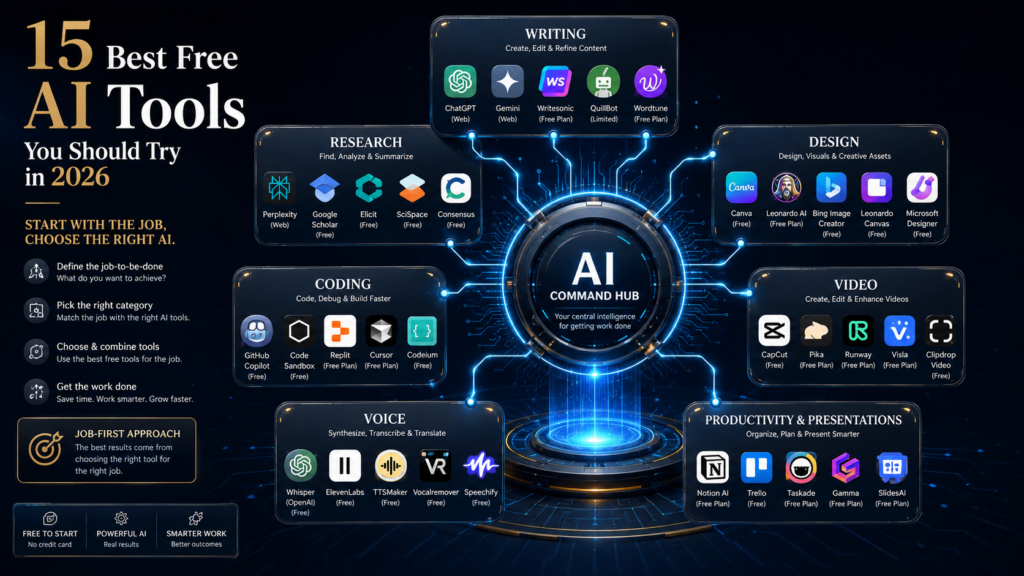
The best free AI tools in 2026 are not the ones with the flashiest demo — they are the ones that solve one specific bottleneck in your day well enough that you keep opening them. ChatGPT and Gemini cover general reasoning and research, Claude handles longer documents and careful writing, Canva AI and Leonardo AI cover visuals, and ElevenLabs and CapCut cover audio and video. None of them is the single “best” tool, because the job you’re trying to do decides that, not the tool’s marketing page.
This guide breaks down 15 free AI tools worth trying in 2026, organized by the actual job each one is good at: writing and research, coding, design, video, voice, translation, and productivity. Every tool listed has a genuinely usable free tier, not a seven-day trial disguised as “free,” and each section tells you plainly where the free plan is strong and where it will frustrate you enough to justify paying.
It helps to see what’s actually driving this: OpenAI, Google, Anthropic, and every other company on this list are absorbing real compute cost on every free response, and they cover it by betting that a meaningful share of free users eventually convert to paid plans, and that habitual free usage builds the brand loyalty that matters at the next platform shift. That’s why free tiers keep getting more generous even as the underlying models get more expensive to run — it’s a customer-acquisition strategy, not charity, which is also why limits can change without warning and why the most generous free tier today won’t necessarily be the most generous one a year from now.
AI Hustle World takeaway: Start with the job, not the tool. Pick the one free AI tool that removes your biggest current bottleneck, use it well for a few weeks, and only then decide whether a second tool or a paid upgrade actually earns its place in your workflow.
Hear What a Free AI Voice Sounds Like
Try ElevenLabs on a short script you actually need, then judge whether the free allowance covers your monthly voiceover volume.
Try ElevenLabs Free →Affiliate disclosure: We may earn a commission if you subscribe through this link, at no additional cost to you.
Quick Answer: The Best Free AI Tools by Job
If you only read one section, read this one. The table below maps each job to the single free tool most people should start with, based on what its free tier actually allows rather than what its pricing page promises.
| Job | Best Free Tool | Why It Wins |
|---|---|---|
| General writing & research | ChatGPT | Broadest free reasoning and writing ability, plus web browsing |
| Multimodal research (text + images) | Google Gemini | Strong at combining text, images, and Google integration |
| Long documents & careful editing | Claude | Larger free context window and steadier tone across long work |
| Everyday Microsoft/Office users | Microsoft Copilot | Already built into Edge and Windows at no extra cost |
| Fact-checking & current events | Perplexity | Cites sources by default, useful for quick research |
| Social graphics & simple design | Canva AI | Templates plus AI features in one free workspace |
| Writing tone & grammar | Grammarly | Real-time grammar and tone checking across most apps |
| Notes & light project docs | Notion AI | AI features layered onto a free note-taking workspace |
| Coding help & autocomplete | GitHub Copilot | Free tier now covers real day-to-day coding assistance |
| AI images from prompts | Leonardo AI | Generous free daily credits for image generation |
| Photo editing with AI | Adobe Firefly | Free generative credits inside familiar Adobe tools |
| Voiceovers & narration | ElevenLabs | Realistic free-tier voice generation and cloning preview |
| Short-form video editing | CapCut | Full editor free, AI captions and effects included |
| Translating documents | DeepL | More natural translations than most free tools at no cost |
| Slide decks from text | Gamma | Turns an outline into a full deck without design work |
What “Free AI Tool” Actually Means in 2026
“Free” now means four different business models, and confusing them is why people feel burned by AI tools that seemed free until they weren’t. Most of the tools in this guide use a freemium model: a genuinely usable free tier funded by upselling a paid plan, not by selling your data. A smaller group uses a credit-based free tier, where you get a fixed number of AI actions per day or month and then wait or pay. A few, like GitHub Copilot’s free tier, exist mainly to build habit and market share among developers who will eventually need the paid version for serious work.
This differs meaningfully from the traditional software free-trial model, where a company gives away a time-limited copy of something already built that costs almost nothing to keep running once it exists. Every AI response consumes real computing power, which is why AI free tiers cap usage instead of capping time, and why the specific caps shift constantly as compute costs and competitive pressure change — a structural difference worth understanding before assuming a free AI tool behaves like the free software you’re used to.
The fourth model is the one worth watching closely: tools that stay free by training on your inputs or reselling aggregated usage data. Read the privacy policy before uploading anything sensitive — a contract, client data, or unpublished work — into a free AI tool, regardless of how polished its interface looks. The tools recommended in this guide are chosen because their free tiers are transparent about these trade-offs, not because they’re flawless.
One more distinction matters for 2026 specifically: several tools on this list (ChatGPT, Gemini, Claude, Perplexity) now give free users limited access to their most advanced models rather than locking you into an older, weaker version indefinitely. That’s a meaningful shift from a couple of years ago, when “free” often meant a noticeably dumber model. It’s also why testing a tool’s current free tier yourself matters more than trusting last year’s reviews, including older versions of this one.
1. ChatGPT
Best for: general writing, research, and everyday problem-solving. ChatGPT, from OpenAI, is the most versatile free AI tool for research, writing, brainstorming, and general problem-solving, and it remains the default starting point for most people’s first AI tool. The free tier includes limited access to OpenAI’s current flagship model alongside its lighter, unlimited model, plus web browsing and basic file uploads.
The free-tier reality is usage caps rather than feature caps: you get a capped number of flagship-model responses before the app quietly downgrades you to the lighter model for the rest of the day. For most casual and even moderate professional use, that’s enough; heavy daily users hit the ceiling by mid-afternoon.
Use ChatGPT when you want one general-purpose tool for writing, research, and quick problem-solving without switching apps. Look elsewhere when you need guaranteed access to the most capable model all day, or when you’re working with very long documents that need Claude’s larger context window instead. If ChatGPT’s limits become a problem, our 7 Best ChatGPT Alternatives guide compares the tools people switch to first.
In practice, this matters most for focused afternoon or evening work, once a morning’s worth of quota is already spent; a freelance writer using ChatGPT for research and first drafts will typically notice the drop in depth partway through a workday. Upgrading to a paid plan mainly pays for itself once that downgrade happens most days rather than occasionally — for lighter use, the free tier’s daily reset is enough.
2. Google Gemini
Best for: Google-ecosystem users and multimodal research. Google Gemini is the strongest free choice when your work already lives inside Google’s ecosystem — Docs, Sheets, Gmail, and Search — because it plugs directly into those tools rather than living in a separate tab.
The free tier gives you a limited number of daily uses of Google’s most capable Gemini model, with unlimited fallback access to a lighter version. Its multimodal ability — understanding images, PDFs, and text together in one prompt — tends to be more generous on the free tier than competitors offer.
Use Gemini when your workflow already runs through Gmail, Docs, or Android and you want AI assistance without leaving those apps. Look elsewhere when you need a tool that isn’t tied to a Google account, or when you want writing output that feels less Google-flavored.
A practical example: someone drafting a report in Google Docs can ask Gemini to summarize a linked spreadsheet and rewrite a paragraph in the same request, something that takes app-switching with a non-integrated tool. Because Gemini’s paid tier is bundled into a broader Google subscription rather than sold standalone, the upgrade decision is really a question about that whole bundle, not just about AI access.
3. Claude
Best for: long documents and careful, longer-form writing. Claude, from Anthropic, handles bigger documents, keeps instructions straighter across a long conversation, and tends to write with a more measured, less “AI-generic” tone than most competitors.
Free-tier limits are message-count based and reset every few hours rather than daily, which in practice makes Claude feel more usable in short, focused sessions than in one long marathon conversation. Its context window on the free plan is still larger than most competitors offer for free.
Use Claude when you’re editing long documents, need consistent tone across a big writing project, or want a second opinion that reads less like a template. Look elsewhere when you need image generation or real-time web browsing built in, since Claude’s free tier is comparatively limited there.
A concrete case: editing a forty-page client proposal for tone consistency is where Claude’s larger context and steadier instruction-following show up most, since a shorter-context tool tends to forget earlier formatting rules by the later sections. The free tier’s few-hour reset window means Claude fits a focused single-document session better than an all-day back-and-forth conversation.
4. Microsoft Copilot
Best for: people already living inside Windows and Edge. Microsoft Copilot is the easiest free AI tool to actually start using, because it’s already built into Edge, Windows, and Bing rather than requiring a new account and a new habit.
The free web and Windows versions give you real access to a capable underlying model for chat, writing help, and image generation, with usage limits that are generous for casual use but noticeably tighter than a paid Microsoft 365 Copilot seat, which adds deep integration into Word, Excel, and Outlook.
Use Copilot when you’re already inside the Microsoft ecosystem and want AI help without installing anything new. Look elsewhere when you need Copilot’s deeper Office integrations, which sit behind a paid business plan rather than the free consumer version.
For someone drafting an email in Outlook or cleaning up a budget in Excel, Copilot’s advantage is zero setup cost — it’s already signed in with the Microsoft account you’re using anyway. The economics only get interesting at the business tier, which is priced per seat and aimed at organizations, so an individual free user rarely has a reason to pay unless an employer is already covering it.
5. Perplexity
Best for: fact-checking and current-events research. Perplexity is built for one job: answering questions with cited, current sources instead of a single unattributed paragraph, which makes it a better free choice than a general chatbot when accuracy and traceability matter.
The free tier includes unlimited basic searches plus a small daily allowance of deeper “Pro” searches that pull from more sources and reason more carefully. For quick fact-checking and current-events questions, the free tier alone is usually enough.
Use Perplexity when you need an answer you can verify, not just a plausible-sounding one — research, current events, or claims you plan to repeat elsewhere. Look elsewhere when you need long-form writing or brainstorming help, where a general chatbot still outperforms it.
A student fact-checking a claim for a paper, or a marketer verifying a competitor’s pricing before publishing a comparison, shows the clearest use case: Perplexity’s cited answer can be checked against its sources in seconds, something a plain chatbot answer doesn’t offer. The free-tier cap on deeper searches rarely bites unless you’re running dozens of verification checks in a single day.
6. Canva AI
Best for: social graphics and simple marketing visuals. Canva AI bundles several AI features — Magic Write for copy, Magic Design for layout suggestions, and background removal — directly into Canva’s free design workspace, which is why it’s the default starting point for quick visuals.
Free-tier AI features are credit-limited and refresh monthly, so heavy users of Magic Design or AI image generation inside Canva will hit a wall faster than casual users creating the occasional graphic.
Use Canva AI when you need a finished graphic fast and don’t need pixel-level design control. Look elsewhere when you need original AI-generated art rather than templated design, where a dedicated tool like Leonardo AI gives you more control.
The clearest example is a small business owner turning a rough product photo and a headline into a finished social post in a few minutes without hiring a designer. Because Canva’s paid tier bundles AI credits together with premium templates and stock assets, the upgrade decision is rarely about AI alone — it’s about whether the whole paid workspace earns its cost, not just Magic Design.
7. Grammarly
Best for: background grammar and tone checking. Grammarly is the free tool worth running in the background rather than opening deliberately: its browser extension checks grammar, clarity, and tone across Gmail, Google Docs, LinkedIn, and most other places you type.
The free tier covers core grammar, spelling, and basic clarity suggestions everywhere it’s installed; tone detection and more advanced rewrite suggestions are capped, with full generative rewriting reserved for paid plans.
Use Grammarly when you want consistent proofreading everywhere you write online without copy-pasting into a separate app. Look elsewhere when you need substantial rewriting or drafting help, which is a different job than the proofreading Grammarly’s free tier is built for.
Picture drafting a client email in Gmail: Grammarly catches a tone that reads as curt before you hit send, a different and arguably more valuable job than generating the email in the first place. Its real limitation shows up on long-form work, where the paid tier’s deeper clarity and fluency suggestions start meaningfully reshaping sentence structure rather than just flagging errors.
8. Notion AI
Best for: summarizing and drafting inside an existing Notion workspace. Notion AI layers writing and summarizing tools directly into Notion’s free note-taking and project-management workspace, which matters if you already keep your notes, tasks, and docs there.
The free Notion plan includes a small number of AI credits to try before you need to upgrade; beyond that trial allotment, most AI features require a paid add-on rather than staying free indefinitely, a meaningfully different model than ChatGPT or Gemini’s ongoing free tiers.
Use Notion AI when you already live inside Notion and want quick summaries or first drafts without leaving your workspace. Look elsewhere when you need an AI tool you can use daily for free long-term, since Notion AI’s free allowance is closer to a trial.
If you already track projects in Notion, asking it to condense a long meeting-notes page into action items shows the value immediately. Because the free AI allotment is a one-time amount rather than a recurring monthly refresh, most regular users exhaust it within the first few weeks and face an early, real decision about the paid add-on instead of easing into the limit gradually.
9. GitHub Copilot
Best for: learning to code and small projects. GitHub Copilot’s free tier turned it from a paid-only tool into a genuinely usable option for students, hobbyists, and developers testing whether AI-assisted coding fits their workflow, with real code completions and a capped number of chat requests each month.
The free plan is enough for learning, side projects, and occasional debugging help; developers working in a large codebase daily tend to exhaust the monthly chat allowance well before the month ends and move to a paid seat.
Use GitHub Copilot when you’re learning to code, maintaining a small project, or want to try AI pair-programming before committing to a paid plan. Look elsewhere when you code professionally at volume, where the free tier’s monthly caps become a daily interruption. For a broader comparison, see our Best AI Coding Assistants roundup.
A student working through a data-structures course, or a solo developer building a side project on weekends, sits squarely inside what the free tier is built for: real completions, occasional chat help, no cost. The economics shift once code review and chat become part of a daily workflow rather than an occasional aid, since that’s exactly the usage pattern the monthly cap is designed to catch.
10. Leonardo AI
Best for: generating AI images regularly without paying. Leonardo AI gives free users a genuinely generous daily allotment of image-generation credits, which makes it one of the strongest free entry points into AI image generation rather than a stripped-down teaser.
Free-tier images come with reasonable resolution and multiple model styles to choose from, though the fastest generation speeds and highest-resolution exports are reserved for paid tiers, and unused daily credits typically don’t roll over.
Use Leonardo AI when you want to experiment with AI image generation regularly without paying, especially for concept art, mockups, or social content. Look elsewhere when you need commercial-safe, brand-consistent imagery at scale, where Adobe Firefly’s licensing model may fit better. Our Best AI Image Generators guide compares it against the field.
A small business owner needing several product mockups a day for social posts can realistically stay on the free tier indefinitely, since the daily credit refresh is generous enough for that volume. The upgrade case strengthens once higher resolution for print or faster generation for client deadlines matters, where waiting in a free-tier queue starts costing more in time than a subscription would in money.
11. Adobe Firefly
Best for: commercially safe edits inside Adobe apps. Adobe Firefly’s advantage isn’t raw image quality — it’s that its outputs are trained to be commercially safe and it’s built directly into Photoshop, Illustrator, and Express, tools many people already use.
The free tier includes a set number of generative credits per month for features like Generative Fill and text-to-image, which is enough for occasional edits but tight for anyone doing regular content production.
Use Adobe Firefly when commercial safety and Adobe integration matter more than having the single best-looking output. Look elsewhere when credit limits get in the way of daily use, or when you don’t already work inside Adobe’s apps.
A photographer removing a background element from a client photo without leaving Photoshop is the kind of task Firefly’s integration is built for. Because the free credits reset monthly and Adobe’s other apps aren’t included, the real comparison isn’t Firefly against other free image tools — it’s whether you’re already paying for Creative Cloud, which changes the economics substantially.
12. ElevenLabs
Best for: realistic AI voiceovers and narration. ElevenLabs remains the free tool of choice for realistic AI voiceovers, with a free tier that includes a monthly character allowance for text-to-speech and a limited preview of its voice-cloning capability.
Free-tier audio quality is close to the paid tiers; the real constraint is volume — a monthly character cap that suits occasional videos or short narrations but runs out quickly for anyone producing regular long-form audio or a podcast.
Use ElevenLabs when you need a handful of natural-sounding voiceovers a month for videos, presentations, or prototypes. Look elsewhere when you’re producing audio at volume, where the free character cap turns into a recurring bottleneck. See our Best AI Voice Generators guide for the full comparison.
A creator recording a five-minute weekly video voiceover fits comfortably inside the free character allowance; a podcaster producing an hour of narration weekly does not, and will hit the cap within the first two or three episodes. That gap between casual and regular production is exactly where the free-to-paid decision becomes obvious rather than optional.
Turn One Script Into a Natural Voiceover
Generate a voiceover for a real video or presentation with ElevenLabs and compare it with your current recording for clarity and pacing.
Create a Voiceover With ElevenLabs →Affiliate disclosure: We may earn a commission if you subscribe through this link, at no additional cost to you.
13. CapCut
Best for: short-form video editing. CapCut gives away nearly its entire video editor for free, including AI captions, background removal, and basic effects, which is why it’s become the default editor for short-form content creators on a budget.
Most core editing and AI features export without a watermark on the free plan; the paid tier mainly adds premium templates, extra cloud storage, and a handful of advanced AI effects rather than gatekeeping the editor itself.
Use CapCut when you’re editing short-form video for TikTok, Reels, or YouTube Shorts and want AI editing help without a subscription. Look elsewhere when you need professional color grading or multi-track audio mixing beyond what a mobile-first editor is built for.
A creator posting three to five short videos a week can run an entire workflow — cutting, captions, effects, export — without ever hitting a paywall, which is unusual for a tool this capable. The paid tier mainly matters once brand consistency across a growing channel calls for premium templates and more cloud storage than the free plan includes.
14. DeepL
Best for: natural-sounding translation. DeepL consistently produces more natural translations than most free alternatives, particularly for European languages, because its models are trained specifically for translation rather than adapted from a general chatbot.
The free tier covers unlimited translation for short text and a capped monthly allowance for full document translation (Word, PowerPoint, PDF), which is generous enough for students and casual international communication.
Use DeepL when translation quality and natural phrasing matter more than raw document volume. Look elsewhere when you need to translate large volumes of documents monthly, where the free cap will force an upgrade quickly. Our Best AI Translation Tools guide covers the paid alternatives worth comparing.
A student translating a research paper’s abstract, or a small business responding to an international customer email, sits well within the free tier’s short-text allowance. The monthly document-translation cap is the real constraint: a handful of contracts or reports a month is fine for free, translating dozens starts costing real time waiting on the monthly reset.
15. Gamma
Best for: turning notes into a designed deck fast. Gamma turns a rough outline or existing document into a designed slide deck, one-pager, or webpage in minutes, which makes it the fastest free way to go from notes to something presentable.
The free tier includes a starting allotment of AI credits for generating and editing decks, enough to build a handful of complete presentations before you need to top up or upgrade; manual edits after generation don’t cost credits.
Use Gamma when you need a presentable deck fast and don’t want to fight with slide software. Look elsewhere when you need pixel-precise brand control over every slide, which dedicated design tools still handle better.
Someone turning a set of meeting notes into an investor update the night before a presentation is Gamma’s ideal use case, where speed matters more than design perfection. Because manual edits after generation don’t cost additional credits, the free tier stretches further than the credit count alone suggests, provided you’re refining a generated draft rather than regenerating it repeatedly.
Which Free AI Tool Should You Choose?
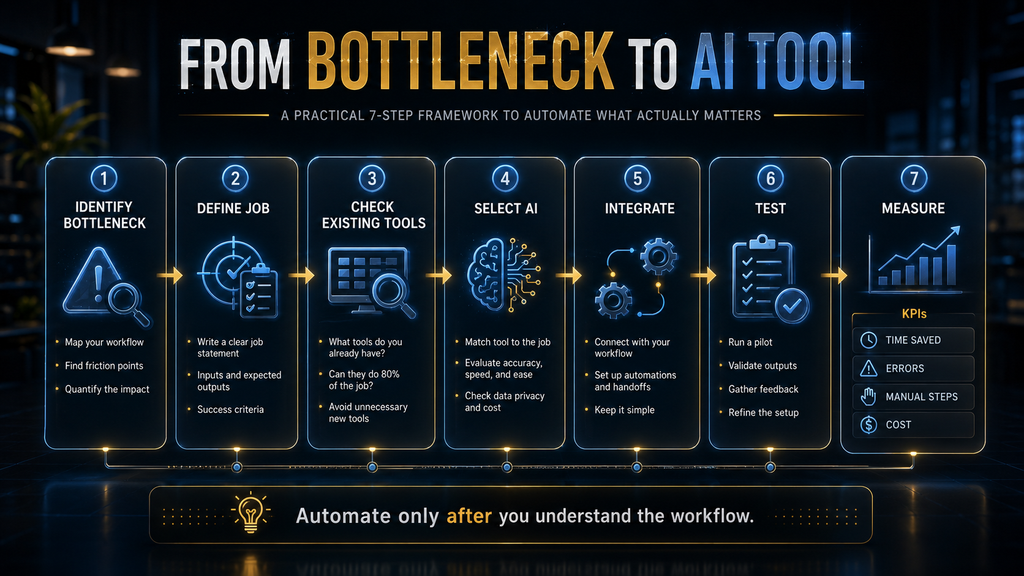
The right free AI tool is decided by your bottleneck, not by which tool has the best reputation this month. Ask what’s actually slowing you down this week — writing, research, images, video, voice, code, or documents — and start with the tool built for that specific job rather than the most talked-about tool overall.
| Bottleneck | Start Here | Backup Option |
|---|---|---|
| Blank-page writing paralysis | ChatGPT | Claude |
| Need to verify a claim quickly | Perplexity | Google Gemini |
| Editing a long, important document | Claude | Microsoft Copilot |
| Making a social graphic today | Canva AI | Adobe Firefly |
| Need original AI artwork | Leonardo AI | Adobe Firefly |
| Recording a voiceover | ElevenLabs | CapCut’s built-in voice tools |
| Editing short-form video | CapCut | Canva AI |
| Translating a document | DeepL | Google Gemini |
| Debugging or learning to code | GitHub Copilot | ChatGPT |
| Building a presentation fast | Gamma | Canva AI |
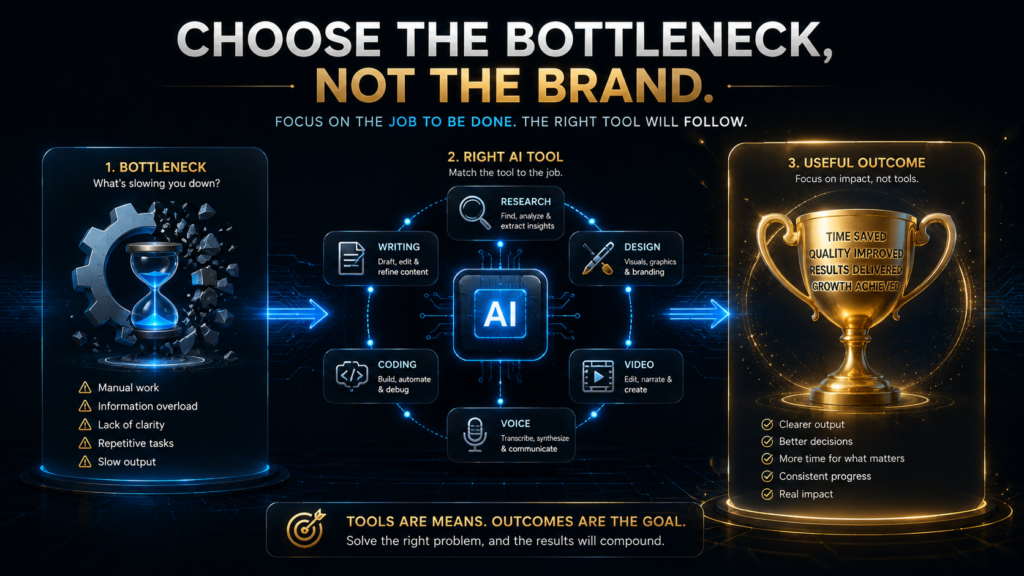
Notice how often the backup option is a tool you already have open for something else. That overlap is intentional — the fastest way to build an AI workflow isn’t to collect fifteen apps, it’s to notice which two or three tools already cover most of your bottlenecks and get good at using those well before adding a new one.
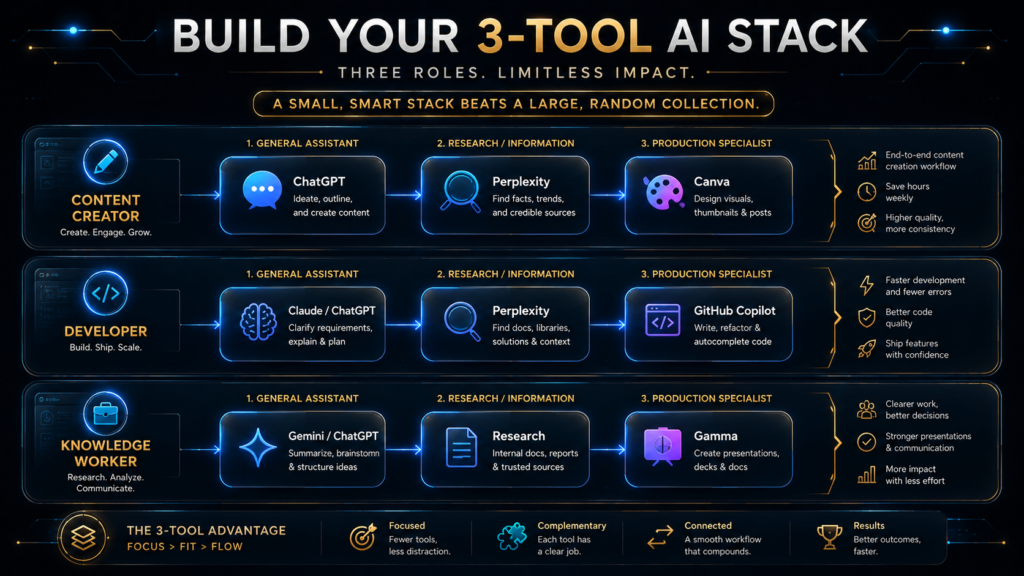
The 3-Tool AI Stack
Most people don’t need fifteen AI tools open at once; they need three that cover writing, visuals, and one specialized job, used consistently enough to become a habit rather than a novelty. A workable starting stack looks like this: one general reasoning tool (ChatGPT, Gemini, or Claude) for writing and research, one visual tool (Canva AI or Leonardo AI) for images and graphics, and one specialized tool matched to your actual work — GitHub Copilot for developers, ElevenLabs for anyone producing audio or video, DeepL for anyone working across languages.
The point of narrowing to three isn’t saving money; the free tiers of all three together still cost nothing. It’s saving attention. Every additional tool you add is a new interface to remember, a new set of limits to track, and a new place your work can end up scattered across, so add a fourth tool only once you can name the specific bottleneck it solves that your current three don’t.
When Should You Upgrade From a Free AI Tool?
Upgrade when a free tier’s limit costs you more time or money than the subscription would, not simply because a paid plan exists or a tool nudges you toward it. Three signals are worth watching: you’re hitting usage caps before your work is actually done on most days, you’re paying in workaround time — switching between two free tools to avoid one tool’s cap — more than a subscription would cost, or the free tier’s limitations are directly costing you clients, deadlines, or quality that someone else would notice.
If none of those three are true yet, keep using the free tier. A surprising number of paid AI subscriptions get purchased out of habit or fear of missing out rather than an actual bottleneck, and canceling one you’re not using consistently is a better use of that budget than adding a second.
Where Free AI Tools Are Heading Next
Free tiers are likely to keep shifting rather than settle into a fixed shape, because the economics behind them are still being worked out in real time. As inference gets cheaper, expect today’s caps to loosen for lighter tasks; as competition concentrates around a handful of frontier labs, expect the most capable models to stay gated behind usage limits or paid plans even as older models become effectively free and unlimited by comparison.
A second shift worth watching is on-device AI — smaller models running directly on a phone or laptop instead of a company’s servers — which removes the usage-cap problem entirely for simpler tasks like grammar checking or basic photo editing, since there’s no per-request cloud cost to ration. Expect more of the tools in this guide to quietly add on-device options for their lightest features over the next year or two.
The broader second-order effect worth naming honestly: as free AI tools make first-draft writing, design, and code trivially easy, the real advantage shifts toward judgment — knowing which draft is actually good, which claim needs checking, which output is ready to ship — rather than toward the drafting itself. Treat every tool in this guide as a way to reach a first draft faster, not as a substitute for the judgment that decides whether that draft is right.
Common Mistakes People Make With Free AI Tools
Treating every tool as a chatbot. Perplexity, DeepL, and CapCut are built for a specific job, not general conversation, and using them like a generic chatbot wastes their actual strength — cited answers, translation accuracy, and video editing speed, respectively.
Uploading sensitive information into free tiers without checking the policy. Client contracts, unpublished manuscripts, and proprietary business data don’t belong in a free AI tool until you’ve confirmed how it handles training data and retention, since free tiers are more likely to use inputs for model improvement than paid business plans.
Chasing the newest tool instead of finishing the current workflow. A new AI tool launches every week; switching to each one resets the small efficiency gains you’d built with the last tool. Give a tool a genuine two-to-three-week trial inside your actual workflow before deciding it’s not working.
Trusting AI output without verification. Free or paid, every AI tool on this list can produce a confident, well-formatted, and wrong answer, especially on names, dates, statistics, and citations. Our Practical Framework for Checking Whether AI Information Is Accurate walks through a fast verification habit worth building before you publish or send anything AI helped draft.
Ignoring the difference between unlimited-lite and capped-flagship access. Several tools on this list quietly downgrade you to a weaker model once you hit a daily cap, and the output quality difference is real. If a response feels noticeably worse than usual, check whether you’ve hit that day’s limit before blaming the tool itself.
Never customizing instructions or context. Most free AI tools let you save preferences, custom instructions, or reusable prompts, and skipping that step means re-explaining your tone, audience, or formatting preferences every single session instead of once.
A Practical Free-AI Workflow
Step 1: Identify the bottleneck. Before opening any tool, name the one task that’s actually slow this week — not “I should use more AI,” but the specific task, like first drafts taking too long or re-explaining the same instructions every session.
Step 2: Match the tool to the job using the decision table above, and commit to using only that tool for that job for at least two weeks rather than testing three tools in parallel, which makes it hard to judge any of them fairly.
Step 3: Save your context once. Whether it’s a custom instructions field, a saved prompt, or a project folder inside the tool, spend ten minutes setting up your preferences so the tool doesn’t start from zero every session.
Step 4: Track where you hit limits for one week. If you never hit a cap, the free tier is enough and there’s nothing to upgrade. If you hit it daily on tasks that matter, that’s your real signal to consider a paid plan — not marketing copy telling you to.
Step 5: Measure the actual time saved, not just usage. At the end of two weeks, estimate how many minutes or hours per week the tool saved compared with doing the task manually. If you can’t name a rough number, the tool hasn’t earned a permanent place in your workflow yet, regardless of how impressive it feels to use.
Final Thoughts
The best free AI stack in 2026 isn’t the one with the most tools in it — it’s the smallest set that reliably removes your actual bottlenecks, used consistently enough that you stop thinking about which tool to open and start just doing the work faster.
If you close this guide and keep working exactly as you have been, nothing catastrophic happens — these are productivity tools, not requirements. But the honest comparison isn’t AI versus no AI; it’s your current pace against a version of your week where one well-chosen free tool removes an hour or two of friction, compounded over every week you keep doing the task the slow way.
Start with one tool that matches your biggest current bottleneck from the list above, give it two honest weeks, and add a second only once you can name specifically what it solves that your first tool can’t. That’s a more durable AI workflow than trying all fifteen tools this weekend and remembering none of them by next month.
Decide If Free Voice Credits Are Enough
Track how many characters your videos use in a normal month on ElevenLabs before deciding whether a paid plan is worth it.
Check ElevenLabs Plans →Affiliate disclosure: We may earn a commission if you subscribe through this link, at no additional cost to you.
Frequently Asked Questions
Are free AI tools actually free, or is there a hidden catch?
Most are genuinely free to use, funded by upselling a paid tier rather than hidden charges, but “free” often means usage caps, older or lighter models once you hit them, or your inputs being used to improve the model. Read each tool’s privacy policy before uploading sensitive material, and treat unusually restrictive terms as a red flag rather than fine print to skip.
What’s the single best free AI tool for beginners?
ChatGPT remains the easiest starting point because its free tier is broad enough to handle writing, research, and general questions without needing a second tool right away. From there, add a specialized tool only once you’ve identified a specific job ChatGPT doesn’t cover well, like image generation or video editing.
Can I use free AI tools for commercial or business work?
Generally yes, but check each tool’s terms for commercial-use restrictions and image-generation licensing specifically. Adobe Firefly, for example, is built around commercially safe training data, while some free image generators are more ambiguous about commercial rights on free-tier outputs.
Do free AI tools give me access to the same models as paid plans?
Often yes, but with usage caps rather than a permanently weaker model. ChatGPT, Gemini, and Claude all give free users limited daily or session-based access to their most capable current model before falling back to a lighter one. Paid plans mainly buy higher limits and priority access, not necessarily a fundamentally different model.
Which free AI tool is best for students?
ChatGPT and Claude both work well for research and writing help, DeepL is genuinely useful for language coursework and studying abroad, and Notion AI fits students who already organize notes and assignments inside Notion. Check your school’s AI-use policy before submitting AI-assisted work, since policies vary widely by institution and course.
How many free AI tools should I actually use at once?
Two to three is the practical ceiling for most people — one general-purpose tool, one visual tool, and one specialized tool matched to your actual work. Beyond that, the time spent switching between apps and remembering which tool does what tends to outweigh the benefit of any single additional tool.
Will free AI tools train on my data?
Many free tiers use your prompts and uploads to help train or improve their models unless you opt out, while most paid business plans explicitly exclude your data from training. If you’re working with confidential information, check the specific tool’s data-use settings rather than assuming free and paid tiers behave the same way.
Are there completely free AI tools with no usage limits at all?
Very few, and the ones that exist tend to run older or smaller models specifically because unlimited access to a flagship model is expensive to provide for free. Grammarly’s core grammar-checking and CapCut’s core video editor come closest to unlimited free use among the tools in this guide.
What happens when I hit a free tier’s usage limit?
Most tools either pause AI features until the limit resets — daily, session-based, or monthly, depending on the tool — or automatically switch you to a lighter, less capable model rather than blocking you outright. Check each tool’s limit type before relying on it for time-sensitive work, since a mid-task downgrade can be disruptive.
Should I pay for an AI tool, or can free versions handle most tasks?
Free versions handle the large majority of casual and moderate professional use cases covered in this guide. Paying makes sense specifically when a usage cap is costing you more time, money, or quality than the subscription price, not simply because a paid tier exists. Track where you actually hit limits for a week before upgrading anything.
Related Guides
- Best Free AI Tools for Students in 2026: 10 Tools to Study Smarter
- Best AI Productivity Tools for Beginners: 10 Tools Compared
- 10 Best AI Tools for Small Business Owners
Written by
Muntasir Ahmad Chowdhury
Founder, AI Hustle World
Muntasir Ahmad Chowdhury is the Founder of AI Hustle World, an independent publication dedicated to making Artificial Intelligence practical, trustworthy, and easy to understand. He researches AI tools, automation, customer service, productivity, and real-world business applications, helping readers make smarter technology decisions through research-driven, experience-backed content.
Expertise:
AI Tools • AI Automation • AI Customer Service • AI Productivity • Generative AI • AI Workflows
Get Smarter With AI
Enjoyed this guide? Get practical AI tools, tutorials, and honest reviews delivered to your inbox.