
Local AI Explained: How Running AI Models on Your Own Hardware Actually Works
“Local AI” means running an AI model’s inference directly on your own device — a laptop, a desktop, or a home server — instead of sending every request to a company’s cloud servers. Once the model is downloaded, each response is generated by your own CPU, GPU, or unified memory. Nothing leaves the device, and there is no per-request bill.
That single shift, from renting compute by the token to owning it outright, is why local AI has gone from a hobbyist curiosity to a serious option for individuals and small teams. It became possible because quantization shrank models enough to fit on consumer hardware, and because a small set of open-source engines learned how to run those shrunken models efficiently.
This article explains what local AI actually is, how the pieces of a local setup connect, what it costs in hardware and electricity versus a cloud subscription, and where it falls short. It also covers two practical use cases built on top of local AI — coding assistants and private document search — and how to tell a working setup from one that’s merely functional.
It does not rank specific apps against each other — that comparison depends on your exact hardware and use case, and belongs in its own dedicated review.
What “Local AI” Actually Means (and What It Doesn’t)
Local AI refers to where inference happens, not where the model was built. Almost nobody trains a foundation model on a personal computer — that still takes large-scale GPU clusters only a handful of labs operate. What runs locally is inference: feeding a prompt into an already-trained model and generating a response on hardware you control.
If you want the underlying mechanics of what that model actually is before going further, our guide to what a large language model is covers the basics.
This is also distinct from enterprise “on-premises” AI deployment, even though the two overlap. On-prem deployment usually means a company running a model on its own servers, serving many employees at once.
Local AI, as this article uses the term, means one person running a model on their own laptop or desktop for their own use. The economics, the software, and the failure modes differ enough that treating the two as the same problem leads to bad hardware decisions.
The Local AI Stack: How the Pieces Actually Connect
A working local AI setup is really four layers stacked on top of each other, and knowing what each layer does makes tool-specific decisions easier. The bottom layer is the model file itself — a GGUF file (llama.cpp’s quantized format) or a safetensors file, holding the model’s weights at whatever precision you chose.
Above that sits the inference engine, the software that loads those weights and runs the matrix math. Above that sits a front-end or wrapper that makes the engine usable without a command line. At the top is whatever interface you interact with — a chat window, or your own code calling a local API.
llama.cpp: The Engine Underneath Almost Everything
llama.cpp is the engine most local AI tools are built on, worth understanding directly rather than through whatever wrapper you use. According to its own project documentation, llama.cpp is a plain C/C++ implementation built for LLM and vision-language-model inference “with minimal setup and state-of-the-art performance on a wide range of hardware.”
It supports a long list of hardware backends — CUDA for NVIDIA GPUs, Metal for Apple Silicon, HIP for AMD, Vulkan, SYCL for Intel, and even NPU-specific backends like Qualcomm’s Hexagon. It can also split a model across CPU and GPU when the model is too large to fit in VRAM alone, a feature the project calls hybrid inference.
Its native GGUF format supports quantization ranging from 1.5-bit to 8-bit integer precision, which is the mechanism that makes running a multi-billion-parameter model on a single consumer GPU possible at all.
For VRAM-constrained builds, llama.cpp also supports distributed inference through its RPC backend, letting a client offload tensor computation to networked rpc-server instances. In practice that means pooling VRAM across two older GPUs, or even separate machines on a home network, to run a model too large for any single card — though it depends on a fast, low-latency connection between them.
Ollama: The Easiest On-Ramp
Ollama is the most common way people actually touch llama.cpp without knowing it. Ollama wraps the engine in a REST API (served locally on port 11434 by default), a “Modelfile” system for configuring model behavior, and a model library that lets you pull a named model the way you’d pull a Docker image.
Ollama’s own site frames this explicitly around data control, stating that when you run a model locally through it, “nothing you run locally ever leaves your machine.” As of 2026 Ollama also offers optional hosted cloud models alongside its local mode, which blurs the line between “local AI” and “a company’s API with a local-feeling interface.” It’s worth checking carefully before assuming a given Ollama setup is fully local.
LM Studio and Jan: GUI-First Alternatives
LM Studio takes a different path: a polished GUI with model browsing built in, running on what its own site calls “the LM Studio runtime, with MLX and llama.cpp under the hood.” MLX is Apple’s own ML framework, and having it available matters on Apple Silicon, where a chip-specific framework can outperform a general-purpose backend.
Jan is a third front-end in the same category — open-source, also llama.cpp-based, aimed at users who want a self-hosted alternative to a commercial chat app. Both exist for the same reason Ollama does: llama.cpp is a command-line engine, and most people would rather click a model name than compile a binary and pass flags.
vLLM: A Different Category Entirely
vLLM belongs to a different category entirely, even though it’s sometimes mentioned alongside Ollama and LM Studio. Where llama.cpp is built for a single user on consumer hardware, vLLM is built to serve many simultaneous users on server-grade GPUs.
Its core techniques — PagedAttention and continuous batching — exist to solve a problem individual users rarely have. According to vLLM’s own technical writeup, PagedAttention manages the model’s key-value cache the way an OS manages virtual memory, splitting it into fixed-size blocks allocated dynamically instead of reserved per request.
Continuous batching lets the scheduler mix requests at different stages — some still processing their prompt, others generating new tokens — within the same forward pass. That combination is what lets a company serve thousands of concurrent chat sessions off a rack of GPUs.
It is not what you need to run a model for yourself, which is why vLLM sits closer to “self-hosted infrastructure” than to “local AI” as most people mean it.
Why This Works at All: Quantization Made the Hardware Math Possible
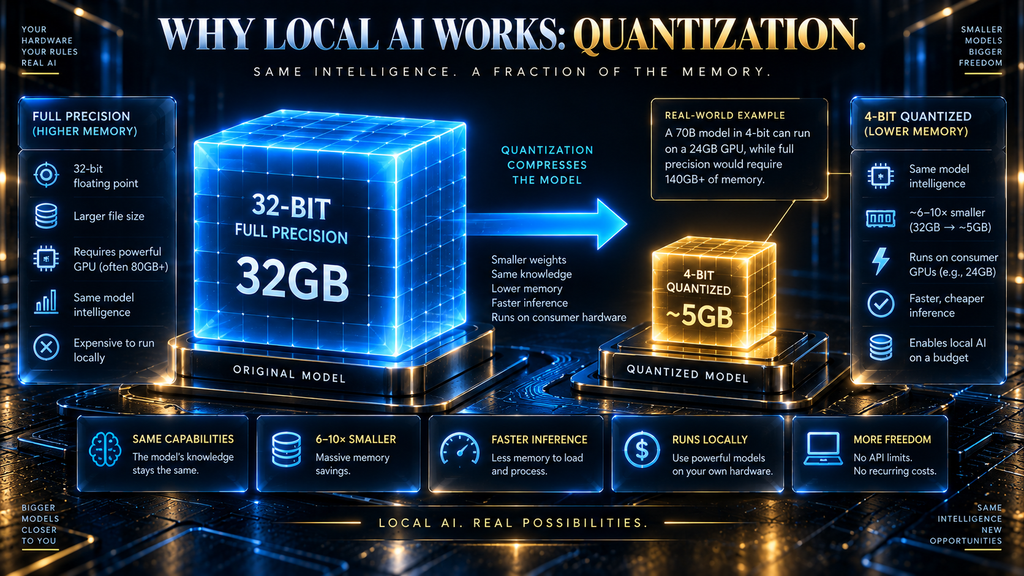
None of the tools above would matter if the hardware math didn’t work, and it only works because of quantization. A model’s weights are normally trained and stored in 16-bit or 32-bit floating-point precision, which is why a 7-billion-parameter model can need well over 14GB just to load.
Quantization compresses those weights to lower-precision formats — 8-bit, 4-bit, sometimes lower — cutting memory roughly in proportion to the bit reduction. That’s why llama.cpp’s GGUF format supports precision levels down to 1.5 bits per weight.
We cover the full mechanism, including the exact memory math and quality trade-offs at each precision level, in our dedicated guide to how quantization works. This article assumes that groundwork and focuses on what it enables at the system level.
What matters here is the practical consequence: a model that would need a data-center GPU at full precision can often run on a single consumer graphics card once quantized to 4-bit, and that gap is the entire reason local AI exists as a mainstream option rather than something only a well-funded lab could attempt a few years ago.
Hardware Reality: What You Actually Need to Run Models Locally
The rule of thumb: a quantized model needs roughly its file size in available memory, plus overhead for the context window and KV cache. Exact figures by model size and precision are laid out in our quantization memory calculator, since that math doesn’t change by which local AI tool you use.
What does change by hardware platform is how much memory you can put behind that number, and at what cost in money, power, and noise.
On the NVIDIA side, consumer GPUs top out well below what a full-size frontier model needs. NVIDIA’s own specs list the RTX 4090 at 24GB of GDDR6X memory with a 450-watt TGP, and the newer RTX 5090 at 32GB of GDDR7 with a 575-watt TGP.
Both are enough for quantized models in the 7B-to-70B range depending on precision, but neither holds an unquantized frontier-scale model. Both also draw serious power under sustained load — a 450-to-575-watt GPU running continuously adds meaningfully to a home electricity bill, which the cost section below quantifies.
AMD’s Radeon cards are a real third option now that llama.cpp has HIP backend support. The RX 7900 XTX ships with 24GB of VRAM at a 355-watt TGP — matching the RTX 4090’s memory at lower power, for anyone comfortable with a smaller driver ecosystem.
Apple Silicon takes a structurally different approach. Instead of a GPU with its own memory pool, Apple’s M-series chips use unified memory shared between CPU and GPU, and Apple’s own specs show that scaling far higher than any consumer GPU: the Mac Studio configures up to 128GB on the M5 Max and up to 512GB on the M5 Ultra.
That headroom means a Mac Studio can hold a quantized 70B-class model — or larger — that would never fit in a single RTX 4090’s 24GB. The trade-off is raw throughput: unified memory generally can’t match a discrete GPU’s compute silicon on tokens-per-second, so the right platform depends on whether your bottleneck is “will it fit” or “how fast does it respond.”
CPU-only inference is the fallback tier, and llama.cpp’s hybrid CPU+GPU mode exists because CPU-only or partial-offload setups are common for people without a dedicated GPU. It works, and small, heavily quantized models can be genuinely usable, but it’s meaningfully slower than GPU inference — a starting point, not a destination, for sustained local AI work.
How to Check Whether a Model Will Actually Fit on Your Hardware
Before downloading anything, the file size of the quantized model tells you most of what you need to know. Model hosting pages typically list the file size for each quantization level of a given GGUF release, and that number is close to the minimum memory the model needs just to load.
A practical margin is roughly 10-20% on top of the file size for context and KV cache, compared against your actual available VRAM or unified memory — not total system RAM. A 24GB GPU running an 8GB model has comfortable headroom; the same GPU running a 22GB model leaves almost nothing for context, showing up as crashes or forced CPU offload once a conversation gets long.
A concrete example makes the math easier to picture. Community GGUF builds of Llama 3.1 8B on Hugging Face list the Q4_K_M variant at 4.92GB, Q5_K_M at 5.73GB, and Q8_0 at 8.54GB — against a full-precision F32 file of 32.13GB for the same model.
On a 12GB GPU, Q4_K_M leaves comfortable room for context; Q8_0 is workable but tighter, and the full-precision file is simply out of reach on that card regardless of context needs. The same file-size comparison applies to any model you’re considering, which is why checking it before downloading saves a wasted download and a frustrating first run.
Two mistakes show up repeatedly here. The first is checking total system RAM instead of VRAM when planning a discrete GPU setup — llama.cpp’s hybrid inference can offload layers to system RAM, but that offloaded portion runs dramatically slower.
The second is picking a quantization level by file size alone, without checking the quality trade-off. Our quantization guide covers which precision levels hold up and which start losing accuracy, so pairing the memory check with that context avoids a model that fits but underperforms a smaller, better-chosen alternative.
The AHW Local AI Cost & Throughput Model
The honest cost comparison between local and cloud AI has two components most comparisons blur together: ongoing electricity cost and upfront hardware cost. Electricity is the easier number to pin down — currently about 19 cents per kWh on average for US residential customers, based on marketplace data reported by EnergySage.
Our Methodology
This model is a transparent calculation from four verifiable inputs, not first-hand lab testing: NVIDIA’s published RTX 4090 TGP (450W), the US average electricity rate (19¢/kWh, via EnergySage), a third-party throughput benchmark (90-104 tok/s for an 8B Q4_K_M model, via LocalScore.ai and Hardware Corner), and OpenAI’s published API pricing ($1.20/1M output tokens).
The formula: watts ÷ 1000 × hours × electricity rate = energy cost; energy cost ÷ (throughput × seconds per hour) = cost per token. Every figure in the tables below follows directly from that formula and these inputs — swap in your own electricity rate or a different card’s TGP and the same math applies.
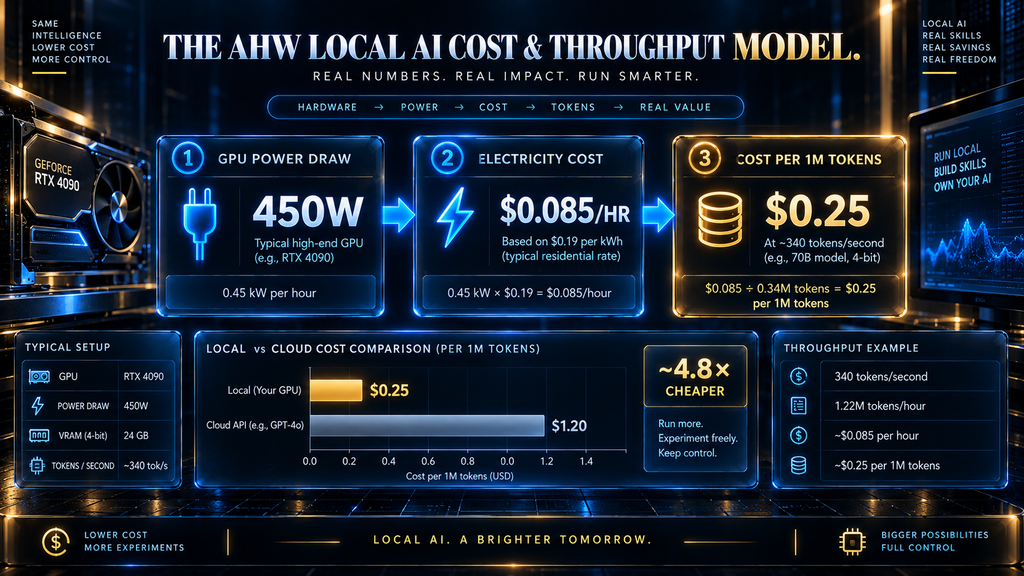
An RTX 4090 running at its full 450-watt TGP for one hour draws 0.45 kWh, which works out to roughly 8.5 cents of electricity per hour of continuous full-load use — and real-world generation rarely holds the card at 100% draw for an entire session, so that figure is closer to a ceiling than a typical bill.
Converting that hourly cost into a per-token figure needs a real throughput number, and published figures vary by source and context length. Benchmark data aggregated from LocalScore.ai and Hardware Corner puts an 8B model at Q4_K_M in roughly a 90-to-104 tokens-per-second range on an RTX 4090.
Taking the midpoint, about 95 tokens per second, one million output tokens takes roughly 2.9 hours of generation, costing approximately 25 cents in electricity alone. For comparison, OpenAI’s current published API pricing lists its budget-tier model at $1.20 per million output tokens.
The electricity cost of local generation is a fraction of that — but that comparison leaves out the GPU itself, a several-hundred-to-thousand-dollar upfront cost a pure per-token cloud price never requires. For occasional or low-volume use, the cloud’s usage-based pricing wins outright.
The math only favors local hardware once usage is high and sustained enough to amortize the purchase, and where that break-even point falls depends on your current cloud spend and how heavily you’ll use the hardware once you own it.
| Hardware tier | Typical memory | Power draw (full load) | Electricity cost per hour | Best suited for |
|---|---|---|---|---|
| CPU-only / hybrid offload | System RAM dependent | Low (50-150W typical system draw) | ~1-3 cents | Small quantized models, no dedicated GPU |
| Consumer GPU (RTX 4090) | 24GB GDDR6X | 450W TGP | ~8.5 cents | 7B-30B class models at 4-bit quantization |
| Flagship GPU (RTX 5090) | 32GB GDDR7 | 575W TGP | ~11 cents | Larger quantized models, faster throughput |
| Apple Silicon (M5 Max/Ultra) | Up to 128GB / 512GB unified | Lower than discrete GPU under equivalent load | Platform-dependent, generally lower | Largest models that need to fit in memory over raw speed |
Throughput also shapes how usable a setup feels — see our explainer on AI tokens for the basics. A 90-to-100 tokens/sec range is fine for single-user chat, but nowhere near what a production app serving many users needs, which is the gap vLLM exists to close.
Usage volume is what actually decides whether local or cloud wins financially, so it helps to see the comparison at different scales rather than only per-million-tokens. The table below applies the same inputs used above — roughly 95 tokens/second on an RTX 4090, 8.5 cents/hour in electricity, and OpenAI’s $1.20/1M output-token budget-tier price — across three usage bands.
| Monthly output volume | Local electricity cost (RTX 4090) | Equivalent cloud cost (budget-tier API) |
|---|---|---|
| Light (1M tokens/month) | ~$0.25 | ~$1.20 |
| Moderate (20M tokens/month) | ~$5.00 | ~$24.00 |
| Heavy (200M tokens/month) | ~$50.00 | ~$240.00 |
Electricity-only local cost stays a small fraction of the cloud figure at every scale shown here — but that comparison still excludes the GPU’s own upfront cost, which is exactly why the break-even point discussed earlier depends on your actual usage volume, not on the per-token comparison alone.
That 19-cent figure is also a national average, and actual residential electricity rates vary considerably by state and utility — often by a factor of two or more. Anyone taking this comparison seriously should swap in the rate from their own utility bill rather than the national number, since it’s the only input in this model that changes meaningfully by location.
Why People Actually Choose Local AI
The clearest reason people move to local AI is data control. When inference happens on your own device, prompts and outputs never cross a network to reach a third party’s servers — which matters most for anything sensitive: draft contracts, personal journaling, unreleased business plans, or notes someone doesn’t want stored on a company’s infrastructure.
Ollama’s framing of “nothing you run locally ever leaves your machine” is the sales pitch, but it reflects something real about the architecture. For more on what’s at stake sharing data with a cloud provider, our guide to AI privacy risks covers what providers typically retain.
Cost predictability is the second major driver, and it runs opposite to what the raw per-token math above suggests. A cloud API bills by usage, so a spike in demand — a viral feature, a busy week, an experiment — shows up directly as a bigger invoice.
A local setup’s marginal cost per additional request is close to zero once the hardware is paid for, which makes it attractive for high-volume, predictable workloads even when the per-token cloud price looks competitive on paper.
Offline access and independence from a provider’s uptime, rate limits, or policy changes round out the practical reasons. A model running on your own hardware keeps working on a plane, during an outage, or after a provider deprecates a model you depended on.
Staying cloud-only isn’t free of risk either, which is worth naming directly: pricing can change with no notice, a favored model can be deprecated mid-project, and a policy update can alter what the provider retains or trains on. None of that makes cloud AI a bad choice — it’s simply a different risk profile, one traded for capability and zero maintenance instead of control.
Customization is the last major reason: with the actual model weights, you can fine-tune your own copy on your own data, which our guide to fine-tuning AI models covers in detail. A cloud API you don’t control the weights for can’t offer that same depth of customization.
Where Local AI Breaks Down
The most consistent limitation is a capability ceiling. Frontier reasoning, complex coding, and cutting-edge multimodal tasks are still generally led by the largest closed models on data-center hardware, and a model quantized to fit in 24-32GB of consumer VRAM isn’t competing at that tier — it trades capability for the ability to run locally at all.
That gap has narrowed as smaller open models have improved, but it has not closed, and workloads that genuinely need the strongest available reasoning still tend to favor a cloud frontier model.
Context window size is constrained by the same memory limits that determine what model fits, since a longer context means a larger KV cache competing for the same memory as the weights. Multi-user scaling is a related wall: one consumer GPU running one llama.cpp instance serves one person, not a team — exactly the gap vLLM-style infrastructure exists to fill.
Maintenance is the least glamorous limitation and the one people underestimate most. Running a model locally means you’re responsible for driver compatibility, engine updates, and troubleshooting your own hardware when something breaks — there is no support line to call.
None of this makes local AI impractical for the workloads it fits, but it means the “free” framing that surrounds it undercounts the real cost, which includes your own time. Local AI is a poor fit for anyone needing guaranteed uptime backed by a support contract, a team without time to maintain drivers, or a workload where the absolute state of the art is non-negotiable.
The AHW Local AI Decision Framework
The right choice between local and cloud AI depends less on which is “better” in the abstract and more on what a specific use case actually needs, which is why a single blanket recommendation misses the point. Each row below traces back to a mechanism explained earlier in this article — memory limits, the capability ceiling, serving architecture — rather than being asserted on its own, so the “why” column is checkable against the sections above it, not just a verdict to take on faith.
| Use case | Recommended approach | Why |
|---|---|---|
| Privacy-sensitive personal drafting or journaling | Local | No data leaves the device; no ongoing dependency on a provider’s retention policy |
| Solo developer coding assistant on a capable GPU | Local or hybrid | Quantized coding models are strong enough for many day-to-day tasks; fall back to cloud for harder problems |
| Frontier research, complex reasoning, or advanced multimodal work | Cloud | Local hardware can’t match the largest closed models’ capability ceiling |
| High-volume production application serving many users | Cloud API or self-hosted vLLM | Consumer local setups aren’t built for concurrent multi-user serving |
| Offline, field, or no-connectivity environments | Local | No network dependency once the model is downloaded |
| Regulated or highly sensitive data | Local, with compliance review | On-device control helps, but still confirm it satisfies the specific regulatory requirement involved |
| Coding agent on a proprietary or client codebase | Local or hybrid | Keeps code off third-party servers for well-scoped tasks; escalate complex refactors to cloud |
| Private knowledge assistant over internal documents | Local RAG | Retrieval keeps sensitive source material out of any cloud provider entirely |
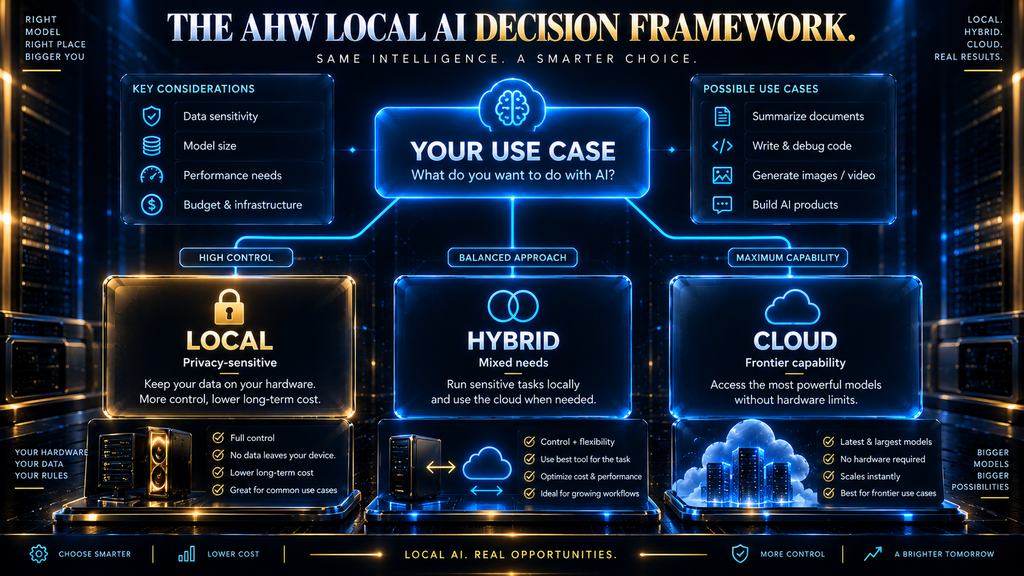
Put together, consider a freelance writer on a MacBook Pro with 64GB of unified memory who wants an AI assistant for early client drafts under NDA. A quantized 13B-to-30B model running locally through LM Studio handles drafting and editing without that client’s confidential material ever reaching a third-party server.
When that writer hits a research task beyond the local model’s depth, switching to a cloud model for just that task — without pasting in confidential material — gets the capability upside without losing the privacy default elsewhere. That hybrid pattern, local by default and cloud only when needed, is how most local AI adopters actually use it in practice.
Contrast that with a small startup shipping an AI feature to a few hundred concurrent users. A single consumer GPU running Ollama simply can’t serve that load, and neither privacy nor cost predictability alone justifies the engineering time to run vLLM well at a small scale.
For that team, a cloud API is usually the right starting point. Moving to self-hosted vLLM serving becomes worth the operational overhead only once usage volume and sustained cost pressure genuinely justify owning that infrastructure — the same amortization logic from the cost model above, just applied at server scale instead of personal scale.
How to Actually Get a Model Running Locally
The fastest reliable path for most people is Ollama, since it collapses the stack described earlier into a handful of commands instead of a manual llama.cpp build. Install it, then pull a model by name — ollama run llama3.1:8b downloads the weights at a sensible default quantization and drops you into a chat prompt, with the API running on port 11434 for anything you build later.
Before running that command, decide on quantization deliberately rather than accepting the default. Most model libraries list several quantization variants; picking one whose file size comfortably fits your VRAM or unified memory, using the memory-fit check above, avoids a model that loads but crawls because it’s spilling into slower system RAM.
Confirming the setup is actually running fully local, not quietly leaning on a hosted cloud fallback somewhere in the chain, is the last step most people skip entirely. Turning off your network connection and sending one more prompt is a blunt but reliable test: if the response still comes back, inference is genuinely happening on your own hardware.
For anyone who wants a GUI instead of a terminal from the start, LM Studio’s model browser walks through the same decisions — engine, model, and quantization — with the trade-offs visible before you download anything.
For a home-server or NAS setup rather than a laptop, Ollama also ships as an official Docker image — the more common path for an always-on machine. Containerizing it keeps the setup reproducible and isolated, at the cost of one extra layer to configure GPU passthrough.
Local AI as a Coding Assistant Backend
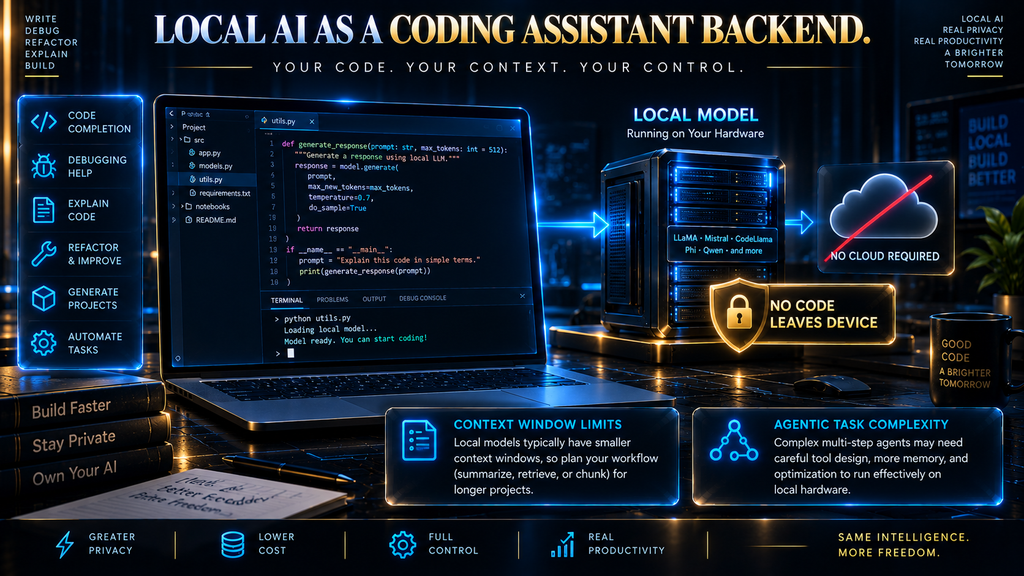
Pointing an agentic coding tool at a local model instead of a cloud API is one of the more practical reasons developers adopt local AI. Ollama’s own site now advertises exactly this, describing how you can “launch Claude Code, Codex, and more with one command” against a locally-served model instead of a hosted one.
The appeal is straightforward: a coding agent can generate a large volume of requests during one session, and running that volume against a local model means no per-token bill and no code leaving the machine. It also keeps working through a spotty connection or a provider outage, which matters more across a multi-step coding session than for a single chat reply.
The trade-off shows up in two places. Context window is the first: reviewing or refactoring a large codebase needs room to hold the relevant files, and a locally quantized model’s practical context length usually runs smaller than a cloud frontier model’s, both for memory reasons and because quality tends to degrade further into a long context.
Agentic capability is the second: multi-step tool use — planning a refactor, running tests, interpreting failures — asks more of a model’s reasoning than one code completion, which is where the capability ceiling above tends to bite hardest. A local model suits smaller, well-scoped coding tasks on sensitive codebases; a complex multi-file refactor is often better handled by a frontier cloud model.
Local AI Plus RAG: Building a Private Knowledge Assistant
A local model only knows what it learned during training, and quantized local models ship with smaller context windows than cloud models. RAG (retrieval-augmented generation) solves that by retrieving only relevant passages from a document set — our RAG vs fine-tuning guide covers that trade-off against retraining a model.
Running RAG entirely locally extends that advantage instead of undermining it. A local embedding model converts your documents into vectors, a local vector database stores and searches them, and the local LLM only ever sees the retrieved passages plus your question — none of it reaches a third-party server.
This is a genuinely popular pattern for a private assistant over sensitive documents — legal contracts, medical notes, internal files — where sending that material to any cloud provider isn’t an option. It also sidesteps a limitation of local models: instead of cramming knowledge into the weights through fine-tuning, RAG keeps the model unchanged and gives it better source material at query time.
Common Mistakes When Getting Started with Local AI
The most common mistake is buying hardware before checking what it can actually run. A GPU with 12GB of VRAM sounds capable until you realize it can’t comfortably hold a 13B model at anything above 4-bit precision alongside a usable context window.
The second mistake is expecting a quantized local model to match a cloud frontier model’s quality across every task. Aggressive quantization does measurably reduce output quality on some workloads, and pretending otherwise leads to disappointment that’s really a mismatched expectation.
Ignoring the physical reality of sustained GPU load is the third mistake. A 450-to-575-watt graphics card running for hours generates real heat and noise in a way gaming sessions — which rarely sustain 100% load for hours at a stretch — don’t fully prepare people for.
Letting model files and engines go stale is a subtler but real problem: quantization methods and model quality both improve steadily, and a GGUF file downloaded a year ago on an outdated llama.cpp build is very likely leaving real performance on the table.
Finally, people sometimes expect a single consumer GPU to handle production-grade, multi-user traffic the way a cloud API does. That’s a fundamentally different serving problem — the one vLLM’s architecture solves — and treating a personal setup as production infrastructure means it falls over the first time real concurrent demand shows up.
A less obvious mistake is underestimating the power supply and cooling a sustained 450-to-575-watt GPU load needs. A PSU sized for occasional gaming spikes can be marginal under hours of continuous inference, and poor case airflow will throttle the GPU’s clock speed — quietly cutting tokens-per-second below what the card is rated for.
How to Know Your Local Setup Is Actually Working Well
Beyond “does it respond,” a handful of concrete signals separate a setup that’s actually working from one that’s technically running. Tokens-per-second is the most direct one: llama.cpp’s own llama-bench tool measures it on your exact hardware, giving you a real number to compare against the published ranges discussed above rather than assuming you’re getting them.
Memory headroom is the second signal: a session that starts fast and slows or crashes as it grows likely means context is exceeding available VRAM, which the memory-fit check earlier exists to catch beforehand. Sustained GPU temperature, checked through your OS’s own tools, catches thermal throttling before it quietly erodes performance.
Cost tracking rounds this out for anyone weighing local against cloud seriously: logging actual hours of heavy use against the electricity math in the cost model above, using your own utility rate rather than the national average, turns the earlier estimate into a real number specific to your own usage pattern, which is ultimately more useful than any published benchmark.
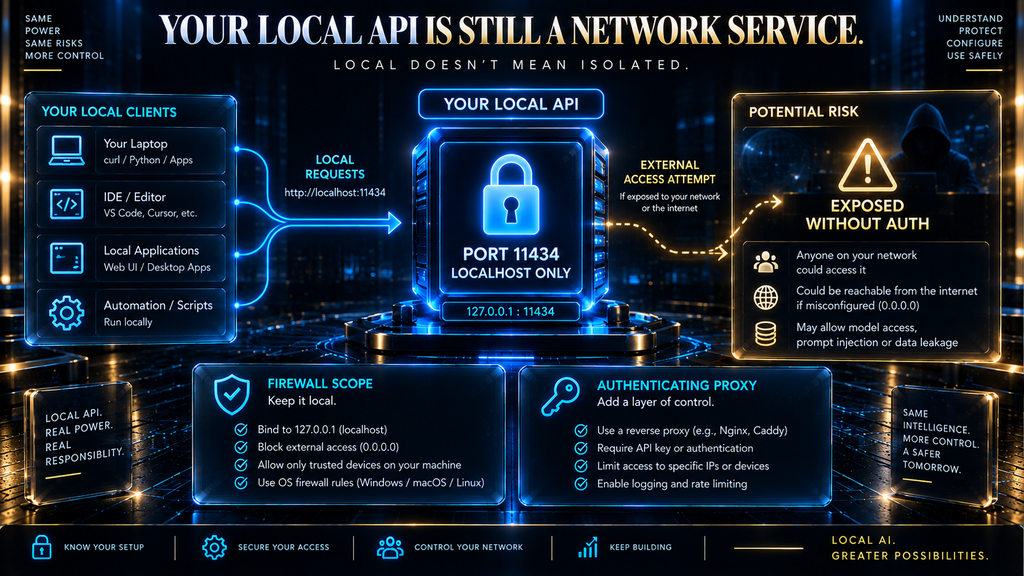
A Security Detail Most People Skip: Your Local API Is Still a Network Service
Running a model “locally” doesn’t automatically mean it’s isolated from the network, and this is one of the more overlooked practical details in local AI setups. Ollama, by its own documentation, serves its REST API on port 11434 — by default bound to localhost, meaning only your own machine can reach it.
The risk shows up when someone exposes that port beyond localhost — via a network interface, a router forward, or a container with open networking — without adding authentication. An exposed, unauthenticated local AI API is a real attack surface: anyone who reaches it can send prompts, pull model info, and sometimes manage the models on the host.
If you do need to reach your local AI setup from another device on your own network, put it behind a firewall rule scoped to trusted IPs or an authenticating reverse proxy rather than opening the port broadly. That’s the same caution that applies to any other local server you’d never expose to the open internet without a second thought.
The Future: Where Local AI Is Headed
The direction of travel points toward more capable models fitting in less memory, and toward hardware built for AI inference from the start rather than adapted to it.
llama.cpp’s growing NPU-specific backends — Hexagon for Snapdragon, CANN for Ascend NPUs, and similar accelerators — signal inference moving beyond “whatever GPU you had for gaming” toward purpose-built silicon, cutting power draw and cost over time. As smaller open models close the gap with larger ones, local AI’s competitive range against cloud frontier models should keep expanding.
On-device mobile inference is the other frontier worth watching. llama.cpp’s ARM NEON optimizations already make small quantized models workable on phone-class hardware, and as phone chips add more dedicated AI silicon, “local AI” will increasingly mean a model running in your pocket, not just on a desktop GPU or a Mac Studio.
Final Thoughts
Consistent with what this article set out to cover, the goal was the system underneath local AI, not a verdict on any app — that belongs in its own dedicated review. Local AI isn’t a replacement for cloud AI so much as a different tool for different problems: capability traded for data control, cost predictability, and independence from a provider.
The technology behind it — quantization on an engine like llama.cpp — is mature enough that “can I run this locally” is now a question of hardware and patience, not possibility. Getting value from it means matching the approach to the use case: local by default for privacy-sensitive or routine work, cloud when a task needs capability local hardware can’t deliver, hybrid for everything in between.
Still Fuzzy on How Quantization Actually Works?
Everything in this guide — from GGUF file sizes to why a 4-bit model fits on your GPU — comes down to quantization. Our full breakdown covers the mechanism, the memory math, and exactly how much quality you give up at each precision level.
Read the Quantization Guide →Frequently Asked Questions
Is local AI actually private, or does data still leave my device?
When you run a model fully through a local engine like llama.cpp, with no cloud fallback enabled, your prompts and outputs stay on your device. Some tools (including Ollama) now also offer optional hosted cloud models alongside local ones, so it’s worth confirming which mode you’re actually using.
Do I need a powerful GPU to run AI models locally?
Not necessarily. Heavily quantized small models can run on a CPU or a modest GPU, though speed and capability both scale with the hardware, and llama.cpp’s hybrid CPU+GPU mode lets you split a model across both when VRAM alone isn’t enough.
Is running AI locally actually cheaper than using a cloud API?
It depends on volume. Electricity cost per token is typically a fraction of cloud API pricing, but that comparison ignores the upfront hardware cost, which only pays for itself with high, sustained usage.
What’s the difference between Ollama, LM Studio, and llama.cpp?
llama.cpp is the underlying inference engine. Ollama and LM Studio are front-ends built on top of it (LM Studio also supports Apple’s MLX) that add a graphical interface, model management, and an easier setup process.
Can a local model match ChatGPT or Claude in quality?
For many everyday tasks, a well-chosen quantized local model gets close. For frontier-level reasoning, advanced coding, or cutting-edge multimodal tasks, cloud models running at full scale still generally hold a capability advantage.
What is vLLM, and is it the same as running AI locally?
vLLM is a serving engine built for handling many simultaneous users efficiently on server-grade GPUs, using techniques like PagedAttention and continuous batching. It’s closer to self-hosted infrastructure than to the single-user local AI setups this article covers.
How much memory do I need to run a 7B or 13B model locally?
Roughly the model’s file size at your chosen quantization level, plus overhead for context and the KV cache. Our quantization memory calculator breaks this down by model size and precision.
Can I fine-tune a model I’m running locally?
Yes — having the actual model weights is what makes local fine-tuning possible in the first place, unlike a cloud API where you don’t control the underlying weights.
Does local AI work without an internet connection?
Yes, once the model and engine are downloaded, inference itself requires no network connection, which is one of local AI’s clearest practical advantages over a cloud API.
Is Apple Silicon or an NVIDIA GPU better for local AI?
It depends on what you’re optimizing for. Apple Silicon’s unified memory lets you fit larger models than a single consumer NVIDIA GPU’s VRAM allows, while NVIDIA GPUs generally offer faster raw throughput for models that fit comfortably within their memory.
Can I use a local model with a coding assistant like Claude Code or Codex?
Yes — Ollama’s own site advertises pointing these agentic coding tools at a locally-served model instead of a cloud one. It works well for smaller, well-scoped tasks on sensitive codebases, though complex multi-file refactors often still favor a frontier cloud model.
What is RAG, and why pair it with local AI?
RAG (retrieval-augmented generation) retrieves relevant document passages into a prompt instead of relying only on what a model learned during training. Running it entirely locally keeps sensitive source documents off any cloud server as well, which is why the combination is popular for private knowledge assistants.
Can I combine multiple GPUs to run a bigger model locally?
Yes — llama.cpp’s RPC backend lets you pool VRAM across two or more GPUs, even across separate machines, to run a model too large for one card. It needs a fast, low-latency connection, so wired networking works better than Wi-Fi.
Can I run local AI on a home server instead of my personal computer?
Yes — Ollama ships as an official Docker image, which is the common path for a dedicated always-on machine like a home server or NAS. It requires configuring GPU passthrough into the container, which adds one extra setup step compared with running it directly.
Written by
Muntasir Ahmad Chowdhury
Founder-AI Hustle World
Muntasir Ahmad Chowdhury is the Founder of AI Hustle World, an independent publication dedicated to making Artificial Intelligence practical, trustworthy, and easy to understand. He researches AI tools, automation, customer service, productivity, and real-world business applications, helping readers make smarter technology decisions through research-driven, experience-backed content.
Expertise:
AI Tools • AI Automation • AI Customer Service • AI Productivity • Generative AI • AI Workflows
Get Smarter With AI
Enjoyed this guide? Get practical AI tools, tutorials, and honest reviews delivered to your inbox.
3 thoughts on “Local AI Explained: How Running AI Models on Your Own Hardware Works”