Evidence: Documentation reviewed
Last checked: August 2026
What was done: Written from official documentation and the published sources linked in this article. Not hands-on tested.
Files: None
Affiliate links: No
Last updated: October 2026
What Are AI Tokens? Explained Simply for Beginners
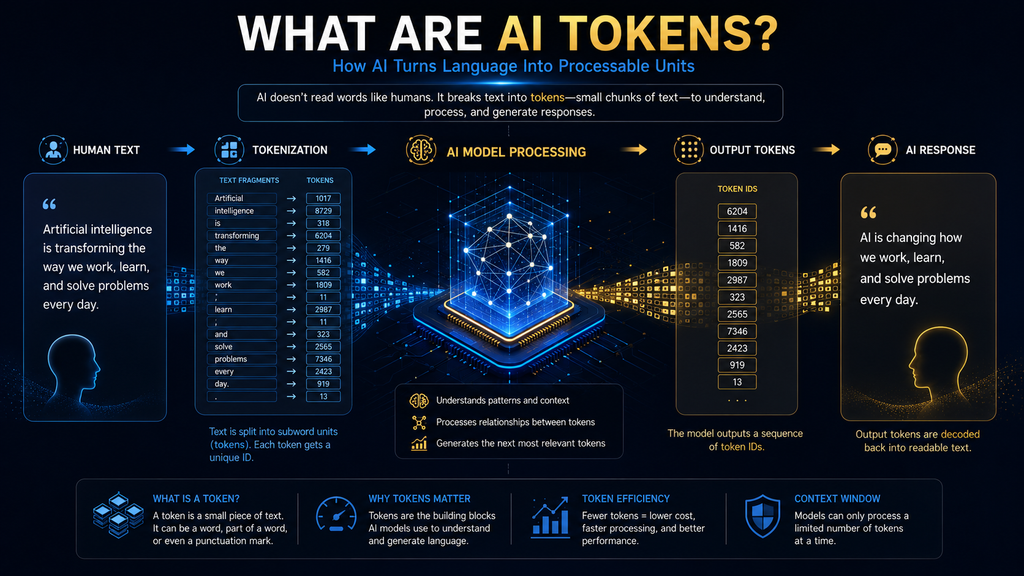
AI tokens are the small pieces of text, and sometimes of images, audio or video, that an AI model reads and writes. A token can be a whole word, part of a word, a punctuation mark or a space. For English text, one token is roughly four characters or about three-quarters of a word, but the exact count depends on the model and the language.
If you use ChatGPT, Gemini, Claude or another assistant, you have probably seen terms such as tokens, token limits, context windows, input tokens and output tokens. They sound technical, but they explain many everyday experiences: why a long conversation starts to lose track of early details, why an AI stops mid-answer and why API bills are measured the way they are.
The idea fits in one sentence: your text is split into tokens, the tokens are turned into numbers the model can process, and the model writes its reply one token at a time before those tokens are turned back into text. Once that flow makes sense, token limits, context windows and AI pricing become much easier to understand.
This guide explains what tokens are, why AI uses them instead of whole words, how token counts change between models and languages, the difference between input, output and thinking tokens, what a context window is, how tokens affect cost and speed, and how to use tokens wisely without obsessing over every one.
What Is a Token?
A token is a unit created by a tokenizer, a program that splits input into pieces the model’s vocabulary can represent. OpenAI’s tokenizer page describes tokens as common sequences of characters found in text. Depending on the text, a token might be a common word, part of a longer word, a number, a symbol or a piece of a technical term.
OpenAI’s help article on understanding and counting tokens gives rough estimates for English: one token is about four characters, about three-quarters of a word, and 100 tokens are about 75 words. It also says these are estimates, not exact counts, and that other languages can behave differently. It is a useful reference to bookmark if you work with prompts often.
Google gives similar guidance. Its documentation on understanding and counting tokens says that for Gemini models a token is about four characters and that 100 tokens equal about 60 to 80 English words. It adds that tokens can be single characters such as “z” or whole words such as “cat,” and that long words are broken into several tokens.
So two common beliefs are wrong. Every word is not one token, and every four characters are not exactly one token. Both figures are helpful estimates for English text, not rules. When you need an exact number, for example to estimate an API bill or check a limit, use the tokenizer or token-counting tool for the specific model you are using.
The Token Flow: From Your Words to an AI Response
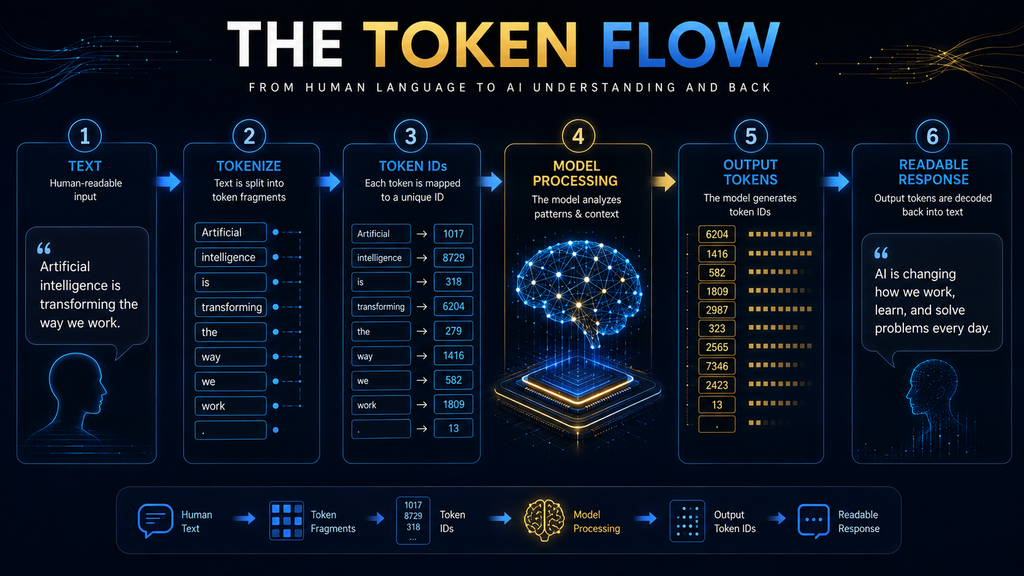
The easiest way to understand tokens is to see them as part of the model’s processing pipeline rather than as a billing unit. The flow has five stages: your text, token pieces, token IDs, the model’s internal numerical representations, and output tokens that are converted back into the text you read on screen.
Imagine you type “AI can help me summarize this report.” You see one sentence. The model does not receive it as one object. A tokenizer splits it into model-specific pieces, each piece is mapped to a number called a token ID, and those numbers are turned into internal representations the neural network can work with mathematically.
When the model answers, it produces output tokens one at a time, and each is converted back into text. That is why “AI reads words” is a handy metaphor but not a precise description. A better mental model is that AI processes tokenized representations of information, not language in exactly the form you see on screen.
This distinction matters as soon as you ask why token limits exist, why counts differ between tools and why some content costs more to process than other content of similar length. Each of those questions comes back to how the input was broken into tokens in the first place. Keep this flow in mind as you read the rest of the guide.
Why AI Does Not Simply Use Whole Words
Language is far messier than a dictionary. If every possible word needed its own unit, a model’s vocabulary would have to cover common words, every form of each word, names, slang, typos, technical terms, product codes, new words and words in many languages. That approach would quickly become huge and inefficient.
Tokenization offers a compromise. Common words can be represented as one token or a few tokens, while rare or new words are built from smaller pieces. A model that has never seen a particular product name can still represent it by combining familiar fragments, which is why AI can handle names and new terms it was never explicitly taught.
The main families of methods are byte pair encoding, WordPiece and Unigram. Hugging Face’s guide to tokenization algorithms explains that these subword methods split text into units between words and characters, keeping the vocabulary compact while still capturing meaningful pieces of language. Each model family picks one of these methods and builds its own vocabulary around it.
Subword tokenization became widely used after research such as Sennrich and colleagues’ 2015 paper on translating rare words with subword units, which adapted byte pair encoding to split rare words into smaller, reusable pieces. The important takeaway is the trade-off: a manageable vocabulary that can still represent text the model has never seen as a whole word.
How Tokenization Works in Practice
Consider the sentence “The AI model is useful.” You see five words and a full stop. A tokenizer may produce a different number of tokens. It might keep common words whole, attach a leading space to a word, split a longer word into pieces and treat the full stop as its own token, all depending on its rules and vocabulary.
The exact result is specific to each model. That is why two AI systems can report different token counts for the same sentence. The tokenizer asks how this sequence of characters should be represented using the vocabulary and encoding this particular model was built with. Two models can read the same sentence and produce quite different pieces.
You can see this for yourself with OpenAI’s interactive tokenizer, which shows how a piece of text is split. Paste in a sentence, a URL and a short block of code, and you will quickly notice that tokens do not line up neatly with words, and that symbols and numbers often split in surprising places. It takes less than a minute and needs no account.
Trying this once is worth more than any explanation. Most people are surprised by how often spaces attach to words, how punctuation splits off and how unusual names break into several pieces. That hands-on view makes later topics, such as token limits and costs, feel concrete rather than abstract. It also helps you spot why some prompts use more tokens than expected.
Why the Same Text Can Have Different Token Counts
There is no universal token count for a piece of text. The count depends on the model, because different models use different tokenizers. It depends on the language, because tokenization efficiency varies between languages and writing systems. And it depends on the text itself, because common words tokenize differently from rare terms.
Formatting matters too. Spaces, line breaks, numbers, symbols, URLs and structured text such as tables or JSON can all change the count. Code usually tokenizes differently from ordinary prose, because it is full of brackets, operators and unusual names. Even the same word can tokenize differently depending on whether a space comes before it.
So if you paste the same paragraph into two different tools and get different counts, neither tool is necessarily wrong. They may simply use different tokenization schemes, or one may include hidden system instructions in its total. The useful question is how this particular model counts the content you are sending it.
That is why a token is not like a kilogram. There is no universal conversion such as one token equals exactly four characters or exactly 0.75 words. Use word-to-token estimates for intuition, and use the target model’s own tokenizer or token-counting tool for anything where accuracy matters, such as budgets and limits.
Why Languages Use Tokens Differently
A token estimate based on English should not be applied automatically to other languages. Tokenization efficiency depends on the language, the writing system, the vocabulary and how much of that language the tokenizer was built around. Two documents of similar human length can therefore consume quite different numbers of tokens.
OpenAI’s help article notes that other languages can have different token-to-word ratios, and Google’s figures are also stated for English. In practice, languages that are less represented in a tokenizer’s training data, or that use non-Latin scripts, often need more tokens for the same meaning, although this varies by model.
This matters for multilingual products because token use affects context capacity, speed and cost. A support assistant serving customers in several languages may use noticeably more tokens for some languages than others. For developers, that is an important design and budgeting consideration, and it is worth measuring with real samples.
For everyday users, you usually do not need to calculate any of this. The bigger lesson is that word count is a human measurement, while token count is a model-specific computing measurement. They are related, but they answer different questions, and confusing the two leads to surprises. Knowing which measure applies saves confusion later.
What Happens After Text Becomes Tokens
Tokenization is only the start. Each token is mapped to a token ID, and each ID is turned into a list of numbers called an embedding that captures something about its meaning and use. The model then processes those numbers through many layers to build an understanding of the whole input in context. Those layers are where the model’s learned knowledge does its work.
A simplified flow looks like this: text, tokenizer, token pieces, token IDs, numerical representations, neural network processing, a predicted next token, then another and another until the response is complete. The internal mathematics is far more complicated, but the sequence is the important part to remember.
The model is not matching your sentence against a database of stored sentences. During generation, it repeatedly predicts which token should come next based on everything currently in its context. That is why “next-token prediction” is so central to how modern language models work. Every word you read in an AI answer was produced this way, one token after another.
If you want the bigger picture of the model itself, our guide to what a large language model is explains it without focusing on tokens. Our explainer on how AI learns from data covers how those patterns are learned during training. Together they give you a solid foundation for everything else in this guide.
Tokens and Next-Token Prediction
Suppose you type “The capital of France is”. The model does not receive an instruction to complete the sentence with “Paris.” It processes the tokens in context and calculates probabilities for many possible next tokens. “Paris” gets a very high probability, while “London,” “Berlin” or “located” get very low ones.
| Possible next token | Relative likelihood (illustrative) |
|---|---|
| Paris | Very high |
| London | Very low |
| Berlin | Very low |
| located | Very low |
The real system is much more sophisticated than this illustration, and generation settings affect how the next token is chosen. But the principle holds: the model builds a response by repeatedly selecting output tokens based on the context and what it learned during training, then converting those tokens into text.
That is why tokens are both an input unit and an output unit. It also explains why AI sometimes produces fluent but wrong answers: the model generates likely continuations, not verified facts. Our guide to AI hallucinations explains this behavior in more detail. Fluency and accuracy are different things, so important claims always need checking.
Input Tokens vs Output Tokens
Input tokens are everything supplied to the model. Output tokens are everything the model generates. The distinction sounds simple, but input often contains much more than the message you typed, which is why token totals can surprise people the first time they look at them. Knowing what counts as input helps you predict usage much more accurately.
Depending on the application, the input can include your prompt, hidden system instructions, earlier messages in the conversation, uploaded files, retrieved documents, tool definitions and tool results. A short visible prompt can therefore sit on top of a much larger context that you never see but the model still has to process.
Google’s token documentation shows how detailed this accounting can be. Its usage data reports separate counts for input, output, thinking, cached content and tool use. That breakdown explains a common surprise: the number of tokens you personally typed is often only a small part of what the system processes.
For chat users, this mostly explains why very long conversations slow down or lose detail. For developers, it is central to cost and design, because every hidden instruction, document chunk and tool result is resent and counted. Our guide to how AI chatbots work walks through what happens between your message and the reply.
What Are Thinking Tokens?
Some modern models do extra internal reasoning before giving a visible answer. Providers often account for this work in separate token categories, sometimes called thinking or reasoning tokens. Google’s documentation, for example, reports thought tokens separately from input and output tokens in its usage data.
The practical lesson is that visible answer length does not always equal total token usage. A model can produce a short reply after substantial internal processing. The visible response alone may not show how much work happened behind it, which matters when you compare speed or cost across different models.
This also means older explanations that reduce everything to input tokens plus visible output tokens are no longer enough for every system. When you compare models for a task, look at total token use for the whole interaction, including any thinking tokens, rather than just the length of the final answer.
For everyday chat, you rarely need to think about this. For developers choosing between models, it can make a large difference to cost and latency. A reasoning model may produce better answers on hard problems while using far more tokens, so the right choice depends on the task, not on a single benchmark.
What Is a Context Window?
A context window is the amount of tokenized information a model can handle in one request or interaction. That is why context windows are measured in tokens rather than pages or words. Everything the model needs, from instructions and documents to conversation history and its own answer, has to fit within that space.
Google’s documentation gives a concrete example: its Gemini 4 models share a single context window of about one million tokens (1,048,576) across input, thinking and output tokens. If the input is very large, less room is left for the answer, and the API caps the output to fit. Other providers set different limits, so check the model you plan to use.
So when someone says a model has a huge context window, the precise meaning is that it can accommodate a large amount of tokenized information in one interaction. That is more accurate than saying it can “remember” a huge amount, because a context window is working space, not permanent memory. The next section explains that difference in more detail.
Imagine giving an assistant a 50-page report, a spreadsheet, a long set of instructions and a dozen earlier messages. All of that has to fit in the window together. If it does not, the system has to drop, shorten or summarize something, which is when answers start to miss details you thought you had provided.
Context Window vs Memory
These terms are related but not the same. The context window is the information available to the model right now, in this interaction. Persistent memory is information an application stores and reuses across separate conversations, such as your preferences or saved facts about you. Products combine these features in different ways.
Retrieval is a system searching external information and inserting relevant parts into the current context, which is how many document assistants work. Conversation history is earlier messages, which may or may not be included in the context depending on the product and how long the conversation has become.
A larger context window does not give a system permanent memory. It only gives more room for the information available in that interaction. Our guide to how AI memory works explains the difference in detail, including what assistants do when a conversation grows too long. Understanding the difference helps you choose the right features for your work.
Retrieval is especially important for working with large document collections. Instead of stuffing everything into the window, the system finds the most relevant pieces. Our retrieval-augmented generation guide and our guide to chunking documents for RAG show how this is done. Retrieval keeps the context focused while still giving access to large libraries of information.
Why Long Conversations Get Harder
A conversation that starts with “help me plan a trip” can grow to include dozens of preferences, several draft itineraries, budget changes, links and follow-up questions. Even though the interface shows one continuous chat, the system still has to fit the relevant information into its context for every new reply it writes.
As the conversation grows, the product may drop older messages, summarize them or rely on memory features to keep key facts. Each approach loses some detail. That is why an assistant can seem to “forget” something you said early on, even though it is still visible further up the chat window. The detail has simply fallen outside the information the model is using.
A better way to think about this is to ask which information is available to the model at the moment it writes the next reply, and how many tokens that information uses. If an important detail is not in the current context, the model cannot use it, no matter how clearly you stated it an hour earlier. Restating it is often the quickest fix.
The practical fix is simple. For long tasks, restate key requirements in a short summary, start a fresh chat when the topic changes and keep important reference material in one place instead of scattered across many messages. Our guide to context engineering covers this skill in depth. These small habits make long projects much smoother.
Why Tokens Matter for AI Pricing
Tokens became an economic unit because many AI APIs charge by the token. Pricing varies by provider and model, but it usually separates input tokens from output tokens, and output is often more expensive. Some providers also offer discounts for cached input that is reused across requests. Caching rewards workflows that reuse the same instructions or documents.
Anthropic’s pricing documentation shows this structure for Claude models, with separate prices for input tokens, output tokens and prompt caching. Google’s documentation also explains that usage metadata is the basis for understanding costs on the Gemini API. Both providers publish detailed price lists that change as new models launch, so always check the current page.
Consumer subscriptions work differently. A ChatGPT, Gemini or Claude subscription usually charges a monthly fee with usage limits rather than billing you for every token. So tokens are a basic processing unit everywhere, but per-token billing is a separate product decision that mostly affects developers and businesses.
If you build with APIs, a simple habit saves money: estimate tokens per request, multiply by expected volume and check the provider’s current price list before you launch. Small differences per request become large at scale, especially when every request resends long instructions or documents. A quick spreadsheet estimate before launch can prevent an unpleasant bill later.
Why Token Count Affects More Than Cost
Cost gets most of the attention, but token volume affects other parts of an AI workflow too. More tokens use more of the context window, leaving less room for other information or for the answer. Larger inputs and outputs also take longer to process, which increases waiting time for users. In live products, speed matters almost as much as cost.
Scalability is another concern. A workflow that sends huge prompts on every request can become slow and expensive as users increase. Retrieval systems must decide which information deserves a place in the context, and output length needs managing too, because unnecessarily long answers use capacity and time.
This is why token awareness matters much more when you move from casual chat to automation, APIs, agents or production systems. Our guides to AI model hosting and inference platforms and local AI explain how token throughput affects infrastructure choices. Running models yourself makes token throughput a direct hardware question.
The Biggest Token Mistake: Using as Few as Possible
Token optimization means wasting as few tokens as possible while keeping everything the task needs, rather than using the fewest tokens possible. That distinction changes how you design prompts and workflows, and getting it wrong can make results worse rather than better. The next example shows why. It shows how cutting too much can backfire.
Imagine you strip essential context from a complex task to make the prompt shorter. You save some tokens, but the model misunderstands the job and gives a poor answer. Now you have to correct it, explain again, ask for a new version and review it, which uses more tokens and more of your time than the original prompt would have.
The better approach is to remove irrelevant information while keeping the context the task needs. That is useful token efficiency. Our beginner’s guide to writing AI prompts shows how to decide which details change the answer and which can safely go. Clear, complete prompts usually cost less over a whole task than short, vague ones.
Useful Tokens vs Wasted Tokens
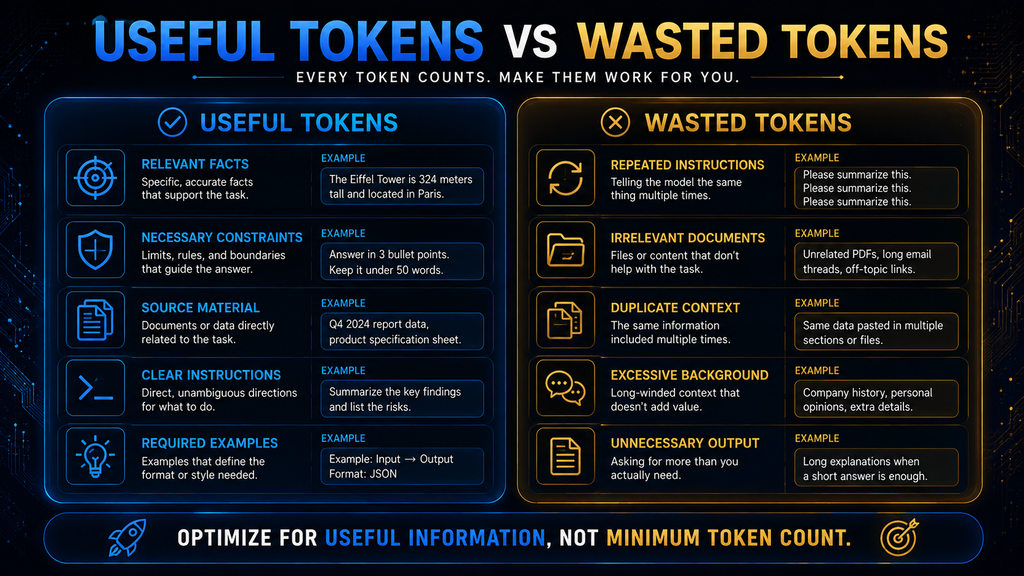
Useful tokens improve the model’s ability to do the task: relevant facts, important constraints, the right document sections, clear output requirements and examples that show the format you want. Removing them usually makes the answer worse, even if the prompt looks tidier. These are the tokens you should protect.
Wasted tokens use context without improving the result: repeated instructions, irrelevant documents, boilerplate that never changes the answer, long pasted threads when only the last message matters and requests for much longer answers than you need. These are the tokens worth cutting. Cutting them improves speed and cost without hurting quality.
The goal is the best possible ratio of useful information to result. That principle matters more as workflows grow, because every wasted token is repeated on every request, across every user and every day. Small savings per request become large savings at scale. Efficiency is about value, not volume. Review your longest prompts first.
A Simple Token-Efficiency Workflow
You can apply this without writing any code. Step 1: define the task, deciding what you want the AI to accomplish before you gather material. Step 2: remove irrelevant context. If a document has ten sections and two matter, share those two rather than the whole file. Smaller, focused inputs are easier for the model to use well.
Step 3: keep critical constraints. Do not delete information just because it uses tokens; if a constraint changes the answer, keep it. Step 4: specify the output you need, such as five bullet points, a 200-word summary or a table, so the model does not produce far more than you can use. A clear format request is one of the easiest ways to control output length.
Step 5: check the result. Shorter is not automatically better, so confirm the answer solves the problem. Step 6: optimize only after the workflow works. First make it reliable, then trim unnecessary tokens. This order is much safer than cutting tokens from the start and wondering why quality dropped. Reliability first, efficiency second.
For long documents, our guide to compressing long documents for AI shows techniques for keeping the important context while reducing length. They work in chat assistants as well as in automated workflows. Summaries, extracts and structured notes are the most common approaches, and each suits different kinds of material.
Why Longer Prompts Are Not Automatically Better
It is tempting to assume that giving an AI more information always makes it smarter. More context helps when the information is relevant. Irrelevant context can make a task harder, increase processing time and bury the details that matter under material the model has to sift through. More is only better when it is relevant.
A 100-page document is not automatically better input than a carefully chosen five-page extract. The right question is how much relevant information the model needs to make a good decision, not how large its context window is. Capacity is useful, but it does not replace good selection. Selection is a skill worth practicing.
A large context window gives you room. It does not remove the need to choose what goes into that room. In practice, the best results often come from smaller, sharper inputs that contain exactly what the task requires and little else. Think of the window as a desk: a bigger desk helps, but only if you put the right papers on it.
Do Code, URLs and Numbers Use Tokens Differently?
They can. Tokenizers are not built only for ordinary prose. Code contains symbols, brackets, indentation, operators and unusual variable names, all of which can split into many tokens. URLs contain slashes, dots, query strings and random-looking identifiers that tokenize inefficiently compared with ordinary words.
Numbers can also be represented in ways that do not match how people group them visually. A long number may be split into several pieces, which is one reason models sometimes struggle with precise arithmetic on long figures. For important calculations, use a calculator or spreadsheet rather than relying on a language model.
So a 500-word coding prompt should not be assumed to have the same token count as a 500-word essay. For developers, this matters when estimating API cost, context use, latency and how many documents can fit in a retrieval step. For ordinary users, the lesson is simple: word count is not a reliable substitute for token count when precision matters.
Tokens Are Not Just About Text
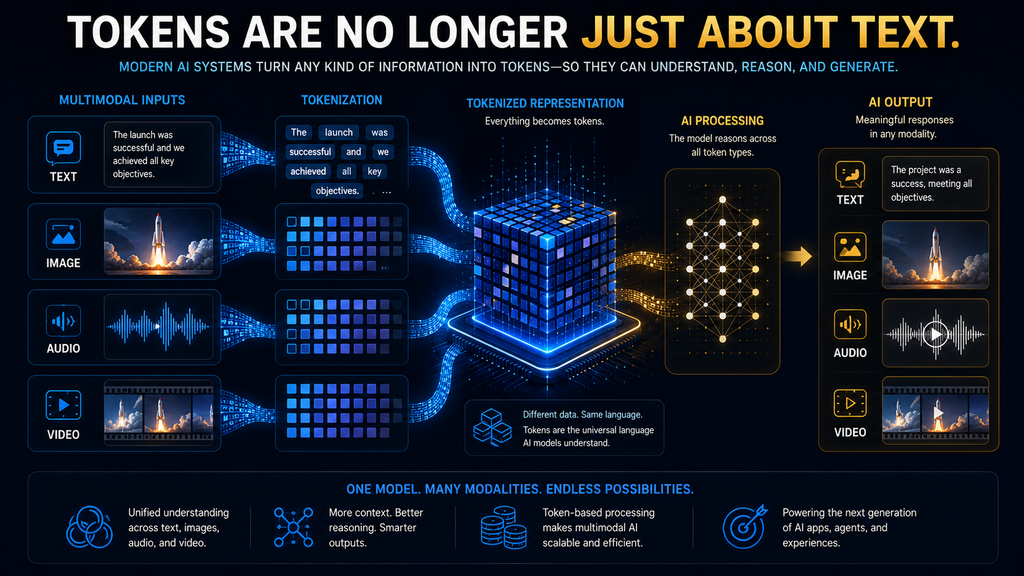
Modern AI systems are increasingly multimodal, which means tokens are no longer only a text concept. Google’s token documentation states that all input to the Gemini API is tokenized, including images, video and audio, and it gives token counts for each kind of input. That makes media files part of every token budget.
For example, Google says images up to 384 pixels in both dimensions count as 258 tokens, with larger images split into more. Video and audio are also converted into token counts based on their length. Higher processing resolution can increase token use, which affects both cost and speed for media-heavy tasks.
You do not need to memorize these formulas, because they change between models and versions. The durable idea is that the old model of “words become tokens” has become “information becomes model-specific tokens.” Images, recordings and video clips all use context capacity, just like text. Plan for that when you upload large files or long recordings.
Do You Need to Count Tokens Every Time?
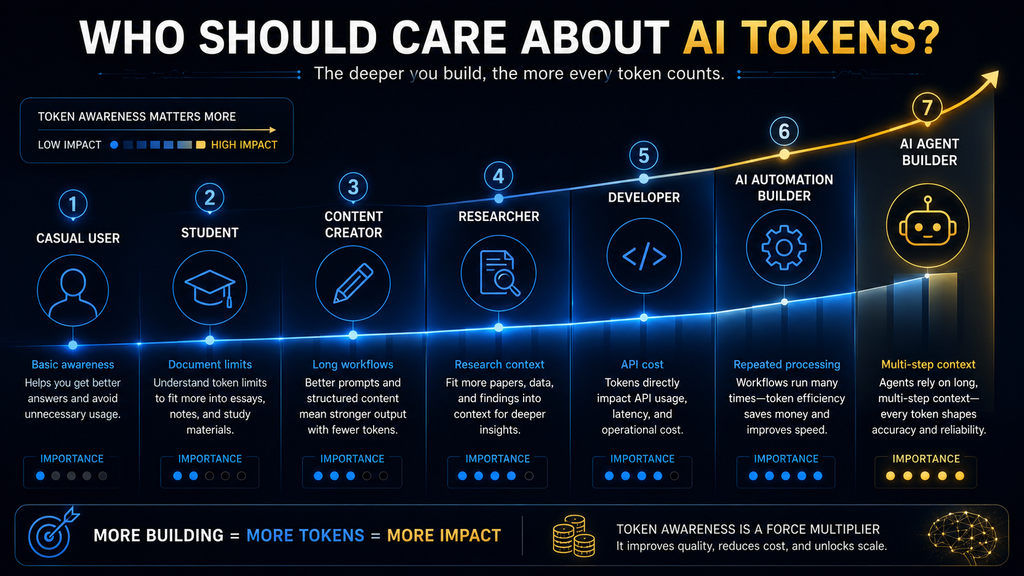
No. Most casual users never need to count tokens. If you ask an assistant to rewrite an email, explain a concept or brainstorm ideas, the product manages token use for you. Token awareness becomes useful when conversations get very long, when you work with large documents or when you send the same context over and over.
It matters most when you use APIs, build automations or agents, process many files or need predictable costs. Think of it like fuel consumption. You do not calculate fuel burn for a trip to the shop, but if you run a delivery fleet, fuel efficiency becomes a serious business variable that you track closely.
| User | How much token knowledge matters | Why |
|---|---|---|
| Casual AI user | Low | Consumer apps manage tokens automatically |
| Student | Moderate | Helps with long documents and context limits |
| Content creator | Moderate | Useful for large research packs and long workflows |
| Researcher | Moderate to high | Important when processing many documents |
| Developer | High | Directly affects cost, limits and architecture |
| Automation or agent builder | Very high | Multi-step workflows reuse context repeatedly |
Nobody needs to become a tokenizer expert. The goal is to recognize when token behavior becomes a practical constraint on cost, quality or speed. Our guides to what an AI agent is and how AI agents use tools explain why agents use so many tokens. Most people only need the basics covered in this guide. Knowing when to care is the real skill.
How to Check Token Counts Yourself
You can measure tokens without writing code. OpenAI’s tokenizer page lets you paste text and see how it splits and how many tokens it uses. That is the quickest way to build intuition, and it is useful for checking whether a long document or prompt is likely to fit within a model’s limits. Try it with a paragraph you write often.
Developers have more precise options. Google’s Gemini API offers a token-counting call that returns the number of input tokens before you send a request, and its responses include usage data broken down into input, output, thinking, cached and tool-use tokens. Other providers return similar usage figures with every API response.
A practical routine is to measure a few real samples of your content, such as a typical prompt, a typical document and a typical answer, with the tokenizer for your chosen model. Multiply by your expected volume, add a margin for hidden instructions and conversation history, and you have a realistic estimate for planning.
Re-measure when you change models or add features such as retrieval or tools, because each change can shift token use significantly. Comparing models side by side, as in our look at prompting ChatGPT, Claude and Gemini, can also reveal how differently each one handles the same task. Keep your measurements in a simple log.
Common Token Mistakes
Thinking One Word Equals One Token
Tokens can be whole words, parts of words, punctuation or spaces attached to words. Word counts give only a rough guide. If you need precision, use the model’s own tokenizer instead of converting words with a fixed ratio. Ratios are fine for quick planning but not for budgets or hard limits. Precise counts need the right tool.
Treating Four Characters as Exactly One Token
The four-character figure is a rough English rule of thumb from OpenAI and Google, not an exact rule. Code, numbers, URLs and other languages can differ widely, so treat it as a starting estimate rather than a measurement. Measure real samples of your own content when the number matters. Your content may differ from typical prose.
Assuming Every Model Uses the Same Tokenizer
Different models and encodings split the same text differently, so counts from one tool do not transfer to another. Always count with the tokenizer for the model you plan to use, especially when comparing costs between providers. Small differences per request can add up over thousands of calls. Compare like with like.
Confusing Token Limits With Word Limits
Context limits are set in tokens, not words or pages. A document that fits by word count may still exceed a token limit, especially if it contains tables, code or non-English text. Check the token count before assuming it fits. Most providers offer a counting tool that gives the exact figure. Use it before uploading very large files.
Assuming a Bigger Window Means Better Answers
More capacity does not guarantee better selection or reasoning. A model can still miss details in a very long input. Good information selection often matters more than the raw size of the context window. Put the most important information where the model is least likely to miss it, such as near the start or end.
Cutting Every Token You Can
Removing useful context to save tokens often makes results worse and costs more in follow-up prompts. Cut repetition and irrelevant material, but keep the facts, constraints and examples that shape a good answer. Aim for complete but focused prompts. A good answer on the first try is the cheapest result of all.
A Practical Token Reality Check
When token counts matter, ask five questions. Which model am I using, since tokenizers and limits differ? What language is the content in, since English estimates may not apply? What kind of information am I sending: plain text, code, structured data or media? Each behaves differently. Each type uses tokens at a different rate.
Then ask whether you are measuring input, output or total use including thinking tokens, and what constraint you are trying to solve. Fitting inside a context window, reducing cost and speeding up responses can each require a different kind of optimization, so name the goal before you change anything. Clear goals lead to sensible trade-offs.
Consider a research workflow. A beginner might load forty sources into a large context window and hope for the best. A better approach selects the three most relevant PDFs and the key sections of four articles. The model then spends its capacity on useful evidence, and the answer is usually sharper and cheaper to produce.
What Happens If You Ignore Token Limits?
For casual users, usually very little. The app manages the constraint quietly, perhaps by trimming old messages. For developers and workflow builders, ignoring tokens can cause real problems: requests that exceed the context window, unexpectedly high API bills and systems that slow down or fail as usage grows.
That is why token use should be treated as an operational metric once AI moves into production. Track average tokens per request, the share used by instructions and retrieved material, and how totals change as features are added. Small inefficiencies multiply quickly across thousands of users. Dashboards that show token use per feature make problems visible early.
The useful question is whether that much context is necessary for the result you need. Answering that question honestly is the most reliable way to control cost, speed and quality together. The answer is usually less than people expect. Focused inputs tend to give better answers, too. Start small and add only what helps.
How to Think About Tokens in 2026
The old mental model was simple: tokens are pieces of words that determine AI pricing. That is no longer enough. Tokens now connect language representation, context capacity, model processing, output generation, multimodal input and AI economics, all at once. Understanding those connections makes AI tools far easier to use well.
For simple chatbot use, tokens stay mostly invisible, and AI search tools hide them too, as our guide to how AI search engines work explains. For serious AI workflows, they become a design concern, especially when a system combines long documents, retrieval, tool calls, memory and multi-step agents. Each of those features adds tokens, and together they shape what the system can do and what it costs.
As models handle ever larger contexts, the key question shifts from “how many tokens can this model handle?” to “which information deserves those tokens?” That is the more important skill, and it is the same skill that makes prompts clearer and answers better in everyday use. Choosing well will matter more as context windows keep growing.
How We Researched This Guide
This guide is based on official documentation and published research, not hands-on testing for this article. We reviewed OpenAI’s help article on understanding and counting tokens and its tokenizer tool, Google’s Gemini documentation on understanding and counting tokens, Anthropic’s pricing documentation, Hugging Face’s guide to tokenization algorithms and the 2015 paper on subword units for rare words.
Token figures such as four characters per token, 60 to 80 words per 100 tokens and 258 tokens per small image are taken from provider documentation as of October 2026 and apply to those providers’ models. The useful-versus-wasted framing and the six-step workflow are AI Hustle World’s editorial guidance.
Final Thoughts
Tokens are easy to misunderstand because they sit underneath almost everything you see when using AI. You type words, the system tokenizes them, the model processes those tokens and generates new ones, and those become the answer you read. Once you see that pipeline, limits, context windows and costs stop looking like unrelated jargon.
You do not need to count tokens when asking an AI to rewrite an email. You do need to understand them when you start asking bigger questions: how much information can this system handle, how much context should I give it, why did usage jump and why does another model count the same text differently? Those questions are where token knowledge pays off.
Remember one idea above the rest: beyond counting AI usage, tokens are the bridge between human language and the computation that makes language models work. Spend them on information that improves the result, and you will get better answers at lower cost. To go further, see our guide to how large language models work.
Choose the AI Tool That Solves the Right Problem
Tokens are the units language models read and write; see how LLMs use them to produce text.
Learn How Large Language Models Work →Frequently Asked Questions
Are AI tokens the same as words?
No. A token can be a whole word, part of a word, punctuation or a space attached to a word. The exact split depends on the model’s tokenizer and the language of the text.
How many words are in one AI token?
There is no exact rule. OpenAI estimates about three-quarters of an English word per token, and Google estimates 60 to 80 English words per 100 tokens for Gemini. Other languages can differ.
Why does AI use tokens instead of whole words?
Tokens let a model represent common words efficiently while building rare or new words from smaller pieces. That keeps the vocabulary manageable and lets the model handle text it has never seen.
Do spaces and punctuation count as tokens?
They can. Spaces often attach to the following word, and punctuation is frequently its own token. Exactly how they are counted depends on the tokenizer.
Why do different AI models give different token counts?
Different models use different tokenizers, so the same text splits into a different number of pieces. Some tools also include hidden instructions in their totals.
What is the difference between input and output tokens?
Input tokens are everything sent to the model, including hidden instructions and history. Output tokens are what the model generates. APIs often price them differently.
What is a context window?
It is the maximum amount of tokenized information a model can handle in one interaction, covering instructions, documents, history and the answer. Sizes vary widely by model.
Do AI tokens affect API costs?
Usually, yes. Many APIs charge per input and output token, with output often costing more. Consumer subscriptions typically use monthly fees with usage limits instead.
Do images and audio use tokens?
In many multimodal models, yes. Google says all Gemini API input is tokenized, including images, video and audio, with set token counts for each type.
Should I always try to reduce my token count?
No. Cut repetition and irrelevant material, but keep the context that shapes a good answer. A prompt that is too short often costs more in corrections.
Related Guides
- How AI Models Understand Language: Explained Simply for Beginners
- What Is an AI Agent? A Beginner’s Guide to How Autonomous AI Works
- How to Compress Long Documents for AI Without Losing Important Context
- A Beginner’s Guide to Writing AI Prompts That Generate Better Results
- AI Copyright Explained: What Businesses Need to Check Before Publishing
Written by
Muntasir Ahmad Chowdhury
Founder, AI Hustle World
Muntasir Ahmad Chowdhury is the Founder of AI Hustle World, an independent publication dedicated to making Artificial Intelligence practical, trustworthy, and easy to understand. He researches AI tools, automation, customer service, productivity, and real-world business applications, helping readers make smarter technology decisions through research-driven, experience-backed content.
Expertise:
AI Tools • AI Automation • AI Customer Service • AI Productivity • Generative AI • AI Workflows
Get Smarter With AI
Enjoyed this guide? Get practical AI tools, tutorials, and honest reviews delivered to your inbox.