Best AI Model Hosting and Inference Platforms for Developers in 2026
Your model works on a laptop. Then the first real users arrive, and a decision you barely noticed during development becomes the entire product experience: who runs the model, where its weights live, how long a cold request waits, and what you pay while no one is using it. A quick API integration can hide those decisions for a while. It cannot remove them.
The best hosting platform is therefore the one that fits your particular model, traffic pattern, latency target, and appetite for operating infrastructure. A team calling a popular open model a few hundred times a day needs a different service from one deploying its own fine-tuned weights behind a customer-facing application. This guide compares eight credible options across those situations, then gives you a repeatable way to choose and test one.
How we researched: This comparison draws on official documentation checked September 24, 2026. AI assisted the research and drafting; no first-hand hosting benchmark was performed. Features and prices can change, so verify them and test your own request trace before committing to production.
In this guide
- First decide what you are actually hosting
- How this comparison makes a recommendation
- The eight platforms, by workload fit
- A quick selection map
- Use the Fit Score as a real decision worksheet
- Turn published prices into the cost of your workload
- Benchmark the experience your users will see
- Three workloads that change the answer
- Production details that the price page cannot settle
- From fine-tuned model to dependable endpoint
- When hosting locally is the right comparison
- Final thoughts
- FAQ
First decide what you are actually hosting
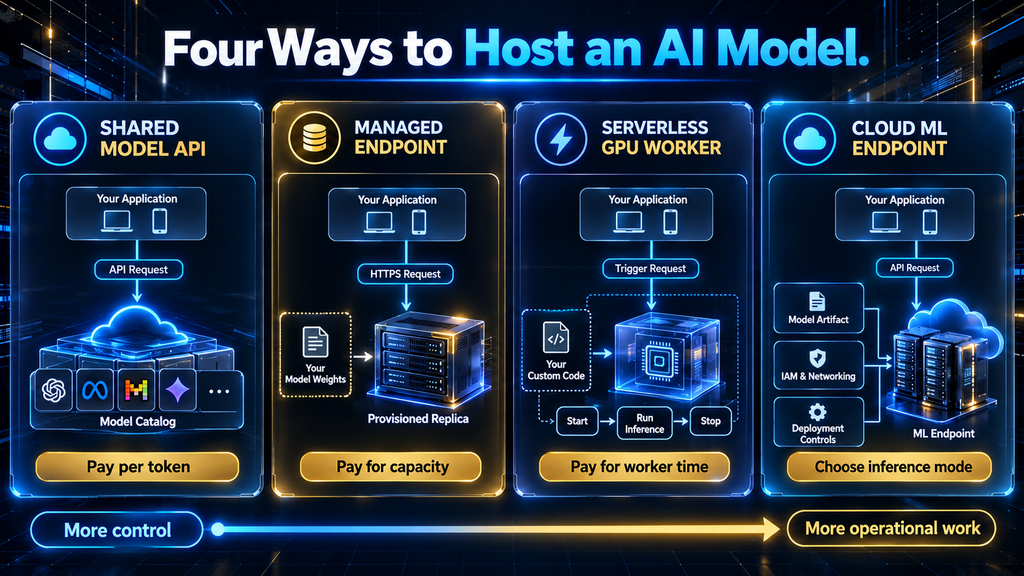
“AI hosting” covers several products that appear together in search results but transfer very different amounts of responsibility to you. A provider-hosted model API lets you choose from a catalog and pay for requests or tokens. A managed endpoint lets you deploy specified weights on provisioned infrastructure. A serverless GPU platform runs your own handler or container and charges for compute activity. A rented GPU or cloud ML endpoint gives you still more control, along with more work around the serving stack.
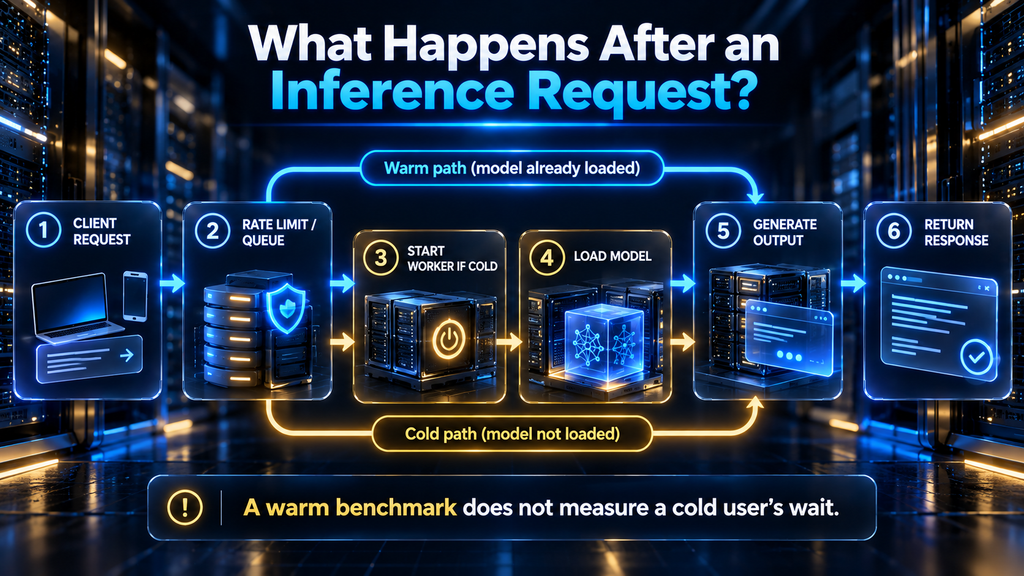
The distinction matters as soon as you change the model. If a shared API does not offer your exact fine-tune, its attractive token price is irrelevant. If you need a specialized preprocessing stage, a hosted chat-completions API may be too restrictive even if it supports the base model. And if a GPU worker scales to zero, the first user after a quiet period may experience container startup and weight loading rather than the warm response advertised by a demo.
| Lane | You provide | Main billing unit | Most useful when | Main constraint |
|---|---|---|---|---|
| Shared model API | Requests and model choice from a catalog | Input/output tokens or requests | You need a popular model live quickly | Catalog, rate limits, and less control over serving |
| Managed model endpoint | Weights, model configuration, sometimes a container | Replica uptime or provider-specific compute | You need stable access to your own model | Provisioning and idle capacity can dominate cost |
| Serverless GPU or custom worker | Inference code, dependencies, and often an image | Worker or function compute time | You need a custom pipeline and variable traffic | Cold starts, queueing, and runtime ownership |
| Cloud-native ML endpoint | Model artifact, deployment configuration, cloud integration | Instance or inference usage by mode | Your workloads and controls already live in that cloud | Configuration and account-level complexity |
This article owns the hosting decision after you have a candidate model and an application workload. It does not choose the model for you or teach the training process. If you are still deciding whether to change weights at all, read our explanation of full fine-tuning, LoRA, and when to use each before committing to a custom-model endpoint. A serving plan for a stock model can be simpler than a serving plan for a model whose weights, adapters, or versions you control.
How this comparison makes a recommendation
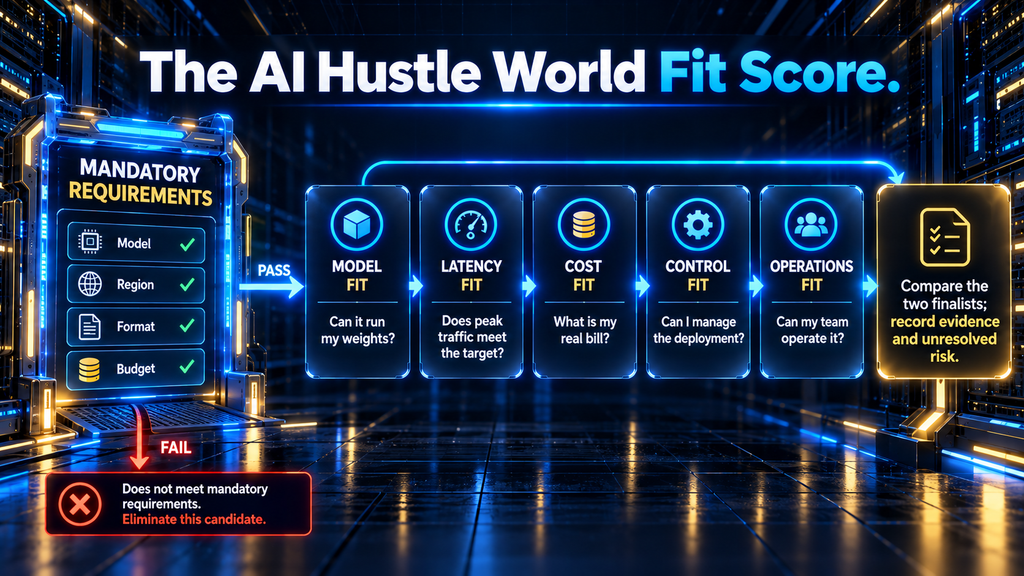
The AI Hustle World Fit Score is a reusable decision frame with five questions: model fit (can the service run the weights and runtime you need?), latency fit (does it satisfy your measured response target at peak traffic?), cost fit (what is the bill at your actual utilization?), control fit (can you configure, secure, and observe the pipeline?), and operations fit (can your team maintain the deployment?). Start by ruling out a provider that fails a required condition. Among the survivors, test the dimensions most likely to change the user experience or the monthly bill.
There is no universal numerical rating in this guide. Provider docs can establish that a feature exists or how billing works; they cannot supply an honest latency score for your prompts, model revision, region, and concurrency. The recommendations below describe the workload each product is a sensible candidate for, the point where it can fail, and what to verify before signing off.
Keep the model and request mix constant when comparing two providers. MLCommons’ MLPerf Endpoints methodology makes the relevant performance dimensions explicit: system throughput, tokens streamed per user, time to first token at the 95th percentile, and concurrency interact. A single “tokens per second” number cannot tell you whether a chat interface feels responsive when other users arrive.
The eight platforms, by workload fit
Fireworks AI: a fast starting point for catalog models with a path to dedicated deployment
Fireworks AI documents serverless access to popular models with per-token billing and a separate deployment route on dedicated GPUs. That combination is useful when you want to prototype with a catalog model and later isolate a production workload without immediately rebuilding your application around another provider. Its documentation also describes fine-tuning and deployment workflows, so teams changing the model itself can inspect a route beyond the shared API.
The first question is whether the exact model, version, context behavior, and output mode you need are available in the lane you intend to buy. A serverless listing does not imply that your own fine-tune can run under the same price and scaling rules. Ask how a dedicated deployment handles minimum replicas, scale-up, request limits, observability, and failover; then measure the p95 first-token time with your real prompts. Fireworks is a strong candidate when the catalog fits and you want deployment choices, but a provider’s speed claim is not a substitute for a matched workload test.
Together AI: a clear choice between token billing and reserved GPU capacity
Together AI explicitly separates serverless shared inference, dedicated endpoints, and dedicated containers. The shared lane pays per input and output token; a dedicated endpoint reserves GPU capacity and charges for it while provisioned; a dedicated container gives you control over inference logic and packaging. That makes Together especially easy to evaluate when your architecture may move from a standard open model to pinned or fine-tuned weights.
Its main tradeoff is the familiar one hidden by “serverless versus dedicated” comparisons. Shared inference avoids an idle GPU bill but can bring variable tail latency or a catalog constraint. Reserved capacity can improve predictability and make sense at sustained load, yet you pay for unused hours and still need to size it. If the output is interactive, compare p95 first-token delay at peak concurrency; if it is batch work, compare total completed tokens per paid GPU-hour. Do not infer the cost crossover from someone else’s prompt length or their hypothetical GPU rate.
Hugging Face Inference Endpoints: a natural home for Hub models and owned weights
Hugging Face Inference Endpoints is a managed deployment service connected to the Hub, with documented support for inference engines such as vLLM and SGLang and for custom containers. If your team already tracks model revisions and artifacts on Hugging Face, that connection removes some packaging friction. It is particularly relevant when the deliverable is a specific model you own, rather than a request to whichever model happens to be in a public API catalog.
The product’s pricing documentation says endpoint compute is charged while a deployed endpoint initializes and runs, with instance prices displayed hourly and calculated by the minute. Evaluate minimum replicas, autoscaling behavior, instance availability, and the model-loading path before equating a listed GPU rate with a per-request cost. A small model used sporadically might spend much of its budget waiting for traffic; a steady workload can make the same dedicated instance more attractive.
The value of this lane becomes clearer with your own weights. If you used LoRA to adapt a base model, check whether the engine and endpoint configuration serve that adapter in the form you trained, or whether you must merge it and publish a new artifact. That is a deployment compatibility question, not a reason to select a platform from an API price table.
Baseten: managed deployment for a custom serving stack
Baseten’s deployment documentation lets developers select CPU, RAM, GPU, and VRAM resources for a model deployment, while its development and hosting documentation covers custom containers and multiple hosting arrangements. This is a fit for teams that need to package more than a standard chat model: a particular inference engine, preprocessing, postprocessing, or a controlled production release path. Its managed layer takes on infrastructure tasks while leaving meaningful control over the runtime and resources.
That flexibility requires a more exact specification from you. Choose enough VRAM for weights, KV cache, context length, and concurrency, then confirm how replicas scale and what happens during a rolling update. Baseten itself notes that insufficient resources can fail a deployment or cause memory errors and that excessive resources increase cost. Compare an equivalent runtime and model on competing services rather than assuming that two nominally similar GPU names imply the same effective throughput.
Training quality also affects the hosting bill. A dataset with unnecessarily long examples or inconsistent formatting can produce an endpoint that spends extra compute on prompts and retries. If you are preparing your own weights, the dataset preparation guide is the upstream check; hosting can make a good model available, but it cannot correct poor labels after deployment.
Replicate: straightforward model execution with optional deployment control
Replicate makes it easy to invoke models from its catalog and documents a way to deploy a custom model. Its separate Deployments product provides private dedicated endpoints, hardware selection, scaling rules, warm instances, and rollout controls. That span makes it attractive to a developer testing a multimodal or specialized model who may later need a production endpoint for a specific version.
Look carefully at which product a price or latency claim describes. The cost of a public model invocation and that of a dedicated deployment can follow different rules, and a scale-to-zero endpoint may spend time starting before it can answer. Replicate documents per-second hardware rates for its compute products on its pricing page; the effective cost per completed prediction still depends on startup, execution, idle settings, and the number of requests served by each running instance. For sporadic image or video jobs, async completion may matter more than first-token latency.
Modal: code-first control for inference functions and dedicated model endpoints
Modal is useful when inference is part of an application you want to express in code: dependency setup, GPU selection, a model loader, and the request handler can live in one deployment workflow. Its current Endpoints documentation also distinguishes shared endpoints for selected library models from dedicated endpoints that support custom weights and configurable autoscaling. A developer can therefore consider a managed model endpoint as well as code-driven GPU functions, rather than treating Modal as only a generic serverless worker.
The cost model changes with that choice. Shared endpoints bill by token, while dedicated endpoints charge for compute resources; Modal’s pricing page publishes GPU, CPU, and memory units for compute workloads. You still need to account for container startup, model-loading strategy, cache persistence, and concurrent requests. Modal is a strong fit when your team can own the Python runtime and benefits from that flexibility; it is a weaker fit if you simply need one turnkey catalog API and no custom serving logic.
Runpod: GPU workers and pods when you want to own more of the runtime
Runpod Serverless runs a handler in your container behind an endpoint, starts workers in response to traffic, and can scale idle workers down. Its documentation describes request queueing for traditional endpoints and a load-balancing mode for custom HTTP services; Runpod also offers Pods when you want a more directly managed GPU environment. This is valuable for teams that already have a working container or require a nonstandard pipeline that does not fit a catalog-model API.
“Pay per second” needs a precise reading. Runpod’s Serverless billing guide says a worker is billed from startup until it fully stops, including initialization, execution, and its configured idle timeout, with storage as an additional component. A cold request can wait for the container and weights to load, while keeping active workers warm adds standing cost. Runpod can offer fine-grained control, but you own container behavior, dependency updates, memory use, and a meaningful part of troubleshooting.
Amazon SageMaker AI: an integrated choice for an existing AWS ML workflow
Amazon SageMaker AI documents real-time, serverless, and asynchronous inference modes. It supports custom model deployment with SDK and infrastructure tooling, which matters if your organization already uses AWS identity, networking, storage, monitoring, and release controls. The key reason to consider it is the fit with that operating environment and the ability to select an inference mode for a real workload.
The same range creates a comparison trap. An AWS serverless endpoint that tolerates cold starts, a provisioned real-time endpoint, and an asynchronous queue solve different problems and have different bills. Check the hardware and model compatibility of the exact mode you propose; do not assume every large generative model fits every serverless configuration. SageMaker can be the right operational home for a regulated or established AWS team, but the setup effort may be disproportionate for a solo developer making a few calls to a popular model.
A quick selection map
| Platform | Consider it first when | Verify before choosing |
|---|---|---|
| Fireworks AI | Catalog model now; potential dedicated deployment later | Exact model and serving-lane support |
| Together AI | You want a clear shared API to dedicated-capacity path | Peak latency and reserved-capacity utilization |
| Hugging Face Inference Endpoints | Your owned model artifacts already live on the Hub | Instance uptime cost and engine compatibility |
| Baseten | You need a managed, configurable custom-model deployment | Resource sizing and scaling behavior |
| Replicate | You need catalog access or a deployment for specialized models | Invocation versus deployment billing |
| Modal | Your team wants inference deployment expressed in code | Shared versus dedicated versus function costs |
| Runpod | You own a container and want GPU worker control | Cold starts, queueing, and billed worker lifetime |
| Amazon SageMaker AI | Your ML operations already run on AWS | Mode-specific hardware and setup effort |
If you need a popular model today and the request format is conventional, begin with a shared API from Fireworks or Together; Modal’s selected shared endpoints are another candidate if its catalog fits. If you own weights on the Hub, begin with Hugging Face Inference Endpoints and compare a Baseten deployment for greater control over packaging and operations. If the application is a custom GPU program rather than only a model call, compare Modal and Runpod. If your ML workflow already belongs to AWS, include SageMaker AI before adding a separate provider.
Replicate cuts across this map: it can be a convenient first stop for a catalog model, especially for specialized media tasks, and its Deployments product becomes relevant when the model version and endpoint behavior must be controlled. These are starting candidates, not automatic winners. The next sections explain what to measure so the short list survives contact with actual traffic.
Use the Fit Score as a real decision worksheet
Begin with a short specification that each contender must satisfy. State the model’s exact revision and license, the prompt and output formats, the data region if one is required, peak requests in flight, acceptable p95 latency, recovery expectation, and a budget ceiling. Mark a requirement as mandatory only if failure would prevent launch; otherwise record it as a preference. This step avoids a common mistake: comparing attractive prices for services that cannot run the model or satisfy a required deployment constraint.
For model fit, attempt the actual deployment or invoke the actual catalog entry, then check the tokenizer, context limit, precision, adapter support, and output mode. A platform’s claim to support “open models” does not establish that it serves your revision with the runtime settings you need. If the model is available only through a custom container, that changes operations fit as well as model fit. Record that dependency before calling it an equal alternative to a managed catalog API.
For latency fit, choose a target that reflects the product: perhaps a first-token threshold for a chat interface or a completion deadline for an asynchronous job. Run the same request trace at normal and peak concurrency, with both warm and cold starts where relevant. A provider passes only if the observed result satisfies the target under the conditions you specified. If it passes with one warm replica, write down the cost of keeping that replica warm; the performance result and the bill belong on the same line.
For cost fit, compute the three daily scenarios from the pricing worksheet below and add any plan minimum, storage, or required warm capacity. Show the cost of successful work, not just requests attempted: failed or retried calls can consume resources without producing useful output. If one candidate is cheaper only at a volume you have not reached, record that as a future option rather than assigning today’s win to it. Revisit the worksheet when traffic, model size, or output length changes.
For control fit, check the settings your application actually requires: pinned weights, deployment revisions, scaling limits, observability, region selection, access controls, and a rollback route. For operations fit, name who will update dependencies, respond to failed deploys, and investigate late-night memory errors. The most configurable product can score poorly for a team that cannot staff its operational demands. Conversely, a managed endpoint can score poorly when the product needs a custom runtime it cannot express.
Finish with a written comparison of the two finalists: mandatory conditions passed, workload measurements, estimated normal and peak bills, outstanding provider questions, and an owner for each operational task. Do not average the five dimensions into a magic number that hides a disqualifying failure. If both pass, choose the one that leaves less unresolved risk in the dimension your users care about most. This decision record is the useful output of the Fit Score; the platform name alone is not.
Turn published prices into the cost of your workload
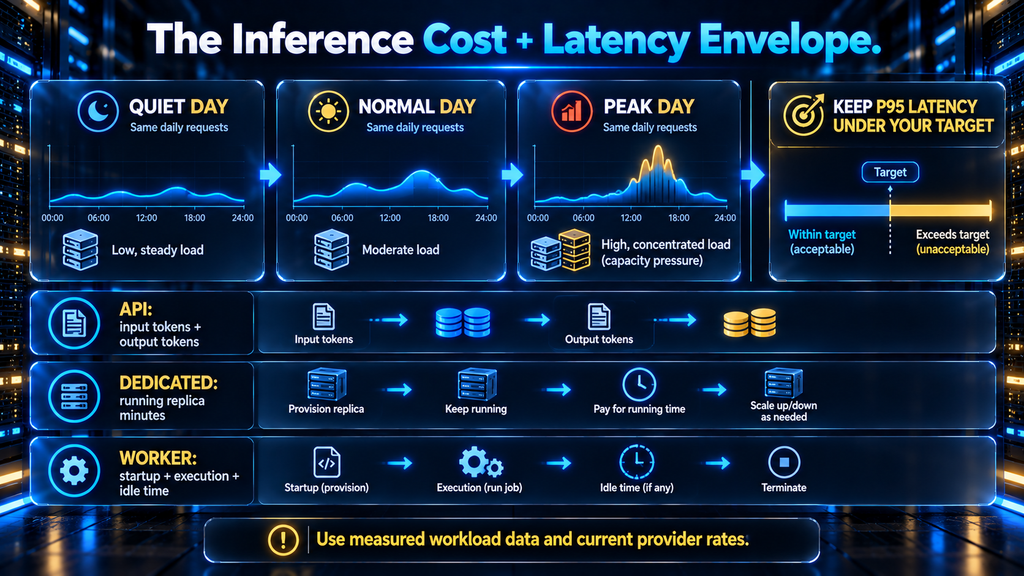
A per-token price and a GPU-hour price cannot be compared by looking at the smaller number. Take a representative day of traffic, separate input tokens from output tokens, and include each model and modality that will be called. For a shared text API, an initial estimate is input tokens ÷ 1,000,000 × input rate + output tokens ÷ 1,000,000 × output rate, adjusted for the provider’s current rules on caching, batch requests, and other billable operations. The rate must be the one attached to your exact model and plan.
For a dedicated endpoint, start with sum of running replica minutes × rate per replica minute, and include billable initialization or scaling transitions where the provider specifies them. For serverless GPU workers, use sum of billed worker seconds × compute rate, then add storage and other applicable charges. Runpod’s documented worker lifecycle is a good reminder that startup and idle timeout are billable in some serverless products. The published unit is only the first line of the worksheet.
Consider an illustrative support assistant that answers 10,000 requests per day. If the average request has 1,200 input tokens and 300 output tokens, the daily text workload is 12 million input and 3 million output tokens before retries, retrieval additions, or caching. Multiply those counts by each candidate’s current model-specific rates; for a dedicated option, measure how many replicas are needed to hold your latency target during peak hours, then price their actual running schedule. This is arithmetic to structure a test, not a measured provider comparison or a forecast of a real customer’s bill.
Now change only one assumption in that example. If the application adds 800 retrieved tokens to every prompt, input volume rises by 8 million tokens a day, while output volume remains the same. That is why a seemingly small change in retrieval configuration can move the bill without changing the number of users. If the provider offers prompt caching, determine which prefixes are actually reused and how cached input is billed; do not apply a discount to every input token simply because the feature appears on a pricing page.
Run a similar sensitivity check for failures. A five percent retry rate would mean 500 additional attempts on a 10,000-request day if every failed attempt is retried once, but the bill depends on when each failure occurs and what the provider charges for it. Record failed work and billed units from the test rather than multiplying a guessed surcharge into the forecast. The practical budget question is what you can afford on an unusually busy day while maintaining the experience you promised, not the cheapest possible average-day headline.
The crossover depends on utilization, not merely total monthly requests. A service handling the same 10,000 requests in a two-hour burst needs a different capacity plan from one receiving them evenly over 24 hours. Long outputs occupy decoding capacity; long inputs affect prefill and time to first token; concurrency can force another replica even when average daily GPU utilization looks low. Calculate a normal week, a peak day, and a quiet day, then include a capacity margin for retries and failures.
Do not overlook model memory. Quantization can reduce the memory needed to run a model, which may expand your hardware choices, but a smaller footprint is not a free performance win. Check the precision format that the provider and engine actually support, evaluate quality on your task, and retest latency at the intended context length. A lower hourly GPU quote is useful only if the model still produces acceptable answers at adequate throughput.
Benchmark the experience your users will see
Start with a small, reproducible request trace: short and long prompts, short and long outputs, any retrieval context, tool calls if the app uses them, and the expected peak concurrency. Fix the model revision and generation settings. Run a warm test, then an idle-to-first-request test, because they answer different questions. Record request success, time to first token, output tokens per second per user, total latency, queue wait, and billed units.
For a chat interface, p95 first-token time and per-user streaming speed matter because the slowest common experience is what people remember. For offline classification or document extraction, completed jobs per hour and cost per valid result may matter more. Increase concurrency until the latency target fails; the useful throughput is the throughput at that boundary, not the largest number in an unconstrained benchmark. MLPerf Endpoints offers a helpful vocabulary for reporting those tradeoffs consistently.
Apply the same test to the same model on each candidate when possible. Region, context length, cache state, batch size, model precision, and request scheduling can change the apparent result more than a logo on the invoice. A provider result for another model or a marketing claim about peak throughput is evidence about its demonstration, not your deployment. Keep the logs and date of your test so a later pricing or model change can be assessed honestly.
Three workloads that change the answer
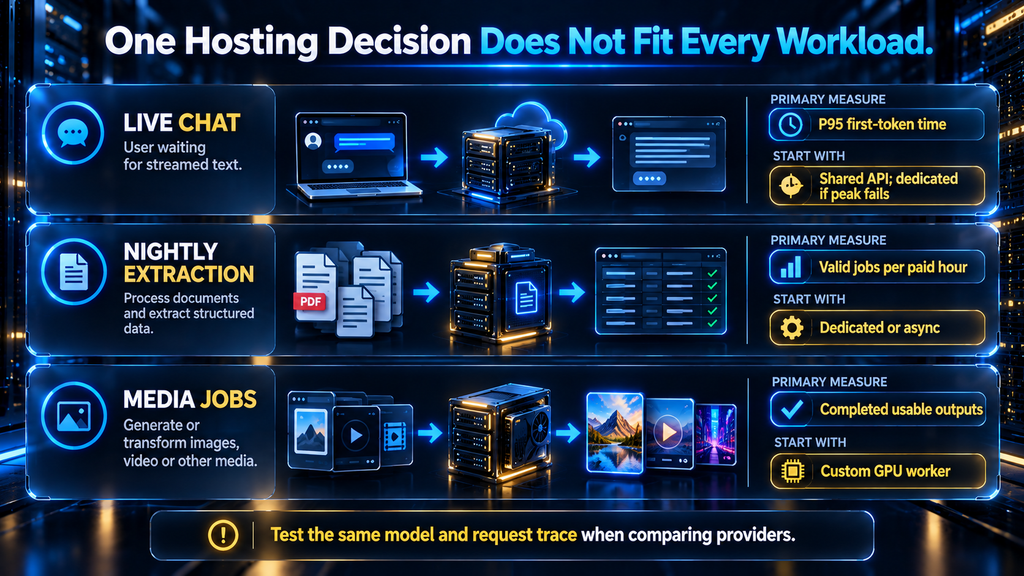
A customer-facing assistant with uneven demand
Imagine a support product with long retrieval context, short conversational replies, and a sharp spike when customers in one time zone begin work. A shared model API is a reasonable first deployment if the model fits, because it avoids buying a quiet overnight GPU. The real test is the first-token delay during the morning spike, when prompt prefill, simultaneous users, and provider-side limits can all surface together. If a shared service misses the target, a warm dedicated endpoint for that feature may be a better use of money than moving every AI feature to reserved capacity.
Look at the complete request path before blaming the host. Retrieval may add seconds before the model ever receives a prompt; excessive document chunks increase input tokens and prefill time; a browser UI may buffer the stream. Separate retrieval time, network time, queue wait, model time, and client rendering in your logs. The hosting decision can fix a saturated endpoint, but it cannot fix a needlessly large prompt or a frontend that waits for the full answer before displaying anything.
A nightly extraction job with your own model
Now imagine an internal pipeline that reads many documents overnight and writes structured fields into a database. People are not waiting for the first token, so maximize valid documents completed per paid hour rather than optimizing a chat benchmark. A dedicated endpoint that stays busy for the batch window, a configurable serverless worker, or an asynchronous cloud endpoint can all make sense. The winning route depends on job size, acceptable completion time, batching opportunities, and how much failed work must be retried.
This is where custom weights matter. If a compact fine-tune extracts the needed fields accurately, it may fit smaller hardware and outperform a larger general model on total cost per accepted record. But count validation failures and manual corrections, not only GPU seconds. A cheaper endpoint that outputs malformed records or misses entities can make the workflow more expensive overall. Use a held-out set of real documents and make the extraction schema part of the acceptance test.
A bursty media pipeline with unusual dependencies
Suppose users upload images, trigger a GPU-heavy transformation, and return later for the result. This is a good reason to consider Replicate, Modal, or Runpod before trying to force the job through a text-oriented chat API. A custom container may need image libraries, a model checkpoint, preprocessing, and artifact storage; the platform must support the whole chain. Compare startup time, sustained job throughput, maximum job duration, payload handling, and whether workers can safely process more than one task at once.
A short test can be misleading if all jobs arrive while a worker is already warm. Run a quiet-period test and then a burst of uploads, including jobs that fail or time out. Determine whether the platform queues requests, rejects excess work, or scales additional workers, and verify how clients learn a job has finished. In this workflow, a slow first job may be acceptable if the completion promise is honest, while lost jobs or duplicate writes are not.
Production details that the price page cannot settle
Capacity and failure behavior. Ask what happens when every worker is busy, when a GPU disappears, or when an upstream request is retried. A shared API may rate-limit you; a queued endpoint may make latency climb; an unbounded retry loop may multiply both traffic and charges. Set explicit client timeouts, bounded retries with backoff, and idempotency for jobs that write results. Monitor queue depth and errors as well as successful response times, because a fast surviving request can conceal a growing backlog.
Versions and reproducibility. “The same model” needs an identifier more precise than a marketing name. Pin the weight revision when possible and record tokenizer, chat template, system prompt, sampling parameters, and serving engine. A provider changing its default catalog version can alter quality without a code deployment on your side. Keep a small regression set of prompts and expected properties so a change in output format or refusal behavior is visible before it reaches every user.
Data handling and access. Read the terms and configuration for the exact product, region, and plan. Confirm where prompts, uploaded files, outputs, request logs, and model weights may be stored; who can access them; and what retention and deletion controls apply. A private endpoint URL is only one part of access control: keys, network restrictions, auditability, and secret rotation matter too. If you handle sensitive data, get the provider-specific answers before uploading it rather than inferring them from a generic “enterprise” label.
Visibility into a slow request. Useful production telemetry connects a request ID to the application trace, the model call, the endpoint’s queue, and the billable workload. Record input and output token counts where applicable, model revision, region, status, first-token time, full latency, and whether the worker started cold. For a custom model, watch memory pressure and replica count. These measurements tell you whether to shorten prompts, increase capacity, keep one worker warm, or fix a failing dependency.
Exit cost. A hosted API may make the first deploy easy while leaving business logic tied to its request shape, tool semantics, and error codes. A managed endpoint can tie scaling, deployment automation, and private networking to one provider. Before committing, document how to export your weights and logs, how to rebuild the serving container elsewhere, and which behavior the application expects. Portability has a cost today, but so does an emergency migration after an unexpected model change or quota restriction.
From fine-tuned model to dependable endpoint
Deploying a fine-tune is more than uploading weights. Save the exact base-model revision, adapter or merged weights, tokenizer and chat template, precision choice, runtime version, and evaluation set. Confirm the host permits the model’s license and accepts the artifact format; then test output quality through the production endpoint rather than only through a local notebook. The serving tokenizer or template can silently change behavior even when the weights are identical.
Next, ship a repeatable release process. Warm the replacement instance, send a small portion of traffic to it if the platform supports that pattern, compare quality and tail latency, and have a rollback path to the previous revision. If a new fine-tune appears excellent on training examples but fails on ordinary production requests, revisit how to prevent overfitting during fine-tuning before spending more to serve it. Hosting protects availability; it does not validate generalization.
A documented example shows why the training and serving decisions should be considered together. In a Hugging Face and Capital Fund Management case study, the team used inference endpoints in a workflow that included large-model-assisted labeling and smaller fine-tuned models for financial entity recognition. The report describes that team’s use case, not a general performance benchmark or a cost guarantee for Hugging Face. Its transferable lesson is to evaluate the whole workflow: data labeling, model quality, deployment, and the cost of repeated inference.
When hosting locally is the right comparison
A cloud shortlist is incomplete if your actual requirement is that prompts and weights remain on hardware you control. Our local AI explainer covers what changes when inference runs on your own machine. Local deployment can simplify privacy and offline use in some settings, but you still need to assess hardware capacity, patching, physical access, backups, and the people who maintain the service. “Local” describes where the model runs; it does not by itself certify a security outcome.
For individual development, the guide to local AI tools is the better place to choose a desktop runtime. If you are weighing specific apps, the Ollama, LM Studio, and Jan comparison deals with their different workflows. Those tools can help you validate a model or build a prototype; they are not interchangeable with a managed multi-user production endpoint merely because each exposes a local API.
You can also combine approaches. Keep a development model local, run a shared API for a low-volume feature, and deploy one sensitive or heavily used fine-tune to a dedicated endpoint. That design adds routing and monitoring work, but it prevents a single hosting decision from dictating every workload. The boundary should follow the sensitivity, traffic, and latency of each feature, not the convenience of one account.
Final thoughts
Pick the hosting lane before you pick the company. A shared API is a sensible first move when a catalog model does the job; a managed endpoint is usually the more relevant comparison for owned weights; a custom GPU worker earns its complexity when your pipeline genuinely needs it. The eight platforms here are candidates within those lanes, each with a different balance of speed to launch, control, predictable capacity, and work for your team.
Then let your workload settle the argument. Price the actual input and output mix, measure p95 responsiveness at peak concurrency, include cold starts and idle capacity, and validate quality through the deployed model. Those steps turn “best platform” from a general claim into a decision you can explain, revisit, and defend when traffic changes.
Know How Much GPU Memory Your Model Really Needs
Use the quantization guide to assess precision, memory, and quality tradeoffs before choosing an endpoint or GPU.
Read the Quantization Guide →FAQ
What is the difference between model hosting and inference?
Model hosting is the infrastructure and deployment arrangement that makes the model available. Inference is the work of running an input through that model to produce an output. A platform often supplies both, but a hosted model API, a managed endpoint for your weights, and a self-managed GPU expose different levels of control.
Which platform is best for a developer’s first production app?
If a catalog model fits your use case, start with a shared API that bills by tokens or requests and gives you straightforward access controls and usage visibility. Fireworks and Together are good candidates in this comparison, with selected shared endpoints available from Modal. Run a short real-traffic test before choosing; the right model and region matter more than a blanket winner label.
Can I host a LoRA fine-tune on a serverless API?
Sometimes, but do not assume a shared catalog API will accept your adapter. Check whether the provider supports your base model, adapter format, engine, and version, or whether it requires merged weights on a dedicated endpoint or custom container. The exact route and billing lane are provider-specific.
Is a dedicated GPU cheaper than paying per token?
It can be cheaper when enough traffic keeps the GPU productive, but the crossover depends on input/output mix, achievable throughput, minimum replicas, peak concurrency, and paid idle time. Estimate both bills with the same request trace and then test the dedicated setup under your latency requirement. A comparison based only on monthly token volume can miss costly traffic bursts.
Does serverless inference always scale to zero without cost?
No. A shared token API can have no idle GPU bill to you, while a serverless worker may bill startup, execution, and an idle timeout before shutdown. Storage, minimum warm workers, and other charges can also apply. Read the current product-specific billing rules instead of relying on the word “serverless.”
How should I compare latency across providers?
Use the same model revision, prompts, output limits, region assumptions, and concurrency levels, and measure both warm and cold paths. Report p50 and p95 first-token time, streaming speed per user, total response time, and errors. A single average latency number hides the queue and startup delays that often decide user experience.
What matters most for an image or video model?
Use completion time, successful outputs per hour, queue behavior, memory requirements, and cost per usable result rather than text-token metrics. Replicate and custom GPU workers can be candidates, but the right choice depends on the exact model and whether jobs can finish asynchronously. Also check input/output storage and retention rules for generated media.
Should I use vLLM instead of one of these platforms?
vLLM is serving software, not a hosting provider by itself. You can run it on a rented GPU or inside a managed endpoint or container where supported. Choose an engine for model compatibility and performance, then choose a host for GPU capacity, deployment, scaling, networking, and support.
When is an AWS endpoint the better choice?
Include SageMaker AI when the team already manages data, identity, networking, monitoring, and releases in AWS, or needs an inference mode that fits those workflows. Compare the setup and operational burden with a specialist platform for the same model. Existing cloud commitments are relevant to the decision, but they do not prove a lower cost or better latency.
How do I avoid getting locked into a platform?
Keep weights, tokenizer, and evaluation data in a format you can export; record the exact model and runtime versions; and isolate provider-specific API handling behind a small application interface. Test a second serving route while the workload is still manageable. An OpenAI-compatible API can ease some code migration, but it does not guarantee identical model behavior, billing, or operational features.
Written by
Muntasir Ahmad Chowdhury
Founder-AI Hustle World
Muntasir Ahmad Chowdhury is the Founder of AI Hustle World, an independent publication dedicated to making Artificial Intelligence practical, trustworthy, and easy to understand. He researches AI tools, automation, customer service, productivity, and real-world business applications, helping readers make smarter technology decisions through research-driven, experience-backed content.
Expertise:
AI Tools • AI Automation • AI Customer Service • AI Productivity • Generative AI • AI Workflows
Get Smarter With AI
Enjoyed this guide? Get practical AI tools, tutorials, and honest reviews delivered to your inbox.