Evidence: Documentation reviewed
Last checked: September 2026
What was done: Written from official documentation and the published sources linked in this article. Not hands-on tested.
Files: None
Affiliate links: No
How to Start a Faceless Pinterest Account for AI Content
Starting a faceless Pinterest account is easy. Building one that consistently attracts the right audience, supports a website or business, and remains manageable after the first few weeks is where the real difficulty begins. Most beginner guides focus on account creation and posting frequency, but those are only the surface-level mechanics. The bigger question is whether you have built a system in which your niche, profile, boards, Pins, destination pages, publishing process, and analytics all work together instead of operating as disconnected pieces.
For an AI-focused publisher, that distinction matters even more. Artificial intelligence can make it much faster to generate content ideas, headlines, descriptions, visual concepts, and design variations, but lower production costs can create a quality problem of their own. When it becomes easy to produce fifty Pins, it also becomes easy to produce fifty versions of the same idea, fifty generic graphics, or fifty pieces of content that look polished but offer little reason to save or click. A successful faceless Pinterest account therefore should not be built around maximum output. It should be built around useful content, clear positioning, efficient production, and deliberate iteration.
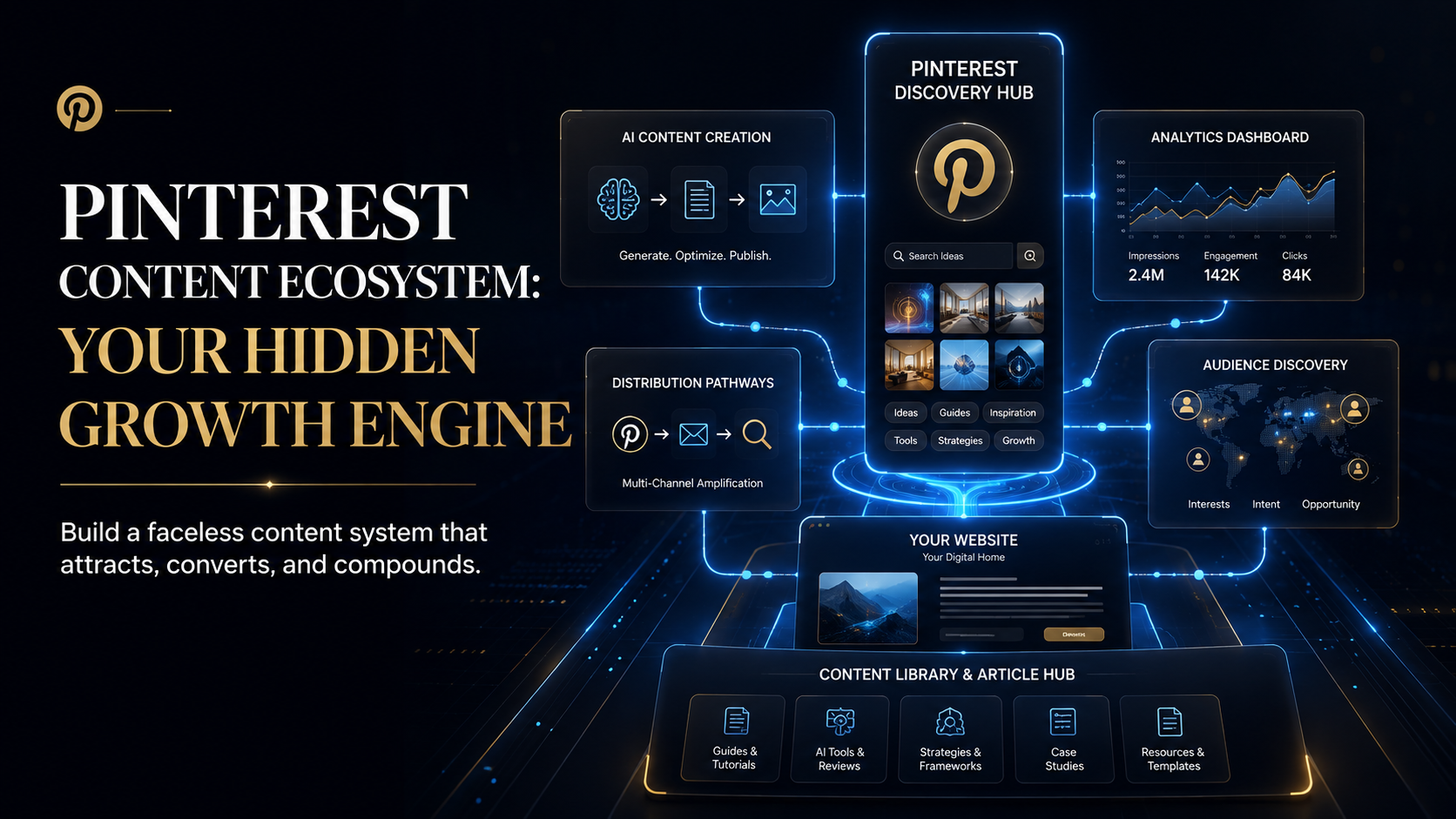
The strongest way to approach Pinterest is to treat it as a discovery and distribution layer around a larger content business. Your website, blog, YouTube channel, digital product, or other destination contains the deeper value, while Pinterest creates additional entry points through visual discovery. Pinterest provides business accounts, analytics, website-claiming functionality, and native scheduling, which means a small publisher can build the foundation without immediately paying for a collection of third-party tools.
This guide explains the complete operating model: what a faceless Pinterest account really is, what you should prepare before launching, how to structure the profile and boards, how to turn existing content into multiple Pin opportunities, how to use AI without producing generic content, how Pinterest SEO should actually be approached, how often to publish, what to measure, when paid tools become worthwhile, and what your first month should look like.
What Is a Faceless Pinterest Account?
A faceless Pinterest account is a brand-led or topic-led Pinterest presence that does not depend on the owner’s face, personal identity, or personality as the main source of audience attention. Instead, the account builds recognition through its brand name, visual identity, subject matter, and the usefulness of the content it publishes. This makes the model especially attractive for publishers, blogs, affiliate businesses, niche websites, digital-product creators, and content brands that want their intellectual property rather than the founder’s personality to remain at the center.
The word faceless should not be interpreted as anonymous or disposable. A serious faceless account should still look and feel like a real publication. Its profile should have a clear identity, its boards should make sense, its Pins should share a recognizable visual language, and its destination pages should demonstrate that there is something substantive behind the account. A visitor should be able to recognize the brand even when no person appears in the creative.
That distinction is important because a faceless strategy removes one of the shortcuts available to personal brands. A creator who appears repeatedly on camera can build familiarity simply through repeated exposure to the same person. A faceless brand has to create that familiarity through consistency of topic, quality, and presentation. Your content becomes the personality of the account, which means positioning and editorial discipline matter more than many beginner guides acknowledge.
Pinterest’s business-account system is designed to support businesses and creators, and Pinterest provides business users with features such as the Business Hub and Pinterest Analytics. The platform does not require a content publisher to make a personal photograph the center of its account, which makes a brand-first approach entirely practical.
Why Pinterest Can Be a Strong Fit for AI Content
AI content has an unusual advantage on Pinterest because many AI-related topics can be converted into practical visual explanations. A tool comparison can become a decision chart, a tutorial can become a step-by-step graphic, a workflow can become a diagram, a list can become a checklist, and a complicated concept can become a visual framework. That gives an AI publisher many legitimate ways to create content without relying on personal photography or an on-camera personality.
The opportunity becomes stronger when you start with the audience problem instead of the software. Someone searching for “best AI writing tools” is trying to compare options. Someone searching for “how to use AI for research” is trying to learn. Someone searching for “AI productivity workflow” may be looking for an implementation idea. Those are different information needs, so they should not automatically receive the same kind of Pin simply because they all fall under the broad category of AI.
This is why I would not describe Pinterest merely as “a search engine” and stop there. Pinterest combines search and discovery, and its current business documentation points to multiple signals around relevance, content quality, engagement, and other factors. The useful mental model is that Pinterest is a visual discovery environment where users can actively look for ideas while also encountering recommendations that match their interests.
That distinction changes the content strategy. Instead of creating Pins only because they contain a keyword, create Pins that answer a recognizable question or solve a recognizable problem. The keyword then becomes a natural description of the content rather than the entire strategy.
The Real Business Model Behind a Faceless Pinterest Account
Before you create the account, decide what should happen after someone discovers one of your Pins. This is one of the most important strategic decisions because Pinterest traffic has little business value if it has nowhere useful to go.
For a website publisher, the basic model is straightforward: a user discovers a Pin, understands the promise, clicks through to the relevant article, consumes more information, and potentially continues into another article, an affiliate recommendation, an email signup, a product, or another business action. The Pinterest account therefore sits at the beginning of the journey rather than being the entire destination.
This is particularly relevant for AI Hustle World. A Pin about AI research tools does not need to explain everything itself. Its job is to communicate enough value and curiosity to earn the click, while the article behind it provides the depth. A Pin about faceless content can introduce the framework, while the website contains the full tutorial. A comparison Pin can summarize the decision, while the destination page explains the nuances, alternatives, limitations, and practical recommendations.
That relationship also protects you from one of the weakest Pinterest strategies: sending every Pin to the homepage. A visitor who clicks a Pin about AI research assistants should not have to search your entire site to find the content they were promised. Pinterest works better as part of a specific content-to-destination relationship, where the visual promise and the destination page reinforce each other.
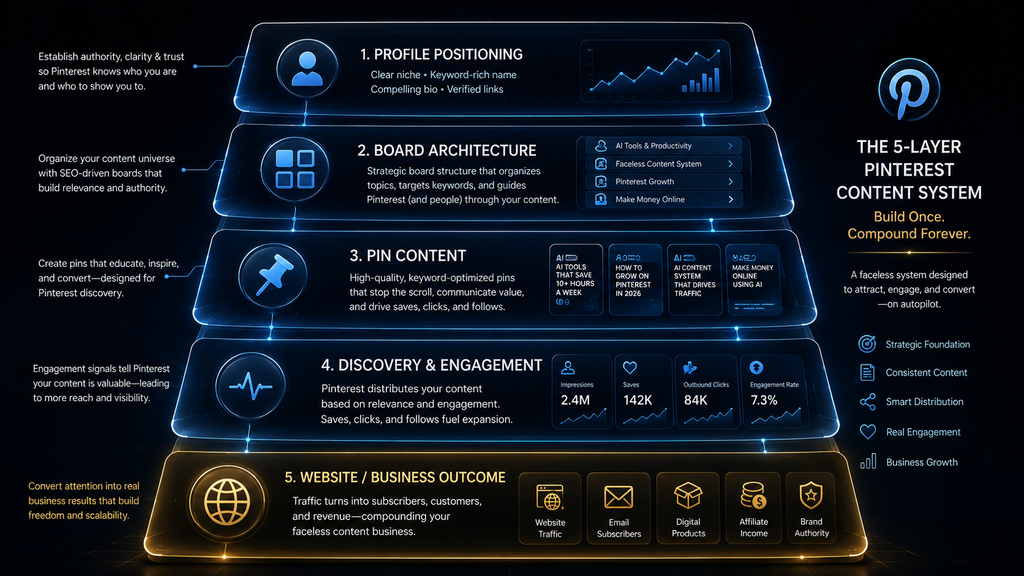
Your account can therefore be understood as three connected layers. The content library contains the substance, the Pinterest profile and boards organize that substance into discoverable topics, and the Pins become individual entry points that bring people into the system.
What You Need Before Creating the Account
You do not need hundreds of articles or thousands of followers before you start. What you need is enough structure to prevent the account from becoming directionless.
The first requirement is a clear niche. A niche should be broad enough to support months or years of publishing, but focused enough that a visitor can understand what the account stands for. “AI” is a subject, but it is too broad to guide practical editorial decisions. A clearer position such as AI tools, productivity, automation, and practical workflows gives you a territory that can support multiple content clusters without turning the profile into a random technology feed.
The second requirement is a defined audience. Decide who the content is really for. Beginners, creators, small-business owners, marketers, students, freelancers, and professionals may all be interested in AI, but they do not necessarily have the same questions or respond to the same promises. A Pin for someone searching for their first AI productivity tool should not necessarily look like a Pin aimed at a marketing professional evaluating an enterprise workflow.
The third requirement is a destination. That could be a blog, website, product page, newsletter, service page, YouTube channel, or another useful resource. You do not need to monetize every visitor immediately, but you should know why bringing the visitor from Pinterest to your destination creates value.
The fourth requirement is a content supply. Look at your publishing schedule and ask how many legitimate Pinterest ideas your content can support. If your website publishes two strong articles each week, you have a recurring source of raw material. If you publish one article a month, forcing yourself into a massive daily Pin schedule will eventually create pressure to recycle ideas.
The fifth requirement is a visual identity. Decide on your basic typography, brand colors, image treatment, and design direction before creating dozens of assets. That will make production faster and help the account become recognizable.
Most importantly, determine what you will not publish. Strong niche positioning is partly about exclusion. A focused account becomes easier to understand because certain topics are deliberately rejected.
Create a Pinterest Business Account
For a business, publisher, or serious content project, start with a Pinterest business account. Pinterest currently provides free business accounts with access to Pinterest Business Hub and Pinterest Analytics, making a business account the logical foundation for a content-driven Pinterest operation. (help.pinterest.com)
You can create a new business account or convert a personal account depending on how you want to structure the presence. If the account is intended to become part of a brand or website, a dedicated business account often creates a cleaner separation between personal browsing and business publishing.
The account name should match the brand you want to build rather than trying to create a mysterious or overly clever identity simply because the account is faceless. Your profile image should work at a small size, which makes a strong logo or recognizable brand mark more useful than a generic stock image.
The profile description should explain what the account actually provides. For example, a brand focused on practical AI content might describe itself around AI tools, tutorials, productivity workflows, automation, and creator strategies. That communicates an editorial position instead of trying to squeeze every possible AI keyword into the bio.
You should also approach account setup with the same discipline you would use when launching a website. The profile is not merely a form to complete before “real content” begins. It is the first context someone receives about the brand.
Add Your Website and Claim It
If the Pinterest account is intended to drive traffic to your website, connect the site early.
Pinterest allows you to add a website to your profile, and claiming a website gives you additional connections between your domain and Pinterest presence. Pinterest says claiming a website can provide insight into how often content from the site is shared and can connect your profile to Pins containing saved content from your domain. (Pinterest Help)
To claim the site, you need to own the domain, subdomain, or subpath and have sufficient control over the website or its DNS configuration. Pinterest currently provides multiple verification methods, including an HTML tag, HTML file, DNS TXT record, and Google Merchant Center for eligible accounts.
This is worth doing before you build a large content library because the connection between your site and Pinterest becomes part of the system. Your website contains the deeper information, while Pinterest introduces that information to people who may not have discovered it through another channel.
For AI Hustle World, that distinction is especially useful because the website can provide detailed tutorials, tool comparisons, workflows, and research while Pinterest communicates those ideas visually. A Pin should not have to carry the entire article inside a graphic. It needs to create a clear and credible bridge toward the page.
Build a Profile That Communicates Its Purpose Immediately
A strong faceless profile should work almost like the front page of a publication. Someone arriving from a Pin may have never encountered the account before, so the profile needs to establish the subject and value quickly without depending on personal familiarity.
Your display name should be recognizable, your profile image should work at small sizes, and your bio should explain the subject in natural language. If your account is focused on AI productivity, for example, the profile should make that obvious rather than forcing visitors to infer the topic from a collection of unrelated Pins.
It is tempting to add every major keyword into a profile because Pinterest is a discovery platform. Resist that temptation. A profile description that reads like a keyword list may technically mention many subjects while communicating very little about what the brand actually offers.
Think in terms of positioning rather than keyword density. When the profile clearly says what you cover, the boards can reinforce that position, and the individual Pins can go deeper into specific questions.
This consistency also makes content production easier. Once the profile tells you what the account is about, every new Pin can be tested against a simple question: Does this strengthen the account’s position or dilute it?
Build Boards Around Real Content Clusters
Boards should not exist simply because Pinterest provides them. Each board should represent a meaningful topic cluster that you can support with relevant content.
For an AI-focused account, that could mean boards around AI tools, AI productivity, AI automation, AI tutorials, faceless content creation, AI business ideas, or other topics that genuinely exist within the site’s content architecture. You should not create every possible category on day one. Start with the subjects where you already have enough content or a realistic plan for producing it.
This is where many accounts become fragmented. A creator reads that successful Pinterest accounts have lots of boards, creates fifteen categories, and then ends up with a profile where each board contains three unrelated Pins. The account technically looks full, but the content structure is weak.
A better approach is to create fewer, stronger topical collections and expand them as the content library develops. Your board architecture should be capable of answering a visitor’s question: “If I like this Pin, where else on this account should I go?”
For AI Hustle World, that might mean someone who discovers an AI productivity Pin can enter the AI Productivity board and find a meaningful collection of related content rather than a mixture of software reviews, YouTube ideas, motivational quotes, and unrelated technology news. The board becomes part of the reader’s journey.
Treat Boards as the Visual Taxonomy of Your Website
If you already have a website, your Pinterest account does not need a completely separate information architecture.
Your website’s content clusters can serve as the starting point for the Pinterest board structure. Articles about AI tools can feed one cluster, productivity another, faceless content another, research another, and so on.
That creates a relationship between the two systems. The website determines the deeper topical architecture, while Pinterest converts those topics into a visual discovery layer.
This also helps prevent content drift. Without an underlying architecture, Pinterest can slowly turn into a collection of whatever ideas seem interesting that week. The account becomes active without becoming strategically stronger.
A coherent board system creates constraints, and constraints are useful for content businesses. When you know that an account has a particular cluster around AI productivity, for example, you can deliberately build more assets that deepen that subject instead of constantly starting from zero.
The result is a Pinterest account that grows vertically within topics rather than simply growing horizontally through unrelated content.
Create Pins From Content You Already Own
One of the strongest ways to make a faceless Pinterest account sustainable is to treat existing content as raw material.
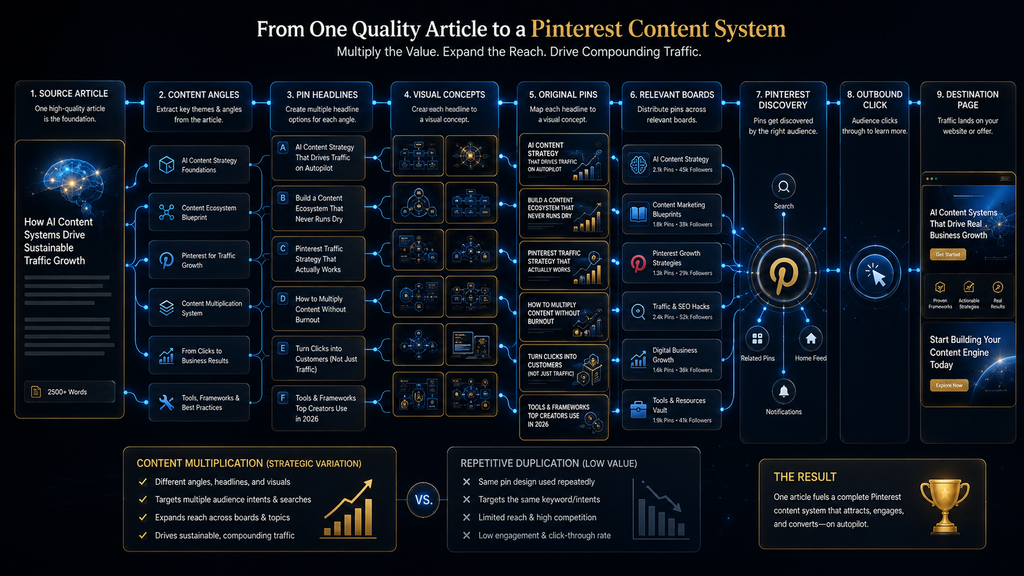
A detailed article rarely contains only one useful idea. It may include a main argument, several supporting concepts, practical examples, a checklist, a comparison, common mistakes, a framework, and a conclusion. Each of those may provide a legitimate angle for a separate Pin.
Suppose you publish an article called “Best AI Tools for Small Businesses.” The obvious Pin might say “10 Best AI Tools for Small Businesses,” but that is only one possible entry point. The same article might support a Pin about the best AI tools for customer service, another about the first business tasks worth automating, another comparing free and paid options, and another explaining how to choose between different categories of tools.
The destination can remain the same when relevant, but the creative purpose changes. That is the key to sustainable repurposing: one body of knowledge can create multiple discovery opportunities without becoming multiple copies of the same asset. For a growing publisher, that can dramatically reduce the pressure to invent new intellectual material for every social post.
Repurposing Is Not Repetition
A repurposed Pin should give the audience a meaningful reason to encounter the content again.
Changing the background image while keeping the same headline and information hierarchy does not necessarily create a strong new asset. Changing the question, the use case, the visual explanation, or the information emphasis can.
Imagine an article about AI research tools. The first Pin could introduce the overall category. A second could explain the difference between a research assistant and a general chatbot. A third could show a four-step research workflow. A fourth could focus on common mistakes. A fifth could compare tools by use case.
Those are connected, but they are not redundant because each one answers a different question.
This matters for both users and the platform. Pinterest’s current guidance emphasizes creating your own Pins with fresh, new content rather than simply relying on saved content, and it recommends quality images or videos.
The practical standard is therefore not “never reuse the same article.” It is “do not force the same creative idea to masquerade as multiple pieces of content.”
Use AI to Accelerate the Production Process
AI can be extremely useful for Pinterest production when the human role is clearly defined.
Start with a real content asset. Give the AI the article, target audience, and account positioning, then ask it to identify the strongest Pinterest-worthy concepts. From there, it can help create headline options, descriptions, visual directions, supporting copy, and a production brief for each asset.
That is efficient because the AI is processing information you already own rather than inventing a strategy from nothing.
The final decision should still belong to the editor. You decide which concepts are genuinely useful, which claims are accurate, which headlines make credible promises, which visual treatment suits the topic, and which variations are different enough to deserve publication.
This division of labor is important because AI is particularly good at generating plausible options, while editorial work is about selecting the option that actually deserves to exist. The more AI reduces production cost, the more important that selection becomes.
Build an AI-Assisted Pin Workflow
A practical workflow can begin with the original article or content asset, move into idea extraction, continue through headline and visual development, and finish with a human quality check before scheduling. This process lets AI handle repetitive transformation work while preserving editorial control over the final asset.
The first stage is content extraction. Identify the central promise, the strongest supporting points, useful examples, important questions, and practical takeaways.
The second stage is angle development. Ask AI to generate multiple ways the material could become useful Pinterest content, then remove ideas that are repetitive, weak, or overly broad.
The third stage is Pin-specific copywriting. Develop a headline that makes a clear promise and a description that adds context rather than simply repeating the headline.
The fourth stage is visual direction. Decide whether the concept should be a comparison, checklist, process diagram, list, framework, screenshot-based explanation, or another format that matches the information being communicated.
The fifth stage is human review. Check the accuracy, readability, visual hierarchy, brand consistency, destination, and creative distinction before publishing.
The final stage is measurement. Look at how the content performs and let those observations influence future creative decisions.
The important part is that AI supports the workflow at several points without becoming the person making the final editorial decision.
Design Pins for the Pinterest Environment
For standard image Pins, Pinterest currently recommends a 2:3 aspect ratio, commonly 1000 × 1500 pixels, and warns that larger aspect ratios may be cropped in feeds. Pinterest also notes that the first portion of a Pin title is more likely to be visible, which makes the opening words especially important.
The technical format matters, but the more important question is whether your creative can be understood when it appears relatively small in a mobile feed. A headline that looks excellent when you are zoomed in inside Canva can become unreadable when surrounded by dozens of other Pins.
That means your design should have a clear information hierarchy. The viewer should recognize the subject quickly, understand the main promise, and be able to decide whether the content is worth exploring.
Pinterest’s current creative guidance also encourages visible branding while keeping the creative focused on the main message. That is particularly useful for a faceless brand because your logo, colors, typography, and visual treatment are doing some of the recognition work that a face normally performs.
Consistent Branding Without Repetitive Templates
A good faceless Pinterest account should look like one brand without looking like one graphic copied hundreds of times. Your brand colors can remain consistent. Your typography can remain consistent.
Your logo treatment can remain consistent. Your image quality can remain consistent. The composition should still adapt to the content.
A comparison deserves a comparison layout. A checklist deserves a checklist structure. A workflow is easier to understand when represented as a process. A tool review may benefit from a product screenshot or interface-centered composition, while a conceptual article may need a framework or diagram.
This distinction is important because the goal of branding is recognition, not repetition. For AI Hustle World, a consistent black or deep-navy foundation with electric-blue and subtle-gold accents can create a strong visual identity, but the actual layouts should change enough that the account still feels editorial rather than mechanically templated.
Write Pin Titles Around the User’s Problem
A Pin title should make the topic clear and give the user a reason to care.
“AI Productivity Tips” is a broad label. “7 AI Workflows That Remove Repetitive Office Tasks” makes a much stronger promise because the subject and expected value are immediately obvious.
Pinterest currently allows Pin titles of up to 100 characters, with the first 40 more likely to appear on the platform, so the most important part of the promise should appear early rather than being buried in a long sentence. (Pinterest Business)
The same principle applies to descriptions. Do not treat them as a place to repeat the same keyword as many times as possible. Use the description to clarify what the Pin contains, who it is for, and what the destination offers when that additional context is useful.
Search language should sound natural. The user should be able to recognize the subject immediately.
And the destination should actually fulfill what the Pin promises. That is a much stronger foundation than trying to reverse-engineer a keyword formula.
Pinterest SEO Is About Relevance Across the Whole Content Chain
Pinterest SEO works best when you stop thinking about keywords as isolated fields and instead think about topic alignment. Your profile establishes the broad subject. Your boards organize the major content clusters.
Your Pin communicates a specific idea. Your destination page delivers the deeper information.
Pinterest’s own documentation points to factors such as relevance to searches or interests, image quality, domain quality, and engagement when discussing Pin performance and distribution. This means keyword stuffing is a weak strategy because it focuses on one small part of the system.
Imagine a Pin titled “Best AI Research Assistants” sitting on a board called “AI Research Tools,” from an account clearly focused on AI productivity, linking to a detailed article that actually compares research assistants. Every layer reinforces the same topic.
Now imagine an account about general motivation publishing the same Pin because “AI” is trending, with a generic board and a homepage destination. The keyword might still appear, but the overall context is much weaker.
Strong Pinterest SEO is therefore closer to semantic consistency than keyword repetition.
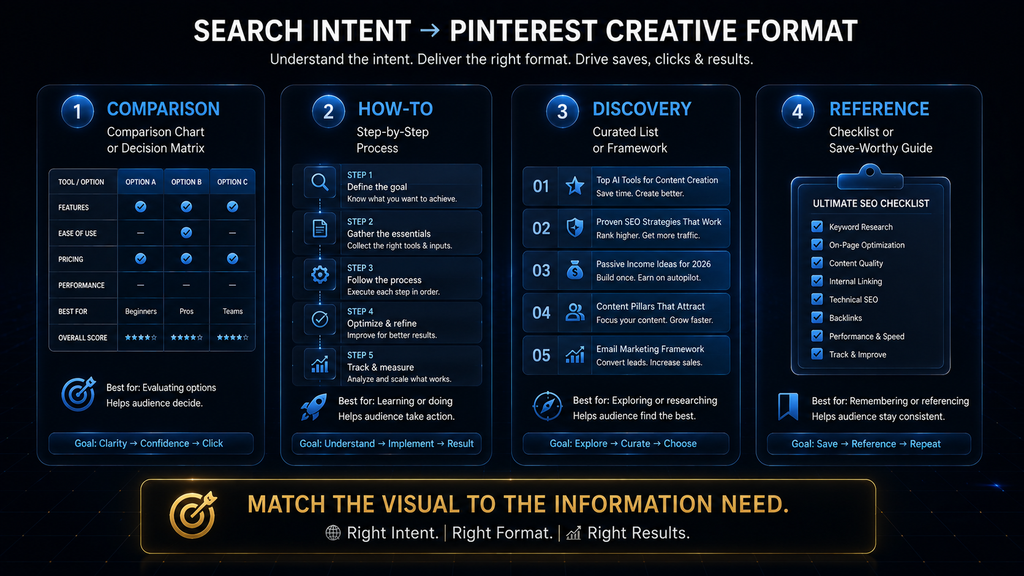
Match Search Intent to Pin Format
Search intent should also influence the way the Pin is designed.
A comparison query suggests a comparison visual because the user is trying to evaluate alternatives. A how-to query suggests a step-by-step or process-oriented format because the user wants to learn how to accomplish something. A discovery query such as “best AI tools for freelancers” may work better as a curated list or category breakdown, while a decision-oriented query may benefit from a framework that helps the user choose.
This is more sophisticated than creating one universal Pin template and forcing every subject into it. The visual format should help the user answer the underlying question. That is the real objective.
For example, if someone searches for “AI research workflow,” a beautiful stock-style illustration of a robot holding a laptop does almost nothing to satisfy the intent. A simple diagram showing source collection → organization → synthesis → verification → final output immediately communicates useful information.
That is the difference between a graphic that looks relevant and a graphic that actually delivers information.
The Destination Page Is Part of the Pinterest Experience
A strong Pin can get the click, but the destination determines whether that click was actually valuable.
The landing page should match the promise made by the Pin. If the Pin says “7 AI Workflows for Small Businesses,” the destination should contain those workflows. If the Pin says “AI Research Assistant vs Chatbot,” the visitor should arrive at the comparison rather than being sent to a generic category page.
This reduces friction and creates a more coherent user experience.
It also gives your website an important role in the strategy. Pinterest may introduce the visitor, but your website provides the deeper experience that turns a single discovery event into continued engagement.
For a publisher, this is where internal linking becomes valuable. A visitor who arrives at an AI research article can discover related AI productivity resources, tool guides, or workflow tutorials. One Pinterest click can therefore create multiple opportunities for the visitor to explore the site’s knowledge base.
The strongest Pinterest account is not merely generating traffic. It is generating relevant traffic that has somewhere useful to go.
How Often Should You Post?
There is no universal number of Pins per day that guarantees Pinterest growth.
That is an important correction to the common advice found in older Pinterest strategy content. Pinterest’s current guidance emphasizes creating original content regularly rather than prescribing one rigid publishing quota that applies to every account. Its current scheduling system also allows business accounts to schedule standard Pins up to 30 days ahead, with up to 10 future Pins scheduled at one time.
The practical implication is that your cadence should come from your content capacity.
If your website produces enough strong material to support several high-quality Pins each week, build around that. If your content library is larger and your design workflow is efficient, you can publish more. If a high daily target would force you to recycle the same concepts, lower the target.
For a new account, a modest but sustainable rhythm is usually a better operating choice than immediately forcing a large daily output. As the content library grows, you can scale the publishing system.
The important number is not “how many Pins did I post?” It is: How many useful and genuinely distinct content opportunities can I sustain?
Why Arbitrary Pin Quotas Can Backfire
A publishing quota feels productive because it is easy to measure. The problem is that a number can quietly become more important than the quality of the content supporting it.
Suppose you decide that your account must publish ten Pins every day. At first, you use your strongest content. Then the easy ideas run out. You start changing headlines on old graphics, generating generic listicles, using decorative AI images, or creating topics that do not really belong to the niche.
The account is technically more active. The content system is actually getting weaker.
AI makes this problem particularly easy to create because the production cost is low. A model can generate hundreds of ideas, but that does not mean hundreds of those ideas deserve to represent your brand.
The better strategy is to let output scale after the underlying content system becomes strong enough to support it.
Use Pinterest’s Native Scheduler First
For most new accounts, the native scheduler is enough.
Pinterest currently allows business accounts to schedule standard Pins up to 30 days in advance and maintain up to 10 future scheduled Pins. The platform’s scheduling workflow lets you select the publication date and time, and certain Pin details can still be edited before publication.
For a solo publisher publishing a manageable number of Pins, that is often enough to batch content without adding another subscription.
The economic logic is simple. If native scheduling takes only a small amount of time each week, purchasing specialized software may not create meaningful value. You should first determine whether scheduling is actually a bottleneck.
A paid scheduling tool becomes easier to justify when you have several accounts, larger publishing queues, complex campaign requirements, or administrative work that genuinely consumes significant time. The sequence should therefore be build → measure the friction → automate the bottleneck, rather than buying automation software before you know what needs automating.
When a Paid Scheduler Makes Sense
The right question is not whether a particular scheduling platform is “worth it” in the abstract. The right question is whether it saves enough operational time to justify its cost for your specific workload.
A single account with a modest publishing schedule may gain very little from an advanced scheduler. An agency managing multiple Pinterest accounts may gain much more because centralized planning and bulk workflows can reduce administrative overhead.
This is an important distinction because many creator guides are written at different scales without making that difference explicit. The tool that makes sense for an agency may be unnecessary for a solo blogger.
The tool that is excessive for one account may become highly useful across ten accounts. Your software stack should grow in response to actual operating friction rather than imagined future scale.
How to Read Pinterest Analytics
Pinterest Analytics should be used as a decision system rather than as a dashboard you check simply to see whether the numbers went up.
Pinterest’s current analytics environment provides an overview of performance, top Pins and boards, performance over time, and multiple engagement metrics. Pinterest also notes that real-time metrics are estimates and can change.
The most useful metrics depend on your objective. Impressions help you understand visibility and distribution. Saves help you understand whether people consider the content useful enough to keep.
Pin clicks show additional interaction with the Pin. Outbound clicks are particularly important when your goal is to bring traffic to a website because they indicate that a user left Pinterest for an external destination. The mistake is to treat one metric as the definition of success.
A Pin that generates 50,000 impressions but almost no outbound traffic may be less useful to a website publisher than a smaller Pin that consistently sends relevant visitors to a valuable article. The correct KPI therefore depends on the business model.
Build a Simple Pinterest Measurement Funnel
For a website-driven account, you can think about performance as a four-stage funnel: visibility → interest → action → business outcome.
Visibility is largely represented by impressions. Interest becomes more visible through saves and other engagement signals. Action is represented by clicks, especially outbound clicks when the purpose of Pinterest is website traffic. The business outcome happens after that traffic reaches your website and performs a valuable action.
This funnel also helps diagnose problems. If impressions are consistently weak, investigate the topic, account positioning, board structure, creative quality, and relevance.
If impressions are healthy but saves are poor, the content may not be compelling enough to preserve. If saves are strong but outbound clicks are weak, the Pin may be useful as a standalone reference but insufficiently persuasive as a gateway to deeper content.
If outbound clicks are healthy but the destination page performs poorly, the Pinterest account may not be the problem at all. The issue may be the content, user experience, page speed, or relevance of the destination.
That is why analytics should lead to questions and experiments, not just celebrations.
Build a Content Feedback Loop
A strong Pinterest account should learn from what it publishes.
You create a group of Pins around different topics and creative formats. The audience responds. You examine the response and compare what happened across subjects, boards, designs, and destinations. Then you create the next batch using the information you gained.
Over time, this creates a feedback loop that reduces guesswork. Perhaps comparison Pins consistently generate more outbound clicks than generic lists. Perhaps tutorials generate more saves.
Perhaps one content cluster gets significantly more visibility than another. Perhaps a certain visual treatment performs well across multiple topics. These patterns should inform future production.
You still need judgment because analytics cannot always tell you why something worked. A Pin may outperform because of its topic, its headline, the visual treatment, the destination, or several factors interacting together.
The job of the publisher is to interpret the evidence rather than blindly reproduce it.
Seasonal Pinterest Content Requires Planning
Seasonal content is particularly useful when your niche intersects with recurring moments, planning cycles, or events.
A productivity publisher might create back-to-school workflow content. A finance site might create tax-season resources. A business publication might create holiday marketing guides. An AI publisher might create annual AI-tool updates, planning resources, or seasonal workflow ideas.
The mistake is waiting until the season arrives to begin creating the content. People often plan ahead, which means seasonal material can be more useful when it is ready before peak demand rather than published after the audience has already made its decisions. The exact lead time should depend on the subject, but the principle is simple: prepare when the audience is beginning to think about the problem, not when everyone else has already started publishing about it.
Seasonal content should still strengthen the niche. A generic holiday graphic may collect impressions, but if it has nothing to do with the account’s core topic it contributes little to the long-term content architecture.
Avoid Turning AI Into a Content Factory
The biggest risk for an AI-powered Pinterest account is not technical failure. It is strategic excess.
Once AI can generate ideas, descriptions, and visual concepts quickly, creators often interpret that capability as permission to publish at much higher volume. But production speed is only useful when the additional content is worth publishing.
Think about the difference between content multiplication and content inflation. Content multiplication means one useful article produces several genuinely valuable entry points. Content inflation means one weak idea produces twenty slightly different graphics.
The first expands your reach while preserving the usefulness of the content library. The second expands your output while weakening the brand. Pinterest’s own guidance emphasizes creating your own Pins with fresh new content and creating quality visual assets, which supports the first approach rather than an indiscriminate volume strategy.
Your AI system should therefore have a rejection mechanism. Not every generated idea gets published. Not every headline survives.
Not every visual concept deserves to become a Pin. That is not inefficiency. That is editorial quality control.
A Strong Pin Needs Three Things to Agree
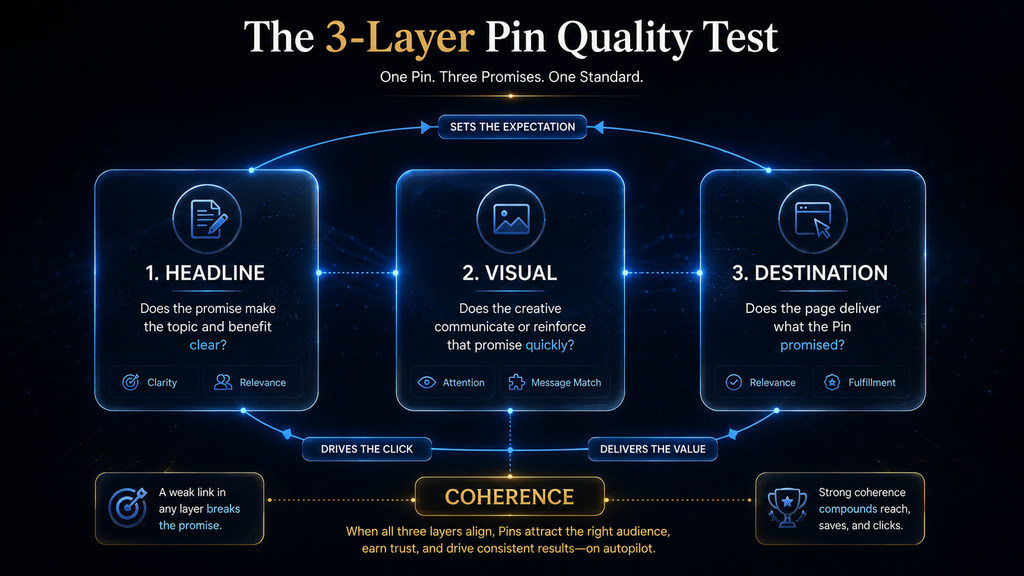
One practical way to evaluate every Pin is to examine the relationship between the headline, visual, and destination. The headline should establish the promise. The visual should communicate or reinforce that promise.
The destination should deliver the deeper value promised by both. When those three elements align, the content feels coherent. When they do not, the user experience breaks.
For example, imagine a Pin saying “The Complete AI Research Workflow,” while the visual is simply a decorative robot illustration and the destination leads to a generic AI homepage. Nothing is technically broken, but the content does not actually answer the user’s implied question.
Now imagine the same headline paired with a clear five-stage workflow graphic and linked to a detailed article explaining each stage. The second version has a reason to exist. That difference is fundamental to good Pinterest content.
Create a Content-to-Pin Matrix
A simple content matrix can make this process easier while keeping it editorial rather than robotic.
| Content type | Strong Pinterest angles |
|---|---|
| Tool roundup | Overall list, best-for categories, comparison, beginner recommendations |
| How-to guide | Step-by-step process, checklist, workflow, common mistakes |
| Comparison | Decision framework, key differences, best-for use cases, winner by scenario |
| Case study | Before/after, key lessons, mistakes, results and implications |
| Research article | Main findings, surprising insight, practical implications, evidence summary |
| Tutorial | Quick-start workflow, steps, common errors, implementation checklist |
| List article | Overall list, category subset, standout recommendation, problem-specific version |
The table should not become a quota. If an article genuinely contains two strong Pin concepts, create two.
If it contains six distinct ideas that are worth explaining visually, create six. The purpose is to discover legitimate opportunities, not to manufacture a number.
How Pinterest Fits Into a Broader Content Operation
A faceless Pinterest account can become particularly powerful when it is part of a larger content ecosystem.
A YouTube video can provide research and ideas for a written article. The article can then provide multiple Pinterest concepts. One of those concepts can be adapted into an Instagram carousel, while another can become part of an email or content update.
The advantage is not that you publish identical material everywhere. The advantage is that one piece of intellectual work can feed several platform-specific formats. Pinterest’s role is visual discovery.
YouTube’s role is deeper video consumption. Instagram’s role can emphasize social and visual interaction. The website serves as the deeper owned-content layer.
That creates a sustainable system in which platforms support one another without becoming duplicate publishing channels. For a brand such as AI Hustle World, this can significantly reduce the cost of maintaining multiple channels because the research and editorial work can produce several useful outputs.
What Should You Measure in the First 30 Days?
During the first month, avoid making your entire judgment based on follower growth. Instead, focus on whether the system is working. Are people discovering the content?
Are particular topics receiving stronger visibility? Are users saving certain formats? Are some Pins generating clicks?
Are outbound clicks reaching the intended articles? Are certain boards becoming more useful? Can you produce the content at a sustainable pace?
Are your templates making production faster without making the account repetitive? Those questions tell you much more about whether you have built a viable system. Pinterest Analytics can provide an overview of top Pins and boards, performance over time, and multiple engagement metrics, which makes it possible to move gradually from guesswork toward evidence-based content decisions.
A Practical 30-Day Faceless Pinterest Launch Plan
Week 1: Establish the Foundation
The first week should focus on positioning and setup rather than chasing volume. Create the business account, finalize the brand identity, write the profile description, connect your website, claim the site, and establish the initial boards around the content clusters you actually intend to support. Pinterest currently provides several methods for claiming a website, so complete the appropriate verification process rather than leaving the account disconnected from the site.
You should also decide on your visual system during this stage. Choose the basic colors, typography, recurring layout principles, and image treatment that will make the account recognizable. You do not need to design twenty templates immediately; you need enough structure to ensure that the first batch looks like it came from one brand.
Most importantly, define the destination. Know which articles, resources, or pages will receive traffic from your first Pins.
Week 2: Build the First Content Batch
Select your strongest existing content and extract several legitimate Pinterest angles from each piece. Do not begin by asking how many Pins you can make. Begin by asking which ideas inside the content are worth visualizing.
Develop the copy, choose an appropriate visual structure, create the assets, and review them at the size in which people are likely to encounter them. Make sure the text remains readable, the topic is obvious, and the design does not depend on tiny supporting details that disappear in a feed.
By the end of the second week, you should have a small but coherent Pin library rather than a huge collection of disconnected graphics.
Week 3: Publish and Observe
Start publishing consistently using Pinterest’s native scheduling tools unless your current workload gives you a real reason to use something more advanced. Pinterest currently allows business accounts to schedule standard Pins up to 30 days in advance, with up to 10 future Pins scheduled at a time.
During this week, record which topics and formats appear to generate stronger signals. Avoid changing the entire strategy after one weak Pin because early data can be noisy, but pay attention to recurring patterns.
You are beginning to learn what your audience responds to.
Week 4: Analyze the System
At the end of the first month, review the account at three levels.
First, evaluate the content. Which topics and angles performed better?
Second, evaluate the creative. Which visual formats earned stronger saves or clicks?
Third, evaluate the destination. Which Pins actually produced meaningful website traffic?
Then decide what to scale. Perhaps comparison content deserves more attention. Perhaps tutorials outperform lists.
Perhaps one board is clearly stronger than another. Perhaps your best-performing Pins are not the ones that took the longest to design.
The purpose of the first month is not to prove that Pinterest can make you successful. It is to build enough evidence to make your next month smarter than your first.
Common Mistakes That Weaken Faceless Pinterest Accounts
One of the most common mistakes is choosing a niche that is too broad. An account that attempts to cover every AI topic may have plenty to publish but little coherent positioning, which makes both the profile and board architecture harder to understand. A focused territory gives you stronger editorial boundaries.
Another common problem is creating too many boards too early. Empty or weakly populated boards rarely make an account stronger. Start with the clusters your content library can genuinely support and expand as the site grows.
Repetitive creative is another major issue. Templates are useful, but a template should be an efficiency mechanism rather than the definition of the content itself. When every Pin looks like the previous Pin with a new headline, the account begins to feel automated.
Sending every Pin to the homepage is also a weak practice for a content publisher. When the Pin makes a specific promise, the destination should normally provide the corresponding information directly so the user does not have to search for it again.
Many creators also make the mistake of focusing entirely on impressions. Visibility matters, but it does not tell you whether the content creates saves, clicks, outbound traffic, or meaningful business outcomes. Your analytics should be connected to the actual objective of the account.
Finally, do not buy software before you have identified a bottleneck. Pinterest already provides business accounts, analytics, website-claiming functionality, and native scheduling, so many small accounts can build a functional system without immediately adding a paid software stack.
Can You Make Money With a Faceless Pinterest Account?
Yes, but the strongest business models usually monetize the attention generated by Pinterest, rather than depending on Pinterest activity itself to be the product.
A publisher can send traffic to articles and monetize that traffic through advertising, affiliate recommendations, products, or other business models. A service provider can use educational content to introduce potential customers to its expertise. A digital-product creator can use Pinterest to drive awareness toward useful resources and eventually a product.
The business model should therefore be designed around the destination. A large number of impressions with almost no meaningful traffic may not be very valuable. A smaller amount of highly relevant traffic can be commercially useful if those visitors engage with the site and eventually take a meaningful action.
This is also why a faceless Pinterest account should not be built purely around follower growth. Followers can be useful, but the account’s economic purpose may be discovery, traffic, brand awareness, or some combination of those outcomes.
The metric should follow the business objective.
When a Faceless Pinterest Account Is a Poor Fit
Pinterest is not automatically the right channel for every business. If you have no useful content, no destination, no interest in visual communication, and no ability to maintain a coherent topic, building an account may simply create another publishing obligation without a meaningful return.
It is also a poor fit when the entire strategy depends on instant results. Pinterest can be useful for ongoing discovery, but there is no honest basis for promising that every new account will generate substantial traffic within a fixed number of weeks.
Another weak scenario is a publisher whose only plan is to mass-produce generic AI graphics. The low cost of production does not eliminate the need for relevance or originality.
The better fit is a business that has something genuinely useful behind the Pins and can create a consistent stream of information around a defined audience problem.
Final Thoughts
Starting a faceless Pinterest account is easy because the technical barrier is low. The harder part is building a system that remains useful after the initial excitement of creating the profile, uploading the first Pins, and watching the first impressions arrive.
The strongest strategy begins with the content rather than the platform. Choose a focused niche, understand the audience, create a clear brand identity, establish meaningful boards, connect your website, and make sure there is enough useful material behind the Pins to support an ongoing publishing process. Pinterest can then become the discovery layer that introduces people to the deeper content you have already invested in creating.
AI can make the process substantially more efficient, but it should be used as a production assistant rather than as the editorial brain of the account. Let it help extract ideas, develop headlines, organize production, and generate visual concepts, while you decide which ideas are actually valuable, which claims are accurate, which creative concepts deserve publication, and which destinations are worth sending users toward.
Do not let arbitrary Pin counts control the strategy. Build around the amount of genuinely useful content your system can support, use Pinterest’s native scheduling capabilities while they are sufficient, and introduce additional software only after you can clearly identify the operational problem it solves. Pinterest currently provides business accounts, analytics, website claiming, and native scheduling, which gives most small publishers a strong foundation without requiring a large paid stack from day one.
Most importantly, think of every article as a source of multiple useful discovery opportunities, not as a URL that deserves one promotional graphic. When you build different Pins around different questions, use visuals that actually teach something, connect each Pin to a relevant destination, and let performance data influence what you make next, Pinterest becomes more than another social channel demanding constant output.
A successful faceless Pinterest account is not a collection of AI-generated graphics. It is a recognizable content system in which your knowledge becomes the substance, your visual identity creates recognition, AI accelerates production, Pinterest creates discovery, and your website delivers the depth and business value behind the click.
Keep Building Your AI Content System
Choose a niche before you build boards; explore ideas that suit a faceless AI content account.
Find Your Pinterest Niche →Frequently Asked Questions
Can I run a Pinterest account without showing my face?
Yes. A Pinterest account can be organized around a business, publication, or brand rather than a personal identity, making the platform practical for faceless content businesses. The important part is to replace personal visibility with clear branding, consistent topics, strong visual identity, and useful content. Pinterest’s business-account system is designed for businesses and creators.
Do I need a Pinterest business account?
For a serious content or business strategy, a business account is the better foundation because Pinterest provides business users with access to tools such as Pinterest Analytics and Business Hub. It is also the more appropriate structure when the account represents a brand or business instead of personal browsing.
Do I need a website?
No. You can use Pinterest without owning a website, but a website provides a valuable destination for traffic and gives a publisher somewhere to deliver deeper information. If Pinterest is part of a website-driven business, connecting and claiming the site is a useful early step.
Should I claim my website on Pinterest?
If your website is important to the business model, yes. Pinterest says claiming a website provides additional insight into how the domain’s content is shared and connects content from the website more closely with the Pinterest profile.
How many Pins should I post every day?
There is no universal daily number that guarantees growth. Pinterest’s current guidance emphasizes regular creation and original content rather than requiring every account to follow the same publishing quota. Choose a cadence that your content library and production process can sustain without causing repetitive or low-quality output.
What counts as a fresh Pin?
A fresh Pin should be treated as genuinely new visual content or a meaningful new creative idea rather than the same graphic repeatedly recycled with superficial wording changes. Creating a new angle, information structure, visual treatment, or useful interpretation gives the audience a legitimate reason to encounter the content again.
Can I use AI-generated images on Pinterest?
AI can be part of the content-creation workflow, particularly for ideation, visual concepts, copy, and design support. Pinterest’s current creation environment also accounts for AI-modified content in its publishing workflow. The more important issue is whether the finished content is useful, relevant, appropriately represented, and worth publishing rather than whether AI was involved.
What size should a Pinterest Pin be?
Pinterest currently recommends a 2:3 aspect ratio, commonly represented as 1000 × 1500 pixels for standard image creative. Larger aspect ratios may be cropped in feeds, so the vertical format is the safest starting point for a standard static Pin.
Do I need Tailwind or another paid scheduler?
Not when you are starting with a small account and manageable publishing volume. Pinterest’s native business scheduling tools allow standard Pins to be scheduled up to 30 days ahead, with up to 10 future Pins scheduled at a time. A paid scheduler becomes more useful when your publishing operation becomes complicated enough that administration itself is a significant bottleneck.
How long does it take for a Pinterest account to grow?
There is no reliable universal timeline because performance depends on the niche, content quality, relevance, competition, creative execution, destination quality, publishing consistency, and accumulated signals. A better approach is to treat the first several months as a process of building the system and learning what your audience responds to rather than expecting a guaranteed result by a particular date.
Sources and Further Reading
- Create rich Pins: Pinterest Business Help. How rich Pins pull metadata from your site.
- Community guidelines: Pinterest’s rules for content and behavior on the platform.
Related Guides
- How to Start a Faceless Instagram Page With AI Tools
- Instagram Niche Ideas for a Faceless AI Content Account
- How to Start a Faceless YouTube Channel in 2026
Written by
Muntasir Ahmad Chowdhury
Founder, AI Hustle World
Muntasir Ahmad Chowdhury is the Founder of AI Hustle World, an independent publication dedicated to making Artificial Intelligence practical, trustworthy, and easy to understand. He researches AI tools, automation, customer service, productivity, and real-world business applications, helping readers make smarter technology decisions through research-driven, experience-backed content.
Expertise:
AI Tools • AI Automation • AI Customer Service • AI Productivity • Generative AI • AI Workflows
Get Smarter With AI
Enjoyed this guide? Get practical AI tools, tutorials, and honest reviews delivered to your inbox.