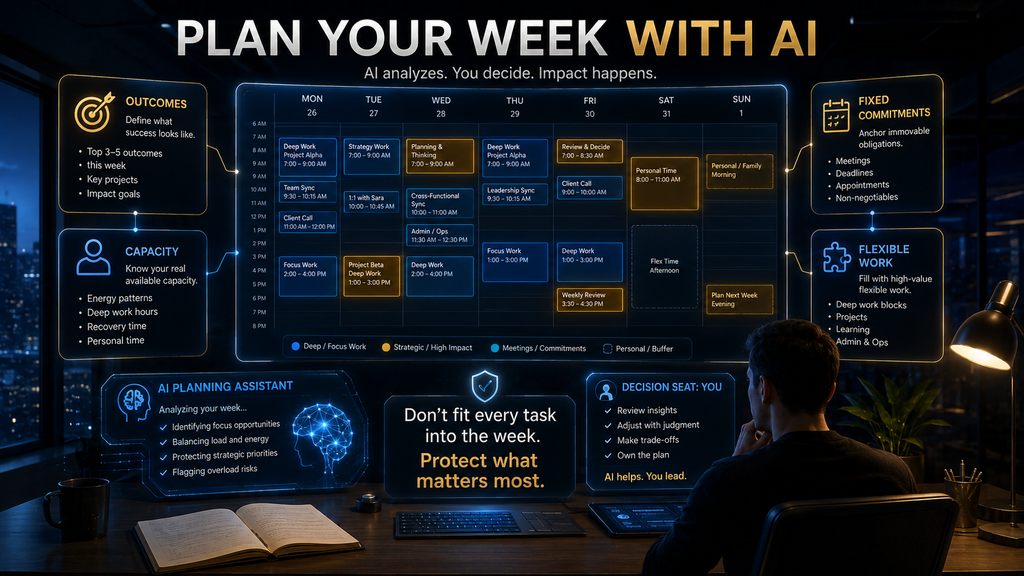
Evidence: Documentation reviewed
Last checked: August 2026
What was done: Written from official documentation and the published sources linked in this article. Not hands-on tested.
Files: None
Affiliate links: No
Using AI to Plan Your Weekly Tasks Without Losing Focus
Last Update: August 2026
A weekly plan can look extremely organized and still fail by Tuesday. You can have a perfectly labeled task list, a color-coded calendar and a carefully arranged set of time blocks, yet still reach Wednesday afternoon wondering how the week disappeared.
The problem is usually not that you failed to plan. The problem is that the plan was built around tasks instead of capacity. You started with everything you wanted to accomplish, then tried to squeeze those tasks into the hours available, instead of starting with the hours available and deciding what actually deserves them.
AI can help with weekly planning, but only when it is used for the right part of the problem. It can summarize unfinished work, group related tasks, identify deadlines, propose priorities, generate draft schedules and surface conflicts. It cannot manufacture additional time, resolve every human trade-off, or know which commitment matters most without understanding your priorities.
That distinction is the foundation of a useful AI weekly planning system.
A good AI plan should not make your week look fuller. It should make the week more realistic.
What Does Using AI to Plan Your Weekly Tasks Actually Mean?
Using AI to plan your weekly tasks means giving an AI system the relevant information about your upcoming commitments, goals, deadlines and workload, then using it to help transform that information into a realistic sequence of work. The important word is help.
You are not asking AI to become your boss. You’re asking it to perform some of the mechanical planning work that humans are often bad at doing repeatedly: collecting scattered tasks, spotting conflicts, grouping related work, suggesting priorities and translating goals into specific actions.
That distinction becomes more important as work becomes more fragmented. Microsoft’s 2025 Work Trend Index reported that employees in its Microsoft 365 telemetry sample experienced interruptions from meetings, emails or chats 275 times per day, with the highest-volume users seeing interruptions roughly every two minutes during core work hours. Microsoft also reported that 60% of meetings were unscheduled or ad hoc in its sample.
The practical implication is not that everyone should adopt a particular AI planner. It is that a weekly plan has to account for the reality of fragmented work. A calendar that assumes uninterrupted execution time for every planned task is not realistic enough to guide a real week.
The Problem With Most Weekly Plans
Most people plan their week in roughly the same order:
Then:
Then:
That seems reasonable. It is also how overcommitment begins.
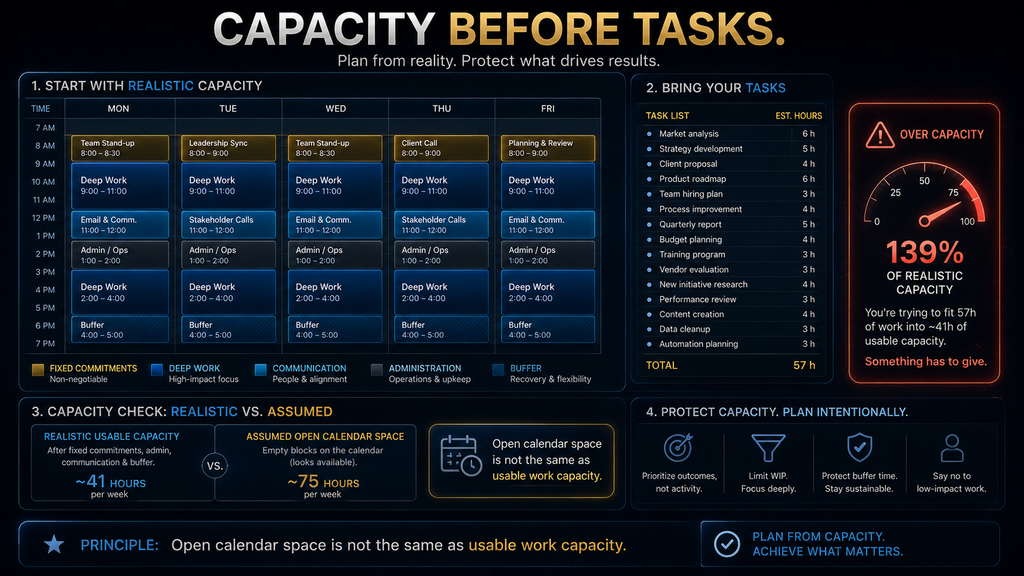
Imagine you have 25 tasks for the week. Your calendar technically contains 35 hours outside meetings, so you start placing those tasks into those hours. The plan looks possible until you remember that research takes longer than expected, clients respond late, meetings create follow-up work, administrative tasks appear, and some tasks require more mental energy than others.
By Thursday, you’ve carried eight tasks forward. The problem wasn’t discipline. The problem was that the plan treated available calendar space as usable capacity.
Those are not the same thing. A 40-hour workweek might contain:
- meetings,
- administrative work,
- communication,
- preparation,
- commuting,
- interruptions,
- recovery,
- unexpected requests,
- and only then, deep focused execution.
AI can help you allocate work more intelligently, but it needs a realistic model of that capacity first.
Why AI Can Make Weekly Planning Better—and Worse
AI can improve planning because it is good at transforming messy information into structured information. Give it:
- your outstanding tasks,
- meeting schedule,
- deadlines,
- project priorities,
- estimated effort,
- recurring responsibilities,
and it can help identify patterns that would take you much longer to organize manually. But there is a trap. AI can also make bad planning faster.
If you give an AI 30 tasks and tell it to “fit everything into this week,” it may produce a beautifully organized schedule that simply doesn’t fit the reality of your life. The output can look more rational than your original list while still being fundamentally unrealistic.
That is why the correct relationship is:
AI proposes the plan. You approve the trade-offs.
That principle will show up repeatedly throughout this guide.
The AI WEEK Framework
A practical way to build your weekly plan is to work through four decisions before you let AI generate a schedule. W — Workload: What already exists? E — End Outcomes: What must be true by the end of the week?
E — Energy & Capacity: How much usable capacity do you actually have? K — Keep, Kill or Defer: What stays, what gets removed and what moves? Only after those decisions should you ask AI to help you build the calendar.
This matters because weekly planning is fundamentally an allocation problem. You have limited attention, limited time and changing conditions. The goal is not to make every task fit; it is to allocate scarce capacity to the work that produces the greatest value.
W — Workload: Start With What Already Exists
Before creating a new weekly plan, collect the unfinished work. That includes:
- incomplete tasks,
- active projects,
- deadlines,
- meetings,
- follow-ups,
- commitments made to other people,
- recurring responsibilities,
- important personal constraints.
This is where AI can be extremely useful. Instead of manually reading through notes, email summaries and task lists, you can ask AI to consolidate them into a single planning view.
For example:
Review these tasks, meeting notes and commitments. Group them by project, identify deadlines and dependencies, and flag anything that appears unfinished or at risk of slipping.
That creates a clearer starting point. But there is a subtle rule here: capture is not commitment.
Just because AI identifies 30 pieces of outstanding work doesn’t mean all 30 belong in this week’s plan. The purpose of the workload stage is to expose reality before you start making promises to yourself.
E — End Outcomes: Decide What Would Make the Week Successful
A task list describes activity. Outcomes describe progress. There is a major difference between:
Finish proposal, update website, answer emails, review campaign.
and:
Submit the client proposal, launch the updated landing page and finalize the campaign decision.
The second version gives you a clearer definition of success. That is why AI should help you move from task inventory to outcome definition. Ask:
Here is everything currently on my plate. Identify the three to four outcomes that would create the most meaningful progress this week. Do not simply choose the tasks with the earliest deadlines; consider business impact, dependencies and the consequences of delay.
That prompt produces a decision aid rather than a prettier checklist. The final choice remains yours. If AI tells you that answering 30 emails is your most important outcome because they are all due today, but you know an important proposal could influence next month’s revenue, the human judgment layer matters more than the mechanical prioritization.
E — Energy & Capacity: The Part Most Plans Ignore
The most important question in weekly planning is often:
How much work can I realistically do?
Not:
How many hours are theoretically open?
Those are different measurements. You may have 40 nominal working hours and only 22 genuinely usable hours for deep, high-value work after accounting for meetings, communication, administration and normal interruptions. You also have different energy levels throughout the week.
Some people do their best analytical work early in the day. Others have recurring obligations that make afternoons more fragmented. Some days are naturally meeting-heavy. Some projects require long uninterrupted blocks that can’t be squeezed into 20-minute gaps.
A useful AI planning instruction is therefore:
Here are my fixed commitments for the week. Estimate my realistically usable work capacity after meetings, administrative time and existing commitments. Do not assume every remaining calendar hour is available for focused work.
The answer will still be an estimate. That’s okay. The point is to stop pretending that a blank calendar slot is automatically productive capacity.
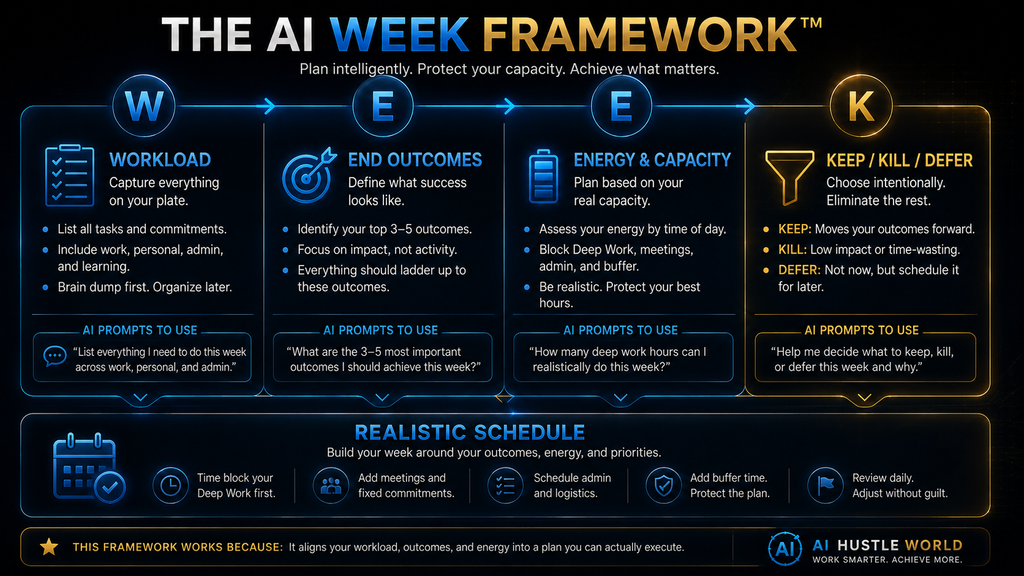
Keep, Kill or Defer: The Decision Most People Avoid
This is where weekly planning becomes real. A week that cannot fit all the work needs a decision about what will not happen. That’s uncomfortable.
It is also necessary. Divide outstanding work into:
- Keep: Important enough to protect capacity for.
- Kill: No longer worth doing.
- Defer: Useful, but not important enough to consume this week’s limited capacity.
This is one of the areas where AI can be surprisingly useful as a challenge mechanism. You can ask:
Review this week’s proposed tasks. Identify anything that appears low-impact, duplicated, unnecessary or poorly timed. Challenge my assumptions and explain what you would defer if the week became 20% shorter.
The key phrase is challenge my assumptions. Good planning isn’t just arranging tasks. It’s deciding which tasks don’t deserve your attention.
Why Weekly Planning Should Start With Outcomes, Not Calendar Blocks
Time blocking is useful, but it should happen after priority decisions. If you start by opening the calendar and filling every available gap, you risk turning your calendar into a task-storage system. Instead: Outcome → priority → task → time block should be the sequence.
Suppose the outcome is:
Complete the first draft of the Q4 business plan.
The tasks might become:
- review previous plan,
- analyze current performance,
- identify assumptions,
- draft strategic options,
- write executive summary,
- review with stakeholder.
Now the AI can help sequence these tasks around dependencies. This is much stronger than telling AI:
“Put my tasks into my calendar.”
The first approach understands the work. The second only arranges objects.
Turn Goals Into Specific When-and-Where Actions
There’s a useful psychological principle behind this.
A large meta-analysis examined 94 independent tests of implementation intentions—plans that specify the when, where and how of goal-directed action. The review found a medium-to-large positive effect on goal attainment, with an overall effect size of d = .65. The researchers concluded that specifying the circumstances and response in advance can help bridge the gap between intending to do something and actually doing it.
That has a practical implication for AI weekly planning.
“Finish the report” is an intention.
“Tuesday, 9:00–10:30, draft the findings section using the research notes from the client folder” is an implementation plan.
AI is useful for translating the first into the second. But there’s a boundary.
A time block is not evidence that the work can actually be completed within that time. Your experience of the task still matters.
Build the Week Around Fixed Constraints First
A realistic weekly plan begins with things you cannot move. That means:
- meetings,
- appointments,
- hard deadlines,
- client availability,
- scheduled events,
- recurring responsibilities.
Then protect the work that matters around those constraints. This is more reliable than starting with your favorite tasks and fitting everything else around them. Ask AI:
Here is my fixed calendar. Here are the outcomes that matter this week. Suggest possible focus blocks without moving my fixed commitments. Leave at least 20% of usable capacity unallocated as a buffer for interruptions and unexpected work.
That last instruction is strategically important. A weekly plan with zero spare capacity is fragile by design.
The 20% Buffer Principle
The exact percentage should not be treated as a universal law. Your work may require more or less. The principle is:
Don’t plan the entire week as if nothing unexpected will happen.
If the week contains:
- client dependencies,
- unpredictable meetings,
- urgent requests,
- technical issues,
- or work requiring revision,
your buffer should grow. If your work is highly predictable, you may need less. The point is to make the schedule resilient rather than theoretically optimal.
A plan that uses 100% of capacity can fail from a single disruption. A plan that uses 80–90% can absorb change. That difference often matters more than squeezing one extra task into the calendar.
Use AI to Group Related Work
Context switching is expensive because every switch requires mental reconstruction. Instead of scattering similar tasks across the week, ask AI to identify natural batches. For example:
Group these tasks by cognitive mode: deep analysis, writing, communication, administration and quick tasks. Suggest where batching could reduce unnecessary context switching.
You might discover that six small communication tasks are scattered across four days. Combining them into two dedicated communication blocks can make the week feel dramatically calmer even if the total workload hasn’t changed. That is an important point:
Productivity isn’t always about doing the work faster. Sometimes it’s about switching between kinds of work less often.
Protect Deep Work Instead of Hoping It Happens
High-value work needs protected space. If your most important task gets whatever time is left after email, meetings and notifications, it will usually receive the worst part of your day. AI can help defend that time by reasoning about:
- task complexity,
- required uninterrupted time,
- deadlines,
- dependency order,
- preferred working periods.
For example:
Which of these tasks require uninterrupted concentration, and which can be completed in fragmented time? Organize them accordingly.
That distinction is more useful than simply ranking tasks from 1 to 10. A three-hour strategy task and a 15-minute approval request may both be “high priority,” but they require completely different scheduling conditions.
A Better Way to Classify Your Weekly Tasks
Instead of only using urgent/important categories, add a second dimension: cognitive demand.
Deep work
Requires sustained concentration. Examples:
- strategy,
- analysis,
- writing,
- coding,
- research.
Coordination work
Requires communication and interaction. Examples:
- meetings,
- approvals,
- client calls,
- collaboration.
Administrative work
Necessary but usually lower cognitive demand. Examples:
- forms,
- scheduling,
- file organization,
- routine updates.
Maintenance work
Keeps the system running. Examples:
- inbox cleanup,
- recurring reports,
- planning,
- documentation.
This allows AI to suggest schedules based not just on urgency, but on how the work actually behaves.
The AI Weekly Planning Prompt
Here is a useful starting prompt:
I need help planning my upcoming week. Below are my fixed commitments, current tasks, deadlines, project priorities and recurring responsibilities. First summarize the workload and identify dependencies. Then estimate my realistically usable work capacity rather than assuming every open calendar slot is available. Next identify the three to four most important outcomes for the week, flag tasks that should be deferred or removed, and propose a schedule with protected deep-work blocks, communication blocks and reasonable buffer time. Do not change fixed commitments. Clearly label anything that requires my judgment rather than assuming your priority recommendation is correct.
This is much stronger than:
Plan my week.
Why? Because you’ve asked AI to reason about constraints before scheduling.
Add a Scenario Test
A useful improvement is to ask AI to stress-test the plan. After it produces the first draft, ask:
Now assume I lose four hours of available work time this week because of unexpected meetings. Show me which tasks should move, which outcomes should remain protected and what should be dropped.
This turns a static plan into an adaptable one. The question isn’t:
“Can AI produce a schedule?”
Of course it can. The better question is:
“Can this plan survive reality?”
That is the standard worth using.
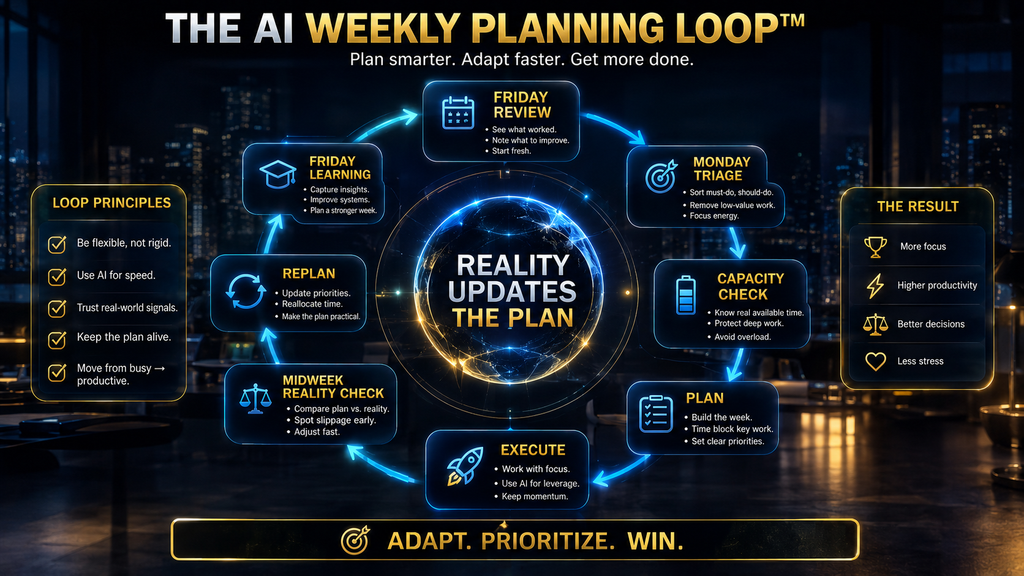
The AI Weekly Planning Loop
A strong weekly workflow should not happen once. It should evolve.
Review
What happened last week?
Triage
What still matters?
Capacity
What can realistically fit?
Plan
Where will the work happen?
Execute
Work through the selected priorities.
Replan
Adjust when conditions change.
Learn
Identify why the original plan succeeded or failed. Then use those lessons next week. This is fundamentally different from a rigid “Sunday planning session” because it treats the week as a dynamic system.
Friday Review: Plan From Reality
A useful weekly cycle begins at the end of the previous week. Spend 15–30 minutes reviewing:
- completed outcomes,
- unfinished work,
- new commitments,
- unexpected interruptions,
- time estimates that were wrong,
- tasks that repeatedly got deferred,
- decisions that remained unresolved.
Then ask AI to identify patterns. For example:
Review these completed and unfinished tasks from the week. Identify which tasks were repeatedly delayed, which estimates were unrealistic and which types of work created the most interruptions. Give me three changes to test next week.
This transforms the weekly review from a reflection exercise into a planning input.
Monday Triage: Don’t Start by Doing
Monday morning is often treated as a signal to begin executing immediately. That can be a mistake. Take a short planning window first.
Review:
- what changed,
- what arrived,
- what disappeared,
- which deadlines moved,
- what still matters.
Then let AI help rebuild the priority picture. The objective isn’t to recreate Friday’s plan perfectly.
The objective is to create the best plan given Monday’s reality. That distinction makes the process more resilient.
Midweek Reality Check
Wednesday is a useful checkpoint. Ask:
What did my actual execution reveal that my Monday plan didn’t know?
You may discover:
- tasks took twice as long,
- one project became more urgent,
- a meeting disappeared,
- a dependency was delayed,
- a task no longer matters.
Then replan. The mistake is treating the original plan as a promise that reality must obey.
A plan is a hypothesis about how the week will unfold. Reality gets to update it.
The “Kill List” Is as Important as the To-Do List
This may be the most useful contrarian idea in the article. A good weekly planner shouldn’t only ask:
What should I do?
It should ask:
What should I stop doing?
Every week, identify:
- unnecessary meetings,
- low-value tasks,
- duplicate work,
- outdated priorities,
- vanity projects,
- tasks that can be delegated,
- tasks that keep getting deferred without meaningful consequence.
AI can help by challenging your workload. Try:
Review my weekly task list as if my available capacity were 30% lower. Which tasks would you remove first, and why?
That forces trade-offs into the open.
Don’t Let AI Become a Professional Overplanner
This is a real failure mode. AI loves structure. Give it 40 tasks and it can create an impressive schedule.
But a schedule can be too detailed to survive contact with reality. If every 30-minute slot has a specific obligation, one unexpected meeting can create a cascade of rescheduling. The result is not productivity.
It’s calendar maintenance. Use AI to identify the shape of the week, not to micromanage every minute. Some work benefits from precise time blocks.
Other work benefits from flexible capacity. Use precision where it matters. Use flexibility where uncertainty is high.
What AI Should Plan and What You Should Decide
AI is well suited to the mechanical parts of weekly planning. It can summarize scattered inputs, identify duplicates, group related tasks, surface deadlines, estimate broad workload and produce alternative schedules. You should retain control over questions such as:
- Which outcome matters most?
- Which commitment can be renegotiated?
- Which task is strategically important despite having no deadline?
- What amount of work is acceptable this week?
- What trade-off are you willing to make?
This separation keeps AI useful without allowing it to quietly redefine your priorities.
A Weekly Planning Example
Imagine you are a freelance marketer. Your incoming work includes:
- two client campaigns,
- one proposal,
- a website revision,
- weekly reporting,
- five calls,
- ongoing email,
- and a new client onboarding process.
Your raw task list contains 24 items. A weak AI plan might schedule all 24. A stronger process starts differently.
You ask:
What three outcomes matter most this week?
Suppose the answer becomes:
- Submit the new client proposal.
- Complete Campaign A’s launch assets.
- Finish the critical website revision.
Everything else is subordinate. Now capacity is checked. You have:
- five meetings,
- three recurring administrative blocks,
- roughly 24 hours of genuine project capacity.
AI can now help sequence the three outcomes around deadlines and dependencies. The weekly plan becomes smaller. That’s the point.
The AI didn’t create more productivity by adding more tasks. It improved productivity by reducing the number of things competing for attention.
Another Example: Knowledge Worker With Too Many Meetings
Suppose your calendar contains eight meetings and several follow-up tasks. If you simply ask AI to “plan my week,” it may fill the remaining spaces. A better prompt is:
Separate my week into fixed commitments, deep-work opportunities, communication blocks and flexible capacity. Identify which tasks require uninterrupted time and protect those blocks before scheduling lower-value work.
Now the AI is solving an allocation problem. This is more sophisticated and more useful than simply arranging a list.
Use AI to Estimate Effort—But Don’t Believe It Blindly
AI can help estimate rough effort. It can also be wrong. If you tell an AI:
How long should this task take?
you may get a plausible number. That number isn’t a measurement. Treat AI estimates as initial assumptions, not facts.
Your own execution history is better evidence. If a task repeatedly takes three hours even though AI predicts one hour, your real data should eventually override the model. This is another reason weekly planning should include a learning loop.
Keep Your Own Planning Data
After several weeks, track:
- estimated time,
- actual time,
- planned vs completed,
- number of interruptions,
- number of carry-over tasks,
- reasons tasks slipped.
Then ask AI to analyze the pattern. For example:
Compare my estimated and actual task times over the past six weeks. Identify where I consistently underestimate effort and suggest three changes to how I plan future weeks.
Now AI is not merely generating a schedule. It’s learning from your workflow data. That can create much more value.
The Metrics That Matter
A weekly planning system should be judged by outcomes, not aesthetics.
Completion of priority outcomes
Did the important work actually get done?
Carry-over rate
How much planned work keeps moving into the next week? A high carry-over rate is a warning signal.
Capacity accuracy
Did you consistently plan more work than your actual capacity could support?
Focus-block survival
How many planned deep-work sessions actually happened?
Replanning frequency
How often did the schedule collapse and need rebuilding?
Planning overhead
How much time are you spending planning your plan? That last metric is easy to ignore. A weekly system that takes 90 minutes to maintain may be unnecessary for someone whose work is simple.
The objective is not to become excellent at planning. The objective is to make better use of the week.
Common Weekly AI Planning Mistakes
One common mistake is giving AI every task you can think of and accepting its first schedule as if the computer had discovered the objectively correct answer. It hasn’t. The system is working from the information you provided and whatever assumptions it can make about priority, duration and constraints.
Another mistake is failing to include invisible work. People plan the deliverable but forget the preparation, communication, review and recovery time around it. A 90-minute presentation is rarely a 90-minute task once research, revisions, approvals and meeting preparation are included.
A third mistake is planning every remaining hour. That creates a brittle schedule with no space for reality. The most useful weekly plans protect important work while leaving enough capacity for unexpected demands.
A fourth mistake is measuring the quality of the plan by how organized the calendar looks. A beautiful calendar can still produce poor results if it contains too much work. Completion, carry-over and rework are much stronger indicators.
A fifth mistake is using AI to avoid making difficult decisions. Asking AI to prioritize everything can feel easier than deciding what you personally are willing to postpone. But delegation of prioritization doesn’t eliminate the trade-off; it simply hides it.
What Happens If You Do Nothing?
You can continue using a normal task list and weekly calendar. For straightforward work, that may be enough.
The problem appears when your workload becomes dynamic. Every unfinished task carries forward, every new commitment competes for the same capacity, and every week begins with a growing inventory of things you didn’t finish last week.
Eventually, your planning system becomes a record of deferred intention.
That is why the AI-assisted approach is useful when applied correctly. It can help you review what actually happened, detect recurring patterns, propose a more realistic allocation and reduce the mechanical burden of weekly planning.
But the benefit comes from the feedback loop, not from the novelty of having AI generate a calendar.
The Minimal 15-Minute AI Weekly Planning System
You don’t need a complex setup. Start with four steps.
First five minutes: review
Give AI your unfinished tasks and last week’s notes. Ask it to identify:
- completed outcomes,
- unfinished priorities,
- recurring blockers,
- new commitments.
Next three minutes: decide outcomes
Choose your three or four most important outcomes. AI can challenge the choices. You make the decisions.
Next four minutes: capacity
Add meetings, fixed commitments and realistic work capacity. Then ask AI to propose a schedule with buffers.
Final three minutes: stress-test
Ask:
If I lose 20% of this week’s capacity, what should move first?
Now you have a plan that has survived one realistic scenario. That’s already more useful than a large task list.
How This Connects to Your Daily AI Workflow
Weekly planning and daily planning solve different problems. The weekly layer decides:
What deserves capacity this week?
The daily layer decides:
What deserves attention today?
That means the weekly plan should feed the daily workflow rather than compete with it. For the next execution layer, see Daily AI Workflow for Managing Work Without Feeling Overwhelmed.
The relationship is: Weekly plan → daily priorities → execution → review → weekly learning. That creates a coherent productivity system rather than two disconnected articles.
How Better Prompts Improve Weekly Planning
The quality of your weekly plan partly depends on how clearly you communicate constraints to AI. A weak request is:
Plan my week.
A stronger request is:
I have 24 hours of realistic project capacity after fixed meetings and administrative work. My three most important outcomes are A, B and C. A has a Friday deadline, B requires two uninterrupted sessions and C depends on information from another person. Protect two deep-work blocks, group communication tasks into batches, leave flexible capacity for unexpected work and flag anything that doesn’t fit.
That prompt doesn’t make the AI smarter. It gives it a better model of the planning problem. For more on constructing that kind of instruction, see A Beginner’s Guide to Writing AI Prompts That Generate Better Results.
When AI Weekly Planning Is Not Worth the Effort
You probably don’t need a complicated AI planning system if your work is already simple and predictable. If you have:
- very few tasks,
- almost no meetings,
- stable priorities,
- little uncertainty,
a basic calendar and task list may be more than sufficient. The system becomes more valuable when you have:
- many competing priorities,
- complex dependencies,
- frequent changes,
- multiple projects,
- substantial communication overhead,
- or recurring planning friction.
The right question is therefore not:
“Should everyone use AI to plan their week?”
It’s:
“Does weekly planning itself consume enough mental effort that AI can meaningfully reduce it?”
The Future of AI Weekly Planning
The direction of productivity software is moving from static schedules toward adaptive systems that can understand context, rearrange work and respond to changes. That can be useful. It can also create a new problem.
If AI starts automatically moving tasks, rescheduling deadlines and filling newly available time, your calendar can become too adaptive. Every change creates another optimization event, and the system may become obsessed with local scheduling while losing sight of the larger goal.
A better future is not a calendar that endlessly rearranges itself. It is a system that understands: what matters, what can move, what cannot move, and when it should ask a human before making a consequential change.
That is consistent with the broader direction of AI-assisted work: machine intelligence becomes more valuable when paired with human judgment and real workflow context, rather than simply layered on top of existing activity. Microsoft’s 2025 Work Trend Index also frames the emerging “frontier firm” around people working alongside AI agents and rethinking workflows, not merely adding another chatbot to existing tasks.
Final Weekly Planning Rule
A weekly plan should answer six questions:
- What matters?
- What fits?
- When will it happen?
- What will I deliberately postpone?
- What happens if the week changes?
- How will I know whether the plan worked?
AI can help answer most of those questions. But one remains fundamentally human:
What is worth your limited attention?
That is the decision no planner should quietly make for you.
Final Thoughts
The purpose of weekly planning is not to prove how much work you can fit into seven days. It is to decide what deserves your limited attention.
AI is useful because it can take some of the mechanical burden away. It can collect scattered tasks, group related work, identify deadlines, surface dependencies and produce possible schedules much faster than doing all of that manually.
But the strongest system doesn’t ask AI to decide everything. It gives the AI a structured problem and keeps the important trade-offs human. Start with workload.
Define outcomes. Calculate capacity. Remove what doesn’t fit.
Schedule the work that matters. Leave room for reality. Then review what actually happened and use the evidence to improve next week’s plan.
That creates something much more valuable than an AI-generated calendar. It creates a learning planning system.
The best AI weekly plan is not the one that fits the most tasks. It is the one that protects the few outcomes that matter most while leaving enough capacity for reality.
Ready to Turn Your Weekly Plan Into Daily Execution?
A strong weekly plan only works when it turns into realistic daily priorities. Build the next layer with a practical AI workflow designed to reduce interruptions, protect focus and keep work moving.
Build Your Daily AI Workflow →Frequently Asked Questions
Can AI plan my entire week?
Yes, AI can generate a draft weekly plan from tasks, deadlines, meetings and constraints. The better approach is to use AI as a planning assistant rather than blindly accepting its schedule. You should decide the major outcomes, validate the available capacity and approve the trade-offs.
What should I tell AI before asking it to plan my week?
Give it your fixed commitments, deadlines, outstanding tasks, major priorities, recurring responsibilities and realistic available work capacity. Also tell it which tasks require uninterrupted focus, which are flexible and which can be batched.
Can AI prioritize my weekly tasks?
AI can suggest priorities based on the criteria you provide, such as impact, deadline, dependency and effort. Human judgment is still important because strategic importance is not always visible from the task list.
Should AI schedule every hour?
No. A fully packed calendar is fragile. A better plan protects important work while leaving flexible capacity for interruptions, revisions and unexpected demands.
How much buffer should I leave in my week?
There is no universal percentage. The right amount depends on how predictable your work is. Highly interrupt-driven work should have more flexible capacity than a stable, predictable schedule.
Can AI help me decide what to remove from my weekly plan?
Yes. This can be one of its most useful roles. Give AI your planned workload and ask it to identify low-impact, duplicative or poorly timed tasks that could be removed or deferred.
Should I plan my week every Sunday or Monday?
Either can work. What matters more is the sequence: review reality, identify outcomes, assess capacity, then build the plan. A short Monday reality check is useful even if the main planning session happens on Friday or Sunday.
What is the difference between weekly and daily AI planning?
Weekly planning decides what deserves your limited capacity across the week. Daily planning decides what deserves attention today. Your daily workflow should inherit priorities from the weekly plan rather than constantly rebuilding them.
Can AI estimate how long tasks will take?
It can provide a rough estimate, but your own historical data is usually more useful. Track estimated versus actual time and use the difference to improve future planning.
What if my week changes constantly?
Then a rigid schedule is especially risky. Use fixed commitments, protected priorities, flexible work blocks and a midweek replanning checkpoint instead of trying to predict every hour precisely.
Is AI weekly planning worth it for a beginner?
It can be, especially if you regularly feel overloaded by competing tasks. Start with a simple workflow rather than adopting a complex planning platform.
What is the biggest mistake people make with AI weekly planning?
They ask AI to fit every task into the week instead of first deciding what the week can realistically support. Capacity and priorities should come before scheduling.
Sources and Further Reading
- Implementation intentions: Strong effects of simple plans: Gollwitzer, American Psychologist, 1999. The research behind “if-then” planning.
- Why is it so hard to do my work? The challenge of attention residue when switching between work tasks: Leroy, 2009. Introduces attention residue after task switching.
- Exploring the “planning fallacy”: Buehler, Griffin and Ross, 1994. Why people underestimate how long tasks will take.
Related Guides
- How to Start a Faceless Instagram Page With AI Tools
- AI Qualitative Research Explained: How AI Analyzes Interviews & Focus Groups
- AI Product Discovery: How to Use AI for Competitive Research and Market Analysis
Written by
Muntasir Ahmad Chowdhury
Founder, AI Hustle World
Muntasir Ahmad Chowdhury is the Founder of AI Hustle World, an independent publication dedicated to making Artificial Intelligence practical, trustworthy, and easy to understand. He researches AI tools, automation, customer service, productivity, and real-world business applications, helping readers make smarter technology decisions through research-driven, experience-backed content.
Expertise:
AI Tools • AI Automation • AI Customer Service • AI Productivity • Generative AI • AI Workflows
Get Smarter With AI
Enjoyed this guide? Get practical AI tools, tutorials, and honest reviews delivered to your inbox.