Evidence: Documentation reviewed
Last checked: August 2026
What was done: Written from official documentation and the published sources linked in this article. Not hands-on tested.
Files: None
Affiliate links: No
Last updated: October 2026
A Beginner’s Guide to Writing AI Prompts That Generate Better Results
To write AI prompts that generate better results, tell the AI exactly what job to do, give it the background that changes the answer, say what a good result must include, name who it is for and describe the format you want. That is the whole skill. You do not need magic phrases, technical knowledge or very long prompts.
Most beginners start with something like “write a blog post about AI productivity.” The AI replies in seconds with 1,500 words that technically answer the request, yet the article is generic, the examples do not fit your readers and the structure is not what you pictured. You then spend longer fixing the answer than you spent writing the prompt.
The usual reaction is to type “make it better” or to search for a perfect formula. Neither helps much. The answer gets longer but not more useful, because the AI still does not know what you wanted. The fix is to give it a clear specification of the work, the same way you would brief a capable new colleague.
This guide teaches that skill from the ground up. You will learn the AI Hustle World CLEAR framework, see before-and-after prompts for everyday tasks, learn how to fix a bad answer, get copy-ready templates and follow a seven-day practice plan. It is written for beginners using ChatGPT, Gemini, Claude or any similar assistant.
What an AI Prompt Is
An AI prompt is anything you give an AI assistant to produce a response: a question, an instruction, background information, a document, an image, an example or several of these together. OpenAI’s prompt engineering guide describes prompt engineering as writing effective instructions so a model consistently produces content that meets your requirements.
The key distinction for beginners is between asking and specifying. “Explain email marketing” is a request. “Explain email marketing to a small-business owner who has never run a campaign, covering the purpose, the basic workflow, three common mistakes and one realistic example, in under 700 words” is a specification.
The second version leaves the AI far less to guess. It knows the reader, the scope, the content and the length, so it can aim at your target instead of producing the most typical answer about email marketing. That shift from asking to specifying is the single biggest improvement most people can make. You will see the difference on the first try.
You do not need to specify everything every time. “What is the capital of Japan?” needs no framework. Specification matters when the task is open-ended, when the result will be used for something important or when the first answer missed the point. Those are the situations this guide focuses on. Everyday questions can stay short and simple.
Why Vague Prompts Produce Generic Answers
AI models are very good at producing plausible, well-written text. Plausible is not the same as useful. An answer can be grammatically perfect and still be too broad, aimed at the wrong reader, missing key points, based on wrong assumptions or simply irrelevant to the job you had in mind. Polish can hide those problems at first glance.
Imagine asking a new employee to “make a report about our sales.” A thoughtful person would come back with questions. Which period? Which products and markets? Who is the report for, and what decision should it support? Those questions exist because the request leaves important choices open. Good prompts answer them in advance.
An AI assistant often does not ask. It makes reasonable-sounding assumptions and keeps going, and when you leave a gap, it fills it with the most typical choice. That is why vague prompts produce average, generic results: average is the safest guess when the model does not know what you want. You only notice the guess when the answer misses.
Good prompting moves those hidden assumptions into explicit instructions. Every time you state the reader, the goal or the format, you replace a guess with a decision. If you want to understand why models behave this way, our explainer on how large language models work is a useful starting point. The rest of this guide shows how to do it.
The CLEAR Framework for Beginners
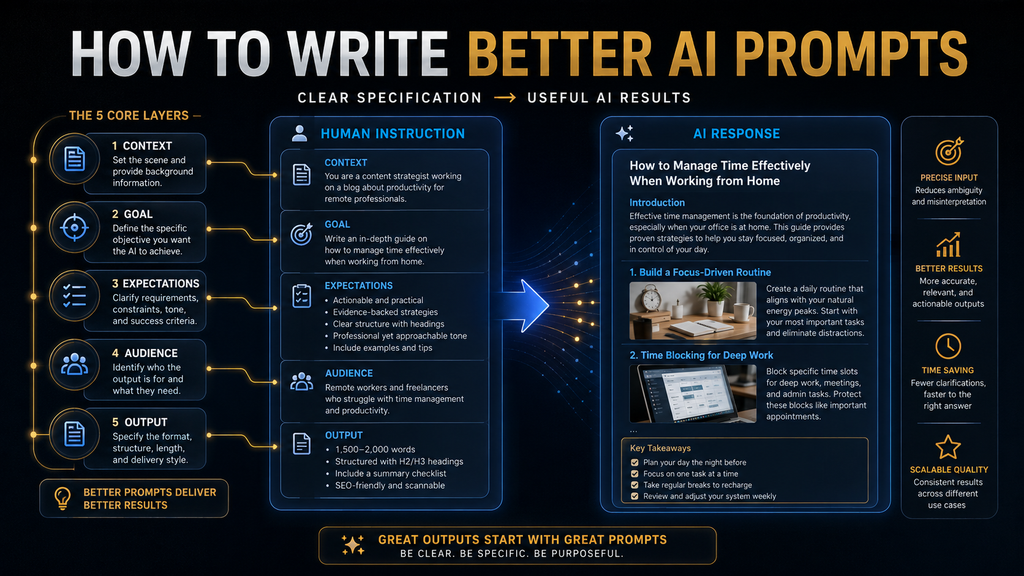
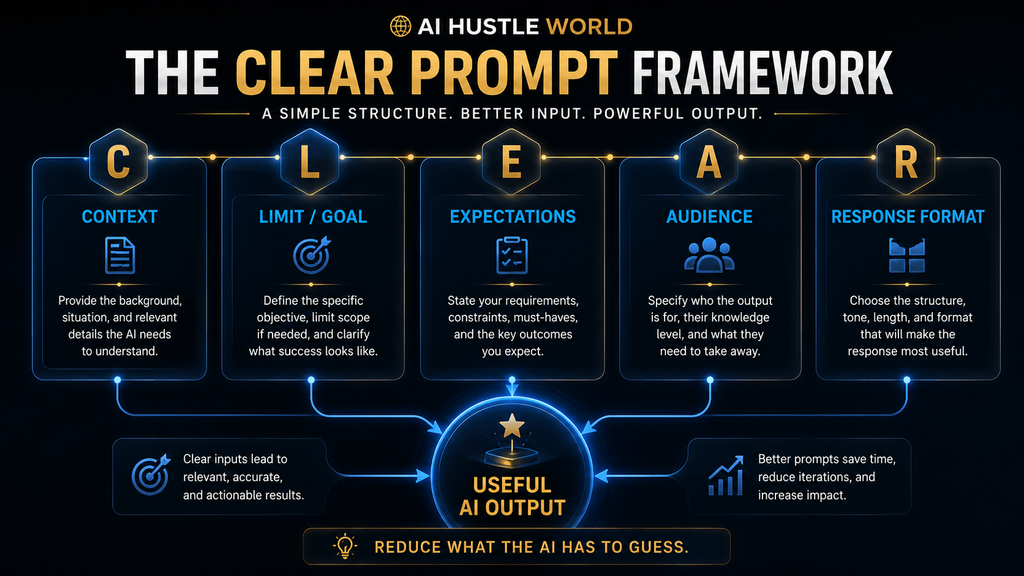
The AI Hustle World CLEAR framework is a simple checklist for writing better prompts. It is our editorial framework for beginners, not an official method from any AI company, and it covers the five things an AI most often has to guess: context, limits and goal, expectations, audience and response format.
| Letter | Element | Question it answers |
|---|---|---|
| C | Context | What does the AI need to know before it starts? |
| L | Limit and goal | What should the result accomplish, and within what boundaries? |
| E | Expectations | What must the answer include, prioritize or avoid? |
| A | Audience | Who will read or use the result? |
| R | Response format | What should the finished output look like? |
You will rarely need all five for a quick request. A short email might need only context and audience, while a research summary might need all five. Use the framework as a checklist rather than a template, and add only the parts that would change the answer if you left them out. With practice, running through the five letters takes only a few seconds.
If you already know these basics and want to focus on factual reliability, our advanced guide to writing prompts for accurate and reliable answers builds on this framework. This beginner guide concentrates on getting useful, well-aimed results for everyday tasks such as writing, summarizing, learning and planning.
C: Give the Context That Changes the Answer
Context answers one question: what does the AI need to know before it can do this properly? “Write a product description” gives it nothing to work with. “Write a product description for a beginner-friendly AI meeting assistant that records meetings, writes summaries and lists action items, for small-business owners without technical backgrounds” gives it a clear picture.
The second version tells the AI what the product is, what it does, who the customer is and which features matter. With that information, the description can be specific. Without it, the AI invents generic benefits that could describe almost any product, because it has nothing better to go on. Specific input leads to specific output.
More context is not automatically better, though. If you paste ten pages of loosely related material, you add noise as well as signal, and the AI may focus on the wrong details. Our guide to context engineering explains why choosing the right information matters more than adding more of it. Relevance matters more than volume.
A simple test helps: would removing this piece of information change the answer? If yes, keep it. If no, cut it. This one question keeps your prompts focused, shorter and easier for both you and the AI to follow, and it works for every kind of task. Apply it once before you send any important prompt. It quickly becomes a habit.
L: State the Goal and Its Limits
The goal tells the AI what success looks like. “Help me with my resume” is open-ended. “Rewrite my resume summary for a sales-management role” is better. “Rewrite my resume summary for a sales-management role, emphasizing team leadership, revenue growth and market expansion, in under 80 words” is better still.
The last version contains a task, a purpose, priorities and a constraint. Each of those narrows the range of acceptable answers, which is exactly what you want. A clear goal often does more work than a paragraph of vague instructions, because it gives the AI one target to aim at. Short prompts can still be precise.
Limits are part of the goal. They include length, scope, the number of items you want, deadlines, exclusions and the criteria for a good decision. A limit such as “three options, not ten” or “only tools under $20 a month” saves you from reading and filtering a long list of things you never wanted. Clear limits also make answers easier to compare.
Be careful with conflicting limits. “Be extremely detailed but keep it under 50 words” forces the AI to break one of your rules. If two limits compete, say which one wins, for example “keep it under 50 words; cut detail before going over the limit.” That small sentence prevents a frustrating back-and-forth.
E: Set Expectations for the Output
Expectations describe what the answer must include, prioritize or avoid. “Compare these AI tools” does not say how. “Compare these AI tools on price, ease of use, integrations, strongest use case and biggest limitation” gives the AI clear evaluation criteria, so the comparison becomes useful instead of descriptive.
Expectations matter most for comparisons, recommendations, analysis, research, planning and any kind of decision support. In those tasks, the AI has to judge what is important, and without your criteria it will choose its own. Those criteria may not match your priorities at all, and you may not notice until you act on the answer.
The word “best” deserves special attention. Best for whom, at what, at what price and under what constraints? There is rarely a universal best. Instead of “which AI tool is best?”, try “compare these tools for a five-person marketing team on writing quality, collaboration, integrations, price and learning curve, then recommend one and explain the trade-off.”
Expectations can also say what to avoid. “No jargon,” “no hype,” “do not invent statistics” and “do not include tools without a free plan” are all useful expectations. Negative instructions work best when they are specific, so name the exact thing you do not want instead of writing “avoid anything bad.” Specific exclusions save a round of edits.
A: Tell the AI Who the Result Is For
The same information needs a different explanation for different readers. “Explain AI agents” could produce anything from a technical overview to a children’s analogy. “Explain AI agents to a small-business owner who understands basic software but has no machine-learning background, with one practical example” sets a clear communication target.
Audience affects vocabulary, depth, examples, tone, assumptions and the level of detail. A finance manager needs different examples from a student, and a beginner needs more definitions than an expert. When you name the reader, the AI can make those choices for you instead of guessing at a generic middle ground.
Describe the audience by what they know and what they need, not only by job title. “Marketers” is vague. “Marketers who use ChatGPT daily but have never built an automation” tells the AI where to start and what to skip. If you want to learn more about AI agents themselves, our beginner’s guide to AI agents is a good next step.
If the audience does not affect the answer, skip it. Asking for a unit conversion or a list of synonyms does not need a reader profile. The aim is to add only the information that changes what a good answer looks like for your situation. When in doubt, try the prompt without an audience first and add one only if the answer misses.
R: Describe the Response Format
If the shape of the answer matters, say so. “Summarize this report in five bullet points,” “compare the three tools in a table with columns for price, best use case, strengths and limitations” and “answer in four sections: recommendation, evidence, risks and next step” all produce predictable, easy-to-use output.
Format is especially useful for repeated work. If you are writing ten product summaries and each one needs the same structure, describe that structure once and reuse it. Consistent output saves editing time and makes the results easier to compare, paste into documents or share with colleagues. It is one of the easiest wins in prompting.
Showing is often faster than telling. A short example of the format you want, such as “Best for: small teams. Main benefit: fast meeting summaries. Main limitation: limited customization,” gives the AI a pattern to copy. We cover examples in more detail later, and our guide to structured prompts shows more advanced options.
Keep format requests realistic. Asking for a table with twelve columns or a summary that is both one line long and fully detailed will produce awkward results. Choose the simplest format that lets you use the answer straight away, and adjust it on the next try if it does not quite fit. Simple formats are easier to reuse later.
Putting CLEAR Together: A Full Example
Here is how the five parts combine into one practical prompt. Notice that each line changes the result, and nothing is there for decoration. This is the standard to aim for: detailed where it matters and silent where it does not. Read it line by line and ask what the answer would lose without each part. Use it as a model for your own tasks.
Task: Write a beginner-friendly guide explaining AI productivity.
Context: Readers are non-technical professionals who already use AI for writing and research.
Goal: Show five practical ways AI can reduce repetitive knowledge-work tasks.
Expectations: For each, explain the workflow, where AI helps, what still needs human judgment and one limitation. No hype.
Audience: Busy professionals with basic AI experience.
Format: Five numbered sections, then a short practical checklist.
You do not need labels like “Task:” and “Context:” in every prompt. They help when a prompt is long, because they make it easy for you and the AI to see each requirement. For a short request, a single well-built sentence does the same job, as long as it contains the parts that matter. Use whichever style you find easier to write.
Compare this with “write about AI productivity.” The short prompt leaves the AI to choose the reader, the angle, the number of ideas, the depth and the structure. The CLEAR version makes those choices for it, which is why the result is far more likely to be usable on the first attempt. That saves several rounds of follow-up prompts.
Longer Prompts Are Not Better Prompts
A lot of prompt advice online pushes very long prompts that open with “act as a world-renowned expert” and continue for several paragraphs. Sometimes a long prompt is justified, but often the length is decoration. What matters is how much useful information each sentence carries. Long and vague is still vague.
Current guidance from AI developers points the same way. Google’s Gemini 3 developer guide advises keeping prompts concise because Gemini 3 responds best to direct, clear instructions and may over-analyze verbose or overly complex prompt techniques used for older models. In other words, clarity beats elaborate wording.
Compare two prompts. “Act as the world’s greatest productivity expert and give me an incredibly detailed answer about productivity” is long and vague. “Identify the three biggest bottlenecks in this workflow; for each, explain the cause, suggest one AI-assisted fix and name one risk” is shorter and far more useful.
So optimize for information density, not length. A useful habit is to reread your prompt and delete any sentence that would not change the answer. What remains is usually shorter, clearer and more effective, and it is also easier to reuse later for similar tasks. Shorter prompts are also easier to debug when something goes wrong.
Should You Tell the AI to Act as an Expert?
Assigning a role can help when a particular perspective matters. “Act as a career coach helping a recent graduate prepare for a sales interview” sets a useful point of view: the AI will think about what interviewers look for and what a nervous graduate needs to hear. That perspective shapes both the content and the tone of the advice.
A role is not a substitute for a task, though. “Act as a world-class marketing expert and give me an amazing strategy” still leaves the AI guessing about the product, the market, the budget and the goal. The role adds flavor but no direction, so the answer stays generic. You would get much the same result without the role at all.
A better version combines the role with real work: “Analyze this landing page as a B2B software marketing strategist. Identify the three biggest conversion barriers, explain why each matters and recommend one specific change for each.” The role sets the perspective, and the specification sets the job. Together they produce focused, useful advice.
Think of roles as optional seasoning. Use one when it clearly changes the answer, and leave it out when the task is already well defined. Our dedicated guide to role prompting covers when roles help and when they make little difference. For most beginner tasks, a clear task matters far more. Add a role only after the task is clear.
When to Add Examples
Sometimes the fastest way to explain what you want is to show it. If every summary should follow the same pattern, one example teaches the pattern faster than a paragraph of instructions. This technique is called few-shot prompting, and OpenAI’s guide describes it as including a handful of input and output examples to steer the model toward a new task.
Google’s prompt design strategies also cover examples, noting that you can include examples that show the model what getting it right looks like. Examples are most useful for formatting, classification, tone, categorization and any output that needs to stay consistent across many items. They work best when the pattern matters more than the wording.
Choose examples carefully, because the AI may copy them too closely. If all your examples are about software, it may lean toward software in every answer. Use varied examples that share the pattern you want but differ in topic, and say whether the AI should match the structure, the tone or both. Clear guidance prevents the AI from copying too much.
Do not add examples by default. If the output you want is obvious, an example adds length without value. Our comparison of few-shot and zero-shot prompting explains when each approach works best and how many examples you usually need. One or two well-chosen examples are often enough for a beginner task. Add more only when results are inconsistent.
When Source Material Matters More Than Wording
Suppose you ask, “What does this company’s privacy policy say about data retention?” No amount of clever wording gives the AI the policy. If it answers anyway, it may describe typical policies or guess. The fix is to paste the relevant document and set a clear rule for how to use it. The source does the heavy lifting here.
A good source rule sounds like this: “Use only the information in the following policy. Identify the sections about data retention. If the document does not specify something, say that it is not specified. Do not infer missing details.” That rule tells the AI where its evidence ends. It also tells you which answers to trust most.
This approach matters for policies, contracts, research papers, product documentation, financial reports and internal company information. In all of these, the answer depends on a specific document, not on general knowledge. Larger systems use the same idea at scale, as our retrieval-augmented generation guide explains.
Remember the division of labor: prompt quality controls the task, and source quality controls the evidence. You need both when accuracy matters. A perfect prompt with no source still invites guessing, and a perfect source with a vague prompt can still produce an answer to the wrong question. Get both right when the stakes are high.
What a Good Prompt Cannot Do
Telling an AI “give me only verified facts” does not verify anything. The model cannot check its own claims against reality just because you asked. A better prompt reduces ambiguity and improves focus, but it cannot turn an unverified claim into a verified fact. Instructions shape the answer; they do not check it.
That is because language models generate likely text rather than looking up truth. Even a well-prompted answer can contain an outdated date, a wrong number or a confident detail that does not exist. Our guide to AI hallucinations explains why this happens even with good prompts, and why the risk is higher for niche or recent topics.
So treat prompting and fact-checking as two separate steps. The workflow is source, prompt, response and then verification. For anything important, such as health, money, legal questions or published content, check the key claims yourself using our framework for checking AI information. Checking takes minutes and prevents costly mistakes.
There is a useful middle step as well. Ask the AI to mark which claims came from your source and which came from its general knowledge, and to flag anything it is unsure about. That does not guarantee accuracy, but it shows you exactly where to focus your checking time, which matters most when the answer is long.
Your First Five Prompts: Before and After
The fastest way to learn is to see weak prompts turned into strong ones. Here are five everyday tasks, each with a typical beginner prompt and an improved version using the CLEAR framework. Try each improved version with your own details and compare the results. You will notice the difference on the very first try.
Writing an email. Weak: “Write an email to a client.” Better: “Write a short, friendly email to a client who asked for a delay on their project. Explain that we can move the deadline by one week, list the two things we need from them and end with a clear next step. Keep it under 150 words.” The reply is ready to send after a quick check.
Summarizing a document. Weak: “Summarize this.” Better: “Summarize this meeting transcript for a manager who missed the meeting. List the three decisions made, the open questions and each action item with its owner. Use bullet points and keep it under 200 words.” The manager can now act on the summary without reading the full transcript.
Learning something new. Weak: “Explain budgeting.” Better: “Explain how to make a monthly budget to a 22-year-old with their first full-time job. Use one worked example with round numbers, explain the 50/30/20 approach and finish with three mistakes to avoid.” Naming the learner and the example style turns a lecture into a lesson.
Planning a week. Weak: “Help me plan my week.” Better: “Here are my tasks and deadlines for this week. Group them by priority, suggest which three to finish first and flag anything that cannot fit in 30 working hours. Format it as a simple day-by-day list.” Our guide to planning your week with AI expands on this.
Making a decision. Weak: “Should I buy a laptop or a tablet?” Better: “Help me decide between a laptop and a tablet. I mainly write documents, join video calls and travel twice a month. My budget is $800. Compare both on these needs, list the trade-offs and recommend one.” Our AI decision-making framework shows more.
In every case, the improved prompt adds the same things: who it is for, what success means, what to include and what shape the answer should take. None of them use special wording. They simply remove the guesswork that made the first version produce a generic answer. The same pattern works for almost any task you bring to an AI assistant.
How to Fix a Bad Response
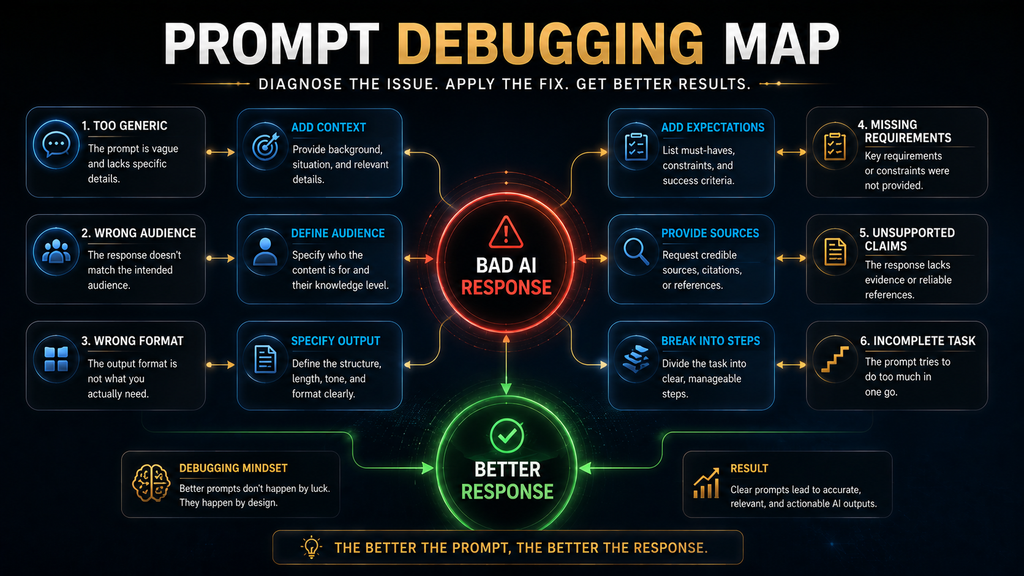
When an answer disappoints, resist the urge to rewrite the whole prompt. First name the failure, then fix the part of the prompt that caused it. This is prompt debugging, and it is a far more useful skill than collecting hundreds of templates you will never reuse. The table below links the most common problems to their likely causes.
| If the answer is… | The likely cause is… | Try adding… |
|---|---|---|
| Too generic | Missing context | Relevant background details |
| Too long or too short | Weak limits | A clear length or scope |
| Aimed at the wrong reader | No audience | Who the result is for |
| Badly structured | No format | A template or example |
| Missing key points | Unclear expectations | The required elements |
| Factually shaky | No source boundary | Source material and a “say if unknown” rule |
| Inconsistent across runs | No pattern | An example to follow |
| Only partly complete | Task too big | Smaller sequential steps |
The table is a diagnostic tool, not a formula. Its job is to help you find the missing piece instead of adding words at random. Most bad answers trace back to one or two missing elements, and fixing those is faster than starting over with a brand-new prompt. Keep the table handy until the patterns become second nature.
When you fix a prompt, change one thing at a time where you can. If you change the context, the audience and the format together, you will not know which change helped. Small, deliberate changes teach you how a particular AI responds, which makes every later prompt better. Over time you will predict problems before you send the prompt at all.
Break Big Jobs Into Smaller Prompts
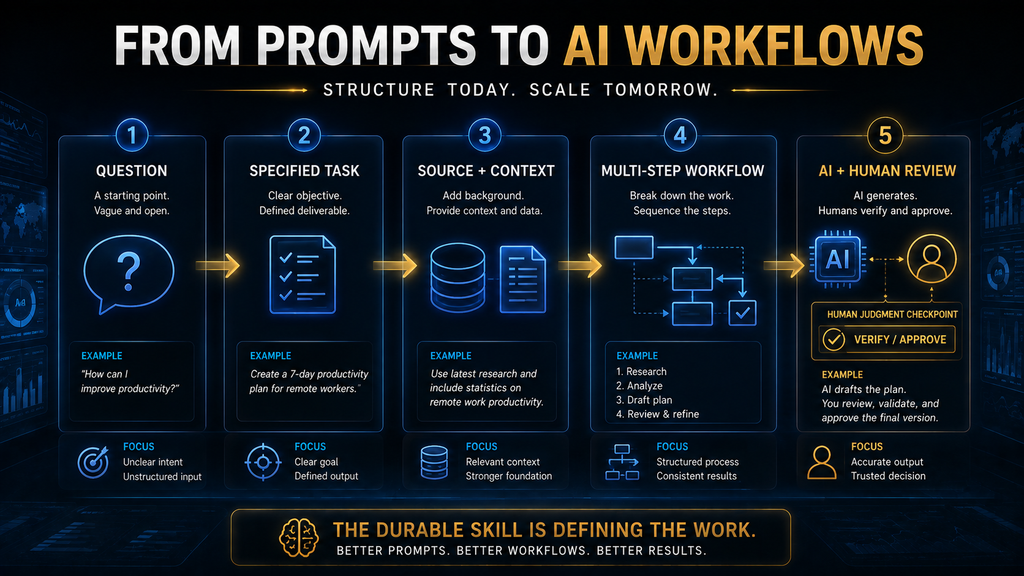
“Research the topic, analyze competitors, find sources, create an outline, write the article, fact-check it, optimize it and create social posts” is not one task. It is a project with eight stages, and asking for it in one prompt usually produces shallow work at every stage. Each part gets a fraction of the attention it needs.
Microsoft’s prompt engineering guidance notes that large language models often perform better when a task is broken down into smaller steps. Splitting work also makes each result easier for you to review before it feeds into the next stage. A mistake caught early does not spread through the rest of the work.
A staged version of the same job might look like this: first research the key questions and sources, then pick the five most important insights, then build an outline for beginners, then draft from the approved outline and finally check the draft for unsupported claims and repetition. Each step has its own short prompt.
Newer models can handle longer, multi-step instructions better than older ones, so this is a judgment call rather than a fixed rule. A good rule of thumb is to split a task whenever you would want to review the result of one stage before starting the next. Our guide to using ChatGPT for blogging shows a full staged workflow.
Refine With Follow-Up Prompts
You do not need a perfect prompt on the first try. Chat assistants remember the conversation, so you can improve an answer step by step. Start with a reasonable prompt, read the result, decide what is missing and ask for that change. This loop of prompt, review and refine is how experienced users work. It is faster than trying to write a perfect prompt.
Specific follow-ups beat vague ones. “Make it better” gives no direction. “Make it shorter,” “keep the examples but simplify the explanation,” “add a practical example for a beginner” or “remove any claims you are unsure about” each tell the AI exactly what to change and what to keep. The AI cannot guess which way “better” should go.
Here is a quick example. A first attempt, “write a LinkedIn post about AI productivity,” returns something generic. A second attempt adds the audience: small-business owners reducing admin work. A third adds direction: start with a realistic everyday problem, explain one workflow, avoid exaggerated claims and end with a question.
The lesson is to notice what was missing after each attempt and add exactly that. If a conversation gets long and messy, start a fresh chat with the improved prompt, because very long conversations can make the AI lose track of earlier details, as our guide to AI memory and context windows explains. A fresh chat often gives a cleaner answer.
Beginner Prompt Templates You Can Copy
Templates give you a head start, but they work only when you fill every bracket with real details. A template with vague fillers produces vague results. Treat these as starting points, and change the wording to suit each task. Delete any line that does not apply rather than leaving it blank. Specific fillers produce specific results.
WRITING
Write a [content type] for [audience] about [topic].
The goal is [outcome]. Include [required elements].
Avoid [things to exclude]. Use a [tone] tone. Format: [format].
SUMMARIZING
Summarize the text below for [audience].
Extract [specific information]. Highlight [decisions / risks / action items].
Keep it under [length]. If something is unclear in the text, say so.
RESEARCH PLANNING
I am researching [topic] for [purpose].
List the key questions I should answer, the types of sources that could answer them,
and common misconceptions. Separate confirmed facts from assumptions.
Do not invent sources or statistics.
EDITING
Edit the text below for [audience and purpose].
Keep the original meaning and all facts. Improve [clarity / structure / length].
Do not add new information. List the main changes you made.
COMPARING
Compare [options] for [specific user or situation] on [criteria].
Explain the trade-offs, say which option fits which situation,
then recommend one and explain why.
BRAINSTORMING
Give me [number] ideas for [goal]. Prioritize [criteria].
Group them into [categories]. Exclude ideas that need [constraint].
DECIDING
Help me decide between [options]. My priorities are [priorities].
My constraints are [constraints]. Compare the options, show the biggest trade-offs
and recommend the best fit for my situation.
Once a template works well for you, save the filled-in version along with a note about when to use it. Over time you will build a small personal library of prompts that fit your own work. Our list of prompt libraries and marketplaces can give you more ideas to adapt. Borrowed prompts work best once you add your own context to them.
How Prompting Changes by Task
The CLEAR principles apply everywhere, but each kind of task leans on different elements. Knowing which elements matter most for a task helps you write a good prompt quickly without running through the whole checklist every time. The table below summarizes the priorities for six common kinds of work. Use it as a quick reference.
| Task | What to prioritize |
|---|---|
| Writing | Audience, purpose, tone, structure, source material |
| Research | Question, scope, preferred sources, evidence rules, output format |
| Analysis | Data, criteria, assumptions, the decision it supports |
| Brainstorming | Goal, constraints, number of ideas, how to judge them |
| Learning | Your current level, the objective, teaching style, practice questions |
| Decisions | Options, priorities, constraints, trade-offs |
The common mistake is to use one universal template for everything. A research prompt full of tone instructions wastes words, and a writing prompt with no audience misses the most important detail. Let the task tell you which parts of CLEAR to emphasize and which to leave out. That judgment improves quickly with practice.
Do Prompts Work the Same in ChatGPT, Gemini and Claude?
The fundamentals transfer well. Clear tasks, relevant context, defined expectations and a useful format improve results in every major assistant. OpenAI, Google, Microsoft and Anthropic all publish prompting guidance, and Anthropic’s prompt engineering overview covers the same core ideas for Claude. Good habits work everywhere.
Details differ between models. Google’s Gemini 3 guidance favors concise, direct instructions, while other models may respond differently to long prompts, examples or formatting cues. The same prompt can produce slightly different structure, tone or length in different assistants, even when all of them answer correctly.
So learn the durable principles first, and adjust for a specific tool only when you notice a pattern or when its documentation recommends something different. Our side-by-side look at prompting ChatGPT, Claude and Gemini shows how the same prompt behaves across the three. For most everyday tasks, the differences are small.
Save and Reuse Your Best Prompts
Retyping the same background every time wastes effort. Most assistants let you store standing instructions, such as custom instructions in ChatGPT, so details about you, your work and your preferred style apply to every new chat. Use them for information that rarely changes, not for task-specific details.
For recurring tasks, keep your best prompts in one place: a note, a document or a dedicated tool. Record what each prompt is for, the inputs it needs and any lessons from using it. When you return a month later, you will not need to rediscover what worked. A prompt with notes is far more useful than a prompt on its own.
Teams benefit even more, because shared prompts make output more consistent across people. If you reach that stage, our roundup of prompt management tools and our guide to writing system instructions cover more structured ways to store and share them. Start simple; a shared document works well for a small team.
What Not to Put in a Prompt
Good prompts include relevant context, but some information should stay out. Never paste passwords, verification codes, full card numbers or government ID numbers into a consumer chatbot. Be careful with client names, health details, private conversations and confidential business documents too, especially on free accounts.
When a task needs sensitive material, reduce it first. Replace names with roles, remove account numbers and cut the document down to the part the AI needs. “Customer A complained that the order arrived late” usually works as well as the real name and address, and it keeps you out of trouble. Less personal detail rarely hurts the answer.
Check your assistant’s data settings as well, including whether chats are used for training and how long they are kept. Our guide to AI privacy risks before sharing personal information explains what to remove and which settings to review. Five minutes spent on settings can prevent a serious leak later. Review them again after major product updates.
How to Tell Whether a Prompt Is Better
It is easy to judge a prompt by whether the answer sounds impressive. A better test is to score the result on five practical measures: relevance, completeness, accuracy, edit burden and repeatability. Each one tells you something different about whether the prompt is doing its job. Together they give a fair picture of quality.
Relevance asks whether the answer addressed the task you set. Completeness asks whether it included everything you required. Accuracy asks whether the important claims hold up when you check them. Edit burden asks how much you had to fix before using it. Repeatability asks whether the same prompt gives useful results again next time.
Score each from 1 to 5. A prompt that reliably scores 4 or 5 across the board is worth far more than one that occasionally produces a brilliant answer but often misses. Reliability is what makes a prompt worth saving, because you can use it without checking every word from scratch. Consistency is what turns a prompt into a tool.
Edit burden is often the most revealing measure. If you spend twenty minutes correcting every answer, the prompt is not saving you much time, however good the first lines look. Track this for your most frequent tasks, and improve the prompts that cost you the most cleanup. Those are where small changes pay off fastest.
The Time Cost of Vague Prompts
For simple tasks, one-line prompts are perfectly fine. The cost of vague prompting appears when you use AI repeatedly for more complex work. It shows up as more editing, more clarification, repeated attempts, inconsistent output and decisions built on assumptions you never noticed. Those small costs add up over a working week.
Research shows AI assistance can produce measurable gains at work. A National Bureau of Economic Research field study of 5,179 customer support agents found that access to a generative AI assistant raised productivity by 14% on average, with a 34% improvement for novice and low-skilled workers. The study is large and well designed, which makes it useful context.
That study measured an AI assistance tool in customer support, not prompt writing, so it would be wrong to say better prompts raise productivity by 14%. The fair conclusion is narrower: AI can deliver real benefits when it is fitted well into actual work, and clear prompting is one part of fitting it well.
The useful question is therefore not “how clever is my prompt?” but “how much useful work did this prompt help me finish, and how much correction did it need?” Answering that honestly for your common tasks shows you where better prompts will save the most time, and where a one-line prompt is already good enough.
Who Benefits Most From Learning to Prompt
Students
If you are a student, use prompts to request clear explanations, practice questions, study plans and feedback on your drafts. State your level and your course so the explanations fit. Use AI to understand material, not to replace your own work, and check your school’s rules on AI use. Our list of free AI tools for students can help you choose an assistant.
Writers and Marketers
If you write or market for a living, prompts help with outlines, research organization, editing, campaign ideas and copy variations. Your advantage comes from supplying real context: your audience, your brand voice and your own expertise. Without those, every output will sound like everyone else’s. Context is your competitive edge.
Freelancers and Business Owners
If you run your own work, prompts can structure briefs, draft client emails, summarize documents and plan operations. Build a small set of reliable prompts for the tasks you repeat every week. Our guide to AI productivity tools for beginners suggests tools that suit these workflows. A small library of tested prompts saves hours each month.
Office Professionals
If you work in an office, prompts help with reports, summaries, meeting preparation and routine knowledge work. You do not need to become a prompt engineer. You need to become good at describing work clearly, which is a skill that also makes you better at briefing colleagues. Clear instructions help people and AI alike.
When a Simple Prompt Is Enough
Not every request needs CLEAR. “What is the capital of Japan?” and “summarize this email in three bullets” are already clear. Adding a reader profile, expectations and format rules would only slow you down without improving the answer. The AI already has everything it needs to respond well. Save your effort for open-ended work.
Prompting effort should rise with ambiguity, complexity and consequences. Add more structure when the task is open-ended, when you will reuse the prompt, when the format matters, when you need to control sources or when a mistake would be costly. Keep it simple when none of those apply. Match the effort to the stakes.
A good habit is to start simple and add detail only when the answer misses. That way you learn which details matter for each kind of task, and you avoid spending five minutes writing a prompt for a question that needed five words. Simple tasks deserve simple prompts. Save the full framework for work where a wrong guess would cost you time.
Common Beginner Mistakes
Being Too Vague
“Write something about AI” forces the AI to invent your intent. Even one added detail, such as the reader or the goal, improves the result. Before sending a prompt, ask yourself whether a stranger could do the task well from your words alone. If the answer is no, add the missing detail. Detail beats guesswork every time.
Saying “Make It Better”
Better in what way: clearer, shorter, more persuasive, more accurate or more formal? Without a direction, the AI changes words more or less at random. Name the improvement you want, and the revision will move in that direction instead of simply getting longer. One clear direction per follow-up works best.
Adding Irrelevant Context
More information can create noise. If you paste a long document but care about one section, point to that section or paste only that part. The AI cannot always tell which details matter most, so help it by leaving out what does not. Shorter, focused context usually produces sharper answers. Point to what matters.
Treating “Best” as a Fact
“Best” depends on the person, budget and situation. Replace it with your criteria, such as price, ease of use or a specific feature. You will get a recommendation that fits your needs instead of a generic list of popular options. Your criteria are what make the answer personal and worth acting on. Name what matters most to you.
Using a Role Instead of a Task
“Act as an expert” does not tell the AI what work to do. If you use a role, pair it with a specific job, a clear goal and the format you want. The role sets the viewpoint; the task does the real work. Without the task, the role changes only the tone of a generic answer, not its usefulness. Define the work first.
Trusting a Polished Answer
Fluent writing can hide wrong facts. Verify anything important before you rely on it or share it, especially numbers, dates, names, prices and advice about health, money or law. Confidence in the wording tells you nothing about accuracy. The AI sounds equally sure when it is right and when it is wrong. Check anything you plan to act on.
Never Iterating
The first answer is a starting point. Read it, decide what is missing and ask for that change. Two or three focused follow-ups usually produce a result far better than any single prompt, and they take less time than starting over. Keep the parts you like and ask for changes to the rest. Iteration is part of the process, not a failure.
A Seven-Day Practice Plan
Reading about prompts helps, but practice builds the skill. This simple plan takes about fifteen minutes a day and uses tasks from your own life, so the improvements carry straight into your work. Keep a short note of what you learn each day. Those notes become your own prompting guide. Short daily practice works better than one long session.
Day 1: Pick a task you often do with AI. Write your usual prompt, then rewrite it with CLEAR and compare the two answers. Day 2: Practice context. Run the same request with and without one key background detail and note how much the answer changes. This shows you which details carry the most weight. Write down what changed.
Day 3: Practice format. Ask for the same information as bullets, then a table, then a short paragraph, and decide which you would use. Day 4: Practice examples. Give one example of the output you want and see whether the AI follows the pattern closely or copies it too literally. Adjust your wording if it copies the topic instead of the pattern.
Day 5: Practice debugging. Take a disappointing answer, name the failure using the table above and fix only that part of the prompt. Day 6: Practice staging. Split a bigger task into three smaller prompts and compare the result with a single prompt. Notice where the staged version is deeper or more accurate.
Day 7: Save your three best prompts with a note about when to use each one. By the end of the week you will have a working method, a small prompt library and a clear sense of which details make the biggest difference for the tasks you do most often. Keep practicing with real work, and the skill will keep improving.
Your Prompt Checklist
Before sending an important prompt, run through these questions. You will not need every item every time, but the list catches the most common gaps in a few seconds. Over time you will run through it without thinking, and your first drafts of prompts will already cover most of it. Use it as a quick final check.
- Task: What exactly do I want the AI to do?
- Context: What information would change the answer?
- Goal and limits: What should the result achieve, and within what boundaries?
- Expectations: What must the answer include or avoid?
- Audience: Who will use the result?
- Sources: Should I paste material and tell the AI to use only that?
- Example: Would one example make the format clearer?
- Format: What shape should the answer take?
- Size: Should I split this into smaller steps?
- Check: How will I judge whether the answer is good?
If you can answer the questions that matter for your task, your prompt is ready. If you cannot, the gap you find is exactly what the AI would otherwise have to guess, and filling it is the quickest way to a better result. A ten-second check now saves several rounds of revision later. Practice makes the check faster.
How We Researched This Guide
This guide is based on official documentation and published research, not on hands-on testing for this article. We reviewed prompting guidance from OpenAI, Google (including its Gemini 3 developer guide), Microsoft and Anthropic, and the National Bureau of Economic Research study on generative AI in customer support.
The CLEAR framework, the before-and-after prompts, the templates and the seven-day plan are AI Hustle World’s editorial guidance for beginners. They are not official methods from any AI company. Model behavior changes over time, so check the linked documentation for the latest model-specific advice. We will update this guide as guidance changes.
Final Thoughts
Good AI prompting is not about finding a secret sentence that makes a model smarter. It is about reducing ambiguity. Give the AI the context that matters, define the job, say what success looks like, set sensible limits, name the reader and describe the format when structure matters. These are communication skills, not technical tricks.
Then read the result and refine it. Provide source material when evidence matters, check important claims yourself and break big jobs into smaller steps. That loop works across ChatGPT, Gemini, Claude and whatever comes next, because it is built on clear communication rather than tricks tied to one model.
The most useful mindset shift is to stop thinking of a prompt as a question and start thinking of it as a small specification for a piece of work. Do not make prompts longer to look sophisticated. Make them clearer, so the AI has less to guess and you have less to fix. That habit will serve you well whichever assistant you use.
Want More Reliable AI Results?
Better prompt writing is only the beginning. Explore more practical guides for improving AI accuracy, asking better questions, and building useful AI workflows.
Explore Prompt Engineering Guides →Frequently Asked Questions
What is an AI prompt?
An AI prompt is the instruction, question or other input you give an AI assistant. It can include text, documents, images and examples. The clearer and more specific it is, the more useful the response tends to be.
How do I write a good AI prompt?
Define the task, add the context that changes the answer, state the goal, list what the answer must include, name the audience and describe the format. Then review the response and refine it.
Should AI prompts be long?
No. Prompts should be as detailed as the task needs and no more. Google advises concise, direct instructions for Gemini 3, and useful detail matters far more than length.
Do I need technical knowledge to write good prompts?
No. Good prompting is mainly a communication skill. If you can brief a colleague clearly on a task, you can learn to write strong prompts for an AI assistant.
Should I tell the AI to act as an expert?
You can when a particular perspective helps, but a role does not replace a clear task. Pair any role with a specific job, a goal and the format you want.
When should I include examples in a prompt?
Include examples when you need a specific format, style or classification, or when outputs must stay consistent. Skip them when the result you want is already obvious.
Can better prompts stop AI from making mistakes?
They reduce ambiguity and improve focus, but they cannot guarantee accuracy. Provide sources where possible and verify important claims yourself before relying on them.
What should I do when the AI gives a bad answer?
Identify the specific problem first, such as missing context, the wrong audience or the wrong format. Then fix that part of the prompt instead of rewriting everything.
Does the same prompt work in every AI tool?
The core principles transfer, but models can differ in tone, structure and length. Start with the same clear prompt, then adjust if a particular tool behaves differently.
Is it safe to put personal information in a prompt?
Avoid passwords, ID numbers, card details and confidential documents in consumer tools. Replace names with roles and share only what the task needs.
Sources and Further Reading
- OpenAI: Prompt engineering guide
- Google: Prompt design strategies for the Gemini API
- Google: Gemini 3 developer guide
- Microsoft: Prompt engineering techniques
- Anthropic: Prompt engineering overview
- NBER: Generative AI at Work (Brynjolfsson, Li and Raymond)
Related Guides
- How to Write AI Prompts for More Accurate and Reliable Answers
- How to Ask AI Better Questions to Save Time and Get Useful Answers
- Few-Shot vs Zero-Shot Prompting
- Best AI Tools for Beginners in 2026
Written by
Muntasir Ahmad Chowdhury
Founder, AI Hustle World
Muntasir Ahmad Chowdhury is the Founder of AI Hustle World, an independent publication dedicated to making Artificial Intelligence practical, trustworthy, and easy to understand. He researches AI tools, automation, customer service, productivity, and real-world business applications, helping readers make smarter technology decisions through research-driven, experience-backed content.
Expertise:
AI Tools • AI Automation • AI Customer Service • AI Productivity • Generative AI • AI Workflows
Get Smarter With AI
Enjoyed this guide? Get practical AI tools, tutorials, and honest reviews delivered to your inbox.