Evidence: Documentation reviewed
Last checked: September 2026
What was done: Written from official documentation and the published sources linked in this article. Not hands-on tested.
Files: None
Affiliate links: Yes
Best AI Tools to Create and Sell Digital Products
Last updated: September 2026. This revision adds a transparent research methodology, expands the AHW PRODUCT → TOOL → ASSET → MARKET → SIGNAL Framework, introduces a reproducible stack-economics model, strengthens licensing and marketplace-policy guidance, and reorganizes the tool comparisons around real production roles.
Affiliate Disclosure: Some links in this article may be affiliate links. If you purchase through one, AI Hustle World may earn a commission at no additional cost to you. Our recommendations are based on workflow fit, capabilities, limitations, economics, and practical usefulness—not commission size.
How this guide handles income. It covers tools for creating and selling digital products and contains no income figures, because AI Hustle World has no verified data on what typical sellers earn. The affiliate links in it go to Systeme.io and Digital Profit Stack AI, and both are marked as sponsored where they appear.
Creating a digital product is no longer the hardest part. The harder problem is creating the right product, packaging it well, getting it in front of the right people, and building a repeatable system that doesn’t collapse into dozens of disconnected tools. AI has dramatically reduced the cost of production. You can brainstorm an ebook, structure a course, generate design concepts, create product descriptions, build a presentation, produce promotional copy, and prepare visual assets much faster than a few years ago.
But there is a trap. Faster creation does not automatically produce better products. Recent research on AI-generated product ideas found that LLM-generated ideas can perform strongly on predicted purchase intent, but AI-generated ideas also tend to be more similar to one another and can be perceived as less novel. That creates the central challenge of the AI digital-product economy: AI makes production cheaper. That makes differentiation more important. So this guide isn’t another list of “10 AI tools you should try.”
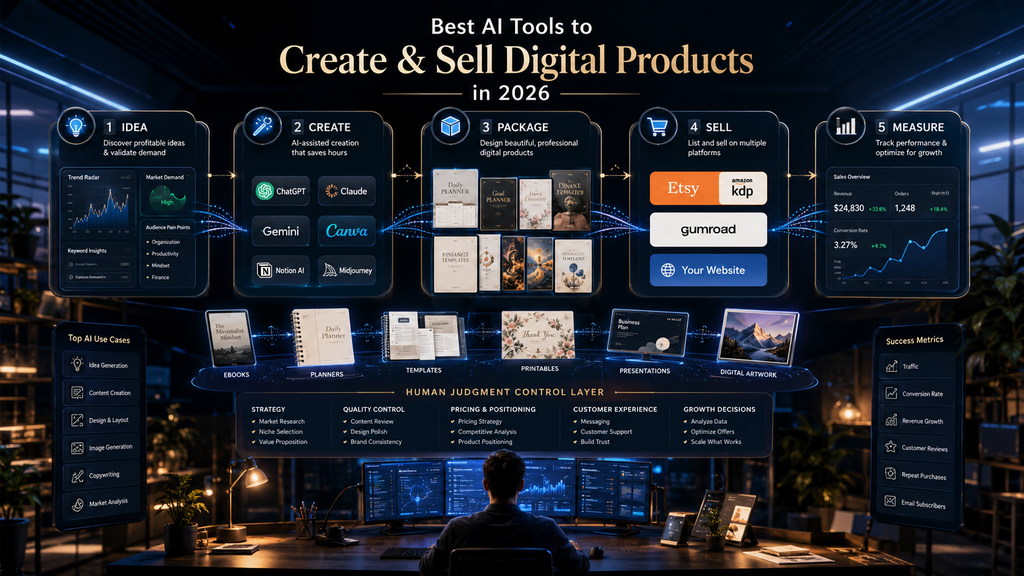
Instead, we’ll examine the complete system: Idea → Validation → Creation → Packaging → Selling → Distribution → Feedback → Improvement. Each tool is matched to the job it actually needs to perform, so the comparison remains useful even when product features and pricing change.
Quick Answer: What Are the Best AI Tools for Digital Products?
There is no universal winner because an ebook, an editable planner and a video course create different production bottlenecks. The best starting choice is the tool that removes the most important bottleneck without adding unnecessary subscriptions or a difficult handoff.
| Digital-product job | Strong starting choice | Why |
|---|---|---|
| Research & ideation | ChatGPT | Flexible reasoning, brainstorming and research workflow |
| Ebook / guide writing | ChatGPT | Strong drafting, rewriting and structured writing |
| Visual design | Canva | Editable designs plus integrated AI |
| Presentations | Gamma | Fast AI-assisted visual documents and decks |
| Product images | Canva + image-generation tools | Creation plus editing in one workflow |
| Templates & printables | Canva | Editable layouts and reusable templates |
| Product descriptions | ChatGPT | Fast positioning and copy variations |
| KDP books | ChatGPT + Canva + KDP | Writing, design and publishing workflow |
| Etsy downloads | Canva + ChatGPT + Etsy | Design plus listing copy |
| Gumroad products | ChatGPT + Canva + Gumroad | Product creation and direct selling |
| Product portfolio management | WordPress + specialized tools | More control as the catalog grows |
The important part is not owning every tool. It’s building the smallest stack that can take your specific product from idea to sale.
A creator with five specialized AI subscriptions can easily become less productive than someone with three well-chosen tools. The objective is not maximum tool count; it is minimum friction between a validated idea and a useful product.
Check Where You Would Sell It
Selling needs a home for your product page, checkout and emails. Systeme.io bundles funnels, email and courses in one account, and its pricing page (checked September 24, 2026) lists a free plan with up to 2,000 contacts, 3 sales funnels and 1 course.
View Systeme.io Plans →Affiliate disclosure: We may earn a commission if you subscribe through this link, at no additional cost to you.
Two public references shape how this page handles sponsorship and sourcing: the FTC’s Endorsement Guides Q&A and Disclosures 101 on disclosing affiliate relationships, and Google’s guidance on using generative AI content, which puts value to readers ahead of how content is produced.
How We Researched This Guide
This comparison was updated from current official product pages, pricing pages, licensing terms, and marketplace policies checked in September 2026. It separates documented product capabilities and platform rules from AI Hustle World analysis. We did not run a controlled hands-on comparison of every paid tool and do not present generated outputs, speed measurements, or earnings as test results.
The tools were evaluated by the job they perform in a commercial workflow: research and product architecture, writing, editable design, visual generation, video production, storefront and checkout, distribution, and feedback. A tool receives a strong recommendation only when its output can move into a buyer-facing asset without creating a larger problem elsewhere, such as unclear commercial rights, poor editability, expensive handoffs, or a selling platform that does not fit the product.
The article’s original contribution is the expanded AHW PRODUCT → TOOL → ASSET → MARKET → SIGNAL Framework. Its original contribution is not another ranking score. It connects the product promise, production bottleneck, finished deliverable, sales channel, and observable market evidence in one traceable model, then adds a transparent contribution-margin and break-even calculation. Readers can replace every assumption, rerun the numbers, and see why a different product or marketplace needs a different stack.
This framework is an editorial decision aid, not a guarantee of demand, profit, legal compliance, or marketplace approval. Licensing and platform terms can change, and their application depends on the source material and product. Always review the current terms for the tools and marketplaces you actually use; consult an appropriate professional when intellectual-property, tax, consumer-protection, or contractual risk is material.
The AI Digital Product Problem: Creation Is Only One Part
Imagine you want to sell a productivity planner. The obvious AI question is: “Which AI tool can create my planner?” But that’s only one question. You also need to answer:
- Who is the planner for?
- What problem does it solve?
- What makes it different?
- What pages should it contain?
- What format should it use?
- Where will you sell it?
- How will buyers discover it?
- What images will you use?
- What will the listing say?
- What price makes sense?
- How will you know whether people actually want it?
This is why the digital-product workflow is better understood as a system. The Traditional Workflow. Historically, creators often had to move between separate tools: Research ↓ Word processor ↓ Design software ↓ Image editor ↓ Marketplace ↓ Email platform ↓ Social media ↓ Analytics Each tool may be good at its individual job. The problem is the handoff. Every handoff creates:
- copying
- formatting
- context switching
- duplicate work
- inconsistent messaging
- forgotten details.
AI doesn’t eliminate that problem by itself. The better approach is to use AI tools according to workflow roles.
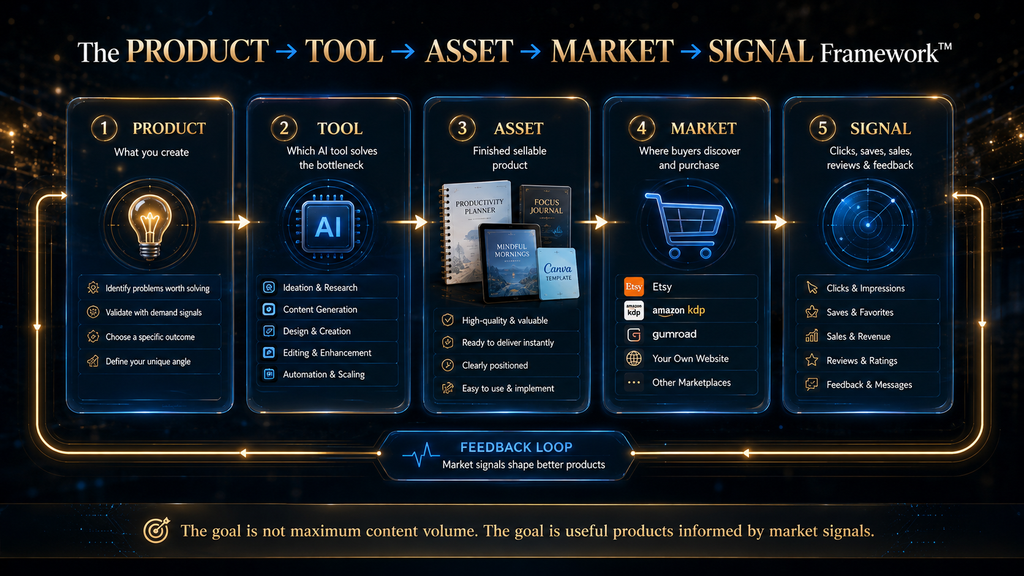
The AHW PRODUCT → TOOL → ASSET → MARKET → SIGNAL Framework
The framework begins with the product and ends with evidence. That order matters. Tool-first creators often subscribe to software, generate something impressive, and only later ask who needs it or where it can be sold. Product-first creators define a buyer problem, choose the narrowest tool stack that can solve it, and preserve a signal that tells them whether to improve, reposition, or stop.
| Stage | Decision question | Required output | Failure signal |
|---|---|---|---|
| PRODUCT | Who is the buyer, what recurring problem exists, and what usable outcome are they paying for? | A specific promise, audience, format, scope, and acceptance criteria | The idea is described by format alone: “ebook,” “template,” or “prompt pack” |
| TOOL | Which production bottleneck needs assistance: research, writing, design, video, delivery, or promotion? | The smallest stack with one defined job for each tool | Several subscriptions overlap while a critical workflow stage remains uncovered |
| ASSET | What finished, editable, quality-controlled item will the buyer receive? | A complete file, workspace, course, template, or system with instructions and support boundaries | The “product” is raw model output that still needs the buyer to organize or repair it |
| MARKET | Where will discovery, checkout, delivery, refunds, tax handling, and customer communication occur? | A marketplace or owned storefront matched to the product and traffic strategy | The platform was chosen for familiarity rather than fees, policy fit, buyer intent, or operational needs |
| SIGNAL | Which observable behavior will determine the next action? | A metric, review window, and decision rule | The seller responds to weak sales by generating more products without diagnosing the funnel |
A planner illustrates the difference. “Create a productivity planner with AI” is only a format request. A stronger PRODUCT statement is “a printable weekly planning system for freelance designers who need to balance client deadlines with business development.” The TOOL stage may use ChatGPT for interview synthesis and page logic, Canva for editable layout, and a spreadsheet for financial tracking. The ASSET is not the generated text; it is a tested PDF or editable template with clear instructions and consistent pages.
The MARKET stage then decides whether Etsy’s existing buyer intent is more valuable than the control of an owned funnel. The SIGNAL stage defines what happens next: for example, review listing impressions, click-through rate, sales conversion, refund reasons, and repeated customer questions after a fixed period. No single number proves product-market fit, but a named signal prevents random iteration.
The framework is most useful as a traceability ledger. Record one row for each product and link the promise to the tool, the finished asset, the channel, and the evidence. If sales are weak, the row helps identify whether the problem is demand, product quality, positioning, discovery, checkout friction, or customer expectation—six different problems that should not receive the same “make more content” response.
What Makes an AI Tool Actually Useful for Digital Products?
A tool should not be judged only by how impressive its demo looks. For digital products, evaluate it on six criteria.
1. Output Quality. Can the tool produce something that survives human review? 2. Editability. Can you actually modify the output? This is particularly important for templates, planners, presentations, worksheets and branded assets.
- 3. Context. Can the tool understand your product, audience and positioning?
- 4. Repeatability. Can you use it to create product number 20 without rebuilding the workflow from scratch?
- 5. Economics. Does the time saved justify the subscription or usage cost?
- 6. Commercial Fit. Does the tool’s licensing and usage model work for the product you intend to sell? That last question is often ignored. And it shouldn’t be.
Best AI Tools for Digital Products, Organized by Workflow Role
The list below is intentionally organized by production role rather than novelty. A writing assistant, an editable design system, a visual generator, and a storefront solve different problems. The right comparison is therefore not “Which tool is most powerful?” but “Which part of this product would fail or consume the most time without assistance?”
1. ChatGPT — Best General-Purpose AI for Product Strategy and Writing
OpenAI’s ChatGPT is one of the strongest general-purpose tools for the thinking and writing layer of a digital-product workflow. OpenAI’s own documentation describes use cases including drafting, rewriting, tightening, changing tone, brainstorming and turning rough ideas into clearer communication. That makes it useful throughout the product lifecycle.
Where ChatGPT fits best
- product brainstorming
- market research assistance
- outlines
- ebooks
- guides
- workbooks
- product descriptions
- sales copy
- email sequences
- FAQ creation
- naming
- positioning
- customer research synthesis
- prompt packs
- content repurposing.
Where ChatGPT Is Strongest. ChatGPT is particularly useful when the product requires reasoning before formatting. For example: “Create a 40-page productivity workbook for freelance designers.” is not the best starting prompt. A better workflow is the following, and ChatGPT can participate in nearly every stage:
- Define the audience.
- Identify their recurring problems.
- Decide what outcome the product promises.
- Design the product architecture.
- Create the content.
- Critique the content.
- Improve it.
- Package it.
Where It Falls Short. ChatGPT is not automatically a finished-product design platform. You can generate excellent text and still end up with weak layout, boring typography, inconsistent visual hierarchy, poor page design and generic presentation. That is where a tool such as Canva becomes more useful.
AI Hustle World Verdict. Best for: thinking, writing, research assistance and product architecture. Don’t use it as: your entire digital-product stack
2. Canva — Best for Templates, Printables and Editable Visual Products
Canva is one of the most important tools in the digital-product workflow because it sits between AI generation and editable design. Its current AI direction includes conversational creation, layered editable output and assisted workflows spanning design and publishing. That matters because digital products are not just ideas. They are files a buyer needs to read, print, edit, present, or reuse.
Where Canva fits best
- planners
- printables
- worksheets
- checklists
- ebooks
- covers
- social templates
- presentations
- media kits
- lead magnets
- product mockups
- digital workbooks
- editable templates.
Canva’s AI ecosystem brings multiple AI-assisted capabilities into a centralized creative environment, but its real advantage here is editability after generation. Suppose you are creating a 30-Day Social Media Planner for Freelancers: ChatGPT can help with the page structure, prompts, instructions, content ideas, captions and checklists.
Canva can then turn that structure into printable pages, editable templates, cover design, mockups and product images. That’s a much better workflow than asking one tool to do everything.
Limitation. AI-generated layouts can still require substantial refinement. The objective should be: AI creates the starting point. Human judgment creates the product. AI Hustle World Verdict. Best for: visual digital products and editable assets.
3. Gamma — Best for Presentations and Visual Information Products
Gamma is particularly useful when the product is inherently presentation-oriented and the buyer expects information to arrive in a visual sequence. Relevant formats include:
- presentation templates
- educational decks
- business guides
- visual reports
- pitch materials
- workshops
- short visual ebooks
- information products.
Gamma’s current free plan supports presentations, documents, websites and social content, with export options including PDF, PowerPoint, PNG and Google Slides. Its AI usage is credit-based, and credit consumption varies according to generation type, model and content complexity.
Where Gamma differs. The product is not simply “write something with AI.” Its useful role is turning structured information into a visual communication format. That fits creators selling business presentations, educational materials, consulting decks, workshop resources and visual reports.
Limitation. A visually attractive deck is not automatically a valuable product. If the underlying information is generic, Gamma can make generic information look more polished. That is useful—but dangerous. Better design cannot rescue weak intellectual property. AI Hustle World Verdict. Best for: presentation-heavy and visual-information products.
4. Claude — Strong Alternative for Long-Form Thinking and Writing
Claude belongs in the writing/reasoning category rather than the visual-design category. It can be particularly useful when you need long-form drafting, document analysis, structured writing, rewriting, detailed explanations and content organization. For writing tasks, see our roundup of the best AI tools for writing blog posts.
For many creators, the decision between ChatGPT and Claude isn’t: “Which one is objectively better?” It is: “Which one produces the workflow and writing style I prefer for this product?” That makes it a strong secondary tool rather than something every beginner needs to subscribe to immediately.
- ebooks
- guides
- reports
- research-heavy products
- long-form educational content.
Limitation. It still doesn’t replace visual production. Any AI output needs checking, as we explain in understanding AI hallucinations.
5. Image-Generation Tools — Best for Original Visual Assets
AI image generation is useful when visuals are a core part of the buyer’s outcome rather than decoration added at the end. Relevant product and asset types include:
- printable artwork
- wall art
- children’s illustrations
- concept artwork
- social graphics
- product mockups
- book illustrations
- visual backgrounds.
But there’s an important distinction: Generated image ≠ finished commercial product. A creator still needs to think about composition, resolution, consistency, typography, licensing, marketplace policies and buyer expectations.
For some products, Canva’s integrated design workflow is enough. For highly visual products, a dedicated image-generation system may be more appropriate, and our comparison of the best AI image generators covers the options.
Reality Check. The easiest thing to generate is often the hardest thing to differentiate. If thousands of sellers can create similar AI art, the competitive advantage shifts toward niche selection, style consistency, curation, packaging, audience understanding and branding.
6. Notion — Best for Structured Knowledge Products
Notion is useful when the digital product itself is a workspace rather than a downloadable document. Examples include business dashboards, project-management templates, content calendars, habit trackers, CRM systems, knowledge bases and productivity systems.
AI can help structure content and workflows, but the real product value comes from the system design. For example: A Notion template that simply contains 20 generic pages is weak. A Notion workspace that solves a specific operational problem is much stronger. Think: “Freelancer Client Management System” rather than: “Ultimate Notion Template.” AI Hustle World Verdict. Best for: systems and knowledge products.
7. Leonardo AI — Strong for Visual Product Creation
Visual creators can use dedicated image-generation platforms for illustrations, concept art, character systems, digital artwork, product imagery and backgrounds.
The important evaluation criterion is not simply image quality. Ask: Can I generate a consistent collection? One beautiful image isn’t necessarily a product. A cohesive 50-image collection may be. This distinction matters for clip-art packs, themed artwork, children’s resources, digital scrapbooking and design assets.
8. Adobe Firefly — Strong for Commercially Minded Creative Workflows
Adobe’s generative ecosystem is particularly relevant to creators already working inside professional creative workflows. Its value comes from the combination of: generation + editing + existing creative software. That can be useful for marketing graphics, image variations, product visuals, backgrounds and creative campaigns.
The bigger advantage for experienced creators is workflow continuity. Instead of generating an image and then moving through several unrelated applications, the AI capability can sit closer to the rest of the design process.
9. CapCut — Best When the Digital Product Includes Video
Video products are digital products too. Examples include mini-courses, tutorial bundles, social-media training, video templates, educational clips and creator resources.
CapCut can be useful for editing, captions, short-form video, visual effects and repurposing. The strategic point is simple: If your product is video-heavy, don’t force a document-first workflow. Build the stack around the actual medium.
10. Gamma + Canva + ChatGPT — A Strong Three-Tool Stack
You don’t always need a single “best” AI tool. For many creators, the better answer is a small stack in which each tool has one job: ChatGPT handles thinking and writing, Canva handles design and packaging, and Gamma turns information into visual presentations. If you are comparing assistants, our list of the best ChatGPT alternatives and the guide to writing AI prompts help you judge them.
That gives you a simple chain: idea and content in ChatGPT, the visual product in Canva, a presentation or visual guide in Gamma, and marketing assets back in ChatGPT and Canva. This is more realistic than expecting one AI platform to dominate every stage.
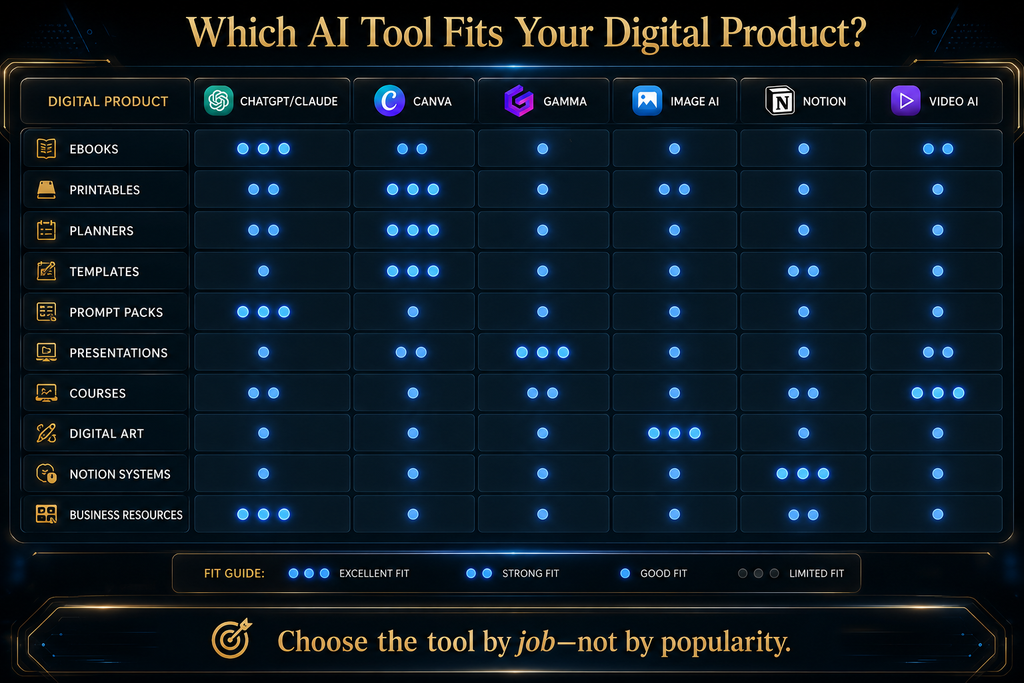
Best AI Tools by Digital Product Type
This is where tool lists become genuinely useful. Our affiliate disclosure lists every company we have a commercial relationship with.
Ebooks. The recommended workflow is ChatGPT or Claude, then Canva, then KDP, Gumroad or your own website. Use AI for research assistance, the outline, drafting, editing and chapter structure, and use Canva for the cover, interior visual elements and promotional graphics. Don’t publish AI-generated text without verification and editing: KDP currently requires publishers to disclose AI-generated text, images or translations, while AI-assisted work does not require disclosure under its current distinction.
Planners and printables. The best workflow is ChatGPT, then Canva, then Etsy or Gumroad. ChatGPT supplies page ideas, prompts, instructions and categories, and Canva handles page layout, typography, graphics and export. This is one of the easiest categories for beginners because the product is highly visual and modular.
Templates. Templates are different from ebooks, because the buyer isn’t paying primarily for information but for time saved. Examples include social-media templates, business proposal templates, invoice templates, content calendars, presentation templates, resume templates and client onboarding templates. The better question is “What repetitive work am I removing?”, and that should determine the product.
Prompt Packs. Prompt packs are easy to produce. That is precisely why they’re becoming harder to differentiate. A generic: “100 ChatGPT prompts” product has weak defensibility. A stronger product is: “50 Tested Client-Onboarding Prompts for Freelance Designers” The difference is specificity + workflow context. AI can generate prompts. Your value comes from:
- testing
- organization
- explanation
- examples
- use cases
- iteration.
Online courses. A course usually needs several tools: ChatGPT or Claude for research and curriculum, Gamma or Canva for slides, CapCut or another video workflow for video, ChatGPT plus a website platform for the sales page, and email, social and search for distribution. The key is not generating the course faster. It is making sure the course solves a meaningful problem.
Digital art. A possible workflow is an image generator, then Canva or Adobe, then a marketplace. AI lowers production cost, which can increase competition, so the creator needs to think about the following:
- originality
- consistency
- file quality
- formats
- licensing
- marketplace rules.
Business Templates. This category can be especially valuable because buyers often purchase outcomes, not aesthetics. Examples include sales dashboards, project-management templates, financial planners, marketing calendars, onboarding systems and client trackers. The best AI tool may actually be less important than the creator’s domain knowledge.
One category deserves a separate note: catalog management. Once you sell more than a handful of products, product records and promotion assets scatter across listings and files. Digital Profit Stack AI is one self-hosted WordPress tool built for that problem, and our review covers what it does and does not do. It is a paid product that AI Hustle World promotes through an affiliate link, it needs your own hosting and AI keys, and it is workflow software rather than an income source.
Test a Promotion Workflow on One Real Product
If you already sell several digital products, this self-hosted WordPress tool turns one product listing into emails, posts and pages. It needs your own hosting and AI keys, so read the requirements first.
View Digital Profit Stack AI →Affiliate disclosure: We may earn a commission if you subscribe through this link, at no additional cost to you.
The Best Tool Depends on the Product
The table below is the decision screen to use before paying for another tool. It starts with the deliverable, then identifies the smallest practical creation stack instead of forcing every product into the same software.
| If you’re creating… | Start with… | Add… |
|---|---|---|
| Ebook | ChatGPT/Claude | Canva |
| Printable | Canva | ChatGPT |
| Planner | Canva | ChatGPT |
| Prompt pack | ChatGPT/Claude | Canva |
| Presentation | Gamma | Canva |
| Notion system | Notion | ChatGPT |
| Digital art | Image generator | Canva/Adobe |
| Course | ChatGPT | Gamma + Canva + video tool |
| Business template | ChatGPT | Canva/Notion/Sheets |
| KDP book | ChatGPT/Claude | Canva + KDP |
| Etsy download | Canva | ChatGPT |
| Affiliate resource | ChatGPT | Canva + WordPress |
The correct question is not “Which AI tool should I buy?” but “Which bottleneck am I trying to remove?” That shift keeps the software decision tied to a real production constraint.
Where Should You Sell AI-Assisted Digital Products?
Creating the product is only half of the system; the next decision is the selling environment, which affects discovery, fees, fulfillment and customer expectations. Etsy is particularly relevant for printables, planners, templates, digital artwork, invitations and downloadable resources.
But AI creators need to understand Etsy’s rules. Etsy’s help page on what you can sell says its “Designed by a seller” category includes seller-prompted AI creations, but digital items must be made and/or designed by the seller, and Etsy requires disclosure when seller-prompted AI is used. That means: Don’t assume “AI-generated” automatically means “allowed.” You still have to comply with marketplace rules.
Amazon KDP is useful for ebooks, workbooks, journals, guides, books and illustrated publications. Its current AI policy distinguishes between AI-generated and AI-assisted content: KDP requires disclosure of AI-generated text, images and translations, while AI-assisted content does not require that disclosure under its current definition. Amazon also tells publishers to review AI-generated content for accuracy and compliance, reinforcing a broader principle: AI output still requires publisher responsibility.
Gumroad. Gumroad is useful when you want a relatively direct selling mechanism for digital products. Its pricing page lists the current fee structure as: 10% + $0.50 for sales through your profile or direct links. Sales generated through Gumroad Discover are currently charged at 30%. Gumroad states that there are no monthly platform payments. This matters when calculating product economics. A $10 product does not mean you keep $10. You need to consider:
- platform fees
- payment processing
- refunds
- advertising
- AI costs
- design software
- your time.
Your own website gives you greater control over branding, SEO, content, customer journey, email capture, product portfolio and analytics. That control also introduces responsibility for hosting, security, payment processing, delivery, maintenance and traffic acquisition.
This is where WordPress can become powerful for creators with a larger catalog. If you would rather not manage hosting and security yourself, a hosted platform is the alternative. Systeme.io is one option that bundles sales funnels, email and online courses in a single account. Its pricing page (checked September 24, 2026) lists a free plan with up to 2,000 contacts, 3 sales funnels and 1 course, and paid plans starting at $17 a month. We have not tested it for this guide, so review the current plans on Systeme.io (affiliate link) before you decide.
Commercial Rights and Marketplace Rules Are Part of the Stack
A tool’s permission to use an output commercially is not the same as a guarantee that the output is copyrightable, exclusive or acceptable on every marketplace. Before publishing, check three separate layers: the AI provider’s terms, the licenses attached to any stock or template elements, and the selling platform’s current content rules. You also remain responsible for trademarks, recognizable people, confidential inputs, factual claims and any material you did not have the right to upload.
| Tool or channel | What the current primary source says | Creator check before publishing |
|---|---|---|
| ChatGPT or Claude text | Provider terms govern inputs and outputs, but they do not turn third-party material into content you own. | Verify facts, originality, source rights, brand names and any regulated or professional claims. |
| Canva | Canva applies its AI Product Terms and separate content licenses. Its product-for-sale guidance explains how licensed content may be used in a design. | Do not resell a standalone licensed element or imply exclusivity when the underlying asset is non-exclusive. |
| Adobe Firefly | Adobe’s Firefly FAQ says non-beta outputs may be used commercially, subject to its terms and user responsibility. | Confirm that the feature is not labeled beta and review the output for third-party rights or misleading content. |
| Etsy | Seller-prompted AI creations may qualify as designed by the seller, while Etsy requires AI-use disclosure and seller involvement. | Follow the current listing policy and describe the product accurately instead of presenting automated output as handmade work. |
| Amazon KDP | KDP’s content guidelines require disclosure of AI-generated text, images and translations; AI-assisted content is treated differently. | Classify the contribution honestly, disclose when required, and review every page for quality and compliance. |
| Gumroad or your own store | The storefront handles transactions and delivery, but it does not validate your ownership or product claims for you. | Keep source records, state refund terms clearly and make sure every included asset can legally be distributed to buyers. |
These rules can change, which is why the table is a pre-publishing checklist rather than permanent legal advice. Recheck the linked policy pages whenever you introduce a new tool, asset source, marketplace or product category, especially if customers receive editable source files that expose individual design elements.
The AHW Digital Product Stack Economics Model
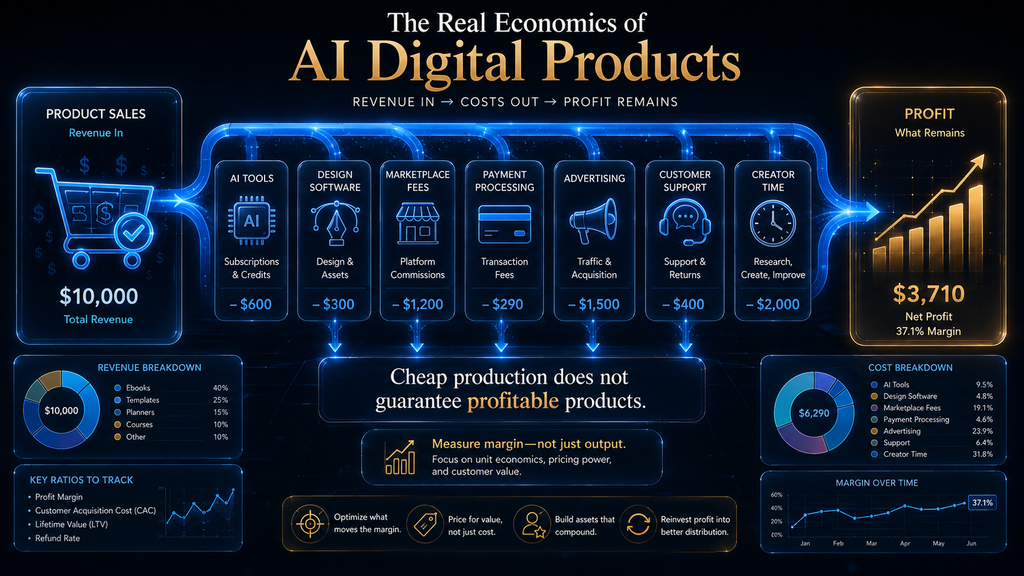
AI can reduce production time without making a product profitable. Separate fixed costs such as monthly software and hosting from variable costs such as transaction fees, per-use generation, delivery and expected customer support. The useful number is not revenue per sale; it is the amount each sale contributes toward fixed costs and eventual profit.
Contribution margin per sale = Price − platform/payment fees − variable AI or fulfillment cost − expected refund/support cost
Break-even sales = Monthly fixed stack cost ÷ contribution margin per sale
The example below is deliberately transparent so another creator can replace every input with current figures from a real product. It uses Gumroad’s September 2026 direct-sale fee of 10% plus $0.50; the remaining amounts are illustrative assumptions, not AI Hustle World earnings, test results or a promise of sales.
| Illustrative input | Amount | How it is used |
|---|---|---|
| Product price | $20.00 | Starting revenue per direct sale |
| Gumroad direct-sale fee | $2.50 | 10% of $20 plus $0.50 |
| Variable AI and delivery allowance | $0.50 | Illustrative per-sale usage or delivery cost |
| Expected refund and support allowance | $1.00 | Illustrative reserve, not a claimed average |
| Contribution margin per sale | $16.00 | $20.00 − $2.50 − $0.50 − $1.00 |
| Monthly fixed tool cost | $48.00 | Illustrative subscriptions and hosting |
| Break-even volume | 3 sales | $48.00 ÷ $16.00 |
This calculation is before tax and excludes the value of the creator’s labor, so it is a floor rather than a complete business model. A Gumroad Discover sale charged at 30% would produce a materially different margin, while an owned store may reduce some transaction costs but add fixed software, maintenance, tax and customer-service work. Run the formula for each channel instead of assuming that the same price performs equally everywhere.
Before building, also test whether demand, differentiation, distribution and repeatability are strong enough to justify the fixed stack. This guide deliberately gives no typical-income figure because we do not have a verified representative dataset; treat unsourced earnings claims on AI-product sales pages as marketing, not evidence.
What AI Should Do — And What You Should Do
The useful boundary is assistance versus accountability. Let AI handle repetitive and reversible production work such as:
- brainstorming
- first drafts
- variations
- summarization
- structure
- repetitive copy
- idea expansion
- formatting assistance
- content repurposing
- research organization.
Keep humans responsible for the decisions that can harm a buyer, violate a rule or change the commercial promise, including:
- product choice
- audience understanding
- fact verification
- originality
- positioning
- quality control
- copyright decisions
- marketplace compliance
- pricing
- final editing
- customer feedback
- business strategy.
The mistake is trying to automate the second list because AI can technically participate in it. Participation is not accountability.
Common Mistakes Beginners Make
- 1. Creating Before Validating. This is probably the most expensive mistake, because you can spend 20 hours creating a product nobody asked for. A better sequence is demand, then concept, then a minimum product, then feedback, then expansion.
- 2. Buying Too Many AI Tools. Five subscriptions don’t automatically produce five times the output. Often they produce five dashboards. Start with the smallest useful stack.
- 3. Making Generic Products. AI makes generic products extremely easy to produce. That’s exactly why generic products become crowded. Instead of: “Ultimate Productivity Planner” consider: “30-Day Productivity Planner for Freelance Designers Managing 3–5 Clients.” Specificity creates positioning.
- 4. Publishing Raw AI Output. AI can make content look finished before it is actually finished. Always review facts, examples, formatting, repetition, claims, instructions and legal or copyright issues.
- 5. Ignoring Marketplace Rules. Etsy and KDP both have explicit policies around AI-generated content, and policies can also change. Check the platform before publishing.
- 6. Confusing Creation With Selling. You can create a beautiful product with zero customers. Creation is production, while selling requires positioning, traffic, trust, distribution and conversion.
- 7. Scaling Products Before Finding a Winner. Creating 100 products before knowing whether product number one works is not necessarily scale. It can be inventory accumulation.
A Better Beginner Workflow
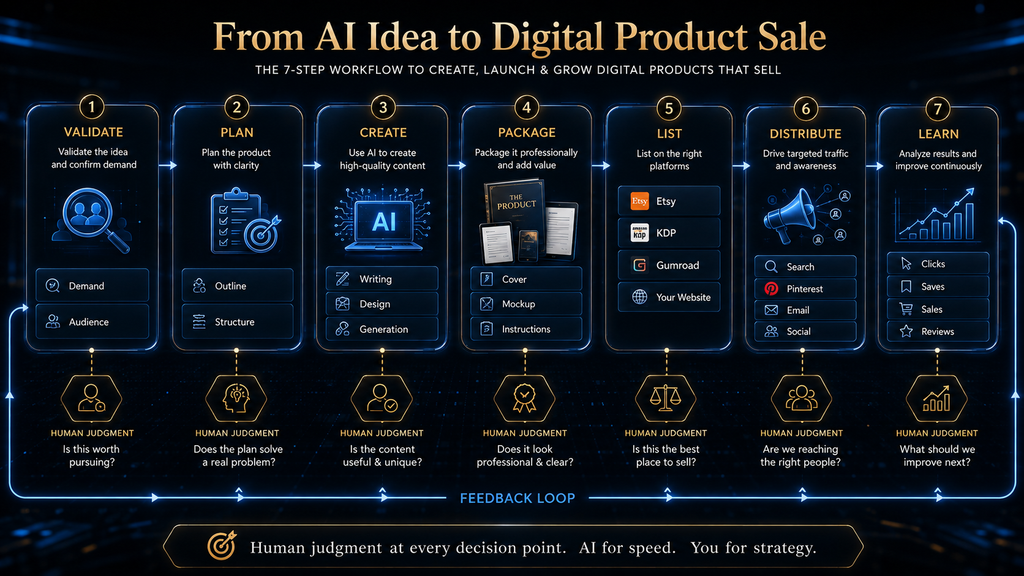
If you’re starting from zero, don’t build a 15-tool stack. Use the steps below, and expand only after the earlier steps produce evidence.
- Choose a specific buyer. Not “People who want productivity” but “Freelance designers who struggle to manage multiple client projects.”
- Identify one pain point. What repeatedly frustrates this person?
- Create a minimum useful product. Build the smallest version that actually solves the problem.
- Use AI to accelerate production. Use ChatGPT for research, outline, copy and ideas, and use Canva for design, packaging and mockups.
- Publish. Choose the marketplace that fits the product.
- Collect signals. Look at impressions, clicks, saves, sales, questions and reviews.
- Improve. Change title, positioning, images, product structure, description, price and offer.
- Expand only after evidence. Then create version two, a bundle, a premium version and related products, which turns one product into a product ecosystem.
A Realistic Example: Building an AI-Assisted Planner
Let’s walk through the system with a Freelancer Weekly Client Planner as the product. For research, use ChatGPT to identify common planning problems among freelancers. For the product structure, create sections for weekly priorities, client deadlines, meetings, deliverables, revenue tracking and follow-ups. Then use AI to draft instructions and prompts, and use Canva to create printable pages, a cover, preview pages and mockups.
For selling, Etsy or Gumroad could be evaluated depending on the product and audience. For marketing, create the listing description, social posts, Pinterest content and email copy, and see our list of the best AI tools for creating social media content for ideas. Then track views, clicks, saves and purchases. If customers repeatedly ask for a monthly version, that’s a product signal, so create it, and you can grow from a weekly planner to a monthly planner, a freelancer planning bundle and eventually a complete freelancer productivity system. That’s how AI becomes part of a business rather than simply a content generator.
The More Products You Create, the More Important Your Workflow Becomes
At five products, a spreadsheet may be enough. At 20 products, organization starts becoming important. At 50 products, you need a proper catalog. At 100+ products, you need to think about the items below, and you can compare plan prices for other tools in our AI Tool Pricing Database:
- naming conventions
- product records
- reusable prompts
- asset libraries
- content templates
- internal links
- promotional systems
- analytics.
This is where centralized systems and WordPress-based product hubs can become useful. The point isn’t that everyone needs sophisticated software. The point is: Your operational requirements change as your catalog grows.
AI Automation Doesn’t Remove the Bottleneck
This is one of the most important second-order effects. Imagine your old workflow takes eight hours to produce a product. AI cuts that to two hours. Excellent. But now you can produce four times as many products. Suddenly your problem becomes: Which products should I promote? Then: How do I edit all this content? Then: Where do I get traffic? Then: Why are visitors not buying? The bottleneck moves. That means AI automation doesn’t necessarily eliminate work. It can expose the next constraint. See also the best AI workflow automation tools. If you are curious how agent-style automation works, see what an AI agent is and how AI agents use tools to complete real tasks.
Contrarian Insight. The goal isn’t to create the maximum number of digital products. The goal is to create the maximum number of useful products per unit of attention, money and time. That’s a very different objective.
How to Choose Between Free and Paid AI Tools
You don’t need to pay immediately. Start free when you’re validating an idea, you’re learning, you’re creating one product and your volume is low.
A paid plan becomes reasonable when a documented constraint is repeatedly costing time, quality or capacity. Typical upgrade signals include:
- you repeatedly hit usage limits
- you need better models
- you need advanced features
- you produce products consistently
- the time saved has measurable value.
Gamma, for example, currently offers a free plan with 400 starter credits, while paid plans add additional capabilities and recurring credits. The same principle applies broadly: Upgrade because of a bottleneck—not because the pricing page has another tier.
The Best AI Stack for Different Creator Types
- Beginner Creator. ChatGPT + Canva That’s enough to start.
- Ebook Creator. ChatGPT/Claude + Canva + KDP or Gumroad
- Etsy Seller. Canva + ChatGPT + Etsy
- Presentation Creator. Gamma + Canva + ChatGPT
- Notion Template Creator. Notion + ChatGPT + Canva
- Visual Artist. Image generator + Canva/Adobe
- Course Creator. ChatGPT + Gamma + Canva + video editor
- Multi-Product Entrepreneur. AI writing tool + design platform + WordPress/store + analytics The more products you manage, the more valuable workflow integration becomes.
How to Decide What Digital Product to Create
Don’t start with: “What can AI make?” Start with: “What problem can I solve better, faster or more conveniently?” A useful product-selection matrix:
| Question | Weak signal | Strong signal |
|---|---|---|
| Problem | Nice-to-have | Recurring pain |
| Audience | Everyone | Specific group |
| Competition | Huge generic category | Clear niche |
| Differentiation | AI-generated content | Unique method/system |
| Distribution | “I’ll post it somewhere” | Known channel |
| Buyer outcome | Vague | Specific |
| Repeat products | None | Natural product ecosystem |
If most answers are in the right column, you have a much stronger starting point because the product connects a specific problem to a reachable buyer and a credible outcome. If several answers remain weak, validate those assumptions before expanding the tool stack or production scope.
How to Validate Before Spending Days Creating
You don’t need perfect market research. You need enough evidence to reduce unnecessary risk. Look for existing products, customer questions, recurring complaints, search demand, marketplace reviews, competitor weaknesses and unanswered use cases.
Then ask AI to help organize the evidence. But don’t let AI invent demand. That’s a critical distinction. AI can help you analyze signals. It cannot magically make weak signals strong.
A Simple Product Validation Score
Use five dimensions. Score each from 1–5: Problem intensity How painful is the problem? Audience clarity Can you clearly describe the buyer? Existing demand Are people already spending money or searching for solutions? Differentiation Can you offer something meaningfully different? Distribution Do you know where potential buyers can be reached? Maximum: 25 points A low score doesn’t automatically mean “don’t build.” It means: Investigate before investing heavily. This is an AI Hustle World editorial framework, not a scientific market-validation score.
What Makes a Digital Product Defensible?
This is becoming more important as AI adoption grows. A defensible product usually has at least one of these:
- Expertise. You know something the average creator doesn’t.
- Workflow. You have a better way of doing something.
- Data. You have proprietary information or research.
- Community. You understand a specific audience deeply.
- Brand. People trust your perspective.
- Distribution. You can reach buyers efficiently.
- System. Your product is more than information—it helps the buyer execute. AI can assist with production. These advantages are harder to automate.
The Future of AI Digital Products
The first phase of generative AI focused heavily on: “Create this for me.” The next phase is moving toward: “Help me build the entire workflow.” We’re already seeing this direction in tools such as Canva, where AI is being integrated into broader design and publishing workflows rather than existing as isolated generators. That shift will change digital products too. The winners won’t necessarily be people who generate the most. They’ll be people who combine AI speed, human expertise, audience understanding, distribution and feedback into a repeatable system. The biggest risk is commoditization. If everyone can produce ebooks, planners, templates, images, prompts and courses at almost no marginal production cost, the supply of mediocre products can explode. That makes trust and differentiation more valuable. Recent research reinforces this tension: AI can produce high-quality ideas at scale, but AI-generated ideas can also become more similar to one another. So the long-term advantage isn’t: “I use AI.” Everyone will. The advantage becomes: “I know what is worth making.”
Final Thoughts
AI has changed digital-product creation. But it hasn’t changed the fundamental equation of value. People don’t buy products because they were difficult for the creator to make. They buy because the product is useful, relevant, trustworthy, convenient or desirable. That’s why the smartest way to use AI is not: “How many products can I create?” It’s: “How much better can I make the process of solving a specific customer’s problem?”
For most beginners, start simple. Use ChatGPT for thinking and writing. Use Canva for visual packaging. Add Gamma when your product needs presentation-style communication. Use specialized image or video tools only when the product genuinely requires them. Then choose the selling platform based on the product—not the other way around. Most importantly, don’t confuse AI-assisted production with business success. The real system is: Find a problem → Validate demand → Design the right product → Use AI to accelerate production → Add human judgment → Package it professionally → Choose the right market → Measure buyer signals → Improve → Build the next product from evidence That is the AI digital-product workflow worth building in 2026.
The memorable takeaway is simple: AI can make digital products cheaper to create, but your advantage comes from knowing which products are worth creating, who they are for and why a buyer should choose yours. That judgment is what turns a generation tool into a durable product system.
Choose Your Selling Home Before You Build More
If you would rather not manage WordPress hosting and security yourself, a hosted platform can cover funnels, email and courses in one account. Compare the free plan and the paid tiers before you commit.
Compare Systeme.io Plans →Affiliate disclosure: We may earn a commission if you subscribe through this link, at no additional cost to you.
Frequently Asked Questions
What is the best AI tool for creating digital products?
There is no universal winner. ChatGPT is a strong starting point for research, ideation and writing; Canva is particularly strong for editable visual products; Gamma is useful for presentations and visual documents. Our Digital Profit Stack AI review covers one tool built around that promotion step.
Can I create digital products entirely with AI?
You can automate significant portions of the workflow, but a strong commercial product still needs human decisions around quality, originality, positioning, verification, design and marketplace compliance.
What digital products can I create with AI?
Common categories include ebooks, planners, printables, templates, prompt packs, workbooks, presentations, digital artwork, courses and business resources. The stronger choice is usually the format that delivers the promised outcome with the least effort for the buyer, not the format AI can generate fastest.
Is Canva good for digital products?
Yes. Canva is especially useful for templates, printables, planners, workbooks, covers, mockups and other visual products. Its current AI capabilities extend well beyond basic design assistance.
Is ChatGPT good for creating ebooks?
It can be useful for research organization, outlining, drafting, rewriting and editing. OpenAI explicitly documents these writing workflows. But AI-generated text still needs fact checking, editing and quality control. Amazon KDP’s content guidelines require you to disclose AI-generated content when you publish.
Can I sell AI-generated products on Etsy?
Etsy currently permits seller-prompted AI creations under its “Designed by a seller” category, but sellers must disclose AI use and digital items must be made and/or designed by the seller. Always check the current policy before publishing.
Can I publish AI-generated books on Amazon KDP?
Yes, but KDP currently requires disclosure of AI-generated text, images and translations. AI-assisted content has a different treatment under KDP’s current policy.
Is Gumroad good for selling digital products?
Gumroad can be useful for direct digital-product sales. Its current fee is 10% + $0.50 for direct/profile sales and 30% for sales through its Discover marketplace.
Do I need to pay for AI tools?
No. You can start with free tiers, particularly while validating your idea. Pay when additional capability or saved time creates enough value to justify the cost.
How many AI tools should I use?
As few as necessary. A beginner can often start with ChatGPT + Canva and add specialized tools only when a real workflow bottleneck appears.
Can AI guarantee digital-product sales?
No. AI can reduce production friction, but sales still depend on product quality, demand, positioning, distribution, trust and conversion.
What is the biggest mistake with AI digital products?
Creating too many generic products before validating whether people actually want them. AI makes generic products cheap to produce, which is exactly why they crowd each other out, so validate demand first and make the first product specific.
Written by
Muntasir Ahmad Chowdhury
Founder-AI Hustle World
Muntasir Ahmad Chowdhury is the Founder of AI Hustle World, an independent publication dedicated to making Artificial Intelligence practical, trustworthy, and easy to understand. He researches AI tools, automation, customer service, productivity, and real-world business applications, helping readers make smarter technology decisions through research-driven, experience-backed content.
Expertise:
AI Tools • AI Automation • AI Customer Service • AI Productivity • Generative AI • AI Workflows
Get Smarter With AI
Enjoyed this guide? Get practical AI tools, tutorials, and honest reviews delivered to your inbox.