
Evidence: Documentation reviewed
Last checked: September 2026
What was done: Written from official documentation and the published sources linked in this article. Not hands-on tested.
Files: None
Affiliate links: No
Cold Email Deliverability Audit: Fix Spam Issues & Recover Burned Domains
Cold email deliverability problems rarely begin with one obvious mistake. A campaign can appear perfectly configured in the sending platform while messages are quietly being filtered, deferred, rejected, or pushed into spam because of a combination of sender reputation, authentication, list quality, message relevance, volume, recipient behavior, or infrastructure changes. That is why repeatedly changing subject lines, adding another warmup tool, or buying more mailboxes often fails to solve the underlying problem.
A proper cold email deliverability audit works differently. Instead of assuming that “spam” is the problem, you identify which layer of the sending system is actually failing, gather evidence from the mailbox providers, repair that layer, stabilize the sending environment, and then determine whether the domain can economically be recovered. This matters even more in 2026 because Gmail, Microsoft, and Yahoo have all moved toward stronger authentication, reputation, and sender-behavior requirements.
The goal of this guide is therefore not to give you another checklist of generic deliverability tips. It is to give you a diagnostic system you can use when a domain starts performing badly, when campaigns suddenly move to spam, when SMTP errors appear, or when a sender needs to decide whether to repair an existing domain or start over.
What a Cold Email Deliverability Audit Actually Measures
A cold email deliverability audit measures whether your outbound system is technically authenticated, operationally stable, reputationally healthy, and reaching the intended recipient environment at an acceptable rate.
That definition is important because delivery is not the same thing as inbox placement. A message can leave your sending platform successfully and still be rejected, deferred, filtered into spam, or automatically routed away from the recipient’s primary inbox. Google itself provides separate dashboards for authentication, IP reputation, domain reputation, spam rate, encryption, feedback loops, and delivery errors because no single metric explains the entire system. (Google Support)
A useful way to think about the audit is to separate four questions. First, can the receiver verify who you are? Second, does the receiver trust your sending history? Third, are recipients responding to your messages as wanted communication or unwanted communication? Fourth, is your infrastructure behaving consistently enough to avoid triggering additional restrictions?
Those questions lead to a much more useful diagnostic principle: Deliverability is a trust-system problem before it is a copywriting problem. A bad email can hurt deliverability, but perfect copy cannot repair broken authentication or a damaged domain reputation.
The D.E.L.I.V.E.R. Audit Framework
To make the audit operational, AI Hustle World will use the D.E.L.I.V.E.R. framework:
| Letter | Audit Layer | What You Investigate |
|---|---|---|
| D | DNS & Authentication | SPF, DKIM, DMARC, alignment, PTR, TLS |
| E | Errors & Deferrals | Bounces, SMTP codes, rejections, throttling |
| L | List Quality | Verification, invalid data, relevance, complaint risk |
| I | Inbox Signals | Reputation, spam rate, placement, Postmaster data |
| V | Volume & Velocity | Sending patterns, spikes, pacing, mailbox allocation |
| E | Engagement & Exit Signals | Replies, spam complaints, unsubscribes, recipient behavior |
| R | Recovery & Rebuild | Stop, repair, stabilize, test, ramp and monitor |
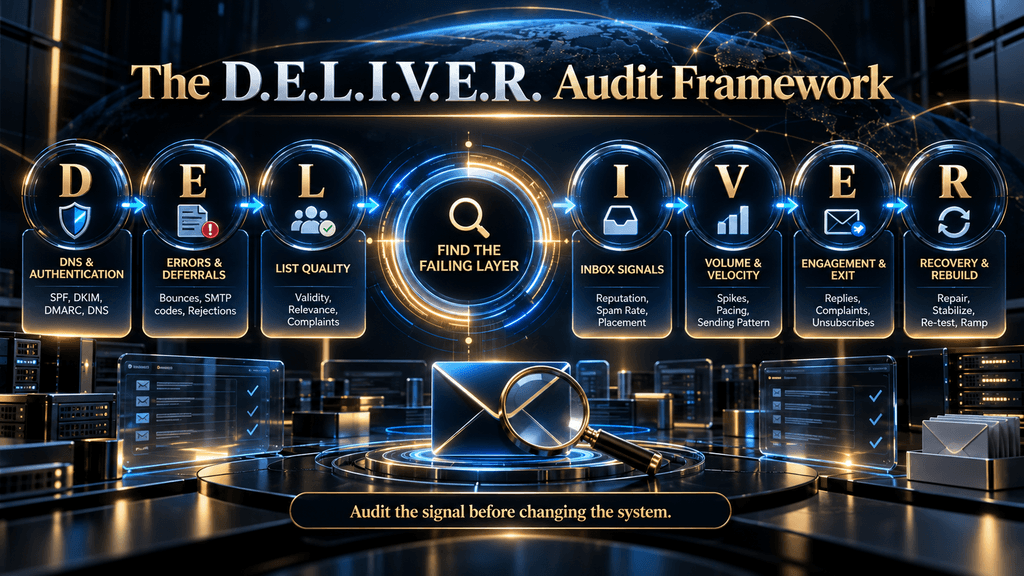
The framework is deliberately ordered this way. You should not begin rebuilding volume before you know whether the infrastructure is authenticated. You should not spend hours rewriting messages before determining whether the domain has poor reputation. You should not keep testing a “burned” domain indefinitely without comparing recovery cost against replacement cost.
The D.E.L.I.V.E.R. model turns deliverability from a collection of tips into a diagnostic sequence.
D — DNS & Authentication
The first layer of an audit is technical identity because mailbox providers need evidence that the sender is authorized to send on behalf of the domain.
For Gmail, all senders to personal Gmail accounts must have SPF or DKIM configured, valid forward and reverse DNS, use TLS, and comply with message-format and spam-rate requirements. Senders reaching the Gmail bulk-sender threshold face additional requirements including SPF, DKIM, DMARC and DMARC alignment, plus one-click unsubscribe for applicable marketing and promotional messages.
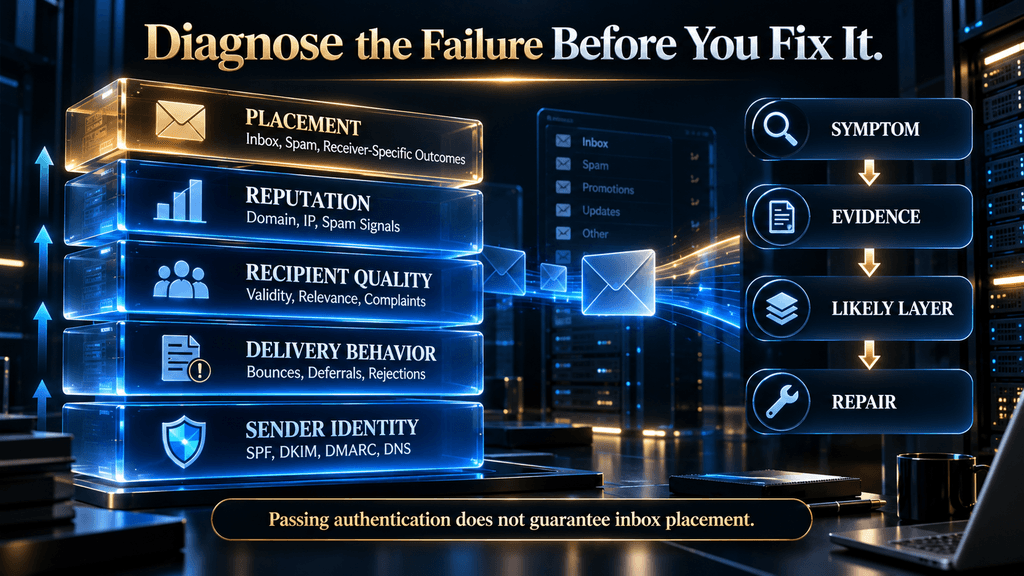
This does not mean that passing SPF, DKIM, and DMARC automatically produces excellent inbox placement. Authentication answers a narrower question: can the receiving system verify the message’s sending identity and authorization? Reputation, recipient behavior, content, and volume determine what happens after that.
SPF
SPF, or Sender Policy Framework, tells a receiving system which sending infrastructure is authorized to send email for a domain.
A common mistake is treating the SPF record as proof that every message will pass SPF. The actual result depends on how the sending service is configured, which envelope-from domain is used, and whether additional third-party systems also send mail for the domain.
This becomes especially important for companies that use multiple platforms. Marketing automation, CRM systems, transactional email, customer-support software, and outbound platforms can all become part of the authentication picture. An SPF record designed around only one sender can create failures when another service starts sending on behalf of the same domain.
The audit therefore needs to answer two questions: what services are authorized, and what services are actually sending?
DKIM
DKIM adds a cryptographic signature to outgoing messages. The receiver uses the corresponding public key published in DNS to verify that the message was signed by the authorized domain and that the signed content has not been altered in transit.
Google’s Postmaster Tools specifically tracks DKIM authentication and recommends configuring DKIM for sending domains. Google’s documentation says senders typically achieve high DKIM success rates when the configuration is correct, though the actual rate can be affected by forwarding and other factors outside the sender’s control.
For a deliverability audit, DKIM is particularly useful because it becomes part of the reputation identity. If your system is relying heavily on SPF while DKIM is missing or inconsistently configured, you lose one of the strongest signals available to establish a stable authenticated sending identity.
DMARC
DMARC ties authentication to the domain visible in the message’s From header and gives domain owners a policy and reporting mechanism for authentication failures.
For Gmail bulk senders, DMARC is required, but Google’s current requirement allows a minimum policy of p=none. That means the existence of a DMARC record and enforcement level are separate questions. A domain can satisfy the basic publishing requirement while still using a monitoring-oriented policy rather than instructing receivers to quarantine or reject failing messages.
The important audit concept is alignment. It is not enough for SPF or DKIM to pass somewhere in the authentication chain; the relevant authenticated domain must align with the From domain for DMARC to pass.
PTR and Reverse DNS
Forward DNS maps a hostname to an IP address. Reverse DNS, commonly represented through a PTR record, maps the IP address back to a hostname.
Google requires valid forward and reverse DNS for mail sent to personal Gmail accounts. (support.google.com)
This is one of those issues that can remain invisible inside a cold-email platform because the sending interface may report that a mailbox is connected and operational. The receiving provider sees a different layer of the system.
If you are dealing with infrastructure-level failures, do not stop at the sending platform’s green status indicators. Audit the actual DNS and authentication results visible to the receiving side.
E — Errors & Deferrals
Once authentication is verified, investigate what the receiving systems are actually doing with your messages. The most useful distinction is between hard failure, temporary failure, and filtering.
A hard bounce generally indicates a condition where the message cannot be accepted under the current circumstances, such as an invalid recipient or an explicit rejection. A temporary failure, often represented through a 4xx response, means the receiving system is delaying acceptance rather than permanently refusing the message. A rejection can be caused by authentication, reputation, policy, infrastructure, recipient status, or other receiver-side rules.
This distinction matters because operators often see “delivery problems” and immediately rewrite their email copy. That can be completely irrelevant when the receiving server is responding to infrastructure or reputation signals.
Google’s current troubleshooting guidance specifically addresses deferrals and recommends reducing sending activity when a sender encounters them, sending a controlled test, maintaining volume below the level that triggered the problem, and only increasing volume gradually after stability returns. That gives us an important rule: A deferral is a diagnostic signal, not merely a temporary inconvenience. Repeated temporary failures can tell you that the receiver does not currently want to accept your traffic at the volume or pattern you are generating.
Hard Bounces vs. Soft Bounces vs. Deferrals
A hard bounce is primarily a recipient or data-quality investigation.
A soft bounce or temporary failure is more ambiguous. It may be caused by recipient-side conditions, throttling, volume, reputation, or temporary infrastructure issues.
A repeated deferral pattern requires greater attention because it can reveal that a provider is actively controlling how quickly it accepts your traffic.
Operators should not reduce every deliverability problem to a single percentage. You need to inspect the distribution and reason for failure.
For example, a campaign with a 4% total bounce rate could contain two completely different situations. If most of the bounces are invalid addresses from a new data provider, the list may be the problem. If valid messages are repeatedly deferred by Gmail after a sudden volume increase, the sending pattern may be more relevant.
The metric alone tells you that something happened. The failure type tells you where to investigate
L — List Quality
List quality is one of the most underestimated deliverability variables because it sits outside the sending platform.
A sender can have valid DNS records, a healthy mailbox, and a perfectly formatted email while repeatedly contacting the wrong people. When that happens, the receiving system eventually sees the aggregate behavioral signal: more unwanted mail, more deletions, more complaints, more unsubscribes, more non-engagement, and potentially worse reputation.
Google explicitly recommends sending only to recipients who want the messages, making it easy to unsubscribe, and maintaining recipient quality. Its Postmaster documentation also associates low reputation with histories of spam and unwanted traffic.
For cold outreach, that means the audit should investigate who is receiving the messages, not just whether the addresses are technically valid. An email address can be valid and still be a terrible prospect. That distinction matters because verification tools answer one question—whether the address can probably receive mail—not whether the person is interested in what you are selling.
What to Audit in the Lead List
Start with source quality. Determine which database, scraper, enrichment source, CRM export, or manual process created the list. If deliverability deteriorated immediately after a new source was introduced, that temporal relationship is important evidence.
Next, inspect invalid and risky addresses. Look for obvious formatting errors, stale contacts, duplicates, role accounts, generic departmental inboxes, catch-all records, and addresses that repeatedly fail.
Then inspect relevance. Are you contacting the people who are actually capable of benefiting from the offer? Are job titles accurate? Are companies still in the target market? Are the contacts still employed there? Has the original buying context changed?
Finally, inspect behavioral history. If the same people have ignored multiple sequences, unsubscribed, complained, or never engaged, continuing to send to them is not just inefficient. It can increase risk.
This leads to another useful principle: Verification tells you whether an address can receive mail. Relevance determines whether you should send it.
I — Inbox Signals
The fourth layer is where a deliverability audit becomes much more interesting.
Google Postmaster Tools currently provides dashboards for compliance status, spam rate, IP reputation, domain reputation, feedback loop, authentication, encryption, and delivery errors. The data applies to outgoing email sent to personal Gmail accounts.
That gives senders much more visibility than simply asking whether a campaign reports “delivered.” The important dashboards should be interpreted together rather than individually.
Domain Reputation
Google describes domain reputation as a rating of the quality of the domain used to send email, based on sending behavior. Its reputation categories range from Bad through Low and Medium to High, with stronger reputation associated with better expected inbox delivery.
A poor domain reputation is a strong reason to stop thinking exclusively about copy. If the domain has established a negative history, changing the subject line on tomorrow’s campaign does not erase that history.
IP Reputation
IP reputation evaluates the sending IP environment. This becomes particularly relevant when the sending infrastructure itself is problematic.
The relationship between IP reputation and domain reputation can also produce useful clues. If the domain is strong but a specific sending IP has a poor reputation, infrastructure deserves more investigation. If both are poor, the problem may be broader.
Again, this is diagnostic reasoning rather than a rigid one-to-one rule.
The Most Misleading Metric: Spam Rate
One of the best insights in Google’s current Postmaster documentation is also one of the easiest to misunderstand.
Google explains that the Spam Rate dashboard measures messages delivered to a recipient’s inbox that the recipient then manually marks as spam. If Gmail is automatically sending a significant number of your messages to spam, fewer messages reach the inbox and therefore fewer recipients have the opportunity to report them as spam. That can make your measured spam rate look artificially low.
This creates a counterintuitive situation: Low spam rate + poor reputation can mean the problem is already severe.
The dashboard is not necessarily telling you that recipients love the mail. It can be telling you that Gmail is filtering enough of the mail before inbox delivery that users are no longer seeing most of it.
This is one reason why a serious audit should never use spam rate in isolation.
What Spam Rate Should You Aim For?
Google’s current guidance recommends keeping reported spam rates below 0.10% and avoiding 0.30% or higher. Google explains that spam rates above 0.10% can negatively affect inbox delivery for bulk senders, while 0.30% or higher has a substantially stronger negative impact.
These numbers should not be interpreted as permission to operate at 0.09%. They are risk thresholds, not performance targets. The practical goal should be much lower wherever possible because occasional spikes, data anomalies, and campaign-specific problems can otherwise push a sender across an important boundary.
For an audit, ask not only “What is today’s spam rate?” but also:
Is it rising? Which campaign caused the rise? Which feedback-loop or campaign identifier is involved? Did the increase begin after a list, message, domain, or volume change?
Those questions produce actionable information.
Google Postmaster Tools: A Practical Reading Order
Do not open Postmaster Tools and stare at the graphs without a hypothesis.
Start with Compliance Status to identify direct violations or missing requirements. Then check Authentication to determine whether SPF, DKIM, and DMARC are behaving as expected. After that, inspect Domain Reputation and IP Reputation to understand the trust layer.
Next, examine Spam Rate and Feedback Loop for recipient-generated complaints. Finally, inspect Delivery Errors for rejected and temporarily failed authenticated messages. Google specifically separates these dashboards because they represent different parts of the sending system.
There is another important limitation: Postmaster Tools data is not real-time. Google explicitly notes that low sending volumes may also result in missing or limited data.
Therefore, do not make large changes every few hours because the dashboard has not yet moved. A slower data source requires slower interpretation.
V — Volume & Velocity
Volume describes how much mail you send. Velocity describes how quickly your sending pattern changes.
Those are not the same thing. A sender that consistently sends 5,000 messages at a controlled rate may create a different receiver response from a sender that normally sends 500 and suddenly sends 5,000 in one burst.
Google’s current troubleshooting documentation advises controlled increases and explicitly warns against sudden changes in sending volume. It also recommends consistent sending throughout the day rather than bursts.
That leads to one of the most practical audit questions: What changed immediately before deliverability changed? If your campaign worked reasonably well for three weeks and then deteriorated within two days, look for the change event. It may have been:
- a new domain
- additional mailboxes
- a sudden increase in volume
- a new prospect database
- a new campaign
- more aggressive follow-ups
- a new sending provider
- changed DNS
- a new tracking setup
- a change in message content
- a large segment that was unusually irrelevant
The timing itself does not prove causation, but it gives you a much better starting hypothesis.
Warmup Is Not a Reputation Reset Button
Warmup is often marketed as the universal cure for sender problems. That is too simplistic.
Warmup is better understood as a controlled approach to establishing or rebuilding sending behavior. It can be useful when a sender is new or when volume needs to increase gradually, but it cannot repair a fundamentally unhealthy audience, an authentication failure, a high complaint rate, or a damaged reputation on its own.
Google’s own guidance focuses heavily on responsible traffic, low spam rates, authentication, consistent sending, and gradual recovery after delivery problems. It does not describe a generic warmup process as a mechanism that guarantees reputation recovery.
That distinction matters because operators often make the same mistake: Domain deteriorates → increase warmup → continue cold volume → assume the warmup will repair the domain. That reverses the logic. A recovering sender should first stop the damaging behavior, then stabilize the system, and only then rebuild volume.
Why Sending Spikes Can Be So Expensive
A sudden volume increase can affect more than one variable at the same time. It may increase the number of complaints, expose more recipients to weak data, generate more hard bounces, increase the absolute number of spam signals, and change the behavior of receiving systems.
This is why volume spikes can be particularly difficult to diagnose after the fact. The sender may observe that “deliverability dropped when we scaled,” but scaling itself may have exposed weaknesses that existed at smaller volume.
A simple example illustrates the problem. Imagine a campaign where 100 out of 10,000 recipients generate negative feedback. That same behavioral rate may look very different operationally once the campaign is expanded to 100,000 recipients. The absolute amount of unwanted traffic increases tenfold even though the percentage remains unchanged.
Scale does not merely amplify the good parts of an outbound system. It amplifies the bad parts too.
E — Engagement & Exit Signals
The final E in D.E.L.I.V.E.R. represents the human response to the mail. That includes replies, non-response, spam complaints, unsubscribes, deletions, and other recipient behaviors that can help mailbox providers infer whether mail is wanted. Google’s Postmaster guidance repeatedly emphasizes recipient choice, low spam rates, easy unsubscribe mechanisms, and sending to audiences that want the messages.
For cold outreach, engagement needs to be interpreted carefully. A low reply rate does not automatically mean poor deliverability. It may indicate bad targeting, weak messaging, poor timing, or an unconvincing offer.
Conversely, a good reply rate does not automatically prove that deliverability is healthy. A campaign may be reaching a small but highly relevant subset while a large amount of traffic is being filtered elsewhere.
That is why the audit should separate deliverability metrics from business-response metrics.
One-Click Unsubscribe Is Part of Deliverability
For Gmail bulk senders, applicable marketing and promotional messages must support one-click unsubscribe and include a clearly visible unsubscribe link in the message body. Google also says unsubscribe requests should be honored within 48 hours.
That is easy to interpret as a compliance checkbox, but it is also an operational signal.
A recipient who does not want more messages should have an easy exit. Making that difficult can push frustration toward the spam button instead of the unsubscribe mechanism.
This is why unsubscribe design should be treated as part of the deliverability system, not simply as a footer element. There is also an important scope distinction: Google says one-click unsubscribe is required for marketing and promotional messages, while transactional messages are excluded.
Google’s 5,000-Message Threshold Has a Bigger Consequence Than Many Senders Realize
Google defines a bulk sender as an email sender sending close to 5,000 or more messages to personal Gmail accounts within a 24-hour period, with messages from the same primary domain counted together. Google’s current FAQ says senders that meet the threshold at least once are permanently considered bulk senders.
That makes the threshold more than a simple daily-volume warning. Once the classification is established, the sender remains in the bulk-sender category even if future volumes decline.
For businesses approaching that level, the correct move is not to wait until enforcement becomes a problem. Authentication, monitoring, unsubscribe infrastructure, spam-rate discipline, and reputation management should already be operational before the business crosses the threshold.
The broader lesson is that volume changes your compliance environment.
Microsoft Outlook Deliverability Needs Its Own Check
A Gmail-only audit is incomplete for businesses that sell into Microsoft-hosted consumer inboxes.
Microsoft currently defines high-volume senders to its consumer email services as senders sending 5,000 or more messages to Microsoft consumer email services using the same domain in the 5322.From address. Microsoft states that those senders must publish SPF and DKIM, ensure both pass, publish a DMARC record, and pass DMARC validation with alignment between the authentication domain and the visible From domain.
This is not identical to Google’s system, and the scope matters: Microsoft is describing its consumer services rather than declaring that this exact threshold is a universal rule for every Microsoft 365 enterprise environment. The practical implication is that the audit needs provider awareness. Gmail health is not proof of universal deliverability.
Yahoo Deliverability Belongs in the Audit Too
Yahoo has likewise tightened sender expectations around authentication and sender behavior. Its current guidance requires SPF or DKIM for senders, and bulk-sender requirements include stronger authentication, DMARC, alignment, low complaint rates, easy unsubscribe, and valid DNS. Yahoo also expects unsubscribe requests for applicable mail to be honored promptly. (senders.yahooinc.com)
This reinforces a broader trend across mailbox providers: identity, reputation, recipient control, and sender discipline are becoming increasingly important. That means “Gmail deliverability” is not the same thing as “email deliverability.”
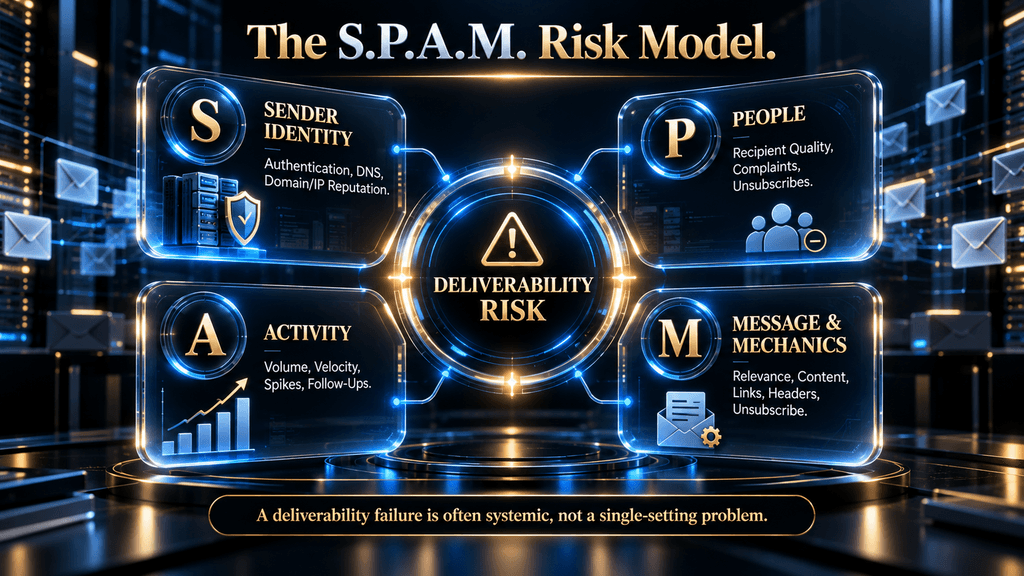
The S.P.A.M. Risk Model
The D.E.L.I.V.E.R. framework explains how to perform the audit. The second AI Hustle World framework explains where spam risk comes from.
S — Sender Identity
This includes authentication, DNS, domain configuration, IP reputation, and the consistency of the sending identity.
P — People
This includes recipient relevance, list quality, complaints, unsubscribes, stale contacts, and whether recipients actually want the message.
A — Activity
This covers volume, velocity, sending patterns, bursts, follow-up behavior, mailbox distribution, and sudden scaling.
M — Message & Mechanics
This includes message relevance, content, links, formatting, headers, tracking behavior, unsubscribe implementation, and technical construction. The important insight is that a deliverability failure often comes from interaction between these layers.
For example, poor list quality may not immediately destroy reputation at low volume. Increase the volume sharply, however, and the same poor list can generate enough negative signals to damage the domain.
That is why deliverability problems often appear suddenly even when the underlying weakness existed for weeks.
What a “Burned Domain” Actually Means
“Burned domain” is common language in outbound communities, but it is not an official Gmail status. A better technical definition is: A burned domain is an operator’s shorthand for a sending domain whose reputation and/or deliverability has deteriorated enough that normal outbound traffic consistently experiences poor placement, throttling, rejection, or spam classification despite ordinary operational use.
The word “burned” can be misleading because it suggests a binary state: alive or dead. Real reputation systems are more gradual.
Google’s current Postmaster Tools reputation categories include High, Medium, Low, and Bad. Google describes Bad reputation as a history of regularly sending large volumes of spam, with mail from that domain or IP almost always being marked as spam or rejected. Low reputation indicates a significant history of spam and a strong likelihood of spam placement.
So a domain may be: healthy → deteriorating → low reputation → severe filtering → operationally “burned” rather than suddenly becoming unusable at one exact moment.
How to Tell Whether a Domain Is Actually in Trouble
Do not call a domain burned because one campaign performed badly. Look for persistent, multi-signal evidence.
A stronger warning pattern might include deteriorating Postmaster domain reputation, repeated delivery errors, growing spam placement, authentication problems, increasing deferrals, or widespread inbox-placement failure across controlled tests. A weaker signal might be simply that reply rates fell.
Reply rates are not deliverability metrics by themselves. A poor offer, bad targeting, seasonal slowdown, or irrelevant list can cause replies to fall without any major inbox problem.
Likewise, a temporary spam spike does not necessarily mean the domain is permanently damaged. The word persistent is important.
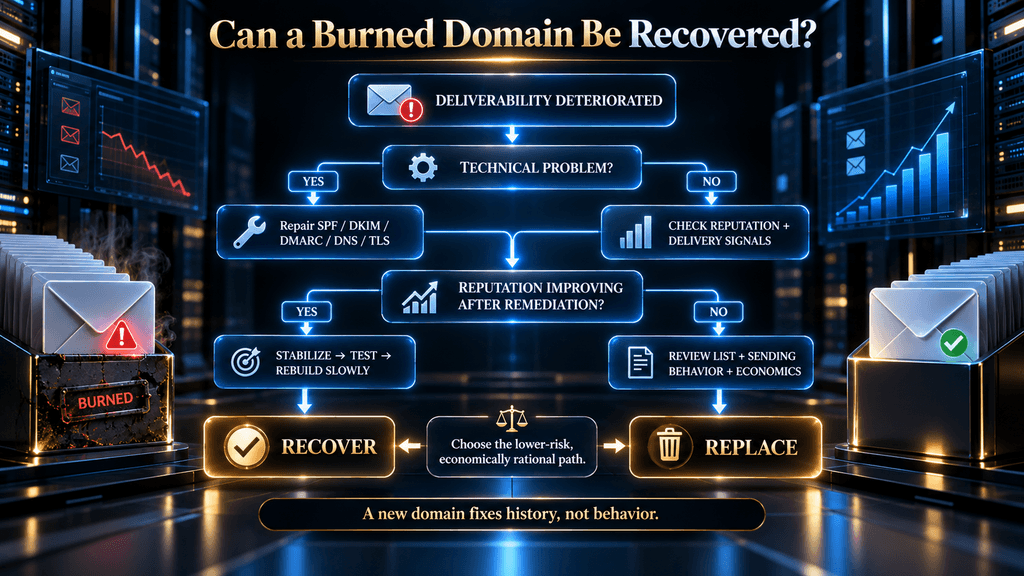
Can a Burned Domain Be Recovered?
Yes, a damaged domain can sometimes recover, but there is no universal recovery timer or guaranteed reset process.
The correct approach is to repair the underlying causes and then observe whether sender signals stabilize and improve. Google explicitly recommends reducing harmful sending behavior and waiting for reputation to recover when the sender has developed a poor reputation. Its troubleshooting guidance also recommends controlled volume after delivery problems rather than immediately returning to the previous sending level.
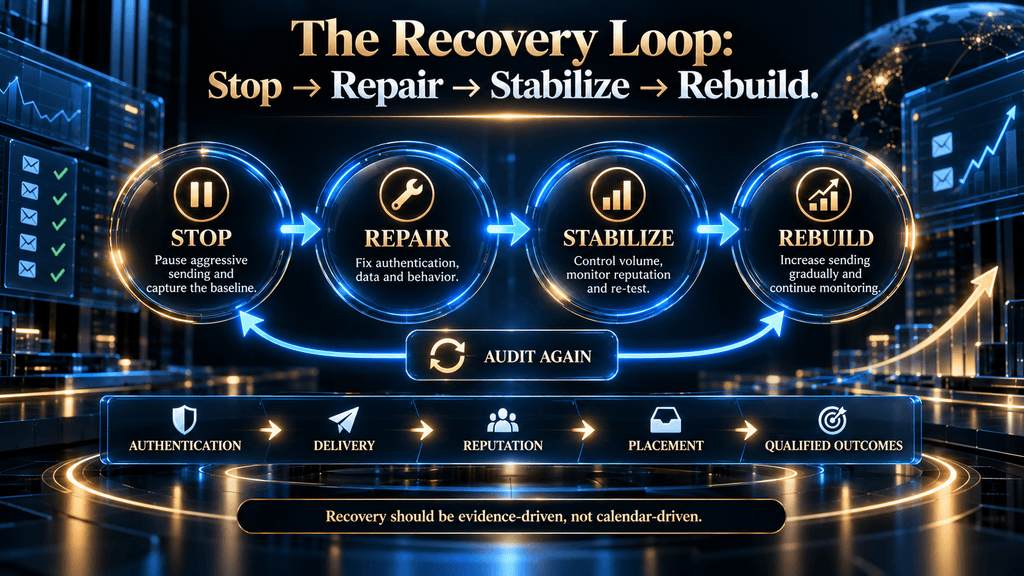
That means recovery is not: “Warm up for 14 days and everything resets.” A better model is: Stop → Diagnose → Repair → Stabilize → Test → Rebuild → Monitor. The time required depends on what caused the damage, how severe the reputation problem is, how the receiving provider is responding, and whether the sender genuinely changes the behavior that caused the issue.
Step 1: Stop Making the Problem Worse
The first recovery action is often the least glamorous. Reduce or pause the problematic sending.
If your domain is generating deferrals, complaints, or obvious rejection patterns, continuing at the same volume produces additional negative traffic while you are still trying to discover the cause. Google’s current troubleshooting guidance explicitly recommends stopping or reducing traffic after deferrals and maintaining sending below the level associated with the failure while stability is restored.
This is also where many operators make the wrong psychological decision. They see falling reply numbers and increase volume because they are trying to “catch up.”
That can convert a performance problem into a reputation problem.
Step 2: Capture the Baseline Before Changing Anything
Before you repair the domain, record what is currently happening. Your baseline should include:
| Metric | Why It Matters |
|---|---|
| SPF result | Sender authorization |
| DKIM result | Cryptographic authentication |
| DMARC result | Authentication + alignment |
| Hard-bounce rate | List/data health |
| Temporary failures | Receiver throttling or transient problems |
| Rejection rate | Policy/infrastructure/reputation signals |
| Spam complaint rate | Recipient negative feedback |
| Unsubscribe rate | Recipient rejection signal |
| Domain reputation | Domain-level trust |
| IP reputation | Infrastructure-level trust |
| Inbox-placement test | Practical placement evidence |
| Sending volume | Current traffic load |
| Recent volume changes | Possible trigger |
| Campaign/source | Helps isolate the problem |
Do not start changing DNS, domains, campaigns, lists, and sending patterns simultaneously. When everything changes at once, you lose the ability to identify which repair actually mattered.
Step 3: Repair Authentication
Fix SPF, DKIM, DMARC, alignment, DNS, and TLS issues before trying to rebuild volume.
Google explicitly requires authentication and DNS controls for Gmail senders, with additional requirements for bulk senders. Its Postmaster authentication dashboard can help identify whether SPF, DKIM, and DMARC are passing consistently.
Do not consider the repair complete simply because the DNS records exist. Send a controlled message and verify what happened to the actual message. The question is not: “Did I publish a DKIM record?”
The question is: “Did the message I just sent pass DKIM and align correctly?” That distinction is fundamental to a real audit.
Step 4: Audit the List
Once authentication is healthy, investigate the audience.
Remove invalid and clearly problematic addresses. Review the source that produced the list. Check stale records and duplicates. Examine whether the campaign is reaching irrelevant contacts or repeatedly targeting people who have already ignored or rejected previous messages.
A domain with perfect authentication can still develop poor reputation if the message is repeatedly perceived as unwanted. Google’s current documentation recommends keeping spam low, sending to recipients who want the messages, and making it easy for recipients to unsubscribe.
This is where deliverability and sales strategy overlap. Bad prospecting creates bad deliverability economics.
Step 5: Reduce Volume and Stabilize Sending
Once the technical and list problems are addressed, establish a controlled sending pattern.
Do not jump immediately back to the volume that existed before the incident. Google recommends gradual increases following delivery problems and warns against sudden increases in volume.
A recovering system needs a stable environment in which you can observe whether receiver signals are improving. The key word is controlled.
You are not trying to maximize the number of messages you can send during recovery. You are trying to find the highest sustainable volume at which the sender remains healthy.
Step 6: Re-Test Before Scaling
Once the infrastructure is repaired and traffic is stabilized, run controlled tests.
Review authentication again. Check Postmaster signals when sufficient data is available. Monitor delivery errors. Compare placement across the recipient environments that actually matter to your business.
Do not treat one successful test as proof of recovery. Recovery should be considered a pattern of improving signals, not a single green light.
Step 7: Rebuild Gradually
When the system demonstrates stability, increase volume carefully. Google’s current guidance says senders should maintain consistent volume and increase gradually after delivery issues. The exact growth rate should depend on the sender’s circumstances rather than a universal “day one = X emails, day two = Y emails” formula.
That kind of rigid schedule is one of the problems with generic warmup guides. A new legitimate sender, a recovering low-reputation domain, a high-volume established sender, and an agency rotating many mailboxes do not necessarily face the same risk.
The recovery process should be evidence-driven rather than calendar-driven.
When Should You Replace the Domain Instead?
The answer should be based on economics and evidence, not panic.
Replacing a domain also has costs. You may need new infrastructure, DNS configuration, mailboxes, authentication, ramp-up time, tracking changes, operational migration, and potentially a period where legitimate business communication becomes fragmented across domains.
Recovering a domain has costs too. You may lose pipeline while sending is constrained, spend staff time diagnosing the issue, pay for additional monitoring, and operate below the volume your team normally needs.
So the decision can be framed as: Recovery Cost = diagnostic effort + lost outbound capacity + remediation time + delayed pipeline versus Replacement Cost = new domain/infrastructure + setup + reputation rebuilding + operational migration + lost continuity. That creates a more rational decision than “domain is burned, buy another one.”
A Domain Recovery Decision Matrix
| Situation | Recommended Direction |
|---|---|
| Authentication broken but reputation otherwise healthy | Repair |
| New list caused bounce/complaint spike | Repair list + stabilize |
| Temporary deferrals after volume spike | Reduce volume + stabilize |
| Reputation low but improving after remediation | Continue controlled recovery |
| Reputation poor with repeated negative signals | Evaluate recovery economics carefully |
| Persistent severe filtering after genuine remediation | Consider replacement |
| No evidence of domain-level problem | Do not replace prematurely |
The important phrase is genuine remediation. Replacing the domain while keeping the same bad list, same sending behavior, and same message strategy simply transfers the problem to a new domain.
Why Replacing a Domain Does Not Fix a Broken System
This is the most important recovery mistake to avoid. Imagine a sender has:
- a poor-quality prospect database,
- aggressive follow-ups,
- weak relevance,
- excessive sending,
- poor unsubscribe handling,
- and a high complaint rate.
The sender changes domains.
For a short period, performance may improve because the new domain does not carry the old reputation history. But the underlying behavior remains.
Eventually the same negative signals can accumulate again.
A new domain can isolate historical reputation. It cannot eliminate behavioral causality.
That is why the correct principle is: New infrastructure can give you a clean starting point; it cannot give you a clean process.
The Most Common Deliverability Failure Modes
“My DNS is green, so deliverability should be fine.”
Authentication is necessary, but it is not sufficient. A sender can pass SPF, DKIM, and DMARC and still have poor reputation or spam placement.
“My spam rate is low, so recipients are happy.”
Google explicitly warns that low reported spam rates can coexist with significant automatic spam filtering, meaning fewer recipients are seeing messages in their inbox and therefore fewer can report them.
“My warmup tool will fix the domain.”
Warmup does not repair poor list quality, spam complaints, broken authentication, or fundamentally unwanted messaging.
“My open rate is good, so I am reaching the inbox.”
Google says it does not track open rates and cannot verify the accuracy of open-rate figures reported by third parties. Open rates should therefore not be treated as authoritative proof of inbox placement.
“I just need to send more.”
More volume can magnify an existing problem. Google specifically cautions against abrupt volume increases and recommends gradual changes when rebuilding after delivery problems.
“The domain is burned, so it must be replaced.”
Not necessarily. First establish whether the problem is technically repairable, reputationally recoverable, and economically worth recovering.
“Changing subject lines will solve spam.”
Sometimes content changes help, but subject lines are only one variable in a much larger system.
Why Open Rate Should Not Be Your Deliverability Dashboard
Open-rate reporting remains popular because it feels like a direct measure of inbox performance. It is not. Google explicitly says it does not track open rates and cannot verify third-party open-rate figures.
That matters because email opens can be affected by tracking systems, privacy features, client behavior, image loading, and measurement methodologies that differ across tools. A better sequence is: Authentication → Delivery → Reputation → Placement → Recipient Response → Qualified Outcome. Open rate can potentially serve as a secondary diagnostic metric, but it should not become the primary health indicator of the sending domain.
Your Deliverability Dashboard Should Track Two Layers
A mature outbound team should maintain two dashboards rather than one.
Layer 1: Infrastructure Health
Track:
- SPF
- DKIM
- DMARC
- alignment
- DNS
- TLS
- hard bounces
- temporary failures
- rejections
- domain reputation
- IP reputation
- spam rate
- unsubscribe behavior
- inbox-placement tests
These metrics answer: “Can we reliably deliver?”
Layer 2: Commercial Health
Track:
- positive replies
- qualified replies
- meetings
- show rates
- opportunities
- customers
- revenue
- cost per qualified meeting
- cost per opportunity
These metrics answer: “Was the delivered traffic actually worth sending?” This distinction prevents a common mistake: celebrating excellent technical delivery for a campaign that generates no commercially useful response.
The Real Cost of Poor Deliverability
Deliverability damage has a direct financial effect because the cost is not limited to emails that fail to arrive.
Suppose a sales operation spends money on prospect data, verification, mailboxes, infrastructure, software, AI usage, and human operations. If a meaningful portion of those messages never reaches the intended inbox, the company is still paying the cost of acquisition while receiving less opportunity from the same system.
That creates a hidden metric: Cost per delivered qualified prospect. But even that is incomplete. The real objective is: Cost per qualified opportunity.
A campaign with lower delivery volume can outperform a high-volume campaign if it reaches more relevant prospects and creates more sales opportunities. This is why deliverability should be treated as part of outbound economics rather than merely a technical concern.
A 30-Minute Deliverability Triage
When a campaign suddenly starts failing, the first audit does not need to take an entire day.
Start with the event timeline. Identify when performance deteriorated and what changed immediately beforehand. Then verify SPF, DKIM, DMARC, alignment, DNS, and the major delivery error categories.
Next, check the sending volume and look for spikes. Review bounce and complaint patterns. Inspect the latest list source. Finally, check the available domain/IP reputation and Postmaster data for the affected recipient environment.
The objective of the 30-minute triage is not to fix everything. It is to answer: “What layer should we investigate first?” That alone can prevent hours of random troubleshooting.
A 60-Minute Full Audit
A deeper audit should reconstruct the last meaningful period of the campaign.
Compare current results against a previously healthy period. Map changes in domain, mailbox count, volume, data source, campaign content, follow-up logic, tracking, infrastructure, and recipient segment.
Then inspect provider-specific evidence. Gmail should be evaluated using Postmaster Tools and authentication data. Microsoft consumer delivery should be investigated through its relevant sender requirements and rejection responses. Yahoo should be considered separately where it represents an important recipient population.
Finally, produce a short diagnosis: Primary suspected cause → supporting evidence → remediation → monitoring plan. That format creates accountability and prevents the audit from becoming an endless list of possible explanations.
A Deep Recovery Audit
A deep recovery audit should be conducted when reputation has materially deteriorated or when earlier remediation attempts have failed.
This audit should reconstruct the sender’s history rather than looking only at today’s metrics. Examine the domain’s sending volume, campaign changes, list sources, authentication changes, complaint patterns, infrastructure migrations, mailbox behavior, content changes, and major periods of scaling.
The goal is to determine whether the problem is isolated or systemic. An isolated problem might be caused by one bad data source or one campaign that generated unusual complaints.
A systemic problem might involve the entire outbound operating model. Those two situations require different recovery strategies.
What Happens If You Ignore a Deliverability Problem?
Ignoring deliverability creates a compounding problem because reputation is built from behavior over time.
If the sending system continues generating unwanted traffic, increasing volume, receiving complaints, or producing authentication failures, the damage can extend beyond one campaign. Google says poor reputation can lead to increased spam classification and advises senders to avoid behaviors that contribute to low reputation while waiting for the domain or IP to recover.
There is also an opportunity-cost problem.
A sender whose messages are increasingly filtered is not simply losing email delivery. The sales team is spending time on campaigns that cannot reach their intended audience efficiently. Prospecting costs continue while pipeline creation falls.
That makes early detection economically valuable. The cheapest deliverability problem to fix is the one you identify before it becomes a reputation problem.
The Future of Cold Email Deliverability
AI is going to make this problem more interesting rather than less important.
As AI makes prospect research, personalization, sequence generation, and campaign execution cheaper, more businesses will be capable of producing large volumes of messages that appear highly customized. That means the ability to generate personalized text will become less scarce.
Mailbox providers will still care about identity, reputation, sender behavior, recipient feedback, authentication, and message quality. The strategic implication is significant: AI may increase the volume of sophisticated-looking outbound faster than it increases the amount of genuinely wanted communication. That creates an environment where sender reputation becomes even more valuable.
The strongest outbound teams will therefore use AI to reduce repetitive work while becoming more disciplined about targeting, data quality, sending behavior, recipient choice, and escalation rules. The technology may become more autonomous, but the need for responsible operational control will increase rather than disappear.
The One Audit Principle to Remember
When a cold email campaign starts going to spam, do not ask: “Which setting should I change?” Ask: “Which signal is telling the receiver not to trust this traffic?” Then follow the evidence.
Authentication tells you whether the sender can prove identity. Error data tells you how receivers are responding technically. List data tells you whether the audience is creating unnecessary risk. Reputation data tells you whether the historical behavior has affected trust. Volume and velocity tell you whether your activity is putting additional pressure on the system. Engagement and unsubscribe behavior tell you whether recipients perceive the communication as wanted.
That is why the D.E.L.I.V.E.R. framework starts with diagnosis rather than optimization.
Cold Email Deliverability Audit Checklist
A serious audit should eventually be able to answer all of these questions:
| Audit Question | Status to Confirm |
|---|---|
| Is SPF configured correctly? | Pass / Fail |
| Is DKIM passing consistently? | Pass / Fail |
| Is DMARC published? | Pass / Fail |
| Does authentication align with the From domain? | Pass / Fail |
| Is forward/reverse DNS valid? | Pass / Fail |
| Is TLS being used? | Pass / Fail |
| Are messages RFC-compliant? | Pass / Fail |
| Is the Gmail bulk-sender threshold relevant? | Yes / No |
| Is the spam rate below Google’s recommended level? | Yes / No |
| Has the domain/IP reputation deteriorated? | Yes / No |
| Are there unusual delivery errors? | Yes / No |
| Are 4xx deferrals increasing? | Yes / No |
| Are hard bounces increasing? | Yes / No |
| Did a new data source precede the problem? | Yes / No |
| Did sending volume suddenly increase? | Yes / No |
| Are complaint/unsubscribe signals increasing? | Yes / No |
| Are placement results deteriorating? | Yes / No |
| Does the problem affect one provider or several? | Record |
| Can the underlying cause be repaired? | Yes / No |
| Is recovery economically rational? | Yes / No |
The checklist is not the audit itself. It is the evidence collection layer.
The diagnosis comes from connecting those answers.
Final Thoughts
Cold email deliverability is often presented as a collection of tricks: warm up your inboxes, add SPF, configure DKIM, publish DMARC, reduce spam words, and send fewer messages. Those actions can matter, but they become much more useful when they are treated as parts of a larger diagnostic system rather than isolated fixes.
The strongest approach is to audit the sender in layers. DNS and authentication establish identity. Errors and deferrals reveal how receivers are responding technically. List quality determines whether the traffic is worth sending. Reputation reveals the history associated with that traffic. Volume and velocity determine how aggressively the system is behaving. Recipient feedback shows whether people actually want the communication. Recovery then becomes the controlled process of correcting those failures and rebuilding trust.
That is why a “burned domain” should not trigger an automatic domain replacement. First, determine what happened.
Then determine whether the cause can be repaired. Then determine whether the repair is economically worthwhile.
The most important lesson is that a clean domain is not the same thing as a healthy outbound system. A new domain can remove historical reputation baggage, but it cannot fix bad targeting, poor data, aggressive sending, weak offers, or irresponsible follow-up. The real objective is not to find a domain that has never been damaged; it is to build an outbound system that does not repeatedly create the conditions that damage domains.
And in 2026, that distinction matters more than ever. As mailbox providers strengthen authentication and sender-behavior enforcement and AI makes high-volume personalized outreach easier to produce, sustainable deliverability will increasingly come from the quality of the entire system rather than from any single tool or setting.
Audit the signal. Find the failing layer. Fix the cause. Then scale again.
Know What Is Breaking Before You Scale Again
Use the audit framework to decide whether your domain needs repair, controlled recovery, or a full rebuild before sending at scale again.
Revisit the Cold Email Strategy →Frequently Asked Questions
What is a cold email deliverability audit?
A cold email deliverability audit is a structured review of the technical, reputational, behavioral, infrastructure, and recipient-level factors that determine whether outbound email is accepted and placed effectively. It typically examines authentication, DNS, domain and IP reputation, bounce and rejection behavior, list quality, spam complaints, sending volume, recipient response, and provider-specific delivery signals.
Why are my cold emails going to spam?
Cold emails can go to spam because of poor sender reputation, unwanted recipient behavior, high complaint rates, weak list quality, authentication problems, sudden volume increases, repeated follow-ups, or message-level signals. The exact cause cannot be determined from spam placement alone, which is why a proper audit needs evidence from authentication, reputation, delivery errors, and recipient behavior. Google specifically provides separate Postmaster dashboards because these signals represent different parts of the sending system.
How do I know if my domain is burned?
“Burned domain” is not an official Gmail classification. In practical terms, the phrase describes a domain suffering persistent and significant deliverability or reputation problems, such as poor domain reputation, repeated spam placement, rejection or deferral patterns, and weak placement that continues despite genuine remediation.
Can a burned domain be recovered?
A damaged domain can sometimes recover when the underlying problems are corrected and sending behavior is stabilized. Google advises senders with poor reputation to reduce harmful sending behavior and wait for reputation to recover, while its troubleshooting guidance recommends controlled sending and gradual increases after delivery problems. There is no universal recovery timer that guarantees restoration for every domain.
How long does domain recovery take?
There is no reliable universal number of days that applies to every domain. Recovery depends on the severity and cause of the problem, the receiving provider, the domain’s sending history, the quality of the remediation, and whether negative signals actually decline. Any service promising that every damaged domain will recover after a fixed warmup period should be treated cautiously.
Does warmup actually improve email deliverability?
Controlled sending and gradual increases can help establish stable sending behavior, but warmup is not a universal reputation-reset mechanism. It cannot repair poor lists, high spam complaints, broken authentication, or fundamentally unwanted messages. Recovery should focus first on correcting the causes of poor delivery and only then rebuilding volume.
What do SPF, DKIM and DMARC do?
SPF identifies authorized sending infrastructure for a domain, DKIM provides a cryptographic signature that helps verify message authenticity, and DMARC connects authentication results with the visible From domain while providing a policy and reporting mechanism. Gmail requires SPF or DKIM for all senders to personal Gmail accounts and adds SPF, DKIM, and DMARC requirements for senders reaching its bulk-sender threshold.
What spam rate is too high for Gmail?
Google recommends keeping reported spam rates below 0.10% and avoiding 0.30% or higher. Google states that even spam rates above 0.10% can negatively affect inbox delivery for bulk senders, while 0.30% or higher has a stronger negative impact.
How do I use Google Postmaster Tools to diagnose deliverability?
Start with Compliance Status and Authentication, then review Domain Reputation, IP Reputation, Spam Rate, Feedback Loop, and Delivery Errors. These dashboards provide different pieces of the deliverability picture, and Google warns that the data is not real-time and may be limited when sending volume is low.
When should I replace a damaged domain instead of recovering it?
Replace the domain only after determining that the problem is severe, persistent, and economically more expensive to recover than to rebuild. You should also confirm that the underlying behavior causing the problem has been corrected. A new domain paired with the same poor list, aggressive volume, or weak sending practices can recreate the problem.
Related Guides
- Best AI Email Assistants (Free & Paid): 10 Tools Compared
- What Is an AI SDR? How AI Agents Automate B2B Prospecting, Outreach & Qualification
- How AI Detects Phishing, Social Engineering & Suspicious Messages
- What Is a Large Language Model (LLM)? How LLMs Really Work
Written by
Muntasir Ahmad Chowdhury
Founder, AI Hustle World
Muntasir Ahmad Chowdhury is the Founder of AI Hustle World, an independent publication dedicated to making Artificial Intelligence practical, trustworthy, and easy to understand. He researches AI tools, automation, customer service, productivity, and real-world business applications, helping readers make smarter technology decisions through research-driven, experience-backed content.
Expertise:
AI Tools • AI Automation • AI Customer Service • AI Productivity • Generative AI • AI Workflows
Get Smarter With AI
Enjoyed this guide? Get practical AI tools, tutorials, and honest reviews delivered to your inbox.