
Best AI Content Repurposing Tools in 2026: Platforms Compared
Editorial note: This comparison is based on current product documentation, help-center material and public pricing information reviewed on September 19, 2026. AI Hustle World did not conduct controlled hands-on tests for this article, so the rankings do not claim to measure output quality, reliability, transcription accuracy or publishing performance.
Publishing more content is not the same as building an effective repurposing system. One platform may find promising moments inside a long video, another may turn a transcript into written assets, and a third may move finished content across social channels without repeated uploads.
Those products are often placed in the same “AI content repurposing” category, even though they solve different operational problems. That makes many best-tool lists look useful while leaving the most important buying question unanswered: which part of your workflow actually needs help?
This comparison evaluates eight platforms according to the jobs they document, the workflow stages they cover and the amount of human judgment that remains necessary. The goal is not to declare one universal winner. It is to help you choose a tool that fits your source material, publishing model and current production bottleneck.
The Best AI Content Repurposing Tools at a Glance
The strongest choice depends on whether you need to extract clips, edit source media, create written derivatives, automate distribution or manage the entire social workflow. A broad platform can cover more stages, but a focused specialist may still perform the one job that matters most to your team.
| Platform | Best fit | Main strength | Main limitation |
|---|---|---|---|
| Quso.ai | Creators wanting clips, scheduling and analytics together | Broad documented workflow coverage | Breadth can add complexity when only one function is needed |
| Descript | Editors who want transcript-based control | Strong connection between transcript, media and manual editing | Direct multi-platform distribution is not its central strength |
| Riverside | Podcasters and interview teams recording original media | Recording, transcription, editing and clip creation in one environment | Less suitable when the source content already lives elsewhere |
| Castmagic | Turning podcasts, interviews and webinars into written assets | Transcript-centered derivative content production | Not a complete social publishing system |
| OpusClip | Producing short clips from long videos | Specialized clipping, reframing, captions and visual enhancement | Written derivatives are secondary to video |
| Repurpose.io | Automating cross-platform publishing | Source-to-destination workflows and repeatable distribution | It does not replace substantive editorial production |
| Pictory | Turning articles, URLs, scripts and audio into videos | Supports several non-video source formats | Generated scenes and source interpretation still need close review |
| Munch Studio | Businesses managing recurring social production | Strategy, creation, approval, scheduling and analytics | Public pricing and product boundaries are less straightforward |
If you mainly need short clips from existing long-form video, start with OpusClip. If you want to edit the underlying recording and create clips from the same transcript, Descript provides a more production-oriented environment.
Castmagic is the stronger fit when the source is a podcast, interview or webinar and the intended outputs are articles, newsletters, summaries and social posts. Repurpose.io belongs later in the workflow: its main value is moving content between connected channels after the production rules have been established.
Quso.ai documents the widest combination of clipping, editing, planning, scheduling and analytics among the products compared. That breadth gives it the highest documentation-based Decision-Fit Score, but it does not automatically make it the best specialist for every source or output.
What Counts as an AI Content Repurposing Tool?
A content repurposing tool should help transform an existing source into one or more assets intended for a different format, channel, audience or stage of the customer journey. The source might be a video, podcast, article, presentation, livestream, meeting or collection of previously published media.
Simple resizing is a limited form of repurposing because it changes packaging without changing the underlying editorial job. Turning a 16:9 interview into a vertical clip is useful, but a true repurposing workflow may also identify the relevant moment, preserve its context, add captions, produce a written post and prepare the result for a specific platform.
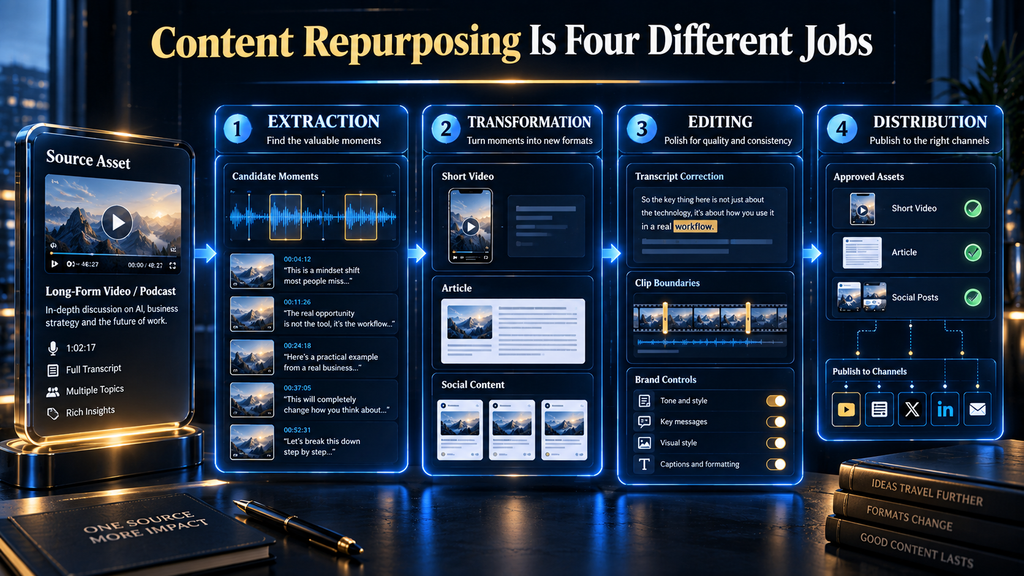
This creates four distinct product categories that are regularly confused.
Extraction tools
Extraction tools identify moments, quotes, topics or sections that may work as independent assets. Their central challenge is not generating more material but deciding which part of a larger source can stand alone without becoming misleading or incomplete.
Video clippers occupy this category, but transcript search and highlight detection also belong here. The tool’s suggestion should be treated as a candidate rather than an editorial decision because an engaging excerpt can still omit a qualification, exception or necessary part of the speaker’s reasoning.
Transformation tools
Transformation tools convert selected material into a different format. Examples include turning an article into a narrated video, an interview into a newsletter draft or a webinar transcript into a series of social posts.
The main risk is semantic drift. A visually polished output can still misrepresent the source if the system compresses a qualified argument into an absolute claim or adds language that was not supported by the original material.
Editing tools
Editing tools help a human refine media, correct transcripts, adjust clip boundaries, change layouts, apply brand elements and approve the final wording. These products may use AI throughout the interface, but their strategic value comes from giving the editor control over what the system produces.
This category is important for teams working with expert commentary, customer stories, research, regulated subjects or branded educational content. Faster generation has limited value if reviewers cannot easily trace and correct the result.
Distribution tools
Distribution tools move approved assets from a source or content library to destination platforms. They may resize media, remove watermarks, schedule posts, maintain backups or trigger a workflow when new material is published.
Distribution automation reduces repetitive handling, but it can also multiply mistakes. A weak caption, incorrect crop or context-poor clip becomes more damaging when it is automatically published across several accounts.
Some platforms cover more than one category, which is why feature-count comparisons can be deceptive. The useful question is not how many features appear on a pricing page; it is whether the platform owns the stages that currently consume the most time or create the most risk.
How We Researched and Compared the Platforms
The comparison uses official product pages, support documentation and current public pricing pages as its primary evidence. Features were included only when the reviewed material described them clearly enough to connect them with a defined workflow stage.
Vendor language such as “viral,” “perfect,” “best-performing” or “studio-quality” was not treated as independent evidence. Those terms describe the company’s positioning, not an externally verified result.
The review also avoids inferring product quality from feature availability. A documented clip generator confirms that clips can be generated; it does not prove that the tool consistently selects the most useful moments or produces better clips than a competing system.
Pricing information receives the same caution. A low headline price may hide annual billing, limited credits, shorter media retention, watermarks, export restrictions, connected-account limits or additional charges for AI processing.
All commercial facts in this article should therefore be read as a September 19, 2026 snapshot. Readers should confirm the current plan page before purchasing because limits and billing structures can change without the underlying article being updated immediately.
The AI Hustle World Decision-Fit Score
The AI Hustle World Decision-Fit Score is a reusable research model for commercial software comparisons. It measures how convincingly a platform’s documented capabilities fit its intended job, not how impressive its marketing language sounds.
Each dimension is rated from zero to five. A zero means sufficient evidence was not found, while five indicates extensive documented support for the dimension being evaluated.
| Dimension | Weight | What it measures |
|---|---|---|
| Core-job fit | 30% | How completely the product addresses the principal use case assigned to it |
| Workflow coverage | 20% | How many relevant stages it handles without leaving the platform |
| Human control | 15% | Editing, approval, correction and brand-control options |
| Integration and portability | 15% | Imports, exports, connected channels and movement between systems |
| Pricing predictability | 10% | Whether costs, credits, limits and plan boundaries are understandable |
| Evidence transparency | 10% | How clearly official documentation supports product claims |
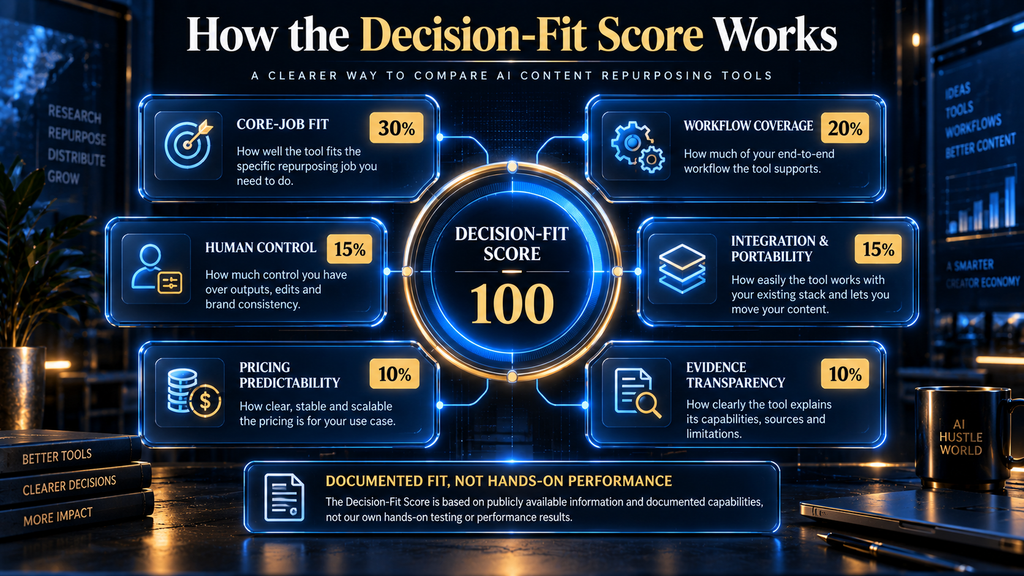
The formula is: Decision-Fit Score = sum of each rating ÷ 5 × its assigned weight
A high score indicates broad and well-documented suitability for the platform’s designated job. It is not a controlled performance score, and a specialist with a lower total may still be the correct purchase for a narrower workflow.
| Platform | Core-job fit | Coverage | Human control | Portability | Pricing clarity | Evidence | Total |
|---|---|---|---|---|---|---|---|
| Quso.ai | 30 | 20 | 12 | 15 | 6 | 8 | 91 |
| Descript | 30 | 16 | 15 | 9 | 8 | 10 | 88 |
| Riverside | 30 | 16 | 15 | 9 | 6 | 8 | 84 |
| Castmagic | 30 | 16 | 12 | 9 | 8 | 8 | 83 |
| OpusClip | 30 | 12 | 12 | 12 | 8 | 8 | 82 |
| Repurpose.io | 30 | 12 | 9 | 15 | 8 | 8 | 82 |
| Pictory | 30 | 16 | 12 | 6 | 6 | 8 | 78 |
| Munch Studio | 24 | 16 | 12 | 12 | 4 | 6 | 74 |
Quso.ai leads this particular model because the score rewards documented breadth across creation, publishing and measurement. Descript scores strongly because it combines clear documentation with substantial editorial control, even though distribution is not its primary function.
Repurpose.io and OpusClip reach the same total through different strengths. OpusClip concentrates more heavily on video creation, while Repurpose.io earns more of its score from channel connectivity and automated publishing.
That difference matters more than the shared number. The score should narrow the shortlist, but the workflow comparison below should determine the purchase.
The AI Hustle World Content Repurposing Platform Coverage Matrix
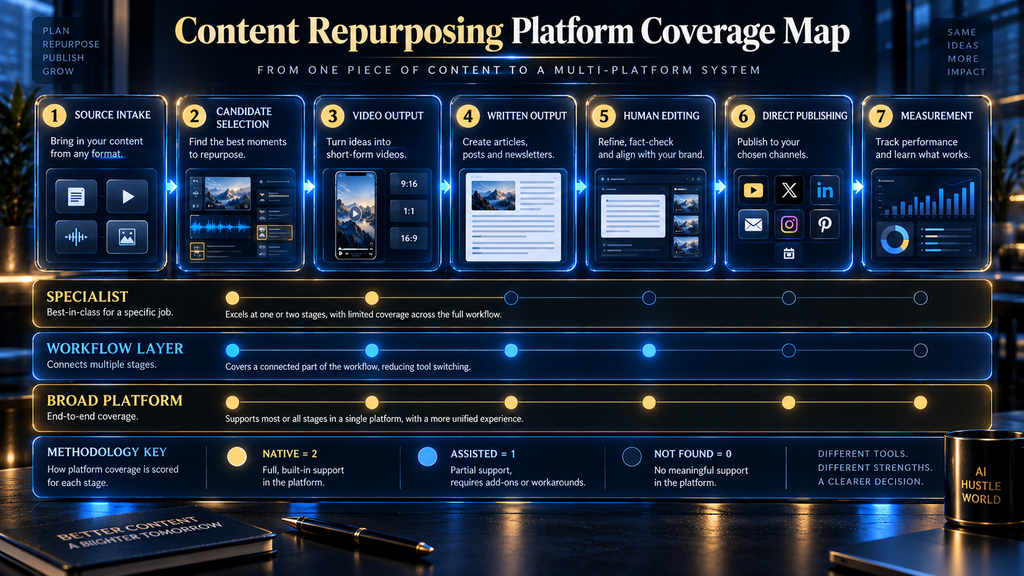
Methodology: AI Hustle World reviewed official product pages, help documentation and public pricing material for eight platforms on September 19, 2026. Each workflow capability was coded as Native (2 points), Assisted (1 point) or Not found in the reviewed documentation (0 points), with the total divided by the maximum applicable points to calculate the Workflow Coverage Index. The matrix measures documented workflow breadth—not output quality, reliability or hands-on performance—and “Not found” does not prove that a capability is impossible.
Each cell uses one of three statuses:
- N — Native: The capability is explicitly documented within the platform.
- A — Assisted: The result requires an integration, export or meaningful manual step.
- — — Not found: The reviewed documentation did not establish the capability.
“Not found” does not mean a task is technically impossible. It means sufficient official evidence was not identified during this review.
| Platform | Source intake | Candidate selection | Video output | Written derivatives | Human editing | Direct publishing | Measurement |
|---|---|---|---|---|---|---|---|
| OpusClip | N | N | N | A | N | N | A |
| Descript | N | N | N | N | N | A | — |
| Castmagic | N | N | A | N | N | A | — |
| Repurpose.io | N | — | A | — | A | N | — |
| Quso.ai | N | N | N | N | N | N | N |
| Riverside | N | N | N | N | N | A | — |
| Pictory | N | N | N | — | N | A | — |
| Munch Studio | N | A | N | N | N | N | N |
The Workflow Coverage Index assigns two points to native coverage, one point to assisted coverage and zero points when sufficient documentation was not found. The result measures breadth only; it does not measure the quality of generated assets.
| Platform | Coverage points | Workflow Coverage Index |
|---|---|---|
| Quso.ai | 14/14 | 100% |
| Munch Studio | 13/14 | 93% |
| OpusClip | 12/14 | 86% |
| Descript | 11/14 | 79% |
| Riverside | 11/14 | 79% |
| Castmagic | 10/14 | 71% |
| Pictory | 9/14 | 64% |
| Repurpose.io | 6/14 | 43% |
Repurpose.io’s lower coverage score is not a verdict that it is a weak product. It reflects its more focused role as an automation and distribution layer rather than a system for generating every asset type.
Munch Studio and Quso.ai score highly because their documented product boundaries extend from creation into publishing and performance management. Their breadth may reduce tool switching, but teams still need to examine whether the depth of each function meets their production standards.
1. Quso.ai: Best for Combining Clips, Scheduling and Analytics
Quso.ai, formerly associated with the Vidyo.ai brand, positions itself as more than an automated clipping tool. Its current product pages include AI clips, subtitles, content repurposing, a video editor, social scheduling, planning, captions and analytics within the same environment.
That combination is the reason it receives the highest Decision-Fit Score in this comparison. It covers the path from importing a long video to creating clips, preparing social copy, scheduling posts and reviewing channel performance.
The platform supports several source methods, including links from major video platforms, cloud storage and direct file uploads. This reduces the manual handling required when source recordings already live in YouTube, Zoom, Google Drive, Dropbox or another supported system.
Its strongest use case is a creator or small content team that publishes video-led content across several social channels. Instead of using one product to find clips, another to add captions and a third to schedule them, the team can manage more of the process in one account.
The benefit is operational simplicity, not proof that every built-in function outperforms a specialist. A platform covering seven workflow stages may still provide less detailed editing than a dedicated editor or less sophisticated distribution control than a specialized social media management product.
Quso.ai’s official material also uses aggressive replacement language, presenting the product as an alternative to several separate editing and scheduling tools. Buyers should translate that claim into a workflow audit rather than assume that a feature with the same label provides the same depth.
Who Quso.ai is best for
Quso.ai is best suited to solo creators, podcasters, small businesses and lean marketing teams whose source material is primarily long-form video. It is especially relevant when the same person is responsible for creating clips, writing captions, scheduling posts and checking performance.
The platform may also fit agencies handling repeatable video-to-social workflows, provided its account, brand and approval controls match the agency’s client structure. Teams should confirm current plan limits for credits, storage, connected channels and brand management before consolidating their stack.
Who should choose something else
Choose a more focused product if your primary need is detailed transcript-based editing, sophisticated podcast-to-article generation or automation between a large number of existing social accounts. Quso.ai’s breadth is valuable when several functions are genuinely needed, but unnecessary breadth can become interface and subscription overhead.
Teams producing research-heavy or expert-led content should also examine how easily each derivative remains connected to the source. A generated caption or blog draft still requires human verification, even when the platform can produce and publish it without leaving the dashboard.
Pricing perspective
The public pricing page reviewed for this article showed a free plan with a monthly credit allowance and a paid entry plan advertised at different effective prices depending on the billing period. That structure makes the initial price easy to understand, but actual value depends on how quickly video processing and other AI functions consume credits.
Do not compare the plan’s headline price with another product until you normalize the included processing time, export resolution, retention, brand controls and scheduling limits. Two plans carrying similar monthly prices may support very different publishing volumes.
Verdict on Quso.ai
Quso.ai offers the broadest documented workflow in this comparison and is the strongest candidate for a video-led team wanting fewer handoffs. It is not automatically the best clip generator, editor or scheduler in isolation, because those narrower performance questions were not tested here.
2. Descript: Best for Transcript-Based Editorial Control
Descript approaches repurposing from the editing layer. Audio and video are represented through a transcript, allowing the editor to revise spoken media through text while retaining access to the underlying recording.
Its Create Clips feature uses AI to scan a composition and identify short, self-contained cuts for social media, highlights or teasers. According to Descript’s official documentation, the source composition must contain enough material for the requested clip length, and very short sources may not produce useful results.
That limitation is sensible because a clip cannot become genuinely self-contained through formatting alone. If the original segment lacks a clear premise, supporting explanation or conclusion, the editor must expand the boundary or select a different moment.
Descript’s main advantage is the relationship between automated suggestions and manual control. The user can inspect the transcript, adjust the selected passage, correct text, remove unwanted material and refine the media without treating the generated clip as final.
This makes Descript particularly strong for interviews, podcasts, webinars, tutorials and expert commentary. The editor can work directly with what was said instead of relying only on a collection of automatically generated clips.
The platform also offers audio cleanup, filler-word removal, captioning, translation and other production functions. Those tools make it possible to improve the source before producing derivatives, which is different from importing a finished video into a clip-only system.
Who Descript is best for
Descript is best for creators and teams that care about editorial judgment as much as production speed. It is especially appropriate when a weak sentence, incorrect transcript or poorly bounded quotation could damage the credibility of the final asset.
Podcast producers can use the same working environment to edit an episode, prepare clips and create supporting materials. Educational and business teams may also prefer it when reviewers need to inspect the source language rather than approve an isolated output.
Who should choose something else
Descript is less suitable when the central requirement is fully automated redistribution between existing social platforms. It can prepare assets for publishing, but a distribution-first product offers a more direct answer when the bottleneck is repeated uploading rather than media editing.
A creator who wants rapid clip suggestions with minimal intervention may also find a specialist clipper more direct. Descript’s value increases when the user intends to edit; it becomes less distinctive when every AI-generated result is accepted without review.
Pricing perspective
Descript offers a free entry point and several paid levels whose monthly cost changes according to billing frequency. The meaningful limits are not only the subscription prices but also included media hours, AI credits and access to advanced production features.
Teams should calculate their expected monthly source duration before choosing a plan. A weekly interview show and a business processing multiple webinars may both need “repurposing,” but their total media hours can create very different costs.
Verdict on Descript
Descript is the strongest choice in this comparison for transcript-based editorial control. It does not promise the lowest-touch workflow, but it gives reviewers a practical way to inspect and reshape the source before a derivative is approved.
3. Castmagic: Best for Turning Recorded Media Into Written Assets
Castmagic begins with recorded media and builds a structured content workspace around the transcript. Its product material emphasizes transcription, summaries, show notes, blog drafts, newsletters, social posts, quotations and reusable prompt-based outputs.
This orientation makes it different from a video-first clip generator. The main product value is not changing a landscape video into a vertical frame; it is extracting and reorganizing the ideas contained within audio or video.
That distinction matters for podcasters, consultants, founders and interview-based content teams. A single recording may contain a newsletter argument, several LinkedIn posts, a client insight, a quotation library and the structure of a longer article, even when no short video is needed.
Castmagic also documents searchable media libraries and the ability to work across collections of transcripts. That can support more valuable repurposing than treating every episode as an isolated upload because recurring ideas and previous explanations remain available as context.
However, the presence of a transcript does not remove the need for source verification. Generated summaries and written assets can compress nuance, combine separate statements or present a conversational comment as a polished conclusion the speaker did not explicitly make.
Who Castmagic is best for
Castmagic is best for people whose most valuable source material is spoken. Podcasters, interviewers, coaches, consultants and webinar teams can use it to create structured written material from recordings without beginning every asset from an empty document.
It is also useful when the objective is a content library rather than a one-time promotional burst. Searchable transcripts, recurring prompts and reusable source material can support a continuing editorial system.
Who should choose something else
Choose OpusClip or another video specialist when the main deliverable is a large volume of visually polished short clips. Castmagic can participate in a video workflow, but written and transcript-based derivatives are a more natural reason to buy it.
Choose Repurpose.io when the assets already exist and the problem is distributing them automatically. Castmagic helps determine and draft what should be published; it is not the strongest dedicated answer for moving every approved asset between channels.
Pricing perspective
The public pricing reviewed for this comparison used transcription hours as an important plan boundary. Annual billing displayed effective monthly prices around $19 for the entry paid plan, $48 for the next level and $139 for the larger team level, with different transcription allowances.
Those figures should not be compared with clip credits as though they represent the same unit. The relevant calculation is the cost per hour of source media and the number of usable written assets the team can responsibly review from that material.
Verdict on Castmagic
Castmagic is the most suitable platform in this shortlist for podcast and recorded-media teams prioritizing written derivatives. Its value depends on maintaining a disciplined review process so generated assets remain faithful to the transcript.
4. OpusClip: Best for Specialized Long-Video Clipping
OpusClip is built around transforming long-form video into short clips. Its documented functions include AI clipping, captions, reframing, B-roll, audio enhancement and voice-over features, which place it firmly in the video-production category.
The platform supports several kinds of long-form material rather than restricting the workflow to conventional talking-head podcasts. Its current positioning covers interviews, explainers, vlogs, sports, gaming and other video genres, although suitability for a genre should not be confused with proven selection quality.
The attraction is speed. A creator can submit a long video, receive proposed clips and use platform-oriented formatting without manually scanning the entire timeline for every candidate moment.
The important word is “proposed.” A model can detect changes in energy, topic, visual motion or speech patterns, but it does not own the creator’s editorial responsibility.
A clip may begin with a strong statement while excluding the explanation that makes the statement accurate. It may also end before the practical answer, select a sensational moment that poorly represents the full discussion or favor emotional language over useful information.
Who OpusClip is best for
OpusClip is best for video creators with a steady supply of long-form material and a clear short-form distribution strategy. Podcasts, interviews, tutorials, commentary videos and recorded events can all produce more platform-ready candidates through this workflow.
It is particularly useful when the current bottleneck is scanning long footage, reframing speakers, adding captions and preparing multiple short-video variations. Teams can then spend their human time reviewing the suggested clips rather than finding every moment manually.
Who should choose something else
Choose Descript when the team needs deeper control over the source recording and transcript. Choose Castmagic when the main outputs are written assets rather than short video.
OpusClip is also a weaker fit when the source begins as an article, presentation or text document. Pictory addresses text-to-video transformation more directly, while a content-generation platform may be better for producing non-video derivatives.
Pricing perspective
The OpusClip pricing structure reviewed for this article included a free plan with monthly credits, paid creator plans and a custom business tier. The free plan carried restrictions involving branding, editing or retained access, while higher tiers expanded processing and collaboration.
Credits must be translated into actual source minutes before comparing costs. A creator uploading four hour-long podcasts per month has a different requirement from a marketer processing occasional ten-minute tutorials.
Verdict on OpusClip
OpusClip is the clearest specialist choice for converting long videos into short-form video candidates. Its documented feature set is focused and relevant, but every selected moment should be reviewed against the original source before publication.
5. Repurpose.io: Best for Automated Cross-Platform Distribution
Repurpose.io solves a different problem from most products in this comparison. It creates workflows connecting source platforms with destination platforms so content can be reformatted, scheduled, backed up or published without repeated downloads and uploads.
Its official product documentation describes automated workflows, platform-specific resizing, watermark handling, cloud backups and publishing across connected accounts. It also supports video, image and story-based workflows, although exact source and destination combinations should be confirmed before purchasing.
The product is most valuable after a team already knows what it wants to publish. It can remove repetitive distribution work, but it does not replace the editorial decisions required to create a useful article, choose an accurate clip or write a channel-specific argument.
This difference explains its lower Workflow Coverage Index. The score records that it covers fewer content-production stages, not that it performs its assigned distribution role poorly.
A focused automation layer may produce more operational value than an all-in-one platform when a team already has preferred tools for recording, editing and writing. The team can preserve those production choices while automating the movement of approved media.
Who Repurpose.io is best for
Repurpose.io is best for creators, agencies and multi-channel businesses repeatedly moving content between the same source and destination accounts. A predictable workflow, such as sending approved videos from one source channel to several social destinations, is where automation can remove the most routine effort.
It is also useful for reducing dependence on platform-specific storage. Documented backup options can help teams retain source files or published assets in cloud storage instead of leaving the only copy inside a social account.
Who should choose something else
Do not choose Repurpose.io as your only tool if your main problem is finding good moments, correcting transcripts or drafting new written assets. It can automate what happens after content exists, but it is not a substitute for the production layer.
It is also a poor fit for teams without stable publishing rules. Automating an inconsistent process usually spreads the inconsistency faster rather than correcting it.
Pricing perspective
The pricing reviewed for this article showed monthly plans around $35 for Starter, $79 for Pro and $179 for Agency, with lower effective costs under annual billing. Connected-account allowances and publishing limits increased across the tiers.
The right comparison unit is not AI credits but the number of accounts, workflows and published assets the plan can support. An agency should also examine how clients are separated and whether approvals must occur outside the platform.
Verdict on Repurpose.io
Repurpose.io is the strongest distribution specialist in this comparison. Buy it when repeated cross-platform handling is the bottleneck, not when the underlying content still needs to be researched, selected or substantially edited.
6. Riverside: Best for Recording-to-Repurposing Workflows
Riverside is strongest when repurposing begins with content recorded inside the same environment. It combines remote recording, transcripts, text-based editing, captions and Magic Clips, allowing a team to move from a conversation to promotional assets without transferring the source through several products.
Magic Clips can identify potential highlights automatically, while the editor can also select text in the transcript and turn that passage into a clip. This combination gives users both automated discovery and direct human selection.
The platform also provides controls for aspect ratio, layout, branding, captions and clip length. These features are especially useful for podcast and interview teams because the people responsible for recording can prepare derivative assets before the project leaves the production workspace.
Its central advantage can become a limitation when recording is not part of the problem. If all source videos are produced elsewhere, a recording-first platform may introduce more functionality than the team needs.
Who Riverside is best for
Riverside is best for podcasters, interview shows, remote video teams, webinar hosts and businesses recording expert conversations. It reduces the handoff between source creation and repurposing, which can make the workflow easier to manage.
The platform also suits teams that want the option to choose moments manually through the transcript. Automated clip suggestions provide speed, while direct selection provides a correction path when the system overlooks an important section.
Who should choose something else
Choose OpusClip when the existing source library is large and the main requirement is specialized clipping. Choose Castmagic when written derivatives are more important than retaining the complete recording environment.
Riverside may also be unnecessary for creators who already have a mature recording and editing system. The value of consolidation depends on whether it removes a real handoff rather than merely replacing familiar software.
Pricing perspective
Riverside offers a free entry point and several paid plans, but public plan presentation can change according to region, billing selection and product packaging. Because the pricing page available during research displayed signals that could not be treated as a reliable universal snapshot, exact figures are not reproduced here.
Buyers should compare recording hours, resolution, separate-track access, transcription allowances, storage and AI feature limits. The value calculation should include the recording capability, not only the clip generator.
Verdict on Riverside
Riverside is the best recording-to-repurposing option in this shortlist. It is most compelling when the same team records, edits and promotes the source content and wants those stages to remain connected.
7. Pictory: Best for Turning Text and Mixed Inputs Into Video
Pictory approaches repurposing from the opposite direction of a conventional video clipper. Instead of requiring every source to begin as a long video, it can use text, scripts, articles, URLs, presentations, images, audio and existing video as inputs for video production.
That makes it relevant to publishers with a substantial written library but limited original footage. An existing article can become the basis of an explainer, narrated summary or social video without recording a presenter from the beginning.
The platform also documents automated captions, generated visuals, AI voices, avatars, highlights and text-based editing. These capabilities can reduce production work, but they create a different review problem from extracting clips from an existing recording.
When a system builds scenes around written material, the editor must verify more than the words. Stock footage, generated visuals, pacing, emphasis and narration can all change how the original claim is interpreted.
A generic visual may weaken a precise business concept, while an overly literal image may make an abstract statement look factual. Human review therefore needs to check semantic alignment rather than only spelling and layout.
Who Pictory is best for
Pictory is best for bloggers, educators, marketers and businesses that already own useful text, scripts, presentations or audio. It can help those teams add video formats without building every project on filmed footage.
It is also useful when the repurposing goal is explanatory rather than personality-led. A structured article or presentation can become a visual narrative, provided the editor checks how each scene represents the source.
Who should choose something else
Choose OpusClip when the main task is extracting short moments from existing video. Choose Descript when detailed source-media editing matters more than generating a new visual interpretation.
Pictory is also a weaker fit when authentic speaker presence is central to the content. A clip of the original expert making the argument may carry more credibility than a generated visual sequence summarizing the same point.
Pricing perspective
Pictory’s plan structure can vary according to billing frequency, video allowances and access to advanced generation features. Buyers should verify the current plan table and calculate the amount of source material they expect to process rather than making a decision from the advertised entry price alone.
Teams should also consider the review time created by visual generation. A lower software price can be offset if every scene requires substantial correction or replacement before it accurately represents the source.
Verdict on Pictory
Pictory is the most relevant option in this comparison for turning articles, scripts, URLs, presentations and audio into video. Its value comes from input flexibility, while its largest responsibility is maintaining visual and factual alignment with the original source.
8. Munch Studio: Best for Managed Social Content Production
Munch originally became known for repurposing long video into short social content, but its current Munch Studio positioning is broader. The platform now presents a workflow that learns from a business’s existing materials, develops social content, allows editing and approval, schedules posts and reviews performance.
This makes it closer to a managed social content system than a simple clip generator. Its product boundaries include strategy and ongoing production, which can appeal to businesses that do not want to assemble separate ideation, creation, approval and scheduling products.
That breadth requires careful evaluation because the system is making decisions at several levels. It is not only formatting an approved asset; it may influence what gets created, how it is framed and when it is published.
Businesses should therefore review how the platform learns brand information, which source materials it uses and how humans approve outputs. The more strategic responsibility a platform appears to assume, the more important its review and governance controls become.
Who Munch Studio is best for
Munch Studio is best for small businesses and agencies seeking a recurring social production environment rather than a single-purpose clipper. It may reduce the need to coordinate separate tools for planning, asset generation, approval and scheduling.
It is especially relevant when the organization has enough existing brand material for the system to interpret. A thin or inconsistent source library gives any brand-learning system less reliable material from which to work.
Who should choose something else
Choose a specialist when the business already has a defined strategy and needs one specific production function. A dedicated clipper, editor or distribution platform will usually have a clearer product boundary and may be easier to evaluate.
Munch Studio is also less suitable for buyers who require completely transparent self-service pricing before beginning a trial or sales conversation. Public pricing clarity was weaker than it was for several other tools in this comparison.
Pricing perspective
A stable public plan table with sufficiently clear, comparable limits was not identified during this review. Prospective buyers should request or confirm current pricing, account allowances, publishing limits, approval roles, supported channels and cancellation terms before adopting it as a central workflow.
That lack of clarity directly reduced the platform’s Pricing Predictability and Evidence Transparency scores. It does not establish poor value, but it increases the amount of due diligence required before purchase.
Verdict on Munch Studio
Munch Studio is the broadest strategy-led social option in this shortlist. It is worth considering when the desired outcome is managed recurring production, but buyers should verify pricing and product boundaries more carefully than they would with a narrowly defined tool.
Which Tool Is Best for Each Source Type?
The source format determines what information the platform can preserve. A tool designed around video may treat an article as an awkward input, while a transcript-centered platform may extract ideas well but offer fewer visual production controls.
| Primary source | Strongest options | Decision logic |
|---|---|---|
| Long-form video | OpusClip, Quso.ai, Descript | Choose by clipping specialization, workflow breadth or editorial control |
| Podcast or interview | Castmagic, Riverside, Descript | Choose by written derivatives, recording workflow or source editing |
| Article or blog post | Pictory, Quso.ai | Choose according to whether the output should be video or mixed social assets |
| Webinar or recorded event | Riverside, Castmagic, Descript | Consider where it was recorded and whether clips or written assets matter more |
| Existing social content | Repurpose.io, Munch Studio | Choose between automated redistribution and broader social production |
| Mixed content library | Quso.ai, Munch Studio | Confirm source imports, brand controls and approval requirements |
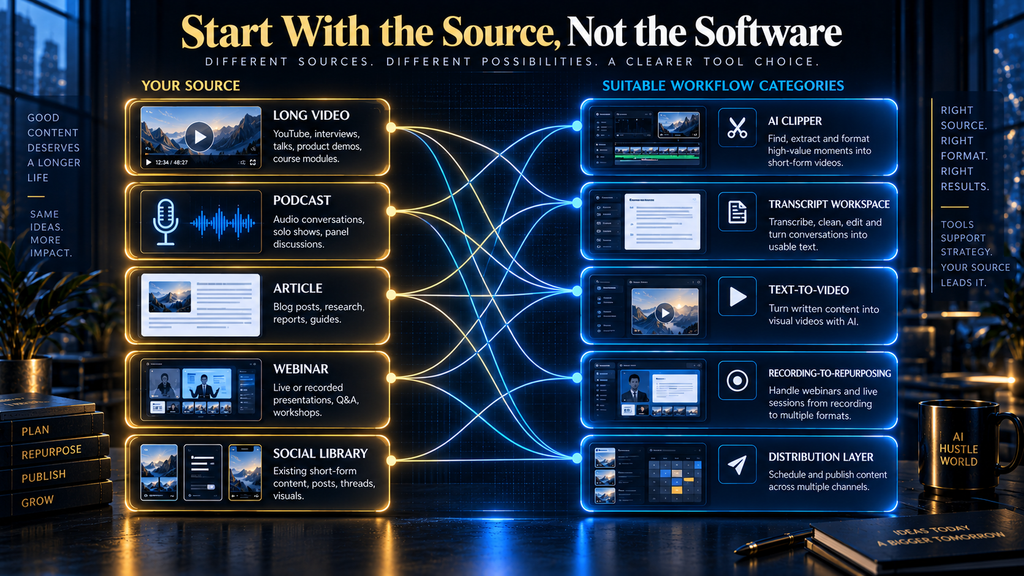
A long-form video workflow usually begins with candidate selection. OpusClip provides the most focused route, while Descript is stronger when the editor wants to inspect and reshape the underlying transcript.
Podcast repurposing is more varied because the desired outputs may include clips, quotations, show notes, newsletters and articles. Castmagic is the strongest written-derivative option, Riverside connects the work to recording, and Descript provides a deeper editing environment.
Text-based publishers should not buy a clipper simply because short-form video is popular. If the source is an article, the first question is whether the team wants to visualize the article, extract its ideas for written channels or use it as evidence for a new asset.
The broader lesson is simple: begin with the source and target output, then evaluate the tool. Beginning with the software encourages teams to manufacture whatever the product generates most easily, even when that output does not support the content strategy.
Which Tool Is Best for Each Workflow Stage?
A mature repurposing system can use different products at different stages. The cost of additional software must be balanced against the quality, control and time saved through specialization.
Best for finding clip candidates
OpusClip is the most focused choice, while Quso.ai offers candidate selection inside a broader social system. Riverside is a strong alternative when the source was recorded within Riverside and the team wants both automatic and transcript-selected clips.
No candidate-selection tool should be allowed to publish its choices without review. The editor should check where the segment begins, whether the claim needs prior context and whether the ending provides enough resolution.
Best for editing source media
Descript provides the strongest transcript-based editing model in this comparison. Riverside also offers text-based control, especially for media captured within its recording environment.
The choice depends on whether editing is the central production job or one stage inside recording and promotion. Descript is the clearer editing-first option; Riverside is the more integrated recording-first option.
Best for written derivatives
Castmagic is the strongest choice for converting recorded conversations into multiple written formats. Quso.ai also documents video-to-blog and social-writing functions, but its central advantage is broader workflow coverage rather than transcript-library depth.
Written drafts require claim-level review. Names, numbers, quotations, causal statements and recommendations should be compared with the source before publication.
Best for automated distribution
Repurpose.io is the clearest specialist because automated movement between source and destination platforms is the product’s main job. Quso.ai and Munch Studio include publishing within broader production systems.
Choose a distribution specialist when the assets are already approved but operational handling remains repetitive. Choose a broader platform when creation and publishing genuinely need to occur in the same environment.
Best for measuring the complete social workflow
Quso.ai and Munch Studio document analytics as part of their wider workflows. This can shorten the distance between publishing and deciding what to produce next.
However, platform analytics should not be confused with a complete business measurement system. Reach and engagement may help refine packaging, while leads, conversions, retention and revenue usually require data from other systems.
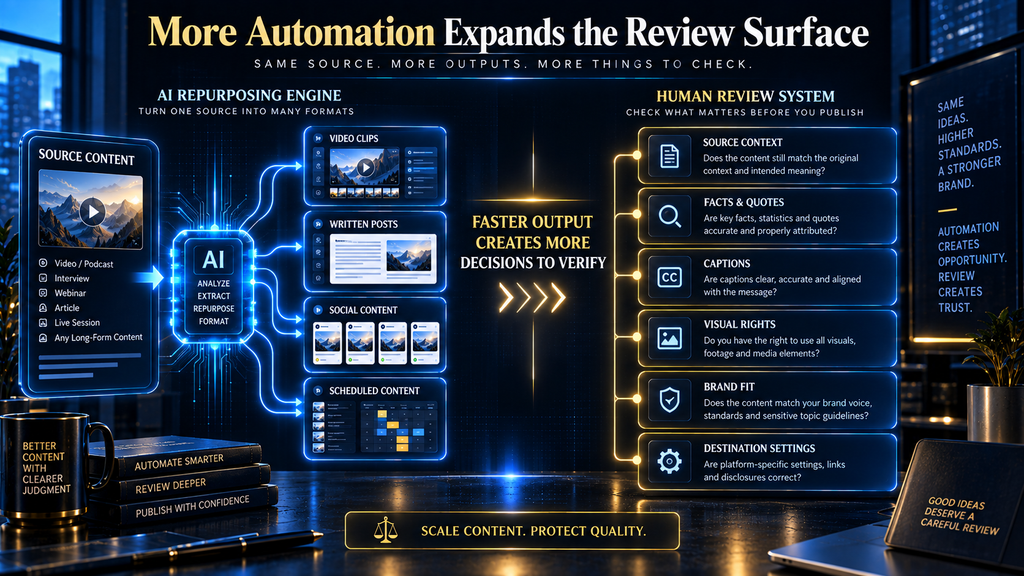
How Much Human Review Does Each Platform Require?
Every platform in this comparison requires human review, but the reason differs. A clip generator needs contextual review, a text generator needs factual review, and a distribution tool needs workflow and destination review.
| Platform | Main review responsibility | Expected review surface |
|---|---|---|
| OpusClip | Clip boundaries, context, captions and framing | Medium |
| Descript | Transcript corrections, edit decisions and final composition | Medium |
| Castmagic | Factual fidelity, quotation accuracy and format adaptation | High |
| Repurpose.io | Routing rules, crops, captions, rights and destination settings | Medium |
| Quso.ai | Clip selection, written outputs, scheduling and analytics interpretation | High |
| Riverside | Recording quality, transcript, clip context and layout | Medium |
| Pictory | Script fidelity, scene relevance, voice, visuals and pacing | High |
| Munch Studio | Brand interpretation, strategy, copy, visuals and approvals | High |
How we research and test: AI Hustle World uses AI-assisted research and drafting, checks material claims against current source documents and completes human editorial review before publication. No first-hand testing is claimed unless a dated testing artifact is retained.
A tool producing five different asset types may save more production time while creating more review work. That is still a favorable trade when the review process is faster than manual creation and the team knows exactly what must be checked.
The Hidden Costs Behind AI Repurposing Pricing
Subscription price is only one part of the cost. AI repurposing products use different units, which makes direct comparison difficult.
One platform may charge according to uploaded video minutes, while another uses transcription hours, general AI credits, exports, connected accounts or published assets. A third may bundle several functions but restrict advanced editing, storage or brand management to higher tiers.
Before choosing a plan, calculate four quantities:
- Monthly duration of source material
- Number of derivative assets required
- Number of people and brands involved
- Number of destination accounts and publishing workflows
A solo creator processing two monthly interviews should not evaluate plans using the same assumptions as an agency handling ten client brands. The agency’s main constraints may be account separation, approvals and destination limits rather than source-processing credits.
Retention deserves particular attention. If uploaded media or generated projects expire after a short period, the team needs an external storage and backup process.
Watermarks and export resolution can also change the usable value of a free plan. A free tier is suitable for understanding the interface, but it may not provide the brand control or output rights needed for production.
Finally, include migration cost. Moving years of source media, prompts, templates and approvals out of a central platform can become difficult, even when the files themselves can be exported.
Specialist Stack or All-in-One Platform?
An all-in-one platform reduces handoffs. Source material, derivative assets, scheduling and performance data can remain in one environment, which may simplify the work of a solo creator or small team.
The tradeoff is depth. A broad platform must divide product attention across several functions, and its built-in editor or scheduler may not match the controls available in a specialist product.
A specialist stack creates the opposite tradeoff. The team can choose a stronger product for each important stage, but files, context and approvals must move between systems.
A sensible specialist stack might use Descript for source editing, Castmagic for written derivatives and Repurpose.io for distribution. That combination offers distinct strengths but introduces three subscriptions and several handoffs.
A broader workflow might use Quso.ai for clips, social copy, scheduling and analytics. It reduces tool switching, but the team must confirm that each built-in function meets its standard before replacing the existing stack.
The correct choice depends on the costliest bottleneck. If editing consumes most of the time, buy a better editor. If approved assets sit unpublished because distribution is repetitive, buy automation rather than another generator.
How to Choose the Right AI Content Repurposing Platform
Start by mapping the current workflow without naming any software. Record where the source begins, who selects reusable material, who creates each output, who approves it and how it reaches the destination.
The slowest step is not always the most valuable automation target. A five-minute human accuracy check may prevent a serious error, while thirty minutes of repeated uploading may provide no editorial value and can be automated safely.
1. Define the source that produces most of your value
Identify whether the system will primarily process videos, podcasts, interviews, articles, webinars or existing social posts. Avoid buying around an occasional format if most of your useful material comes from somewhere else.
A video specialist is logical for a YouTube-led creator. It is a poor foundation for a research publisher whose source assets are mostly written documents and datasets.
2. Define the required outputs
List the assets that support an actual publishing plan. Do not count formats merely because a product can generate them.
A business may need two strong LinkedIn posts and one newsletter from each webinar, not twenty generic assets. The tool should be evaluated against that requirement.
3. Identify the current bottleneck
The bottleneck may be finding moments, editing media, drafting derivatives, obtaining approvals or publishing to several channels. Each problem points toward a different product category.
Buying a clip generator will not fix slow approval. Buying a scheduler will not fix weak source material.
4. Decide how much control the content requires
Low-risk entertainment clips can tolerate a different workflow from financial, medical, legal or technical explanations. Expert-led content requires stronger traceability because subtle wording changes can alter the claim.
Look for access to transcripts, editable boundaries, source references, approval states and exportable assets. These controls matter more than the number of formats generated from one click.
5. Normalize the pricing units
Translate credits, minutes, hours and exports into your expected monthly volume. Include team seats, brand workspaces, storage, retention and connected accounts.
A cheaper subscription can become more expensive if important work repeatedly exceeds its allowance or requires another product to complete the workflow.
6. Test one repeated workflow before migrating
Run the same real source through the shortlisted tools and evaluate the outputs against a fixed checklist. Save the source, settings, generated assets, review time and corrections so the decision is based on comparable evidence.
This is where your own testing should begin. The documentation-based comparison in this article narrows the shortlist, but only a controlled trial can determine which platform handles your content, accent, visual style and editorial standards most effectively.
Common Buying Mistakes
The first mistake is buying the platform with the longest feature list. Feature breadth matters only when the team will use those functions and they meet the required level of control.
The second mistake is treating “AI repurposing” as one job. Selecting an idea, rewriting it, editing media and publishing the result are separate activities with different failure modes.
The third mistake is comparing headline prices without comparing units. Credits, transcription hours and connected accounts cannot be treated as equivalent quantities.
The fourth mistake is automating publication before establishing review rules. Automation should follow a stable workflow; it should not be used to avoid defining one.
The fifth mistake is measuring asset count instead of useful outcomes. Ten weak clips do not necessarily create more value than two carefully selected assets that reach the right audience.
Final Thoughts
The best AI content repurposing platform is the one that removes the right bottleneck without removing necessary judgment. OpusClip is the clearest video-clipping specialist, Descript provides the strongest transcript-based editing environment, Castmagic is suited to written derivatives, and Repurpose.io addresses automated distribution.
Quso.ai offers the broadest documented combination of production, publishing and measurement, while Riverside is the strongest recording-to-repurposing option. Pictory provides a practical route from text and mixed inputs to video, and Munch Studio offers a broader managed social workflow for businesses willing to perform additional pricing and product due diligence.
Do not purchase solely from the final score. Use the coverage matrix to identify the relevant platforms, then run a controlled trial with the same source, output brief and review checklist.
Before You Buy a Tool, Build the Workflow It Needs to Serve
The strongest platform cannot fix an unclear source-to-output process. Use our practical content repurposing guide to map one valuable idea into useful assets before choosing your software.
Build Your Repurposing System →Frequently Asked Questions
What is the best AI content repurposing tool in 2026?
There is no universal winner because the products solve different workflow problems. Quso.ai has the broadest documented coverage in this comparison, while OpusClip, Descript, Castmagic and Repurpose.io are stronger fits for specific jobs.
What is the best AI tool for turning long videos into short clips?
OpusClip is the most focused long-video clipping option in this shortlist. Quso.ai is better when clipping must be combined with scheduling and analytics, while Descript is preferable when transcript-based editing control matters more.
What is the best AI repurposing tool for podcasts?
Castmagic is the strongest option for turning podcast recordings into written assets such as summaries, posts, newsletters and articles. Riverside is more suitable when recording and clipping should happen in the same system, while Descript is strong for detailed episode editing.
Can AI repurpose an article into a video?
Yes. Pictory documents text, article, URL, presentation and audio inputs for video creation, while other platforms offer narrower text-to-video functions. The resulting script, scenes, voice and visual interpretation should still be checked against the original article.
Which tool is best for automatically publishing content across platforms?
Repurpose.io is the most focused distribution-automation product in this comparison. It is designed around connected source and destination workflows, but it should be used after the team establishes clear production and approval rules.
Are all-in-one repurposing platforms better than specialist tools?
All-in-one platforms reduce handoffs and may lower the number of subscriptions, but they do not automatically provide the deepest function in every category. A specialist stack is better when editing, written transformation or distribution requires more control than the broad platform provides.
Can AI repurposing tools publish content without human review?
Some platforms can technically schedule or publish outputs automatically, but that does not make unreviewed publishing a sound editorial practice. Humans should verify context, factual claims, captions, visual framing, brand fit and destination settings before automation is allowed to distribute the asset.
How should I compare AI repurposing tool pricing?
Convert every plan into your expected monthly source minutes, transcription hours, exports, users, brands and destination accounts. You should also check annual billing requirements, watermarks, storage, retention and credit rules before comparing headline prices.
Do AI content repurposing tools improve content performance?
They can reduce production work and make consistent publishing easier, but feature availability does not prove improved reach, engagement or revenue. Performance depends on source quality, editorial selection, platform fit, audience relevance and the review process.
Should I use one tool or several tools for content repurposing?
Use one platform when its built-in functions adequately cover your important stages and reducing handoffs is the main priority. Use a specialist stack when source editing, derivative writing and distribution each require deeper controls than one platform can provide.
Sources and Further Reading
- How to specify a canonical URL: Google Search Central. How to consolidate duplicate or near-duplicate URLs.
- Get started creating YouTube Shorts: YouTube Help. How to create and upload Shorts.
Related Guides
- Best AI Tools for Creating Social Media Content (Free & Paid)
- How to Repurpose Content Across YouTube, Pinterest, and Instagram
- AI Video Clipping Tools: Cost Per Minute (2026)
Written by
Muntasir Ahmad Chowdhury
Founder, AI Hustle World
Muntasir Ahmad Chowdhury is the Founder of AI Hustle World, an independent publication dedicated to making Artificial Intelligence practical, trustworthy, and easy to understand. He researches AI tools, automation, customer service, productivity, and real-world business applications, helping readers make smarter technology decisions through research-driven, experience-backed content.
Expertise:
AI Tools • AI Automation • AI Customer Service • AI Productivity • Generative AI • AI Workflows
Get Smarter With AI
Enjoyed this guide? Get practical AI tools, tutorials, and honest reviews delivered to your inbox.
2 thoughts on “8 Best AI Content Repurposing Tools in 2026”