OpusClip vs Descript vs Captions: Which AI Repurposing Tool Is Best?
Editorial note: This comparison is based on official pricing pages, product documentation and independent review data reviewed on September 20, 2026. AI Hustle World did not conduct controlled hands-on tests of clip quality, editing accuracy or output performance for this article. Vendor claims about competitors are identified as such rather than treated as fact.
OpusClip, Descript and Captions show up next to each other constantly, in “best AI clipping tool” roundups, in creator forum threads, in the autocomplete suggestions under each other’s names. That proximity creates an assumption most readers never question: if three products keep appearing in the same comparison, they must be solving the same problem, and the only real decision left is which one does it better.
That assumption is what actually sends people looking for this comparison. Someone has watched a creator credit OpusClip for viral clip counts, seen Descript mentioned in the same breath as podcast editing, and noticed Captions ranking for the same “AI repurposing tool” searches, and now wants a single verdict before committing a monthly budget line to one of them.
The search behavior is consistent: people type all three names into one query because they expect one winner to fall out the other side.
This article exists because that expectation does not survive contact with what each product’s own documentation actually says it does. The three tools are priced similarly, marketed to overlapping audiences, and discussed interchangeably online, but a close read of each platform’s positioning shows two genuinely different product categories wearing a similar price tag.
Getting that distinction right, before scoring anything, is what makes the rest of this comparison useful instead of misleading.
Quick Answer
There is no single best answer, because these three tools are not built to do the same job. OpusClip is the strongest choice for extracting short clips from long-form video at scale, and Descript is the strongest choice when the source needs real editing, not just clipping.
Captions is the strongest choice only if the goal is broader AI video generation, including avatar-led content, with clip extraction as one feature among several rather than the main product.
A reader comparing these three by name has usually assumed they compete for the same budget line. They do compete on price. They do not compete on job.
What This Article Owns and What It Does Not
This article owns a direct, weighted verdict between exactly these three named tools, using the AI Hustle World Decision-Fit Score applied consistently across all three. It also owns a finding the vendor pages and existing third-party comparisons do not state clearly: these products split into two different categories of tool, and knowing which category a reader actually needs matters more than any single ranking number.
Most existing “best AI repurposing tool” roundups rank all three on one axis, usually price or a feature checklist, without stating that category split in plain terms. That gap is what this article closes, and it is why the category finding sits at the center of the piece rather than as a passing observation buried in a features table.
This article does not own first-hand hands-on testing of clip quality, editing accuracy or output performance for any of the three platforms. A rigorous controlled test across OpusClip, Descript and Captions would require paid access at comparable plan tiers, identical source footage, and one evaluation rubric applied the same way to all three, none of which has been done for this article.
Rather than imply testing that did not happen, every claim here is built from official documentation, disclosed-sample-size review data, and transparent reasoning about what that evidence does and does not support, with vendor claims about competitors explicitly labeled as vendor claims rather than treated as fact. It does not own a fresh review of OpusClip’s per-minute pricing math, which AI Hustle World already published in a dedicated cost comparison covering five clipping platforms. It also does not own the eight-tool landscape survey AI Hustle World already published covering the wider content-repurposing category, including deeper individual profiles of OpusClip and Descript.
This article is narrower by design. It answers the question a reader asks after they already have these three names on a shortlist and want to know which one to actually buy.
It also closes out a broader series on content repurposing that started with why repurposing turns one idea into many assets and worked through each practical output along the way: turning articles into social media content, repurposing research into LinkedIn posts, X threads and newsletters, and building a content atom workflow that ties every format back to one original piece of source material.
Same Job or Different Job? The Question This Comparison Actually Answers
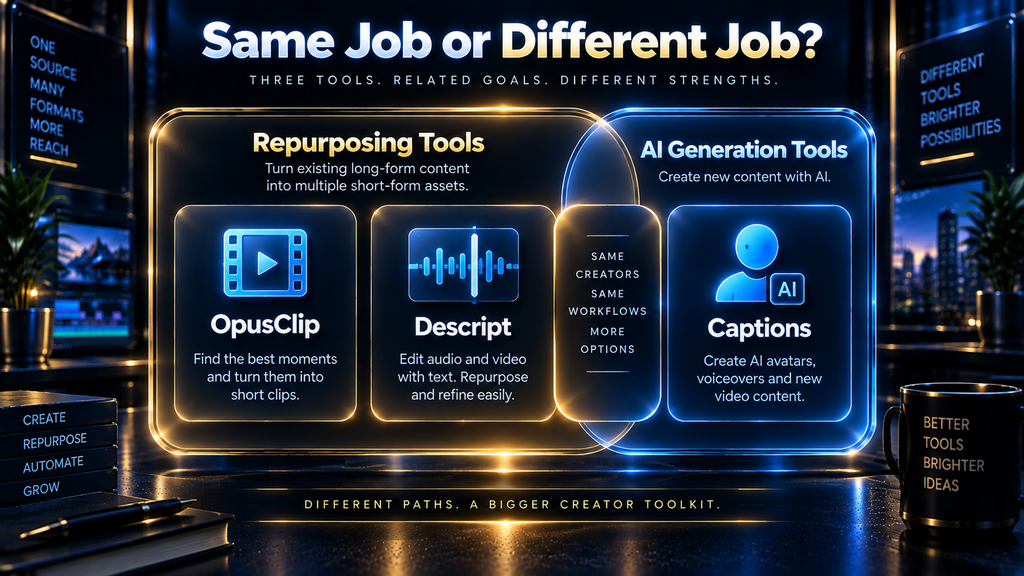
Before scoring anything, it is worth stating plainly what each platform’s own documentation says it is for. OpusClip’s official positioning is a clip-extraction and multi-platform distribution specialist: upload long video, receive short clips, publish them across social channels from the same dashboard.
Descript’s official positioning is broader. Its own site describes a five-stage workflow: record, edit, refine, share, multiply, with clip creation appearing only in the final “multiply” stage after recording and editing are already handled inside the same product.
Captions is different again. Its pricing page and homepage foreground AI-generated video: digital twins, custom AI actors, fully AI-produced videos from a text prompt. A “Clips” feature exists and is documented, but it sits inside a product built primarily around generating new video content, not repurposing existing long-form footage.
That distinction changes what “best” means. A reader who needs to turn four hours of podcast footage into fifteen clips a week is not shopping in the same category as a reader who wants an AI avatar to deliver scripted video without a camera at all, even though both readers might type the same three tool names into a search bar.
This article scores all three against the same framework because the comparison is worth having. It does not pretend the three products are interchangeable once the scoring is done.
Why the Category Gap Isn’t Obvious From the Outside
The category difference above is easy to state once someone has read all three products’ documentation side by side, but that is precisely the reading most buyers skip. Vendor homepages are not built to clarify category boundaries; they are built to claim the widest possible territory.
“AI-powered content repurposing” is broad enough that OpusClip, Descript and Captions can all use nearly identical language to describe different underlying products.
The gap becomes visible in one specific place: what each platform treats as its primary export. OpusClip’s core export is a batch of short vertical clips pulled from footage that already exists. Descript’s core export is an edited long-form piece, with short clips as a downstream byproduct of an editing session that already happened.
Captions’ core export is a video that did not exist before the platform generated it, using a script, a digital twin or an AI actor rather than footage a person recorded. Three different starting points, three different outputs, one shared marketing vocabulary.
That shared vocabulary is also why review sites and “best of” roundups tend to flatten the distinction further. A listicle optimized for a broad keyword like “AI repurposing tools” has an incentive to include all three under one heading, because doing so captures more search intent than splitting them into separate categories would.
The result is that by the time a reader reaches a comparison like this one, they have usually already been primed by several other sources to treat the three as direct substitutes, which is exactly the assumption this article’s category-mismatch analysis exists to correct.
The AI Hustle World Decision-Fit Score, Applied to This Comparison
The AI Hustle World Decision-Fit Score is the site’s reusable, weighted framework for evaluating how convincingly a platform’s documented capabilities fit its intended job. It was introduced in AI Hustle World’s broader content-repurposing comparison and is applied here with the same weights and formula, extended to a direct three-way scoring.
Each dimension is rated from zero to five, where five indicates extensive, unambiguous public documentation and zero indicates that sufficient evidence was not found for that dimension.
| Dimension | Weight | What It Measures |
|---|---|---|
| Core-job fit | 30% | How completely the product addresses its own stated principal use case |
| Workflow coverage | 20% | How many relevant repurposing stages it handles without leaving the platform |
| Human control | 15% | Editing, approval, correction and brand-control options |
| Integration and portability | 15% | Imports, exports, connected channels, movement between systems |
| Pricing predictability | 10% | Whether costs, credits, limits and plan boundaries are understandable |
| Evidence transparency | 10% | How clearly official documentation supports product claims |
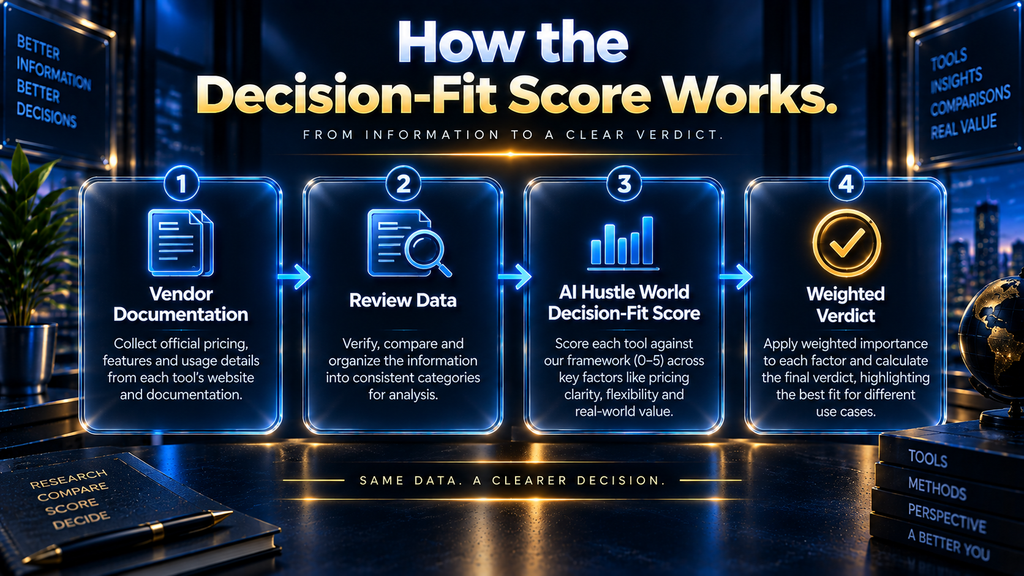
The formula is: Decision-Fit Score = sum of each dimension’s rating ÷ 5 × its assigned weight, summed across all six dimensions, expressed out of 100.
| Platform | Core-job fit | Coverage | Human control | Portability | Pricing clarity | Evidence | Total |
|---|---|---|---|---|---|---|---|
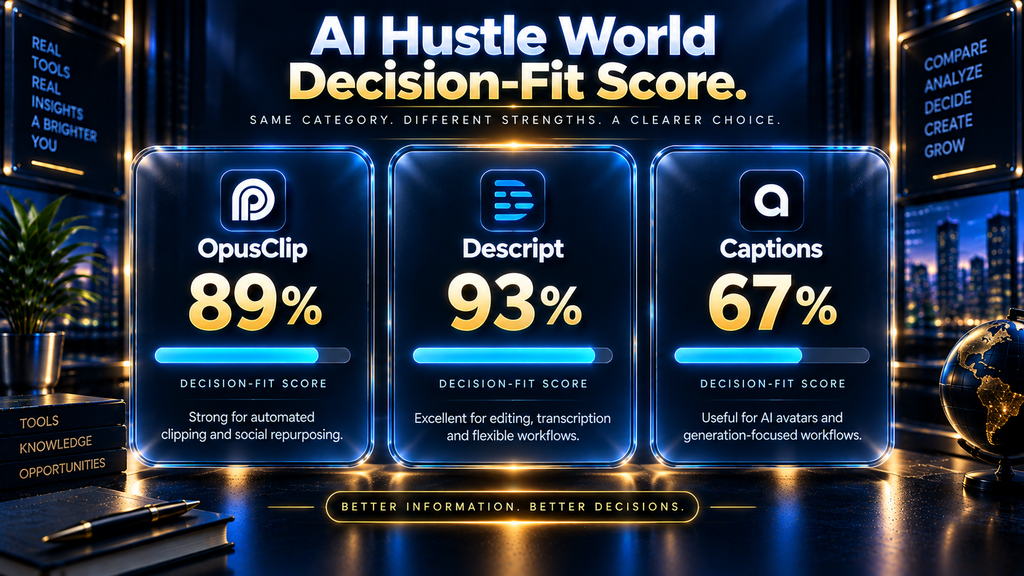
| OpusClip | 30 | 16 | 12 | 15 | 8 | 8 | 89 |
| Descript | 27 | 20 | 15 | 12 | 9 | 10 | 93 |
| Captions | 21 | 12 | 9 | 9 | 8 | 8 | 67 |
Descript scores highest overall because its documentation covers the most repurposing stages inside one product and gives the clearest evidence of how each stage works. OpusClip scores close behind because its core-job fit is close to perfect for its one stated job, even though it covers fewer stages than Descript.
Captions scores lowest in this specific comparison, not because it is a weak product, but because its documented strength lies in AI video generation rather than the repurposing job this comparison is scoring. A different comparison, one scoring AI avatar and generated-video platforms, would likely produce a very different result for Captions.
Independent Rating Comparison, With an Honest Caveat
Public review platforms provide one more data point, though the sample sizes here are not equally reliable. G2 lists Descript at 4.6 out of 5 stars across 923 reviews and OpusClip at 4.6 out of 5 stars across 119 reviews, giving both a reasonably large sample to draw on.
Captions shows 4.5 out of 5 stars on G2, but from a single review at the time of this research. A one-review average carries essentially no statistical weight and should not be read as comparable to Descript’s or OpusClip’s much larger samples.
This article reports that gap honestly rather than presenting three star ratings side by side as though they meant the same thing. A single data point dressed up as a rating comparison would be a worse outcome for the reader than stating plainly that Captions currently lacks enough independent review volume to compare on this measure.
How We Researched This Comparison
Every pricing figure and feature claim in this article comes from three sources reviewed directly on September 20, 2026: OpusClip’s official pricing page, Descript’s official pricing page, and Captions’ official pricing page. No third-party pricing summary or affiliate roundup was used as a source for any figure quoted here.
Independent review data comes directly from G2’s Descript vs OpusClip comparison page, plus a separate check of Captions’ own G2 listing, cited with sample sizes rather than bare star ratings. That choice matters here specifically because Captions’ single-review sample would otherwise mislead a reader comparing it against Descript’s and OpusClip’s much larger review counts.
Descript’s own comparison page against OpusClip states a specific processing-hours difference between the two platforms. That page is an interested party comparing itself favorably to a competitor, so its specific numeric claim is not repeated here as independent fact.
Only the two vendors’ own separately published pricing and feature pages are used as the basis for this article’s figures.
No claim in this article about clip quality, editing accuracy or output performance is based on first-hand testing, because AI Hustle World did not conduct controlled testing for this comparison. A meaningful first-hand test would require paid access to all three platforms at comparable plan tiers, the same source footage run through each one, and a single evaluation rubric applied consistently across all three.
That investment has not been made for this article. Where a first-hand test could add genuinely new evidence in a future update, the priority would be clip-selection accuracy on identical podcast footage, since that is the single claim readers ask about most and the one vendor marketing pages are least specific about.
Until that testing exists, this article’s value comes from a transparent synthesis of each platform’s own documentation, review data with disclosed sample sizes instead of bare star ratings, and the category-mismatch finding itself, rather than from hands-on experience this article does not claim.
What this methodology cannot verify: feature lists and pricing on all three platforms can change without notice, and promotional pricing can vary by region or account history. Readers should confirm current terms directly on each platform before subscribing.
OpusClip
Overview
OpusClip is built specifically around one job: turning long-form video into short, platform-ready clips. Its documentation describes an AI model called ClipAnything that identifies candidate moments across genres including podcasts, interviews, vlogs and sports footage, then applies captions, reframing and optional B-roll automatically.
The free plan includes 60 credits per month with a watermark and clips that expire after three days. The Starter plan, at $15 per month, removes the watermark and adds auto-posting to YouTube Shorts, TikTok and Instagram Reels directly from the dashboard.
The Pro plan runs $29 per month billed monthly, or roughly $14.50 per month on an annual plan billed at $174 per year. It adds a two-seat team workspace, AI B-roll generation, multiple aspect ratios and export to professional editors like Adobe Premiere and DaVinci Resolve.
Who OpusClip Is Best For
OpusClip is the strongest choice for a creator or team whose primary bottleneck is finding and formatting clips from a steady supply of long-form video. Podcasters, interview shows and recorded events with consistent output volume get the most value from a tool built around exactly that workflow.
It is also the more direct choice for teams that want auto-publishing to social platforms built into the same subscription, rather than exporting clips and scheduling them somewhere else.
Who Should Choose Something Else
Choose Descript instead if the source recording itself needs real editing work before clips are worth making. Choose Captions instead if the actual goal is generating new AI-avatar video rather than repurposing existing long-form footage.
Pricing Perspective
OpusClip’s credit system converts cleanly to source minutes at a disclosed rate, which AI Hustle World has verified and detailed in a separate cost-per-minute comparison covering five clipping platforms. That existing analysis remains the more precise resource for anyone comparing OpusClip’s cost against other pure clipping tools.
Verdict on OpusClip
OpusClip is the clearest specialist choice in this three-way comparison for a workflow that is genuinely just extraction and formatting. Its narrower workflow coverage compared to Descript is the tradeoff for doing its one job with the most direct, purpose-built tooling of the three.
Descript
Overview
Descript positions itself around a full five-stage workflow: record, edit, refine, share and multiply. Clip creation is the final stage of that sequence, built on top of the same transcript-based editing system used for the entire recording, the same transcript-first approach AI Hustle World covered in how to turn video transcripts into articles, clips and social posts.
Its Underlord AI assistant handles filler-word removal, background noise cleanup, eye-contact correction and can generate B-roll to fill gaps in footage. The free plan includes 60 minutes of media per month and 100 one-time AI credits, enough to test the workflow without a subscription.
Paid tiers start at Hobbyist, $16 per month billed monthly or roughly $24 per month on the annual plan, through Creator at $24 monthly or roughly $35 annual, up to Business at $50 monthly or roughly $65 annual. Each tier raises the monthly media-hour allowance, AI credit allowance and team seat count.
Who Descript Is Best For
Descript is the stronger choice when the source recording needs real editorial work: removing filler words, correcting a rough take, cleaning audio, or restructuring a conversation before any clip gets made. Podcast producers and teams handling expert or regulated content benefit most from editing by transcript rather than trusting an automated clip suggestion outright.
It is also the better fit for a team that wants recording, editing and clip creation inside one continuous workflow rather than separate tools for each stage.
Who Should Choose Something Else
Choose OpusClip instead if the source footage already exists in finished form and the only remaining job is finding and formatting clips quickly. Choose Captions instead if the goal is generating new video from a script or an AI avatar rather than editing existing recordings.
Pricing Perspective
Descript’s media-hours-per-month model is a different unit from OpusClip’s credits-per-minute system, so the two cannot be compared on sticker price alone. A team should calculate their actual monthly recording volume against Descript’s tier limits rather than comparing the headline monthly cost directly against OpusClip’s.
Verdict on Descript
Descript earns the highest Decision-Fit Score in this three-way comparison because its documented workflow coverage and evidence transparency are the strongest of the three. It is the right choice when editorial control over the source material matters as much as the speed of producing clips from it.
Captions
Overview
Captions positions itself primarily as an AI video generation platform rather than a repurposing tool. Its homepage and pricing page foreground AI Creator, AI Ads, AI Skits and digital-twin avatar features that produce new video content from a script or prompt, with no source recording required at all.
A “Clips” feature is documented and does extract shorter segments from longer source video, which is why this comparison includes Captions at all. But it sits inside a product whose primary marketed capability is generation, not extraction.
The Max plan costs $24.99 per month for 500 credits and includes the AI Edit styles library, digital twins and batch clip creation. Scale tiers rise from $69.99 per month for 1,400 credits up to $279.99 per month for 5,600 credits, aimed at higher-volume production needs.
Who Captions Is Best For
Captions is the better choice for a creator or business that wants to produce video content without recording original footage at all, using AI avatars or generated visuals built from a script. Its clip-extraction feature is a genuine bonus for that same buyer if they also have existing long-form source material to repurpose occasionally.
Who Should Choose Something Else
Choose OpusClip or Descript instead if clip extraction from existing long-form video is the actual core need, not an occasional secondary feature. A buyer choosing Captions specifically to replace a dedicated clipping tool is very likely paying for AI-generation capability they will not use.
Pricing Perspective
Captions’ credit system spans both its generation features and its clip feature within the same allowance, so a buyer who plans to use both will consume credits faster than one using only clip extraction. The documentation does not separate how many credits a clip-only workflow consumes versus an AI-generation workflow, which this comparison could not resolve from public information.
Verdict on Captions
Captions is not the strongest choice in this comparison for pure repurposing work, and its Decision-Fit Score reflects that honestly. It remains a reasonable choice only for a buyer whose actual priority is AI-generated video content, with clip extraction as a secondary convenience rather than the reason to subscribe.
Cross-Cutting Comparison: Best by Reader Situation
| Reader Situation | Strongest Choice | Why |
|---|---|---|
| Steady volume of long-form video, need fast clips | OpusClip | Purpose-built extraction, auto-publishing included |
| Source footage needs real editing before clipping | Descript | Transcript-based editing plus clip creation in one workflow |
| Want AI-generated or avatar-led video, clips secondary | Captions | Only platform built around generation first |
| Small team wanting the most documented workflow coverage | Descript | Highest Decision-Fit Score, most stages covered |
| Solo creator on a tight budget testing the category | OpusClip free tier or Descript free tier | Both offer genuine free access; Captions’ free tier excludes AI credits entirely |
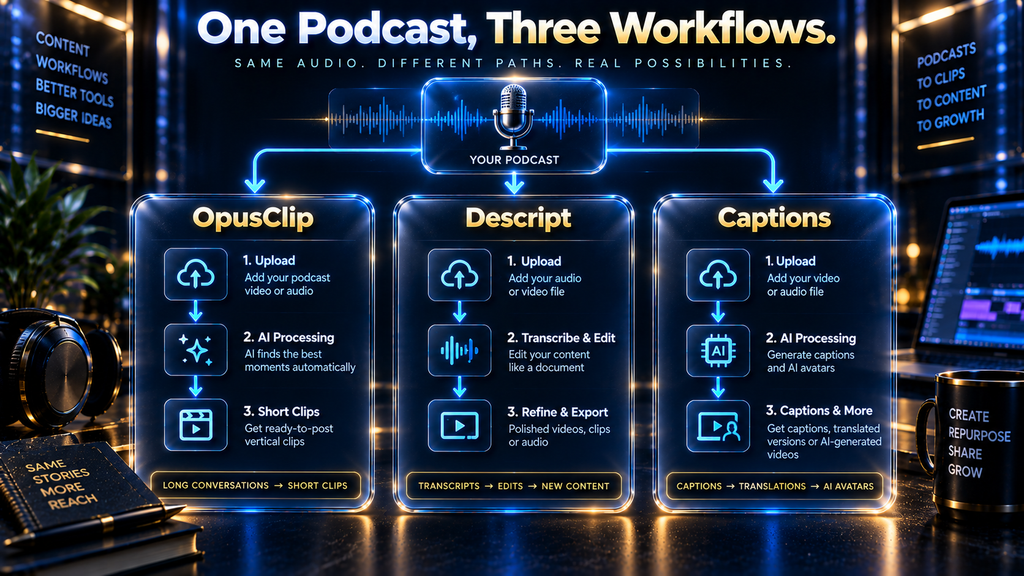
A Worked Example: The Same Weekly Podcast, Three Different Workflows
A weekly one-hour interview podcast is a useful test case because all three tools claim to handle it, and it’s the same scenario AI Hustle World walked through in repurposing podcasts into short-form content. On OpusClip, the host uploads the finished recording, receives AI-suggested clips within minutes, and can auto-post the approved ones directly to TikTok and Instagram Reels from the same dashboard.
On Descript, the host would more likely record inside the platform itself, remove filler words and dead air through the transcript, then use the Create Clips feature once the edited episode is finished. The output takes longer to reach clips, but the underlying episode is also cleaner before anything gets published anywhere.
On Captions, the same podcast recording could be uploaded to the Clips feature, but the host gains none of Captions’ core strengths in the process. They would be paying for AI-avatar and generation capability tied to the same credit pool while using only the one feature that overlaps with the other two tools.
That comparison makes the category difference concrete. Two of the three tools are built around this exact workflow; the third can technically do it but was not designed around it, and the subscription cost reflects capability the podcast workflow never touches.
How Much Human Review Each Platform Still Requires
None of these three platforms removes the need for human review, but the reason differs by product. OpusClip’s suggested clips need context review, since an automated system can select a strong opening line while cutting the explanation that makes it accurate.
Descript’s transcript-based edits need the same kind of review a human editor would apply to any cut, since the AI assistant is executing instructions rather than making independent editorial judgment. Captions’ AI-generated video needs the most review of the three, because generated visuals and AI-avatar delivery can misrepresent a script’s tone or claims in ways a straightforward clip cannot.
Common Mistakes When Comparing These Three Tools
The most common mistake is treating this as a single ranking question when it is actually two different questions depending on what the reader needs. A reader who needs pure clip extraction and picks based on Captions’ AI-generation strength will end up with tools they never use.
A second mistake is comparing sticker prices without normalizing the unit each platform actually charges by. OpusClip prices by credits tied to source minutes, Descript prices by media hours per month, and Captions prices by a shared credit pool covering both generation and clipping, so a direct dollar-to-dollar comparison misleads without that context.
A third mistake is treating Captions’ single G2 review as a meaningful rating data point next to Descript’s and OpusClip’s much larger samples. A comparison that presents all three star ratings side by side without that caveat is technically accurate and practically misleading.
A Decision Framework Before You Choose
Start by naming your actual source material honestly. If it is already-recorded long-form video that mainly needs clipping, OpusClip or Descript are the real contenders; Captions is not built around that job as its primary function.
Next, decide whether the source recording needs real editing beyond clip selection. If filler words, audio quality or structural cuts matter, that points toward Descript’s transcript-based workflow over OpusClip’s more automated extraction.
Then check whether auto-publishing to social platforms from the same dashboard matters to your workflow. OpusClip includes this from its Starter tier; Descript’s distribution features are less central to its core positioning.
Finally, confirm whether AI-generated or avatar-led video is a real production need, not just an interesting feature. Only if that answer is yes does Captions’ broader platform, and its higher price at volume, become the more defensible choice over a dedicated clipping or editing tool.
What Happens If You Don’t Decide, and Just Pick the One You’ve Heard of Most
Skipping this comparison rarely means skipping a purchase entirely; it usually means defaulting to whichever tool the reader saw most recently in a social feed or a friend’s recommendation. That default has a real cost even when the subscription itself is affordable.
A team that picks OpusClip when the real bottleneck was messy source audio ends up automating the wrong step, publishing faster clips of a recording that still needed editing. A team that picks Descript when the real need was high-volume automated clipping ends up spending human time on manual clip selection a specialist tool would have handled automatically.
A team that picks Captions specifically to replace a dedicated clipping tool ends up paying for AI-generation capacity it never uses, while the actual clipping workflow gets a secondary feature instead of a purpose-built one. None of these are catastrophic mistakes, but all three are avoidable ones, and the subscription cost of guessing wrong compounds monthly until someone notices the mismatch.
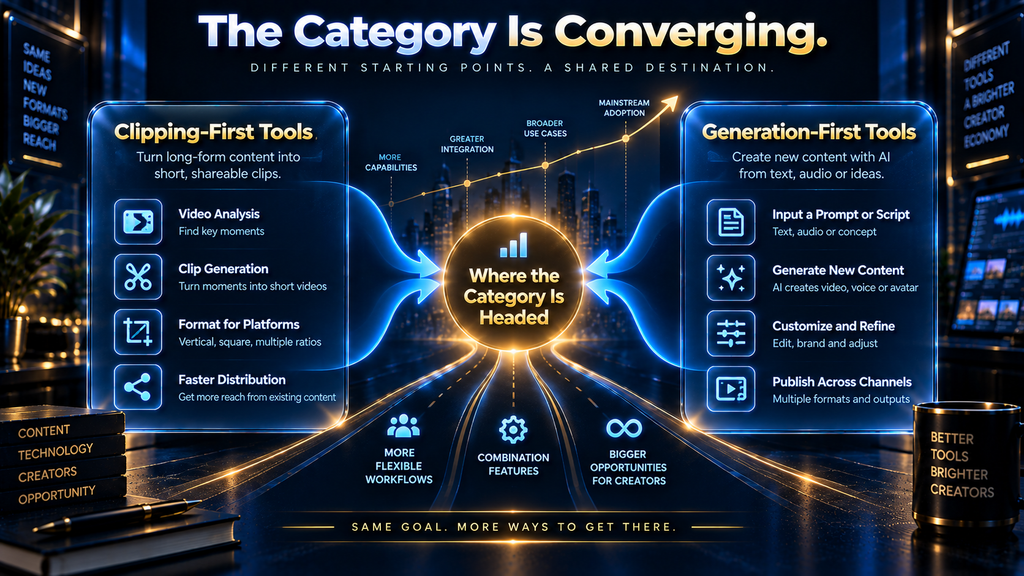
Where This Category Is Headed Next
The clearest signal in this comparison is that the boundary between “clipping tool” and “video generation platform” is already blurring, not holding steady. Captions building a Clips feature into a generation-first product, and OpusClip adding AI B-roll generation into a clipping-first product, are both moves toward the same middle ground from opposite directions.
That convergence has a second-order effect worth watching: as more platforms add adjacent features, pricing comparisons like this one get harder to do honestly, because credit pools increasingly span capabilities a given buyer may never use. A reader evaluating any of these tools eighteen months from now should expect to ask not just “what does this cost” but “what fraction of what I’m paying for will I actually use.”
That second question barely applied to single-purpose tools a year earlier, when a credit was a credit and a feature list was short enough to scan in full.
Descript’s lead in this comparison’s workflow-coverage dimension is also a preview of where competitive pressure is likely headed. A platform that only does one job well remains defensible only as long as buyers value depth over breadth for that specific job, and that tradeoff shifts a little further toward breadth every time a specialist adds one more adjacent feature to stay competitive on paper.
Measuring Whether You Picked the Right One
The Decision-Fit Score and this comparison can narrow the choice, but only actual use over a billing cycle confirms it was the right one. Track how many of the platform’s credits or media hours are actually consumed against the plan’s monthly allowance, since a tool bought for its breadth is wasted spend if only one feature ever gets used.
Track how much manual clean-up or re-editing happens after the platform’s automated output, since that number reveals whether the tool matched the real bottleneck or just moved it. A team still manually fixing clip selections every week bought a tool that didn’t solve the actual problem, regardless of its Decision-Fit Score.
Track whether the subscription is replacing a real cost, such as freelance editing time, or simply adding a new line item alongside work that still happens manually anyway. A platform only pays for itself when it removes a cost that existed before it, not when it becomes one more tool in a stack that still needs the same human hours.
Final Thoughts
The honest answer to “which is best” is that the question itself assumes a single job these three tools were not all built to do. OpusClip wins the comparison for pure clip extraction, Descript wins it for workflows where source editing matters as much as output speed, and Captions only wins it for a buyer whose real priority is AI-generated video with clipping as a secondary convenience.
Choosing based on the Decision-Fit Score alone would point most readers toward Descript, since it covers the most documented ground with the clearest evidence. But a reader whose only bottleneck is turning finished long-form video into fast, formatted clips will likely find OpusClip’s narrower tool more directly useful than Descript’s broader one.
The right move before subscribing to any of the three is the same regardless of which tool wins: confirm the actual source material, the actual bottleneck, and the actual output goal, then match the tool to that answer rather than to a single ranking number.
Picked Your Tool — Now What Do You Actually Repurpose First?
Choosing between OpusClip, Descript and Captions only solves half the problem. See AI Hustle World’s full content-repurposing framework for turning one piece of source material into a week of formats.
See the Repurposing Framework →Frequently Asked Questions
Is OpusClip, Descript or Captions the best overall AI repurposing tool?
There is no single best answer because the three tools are not built for the same primary job. OpusClip is strongest for pure clip extraction, Descript is strongest when source editing matters, and Captions is strongest only when AI-generated video is the actual goal.
Which of the three is cheapest?
OpusClip’s Starter plan at $15 per month is the lowest entry-level paid price among the three. Descript’s Hobbyist plan starts at $16 monthly, and Captions’ Max plan at $24.99 monthly is the highest entry price, though all three offer functional free tiers.
Can Captions actually replace a dedicated clipping tool like OpusClip?
Captions does have a documented clip-extraction feature, so it is technically capable of the same basic job. But its Decision-Fit Score in this comparison is meaningfully lower for that specific use case because clipping is a secondary feature inside a platform built primarily for AI video generation.
Does Descript’s higher Decision-Fit Score mean it is better than OpusClip for everyone?
No. The score reflects broader documented workflow coverage, not superior performance at any single stage. A buyer who only needs fast, automated clip extraction from finished footage may still get more direct value from OpusClip’s narrower, purpose-built tool.
Why does this comparison include Captions if it scores lowest?
Because readers are actively searching this exact three-way comparison, which means Captions is a genuine part of many buyers’ shortlists. Explaining why it scores differently, rather than omitting it, is more useful than pretending the comparison only has two real contenders.
How reliable are the G2 star ratings used in this comparison?
Descript’s and OpusClip’s ratings draw on hundreds of reviews each and are reasonably reliable as a directional signal. Captions’ rating comes from a single review at the time of this research and should not be treated as statistically meaningful.
Do all three tools offer a free plan?
Yes, but the free tiers differ significantly. OpusClip and Descript both include meaningful free access to their core repurposing features, while Captions’ free plan excludes AI usage credits entirely, limiting it to basic manual editing tools.
Which tool is better for a podcast-heavy workflow?
Descript and OpusClip are both strong options depending on whether editing or extraction is the bigger bottleneck. Captions is a weaker fit for a podcast-first workflow unless the team also wants AI-generated video content alongside the podcast clips.
Is it worth paying for more than one of these tools at once?
For some workflows, yes. A team that needs both deep source editing and high-volume automated clipping might reasonably use Descript for editing and OpusClip for clip volume, accepting the cost of two subscriptions over compromising on either job.
How often should I re-check this comparison before deciding?
Pricing and features across all three platforms can change without notice, so confirm current plan details directly on each vendor’s pricing page before subscribing. This comparison reflects a September 20, 2026 snapshot.
Written by
Muntasir Ahmad Chowdhury
Founder, AI Hustle World
Muntasir Ahmad Chowdhury is the Founder of AI Hustle World, an independent publication dedicated to making Artificial Intelligence practical, trustworthy, and easy to understand. He researches AI tools, automation, customer service, productivity, and real-world business applications, helping readers make smarter technology decisions through research-driven, experience-backed content.
Expertise:
AI Tools • AI Automation • AI Customer Service • AI Productivity • Generative AI • AI Workflows
Get Smarter With AI
Enjoyed this guide? Get practical AI tools, tutorials, and honest reviews delivered to your inbox.
4 thoughts on “OpusClip vs Descript vs Captions: Which AI Repurposing Tool Is Best?”