Evidence: Documentation reviewed
Last checked: August 2026
What was done: Written from official documentation and the published sources linked in this article. Not hands-on tested.
Files: None
Affiliate links: No
Common AI Website Builder Mistakes: 18 Errors to Avoid
Last Update: August 2026
AI website builders have changed the economics of website creation. You can describe a business, choose a visual direction, provide a few requirements, and get a functioning website without starting from a blank code editor.
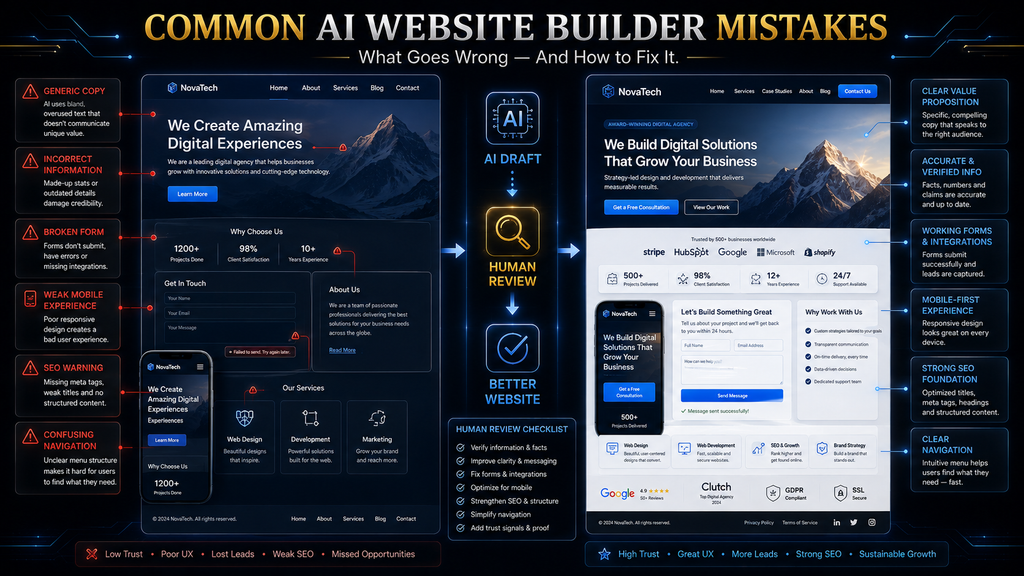
That speed is genuinely useful. The problem begins when speed gets confused with completion. An AI website builder can create a polished first version while still getting important things wrong: the positioning may be generic, the content may contain invented details, the mobile layout may be awkward, a form may not work, the SEO setup may be incomplete, or the site may look impressive without helping visitors accomplish anything.
That is why the most important skill when using an AI website builder is not simply knowing how to generate a website. It is knowing how to evaluate what the AI generated.
This guide explains the most important AI website builder mistakes, why they happen, what they can cost you, and how to build a practical review process that catches problems before they reach your visitors.
Quick Answer: What Are the Most Common AI Website Builder Mistakes?
The most common mistakes are treating the first AI draft as finished, giving the builder weak or incomplete instructions, allowing AI to invent business information, publishing generic content, prioritizing visual appearance over usability, assuming mobile SEO and accessibility are automatic, adding unnecessary features, failing to test forms and integrations, ignoring performance and security, and treating launch as the end of the process. The deeper problem behind most of these mistakes is automation without sufficient judgment.
AI is very good at producing plausible output from incomplete instructions. It is much less reliable at deciding whether that output is strategically correct for your specific business.
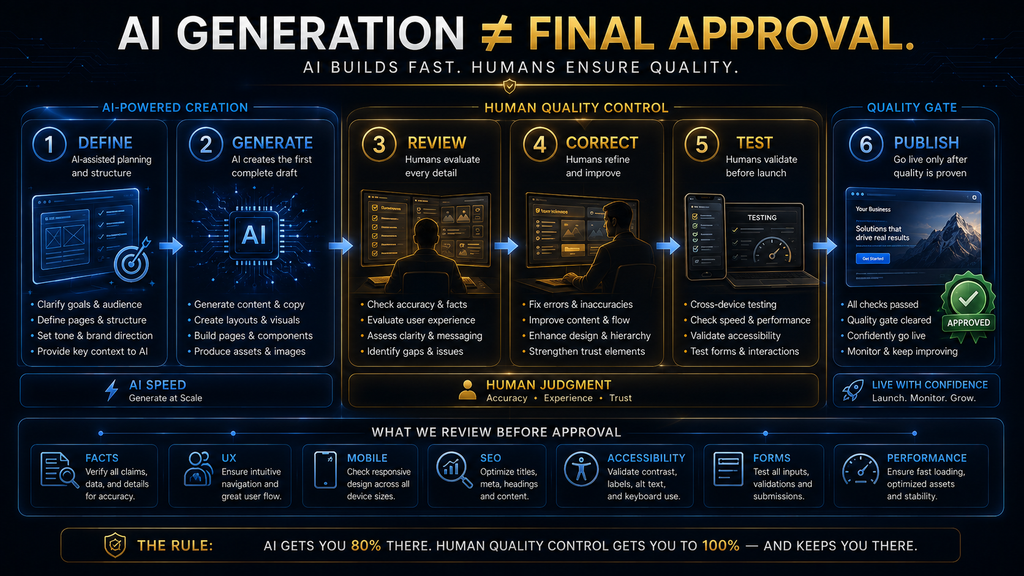
A useful way to think about the entire problem is: AI generation → human evaluation → correction → technical testing → publishing → measurement → iteration. Skip the evaluation stages, and you can end up with a website that looks finished before it is actually ready.
Why AI Website Builder Mistakes Happen
AI website builders do not fail only because the underlying AI is imperfect. Many failures happen because the user gives the system a task that is underspecified, then assumes the resulting output represents a complete solution.
That distinction matters. Suppose a restaurant owner asks an AI builder:
“Create a modern website for my restaurant.”
The AI has to make assumptions about almost everything: the target customer, cuisine, location, menu structure, brand personality, booking process, photography, calls to action, and page hierarchy. The resulting website may look perfectly reasonable because it follows common patterns for restaurant websites. But “reasonable” is not the same as “correct.”
A better brief might specify the restaurant’s location, cuisine, audience, signature dishes, opening hours, booking method, brand style, menu structure, delivery options, and primary business objective. The AI then has a much better specification to work from.
Current AI website workflows increasingly reflect this principle. Framer’s documentation, for example, recommends giving agents clear information about content, layout, structure, item counts, styling, and functionality, and says more context generally produces more accurate results. It also recommends reviewing the generated content, images, layout, links, and responsive behavior before publishing.
So the first principle is simple:
AI can automate execution, but it cannot automatically know what your business should mean.
The AI Website Quality Stack
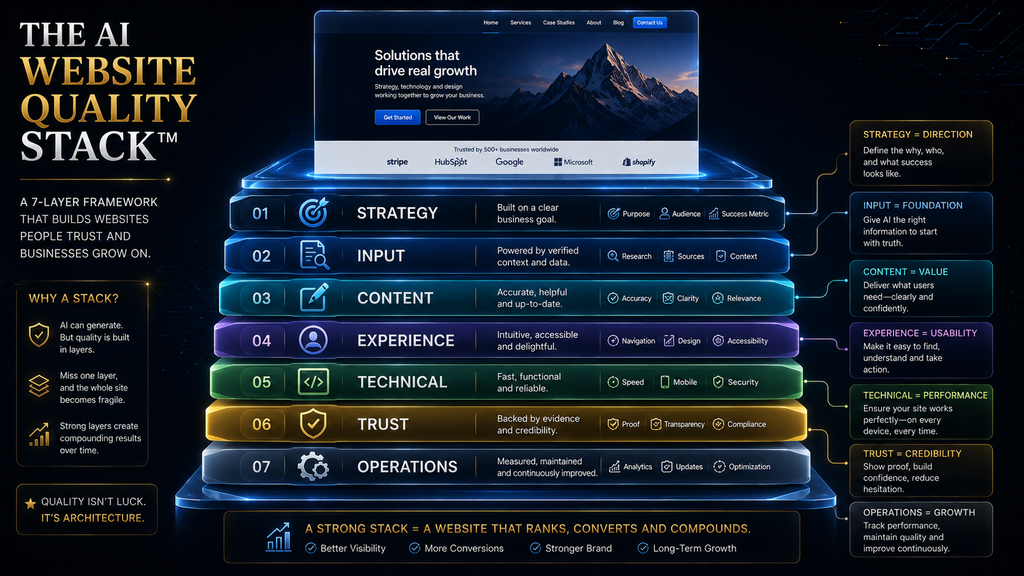
A useful way to audit an AI-generated website is to stop thinking about mistakes as an arbitrary list and instead evaluate seven layers of quality: Strategy → Input → Content → Experience → Technical → Trust → Operations. Each layer answers a different question.
- Strategy: Is this the right website for the business objective?
- Input: Did the AI receive enough accurate information?
- Content: Is the information useful, specific, original, and factual?
- Experience: Can visitors understand and use the website easily?
- Technical: Does everything work across devices and systems?
- Trust: Does the website give visitors credible reasons to believe the business?
- Operations: Is somebody monitoring, measuring, updating, and maintaining the site?
A website can succeed at six layers and still fail badly at the seventh. For example, a beautiful website with a broken booking form has an operational and technical failure that directly affects revenue. A technically perfect website filled with invented business claims has a trust failure.
A fast, attractive website with no clear value proposition has a strategy failure. This is why simply asking whether an AI website “looks good” is an inadequate quality test.
Mistake 1: Treating the First AI Draft as the Finished Website
The first AI-generated website should be treated as a draft, not a final product.
This is probably the most important mistake because it creates many of the others. Once someone believes the first version is finished, they stop checking the content, structure, mobile behavior, links, forms, SEO settings, and brand details that still need attention.
AI builders are increasingly designed around iterative workflows rather than one-time generation. Framer’s current agent workflow lets users generate a site, continue refining it through prompts, edit it manually on the canvas, and even use branches to review larger changes before applying them to the main project.
That tells you something important about the intended workflow. Generation is the beginning of the process, not the end.
Imagine a freelancer creates a portfolio website with AI. The generated version includes a hero section, services, portfolio cards, testimonials, and a contact form.
At first glance, everything looks complete. But then the freelancer notices that:
- two portfolio descriptions are generic;
- the testimonial section contains placeholder language;
- the contact form sends to the wrong address;
- the mobile navigation is awkward;
- the primary CTA competes with three secondary buttons;
- the About page doesn’t explain the freelancer’s actual experience.
None of those problems necessarily make the website look broken. That is precisely why they are dangerous.
The better workflow
After generation, perform a deliberate review pass. Ask:
- Is the business information correct?
- Does the site communicate the right value proposition?
- Does each page have a clear purpose?
- Are the important actions obvious?
- Does the mobile version work?
- Are all forms and links functional?
- Are images and claims authentic?
- Is the SEO configuration complete?
- Is the website accessible enough for its intended audience?
- Does the final version actually represent the business?
The goal is not to rewrite everything manually. The goal is to identify where AI’s assumptions need to be replaced by human decisions.
Mistake 2: Giving the AI a Weak or Vague Brief
A vague instruction produces a large amount of room for the AI to guess. And whenever the AI has to guess something important, you are accepting a risk. Compare these two requests:
“Build a professional website for my marketing agency.”
with:
“Build a website for a digital marketing agency that helps independent restaurants in Dhaka generate more bookings through paid social campaigns. The primary conversion goal is a consultation request. Include Home, Services, Case Studies, About, FAQ, and Contact pages. Use a premium editorial visual style, concise copy, real proof points, and one primary CTA. Do not invent client results, awards, certifications, or testimonials.”
The second brief gives the system:
- business category;
- target audience;
- location;
- service;
- problem;
- conversion goal;
- page structure;
- visual direction;
- content constraints;
- factual boundaries.
That is dramatically more useful.
Framer’s current documentation specifically recommends detailed prompts covering the type of section, content, number of items, layout, styling, and functionality. It also recommends providing reference images and actual assets when visual accuracy matters.
The important distinction
A good prompt is not necessarily a long prompt. It is a complete brief. You want to supply the information that affects decisions.
For a business website, that usually means:
Who are you? Who do you serve? What do you offer? What problem do you solve? What should visitors do? What pages do you need? What should the site feel like? What facts must not be invented?
That last question is often forgotten.
Mistake 3: Assuming a Detailed Prompt Automatically Gives You Good Strategy
This is subtler than the previous mistake. You can give the AI a very detailed prompt and still give it a bad strategic direction. For example:
“Create Home, About, Services, Blog, Resources, Testimonials, FAQ, Pricing, Portfolio, Contact, Careers, Newsletter, Events, and Community pages.”
That is detailed. It may also be completely unnecessary. The problem is that detail and strategy are not the same thing.
A website should be organized around what visitors need to understand and what the business needs them to do—not around the number of pages an AI can generate. Before asking AI to build a website, define the site’s primary job. For a local service business, that might be:
Generate qualified calls.
For an ecommerce store:
Help visitors discover products and complete purchases.
For a consultant:
Establish expertise and generate consultation requests.
For a portfolio:
Demonstrate capability and make contacting the creator easy.
Once that objective is clear, page structure becomes easier to evaluate.
A useful test
For every major section, ask:
What job does this section perform?
If the answer is unclear, the section may not need to exist. This prevents a common AI-era problem: feature accumulation without strategic purpose.
Mistake 4: Letting AI Invent the Business
This is one of the most serious AI website builder mistakes because the output can look completely believable. When an AI does not know something, it may generate plausible placeholder information.
Framer’s current CMS guidance explicitly warns that when users do not provide details, its agent can generate plausible placeholder content. It specifically tells users to review titles, copy, dates, names, and other information before publishing.
Consider a hypothetical consulting firm. The owner provides only:
“We help small businesses with financial planning.”
The AI might generate:
“With more than 15 years of experience, our certified advisors have helped hundreds of businesses improve profitability.”
That sounds professional. But where did those facts come from? They weren’t supplied.
They were inferred or invented. This is the source-of-truth problem. AI can generate language that sounds factual without possessing evidence that the statement is factual.
High-risk information to verify manually
Pay particular attention to:
- business names;
- addresses;
- phone numbers;
- opening hours;
- pricing;
- certifications;
- licenses;
- awards;
- years of experience;
- customer counts;
- testimonials;
- case-study results;
- guarantees;
- product specifications;
- legal claims;
- medical or financial claims.
A good rule is:
If a statement could affect a customer’s decision, verify it against a real source before publishing it.
Mistake 5: Publishing Generic AI Copy Without Making It Specific
Even when AI-generated copy is technically accurate, it can still be strategically weak. The problem is not necessarily hallucination. It is genericity.
Consider:
“We provide innovative solutions tailored to your unique needs.”
There is nothing obviously false about that sentence. There is also very little useful information in it. A visitor still doesn’t know:
- what you sell;
- who you help;
- what problem you solve;
- how your approach differs;
- why they should choose you.
AI tends to be good at producing language that resembles successful business copy. That can create a strange paradox: the website sounds professional while saying almost nothing distinctive.
Google’s current guidance emphasizes original, helpful, reliable content that provides substantial value rather than simply summarizing or reproducing existing material. It also explicitly warns against using extensive automation to create large amounts of search-first content without sufficient value.
The fix
Give AI the raw material that only the business can provide. Instead of:
“We provide premium web design services.”
give it:
- who your typical customer is;
- what they struggle with;
- what you actually deliver;
- how your process works;
- typical timelines;
- real examples;
- actual outcomes;
- customer objections;
- differentiators.
AI can then turn those facts into polished communication. That is much more valuable than asking AI to invent the entire brand story.
Mistake 6: Using AI-Generated Images as a Substitute for Real Evidence
AI-generated visuals can make a website look polished. They cannot automatically make the business more credible. That distinction matters.
A generated photograph of a modern office does not prove that the company has that office. A generated product image does not prove the product looks that way.
A generated “customer” cannot function as authentic customer evidence. A generated doctor, lawyer, consultant, engineer, or executive does not establish that such a person actually works for the company.
Where AI visuals make sense
AI-generated imagery can be excellent for:
- abstract concepts;
- decorative backgrounds;
- conceptual illustrations;
- editorial visuals;
- early prototypes;
- fictional or clearly illustrative scenarios.
But where authenticity matters, use real assets:
- actual product photographs;
- real team photos;
- genuine project screenshots;
- real locations;
- authentic customer evidence;
- documented case studies.
The strongest principle is:
AI can create visual polish. It cannot manufacture real-world proof.
That is especially important for businesses where trust is a major part of the buying decision.
Mistake 7: Designing for Appearance Instead of User Experience
A beautiful website can still be a bad website. This happens when the optimization target becomes:
“Make it look modern.”
instead of:
“Help the visitor accomplish something.”
The difference is enormous. A visually impressive homepage might contain:
- animated backgrounds;
- oversized typography;
- floating cards;
- multiple gradients;
- video backgrounds;
- interactive effects;
- several CTA buttons.
But if the visitor cannot quickly answer:
What is this? Is it for me? Why should I care? What should I do next?
the design has failed its primary job.
Good UX is often less impressive than good visual design
A strong website may simply:
- explain the offer clearly;
- provide intuitive navigation;
- present useful information in the right order;
- reduce unnecessary choices;
- use readable typography;
- make the primary action obvious.
This is why AI-generated design should be evaluated through the user’s journey rather than through screenshots.
Try the five-second test
Show the homepage to someone unfamiliar with the business. After a few seconds, ask:
“What does this company do?”
Then ask:
“Who is it for?”
Then:
“What would you do next?”
If the answers are unclear, the problem is not a missing animation. It is information architecture.
Mistake 8: Assuming “Responsive” Means “Mobile-Ready”
An AI builder may generate a responsive layout. That does not mean you should assume the mobile experience is finished.
Responsive design is about adapting the interface to different screen conditions. Actual usability still depends on what happens to the content, navigation, buttons, forms, images, spacing, and interactions at those sizes.
Framer’s current guidance explicitly includes responsive behavior among the things users should review before publishing AI-generated sites. A mobile audit should check more than whether the page technically fits the screen. Look for:
- headlines wrapping badly;
- buttons becoming too small or crowded;
- menus that are difficult to operate;
- forms requiring excessive scrolling;
- images cropping important information;
- text becoming difficult to read;
- overlapping elements;
- horizontal scrolling;
- sticky elements covering content;
- excessive animation;
- slow-loading media.
The practical test
Don’t only resize the desktop browser window. Actually use the website on a phone. Tap the navigation.
Open the form. Try the CTA. Scroll through the longest page.
Submit something. Return to the previous page. The goal is to simulate the experience of a real visitor, not merely inspect a responsive preview.
Mistake 9: Assuming AI Has “Done the SEO”
AI can help with SEO. That does not mean SEO has been solved. An AI website builder may help generate:
- page titles;
- meta descriptions;
- headings;
- image alt text;
- URLs;
- structured content;
- internal links.
Those are useful foundations. But SEO is much larger than filling in metadata.
Google’s current guidance for AI features in Search says the foundational SEO practices still apply. It specifically points to crawlability, internal linking, page experience, textual availability of important content, high-quality media, matching structured data to visible content, and accurate business information. Google also says there are no special technical requirements or special schema needed just to appear in AI Overviews or AI Mode.
That means the mistake is not:
“AI SEO is useless.”
The mistake is:
“The AI generated my SEO fields, therefore my SEO strategy is complete.”
A better SEO review
Check:
- Search intent: Does the page actually answer what the searcher wants?
- Information quality: Does it provide something useful and specific?
- Architecture: Can important pages be found through internal links?
- Indexability: Can search engines access and index the important content?
- Content: Is the important information available as text rather than hidden entirely inside inaccessible visual elements?
- Experience: Is the page usable and reasonably performant?
- Business information: Are important details accurate and consistent?
This is the difference between automated SEO setup and SEO strategy.
Mistake 10: Creating AI Content at Scale Without Adding Enough Value
This mistake is especially important for anyone using an AI website builder alongside AI content tools. Once AI makes production cheap, it becomes tempting to create dozens or hundreds of pages.
That can feel like productivity. But more pages do not automatically create a better website.
Google’s current spam policies define scaled content abuse around producing many pages primarily to manipulate search rankings rather than help users. Google explicitly includes generative AI as one possible way such pages can be produced.
Google’s current generative-AI guidance makes the same broader point: AI can be useful for research and structuring original content, but generating many low-value pages without adding value can violate spam policies. The strategic lesson is bigger than Google. Suppose a website has 200 AI-generated articles that all repeat information visitors can find elsewhere.
The business now has:
- more pages to maintain;
- more internal links to manage;
- more opportunities for outdated information;
- more potential duplication;
- more content that doesn’t strengthen the brand.
The site became larger. It did not necessarily become better.
Better approach
Before creating another page, ask:
What useful job does this page perform that existing content does not?
If you cannot answer that clearly, don’t publish it yet.
Mistake 11: Adding Features Simply Because AI Can Build Them
AI makes complexity feel cheap. That creates a dangerous temptation. If an AI builder can add a chatbot, calculator, animation, interactive quiz, popup, recommendation engine, carousel, dashboard, booking system, or custom widget in minutes, why not add it?
Because the cost of building a feature is not the same as the cost of having the feature. Every feature can introduce:
- maintenance;
- performance overhead;
- accessibility problems;
- user confusion;
- technical dependencies;
- additional failure points;
- privacy considerations.
A simple business website does not automatically become better because it contains more functionality.
Use the feature-value test
For every additional feature, ask:
- What user problem does this solve?
- How often will visitors use it?
- Does it support the primary business goal?
- What happens if it breaks?
- What does it add to maintenance?
- Does it slow down or complicate the experience?
If the answers are weak, remove it. Automation for its own sake is not optimization.
Mistake 12: Failing to Test Forms, Buttons, Links, and Integrations
This is one of the mistakes with the clearest business consequences. A broken animation is annoying. A broken lead form can cost you customers.
An AI-generated website might contain:
- “Book a consultation” → wrong URL
- “Contact us” → form doesn’t send
- “Buy now” → checkout error
- “Schedule a call” → wrong calendar
- “WhatsApp us” → incorrect phone number
The page can look perfect while the conversion system underneath it is broken.
Test every important user path
For a service business: Homepage → service page → CTA → form → confirmation → business receives lead. For ecommerce: Product page → cart → checkout → payment → confirmation. For a booking site: Service → availability → booking → confirmation → notification.
For a newsletter: Form → submission → confirmation → subscriber system. Don’t assume a button works because it looks clickable. Actually use it.
Mistake 13: Ignoring Performance Because the Website Looks Good
AI can make it easy to create visually rich pages. But every large image, animation, video, script, font, widget, and third-party integration can affect the experience. Performance should therefore be treated as part of website quality, not as a technical detail that can be ignored until later.
Core Web Vitals provide three useful measures:
The current “good” thresholds at the 75th percentile are 2.5 seconds or less for LCP, 200 milliseconds or less for INP, and 0.1 or less for CLS. You don’t need to turn every AI website into a performance engineering project. But you should recognize warning signs:
- enormous hero images;
- unnecessary autoplay video;
- excessive animation;
- multiple third-party scripts;
- heavy embedded widgets;
- layout shifting while the page loads;
- interactions that feel delayed.
The right question
Don’t ask:
“Can the AI add this?”
Ask:
“Is the improvement worth the performance and complexity cost?”
Mistake 14: Ignoring Accessibility
Accessibility is often overlooked because an AI-generated website can appear visually polished while still being difficult for some people to use.
The W3C’s current WCAG 2.2 standard organizes accessibility around four foundational principles: content should be perceivable, operable, understandable, and robust. WCAG 2.2 also includes criteria addressing areas such as focus visibility, target size, accessible authentication, and input assistance.
For a practical AI-generated website review, check:
- text contrast;
- meaningful image alternatives;
- heading hierarchy;
- keyboard navigation;
- visible focus states;
- form labels;
- understandable error messages;
- button and link clarity;
- usable target sizes;
- motion that doesn’t unnecessarily interfere with users.
Accessibility also improves general usability. A website that is easier to navigate with different input methods is often easier to navigate for everyone. The mistake is assuming:
“The AI built it, so accessibility must already be handled.”
It may be partially handled. That is not the same as verified.
Mistake 15: Ignoring Trust Signals
AI can produce polished business language extremely quickly. That makes trust even more important. A website can say:
“We are trusted by thousands of customers.”
But where is the evidence? A visitor may look for:
- real contact information;
- company details;
- genuine team information;
- clear service descriptions;
- customer reviews;
- case studies;
- portfolio evidence;
- policies;
- professional credentials where relevant;
- secure payment information;
- transparent pricing where appropriate.
The exact trust signals depend on the business. A freelancer may need a strong portfolio and genuine client work. A local business may need address, phone, opening hours, reviews, and real photographs.
An ecommerce company may need clear shipping, returns, product information, and payment details. A professional service may need credentials, expertise, case studies, and transparent contact information.
The key principle
Trust is not created by sounding trustworthy. It is created by giving visitors evidence.
Mistake 16: Forgetting Ownership, Maintenance, and Exit Risk
A website isn’t just a collection of pages. It is also a system that someone needs to maintain. Before committing heavily to an AI website builder, understand:
- where the site is hosted;
- who owns the domain;
- how content is exported;
- whether the design can be migrated;
- how backups work;
- what happens if you cancel the plan;
- which integrations depend on the platform;
- who can access the account;
- how future developers can work with the site.
This matters more as the website becomes more important to the business. A temporary landing page has different requirements from a website that becomes the company’s primary sales channel. And an ecommerce platform or customer portal has different requirements again.
The hidden question
Don’t only ask:
“Can this platform build my website?”
Ask:
“Can I still operate my business comfortably if my relationship with this platform changes?”
That is a much better long-term question.
Mistake 17: Giving AI Too Much Authority Over High-Impact Changes
The newer generation of AI website tools is becoming more capable. That creates a new category of risk. Modern agents can increasingly modify:
- pages;
- layouts;
- CMS content;
- code;
- redirects;
- structured data;
- site-wide content;
- repeated elements.
Framer’s current documentation, for example, describes agents that can update content, layouts, interactions, code, CMS collections and other structured project elements. It also recommends reviewing changes before publishing, particularly for high-impact workflows.
The more powerful the AI becomes, the more important permission boundaries become. There is a meaningful difference between:
“Rewrite this paragraph.”
and:
“Update every product page, change the navigation, modify redirects, and publish.”
The second task has much greater consequences if something goes wrong.
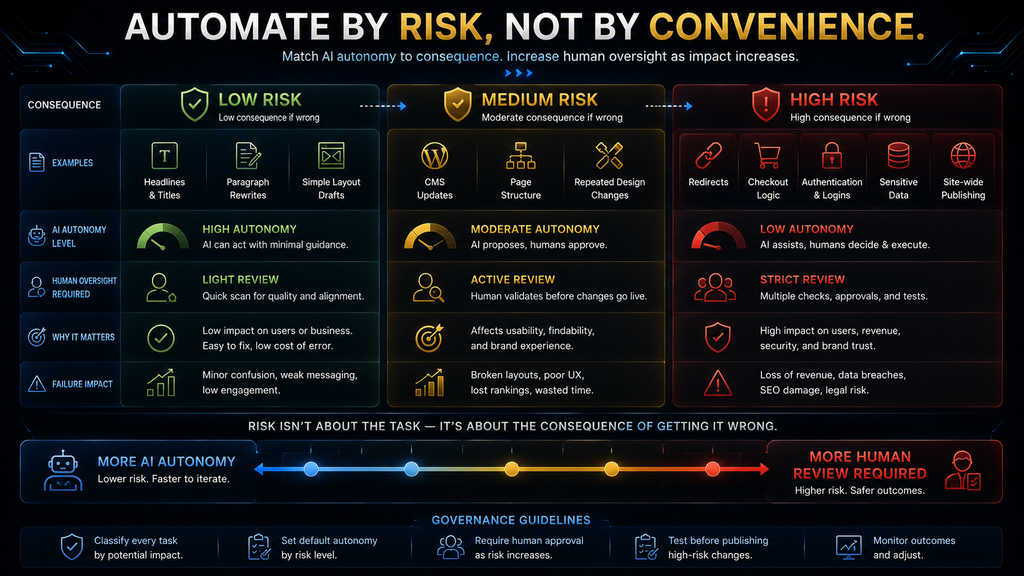
Use a risk-based rule
- Low consequence → more automation
- High consequence → more review
For example:
| Task | Reasonable AI autonomy | Human review |
|---|---|---|
| Draft headline | High | Quick |
| Rewrite paragraph | High | Yes |
| Generate section layout | High | Yes |
| Update one CMS entry | Moderate | Yes |
| Change site-wide navigation | Lower | Strong |
| Modify redirects | Lower | Strong |
| Change checkout logic | Low | Strong technical review |
| Publish major site-wide changes | Low | Final approval |
This is the direction website building is moving toward: not “AI does everything,” but AI operates within defined boundaries.
Mistake 18: Treating Launch as the Finish Line
A website is not finished when you press Publish. Launch is the beginning of the measurement phase. After launch, you should watch:
- Traffic: Are the right people arriving?
- Engagement: Are visitors finding useful pages?
- Conversions: Are visitors completing the intended action?
- Technical health: Are there broken links, errors, performance issues, or mobile problems?
- Search visibility: Are important pages being discovered and indexed?
- Business results: Are leads, bookings, purchases, or other desired outcomes actually improving?
Google’s current guidance for AI search emphasizes the same broader principle: foundational SEO, page experience, internal linking, textual content, and accurate information remain important, while Search Console and analytics can help measure how the site performs. This creates an important feedback loop: Website → Visitor behavior → Evidence → Improvements → Better website. Without that loop, you’re making decisions based on assumptions.
The Mistake Behind All the Other Mistakes
At this point, a pattern becomes visible. Most AI website builder mistakes are not really caused by AI being incapable. They happen because people give AI authority over decisions that require context.
The chain often looks like this: Weak brief → wrong assumptions → generic structure → generic content → weak user experience → poor conversion. Or: Missing business facts → AI fills the gaps → invented claims → misleading website → damaged trust. Or: Beautiful design → no functional testing → broken form → lost lead.
Or: AI-generated pages at scale → little original value → bloated site → weak usefulness. The first mistake is often invisible by the time the final website is published.
That’s why debugging the website only at the visual level is insufficient. You need to inspect the decision chain that produced it.
A Better AI Website Workflow
The solution isn’t to stop using AI. That would throw away the biggest advantage of these tools. The better approach is to create a controlled production workflow.
Step 1: Define the business objective
Write one sentence describing what the website must accomplish. For example:
“The website should generate qualified consultation requests from small-business owners.”
That becomes the anchor for the rest of the project.
Step 2: Define the audience
Specify:
- who the visitor is;
- what they need;
- what problem they have;
- what objections they may have;
- what evidence they need before taking action.
Step 3: Give AI verified source material
Provide:
- actual company information;
- real service descriptions;
- genuine images;
- approved brand assets;
- accurate prices;
- real testimonials;
- real case studies;
- contact information.
Don’t ask AI to invent what you already know.
Step 4: Generate the first version
Let the AI handle the repetitive production work. This is where the technology creates its biggest efficiency gain.
Step 5: Review strategically
Check:
- positioning;
- hierarchy;
- content;
- brand;
- proof;
- calls to action.
Step 6: Review technically
Test:
- mobile;
- forms;
- links;
- navigation;
- integrations;
- performance;
- accessibility;
- SEO foundations.
Step 7: Publish only after validation
Publishing should be the result of a review process, not the automatic next step after generation.
Step 8: Measure
Track the outcomes that matter to the business.
Step 9: Iterate
Use the evidence to decide what to change.
This is where modern AI agents can become especially useful. They can increasingly help make iterative changes inside website environments rather than forcing the user to rebuild pages manually.
The Pre-Publish AI Website Quality Audit
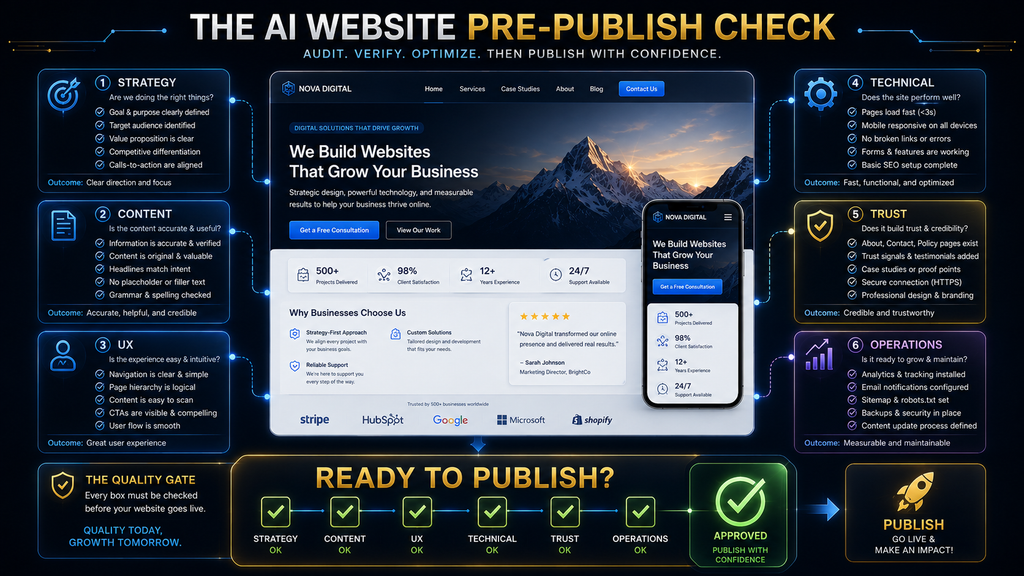
Before publishing an AI-generated website, use this as a final decision tool.
| Area | What to ask | Pass condition |
|---|---|---|
| Strategy | Is the site’s purpose obvious? | Visitors can quickly understand the main value and next action |
| Audience | Is the site clearly designed for a specific audience? | Messaging reflects real customer needs |
| Input | Did the AI receive accurate business information? | Important facts come from verified sources |
| Content | Is the copy specific rather than generic? | The business sounds like itself rather than every competitor |
| Accuracy | Did AI invent anything? | Claims, names, dates, prices, credentials, and testimonials are verified |
| Brand | Does the site feel distinctive? | Real brand assets and positioning are visible |
| UX | Can visitors navigate without confusion? | Main paths are obvious and friction is low |
| Mobile | Does the site work on real phones? | No major layout, navigation, form, or readability problems |
| SEO | Are the foundations correct? | Crawlability, content, titles, links, URLs, and important information are reviewed |
| Accessibility | Can different users operate the site? | Key content and interactions are usable and accessible |
| Performance | Does the site feel responsive? | Heavy assets and unnecessary effects have been controlled |
| Functionality | Do critical paths work? | Forms, buttons, checkout, booking, and integrations are tested |
| Trust | Is there enough evidence? | Visitors can verify important business information |
| Security | Are sensitive workflows appropriate? | High-risk functions receive appropriate technical review |
| Operations | Who owns maintenance? | Someone is responsible for updates, monitoring, and fixes |
| Measurement | How will success be judged? | Relevant traffic, engagement, conversion, and business KPIs are defined |
What Happens If You Ignore These Mistakes?
The consequences usually don’t arrive all at once. They compound. A generic headline may only reduce clarity slightly.
A weak CTA may reduce conversions slightly. A broken form may lose several leads. Poor mobile usability may cause visitors to leave.
Weak content may fail to earn search visibility. Unverified claims may damage trust. Poor maintenance may allow small problems to accumulate.
The dangerous part is that each individual issue can appear “not that serious.” Together, they create a website that consumes time and money without producing the expected business result. That is why the correct objective is not:
Build the website as cheaply as possible.
It is:
Automate production while protecting the decisions that have meaningful consequences.
When Should You Use an AI Website Builder?
AI website builders are particularly useful when you need a relatively standard website quickly and want to reduce the amount of manual design and development work. They can be a strong fit for:
- freelancers;
- consultants;
- local businesses;
- portfolios;
- simple service businesses;
- blogs;
- startups validating an idea;
- campaign landing pages;
- straightforward ecommerce projects.
The more standardized the website problem, the more valuable automation can become. But if the project requires complex backend architecture, unusual integrations, advanced security controls, highly customized workflows, or specialized application logic, you should evaluate whether a traditional development workflow or a more advanced AI development environment is more appropriate.
The important point is not that AI website builders are “good” or “bad.” It’s whether the tool’s level of abstraction matches the problem you’re trying to solve.
When Should You Avoid Relying on an AI Website Builder Alone?
Be more cautious when the website handles high-consequence information or complex functionality. Examples include:
- customer portals;
- sensitive user information;
- financial transactions;
- complex ecommerce operations;
- authentication;
- private databases;
- advanced business workflows;
- regulated or high-risk information.
The reason is not that AI cannot help. It is that the cost of an error is much higher. A wrong font choice is easy to fix.
A wrong payment workflow is not. A generic paragraph is annoying. A security problem can be serious.
A weak hero section can be redesigned. A broken customer database workflow can disrupt operations.
The decision rule
The greater the consequence of failure, the stronger the human and technical review should be.
The Second-Order Effect: AI Makes Basic Website Quality Cheaper
There is a larger change happening underneath all of this. AI is making it cheaper to produce a competent-looking website. That means simply having:
- a modern layout;
- polished typography;
- attractive images;
- responsive pages;
- professional copy
will become a weaker competitive advantage. If almost anyone can generate those things, they become closer to table stakes. The scarce advantages move elsewhere.
They become:
- original positioning;
- genuine expertise;
- real customer evidence;
- proprietary information;
- memorable branding;
- better user experience;
- stronger offers;
- better conversion paths;
- faster learning from customer behavior.
In other words:
AI reduces the cost of website production while increasing the relative value of differentiation.
That is one of the most important things to understand about the AI website-builder market. The winning website will not necessarily be the one that used the most AI. It will be the one that uses AI to produce the right thing faster.
The New Skill: Defining What “Good” Means
This is the deeper lesson behind the entire topic. Traditional website development required people to know how to design, write, code, configure, test, and publish. AI is reducing the amount of manual work required in many of those areas.
But that creates a different requirement: You need to become better at specification and evaluation. You need to know:
- what the site should accomplish;
- what the customer needs;
- what information is factual;
- what the brand should communicate;
- what should be automated;
- what must be reviewed;
- what needs testing;
- what success looks like.
If you cannot define those things, AI will still produce something. It just won’t necessarily produce the right thing. That is why the most important question isn’t:
“Can AI build my website?”
It clearly can build many kinds of websites. The better question is:
“Can I define the outcome clearly enough, and review the result rigorously enough, to make AI-generated work useful?”
That is the real skill.
Final Thoughts
AI website builders are powerful precisely because they remove a large amount of repetitive work. But that advantage creates a trap. When something becomes easy to generate, people become tempted to stop evaluating it.
That is the wrong direction. The best AI website workflow is not: Prompt → Generate → Publish. It is: Define → Generate → Review → Correct → Test → Publish → Measure → Improve.
AI should handle more of the production work. Humans should retain control over the decisions where context, accuracy, trust, strategy, and consequences matter. That is the boundary that makes AI website building useful rather than reckless.
A website does not become good because AI created it. It becomes good when the right decisions survive the journey from AI-generated draft to real-world customer experience.
Build Smarter With AI, Not Just Faster
Avoid the common mistakes by choosing a builder that fits your project, and compare the leading options.
Compare the Best AI Website Builders →Frequently Asked Questions
Are AI website builders reliable?
They can be reliable for many standard website-building tasks, but reliability depends on the platform, the task, the quality of the input, and the amount of human review. AI-generated websites should be treated as editable work that needs validation rather than automatically correct final products.
What is the biggest AI website builder mistake?
The biggest mistake is treating the first AI-generated version as finished. Once users stop reviewing the output, problems with content, UX, mobile behavior, functionality, SEO, and brand differentiation can remain hidden.
Can AI website builders create false information?
Yes. If the system does not have the necessary business information, it may generate plausible placeholder or inferred content. Current Framer documentation explicitly warns users to review AI-generated titles, copy, dates, names, and other information before publishing.
Does AI-generated website content hurt SEO?
AI-generated content is not automatically a problem simply because AI was used. The bigger issue is whether the content provides genuine value, accuracy, originality, and usefulness. Google specifically warns against using generative AI to create large amounts of low-value content primarily to manipulate search rankings.
Do AI website builders automatically handle SEO?
They can automate many basic SEO tasks, but they do not automatically create a complete SEO strategy. Google says foundational SEO practices remain relevant for AI search features, including crawlability, internal linking, page experience, textual content, and accurate structured information.
Are AI-generated websites mobile-friendly?
Many modern AI website builders can generate responsive layouts, but you should still test the actual website on phones and tablets. Responsive generation does not guarantee that every heading, form, navigation element, image, and interaction provides a good mobile experience.
Should I use real photos instead of AI-generated images?
When authenticity matters, yes. AI-generated visuals can work well for conceptual or decorative purposes, but real products, people, locations, projects, and customer evidence should generally be represented with genuine assets.
Can AI website builders create accessible websites?
They can help create accessible structures, but accessibility still needs review and testing. WCAG 2.2 provides the current W3C framework for making web content more accessible across devices and user needs.
Can AI website builders replace web developers?
They can reduce manual work for many standard websites, but they do not eliminate the need for specialized development when a project involves complex application logic, infrastructure, security, databases, or unusual integrations.
Should I keep improving my AI-generated website after launch?
Yes. Launch should begin the measurement and improvement cycle rather than end it. Monitor user behavior, conversions, technical problems, search performance, and business outcomes, then use that evidence to guide future changes.
Related Guides
- AI SEO vs Traditional SEO: What Actually Matters in 2026?
- How to Use ChatGPT for Blogging: Complete Beginner’s Guide
- Best AI Resume Builders (Free & Paid)
Written by
Muntasir Ahmad Chowdhury
Founder, AI Hustle World
Muntasir Ahmad Chowdhury is the Founder of AI Hustle World, an independent publication dedicated to making Artificial Intelligence practical, trustworthy, and easy to understand. He researches AI tools, automation, customer service, productivity, and real-world business applications, helping readers make smarter technology decisions through research-driven, experience-backed content.
Expertise:
AI Tools • AI Automation • AI Customer Service • AI Productivity • Generative AI • AI Workflows
Get Smarter With AI
Enjoyed this guide? Get practical AI tools, tutorials, and honest reviews delivered to your inbox.