Evidence: Documentation reviewed
Last checked: September 2026
What was done: Written from official documentation and the published sources linked in this article. Not hands-on tested.
Files: None
Affiliate links: No
How AI Automates Accounts Payable, Invoice Processing & Reconciliation
The AP Problem Isn’t Typing Invoices
Picture a finance team that receives 4,000 supplier invoices every month. The first one is simple — the PDF is readable, the vendor exists in the system, the purchase order matches, the goods were received, and the amount is correct. The next one is not. A vendor leaves off the PO number, another shows a quantity mismatch, a third charges a unit price that does not match the original order, a fourth looks like a duplicate, and a fifth arrives from a supplier whose bank details changed last week without anyone flagging it.
This is where accounts payable actually gets expensive — not in the typing, but in the judgment calls. The real question was never “how do we read invoices faster?” It is “how do we determine which invoices are safe to move through the process automatically, and which ones require a human to stop and look?” That distinction is the entire subject of this guide, and it is the difference between AI that quietly de-risks a finance team’s AP function and AI that quietly creates a new category of losses.
Why OCR Alone Was Never Going to Be Enough
For years, “AP automation” meant optical character recognition — software that reads the text on a scanned document and converts it into structured fields. OCR answers a narrow question: what text appears on this page? That is useful, but it stops well short of what accounts payable actually needs to know.
Take a simple example: an invoice lists a vendor, an invoice number, a quantity, a unit price, and a total. OCR can extract every one of those values accurately. What it cannot tell you is whether the vendor actually exists in the vendor master file, whether that invoice number has already been paid once this quarter, whether the quantity billed matches what was actually received on the dock, whether the unit price matches what was negotiated, or whether the invoice ties back to a valid purchase order at all. Those are matching, validation, and judgment problems — not text-extraction problems — and they are exactly where modern AI in AP earns its keep.
Modern AI can extract invoice data, identify the vendor, suggest an accounting classification, locate a matching purchase order, flag discrepancies, and prepare a draft transaction for review. Microsoft’s Payables Agent in Dynamics 365 Business Central is a live example: it can monitor an invoice inbox, extract the relevant details, identify the vendor, suggest account classifications, and create a draft purchase document — but per Microsoft’s own documentation, it does not automatically post invoices or make irreversible financial changes without a human approving them first. That is a far more realistic model of what AI does in AP today than the “AI replaces the AP department” narrative that shows up in vendor marketing.
The 10-Step AI Accounts Payable Workflow
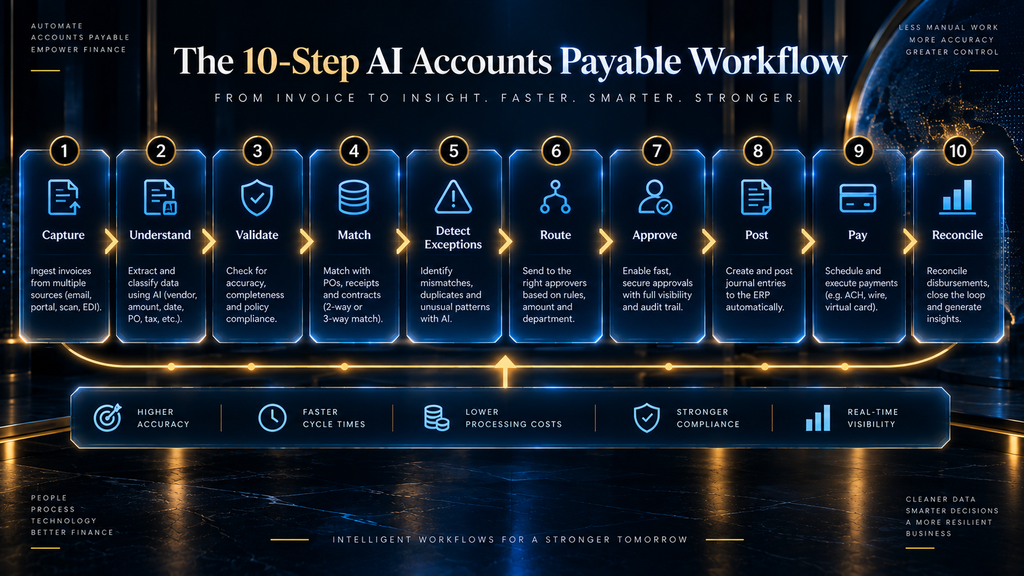
Most AI AP platforms, regardless of vendor, break the process down into roughly the same ten steps. Understanding this sequence matters more than memorizing any single vendor’s feature list, because it tells you exactly where AI is doing real work, where a human checkpoint belongs, and where a breakdown in one step quietly causes problems three steps later.
Step 1 — Capture
The invoice enters the system, whether through an email inbox, a vendor portal, EDI, or a scanned upload. Capture is the easy part; it has been automated in some form for over a decade.
Step 2 — Understand
The system extracts structured data from the document — vendor name, invoice number, line items, quantities, prices, tax, and totals — regardless of format or layout. This is where large language models meaningfully outperform older OCR-only tools, because they can interpret an invoice’s structure rather than relying on a fixed template.
Step 3 — Validate
The extracted data gets checked against what it should be: does this vendor exist in the vendor master, is the invoice number a duplicate, does the tax calculation look correct, is the format internally consistent. This is a data-integrity checkpoint before anything gets matched.
Step 4 — Match
The invoice is compared against a purchase order and, where applicable, a goods-receipt record — the two-way or three-way matching process described in the next section.
Step 5 — Detect Exceptions
Anything that does not match cleanly gets flagged: a price variance, a quantity variance, a missing PO, a vendor anomaly, or unusual banking information. This step is where AI’s judgment quality actually shows up, because a system that flags too much creates review fatigue, and a system that flags too little lets real problems through.
Step 6 — Route
Flagged exceptions get sent to the right human — accounts payable, procurement, or a manager, depending on the type and size of the discrepancy — while clean invoices continue moving without interruption.
Step 7 — Approve
A human (or, for very low-risk, low-dollar transactions under a defined policy, a pre-authorized automated rule) signs off on the invoice before it is posted.
Step 8 — Post
The approved invoice is recorded in the general ledger with the correct account coding, cost center, and tax treatment.
Step 9 — Pay
Payment is scheduled and executed according to the agreed terms, timed to capture early-payment discounts where they exist and to avoid late fees.
Step 10 — Reconcile
The payment is matched back against the invoice and the bank statement, closing the loop and confirming nothing was paid twice, paid to the wrong account, or left outstanding by mistake.
The mistake most finance teams make is treating this as one automation project. It is ten distinct capabilities, each with a different error profile, and the right amount of AI autonomy is different at every single step — a theme this guide returns to throughout.
Two-Way Matching vs. Three-Way Matching, Explained
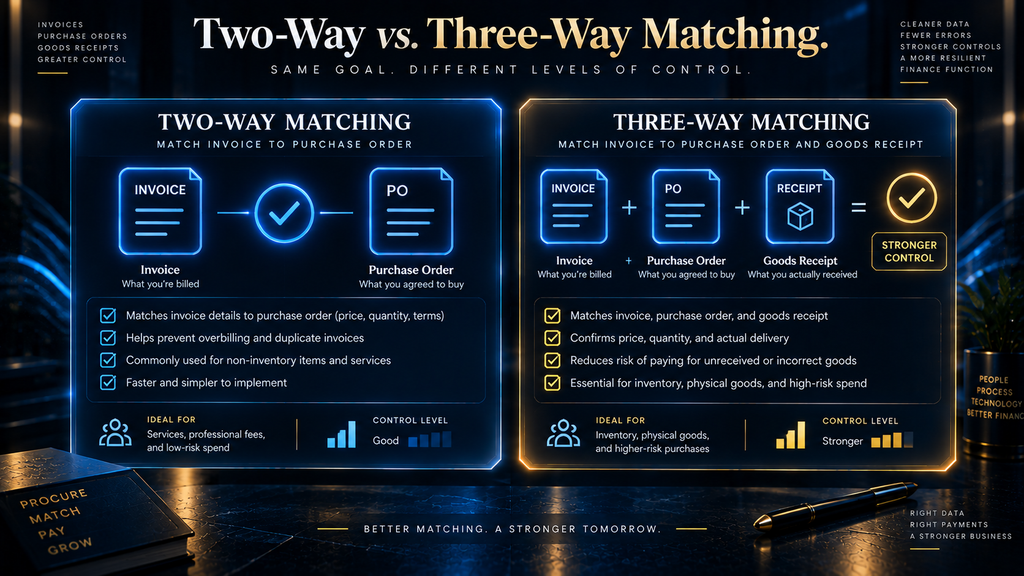
Matching is the core control in accounts payable, and AI does not change what matching is — it changes how fast and how thoroughly it happens. Two-way matching compares the invoice against the purchase order alone: does the vendor, quantity, and price on the invoice agree with what was ordered? Three-way matching adds a third document, the goods-receipt or proof of delivery, so the system also confirms that what was ordered was actually received before payment goes out.
Three-way matching is the stronger control because it closes the gap that two-way matching leaves open: a vendor could invoice correctly for an order that was never actually fulfilled. AI’s real contribution here is not the matching logic itself, which has existed in ERP systems for decades — it is the ability to handle the unstructured, messy cases that used to force a human to intervene: a delivery split across three partial shipments, a quantity that’s off by a rounding difference, a PO that was amended after the fact. Those are exactly the situations where rules-based matching used to fail silently or reject everything indiscriminately, and where a model that can reason about the specific discrepancy adds real value.
The Exception Types Every AP Team Should Expect
Not every exception is the same kind of problem, and treating them identically is one of the fastest ways to either overwhelm a review queue or miss something that actually matters. The categories below cover most of what shows up in a typical AP exception queue.
- Price mismatch — the invoiced unit price differs from the purchase order or contracted rate.
- Quantity mismatch — the invoiced quantity differs from what was ordered or received.
- Receipt mismatch — the invoice references goods that have not been recorded as received.
- Duplicate invoice — the same invoice number, amount, or line items appear to have already been submitted.
- Missing purchase order — the invoice has no corresponding PO in the system at all.
- Vendor anomaly — the vendor is new, recently changed its details, or does not match the vendor master record cleanly.
- Unusual banking information — the payment account differs from what is on file for that vendor.
- Policy violation — the invoice breaches an internal spending, approval, or contract-term policy.
Each of these deserves a different response. A price mismatch of a few cents is not the same risk as unusual banking information appearing on an otherwise-legitimate vendor’s invoice — the first is a data problem, the second is a potential fraud signal, and a well-configured AI AP system routes them to different reviewers with different urgency.
The Fraud Risks AI Introduces — and the Ones It Closes
AI in AP is often marketed purely as a risk reducer, but it is more accurate to say it changes the shape of the risk rather than eliminating it. Automating a workflow that used to have a human looking at every invoice means a well-crafted fraudulent invoice now has to fool a model instead of a person — and models can be fooled in different ways than people are.
- Fake invoices — a fabricated invoice for goods or services that were never ordered, designed to slip through if matching controls are weak.
- Duplicate payment — the same legitimate invoice paid twice, whether through system error or deliberate resubmission.
- Vendor impersonation — a fraudster posing as a legitimate, existing vendor to redirect payment.
- Bank-account manipulation — a legitimate vendor’s payment details are altered, often via a compromised email thread, so a real invoice pays out to the wrong account.
- Compromised supplier email — a vendor’s own email account is breached and used to send convincing, familiar-looking fraudulent requests.
- Approval bypass — an invoice is structured or split to fall under an approval threshold that would normally trigger additional scrutiny.
The single highest-leverage control against most of this list is a strict rule: any change to a vendor’s banking details triggers mandatory human verification through a channel other than email, every time, with no AI autonomy over that specific decision. Bank-account manipulation and vendor impersonation are core patterns behind business email compromise, which the FBI has tracked as one of the costliest categories of cybercrime for years. This is the clearest example in this guide of a task that should never be fully automated regardless of how accurate the underlying model becomes — the cost of one successful bank-account fraud almost always exceeds the efficiency gained by automating verification.
What Early AI AP Deployments Actually Show
Vendor case studies tend to lead with the most flattering number from the most cooperative customer, so they are worth reading skeptically. What holds up across multiple independent accounts of AI AP rollouts is a more modest but still meaningful pattern: processing time per invoice drops fastest and most reliably in the first 60-90 days, touchless rates climb gradually rather than jumping immediately, and the categories that resist automation the longest are almost always non-PO spend and new-vendor invoices, not high-volume routine purchasing.
AI Hustle World’s own analysis of publicly available vendor documentation, including Microsoft’s published guidance on its Payables Agent, points to the same conclusion the ten-step framework above is built around: the deployments that hold up over time are the ones that keep a human checkpoint at approval and payment while letting AI fully own extraction and validation — not the ones chasing full end-to-end autonomy from day one.
AI Hustle World Reality Check
Every AP automation vendor will show a demo where invoices flow through cleanly from capture to payment with almost no human involvement. In practice, most finance teams land somewhere between 60% and 85% touchless processing once a system is mature — not 100% — and that remaining 15-40% is not a failure of the technology. It is the set of invoices that genuinely require judgment: new vendors, unusual terms, disputed amounts, or anything that looks even slightly like the fraud patterns above. A vendor promising full touchless processing on day one, for every invoice type, is a signal to ask harder questions in the sales process, not a feature to get excited about.
What AI Should Not Be Trusted to Do Autonomously
Across the ten-step workflow described earlier, autonomy should not be distributed evenly. Capture, understand, and validate are low-risk, high-volume steps where AI can operate with minimal supervision because an error is easy to catch and cheap to fix. Approve, post, and pay are a different category entirely — an error there moves real money, and reversing a mistaken payment is far more expensive than preventing one.
As a working rule: AI should fully own extraction and first-pass validation, should heavily assist matching and exception detection, and should only ever recommend at the approval and payment steps for any invoice above a low, clearly defined dollar threshold. Below that threshold, for known vendors with a clean history, limited automated approval can make sense — but the threshold should be set deliberately by finance leadership, not defaulted to whatever the software vendor ships with.
Data Quality Is the Real Bottleneck, Not Model Accuracy
Per KPMG’s 2026 Global AI in Finance research, 36% of finance leaders cite data quality as both their top barrier and their top opportunity when deploying AI. Accounts payable is a clear illustration of why: an AI matching engine is only as reliable as the vendor master file, purchase order data, and receiving records it is comparing against. A vendor master with duplicate entries, stale banking details, or inconsistent naming will produce false exceptions no matter how capable the underlying model is.
This is why the highest-ROI early step in an AP AI rollout is usually not buying software — it is a vendor master and PO-data cleanup. Teams that skip this step tend to see their AI tool generate an overwhelming number of exceptions in the first weeks, conclude the tool “doesn’t work,” and abandon a project that would have performed well against clean data.
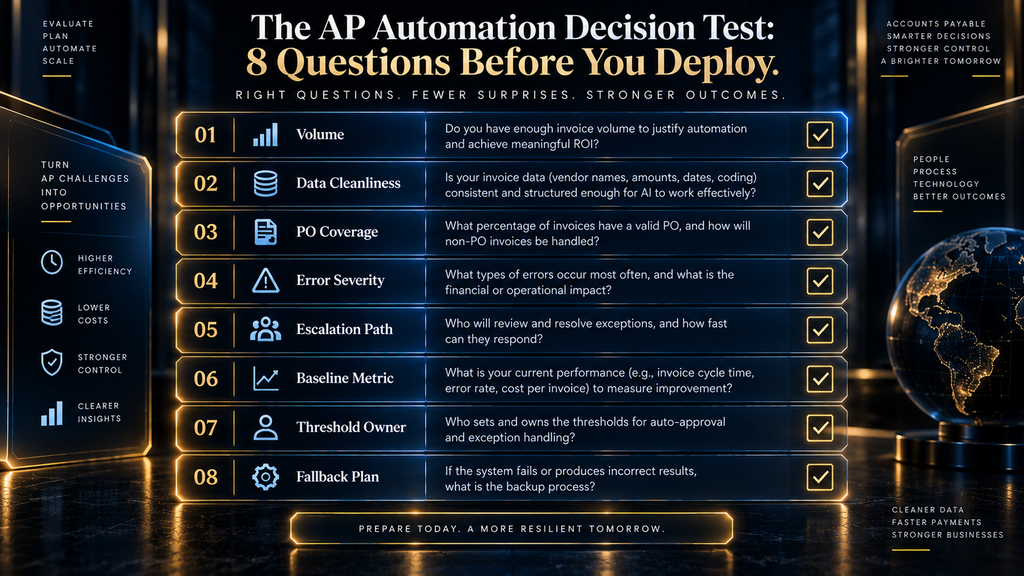
The AP Automation Decision Test: 8 Questions Before You Deploy
Before signing a contract or scoping an implementation, running a given invoice category through these eight questions is a fast way to tell whether AI automation will actually help, or whether it is being applied to a workflow that isn’t ready for it yet.
- Is the volume high enough to matter? A vendor category with 20 invoices a month rarely justifies dedicated automation effort — the payoff scales with volume.
- Is the vendor master data for this category clean? If not, that cleanup has to happen first regardless of which tool gets chosen.
- Is there a purchase order for most of this volume? Non-PO spend needs a different automation approach than PO-based spend.
- How severe is an error, if one slips through? High-dollar or high-fraud-risk categories need a lower autonomy ceiling than low-dollar routine spend.
- Does a clear escalation path already exist for exceptions? Automating capture without fixing exception routing just relocates the bottleneck.
- Is there a way to measure the baseline today? Without a “before” number, ROI cannot be proven later.
- Who owns the decision to change exception thresholds later? This needs a named owner before go-live, not after the first incident.
- What is the fallback if the AI tool is wrong? Every deployment needs a defined manual-override path that doesn’t require an emergency meeting to use.
A “no” on two or more of these questions for a given invoice category is a signal to start with a different, better-prepared category first, rather than forcing the hardest case through as the pilot.
How to Evaluate an AI AP Automation Vendor
AP automation tools range from lightweight OCR-plus-workflow add-ons to full agentic platforms embedded directly in the ERP. The checklist below covers the questions that matter most once you get past the demo.
ERP-native or standalone?
A tool embedded directly in your ERP (like Microsoft’s Payables Agent inside Dynamics 365, or similar capabilities inside NetSuite and SAP) typically integrates more cleanly and inherits existing permissions and audit trails. A standalone tool may offer more advanced AI capability but adds an integration layer, a second system of record risk, and another vendor relationship to manage.
How does it handle exceptions, not just clean invoices?
Ask to see the exception-handling workflow specifically, not just the happy-path demo. What does the review queue look like when an invoice has three different problems at once? Can routing rules be customized by exception type and dollar amount without a support ticket?
What is the actual touchless processing rate, from a comparable customer?
Push past the vendor’s best-case number and ask for a reference customer with a similar invoice volume, vendor mix, and industry. Touchless rates vary enormously by how standardized a company’s purchasing is — a services company with mostly non-PO invoices will see a very different number than a manufacturer with disciplined PO-based purchasing.
What controls exist around banking-detail changes?
This should be a non-negotiable line item, not a follow-up question. Ask exactly how the system flags and verifies any change to vendor payment details, and whether that verification step can be bypassed by an admin under time pressure.
What is the total cost, including implementation?
Per-invoice pricing looks attractive at low volume and can become expensive as volume grows; flat platform pricing can include hidden usage caps. Ask for the realistic all-in cost at your actual invoice volume, plus a implementation timeline from a comparable customer — not the vendor’s best case.
Build vs. Buy: ERP-Native AI vs. Standalone AP Platforms
Once a finance team decides to modernize AP, the first real fork in the road is whether to use the AI capability already built into the ERP or bring in a dedicated, standalone AP automation platform. Neither answer is universally correct, and the right one depends more on how customized your existing ERP setup already is than on which option has the flashier feature list.
When ERP-native makes sense
If your ERP deployment is relatively standard and your invoice volume is moderate, native AI capability — like Microsoft’s Payables Agent inside Dynamics 365, or the equivalent inside NetSuite or SAP — is usually the faster and lower-risk path. It inherits your existing permissions, audit trail, and chart of accounts without an integration project, and it avoids adding a new vendor relationship and a second system that has to stay in sync with the ERP.
When a standalone platform makes sense
Standalone AP platforms tend to pull ahead when invoice volume is high, the vendor base is large and varied, or the matching and exception-handling logic needs to be more sophisticated than what the ERP vendor has built natively. They often move faster on AI capability than ERP vendors, since it is their core product rather than one feature among hundreds. The tradeoff is a real integration project, an additional point of failure, and a second system your IT and finance teams both need to maintain.
The hybrid reality
In practice, a growing number of finance teams run ERP-native AI for the majority of standard, PO-based invoice flow and layer a standalone tool on top only for the specific exception types or vendor categories the native tool handles poorly. This adds complexity but avoids forcing every invoice type through a single tool’s weakest capability.
The Audit Trail Requirement Most Teams Underestimate
An AI AP system makes thousands of small decisions a month — which invoices to flag, which to match automatically, which exceptions to escalate. Every one of those decisions needs to be reconstructable after the fact: which rule or model output triggered the action, what data it was based on, and who (human or system) ultimately approved the payment. This is not optional documentation for a “nice to have” audit — for any company under SOX or similar financial controls, it is the difference between an AI deployment that passes review cleanly and one that becomes a finding.
The practical implication is that audit-trail completeness should be a selection criterion for any AP AI tool, evaluated with the same weight as matching accuracy or touchless rate. A system that can’t show, invoice by invoice, exactly why it did what it did is a governance liability regardless of how accurate its matching turns out to be — and it is worth confirming this capability during a vendor evaluation rather than discovering the gap during the first audit cycle after go-live.
A 90-Day Rollout Plan for AI in Accounts Payable
Days 1-30 — Understand the Process
Before touching any software, map the current AP process exactly as it works today, including the informal exceptions nobody has written down. Audit the vendor master and PO data for the cleanup issues described earlier, and establish a baseline for your current touchless rate, average processing time, and error rate — you cannot prove AI improved anything without knowing where you started.
Days 31-60 — Pilot
Run the AI tool against a limited, low-risk slice of invoice volume — a single vendor category or a single business unit — with a human reviewing every single output, including the ones the system marked as clean. This is where you calibrate exception thresholds and discover the data-quality issues that only show up under real volume.
Days 61-90 — Scale Carefully
Expand coverage in stages, tightening or loosening exception thresholds as the false-positive and missed-exception rates become clear. A false positive — a clean invoice incorrectly flagged for review — wastes staff time but is low-risk. A missed exception — a genuine problem that should have been flagged but wasn’t — is the far more expensive failure mode, and it is worth erring toward more false positives than missed exceptions during this phase.
Signs Your AP Team Is Ready to Expand AI Coverage
Not every finance team should scale AI AP coverage at the same pace, and pushing too fast is a more common failure mode than moving too slowly. A few signals suggest a team is genuinely ready to expand coverage beyond an initial pilot rather than just eager to.
The exception rate on the pilot category has stabilized and stopped trending downward, meaning the system has learned what normal looks like for that vendor group. The false-positive rate is low enough that reviewers aren’t routinely ignoring flags out of fatigue — a review queue that gets rubber-stamped defeats the purpose of having one. Vendor master data has been cleaned for the categories being added next, not just the original pilot group. And critically, at least one real exception has been caught and correctly escalated during the pilot, proving the system’s judgment holds up on an actual edge case rather than only on clean, easy invoices.
If those four signals aren’t all true yet, the better move is extending the pilot rather than expanding scope — a slower rollout that builds real trust in the system outperforms a fast one that has to be walked back after an error.
Ten Mistakes Finance Teams Make Automating AP
The problem isn’t lack of automation software — most finance teams have access to capable tools already. The mistakes below are about how those tools get deployed, not which one gets chosen.
- Starting with OCR instead of the workflow. Optimizing text extraction first, before deciding how exceptions should be routed and approved, builds the easy 20% and defers the hard 80%.
- Optimizing extraction accuracy past the point it matters. Going from 97% to 99% extraction accuracy delivers far less value than fixing how the system handles the 3% it gets wrong.
- Automating payment authorization too early. Full autonomy at the payment step, before trust and track record are established, is where a single bad decision costs the most.
- Ignoring exception handling design. A tool that flags problems without a clear, fast routing and resolution path just relocates the bottleneck instead of removing it.
- Treating every anomaly as fraud. Most exceptions are data problems, not fraud attempts — over-escalating erodes trust in the system and burns reviewer attention on false alarms.
- Ignoring data quality. As covered above, a messy vendor master or PO data will make even a strong model look unreliable.
- Assuming three-way matching solves everything. Matching catches quantity and price discrepancies; it does not catch a fabricated invoice for goods that were genuinely received through a compromised process.
- Measuring only invoices processed. Volume metrics look good on a dashboard but say nothing about exception quality, fraud prevention, or staff time actually saved.
- Buying software before redesigning the workflow. A tool bolted onto a broken process automates the brokenness faster.
- Removing humans before trust is established. Cutting review staff before a system has a proven track record at your actual volume and vendor mix is how a manageable error becomes a public one.
Common Objections to AI in AP, Addressed
“Our invoice formats are too inconsistent for AI to handle.”
This objection was much more valid in the OCR-only era, when extraction relied on fixed templates. Large language model-based extraction is specifically better at handling inconsistent, unstructured formats than older tools, which is exactly the capability gap described earlier in this guide. Inconsistent formatting is a weaker reason to avoid AI AP automation today than it was even two or three years ago.
“We tried automation before and it created more work, not less.”
This is usually a symptom of the mistakes covered earlier — deploying against dirty vendor data, skipping exception-workflow design, or trying to automate payment authorization before trust was established. It is rarely a sign that automation itself doesn’t work for that business; it is far more often a sign the rollout skipped the data-cleanup and pilot phases described in the 90-day plan above.
“Our auditors won’t accept an AI-driven process.”
Auditors generally aren’t objecting to AI itself — they’re checking for a clear audit trail, documented controls, and a defensible explanation for every automated decision. A well-implemented AI AP system, with logged reasoning for every match and every exception flag, is often easier to audit than a manual process that relied on someone’s undocumented judgment call.
“We’re too small for this to be worth it.”
Volume matters more than company size. A ten-person company processing 2,000 invoices a month from a small, stable vendor base may see less benefit than a fifty-person company processing 500 invoices a month from hundreds of varied vendors. The decision test earlier in this guide is a better filter than headcount for deciding whether a given invoice category is worth automating.
A Simple KPI Framework for Measuring AP AI ROI
Touchless processing rate, average cost per invoice, and average cycle time from receipt to payment are the three numbers worth tracking before and after any AI deployment — measured against the baseline established during the first 30 days of rollout. A fourth number matters just as much even though it is harder to put on a dashboard: exception quality, meaning the ratio of exceptions that turned out to be real problems versus exceptions that turned out to be nothing. A system that improves the first three numbers while quietly letting exception quality degrade is trading visible efficiency for invisible risk.
Early-payment discount capture is worth tracking separately for finance teams with negotiated terms — faster processing often means more invoices get paid inside the discount window, which is a direct, easily quantified return that is simple to show a CFO.
How This Differs by Industry
Manufacturing and distribution
Purchase-order discipline tends to be strong, which makes three-way matching highly effective and touchless rates comparatively high once vendor and PO data are clean. The main complexity is partial shipments and quantity variances across multi-part deliveries.
Professional services and SaaS
A much larger share of invoices arrive without a purchase order at all — retainers, subscriptions, one-off vendor engagements — which pushes more of the workflow toward AI-assisted coding and approval routing rather than matching, since there is often nothing to match against.
Retail and e-commerce
High invoice volume with strong seasonality, similar to the pattern seen in AI-driven finance forecasting, means exception thresholds often need to flex around promotional and holiday periods rather than staying static year-round.
Healthcare and other regulated sectors
Vendor verification and approval controls tend to carry a higher compliance bar, which usually means a lower ceiling on autonomous approval even for low-dollar invoices, and a stronger emphasis on audit-trail completeness over raw processing speed.
What Happens If You Do Nothing
Manual AP does not stay flat while everyone else automates — invoice volume tends to grow with the business, and the cost of processing each one manually grows with it too, since headcount rarely scales as fast as volume. The realistic cost of doing nothing is not a dramatic failure; it is a slow accumulation of missed early-payment discounts, higher processing cost per invoice than automated peers, and AP staff spending their time on data entry instead of the exception review and vendor relationship work that actually needs judgment.
Who Should Prioritize This Now — and Who Can Wait
Prioritize now
Finance teams processing more than a few hundred invoices a month, especially with a vendor base that has grown faster than the AP headcount, get the fastest and clearest payback. The same is true for any team that has recently had a near-miss on vendor fraud or duplicate payment — the fraud-prevention case alone often justifies the investment before the efficiency case does.
Worth piloting, not rushing
Teams with moderate volume and a relatively clean, stable vendor base can move more deliberately. The upside is real but less urgent, and there is little cost to spending an extra month on the data-cleanup phase before piloting.
Can reasonably wait
Very low invoice volume, a vendor base that changes rarely, and an AP process that is already fast and low-error are signs the return on a dedicated AI AP project will be modest. For these teams, the broader finance-function priorities covered elsewhere on this site — forecasting, anomaly detection, cash flow planning — are often a better first place to apply AI than accounts payable specifically.
Where This Fits in the Broader AI Finance Stack
Accounts payable is one piece of a larger shift happening across finance functions. This guide is part of our coverage of how AI is actually being used across the finance function — AI in Finance & Accounting Explained lays out the overall framework this article works within, AI Financial Planning & Analysis covers the forecasting side of finance, How AI Detects Financial Anomalies, Fraud & Leakage goes deeper on the fraud-detection themes touched on above, and Cash Flow Forecasting and Scenario Planning covers how faster AP processing feeds directly into more accurate cash forecasts. For teams deciding what to automate first, AI Accounting vs. Traditional Accounting is a useful companion piece.
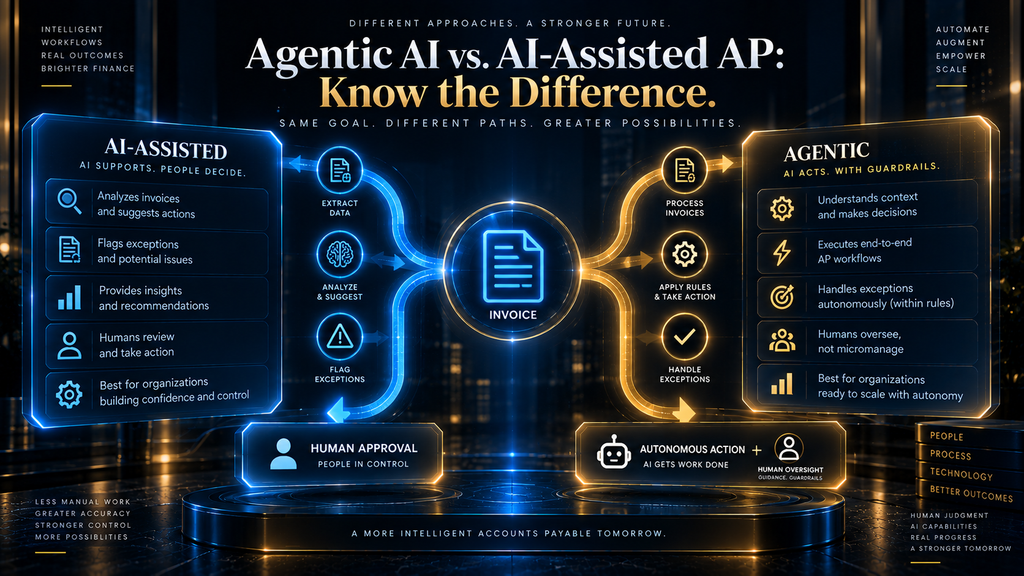
Agentic AI vs. AI-Assisted AP: Know Which One You’re Buying
Vendors increasingly market their AP tools as “agentic,” but the term covers a wide range of actual autonomy. An AI-assisted tool surfaces suggestions — a proposed match, a proposed account code — and waits for a human to act. An agentic tool can take the next step itself: pulling a missing document, contacting a vendor, or re-routing an exception without being asked, though per the governance principles in this guide, it should still stop short of posting or paying without approval.
When evaluating a vendor’s “agentic AI” claim, ask specifically what actions the agent can take without a human in the loop, and whether that list is configurable by your team or fixed by the vendor. The label alone tells you very little; the specific list of unsupervised actions tells you everything about whether the tool fits the autonomy boundaries this guide has laid out.
The Future of AI in Accounts Payable
The next meaningful shift is not better invoice extraction — that problem is close to solved. It is AI systems that handle multi-step exception resolution end to end: contacting a vendor for clarification, checking a discrepancy against contract terms, and drafting a resolution for human sign-off, rather than simply flagging the problem and stopping. Agentic capability like Microsoft’s Payables Agent is an early version of this direction, and the gap between “flags problems” and “resolves problems with a human checkpoint” is where the next few years of AP automation will be spent.
Final Thoughts
AI does not make accounts payable disappear as a function — it changes what the people in it spend their time on. Teams that treat this as a workflow redesign, starting with clean data and a clear map of where autonomy should and shouldn’t extend, see real reductions in processing cost and cycle time. Teams that treat it as a plug-in on top of an already broken process mostly automate the brokenness, faster. The distinction made at the start of this guide is the one that matters most: this was never really about reading invoices faster. It is about knowing, invoice by invoice, which ones are safe to move automatically and which ones need a human to stop and look.
Ready to Compare AI Tools for Your Finance Team?
Run your AP invoice volume through the Decision Test above, then see which platforms actually fit the workflow you need automated.
See the Best AI Finance & Accounting Tools →FAQ
What is AI accounts payable automation?
AI accounts payable automation refers to software that uses machine learning and, increasingly, large language models to capture invoice data, validate it, match it against purchase orders and receipts, detect exceptions, and route them for approval — reducing manual data entry while keeping a human in the loop for judgment calls and final payment authorization.
How does AI process invoices?
AI extracts structured data from an invoice regardless of its format, checks that data against the vendor master and purchase order records, applies two-way or three-way matching, and flags anything that does not reconcile cleanly for human review, while letting clean, low-risk invoices continue toward approval and payment automatically.
Can AI fully automate accounts payable?
Not responsibly, and not today. Even mature AI AP deployments typically land around 60-85% touchless processing, with the remainder requiring human judgment — new vendors, unusual terms, disputed amounts, or anything resembling the fraud patterns covered earlier in this guide. Full autonomy over payment authorization, in particular, is not a control most finance teams should give up.
What is the difference between two-way and three-way matching?
Two-way matching compares an invoice against its purchase order. Three-way matching adds a goods-receipt or delivery record, confirming that what was ordered was actually received before payment is released — a stronger control that closes a gap two-way matching leaves open.
Is AI accounts payable software safe from fraud?
AI can reduce certain fraud risks — like catching duplicate invoices or unusual vendor patterns at a scale humans can’t match — but it also introduces new ones if deployed carelessly, particularly around vendor bank-detail changes and compromised supplier email. Mandatory, out-of-band human verification for any banking-detail change is the single most important control regardless of how capable the AI is.
How much does AI invoice processing cost?
Pricing varies by vendor and model — per-invoice, per-seat, and flat platform pricing are all common — and the right choice depends heavily on your invoice volume. The more important cost question is usually implementation and data-cleanup time rather than the software fee itself, since a messy vendor master will slow any deployment regardless of price.
What is a good touchless invoice processing rate?
There is no universal benchmark, since it depends heavily on how much of your invoice volume is PO-based versus non-PO, and how standardized your vendor relationships are. What matters more than hitting a specific number is trending upward from your own baseline while exception quality — the rate of exceptions that turn out to be real problems — stays stable or improves.
Does AI accounts payable software replace AP staff?
It changes the job more than it eliminates it. Manual data entry and routine matching shrink significantly, while the time freed up shifts toward exception review, vendor relationship management, and process improvement — work that still requires a person, and often a more experienced one than pure data entry required.
What ERP systems have built-in AI for accounts payable?
Most major ERP platforms now offer some form of native AI AP capability — Microsoft Dynamics 365 Business Central’s Payables Agent is one current example, and NetSuite and SAP have comparable capabilities in their own ecosystems. ERP-native tools generally integrate more cleanly than standalone add-ons, though standalone platforms sometimes offer more advanced matching or fraud-detection features.
How long does it take to implement AI accounts payable automation?
A phased rollout — roughly 30 days to understand the current process and clean up data, 30 days to pilot against a limited slice of volume, and 30 days to scale carefully — is a realistic timeline for a mid-sized finance team, though the data-quality work in the first phase is often the part that determines whether the rest goes smoothly or not.
Sources and Further Reading
- Business Email Compromise: The $50 Billion Scam: FBI Internet Crime Complaint Center public service announcement on BEC losses.
- Internal Control – Integrated Framework: COSO’s widely used framework for designing and assessing internal controls.
Related Guides
- How AI Finds and Screens Candidates (Without Bias)
- AI SDR vs Human SDR: Which One Should Your Business Use in 2026?
- How to Build an AI B2B Prospecting Workflow
Written by
Muntasir Ahmad Chowdhury
Founder, AI Hustle World
Muntasir Ahmad Chowdhury is the Founder of AI Hustle World, an independent publication dedicated to making Artificial Intelligence practical, trustworthy, and easy to understand. He researches AI tools, automation, customer service, productivity, and real-world business applications, helping readers make smarter technology decisions through research-driven, experience-backed content.
Expertise:
AI Tools • AI Automation • AI Customer Service • AI Productivity • Generative AI • AI Workflows
Get Smarter With AI
Enjoyed this guide? Get practical AI tools, tutorials, and honest reviews delivered to your inbox.