Evidence: Documentation reviewed
Last checked: September 2026
What was done: Written from official documentation and the published sources linked in this article. Not hands-on tested.
Files: None
Affiliate links: No
How to Build an AI B2B Prospecting Workflow
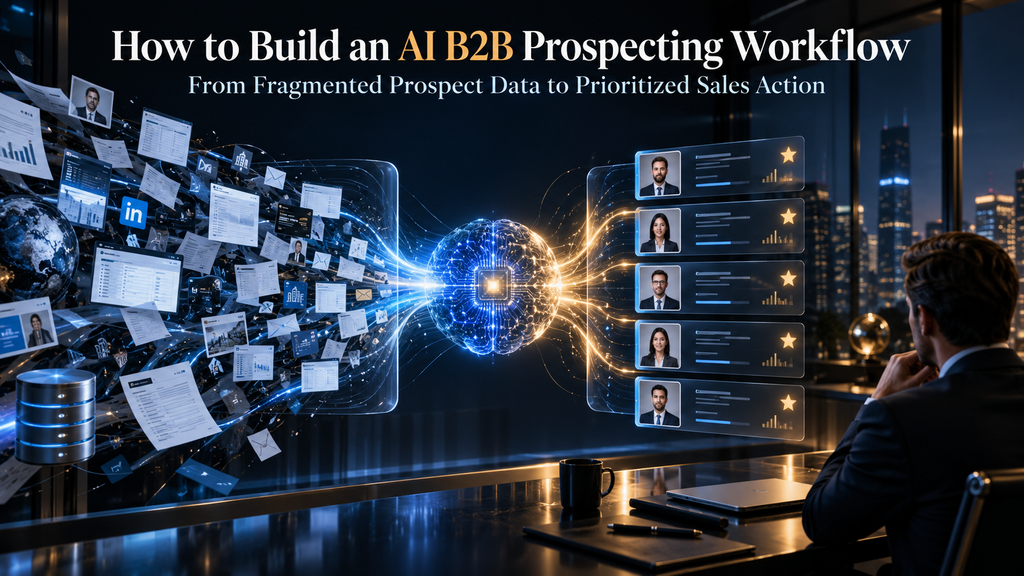
B2B prospecting becomes difficult long before a salesperson sends the first email. The real problem is usually not a lack of potential prospects; it is the amount of fragmented information that must be turned into a useful sales decision. A sales team may have thousands of companies in a database, incomplete contact records, changing job titles, scattered buying signals, website activity, hiring announcements, technology changes, CRM history, and dozens of possible reasons to contact an account. The salesperson is then expected to determine which companies actually fit, which people matter, whether the timing is right, what has changed, and what should happen next.
That is where AI can change the economics of prospecting, but only when it is implemented as a workflow rather than purchased as another isolated tool. An AI system that merely finds names produces more data. An AI system that connects discovery, enrichment, verification, qualification, signal detection, prioritization, research, and routing can produce something much more valuable: a continuously improving stream of sales-ready decisions.
The distinction matters because prospecting is fundamentally a decision problem. The objective is not to find the largest possible number of contacts. It is to identify the relatively small number of accounts and people where fit, timing, evidence, and reachability overlap strongly enough to justify human attention.
Current AI prospecting systems increasingly follow this broader model. HubSpot, for example, describes AI prospecting around lead identification, contact enrichment, personalization, scoring, prioritization, and pipeline handoff, while Salesforce emphasizes AI’s role in reducing manual prospecting work and helping sellers focus on higher-intent opportunities.
The practical lesson is simple: AI should not merely make prospecting faster. It should make the decisions inside prospecting better.
Quick Answer: What Is an AI B2B Prospecting Workflow?
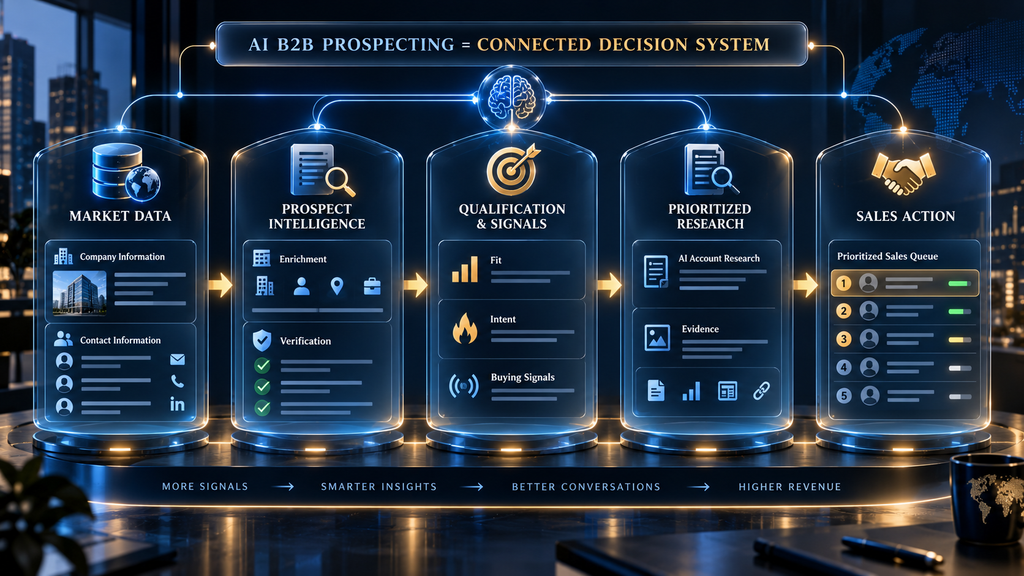
An AI B2B prospecting workflow is a connected process that uses data, automation, AI research, qualification logic, buying signals, and sales-system integrations to move from a defined target market to prioritized prospects and appropriate sales actions. A strong workflow normally moves through these stages: define the ideal customer profile, discover target accounts, identify relevant contacts, enrich and verify their data, qualify fit and intent, detect meaningful buying signals, prioritize prospects, research the account, prepare evidence-based outreach, route the opportunity to the appropriate sales motion, and feed the outcome back into the system.
The important word is connected. If an AI tool finds a company but does not determine whether the company fits your ICP, the workflow is incomplete. If another tool enriches the contact but nobody verifies whether the data is trustworthy, the workflow is incomplete. If a buying-signal platform detects that an account is hiring but does not translate that signal into a specific sales action, the workflow is incomplete.
A useful way to think about the entire system is: Market definition → Discovery → Enrichment → Verification → Qualification → Signal detection → Prioritization → Research → Activation → Feedback.
The goal is not to automate every step. The goal is to ensure that every step produces a better input for the next decision.
Why Most AI Prospecting Systems Fail
The easiest way to build an AI prospecting system is to start buying tools. A company purchases a prospect database, adds an enrichment provider, connects an AI research agent, installs an outreach platform, adds intent data, and eventually connects everything to the CRM. On paper, the stack looks sophisticated. In practice, the sales team may simply end up with more records, more notifications, more duplicate data, and more automation to maintain.
The underlying mistake is starting with technology instead of the decision that technology is supposed to improve.
Suppose a SaaS company sells revenue intelligence software to B2B organizations with 100–1,000 employees. The company can easily build a list of tens of thousands of businesses that technically fall within that employee range. But employee count alone does not tell the sales team whether a company has a revenue operations problem, whether the relevant team exists, whether the company is expanding its sales organization, whether the prospect is already using a competitor, whether the timing is right, or whether anyone at the company has enough authority to evaluate a new platform.
The database can answer who exists. Prospecting needs to answer who matters now.
This is why adding more data does not automatically improve prospecting. Data only becomes valuable when it reduces uncertainty around a decision. A new company record may be useful at the discovery stage, but the same record may be nearly worthless to a salesperson if the contact information is stale, the role is irrelevant, the account is outside the ICP, and there is no reason to believe the company is currently considering a purchase.
A mature AI workflow therefore treats every stage as a filtering and evidence-building process. The system begins with a broad universe, reduces it through increasingly meaningful constraints, and eventually presents salespeople with a much smaller set of opportunities that have enough evidence behind them to justify action.
That is the core architecture behind this entire article.
What an AI B2B Prospecting Workflow Actually Does
Traditional prospecting often behaves like a list-processing exercise. A salesperson receives a list, searches for contacts, checks LinkedIn or a database, writes notes, sends messages, waits, and repeats the process. The salesperson is effectively acting as the search engine, data cleaner, qualification engine, research analyst, and workflow router at the same time.
AI changes this by separating information processing from human judgment.
The machine can process thousands of records, compare attributes, search for relevant information, identify patterns, summarize company activity, detect changes, calculate scores, classify prospects, and prepare recommended actions. The human should remain responsible for decisions where context, ambiguity, relationship history, commercial consequences, or judgment matter.
This leads to a useful operating rule: Automate repetition. Augment judgment. Escalate ambiguity.
That rule is more important than any particular AI platform because it prevents the common mistake of treating automation as an end in itself.
For example, determining whether a company has 500 employees is highly automatable. Finding the current VP of Revenue at that company is also largely automatable. Verifying whether that person actually owns the problem your product solves can be assisted heavily by AI. But deciding whether a sensitive organizational change makes this a good moment for outreach may require human interpretation.
The best workflow therefore does not ask, “Can AI do this?” It asks, “What level of automation produces the best decision at the lowest acceptable risk?”
The AI Prospecting Operating Loop
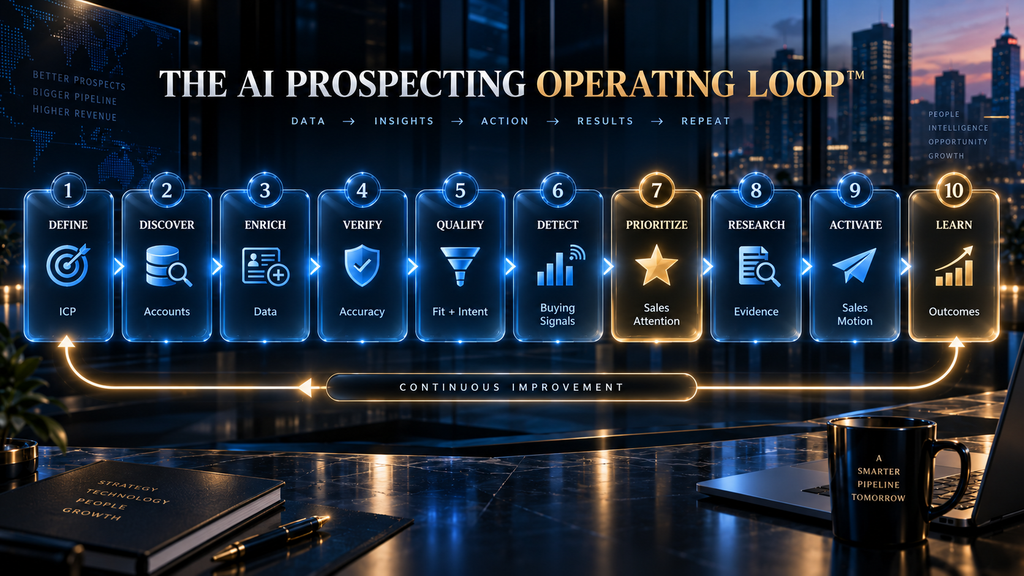
The workflow developed for this article can be organized as the AI Prospecting Operating Loop: DEFINE → DISCOVER → ENRICH → VERIFY → QUALIFY → DETECT → PRIORITIZE → RESEARCH → ACTIVATE → LEARN.
The loop is deliberately circular. Prospecting should not end when an email is sent. The outcomes of outreach, meetings, opportunities, losses, disqualification reasons, and customer conversions should eventually influence the rules used to identify the next prospects.
That creates an important difference between a static prospecting database and an intelligent prospecting system. A static database asks, “Who is on our list?”
A learning workflow asks, “What characteristics, signals, behaviors, and conditions repeatedly appear among the prospects that become valuable opportunities?” The second question is where AI becomes strategically interesting.
Step 1: Define the ICP Before You Automate Anything
Every prospecting workflow begins with the ideal customer profile, but many teams define their ICP too loosely. They use broad categories such as industry, employee count, geography, or annual revenue and then assume the resulting companies are equally attractive.
They are not.
A useful ICP should describe the conditions under which your product is most likely to solve a meaningful problem and produce an economically attractive customer. That means considering firmographics, business model, operational complexity, technology environment, likely pain points, organizational structure, purchasing authority, and historical customer characteristics.
Imagine that your product helps B2B companies automate sales operations. A weak ICP might say:
B2B companies with 100–1,000 employees. A stronger ICP might say: B2B companies with 150–1,000 employees, a dedicated sales or revenue operations function, a multi-representative sales organization, evidence of recent go-to-market expansion, and an operational problem that becomes expensive as sales volume increases. The second definition gives the AI something much more useful to evaluate.
It also creates an important distinction between fit and timing. A company can be an excellent ICP match and still be a poor prospect today. Conversely, a company can show strong activity but have weak structural fit. The workflow needs to preserve that distinction rather than collapsing everything into one generic lead score.
AI can help formalize this process by converting historical customer characteristics, CRM data, and business rules into a more structured selling profile. Current CRM platforms are already moving in this direction; HubSpot, for example, supports AI-assisted inference of company value propositions and ICP characteristics for prospecting workflows.
The principle remains the same regardless of platform: the quality of the decision system cannot exceed the clarity of the problem definition.
Step 2: Discover Target Accounts
Once the ICP is defined, the workflow needs to create the universe of potential accounts.
This is where databases, search engines, professional networks, company websites, public sources, directories, APIs, scraping systems, and specialized B2B data providers can contribute. The goal is not yet to identify the perfect prospect. The goal is to construct a sufficiently broad account universe that can later be filtered.
This distinction matters because discovery and qualification solve different problems. Discovery asks: “Which companies could potentially belong in our market?” Qualification asks: “Which of those companies deserve attention?”
Combining the two too early can cause the workflow to become overly dependent on whatever filters a particular data provider happens to offer. A company may not appear under the exact industry label you expect, even though its business model and operating characteristics make it an excellent customer.
AI can help broaden discovery by analyzing company descriptions, websites, job postings, technology footprints, product categories, and other unstructured information. Instead of depending entirely on rigid database fields, the system can look for semantic evidence that a company resembles the businesses you actually want.
However, broader discovery increases the importance of later verification. The more permissive the discovery layer becomes, the more aggressively the workflow needs to validate what it finds.
Step 3: Identify and Verify the Right Contacts
Finding the account is only half of prospecting. The next question is who inside that organization should actually be approached.
This is where many prospecting workflows produce misleading confidence. A database may return a contact with a relevant-sounding title, but the person could have changed roles, left the company, inherited a different responsibility, or never have been the true owner of the problem.
The workflow therefore needs to distinguish between contact discovery and contact verification.
Contact discovery asks whether someone appears to match the target persona. Verification asks whether the available evidence supports using that person as a sales contact now.
Useful fields include current role, seniority, department, location, company association, work email, phone number where appropriate, professional profile, and evidence that the person actually owns or influences the problem being addressed.
This is also where data confidence becomes important. A prospect with excellent ICP fit but an unverified contact should not automatically receive the same priority as an equally strong account with a verified decision-maker and recent evidence of relevant activity.
The system should therefore preserve uncertainty instead of hiding it. Rather than saying: “Contact found.” a stronger workflow can distinguish: “Decision-maker likely identified; role verified recently; email confidence high.” That seemingly small difference becomes valuable when thousands of records are processed automatically.
Step 4: Enrich the Prospect Record
Enrichment turns a basic record into a decision-ready record.
At the account level, this may include employee count, revenue range, industry, headquarters, technology stack, funding history, growth indicators, business model, hiring activity, and organizational structure. At the contact level, it may include title, seniority, department, professional history, contact details, and relationship information.
But enrichment should not mean collecting everything available. That is one of the most common ways prospecting systems become unnecessarily expensive and operationally heavy. The correct question is: “Which fields change the decision?”
If technology stack is essential for determining whether your product integrates with a prospect’s environment, enrich it. If recent hiring is a strong predictor of demand for your service, collect it. If a field has no meaningful influence on qualification, prioritization, routing, personalization, or reporting, it may not deserve to be in the workflow.
This creates a useful concept: decision-relevant enrichment.
The objective is not the most complete prospect record. It is the smallest record that contains enough trustworthy information to make the next decision intelligently.
Modern B2B prospecting systems increasingly combine multiple data sources and enrichment processes rather than relying on a single database. Clay’s current prospecting framework, for example, describes bringing together data providers, AI research, signals, CRM information, enrichment, scoring, and orchestration before producing a sales-ready record.
The deeper lesson is that enrichment should serve the workflow rather than become a separate project.
Step 5: Verify Before You Trust
AI can summarize bad data extremely efficiently. That is a dangerous capability.
If a workflow contains an outdated title, incorrect company association, misleading technology classification, or stale business information, AI may transform that flawed input into a polished and convincing explanation. The output can look intelligent while being fundamentally wrong.
Verification therefore needs to exist as its own stage rather than being treated as an automatic consequence of enrichment.
For critical fields, the workflow should establish whether information is current enough to support action. Contact data may require verification. Company information may need cross-checking. Important claims used in personalization should have a source or evidence trail.
This becomes particularly important when AI generates outreach.
A personalized sentence such as “I saw that your company is expanding its RevOps team” sounds impressive only if the company really is expanding that function. If the underlying hiring signal is months old, the message can become worse than generic outreach because it communicates false confidence.
A useful principle is: The more consequential the claim, the stronger the evidence requirement.
Not every sentence needs a citation. But every important automated decision needs an appropriate level of confidence behind it.
Step 6: Qualify Fit and Intent Separately
Qualification is where the workflow starts becoming genuinely useful. A prospect should generally be evaluated along at least two dimensions: Fit: Does this account resemble the companies we are equipped to serve successfully? Intent: Is there evidence that the account may have a relevant problem, project, or reason to consider a solution?
These dimensions should not be collapsed too early. Consider two companies.
Company A is almost a perfect ICP match. It has the right industry, size, organizational structure, and technology environment. However, there is no meaningful evidence that it is currently dealing with the problem your product solves.
Company B is a slightly weaker ICP match but has just hired a senior leader responsible for the exact problem your product addresses, is expanding the relevant department, and has recently engaged with related content.
A static lead list may rank Company A first because it fits the profile better. A dynamic prospecting workflow may rank Company B higher because timing is stronger.
This is why qualification is better understood as a decision gate rather than a label. Current B2B qualification frameworks increasingly emphasize fit and intent as separate inputs before routing prospects to sales or nurture paths.
The workflow should therefore be capable of producing outcomes such as:
- Strong fit, strong intent → sales-ready
- Strong fit, weak intent → nurture or monitor
- Moderate fit, strong intent → human review
- Weak fit, strong activity → investigate before outreach
- Weak fit, weak intent → deprioritize
That is much more useful than simply assigning “lead” or “not a lead.”
Step 7: Detect Buying Signals
Buying signals are the timing layer of prospecting.
An account may have been a good prospect six months ago, remain a good prospect today, and still not be equally attractive on every day in between. Something can change inside the organization that creates a new reason to pay attention.
Signals can include funding events, executive changes, hiring activity, expansion into new markets, technology changes, new strategic initiatives, product launches, organizational restructuring, relevant website behavior, engagement with content, competitor activity, or other events that correlate with the problem your solution addresses. The critical mistake is treating every signal as equally meaningful.
A funding announcement may indicate growth, but growth does not automatically mean buying intent for your product. A job posting may indicate a problem is becoming important, but the company may intend to solve it internally. A leadership change may create an opportunity, but it may also temporarily reduce the likelihood of purchasing while the new executive establishes priorities.
Signal detection therefore needs interpretation.
Clay’s current buying-signal framework makes an important point: a signal becomes useful when it is connected to an action. The workflow should enrich the signal, assess its urgency, stack it with other evidence, and route the resulting opportunity into an appropriate play rather than simply generating another alert.
That leads to one of the strongest rules in this workflow: A signal without an action is just a notification.
If an account posts a relevant hiring signal, the system should know what happens next. Perhaps it finds the hiring manager, checks whether the account fits the ICP, researches the initiative, assigns a priority, and prepares a specific outreach angle. If no action follows, monitoring the signal may add activity without adding pipeline.
Step 8: Build a Prospect Priority Score
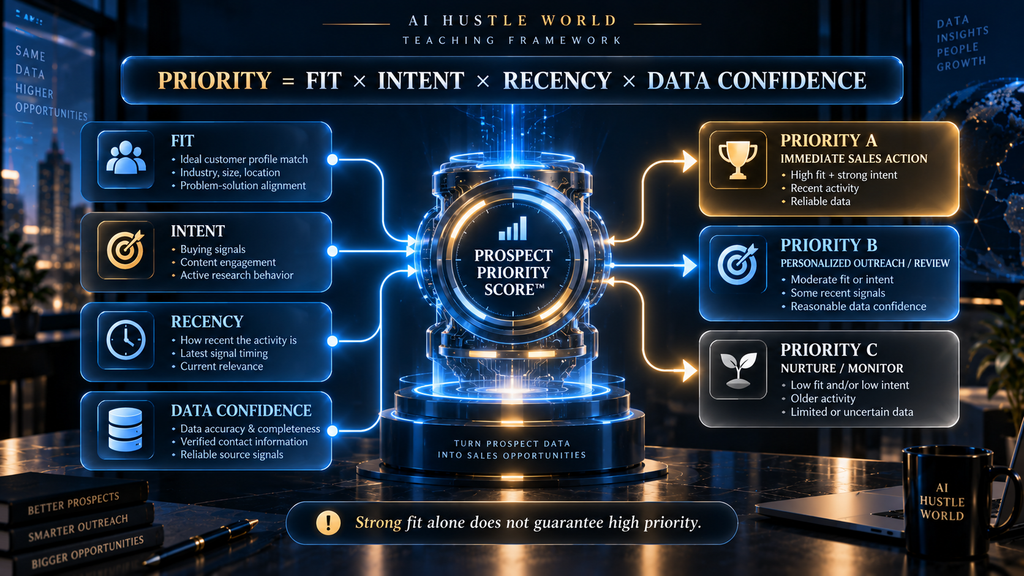
Once the workflow knows the account’s fit, contact quality, intent, signals, and data confidence, it needs to decide what deserves attention first. This is where many teams make scoring unnecessarily complicated. A useful starting model is: Priority = Fit × Intent × Recency × Data Confidence.
This is not intended as a universal mathematical formula that every business should calculate literally. It is a decision model that forces the workflow to consider four different questions.
- Fit: Is this the type of account we actually want?
- Intent: Is there evidence of a relevant problem or buying interest?
- Recency: Is the evidence current enough to matter?
- Data confidence: Do we trust the information well enough to act on it?
The multiplicative logic is intentional because a major weakness in one dimension should be capable of materially reducing priority. An account with exceptional fit but no timing evidence should not automatically outrank an account with strong fit and strong current signals.
Clay’s current B2B prospecting guidance similarly describes prioritization around ICP fit combined with active signals, with higher tiers assigned when strong fit and meaningful signals overlap. The score should also be explainable.
A salesperson should be able to understand why an account is high priority. “AI score: 94” is less useful than:
Priority A — Strong ICP fit, recently hired VP Revenue Operations, 35% growth in sales headcount, verified decision-maker identified.
The second version does more than rank the prospect. It gives the salesperson a reason to care.
Step 9: Use AI for Account and Contact Research
Once a prospect has survived the earlier filters, AI can perform a much more valuable type of research. Instead of asking AI to find random facts about a company, give it a specific research objective.
For example: Determine whether this account has evidence of a scaling sales operation, identify the most relevant operational challenge, identify the person most likely to own that challenge, and provide only claims supported by recent evidence. That produces a fundamentally different output from: Tell me about this company.
The first prompt is connected to a sales decision. The second is merely summarization.
AI research becomes particularly powerful when it combines structured data with unstructured information. Company descriptions, hiring pages, executive announcements, product pages, customer stories, technology information, public communications, and other sources can be analyzed together to construct a more useful account picture.
However, AI research should not be confused with truth. The model can summarize evidence. It can compare information. It can identify patterns. It can generate hypotheses. It can suggest a likely problem.
But the workflow should distinguish between observed evidence and AI inference. That distinction becomes critical when the output is used for external communication.
Step 10: Turn Research Into Evidence-Based Personalization
Personalization is often treated as a writing problem. It is actually a relevance problem.
The objective is not to produce an email that contains the prospect’s company name and a recent news event. The objective is to establish a credible connection between something happening inside the prospect’s organization and the problem your product can help solve.
Consider the difference.
Weak personalization: “I saw that your company is growing rapidly. I thought you might be interested in our platform.”
This could be sent to almost any growing company. Stronger personalization:
“Your recent expansion of the revenue operations team suggests you’re investing in the systems behind a larger sales organization. Teams at this stage often discover that lead routing and prospect research become harder to standardize as volume increases.”
The second version uses the observed event to establish a plausible operational problem. It still requires judgment, but the AI has helped turn raw evidence into a useful hypothesis.
That is the appropriate role for AI-generated personalization. The system should provide the salesperson with a reason to contact the prospect, not simply a collection of interesting facts.
Step 11: Route Each Prospect Into the Correct Sales Motion
Not every qualified prospect should receive the same treatment. This is one of the most important differences between a sophisticated workflow and a mass-outreach machine.
A high-fit account with a strong buying signal may deserve immediate human attention. A high-fit account with no current signal may belong in a monitored nurture segment. A prospect with uncertain data may require verification. A strategically important enterprise account may deserve account-based research rather than automated outbound.
The workflow should therefore produce a recommended sales motion, not merely a score. For example:
- Priority A: Immediate rep action.
- Priority B: Personalized outbound with human review.
- Priority C: Automated nurture or periodic monitoring.
- Review: Ambiguous or conflicting evidence requiring human judgment.
- Reject: Outside ICP or insufficient evidence.
This is where routing turns intelligence into execution. The prospecting system becomes useful when the salesperson can open their workspace and immediately see not only who to contact, but why this account is being surfaced, what evidence supports the recommendation, and what action is expected next. Current AI prospecting systems increasingly connect identification, enrichment, scoring, outreach, and CRM handoff for exactly this reason.
Step 12: Make the CRM the System of Record
The CRM should not become the final destination where automated systems dump whatever they have collected. It should become the memory of the prospecting system.
That means storing the information necessary to understand why a prospect was selected, what happened after contact, what signals were present, what qualification decision was made, which sales motion was used, and what the eventual outcome was. This creates a feedback loop.
Suppose the workflow repeatedly identifies companies with a certain combination of hiring activity and technology usage. Salespeople contact those accounts, but almost none progress beyond the first conversation. That outcome should eventually influence the prioritization model.
Conversely, suppose a particular signal repeatedly appears among companies that become qualified opportunities. That signal deserves greater weight.
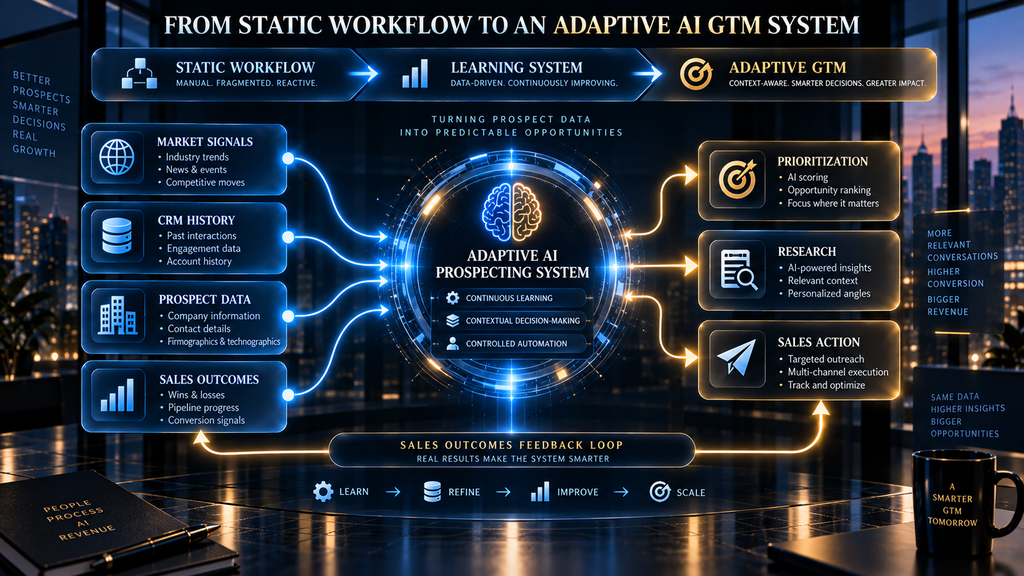
Without CRM feedback, AI prospecting remains largely static. With feedback, the system can begin learning which combinations of fit, timing, signals, and context actually correlate with commercial outcomes.
The CRM is therefore not merely a storage system. It is the memory layer that allows the prospecting workflow to improve.
The Complete AI B2B Prospecting Workflow
At this point, the entire operating model can be viewed as one connected system.
The workflow begins with a defined ICP rather than a database. It discovers accounts broadly enough to avoid artificial limitations, then narrows those accounts through enrichment and verification. Contacts are identified according to actual buying responsibility rather than title alone. Fit and intent are evaluated separately, while buying signals provide the timing layer.
The system then combines those inputs into an explainable priority decision. High-priority prospects receive deeper AI research, which produces evidence and hypotheses that can support relevant outreach. The resulting prospect is routed into the appropriate sales motion, recorded in the CRM, and eventually evaluated against the outcome.
That creates the complete loop: Define → Discover → Enrich → Verify → Qualify → Detect → Prioritize → Research → Activate → Learn. The power does not come from any single stage. It comes from the connections between stages.
A Realistic Example: Building the Workflow for a B2B SaaS Company
Consider a fictional B2B SaaS company that sells revenue operations software to growing technology companies.
Its sales team currently works from a database containing approximately 40,000 companies. Salespeople manually filter companies, search for revenue leaders, check websites, research recent developments, and write outreach. Because the process is manual, reps naturally gravitate toward the easiest prospects to research rather than necessarily the most valuable ones.
The company decides to build an AI prospecting workflow.
The first change is not a tool purchase. The company defines its ICP around B2B technology companies with 150–1,000 employees, established sales organizations, a dedicated RevOps function, and evidence of commercial expansion. It also defines several signals that matter: rapid sales hiring, a new revenue leader, international expansion, CRM migration activity, and changes in the sales technology environment.
The workflow then discovers a larger account universe and enriches those companies. AI classifies company descriptions and hiring information to identify likely ICP matches. Contact discovery identifies the relevant revenue operations or sales leadership roles.
Now the workflow has something more useful than a raw list. It has a filtered population.
Suppose one account has strong ICP fit but no recent activity. Another has strong fit plus a new CRO. A third has strong fit, a recent CRO appointment, significant sales hiring, and an open RevOps leadership position.
All three accounts may belong to the target market. They should not receive equal attention.
The third account becomes a Priority A prospect because multiple independent signals point toward a period of organizational change and investment. The AI research layer investigates the company’s expansion and identifies the likely operational implications. The workflow then provides the salesperson with a concise account brief explaining the evidence, the likely problem, the relevant contact, and the recommended sales angle.
The salesperson still decides whether to act. The system simply makes the decision dramatically easier.
Three Practical Architectures for an AI Prospecting Workflow
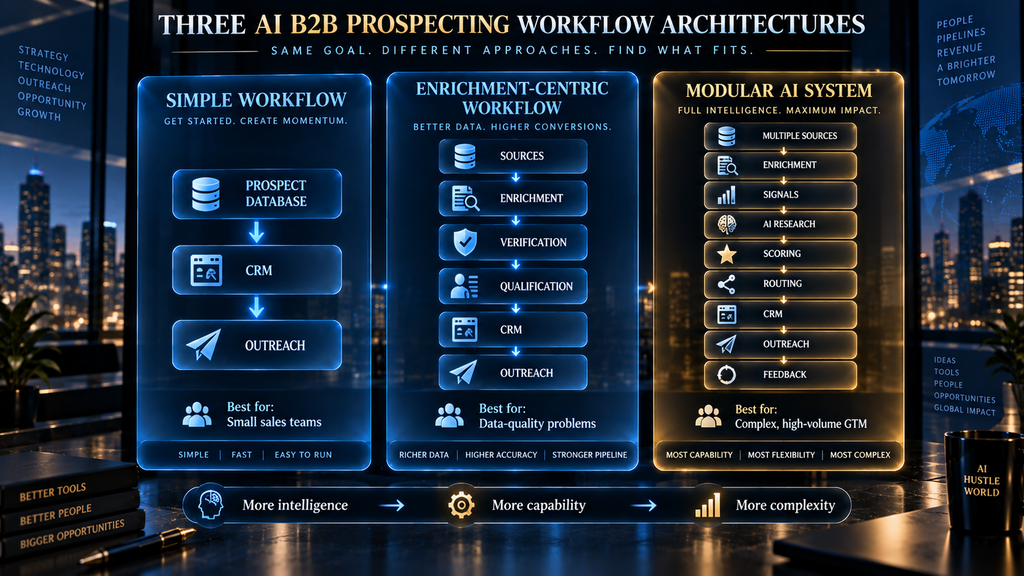
There is no single architecture that every business needs. The right design depends on the size of the sales organization, the quality of existing CRM data, the complexity of the ICP, the number of data sources, and how much operational capacity exists to maintain automation.
Architecture 1: Simple Prospecting Workflow
The simplest architecture might look like:
Prospect database → CRM → Outreach. This is appropriate when the ICP is straightforward, the sales team is small, and the primary problem is list building rather than complex qualification.
The advantage is simplicity. There are fewer integrations, fewer failure points, and less maintenance.
The weakness is that the workflow remains relatively static. It may identify prospects and contact them efficiently, but it has limited ability to understand changing buying conditions.
For a small sales team, however, that may be exactly the right trade-off. A simple system that is consistently used can outperform a sophisticated system nobody trusts.
Architecture 2: Enrichment-Centric Workflow
A more advanced structure is: Sources → Enrichment → Verification → Qualification → CRM → Outreach.
This model becomes useful when data quality is the major bottleneck. The company may have access to many potential accounts but struggle with missing contacts, outdated information, duplicate records, or weak qualification.
The workflow focuses heavily on turning raw prospect information into sales-ready records. This architecture is particularly useful for teams that have enough prospect volume to justify automation but do not yet need sophisticated real-time signal orchestration.
Architecture 3: Modular AI Prospecting System
The most sophisticated architecture is: Multiple Sources → Enrichment → Signals → AI Research → Scoring → Routing → CRM → Outreach → Feedback. This model is appropriate when the company has a complex ICP, meaningful buying signals, substantial prospect volume, and a sales organization capable of acting on prioritized intelligence.
Its advantage is adaptability. Different data sources can contribute different evidence, while AI handles research and classification and the CRM stores the resulting decisions.
Its disadvantage is complexity.
Every integration creates another potential failure point. Every automation requires monitoring. Every scoring model requires calibration. Every additional data provider creates questions about accuracy, duplication, and cost.
That means a sophisticated architecture should be earned through operational need rather than purchased because it looks impressive.
What Should Be Automated?
Automation is strongest when the task is repetitive, rules-based, high-volume, and relatively easy to verify.
Account discovery is a strong automation candidate. Data enrichment is another. Duplicate detection, field normalization, contact verification, basic ICP classification, signal monitoring, initial scoring, CRM updates, and research summaries can also be heavily automated.
The important thing is that automation should reduce decision preparation, not eliminate necessary judgment.
For example, an AI system can identify ten companies that match a target segment and summarize why each appears relevant. A salesperson can then spend their time deciding which two deserve a strategic approach.
That is a much better use of human attention than asking the salesperson to manually locate the ten companies in the first place.
What Should Not Be Fully Automated?
Not every stage should move directly from AI decision to external action. High-consequence personalization, ambiguous qualification, strategic enterprise accounts, sensitive situations, unusual organizational changes, and claims based on weak evidence deserve human review. The same is true for early deployment.
A sensible implementation often begins in review mode. AI produces recommendations and drafts, while a human evaluates quality before anything is sent automatically. HubSpot’s current AI prospecting guidance explicitly recommends reviewing AI-generated outreach before moving toward more autonomous operation.
This approach has two advantages. First, it protects the brand from poor automated decisions.
Second, it gives the company an opportunity to learn where the AI performs well and where it consistently requires correction. Autonomy should therefore be the result of demonstrated reliability, not the starting objective.
The Most Important Failure Modes
Weak ICP Definition
If the ICP is vague, AI simply automates ambiguity. The system may become excellent at identifying thousands of companies that the sales team does not actually want.
The solution is to define the conditions associated with successful customers, not merely demographic characteristics.
Tool-First Design
Buying multiple AI platforms before designing the workflow creates fragmented automation. Each tool solves a local problem while nobody owns the overall decision process.
The solution is to design the workflow first and select tools according to the stages they need to support.
Enriching Everything
More data can feel like progress, but unnecessary enrichment increases cost and complexity. The better approach is decision-relevant enrichment: collect information that changes qualification, prioritization, routing, research, or outreach.
Trusting AI Research Without Verification
AI can turn incomplete evidence into confident prose. That makes verification more important, not less.
Important external claims should be based on trustworthy and sufficiently recent evidence.
Treating Signals as Intent
A signal indicates that something changed. It does not automatically prove that a company wants to buy.
Signals should be interpreted in context and, where possible, combined with fit and additional evidence.
Creating Scores Nobody Understands
A mysterious score creates resistance.
Salespeople need to know why a prospect is prioritized. Explainability makes the system easier to trust and easier to improve.
Generating Signals Without Actions
A dashboard full of alerts is not an operating system. Every important signal should connect to a defined sales play, such as research, qualification, nurture, rep review, or immediate outreach.
Automating Outreach Too Early
The easiest thing to automate is sending messages. That does not mean it is the right place to start.
If the underlying targeting, data, qualification, or research is weak, automation simply increases the speed at which the company sends irrelevant outreach.
Ignoring the Feedback Loop
If the workflow never learns from outcomes, it cannot improve meaningfully. Closed-lost reasons, positive replies, meetings, opportunities, disqualifications, and customer conversions should eventually influence the system.
How to Measure an AI Prospecting Workflow
The wrong measurement framework focuses only on how many leads the system generates. A better framework measures the quality of decisions at each stage.
Data Quality
Track valid email rate, enrichment completion rate, duplicate rate, stale-record rate, and the percentage of records with sufficient information for qualification.
Qualification Quality
Measure ICP-match rate, qualified-prospect rate, signal-qualified rate, and the percentage of sales-accepted prospects that later prove to be genuinely relevant.
Workflow Performance
Track the time between signal detection and sales action, automation rate, human intervention rate, workflow failure rate, and the percentage of records that move cleanly through each stage.
Sales Outcomes
Ultimately, the system needs to influence positive replies, meetings, qualified opportunities, pipeline value, conversion rates, and revenue.
Economics
The most useful economic metric may be cost per qualified opportunity, rather than cost per lead.
A workflow that produces 10,000 contacts at low cost but almost no qualified opportunities is not efficient. A workflow that produces 1,000 highly relevant prospects and significantly improves opportunity creation may be economically superior even if its data costs are higher.
This is why prospecting automation should be evaluated as a pipeline system rather than a lead-generation machine.
The Hidden KPI: Decision Latency
There is another metric that many prospecting teams overlook: decision latency.
Imagine that a valuable buying signal occurs on Monday. The company does not detect it until Thursday. The sales representative researches the account Friday. Outreach happens the following Tuesday.
The system technically worked. Commercially, it may have failed.
The cost was not an obvious software failure. It was the delay between something changing in the market and the sales organization responding to it.
AI can reduce this latency because it can monitor, classify, enrich, research, and route information continuously rather than waiting for a salesperson to manually discover it.
That is one of the strongest strategic arguments for AI prospecting. The advantage is not simply that AI can process more records.
It is that AI can shorten the distance between market change and sales action.
The Economic Logic Behind Automation
AI prospecting should also be evaluated against the economics of human time.
Suppose a salesperson spends several hours each week finding accounts, researching companies, verifying contacts, updating CRM records, and preparing basic personalization. None of those activities is inherently worthless, but they compete directly with customer conversations, discovery calls, deal strategy, and relationship development.
If AI can reliably perform the repetitive parts of that work, the company effectively converts expensive human hours into automated processing. But the economics only work if quality remains acceptable.
There is no value in saving an hour of research if the resulting outreach creates low-quality conversations and damages response rates. Likewise, generating ten times more prospects is meaningless if the sales team cannot distinguish the five prospects that actually deserve attention.
The economic objective is therefore not maximum automation. It is maximum useful sales capacity per unit of cost.
Who Should Build an AI B2B Prospecting Workflow?
The strongest candidates are teams that already have a reasonably clear sales motion but are constrained by prospecting volume, research time, data quality, or changing buying conditions.
A growing B2B SaaS company is a strong example. It may already understand its ICP and sales process but struggle to keep account research and data enrichment synchronized as the market expands.
An established sales organization can benefit even more when it has substantial CRM history and enough closed-loop data to identify patterns between prospect characteristics and sales outcomes. RevOps, sales operations, growth, and demand-generation teams are often well positioned to own the workflow because they can balance sales requirements with data, automation, and measurement.
Who Should Not Build One Yet?
A sophisticated AI prospecting workflow is not automatically appropriate for every business.
If the company does not know who its ideal customers are, automation may amplify the wrong strategy. If the sales motion is highly relationship-driven and depends on a very small number of accounts, an elaborate prospecting engine may create more complexity than value.
The same applies when the company has insufficient sales volume to justify automation or lacks the operational capacity to maintain data quality and integrations.
In these situations, a simpler prospecting process may be the better choice. AI should solve an existing bottleneck.
It should not create a new operations department merely to maintain the AI system.
A Practical Implementation Sequence
The safest way to build the workflow is incrementally.
Start by defining one ICP and one primary persona. Do not attempt to automate every market segment simultaneously.
Next, build a reliable account-discovery process and verify the quality of the resulting records. Once that works, add contact identification and enrichment. Then introduce qualification logic.
After the qualification process is producing useful results, introduce a limited number of buying signals that are strongly connected to the product’s value proposition. Do not begin by monitoring every possible signal.
Once the signal layer is useful, add prioritization. Then introduce AI research and personalization. Finally, connect routing, outreach, CRM feedback, and performance measurement.
This order matters because each stage depends on the quality of the previous one.
If the account universe is poor, better enrichment will not fix it. If qualification is weak, better scoring will not fix it. If the signals are irrelevant, better AI research will simply produce better explanations for irrelevant prospects.
The workflow should therefore be built from the foundation upward.
The Human-AI Boundary
The most effective prospecting systems will not be entirely automated. They will be selectively automated.
AI is exceptionally useful when the work involves large datasets, repetitive research, classification, pattern detection, summarization, monitoring, and first-draft generation. Humans remain particularly valuable when decisions involve ambiguity, strategic context, relationships, unusual circumstances, or consequences that are difficult to encode into rules.
This creates a useful division of labor. AI finds the evidence. AI organizes the evidence. AI identifies patterns. AI recommends an action.
The salesperson decides how that recommendation should become a relationship.
That boundary will become increasingly important as AI agents become capable of executing more of the workflow autonomously. Salesforce and HubSpot are already moving toward systems where AI can identify prospects, qualify them, draft outreach, and coordinate sales actions inside connected CRM environments.
The strategic question will therefore shift from “Can AI do prospecting?” to a more useful question: “Which prospecting decisions should AI make, which should it recommend, and which should remain human?”
What Happens If You Keep Prospecting Manually?
Manual prospecting does not suddenly become impossible because AI exists. The problem is opportunity cost.
As the number of accounts, contacts, signals, and possible research sources increases, humans increasingly become the bottleneck between information and action. A salesperson may know that an account changed its leadership team, but discover the change too late. They may have the right company in the CRM but lack a current contact. They may spend thirty minutes researching an account that turns out not to fit.
The result is not simply lower productivity. It is inconsistent attention.
Some prospects receive extensive research because a salesperson happened to discover something interesting. Others receive generic outreach because there was not enough time to investigate them. High-potential accounts can be missed because the information required to recognize their opportunity is distributed across too many systems.
AI can reduce this inconsistency by continuously applying the same qualification and prioritization logic across the market. That creates a second-order advantage: the quality of prospecting becomes less dependent on which salesperson happened to notice which signal at which moment.
The Future: Adaptive GTM Systems
The next evolution of AI prospecting is likely to move beyond static workflows. Instead of a workflow that says, “If X happens, do Y,” increasingly capable systems will be able to evaluate combinations of evidence and recommend different actions based on context.
For example, the same hiring signal may mean different things for different companies. A 20-person increase in sales headcount could be highly significant for one organization and almost irrelevant for another. A new executive could create an immediate buying opportunity in one company but have no effect in another because the organization already has an established internal solution.
The future system therefore needs context. It needs to understand the ICP, the product, the historical customer base, the prospect’s current state, the sales process, the available evidence, and the outcomes of previous actions. That begins to resemble an adaptive go-to-market operating system rather than a lead database.
The direction of the market is already visible in current AI prospecting products. HubSpot describes agents that can use CRM information and buying signals to identify companies and source contacts, while Clay’s current prospecting framework emphasizes data, agents, orchestration, and execution as connected components of the modern B2B prospecting process.
The important caveat is that more autonomy will also increase the importance of governance, data quality, explainability, and human escalation.
A system that can act automatically can also make mistakes automatically. That is why the future of AI prospecting is not simply more automation. It is better controlled automation.
The Contrarian Insight: More Prospecting Is Not the Goal
The natural temptation with AI is to measure success by volume.
More accounts. More contacts. More signals. More messages. More sequences. But sales does not reward activity for its own sake.
A sales organization creates value when it spends its limited attention on the right commercial opportunities.
That means the true objective of AI prospecting is not to make the sales team contact more people. It is to make the team more selective without becoming slower.
This is an important distinction because traditional prospecting often forces salespeople to choose between coverage and depth. They can research a small number of accounts thoroughly, or they can contact a much larger number with limited context.
A well-designed AI workflow changes that trade-off. The machine handles the breadth. The human applies the depth. That is where the real productivity gain appears.
The Core Principle: A Prospect Is Not a Lead Until the Workflow Knows What to Do With It
A database record is not a sales opportunity. A verified contact is not necessarily a qualified prospect. A qualified prospect is not necessarily ready for outreach. A buying signal is not necessarily intent. And an AI-generated score is not automatically a good decision.
The value appears only when these pieces are connected. A strong AI prospecting workflow should allow a salesperson to look at a prospect and understand five things quickly:
- Why does this company fit?
- Why might the timing matter?
- What evidence supports that conclusion?
- Who is the right person to approach?
- What should happen next?
If the workflow can answer those questions consistently, it is doing something much more valuable than generating leads.
It is reducing uncertainty. And reducing uncertainty is the real job of prospecting intelligence.
Final Thoughts
Building an AI B2B prospecting workflow is not primarily a software implementation exercise. It is an exercise in designing how a sales organization turns uncertain market information into decisions.
The strongest systems begin with a precise ICP, discover accounts broadly enough to avoid blind spots, enrich only the information that matters, verify critical data, separate fit from intent, interpret buying signals in context, prioritize prospects transparently, use AI for research and preparation, and route each prospect into an appropriate sales motion. The CRM then becomes the memory of the system, allowing outcomes to influence future decisions.
The most important shift is from lead collection to decision orchestration. Instead of asking AI to find more people, ask it to continuously determine which accounts deserve attention, why they deserve it, what evidence supports that conclusion, and what the salesperson should do next. That is the difference between an AI tool stack and an AI prospecting system.
The goal is not to remove salespeople from prospecting. The goal is to remove the repetitive information work that prevents salespeople from spending more time on the conversations that actually matter.
Automate repetition. Augment judgment. Escalate ambiguity.
When those principles are built into the workflow, AI becomes more than a faster way to build lists. It becomes an operating layer between changing market conditions and better sales decisions.
Build the Data Layer Behind Your Prospecting Workflow
An AI prospecting workflow is only as reliable as the account, contact, enrichment, and verification data feeding it.
Compare Lead Data Tools →Frequently Asked Questions
What is an AI B2B prospecting workflow?
An AI B2B prospecting workflow is a connected process that uses AI, data, automation, qualification logic, buying signals, research, and CRM systems to identify and prioritize potential business customers. Rather than treating prospecting as manual list building, the workflow moves prospects through discovery, enrichment, verification, qualification, prioritization, research, and sales activation.
How does AI improve B2B prospecting?
AI can reduce the manual work involved in finding accounts, enriching records, researching companies, detecting changes, scoring prospects, preparing personalization, and updating sales systems. Its larger value comes from connecting those activities so that salespeople receive prioritized prospects with relevant context rather than undifferentiated lists.
What are the main stages of an AI prospecting workflow?
A practical workflow can be organized into ten major stages: define the ICP, discover accounts, enrich prospects, verify data, qualify fit and intent, detect buying signals, prioritize prospects, research accounts, activate the appropriate sales motion, and learn from the resulting outcomes.
What data does an AI prospecting workflow need?
The exact data depends on the business, but useful inputs can include company size, industry, geography, revenue characteristics, technology environment, organizational structure, contact information, job roles, hiring activity, leadership changes, engagement data, CRM history, and other buying signals. The goal should not be to collect every possible field; it should be to collect the information that materially improves a sales decision.
Should AI completely automate B2B prospecting?
Usually, no. AI is highly effective for repetitive research, enrichment, classification, monitoring, prioritization, and drafting, but ambiguous or high-consequence decisions often benefit from human review. A practical implementation is to begin with AI recommendations and human approval, then increase autonomy as the workflow demonstrates reliable performance.
What is the difference between AI prospecting and AI lead generation?
AI lead generation generally focuses on finding and developing potential leads through automated sourcing, research, qualification, and personalization. AI prospecting is more specifically concerned with identifying the right accounts and contacts for sales engagement and determining which prospects deserve attention now. In practice, the two concepts overlap heavily, but prospecting places greater emphasis on sales prioritization and action.
How do buying signals fit into an AI prospecting workflow?
Buying signals provide a timing layer. They help determine whether an account that already fits the ICP may have a current reason to consider a relevant solution. Signals can include funding, hiring activity, leadership changes, expansion, technology changes, or relevant engagement, but the signal should be interpreted in context rather than treated as automatic proof of buying intent.
How should AI prioritize B2B prospects?
A useful prioritization model considers multiple dimensions rather than relying on one score. Fit, intent, recency, and data confidence are strong starting dimensions. The resulting score should also be explainable so salespeople understand why a prospect was prioritized and which evidence influenced the recommendation.
What should humans handle in an AI prospecting workflow?
Humans should generally retain responsibility for ambiguous qualification, strategic accounts, sensitive situations, important relationship decisions, unusual circumstances, and high-consequence external communication. AI should prepare the evidence and recommendation while humans apply judgment where context matters.
How do you measure an AI prospecting workflow?
Measure performance at multiple levels. Data-quality metrics can include valid contact rates, enrichment completion, duplicate rates, and stale-record rates. Workflow metrics can include signal-to-action time and automation rates, while sales metrics should ultimately include positive replies, meetings, qualified opportunities, pipeline, conversion rates, and revenue. Cost per qualified opportunity is often more meaningful than cost per raw lead.
Do you need multiple AI tools to build a prospecting workflow?
No. A sophisticated stack can be useful when the business has complex data requirements, large prospect volumes, or many signals, but additional tools also create integration and maintenance costs. A simple workflow that reliably connects discovery, qualification, CRM, and outreach can be more effective than a large stack that nobody maintains.
What is the biggest mistake companies make when building AI prospecting systems?
The biggest mistake is usually treating the project as a tool-implementation exercise instead of a decision-system design problem. Companies often automate list building before defining the ICP, enrich information that does not influence decisions, create unexplained scoring systems, or automate outreach before validating targeting and research quality.
What will AI prospecting look like in the future?
The direction is toward adaptive systems that continuously evaluate account characteristics, market changes, buying signals, historical outcomes, and CRM data to recommend or execute the next sales action. The important challenge will be controlling that autonomy through trustworthy data, explainable decisions, appropriate human review, and feedback loops rather than simply maximizing automation.
Sources and Further Reading
- The Short Life of Online Sales Leads: Harvard Business Review. Research on how quickly firms contact web leads and how that affects qualification.
- CAN-SPAM Act: A Compliance Guide for Business: US Federal Trade Commission guide to commercial email rules.
Related Guides
- What Is an AI SDR? How AI Agents Automate B2B Prospecting, Outreach & Qualification
- AI Cold Email Strategy Explained: Scale Outreach Without Hitting
- AI Conversation Intelligence Explained: How AI Turns Conversations Into Business Insights
Written by
Muntasir Ahmad Chowdhury
Founder, AI Hustle World
Muntasir Ahmad Chowdhury is the Founder of AI Hustle World, an independent publication dedicated to making Artificial Intelligence practical, trustworthy, and easy to understand. He researches AI tools, automation, customer service, productivity, and real-world business applications, helping readers make smarter technology decisions through research-driven, experience-backed content.
Expertise:
AI Tools • AI Automation • AI Customer Service • AI Productivity • Generative AI • AI Workflows
Get Smarter With AI
Enjoyed this guide? Get practical AI tools, tutorials, and honest reviews delivered to your inbox.